#server-hosting
1 messages · Page 38 of 1
 cosmic oak
 barren zenith
i am trying to host my server using gtxgaming and im failing miserably please help
 pastel sleet
on the game's main menu it says "steam is NOT connected"
oh sorry, it says steam is not running
cosmic oak
did you use login anonymous for your server?
pastel sleet
I did, i'll try that again just in case
cosmic oak
i am trying to host my server using gtxgaming and im failing miserably please help
@barren zenith Hi I'm not familiar with gtxgaming but what issues are you having?
barren zenith
There is a process I have to do where I stop my server. Install envirma on my server as a mod, than go to my config files and save it so my server can reset with the Isla Spiro map, than I restart my server. And it’s supposed to work but it isn’t and even the gtx gaming support is having issues trying to fix it
 turbid thicket
Is there a way to join a server VIA IP?
@solemn igloo yes through steam boot
 hollow locust
Is it a bug for the server to crash when it hits the player cap?
barren zenith
And Ik I have my game updated cause I can play on envirma just I can’t put my server in there
turbid thicket
Hey guys im here to help, I currently have 2 server up and working if anyone has questions pls just @ me
cosmic oak
Is it a bug for the server to crash when it hits the player cap?
@hollow locust Depends, waht does the log say
There is a process I have to do where I stop my server. Install envirma on my server as a mod, than go to my config files and save it so my server can reset with the Isla Spiro map, than I restart my server. And it’s supposed to work but it isn’t and even the gtx gaming support is having issues trying to fix it
@barren zenith what does your config look like?
turbid thicket
Is anyone using ping perfect?
barren zenith
The only option on it says “click save to re launch envirma on server” that’s it nothing else
cosmic oak
There's been a bunch of people, all of which we've been able to help.
@turbid thicket
The only option on it says “click save to re launch envirma on server” that’s it nothing else
@barren zenith So you don't have a config file?
It just shuts down
@hollow locust if you launched it with -log there should be a log
cosmic oak
I'm hosting my own and I've helped 4 people who had PP servers with issues.
turbid thicket
I figured it our before ping perfect did
I helped majority of theyre customers
lol
barren zenith
Gtx gaming, and I did have config file pre update but post update that is the only option when downloading the mod
cosmic oak
from what I've noticed, pp didn't fix anything yet. They just slapped a bunch of crap in their configs.
turbid thicket
All i know is right now Ping perfect works but the server name will not change.
cosmic oak
Gtx gaming, and I did have config file pre update but post update that is the only option when downloading the mod
@barren zenith That's beginning to sound an awful lot like a problem on GTX's end with their system instead of the actual server.
All I know is, for most hosters, once you place the config file with evrima's defaults in there, and edit it to suit specification, it starts working.
barren zenith
Yeah it’s a very simple step by step process so idk why there’s an issue
cosmic oak
the default config is:
[/Script/TheIsle.TIGameStateBase]
AdminsSteamIDs=
[/Script/TheIsle.TIGameSession]
ServerName=
MaxPlayerCount=
bServerGlobalChat=true
bServerNesting=false
bServerFallDamage=true
bServerAllowReplayRecording=false
bServerDynamicTimeOfDay=false
ServerTimeOfDayInSeconds=21600
ServerLengthOfDayInSeconds=3600
bServerDynamicWeather=true
[/Script/Engine.GameSession]
MaxPlayers=
turbid thicket
Does anyone know how to get server names workin lol
cosmic oak
CAN SOMEONE DM ME THE ADMIN COMMANDS
@merry urchin YES WE CAN> :P press END
turbid thicket
CAN SOMEONE DM ME THE ADMIN COMMANDS
@merry urchin Admin commands dont work still.
 merry urchin
in announcmeents
merry urchin
admins said they fixes it
cosmic oak
jup. If you're an admin: Press END, or type /adminpanel
this is the only way for now
Does anyone know how to get server names workin lol
@turbid thicket Depends mostly on your game.ini. I noticed PP puts in a lot of extra stuff that seems to get in the way.
All you need is the default
 ruby prism
Is there a spectator mode command?
turbid thicket
@turbid thicket Depends mostly on your game.ini. I noticed PP puts in a lot of extra stuff that seems to get in the way.
All you need is the default
@cosmic oak could u send me default
pls?
hollow locust
Another question, will the servers that are injecting the deino and ptero be punished/blacklisted?
cosmic oak
[/Script/TheIsle.TIGameStateBase]
AdminsSteamIDs=
[/Script/TheIsle.TIGameSession]
ServerName=
MaxPlayerCount=
bServerGlobalChat=true
bServerNesting=false
bServerFallDamage=true
bServerAllowReplayRecording=false
bServerDynamicTimeOfDay=false
ServerTimeOfDayInSeconds=21600
ServerLengthOfDayInSeconds=3600
bServerDynamicWeather=true
[/Script/Engine.GameSession]
MaxPlayers=
Another question, will the servers that are injecting the deino and ptero be punished/blacklisted?
@hollow locust Question for the dev team. I dunno. I know there's issues with the injection causing all sorts of bugs
so i just tell people not to
hollow locust
Understood
ruby prism
Is spectator mode disabled, or just under a new keybind?
cosmic oak
Is there a spectator mode command?
@ruby prism Sorry, missed this. Not at the moment, spectator mode is not in
cosmic oak
yw.
 ionic hull
im sorry if this has been asked before but how do you get into admin console
hollow locust
press END or type /adminpanel
@cosmic oak Ah i was about to ask abou the admin console aswell
Thank you very much @cosmic oak !
merry urchin
they need to increase the maximum servers
merry urchin
there are so many servers being hosted my friend can't find mine
cosmic oak
they're all in there though; but there's no sorting
 tawdry arrow
My server seems not not come up
merry urchin
there's a maximum and it does NOT want to show
we have 4 people, it is clearly up
but it just will not display for my friend
cosmic oak
It was limited to 50. they patched it.
merry urchin
It's still apparently limited
cosmic oak
If its your server, share with them your IP and have them add it through steam servers. That seems to work even if it doesnt show the name properly
But, that is a client problem. Not a server hosting one :)
merry urchin
won't work
already tried
it's a pingperfect server and they show as not responding
cosmic oak
But it is running and there's others on it?
merry urchin
yes
tawdry arrow
My server show as not responding as well
hollow locust
@cosmic oak nothing is showing up when i hit the END key
cosmic oak
Is your name yellow in chat?
My server show as not responding as well
@tawdry arrow What does the console say and are there people on it?
hollow locust
Oh no it isnt
cosmic oak
Oh no it isnt
@hollow locust you're not admin.
hollow locust
I already added my username to be the admin of the server
Dont know why it didnt set up
 plucky dragon
Show us a screen
hollow locust
Show us a screen
@plucky dragon In-game?
ruby prism
Is Connection Info a servers IP?
plucky dragon
@plucky dragon In-game?
@hollow locust of your config
cosmic oak
I already added my username to be the admin of the server
@hollow locust You need your steam64ID
tawdry arrow
Im running my server thru G-portal and put the deafault evrima game.ini in there but it still wont show up
pastel sleet
@hollow locust you have to put your steam id into the config file instead of your username
cosmic oak
Solo, Awesome, show config please.
tawdry arrow
[/Script/TheIsle.TIGameStateBase]
AdminsSteamIDs=76561198853230365
AdminsSteamIDs=76561197993446806
[/Script/TheIsle.TIGameSession]
ServerName=Kill or be killed
MaxPlayerCount=25
bServerGlobalChat=true
bServerNesting=false
bServerFallDamage=true
bServerAllowReplayRecording=false
bServerDynamicTimeOfDay=false
ServerTimeOfDayInSeconds=21600
ServerLengthOfDayInSeconds=3600
bServerDynamicWeather=true
[/Script/Engine.GameSession]
MaxPlayers=25
[/script/engine.gamesession]
MaxPlayers=25
cosmic oak
Might wanna remove that extra [/script/engine.gamesession] line.
hollow locust
[/Script/TheIsle.TIGameStateBase]
AdminsSteamIDs=76561198004430824
+AdminsSteamIDs=76561198055189542
+AdminsSteamIDs=76561198044946414
+AdminsSteamIDs=76561198052361995
[/Script/TheIsle.TIGameSession]
ServerName=Prelude Realism 2.0 BRASIL
MaxPlayerCount=100
bServerGlobalChat=true
bServerNesting=true
bServerFallDamage=true
bServerAllowReplayRecording=true
bServerDynamicTimeOfDay=0
ServerTimeOfDayInSeconds=21600
ServerLengthOfDayInSeconds=3600
bServerDynamicWeather=true
[/Script/Engine.GameSession]
MaxPlayers=100
cosmic oak
Aside from that, I don't see issues with your solo.
Awesome, remove the +'s
no longer need em
plucky dragon
Yeah
hollow locust
Understood, gonna try that right away
tawdry arrow
Removed the extra line and restarted it but still wont show up some how
cosmic oak
hang on, whats the name, Kill or be Killed?
tawdry arrow
yeah
 hollow moon
however many ids you have in for admins, is that how many slots only admins can use? Or would it like kick for an admin if one logs in on full?
cosmic oak
It seems (unconfirmed) that those do reserve slots, but as said, unconfirmed.
It will reserve, not kick.
@tawdry arrow can others find it through the ingame list fine?
hollow moon
hmm, since now we have 3 co-owners, another friend wants to split 3 way 🙂
tawdry arrow
@cosmic oak Not that I know of, there is no one on the server
cosmic oak
so noone can find the server?
9/10 this means that your server is (for some reason) renamed to the default which is QA Test Server!
So in all likelyhood your server's on the list, just not with the name you expect.
barren zenith
Yay it’s up! How do I do admin commands?
tawdry arrow
Oh ok, So I should try find a QA server with 25slots and see?
cosmic oak
There's over 10 QA servers and they're not sorted. You're welcome to try but I'd rather figure out why its not taking on your server name.
hollow locust
Forgive my ignorance @cosmic oak but how do i stop the batch files?
cosmic oak
Close em.
hollow locust
Oh
cosmic oak
:)
tawdry arrow
Seems like every QA has 0/0 slots
cosmic oak
means there's config shit that's messed up. Either V3 versions trying to start evrima configs, or the other way around.
I don't know how gportal does things.
i mean, I'm familiar with gportal just not their "the isle" backend.
tawdry arrow
It seems like when I change the server name under their "basic settings" They put the old game.ini in the config, and when I remove it again the server name under "basic settings" goes back to "The Isle Server by G-Portal.com", so maybe its trying to but 2 names on the same server?
 boreal nacelle
does anyone understand this? I had my server up yesterday and reverted now i reverted it back but its not installing the files for it anymore
its not intstalling the default game ini and all and everything else in that folder
plucky dragon
Are u in legacy or Evrima Game.ini
 kind terrace
Question: Do we need to update the server with the new patch/hotfix that came out just then? anyone know.
cosmic oak
It seems like when I change the server name under their "basic settings" They put the old game.ini in the config, and when I remove it again the server name under "basic settings" goes back to "The Isle Server by G-Portal.com", so maybe its trying to but 2 names on the same server?
@tawdry arrow I think you need to tell g-portal that the game has shifted the config from defaultgame.ini to game.ini in the folder detailed in the guide:
https://docs.google.com/document/d/130fNIlhm89fJGeSivJAi0avhe_ynNNHEaPjahP3BKcE/edit#

Google Docs
Evrima Server hosting guide This guide assumes you’ve got all the required components in place and that you’re hosting your own server. I will list them here for reference but I’m not going to tell you how to get it working. Prerequisites: SteamCMD .Net 3.5 (make sure you h...
boreal nacelle
hollow moon
how many "CPU Cores" is recommended for a sub-100 player server? (I don't know if we'll ever go past 75 once we expand to that)
boreal nacelle
cores really dont matter you just need lots of ram
hollow moon
so I can select '2-4 cores' and should be fine? Looking at some dedis
boreal nacelle
yeah
hollow moon
100GB space should be enough I'd say?
hollow moon
Do most dedis allow adding more ram down the road? Since we'd start with probably 30-40 slots at most.
boreal nacelle
im not sure havent messed with them for awhile. They should allow you to
hollow moon
since with Ping, it's saying 3% ram used with 4gb idle with no players.
kind terrace
Hey guys, i've lost it in the sea of words. Whats the new / command to see the admin commands in game on the server?
kind terrace
thank you!
plucky dragon
No problemo
hollow moon
I would say at least 2 cores though right?
hollow moon
Trying to see what minimum specs I'd need for a dedi with like, max 100 slots down the road, we'd start with 50 probs
Would 40GB ssd be enough? What would the mimum you'd recommend be for storage, bandwidth, an memory be?
welp, seems gtxgaming maxes their VPS out at 16gb, can't go higher
plucky dragon
Ye
 oblique osprey
hey guys can someone tell me the admin command ? pls
tawdry arrow
/adminpanel
Or END
plucky dragon
/adminpanel
hollow moon
Would this run well?
https://i.imgur.com/zJ6Dzxr.png
 plucky dragon
I think so Kenson
 graceful tendon
dont have all the admin commands yet.. can only do a few things for now.. but its enough
hollow moon
even the 500gb bandwidth?
plucky dragon
Of course
hollow moon
I'll keep gtxgaming in mind then.
Tho I'm not sure if SoYouStart's dedis support Windows
their tier 1 and 2 game dedis show "X" on Windows
tier 3 shows windows works tho (but out of stock atm)
hollow moon
ah okay. Ping is nice, but not as good specs. I have a new third coowner friend who does software coding, so he could setup our vps
ooh, vilayer has a good deal, dunno how good they are tho for Isle:
https://i.imgur.com/27cgVhc.png
 barren zenith
i keep trying to give myself and my staff admin privelages but cant
plucky dragon
So u dont can give Admin rights to you ?
barren zenith
yeah i have gtx gaming and it saves my staff and i as admins but in game we have no privelages we tried pressing END and the /adminpanel
plucky dragon
Are ur names yellow in Chat
barren zenith
no they are green when they should be yellow
plucky dragon
What
OK send me Screen of your config
Where you put The Steam ID in
Remove The "+"
barren zenith
Ok ty
plucky dragon
No problemo
boreal nacelle
does anyone know the lines that are suppost to be in the game .ini file?
plucky dragon
Which lines exactly
kind terrace
Wondering if anyone has been successful with Ping Perfect in allowing admins (not my server, since owner is at work atm)
However just want to know if anyone has be successful so far with it...
plucky dragon
I dont Like Ping perfect
kind terrace
Not my choice sadly XD
plucky dragon
XD
cosmic oak
Ok, what else we got.
AFAIK if you have PP and use the default config instead of their weird one, you should be fine.
barren zenith
is there anyway to spectate as admin rn?
plucky dragon
No
hollow moon
If this discount is recurring, I might take it:
https://i.imgur.com/FrksDap.png
 barren zenith
dang
cosmic oak
Not bad.
barren zenith
yes it worked but its very limited
plucky dragon
Ok
barren zenith
very few admin commands
cosmic oak
7 or so. Kick, ban, slay, tp, tptome, heal and grow.
Also the admin screen is limited to +/- 40 people apparently
plucky dragon
Yeah
 heady shore
hi how i can use the admin commandes
cosmic oak
press END
plucky dragon
/adminpanel
cosmic oak
please someone pin that :P
plucky dragon
XD
cosmic oak
that's the 45th time today
plucky dragon
Yeah that sucks
 vast geode
So, I am going to assume that somewhere this question has been asked but I will ask anyways. As a server owner, am I allowed to run Evrima?
cosmic oak
Yes.
plucky dragon
Yeah
cosmic oak
Wrong tau :p
plucky dragon
XD
boreal nacelle
i got the bat file to intsall the game ini file but its completely empty
plucky dragon
I dont have it right now sorry, im not on my pc
boreal nacelle
the game ini
cosmic oak
[/Script/TheIsle.TIGameStateBase]
AdminsSteamIDs=
[/Script/TheIsle.TIGameSession]
ServerName=
MaxPlayerCount=
bServerGlobalChat=true
bServerNesting=false
bServerFallDamage=true
bServerAllowReplayRecording=false
bServerDynamicTimeOfDay=false
ServerTimeOfDayInSeconds=21600
ServerLengthOfDayInSeconds=3600
bServerDynamicWeather=true
[/Script/Engine.GameSession]
MaxPlayers=
Fill in all the empty fields with your personal preference
 arctic apex
I've been away for a couple hours - has anyone figured out banning for PingPerfect servers? We have individuals coming back that were banned prior to the recode dropping.
cosmic oak
That'll be a PP specific problem and something they'll need to handle.
boreal nacelle
@cosmic oak is that everything in your game ini?
cosmic oak
My guess is that they're basing it on a wrong file because it changed.
arctic apex
Thanks. I'll reach out to them.
cosmic oak
@cosmic oak is that everything in your game ini?
@boreal nacelle yes. With my personal stuff so my SteamID, my servername and my max counts
kind terrace
@arctic apex You will probably need to contact their support. They ahve rolled out a new template for servers.
boreal nacelle
i need the lines where it has the map
arctic apex
Thank you @kind terrace
cosmic oak
i need the lines where it has the map
@boreal nacelle We don't use that.
kind terrace
Quite honestly anything with PP contact their support, since most of it is on their end.
cosmic oak
@boreal nacelle sent you my batch file in PM
boreal nacelle
hmm alright let me try it out. Yesterday it had a bunch of stuff in it like the map name and all that. That was whenever it it installed it on its own. But im in legacy now. dont know if that matters
heady shore
the spector mode dont work?
cosmic oak
the spector mode dont work?
@heady shore Not implemented
plucky dragon
Yes
heady shore
ok thx
cosmic oak
hmm alright let me try it out. Yesterday it had a bunch of stuff in it like the map name and all that. That was whenever it it installed it on its own. But im in legacy now. dont know if that matters
@boreal nacelle Definitely matters. Forget everything we said.
If you are not hosting evrima, but legacy, its different
 jolly sand
Anyone else having issues with EU1
cosmic oak
@boreal nacelle use this: https://steamcommunity.com/sharedfiles/filedetails/?id=1502947359

Having had trouble finding a clear and updated way to do this, I decided to create this guide for those of you who wish to host a dedicated server. This is a server you can host on your computer and n
^ for legacy
 sterile matrix
all my evrima servers crash a few times a day, to keep them running, there is a script, that restarts it, you just need to edit the ip, port, and path for your individual configuration
make a new server.bat file with following content
@echo off
cls
echo Protecting isle server from crashes...
title The Isle Server - TEST
:TheIsle
echo (%time%) isle server started.
start /wait C:\"The Isle Dedicated Server"\TheIsleServer.exe ?MultiHome=127.0.0.1?Port=27270?QueryPort=27271?MaxPlayers=50 -log | set /P "="
echo (%time%) WARNING: isle server closed or crashed, restarting in 10 seconds.
timeout /t 10
goto TheIsle
found that script online and it works for me 😄
cosmic oak
all my evrima servers crash a few times a day, to keep them running, there is a script, that restarts it, you just need to edit the ip, port, and path for your individual configuration
found that script online and it works for me 😄
@sterile matrix Nice. You no longer need Maxplayers, and ?MultiHome= should be set to your public IP.
boreal nacelle
@cosmic oak ill dm you with the issues im having when i intsall the files for for -beta evrima it wont give me the windows server folder witch contains the game ini
sterile matrix
ahh okay nice @cosmic oak
cosmic oak
@cosmic oak ill dm you with the issues im having when i intsall the files for for -beta evrima it wont give me the windows server folder witch contains the game ini
@boreal nacelle sure.
sterile matrix
[/Script/TheIsle.TIGameSession]
ServerName=servername
MaxPlayerCount=50
bServerGlobalChat=true
bServerNesting=false
bServerFallDamage=true
bServerAllowReplayRecording=false
bServerDynamicTimeOfDay=true
ServerTimeOfDayInSeconds=21600
ServerLengthOfDayInSeconds=3600
bServerDynamicWeather=true

[/Script/Engine.GameSession]
MaxPlayers=50
does anyone know the differences between MaxPlayers and MaxPlayerCount?
 flat tartan
Are admin controls not working on evirma?
plucky dragon
Type /adminpanel
flat tartan
@plucky dragon you are my hero
plucky dragon
No problemo
cosmic oak
does anyone know the differences between MaxPlayers and MaxPlayerCount?
@sterile matrix The letter "s" and the word "count" :p
No, I'm guessing its two different parts of the game engine we're talking to. It might even be old config data. But I can't easily confirm that.
flat tartan
Are the old admin commands the same? i can't get grow to work... Also could you please tell me how to use freecam?
sterile matrix
okay, seems weird to me @cosmic oak
Are the old admin commands the same? i can't get grow to work... Also could you please tell me how to use freecam?
@flat tartan use END key ingame, that is a new admin interface
plucky dragon
Are the old admin commands the same? i can't get grow to work... Also could you please tell me how to use freecam?
@flat tartan what u mean with freecam
Spectatormode ?
sterile matrix
he means spectator, it is not available right now I think
plucky dragon
No it isnt
 boreal barn
How do you host a server in ervima?
 naive hill
My friend has a server, he did the update on it but he can't find it in the server list, did anyone knows if it's normal or it is a glitch that need to be fixed ?
plucky dragon
What is your Server hoster ? @boreal barn
plucky dragon
@naive hill Just restart Server or refresh Server searching
I dont have one lol
@boreal barn did you have a dedicatet Server
naive hill
My friend has already restarted the server and nothings hapenning
boreal barn
Thats what im asking, how i can host a dedicated server
merry urchin
there is no list of admin commands available yet i guess? 🙂
plucky dragon
@naive hill Show me your config
naive hill
it's not mine-
plucky dragon
there is no list of admin commands available yet i guess? 🙂
@merry urchin do /adminpanel
naive hill
so i can't tell-
plucky dragon
Okay than I cant do anything
merry urchin
awesome, thanks tauriel ❤️
plucky dragon
Thats why im Here
 smoky roost
any admin commands work yet?
cosmic oak
Thats what im asking, how i can host a dedicated server
@boreal barn If you have a server or a system you can host on, follow this guide: https://docs.google.com/document/d/130fNIlhm89fJGeSivJAi0avhe_ynNNHEaPjahP3BKcE/edit#
Google Docs
Evrima Server hosting guide This guide assumes you’ve got all the required components in place and that you’re hosting your own server. I will list them here for reference but I’m not going to tell you how to get it working. Prerequisites: SteamCMD .Net 3.5 (make sure you h...
plucky dragon
any admin commands work yet?
@smoky roost do /adminpanel
smoky roost
kk
plucky dragon
To many Guys are asking xD
cosmic oak
I dont mind the question. I mind the repetition :p
cosmic oak
see ya!
 queen nymph
is there a handy bat to restart the server, for example daily at 12am?
 west patrol
Does anybody have a fully downloaded and configured server i can download, because setting up a server on my device doesnt work.
west patrol
can anybody help me?
cosmic oak
can anybody help me?
@west patrol https://docs.google.com/document/d/130fNIlhm89fJGeSivJAi0avhe_ynNNHEaPjahP3BKcE/edit?usp=sharing
Start from scratch. With this you'll be up and running in a few minutes.
Google Docs
Evrima Server hosting guide This guide assumes you’ve got all the required components in place and that you’re hosting your own server. I will list them here for reference but I’m not going to tell you how to get it working. Prerequisites: SteamCMD .Net 3.5 (make sure you h...
west patrol
doesnt work for me
when i download the server it literally doesnt download the engine
and the config
and most of the support
all i need is a fully downloaded server, so i can use it.
i tried fixing it all day :/
cosmic oak
I don't have a hosting service that can hold 4GB+
queen nymph
No, but you can use task scheduler to do that
@cosmic oak will look over my settings again, somehow it didn worked last time
west patrol
thats all it downloads
hold on, let me make another ss
there
if i follow all the steps
cosmic oak
thats all it downloads
@west patrol navigate to steamapps\common\
it should be in there
cosmic oak
i'm doing nothing but because as soon as you figure things out, I can go sleep
still waiting :P
cosmic oak
hah, glad to help., enjoy!
cosmic oak
don't thank me/us, thank devs. :) Without them, no game.
And with that I am going to bed folks.
If you require any help, follow this guide first: https://docs.google.com/document/d/130fNIlhm89fJGeSivJAi0avhe_ynNNHEaPjahP3BKcE/edit?usp=sharing
Google Docs
Evrima Server hosting guide This guide assumes you’ve got all the required components in place and that you’re hosting your own server. I will list them here for reference but I’m not going to tell you how to get it working. Prerequisites: SteamCMD .Net 3.5 (make sure you h...
nite
 lethal notch
already solved the problem of the server using 100% ram and the server crashing?
 bronze jacinth
anyone got a bat file template with logs and everything?
lethal notch
Ports: 2715-27017 this is right?
 eager oar
@bronze jacinth
cls
echo Protecting isle server from crashes...
:TheIsle
echo (%time%) isle server started.
start /wait F:\the_isle_server_evrima\TheIsleServer.exe MultiHome=XX.XX.XX.XXPort=XXXX?QueryPort=XXXX?MaxPlayers=250? -log | set /P "="
echo (%time%) WARNING: isle server closed or crashed, restarting in 1 minute.
timeout /t 60
goto TheIsle``` uneven tide
I noticed, If my haver has 16 players, no player is able to join anymore
 vocal vigil
Just confirming you guys have the ability to use admin commands now?
bronze jacinth
I can do /adminpanel
vocal vigil
Thanks :]
bronze jacinth
people above don't know how it works
they think that /slay and stuff is still a thing
vocal vigil
Nope just admin panel
bronze jacinth
but it's all in /adminpanel
would be good to have both options though
adminpanel + commands
vocal vigil
Do you know how to set people as admins on your server? Adding it to the doc. but don't run one.
Agreed
bronze jacinth
[/Script/TheIsle.TIGameStateBase]
AdminsSteamIDs=76561198
AdminsSteamIDs=76561198
[/Script/TheIsle.TIGameSession]
ServerName=servername
MaxPlayerCount=playercount
bServerGlobalChat=true
bServerNesting=true
bServerFallDamage=true
bServerAllowReplayRecording=true
bServerDynamicTimeOfDay=true
ServerTimeOfDayInSeconds=21600
ServerLengthOfDayInSeconds=3600
bServerDynamicWeather=true
[/Script/Engine.GameSession]
MaxPlayers=100
west patrol
when i host my server it keeps kicking people out
[2020.06.19-22.56.14:137][947]LogOnline: STEAM: Adding user 76561198235479856:7777 from RegisterConnection
[2020.06.19-22.56.14:188][948]LogOnline: Verbose: STEAM: AUTH: Steam user authentication task started for 76561198235479856 successfully
[2020.06.19-22.56.14:188][948]LogOnline: STEAM: AUTH HANDLER: Sending auth result to user 76561198235479856 with flag success? 1
[2020.06.19-22.56.14:288][950]LogOnline: Verbose: STEAM: AUTH: Removing user 76561198235479856
[2020.06.19-22.56.14:288][950]LogOnline: Verbose: STEAM: AUTH: Ended authentication with 76561198235479856
[2020.06.19-22.56.14:288][950]LogOnline: STEAM: Removing P2P Session Id: UNKNOWN [0x25557672020], Channel: 7777, IdleTime: 0.050
[2020.06.19-22.56.14:288][950]LogOnline: Verbose: STEAM: Removing channel 7777 from user 76561198235479856
[2020.06.19-22.56.15:800][981]LogOnline: STEAM: Closing channel 7777 with user 76561198235479856
[2020.06.19-22.56.15:803][981]LogOnline: Verbose: STEAM: 76561198235479856 has no more open connections! Going to remove
[2020.06.19-22.56.15:803][981]LogOnline: STEAM: 76561198235479856 has been removed.
bronze jacinth
example ini file
vocal vigil
Thanks. I appreciate it
 static spire
i have the same @west patrol
static spire
yeah and guys cant login and restart the game and try again the same thing
static spire
and when iam in the server copple of time i cant sniff and 1 call
static spire
umm strange
yeah me to the same for me
i try to do it it dont work
again
the same think kick player out or cant even join
[2020.06.19-20.28.14:268][544]LogOnline: Verbose: STEAM: - Detailed P2P session info:
[2020.06.19-20.28.14:268][544]LogOnline: Verbose: STEAM: -- IPAddress: 192.168.0.12:58964
[2020.06.19-20.28.14:269][544]LogOnline: Verbose: STEAM: -- ConnectionActive: 1, Connecting: 0, SessionError: 0, UsingRelay: 0
[2020.06.19-20.28.14:269][544]LogOnline: Verbose: STEAM: -- QueuedBytes: 0, QueuedPackets: 0
[2020.06.19-20.28.24:262][743]LogOnline: Verbose: STEAM: AUTH: Removing user 76561198011913994
[2020.06.19-20.28.24:265][743]LogOnline: Verbose: STEAM: AUTH: Ended authentication with 76561198011913994
[2020.06.19-20.28.24:265][743]LogOnline: STEAM: Removing P2P Session Id: StroopWaffle [0x2B781985860], Channel: 7781, IdleTime: 0.053
[2020.06.19-20.28.24:266][743]LogOnline: Verbose: STEAM: Removing channel 7781 from user 76561198011913994
[2020.06.19-20.28.24:301][744]LogOnline: Verbose: STEAM: Dumping Steam P2P socket details:
[2020.06.19-20.28.24:301][744]LogOnline: Verbose: STEAM: - Id: StroopWaffle [0x2B78198ADE0], Number of Channels: 0, IdleTime: 0.088
[2020.06.19-20.28.24:302][744]LogOnline: Verbose: STEAM: - Detailed P2P session info:
[2020.06.19-20.28.24:302][744]LogOnline: Verbose: STEAM: -- IPAddress: 192.168.0.12:58964
[2020.06.19-20.28.24:302][744]LogOnline: Verbose: STEAM: -- ConnectionActive: 1, Connecting: 0, SessionError: 0, UsingRelay: 0
[2020.06.19-20.28.24:302][744]LogOnline: Verbose: STEAM: -- QueuedBytes: 0, QueuedPackets: 0
[2020.06.19-20.28.25:767][770]LogOnline: STEAM: Closing channel 7781 with user 76561198011913994
[2020.06.19-20.28.25:773][770]LogOnline: Verbose: STEAM: 76561198011913994 has no more open connections! Going to remove
[2020.06.19-20.28.25:776][770]LogOnline: STEAM: 76561198011913994 has been removed.
[2020.06.19-20.31.56:113][955]LogOnline: Verbose: STEAM: FOnlineAsyncEventSteamConnectionFailed RemoteId: Server[0x1403A910F22240A] Reason: '4' k_EP2PSessionErrorTimeout (Timeout)
this happend al the time
if any no what happend help me pls send me private dm StroopWaffle#8076 thanks for the help
tomorrow i try to set up my new windows on it
eager oar
The "Steam no more open connections" warning is normal.
static spire
ok
eager oar
SessionErrorTimeout is not normal
static spire
oke thanks i look tomorrow on it and try new windows when i do my old server and run it hi do it right lol
thanks for the anser
help xd
merry urchin
did they fix the admin commands
west patrol
@static spire its apparently some sort of steam authentication thing
it is caused by a bad server or a bad internet connection
i dont think you can disable steam auth tho 😭
[2020.06.19-23.35.07:434][606]LogOnline: Verbose: STEAM: AUTH: Removing user 76561198235479856
[2020.06.19-23.35.07:435][606]LogOnline: Verbose: STEAM: AUTH: Ended authentication with 76561198235479856
static spire
Oke thanks @west patrol i look tomorrow i go to bed its late here if you like add me on discord if you like thanks for the help
 unborn hollow
Heya guys, how much GB of memory would you recommend for an EVRIMA server : >?
 shrewd basin
depends on the size I'm hosting a 200person and the ram usage is 10 to 15gb
unborn hollow
mk ty! Just needed an estimated range : >
shrewd basin
I would say 20 is a safe number
 lofty pelican
ok so after 20 hours of fighting i finally got my server up. but i can't access my admin powers. i have added my admins in but none of have any powers and our names are still normal and not yellow. anyone know of a fix?
queen nymph
ok so after 20 hours of fighting i finally got my server up. but i can't access my admin powers. i have added my admins in but none of have any powers and our names are still normal and not yellow. anyone know of a fix?
@lofty pelican could you ss the admin section from the game.ini for me?
 crude cargo
press END for admin screen
 topaz stream
this new admining system is weird i cant seem to be admin on my servers
 stoic schooner
Scroll up Silky, people have come up with numerous methods to get yourself and others added.
lofty pelican
[/Script/GameplayAbilities.AbilitySystemGlobals]
AbilitySystemGlobalsClassName=/Script/TheIsle.TIAbilitySystemGlobals
GlobalAttributeSetDefaultsTableNames=/Game/TheIsle/Core/Data/CT_GlobalAttributes.CT_GlobalAttributes
[/Script/TheIsle.TIGameStateBase]
ServerAdmins=76561198041785134
ServerAdmins=76561198046085389
ServerAdmins=76561198138695596
ServerAdmins=76561198330408818
ServerAdmins=76561198106694988
ServerAdmins=76561198277595320
[/Script/TheIsle.TIGameSession]
@queen nymph
topaz stream
do i remove + or keep the +
stoic schooner
remove
 static mist
I appear to be having problems with redownloading the spiro server files the configs don't come down with it are they relocated
 warm heart
Can anyone dm me a code for the start theisleserver bat file?
 brisk iron
@static mist https://docs.google.com/document/d/1ICO2wfpasJwdVgDZDxNOosCx3OZpWc9SIdwS5bDowuU/edit
Scroll to the second page and follow those steps.

Google Docs
88Download https://developer.valvesoftware.com/wiki/SteamCMD Place SteamCMD.exe where you would like the server to be located Launch SteamCMD.exe Login Anonymous app_update 412680 -beta evrima Port Forward the following ports on the Firewall Inbound Rules 27015-27017 tcp 0....
You'll create the game.ini and the folder if you need to and the rest of the config files will load on their own. Create the game.ini and launch the server. Hope it works for ya!
static mist
so i have to create it myself does this look right
brisk iron
Yes. Now create the folder Saved and inside Saved create the folder Config. Inside Config create WindowsServer and then the Game.ini
crude cargo
paste your bat file contents
warm heart
start /wait C:\Salg\ScorpioRose\TheIsleServer.exe?MultiHome=5.9.83.83?Port=6969?QueryPort=6969?MaxPlayers=100? -log | set /P "="
brisk iron
@warm heart add a space between TheIsleServer.exe and ?MultiHome
crude cargo
are you running multiple servers?
warm heart
FiveM, CSGO, minecraft
fixed it by editing it to this
@hollow badger off
cls
echo saving server from crashes
echo Shutdown server by closing this script, then pressing Ctrl + C on the isle console
title The Isle server - My Amazing Server
:TheIsleServer
echo (%time%) Server Started
start C:\Salg\ScorpioRose\TheIsleServer.exe ?MultiHome=5.9.83.83?Port=6969?QueryPort=6969?MaxPlayers=100?game=Survival -log
quit
brisk iron
@warm heart Yes. You added the space now run it
crude cargo
| set /P "="
add that if you want to catch crashes
then add goto TheIsleServer before quit
warm heart
no crashes here 😎
Thanks bonkers
@crude cargo Can u help me add autorestart to that
crude cargo
yes, that script auto restarts
warm heart
goto where?
crude cargo
`@hollow badger off
cls
echo Protecting isle server from crashes...
title THIS TITLE DOES NOTHING
:TheIsle
echo(@time@) Checking for updates...
start /wait C:\IsleServers\steamcmd\steamcmd.exe +login anonymous +force_install_dir C:\IsleServers\Server1 +app_update 412680 -beta evrima +quit
echo (%time%) isle server started.
rem start /wait TheIsleServer.exe MaxPlayers=191? -log | set /P "="
start /wait TheIsleServer.exe MaxPlayers=191? -log | set /P "="
rem start /wait TheIsleServer.exe ?MultiHome=34.94.68.208 ?Port=7777? QueryPort=7777? MaxPlayers=155? -log
echo (%time%) WARNING: isle server closed or crashed, restarting in 1 minute
timeout /t 60
goto TheIsle`
 iron moon
to add another admin besides myself, do I just add a + before the admin thing for another one or?
I know I saw it somewhere else before but I can't remember u nu
crude cargo
how to restart an app after certain amount of time: https://stackoverflow.com/questions/15602687/batch-file-restart-program-after-every-20-minutes

Stack Overflow
I want to create batch file which starts a program and after 20 minutes will close the program and start it again.
The only thing I know about a batch file is how to start a program:
@echo off
St...
topaz stream
I got CLG backonline thanks guys!
 molten storm
heeeeeeeeeeeeelp i run server through citadel. everything is updated to evrima branch but i cant get my server to show up T_T
crude cargo
you should contact Citadel customer service
molten storm
i dont think it's on their end though
static mist
having a problem with my game.ini done the one on the setup site but....
no end of problems 😦
 final dove
@static mist Don't think its your fault.
I think that error happens on all servers
static mist
okays
lofty pelican
anyone know why i don't have admin on my server when i have input the code properly?
static mist
anyone got a game.ini done up that i can work from i just don't think it's doing whats needed
not showing in the server list
had it showing up earlier until the update
crude cargo
see my messages above from about 12-13 hours ago
kind terrace
@lofty pelican Not sure your server provider, but if you are with Ping Perfect. You will need to contact their support directly as they need to shuffle things around.
(outside of that im not sure how it works with other providers)
lofty pelican
i am with AGSHosting
kind terrace
Ah then im not sure sorry :\
kind terrace
No problem.
static mist
? normal
I had a game hosted earlier 😦 before the update and now nothing using same ports as before that i was using
 obsidian dirge
someone have a list of admin commands for evrima?
brisk iron
@obsidian dirge No admin commands at the moment. You can use the admin panel by typing /adminpanel or hitting the END key.
 bitter garden
My server was running before the update yesterday morning, do I just run the app update in steam cmd again? Or is there something else i need to do. The bat file i made had the update within the file but it wasnt seeming to work
lofty pelican
one final question. do admins no longer have admin vision/ skycam?
warm heart
No
bitter garden
Reee why won’t the version update lol
static mist
is there a global chat function on the servers yet?
i managed to get one server up woop
flat tartan
I'm on pingperfect and my server keeps crashing, they are saying its the game itself at this point unfortunately. Any ideas?
lofty pelican
my server hasn't crashed once. im with AGSHosting. their servers are pretty beefy
static mist
mines still going at the minute maybe suggest reinstalling it
flat tartan
ok, thank you
static mist
FOnlineAsyncEventSteamServerFailedGS Result: '5' k_EResultInvalidPassword (invalid password/ticket) anything to be worried about?
 abstract crane
Does anyone know the admin commands or is that not available yet?
static mist
not available yet
abstract crane
Okay thanks
static mist
admin console is apparently
No admin commands at the moment. You can use the admin panel by typing /adminpanel or hitting the END key.
can not bring up settings while in game is that still being messed with?
abstract crane
It seems like it is working
static mist
the settings while on the server?
okay success both servers up
love the fact you can jump when grown now
and the speed they run!!!
static mist
If anyone gets data acquisition error exit the game then reopen 🙂
FOnlineAsyncEventSteamServerDisconnectedGS Result: '6' k_EResultLoggedInElsewhere (same user logged in elsewhere) can not log steam in on the server machine whilst servers are loaded
keeps logging me out
of the steam
 nimble saffron
so does anyone else host through Citadel? My dashboard shows the game updated, but it's not showing up in the server list and I don't know how to test it to fix it
static mist
FOnlineAsyncEventSteamServerFailedGS Result: '5' k_EResultInvalidPassword (invalid password/ticket) anyone know what this is as it's spamming my console now
nimble saffron
Have mine set to the Evrima branch, ran the updater, do I need to go in and manually edit the Game.ini file or is that handled automatically?
nimble saffron
Just made the changes to my Game.ini file that were posted in the setup guide, but still isn't showing up in the server list. Is it a case of I just need to keep refreshing or is it something on my end? Any help/tips would be appreciated
 keen quail
Question, does anyone use Nitrado, and has it been allowing people to update it to an EVRIMA server?
 tropic wasp
Anyone found a way to direct connect to a server, since there's no filters yet?
plucky dragon
Question, does anyone use Nitrado, and has it been allowing people to update it to an EVRIMA server?
@keen quail Go in your Mod File and Look of there is Evrima to install
Just made the changes to my Game.ini file that were posted in the setup guide, but still isn't showing up in the server list. Is it a case of I just need to keep refreshing or is it something on my end? Any help/tips would be appreciated
@nimble saffron did you still have The Problem ?
nimble saffron
yup
plucky dragon
So your Server is Not in Server list, right ?
nimble saffron
not at the moment, shut it down while waiting for trouble ticket from Citadel
plucky dragon
Okay, pls start it and habe a Look if its now there
Did you tried to refresh The Server list a couple of Times ?
nimble saffron
yeah
plucky dragon
Okay, First start your Server and Look if its still Not there
I'm on pingperfect and my server keeps crashing, they are saying its the game itself at this point unfortunately. Any ideas?
@flat tartan Server Crashes If one or more Player spamming right click with utah
nimble saffron
Nope, still not listed
plucky dragon
Okay, send me your config pls
tropic wasp
Server not showing up in server list due to higher ping than a lot of other servers... no way to direct connect or filter?
static mist
My server was not showing up in the list till i did the / instead of the backslash on my directory things that includes the start up bat that forced the console to ask me if i wanted it to find things auto.
i used the old config file it included this
MapsToCook=(FilePath="L:/Servers/theisle2/TheIsle/Content/TheIsle/Maps/TitleMap")
MapsToCook=(FilePath="L:/Servers/theisle2/TheIsle/Content/TheIsle/Maps/Game/Isla_Spiro")
DirectoriesToAlwaysCook=(Path="L/Servers/theisle2/TheIsle/Content/TheIsle/Core/Characters/Dinosaurs/Abilities/Cues")
DirectoriesToAlwaysStageAsNonUFS=(Path="L:/Servers/theisle2/TheIsle/Content/Splash")
dunno if that helps but the old config was still usable
@hollow badger off
cls
echo saving server from crashes
echo Shutdown server by closing this script, then pressing Ctrl + C on the isle console
title The Isle server - My Amazing Server
:A Reserects Isle No Rules Apply
echo (%time%) Server Started
start L:\Servers\theisle2\TheIsleServer.exe /Game/TheIsle/Maps/Game/Isla_Spiro?MultiHome=---.---.--.---?Port=7778?QueryPort=7778?game=Survival -log
quit
Startup bat file example
notice the forward slashes
graceful tendon
GAME.INI should look like this...
----------------------------------

[/Script/GameplayAbilities.AbilitySystemGlobals]
AbilitySystemGlobalsClassName=/Script/TheIsle.TIAbilitySystemGlobals
GlobalAttributeSetDefaultsTableNames=/Game/TheIsle/Core/Data/CT_GlobalAttributes.CT_GlobalAttributes

[/Script/TheIsle.TIGameStateBase]
AdminsSteamIDs=76561198
AdminsSteamIDs=765611979
AdminsSteamIDs=765611980
AdminsSteamIDs=765611988
AdminsSteamIDs=76561198
AdminsSteamIDs=7656119
AdminsSteamIDs=7656119
AdminsSteamIDs=7656119796
AdminsSteamIDs=765611988
AdminsSteamIDs=7656119
AdminsSteamIDs=76561198


[/Script/TheIsle.TIGameSession]
ServerName=Sapphire Isle -(No Rules!)
MaxPlayerCount=160
bServerGlobalChat=true
bServerNesting=false
bServerFallDamage=true
bServerAllowReplayRecording=false
bServerDynamicTimeOfDay=true
ServerTimeOfDayInSeconds=21600
ServerLengthOfDayInSeconds=3600
bServerDynamicWeather=true ```
Dont need anything moreStart.Bat
-------------------------
cls
echo Protecting isle server from crashes...
title Sapphire isle - (No Rules)
:TheIsle
echo(@time@) Checking for updates...
start /wait C:\Users\Administrator\Desktop\steamcmd\steamcmd.exe +login anonymous +force_install_dir C:\IsleServers\Server1 +app_update 412680 -beta evrima +quit
echo (%time%) isle server started.
rem start /wait TheIsleServer.exe MaxPlayers=100? -log | set /P "="
start /wait TheIsleServer.exe MaxPlayers=100? -log | set /P "="
rem start /wait C:\Users\Administrator\Desktop\isleservers\server1\TheIsleServer.exe?MultiHome=00.000.00.00?Port=7777?QueryPort=7778?MaxPlayers=100?game=Survival -log | set /P "="
echo (%time%) WARNING: isle server closed or crashed, restarting in 25 sec.
timeout /t 25
goto TheIsle ```
Edit to fit your system. sonic sierra
Help
How to go into the spectrum of admins?
 quaint cedar
are admin commands not working? im an admin on my server and cant tp to anyone or grow
graceful tendon
only a few admin powers work .. "End" key to bring up the admin control panel
we can ban, goto, bring, heal and grow
and slay, so it is most, just no spec. or / commands yet
(weather and time and all that good stuff)
tropic wasp
Asking again, has anyone found a way to let someone direct connect to your server without having to try to find it in the in game server list?
graceful tendon
can try thru steam its self
2 ways .. thru a friend..(if they are already in the server you want) .. you just join them from the friends menu, or goto "View" then "Servers".. change the filter to "the Isle", and then refresh the search, and you can join the server from there..
helps a lot (sometimes) if you cant find the server in the in-game list
cosmic oak
GAME.INI should look like this...
----------------------------------

[/Script/GameplayAbilities.AbilitySystemGlobals]
AbilitySystemGlobalsClassName=/Script/TheIsle.TIAbilitySystemGlobals
GlobalAttributeSetDefaultsTableNames=/Game/TheIsle/Core/Data/CT_GlobalAttributes.CT_GlobalAttributes

[/Script/TheIsle.TIGameStateBase]
AdminsSteamIDs=76561198
AdminsSteamIDs=765611979
AdminsSteamIDs=765611980
AdminsSteamIDs=765611988
AdminsSteamIDs=76561198
AdminsSteamIDs=7656119
AdminsSteamIDs=7656119
AdminsSteamIDs=7656119796
AdminsSteamIDs=765611988
AdminsSteamIDs=7656119
AdminsSteamIDs=76561198


[/Script/TheIsle.TIGameSession]
ServerName=Sapphire Isle -(No Rules!)
MaxPlayerCount=160
bServerGlobalChat=true
bServerNesting=false
bServerFallDamage=true
bServerAllowReplayRecording=false
bServerDynamicTimeOfDay=true
ServerTimeOfDayInSeconds=21600
ServerLengthOfDayInSeconds=3600
bServerDynamicWeather=true ```
Dont need anything more
@graceful tendon you can lose the top rows. Just start with the tigamestatebase header
graceful tendon
yeah i know its redundant, but when i tried to remove it, all of a sudden i had an issue .. no clue why ..lol
soon as i re-added it, it worked again .. no idea why or what it was doing (or what i did) ..lol
cosmic oak
Own box or a hosting service?
graceful tendon
own
cosmic oak
Odd. We're still on .06?
cosmic oak
Out of interest, what was the issue you had when you removed it?
graceful tendon
would get a crash error when trying to start up the server
west patrol
My server boots everyone that is trying to join for no reason at all
does anybody know why this is happening?
cosmic oak
would get a crash error when trying to start up the server
@graceful tendon I'll take a better look when I get back to the pc. Currently in a play garden and it's bright XD
My server boots everyone that is trying to join for no reason at all
@west patrol can we see your bat file and your game.ini please?
graceful tendon
sweet.. no rush.
some are having way bigger problems then me
my server is running great - for what we have
west patrol
@hollow badger off
cls
echo Protecting isle server from crashes...
title The Isle Server - Isla Antillia [EU]
:Evrima Server
echo (%time%) Checking for updates...
start /wait C:\steamcmd\steamcmd.exe +login anonymous +force_install_dir C:\TheIsleServer +app_update 412680 -beta evrima +quit
echo (%time%) isle server started.
start /wait C:\isleserver\steamapps\common\theislededicatedserver\TheIsleServer.exe ?Port=7777?QueryPort=7778?MaxPlayers=100 -log
echo (%time%) WARNING: isle server closed or crashed, restarting in 1 minute.
timeout /t 60
goto TheIsle
thats me .bat file
graceful tendon
looks like you missing a command line - gunna double check that
west patrol
no
graceful tendon
ouch
west patrol
nobody can join for some reason
its some steam auth thing
heres the logs when someone tries to join
[2020.06.20-10.16.14:871][671]LogOnline: Verbose: STEAM: FOnlineAsyncEventSteamConnectionRequest RemoteId: UNKNOWN [0x20591D885C0]
[2020.06.20-10.16.14:871][671]LogOnline: STEAM: Adding P2P connection information with user 76561198235479856 (Name: UNKNOWN [0x20591F73AC0])
[2020.06.20-10.16.18:527][743]LogOnline: STEAM: Adding user 76561198235479856:7777 from RegisterConnection
[2020.06.20-10.16.18:577][744]LogOnline: Verbose: STEAM: AUTH: Steam user authentication task started for 76561198235479856 successfully
[2020.06.20-10.16.18:577][744]LogOnline: STEAM: AUTH HANDLER: Sending auth result to user 76561198235479856 with flag success? 1
[2020.06.20-10.16.18:627][745]LogNetVersion: TheIsle 0.4.0.01, NetCL: 0, EngineNetVer: 13, GameNetVer: 0 (Checksum: 3995854938)
[2020.06.20-10.16.18:677][746]LogOnline: Verbose: STEAM: AUTH: Removing user 76561198235479856
[2020.06.20-10.16.18:677][746]LogOnline: Verbose: STEAM: AUTH: Ended authentication with 76561198235479856
[2020.06.20-10.16.18:678][746]LogOnline: STEAM: Removing P2P Session Id: UNKNOWN [0x20591F72D40], Channel: 7777, IdleTime: 0.051
[2020.06.20-10.16.18:679][746]LogOnline: Verbose: STEAM: Removing channel 7777 from user 76561198235479856
[2020.06.20-10.16.20:202][777]LogOnline: STEAM: Closing channel 7777 with user 76561198235479856
[2020.06.20-10.16.20:204][777]LogOnline: Verbose: STEAM: 76561198235479856 has no more open connections! Going to remove
[2020.06.20-10.16.20:204][777]LogOnline: STEAM: 76561198235479856 has been removed.
cosmic oak
Oh right. I remember. You said steam wasn't connected.
west patrol
what do you mean?
cosmic oak
You were here yesterday right?
Anyway, those logs look normal. That's a user connecting, being connected, and disconnecting
west patrol
oh
graceful tendon
cls
echo Protecting isle server from crashes...
title Sapphire isle - (No Rules)
:TheIsle
echo(@time@) Checking for updates...
start /wait C:\Users\Administrator\Desktop\steamcmd\steamcmd.exe +login anonymous +force_install_dir C:\IsleServers\Server1 +app_update 412680 -beta evrima +quit
echo (%time%) isle server started.
rem start /wait TheIsleServer.exe MaxPlayers=100? -log | set /P "="
start /wait TheIsleServer.exe MaxPlayers=100? -log | set /P "="
rem start /wait C:\Users\Administrator\Desktop\isleservers\server1\TheIsleServer.exe?MultiHome=00.000.00.00?Port=7777?QueryPort=7778?MaxPlayers=100?game=Survival -log | set /P "=" <--- what about this line
echo (%time%) WARNING: isle server closed or crashed, restarting in 25 sec.
timeout /t 25
goto TheIsle
cosmic oak
Oh shit, you're right. My bad. I missed that. On my phone. Sorry
You need that. Not entirely sure what it does though
graceful tendon
all good, phone is hard to read sometimes
graceful tendon
think thats what links your server to steams isle link
cosmic oak
Also, juicy, remlines don't do anything.
Multihome should be set your external ip
cosmic oak
4
graceful tendon
yeah.. lol, had to double check
graceful tendon
yess.. that works too
cosmic oak
If you're hosting on your own network, the ipconfig is useless
Afk, driving home, kid to bed, logging on.
graceful tendon
drive safe..
west patrol
@graceful tendon
when i add those command lines in my .bat file
the server launches fine, but it doesnt appear in the server browser
graceful tendon
yeah that happens sometime, it should be up, but some servers just dont show at times.. whats your server name ill look for it too
west patrol
Isla Antillia [EU]
graceful tendon
real fast if you bring up "Task manager" and go to Detail
scroll all the way down, you should see the Isle server running
west patrol
im there, yeah
graceful tendon
should see 2 isles running
west patrol
yup
quaint cedar
this server not showing up bug is super annoying
west patrol
i cant find it :v
graceful tendon
i missed it, but are you running the server on the same comp as you play on
west patrol
same here
graceful tendon
whats the server name ill look for your too
quaint cedar
Isla Phoenix -(No Rules!)
should have 80 slots
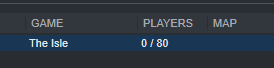
cause it shows up in steam server list and everything
just not on the actual game
holy fuck it finally shows up
after 2 hours
thank god
graceful tendon
yeah .. both of yours are running.. its just how it shows up is the issue
still looking for yours @west patrol
quaint cedar
wish filter options were in the game
west patrol
its not working :/
graceful tendon
how many version of the isle server you have running .. just 2 right?
west patrol
wdym?
west patrol
yeah, i see them
graceful tendon
just 2
west patrol
yeah
graceful tendon
ok
hummm, might need a 3rd eye to help look for it
the issue isnt your server, its steam
how their server searches work
west patrol
wdym?
its not up at all i think
because im running it just fine
but i cant find it nowhere
graceful tendon
yeah, we need a another person to look too, its steam, sometimes the servers just dont pop up on the list .. its running, but steam is like nope
cosmic oak
Aand we're back. What's going on?
graceful tendon
just tring to seach for Stans server
its running, we just gotta wait for it to pop up
in the list
west patrol
can you send me your .bat code @graceful tendon
cosmic oak
I'll take a look as well.
graceful tendon
@west patrol your server is "Isla Antillia [EU]"
west patrol
yeah
@hollow badger off
cls
echo Protecting isle server from crashes...
title Isla Antillia [EU]
:Evrima Server
echo (%time%) Checking for updates...
start /wait C:\steamcmd\steamcmd.exe +login anonymous +force_install_dir C:\TheIsleServer +app_update 412680 -beta evrima +quit
echo (%time%) isle server started.
start /wait C:\isleserver\steamapps\common\theislededicatedserver\TheIsleServer.exe ?MiltiHome=192.168.1.61?Port=7777?QueryPort=7778?MaxPlayers=100?game=Survival -log | set /P "="
echo (%time%) WARNING: isle server closed or crashed, restarting in 1 minute.
timeout /t 60
goto TheIsle
cosmic oak
I dont see it.
west patrol
look
west patrol
is the title line good?
graceful tendon
awww yep
cosmic oak
Oh jeez. i see whats happening
west patrol
?
cosmic oak
start /wait C:\isleserver\steamapps\common\theislededicatedserver\TheIsleServer.exe ?MiltiHome=192.168.1.61?Port=7777?QueryPort=7778 -log | set /P "="
Try it like that
oh wait
Stan
go to https://whatsmyip.com
Whats My IP shows your Public IP Address and LAN, including ability to Trace IP and view WHOIS History. View Screen resolution and browser version
and tell me what it says
west patrol
ive sent it you
west patrol
i fixed that
graceful tendon
k.. make sure to close out and restart the server
cosmic oak
Also; and i've told him this, but for the public reading: ?Maxplayers= and ?game= no longer work.
All handled from the game.ini
graceful tendon
yess
i have it there, because for some reason, no idea why, but if i try to edit my .bat in anyway it breaks it ..
no clue ...lol, so just left it alone, seems to still work tho
cosmic oak
@echo off
cls
echo Protecting isle server from crashes...
title Isle Roaming People EU 1
:TheIsle
echo (%time%) Checking for updates...
start /wait C:\Tools\steamcmd.exe +login anonymous +force_install_dir C:\tools\steamapps\common\TheIsl~1 +app_update 412680 -beta evrima +quit
echo (%time%) isle server started.
start /wait C:\tools\steamapps\common\TheIsl~1\TheIsleServer.exe -log | set /P "="
echo (%time%) WARNING: isle server closed or crashed, restarting in 1 minute.
timeout /t 60
goto TheIsle
All I got in my batch file. So clean :)
graceful tendon
looks good, very clean
@west patrol you get your server reset and running again
.
another issue i saw some were having was this
to many running at once
just another cause for issues i have found
west patrol
i see
cosmic oak
Found his problem.
He renamed his server folder.
So basically, was launching an old copy of the server
joy to the world.
cosmic oak
what I do?
 coarse yacht
helped stan haha
cosmic oak
oh lol, no worries; it happens. Honestly should've caught that a little sooner. Guess I'm not as alert as I wanna be.
graceful tendon
awww.. nice
 trail trout
did anyone manage to give dinosaurs to players on evrima ?
(Sorry for my english, I'm French)
 tulip mauve
Our Server will crash as soon two utahs are pouncing each other.
Anyone got the same problem?
 worthy lava
nope soz
tawdry arrow
Anyone else running their server through G-portal and managed to get it up?
nimble saffron
Sadly no to running through G-Portal, I use Citadel
Still can't get mine to show up either
tawdry arrow
It really blows
 fair burrow
Is it already out how admins can get the PT? I see some screenshots from them. :O
nimble saffron
I think those were from when people were cracking their way in as opposed to legit injections
fair burrow
thats why im askin ig its legit or is there already someone hacked the gamefiles to get them
nimble saffron
I'm not sure, and don't think talkin about it here is the right choice (both because this is for discussion on server hosting, and because I'm fairly sure the devs would take a dim view of someone asking about how people are hacking their game lol)
cosmic oak
When in doubt, don't. There also seem to be a varying number of bugs associated with it
fair burrow
i wont do this. If its a "bug" maybe the devs read this and gonna fix this that nobody get the other stuff until its ready.
Thats why im asked if its "normal" Possible or the Server owner changed something not "legal" on there stuff.
you know what i mean?
merry urchin
are we able to use our admin commands yet
 alpine bone
Unless they changed it when i was asleep you can. But its a menu instead of typing in global. Either type/adminpanel or push the end key and it should hopefully come up :) @merry urchin
tropic wasp
No commands, just /adminpanel / END
Beat me to it 🙂
Has anyone figured out how to direct connect to a server without going through the server list in game?
merry urchin
Awesome thank you that's very helpful and im very grateful for your help guys <3
 merry urchin
good to know and how?
fair burrow
`ParadymShift #TeamFoszor
EVRIMA - 0.4.0.06
Changelog:
-Removed white box mesh in the world
-Fixed Admins permissions
-Fixed amount of server lists to find (was cap to 50)
-Fixed a way people were injecting to play as Ptera or Deino
Rolling this update out now to private servers and public.`
Its not possible anymore D:
merry urchin
oh fair
 boreal smelt
Seems they disabled all injections, not just those two. When I finally got my server up first thing I did was test ways to break it, including injections. So unless there’s a new trick or something they don’t appear to work as they do on Legacy.
 civic condor
I don't know if this is the right place to ask, but how do I add admins on the Evrima branch through Pingperfect? It said that admins had to be set through the text editor, which I tried, but it didn't seem to work, although I did type the wrong command in-game so that might be why I didn't see the admin panel. I'll try again and see if it works, but any help would be appreciated
tropic wasp
You need to completely stop the server before you edit that file
because it seems to not update (or actually re-update the old one) when it's stopped
You will know if you're an admin because your name will be gold
when you type
civic condor
Alright, I'll try that out now. Thank you
tropic wasp
No worries. It's a weird one, figured it out myself earlier
cosmic oak
Evening all. Lets see if we can get through the evening without saying "end" 45556 times
queen nymph
or /adminpanel
boreal nacelle
Have they fixed the admin string or what. It doesn't recognize me as a admin in game. I've put my steam I'd in there
fair burrow
I like the new adminpanel
brisk iron
@boreal nacelle Did you also stop your server first or restart your server after editing the config?
✅ AdminsSteamIDs= {insert steamid64}
❌ +AdminsSteamIDs= {insert steamid64}
brisk iron
@boreal nacelle yes the 17 digit number. You have the admins added in the wrong section. One sec
[/Script/TheIsle.TIGameStateBase] AdminsSteamIDs={insert steamid64} AdminsSteamIDs={insert steamid64} AdminsSteamIDs={insert steamid64}
remove your 2 admin lines from the section you have them in and paste what I gave you into a separate section above
should be good to go after that
boreal nacelle
alright will check it out thanks
brisk iron
np
boreal nacelle
It worked 🙂
brisk iron
Awesome!
 gloomy bridge
server not showing in the list
Steam API failed to initialize!
is that normal
?
 worldly hamlet


 long yarrow
Sigh, failing to get server to load or appear.
There is a huge lack of documenation
Game .ini file i have:
[/Script/TheIsle.TIGameStateBase]
AdminsSteamIDs=77777777777777777
AdminsSteamIDs=77777777777777777
[/Script/TheIsle.TIGameSession]
ServerName=[EU] Isla Alpha
MaxPlayerCount=70
bServerGlobalChat=true
bServerNesting=false
bServerFallDamage=true
bServerAllowReplayRecording=false
bServerDynamicTimeOfDay=true
ServerTimeOfDayInSeconds=21600
ServerLengthOfDayInSeconds=3600
bServerDynamicWeather=true
[/Script/Engine.GameSession]
MaxPlayers=70
long yarrow
Ports are forwarded
 austere hollow
which ports do you use?
long yarrow
40000 and 400001
long yarrow
Custom ports, already have 7778 and 27015 in use
austere hollow
then take 7779 and 27016
long yarrow
Would be very dumb if you can no longer define ports
Tried:
TheIsle\Binaries\Win64\TheIsleServer-Win64-Shipping.exe ?MultiHome=109.230.0.0?Port=40000?QueryPort=40001?MaxPlayers=70 -log | set /P "="
and
TheIsle\TheIsleServer.exe ?MultiHome=109.230.0.0?Port=40000?QueryPort=40001?MaxPlayers=70 -log | set /P "="
Same result
austere hollow
@hollow badger off
cls
echo Protecting isle server from crashes...
title Isla Irridia
:TheIsle
echo (%time%) Checking for updates...
start /wait C:\steamcmd\steamcmd.exe +login anonymous +force_install_dir C:\Irridia\Irridia_Evrima +app_update 412680 -beta evrima +quit
echo (%time%) isle server started.
start /wait C:\Irridia\Irridia_Evrima\TheIsleServer.exe MultiHome=93.186.198.168?Port=7780?QueryPort=27015?MaxPlayers=100? -log | set /P "="
echo (%time%) WARNING: isle server closed or crashed, restarting in 1 minute.
timeout /t 60
goto TheIsle
this is ours
one of 4
and i only go 1 port per server upwards
Also make sure your firewall allows the program
long yarrow
Does Engine.ini still have any relevance i wonder?
 keen storm
help me pls
[/Script/TheIsle.TIGameStateBase]
AdminsSteamIDs=
AdminsSteamIDs=
AdminsSteamIDs=
[/Script/TheIsle.TIGameSession]
ServerName=[FR/EN] The Elder World [REALISTE]
MaxPlayerCount=20
bServerGlobalChat=true
bServerNesting=false
bServerFallDamage=true
bServerAllowReplayRecording=false
bServerDynamicTimeOfDay=true
ServerTimeOfDayInSeconds=21600
ServerLengthOfDayInSeconds=3600
bServerDynamicWeather=true
[/script/Engine.gamesession]
MaxPlayers=20
[/script/engine.gamesession]
MaxPlayers=20
[URL]
Port=29600
PeerPort=29615
 blissful topaz
how can the admin have an aerial view of the server as in the old version?
stoic schooner
They can't yet @blissful topaz but they're working on it.
fair burrow
aww ma report instand getting removed D:
trail trout
I heard that admins can play as Ptera 🤔
And, I failed to give dinosaurs at players
You know how ?
blissful topaz
They can't yet @blissful topaz but they're working on it.
@stoic schooner Thanks 😉
 humble kettle
anyone know why from g-portal server is not showing in the server list? anyone can help me who had the same problem but solved it`?
plucky dragon
G-Portal dont Support evrima yet I think
plucky dragon
Okay, did u refreshed server-searching a couple of Times ?
humble kettle
ya i did and restarted the server and and and ..... nothing helped
plucky dragon
Make Sure your Server is on
humble kettle
its on xd
humble kettle
i did allrdy
plucky dragon
Make Sure your Server is off, while you Doing it
humble kettle
did it
plucky dragon
Did you tried to Rename Server ?
humble kettle
yes that too
humble kettle
yes:)
plucky dragon
Send me your game.ini pls
humble kettle
[/script/theisle.igamesession]
ServerName=Dragon age
ServerPassword=
ServerTag=3
ServerLogoutTime=60
bServerAllowChat=true
bServerGlobalChat=false
bServerNameTags=false
bServerExperimental=false
bServerBattleye=true
bServerAI=false
ServerAIMax=100
ServerAIRate=1
bServerAIPlayerSpawns=false
bServerGrowth=true
bServerNesting=false
ServerSteamGroup=
bServerScent=true
bServerAllowTurnInPlace=false
bServerFallDamage=false
bServerAllowReplayRecording=false
ServerDeadBodyTime=10
ServerRespawnTime=60
ServerFootprintLifetime=60
ServerDiscord=
[/script/engine.gamesession]
MaxPlayers=50
[/script/theisle.igamemode]
ServerStartingTime=1350
ServerDayLength=20
humble kettle
but its switched to it
humble kettle
mhh ok
 livid apex
Don't you love it when your connecting to a server and it kicks you back to main menu constantly
plucky dragon
Yeah
livid apex
then wont let you connect because data failed
I love it so much
Debating on marrying it
plucky dragon
Just restart Game
plucky dragon
XD
livid apex
I'm just trying to get the servers to work properly for a customer
It's fucking cancer
plucky dragon
Server offen Crash, because Utah right click is buggy
livid apex
What does the right click do?


I love this so much
I get in faster, But deleting my player data
then I do trying to get in with pre existing
😂
plucky dragon
What does the right click do?
@livid apex jump Attack, and If you Spam it, The Server crash
livid apex
That sounds like every server hosters dream
 lime moon
<@&401466542140817419> can an admin play a Deinosuchus and Ptero?
queen nymph
no
lime moon
ok thanks
queen nymph
we still have to wait for the official release
bitter garden
anyone know how to update the version of your dedicated server?
sonic sierra
Is there a map of Isla Spero?
bitter garden
anybody?
 devout cliff
Admins can play as a deino or a ptera
devout cliff
What are you reporting?
fair burrow
That the last fixx didnt worked
 ornate scaffold
hi guys, is there a list where i can find the commands for a server ?
ornate scaffold
wtf ok thanks xD
fair burrow
yeah i realized this today too. A bit annoying to help Stuck peeps
devout cliff
Has anyone actually started a server?
 hidden heath
Official BR server is not online?
devout cliff
Quick question, are there any simple guides to creating a Isle server?
hollow moon
Oof, my server (Ping) just crashed twice within 15 mins, with just 1 person on it? We have 2 gb extra ram addition, high cpu, ssd.
yesterday ran with 3-4 people smoothly for 3-4 hrs straight no crash
 winter coral
Hello, anyone got the line for setting Admins in Evrima ?
boreal nacelle
[/Script/TheIsle.TIGameStateBase]
AdminsSteamIDs=
AdminsSteamIDs=
AdminsSteamIDs=
hollow moon
How long do bodies last in Evrima? Seems to be more than 10 mins?
I'm sure I'd like to configure that setting once it's available in the update config
boreal nacelle
I haven't seen a line where it has one
I'm sure it's the same as the older one
Don't think that line even worked anyways
Think it's all on a set time
hollow moon
seems like on legacy it did do something. I accidentally set it to 10 seconds
it disappeared at 10s
set to 1200 seconds, and it lasted like 20 min
seems to last longer than 10 mins, maybe 15 or 20.
boreal nacelle
Haven't even messed with legacy so I can't answer it.
I'm just answering to what I know with 1.53 and evrima
merry urchin
my admin powers are still not working but it says im an admin anyone else have this issue? when it says they fixed mod powers
 violet marsh
/adminpanel in chat or end key
merry urchin
in game? oklet me try that
 unkempt haven
Does anyone know the map ID for Isla spiro
violet marsh
Don't need to worry about specifying the map yet, server auto hosts it atm
unkempt haven
Oh ok
 vocal summit

Evrima, Evrima release, Evrima gameplay, Anthomnia Evrima, Dondi Evrima, ParadymShift Evrima
Spread the love
merry urchin
what is the best server hosting
 thorn shell
depends on what you are looking for in terms of how many slots it can handle... you need a more powerful server for more people otherwise lag. Prices scale accordingly so it's also an opinion of what you want to spend.
i wouldn't know where to begin in terms of service tho... other peeps here will have to speak to that. I have a home server :P
 fast sierra
some comand to set a timer to log out?
thorn shell
Not in the game yet as far as I know
cosmic oak
Someone asked for a guide on how to setup a server: https://docs.google.com/document/d/130fNIlhm89fJGeSivJAi0avhe_ynNNHEaPjahP3BKcE/edit?usp=sharing
Google Docs
Evrima Server hosting guide This guide assumes you’ve got all the required components in place and that you’re hosting your own server. I will list them here for reference but I’m not going to tell you how to get it working. Prerequisites: SteamCMD .Net 3.5 (make sure you h...
I'll just relink it here again
Has anyone figured out the required specs with progression based on numbers of players yet? If not thats something I'll look into at lunch.
what is the best server hosting
@merry urchin your own.
bitter garden
How long does it take for the server to pop up on the listings typically?
 lucid lion
What does this indicator mean? 64,765 s https://media.discordapp.net/attachments/401466217744957460/724046939523383316/encryption_uptime.png

 tropic wasp
Seconds the server has been running for @lucid lion
lucid lion
@tropic wasp thx)
tropic wasp
np
queen nymph
How long does it take for the server to pop up on the listings typically?
@bitter garden as soon as the server is done booting up
queen nymph
All ports forwarded?
 severe basin
Hello, I seem to be having issues with Evrima's servers listing.
I've always been playing with my NA friends on NA server, despite being in Europe. But since installing Evrima, the list of server I get given are all european ones. There are a couple NA servers at the very bottom, but the one my friends run is not there. This has been going on for a couple days now.
My impression is that the server list is prioritizing servers hosted closer to me on the list, and because there's more and more EU servers added everyday, the list just ran out of space to show me the NA ones.
I feel there's a urgent need for a Search or Filter system to fix this, because me and many other EU-side players who wish to play on NA servers are being locked out.
queen nymph
use ipv4 right?
@bitter garden ports dont care for ipv4 or ipv6
@severe basin ya the server list is pure madness, takes me up to 8min to find my server
Oop
 sullen scroll
This is getting weird, my clients' servers sometimes show to them on the list..and sometimes dont.
Do we have any client/server side fix for that yet?
queen nymph
Not that i know of sadly
But i noticed that my server shows up roughly at the same spot of the list, no matter how often i start the game or refresh the list
Imo we need at least an option to sort the server list A-Z or filters .-.
sullen scroll
it works weirdly with pings
high pings barely show...
for instance....sometimes US servers dont show up to me...sometimes they do. Europe is constantly showing.
queen nymph
My list goes from 10 to 900 ping reaching from EU to AU
So afaik all servers show up for me
sullen scroll
I guess I'mma limit my hosting businesses for now till this is getting more stable
plucky dragon
it works on many hoster
 willow elbow
yes
willow elbow
We had it twice, that the Server crashed, after a Utha pounced another one, he didn't even kill it, just pounced and bite it and than the server crashed
bitter garden
yeah it's very repeatable
 prisma glade
It’s happened in on my server as well
warm heart
@willow elbow Seems like it happens on all servers, just put on auto restart, simple 🙂
willow elbow
we have ^^
warm heart
We will just need for them to patch out a server fix 😦
 severe tinsel
anyone know a way to find your server if its not showing up on the list anymore?
 grim fossil
On wich hoster can you buy an evrima server ?
queen nymph
anyone know a way to find your server if its not showing up on the list anymore?
@severe tinsel does it show up in the steam server view?
severe tinsel
@queen nymph it does but it doesn’t seem to connect from there. a few of my friends are on the server rn so I know it’s up and working I just can’t find it
stoic schooner
Can they invite you to join them through steam?
Or can you join their game in the same way?
severe tinsel
Possibly. I’m pretty sure it’s because the server is based in the US where most of us are but I’m in U.K.
stoic schooner
Yeah the servers shown tend to be more local to you first. The server I admin on is based either in the UK or close to it. But there's still alot of people in the US can't find us yet
queen nymph
AFAIK rn you cant connect vie steam server view or invites and have to find the server in the list sadly
lucid lion
the same problems the server launches fine, but it doesnt appear in the server browser
queen nymph
and the last patch should have fixed the issue with the server list being capped so every player should see all servers
severe tinsel
It still has a cap, it’s just a bigger list than the 50 it was at
 strong narwhal
what´s the command to tp players?
queen nymph
/adminpanel
strong narwhal
thank you^^
queen nymph
or END
 amber linden
Hey guys, bit of an odd one. I have a server that I've had set up for a few weeks now and currently struggling to figure out how to update it to the new engine/EVRIMA. Would anyone be able to give a hand in such? Currently it works fine and is listed in legacy but!
 magic estuary
Is there a way to fly as server admin or see names?
queen nymph
Is there a way to fly as server admin or see names?
@magic estuary no, only use the "goto" on yourself
merry urchin
i have a server and it says its runnjing but its not showing up what should i do it was working perfectly yesturday but now its not
plucky dragon
There are many ways what U can do
Restart your Server a couple of times, or Rename it
If this is Not working, send me your game.ini per DM pls
@merry urchin
 inner ermine
Good evening everyone!)
Wanted to ask you, is it okay that server owners are giving away Tricerotopses, pteras and deinosuchus on their evrima servers?
Cause i think that it is totally not okay
inner ermine
Its just so cringy
stoic schooner
Indeed
 gentle island
Are there admin commands yet for admins?
 peak saddle
@gentle island you have to use /adminpanel in the chat box, then you can press the "END" key to access the adminpanel.
gentle island
Thank you ^^
peak saddle
once you use the /adminpanel you can also use TAB to see who is on the server
queen nymph
also trikes, pts and deinos dont have basic functions rn
peak saddle
?
stoic schooner
@queen nymph Either way. People shouldn't be using them.
queen nymph
@queen nymph Either way. People shouldn't be using them.
@stoic schooner ofc not but it's also pointless rn
winter coral
hey does in Evrima any command work as a admin ?
stoic schooner
Type the "END" key or type /adminpanel
It's a GUI panel now, not "/" commands.
cosmic oak
So now that people are pinging me personally: Please don't.
Second: You should run the server off a separate machine. Its not made for running off your own game PC if you intend to play on that same machine. Just don't.
I've also updated my guide to reflect the mostly-used locations and such. Follow it to the letter; don't screw around with the locations. Chances are, if you NEED to do that, you shouldn't need this guide anyway.
Google Docs
Evrima Server hosting guide This guide assumes you’ve got all the required components in place and that you’re hosting your own server. I will list them here for reference but I’m not going to tell you how to get it working. Prerequisites: SteamCMD .Net 3.5 (make sure you h...
I'll see about adding screenshots once I have more time. Right now, no time. :)
static spire
Any help i don't no wat happend when I play in my server and stop the game he still running when I click stop playing stop the server to and no player can't come in
Need i the dedicated server for steam if that need it of not i don't understand it anymore hi runs only for mee and when iam done whit playing isle stil on when I stop stop the server too???? 3 day I work on it
@cosmic oak can you send me the guide please
 buoyant needle
Can someone help me with setting up evirma on my second server? im completely stuck and use citadel hosting
cosmic oak
For some retarded reason google disabled the option to copy-paste in the guide. That's enabled now.
Need i the dedicated server for steam if that need it of not i don't understand it anymore hi runs only for mee and when iam done whit playing isle stil on when I stop stop the server too???? 3 day I work on it
@static spire Hate to say it but if you don't understand this, perhaps you should just play on an existing server.
 tribal gust
Noticing a correlation between the pouncing so players are stuck on their back and server crashing. Might be something to look into. Fairly reliable and duplicateable bug
 woeful plume
how to change max tick rate 20 to 15???
topaz stream
so why is there a region restriction? trying to get a server hosted else where and i cant find it.
cosmic oak
I've been able to find servers across the world, especially when I've helped set them up.
First thing to check is your configuration. There are a buttload of default named servers still on that list
how to change max tick rate 20 to 15???
@woeful plume I'm sorry, I've no idea. Also, since this is a very early release, it might not help your stability
tropic wasp
I think the server list is showing the top servers for you based on ping. That's why you're not finding some others.
Though I think there may be some additional extras that get thrown in for some reason....
Wondering if it's some sort of 'sponsored' whitelisted servers that just get added no matter the ping... hmm? 🙂
Conspiracy! 🙂
Seriously tho... Still no way of direct connecting? There's only 2 other options I can come up with, that's filtering out certain external IP ranges for the game port via firewalls, or using a VPN to make it 'seem' like your connection is closer to your desired server destination