#server-hosting
1 messages · Page 37 of 1
 strong citrus
 inner ermine
Press "End"
strong citrus
Thank you
 crude cargo
end is working, thanks!
 merry urchin
@crude cargo Thank you. Those files worked.
 haughty echo
has anyone using ping perfect got theirs running yet
 shrewd frigate
people, you need to copy this entire folder to %IsleServerFolder%\Saved\Config\WindowsServer\ https://filebin.net/fdc2st6xsyl4id94
@crude cargo I don't have a WindowsServer folder at this path... only CrashReportClient
Upload files and make them available for your friends. Think of it as Pastebin for files. Registration is not required. Large files are supported.
crude cargo
@shrewd frigate you need to create the folder
shrewd frigate
@shrewd frigate you need to create the folder
@crude cargo Ok sometimes I don't deserve to live... thats how stupid I feel right now
crude cargo
@shrewd frigate it's not you, we spent 2 hours figuring this out
inside of WindowsServer folder, you should have a folder structure like this: https://i.imgur.com/ecmLAF2.png
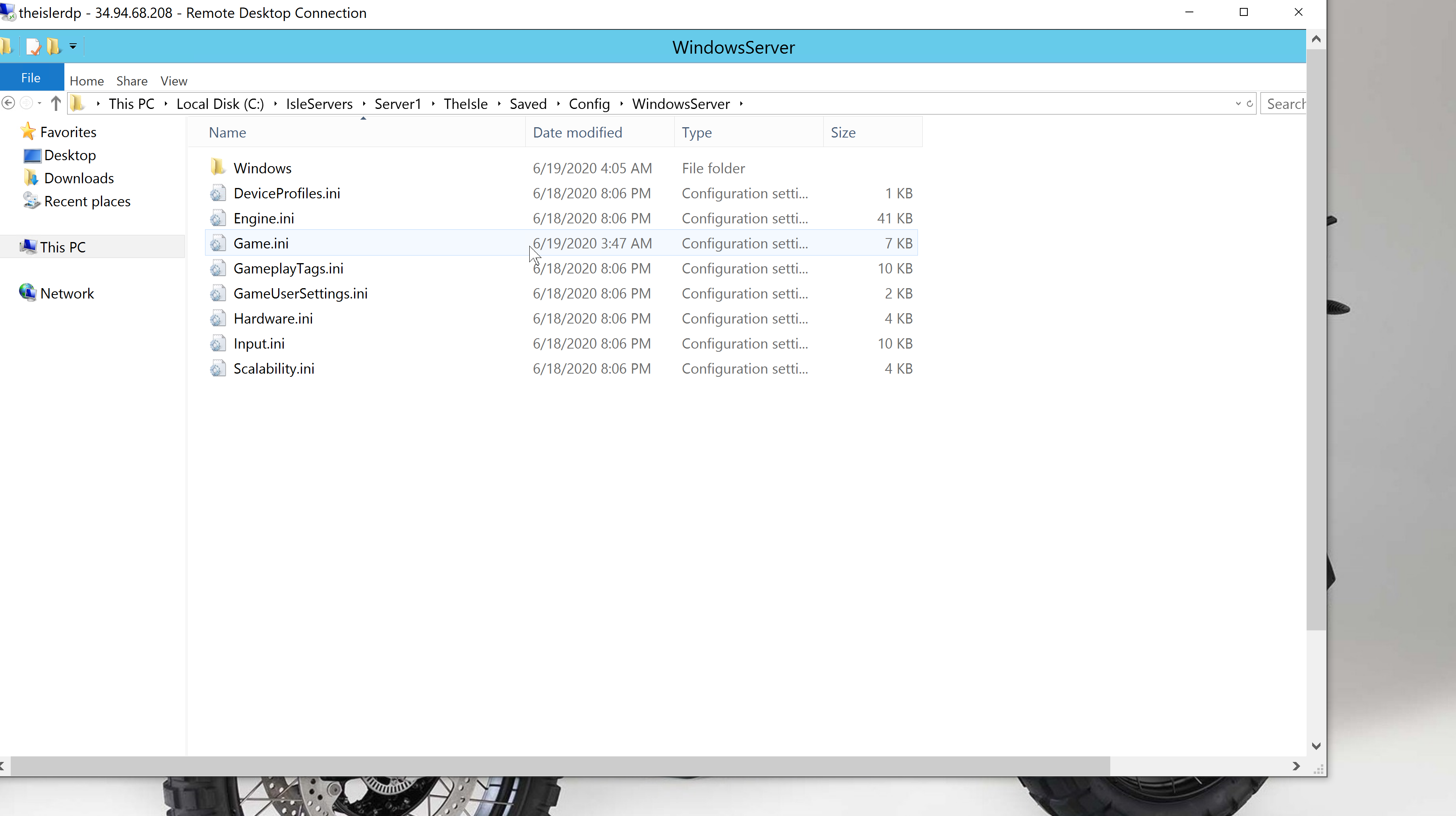
 rapid iron
Oh, can i fix crash?
 barren torrent
What can we do if someone else impersonated our server,Name,discord ext?
rapid iron
@barren torrent report in the game
 worn vapor
anyway to lower the fps
i can go 144
but dont have liquid cool
shit turns my gpu into a fyring pan
merry urchin
20.06.19-12.10.41:371][ 44]LogOnlineSession: Verbose: STEAM: SetGameTags(BUILDID:0,OWNINGID:90136376179493895,OWNINGNAME:90136376179493895,SESSIONFLAGS:939,ServerName_s:QA Test Server!)
 uneven citrus
i have yellow name but no admin powers, anyone same problem?
rapid iron
@uneven citrus button END
 lime moon
my dedicated server can't be found and yet no error
rapid iron
@lime moon you have game.ini?
crude cargo
you have firewall open on both routers and windows firewall?
crude cargo
i had to create rule for ports on firewall and create rule in windows firewall for it to show
server gives no warning if ports aren't open
 smoky roost
Using PingPerfect.com. I updated everything, still not showing up
lime moon
the ports it's open 7777 annd 7778
uneven citrus
@uneven citrus button END
@rapid iron thx so much, can't change time and weather?
crude cargo
@smoky roost contact pingperfect, that's what you pay them for, we are running real dedicated servers
 trail trout
PingPerfect do the updater automaticaly ?
smoky roost
U have to press update but yeah
rapid iron
@lime moon hmm, port forwading? Check steam - server
@uneven citrus no, weather cant change and spectator dont use(
shrewd frigate
inside of WindowsServer folder, you should have a folder structure like this: https://i.imgur.com/ecmLAF2.png
@crude cargo Thank u very much! It worked for me!
 queen nymph
Can there only be 1 admin online at the time or did i messed smth up?
merry urchin
@smoky roost updates? I also want to run a pingperfect server. Is it functional with evrima yet?
smoky roost
Im still diddling with the settings. Everything looks to be in place. I can switch between it showing up on regular isle server lists. But when i switch it again, it disappears from there and it should show up on evrima. The option is basically there on pingperfect.
merry urchin
mine is a QA test server now wtf
 scarlet linden
no fixes for qa test server 0/0 yet? :c
 tulip mauve
Anyone else got the problem with PingPerfect that the server cant find the map?
 graceful tendon
same
shrewd frigate
my dedicated server can't be found and yet no error?
@lime moon Did you try to search it in steam with your IP?
 chrome eagle
https://gyazo.com/d66f9b02ee5fe69cf9a8371ffbbb3418 anyone getting this error since new update?
 graceful tendon
i updated it to .6 but it still reads version .1
shrewd frigate
https://gyazo.com/d66f9b02ee5fe69cf9a8371ffbbb3418 anyone getting this error since new update?
@chrome eagle yes and there is a solution already... wait I'll link u
chrome eagle
ty
lime moon
@shrewd frigate yes
I already had a dedicated server
i know
but the are a probleme
shrewd frigate
with many thanks to @crude cargo
people, you need to copy this entire folder to %IsleServerFolder%\Saved\Config\WindowsServer\ https://filebin.net/fdc2st6xsyl4id94
Upload files and make them available for your friends. Think of it as Pastebin for files. Registration is not required. Large files are supported.
chrome eagle
ahh i already added that
 steel onyx
anyone know how to change the name from QA test server with 0 people?
shrewd frigate
ahh i already added that
@chrome eagle First it didn't work for me either... then I reinstalled the server (first copy player data) and added them again... after taht it worked... at least for me
chrome eagle
will try it cheers
 west patrol
@shrewd frigate if i do that it doesnt create a server and a theisle map
crude cargo
if you are getting DATA ACQUISITION FAILED restart your client if you have already done previous steps
lime moon
nope
crude cargo
i have tested this with 4 people already running servers, i have to restart client in order to clear data acquisition failed error
shrewd frigate
@shrewd frigate if i do that it doesnt create a server and a theisle map
@west patrol did u delete every folder and restart the whole server?
 glossy sequoia
do admin commands work yet? or are they not implemented?
glossy sequoia
admin panel?
glossy sequoia
ahhh awesome, thanks heaps for that
 tropic wasp
Anyone know the fix for steam just not running the game when you click Play?
 ocean forum
[END] key also brings up the admin panel doesn't it?
tropic wasp
yes
 boreal barn
How do ya host a server in ERVIMA?
queen nymph
i finally managed to get multiple admins on my server lmao
steel onyx
any fix for the name being QA test server??
crude cargo
@steel onyx look above and start from scratch
it's taken us 3+ hours to get this far, but most servers updating with instructions no problems
 opal portal
Does anyone know if it is possible show chat messages in the server console?
haughty echo
Has anyone gotten this to work on pingperfect?
haughty echo
yeah not getting a lot of help from them thus far, not happy about that
lime moon
I did do this, here.https://filebin.net/fdc2st6xsyl4id94 but impossible
Upload files and make them available for your friends. Think of it as Pastebin for files. Registration is not required. Large files are supported.
i had put my id and ip ect.. port open 7777 and 7778
 upper abyss
@lime moon Don't specify the map location in the commandline
TheIsleServer.exe ?Port=34180?QueryPort=34180
lime moon
@hollow badger off
cls
echo Protecting isle server from crashes...
title name
:TheIsle
echo(@time@) Checking for updates...
start /wait C:\steamcmd\steamcmd.exe +login anonymous +force_install_dir C:\IsleServers\Server1 +app_update 412680 -beta evrima +quit
echo (%time%) isle server started.
start /wait C:\theisle\TheIsleServer.exe ?MultiHome= ?Port=7777? QueryPort=7778? MaxPlayers=100? -log | set /P "="
echo (%time%) WARNING: isle server closed or crashed, restarting in 1 minute
timeout /t 60
goto TheIsle
trail trout
I'm on PingPerfect and my server does not appear, can someone help ?
crude cargo
just FYI, the old ways of specifying server IP, servermap, server port using ? ? don't work anymore, ignore them, everything is default, use a simple command line, delete multihome, delete port, delete queryport, just use simple command line of: start /wait TheIsleServer.exe MaxPlayers=191? -log | set /P "="
upper abyss
@crude cargo Server port and Query does work.
crude cargo
`example server.bat file
rem thx to NewBeginnings for getting me into this game =D
@hollow badger off
cls
echo Protecting isle server from crashes...
title New Beginnings [TEMP]
:TheIsle
echo(@time@) Checking for updates...
start /wait C:\IsleServers\steamcmd\steamcmd.exe +login anonymous +force_install_dir C:\IsleServers\Server1 +app_update 412680 -beta evrima +quit
echo (%time%) isle server started.
rem start /wait TheIsleServer.exe MaxPlayers=191? -log | set /P "="
start /wait TheIsleServer.exe MaxPlayers=191? -log | set /P "="
rem start /wait TheIsleServer.exe ?MultiHome=34.94.68.208 ?Port=7777? QueryPort=7777? MaxPlayers=155? -log
echo (%time%) WARNING: isle server closed or crashed, restarting in 1 minute
timeout /t 60
goto TheIsle****`
@upper abyss everytime i try to customize, it does not work, i tried to run more than one server, it's not working, i should be able to run 500 clients on my google cloud server, can't even run more than 1 instance.
@upper abyss please enlighten me, we have spent 3 hours just for servers to show up by now.
tropic wasp
Are you using different ports for each server?
more than one server won't run on the same port.
crude cargo
yes, i tried with multiple ports
have you actually tried or are you just suggesting?
command line parameters are only half working, and we can't tell which ones work, it's trial and error
tropic wasp
I haven't tried. I'm just using the one server.
crude cargo
please try, then get back with results, i will do also, i'm on my 6th attempt with variations of parameters
upper abyss
@crude cargo Tried I am running multiple servers
crude cargo
please enlighten everyone else on how
thx for input
spent last 4 hours just to tell everyone how to get running, i'm spent
 short hound
can some please tell me what host will support EVRIMA? Nitrado doesnt seem to do it at the moment
crude cargo
this chat is for dedicated hosting, you should contact Nitrado
you pay them to fix it, right?
short hound
i pay them to host a server
crude cargo
yep, so make them spend the money you are paying
we are just lonely beggers running our own servers not getting paid for people to run our host copies
short hound
i just want to know which servers actually work and ill move my server over
 flat magnet
Im on pingPerfect been fighting with them for 14 hours at this point Cannot find my server for EVRIMA even though they say it is up... idk what to do anymore
short hound
so pingperfect can host?
flat magnet
PingPerfect can host
crude cargo
yeah, contact pingperfect or nitrado, they should help you, not us
short hound
ok thank you
upper abyss
@flat magnet Check that you have a server name
 cosmic oak
Do we know how to reserve slots?
crude cargo
guaranteed, pingperfect admins have updated their servers based off my posts... don't derogate, i just want game to be playable by everyone.
upper abyss
TheIsleServer.exe ?Port=34180?QueryPort=34180
crude cargo
but if you are pingperfect customer, you should ask them, they are giving you custom command line interface, not associated to this.
 peak ice
Does someone mind helping me setting up my server on pingperfect? Im having alot of trouble with it right now
It just wont start up
Gives me Error ;-;
crude cargo
contact pingperfect support
crude cargo
or start your own server paying $0 dollars
they don't want me to say that
so i will stop
cosmic oak
It is true though. I'm getting a semi-vps with 16gb for like.. 15 bucks. And its running servers just fine.
Anywho; has anyone figured out if we can reserve slots?
crude cargo
i'm not here to promote pingperfect, so i won't help with that, whaver is associated, i won't respond, i'm done
just talking from dedicated server point of view
ignore the ping perfect marketing guys here
shrewd frigate
is there already a spectator mode?
flat magnet
@upper abyss They say its Named Correctly.. so idk man.. ive been up 20 hours between this and work.. I told them to keep my ticket open but I need sleep XD
 split hornet
A friend of mine created a server but I cannot find it in the server list... HELP ive been looking for an hour...
peak ice
Its not so much of us marketing :) where simply asking for help on how to set it up as theres alot of issues right now. @crude cargo
short hound
my friend has told me to just reinstall my current server. idk if that will work
split hornet
please what do i do
crude cargo
@peak ice stop pretending, you are selling a service, i get it, i'm trying not to mix your service up with legit dedicated server services. I think it's nice what you are doing, but you should have your own support, not here.
peak ice
Am i legit not allowed to ask for help?
Ping perfect is what most people use to host servers im just asking for help because alot of people are having the same issues im having and got it fixed
crude cargo
you can, but all your customers are coming here for your lack of support, causing people like me to support your customers. Get a grip, support them... I don't get paid like you do, i'm just a user, you on the other hand are having people pay you, then having people have me support them.
it's an open and closed case, GTFO
 eager oar
Wait, pingperfect's support team is asking for help in here ? Funniest thing of the day so far
crude cargo
well, then pingperfect are hanging you dry
peak ice
Yall make it like if im some person that works there lol
crude cargo
you should think about not using pingperfect
peak ice
Nah there just having issues rn
crude cargo
of coarse they are, then they pawn it off to the community as ... oh its something everyone else can resolve.
you sell a service, you should support it
pingperfect should not be directing traffic here
glossy sequoia
Does growing someone to a certain point stop them growing at all?
crude cargo
they are making money off the the game
peak ice
Admins are broken
eager oar
Admins is fixed
glossy sequoia
It works, but I think it stops them growing if you grow them to say .5
cosmic oak
how do you test admins?
crude cargo
ping perfect staff should be here, they should get info, then relay that to their customers, not making customers figure it out for themselves, why should pingperfect exists if otherwise?
 woven parcel
are there any admin commands yet?
glossy sequoia
/adminpanel
woven parcel
thanks :D
eager oar
I mean, pingperfect offer a service that isn't a day old yet. Give it time
crude cargo
@cosmic oak if you can press TAB and see a screen, it should tell you, you have admiun
cosmic oak
gotcha; well, it works.
I'll write up a detailed guide in a minute.
Because between all the bogus info, it was super easy.
crude cargo
well, i have personal DMs, so far 8 customers of theirs, that I had to walk thru step by step to setup their server, then realize, they are paying BANKO for service that doesn't exist, then realize, i'm providing free tech support to company that already made $500 USD from these people.
all i get is the ability to rub my ball sacks in a circular motion while pingperfect spends $500 USD on their new EXECUCHAIR for Big & Tall People.
glossy sequoia
Can we do the fly around thing as admin? Or not in yet?
cosmic oak
Grow, heal, TP to, tp them, kick, slay, ban.
eager oar
Anyone tried to edit the players save file xyz location and put someone out of the fence ?
 steep vector
Adding admins has not worked for me... any one know a fix or a reason
steep vector
Is that dedicated or is it through a provider?
eager oar
dedicated. Shouldn't change tho
 brittle laurel
is there still admin commands?
 spare hedge
so my server after update is still on 4.0.01 and not 4.0.06 any help?
 sonic sierra
Hello.
Prompt admin teams in Evrima? We cannot go invisible, or register growth, how to do it or who to contact with this issue?
 potent echo
Why does Evrima not start?..
 rare nacelle
has anyone the admin commands?
sonic sierra
 warped tartan
pls help
how do i make my server public
because my friend wantsa to join
but for some reason it says no servers found
and idea why
spare hedge
@warped tartan you ruining your ouwn box?
warped tartan
yes
spare hedge
did you set up your port forwarding
spare hedge
and have your public IP in the .bat file?
sonic sierra
Will someone tell the admin teams?
warped tartan
also what does yes mean
ik
@warped tartan you ruining your ouwn box?
@spare hedge what do you mean my own box
???
like on my own computer?
merry urchin
wouldn't that mean, not running your server through a third party like ping perfect
tulip mauve
Anyone got the new admin commands?
spare hedge
@warped tartan do you have your own server not renting
spare hedge
I really don't know man
warped tartan
should i ask the devs maybe?
merry urchin
so from what I've been reading
the qaserver 0/0 is just an indication of updating servers?
spare hedge
so after updating i no longer have a defaultGame.ini is this normal?
 arctic apex
@eager oar
How were you able to get the ID's to save? Each time I save them and restart the server - the Text Editor keeps reverting back to it's original form.
queen nymph
@steep vector
[/Script/TheIsle.TIGameStateBase]
AdminsSteamIDs=[SteamID64]
+AdminSteamIDs=[SteamID64]
for more admins just repeat the line
example:
AdminSteamIDs=888
+AdminSteamIDs=888
AdminSteamIDs=889
+AdminSteamIDs=889
...
eager oar
@arctic apex Edit the file when the server is down
arctic apex
So do you save each ID twice?
queen nymph
ya
arctic apex
I did.
eager oar
No need @arctic apex
arctic apex
So the first has a + sign and the second doesnt?
 analog glade
Can you still host private servers or are they only available through companies now?
queen nymph
basically you do it with and without for every admin
eager oar
The first has no + sign, all subsequent require one
arctic apex
Okay. Let me try that. Thank you both so much! 💜 @queen nymph @eager oar
queen nymph
i still host a privat dedicated
without the plus i got locked out of the admin menu as the 2nd admin locked on befor me
merry urchin
my server keeps reverting to 0/0 slots after a minute or two of running.
I'm not sure what to do about this. any tips?
eager oar
I have 3 admins on mine. All 3 have access. 1st id has no + sign. 2nd and 3rd do have a + sign
queen nymph
did you set up the server with the @merry urchin C:\Games\TheIsle\TheIsle\Saved\Config\WindowsServer\Game.ini ?
eager oar
@merry urchin Mine did this after the update because the config files where reverted back to default. Make sur you have a server name and playerscount in your game.ini file.
merry urchin
okay, I'll check that now
eager oar
@spare hedge
[/Script/TheIsle.TIGameStateBase]
AdminsSteamIDs=[SteamID64]
[/Script/TheIsle.TIGameSession]
ServerName=[Something here]
MaxPlayerCount=[ServerMaxPlayers]
bServerGlobalChat=true
bServerNesting=false
bServerFallDamage=true
bServerAllowReplayRecording=false
bServerDynamicTimeOfDay=true
ServerTimeOfDayInSeconds=21600
ServerLengthOfDayInSeconds=3600
bServerDynamicWeather=true
queen nymph
sadly everything after max players doesnt work afaik
eager oar
mostly yeah
spare hedge
ok thank you there was way more before update should I need anything els?
eager oar
AFAIK it'S the minimum required to work
spare hedge
@eager oar thank you
merry urchin
can anyone help me, i cannot find official EU servers despite being european, i only get NA ones.
queen nymph
@merry urchin isnt the right channel here but try restarting the game and refresh a couple of times
 keen quail
Tytoo, is that code what we replace in game.ini to have it up and running on EVRIMA? I've been trying to find the codes to replace my files to have it ready for EVRIMA, but no one seems to be willing to share in DMs.
merry urchin
i know it isn't the right channel but noone else ever responds in others
i've been trying to get help for a week
restarting doesn't fix it
queen nymph
legacy or evrima build?
merry urchin
both
cosmic oak
For those interested:
https://docs.google.com/document/d/130fNIlhm89fJGeSivJAi0avhe_ynNNHEaPjahP3BKcE/edit?usp=sharing

Google Docs
Evrima Server hosting guide This guide assumes you’ve got all the required components in place. I will list them here for reference but I’m not going to tell you how to get it working. Prerequisites: SteamCMD .Net 3.5 (make sure you have an install iso handy if needed) Visu...
merry urchin
all i get is Russian and NA
@keen quail I can screen share with you to help out
some AU too
if youre hosting through ping perfect you'll just have to type in evrima, execute a command and update steam to get it running on the new update
keen quail
I'm hosting through a renter service, but the same concept, can edit any files etc. That's my current issue I should say.
arctic apex
Thanks! @cosmic oak
keen quail
Nitrado to be exact, unsure of there has been any issues with that one currently.
 umbral heart
to initialize
 calm radish
Has anyone got gportal to work yet? I still havent and support hasnt given me any word yet either.
graceful tendon
@spare hedge Im having the same issue .. i updated it 3 times and even reinstalled it and updated it again .. still says .1 and not .6
merry urchin
~~Posting this again in case https://youtu.be/pNk7cBFO3NY~~

 rocky light
give admins commands ?
 plucky dragon
Yeah whats the admin commands
 native robin
Where is the best place to get a server from? Need some help
 molten storm
cant find my server in server list, help?
 smoky mulch
there are more servers than actual players lmao
plucky dragon
@molten storm
If your server it's showing online, try to refresh the server list a couple of times or even change the server name, The Isle it's having trouble listing the servers, and changing server name seems to help.
If your server it's not showing online, go to Mod Manager, uninstall EVRIMA Edition and install it back again.
merry urchin
facts
plucky dragon
lol there is a tab now
rocky light
who know the admin commands
smoky mulch
another thing.... the game devs should provide all the documentations about server hosting/settings
not let the community figure it out
rapid iron

 devout snow
So have we figured out how to properly give admins their powers?
 weary marlin
Does anyone know the admin commands?
plucky dragon
nope
devout snow
i know the old commands XD
rapid iron
@weary marlin you need button End
plucky dragon
@devout snow can u say me ? xD
molten storm
@plucky dragon neither worked
plucky dragon
okay which hoster u have ?
molten storm
i have citadel
merry urchin
I will work on admin commands next
 stoic schooner
Can we have admin perms like asap, already a tonne of toxics flooding servers
west patrol
does anybody know how to get configure files?
for me when i make a server it doesnt make a server.exe and a filder called theisle is allso missing
folder*
arctic apex
For PingPerfect server owners adding admins, this is what I was told to use. Still testing:
[/Script/TheIsle.TIGameStateBase]
AdminsSteamIDs=[SteamID64]
+AdminsSteamIDs=[SteamID64]
+AdminsSteamIDs=[SteamID64]
...
arctic apex
Hmmm.
west patrol
about some server engine
devout snow
doesnt matter my server still isnt even showing up, ive restarted the server renamed it and no one in my community can locate it
west patrol
that is simply not downloading when i setup the server -.-
 dark kettle
Admin perms do work, use the END key to get to the panel to kick/ban/grow etc
molten storm
not working T-T
 buoyant needle
Has anyone been able to get evirma working with citadel?
 brisk iron
Anyone with root access to their server have a .zip of the default config files they can send? Updated the server but seems to download everything except for the config files. Tried through SteamCMD and then through steam itself and using the validate command and the integrity tool. No luck. (evrima server)
dark kettle
This guide has everything you need. Worked a charm for me, server running.
Google Docs
Evrima Server hosting guide This guide assumes you’ve got all the required components in place and that you’re hosting your own server. I will list them here for reference but I’m not going to tell you how to get it working. Prerequisites: SteamCMD .Net 3.5 (make sure you h...
Start from scratch, delete all the old installations and start over. If this is a privately hosted server, updated to Windows Feature Pack 1004 helped a ton
brisk iron
The server was working perfectly fine yesterday and then updating it screwed it up. Like for example the DefaultGame.ini and the other configs they had in the server install are all wiped. This is the new way to go about the configs specifically?
dark kettle
This is what fixed my server not downloading the config files. That and possibly the Windows Update I also did this morning
buoyant needle
Would that also work if you’re hosting through something like citadel or Pingperfect?
dark kettle
No idea
stoic schooner
Sorted admin, thanks all
dark kettle
Should contact your host about that
stoic schooner
is there a command list other than end key. As would liek to choose ban duration, spectate and remove bans if known, please dm
dark kettle
Nope
graceful tendon
Our server was running GREAT!! .. then this update and nothing .... i update and update and update, check the file over and over again ... but when u go to search for it, it still shows version .1 and not .6
???????
 hollow moon
Our server is on Ping, and it seems to be geting stuck at like 330MB of memory, we have updated to .06 hotfix, selected evrima, resaved the server config, and even the host has tried a new IP.
stoic schooner
I see, cheers
spare hedge
@spare hedge Im having the same issue .. i updated it 3 times and even reinstalled it and updated it again .. still says .1 and not .6
@graceful tendon did you find a fix?
 lime sierra
@brisk iron Same for me it wiped the config files.
graceful tendon
@spare hedge No, i just tried to update it again.. and i could not find it in the server list, so i had a friend just check, and it still reads .1 not .6
im updating through CMD
brisk iron
@dark kettle Thanks man. It's working now.
hollow moon
(Bout to start mowing the lawn so please mention)
Is there a way to kick someone from the server if Ping does end up fixing the server while I'm outside, so I can get onto my own server to make sure things are working smoothly?
brisk iron
@lime sierra Follow this guide here for the game.ini file https://docs.google.com/document/d/130fNIlhm89fJGeSivJAi0avhe_ynNNHEaPjahP3BKcE/edit?usp=sharing It worked perfectly
Google Docs
Evrima Server hosting guide This guide assumes you’ve got all the required components in place and that you’re hosting your own server. I will list them here for reference but I’m not going to tell you how to get it working. Prerequisites: SteamCMD .Net 3.5 (make sure you h...
 lean prawn
@merry urchin Thanks for the video!
 uneven tide
I need some help with Evrima
in the C:<serverPath>\TheIsle\Saved\Config\WindowsServer\Game.ini
[/Script/TheIsle.TIGameStateBase]
AdminsSteamIDs=76561....
+AdminsSteamIDs=7656....
+AdminsSteamIDs=7656....
+AdminsSteamIDs=7656....
+AdminsSteamIDs=7656....
+AdminsSteamIDs=7656....
+AdminsSteamIDs=7656....
+AdminsSteamIDs=7656....
+AdminsSteamIDs=7656....

[/Script/TheIsle.TIGameSession]
ServerName=MyLittleServer
MaxPlayerCount=150
bServerGlobalChat=true
bServerNesting=true
bServerFallDamage=true
bServerAllowReplayRecording=false
bServerDynamicTimeOfDay=true
ServerTimeOfDayInSeconds=21600
ServerLengthOfDayInSeconds=3600
bServerDynamicWeather=true
But none of my admins can use commands?
tropic wasp
I have just AdminsSteamIDs, no +
and it's working fine for me
I have 3, and I just removed the rest
eager oar
None of the commands work. Press del to bring up admin panel or type /admin panel
tropic wasp
*END to bring up Admin Panel or type /adminpanel
eager oar
Right,my bad
tropic wasp
np 🙂
I'm bored so happy to chat. Literally running around the edges of the map right now.
uneven tide
so
[/Script/TheIsle.TIGameStateBase]
AdminsSteamIDs=76561.....
AdminsSteamIDs=76561.....
AdminsSteamIDs=76561.....
AdminsSteamIDs=76561.....
AdminsSteamIDs=76561.....
AdminsSteamIDs=76561.....
AdminsSteamIDs=76561.....
AdminsSteamIDs=76561.....
AdminsSteamIDs=76561.....
Should work?
 violet arrow
oohh thank you
 amber oak
why i stay on the scanning all frequencies?
lime sierra
@brisk iron Thanks I did not see that they updated it. Working on it now.
stoic schooner
why i stay on the scanning all frequencies?
@amber oak restart your game and try again, works for me, and remember if the server has ten fewer than its capicity, the game sees it as full
amber oak
ok thanks ^^
tropic wasp
What commands?
there are no /commands active
except for /adminpanel , which probably has what you're looking for
🙂
merry urchin
C:<Directory>\TheIsleServer.exe?MultiHome=xx.xx.xx.xx?Port=XXXX?QueryPort=XXXX?MaxPlayers=XX? -log | set /P "="
isnt working for me
 compact lynx
so what are these new commands
tropic wasp
It just brings up an admin panel that you can click on actions.
I really hope they add back in the actual text commands, they are much easier and quicker
stoic schooner
press your "end" key
tropic wasp
it gives you a GUI that looks like this for each player, and you can scroll all the way down
stoic schooner
its all in there
tropic wasp
 bronze jacinth
just updated my server
merry urchin
Nok?
bronze jacinth
where is the config file?
tropic wasp
Did it work Koobash?
merry urchin
help LogLoad: Error: Failed to enter /Engine/Maps/Entry: Servers can't open network URLs. Please check the log for errors.
tropic wasp
Hey Joshy
 hexed vigil
Hi! Sorry to bother you but is anyone of you using Ping Perfect? Does your server appear in the server list? Or does it have the right name?
bronze jacinth
@tropic wasp my config file is gone
where is it
where did you put it
jk
but it is gone
tropic wasp
You have to create it. That's what the update did, it deleted the location of the config files 🙂
bronze jacinth
how do I make one properly without blowing up my pc
bronze jacinth
got it
tropic wasp
customise it, etc, then create the folder you need it in on your server
bronze jacinth
are you able to help me real quick with setting up logs?
tropic wasp
Config\WindowsServer is the folder
put Game.ini in there
then restart server.
With your logs?
tropic wasp
Afraid not, I'm not using that.
bronze jacinth
oh ok
bronze jacinth
/adminpanel
merry urchin
Nok can you dm me your commandline without the ip etc mine doesnt work for some reason
tropic wasp
There are no commands other than /adminpanel or hitting the End key for the same thing.
What is your Joshy?
merry urchin
start /wait C:\theisleserver2\TheIsleServer.exe?MultiHome=....?Port=......?QueryPort=......?MaxPlayers=40? -log | set /P "="
it says "cant find file blah blah blah"
tropic wasp
put a space between theisleserver.exe and ?
barren torrent
Admins have commands on evrima yet?
merry urchin
ty
tropic wasp
Warthog, only END or /adminpanel
barren torrent
Thank you
tropic wasp
Welcome 🙂
merry urchin
you can set admins right?
tropic wasp
yes
 abstract bridge
is there a spectate for admins ?
tropic wasp
Not yet 😢
abstract bridge
all goods! I finnaly got my server working
tropic wasp
🙂
merry urchin
Anyone else hosting through pingperfect?
 tiny kiln
Hey anyone hosting through GTX Gaming?
stoic schooner
Can we spectate at all?
id like to not fall down a hole im about to rescue someone from
merry urchin
Hey, just updated my server, and when i connect it boots me out, any fixes?
hexed vigil
i use ping perfect and i can't find our server either. I did the steps they send to us but it doesn't appear. 😦
 glass ivy
I haven't seen an answer to this pinned or in an FAQ but is steam direct connect not working for locally hosted servers?
barren torrent
So we can or cant inject pteranodon and deino?
merry urchin
i dont believe those dinos have been added yet.
brisk iron
@merry urchin I'm having the same issue. After updating the server I can't join because it boots me out right away. Sometimes I can get in but others cant
 simple veldt
@hexed vigil have you contacted them? They are looking into it for me
hexed vigil
yeah, we wrote a ticket now. Thanks though
merry urchin
@arctic apex Pingperfect works, correct? I have to open a support ticket to get mine to show up lol.
arctic apex
Yes, it's working. Got my server up yesterday.
It went back "down" this morning though because they pushed another update.
When you logged in, did you see the following?
simple veldt
@arctic apex I did all of that but still can't see them on list
merry urchin
I haven't seen that, thank you though
arctic apex
Sure.
 tepid wedge
Pingperfect servers are still showing up as QA Server!
[2020.06.19-16.35.53:805][ 15]LogOnlineSession: Verbose: STEAM: SetGameTags(BUILDID:0,OWNINGID:#####,OWNINGNAME:#####,SESSIONFLAGS:939,ServerName_s:QA Test Server!)
arctic apex
Ive got some people in my community who can find our server and some who cannot.
tepid wedge
Yes that has been happening for a long time even before the ERVIMA update. Which is why I miss the join off friends and direct connect options.
simple veldt
I can't even favorite the server and find it either, it comes up with a number that starts with 9
merry urchin
Alright, it shows now
arctic apex
Nice! @merry urchin
 tribal gust
Maybe I’ll ask here. I use ping perfect and followed all the patch steps. The server shows and is up but my players just are seeing sky and get kicked. Anyone have a fix? I did confirm they are on version V 0.4.0.06
Anyone have a fix?
 north granite
we host our own server and after this update the .bat file says islev3 map doesnt exist or something and it asks do we want to go to the defualt map and it goes to isla spiro, how do we get back to V3
arctic apex
@simple veldt Have you checked the name of your server in the "Script"?
[/Script/TheIsle.TIGameSession]
ServerName="______________"
MaxPlayerCount=150
bServerGlobalChat=true
bServerNesting=true
bServerFallDamage=true
bServerAllowReplayRecording=false
bServerDynamicTimeOfDay=true
ServerTimeOfDayInSeconds=21600
ServerLengthOfDayInSeconds=3600
bServerDynamicWeather=true
 split salmon
after you join a server and you got kicked you need to restart the game sounds nice :c
calm radish
For those with gportal, support just said they should have the beta build up in around 45mins. So hopefully it'll be up with no issues.
hollow moon
Quick Q: Are Admin Reserved slots a thing, or will they be a thing in Evrima down the line?
tribal gust
I opened a ticket with ping perfect. If we can’t get answers here maybe they have an idea for us? My server is one too that after the patch players join n get kicked out
hollow moon
Yea, my server isn't showing on Ping, but 2 other servers I play on that are on Ping both show every refresh for me.
tribal gust
My server shows but when you try to join you just see sky and then get booted
north granite
we host our own server and after this update the .bat file says islev3 map doesnt exist or something and it asks do we want to go to the defualt map and it goes to isla spiro, how do we get back to V3
@north granite is anyone else having this problem?
hollow moon
Mine shows on Steam > Servers > Favorites, but not ingame, can't even right click "Connect" via Steam Servers. :/
tribal gust
Yikes open a ticket with ping that sounds like it’s server side maybe
hollow moon
I have one open, they've tried changing IP's twice haha
tribal gust
They’re probably like “omg why” Lolol
tribal gust
Oof
hollow moon
It should show 20 (just started our server up 3 days ago)
 summer dagger
anyone know where i can find admin commands
tribal gust
@summer dagger this is what it used to be,
Left shift plus \ to tp to a location.
/Grow <name>
/Slay <name>
/Goto <name>
/Bring <name>
/Time <0am-2300>
/Announce <whatever you want to say>
Delete under insert on the keyboard for admin sight
Idk if it’s still the same but hope that helps
arctic apex
Or you can press the "End" key.
tribal gust
Intriguing ty zoey!
merry urchin
i wanna know if we can go into specate mode
my \ key for specate is not working
there is no spectate mode
 wanton abyss
is there a place to see the ban list ?
tribal gust
Still no word back from ping guys, I’ll pass along whatever update I get maybe that’ll help you guys too
wanton abyss
or a way to unban people ?
merry urchin
you might have to go into the consel and unban people
simple veldt
@arctic apex my config does not look like that
 balmy forum
the hot fix obviously f'd it all up
arctic apex
Are you in the config or the text editor?
simple veldt
text editor
arctic apex
With PP right?
simple veldt
yes
simple veldt
[/Script/TheIsle.IGameSession]
ServerName=name
ServerPassword=
ServerSteamGroup=
bFamilySharing=false
bServerDatabase=true
bServerAllowChat=True
bServerBattleye=false
bServerExperimental=false
bServerAI=false
ServerAIMax=100
ServerAIRate=1.0
bServerAIPlayerSpawns=false
bServerScent=false
ServerDeadBodyTime=10
ServerDiscord=9Muk4M3
this is what it looks like, which looks like old config file for legacy
queen nymph
Do we need server restarts for the herbi bushes or will they respawn now?
cosmic oak
the hot fix obviously f'd it all up
Or, you know, you can understand that you're basically playing a beta release and things will change and change often. Nothing screwed anything up, it simply changed. Deal with it.
[/Script/TheIsle.IGameSession]
ServerName=name
ServerPassword=
ServerSteamGroup=
bFamilySharing=false
bServerDatabase=true
bServerAllowChat=True
bServerBattleye=false
bServerExperimental=false
bServerAI=false
ServerAIMax=100
ServerAIRate=1.0
bServerAIPlayerSpawns=false
bServerScent=false
ServerDeadBodyTime=10
ServerDiscord=9Muk4M3
@simple veldt
Where did you get this from? A hosting service?
arctic apex
Yes, they're on PingPerfect.
simple veldt
Yes
cosmic oak
That seems horribly incorrect. But I don't know how they've set things up.
It looks like your configuration is simply the legacy version, which won't work
You could try copying the content from my guide, see if that works but I can't promise anything.
I know that what you have is not what it should be.
cosmic oak
Google Docs
Evrima Server hosting guide This guide assumes you’ve got all the required components in place and that you’re hosting your own server. I will list them here for reference but I’m not going to tell you how to get it working. Prerequisites: SteamCMD .Net 3.5 (make sure you h...
This is for when you host your own though. But the configuration might work. Again, dunno for sure. You're my new Guinea pig xD
north granite
I’m just trying to get back to legacy 😭
cosmic oak
On your own server or a service?
simple veldt
so its admin steam ids now?
north granite
My own
simple veldt
not with the plus?
north granite
It says isle v3 isn’t a map and idk why. Was working when I went to bed
cosmic oak
My own
@north granite I'll have a look. It should be fairly straight forward. Need to put my son into bed first
simple veldt
@cosmic oak ?
north granite
Thank you! No rush. When you can could ya dm me @cosmic oak
cosmic oak
not with the plus?
@simple veldt if you have multiple, yes. But it'd be a lot easier if they just turned it into an array, commas, easy.
cosmic oak
Yeesh
I'll try multiple on my own server but the one, and then pluses worked for me as I've written on the explanation of that field
trail trout
Hello, do admins commands works ? I tried but it don't work (sorry for my english, I'm french)
balmy forum
Where are all the default server config files now?
cosmic oak
Yes. Press end
The files get loaded in on first launch, then you need to edit the stuff in. All you need is the single game.ini loaded in apparently
Google Docs
Evrima Server hosting guide This guide assumes you’ve got all the required components in place and that you’re hosting your own server. I will list them here for reference but I’m not going to tell you how to get it working. Prerequisites: SteamCMD .Net 3.5 (make sure you h...
Check the configuration part
Or the install part, if you're not done
balmy forum
nah i need the defaults that I had access to last night so I can make the server not lag and play smooth which btw took me hours of testing to fine tune, now all gone.
need to change tick rate and a few other settings
cosmic oak
So change them. Surely you wrote down what you changed.
balmy forum
they're gone
cosmic oak
Your notes are gone? That's odd
balmy forum
are you being rerarded on purpose?
ahh how nice a smart ass
the files are named defaultengire defautthis defaultthat
and i have it memorized
no need for notes dickhead
 austere ravine
dude stop bitching becuse you didnt keep seperate notes about your 'fine tuned' settings outside of your server
cosmic oak
Say bye before you storm off, otherwise it's just rude
So i injected myself as a utah raptor and now my UI is gone?
@merry urchin what do you mean inject?
merry urchin
I used my consel to change my dino to a utah
i went into the save fiels and changed me into a utah from tento
austere ravine
i have a feeling there is a button to toggle the ui, but i have no idea what it is
merry urchin
f10 is not working
cosmic oak
Ah. I've been seeing a few reports here and there you shouldn't do that.
Basically, just die, spawn as whatever, sometimes you need to die again (bug ) and then use admin commands to do what ever you need it to
merry urchin
ok im drowning myself how do i change my dino by dying?
cosmic oak
You don't. You reconnect, pick different Dino, maybe die (coz of the bug) and then tadaaa
simple veldt
people are connected to it
merry urchin
hmm ok
simple veldt
comes up as a strange 9 number on my favorites list
simple veldt
yeah when I favorite ip in steam
cosmic oak
Ohhhh that. Yeah. I haven't looked at it too much but I did notice that steam doesn't like evrima much yet because of the beta branch
cosmic oak
Just use the ingame one, shouldn't cause any trouble
simple veldt
its not there
 desert vector
anyone else having issues with pingperfect? my server wont even load up on the console page and seems to refuse to function
merry urchin
are the admin commands up?
cosmic oak
Press end
simple veldt
OMG it poped up!
merry urchin
awesome thank you
cosmic oak
Thank the others, I learned that one from them
I was using a slash command
Very slow xD
simple veldt
does anyone have admin command list?
cosmic oak
Press end
austere ravine
there are a lot of issues with pingperfect apparently, but dont know that anyone has answers yet
cosmic oak
Afk 20. Son, bed, story.
stoic schooner
does anyone have admin command list?
@simple veldt You press the "end" key on your keyboard
simple veldt
whoa this is weird
ty @stoic schooner
can you not go into spectate anymore? @stoic schooner
molten storm
what are the current admin things you can do anyway?
stoic schooner
Not yet, I messaged Punchpacket, he said they're working on it
stoic schooner
Just be mindful, if people are stuck, you can't go to them
or you get stuck too, so the only option is to slay then grow them or bring them to your position
 south bough
No spectate mode?
south bough
Or Names either as per DEL
molten storm
so you can bring but not goto?
stoic schooner
You can do both, but what i mean is, if you go to someone and they're stuck, you'll get stuck too as currently you cant spectate tp to near them
But they're working on it
south bough
If you go to someone stuck, You'll have to go to someone else who isn't and then bring the stuck person to you.
 eager mirage
Admin Spectator modus?
 vast cradle
My server keeps getting stuck on "LogPakFile: Precache HighWater 48MB" Is that just a general location it freezes at if something is wrong?
eager mirage
Everyone /adminpanel for goto,grow etc
eager mirage
@cosmic oak thx 😄
cosmic oak
My server keeps getting stuck on "LogPakFile: Precache HighWater 48MB" Is that just a general location it freezes at if something is wrong?
@vast cradle Thats the server being ready.
eager mirage
Spectator Mode work?
cosmic oak
Nope.
uneven tide
Why some users cannot login at my server?
cosmic oak
Is it full?
What is your max player count, and how many are on at this moment
And for good measure: How many admins have you added.
Why some users cannot login at my server?
@uneven tide Max player setting, how many admins, how many players are on atm?
 ionic hollow
Is there nothing yet about a solution to pingperfect servers not working?
uneven tide
its the 'data acquisition failed' issue
cosmic oak
its the 'data acquisition failed' issue
@uneven tide Restart client seems to work most of the time (at least for me)
 indigo fjord
Ever since the steam update I cannot get my server to work. It says "data acquisition failed"
cosmic oak
Is there nothing yet about a solution to pingperfect servers not working?
@ionic hollow All I've seen so far is replacing their default config with the one in my guide.
That seemed to work for at least one person.
Ever since the steam update I cannot get my server to work. It says "data acquisition failed"
@indigo fjord Show me your game.ini please.
you can redact ID's if you want
indigo fjord
Thats the thing I dont seem to have a game.ini I only have a defaultgame.ini
cosmic oak
Pff I can't chande thé keybindings. Pretty hard on a azerty. Can't call
@elder stirrup Annoying. I know. Sadly not a server issue.
Thats the thing I dont seem to have a game.ini I only have a defaultgame.ini
@indigo fjord Which service are you using?
indigo fjord
My own PC.
cosmic oak
Oh then its easy.
indigo fjord
It was running before the update
 elder stirrup
@cosmic oak I know it's normal I read it
elder stirrup
@cosmic oak you dutch?
cosmic oak
(while the server is down ofc) and then try again
indigo fjord
Yup I did the update via steamcmd & that is when it stopped working
cosmic oak
It was running before the update
@indigo fjord You might wanna follow https://docs.google.com/document/d/130fNIlhm89fJGeSivJAi0avhe_ynNNHEaPjahP3BKcE/edit#
As the update change a bunch of things
Google Docs
Evrima Server hosting guide This guide assumes you’ve got all the required components in place and that you’re hosting your own server. I will list them here for reference but I’m not going to tell you how to get it working. Prerequisites: SteamCMD .Net 3.5 (make sure you h...
@cosmic oak you dutch?
@elder stirrup Am indeed sir.
indigo fjord
lol I did follow that I think my problem is my folder structure
 worldly hamlet
Hey guys.
My server is crashing
[2020.06.19-18.03.17:164][457]LogWindows: Error:
[2020.06.19-18.03.17:164][457]LogWindows: Error: Fatal error!
[2020.06.19-18.03.17:164][457]LogWindows: Error:
[2020.06.19-18.03.17:164][457]LogWindows: Error: Unhandled Exception: EXCEPTION_ACCESS_VIOLATION reading address 0xffffffff
[2020.06.19-18.03.17:165][457]LogWindows: Error:
[2020.06.19-18.03.17:165][457]LogWindows: Error: [Callstack] 0x00007ff7007d8761 TheIsleServer-Win64-Shipping.exe!UnknownFunction []
[2020.06.19-18.03.17:165][457]LogWindows: Error: [Callstack] 0x00007ff7007dd50e TheIsleServer-Win64-Shipping.exe!UnknownFunction []
[2020.06.19-18.03.17:165][457]LogWindows: Error: [Callstack] 0x00007ff70021f716 TheIsleServer-Win64-Shipping.exe!UnknownFunction []
[2020.06.19-18.03.17:165][457]LogWindows: Error: [Callstack] 0x00007ff700230397 TheIsleServer-Win64-Shipping.exe!UnknownFunction []
[2020.06.19-18.03.17:166][457]LogWindows: Error: [Callstack] 0x00007ff700223e7e TheIsleServer-Win64-Shipping.exe!UnknownFunction []
[2020.06.19-18.03.17:166][457]LogWindows: Error: [Callstack] 0x00007ff7019f7059 TheIsleServer-Win64-Shipping.exe!UnknownFunction []
[2020.06.19-18.03.17:166][457]LogWindows: Error: [Callstack] 0x00007ff70173dab9 TheIsleServer-Win64-Shipping.exe!UnknownFunction []
[2020.06.19-18.03.17:166][457]LogWindows: Error: [Callstack] 0x00007ff701676838 TheIsleServer-Win64-Shipping.exe!UnknownFunction []
[2020.06.19-18.03.17:167][457]LogWindows: Error: [Callstack] 0x00007ff7001075d9 TheIsleServer-Win64-Shipping.exe!UnknownFunction []
[2020.06.19-18.03.17:167][457]LogWindows: Error: [Callstack] 0x00007ff70010c38c TheIsleServer-Win64-Shipping.exe!UnknownFunction []
[2020.06.19-18.03.17:167][457]LogWindows: Error: [Callstack] 0x00007ff70010c3fa TheIsleServer-Win64-Shipping.exe!UnknownFunction []
[2020.06.19-18.03.17:167][457]LogWindows: Error:```[Callstack] 0x00007ff700114d6b TheIsleServer-Win64-Shipping.exe!UnknownFunction []
[2020.06.19-18.03.17:168][457]LogWindows: Error: [Callstack] 0x00007ff70228da3e TheIsleServer-Win64-Shipping.exe!UnknownFunction []
[2020.06.19-18.03.17:168][457]LogWindows: Error: [Callstack] 0x00007ffa524f7bd4 KERNEL32.DLL!UnknownFunction []
[2020.06.19-18.03.17:168][457]LogWindows: Error: [Callstack] 0x00007ffa53b2ce51 ntdll.dll!UnknownFunction []
[2020.06.19-18.03.17:168][457]LogWindows: Error:
[2020.06.19-18.03.17:192][457]LogExit: Executing StaticShutdownAfterError
[2020.06.19-18.03.19:948][457]LogWindows: FPlatformMisc::RequestExit(1)
[2020.06.19-18.03.19:949][457]LogCore: Engine exit requested (reason: Win RequestExit)
[2020.06.19-18.03.19:974][457]Log file closed, 06/19/20 20:03:19
Anyone have this issue sometimes?`
merry urchin
Im on my server and I put my ID in ping what are the admin commands?
elder stirrup
Aaah I'm from Belgium 
cosmic oak
lol I did follow that I think my problem is my folder structure
@indigo fjord Okay. Create the game.ini file as it is written in the guide.
Im on my server and I put my ID in ping what are the admin commands?
@merry urchin Press END
or /adminpanel
END is easier.
indigo fjord
If someone here has a working server can you please email me an example of your folder structure? my email is lynnthegreat22@gmail.com
cosmic oak
Sure, two secs.
indigo fjord
I have not much knowledge on servers & networking so I dont know how to organize my server
 heady sun
Does that work @cosmic oak ? My endkey has double use and there for doesnt open the panel other admins with different keyboards are fine but im having issues opening it. 😩
smoky mulch
I want refund
cosmic oak
Does that work @cosmic oak ? My endkey has double use and there for doesnt open the panel other admins with different keyboards are fine but im having issues opening it. 😩
@heady sun /adminpanel in chat also works
heady sun
Thanks imma give it a try
cosmic oak
yw
For both.
I want refund
@smoky mulch Please go away unless you have a question that we can help with, or if you want to help others.
I have not much knowledge on servers & networking so I dont know how to organize my server
@indigo fjord Still working on it for ya. I need a tree thing...
smoky mulch
dude why do you think all this shitshow is happening?
cosmic oak
And blocked. Please ignore the troll
tepid wedge
Has anyone found a fix for servername coming up as "QA Test Server!" seems to be the only thing I can't get past. Is configured in the game.ini.
cosmic oak
Yes. Don't use quotes.
tepid wedge
There are no quotes.
heady sun
@cosmic oak you are a savior it worked thank you so much
cosmic oak
Show me your game.ini please.
@cosmic oak you are a savior it worked thank you so much
@heady sun Happy to help, enjoy!
smoky mulch
@cosmic oak can't face the reality, just keep yourself in your dream world gj
cosmic oak
@indigo fjord I've lost track. Were you hosting your own or using a service?
cosmic oak
Did you use +adminssteamids or just adminssteamids
 livid marten
cosmic oak
livid marten
cosmic oak
try without plus
its the one thing i need to test a bit more so you're now my tester :P
livid marten
cosmic oak
ya, lose the pluses
simple veldt
is there a way to scroll list of people, because in admin control panel i cant see all the players only a few
cosmic oak
Tab.
simple veldt
but then I can use admin controls with them
i have 45 people on
and can't use commands on them
if needed
cosmic oak
I've got two people on my server, so i can't test things for you; you can try the basic /kick /heal stuff but no idea if it works like that.
simple veldt
yeah they dont work right now
simple veldt
I did, but i have 47 people on here
lime sierra
I can scroll in the admin panel
simple veldt
so I cant see them
cosmic oak
and blindly scrolling?
simple veldt
I only see like 10
cosmic oak
doesnt work either?
simple veldt
with admin control function? nope
cosmic oak
Yeah trying to get you a visual but it aint working.
Basically: under your install directory you should have: TheIsle\Saved\Config\WindowsServer
cosmic oak
That explains why most official servers are capped at 50 (40 players + 10 admins)
simple veldt
crap lol
indigo fjord
@cosmic oak Does the steamcmd file stuff go inside of the directory? in the google dox guide it says put steamcmd where you want your server to be?
simple veldt
i have it set to 100 ;w;
indigo fjord
@cosmic oak Mine is f'd up then it is more like this: C:\TheIsleServer\steamapps\common\The Isle Dedicated Server
cosmic oak
That's fine too.
The Isle Dedicated Server\TheIsle\Saved\Config\WindowsServer\
There should be a file in there called game.ini
if its not there, create it and put in the stuff from the guide
hollow moon
@cosmic oak you can define reserved admin slots? Or is that an Official thing only?
cosmic oak
after that, bingo.
indigo fjord
I am missing game.ini I only have defaultgame.ini
cosmic oak
@cosmic oak you can define reserved admin slots? Or is that an Official thing only?
@hollow moon Haven't figured that out yet, if someone does..
hollow moon
I'd love to have even just 2 reserved slots so if a rulebreaker appears, an admin can always get on.
cosmic oak
I know. Me too. I'm gonna try something later to test a few things on my own serve rbut i need people
I am missing game.ini I only have defaultgame.ini
@indigo fjord Did you have any special stuff configured?
hollow moon
I'm waiting on Ping to test some things haha
hollow moon
cant afford a dedi atm :/
cosmic oak
Not blaming you. Just as a paid service.. they should be able to figure stuff out faster than us.
queen nymph
afaik you reserve the slots with the AdminSteam64Ids
hollow moon
not unless I can get a dedi for like 30-40/mo at most haha
tribal gust
Hey guys!! My server after the patch had the people log in and get booted issue. My host is ping perfect. Here’s what they did and it fixed it so open a ticket and see if they can fix it for you too
cosmic oak
afaik you reserve the slots with the AdminSteam64Ids
@queen nymph Exactly what i wanted to test
indigo fjord
@cosmic oak I dont think so I am pretty sure I left the configuration stuff alone since a lot of it was still not working when the update dropped
other than server name & player count
cosmic oak
Delete defaultgame.ini and recreate from the guide
 dusty fiber
Will spectate be a thing again for admins? It's so very needed for stuck players, watching packs to ensure no rulebreaks, ETC. Would love to have it again
cosmic oak
I do not know, sorry.
I'm not affiliated with the dev team, I just do servers.
not unless I can get a dedi for like 30-40/mo at most haha
@hollow moon There's a german host called Netcup GMBH that does semi-virtuals with high memory etc for low prices.
hollow moon
hmm, do they have a location closer to the USA?
indigo fjord
Mine also looks like this: C:\TheIsleServer\steamapps\common\The Isle Dedicated Server\TheIsle\Saved\Config\CrashReportClient
hollow moon
most of our players are in the usa
graceful tendon
cls
echo Protecting isle server from crashes...
title (your server name)
:TheIsle
echo(@time@) Checking for updates...
start /wait C:\Users\Administrator\Desktop\steamcmd\steamcmd.exe +login anonymous +force_install_dir C:\IsleServers\Server1 +app_update 412680 -beta evrima +quit
echo (%time%) isle server started.
rem start /wait TheIsleServer.exe MaxPlayers=100? -log | set /P "="
start /wait TheIsleServer.exe MaxPlayers=100? -log | set /P "="
rem start /wait C:\Users\Administrator\Desktop\theisleserver\TheIsleServer.exe?MultiHome=00.000.00?Port=7777?QueryPort=7778?MaxPlayers=100?game=Survival -log | set /P "="
echo (%time%) WARNING: isle server closed or crashed, restarting in 25 sec.
timeout /t 25
goto TheIsle ```

(start.bat file)Honestly dont know.
cls
echo Protecting isle server from crashes...
title (your server name)
:TheIsle
echo(@time@) Checking for updates...
start /wait C:\Users\Administrator\Desktop\steamcmd\steamcmd.exe +login anonymous +force_install_dir C:\IsleServers\Server1 +app_update 412680 -beta evrima +quit
echo (%time%) isle server started.
rem start /wait TheIsleServer.exe MaxPlayers=100? -log | set /P "="
start /wait TheIsleServer.exe MaxPlayers=100? -log | set /P "="
rem start /wait C:\Users\Administrator\Desktop\theisleserver\TheIsleServer.exe?MultiHome=00.000.00?Port=7777?QueryPort=7778?MaxPlayers=100?game=Survival -log | set /P "="
echo (%time%) WARNING: isle server closed or crashed, restarting in 25 sec.
timeout /t 25
goto TheIsle ```
@graceful tendon Why do you have remlines in there? Also, if you've set maxplayers in game.ini, its no longer needed on the command line.
most of our players are in the usa
@hollow moon You'd have to check with them.
graceful tendon
o swet.. seems to still work for me tho ...lol
cosmic oak
Mine also looks like this: C:\TheIsleServer\steamapps\common\The Isle Dedicated Server\TheIsle\Saved\Config\CrashReportClient
@indigo fjord If you don't have "windowsserver" folder, create it.
I'm sure it does, just redundant :) Good reference though, thanks!
graceful tendon
it is good to know .. and Ty 🙂
cosmic oak
@indigo fjord THeIsle\Saved\Config\WindowsServer\game.ini
if it doesnt exist, create it.
indigo fjord
can you paste your game.ini contents so I can make one?
I made the windowsserver folder
cosmic oak
[/Script/TheIsle.TIGameStateBase]
AdminsSteamIDs=
[/Script/TheIsle.TIGameSession]
ServerName=
MaxPlayerCount=100
bServerGlobalChat=true
bServerNesting=false
bServerFallDamage=true
bServerAllowReplayRecording=false
bServerDynamicTimeOfDay=false
ServerTimeOfDayInSeconds=21600
ServerLengthOfDayInSeconds=3600
bServerDynamicWeather=true
[/Script/Engine.GameSession]
MaxPlayers=100
Change:
AdminsSteamIDs
ServerName
MaxPlayerCount
MaxPlayers
To what you need
hollow moon
Yea, there was another host for like 44 eur per month but they're eu only I think. I'd probs want something like east coast USA so it has decent ping across USA and western eu
graceful tendon
[/Script/GameplayAbilities.AbilitySystemGlobals]
AbilitySystemGlobalsClassName=/Script/TheIsle.TIAbilitySystemGlobals
GlobalAttributeSetDefaultsTableNames=/Game/TheIsle/Core/Data/CT_GlobalAttributes.CT_GlobalAttributes


[/Script/TheIsle.TIGameStateBase]
AdminsSteamIDs=76561198
AdminsSteamIDs=7656119
AdminsSteamIDs=765611
AdminsSteamIDs=765611
AdminsSteamIDs=7656119
AdminsSteamIDs=765611
AdminsSteamIDs=765611
AdminsSteamIDs=765611
AdminsSteamIDs=765616
AdminsSteamIDs=765611
AdminsSteamIDs=765611


[/Script/TheIsle.TIGameSession]
ServerName=Sapphire Isle - (No Rules!)
MaxPlayerCount=160
bServerGlobalChat=true
bServerNesting=false
bServerFallDamage=true
bServerAllowReplayRecording=false
bServerDynamicTimeOfDay=true
ServerTimeOfDayInSeconds=21600
ServerLengthOfDayInSeconds=3600
bServerDynamicWeather=true ```admisnsteamids is a steam64 id which you can find here https://steamidfinder.com/
Steam ID Finder is a tool that allows you to find your steam ID quickly and easily.
indigo fjord
thank you very much
cosmic oak
There you go.
graceful tendon
its not like yesterdays "game.ini" file you dont need that junk in it, just what i have there
cosmic oak
And now that I know the thing about adminssteamids.. gonna change that in the guide coz i apparently did a bad assumption...
graceful tendon
take the + away to make admin powers work
cosmic oak
jerp. Silly people suggesting +, and i took it for granted. I bad. :)
cosmic oak
It makes sense though, it works in other languages.
graceful tendon
yeah
hollow moon
LOL my ping server:
https://i.imgur.com/anUabIA.png
 cosmic oak
Hey guys.
My server is crashing[2020.06.19-18.03.17:164][457]LogWindows: Error: [2020.06.19-18.03.17:164][457]LogWindows: Error: Fatal error! [2020.06.19-18.03.17:164][457]LogWindows: Error: [2020.06.19-18.03.17:164][457]LogWindows: Error: Unhandled Exception: EXCEPTION_ACCESS_VIOLATION reading address 0xffffffff [2020.06.19-18.03.17:165][457]LogWindows: Error: [2020.06.19-18.03.17:167][457]LogWindows: Error: [Callstack] 0x00007ff70010c3fa TheIsleServer-Win64-Shipping.exe!UnknownFunction [] [2020.06.19-18.03.17:167][457]LogWindows: Error:```
@worldly hamlet I dismissed your post as being from the old server. Apologies, might not have been the case. Do you still need help?
hollow moon
It should be 20 slots, not 1/0 slots. xD
cosmic oak
Steam does not like Evrima yet as its a beta branch
anyone know the new admin commands?
@unreal panther press END
tepid wedge
@unreal panther Press your END key.
cosmic oak
or /adminpanel
graceful tendon
in game push the "END" key
thats all we have for now
@unreal panther
we dont have all the admin commands yet
hollow moon
at least the basics seem to work, spec would be nice, but you can do the essential stuff minus that I think
graceful tendon
yeah .. works for what we have now
cosmic oak
Its a first release (+ a patch), relax, sit back. Enjoy the chaos :P
graceful tendon
yep 👍
tepid wedge
(Joking) - But why isn't the game completed yet? They just released and it should be done! I want a the things NAAAHOOOW! 🙂
cosmic oak

Walt Disney Pictures presents action hero Vin Diesel in a fast-paced comedy smash. Lt. Shane Wolfe (Diesel) is a tough-as-nails Navy S.E.A.L. who has controlled military operations in every corner of the globe. Now the ultimate test comes when he's assigned to protect the home...
;p
graceful tendon
lol
 round flower
(if we are allowed to) whats the Ptera dino code/name for injecting? "BP_Pteranodon_C"?
cosmic oak
Cannot and please do not inject; it causes all sorts of bad things
cosmic oak
When in doubt: don't. If you rather still do it, I can't help you simply because I do not know.
For those on PingPerfect still with issues: It seems that a simple replace will fix (most) issues.
Replace your PingPerfect game.ini with the default Evrima until PP has found a fix for themselves:
[/Script/TheIsle.TIGameStateBase]
AdminsSteamIDs=
[/Script/TheIsle.TIGameSession]
ServerName=
MaxPlayerCount=100
bServerGlobalChat=true
bServerNesting=false
bServerFallDamage=true
bServerAllowReplayRecording=false
bServerDynamicTimeOfDay=false
ServerTimeOfDayInSeconds=21600
ServerLengthOfDayInSeconds=3600
bServerDynamicWeather=true
[/Script/Engine.GameSession]
MaxPlayers=100
hollow moon
I guess we can give that a try, but replace maxplayers with 20 which is the number we pay for
cosmic oak
Yes, replace values with the values for you.
I've had 2 verifications of this, would be nice to add a third.
hollow moon
ah ok
 iron moon
Hmm...I'm not sure where to ask this, and I see it's been asked a lot, but what if I can't get the admin command panel to show up by pressing END or typing /adminpanel?
I put my steam id in the admin section, but it still doesn't seem to let me use it.
I'm wondering if I did something wrong or if there's something I'm not doing
graceful tendon
yess ^^
cosmic oak
Hmm...I'm not sure where to ask this, and I see it's been asked a lot, but what if I can't get the admin command panel to show up by pressing END or typing /adminpanel?
I put my steam id in the admin section, but it still doesn't seem to let me use it.
I'm wondering if I did something wrong or if there's something I'm not doing
@iron moon SteamID64 value needs to be in there. If it doesnt work, show game.ini please
plucky dragon
Hmm...I'm not sure where to ask this, and I see it's been asked a lot, but what if I can't get the admin command panel to show up by pressing END or typing /adminpanel?
I put my steam id in the admin section, but it still doesn't seem to let me use it.
I'm wondering if I did something wrong or if there's something I'm not doing
@iron moon is your Name yellow
In chat
hollow moon
I'll let you know if it works Myst
iron moon
I'll get the game.ini in a moment.
and no it is not yellow in chat, so that definitely lets me know it's not set for me. hmm.
cosmic oak
That means there's a problem with your settings.
plucky dragon
Yeah can you send me Screen From this, where U put your Steam ID dir Admin in
hollow moon
derp I forgot to define our server name xD
iron moon
Mmh...there we go. Took a second to find it. I'm using a host atm and wasn't sure where the actual file was.
cosmic oak
Your game.ini is convoluted.
ALl you need is the following:
[/Script/TheIsle.TIGameStateBase]
AdminsSteamIDs=CHANGEME
[/Script/TheIsle.TIGameSession]
ServerName=CHANGEME
MaxPlayerCount=CHANGEME
bServerGlobalChat=true
bServerNesting=false
bServerFallDamage=true
bServerAllowReplayRecording=false
bServerDynamicTimeOfDay=false
ServerTimeOfDayInSeconds=21600
ServerLengthOfDayInSeconds=3600
bServerDynamicWeather=true
[/Script/Engine.GameSession]
MaxPlayers=CHANGEME
change all values thrat say "changeme"
hollow moon
nope, still not showing with your config (minus admin ids, name, and slots set to 20)
iron moon
Yeah I'm not sure what they're doing tbh.
It looked a lot more clogged when I actually checked it out in the text editor but I also wouldn't be sure what to change myself at the moment myself.
I'll put that stuff in and let you know what happens! And thanks
hollow moon
not even via steam servers > Faves > connect
cosmic oak
@iron moon always keep backups!
nope, still not showing with your config (minus admin ids, name, and slots set to 20)
@hollow moon In steam or in the game?
and can i see your full config as it is now?
hollow moon
I tried via in-game browser and steam servers > faves
AdminsSteamIDs=76561198025546552
AdminsSteamIDs=76561198073396415

[/Script/TheIsle.TIGameSession]
ServerName=[PG] Mesozoic Haven
MaxPlayerCount=20
bServerGlobalChat=true
bServerNesting=false
bServerFallDamage=true
bServerAllowReplayRecording=false
bServerDynamicTimeOfDay=false
ServerTimeOfDayInSeconds=21600
ServerLengthOfDayInSeconds=3600
bServerDynamicWeather=true

[/Script/Engine.GameSession]
MaxPlayers=20```I tried via in-game browser and steam servers > faves
@hollow moon Hmm. Does pingperfect have any logs?
iron moon
and just to be sure, I just copy paste that in my game.ini or am I replacing something besides the values that say change me, which I assume are just my server settings?
hollow moon
like the console output?
hollow moon
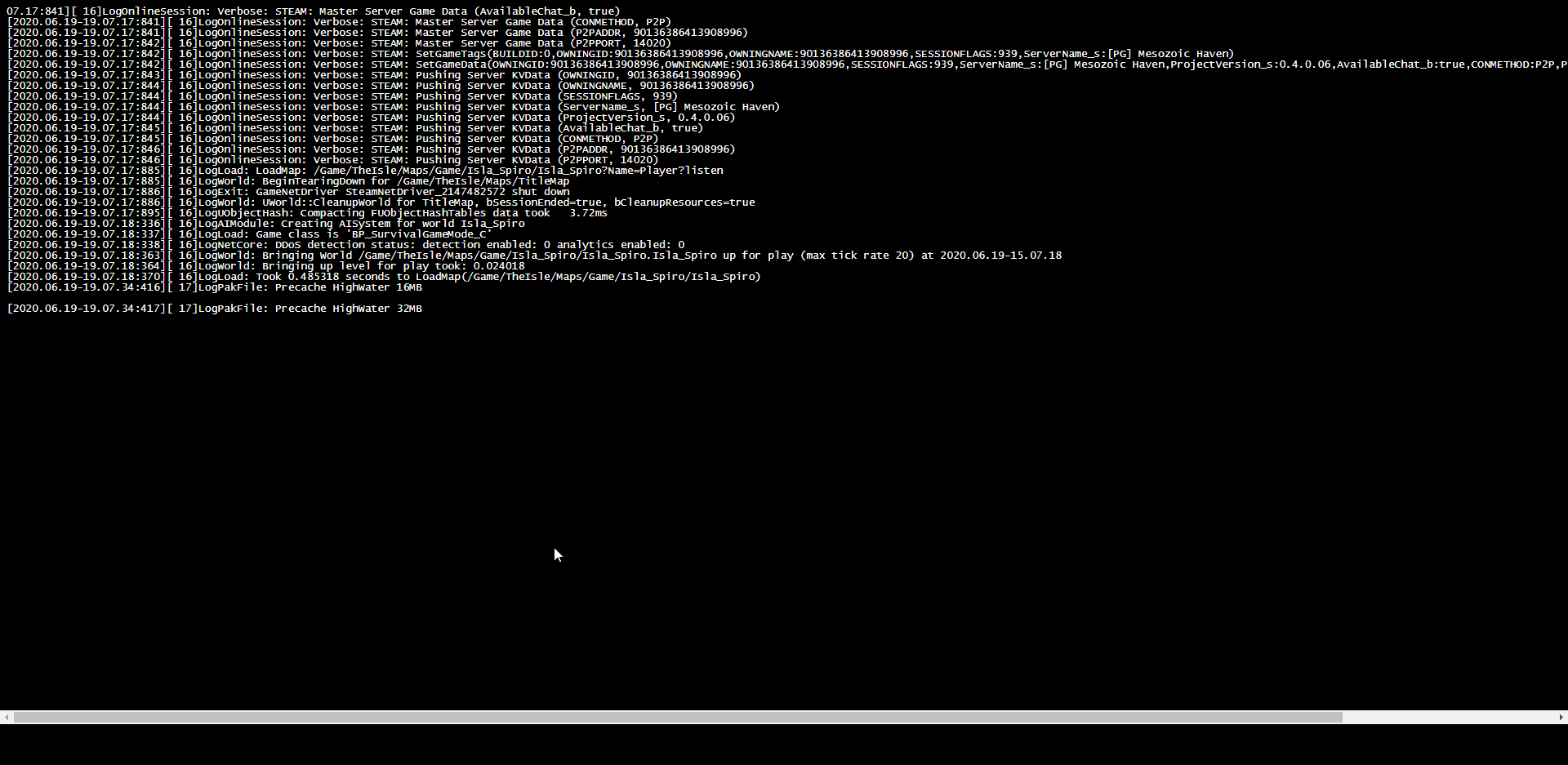 graceful tendon
Hummm ...
round flower
mine is freezing in exactly the same state/spot
cosmic oak
https://i.imgur.com/RlCP0FQ.png
@hollow moon If I'm right, it should come up with another precache for another value after that. 48 i think?
hollow moon
nope, that's the last one and its been like 32 for a couple mins now
Full server name: [PG] Mesozoic Haven since we run a PG community.
round flower
Mine is Isla Solaris. I am restarting it again but same issue, was up and i couldnt find it in any means
cosmic oak
leave it running for a moment please. One sec.
round flower
yup yup
cosmic oak
hollow moon
weird, it doesn't show for me with or without a vpn
cosmic oak
The list is sorted weirdly.
round flower
Noice!
cosmic oak
checking isla solaris..
round flower
at least its there though. Cant see it in the steam server list either?
cosmic oak
carni
round flower
looks like it SHOULD be running now Myst
cosmic oak
ok.. two secs.. or however long it takes xD
 modest patrol
iron moon
modest patrol
iron moon
Ah! That worked! Thank you so much MystNL u vu~ <3
I appreciate all the help you're giving at the moment.
hollow moon
ok it shows for me finally
iron moon
Much love u vu~
hollow moon
let me message ping so they don't mess anything else up haha
cosmic oak
You're welcome, dont thank me. Thank devs. :)
iron moon
I can't give them enough appreciation for how much they're doing
they're doing the lords work
cosmic oak
@modest patrol can I see your game.ini please, and what hoster do you use?
round flower
aye i found Kenzo's server as well lol
hollow moon
lol now I am stuck with this and I can still move around and do stuff:
https://i.imgur.com/hizZ2S4.jpg
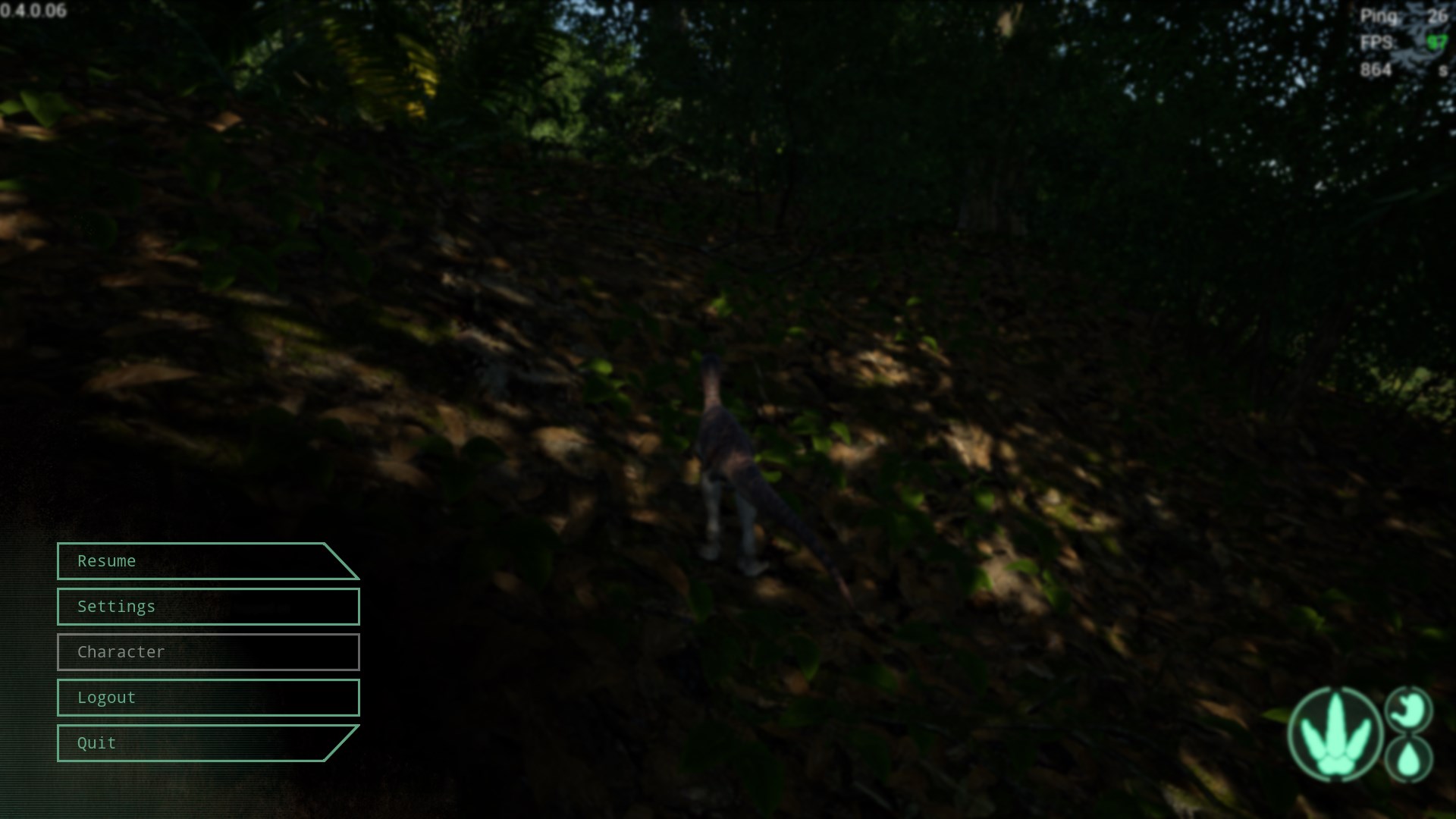


 modest patrol
@cosmic oak it just came now, it ran hours already, i have 2 evrima servers, 1 runs all time without crashes and the other one crashes from time to time, both have the same game ini except name and ports
spare hedge
so I've been trying to get my admins working and the only one I cant get to work is the first on in the list
cosmic oak
ok one sec.
@cosmic oak it just came now, it ran hours already, i have 2 evrima servers, 1 runs all time without crashes and the other one crashes from time to time, both have the same game ini except name and ports
@modest patrol One sec... need to pay attention :)
so I've been trying to get my admins working and the only one I cant get to work is the first on in the list
@spare hedge How does the game.ini file look?
It should look like this:
[/Script/TheIsle.TIGameStateBase]
AdminsSteamIDs=76561197965403109
AdminsSteamIDs=76561197987643109
AdminsSteamIDs=76561197345345109
merry urchin
I got my server working after an entire day of troubleshooting qith pingperfect staff lol
round flower
@spare hedge hey again! you add the "+" to the admin line?
hollow moon
tho the grow button doesn't seem to work for me
merry urchin
mine is Fading Legends yeet
round flower
i must have missed that conversation earlier
hollow moon
even tho I can access the admin panel, name in chat is yellow
cosmic oak
Mine is Isla Solaris. I am restarting it again but same issue, was up and i couldnt find it in any means
@round flower I cant find it either. Game.ini please?
merry urchin
also what button is for admin comands again?
cosmic oak
END
merry urchin
I need to set that up think
spare hedge
AdminsSteamIDs=[steamID]
+AdminsSteamIDs=[steamID]

[/Script/TheIsle.TIGameSession]
ServerName=Isla Provectus
MaxPlayerCount=50
bServerGlobalChat=true
bServerNesting=false
bServerFallDamage=true
bServerAllowReplayRecording=false
bServerDynamicTimeOfDay=true
ServerTimeOfDayInSeconds=21600
ServerLengthOfDayInSeconds=3600
bServerDynamicWeather=true```yeah remove the + sign
spare hedge
@round flower
round flower
sure thing. one sec
cosmic oak
That'll fix your thing
cosmic oak
if the button isn't working then try /adminpanel or see if your name is yellow in chat.
if thats not the case, you are not admin
spare hedge
yeah remove the + sign
@cosmic oak when I start it it adds it automatically
cosmic oak
@cosmic oak when I start it it adds it automatically
@spare hedge stop server completely. Edit file. Start server.
make sure you stop any batch files too
Coz they will restart the server :)
spare hedge
ok thank you
merry urchin
So, how do you make yourself or someone an admin with pingperfect?
round flower
huh. My Game.ini is blank now?
cosmic oak
So, how do you make yourself or someone an admin with pingperfect?
@merry urchin I'm assuming the same way you do with the usual server:
Edit game.ini and add in the steam64ID of admins with:
AdminsSteamIDs=01234567890
huh. My Game.ini is blank now?
@round flower that explains a lot :)
merry urchin
ok, ty
round flower
lol ikr
 karmic ingot
i get error on my pingperfect server it won't start any solution guys?
round flower
i know what i need to do
cosmic oak
i get error on my pingperfect server it won't start any solution guys?
@karmic ingot Can i see your game.ini please. A screenshot will do
merry urchin
my stema id is in there already though
cosmic oak
my stema id is in there already though
@merry urchin Show me please. (nothing to do with trust, just wanna confirm a suspicion)
merry urchin
I'll dm you
cosmic oak
sure
cosmic oak
Works fine. Just enter 1.0 for fully grown and press grow
cosmic oak
Jup :)
cosmic oak
havent had that issue but it might. Seems like a minor thing
hollow moon
kinda, now i have to find my server again lol
karmic ingot
i get "can't connect to remote server" when trying to open the text editor or config. editor
cosmic oak
i get "can't connect to remote server" when trying to open the text editor or config. editor
@karmic ingot wbuh?
spare hedge
make sure you stop any batch files too
@cosmic oak yea so that didn't work
cosmic oak
what happened?
spare hedge
i even did a full systen reboot
 solemn igloo
Is there a way to join a server VIA IP?
spare hedge
added the +
cosmic oak
Is there a way to join a server VIA IP?
@solemn igloo Not that I'm aware of but I'm not discounting the possibility.
solemn igloo
Ty
cosmic oak
added the +
@spare hedge k, gimme a few, too many convos.
merry urchin
got admin wokring, now for the discord server sigh
cosmic oak
discord server?
modest patrol
Fairly easy it seems: You ran out of memory.
@cosmic oak ram?
cosmic oak
That's what the error said..
modest patrol
i have 64gb xD
it uses not even 20
graceful tendon
try restarting your comp
cosmic oak
I've seen people saying the server can have memory leaks
graceful tendon
mite of had a little hiccup
modest patrol
yeah in this case this might be the issue
graceful tendon
yeah try restarting the server/computer
hollow moon
Is the MOTD thing not added yet, I assume?
graceful tendon
dont think so
hollow moon
hopefully soon, that way if no admins are on, people can know the rules
graceful tendon
yeah.. im sure it will come in the next few days
in one of the many updates we'll get this week
cosmic oak
Aaaand another happy customer. What else we got?
merry urchin
anyone else admin screwly on there server? I enter the right steam id and my name is yellow but my steam id in game are all 7 and i was told there are admin commands working now?
cosmic oak
Jup.
The tab screen is weird, confirmed.
Yellow = admin
and admin commands are through the END key or by typing /adminpanel
hollow moon
Love the new admin ui
merry urchin
thank you
hollow moon
Much easier for my non tech-savvy co owner
 kind terrace
Is there a way to join a server VIA IP?
@solemn igloo
Actually there is but the problem is that the name of servers for the new build are all numbers.
You will need to get the IP of the server you want to join (if they will give it to you)
In steam > View > Servers > Filter > find the isle > list of servers should show up.
If you have the IP of said server you can go to favourite (view> servers> favourites) right click > select add server ip.
cosmic oak
Well there ya go, not perfect but possible! Thanks Nuka!
kind terrace
Not problem. It is possible since i tested it with the server i admin that wasnt showing up for me and it does work.
Through gaining the server IP.
The main issue is ofcourse not being able to see the server name through steam since its just numbers haha
You will just need to ask the admins of the server (doubt gaining it for the official servers)
cosmic oak
exactly. I'm sure we'll get filters soon enough. Just wasn't important for the first release. (and technically not a server issue xD)
 pastel sleet
So i got my server running, when I go into my task manager it's there, and I go in-game and the game says 'steam is not connected' and my server list is empty. So far i've tried |exiting out of everything and then starting my server, waiting for it to be ready, then logging into steam and launching the game| Adding my server to the favorite servers list| changing my ping. Any ideas?
trail trout
Is the night available ?
cosmic oak
Is the night available ?
@trail trout There's a server option for setting time values but all I know is that its disabled.
So i got my server running, when I go into my task manager it's there, and I go in-game and the game says 'steam is not connected' and my server list is empty. So far i've tried |exiting out of everything and then starting my server, waiting for it to be ready, then logging into steam and launching the game| Adding my server to the favorite servers list| changing my ping. Any ideas?
@pastel sleet Did you use steamcmd to install the server files?