#server-hosting
1 messages · Page 29 of 1
 sturdy harness
 merry urchin
Anyone know what to put in the character class to spawn an Acro?
I tried Acro like the Spino is, but that didnt work 😦
 weak arch
Also just wondering is it possible to run multiple isle servers through one dedicated server?
 naive onyx
You can through the same computer yes
 wispy crag
Does anyone have a rough idea of the typical per-player load on the server/network? Would be useful to calculate how much you could support for a given memory size, connection throughput, etc.
merry urchin
from what i have seen, its maybe 15-25kbps per person as far as network
wispy crag
And memory needed to comfortably run a large map like V3?
merry urchin
i have 8gb and it consumes about 3.6
wispy crag
Thanks for the feedback! Seems pretty efficient, overall.
merry urchin
yea i was surprised
wispy crag
I don't suppose you know if there's a way to direct connect to a host on a private LAN that doesn't show up in the server browser? Seems like a pretty big oversight in the UI.
merry urchin
i only run a dedicated so im not sure my friend
 sterile plinth
I had a few questions about the following line in the Game.ini for a Server;
[/script/theisle.igamemode]
bServerDynamicTimeOfDay=0
ServerDayLength=60
- what does the bServerDynamicTimeOfDay= do if set to 1 or 0, respectively
- in regards of the ServerDayLength=60 ; If I increase/Decrease this value, does it impact the entire Day/Night cycle, or only the day?
Also, does having it set to lower or higher values strain a server in any given way?
merry urchin
What i have found is that those commands are deprecated. The server will always alternate day and time and they are at a static setting.
an admin inside though can type /time morning
and that will reset the day according to the starting time you have set
sterile plinth
Thanks for letting me know
 strong heart
Not too familiar to server hosting but is there any way to edit the coding when it comes to shortening the growth duration of each dino when on the survival mode?
 neat berry
any guides out there for setting up a dedicated via ubuntu server 18.04?
naive onyx
@strong heart No, that would be more of a dev kit thing if anything, which dev kit is borken/not available as of right now anyhow.
neat berry
@eternal breach just saw above that Linux isn't supported. I was gonna try and run a server via Ubuntu server but I guess best bet would be to virtualise a windows OS and run it from there?
weak arch
If you running linux then yes
it used to have support i just went through the same thing
neat berry
ubuntu, which i guess is linux essentially
weak arch
Yeah I understand what your talking about
its only supported for windows os atm sadly.
neat berry
fug. welp, time to virtualise win7. or do you reckon win server would be better for it?
weak arch
Either or works fine
As long as you ahve enough ram to support hte os and run the server
neat berry
got a Dell T420 fully kitted out
neat berry
as in the game?
weak arch
the server hosting does
 haughty marten
is there any list or something to the available admin commands when you're a server admin?
I know the whole /help but I'm pretty sure theres more than that
naive onyx
everything listed in /help is all you can do afaik, the rest are dev only commands for now
weak arch
whats the average upload speed per 100 person server thats maxed out?
trying to figure out my speed options internet wise
neat berry
supposedly its about 15-25kb/s per person, according to @merry urchin
merry urchin
@weak arch @neat berry I just did a test with one person after i got a baseline of the server just sitting there (Server 2012 R2) and after getting in and running around/roaring and doing things I came up with the numbers below.
Send: 50Kbps
Recieve: 40Kbps
This will be per person connected.
weak arch
Rip that complicates things
merry urchin
I didnt want to steer you wrong my friend
weak arch
No I appreciate the test honestly.
whats the usage of just the server itself running if you can test it?
merry urchin
sure one sec
weak arch
I have about 20mbps so i can run it but i was hoping to run up to 8 servers if need be but that doesnt seem likely
merry urchin
and remember your internet is probably not synchronous. so your up is probably around 3-5Mbps
no one on right now, fresh restart
Feel free to use mine and i can make you an admin if you like. I need someone to hang there and bring people in!
weak arch
No thats my upload speed my download is 250ish
but thanks for explaining it and i mean id be happy to hop on if i get the chance im also growing my sever at the moment
if you can try posting it on reddit and building acommunity
It worked well for me just dont spam post it or atleast i wouldnt
I have gotten to 30 people on at once by doing that and getting some good people who wanted to play on the server
easier to get a group of friends and just mess around honestly
the days of spending time in party fields were a real thing
merry urchin
well thanks for that my man! Can you link me the reddit page you posted on?
and did you have problems when there were 30 on?
weak arch
None but the server im running right now is on google cloud
I figured id test it out as a project and it worked well
but I cant afford 120+ a month to host it there
merry urchin
oh good lord yea. Im an IT director so i spun it up on our 80k worth of VMware infrastructure lol. 1GB up and down fiber as well 😃
neat berry
ty for the tests @merry urchin , that means I should be okay to host a 100man serv with my 100/50 net
now i just gotta figure out how to virtualise win2012 on ubuntu D:
also screw you and your google fibre. i am maximum jelly
weak arch
i mean your pretty lucky with 100/50
im stuck with 250/20
why my upload gotta be so low
neat berry
disgusting
weak arch
I mean its enough to run 4 servers though so its fine

 lapis estuary
is there a setting to increase/decrease growth rates and also thirst and hunger?
 heavy temple
Is there a good place to advertise new servers in this discord?
neat berry
could i get someone to test if they can see/connect to my server?
lapis estuary
if you can't see or connect to your own server then others can't
 violet marsh
@neat berry are you running the server and the game trying to connect on the same machine? If so then it won't work.
@lapis estuary No, not currently
@heavy temple There's a forums tab called Looking for Groups or something like that in the discussions of the game on Steam where you can advertise other servers, but you're not allowed to anywhere in this discord as far as I'm aware
haughty marten
Can someone help with finding the file path to changing server logout times?
neat berry
@violet marsh Neg, server is on its own but on the same network
I'm desperately trying to forward ports atm cause that seems to be the issue. 7777-7778 and 20715-27016 aren't open. in fact no ports are :/
violet marsh
I can hop on and see if it's visible for you really fast. Just to double check. What would the name be?'
neat berry
[Oceanic] Uluru Station
maybe [Oceanic] Uluru Station [ High AI | Low Ruleset ] dunno if its configured properly
def running tho
violet marsh
Alright, if it's still running give me a sec to check
 wary wigeon
Can't seem to get my server to show up on the server browser
anyone have that issue?
I can search for it in the steam server browser, but not in game
violet marsh
What's the server name and I can check for you
violet marsh
also @neat berry I'm seeing an Oceanic LFDU 1 and 2 but no Uluru Station
And yeah give me a sec
wary wigeon
TheIsleSe 22710 steam 26u IPv4 101414 0t0 TCP isle-01:34407->162.254.192.101:27020 (ESTABLISHED)```those are the only ports I see listening there
violet marsh
If I'm not mistaken you need 7777 and 7778 running as well
wary wigeon
/home/steam/isle/TheIsle/Binaries/Linux/TheIsleServer-Linux-Shipping /Game/TheIsle/Maps/Thenyaw_Island/Thenyaw_Island?MaxPlayers=100?game=Survival?Port=7777?QueryPort=27015 -log -server
violet marsh
I'm not finding it also
violet marsh
Yup, nothin
wary wigeon
well crap
hmm
does anyone have an example start line
maybe I am doing something wrong
tried adding: /home/steam/isle/TheIsle/Binaries/Linux/TheIsleServer-Linux-Shipping /Game/TheIsle/Maps/Thenyaw_Island/Thenyaw_Island?MaxPlayers=100?game=Survival?Port=7777?QueryPort=27015 -log -server -listen the -server and -listen arguments but that didn't do anything
bah, ill look later. Thanks for your help @violet marsh
violet marsh
No problem, also the commandline that PingPerfect uses for our server is
/Game/TheIsle/Maps/Landscape3/Isle_V3?MaxPlayers=20?game=Survival
If you're following the guide posted in the discussions of the game itself and it says to put all of that then there's no other advice I can give you
violet marsh
Same, and not a problem
neat berry
success, finally got it going. But i'm having issues with the server cap. I've followed the guide above but it still keeps capping at 50. Is there another codeline I need for the game.ini?
weak arch
nope are you sure its put in correctly on the bat?
neat berry
yeah i fixed it. Didn't put it under the right category to execute
Do you know where I can find the full admin commands? like to TP people and fly, see AI etc
 white kite
type /help in the game chat
all available admin command will show up @neat berry
to "fly" in spectator mode, check your keybind to see what key, I don't remember which one it is because I rebinded mine. Pressing the key once will take you into spectator mode, hitting the key again will exit spectator mode and bring you back where you were. If you hold "shift" while tapping it the second time, it will teleport you to where your spectator camera is.
to see AI's (and everyone's names) just hit the "delete" key.
neat berry
Awesome, thanks Paco. Good info for everyone to know since it took me forever to figure out (checking the controls would have helped)
 little trench
@wary wigeon Linux support was removed.. You would of ran it from /home/steam/isle/TheIsle_linux_server.sh (Or file called something like that.)
heavy temple
@violet marsh Thanks!
wary wigeon
Ok, well this is incredibly frustrating now
Installed windows got everything running
still can't see it in the server browser
forwarding 7777-7778, 27015-27016 UDP to the internal IP
violet marsh
Forks are you still testing?
wary wigeon
Yeah, but I am giving up on my LAN network, putting it on the internet
violet marsh
I'm available to check and see if it's popping up for me if you want to get an outside view really fast
wary wigeon
Got it!
it was the MultiHome option that needed to be set
Let me know if you want to help make my server bleed tonight
 arctic apex
If you switch from Sandbox to Survival, does it automatically lock/disable the Sandbox dinosaurs or do you have to go in and manually disable each one? Thank you!
little trench
Well, the Linux files aren't getting updated, so unusable.
violet marsh
@arctic apex When you switch to survival the gamemode only gives you the option to select survival dinos, no Sandbox-only dinosaurs are available to be chosen.
However, if you wanted to go sandbox and for some reason wanted survival dinos disabled then you'd need to go in and disable them
arctic apex
Okay great! Thank you so much @violet marsh
neat berry
on that line of questioning, is is possible to enable specific disabled dinosaurs so they're selectable from spawn in survival?
 crude vessel
how do i host a server?
violet marsh
@neat berry I do not think that this is possible. As far as I understand it, you only have the functionality to disable dinos, not enable them
@crude vessel There is a guide to host a server located in the discussions for the game on Steam, I believe posted by StolidSnow. If you scroll up a little you'll be able to find it for sure. As far as I'm aware, it contains everything that you need to get the server running, right down to downloading the tool
naive onyx

Having had trouble finding a clear and updated way to do this, I decided to create this guide for those of you who wish to host a dedicated server. This is a server you can host on your computer and n
And yeah, at this point in time there’s no enabling dinosaurs, however you can set people as non survival dinos in a survival server
 tired prism
Can someone actually make a video on how to make a sever it never works for me so please make a video on how to do it
weak arch
That guide is as correct as can be surely your making a error or not port forwarding
What happens when you run the bat file?
tired prism
it says went to watininginprogress to start in progress but it wont let me launch the game after that
Okay im following the steps but im stuck om the port forwarding not giving how to do it
Any help
Nvm I give up this is really fucking stupid how you have to do all theses steps just to make a server i give up i quit
Just for one game as well
So why dont the devs make it alot easier to make a sever or help me
little trench
Making the server is easy and simple. This will show you how to do the Game Server side of things. Steps list in description/link https://www.youtube.com/watch?v=SbHf0PzOc-s
Port forwarding is a different thing. All games have this step regardless if you are hosting from home on some cheap knock of modem from your ISP *COUGH* TELSTRA *COUGH*, it's going to be a heart ache, but you can get it working if you stick with it 😃

Get your Isle server started quick and easy. Everything you need will be on my site below. http://playground-au.tk/howto-the-isle-dedicated-server/ https://d...
 woeful plume
Does anyone know how to put the MOTD ?? I tried to put one but it does not appear every time you enter the server
little trench
What have you done yourself to do it?
You need to make a MOTD.txt file in the Saved folder and add your motd in that.
@woeful plume
 vital pumice
Hey. Help. I can not understand why the server does not work. Ports are open
little trench
Feel free to DM your server conect info, othjerwise make sure firewall has allowed the server
woeful plume
@little trench thanks, works fine 😄
little trench
👍
tired prism
No offense Grinny I've watched your video I did all of that but I got what cuslya got and yeah
I usally do better when people are talking but theres more it than your video though
now everytime I launch the game it doesn't work or find anysever so Idk
Also I'm getting the same thing as cuslya and I allowed firewall to let it happen so I don't know
little trench
I don't normally do home hosting I don't have these issues.
Nothing there saying it's not running, it's running. Check your server Ip in Steam Servers instead of game to see if you can see it
might not be showing in game.
weak arch
are you running the bat file?
or just running the server file?
match state means nothing
it means the servers running
if it doesnt show up its not port forwarded correctly
 twilit geyser
can anyone see if Wompa Land is on server list?
 nocturne fractal
@hoary cave hi could u mind having a chat in private?
 river stag
Can anyone give me some help with settings/config for a server? I have it up and running on my own dedicated box just want to know how to configure some things
weak arch
theres a wiki page
 eternal breach
im working on a new wiki for server hosting as well, hope to have it done by tonight
violet marsh
three 👏's for looter
 frozen fern
how do I get out of freecam
 shy urchin
I just get a lot of AI spawning in one spot on my server what are some of the settings people have for theirs? I don't know why but on thenyaw it seems to clump
violet marsh
@frozen fern if you haven't figured it out yet the original binding for it is the backslash right above enter so the \ key
frozen fern
oke thank you!
haughty marten
what number should I set Ai too for high Ai on a server, Default being 3.0?
violet marsh
I don't think that the ai numbers actually affect anything right now @haughty marten From what I understand, they just currently aren't considered when the server starts
haughty marten
I changed it to 20.0 and it seems when u have 3+ carns in an area 2 will spawn at a time, but before when it was 3.0 u killed the 2 and none would respawn for a while, but at 20.0 if you kill 1 another will take its place instantly
violet marsh
According to looter that stuff doesn't matter
So I think you're just getting some pretty nice coincidences honestly
I've noticed that if I'm the only carni in an area or on the server, then ai will spawn around me constantly if I'm not moving, right after I kill them or not.
 past current
hey how do we increse npcs in a server?
naive onyx
if you mean ai, then you can't right now
violet marsh
It depends on which service you use, or virtually free if you host it yourself
 thorny flint
how would I host it for free?
violet marsh
I'd you scroll up just a little StolidSnow has posted a guide that he wrote that goes over all the technical details and steps needed to get it working
arctic apex
Is anyone having trouble with their server memory immediately filling up right after doing a restart and "emptying" it? Our PingPerfect server is currently unplayable, and the only advice we got back was to upgrade the RAM or remove uncessary items from the map. Like WTF?
 tardy shell
can i run isle server on ovh?
little trench
Yeah you could.
 sonic horizon
Is the code for Alberto still Albert?
tired prism

wrong channel my bad
naive onyx
Should be
 undone pine
is there a way to expand the server from 200 to 300 players?
 atomic helm
@arctic apex same issue with memory and no one is on the server. It appears to be something with steam as the game itself keeps redownloading for me. Did update from yesterday and I guess best to wait for it to resolve. Edit: Actually, it seems to be the config files as logs state that settings in them overload steam. Then it has problem with missing 'slate widget' files elements so more likely either on steam end or pingperfect itself. Edit 2: It actually seems to be the very same error of steam wishing to re-update. I upload the log in case someone finds it useful: https://pastebin.com/mW76m5xH. Edit 3: My game stopped redownloading and worked properly but server did not despite me updating files. We shall see what tomorrow brings.
neat berry
Not having this issue at all but I am using the SteamCMD version to host
 delicate nexus
Anyone happen to have a list of all the "SkinPaletteSection" color codes? I was hoping to mess around with dinosaur color palettes on my private server with colors you can't choose by default for a specific species.
naive onyx
I don't think one exists yet since its still only really new
delicate nexus
Yeah I figured that would be the case. I mean I can always manually check by picking certain colors on the character screen and then spawning in but I was hoping there'd be an easy way haha
 half badge
What does bServerDynamicTimeOfDay=0 mean btw?
nocturne fractal
Any ideas on how to update a server?
neat berry
If you're using SteamCMD, all you need to do is type this in SteamCMD.exe: login anonymous force_install_dir <path> app_update 412680 validate
delicate nexus
Messed around with the "SkinPaletteSection" but I guess the colors don't apply if they're not applicable to a certain species by default. My dreams have been crushed. I hope that they change that in the future.
eternal breach
we have no plans to allow server owners to apply colors not allowed for a character outside of mods in the future @delicate nexus
delicate nexus
Oh, okay. Good to know. Thanks Looter!
 toxic crescent
hello, are Hypos available? <@&401466542140817419>
merry urchin
@toxic crescent No, Developer only.
toxic crescent
thanks
merry urchin
hello all... so the other day when i was testing setting up a dedicated server on Linux and it seemed to download all needed files. though today it is not able to download any server files. i checked steamdb and currently it looks like there is only a windows version available. is this a known issue right now?
little trench
Linux support was removed a while ago
merry urchin
well i was running a linux server just the other day... how long is a while ago? and that is not what steam says.
and the beta version shows a linux version... so im not sure why the public current version doesnt have a linux version
 oblique bramble
Hello there. Is there anyone who can give me a (step by step tutorial) on how to set up a proper server on The Isle? I can’t find a guide anywhere lol
weak arch
stolid posted one
thorny flint
so who can help me host]
wait that stolid dude
id rather buy one, what are the best web host
 robust crest
So whose the best server provider?
white kite
Personally, I recommend PingPerfect, never had issue dealing with them. @robust crest @thorny flint
robust crest
appreciate it @white kite been having some issues with another provider that we would like to remedy.
thorny flint
ight thx
violet marsh
@undone pine are you hosting the server yourself or are you hosting it through a provider?
violet marsh
Alrighty, find your Game.ini file. This is the file that holds the configuration settings like the max players. Find it and open it with some kind of text editor and see if there is already a line that says max players somewhere in it
violet marsh
What do you mean? Like offer your server to host the official servers on?
undone pine
like turn a private server to official server
because i think there is no Asia official server
otherwise the ping of the server that i host is really high so I'm planning to buy an official server.
violet marsh
Well, if anyone's to talk to about that it would be Punchpacket
I would dm him something about it if you were serious about it
little trench
@merry urchin https://steamcommunity.com/games/TheIsle/announcements/detail/1702806817968306649
Linux files aren't getting updates. Last I looked it didn't even have the script files to start the server.

Greetings Islanders, We are regretfully starting the process of phasing out support for Linux dedicated servers for The Isle. This is due to both engine performance issues we have encountered when running linux servers, and most importantly, the new third party technology we ...
 cursive light
How to change the length of day and night? what commands to register
cursive light
i want day 1h and night 30min
neat berry
@cursive light Put this code in your game.ini file: ```[/script/theisle.igamemode]
ServerDayLength=60
I don't think custom day/night length is implemented yet, it's simply a split of the total. So 60m = 30m days, 30m nights.Just tried to see if ServerNightLength= does anything, nope
 dusky topaz
Anyone knows the command for the server to disable dinosaurs in sandbox?
weak arch
Anyone else having the ai fall through the map?
 dusky hearth
@dusky topaz try this guide: https://steamcommunity.com/sharedfiles/filedetails/?id=1231855950

This guide will tell you in text form how you as a server owner of a The Isle server can disable any Faction from your server and how you can also access and edit the database in your server to be abl
violet marsh
@cursive light @neat berry currently there is no way to change the night cycle lengths and in changing the daylight cycle lengths you also have to give up being able to change the time of day through ingame admin commands
@weak arch I think this is currently just a problem with the AI spawner in general and you're in a bad area. Try moving to a different area and see if the problem persists
 tiny vault
Can someone show me a screenshot of a server console thats working i never know if mine is because it wont let me play amd hose on same machine help plz.
delicate nexus
press \ to go into spectator mode, Anillex c:
dusky topaz
that kinda didn't worked for me 😦
lapis estuary
having a technical difficulty. for some reason i can't get my discord link to show up in the server details
nor the motd message
tiny vault
So no to screenshot?
weak arch
Whats the issue diamond?
it wont let you play on the same machine?
Are you running a bat file or just running server exe?
lapis estuary
if you're running on the same machine as your server run it through port 7778 and query port 27018. it won't conflict with the ports the game natively uses when you launch it. then you can play on the same machine
tiny vault
is there any way someone that operates a home dedicated server can pm me i have followed all directions and get an "Error" couldn't start"
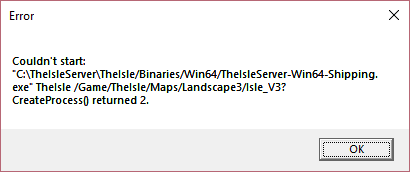
any advice?
i was also having troubles setting static IP it couldnt connect to internet after i changed IPv4 and subnet
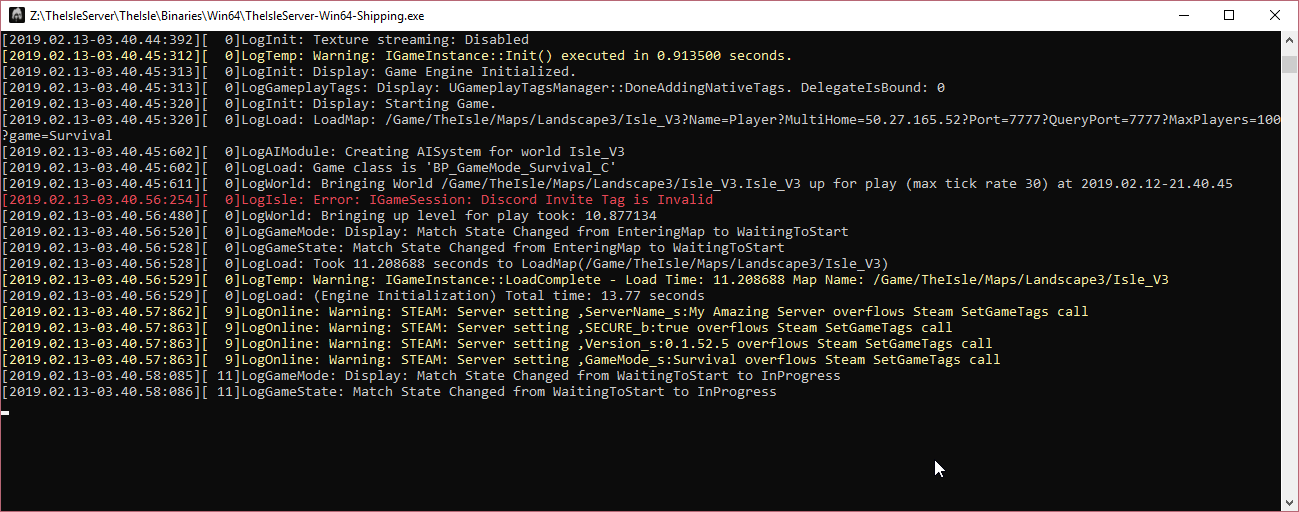 tiny vault
<@&401466542140817419> i cant seem to find my game so how do i know if it is running? me nor my friends can located it in server search?
@lapis estuary i changed my ports and can play and run but i can not find the server i just set up and can not find answers anywhere
tiny vault
All is Good thanks
tiny vault
1 more question. I tried giving myself a dino and went through the Database\player\survivor and found my id changed the dinoclass to "SpinoAdultS" and i still do not have access to it.
naive onyx
Spino isn't in survival, just do Spino @tiny vault
 kindred silo
neat berry
kindred silo
neat berry
Hello
merry urchin
what are the best and cheapest sites to get a server?
tiny vault
@naive onyx so just spino as the dino class and then growth is what affect its maturity?
naive onyx
Yeah, 1.0 will be fully grown
tiny vault
Sweet thanks i will try it later.
<@&401466542140817419> would it be okay to post my server name here? Im trying to stress test the machine its on amd check its performance before transfering to a more permanent machine to run off of
 inland flower
As long as it's not an advertisement that should be okay.
tiny vault
No just want to check parameters is all i have in the MOTD that is a test server and will be transfered to stronger machine later. And thanks
Its Alda Gaming Official for server name i just need a good base for what i need to upgrade in the server and then transfer over based on performance is all again thanks
 quartz scaffold
so whats the deal with ai now?
sonic horizon
Ai spawns when carnis are hungry i believe.
quartz scaffold
in my server they arnt what so ever
 full coyote
does bigger the server mean the worse performance? I noticed that when I play on larger servers I have excessively high ping, then I go to a low pop server and everything is fine.
 pliant plover
Yep.
That’s how it works.
That’s why you see a server like nycta with two hundred or so slots but it runs like garbage for a lot of people.
A decent number for a server is either 100 or 80 depending on the map, maximum.
 unreal hull
it's around the 160 mark that things just become completely unstable. the AI system can't cope with that many players to sort through so it starts misbehaving if you have a server that large.
full coyote
I'm on a server right now with 60 people and my ping is anywhere between 200-300 and it's noticeable
violet marsh
Tea are you using the onscreen debug ping or are you using the character menu ping
They show different values last I checked, the debug being higher
 vast tangle
So i am hearing of a patch tonight.. Do we know roughly when that will be so i know how long i have to stay up??? to update servers
violet marsh
Were told 3-5 hours (if nothing went wrong) at about 7:00 p.m. CST, so anytime from now to 2 hours from now is the expected time
I think
let me double check
vast tangle
ok ty @violet marsh
violet marsh
👍
 jade whale
Can someone message me or let me know if their server is having ai problems on most recent patch? tried various ai settings no luck for me
violet marsh
@jade whale if I'm not mistaken none of the ai settings are supposed to work as the system they influenced was removed in May of 2018 according to Looter
jade whale
ah okay ty
merry urchin
So can I host my server throught Steam CM
CMD*
But last time when I unpacked it I couldn't find it
naive onyx
You gotta tell it where the install directory you want it to be is
merry urchin
How I can set it up?
full coyote
I was just using the ingame ping to judge. but even without the number being represented- it is obvious when I ambush an AI and spam attack and it doesn't move. then after like 4-5 attacks the AI freaks out and starts running away then at some point I finally kill it
lower server populations make the game feel good
it's not until I start playing with 50+ people that the server starts feeling bad
it makes me wonder if the offical servers are running better hardware than a lot of the custom servers are
neat berry
@merry urchin Use this guide. It is a bit higher up but you do need to scroll pretty far. https://steamcommunity.com/sharedfiles/filedetails/?id=1502947359
Having had trouble finding a clear and updated way to do this, I decided to create this guide for those of you who wish to host a dedicated server. This is a server you can host on your computer and n
merry urchin
@neat berry it is made by using SteamCMD?
neat berry
Yes
merry urchin
Alright
I will take a look
@neat berry I'm confused in
"
Now, with these numbers in mind, hop on over to the Control Panel and go to Network and Internet. Then go to Network and Sharing Centre and press Change Adaptor Settings, right click your current network connection, and select Properties. You will then be greeted by this window."
since I have polish version of windows
and when I follow it I think right
I don't see change adaptor settings thing
neat berry
@merry urchin Click on the Connection Type link (eg: Ethernet 2), that'll open up the page you're looking for. Then Double click Internet Protocol Version 4 and continue from there
Connections: Ethernet 2 within Network and Sharing centre
wary wigeon
Is there a way to turn on AI dinos outside of the food dinos?
violet marsh
If you mean is there a way to make ai spawn that isn't oro, velo, or taco, then no. And velo is only available on Thenyaw at the moment
merry urchin
Can we please have a way to customize what colours our admins have in-game, and also a way to mute players from speaking in global for a set duration? 😄
unreal hull
@full coyote probably not better hardware. just saner limits. putting playercounts well above 100+ is not a good idea.
 cloud thistle
@digital mesa that injection guide you had posted a while back is that valid for external sql databases?
I had been doing research and keep finding conflicting info on if there is a hashing function that the game uses to validate
 digital mesa
I don't get exactly what the problem would be here, but as long as you have access to the game's database with all the people's dinosaur information stored in there, the guide should be good to use
cloud thistle
I'll test it out when I'm able, I've been reading that allegeldy the game compares hashes against the database info then deletes the file and replaces with empty
little trench
That is old way, when the game actually use the sql database. Database all in JSON plaintext, there's no hash in it.
cloud thistle
Is there no more native database functionality? @little trench
little trench
As far as I am aware and see, it's just textfiles in saved folder, for every player, and bans
cloud thistle
Understood thank you 🙂
 flat vortex
Does anyone here know a good hack for running this server on Linux? I'm pretty loathe to spin up a Windows VM when I host all my other servers in automatically deployable Docker instances in Ubuntu. I'm going to investigate Wine command line options but would like to avoid that if possible.
I do know that the devs dropped native Linux support, which makes me sad.
 vagrant hound
What rate do people have dead body time on?
delicate nexus
on my server its 10 minutes
eternal breach
@flat vortex the best solution for containerizing this game right now, is Windows Server 2019, with WSL setup, so you can run windows or linux containers on a server, but it's expensive and hard to get ahold of currently
because of this, we don't ship an official image for the server atm
flat vortex
I've got a Windows Server 2016 datacenter license but I've moved away from Windows as a hosting platform. If I come up with anything neat I'll write a guide and share it here. Or create a docker image.
Thanks for the response, I'm happy to see how active this community is
eternal breach
I believe only Windows Server 2019 Datacenter will be capable of hosting optimized windows containers alongside linux ones
Azure and AWS offer it now, unsure on the pricing
merry urchin
hi guys anyone have any idea why our server keeps loosing connection to steam or what not it boots out the players but the server hasnt actually restarted the uptime ?? pls help
naive onyx
to me it sounds like your internet might be dropping out or something but idk for sure
merry urchin
sorry what i mean is all the people disconnecting from a dedicated server via a host. Not just me
naive onyx
oh so you're going through a paid server provider?
merry urchin
yes we are but i was wondering if anyone else with a server was having the same issues :/
merry urchin
GTX ok thanks we will look into it 😃
naive onyx
np, you can always ask through support tickets I assume too so might be worth it to see if they know of it
neat berry
Anyone know how to get a second server to force use listening port 27016? First one is using 27015 by default but goes to 14001 for the second
neat berry
going up in ports, 7778 to 7779 still results in the same listening port off 14001
neat berry
I can host either server independently, but when I go to launch the second it keeps going back to port 14001
flat vortex
Are you using the QueryPort argument? @neat berry
eternal breach
@neat berry you are better off specifying the ports manually in the startup parameters, you must specify Port and QueryPort like so
Thenyaw_Island?MaxPlayers=80?Game=Survival?Port=7780?QueryPort=7781?ServerName=My_Isle_Server
not sure why it chose 14001 for your installation as its supposed to keep bumping up 1 until it finds something unbound
neat berry
This is what I have set within the startup bat but it keeps defaulting to 14001 as the listening port. When run either one on its own it's fine, only when I have both going. Does the same thing If I run it in another login instance of WinServ 2016
does the positioning of the code matter? I have it exactly as is: @echo off cls echo Protecting isle server from crashes... title [OCE] Uluru Station Thenyaw :TheIsle echo (%time%) The Isle Server Started start /wait C:\TheIsle\Server2\TheIsleServer.exe /Game/TheIsle/Maps/Thenyaw_Island/Thenyaw_Island? MultiHome=58.178.219.126?Port=7778?QueryPort=27016?MaxPlayers=100?game=Survival -log | set /P "=" echo (%time%) WARNING: isle server closed or crashed, restarting in 1 minute. timeout /t 60 goto TheIsle
interestingly enough, even when the ports are entered in the .bat, it still tends to use something else. I've set it to 7780 just for the hell of it and it still refers to 7777 and 14001
would the files being a direct copy & paste rather than a new install via SteamCMD perhaps be the issue? Registry etc
neat berry
okay, I fixed it. Turns out the command MultiHome was causing the issue and breaking the rest of the command. AFter that point nothing else ran.
Since I have a static IP i guess even having multi home is pointless
*static external IP
For future references, here is the exact code I am running: @echo off cls echo Protecting isle server from crashes... title [OCE] Uluru Station Isle_V3 :isle echo (%time%) The Isle Server Started start /wait C:\TheIsle\Server1\TheIsleServer.exe /Game/TheIsle/Maps/Landscape3/Isle_V3?Port=7777?QueryPort=27018?MaxPlayers=100?game=Survival -log | set /P "=" echo (%time%) WARNING: isle server closed or crashed, restarting in 1 minute. timeout /t 60 goto TheIsle
The line start /wait C:\TheIsle\Server1\TheIsleServer.exe /Game/TheIsle/Maps/Landscape3/Isle_V3?Port=7777?QueryPort=27018?MaxPlayers=100?game=Survival -log | set /P "="
needs to also be set on one continuous line within the bat to work correctly.
 abstract bridge
What kind of spec pc/server would I need to run a server of 100 cap??
Like kind of cpu, ram and storage...
 regal depot
So i will ask again because there is no info about that still..
ServerAIRate=
if i want HIGH AI rate what should be this ? what kind number there will be??
is it still true ?
naive onyx
It still changes nothing yea
 inner palm
Steam>app_update 412680 validate
Update state (0x5) validating, progress: 0.00 (0 / 0)
Success! App '412680' fully installed.
But the dedicated server will be not installed. Tested and Logged in as anonymous and my private account with buyed game.
The path /root/Steam/steamapps/common/The Isle Dedicated Server is completely empty
naive onyx
did you do the whole Force_Install_Dir C: etc.
inner palm
Yep
neat berry
running windows?
inner palm
No, Linux/Debian
neat berry
not supported
inner palm
But listened
neat berry
they removed support. I had the same issue, setup a debian server until I realised they only support windows.
inner palm
Hmm, okay. Works over wine?
neat berry
looter is probs the best person to ask about that
naive onyx
https://steamcommunity.com/games/TheIsle/announcements/detail/1702806817968306649 this is when they did it
Greetings Islanders, We are regretfully starting the process of phasing out support for Linux dedicated servers for The Isle. This is due to both engine performance issues we have encountered when running linux servers, and most importantly, the new third party technology we ...
neat berry
would be nice if it was working, could've got a nice terminal serv going
abstract bridge
Hey hey, i am wondering as i am currently setting up my server atm, that do i need to have the game installed on the pc i am hosting the server from?? and if not where do the files come from for the game to be placed?
inner palm
No, you dont need to have installed The Isle. You need only the Dedicated Server files. You found them in your Steam Library or by given App-ID 412680 on anonymous login.
abstract bridge
ahh yes, i am doing that now. i didn't log in as anonymous
neat berry
Run TheIsleServer.exe once, that should initialise and create the missing files.
abstract bridge
i got it to work. my server isn't showing up when i search it so someothing is wrong ahah
neat berry
What's the listening port/query port coming up at in your resource monitor?
abstract bridge
im in resource monitor but can't find "listening ort" nor "query port"
neat berry
highlight the PID checkmark for The Isle instance, then go to the network tab then scroll to the bottom
abstract bridge
and also the .bat file i created says "this app can't run on your pc"
neat berry
:/ even in admin mode?
abstract bridge
yep
neat berry
what version of windows are you running?
neat berry
can you send a screenshot of the bat file contents and the error you're getting
abstract bridge
neat berry
the error is basically telling you exactly what the issue is. Use the "snippet" tool in windows to take a screenshot or targeted shot of the .bat contents for me
abstract bridge
okay
 red dragon
What are your AI numbers? im doing max of 400, 100 per person joining on a 50 man server...
is that "too high"
violet marsh
The ai settings in the config do not change anything. That system was removed May 2018 according to Looter and they haven't been set up to change anything in the current AI system, so setting those numbers doesn't do anything for you
red dragon
oh balls really... so there's no way to boost the numbers...
violet marsh
Not at the moment no. I think Looter said something about making a compendium of things that still work and what doesn't, and they'll probably add more and/or be willing to add more server fine-tuning code after the big ol' code cleanout
red dragon
Sweet, one last question. got my server up and running. Now how do I get a MOTD like some of the paid servers have?!
violet marsh
You have to create a .txt file just titled MOTD, but as for where it goes I can't entirely remember
I think it goes in the config file
red dragon
okay
idn bout that, didnt work
how about the dicord link, can never get the serverdiscord= to work right
violet marsh
ok @red dragon So the MOTD.txt goes in the TheIsle\Saved folder. Just put it in there. As for the serverdiscord, if I'; mnot mistaken you need to use the command ServerDiscord=(#'s here) under the [/Script/TheIsle.IGameSession] tag in the Game.ini file.
the #'s here from my message is the last digits of the invite link. For example, https://discord.gg/p8m5Yx is a link to this server. If you wanted to create a link for your server, you'd create a reusable link and then take the numbers (in the case of this link, it's the p8m5Yx) that are on the end of the link and use them inside of the #'s here without the ()
So it'd be ServerDiscord=p8m5Yx
red dragon
awesome, thank you! but neither worked... its fine i have my own server up n running, i guess i cant complain too much
 twilit cargo
@red dragon Don't tag devs.
red dragon
oops sorry
red dragon
Can anyone post a copy if what their MOTD looks like... i cant seem to get it going right and its bugging me
 shell spire
Sorry if this has been asked before. I am trying to find out what the server specs requirements are for the Isle - if i'd want to host a server in my country?
red dragon
@shell spire host it yourself?
 somber merlin
That's what I do, hosting it myself ^^
red dragon
@shell spire https://steamcommunity.com/sharedfiles/filedetails/?id=1502947359 check that website out.
Having had trouble finding a clear and updated way to do this, I decided to create this guide for those of you who wish to host a dedicated server. This is a server you can host on your computer and n
 forest wolf
We have a new server in case who likes to look Official Shining Isle[HighAI] [Ger/Eng]
 grim phoenix
Hey can anybody help me out in dm? I want to know about hosting isle servers with v3 map. and also how to become an admin in different servers
Does PingPerfect works with Isle? Can I buy it from there?
 fringe axle
Yes, PingPerfect is one of many that offer The Isle game servers for a price. To become an admin, you need to put ServerAdmins=YourSteamID64 inside your server's Game.ini file.
grim phoenix
PingPerfect works right. I just wanted to clarify that.
fringe axle
As for becoming an admin on another server, you'll most likely have to apply with them when they open applications.
grim phoenix
apply with them? i didn't understand
I have to request another admin to become an admin? 😮
fringe axle
Yes, PingPerfect works. If you have your own server, you can make yourself admin.
grim phoenix
And what about logout ? Like if I'm not in game. the server won't show up in game for others?
fringe axle
It will show up if you rent from PingPerfect or another game hosting service.
grim phoenix
Oh okay.
fringe axle
You don't need to be logged in at all times. The server will stay up.
grim phoenix
Okay 😃 Thanks alot.
fringe axle
👍
grim phoenix
And what is this current HOST button in-game right now. I can host from there too? What's the difference?
dusky hearth
This Button is to host a "server" from your home computer. @grim phoenix
shell spire
@red dragon that's the intent. Im asking what kind of server specs are required? As in Ram, cpu ect ect. I need to chat to a provider, but obviously want to know what kind of h/ware i need.
red dragon
@shell spire ill DM you
shell spire
ty
undone pine
How to configure the GAME.ini file?
naive onyx
Edit it with notepad
naive onyx
Right click on game.ini and click edit
undone pine
thanks bro
naive onyx
No problem
 cedar raft
<@&401466542140817419>
Sorry for the tag, but would it be allowed to direct message one of you some questions about this topic?
white kite
I can try answer some but my knowledge on servwr hosting is limited @cedar raft
cedar raft
Alright. Thank you ❤
quartz scaffold
so how does ai work now?
on pingperfect you can edit it but it seems to make no difference
weak arch
can i play on the same pc as i use to host?
violet marsh
@quartz scaffold Currently the Game.ini AI settings do absolutely nothing. This is because the system that took in these variables was removed in May of 2018 According to Looter, so they haven't worked for a while.
@weak arch Yes it's possible, but you have to make use of SteamCMD in order to do so. There's a detailed guide on how to do it that was written by StolidSnow that can be found by scrolling up some.
Actually it wasn't that far so here it is https://steamcommunity.com/sharedfiles/filedetails/?id=1502947359
Having had trouble finding a clear and updated way to do this, I decided to create this guide for those of you who wish to host a dedicated server. This is a server you can host on your computer and n
weak arch
im seemingly having a issue connection still though
violet marsh
Hm, start your server and I'll see if it comes up at all
weak arch
I believe its the steam subsystem error
here ill start it up should be cereto isle 2
Actually i think i can get it
thanks for the help though!
weak arch
Hmm so i was able to get it to start with no steam errors on either side but it doesnt show up for me.
I know the ports are forwarded
 scarlet phoenix
Warning: STEAM: Server setting ,ServerName_s:Dino Clouds [High AI] overflows Steam SetGameTags call
LogOnline: Warning: STEAM: Server setting ,SECURE_b:true overflows Steam SetGameTags call
LogOnline: Warning: STEAM: Server setting ,Version_s:0.1.52.7 overflows Steam SetGameTags call
LogOnline: Warning: STEAM: Server setting ,GameMode_s:Survival overflows Steam SetGameTags call
is this normal?
naive onyx
yeah
weak arch
i got it
 carmine crag
Is there a good way to promote a server?
 fresh heath
So Ai doesnt seem to spawn for me :T
fresh heath
NVM got it
naive onyx
@carmine crag In the isle’s LF Group discussion tab on steam
twilit cargo
@steel jolt Take it to #401464048610312195. Ask there.
 steel jolt
ok
carmine crag
Thank you! @naive onyx
 magic solstice
 tepid wedge
@scarlet phoenix Yes that is normal.
 fast delta
Heyyy is this the right place to ask this? What's the keybind for turning nametags off
 clear prawn
Hello, Can anyone help me or explain on how to host a server please? Thank you.
 round onyx
does anyon know what requirements it takes for hosting a 100 man server?
little trench
Generally looking at 8 Gig of ram, and high single core performance, a few people in here using i7-7700k
round onyx
anyone have a command list for an admin
round onyx
ty
round onyx
how do you spawn spinos or stegos in a server?
naive onyx
Edit the players database
round onyx
it wont let me download my file
naive onyx
What is it saying?
 steel remnant
@here does anyone know how to play as a spino? If im the owner of my own server??
,-,
 wind ermine
@steel remnant edit your database
steel remnant
... anyone can teach me how to Edit my Database! ???
naive onyx
This guide will tell you in text form how you as a server owner of a The Isle server can disable any Faction from your server and how you can also access and edit the database in your server to be abl
naive onyx
it's it's own step in there
steel remnant
oh ok
 flint ermine
Is there a way to allow mixed species grouping on own servers?
 shy ether
I don't believe so currently.
 regal latch
@neat berry OMG Thank you! Been beating my head against a wall for an hour trying to figure this out. The Steam Discussion page should be updated with this!
neat berry
@regal latch I don't know what I did, but thanks for the recognition! I hope it helped!
regal latch
The part about getting rid of MultiHome in the server bat file
totally fixed my issues
neat berry
haha yeah, multihome was a bitch, completely breaks the bat code. That took me a while to figure out, but glad someone benefits from my headscratching
 vivid solstice
How to make dedicated server for ppl to play on hmmm
neat berry
 halcyon schooner
Just wanted to know if its better to host a server on a platform such as pingperfect, or to host one yourself for free on your pc
white kite
@halcyon schooner can be worth it if you have a good enough PC to host and play at the same time, if not you're much better off using Pingperfect
 gusty garnet
On a high ai server what is the best setting to have the ai at without "killing" the server?
halcyon schooner
Thanks @white kite
violet marsh
@gusty garnet Currently it doesn't matter, as all of the AI settings do nothing. According to Looter, the system that was affected by them was removed last year
gusty garnet
@violet marsh Okay. Thank you
violet marsh
If you're using the in-game HOST button, there currently isn't a way as far as I'm aware. The only way you can do it is through a commandline on a dedicated server
 steel notch
Oh, I see
 wary coral
anybody know why ai only spawn on server restarts? and how to fix it?
 narrow magnet
yeah im a server administrator, running the isle... but i cant get teh AI to work properly
ive tried many config.ini settings
to no avail
there is hardly any ai that spawns at all if any
fringe axle
AI only spawns around carnivores below 60% hunger, iirc.
None of the config options have any effect on them either, they're obsolete now.
narrow magnet
OHH okay, ty karth, i appreciate that, now i dont have to worry thinking it was somethin i messed up LOL ty ty : )
narrow magnet
yo, is there a way to make it so admins can change the server time ? is that a needed attribute in the config.ini ??
 smoky yew
@narrow magnet have you or your admins type /help in chat in game . itll pull up a list of commands including the time one. ie /time morning, day, night, or a specific time
wind ermine
numbers like 8 and 9 work as well. it's in 24 hour time i think so 8-9 would be early morning
merry urchin
hey guys can admins get any special colours for their dinos?
regal latch
No mods right now. They were removed from the game a while ago but will be back in the future.
 steep crypt
I think they meant if admins could set their dinos to colours that aren't in the dino's standard colour palette
and afaik they cannot
regal latch
Yeah, that was a Mod pack I think. Either wa you're right, it was removed.
steep crypt
There were some skin mods, but I think this was referring to the new skin system
Imagine admins could set themselves to other colours
neon green utahs xD
merry urchin
ok thanks 😃
violet marsh
Yeah currently the way the skin system is set up if it reads a color that isnt in that species selectable color pallete, admin or not itll reset that color to the default for that layer.
 upbeat heath
hey, 2 of my friends from England can't seem to find the EU Official Servers, is that a known problem?
regal latch
Go to Steam - Steam settings upper left corner - In Game - Server Max Pings - Set to 1000 instead of 5000
upbeat heath
npnp, thx for the answer buddy
gonna let you know if it worked
thx man, worked perfectly @regal latch
regal latch
Awesome!
 visual coral
ServerPassword= on Game.ini not working, it's broken or changed place ?
anyone with same issue?
 violet marsh
It currently does not affect anything as far as I'm aware. It gives the server the little icon of being "locked" with the padlock, but it doesn't currently add any functionality to trying to join a server.
twilit cargo
@marsh sonnet If you're having server issues, post here.
 marsh sonnet
Why is my server not up im in the server but nobody cant find it why is that?
regal latch
Probably a port issue? I have my server set to 7780
but sometimes it doesn't show iether
naive onyx
I mean if you are in it and they can’t see it I ran into that issue ages ago, good old keep refreshing for them otherwise restart the server
wind ermine
@marsh sonnet if your server is called "moonstone deathmatch" then i can see it rn
regal latch
If you have your Query port and standard port set the same, you won't see the server in your list
regal latch
That port is set in your Batch File to start the server
Or are you using the Host Server option in game?
marsh sonnet
im useing the host
regal latch
Oh, OK. I don't use that option so I can't be of much help. I use the SteamCMD host version
marsh sonnet
CMD host?
regal latch
Hello. I am going to guide you on how to set up a server for the game using SteamCMD. This method is a little different from using the dedicated server tool downloaded from your steam tools as it allows you to play on the same machine with which you are hosting with. It is al...
wind ermine
hosting a server from in-game doesnt make it show up for anyone else
it's only you in there
regal latch
Well, that explains it then
wind ermine
you'd have to get a server running on your own through the cmd host like bacon or from server hosting sites like pingperfect to have other people see your server
so yeah
regal latch
The guide I actually used was this one
I've come across a lot of threads that give half of what people need to set up dedicated servers, and I've also come across a plethora of threads asking questions that aren't getting answers. I decided to make this, and I will do my best to keep it up to date and answer any a...
WIth a couple other tweaks in the INI file
regal latch
Yes it does
I'm using it now but please note you need a decently beefy PC to support others and yourself
regal latch
Click the link I posted in here and follow the directions
marsh sonnet
already did it
marsh sonnet
already did it hmm send me a BAT link pz
regal latch
There is no link to a BAT file, you have to make one
Because it's custom to your server
WIth ports, server name, etc
marsh sonnet
i think idid it right
regal latch
@echo off
cls
echo Protecting isle server from crashes...
title Isle Server
:isle
echo (%time%) isle server started.
start /wait C:\Server\Path\TheIsleServer.exe Isle_V3?MaxPlayers=100?ServerName=My_Server_Name?Game=Survival
echo (%time%) WARNING: isle server closed or crashed, restarting in 1 minute.
timeout /t 60
goto isle
with custom file path, etc
If so you should have two windows pop up on your screen, one small and one large with text
Go to Task Manager and close the running TheIsle processes and try again
This is my BAT file
@echo off
cls
echo Protecting isle server from crashes...
title The Isle Server - My Server Name
:TheIsleServer
echo (%time%) isle server started.
start /wait I:\isle\TheIsleServer.exe /Game/TheIsle/Maps/Landscape3/Isle_V3?Port=7779?QueryPort=7780?MaxPlayers=50?game=Sandbox -log | set /P "="
echo (%time%) WARNING: isle server closed or crashed, restarting in 1 minute.
timeout /t 60
goto isle
marsh sonnet
wowthis is tricky XD
marsh sonnet
were do i go for that
regal latch
Pingperfect
marsh sonnet
ok
marsh sonnet
thanks befor i go once i have all this done with the BAT were do i go in the isle to create the server?
regal latch
The BAT file will start the server for you
it will run in the nackground.
Background
A host will run everything for you and you just log in
marsh sonnet
oh ok
regal latch
no need for SteamCMD or the BAT file
 onyx minnow
Hello everyone
regal latch
If you can't get yours working it's a reasonable alternative
onyx minnow
sorry if it was asked already. But i am currently trying to host on a Linux machine. The Server is running, but it never appears in the server list. am i missing something? Or is it not currently supported for Linux since all guides are for windows?
i can see the Server in the Steam client server list, but its impossible to join from there...
ah. i see now. Linux support was dropped last year. 🙄
regal latch
Linux is no longer supported
vivid solstice
How do i host a server with the v3 map theres only 2 maps on there the testlevel and the island one
regal latch
Three maps, Thenyaw, DVTestLevel and V3
This guide uses V3 as the map
I've come across a lot of threads that give half of what people need to set up dedicated servers, and I've also come across a plethora of threads asking questions that aren't getting answers. I decided to make this, and I will do my best to keep it up to date and answer any a...
steep crypt
probably talking about the host button in game
regal latch
Oh, that doesn't actually host a server
It's just for you to play by yourself
If you want to actually host a server for others to play on, use the guide I posted
Have to use SteamCMD for that or pay for a hosted server
 hoary barn
Is pingperfect good?
white kite
I don't think I've ever seen a bad review about them @hoary barn
hoary barn
alrighty, thank you
violet marsh
Yeah we use them as a service and never have had any real problems. I recommend them completely
naive onyx
I also recommend them, good providers 👍
twilit cargo
@gusty grove Don't advertise here, do it on The Isle's steam forums. Should be a LFG section there for it.
 gusty grove
@twilit cargo my bad! thank you for letting me know!
weak arch
Its better to host it on your own
 north steppe
maybe anyone can help me i created a dedicated server but it shows not up in the ingame browser a privat pm will be cool thanks
 twilit sedge
Anyone got a list of the server commands that can be used
naive onyx
Use /help in game to see all commands
 gleaming sleet
is it impossible to enable replay recording? i put bServerAllowReplayRecording=True into my config but there seems to be no difference. working with a listen server and not dedi, dunno if that changes anything
 hushed wagon
<@&401466542140817419> Hey guys sorry if this is in the wrong place I am running a server and trying to find the proper list of dino names that we can inject into the survival servers. Im currently running into issues injecting some dinos like the Austro where you cant use calls and move the camera. Thanks in advance
sonic horizon
@hushed wagon I can send you a DM with the list of codes.
north steppe
Hi is the AI on the dedicated servers disabled ? because i cant find any on my dedi server
naive onyx
They spawn when you’re below 70% hunger as a carnivore iirc
north steppe
ok
north steppe
What are the perfect or the max ai settings ?
violet marsh
There arent any. Those setting no longer control anything as of early last 6ear according to Looter
hushed wagon
@sonic horizon Thanks I really appreciated the help
Also anyone else experiencing issues while injecting the Theri and Austro
violet marsh
What kinds of issues @hushed wagon ?
naive onyx
In their previous message they said something about not being able to use the calls and move the camera
hushed wagon
the theri spawns in skinned alive and cant move camera and doesnt do calls the austro has skin but cant move camera and cant call or attack
@naive onyx oh ok thanks Stolid
naive onyx
?
hushed wagon
I thought you were answering me
naive onyx
do you change the values of their health and stuff so that they aren't spawning in with no health?
and nah I was answering the other
hushed wagon
yes i put the 9999. Is this correct
hushed wagon
yea wonder if its the server im hosting with ping perfect
naive onyx
nah, likely something was entered wrong
hushed wagon
oh quite possible since im new to this
hushed wagon
sure give me a sec
naive onyx
kk
hushed wagon
"CharacterClass": "Austro",
"DNA": "",
"Location_Isle_V3": "X=-287744.781 Y=114839.078 Z=-72934.156",
"Rotation_Isle_V3": "P=0.000000 Y=0.000000 R=0.000000",
"Growth": "1",
"Hunger": "9999",
"Thirst": "9999",
"Stamina": "85",
"Health": "9999",
"BleedingRate": "0",
"Oxygen": "40",
"bGender": false,
"bIsResting": false,
"bBrokenLegs": false,
"ProgressionPoints": "0",
"ProgressionTier": "1",
"UnlockedCharacters": "",
"CameraRotation_Isle_V3": "P=0.000000 Y=90.000076 R=0.000000",
"CameraDistance_Isle_V3": "550.0",
"SkinPaletteSection1": 62,
"SkinPaletteSection2": 26,
"SkinPaletteSection3": 29,
"SkinPaletteSection4": 26,
"SkinPaletteSection5": 24,
"SkinPaletteSection6": 254,
"SkinPaletteVariation": "6.0"
}
naive onyx
Try removing all the skin pallet options (as austro has no options for this and wouldn't use them) and try adding { to the beginning of the line like how it ends with }
hushed wagon
will do let me try it
naive onyx
alrighty
hushed wagon
Ha dont know what it was but it worked @naive onyx Thanks bud I appreciate the help
naive onyx
No problem, its simply just fussy and doesn't like it being inputted incorrectly from what I can tell
hushed wagon
Yea definitely user error
naive onyx
glad I could help though :)
hushed wagon
Yea trust me it my not be much but you saved me another sleepless night lol
violet marsh
Yeah .JSON are some of the pickiest files I've ever seen honestly
hushed wagon
Yea I believe you
 worldly stone
Reaper for the larger dinos some need 99999 health otherwise some spawn near dead
😉
 graceful prairie
does anyone know where i can purchase a server hosting service? id like to host a server but not a dedicated one off my pc a dm will be great. ty
violet marsh
Id highly recommend you PingPerfect
graceful prairie
cool ty
 lunar furnace
I would like to try my hand at a dedicated server, does anyone know where I could find details on how to set that up? I've tried Googling it, but nothing came up for the Isle
@ me if you've got any info for me, thanks 💜
tiny vault
@lunar furnace https://steamcommunity.com/app/376210/discussions/16/1621724915777338010/ this is a nice guide i followed when i set mine up
Hello. I am going to guide you on how to set up a server for the game using SteamCMD. This method is a little different from using the dedicated server tool downloaded from your steam tools as it allows you to play on the same machine with which you are hosting with. It is al...
 leaden topaz
Anyone know how to change your dino to a Cama?
naive onyx
You gotta go into the players folder and find their steamid and then edit it with notepad or something and then where it says their character class type Cama or whatever the code may be for it, think it’s Cama
 marsh sonnet
only with steamcmd can start a server?
regal latch
Yes
regal latch
Or you can pay for a host from Pingperfect or another provider
 misty forge
How much is it to host a server
lunar furnace
It depends on what map you want and how many player slots you want if you're thinking about using PingPerfect
 ember sleet
 tall trench
you can buy it at the steam store @ember sleet
 fervent jolt
Hello. Does anyone use Citadel Services and or know how or if we can come in (admin and moderators) as injected non-survival dinos? Can't seem to see if it IS allowed for all as I have seen unofficial servers inject before? And So many different places say either yes or no, it's quite confusing as to weather it's allowed or even possible.
white kite
Never seen anywhere where it said you were not allowed to, and yes it's very possible, all you have to do is edit the database of your server @fervent jolt
fervent jolt
I heard something about mods not being available anymore etc. I will just have to look up extensively how to do it with my server service. Thank you!
fervent jolt
Ah, okay for some reason I thought they were kind of in the same realm of "Modification" Okay. Good to know. I thought perhaps you had to have Dev-access or codes in order to even get that option
white kite
https://steamcommunity.com/sharedfiles/filedetails/?id=1502947359
at the bottom there is a section that explains how one can inject non survival dinos, although it's not a citadel specific method, it gives you the basic idea @fervent jolt
Having had trouble finding a clear and updated way to do this, I decided to create this guide for those of you who wish to host a dedicated server. This is a server you can host on your computer and n
fervent jolt
Huh...Interesting! I will have to muddle around with that for CS! It gave me some code about disabled and enabled dinos! I might try that too. Awesome! Thanks again!
merry urchin
how much would it cost monthly to run a server with about 150 player slots?
 scarlet radish
Is it ok to post my server? Just brought it up today but I dont want to step on toes
scarlet radish
i dont wana get in trouble or step on sombody but knowing this is official id think they would be ok with it? id rather play it safe tho thanks @regal latch
regal latch
#401470471750811669 is safe. This channel is for help with server hosting
You can also <@&401466542140817419> to ask where to post your own server link??
twilit cargo
@scarlet radish You can post your server here: https://steamcommunity.com/app/376210/discussions/13/
The Isle - The Isle: A World Designed to Kill YouThe Isle is intended to be a gritty, open-world survival horror game. Explore vast landscapes of dense forest and open plains, traverse treacherous mountains and wade through dark swamps where horrors lurk. Hidden within are ru...
naive onyx
@merry urchin iirc it’s not recommended to have slots over 100 but for 150 slots on pingperfect for example for just the slots alone would be $96USD
scarlet radish
Thanks @twilit cargo
merry urchin
and what do I need to know else apart player slots? how much ram and other stuff do i need for it to be good?, and is pingperfect the best one out there?
@naive onyx
and is the host name on pingperfect the name of the server and the rcon password the password I use, but where do I use it
and do I need the additional memmory?
naive onyx
@merry urchin Pingperfect in my experience at least was really good, the host name is the name for the server and the rcon password I wouldn't worry too much about since its only for rcon which doesn't really exist right now. Additional Memory is more than likely needed if you wanna host it on v3 for example.
dusky hearth
Ping perfect is a good choice if you wanna host one good server. V3 is recommend to have 8GB. @merry urchin
 stable jasper
How do I eliminate velo ai from the server?
merry urchin
i think you cant eliminate specific AI
 balmy flint
What do most people use for server hosting?
regal latch
pingperfect
balmy flint
thanks
little trench
Ping Perfect became better? Their server performance used to be so hit and miss or just simply poor to the point it seems like they oversell on their servers. They had the Conan exiles contract for server and lost it due to performance issues. Never been good when I've used them myself either.
Will always pick a dedicated server on a solid trusted network over using a GSP Personally
 glossy sequoia
so, im trying to make someone an anky, but they spawn in bleeding and the camera locked to the side, can someone tell me how to change someones dino to a non survival?
naive onyx
Can you post a screenshot of what the player file looks like when you editing it?
@glossy sequoia
glossy sequoia
sorry, it's all figured out now, i didn't realise you had to put all the health and stuff up high, all fixed, thank you though
naive onyx
Ah good good
 chrome crypt
Can any help me? i have an Server on G-portal... and when any Players logged out i see her dino at the place
how can i fix it? ore de-spawn it..
merry urchin
yes i have a ping perfect server i got everyone on it but one person who cannot join it keeps popping up no servers found, weve done all the steam options like changing the ping, they do not have antivirus, weve also had them restart their computer, and also delete the game and reinstalled it, and it still pops up with nothing ive even gone thru and changed my server name to and nothing
ive even change settings on my ping perfect site for the server and nothing
naive onyx
@chrome crypt Do they wait for the timer to countdown before they log out?
@merry urchin I don’t think there’s anything wrong with the server, they might have filters ticked or something, might needa take em to #🔧-legacy-troubleshooting-🔧. People there know what’s up.
balmy flint
Is their a list of admin commands anywhere?
naive onyx
Do /help ingame
balmy flint
thanks
naive onyx
Np 👍
merry urchin
actually the person was able to join just recently thank u
naive onyx
Ah ok awesome
balmy flint
I am new to admin commands but how do you get the admin stuff like the password in there because i have it just don't know how to access the admin password thing to put the password in
you know
naive onyx
Are you talking about the rcon password? Cause that’s for rcon which doesn’t exist currently
chrome crypt
@naive onyx Yes, the player wait and go off an then, i can see her body idk
merry urchin
@merry urchin tell them to allow the isle in firewall
merry urchin
Yep we're all good man thanks it took forever to get them to find it
 upper talon
how enable rcon ?
naive onyx
Rcon doesn’t exist right now
 shy bison


 uneven citrus
can i add more dino to my dedicated server?
naive onyx
What exactly do you mean?
uneven citrus
there 's more dino like Camas and i would like to put in the server
 dense scroll
Uff, setting up a server + discord took me the whole day 😄
 south tiger
i have issue on my rented server as the time in the server is different for every player on it i tried Google but there are no topics on this problem can you please HELP???
dense scroll
Do you Host via Pingperfect?
south tiger
no G-portal i host form
i have noticed tho that this only happens when a player or me relog the time seems to back track to the starting time for the person that reconnects
white kite
@uneven citrus non survival dinos have to be manually injected into the server by editing the database
uneven citrus
@white kite thank u so much
chrome crypt
Can someone help me with further input commands from a The Isle Server?
such as free camera, player as other Dino can spawn or even as Admin ingame Dino change?
merry urchin
if a server is hosted on ping perfect is it possible to increase the max player number at any time or decrease?
woeful plume
Good afternoon, I was wondering if someone has a server manager or software to auto update The Isle server and send messages to a Discord
 drowsy robin
hi i would love to set a server up but does it coast money or do i need a developer help or some sight and please if there is a free to do so i would like to know be cause i would introduce the experience that no one has ever had on the whole isle francise and i hope you can help me and thank you (sorry for bad spelling).
keep in mind i am new to this so i may be a little stupid sorry
steep crypt
I don't know how to set up servers but I've seen many people recommend pingperfect
drowsy robin
is it free?
steep crypt
probably not
steep crypt
I don't think that there are any good servers that don't cost money
I mean why would someone just give out servers without getting anything from it
little trench
Can host servers from home off a PC with the software for free, still technically not free when keeping computer on 24/7 for server going cost you more in electricity.
steep crypt
https://pingperfect.com/gameservers/the-isle-game-server-hosting-rental.php
Maybe there are some free servers that don't suck but this is the pingperfect page if you want to take a look

Pingperfect.com
Get your The Isle Server Hosting from Pingperfect, A worldwide provider of game server rental with 24/7 superb support. Get your The Isle server now
yeah you can also host them yourself but I'd imagine you need a pretty good PC to do that
little trench
Fairly decent CPU and decent amount of RAM yeah.
little trench
V3 map recommended around 8 gig of ram, suggest the server actually have 16.
drowsy robin
be cause i just found a way to host free dedicated session on youtube using steam cmd
i only have 8gb ram and iam gonna play from the sam device
little trench
Might be alright if you don't use the V3 map
drowsy robin
yeah thanks
or there someone who is kind enough to host the server for me for free
be cause it's hard for me to pay for a server
 lost mantle
@steep crypt Hey have you hosted a Isle server from Ping Perfect?
steep crypt
Nah, I've just seen many people recommend it
lost mantle
Ah i see, my friend has currently bought one but doesnt know what to update and install to get the server running so was just looking for some advice 😄
lost mantle
Anyone here have any experience hosting a server for The Isle?
white kite
iirc he just have to update the server using the "steam update" option in the PP control panel @lost mantle
lost mantle
@white kite I will let him know thanks!
@white kite He did that and still to no avail no server :/
white kite
can you have your friend dm me @lost mantle
 frail lotus
Abny admin here
merry urchin
what does one time payments only mean on pingperfect with paypal?? i can only pay once with pay pal??
 lucid wedge
join the server Amicitia
merry urchin
help, what does deliver to this address on pingperfect mean?? i get my server or just papers confirming that i got the server there??
@white kite ? ^^
little trench
@merry urchin Paypal has two method with payments. One-time or subscription.
One-time means that every month your invoice is due you need to login and make the payment every invoice.
Having a subscription means it will automatically come out of your account, which is handy for a set and forget, but you have less control of when you funds come out of your account.
one time payments simply means you have to make the payment each time it is due
merry urchin
i kind of figured that out, but what about the delivery?
little trench
PingPerfect don't use it.
You order server & Pay with paypal
You'll get emails thank you for the payment, and order confirmations.
After a short time your server should be set up and get another email about your server details. if not within 24 hours contact support.
Physcial address is not used. But surely a way to track you down if you scam them or have debt they need to collect of you for whatever reason, they can find you.
merry urchin
ok thank you for explaining, ive also contacted them with email, and i unnderstand everything now
lost mantle
How do you access Admin panel?
 tight mirage
is their linux server files for The Isle?
eternal breach
The Isle does not currently support linux, macos servers or clients, only Windows
 cobalt axle
Hi, where can I get admin commands
unreal hull
type /help to see a list of commands in the game's chat box
 flat palm
is there a way to automate a server announcement prior to a restart
naive onyx
None that I know of
little trench
There no out of game admin/rcon and no console input, sadly no way to do it out of game it seems until such things are added.
 waxen trench
I'm not sure if this is the right channel but I need help anyways. I have a server and since yesterday afternoon it's been down. This is what shows in the panel. I can't load anything either, is it just a hosting problem or something else?
merry urchin
server hosting pingperfect, how long should corpses stay, is it in minutes or seconds?
and how to change the map
and how to set it to survival
someone help with setting up the server
merry urchin
nvm
merry urchin
where can i change a players dino
lost mantle
Hey guys, I'm wondering. What spawn rate do you put for the Dino's? I want to create a server with heaps of life but want the Dino's to stay and not just despawn when chasing as a Carni 🤔 any advice would be brilliant
 loud spade
@merry urchin commandlines is where maps are chosen, survival was chosen when you bought the server. Changing a players Dino is through file manager -> the isle -> databases -> survival -> players. You use their steam id to find them the each dino has their own code for character class which you can find on the internet.
 opaque iris
can i promote servers here?
naive onyx
Promote your server in the LF Group Discussion: https://steamcommunity.com/app/376210/discussions/13/
opaque iris
thx!
lost mantle
Regarding AI spawn, what would be the best setting?
naive onyx
Those settings don't work.
lost mantle
Oh really? Hm, when i was playing around with the settings the other day i got an AI to spawn, but it kept disappearing and then reappearing 🤔
 magic crescent
So hi, I'm looking to start hosting the isle. And I was wondering, can you up and down grade AI spawn? I mean I see different servers, the one just with names have low ai spawn. But I joined some server with high ai in their names and they definitely have more AI spawn, how do they do this? And another question can you adjust the day time? I would like longer days but is this even possible? Thank you
abstract bridge
Need to find out how to turn alt turning off:
where in the code for windows can i disable alt turning in the game.ini file (i host the server from home)
like which file is it ???
merry urchin
Are there any step by step guides to starting your own server through ping perfect? And how to set everything up?
Thanks
lost mantle
@magic crescent I was told that it is broken atm 😦
magic crescent
@lost mantle ahh the ai spawn. Oké but why do some servers have higher AI?
Thnx BTW @lost mantle
And the day time?
lost mantle
I think they are servers that haven't changed their title in a while. I have been playing around with the AI spawn and only got 1 dino to spawn and it kept disappearing and reappearing so i guess its just broken code for now 😄 They have more important matters though atm but it would be super awesome to have an island full of AI
@abstract bridge What provider do you use?
abstract bridge
i host myself
lost mantle
ah then i have no idea
lost mantle
You do know that a hosted server on your computer will take a lot of ram and power?
abstract bridge
ahah i have been hosting for 6 weeks, have up to 50+ players on and it is fine, very powerful rack mount system
naive onyx
Ai spawn when a carnivore has hunger lower than 70%
Pretty sure the longer and shorter day thing doesn't work too well but there is/was a setting for it.
magic crescent
@naive onyx oké nice thank you
naive onyx
@abstract bridge bServerAllowTurnInPlace=false to turn off alt turn, if that doesn't work its most likely borken.
abstract bridge
yep that worked! Thankyou
naive onyx
No problem
merry urchin
I bought a server on ping perfect, but I can't find it in the server list on the isle. How can I find it?
merry urchin
@LethalBacon#523 yes. I named it the emerald isle but on my ping account its calling it fun times. Fun times does show up on the server list but it says that my game is outdated and restart steam and update. My steam and isle game are all up to date
regal latch
Have you updated your server to 53.0?
merry urchin
How do I do that?
regal latch
that I honestly don't know, I run my own dedicated server on my own PC. PingPerfect should have a help section for it though, or you can ask their support. Does it show in the Isle Server browser as 52.9 or 53.0 when it does show?
merry urchin
It's 1.52.7
merry urchin
Yeah, I also selected v3 but it's on thenyaw.
regal latch
Looks like this guide will run you through setup and updating

This guide will answer the question that gets asked so many times, "How do I start my own server?" Now you will know all the things you need to know if you're just starting out and don't kno
might want to do it all over again to be sure it's right
merry urchin
Cool thanks
merry urchin
how do you get the MOTD to be longer and inlude some info about some basic rules and joining discord i cant seem to find it
pingperfect btw
ping me if you know the answer
worldly stone
@merry urchin its the MOTD file, open it edit it, save it , restart server
 minor axle
Anyone can send game.ini?
magic crescent
@regal latch do you host on your own pc? And play at the same time with that pc too?
regal latch
@magic crescent Yes I do
magic crescent
@regal latch oké nice
fervent jolt
Hello! I run my server on citadelservers.com and they don't really have any help.
I need help with a few things please?
#1) How do I change the dead body stay time? --The bodies on my server do not disappear. I spawn back in and they all jump up and flap back onto the ground barely decaying. Even after a whole day passing I come back to the server and they are STILL there.
#2) What file do I change the Alt Turn to false?
#3)Where can I shorten the log out time? What is the proper code for it?
***Thank you ❤ ;-; ***
merry urchin
how to update the server on pingperfect after a new patch?
 ancient grove
Hey, as Server admin can I know who is online and for how long?? without open the client, on server side
with help of database, maybe
white kite
@merry urchin
Game Services > your server > Steam Update
merry urchin
@white kite but i did something different yesterday and it worked, Ive done the Beta/Legacy update and clicked on execute restarted the server and it was ok. so should i do it like you said next time?
merry urchin
and if paid by paypal, will it renew itself automatically or do i need to do it everytime its about to expire
 brazen flint
Why did you delete my message?
shy ether
@brazen flint I told you already. Advertising servers is not permitted in this discord.
We have a LFG section on the steam forums for advertising servers.
brazen flint
You did?
sry then, ill check it out 😃
dusky hearth
@merry urchin ya do it like Paco told you. Your way is for changing the public/dev/legacy branch. Just do „Steam Update“. You pay it monthly with your PayPal. It’s not automatically. You become a invoice and then click and pay.
lunar furnace
Via PingPerfect; Is it possible to set players as non-survival dinos (such as spino or pue) in a survival game-type? I know it's possible to lock dinos out of other gametypes
lunar furnace
@ me if you have an answer, thanks
steep crypt
it is possible, but I forgot how to do it
chrome crypt
are there any more commands for the admins, if so how?
 merry cypress
@lunar furnace you have to edit their player file
lunar furnace
Good, thank you guys. I was just curious if it would be disabled in that gametype
ancient grove
I need some help to configure Mysql database in my server.
I configure bServerDatabase=false and bServerDatabase=true and nothing. And I set the Mysql user, pass, etc
I have to create/import the Schema?
little trench
I could be wrong, but don't think it works. Not sure mySQL ever work even when it was there.
regal latch
@ancient grove SQL database isn't a thing any more
dense scroll
Hey guys, is there any way to change length of day and night seperatly when hosting a server?
regal latch
Game.ini file, ServerDayLength line
dense scroll
We have: ServerDayLength=60
Should it be ServerNightLength= XX ?
regal latch
Oh, I see what you're asking now. I don't think there is a way to change the night length, only day.
dense scroll
😦 thank you anyway
ancient grove
@regal latch neither SQLite? Only JSON file?
regal latch
Time waste?
merry urchin
Hey ! So i have my own server and from the new patch we need to update the server and, we have tried to restart it and its still not working any ideas of how to fix it ?
regal latch
Whos the host? And what isn't working?
merry urchin
Im the host and so the new patch just got put out and it says need to update steam but we all hnave and can get on all the other servers but mine
regal latch
So you're hosting your own server via SteamCMD?
merry urchin
nope
regal latch
So you're using the In-Game Host button?
merry urchin
nope
regal latch
SO if you're the server host, how are you hosting it?
 sleek shale
I think they mean by the host, as in the website. We use Nitrado. <3
merry urchin
thanks kitten
sleek shale
Np!
regal latch
Nitrado is the host then. I don't know how to update their servers. I run my own on my own PC so I'm not familiar with their control panel. Somewhere on it should be a Steam Update button though to install the new patch
merry urchin
dont see it anywhere
regal latch
Yikes, their forums are pretty bleak also. I did find one article that says their servers will update 1-3 hours after a Steam patch is released, so you might just have to wait. Have you updated your client as well? What's the message that you get? Something is out of date or not up to date?
You could try the CHange Game section to see if the new version is listed?
That's all that I can find on updating
But if it's a Survival server, that may wipe the player saves on it unless you back them up.
little trench
Last I heard of Nitrado they do the updates themself within so many hours of coming out, contact them and get them to update the server, may of slipped past them.
lost mantle
@lunar furnace did you manage to add the Dino's to survival mode?
merry urchin
How do u change the safelog time on nitrado?
merry urchin
ok thx
regal latch
The line you want is this, in seconds: ServerLogoutTime=15
merry urchin
My friends keep telling me they cant find the server any solutions?
 plain surge
Anyone else get the steam subsystem message after starting your server?