#folding-and-boinc
1 messages · Page 76 of 1
 brittle coral
brittle coral
brittle coral
yea its w/e i rebuilt the single rig loop
with all the rads in one loop
hahaha
minus the leaky one
 onyx canopy
will you have separated loops for gpu and cpu ?
brittle coral
no this is all for just cpu
onyx canopy
which cpu
brittle coral
3800x
hence why i said the d15 is a kids toy xD
im trying to knock 20-30 degrees of my temps
brittle coral
and im not gonna bother doing any OC beyond increasing the thermal limit for turbo
so it can turbo higher
onyx canopy
if you have a good loop you have room for oc and still safe temps
onyx canopy
I mean
brittle coral
this cpu is getting moved into a rig on just air eventually
onyx canopy
it should be stable
brittle coral
idgaf about more than 4.5 lol
brittle coral
yea this is my load temp on my 2600x
onyx canopy
if you see you're still at 55° you will go higher
brittle coral
that ssd boot time tho
but yea on my 2600x idk how to increase the power envelope
but this is the all night load temps
thats current, min, max
onyx canopy
before crash
brittle coral
2600x under the latest 212 black with a 4000rpm delta fan
no thats the other rig
i was going to link it in garage
its in a cool room sucking in air
onyx canopy
do something for your 3800x otherwise it will crash every 20min
brittle coral
i was just showing off the power of a good air cooler if you dont mind it sounding like a jet engine, but then you can do the same with radiators too but it will only get you a couple degrees more vs the 10-15 degree difference with the stock fan on that cooler
yea
im thinking im gonna repaste it before i really do sleep
im pissed
xD
onyx canopy
what about fan load
 uneven shore
is it just me or are my gpus always at ready
brittle coral
and its got a 1200cfm blower hitting the case but thats aimed at the GPUs
if it was hitting the cpu fan it'd be way lower
like 5-10 degrees easy
onyx canopy
@uneven shore have you updated to 7.6.8 ?
uneven shore
brittle coral
i wonder if i can rig up a fan to blow through the side
uneven shore
how do i check my fah version?
uneven shore
yeah
onyx canopy
otherwise your gpu might not be detected anymore
uneven shore
i didn't even know i was still using an old version of fah
onyx canopy
they messed up something with 7.6.8
so don't try to uninstall haha
in the settings you will be able to choose coronavirus as prefered
and you will have more wus
 limpid lichen
Guess I need to see if I'm out of date
onyx canopy
anything
brittle coral
bloom
onyx canopy
yup
brittle coral
just putting a 120mm fan on top of my gpu dropped my temps 5c
blowing into the cpu cooler
lmfao
uneven shore
ill update after i updated fah
brittle coral
its a silverstone air penetrator its got high static pressure and its only hittint part of the cooler but its working for now haha
onyx canopy
intake from above the case?
onyx canopy
intake from under gpu ?
brittle coral
its sitting on a GPU
brittle coral
no
i have a 1200cfm fan blowing in
and the 120mm fan is directing some of it
its running at full speed on it's own power and intaking fresh air from outside the case faster than the GPU can heat it
that is how its getting it's air XD
once it uploads
i can feel the massive airflow going through the fan and getting directed. its actually moving several times it's rated output because its moving air itself at full speed without fighting the fan (fan is helping it along in fact) but it's still providing the static pressure bonus
that made a huge difference lol
uneven shore
folding@home's download servers are pretty slow today
brittle coral
idk they seem pretty solid to me
uneven shore
brittle coral
they've been way worse the past couple weeks
uneven shore
i have a 15mbps connection
brittle coral
ooh, thats based on the individual server
uneven shore
probably
brittle coral
idk why that's happening, normally i get downloads like nothing
10 slots tho all not having issues getting work, servers are fine xD
im able to finally benchmark my farm just in time for the servers to be stable
but yea @onyx canopy if it shuts down again while im asleep im gonna blame it on the PSU unless i can watch it overheat again
cause im pretty sure i set the thermal shutdown in the motherboard bios to 90c
xD
was 90 or 95
actually, has to be 95 cause i saw it hit 90.75 xD
and sit and not crash
before i put a fan on it
onyx canopy
in the bios I have something called "critical temperature" but it's just for the automatic 100% speed for the fans
brittle coral
i need to check where that's set for me
in the garage the rig with the 4000rpm fan is running on direct PSU its stuck 100% always
onyx canopy
bug fix ?
brittle coral
i never even saw .8
it doesnt fix the bug with gpu not detecting tho
that is still present
install over 5.1
brittle coral
also when you install
open 7.5.1 first
failing to open it will not fix the bug
xD
ask me how i know
onyx canopy

I’m happy to announce new version of the @VMware Appliance for @foldingathome v1.0.3 @vmwflings supporting latest F@H 7.6.8 release which just came out today! https://t.co/fseq8n1h6Y
Join the fun & support #TeamVMware (now Rank 69) https://t.co/ZWQ2PXGhs3 and be #ForceForGoo...
Likes
142

 Twitter
supporting latest F@H 7.6.8
onyx canopy
it's not vms in gneeral
onyx canopy
13400 ?
 jade slate
i havent folded that much today, i played VR in the afternoon
brittle coral
i dont think i was supposed to be getting it
uneven shore
i updated fah
jade slate
so i havnt seen it
brittle coral
it looked like a test WU for the all new client
uneven shore
and now i can't access the advanced control
brittle coral
not the updated one we just got
brittle coral
try a reboot first
brittle coral
ive had it do that
brittle coral
ayyy
was it just not letting you right click in the system tray?
pro tip
pin that sucker
work around 😉
happens to me all the time xD
wasnt in system tray but it'd let me start it from the shortcut
F@H core was stil lrunning in the background
brittle coral
also @onyx canopy, last call but i just measured a minimum of 82.75, down from my high of 90.75 running OCCT's CPU test to try and make it crash
😄
still sitting at 84c avg
onyx canopy
so no crash
onyx canopy
good news
brittle coral
yea
its intermittent enough that i can leave it alone a lot of the time
but that's twice in 2 days it's done a straight to black once and then 5m or less after reboot
hence why i stuck around
brittle coral
my bet is it's some spot in a WU that's overheating a part
dang lol
what wu
2070 ?
onyx canopy
for my2070
brittle coral
yea i assumed so
onyx canopy
3h43
brittle coral
only a 1080ti and 2070 would hit around that
brittle coral
word
this guy got back to me about the AORUS external 2070 for $600
if the guy with the 2080ti doesnt have receipt im buying it
onyx canopy
you should try to get a lower price
brittle coral
plug it in over USB3 to the rig with the 2060 and the 2600x cpu in it
onyx canopy
is it AUS$ ?
brittle coral
its thunderbolt on the device
i'd need an adapter
one of my boards has a 3.1 gen2 on it
unless you don't need an adapter to do thunderbolt 3 into a usb3.1 gen2 type c port
idk how that even works never done it
a lot of these products seem to advertise it as if it does
onyx canopy
make sure that you have the last drivers for your ports
onyx canopy
it's basically usb 3.0
 shut halo
Today is the day I break 5 million points.
 slate lake
😮
 kind steppe
420
it's called comedy
I have a legitimate question about FAH and overclocking.
You know that when GPUs are overclocked too hard, they sometimes freak out? I guess this means they are unstable and calculate instructions wrongfully.
Does this mean that the GPU might calculate these folding simulations wrong, and it might send a wrong result to the researchers?
This made me a little concerned, since i have been overclocking all my folding rigs equipped with a GPU.
 thorny inlet
It doesn't send the WU. It detects unstable hardware, after failing 3 times it ends the WU
kind steppe
Hope it works xD
 pseudo abyss
If I remember right, failing WUs make quite a hit on PPD
thorny inlet
Ideally you want to fold at stock. These are compute workloads, very sensitive to hardware instability
kind steppe
I think mine are stable, but you never know. Sometimes it's not stable but not crashing.
thorny inlet
You can see this in your Log, click on Warnings to filter the log
kind steppe
I notice that it overclocks much more on the FAH workload compared to games. Blender cycles gets even higher OC.
K i will go read that.
I forgot to mention this! this was quite peculiar. I should have taken a screenshot. This was on my main PC equipped with a 1080 TI and it was overclocked, but stable.
And when viewing the protein my GPU was simulating, it looked weird. Part of it looked normal, but a bunch of purple molecules formed a nearly perfect square that seemed to extend as far as the viewer could handle. Let me promise you this, no protein looks like that!
It wasn't like this when viewing my CPU simulation.
It happened now!
Maybe the organisms in Minecraft have that protein, but not us! Edit: It's not windows XP, that's just a skin.
 vivid wadi
I am helping 👶
kind steppe
nais
thorny inlet

kind steppe
I have some spare raspberry pis laying around. Maybe i should put them to work with boinc?
vivid wadi
Lol, looks like the real purpose of FAH is to assimilate a borg cube, god help us all
 agile edge
My Raspberry Pi cant even run a Minecraft Server, dont even bother folding on it
 solemn spruce
mine can run a mineraft server perfectly fine
just download java 8 and load up the server software
not too hard
you just need a bit of cpu overclock
onyx canopy
you can edit the ram allocated for the server
 gaunt wasp
kind steppe
gaunt wasp
kind steppe
@agile edge I know it won't do much, but i have like 5 of them. All are either pi 3 + or pi 4. That's 20 cores! These would do nice in blender if i had a cluster and more RAM. They are just laying there without any use, and this would give them a purpose.
 silver wing
Holy crap there has been some huge hardware flexes going on unnoticed

EXTREME Overclocking
F@H stats user summary for NVIDIA_Saturn_V. Help Folding at Home fight Coronavirus, further medical research, and prevent diseases with distributed computing!
peaked at 1.1 billion points per day
EXTREME Overclocking
F@H stats user summary for CMS-Experiment. Help Folding at Home fight Coronavirus, further medical research, and prevent diseases with distributed computing!
EXTREME Overclocking
F@H stats user summary for ATLAS_CPU. Help Folding at Home fight Coronavirus, further medical research, and prevent diseases with distributed computing!
ATLAS is contributing 10,000 CPU cores
brittle coral
@onyx canopy it def wasnt temps
theres a heatwave here
while i was asleep my cpu package hit 96c without crashing
its either the WU or my PSU crashing
onyx canopy
No crash so far?
brittle coral
it was 95f in my room when i woke up
yes
i think it was just overdrawing something or it was in fact the WU but maybe a GPU hard crash or overdraw
idk
i'll figure it out
in other news
corsair is amazing
my wb shipped from anchorage on the 23rd
its here today
it came the same day as the 3 pack of fans with the 6 way LED controller i needed to get the lights working on the whole kit
what absolute legends
slate lake
OK! So question. If I download the BOINC will I still be able to Folding stuff plus other things?
Is that how it works or is that something else?
 hushed bobcat
You can use BOINC for CPU and F@H for GPU @slate lake
hushed bobcat
Well I heard the Rosetta@ Home Project on BOINC sends data to F@H
but I cant confirm that
I believe Rosetta does do work on COVID
slate lake
oic
brittle coral
if you want to support it, install it alongside F@H and just make sure there's at least a couple threads free for work to run on
boinc doesnt use SMT it just pops a slot for each thread in the system
limit the number of threads it can use to the number you left open in F@H for other things
you can edit it in F@H in the slot options for your CPU slot
i also recommended this on systems with more than one GPU slot or that you use regularly while folding for other things that use more than just a little CPU, as it doesnt really slow things down a whole lot on the slot and makes everything else including the GPU slot run a bit faster
pegging 100% with CPU definitely seems to take some time from GPU for nvidia users
fuck
goddammit, the 13400 WU just hit my 2060
idk what to do about it
@onyx canopy this is what i was talking about
says update core but there is no publicly available core v0.0.3
onyx canopy
1.5 day remaining?
brittle coral
yes it wont run
onyx canopy
So it could be an experimental wu
onyx canopy
How do you know the core version? Logs?
brittle coral
ugh i muted myself with an all caps message
xD
ugh i muted myself with an all caps and then right as that was finished somehow my breaker blew
the actual breaker blew
im starting to wonder if i've been browning the circuit out and that's what's causing the drop on the PC so far
but with all the heat today i didnt hit that point in folding for power draw the way i did just now, where i blacked it out probably with my fridge and freezer going at once
just, i used to be able to run 2 PCs with 2 gpus each on this circuit...........
im really confused
xD
i should in theory have around 1400w of power available on that circuit for both the mini fridge and mini freezer
maybe 1200 on the low end if my amp and the fans draw more than i think
 wheat lynx
mini fridge+mini freezer+computer is a disaster waiting to happen
@brittle coral
if the breaker is tripping please try to reallocate your load on a different circuit before you have a house fire
hushed bobcat
@brittle coral even a mini fridge and mini freezer should have a fairly large inrush, if you have a loose neutral somewhere or the breaker is over capacity you could get a brownout condition
personally i have APC Battery Backups on every PC in the house
they usually go off once a week
though the day before yesterday they went off like 6 times for some reason
brittle coral
yea ive been thinking about getting one to smooth that over
guess now's the time
it just wasn't a factor for like
idk 8 years?
i moved a PC to the garage years ago when i had 2 in here and it was happening all the time
it was never an issue when i was running 2 290x in here xD. theres less draw in my current rig but then i think some other devices are pulling more than they used to
also was never an issue for 2 pcs with 2 5870s each just gaming
hushed bobcat
I had an electric company come in and Re-Do alot in my house when I installed my backup generator
brittle coral
yea
hushed bobcat
I had outlets that had a specific flaw
brittle coral
we had some work done on a bunch of the circuits when we moved in
hushed bobcat
they had push pull connections that would loosen over time
brittle coral
but we missed some in the garage and i managed to burn a section of a circuit out in the wall because it wasn't wired properly
that wasn't even running PCs
i was running a single power tool off a dedicated circuit that happened to have a 350w itx box on it
hushed bobcat
it just so happens we lost 2 microwaves on that same circuit
brittle coral
xD
yea
i wonder what the draw at the wall is for my tube amp as well
its only a 35wpc amp but that thing can't be drawing light, it's class A
hushed bobcat
i know a little about Class AB and Class D amps
brittle coral
i had kill-a-watt devices on everything when i first started having issues as well
the sustained draw of everything was well under the max, its just on spin up for the fridge or freezer
so a UPS would prob solve the issue
when circuit becomes unstable UPS can fall over hopefully preventing the whole thing from tripping
hushed bobcat
keep in mind brownout on a UPS is pretty low
brittle coral
and yea, if you know a bit about class AB, you know the point of AB is to have a small class A stage into a much larger class B stage, so that the class A part that stays on al lthe time doenst overdraw much
hushed bobcat
like 98 Volts or somthing
brittle coral
i can look into one where that value is a bit different
if necessary
or editable
i need a 1kw UPS probably to begin with
it better come with some features
ffs
xD
hushed bobcat
on APC you can adjust Under and Over Voltage as well as Electrical Noise sensitivity.
hushed bobcat
ill link you the one im using
this is a slightly newer model
it's a little pricy
but its a real Pure Sine Wave UPS
Back UPS PRO BR 1500VA, SineWave, 10 Outlets, 2 USB Charging Ports, AVR, LCD interface
will last for 4 min under full load
you know what your total power draw is?
brittle coral
ayyyyyy
i figured out how to delete a WU finally without wiping the entire install
there's a thread on the F@H support forums today about the issue i was having with wu 13400
it's not supposed to be out to advanced flag client types but it was and now they're rushing to ready the v0.0.5 core for release because of it XD
thats twice now i've gotten a beta WU from that server/project when i shouldn't have been
instructions on the forums from the beta team dealing with the issue were real clear tho, if anyone else did end up with this WU direct them to this link
yea they switched 13400 for 14300 but its the right thread and WU lol
just a reminder that using these instructions to delete slower WUs for PPD reasons tho is against EULA, don't do that! they gave permission to delete it in this instance as it's not meant for non-beta clients and it was their mistake xD
to be clear, the issue is fixed on their end and none more should be sending out, but if you ended up with one anyway this is how to get rid of it
also @hushed bobcat only $208? i was expecting to have to pay double htat
at least
UPS have come way down in price since 10 years ago
hushed bobcat
@brittle coral sorry i though you figured out how to delete WU already, ive had to do it several times due to some WU BSOD'ing me or refusing to start at all
wheat lynx
I would still reccommend not putting a pc on the same circuit on a high amperage startup device, but if a UPS solves that, it's probably fine
brittle coral
nope
christmas i don't have much choice but yes, a good UPS can detect when the voltage drop from a high current motor hitting the circuit drops the voltage just fine. its just a matter of calibrating it to happen
should be easy, i have the fridge and freezer both on an industrial power strip i can switch on and off if need be (rated for 20a draw but came with a 5/15 NEMA plug for home use as well included)
and yea, i didn't know how to delete a WU yet. last time i tried to follow similar instructions i did it right but managed to still fuck it up and break my client requiring a reinstall
brittle coral
ugh, tryina figure out why my corsair lighting still won't work on my fans
 main mist
is it plugged in?
brittle coral
discover the test PSU im using to isolate for 3.3v issues doesn't even have 3.3v
on the sata power
........
thats what i get for using a cheap thermaltake 80+ rated unit (just 80+ white not even bronze)
and yes
its plugged in rn. one of the fans works so far but only part of the fan and when i plug in a second fan all together it just straight up stops working
😄
brittle coral
yes
that is what caused that
if you had monitored the log while it was happening it could have been avoided
starting a card on the network without first making sure the overclock doesn't crash on WUs is a bad idea. usually it'll happen immediately in my experience
this goes for CPU and GPU oc both technically as well
brittle coral
@onyx canopy i figured out why my RGB wasnt working on my fans initially. turns out i probably fried my 140mm fan's rgb since the outer ring isn't working. i plugged it into the motherboard 4 pin not knowing you weren't supposed to lol. they approved my return anyway though since they can't verify whether or not i damaged it anyway but yea new fan otw from corsair directly this time (amazon ran out) xD
whooooops
all 5 others work tho along with the pump and block 😄
this rig is gonna be bright af
brittle coral
Lmao
Just leaving it idle ?
Also @hushed bobcat I finally felt well enough to finish tubing and filling this. Overkill for just one CPU maybe but all 4 rads needed cleaning and I'm using all but one of the 2 largest anyway lma
It gets to run for up to 48 hours like this and then I'm taking down my main rig for the day and installing it all
I used an old D5 (top left) into one of the fill ports on the left rad to charge the whole loop as well with most of the fluid it needed
Usually is a pain in the ass 2 person job tilting them to get air out but I turbocharged the process (literally) and if I wanted to to for the kill I have another D5 lmao
 quasi oracle
I've read that older GPUs aren't supported with Folding at Home. Any idea how I can get my HD 7770 to work with FaH?
 mystic hollow
hey, WUT happened yesterday
500k points sounds like a lot for a single GTX 1060 6GB limited to 60W
and day before 410k, so it couldn't even be a "lucky overspill" from one day to next
@quasi oracle are you sure it is not supported ? it might be a configuration issue if you had F@H running on PC before
@quasi oracle ideally check what is listed in FAHControl, on System info tab, is the GPU listed as OpenCL Device ?
(also what host OS?)
quasi oracle
@mystic hollow Started FaH today. It wasn’t reading my hd7770 gpu.
mystic hollow
you might have to add a GPU slot manually, but GCN should still be supported
but it uses OpenCL, so the question about OS is relevant - it might be a driver or OpenCL issue on Linux for example
someone used HD7770 in October last year in forums, so i would say it still works
@stark bough those points 😄
 vague flint
I'm glad to see that WUs are finally stabilizing in the past few days so my server can get some consistent work done
Unfortunately I haven't had my main PC folding for a while because I play games quite a lot and never remember to turn it back on. It also seems to really bug out with other programs, even if I just use GPU folding.
jade slate
wait an OCd GPU has a higher failure rate than non OC, but my RTX2080 is preoverclocked to 1920mhz
and i have not had a failed GPU WU yet
brittle coral
yea @vague flint my 8 gpu slots have been pretty much non stop full now
@jade slate it just depends how stable a given die is at those clocks at a given voltage. that GPU is tuned properly to be stable with it through factory validation, but maybe another GPU will fail cause it's not stable there under validation
jade slate
its weird that my GPU is factory overclocked to 1920 tho
brittle coral
yea
jade slate
brittle coral
my rx5700xt is rated to 1905mhz stock turbo clocks but the driver decided that it was fine at 2039 so it sits there when it's not to hot
also i just confirmed that the guy with the rx2080TI FTW3 ultra has the receipt but he moved out of my area, so im figuring out how to ship and pay lol
its less than a grand @_@
he had purchased it in feb for a project that went to shit when lockdown happened so now he's moved for a different job to LA and doesn't need it so he's selling it at blowout pricing to recoup XD
jade slate
nice
brittle coral
yea it was listed for $800 when it was local but the day he moved he said he increased it to account for shipping it here
its like $900 now but i'll pay that given he paid $1500 plus tax lol
which is at least 9.25% idk what it is down in LA but it's higher than that here, 9.25 is state level
jade slate
but a RTX2080ti for 900 bucks is still cheap
brittle coral
yea
its dirt cheap
i am honestly doing it with the expectation that if i decide to sell it within a year i might even recoup and make a profit depending on what AMD comes out with
 coarse citrus
they are releasing stuff they say competes with the 2080ti, too bad Nvidias about to release Ampere soon too
jade slate
true, but they also said the 3900x would beat intels 9900K in gaming, but its basically the same
 rich depot
Basically the same for less is beating IMO
brittle coral
yea
def
and in non-gaming the 3800x can even give it trouble lol
anything that makes intel compete is good to me
and if the performance is where I need it i always buy AMD instead
Athlon64 was what made intel innovate core 2 duo, they'll figure some magic out if they want to keep their crown but amd's always gonna try and outmaneuver them on core count per dollar
also even if it competes with a 2080ti in games, AMD still seems to suffer in compute performance at least in F@H, it seems like apps need to be optimized for one or the other to get the best performance. some WUs are real fast on my 5700xt but for the power it draws a 2080ti is more than twice as efficient for folding

 marble quartz
folding be like
uneven shore
wer did u get dat? elon?
marble quartz
ye
 brittle coral
@worldly hazel how long without WU? servers seem to be a lot better today still but i havent checked my slots in a bit
 worldly hazel
4,5h @brittle coral
brittle coral
i havea couple slots finishing in the next half hour i'l lsee whats up
2 cpu and 8 gpu slots full tho
this is how i know the servers are working lol (also the latest set of WU are faster and worth more) https://folding.extremeoverclocking.com/user_summary.php?s=&u=1106960
EXTREME Overclocking
F@H stats user summary for Faxon. Help Folding at Home fight Coronavirus, further medical research, and prevent diseases with distributed computing!
that spike happened when i started getting 24/7 work
team needs to pick up the slack somehow
worldly hazel
just got an GPU WU
worldly hazel

brittle coral
Going to bed finally, but holy balls
im literally minutes from hitting 50 mil points total
that did not take long XD
slate lake
😮
rich depot
I'm looking at hitting 1.75 billion points in a few days! Crazy!
uneven shore
What are your pc specs @rich depot?
rich depot
2 systyems, 1. Ryzen 1700 and a 1080 waterforce, 2. 5960x, 1080FE(signed by LMG crew), 980FE, 2060 and 2070
uneven shore
Well, that makes sense
rich depot
I've not always had a load of hardware, I just fold 24/7
kind steppe
uneven shore
I have a gtx 950 and a gt 440 paired with an 8700k and im still at 250k
kind steppe
flex
uneven shore
With 220 workunits
rich depot
Foldatron, the 5960x system is relatively new, used to run my 1700 with a 1080 and 1080ti hybrids. Had to sell the 1080ti to finance my house move recently unfortunately
I'm a beta tester, so I like to have a range of hardware even if it isn't the most efficient set up then they can get good data of hhow the new WUs do on different generations of GPUs
uneven shore
kind steppe
quasi oracle
@mystic hollow Did some homework, got it figured out. Thank you for your help!
slate lake
YAY
 fickle needle
so I have my rig back up and dummy thicc, if I want a machine to only fold on the GPU, can I remove the default CPU slot? or does it need that slot to assign work to the GPU
mystic hollow
@fickle needle yes, that is how you do it. remove the cpu slot, leave the gpu slot there, done
fickle needle
half an hour later XD
fickle needle
reeeee
 trim nexus
why are we allowing default to be first
 arctic sage
if you pause and resume the attempt retry time will lower significantly
probably screwing myself out of WU's with that advice but whatever
trim nexus
I just let it run until it gets to 24hrs before next attempt and I reset
arctic sage
if I happen to see it with a long wait time retry a few times
 rapid lodge
how do you guys have your folding boxes set up? GPU + CPU with lots of noise, or are you guys building specifically to fold
handle 100% CPU and 100% GPU for periods of time
slate lake
I just fold on my surface
brittle coral
no but then its been intermittent
@onyx canopy it's also not 110f in my room today waking up, more like 85-90f xD
onyx canopy
thats better
brittle coral
it was supposed to be warmer but it ended up being overcast and i just have to vent the built up heat that didnt get cleared
i have a 1200cfm blower in the window now
onyx canopy
HAHA
brittle coral
thats normal
onyx canopy
just wait 1min
brittle coral
give it till it hits 1%
onyx canopy
or 2
brittle coral
not just 1m, 1%
thats the mark 🙂
once it reports it's first 1% progress in log it'll update
 dusky seal
ah, okay, usually i dont look at it when it first gets a wu
dusky seal
but i just got a new GPU and wanted to give it a go
brittle coral
nice what GPU
dusky seal
5700xt raw II
brittle coral
nice gurl you gonna smash some WU with that
dusky seal
was gonna get a vega VII but no where around here had one 😦
brittle coral
nvidia seems to have an advantage but my 5700xt is my 2nd fastest card in my farm still
dusky seal
and i wasnt ready to wait 2-3 weeks for it to ship
dusky seal
5700xt beats the 2060 in compute stuff like FreeCAD and Blender which is why i went with it
brittle coral
word yea if you use those thats dope for you then xD
F@H is a specific app and obviously performance will differ in others
dusky seal
thats also why i was originally gonna get a vega VII
brittle coral
ive been buying purpose specific cards for folding on
but like
the 5700xt has faster double than a 2080ti
dusky seal
folding for me is more of a side thing
brittle coral
so makes sense
dusky seal
i have it running on my spare space on my servers and on my computers when im not doing heavy stuff
brittle coral
i just needed something to do with all my hardware and my friend's spare GPUs, went and bought a couple extra fast ones and suddenly im one of the top LTT team contributors over a 24hr period (not all time by far yet)
ayyy
i have 2 rigs in the garage with ground slab airflow cooling
dusky seal
i might see if i can get the 580 i just swapped from running in my server...
brittle coral
so even on a hot day the concrete is storing cool energy that my airflow passes over
dusky seal
but thats gonna be easier said than done
dusky seal
i have a few r710's with proxmox so getting to to register the gpu and pass it through to a vm is gonna be a pain
brittle coral
friend of mine did that, he glued together some cardboard pieces and built a custom box to protect his cards on risers that didnt have anywhere to mount in a miner
from what i hear VMware is the only one worth using to fold
dusky seal
im not playing for that steaming pile of crap lol
i deal with it enough at work... id rather not put up with it at home too
fickle needle
now we're cooking with gas
brittle coral
@dusky seal believe me i know as well as any. 10 years ago I was dating the seinor QA manager at VMware's daughter. He was literally a russian trucker who had somehow managed to get a tech job
I wish i was making this up, but he once had me proofread a speech he was supposed to give at a staff meeting because he wanted it to sound more like a native speaker had written it and it was full of mistakes that middle schoolers learn to avoid
Im not trying to knock him just for his english skills, but when that's the language you're communicating in and you can neither speak nor write in it at a professional level problems will arise xD
Buuuuut, thats the only one that has proper hardware access to the GPU from what i've read, unfortunately =/
there may be other ways tho, I have not tried. I just run everything in windows right now and use VNC viewer to run the 2 machines in the garage
dusky seal
i use spice to access all my vm's
hushed bobcat
I did manage to get a GT430 to passthrough to a Linux VM on proxmox
but the performance was worse than running on native windows
and I tried to do it again with another Linux distro and failed completely
You have to edit a file in the root proxmox folder on the terminal to get passthrough to work at all
@dusky seal https://pve.proxmox.com/wiki/Pci_passthrough
hushed bobcat
not 100% sure but i think the main issue I was having was with nvidia locking down drivers for Virtualized OS's on consumer GPU's
brittle coral
lol they want you to only use pro GPUs for that?
main mist
Yeah Nvidia wants you to use the GRID K2 cards or cards like it.
main mist
They don't support proper passthrough on many Hypervisors.
Nvidia limited it because the GRID K2 has a special Nvidia licence apparently.
hushed bobcat
Quadro works fine on Virtualized OS's
i know its possible to hack the driver so you can virtualize a normal nvidia GPU
brittle coral
hey guys, so im working out how im installing my water loop tonight for my 3800x so its not stuck at 85-90c while folding
imagine for a second, an ultra long ITX box with 2 3x120 radiators in it. should i A: intake air through the window, like my old build, and make it impossible to see the RGB ring on my corsair fans in front, B: exhaust out the back directly into the intake through the window, or C: make the entire case a static pressure exhausted design and intake all 6 fans 3 on both sides
basically it's a trade off on aesthetics vs performance. the caveat as well is the rad getting cool air intake is going to be 80mm thick and the one with the RGB fans is only 30mm so its less important how that one performs
 empty cape
is a mcbook pro worth for folding lmao
the new one fully speced out (except hard drive who need friking 8tb of storage)
lmao linus just looking at it be like hmm whens the next petabyte project
hushed bobcat
Main concern will be thermals
From what I've seen on the LTT channel MacBooks boost the CPU until they throttle
Generally speaking running at the throttle point 24/7 isn't good
If you have a dedicated GPU that would probably be better to fold on
brittle coral
as someone who is stuck folding on a CPU that's at it's throttle point (temps) i highly advise against it. I will only be stuck folding on it this way for 1-2 more days but you can't install a high end air cooler or an ultra high end custom water loop in a macbook XD
@empty cape if you can find out how to control the boost on your CPU so it stays 10-20c under the throttle temp it will be stable long term in that capacity
idk what software or UEFI options you get on mac though to do this
apple may lock the CPU multiplier out entirely
some software like if you dual boot windows might work though
brittle coral
yea lol
for that price you could build a pc that crunches over 6mppd
maybe, if you can find used 2080ti for 1000 each
xD
easily 5m tho with 2
not even worth it, if thats your main goal lmao
would be absolutely obliteratingly fast at anything else as well
 worn dove
a decent gpu wipes the floor off cpus from my experience
my 2500k will only get like 50k a day whereas my rx 470 will get like 400k a day
brittle coral
man, poor linus. they tried to do "the easiest water cooled PC" and it looks like it was 2-3x harder to set up than my rig is gonna be, and mine is already a nightmare xD

Thanks to Viewsonic for sponsoring this video! Learn more about the Viewsonic Gaming Elite Series monitor at https://bit.ly/2CYkPWz or buy it on Amazon (paid link) at https://geni.us/BNbSU7
Enter Viewsonic's Giveaway at https://lmg.gg/tYvfu
Water cooling is hard. RGB is more...
2 people 2 dayws
mine is taking exponentially longer because of all the pre-prep for used parts but balls xD they had such a hard time
Linus: "I don't know the last time i've had a watercooled build go this poorly"
3 days xD
 gritty bobcat
What happens now? Will I be unable to finish this work unit so the processing gets wasted?
onyx canopy
top 10k ltt
pog
your pc might not be very efficient for folding
someone could take 4hours to complete the task
rich depot
@gritty bobcat Won't get wasted no.
 cerulean oriole
been googling this and getting seemingly conflicting info... does folding performance on GPU degrade meaningfully if PCI-e bandwidth is reduced to x8 or x4?
if I were to run dual GPU's not for gaming, but to have them both folding, or to have one fold while the other handles games, would folding care about the slots going down to x8/x8 or x16/x4 (depending on board)
 trim fjord
@cerulean oriole interesting Q, would like to know too - additional Q on top would be would it be more effective if you had a base OS with 1 GPU folding away and then another OS for your games?
 idle harness
I run 2 RX 480s and see barely any difference in PPD between the card in 16x and 4x
it depends on the card. I don't think 4x would be able to handle much more than a 480/580/1060
cerulean oriole
so would x8/x8 be the sweet spot, considering gaming GPU's below 2080 ti can't saturate x16?
idle harness
should clarify my x4 is x4 2.0
x8 / x8 should be ok, I'm no big expert on this though
cerulean oriole
🤔
shut halo
didn't someone had a mining rig here? Running like 7 gpu's at x1
slate lake
rolls around quietly folding
cerulean oriole
yeah I know miners could just run all their cards at x1. either on dedicated mining boards or with splitters
and I found a folding forum thread from 2016 asking about using those x1 splitters for f@h with like 20 pages of discussion and no clear bottom line that I could see
rich depot
You require 4x PCIe 3.0 for most cards, although 2080tis can saturate a 4x connection on the newer core22 WUs
Older and weaker cards such as the 1060 can be fine with 4x 2.0 though
 snow lake
main mist
snow lake
main mist
you can do it on your gaming pc...
 proven marlin
^ I usually have my main PC BOINCing in the background while I do things like use a 3D slicer for my printer, run music from Youtube, Discord up, and/or play a game at the same time. If doing F@H, depends on the game, I can usually get away running lighter games while it does that.
 cursive jasper
i been using my gaming rig to fold and i am proud to say that i am finally in the top 1000!
didnt think i would make it this high up in our team but this is awesome
and lasky just pause it while you play games and let it run overnight, that is what i have been doing and it been working great as you can tell :)
 digital phoenix
I have a question about my rig and why it constantly freezes on me after about an hour of folding at medium power off the FAHcontrol
is it possible to set the video card to work at 85 or 90% efficiency instead of it running at 98 to 100%?
yet i never have it freeze on me when i fold and play games or fold and watch videos.
hushed bobcat
@cerulean oriole @trim fjord
@brittle coral and I have been doing a bit of testing on F@H PCI Express bandwidth usage.
We found the bandwidth required changes a little with the WU being worked on.
For example for one WU on my 1080 Ti PCIE bandwidth was 22% (PCIE 3.0 x16) so theoretically I could run at PCIE 3.0 4x and be fine. BUT I saw another WU run at 29% PCIE bandwidth later that day, so while it wouldn't be much PCIE 4x would technically be a bottleneck.

 cerulean oriole
@hushed bobcat thanks for that info. Is 29% the highest you've seen?
hushed bobcat
here is another Example
GPU1 is a GTX 660 Ti (Estimated PPD ~100k)
GPU2 is a GTX 970 (Estimated PPD ~450k)
@cerulean oriole on my 1080 Ti yes
@digital phoenix Yes and No
You cannot limit Folding at Home's GPU usage with the app, HOWEVER you can use a program like MSI afterburner to Limit power usage to a certain %.(Also called power limit)
In fact some of the more experienced folders here have found its far more efficient to run a GPU at 75-85% power limit.
digital phoenix
@hushed bobcat ok thank you had a feeling. I have afterburner installed but still dont fully understand how to use it.
also have a question about ram but not sure if i should ask here or at tech support?
hushed bobcat
@digital phoenix If you can justify it as related to folding you can ask it here....
😉
Also if you look at the picture i posted a min ago you can see MSI Afterburner in the lower left corner of the screen
second option says "Power Limit"
cerulean oriole
@hushed bobcat so it seems like x8/x8 is the sweet spot to not bottleneck the gaming card or the folding card assuming both are lower than like 2080 ti level of performance
hushed bobcat
change that to 85% and you're good
digital phoenix
well then for folding does more ram help? and does the cpu do anything for folding? cause i always seem to get a WU for the cpu everytime i log back on
hushed bobcat
No and Yes
digital phoenix
lol thanks for the quick answer on that
hushed bobcat
well unless you are running out @digital phoenix
digital phoenix
currently have 4 16GB ram sticks installed. all are being shown on the task manager but i only see 8GB in use at anytime i use my computer. for folding or gaming or video watching and any combination inbetween
hushed bobcat
@cerulean oriole IMO if you have a GTX 1070 or less you could run at PCIE 3.0 4x and not notice (So probably anything 800k PPD or less).
Anything between that and a 2080 Ti 8x is probably fine
2080 Ti and higher MIGHT be okay at 8x but we aren't 100% sure. 16x to be safe
64 GB of RAM is alot for a normal PC
digital phoenix
Got it on sale and though ehh why not
hushed bobcat
I very rarely use all of my 32 GB of RAM
digital phoenix
ok fair point. was probably a little power hungry at the time too lol.
was just wanting to make sure i wasn't being bottle necked
cerulean oriole
That's the most clear and direct info I've gotten so I appreciate it
hushed bobcat
@cerulean oriole NP glad I could help.
I should also note I've observed a CPU thread requirement increase similar to PCIE bandwidth
Meaning the more powerful your GPU the more CPU threads it needs to feed it
brittle coral
@cerulean oriole hey I just woke up. I wanted to add that the fastest card you should use in a 4x 3.0 is probably like a 2060 or so. I was at 90% range bus use on it
Now its in an 8x 4.0 so its happy there, and I have a 1060 in that slot again
hushed bobcat
whats the PPD on a 2060? a little over 1 mil right?
brittle coral
900k to 1.25ish
brittle coral
Also since AMD cards don't give you info on bus use in afterburner and they use almost no CPU either vs Nvidia, for all I know you could be able to use a faster AMD cars
And nah, haven't heard back in 2 days about shipping. I'm gonna email him again in a bit
hushed bobcat
I wanted you to report on the BUS usage if you got it 🙂
curious to know if it can fully saturate a PCIE 3.0 8x slot
brittle coral
Its going in a 4.0 16x if I get it lol
The board I have for it has 4.0 4x and 16x slots
I'd move the 2060 inside with it and move the AMD cards to the garage
We can still monitor bus % used tho
Extrapolate
cerulean oriole
I have a 5700
hushed bobcat
I think i've said this before but it shouldn't matter if the board is 4.0 if everything in the chain isn't also 4.0.
and the 2080 Ti is 3.0 so it should run at 3.0 bandwidth
cerulean oriole
And I was toying with the idea of getting a 5500xt or 5600xt as the folding card I can get one that matches in looks and only uses one PCIe cable
hushed bobcat
Keep in mind Middcore that Faxon has seen inconsistent performance with his 5700XT, nVidia seems to perform much better in Folding at Home
cerulean oriole
I already fold on my 5700
But yes I know it's Nvidia biased still
I might buy one more card for folding, not buying two though
brittle coral
yea dont waste your money on another AMD card just for folding
its not worth it
if you are doing blender or other apps that are super fast on the new navi chips go for it, but just for folding, get a used 1060 6gb or 1070, any more money spent go straight to the 2060
brittle coral
so am i
thats why i bought enough nvidia GPUs to fill 2 rigs
and havent touched a single AMD card since
the difference is as much as 2:1 on some WU
you lose 50% or more performance, its astronomical
its a no contest argument
except on some WU and even on those
my 2060 is faster than the 5700xt
for less money and less power
no contest xD
cerulean oriole
Shrug
brittle coral
this from a diehard AMD fan
i just want to make a difference with what i spend on this cause it's an investment in me not dying xD
<high risk
cerulean oriole
I am quite happy with my 5700 for gaming. If I'm going to get another card for folding I want it to look good in the system though.
brittle coral
if it's going into the same rig that is the only reason to justify using an AMD card cause some ppl have reported driver incompatibility causing performance loss
cerulean oriole
I mean there's people like JayzTwoCents who go from making here's why SLI is dead videos to building SLI systems videos
brittle coral
but i can easily verify if that's an actual issue with a 5700 and whatever card u want if you did go nvidia
hushed bobcat
Personally I'd be concerned with the drivers not playing nice
brittle coral
some ppl reported as much as a 20% performance hit tho mixing cards
cerulean oriole
And their reason is I'm an enthusiast and it looks cool
My reason would be I'm an enthusiast, it looks cool, and it helps medical research
cerulean oriole
Yeah there's no way I'm mixing them
brittle coral
if you REALLY care more about the medical research part, nvidia is the way to go
hands down
cerulean oriole
I don't care more about it. My PC is for gaming first and foremost.
Hopefully now that AMD cards are more competitive the f@h developers will take more advantage of them
brittle coral
its not about the development
its about the workload
each WU is individually optimized
by different teams
cerulean oriole
Well I know Navi cards were total shit before core 22 and then suddenly core 22 they're actually ok
cerulean oriole
So it seems to be there's potential for AMD folding performance to get much better
brittle coral
you're not wrong inherently
but even with core22 im telling you, they're pretty shit half the time xD
b y my standards
same with ellesmere
hushed bobcat
actually I think its quite possible that because nVidia is way more popular than AMD the F@H Team focused on CUDA development, while keeping OpenCL as a backup
cerulean oriole
I don't bother with CPU folding at all
brittle coral
my rx580 underperforms a 10603gb on a good day avg
it def seems that they do
also nvidia isn't exactly way more popular, its just that they had a massive headstart on compute
CUDA might not exist otherwise 😛
AMD was late to the game but absolutely hulk smashed their way into the scene with the 5870 xD
i bought 4 of those cards to do distributed computing
because of their FP32 performance
cerulean oriole
If it was about raw compute power than Vega would have shit all over everything. They optimized for CUDA because Nvidia was more popular
So I am hopeful if AMD cards continue to get more competitive at the high end we'll see their folding potential continue to improve
brittle coral
yea
i just dont' see it mattering before these cards are all replaced with something newer xD
hushed bobcat
are you talking about Vega 64 Middcore?
brittle coral
and they're not gonna update the core within that timeframe AFAIK
cerulean oriole
All of the Vega cards were compute cards sold as gaming cards basically
brittle coral
they're working on a new core yes but my understanding is they're full bore working on the new client
cerulean oriole
Navi is actually designed as a gaming card from the ground up
brittle coral
yea and it still shits FP32 for breakfast, faster than a 2080ti xD
but folding@home uses FP16
cerulean oriole
Alas
brittle coral
and the 2080ti is way faster in it
for 25w more TDP XD
most boosted navi cards are effectively the same TDP
cerulean oriole
Anyway I've essentially been talked out of this idea
brittle coral
lol for sure
yea like, i hear you, and contributing is def a great cause
but unless you have an AMD card lying around, prob isn't worth it
unless say, you wanted to buy a used RX580 or something for $100
that's what i would do
if you really want to get a card to fold on
cerulean oriole
Would look like shit
brittle coral
hahaha
you want to see looks like shit? XD
im fixing most of this in the next day
cerulean oriole
Not really
brittle coral
the cooler on my 5700xt fell off
LOL
the fan shroud specifically
i zip tied it back on, then stuck the rx580 in under it with that fan helping
im cleaning all the mess up tho and installing a water loop for the CPU today
and ripping that small fan out
isnt doing squat
when this is all over im selling the RX580 anyway, so it can look like shit for now 😛
hushed bobcat
https://cdn.discordapp.com/attachments/203950909854580736/695579580618244146/IMG_20200403_052442.jpg


folding on this
doesn't look quite as bad as Faxon's setup though
hushed bobcat
try to find some Water blocks used and Loop everything
I can beat you in random fan usage @brittle coral
maybe tie.....
 left patrol
1 fan on the cooler up top @brittle coral ? 
hushed bobcat
and yes i've been folding on this for 2 weeks now
brittle coral
like i said heavens
its not done
if you look closely you'll notice that's a radiator thats not fully installed
i have to take the board out to install the 2nd fan with cables behind the board or they wont reach where the lighting is routed
left patrol
oof
brittle coral
yea
so in a bit here
im taking the whole rig down with the help of a family member cause i cant lift it on my own as is
let alone once i add 3 radiators and water xD
5hdd is heavy enough as is
xD
5 hdd 1 optical 2gpus xD
i need to take the 10krpm velociraptor out and put it in storage, thats just the best spot i have for it xD
I got it right when SSDs were coming out and then within a year or so upgraded to a 500gb SSD for $800
@hushed bobcat if i can clean my old 1156 blocks would they work?
hushed bobcat
you mean zip tie CPU blocks to your GPU?
brittle coral
no im talking about you were looking for blocks
hushed bobcat
i meant for you
hushed bobcat
look for some used GPU blocks so you can watercool everything
brittle coral
and im not buying a water block 2080ti or anything
i cant tho my cards dont take em
and im not using a non-full cover block
i'd ahve to sell the 5700xt and get one that does take it
xD
my last loop i had a pair of 290x on the same loop as my CPU
it was bad
they literally heated my CPU for me
the water loop couldn't keep up with 2 3x120 80mm, the 3x120 30mm those led fans are on, and the 2x120 35mm in the top
i never got around to redoing the loop either
idk where i would have even put another pump, let alone a 2nd reservoir, unless i put one pump/res where you see it now, but with a pair of 290x there at full length there was no space to route tubing around them
tho i guess you dont need to either xD
but still, at the time it was just to tight and also so much work more
a loop like this is a massive bitch to fill without a charging pump xD
thankfully now that I have a 3rd pump, i can do that
if you've never used a charging pump to fill a loop, you should @hushed bobcat. its the best thing ever xD
i filled an entire loop to near purged in like 3 minutes
enough that the main pump was able to circulate and the loop was mostly full but not so much that it leaked water when i took the barb off for the inlet and replaced the cap on that port
brittle coral
xD
back when i started it was an easy 700-1.5ghz bump on your OC depending on the chip and board
and how far you were willing to push voltage really because temps were not even an issue once you got a block on a q9650 xD
hushed bobcat
ohh
brittle coral
the servers finally stabilized right
this is what that looks like for me
EXTREME Overclocking
F@H stats user summary for Faxon. Help Folding at Home fight Coronavirus, further medical research, and prevent diseases with distributed computing!
hushed bobcat
i just found a lot of 6 P106-100's on eBay for $400 shipped
hushed bobcat
thats like what 3 mil ppd for $400?
hushed bobcat
look at the board i linked earlier
sitting on the desk
2 CPU's... plenty of PCIE lanes
brittle coral
hahaha
i didnt even think about the fact that you already had one
fuck it dude buy them
thats a fat deal
but link me a photo so i can look at least
i dont want to build another rig anyway XD
hushed bobcat
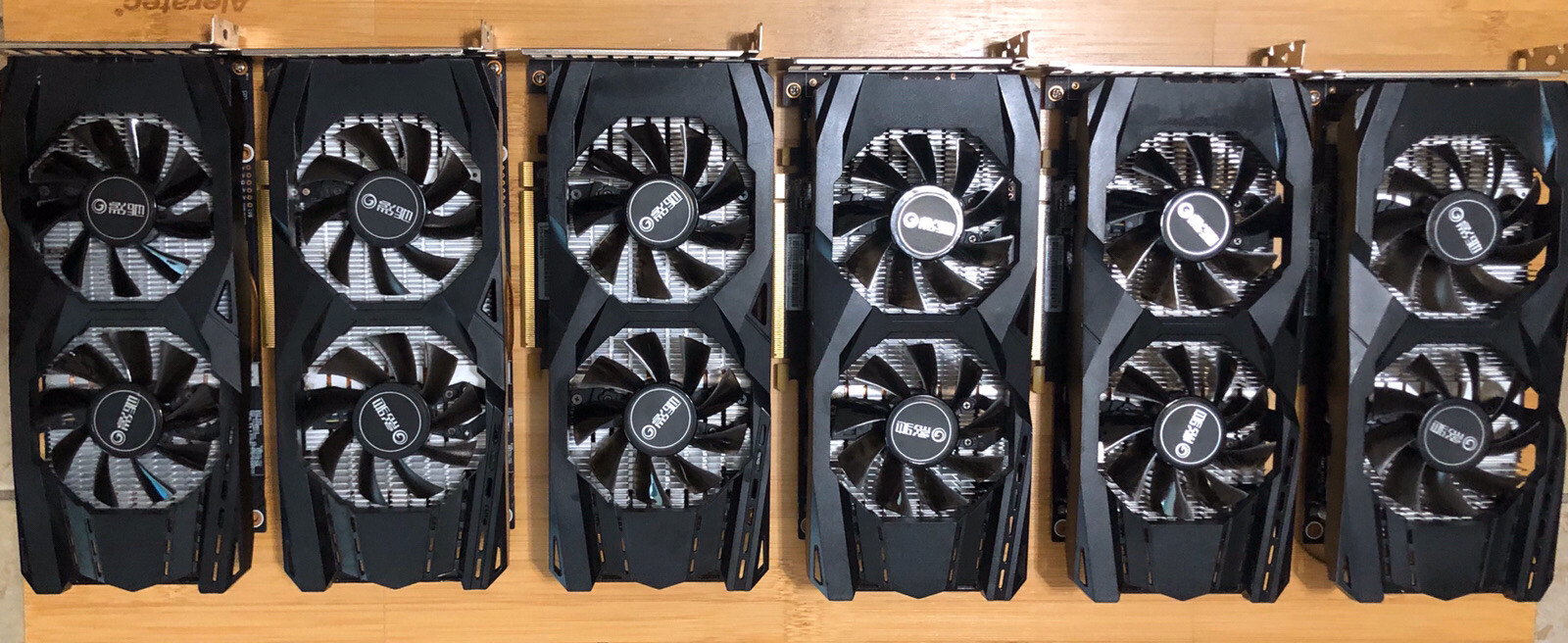
 brittle coral
dank
hushed bobcat
not even the passive ones
brittle coral
hah they're chinese ones
hushed bobcat
yea...
hushed bobcat

 brittle coral
but with a worse cooler than that
hushed bobcat
6 gb
these would be $66.60 each pretty much
which is about $30-35 cheaper PER card
brittle coral
not bad
hushed bobcat
lets see... going through all the machines i have in my head i think i could put 5 to work right away
replace my 2 660 Ti's
brittle coral
haha yea
anything older than a 9 series card i'd rip out to put 1060s in its place for sure
hushed bobcat
actually one of the rigs with a 660 Ti could run 2 of these because the 660 Ti uses 2 6-pins and the 106 only uses 1
brittle coral
yea
it does
xD
also fyi, the 6gb is still mining relevant as well, fortunately if you want to later ever
the 3gb isnt for ETH now apparently
hash got to big
brittle coral
i havent mined since LTC was relevant
hushed bobcat
@feelsbad
brittle coral
dont even get me started
i should be living on a private solar powered estate
hah i typed out a whole big thing but because i used the word that references my sexuality somewhat it got deleted
im gonna be more specific then
xD
But yea, Basically I want a big LGBTQ estate where we defend our weed plants with guns and there's a giant data processing farm run on solar and other renewables, contributing to all the projects we care about for science
i used the g word it got mad lol
and if i hadn't spent 1200btc on a pizza in 2010.......
oh boy
1200 BTC 😦
mined on a CPU
honestly i'd probably have run for government by now
with that kind of money to back me
with that said i'm REALLY glad i'm not in politics right now @_@
hushed bobcat
still debating on this lot of gpu's
the seller has 0 feedback
only been a member for 2 days
brittle coral
yea