#networking
1 messages · Page 240 of 1
 lean pebble
Tell them electricity problems
Easy workaround
Powerline is down
Network related issues always working
 upbeat flint
Yeah, bit even if it's a technical problem it lowers my score so I have a lesser chance to get a bonus :D
lean pebble
😂
upbeat flint
Alright, shutting down
And it didn't work :(
I'm gonna make a sanity check and see if it's turned on in BIOS
Indeed it is
 waxen scroll
@upbeat flint at least you get a bonus
upbeat flint
But why oh why doesn't it work
 peak cloak
ideally you would want to check if the packet actually reached the compuer
but that would require a network tap or a switch with port mirroring and then use wireshark to anaylze traffic
upbeat flint
that. I've been always helping my relatives and friends a lot with computer stuff. But whenever someone asks me to help them I always say the same thing: I can help you as long as it's not network or printer related
but that would require a network tap or a switch with port mirroring and then use wireshark to anaylze traffic
@peak cloak wouldn't wireshark alone do the trick?
peak cloak
I mean you could see if it would work with the computer turned on, but not when it's turned off
 hollow marlin
@peak cloak ECMP with per-packet set. C'mon Present, you should know
peak cloak
what
hollow marlin
The image you posted
peak cloak
oh lol
upbeat flint
I boy, I think it was a Windows problem. My network card didn't have permission to turn the computer on 😄
gonna try it now
Still nothing
 unborn sluice
so you cna turn it from router -> pc?
upbeat flint
How would I do it
How do I use router to send the packet
Seriously, I have no clue
peak cloak
you would need a router than you can actually access
like use the file system
command line
waxen scroll
muh ubnt 👀
lean pebble
You and your computer @upbeat flint
https://c.tenor.com/8dcVdWgPs5cAAAAM/finding-nemo-wake-up.gif
 upbeat flint
You and your computer @upbeat flint
https://c.tenor.com/8dcVdWgPs5cAAAAM/finding-nemo-wake-up.gif
@lean pebble that's actually funny xd
I guess I'm going to have to get up from need every time I want to access my pc then :(
 dire flare
Anyone know a thing or two about Linux & databases (postgres specifically)
On a locally hosted database I can use the psql shell either through a TCP connection via localhost or through a unix domain socket
Is it possible to connect pgAdmin to the database via unix domain socket, or will that only run through TCP?
hollow marlin
@upbeat flint Just a quick google they mentioned turning off fast startup in Win 10 which might be worth a shot
Control Panel\All Control Panel Items\Power Options\System Settings uncheck fast startup
upbeat flint
@upbeat flint Just a quick google they mentioned turning off fast startup in Win 10 which might be worth a shot
Control Panel\All Control Panel Items\Power Options\System Settingsuncheck fast startup
@hollow marlin I always have it off, causes it causes variety of problems and my system boots super quick anyways
unborn sluice
and I assume you did the tweak for network card
upbeat flint
yep
 little schooner
@waxen scroll so... How should I handle this situation where almost all the emails I get sent by my coworkers always get cc'd to the supervisor?
It seems this always happen even when it does not involve the supervisor
waxen scroll
to your supervisor? is it shared supervisor with them?
 thick minnow
guys I have a network question, i have 2 routers
ISP one - Altice Fibergateway GR241AG
My router - Dlink Dir 880L
I want to use my router has the main one and the ISP one just to connect the TV box and the TV
The ISP is in bridge and mine is connected to it via RJ45
How can I create a mesh of wireles network, instead of having to trade networks when i move around the house?
peak cloak
you would need AP's that have a central controller for seamless roaming
thick minnow
setting the up the dlink one has an AP wont work?
peak cloak
you could have 2 seperate SSID's and devices should choose the strongest one
thick minnow
i have 2 SSID's
peak cloak
no, for seamless roaming over one SSID you would need a controller
thick minnow
but since the distance is not that far it wont disconnect, jus stays with 1 bar of power
peak cloak
you may need to adjust TX power
lower TX power so it's so low the phone would disconenct
peak cloak
nope
you just need AP's that support being controlled
Like unifi
or Omada
Omada controller is free actually, you can just download the software to run on your server
Or you can buy a dedicated box
Or for mirotik, which uses CAPsMan
thick minnow
i see tp link has Onemesh
peak cloak
that's mesh
you want seamless roaming right?
so the two AP's are connected via ethernet?
thick minnow
yeah you are talking about this
Easy network expansion with AC1200 dual band gigabit Wi-Fi access point
waxen scroll
🤣
thick minnow
xD
peak cloak
AC1350 Wireless MU-MIMO Gigabit Ceiling Mount Access Point
thick minnow
being Pepega right now
peak cloak
that's what I have
tp-link consumer products are kinda bad
ubiquity are kinda nice
so are mikrotik
peak cloak

MikroTik is a Latvian company which was founded in 1996 to develop routers and wireless ISP systems. MikroTik now provides hardware and software for Internet connectivity in most of the countries around the world.
thick minnow
btw unrelated question
is ethernet over power
works? or is prone to interferance?
peak cloak
powerline?
thick minnow
yeah
peak cloak
yeah it's prone to interference
so like turning on a high power device can mess with it
thick minnow
and a AP is it better to go router cable to AP
then AP connecting via wireless right?
like a repeater
peak cloak
umm

example of my setup
the thing on the middle shelf in the middle is my router
it just routes
peak cloak
no switching, no wireless
thing on the right in red is a pi
runs my controllers and DNS
on the left is my modem
and on the top is a PoE switch
one of those cables goes to my AP
just one cable, because it's providing power already as well
and all the other cables go elsewhere to the house
thick minnow
i want to set up a pi hole also
so ur POE goes to the AP to provide Power and ethernet
peak cloak
yeah
yeah, that pi is running pihole as well:
my dns setup works like this:
Client -> Pi-hole -> Router -> Upsteam (quad9, google, cf)
so this way I can resolve local hostnames as well
thick minnow
i might get a tp link AP
peak cloak
mtik is also nice
thick minnow
to manage the wifi, i still need the 2nd router to use has a switch
to connect both pcs
thick minnow
its cheaper not to get one 😄 and use a router for it and disable its wifi
im not the 1st router the ISP one is in bridge
its "not there"
peak cloak
wait, I'm kinda confused, can you show a diagram
peak cloak
what's the bridge? wifi bridge?
thick minnow
bridge mode 😄
"Bridge mode is the configuration that disables the NAT feature on the modem and allows a router to function as a DHCP server without an IP Address conflict. Connecting multiple routers can extend the Wi-Fi coverage in your office/home."
thick minnow
basically my 2nd router is 192.168.0.1
my MAIN shoud be 192.168.1.254
but if i try to connect to it i cant
since its in bridge mode
peak cloak
you should still be able to
thick minnow
he does not give any ip to any device on the 4th port
peak cloak
if you configure the router to be on the same subnet
thick minnow
the others he does
to the devices on the 4th lan port its like a bypass or wtv the router doesnt exist of some sorts
peak cloak
you can't connect to it because I assume it's a /24 network so your PC thinks it can't connect to something outside of the /24 range and forwards the reqeusts to your actual router, which doesn't have a route to the ip you are trying to access
thick minnow
thats why the 2nd router is dealing IP above 100, and the 1st one below ( I set it up that way) not to get double ip's or that manbo jambo
peak cloak
huh
thick minnow
yeah its that i guess
peak cloak
weird, I would have the primary router (the one doing NAT) do DHCP as well
thick minnow
the one doing nat is the 2nd 😄
peak cloak
boy is that messy
thick minnow
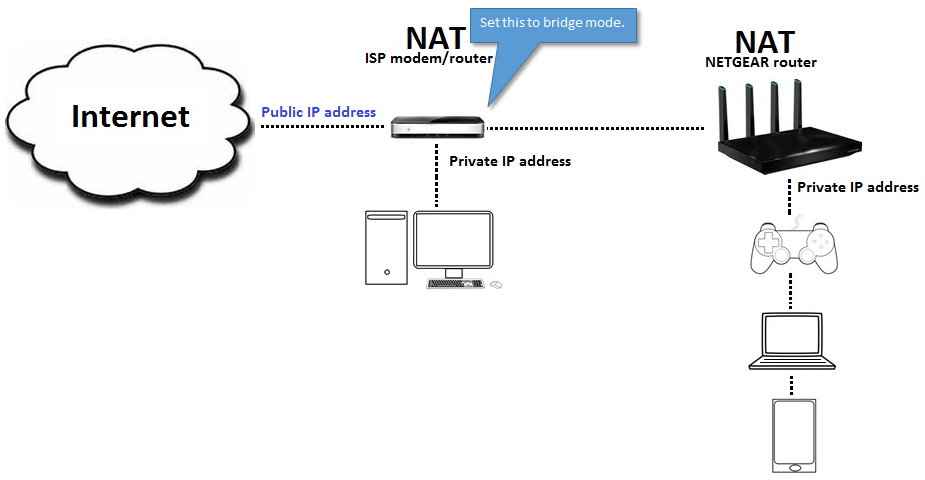 peak cloak
so only one port is in bridge mode?
thick minnow
yes
hollow marlin
Bridge mode is all or nothing. I have not seen outside cli configuration to specify a port for bridge
peak cloak
ok, but then how are the devices on that router connecting
I'm soo confused
you still have 2 seperate networks
thick minnow
wireless only
peak cloak
no like 2 seperate subnets, aka networks
thick minnow
that im not sure
peak cloak
what's the ip on these devices
little schooner
@waxen scroll yes shared supervisor
peak cloak
and what's the ip on these
hollow marlin
This setup makes little sense. Either the ISP allows multiple IPs, one for modem and one for router somehow bridged off port 4 or the devices off the modem are pulling publics. Going to need a lot more info or like Present said, IPs of the devices
lean pebble
What are we talking about?
peak cloak
some werid network setup I'm trying to understand
lean pebble
Tell me
peak cloak
scroll up
lean pebble
Just reconfigure router 2 to be in the same subnet
peak cloak
but they aren't configured correctly
lean pebble
I noticed that
After he said r2 192.168.0.1/24
And main 192.168.1.254/24 ? O_o
From 1.254 to what ?
1.508 o_O
Or he mistakes with the subnet
well i think it just disables it on 4 lan port
@thick minnow I think that netgear home router don't have such advanced option like this
i think
@thick minnow don't think check
basically my 2nd router is 192.168.0.1
@thick minnow disable this dhcp you have DHCP on your main router
Can you export your routers configs ?
Both of them
And send us / me ?
hollow marlin
These are basic consumer routers, export is asking too much from these devices
hollow marlin
Its the ISPs modem, I said it typically is only possible that way. I don't think he can access CLI
lean pebble
Basically it just connecting lan 4 to wan1 of the main router
For give it bridge
After he disabled all of the second router fiber / ptm / atm / adsl vdsl stuff
hollow marlin
You want to leave the modem in router mode then just disable DHCP and set bridge on the second router and plug the modem into the router. It shouldn't be this complicated
hollow marlin
Exactly, doubt netgear even knows what a config is
lean pebble
Not true, my dlink have option for a real config file
lean pebble
Wired
I still hope that I'll get my new cisco home switches tomorrow alongside with my new screen
Gonna switch my old tplink switch and my second router that now used only as switch for my basement
 dire hearth
Did they modify where you set the VLAN tags for wifi SSID in the latest Unifi releases?
 warm drift
anyone good at networking ?
I am looking to get something like a wireless access point or something that would extend my internet but i do not want to connect to a diffrent ssid like i got vodafone wifi i wana be on that wifi at all times even when im connected to a wap thats idk tp-ap or something
how can i do this
or what kind of a device do i need
https://www.amazon.co.uk/TP-Link-Gigabit-Controller-Software-EAP225/dp/B01LRQW0GM/ref=sr_1_3?crid=3VSXTS7OD9D9N&dchild=1&keywords=wireless+access+point+tp+link&qid=1605558880&sprefix=wireless+access+point+tp%2Caps%2C172&sr=8-3 something like this ?
peak cloak
@warm drift I have that
You said you want to extend it
that will work, but not with seamless roaming on the same ssid, iirc
what you want is the same brand of AP (Omada) using the Omada controller
warm drift
never heard of omada what would u recommend i can take ethernet cable to anywhere I just want 1 device to cover the wifi deadzones of my house
warm drift
ahhh yea
peak cloak
you would want 2 AP's though
1 to replace your current wifi AP, you would keep the router turn off wifi
and then another 1 to extend the range
and then if you have some sort of computer you can use as a server for the controller or buy a dedicated controller
I don't think you can do roaming on one SSID without a controller
warm drift
i see ok ill look into that thank you
waxen scroll
@little schooner linus manager tips
sounds like you need to confront your coworker
or if you wanna be sneaky ask manager "i noticed so-and-so copies you on all emails. is there a reason? maybe a request to CC you on all emails I didn't see?"
if manager is all 💁 tell coworker to cut the crap
managers are there to manage people, not participate in their work to the little details
unfortunately at your work level you get a lot of managers and coworkers of low quality
 mellow vale
I wish I had good internet :(
waxen scroll
Samsung sells internet, did you try them?
mellow vale
No
waxen scroll
💁
mellow vale
The highest I've ever seen my internet is 31mbps download and 8mbps upload.
little schooner
@waxen scroll k I'll give that a shot
waxen scroll
@little schooner when you get higher you can make important decisions as a non-manager and generally manager leaves you alone
mellow vale
While my LTE gets like 57mbps download and 2.5 upload
lean pebble
The highest I've ever seen my internet is 31mbps download and 8mbps upload.
@mellow vale well upload better than mine
I got 150Mbps up / down for 3 months than my cellular company blocked it and downgraded it.
I downloaded games from steam with it because I had so much problems with my home network.
 snow spoke
good evening or whatever there is guys
lean pebble
Use iredmail
Great tool
I'm using it for over a year now
You have free and paid version
peak cloak
plz don't self host public email
lean pebble
It's only private mails
peak cloak
yeah ok, then it's fine
lean pebble
Transferring all the shit and spam I get to there

Auto forwarding and removing from my main email
But iredmail is awesome
 tiny arch
yo i need help why do i get 90/60 even do i have 300/60 i only see this issue on pc and not my laptop
im using ethernet btww
peak cloak
what cable?
 indigo bramble
Bruh i get 20 10
peak cloak
could be EM interference
 worthy stirrup
So what i get from what is my ip is
Its changing every few days
So idk if i can connect to my router even with vps/vpn set up since i dont know the ip to connect to at first place
 primal ice
yeah you probably have dhcp on wan its normal. it generally costs more to get a static IP from ISP.
worthy stirrup
Is there smth i could do with python
For example. On mobile phone, run a code to get current ip everyday on 6 am
peak cloak
dynamic dns exists
worthy stirrup
dynamic dns exists
Is it free
worthy stirrup
Ddns?
primal ice
yes
peak cloak
well.. you need a domain name first
except for dynu
no-ip also works
bascially when your public ip changes it sends a request to the dns server to change the A record specified with the new ip
primal ice
peak cloak
that's a type of vpn /tunnel
primal ice
main one
peak cloak
the one that has a public ip interface
worthy stirrup
Oh
Nvm both of it support ddns anyway
You guys recommend any service?
Btw i cant have a device larger than pi 0 running 24/7 since my parent is asian
peak cloak
I use dns.he.net
you need a domain name already though
@worthy stirrup you have a regular pi with an actual ethernet port? I wouldn't run any servers over wifi
worthy stirrup
Only pi i have is pi 0 wh
And its just for pihole
Since i run server on my laptop
peak cloak
I have a pi for DNS and wifi Ap controller
worthy stirrup
Or after this, i might run it on my old pc with only way to connect to internet is lan
What
Btw my pi is right next to my main router
 worthy stirrup
I could go buy rj45 to usb adapter and connect my pi 0 to the router via lan tho
Since pi 0 here is like 25 usd
My country have a dumb tax for electronics
EV is taxxed 200-1000% the og price
peak cloak
that's really high
worthy stirrup
Yeah
They have a deal with petrol company
Anyway
I could go buy rj45 to usb adapter and connect my pi 0 to the router via lan tho
You recommend this or should i just use the same way of pi 0wh wifi
peak cloak
I always use ethernet whenever possible, just more reliable.
primal ice
^^
worthy stirrup
For what purpose tho
peak cloak
fun and learning
worthy stirrup
Idk what id do with website
peak cloak
pi0 is very limiting though
worthy stirrup
Ye
peak cloak
made more for embedded systems
kinda like arduino
but pi0 runs an OS
my friend made a chat app
worthy stirrup
When i bought it + case it cost me like 66 usd
peak cloak
you can't really run a vpn, too weak
peak cloak
in what way?
worthy stirrup
Ddns
peak cloak
they have multiple services
 ornate jungle
https://dns.he.net/ is free to use, so long as whatever you're using it with supports it.
peak cloak
yeah, dns is free. You need to already have purchased a domain name tho
worthy stirrup
Is the domain one time or temp
peak cloak
it's a subscription
worthy stirrup
Welp
peak cloak
are you a student
peak cloak
cool, then you can get one for free for one year via github student dev pacl
worthy stirrup
Do i need school email for that
peak cloak

GitHub Education
The best developer tools, free for students. Get your GitHub Student Developer Pack now.
yeah
worthy stirrup
Since none of that exist in high school for my country
Only uni
And id be grad in like march next year
Can i use smth like weebly.com for that
peak cloak
no, you need a domain name, dynu or no-ip I think provide free subdomains
worthy stirrup
Oh
If i use no ip for free, what do they mean by confirm every 30 day
Do i have to click 1 link they send to me every 30 day to keep my subdomain
peak cloak
you need to press a button on their website or something, I only ever used dynu for a bit
peak cloak
you can setup your pi to do it as well
ornate jungle
If i use no ip for free, what do they mean by confirm every 30 day
@worthy stirrup you get an email every 25-30 days saying "yo dawg, are you like, still using these dynamic DNS entries? if so, click here, pass Google ReCaptcha, then click again. (or pay us money.)"
lean pebble
Morning
worthy stirrup
Since i dont recognize that name when i was messing around in my router setting
Good
Thats fine with me
you can setup your pi to do it as well
@peak cloak pi 0 can do that?
Btw current sd card in my pi 0 only have like 8 gb
peak cloak
there are some limitations, but yeah kinda
worthy stirrup
Like what?
peak cloak
I forgot
oh
limited DNS entries
up to 5
that's why I switched to cloudflare and then to he.net
worthy stirrup
What does that mean
lean pebble
Cf is nice
peak cloak
these are dns entries
the first 6 aren't that important as a beginner
the last one is a cname
lean pebble
Man the TTL is so high gosh
peak cloak
default values lol
lean pebble
Gosh too high
You could manage dns entries via Google domains if you bought from there
Good and fast dns updates
worthy stirrup
So u recommend dynu over no ip?
peak cloak
i mean I never used no ip, so I can't compare
lean pebble
Last time I used no ip was 10 years ago with maplestory private server 🤣
Was nice
But it changed alot since than idk how they're now
worthy stirrup
What about dynu
peak cloak
i does what it needs to
worthy stirrup
Is it still free
worthy stirrup
Can u help me search for manual of gn542vf skyworth
Nvm
By dynu is it dyndns
I guess its not
peak cloak
@worthy stirrup https://www.dynu.com/en-US
 tame carbon
@peak cloak herro
peak cloak
oh, you are back
tame carbon
Yeah, only here though
I am done with everyone else on LTT
incompetence > 9000
@peak cloak Got that guy from last week set up with his hEX S and 3 cAP ac's
took us 4 hours
peak cloak
oh nice
tame carbon
He's happy :)
Only problem we ran into
he bought an SFP to RJ45 module
but it was not detecting a link
Module was detected
CABLE MATTERS brand
fyi
peak cloak
hmm, did you figure it out, of did it just not work
tame carbon
Well, we tried everything
disable auto negotiate
still no link detected
also no MAC was listed
so I concluded incompatible
peak cloak
yep
power company is front of my neighbors house, hopefully they don't mess something up
tame carbon
hehe
@peak cloak lol we made an oof
so we just copied a backup from one cAP
to the other
and then they both had same MAC
peak cloak
oh lol
tame carbon
yeah.. so scripts. no backups
@peak cloak apparently, not all the APs he got had same frequency restrictions
they clashed, and CAPs was complaining about region locks
didnt work until we set the region from united states to united states3
It worked with one AP, but then adding a 2nd one, made it complain
 dusty osprey
h m m
hollow marlin
didnt work until we set the region from
united statestounited states3
@tame carbon I had to change to US3 on my hAP ac2 before my devices would stop constantly disconnecting. Many of my devices hated using the freq in US region
tame carbon
@hollow marlin apparently US3 is the 'latest' regulation by the FCC
if you aren't using it, you're actually violating the law O.o
tame carbon
and mtik forums I read something similair, about US3 giving best performance
compared to other frequency bands, not playing ball with newer client chipsets
I will declare my backyard independent
and make a law that places no restrictions on antenna gain
and then fry every braincell in the area with a 20kW wifi antenna
ofcourse, I will be wearing my tinfoil hat
hollow marlin
I think it mentioned most modern devices have an list of FCC approved channels and if any noise is heard outside the wifi signal it would immediately shut it down for compliance. Most my devices would all drop at the same time which makes sense but how much truth is behind that, not sure, never dug deeper
hollow marlin
He should just get US and non-US models 
I got 6 hAP ac2 from my last work place when they were switching to new deployments and it was 3 EU/3 US. So if I ran into that Id just toss the EU in because it can be set to "no f's given". But Id hate to do that because my 3 US ones were the first batches with 256mb ram instead of 128mb 💦
tame carbon
DRC is best region
lean pebble
Someone knows how to cancel vlans on cisco g250 switch
I need this switch will be able to get my router dhcp and pass it to the other devices.
Right now I'm stuck with it
Last time I used cisco was 3 years ago
peak cloak
well just change the vlan settings
peak cloak
factory reset?
hollow marlin
@lean pebble you don't cancel VLANs. If you do not want tagging you just set the ports you want to VLAN 1 or change the VLAN you want to native
lean pebble
Well factory reset to this one to
When I change something in this vlan automatically I lost the option to manage it ... And then factory reset
My lans should be trunk or access ?
I always forget that
peak cloak
um, it depends
I don't thing you fully understand vlans
ports going to end-devices should be access
this means there will be no vlan tags on them
lean pebble
I didn't touch vlans for 3 years so.. probably forgot
 lean pebble
Now I get the same IP for all ports
tame carbon
IP
peak cloak
if you just want a basic switch you only want one vlan
tame carbon
wat
lean pebble
So it's make no sense
peak cloak
then have only one vlan and have them all be access so nothing is tagged
every switch has "vlans", it's just vlan 1
lean pebble
Ok but look at the photo I sent
lean pebble
Ok
peak cloak
if you just want a basic flat network switch just make everything access on one vlan, vlan 1
lean pebble
That what I wanted to know access or trunk 😅
tame carbon
@lean pebble Look at that image
That multicolored line, is a trunk
you don't want that
lean pebble
Ok
peak cloak
trunk tags the packets with the the vlan number, you only want trunk to other network devices such as AP's or routers
tame carbon
@peak cloak imagine this channel without you or @hollow marlin
peak cloak
I still consider myself a noob
lean pebble
I'm familiar with fortigate because I use it on daily basis 😅
tame carbon
firewalling makes my head spin
especially when you have multiple networks on the same router
lean pebble
Not using switches too much
tame carbon
switches are ez
@lean pebble VLANs are not that difficult, think of it this way:
you have a physical network, (which we call vlan1)
lean pebble
I was good at it 3 years ago
peak cloak
I think of it as multiple small switches within one big switch
lean pebble
At my studies
tame carbon
and then, ontop of that physical network we can allocate up to 4096 additional 'virtual' networks
and all it really does, it just change a number in the packet
from 1 to something else
tagging and untagging traffic, just means we set or reset that number
untagging means set it to 1
lean pebble
But I still consider it as weird that this switch gets the same IP for all ports
peak cloak
a L2 switch doesn't have an ip
tame carbon
Switches don't use IP
@lean pebble very likely that the DHCP server on your network, gives out the same IP to the same MAC address when you connect it
lean pebble
I have connected it to my network
tame carbon
so even if its on a different port, the MAC address is the same
so the DHCP server gives you the same IP
peak cloak
yep, that ip is just for a mini computer inside of the switch
separate from the actual switching
tame carbon
no
lean pebble
Ok
tame carbon
there should only be one DHCP per vlan
lean pebble
Just wanted to make sure
tame carbon
DHCP requests use the broadcast domain
so every device on the network can see those messages
if you have two DHCP servers, it will cause issues
Relays are only required if you are on different vlans
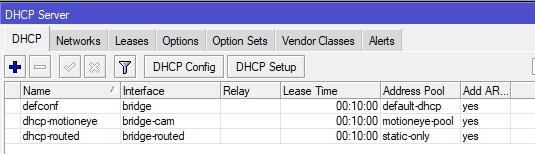
on my mikrotik I have multiple DHCP servers
for each network
lean pebble
Ah I don't need this option at home yet
 peak cloak
tame carbon
peak cloak
tame carbon
my dhcp-routed server, gives out public IPs :D
peak cloak
I don't use like 80% of these
tame carbon
NIC teaming
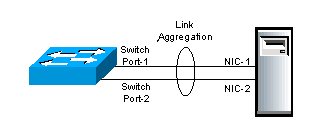
In computer networking, the term link aggregation refers to various methods of combining (aggregating) multiple network connections in parallel in order to increase throughput beyond what a single connection could sustain, and to provide redundancy in case one of the links sho...
its a bit of a finecky technology
I'm no fan of link aggregation, especially on 1G copper
just use faster links.
lean pebble
So not needed
peak cloak
isn't LAG more for failover
tame carbon
Other umbrella terms used to describe the method include trunking,[1] bundling,[2] bonding,[1] channeling[3] or teaming. These umbrella terms encompass not only vendor-independent standards such as Link Aggregation Control Protocol (LACP) for Ethernet defined in IEEE 802.1AX or the previous IEEE 802.3ad, but also various proprietary solutions.
Failover occurs automatically: When a link fails and there is (for example) a media converter between the devices, a peer system will not perceive any connectivity problems. With static link aggregation, the peer would continue sending traffic down the link causing the connection to fail.
@peak cloak need to have a POG protocol
makes your internet faster using magic packets
tame carbon
https://cdn.discordapp.com/attachments/776722183119699988/777646103775674368/IMG-20200922-WA0001.jpg

:)
lean pebble
Your home?
tame carbon
Yep
tame carbon
NAS, Games, and I also use it for business
There's some customer software running on this
peak cloak
I use a pi server for dns an an optiplex for lab
tame carbon
@lean pebble that server is just consumer parts
its a Ryzen 2600
with 16GB DDR4
but it has a dual 10gbit network card
tame carbon
Oh and this server also monitors and records 4 cameras
secure the warehouse
behind our house
@lean pebble https://i.imgur.com/7lbjm4R.png
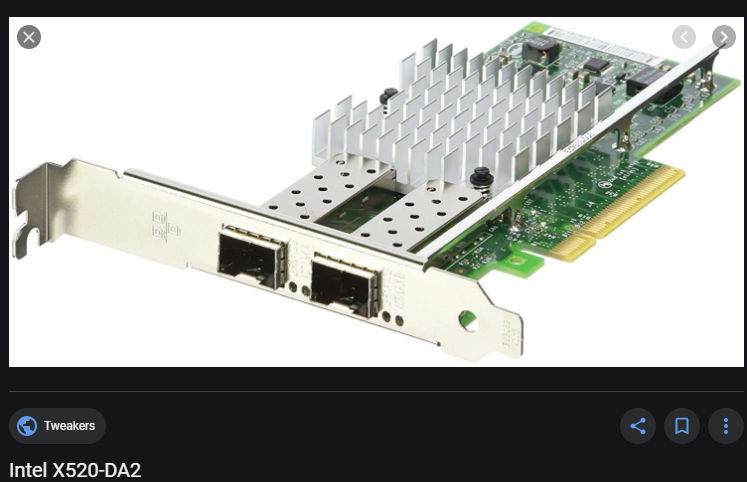
This is an older card though, still uses PCIe 2.0
tame carbon
But it does 2x 10gbit :)
lean pebble
I got 4 but my huge gpu takes all the space
tame carbon
That machine was built on a budget and ment to be low power
that Ryzen 2600 uses only like 35 watts
most expensive part was the memory
DDR4 ECC @ 2400MHz
tame carbon
@lean pebble you don't need any vlans
just restore factory settings
and plug devices in .
you don't need any configuration
tame carbon
Do you have an interface overview you can screenshot?
like a big list
of all your ports
with the vlan info in it
lean pebble
Ya
tame carbon
send a screenshot, not a photograph
lean pebble
Now I don't have wifi horray
Dammit the switch ACL
Wtf
I just connected my tenda APs to this switch and boom not wifi
Fixed
All the problem was the spamming tree
tame carbon
@lean pebble all ports are untagged
1U = vlan 1 untagged
you should configure those ports to all be access
 open coral
is this the right channel to discuss ddos protection etc?
lean pebble
@lean pebble all ports are untagged
@tame carbon now all works
tame carbon
cool
lean pebble
But only 1 problem
tame carbon

tame carbon
@lean pebble you only have one switch?
tame carbon
@lean pebble how do they get their IP
lean pebble
DHCP
lean pebble
Ya
open coral
spoke a little in tech chat 1 but people look at different channels lol.
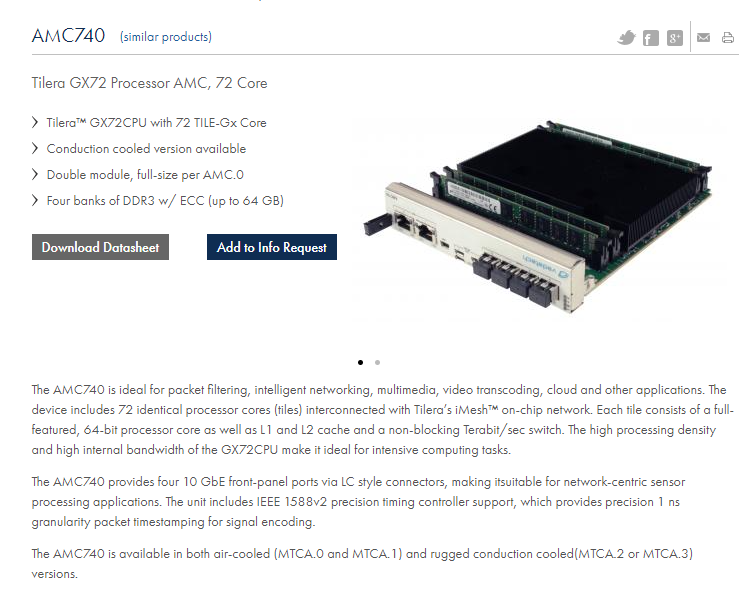
Basically got a dedicated server & a vpn with 1 host, 2 different servers.
Thinking of buying a server pc at home but my issue is ddos protection. would a vpn hinder the performance much?
just can't justify the specs for cost/m
open coral
but will it hinder the performance much?
tame carbon
Its a tunnel, so its as fast as the slowest link in the chain
open coral
literally after looking up the dedi specs it would cost me £700 to build 😂
and i have 900mbps internet but the vpn is only at 250ish
but 250 should be more than enough
tame carbon
@open coral get a small VPS
and use that as a public endpoint
preferably one that is close to your ISP (for lowest ping)
tame carbon
@open coral this wont protect from layer 7 DDoS attacks
you can still overload a webserver easily
open coral
webserver?
tame carbon
as an example
tame carbon
layer 7 just means you attack the application, not the network
tame carbon
@open coral really depends what kind of game you are hosting
I've got a big dedicated machine with OVH
open coral
its DayZ
tame carbon
They do antiddos and layer 7 filtering for minecraft xD
open coral
the point is i am trying to cut long term cost
paying £160 a month for a dedi that costs 700 to build.
tame carbon
By self hosting a server?
160 pounds/month
but you are forgetting
the space, the electricity, the data, the maintenance
open coral
ddos protection expensive
tame carbon
Datacenter hosting takes care of more than just the hardware
Thats why it seems expensive
If you do a full breakdown of the costs, centralized hosting in the cloud is cheaper
open coral
yea ik but still a pc shouldnt have maintenance issues for multiple years
tame carbon
@open coral best I can offer, is a forward proxy on a VPS (on a fast network)
It won't protect you from your service going down
but it at least masks your own IP, and allows you to drop the proxy and restore internet
open coral
well if i upgrade my pc next year i will do a test run on that then
pity ddos is a thing
open coral
nah but i ran game servers in the past and have experience with it haappening
tame carbon
OVH's filter service is capable of anti-ddos up to 240gbit/s
open coral
had 140gbps hit our Arma 2 game server years ago
tame carbon
fuck
tame carbon
yeah you wont be able to protect yourself from that
not unless you have an unobtainium creditcard
open coral
so lets look at it this way
if ovh could mitigate that attack on a dedi, i couldn't do a forward proxy cheap ovh vps?
wouldn't it do the same thing?
tame carbon
OVH doesnt offer VAC on all their machines
open coral
ah
open coral
that makes sense
tame carbon
But those have a steep entry price
and pretty sure that the gameservers OVH provides are limited to 250mbit/s
250mbit/s of post-filter traffic
open coral
My vpn has mitigated a 80gbps before but that has protection up to 100gbps
tame carbon
Antiddos is just a dick-measuring contest
whoever has the bigger pipe wins
then you just need some fancy appliance to do the actual filtering
open coral
hmm
i just wish there was a cheaper alternative 😂
i don't expect to make money off my game server
 tame carbon
the benefit that companies like OVH have, is that they have many entry points to their network, scattered across the globe
and their filters operate on the edge routers
this is why they can filter so effectively
they just prevent the data from even entering their network
 open coral
its a pity ovh don't venture into more cpu's
tame carbon
@open coral businesses with your concerns
would go for a private rack solution
so you have your own rack in a datacenter
open coral
but expensive AF lol
just trying to get the most performance
ovh for dayz sucks
its all about the core speed
so xeon processor sucks apart from 1 type
tame carbon
don't they have OC'ed i7s ?
 dusty osprey
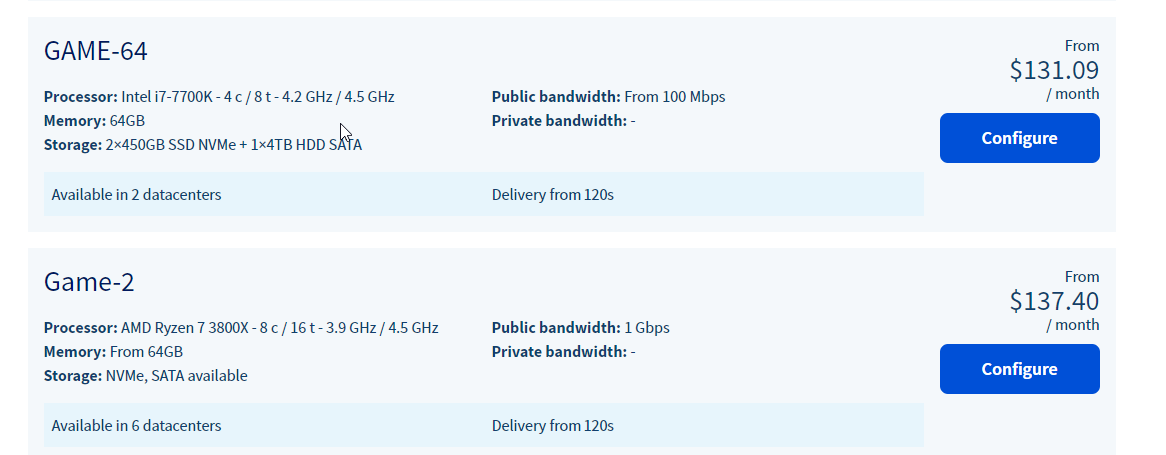
Hetzner has some of the fast cpus
open coral
😂
tame carbon
OVH. make the 3950X happen
dusty osprey
They made dual 64 epyc's happen tho 😰
open coral
someone with experience with dayz servers told me the only xeon that beats the i9 9900k/10900k at server performance is - Xeon E-2288G
not arma 2
dayz standalone
open coral
its been revived
tame carbon
I bought it during preorder
open coral
since they added modding
i was the same till 2 months ago
all big streamers been playing it since mods have been introduced
tame carbon
I call it: Running simulator
open coral
its grown big again
tame carbon
Because there's no itemspawns near the coast at all
ever since they updated the spawning algorithms
open coral
there is now
well i am talking about modded servers
modded dayz standalone is like dayz overpoch
hence why its popular again
open coral
will show you an example
open coral
yea, loot is completely customized on servers now
tame carbon
cool
@open coral first time I got to that prison island
unlooted.
I was geared up to the max after that
open coral
xD
tame carbon
then I got killed by some guy who logged in
I hate people who hop servers to gear up
 open coral
yea thats my server. its got to be balanced but yea
but honestly try out modded servers
its completely different
helicopters, cars, supercars, boats
custom base building.
tame carbon
@open coral do you have a trader?
open coral
yepo
tame carbon
cool, yeah that's one thing that was missing from standalone
@open coral back to the question at hand
Datacenter level internet is more robust than home internet
so you can at least get 1 layer of hardening by using a tunnel
players wont be too happy, because of the increase in ping
lean pebble
1 is ok 1 not accessible
Waiting for him to reboot
All fixed
Vlan 1 was on strange static
 verbal vine
my wifi bad
tame carbon
use lan
lean pebble
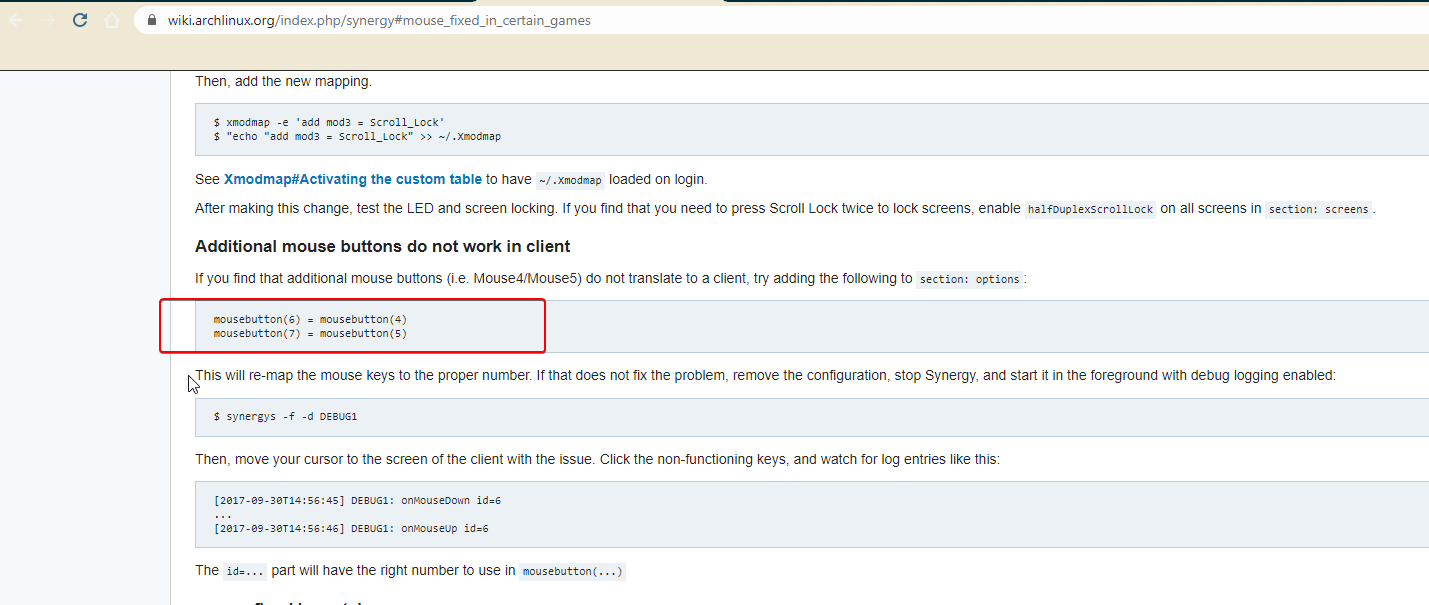
Someone knows how to make all my mouse buttons work with synergy?
lean pebble
How do I do that first time with synergy
 waxen scroll
i kno rite?
little schooner
What if the game captures the mouse? It would never reach the other screens
And for the games where mouse dragging hides the pointer and the game takes full control
It can't jump over to the next screen
unborn sluice
I had that problem
When playing league, and accidentally drags my pointer to my other pc
league minimized and can't be opened again until I close the synergy on the client pc
PITA

but I don't play on the client pc.
(although yea, about "capture")
 unkempt ferry
I currently have a full UniFi setup and I am running out of switch ports. I want to get a switch to add to my current network. Any suggestions? I'm looking for something used.
lean pebble
https://wiki.archlinux.org/index.php/synergy#mouse_fixed_in_certain_games
@tame carbon it wasn't on game it was that half of the mouse 🐀 keys wasn't recognized by windows at all with synergy.
But I have got it fixed with evdev
thick minnow
I am sure I ask here, but I am encountering a problem
I am trying to port forward some things (following an guide for Ark Survival Evolved so I can play with friends, and not use official servers and get constantly destroyed cause the alpha tribe thinks me having a duck is an avenger-level threat)
I have opened the firewall and access to the advanced settings, where there's the Inbound rules. I set three different rules to allow port forwarding, but whenever I exit the window, the three rules does not save
unborn sluice
get constantly destroyed cause the alpha tribe
This is the real problem
 tall pagoda
Is cat8 cable worth installing or should I stick to cat6 for regular to not so much gaming?
unborn sluice
I mean do you even have devices that have cat8
tall pagoda
Idk. I have a 800€ potato HP gaming laptop
And my router is a Arris Connectbox from my isp Ziggo
 zenith remnant
Then u don't need Cat 8, unless you want to upgrade everything to support Cat 8
 strange silo
Any Mikrotik gurus online right now?
Need to setup transparent bridge interface to strip off PPPoE authentication for my firewall, it doesn't support hardware acceleration on PPPoE authenticated interfaces
don't want routing between them which I could do, just want to strip off that PPPoE
tame carbon
@strange silo wat
PPPoE interfaces behave like regular interfaces
you can attach them to a bridge as a port
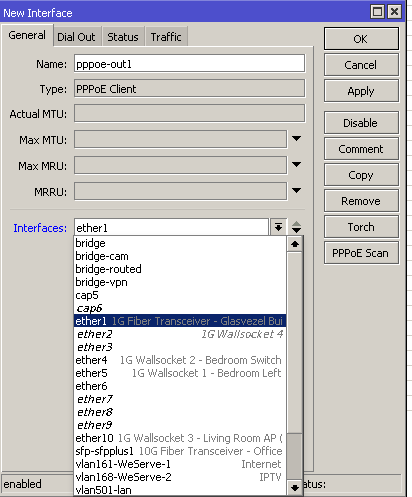
Set it to the port that the PPPoE server can be reached at
after that, just add it as a bridge port
tame carbon
most of these things are dead simple on mtik
strange silo
ISP won't disable PPPoE for me so forced down this path
tame carbon
PPPoE is a common way ISPs identify subscribers
strange silo
stupid fortgate not supporting PPPoE hw offload
strange silo
it may be common but they don't actually need it
strange silo
my other connection on the same wholesale network does not use PPPoE
tame carbon
Mh?
strange silo
it's all a shared network here, ISPs are just retailers
tame carbon
Copper though?
strange silo
no fibre
tame carbon
mh
strange silo
GPON
tame carbon
I got an LC patch lead from my ISP xD
strange silo
atm ONT goes in to a FG600C but the throughput is ass
tame carbon
They sent an SFP module to use
strange silo
also slow on my FG60D
strange silo
confirmed with fortigate PPPoE hw offload is not support hence bad perf
my 60D caps out at 102Mbps 100% CPU lol
 strange silo
mm possibly not, just want to auth the connection on the hEX and bridge it to the firewall so it gets the public IP
hEX needs to be as transparent as possible
tame carbon
Start by creating that PPPoE interface, verify it connects
add it to your local bridge, adjust the interface lists so it is on the WAN side
firewall config should play ball if you do it that way
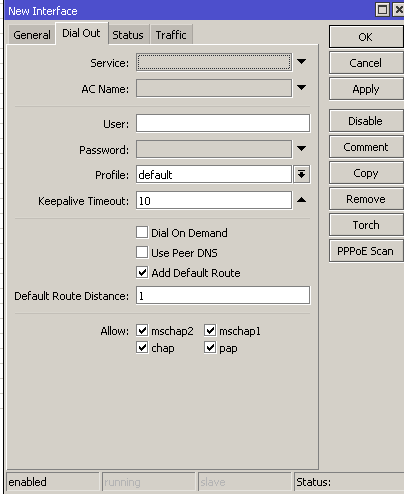
that Add default route will make sure it adds an entry to the routing table
strange silo
yea I've had it working as a PPPoE client before getting the IP etc, probably still has that config on it
tame carbon
I'm not entirely sure about the hEX's capabilities with PPPoE
all I know is that it has hw acceleration for IPsec...
but it has a beefy quadcore, so perf should be fine
I expect nothing less than 1G PPPoE
strange silo
from memory it was fine
I stopped trying to get the bridge going at the time since the connection was 100/100 so it didn;t matter
now it's 1000/1000 so it does
900 going unusable lol
tame carbon
@strange silo https://i.imgur.com/JLTJeaL.png
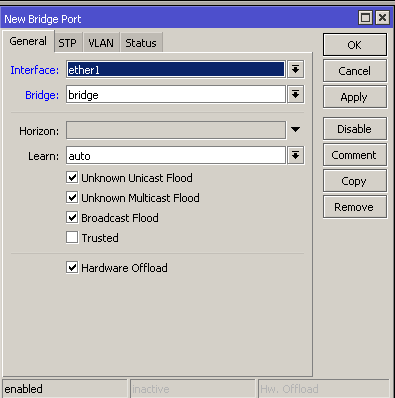



You just add the PPPoE interface as a port on the bridge, so it can communicate
It behaves almost identically to the way VLANs are configured
strange silo
hmm got some odd config left on here
strange silo
oh yea I need to use VLAN10 for this connection too
so do I need to configure that on the hEX or the fortigate hmm
tame carbon
err
thats fine
create a vlan interface
then create the PPPoE interface, on that vlan
strange silo
so for the bridge I add pppoe interface and another eth interface?
tame carbon
@strange silo no, you bind the PPPoE client to an interface, either a physical or virtual one
and it itself becomes an interface
strange silo
ok, just the pic you have is adding eth1 to the bridge
tame carbon
yeah eth1 should be your PPPoE client
strange silo
it is
tame carbon
if you have to have a vlan encapsulating the PPPoE traffic, you bind the PPPoE interface to the vlan, and the vlan on the physical interface
strange silo
oh right can only select actual physical ports
brb internet going out
@tame carbon ok pppoe is connecting and hEX has public IP and connected clients have internet access
now to bridge that over to the firewall
tame carbon
@strange silo clarify for me, what do you mean by that?
if clients have received a default route and can reach the internet
what more is there to bridge?
strange silo
I do not want the hEX to have the public IP
the fortigate physical firewall must have it
the hEX is to only do PPPoE, nothing else
no routing, no NAT
just pass on a virtual wire, bridge, half-bridge (so many names each vendor person uses) to the firewall
most consumer routers called this feature half-bridge mode back in the ADSL PPPoA days
it's a weird config I want lol
well I don't want it, I want PPPoE turned off but they wont do it
"Mikrotik RouterOS does not have PPPoE Relay (half bridge) feature, yet. So you cant run your mikrotik router in half bridge mode."
RIP me
tame carbon
yeah..
@strange silo you could do some forwarding magic
@strange silo why the fortigate firewall though?
strange silo
because it has very fast IPSec hardware offload for my S2S VPNs
strange silo
yea
tame carbon
@strange silo you could set up a masquerade
and forward all vpn traffic
as long as you add the proper rules to the firewall to permit ipsec/l2tp
strange silo
8Gbps IPSec
strange silo
no that's the 600C hardware support lol
tame carbon
@strange silo why not just set your VPN server up as a service behind the mikrotik?
instead of trying to passthrough the PPPoE
strange silo
because then it also defeats the point of having the firewall in the first place
tame carbon
It acts as access gateway for your local network, no?
strange silo
I used it for VIP/reverse proxy etc
tame carbon
nghm.
strange silo
firewalling, UTM etc
I have a /29 range I own so I can just setup routing from the hEX to the fortigate
strange silo
and not NAT on the hEX
tame carbon
statically routed through my WAN