#networking
1 messages · Page 238 of 1
 tame carbon
 stable warren
it was great for this
tame carbon
but unify is weird
stable warren
not when people just pull the plug lol
stable warren
you can 'copy' the network to another location
stable warren
but i like cloudtrax better that way, i could send those AP's to a customer unconfigured and just let them connect them to their network
i'd enter the MAC's in the controller/their network and it would sync and voila done.
tame carbon
I just have a copy of all the configurations here
if a device breaks, I get a new one, load the config
and swap them out
mikrotiks are nice in that you can configure them without IP
you can connect to them using layer 2 MAC
stable warren
same for me but i can just let the supplier make it a dropshipment :)
tame carbon
 stable warren
yeah the cloudtrax stuff does that also
tame carbon
Those cloudtrax APs become paperweights when cloudtrax goes out of business
or if they drop support
tame carbon
not a fan of this kind of gear at all
you make yourself dependent on yet another entitity
stable warren
the resellers bought a shit ton of stock, and all 'old' devices still go under the old ways. So older bought devices are still free to use
some company took over
datto or something

Datto protects essential business data for tens of thousands of the fastest growing companies, delivering uninterrupted access to data.
don't even know what they do :P
sound like a shady bunch, they contacted all people with accounts on the cloudtrax platform
@tame carbon btw thanks for the advice
 crisp shell
Does someone know how to fix this? Rough translation: "An error occurred while trying to reconnect A: to \ 192.168.2.10 \ Pc_Backups. Microsoft Windows Network: The local device name is already in use. The connection has not been restored" The NAS is online, I can access the control panel. The IP is correct, file sharing and network detection are enabled, removing and adding the NAS doesn't work. Restarting and even Windows reinstall neither
I searched online but couln't find a solution
 spiral drift
question that is likely dumb: in a mesh/roaming setup (e.g. multiple APs throughout a house all controlled by a router in the basement through CAPsMAN/routerOS), who determines which band/AP the device is communicating with, the client device or the router?
Assuming all APs are sharing an SSID
@tame carbon summoning the mikrotik rep
tame carbon
wat
@spiral drift ahoy
was eating dinner
@spiral drift you can configure all of that in the provisioning
@spiral drift right now I use just default config\

But you can configure these channels to your liking

I haven't messed with this too much
but its nothing that the mikrotik wiki cant help with
spiral drift
I've never messed with channels and I'm not planning to start now if I can avoid it
tame carbon
@spiral drift if you leave them on automatic
they will automatically swap channels
CAPs can scan for other nearby CAPs
spiral drift
Ok, I figured channels were handled automatically, I mean like 5ghz/2.4ghz bands
spiral drift
in prior setups I've had 2.4 be one SSID and 5 be another
tame carbon
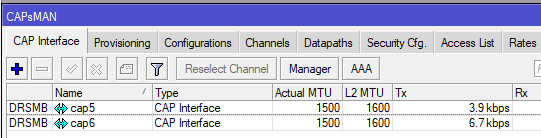
so if you have a dual band AP, it just appears as two CAPs
spiral drift
ok so they should still have separate SSIDs
 spiral drift
ok so in this case, is it the client that's choosing which band to connect on?
got it
tame carbon
@spiral drift you can set them up to all have the same SSID
@spiral drift every radio as an SSID and BSID
BSID = Basestation ID
the BSID is different, but the SSID the same
 peak cloak
there are some problems with certain devices that won't switch to 5ghz
i never had any issues
tame carbon
yeah
@peak cloak you can usually solve this problem
if you reduce tx power on the 2.4 band
makes it appear less strong, and then it favors 5GHz
some wifi clients are just stupid.
spiral drift
But isn't the advantage of 2.4 that it has longer range but lower bandwidth?
tame carbon
yeah
but if you are in the room with it
and the device favors 2.4 over 5
may help to reduce 2.4 TX power, and increase the TX on 5
TX = transmit
spiral drift
figgred
tame carbon
RX = receiving
@spiral drift you can crank the TX power all the way to max
and be 30 meters away
see the network, but be unable to connect to it
because the phone does not have enough TX power to reply
peak cloak
the higher the dBm the higher the power, correct?
spiral drift
hahaha
tame carbon
so you can crank radio to max
spiral drift
that's such a niche loophole I love it
tame carbon
 peak cloak
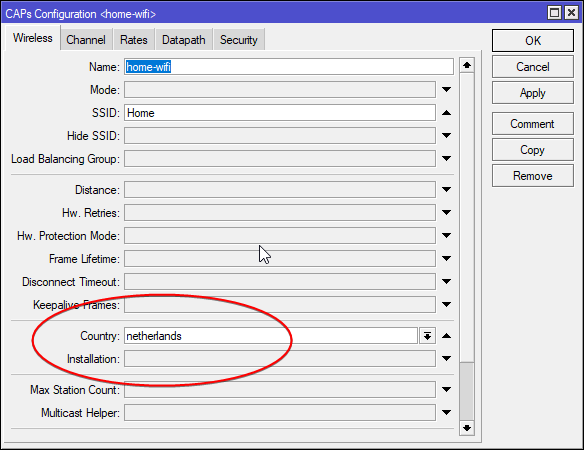
like the CAP has international and US versions
tame carbon
We have two versions available.

- hAP ac²-US (USA) is factory locked for 2412-2462MHz, 5170-5250MHz and 5725-5835MHz frequencies. This lock can not be removed.

- hAP ac² (International) supports 2412-2484MHz and 5150MHz-5875MHz range (Specific frequency range can be limited by country regulations).
yeah different regions have different specific frequencies reserved for gov't/public sector use so they have to keep those clear
spiral drift
I wouldn't be surprised if there was a built-in power cap through firmware or something
tame carbon
Are you fucking kidding me?!
OMG
@uncut pendant why
Let me PM you something. your filter is broken.
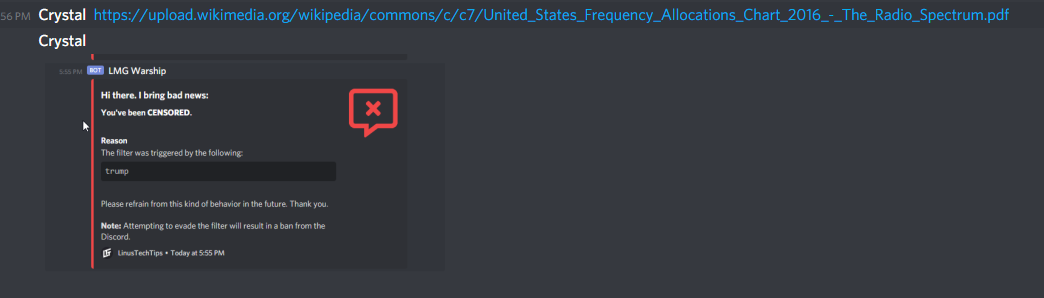
@peak cloak I hate LMG warship so much.
peak cloak
wut, that's just a wiki article
tame carbon
@peak cloak look at the end of the url
 waxen scroll
@tame carbon are you srs
me too
lol
@peak cloak its like when the teacher bans wikipedia use so you use it anyway and copy the reference at the bottom

tame carbon
@waxen scroll thats what I do
as long as you quote from the source directly, doesnt matter what wikipedia says
Currently there are the following setting groups:

channel - channel related settings, such as frequency and width
datapath - data forwarding related settings, such as bridge to which particular interface should be automatically added as port
security - security related settings, such as allowed authentication types or passphrase
configuration - main wireless settings group, includes settings such as SSID, and additionally binds together other setting groups - that is, configuration profile can refer to channel, security, etc. named setting groups. Additionally any setting can be overridden directly in configuration profile.
@spiral drift these are the main configuration points for CAPs
waxen scroll
i dont get how LTT is woke but has pepes in the emotes
tame carbon
what even is woke
tame carbon
@waxen scroll pepes come in many flavors
waxen scroll
💁
tame carbon
I used to think it was alt-right too
until I looked up its history
mainstream media spread the word of "pepe is alt-right"
waxen scroll
👌 should be banned too
tame carbon
@spiral drift btw that hEX S you got, you can get an SFP for the left port
so you can use RJ45 on that too

FS Germany
Generic Compatible 10/100/1000BASE-T SFP Copper RJ-45 100m Transceiver Module and customize fiber optical products from FS.COM!
this can plug into the left most hole, and offer you gigabit too
spiral drift
that adapter is supposed to come today even though the hEX doesn't get here till the 15th
@waxen scroll pepe is an ancient meme from the /b/efore times that initially was just a cartoon internet meme frog
then assholes stole it and made it racist for a while
then us not assholes took it back and as long as it doesn't have obvious symbology it's just a cool meme again
tame carbon
Theres just many flavors of pepe
spiral drift
there's a documentary about it I want to watch one of these days
tame carbon
and 4chan has their own brand of perverted frogs
spiral drift

Feels Good Man
When indie comic character Pepe the Frog becomes the unwitting icon of hate, his creator fights to bring Pepe back from the darkness
tame carbon
there's also a pepe blockchain
spiral drift
of course there is
tame carbon

CoinMarketCap
Get the latest Pepe Cash (PEPECASH) price, market cap, trading pairs, charts and data today from the world’s number one cryptocurrency price-tracking website
you basically trade the right to a unique pepe
thats why things can be "rare pepes"
tame carbon
its a crypto currency
spiral drift
what'll they think up next
tame carbon
but it encodes images
so they are part of the blockchain
the hash of the image matches that in that blockchain
spiral drift
so functionally it's a blockchain trading card game
tame carbon
meh
bitcoin is bad for environment
all those people in #crypto-currency
ignorant
@spiral drift I've spoken to IT people of one of the largest banks in my country
couple years ago
they told me they were currently developing and testing a system for international trades between banks, to be done on a blockchain, for their own indivudual loans
basically, things your bank owes you or you owe them, could be your own chain
and then banks internationally have their own deals, which they chain together for a common realword currency
ofc, this is all internal
bank <--> bank <--> bank and so on
but this is complicated stuff
can take a long time
for other banks to update their systems
cus they have very high quality and test standards
spiral drift
it's also still so volatile I don't want to touch it with a ten foot pole
spiral drift
seems like crypto is caught in a catch-22 where it won't stabilize until it hits widespread adoption/ubiquity
spiral drift
but it's so volatile it's putting regular people off
not the code itself, I mean like the value of any given cryptocurrency
tame carbon
every commit has a parrent commit
and the hash it passes in, is a sha-256 hash signed with the hash from the previous commit
thats a blockchain.
spiral drift
I mean as a viable currency, I know blockchain is obscenely secure
spiral drift
or at least it can be if implemented correctly
spiral drift
right blockchain is a process of secure data transmission through distributed computing
crossed terms my bad
You ever read any Neil Stephenson by any chance?
tame carbon
Dyslexic :/
software I don't really have much of a problem with
but reading is always been hard for me
 spiral drift
I have a rudimentary understanding of blockchain
spiral drift
I know it's the technology that cryptos like bitcoin or litecoin etc are built on
cripes no I can't code for shit
tame carbon
the thing that makes this all secure
spiral drift
just like broad strokes rudimentary
spiral drift
yeah and it's distributed and hash/salted so all the users are serving as checks for data added to the chain by other users
tame carbon
yeah so every data node
tame carbon
@spiral drift in software

you just expand that
LinkedList
ahh found
ok so
A hash chain is similar to a blockchain, as they both utilize a cryptographic hash function for creating a link between two nodes. However, a blockchain (as used by Bitcoin and related systems) is generally intended to support distributed consensus around a public ledger (data), and incorporates a set of rules for encapsulation of data and associated data permissions.
I was trying to say this ^
This is some very complicated math https://i.imgur.com/f13DlUB.png
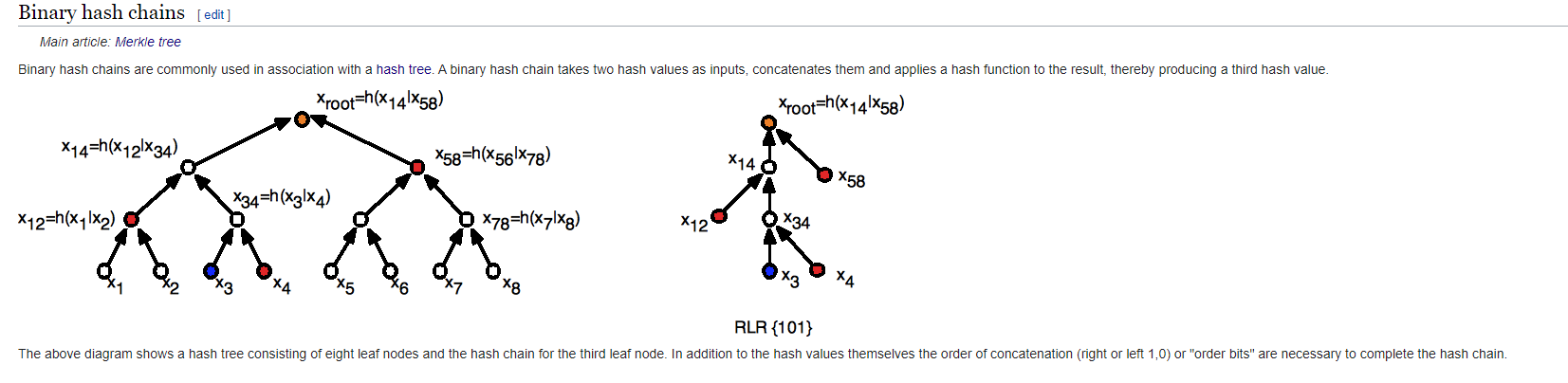
blockchain is a collection of many of these components
spiral drift
You know the checksums tripcode or whatever it's called on 4chan where you verify your anonymous identity through a hashed passphrase?
tame carbon
its not just a crypto
its used in many other places
@spiral drift I think thats GPG
spiral drift
I know it's garbage but do you know what I'm talking about?
just as a concept
not GPG I don't know anything about that, the hash 4chan uses isn't super robust
but it's for 4chan so who cares
tame carbon
yeah its key signing
spiral drift
but I mention Neil Stephenson because he wrote a book where in the future people use blockchained identity tokens
tame carbon
 spiral drift
Allows for simultaneous persistence of identity and anonymity
tame carbon
if they have your public key (bob)
you, alice can sign a message with your private key
and the public key reverses the private key
only your private key can do that
so you can use this to verify your identity
HTTPS is also using this

You encrypt the data you send to a webserver with their public key
and they can decrypt it with their private key
spiral drift
I have a conceptual understanding of cryptography
I'm talking about a sci-fi conceptual use of blockchain
like trading hashed unique rare pepes instead of money
spiral drift
or verifying an identity without needing to actually know any personal details like address or birthday
tame carbon
This is why I don't like cloud
and prefer to teach people how to set up their own networks
spiral drift
I would highly recommend you try listening to the Cryptonomicon by Neil Stephenson
it's a really good novel about cryptography and information theory that takes place across different eras
it's long though, something like 600 pages so I bet the audiobook is close to 30 hours
tame carbon
mh
its fiction though
just saw the genre
if I am to read something big and long
I better had learn something
some science books are more interesting xD
spiral drift
yeah dude you do you
spiral drift
just a recommendation
 unborn sluice

 spiral drift
I learn a lot by reading fiction, like obviously the density of learning is way lower than a textbook of equivalent length
but you do you me dood
waxen scroll
@tame carbon thank you
ive been trying to get that channel delisted for a while now
at least lets have an options trading one instead
in.... real currency 
if anything remove it for #servers
tame carbon
@waxen scroll idk, its not the solution
like, the technology is fine between large trade organizations
but not on a global scale
we can still use it to make fraud almost impossible
and if we do some complicated parelel chains you can even let govt automatically calculate your taxes
ezgam
because you can keep the data private
and then generate the receipt they would need
they don't need to know who and where
just that the block is validated by some key
 tribal ferry
Would anyone be able to help me identify if my cable lines carry fiber?
Seems like I have an optiloop or something
Cable seems to go like this into another box.
 spare bay
Where I live the poles have coloured tags near the bottom
I think yellow is cable and orange is fibre here
anything like that?
tribal ferry
@spare bay At the bottom of the poles?
I have these things that come across to the pole on my side of the road.
Seems to be like cable and power, not fiber.
Although I have no clue what else that optiloop looking thing could be.
peak cloak
oh, I see those all the time
tribal ferry
I’m guessing that it’s not fiber and just a lookalike?
peak cloak
idk what they are tho
tribal ferry
Paging someone experienced in what fiber lines look like
 hollow marlin
@tribal ferry The first picture is clearly cable. The following picture looks like outdoor fiber
 hollow marlin
The flat cables are typically fiber
hollow marlin
Its a maybe. Its hard to tell in the photo
tribal ferry
That pole you just sent a picture of is between my house and my neighbor's house on the edge of the woods
I can get another photo.
What angle do you need?
hollow marlin
Front and side. The cable should be in the shape of a rectangle
tribal ferry
Alright, give me a few minutes.
@hollow marlin
Looks to be what you said.
Flat and a rectangle.
peak cloak
@tame carbon last mile fiber is on poles here
hollow marlin
@tribal ferry Yeah thats fiber. The middle of the 3 runs looks like it has its shielding cut and you could look in side and if you see small cotton like threads and 12 smaller wires then it would prove it. Just please be careful because its someone elses connection
tribal ferry
Yeah, I won't be touching that.
Is it going into a central splitter or something or directly into my neighbor?
hollow marlin
The boxes are splice cases. Just like a patch panel where if there is a cut say in the yard, you do not have to run a new bundle. Just replace from the house to the pole
tribal ferry
Is there any way I can find out which company owns the fiber?
CenturyLink is in a township over, but supposedly they don't cover my area online.
I have very fast 1gbps cable from Xfinity so there's no reason for me to switch if it's the same speeds, but I've been intrigued by their Gigabit Pro from Xfinity.
I think it's only in major cities, though.
hollow marlin
Unless there are tags on the cases not really. If you know your neighbors it doesn't hurt to ask who they go through
peak cloak
are you in the US? Because there is an FCC website that will show you somewhat what ISP's are at your address
peak cloak
tribal ferry
@hollow marlin I don't think they would know, they're in their late 70's.
Well, it says
"ADSL, Cable, Fiber, Fixed Wireless, Satellite, Other"
None of the providers listed below show as having fiber, though.
peak cloak
hmm
tribal ferry
Speed isn't really accurate either.
Only shows ≥ 25/3 Mbps
which is technically true
but as I said, I get 1gbps from xfinity.
peak cloak
yeah, it's not the most accurate of things
tribal ferry
oh comcast is accurate
I mean, if I call Xfinity would they be able to figure it out?
This is my dream, although I don't think they service my area with this.
hollow marlin
Never hurts
tribal ferry
Although I should not believe everything I read,
supposedly xfinity support has zero clue what the hell it is and technically this is from comcast business.
if they service my area*
 lean pebble
Today someone from one of the ISPs in my country contacted me for selling me bundle.
Unlimited home network , tv and free Netflix.
I asked him what the heck is unlimited internet for home network.
He couldn't answer me on my simple question...
Than he told me that when the fiber will arrive at my house I'll get "unlimited" network speed up to 1Gbps.
I asked him you said unlimited why suddenly it's limited to 1Gbps.
Still got no answer
tribal ferry
¯_(ツ)_/¯
tame carbon
@lean pebble peering costs money too
peak cloak
@lean pebble probobly meant no data cap, some people have data caps on home internet
tame carbon
@lean pebble the a fiber can do like 18tbit/s if you wanted it to
but peering costs money
lean pebble
@lean pebble probobly meant no data cap, some people have data caps on home internet
@peak cloak not here
hollow marlin
@tame carbon Currying cable is not possible in all areas
tame carbon
@hollow marlin just feels so wrong lol
to me, internet is like other utilities
water, gas, electricity
peak cloak
electricity is on poles too
tame carbon
we have that all unground here
tribal ferry
to be fair poles are ugly as hell
tame carbon
yep
peak cloak
some areas in the US are all underground too
tribal ferry
if they could all be buried I'd love that, but it would cost billions and electrical companies aren't going to really spend that
for little benefit to them
peak cloak
well alot of the US is not that densly populated so it doesn't make sense to bury
lean pebble
@lean pebble peering costs money too
@tame carbon I know it'll costs twice the cost my friends are paying for it because I'm living in private house.
peak cloak
cities are usually all underground
tribal ferry
^
lean pebble
Today I'm having shitty vdsl connection
tame carbon
@lean pebble unlimited just means
that they don;t meter your bandwidth
so you can use it as much as you want
1gbit is the actual network speed
hollow marlin
Burring would easily range to the billions.
tribal ferry
I'll call Xfinity tomorrow and see what they say.
🤞 that they service my area but I doubt it
tribal ferry
I don't have any
peak cloak
it's stupid
lean pebble
1gbit is the actual network speed
@tame carbon 128MB/s
tribal ferry
it is, yeah
tame carbon
we measure network speed in bits
tribal ferry
I use about a terabyte a month average
peak cloak
cable?
peak cloak
weird, usually those asymmetric speeds are cable
lean pebble
Not here man
In my country they'll do anything to fuck the customer
Especially in this things
They connect the fiber to your home but making you hard time to upload things
Now I have 40Mbps
tribal ferry
@peak cloak Would you know of anywhere else to find out who owns the fiber?
Nothing was written on the cable, just straight black.
lean pebble
And 0.5 upload
peak cloak
no clue, maybe look for tags? Sometimes power companies lay dark fiber as well
tribal ferry
Dark fiber is..?
lean pebble
Where you from
tribal ferry
The US.
lean pebble
Look for utopia infrastructure
peak cloak
just the wire, which they will lease I think to ISP's and other providers
lean pebble
I heard they are good
peak cloak
utopia fiber?
lean pebble
Ya
lean pebble
Oh
peak cloak
yeah, they only do a small portion in Utah or something
tribal ferry
Not AT&T fiber.
tribal ferry
FiOS?
peak cloak
FiOS uses a GPON network, so it's shared, kinda like cable
lean pebble
I like the idea of utopia
tribal ferry
FiOS isn't that good from what I've heard.
lean pebble
FiOS uses a GPON network, so it's shared, kinda like cable
@peak cloak here to
tribal ferry
My friend lives up in Boston with fios and supposedly it's complete trash
tribal ferry
Goes offline a lot and slow speeds
He hasn't gone into much detail
All he's said is that he would kill to get the internet I've got
so
lean pebble
Maybe in his place
peak cloak
hmm, I mean people complain about optimum and I've had zero issues
tribal ferry
No, he lives in another state.
lean pebble
😂
peak cloak
ew, copper over long distances won't work
lean pebble
Man the fiber is under my garden walls and I'm not connected
I had times that I had to download games from steam over my 4G network
Because my home network was trash
Because the network infrastructure here
Until I got my fortigate and blocked all their system from accessing to my line
And router
peak cloak
I mean... couldn't you just use your own router
lean pebble
I did
peak cloak
they can't access that
lean pebble
But their system could
peak cloak
how?
lean pebble
Their system was resting my network all the time
peak cloak
resting?
tame carbon
wat
lean pebble
I tried I used 4 different routers till the fortigate
lean pebble
resting?
@peak cloak refreshing the line "updating"
peak cloak
huh? I don't understand
lean pebble
I had problems 10 years
tame carbon
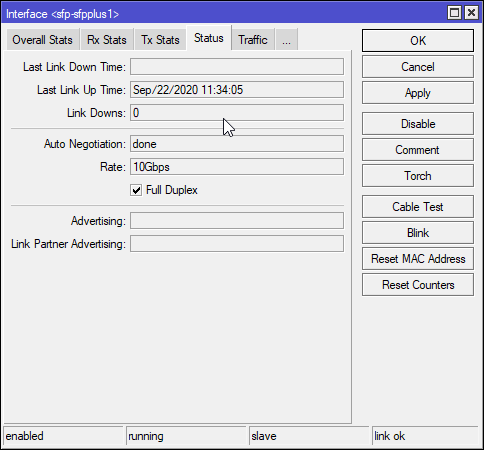 peak cloak
oh, so on the ISP's end?
lean pebble
They switched 7 times the main switch
The ISP is good, here ISP and the under ground network are separated
ISP is only user and pass
The second company connected to your house
Internet infrastructure
It's not like utopia / at&t verizon and such
It's same company with different name and less support
Until 2003 I think my country only had 1 main company that handled the internet infrastructure
That provides adsl connection
They have fiber from 2010 but the government blocked them from using it
Because they wanted to end their monopol in this industry
 surreal wolf
yo anyone active here that can help me?
peak cloak
Don't ask to ask, just ask
waxen scroll
@peak cloak you'll hurt feelings
 flat yew
Anyone here that can help me resolve some Windows 10 10G inefficiencies and actually let me get 10G?
 stone kite
Question: How would one go about extending usb over ethernet from downstairs to upstairs?
flat yew
I've pretty much eliminated all of the hardware as potential culprits.
stone kite
@flat yew if you have a spare drive, maybe try another OS and see if it's just win10 being clunky.
flat yew
@stone kite
I've confirmed Windows 10 is the issue.
Somewhere
FreeBSD to FreeBSD with all of the involved hardware gets 10G easy
stone kite
Hmmm have you tried using a hammer?
flat yew
But on Windows it just gets stuck at 4G
@stone kite yes, but that introduced a slightly different problem.
stone kite
Did you try swearing at it profusely?
flat yew
That causes Windows 10 to boot backwards. :p
I've tried reconfiguring some driver options on the card, but that only marginally improved performance.
stone kite
That vid where LTT upgrades to 10G in like 2015 might have some answers. I believe Linus had a similar issue at first @flat yew
hollow marlin
@flat yew are you using the -P flags?
flat yew
@hollow marlin that's a good question. How do I check?
hollow marlin
When running iPerf use -P 4 or how ever many cores your have
flat yew
@stone kite was that the one they spent doing on a Weekend and Jake laughed at Linus for almost PoE a non PoE port on a $2000 laptop?
@hollow marlin I'm not running wireshark.
I'm running iPerf3
@stone kite Otherwise, I don't remember the video
hollow marlin
Shit yeah iPerf. I Have an open wireshark capture ATM
flat yew
I'm initializing WireShark
hollow marlin
No wireshark lol. I misspoke because multitasking
surreal wolf
how to download wireless driver for windows 7 manually
flat yew
@hollow marlin so use -P in iperf.
surreal wolf
i think i accedintely uninstalled the one i had on my laptop
stone kite
I'll see if I can dig up the vid and link
surreal wolf
i accidentally uninstalled my wireless
hollow marlin
@flat yew yes. You can replace 4 with however many cores you have
stone kite
@surreal wolf it probably deserved it. Lol
surreal wolf
please mate, i just want it back
im using windows 7 and the other pc is windows 10 so i cant just copy paste it using usb
stone kite
@surreal wolf do you have an ethernet port and cable?
flat yew
@hollow marlin it didn't help much, it just throttled each connection.
flat yew
My total receive from the server is 6 Gbps and my total sends is 2-3 Gbps
surreal wolf
it doesnt allow me, i cant find any drivers
stone kite
Use ethernet, go into device manager and update the driver. Tell it to search windows update automatically
flat yew
My send is that high on a single thread.
hollow marlin
@flat yew Yeah each thread is going to take a hit but thats not much of a problem. Windows IP stack struggles at 10G. What CPU are you trying to test with?
hollow marlin
Did you use -P 4 or did you increase it?
flat yew
I used -P 16
stone kite
@surreal wolf dowoad a program called Driver Identifier. Scan your pc. In the results should be your identified hardware. You then follow the site to your driver to download. Use device manager to update driver. Then browse manually to the downloaded unzipped driver. Click next and hope it works
flat yew
I can try again with -P 8
stone kite
@flat yew is - P69 an option? XD
flat yew
Total throughput dropped to 2 Gbps. 😦
@flat yew the gag from the DigitalStorm video?
@hollow marlin ^^^
surreal wolf
now it says microsoft virtual miniport adapter is the driver that has been downloaded @stone kite @peak cloak
surreal wolf
thats what i can see
peak cloak
update the driver for the broadcom 802.11n Network adapter
also what windows verison is that, super old
peak cloak
win 7 doesn't look like that tho? or is it a reskin?
peak cloak
hmm ok, it does it work?
surreal wolf
no
peak cloak
maybe restart
surreal wolf
i downloaded driver finder
peak cloak
restart, many windows issues are fixed by restart
surreal wolf
its running will see if it will detect anything
mate this windows 7 is super old im afraid it wont help restarting
peak cloak
the way windows is built, restarting would help still, right?
if driver finder doesn't find anything then restart, can't do any hard right
surreal wolf
i just click on backup all drivers
on driver finder
i regret uninstaling it i just didnt know it was wifi thing
hollow marlin
@flat yew Yeah thats expected. Window's stack cannot handle it. Either try a live linux distro or even run it from a linux VM if you want to test 10G
flat yew
Oh I already did. All the hardware I have gets 10G easy on a single thread.
Hell even a Celeron CPU does it without breaking a sweat.
I don't get why Windows 10 can't even get 10G on an i9 CPU. That's just silly and ridiculous. :/
hollow marlin
I know, thats why you need to brute force it with thread in iPerf3. You could try iPerf2 as that was good to 10G
flat yew
But brute force didn't help either. The total numbers were still the same more or less. :/
I can try iPerf though.
@hollow marlin iperf2 is even worse. Not even getting a gigabit
hollow marlin
@flat yew worth a shot. Many reported they used 2 for 10G in windows. Maybe a flag is needed? I have never used 2 because I only use linux for 10G
surreal wolf
@stone kite @peak cloak found my wirless wifi again thanks brothers cheers
tribal ferry
Holy shit, gigabit pro is available at my address
peak cloak
oh, nice
flat yew
Now you just need a network infrastructure to be able to handle that. :p
tribal ferry
$300/month, two year commitment
peak cloak
yep
tribal ferry
I’m talking to them at the moment
stone kite
@surreal wolf you're welcome. I hope my instructions helped in some way.
peak cloak
where my dad's work HQ is, they have 10gig for $300/month
Chattanooga
we may move there one day, he really likes it down there
 maiden jay
This is a bit sus no?
This goes for 194 new here
It's apparently opened never used, but like, half the price?
tribal ferry
I apologize to interrupt but I’m amazed that I have gigabit pro service
And fiber
My area has zero cell coverage at all
tribal ferry
$1k upfront
maiden jay
There are some pics, 3 are from google images
tribal ferry
Main thoroughfare
peak cloak
ah, makes more sense
maiden jay
peak cloak
@maiden jay bit sus
maiden jay
This one has a more legit price, but no pics other than this again
Preflashed with DD-WRT which is kinda epic, saves me trouble, but I dunno
I don't like when there's no pics
peak cloak
me neither
maiden jay
I mean it is Ebay, consumer is at a huge disadvantage over the seller, but like
Every single listing of this router on ebay uses that same image straight from linksys site lmao
Man I dunno
hollow marlin
@flat yew what happens running the test in reverse? Is the server linux?
maiden jay
I really want to get this router cheaper
flat yew
The server is TrueNAS
maiden jay
This listing seems nice, but uhh
flat yew
@hollow marlin it's as I mentioned before, I can't send more than 2 Gbps, and I can't pull more than 6 Gbps.
But TrueNAS servers using the same NICs as my Windows machines do, and testing with one another over the same switch, and they easily do 10 Gbps on a Celeron CPU, no less.
Windows on an i9 9900K chokes. Really pathetic on Microsoft's part.
 south blade
How do I find the IP address to my router, it's got DD-WRT installed and I screwed something up. I was thinking i'd reset it before updating it but now can't seem to connect to the GUI even thought I'm still online....
192.168.1.1 doesn't work and neither does 192.168.10.10 which I had it setup as
I have PFSense handling DHCP
 hoary tusk
@south blade I type in ipconfig in Command Prompt and paste the default gateway into my browser. Tried that?
south blade
gateway shows the IP to the PFSense box
hoary tusk
oh idk then
 primal ice
arp -a
hoary tusk
Anyone know how deep an IP ban goes? Is it just your public IP address that gets banned?
south blade
arp -a
@primal ice :/ I still see the IP address I had setup for the router in there, 192.168.10.10 but I can't connect to get to the GUI, wtf -_-
sigh so stupid that stuff like this happens, I usually skip resets and go straight to update and select to reset on update, but NOooooo, today I try and reset to defaults BEFORE going to update it and this happens.
primal ice
you might of changed the access type from https to http my buffalo router does that. then I have to manually type out the address http ://192.168.10.10/ otherwise it refuses to connect.
south blade
I was thinking that but didn't make a difference :/
well, on my phone it shows Unable to Connect on one and Timed out on the other.
https vs http
 fading wraith
 primal ice
do you have a device that you can connect to it directly through ethernet? though its still probably going to come down to just hard resetting it.
south blade
I tried holding the WPS/Reset button already, yet apparently it didn't reset anything. LOL And this desktop is the only thing hardwired to it, but as I mentioned neither LAN or WAN port got me back into the GUI
 sinful solar
Anyone here have experience with Mikrotik networking equipment?
primal ice
yeah there should be another reset button not the WPS. the other reset button should return it to factory defaults. might have to unplug it and hold down the reset button for the 10-30 seconds.
which router is it?
south blade
TP-Link Archer C7 v2
besides the power button this "WPS/Reset" is the only other button I see on the back.
This router has actually been giving me a lot of trouble for a while now, might be these firmware though. What's a cheapish router that's got a good range?
primal ice
yeah no apparently that is the factory reset button. normally the wps/reset is just for the wireless portion. but okay did you hold it down til the lights flashed fast then slow that is suppose to indicate a reset.
south blade
I held it till they turned off for a sec and came back on, didn't seem to reset. I tried it again and kept holding it, after the initial lights going off and on it looked like they went back to what they were, didn't matter if I just kept on holding it after that.
primal ice
mhm that might be dd-wrt messing with something then. yeah try the hard reset unplug the power hold down the reset button for thirty seconds (to drain the nvram power) then plug the power back in and see if that changes anything.
south blade
Ok, thank you. I'll have to try that later tonight, I was sure this was going to take less than 30 minutes as it usually did, don't want to turn off the internet on everyone in the house now. LOL
primal ice
good luck. yeah those oh this should take 5 min but then turns into hours long troubleshooting situations.
@sinful solar yeah @tame carbon loves the Mikrotik hardware. though they are European so might take awhile to get a response .
peak cloak
@primal ice they left the server
sinful solar
🤔
hollow marlin
Crystal was banned via the bot
sinful solar
Having problems with MinasTirith (The LTE modem) occasionally hanging on us
Here is a diagram of my home network:
primal ice
ouch okay did not know that. 😒
sinful solar
When it hangs I can still ping any address I want. I can clear my DNS cache and still resolve domains via nslookup or a resolve command on the router.. But all attempts to load a website time out
hollow marlin
@sinful solar is this just happening on the PCs?
sinful solar
All devices, phone, smart TVs stops streaming, etc
hollow marlin
Are you handling DNS on the Mikrotiks or handing out external DNS in DHCP
 weak tundra
 dusty osprey
weak tundra
dusty osprey
weak tundra
K
unborn sluice

lean pebble
When it hangs I can still ping any address I want. I can clear my DNS cache and still resolve domains via nslookup or a resolve command on the router.. But all attempts to load a website time out
@sinful solar
I have the same problem on my pc.
I need to wait untill I get error in my browser and then click F5 for refresh for Google to load.
If I use my proxy server all working perfect.
south blade
F**** DD-WRT, I couldn't get back in the GUI last night but come to find this morning that it rebooted itself anyways as I had it setup to do at 4AM and at that time it reset itself to default settings like I was trying to do last night! So it reset itself and had WIFI without a password since 4AM!
unborn sluice
free wifi for everyone
peak cloak
why I don't like all-in-one routers
south blade
I had DHCP Leases opened up on PFSense and screenshotted it before refreshing, I think I only see 1 MAC address I don't recognize.
...That MAC address is just the DD-WRT router after it reset itself. 😒
Is there somewhere else in PFSense I should look to see if someone was on my network last night?
I didn't think this through before trying to get everything locked back up, but now I want to know if anyone connected to my network.
peak cloak
dhcp leases
technically if someone was really being sneaky they could try static ip, but I don't think many neighbors would be that tech literate
south blade
Well, if that's all that was connected under DHCP leases then guess I'm fine and no one else got in.
Holy shet, I think I just realized something....would making my desktop wireless make me more secure!?
All my other devices we're like headless chickens without WIFI connected cause it reset itself to another network name without a password, so they were no longer connected to my network...so would having my desktop be wireless instead secure me too?
peak cloak
Umm, kinda not really. Wired is the most secure, no one can listen to it without a tapper. Wifi is emitted everywhere (encrypted of course, but still)
Just don't have wifi reset, get a proper AP if you can
south blade
This is the first time I had this happen, so stupid. Maybe if I had thought of turning the router off and on last night it would have finished resetting itself like I was trying to do with the reset button. 😭
unborn sluice
Atleast your neighbors got free wifi for hours

if they would connect to an unknown AP, i would assume they know how static IPs work
south blade
I feel like my desktop was the only real vulnerable device in those 5 hours, 4AM-9AM, they would still have needed my device login to access my "shared" files?
peak cloak
do you have a password on network shares? if not you should
I do a nmap scan of my network once in a while to check for any vulnerabilities
south blade
Google search shows that that is a Linux command?
peak cloak
no, there is a windows version as well
it's actually zen map
zenmap is a gui for nmap
Official Download site for the Free
Nmap Security Scanner. Helps with network security, administration, and general hacking
unborn sluice
I mean if you have the network sharing on then anyone who connects to (same network) would see your files
hopefully you ddin't made it public

south blade
 Trying to imagine myself as a neighbor finding free WIFI, on my Android phone I load up ASUS File Manager and don't even see my desktop under Network Places, which would have been the only device that was hard wired, as I said all the wireless devices were in the dark as they didn't know the then reset WIFI name. Edit: Just tried to put the SSID back to it's reset state without a password and the only 2 devices that connect to it at the moment is a tablet in the house and my phone, hopefully that was all that accessed it. :/ In this mode under Network Places on my Android phone only my wired desktop shows up but can only be accessed with a login.
 hasty minnow
hi im looking for a usb-c to 1gigabit ethernet adapter does anyone know of a good product i could use?
sinful solar
Are you handling DNS on the Mikrotiks or handing out external DNS in DHCP
@hollow marlin all of the Mikrotik devices are addressed statically and there is no dhcp at all. The only place using dhcp is each home router inside of each separate home network
south blade
Anyone know how to kick off a device from DD-WRT and PFSense? I can't figure out what device is connected that's not a MAC address I can seem to find in the house and it's host name is just iPhone.
 gray pawn
@south blade I'm no PFSense expert by any means, but under Services > DHCP Server, you can specify to "Deny unknown clients" if you static map all the devices that you want to allow on your network.
peak cloak
@south blade I don't know how to do it in dd-wrt, but on my AP I just go to Status -> Client List -> and then I can rate limit or block certain devices
if you just change the wifi ssid and password back to what it was, clients that don't know the new SSID and password won't be able to connect anyway
south blade
I don't know which would be more convenient, changing SSID and password on 12 devices or blocking all other devices and having to deal with adding in manually anything new I want to put on the network LOL
peak cloak
no, I mean if the wifi reset to the default open password the "neighboor" when the SSID and Password were changed back to normal wouldn't be able to connect anymore anyway
south blade
Oh, that should be true...but I still can't figure out whose device this "iPhone" with MAC I can't find in the house is supposed to go to.
I've got an old dead iPad in the corner in pieces, shouldn't be that, not matching the other 3 iPhone devices either...
@south blade I'm no PFSense expert by any means, but under Services > DHCP Server, you can specify to "Deny unknown clients" if you static map all the devices that you want to allow on your network.
@gray pawn Considering doing that, but I had a pool 192.168.10.100-120 for when family came over, but this "iPhone" I can't find has taken one of those addresses at the moment. Currently trying to remember where to see in PFSense just what it's accessing.
Whatever it is they seem to be accessing TikTok
peak cloak
If I had that problem, I would make a seperate SSID just for them and isolate it from the network and then have dhcp point to a dns server I would host and have all dns requests point to an internal website to troll them
south blade
Hmmm, this MAC address and IP address is accessing TikTok, my sister is accessing TikTok, but I can see the MAC address from her iPhone she screenshot is online in PFSense, along with the unknown MAC that's also an iPhone....how many MAC addresses to iPhone's have? 😄
 rocky badge
Random mac
south blade
😭 I've been chasing a ghost this whole time?! So, how beneficial is it to keep that setting on iPhone turned on?
 little schooner
rocky badge
little schooner
rocky badge
yeah
 inner lake
Internets been offline for 3 days by now
On my shit router combo the online light isn’t on
I’ve tried resetting it and unplugging it like 30 times by now
called spectrum and they tried to reset it themselves in their end or something didn’t do anything, anyone got any ideas on what to do 
peak cloak
because it's an all in one, can't really check if it's router or modem, however I remember some all-in-ones let you check the status of the connections. Check if the coax connection is online
via the webui that is
 peak cloak
I am also a teenager
suprise
any way type in ipconfig /all in windows command prompt
you connected via wifi or ethernet?
inner lake
WiFi
inner lake
Yep
 ornate jungle
@inner lake what is the exact make and model of your modem/router potato combo unit?
peak cloak
ok cool, so when you type ipconfig /all show what shows up under Wireless LAN adapter
ornate jungle
Based on the user manual, the modem isn't connected to your service provider if the online light isn't lit.
https://d15yx0mnc9teae.cloudfront.net/sites/default/files/technicolor-tc8717t-userguide.pdf
peak cloak
yep, that's what I thought as well, just wanted to make sure
inner lake
bruh
peak cloak
go to http://192.168.0.1
inner lake
On my phone?
peak cloak
any device connected to your modem wifi
peak cloak
I think the default login is admin password
ornate jungle
It's a cable modem, so something is preventing the modem from locking onto the down/upstream channels, which usually indicates poor signal levels coming in through the coax cable. When you spoke with your ISP, what did they do after a reset didn't work?
This could be caused by a break in the cable, an old coax cable splitter, or a disconnection somewhere between the back of the modem and the point where the drop cable from your ISP comes into your house. Or it could be an outage in your area.
peak cloak
well, your modem isn't connected to your ISP
inner lake
last time we called spectrum when our WiFi was out they said ther was no outage
ornate jungle
How do you know? One way to verify is to ask a neighbor with a cable modem on the same ISP to verify if they have connectivity. Another way to verify is if you have other hardware from the same ISP in your home.
ornate jungle
Even if your friend lives across the street, they could be fed by a different CMTS and/or Node/Amplifier, so that doesn't guarantee there isn't an outage impacting even just 5 houses on your side of the street.
inner lake
Alright
okay so last time we called spectrum the person said they’re gonna reset it from their side or soemthing
I’m not to siren
Sure^
but it didn’t do anything
ornate jungle
Righto, and what did they do when they tried to reset it but it didn't come online?
inner lake
They said they’ll bring someone to come
but let’s just say it’s gonna take a while
they didn’t really tell us what problem we had either
ornate jungle
Gotcha, they booked a service call for a tech to visit, which makes sense since something is physically impeding the signal between the modem and the outside plant network. (the cables & equipment that deliver signal to subscribers' homes.)
In the meantime, do you have another coax outlet in the home you can connect the modem to? This will help determine if ALL outlets in your home are not receiving signal, or if it's just the current coax outlet.
inner lake
nope
Tbh I think we’ve had problems with spectrum for about 5-7 years
because I still remember being a kid and resetting the modem and crap
and Ngl it feels like Everytime we get a new router from them it gets worse
ornate jungle
Welp, you'll have to wait for the technician then, unless you feel like trying to trace the coax cable through your walls to find out how/where it connects to the drop cable coming in from the street.
That sounds like it's a coax cable signal problem that's never been properly addressed. A new modem won't fix that - Spectrum's support should have checked the signal levels being delivered to the modem to see if they were low during each time you contacted them for support, that way they could have sent a technician out proactively before the levels became so poor that the modem stopped connecting.
inner lake
On my old router I got 100mbps now I get 10-20mbps (when my internet is up$
peak cloak
I mean, you always have to benchmark over ethernet
inner lake
Makes sense
peak cloak
But I suspect it's still a problem on spectrums end
inner lake
gotcha
peak cloak
cable can be sensitive to EM interference
inner lake
Man gotta love it when Beyond light comes out and I buy the $70 version and I can’t even play it
Soo get a new Coax cable
peak cloak
no
ornate jungle
Until we know what the problem is, who knows whether you just need a new coax cable, new splitters, a new drop cable from the street, or if the tech needs to replace the cable TAP on the lines further up your street.
inner lake
wait @peak cloak the link thing what’s the username because i can’t connect 😂
peak cloak
if not, look on the router for a login
inner lake
Got^
peak cloak
nice, show a screenshot
peak cloak
yeah, because you don't have a moca network
ornate jungle
Under Connection do you have a menu under Status perhaps labelled Spectrum Networ or similar?
If you do, click on that, then scroll down... hopefully your modem shows you down/upstream levels.
inner lake
I got WAN network
ornate jungle
That's probably it, because below that you probably have Local IP Network like my similar but not same modem.
ornate jungle
Take a screenshot of down and upstream stats. Chances are I am guessing that when you power cycle the modem (reboot it) the online light blinks for a while, but then eventually goes out, yeah?
inner lake
ornate jungle
Righto, so no channels are locked in - you've got a signal delivery problem, meaning there's no (or very poor) RF signal being delivered to the modem over the current coax cabling from the NODE outside your home, through the drop cable to your home, and then through your house coax wiring. Wait for a technician.
inner lake
okay
south blade
Surely it has a section where it shows messages as to what the problem is, no? LOL
inner lake
Not even sure why it started not turning on after restarting
It used to take like 1-2 then 3-5 now it ain’t ever going on lol
peak cloak
@south blade I mean, those are called lights...
south blade
No, I mean literally like console showing what's actually going on behind the lights,
ornate jungle
Surely it has a section where it shows messages as to what the problem is, no? LOL
@south blade diagnosing RF/signal problems on a coax network isn't something that most cable modems can do... In fact, frontline support agents at many ISPs don't even have the tools to do this. You need to know what you're doing (aka be a trained cable engineer) and usually have some kind of special cable testing equipment to perform a TDR. https://en.wikipedia.org/wiki/Time-domain_reflectometer

A time-domain reflectometer (TDR) is an electronic instrument used to determine the characteristics of electrical lines by observing reflected waveforms.
It can be used to characterize and locate faults in metallic cables (for example, twisted pair wire or coaxial cable).
It ...
south blade
Well, PFSense blocked me out of my modems WebGUI but ARRIS brand modems have what I'm talking about. LOL
I would think something similar would be in this AIO, maybe under Connection? But I'm guessing that was his screenshot of it.
south blade
Event Log
south blade
Yeah, I've gotten some idea on modem issues through that on mine. Sometimes it's just spammin the problem right there that's easy to report to the ISP. xD
peak cloak
about pfsense blocking the conenction, that's werid
I have an er-x and I can access it no problem
http://192.168.100.1/ is the ip
south blade
192.168.100.1, PFSense is 192.168.10.1
peak cloak
and I have an 10.x.x.x network
south blade
It's probably something I don't understand in how I have it setup.
Once I put the PFSense box between the modem and the Router I was no longer able to get to the Arris WebGUI
peak cloak
I don't understand how it works either
¯_(ツ)_/¯
it always has puzzled me, I asked but I still didn't understand
lean pebble
Did you give access to arris webgui in pfsense fw ?
Does the pfsense have the same network ips?
For example 10.10.10.1
peak cloak
what are the networks on pfsense, for example I have like 6, for example 10.0.10.0/24 is trusted
if you have a network that includes 192.168.100.1 it wouldn't work
lean pebble
I have fortigate so I don't have this issue.
But it's sound like you just need to accept in your fw
I know that in fortigate of not accept your one subnet in admin place so you can't access it via ssh / webgui


 lean pebble
Do you get error while trying to access the webgui?
peak cloak
I won't either in a few weeks
rocky badge

 lean pebble
Once I put the PFSense box between the modem and the Router I was no longer able to get to the Arris WebGUI
@south blade
peak cloak
no, they won't help
inner lake
Damn
lean pebble
192.168.100.1, PFSense is 192.168.10.1
@south blade your arris ip is 100.1?
Did you enabled access from vlan1 to your main vlan?
Sounds like you just need to use nat for access it or let arris access webgui from 192.168.10.0/24, for example.
peak cloak
huh, vlans have nothing to do with this
my trusted network doesn't have access to default and it works
lean pebble
Maybe it does, because his pfsense is 10.1 and arris 100.1
peak cloak
huh, shouldn't be an issue tho
south blade
As long as I don't break anything
rocky badge
It shouldn't
lean pebble
Should be if he get error while trying access it
rocky badge
Wait, who's having the issue?
peak cloak
the amount of times I didn't understand vlans and broke my network while trying to set them up
rocky badge
Sryously?
rocky badge
Is it every device can't access 192.168.100.1?
lean pebble
For now he have 2 networks 10.0/24 and 100.0/24
peak cloak
well there's your issue
lean pebble
That's what I say
rocky badge
If you have a 192.168.100.1/24 network
lean pebble
Lol
rocky badge
The pfSense won't send it over the default GW
peak cloak
you could change the network address
rocky badge

 lean pebble
He just need to use nat between them to give them access
Or make it the same network subnet
peak cloak
huh
lean pebble
I had the same issue with my fortigate
south blade
Gonna need the How To For Dummies, I'm under NAT, where do I do this stuff to access 192.168.100.1?
peak cloak
192.168.100.1 is inside the 192.168.100.1/24 network 192.168.100.1 is the gateway of the network as well as the address of the modem. What you need to do is change your 192.168.100.0/24 network to a different address
like 192.168.200.0.24
make sure to update the dhcp lease range as well, idk pfsense, I can do it in edgemax though
and vyos, both are kinda similar basics wise
lean pebble
He have 2 subnets right now.
10.0/24 and 100.0/24
peak cloak
yeah
rocky badge
192.168.x.y? 
peak cloak
192.168.100.0/24 needs to changed
rocky badge
yup ^
lean pebble
To the same network
His main router on 100.1
Pfsense 10.1
From what I understand
peak cloak
isn't pfsense the main router
peak cloak
my router has multiple interfaces
lean pebble
What is the router ips
rocky badge
its just bridging and authenticating
lean pebble
What dhcp the router give?
peak cloak
interface galore
south blade
_> it is just a modem, address to it is 192.168.100.1, it's connect to my PFSense box 192.168.10.1, my router is connected after that, 192.168.10.10....how big of a mess do I have? 😄
rocky badge
@peak cloak https://blob.rocks/agy7x7WwCX.png

 peak cloak
@south blade pfsense is a router...
lean pebble
Gosh man
peak cloak
you mean AP?
rocky badge
is your modem doing NAT
lean pebble
You have 2 routers on the same network with nat
rocky badge
if not, the pfSense should be getting a public WAN IP
lean pebble
I'm lost what configuration did you do?
south blade
dumb question, does AP (Access Point) only mean WIFI?
lean pebble
Start from the beginning
rocky badge
yes
lean pebble
You have:
Modem
Pfsense
Router ?
south blade
Cause no, 192.168.10.10 is not only WiFi, my desktop is hardwired to it, and my wireless devices also connect to it, yes.
rocky badge
on your desktop
peak cloak
what's the second router doing then?
south blade
192.168.10.1
lean pebble
So much mess
lean pebble
You have arris router or modem ?
south blade
modem
lean pebble
Ok
lean pebble
What brend of router