#networking
1 messages · Page 237 of 1

 tame carbon
2
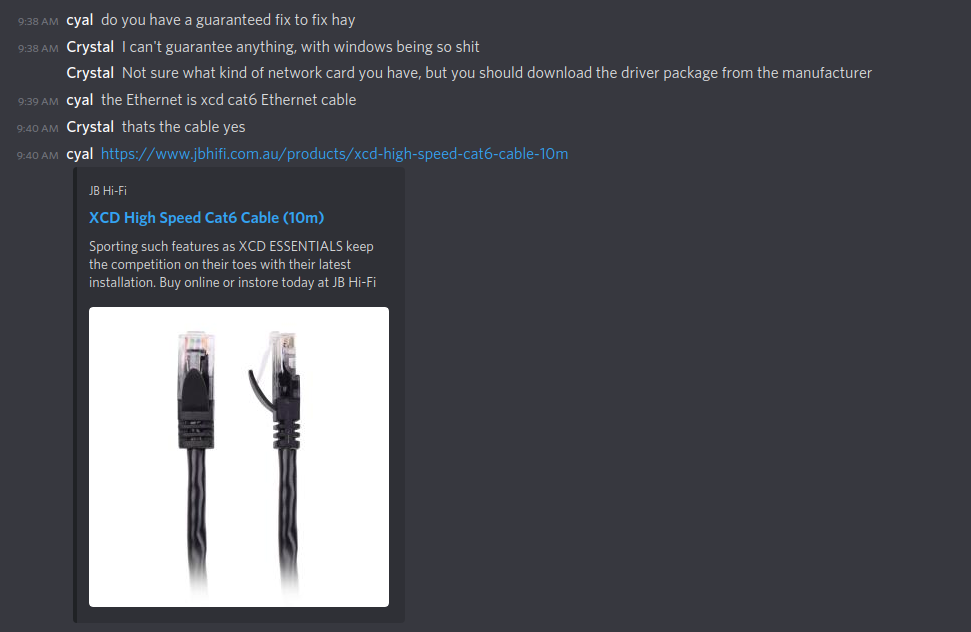
@thorny vector see, this is why Phoenix gets upset: https://i.imgur.com/DEAeRhu.png
 unborn sluice
what's the context of this lel
unborn sluice
I thought phoenix left cause of the people in #development
tame carbon
he cant get his network device to work
 thorny vector
Oh, with that dude having networking issues? Error 56, just some driver issues
unborn sluice
@unborn sluice code 56 in windows device manager
@tame carbon oh lel, definitely because of cable
tame carbon
but people in general think its fixed in bios
unborn sluice

tame carbon
like
its 9:45am
I am only on my first cup of coffee
aint got the nerves for this
thorny vector
But don't you know, all problems are fixed it the bios? /s
tame carbon
@thorny vector I don't see how resetting a bios is going to solve anything
thorny vector
I wouldn't expect it to. I dropped him a guide to follow, so 🤷♂️
thorny vector
Honestly, my biggest pet peeve are the people that ask for people to build them a parts list with vague crap as guides
And it is. WITH POWERSHELL!
tame carbon
are you a hacker?
thorny vector
Hardly.
unborn sluice
he's that guy that uses powershell in linux
unborn sluice
it is, but he's the answer to
tame carbon
pretty sure commandlets in ps are just .NET programs
unborn sluice
"Who tf uses this"
thorny vector
For a good reason, the PowerCLI powershell module is super powerful when controlling VMware products
tame carbon
@thorny vector fuuuuck
I hated that.
omfg
I had to make a custom ESX image for some raid controller
on windows 7
windows 7 PS does not have package manager by default
so took me about an hour to get PowerCLI to work
after which I could use esx customizer
garbage.
thorny vector
I have a script lying around somewhere that uses powershell 1.0 commands to pull and install the latest powershell version
thorny vector
Why? Those don't scale out well.
thorny vector
esxi and vsphere, on the other hand, are amazingly powerful
Not like I'm using workstation
tame carbon
you have to pay for workstation on linux
thorny vector
Unless you attend their conferences, where they gave out workstation 16 keys
tame carbon
or
use FOSS
and not give a crap about vmware
they put all kinds of arbitrary limits on their software
like 1 cpu socket max
tame carbon
... exactly
thorny vector
200 dollars a year for a VMUG dev liscense for all products
thorny vector
equivalent to the enterprise line
i'll pay 200 bucks a year for support and dev. Easy peasy.
tame carbon
I don't really do closed source software
thorny vector
Plus, its what is used in our forensic kits, and by almost every customer we have
tame carbon
and vmware putting all kinds of licensing on their kit, makes me look elsewhere
for single server vm hosting, QEMU/KVM is perfect
if you need scaling, Proxmox
thorny vector
Trust me, VMware liscensing is by far one of the milder buisness models we deal with
tame carbon
I like how microsoft forces a full Office-365 license on every employee
thorny vector
Not standalone kms solutions. Those are buy and be done. Just have to get new ones for any new products
tame carbon
isnt that the same as a subscription?
They drop support
and in a few years, they'll find a way to force their new software on older customers
thorny vector
No. Support is good for the life of the product
thorny vector
lol
they'll still support old office products
and even windows 7 still can be supported, if you buy the extended support
tame carbon

Find out which products will retire, reach end of support, or move from mainstream support to extended support in 2020.
One of my friends was quite salty about this
they just paid over 15k for Microsoft Dynamics
and its already being phased out, 2 years after release
thorny vector
No, its moved to extended support
tame carbon
Irrelevant, its still planned obsolesence
so you can't build on it reliably
without being forced to pay microsoft
thorny vector
Its not planned obsolesence at all. Its natural progression of products. Planned obsolesence is if the products just stopped working after the end of support
thorny vector
and lemme tell you about some of the old products i get to deal with with some customers
tame carbon
This is just a fundamental problem with all closed source
it cares more about making a buck, than it cares about delivering a reliable software experience
thorny vector
Open source has its place, and its amazing. But closed source products often have much more reliable support.
tame carbon
@thorny vector say that to redhat
thorny vector
Really? I've had nothing but good expiriences with them
Good enough I went ahead and got my own subscription for home
tame carbon
Redhat shares all sourcecode with their customers
Their entire business model is built around support
thorny vector
Redhat/Centos/Fedora is a different story.
tame carbon
microsoft just writes a program, calls it "finished"
thorny vector
I think we're just at different ends of the user spectrum, and we're going to fundamentally disagree on a lot
tame carbon
puts it on a CD
and sells it for an insane markup
and drops support 2 years later
or release a new version for the same price, the next year
scratch that, lets make it a subscription
@thorny vector yeah, seems like it
I see the use in software, only in the problems it solves in our lives
this is why I dont understand why you would pay for an operating system
it doesn't solve a problem
you need it to run other programs
thorny vector
Yes, and I'll pay for it, because someone put work hours into making it
even the linux distros I use, I support the devs
pop_os, I bought a laptop
Redhat/centos, bought a subscription
tame carbon
mh. see thats good business
thorny vector
VMware, bought a liscense
tame carbon
I just wish if I bought something, I'd have full control over it
and not get "the right to use it"
@thorny vector open source & free market forces don't play well together
they fundamentally oppose eachother
thorny vector
They also operate in different market spaces
tame carbon
If it wasn't for FOSS, apple would not be where it is today
same goes for Microsoft
Apple makes heavy use of GNU utils
thorny vector
Ok. But I can call microsoft engineers, or vmware engineers. Its a lot harder for me to track down dev_guy_23 who helped make "x" distro/program.
tame carbon
but you can look at the source
same can't be said for microsoft
and if you have a problem
you can fix it yourself
or pay someone to fix it for you
thorny vector
So I can spend the time teaching myself enough to read through the source, and understand every product that I use on a daily basis. Or I can focus on my job, and have support do supports job
tame carbon
Yes, this is why companies like redhat exist
except they don't shaft you at every opportunity ;)

ZDNet
The Dutch government has followed the United Kingdom’s lead, signing a multimillion Euro deal with Microsoft for the company to continue providing support for its Windows XP systems.
Like, my taxes go to this BS.
only because they got a chokehold on the govt.
thorny vector
I'd hardly say microsoft, vmware, and the half dozen other products I use are shafting me.
https://www.zdnet.com/article/dutch-government-pays-millions-to-extend-microsoft-xp-support/
@tame carbon Also, millions? Drop in the bucket to take care of critical, air-gapped systems
tame carbon
and then the next year

The Dutch government is paying €1.7m to Microsoft to be able to continue using its Windows XP system, on top of a €3m payment for support services made last year. Microsoft stopped supporting the 14-year-old system a year ago but the Dutch government did not manage to migrate ...
thorny vector
Sounds like a good deal to me
tame carbon
what is this bullshit?!
thorny vector
Again, that amount of money is barely anything at these scales
tame carbon
like, government operation, we should be in control of our own source.
and not pay some spying american company
thorny vector
A single one of our larger forensic kits cost more than what they're paying for support.
tame carbon
We're talking about an operating system here
and a government paying 10s of millions
to use an operating system.
its
rediculous.
thorny vector
Again, that's like you spending pennies
tame carbon
yeah but it doesnt solve the problem
in 2 years, we're still in the same boat
using windows xp
wasting money
thorny vector
🤷♂️
tame carbon
if we had our own source, we could employ our own experts
and if you give them 10 million, as we do with microsoft
thorny vector
All those systems, and the old software and hardware they have to use, aren't going anywhere.
tame carbon
they can solve it too.
thorny vector
Not because some evil company is holding them hostage, but because infrastructure and technologies made in ye olden times don't like talking to modern equipment
So the support is neccesary
 maiden widget
https://www.zdnet.com/article/dutch-government-pays-millions-to-extend-microsoft-xp-support/
@tame carbon happiness noises
thorny vector
Support, that sounds an awful like redhat
tame carbon
@thorny vector but we can stop paying redhat at any time, and put our own smart people on it
because we have the sourcecode.
same cant be said for windows
thorny vector
Cool. But that requires paying people and training them up so they can do the support themselves. Which would end up costing more
tame carbon
Its like right to repair.
thorny vector
And you do have that right as a consumer (or at least you should. Looking at you, john deere). But things operate differently at the corperate/enterprise/government level
We do use open source stuff, but sometimes the most economical thing is to just get the plug and play solution
because we don't have time to train up all of our users to be power users
or the money
(or patience)
tame carbon
@thorny vector at a lot of companies, office computers can be linux these days
a lot of software uses webinterfaces
thorny vector
Can be. You have fun training those users/dealing with their complaints/etc.
tame carbon
honestly, if you have a good and well set up device
its more reliable
and a webbrowser is the same on all
like you said, people are not power users
they dont want to have to think about errors
thorny vector
I do want to say I do agree with what you said. But in practice, that's not how it works
thorny vector
And how stuff looks, and other utilities they're used to, how file explorer works for windows, etc
tame carbon
If people can figure out how to use a mac
or use their phone
I'm sure they will survive a different DE
thorny vector
Mac users arent windows users
tame carbon
cinnamon desktop is much like windows
I've seen plenty of non savvy users who do just fine on both
 rose sparrow
Hello
I have my ISP providing NATed ipv4
I wanted to do port forwarding
Is there any chance I can do that?
unborn sluice
you mean CGNAT ip?
tame carbon
@rose sparrow if you are behind a NAT, you wont be able to port forward
 spiral drift
Stupid n00b question, what do you guys use to test ISP speeds? I've been using the m-lab speed test that's a promoted google result
tame carbon
@peak cloak someone nuked my speedtests from last night
I think we need to amend the rule of not posting speedtests
if the techies get to post benchmarks, then let us have our speedtests
 peak cloak
just show screenshots from cli https://discordapp.com/channels/375436620578684930/387022787480387605/776236202536992769
tame carbon
@spiral drift speedtest for public internet, iperf for validating throughput in network equipment
speedtest is bad tool for very high speed connections
that screenshot I posted last night, with the 2gbit/s internet
that connection is way faster than what speedtest claims
tame carbon
Is this LTE?
not really familair with it
but 500-700MHz looks like LTE to me
@thick minnow do you have an issues?
because to me, looks good
signal to noise ratio is above 30 throughout
 thick minnow
@tame carbon it’s wifi.... sometimes i can’t even load youtube or a website i have to restart the app just for it too load and when playing warzone i keep lagging of someone watches a 1440p or 4k youtube video. I have 1gig down and 50upload
tame carbon
@thick minnow use lan cables
wifi is crap
it can't really carry that much bandwidth consistently
one or two clients at same time on one AP you push up at the 800mbit/s limit
5GHz has more channels, and is more stable
But it does not penetrate walls
or, bad at least, stone it cant penetrate, drywall might work
especially consumer wifi routers
those are terrible
asus 
they should be ban those routers
thick minnow
@tame carbon it’s a cable modem... my isp is cable so it’s cable from the wall into the modem and then an ethernet to my orbi
that’s what i mean
tame carbon
yeah you aren't going to get 1gbit/s over wifi though
thick minnow
i know
i get 701
601*
over wifi... ethernet to my pc i have never gotten over 750
thick minnow
is the corrected and uncorrectables good like?
tame carbon
@thick minnow over gigabit lan you should get max speed
if its coaxial cable
its shared bandwidth
idk so much about that
 night quail
 crisp shell
Hi, I have an old Sitecom md 254 NAS. I'm having some problems with write speed. I'm only getting ~11MB/s. So you would say the NAS's running at a 100mbit. However, when I look in the "Connection Log" it says: eth0: link up, 1000Mbps, full-duplex, not using pause, Ipa 0xC1E1. I'm using a CAT6 cable and I tried 6 different cables. I'm not sure where the problem's at. I don't think it's in my PC, switch or router. Since I can access a shared hard drive on my laptop at 1000Mbps-103MB/s read and write (while using Ethernet). Every PC in my house has a max write speed of ~11MB/s on the NAS. The read speed is different. Sometimes it's 28MB/s and an hour later it's 14MB/s (same file).
I'm using Jumbo Frames and a MTU value of 4074 bytes. Changing this or disabling Jumbo Frames doesn't make a difference. If I look at the specs it says it has a gigabit rj45 connector and sata-300. Maybe the sata-300 link is the problem? It's certainly not the HDD's that are installed. When connecting them to my PC I'm getting 121MB/s read and 98MB/s write. The drives run in RAID1, but that doesn't impact the speed that much right?
I can't find anything in my router/NAS settings that limits the speed
 nova igloo
maybe because u maxed out the NAS' ram cache?
try wait an hour later, then try again?
 karmic sapphire
anyone has any experience with the eero 6 mesh wifi system
nova igloo
wow this is so coincidence
thick minnow
So i’m supposed to be getting fiber internet... what kind of modem do i need? because idk if a cable modem is gonna work
if u know @ me
 open forge
Do you know if your internet provider provides the modem? @thick minnow
Because I wouldn't think that they would just bring you the fiber and tell you to get it working yourself
It usually comes with the modem and they install it for you, sometimes even the router is integrated in the modem they provide
thick minnow
I have no clue if they do, last week they brought a cable modem so i don’t see how fiber is supposed to work with it @open forge
open forge
What is your provider?
open forge
EQUIP, TAXES & FEES: Free standard installation with online orders, visit suddenlink.com/installation for details. Modem-lease will be charged $10.00 a month. Free Smart Router available with leased modem. Limit 1 router per household. A $3.50 Network Enhancement Fee applies. Surcharges, taxes, plus certain add'l charges and fees will be added to bill, and are subject to change during and after promotion period. Min system req's & equip configs apply.
So you can lease their router + modem for 10$/month and not bother with it
thick minnow
yeah but i want to use my own, last time i used their i couldn’t be use the internet
what i’m trying to say is do i need a new modem if i’m getting fiber because i have a cable modem right now
open forge
Yes since your modem is probably to get a coax signal to an ethernet signal
thick minnow
do u know what modem would be best for fiber-optic speeds?
open forge
You just need a Gigabit Media Converter
ex
Then you have to configure your router to instruct it how to connect to their network
thick minnow
bruh
open forge
You will need a username and password that is different from your account that you use to connect to their website
thick minnow
what about a FTTP?
open forge
That's what I assumed you were going to receive
thick minnow
i’ll just wait until a technician comes and see what they will do i guess
thanks you for your time
i need help with 1 more thing @open forge
 hollow marlin
With fiber it will be an ONT instead of a modem. If you want to purchase one instead of rent I would ask the ISP a head of time a list of approved ONTs. The techs typically do not know which ones are compatible
thick minnow
ah.... so the would the ONT go to my orbi or what? @hollow marlin
hollow marlin
Yes. An ONT is the same concept as a modem. If you purchase your own you will need to configure it and just plug your router in
peak cloak
Verizon for example doesn't allow users to buy their own ONT's as it's a GPON network so it needs to do their own thing
thick minnow
So i would probably just use my own isp ONT if that’s what they do....
Also ever since i had a technician come to my house my wifi has been acting up and i look at the modem they messed with me there’s a lot of corrected and uncorrected things
anyone know how to fix from there being 1 thousand to over 100k
hollow marlin
This means there is a physical issue on the incoming COAX. Either a bad splitter, bad/broken cable, bad booster, etc... Basically this is what your ISP would handle on fixing.
hollow marlin
Not necessarily. Also -db power levels are normal, it tells you the signal strength which over distance will degrade.
thick minnow
alrighty, thank you
 flat lion
Any ideas why I can't seem to ping but can resolve DNS requests in a x86-to-aarch64 chroot (facilitated by /usr/bin/qemu-aarch64-static)?
 waxen scroll
spiral drift
waxen scroll
spiral drift
@tame carbon @peak cloak New APs came today, hEX S won't come for a couple more days
peak cloak
nice
 little schooner
@waxen scroll they finally gave me remote access so I can work from home in case another shutdown wave comes in
 tribal ferry
I need some advice here with my networking plan.
I’m really trying to get my pricing under $600, so I need to find out how to knock off $184 somehow.
I have gig speed internet and need to deliver it to devices, and I’m really trying to get a rackmount router for my future rack.
I looked into TP-link business AP’s that would suit my needs, but for roaming and “mesh” functionally you seem to need an $80 controller which would void any cost savings from using it over the MicroTik AP’s.
Honestly at this point I don’t care who this hardware is from, router and AP can be entirely different brands as long as I can get it in my budget.
MOCA adapters are for two of the APs, since my house was built in 1980 and is not wired with Ethernet except for a cable running to my downstairs switch.
 uncut plover
from what i can say, tp link makes quality products
i got a pcie network adapter from them and it works great
tribal ferry
I agree, but there’s no cost savings with it.
If there’s no savings with it then I would just feel better off using AP’s already integrated into routerOS
Less points of failure and complexity
uncut plover
i’m not very knowledgeable about this stuff so i would check with someone else tbh
tribal ferry
Alright, thanks
It’s more just finding equivalents to bring down the price rather than technical assistance
Will wait for someone who knows more.
 stuck hawk
@tribal ferry If you want cheaper decent APs with WiFi 5/ac, you could go with these for $50 each: https://www.google.com/shopping/product/705792687920812625?q=rt-ac66u&safe=active&hl=en&tbs=vw:l,ss:44&sxsrf=ALeKk03PcGvY3SdAy0XUUBHYW6_XPbdoDQ:1605245390767&psb=1&prds=eto:9957042279323755990_0,cdl:1,prmr:1,cs:1
ASUS RT-AC1200 V2
tribal ferry
One of the main issues is that I need multiple of these.
Roaming/mesh/whatever they call it
I’m not sure if those would support it
stuck hawk
They might not. I think you might have your best deal then @70 per AP.
tribal ferry
The only way to bring down my pricing is with getting a cheaper router then.
stuck hawk
Only downside I experience with non-mesh for 3 APs is sometimes my mobile devices dont drop weaker connections sooner.
tribal ferry
I’m stuck between a rock and a hard place with me having to get the MOCA adapters.
Yeah, that’s why I need ones that specifically support it.
 hexed vault
If you are talking about client roaming from AP to AP - I'm quite sure mikrotik doesn't have that.
tribal ferry
I believe they do after hearing it from a couple members yesterday
stuck hawk
However, a different ASUS router of mine does allow for setting reception threshholds for forcing a connected device to drop & try elsewhere. I forget the feature name.
tribal ferry
Fast roaming?
If my house was wired with Ethernet even slightly more than now I’d be a-ok with pricing.
hexed vault
They have CAPsMAN to manage multiple AP. And have something like zero provisioning for them, not actual mobility
tribal ferry
The adapters are what cripple my budget.
Yes, all the traffic would be routed to the main router with CAPsMAN
stuck hawk
My ASUS RT-AC66U calls it "Roaming Assistant"
tribal ferry
Yeah, I know each brand calls it different
stuck hawk
Helpful with cutting off weak 5GHz connections so they'll go to 2GHz or a different AP
tribal ferry
Mesh is not a unanimous term between all brands, they mean different things wherever you go
cAP lite doesn’t seem good either, it’s not powerful enough for me
 flint matrix
tame carbon
flint matrix
tame carbon
@tribal ferry get cAP ac
those aren't limited to 100M
@stuck hawk kicking off a client because of signal strength is really annoying.
Some clients refuse to swap APs, and will try to reconnect
giving you the classic meme

if you want true roaming capabilities, you'll have to get an AP that is compliant with 802.11ak/r
sadly mikrotik is not
CAPsMAN makes life easier, I don't trust ASUS one bit.
 tame carbon
Yeah
I don't bother with complicated wireless setups
I just plug cable into laptop :3
@unborn sluice I got a long laptop charging cable under my desk, with a lan cable velcro'd to it
both ports are next to eachother :)
 tame carbon
on rails lol
unborn sluice
exactly

 dusky wigeon
Its still annoying when 4 pcs are on one switch but in software they all have same IP
 nova igloo
Fucking hate non configurable switches
@dusky wigeon Thats HUB i guess?
Its still annoying when 4 pcs are on one switch but in software they all have same IP
@dusky wigeon But they have different Internal Ip
tame carbon
@dusky wigeon they shouldnt have the same IP.
switches dont care about IP
switches talk ethernet, not IP
 nova igloo
Dont we distribute Internal IPs on switches?
tame carbon
no
switches switch ethernet frames
layer 2 uses only two mechanisms, LLC and MAC
IP is layer 3
nova igloo
Then its the router which distributing the IPs ?
unborn sluice
technically crystal is right, but basically if your idea is dhcp server -> switch -> pc then yes
nova igloo
But dont we connect like this
HOST/PC -> Switch -> Router -> Network(WAN)
nova igloo
just a a diagram of the connections from PC to the WAN
unborn sluice
well, crystal is right
nova igloo
Yeah, its right
but i mean myself are confused IPs/DHCP distribute are happened on Switch or Router
unborn sluice
why would a router distribute IP
unborn sluice
I think it's john
unborn sluice
the DHCP server does the DHCP stuff
nova igloo
Yeah who is running the DHCP server
unborn sluice
the engineers
nova igloo
or both of them can
unborn sluice
it's the DHCP server
nova igloo
So single layer switch is just a extension cord
tame carbon
@nova igloo there's a reason we call these things "protocol stacks"
there's various protocols stacked ontop of eachother
ethernet makes sure we can transfer data between two devices
it takes care of what we call a 'LAN'
when a device connects to a LAN, it sends out a DHCP broadcast

client announces itself with discovery broadcast
the server then offers an IP it could use
the client then requests an IP it'd like, either using the one it had previously, or using the one offered by the server
the server acknowledges the request, and the client sets its IP
@nova igloo to make sure the right ethernet frame goes to the right computer, MAC is used
Media Access Controll
switches have a table internally, and they know which MAC is connected on which port
so when an ethernet frame comes in, it just looks at the destination MAC
and forwards the frame
@nova igloo that image you sent is wrong in so many ways xD
NAT has nothing to do with address allocation
 dusky wigeon
Learning so much just by reading 
tame carbon
This is what the DHCP client that talks to my ISP
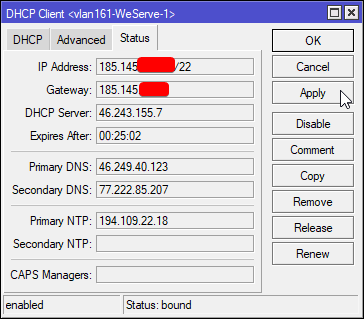
And locally, you have your own DHCP server
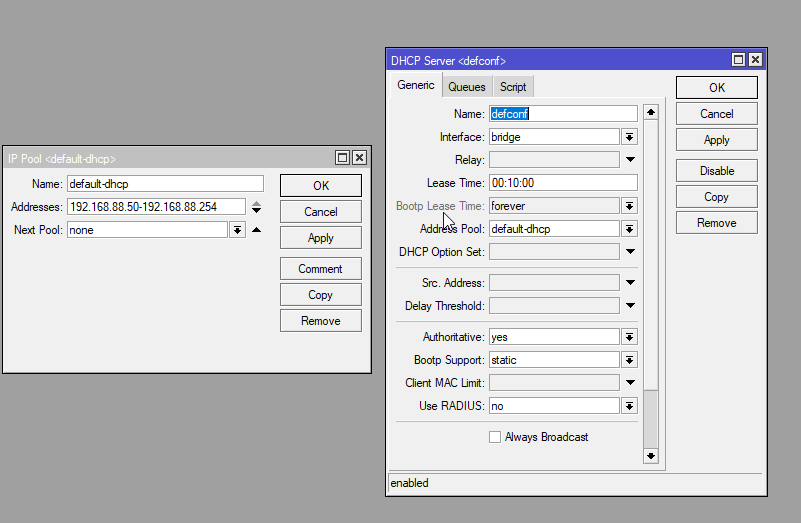
you can see the pool of addresses on the left
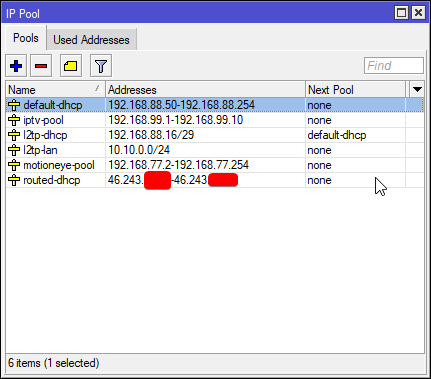
you can have multiple pools
I got like 3 dhcp servers running on my router
or just ditch this entirely
and use ipv6
you don't need NAT and DHCP
nova igloo
Maybe different ISP using different topology???
unborn sluice
wdym
tame carbon

star topology ^
@unborn sluice original ethernet was bus topology xD

only one device could talk at any one time
and they use CSMA/CD to make sure collisions are avoided
unborn sluice
I mean who doesn't want getting spammed by packets to drop
tame carbon
Carrier-sense multiple access with collision detection (CSMA/CD) is a media access control (MAC) method used most notably in early Ethernet technology for local area networking. It uses carrier-sensing to defer transmissions until no other stations are transmitting. This is us...
tame carbon
CSMA/CD isnt really a thing in networks anymore
unborn sluice
I wonder if the next generation would hear about how HUBs work
tame carbon
because we have full duplex gigabit on switches
unborn sluice

because we have full duplex gigabit on switches
thank you smart people for bringing the cost down

even the cheapest one in the online shopping is switch
tame carbon
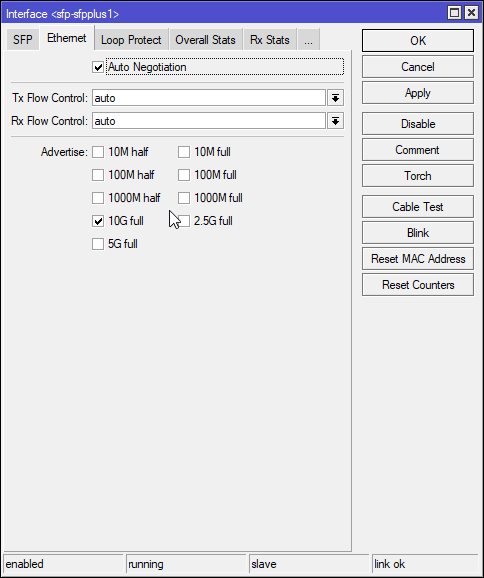 tame carbon
pretty sure the new ones are updated
if I update to the new routerOS
40G should also be listed now
unborn sluice
what the flying fuck

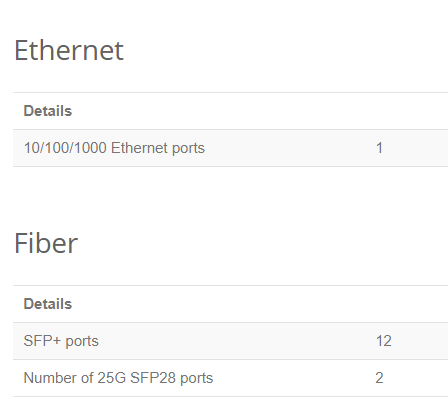 tame carbon
scalps?
 tame carbon
here, chinese is synonym for 'cheap garbage'
the kind of stuff you can buy on ali
really is cheap garbage
@unborn sluice I'm surprised LTT got the aliexpress PC to boot lol
tame carbon
nah it was a while back
unborn sluice
lel I don't know sht about these titles
tame carbon

Get 50% off your first 3 months of FreshBooks when you sign up for a paid plan at https://www.freshbooks.com/techtips
Use code LINUS and get 25% off GlassWire at https://lmg.gg/glasswire
We constantly make videos of weird stuff we find on AliExpress, but we've never built a ...
unborn sluice
i just want to watch building pcs
welp, i'm off to youtube to watch that
hap ac3 still not in newegg

tame carbon
@unborn sluice if ur not watching
Get 50% off your first 3 months of FreshBooks when you sign up for a paid plan at https://www.freshbooks.com/techtips
Use code LINUS and get 25% off GlassWire at https://lmg.gg/glasswire
We constantly make videos of weird stuff we find on AliExpress, but we've never built a ...
at least watch the B-roll
I timestamped it for ya
unborn sluice
I'm literally watching
the whole thing
oh wait hapac3 only has 1PoE

@tame carbon a store in my store in my country is on the fucking sea
maybe I should swim to buy hap ac3
tribal ferry
@tame carbon Already planning to.
That's what I have in my plan, I was just seeing if there is anything cheaper.
tame carbon
@tribal ferry not for dual band APs
tribal ferry
What should I get then?
tame carbon
You're looking for just wireless APs right?
Really depends on what spec you need
just 2.4GHz is relatively cheap
but dualband (with 5GHz) gets expensive quickly
mostly because those APs have gigabit ethernet instead of fast
tribal ferry
Yep, I do need dual band.
tribal ferry
And then I have the MOCA adapters, which puts me over budget by $184
tribal ferry
Yep, it is.
tame carbon
that stuff is so expensive lol
tame carbon
why not wire it up then/
tribal ferry
If I won the lottery then maybe, lol
tame carbon
Oh, rented ?
tribal ferry
It's not a single story home, either. Two story including a basement.
And a finished attic
And a half finished basement.
tame carbon
You guys renovating?
tame carbon
This is the prime time to toss some network cables in the wall
tribal ferry
The largest we're going to do is this kitchen, there's no major structural changes.
Upstairs in the bedrooms, it's just going to be wallpaper removal, plastering holes, and paint.
tame carbon
Idk what those tools are called in english
but if you're doing plaster
you can cut grooves into the wall
run the cable through it, and then cover it with plaster
tribal ferry
It's just patching holes - not replastering
peak cloak
if you are doing drywall and painting that is the time to do cabling
tame carbon
Thats what I did
tribal ferry
Painting is all we're doing upstairs.
tame carbon
do cables, then plaster, then paint
peak cloak
you just need a couple of holes
unborn sluice

 tribal ferry
I can probably run a cable to my study if I put a switch in the top of my basement.
tame carbon
Called a "Wall chaser"
it cuts a groove into the wall
you can run cables through them, and then cover them up
unless you are a dennis
and you don't use powertools
peak cloak
I just fished cables
tame carbon
@tribal ferry those cAPs also support PoE, so you only need a networking cable to the AP location
peak cloak
you will probobly save yourself some frustration doing it the way crystal said
 tribal ferry
I mean, possibly.
tame carbon
it looks harder than it really is
tribal ferry
It might just be easier to pay extra with the MOCA
tame carbon
if it works that is
@tribal ferry or
you find the duct that the coaxial uses
pull it out, and run ethernet instead
I didnt want to deal with running 5+ cables from my network cabinet to the other side of the building
so I run a single fiber
and split onto copper on the other side
tribal ferry
Yeah, I've thought about doing it before but fiber seems entirely overkill for me.
I only have 1gbps speed from Xfinity.
tame carbon
@tribal ferry fiber is actually not that overkill lol
its futureproof
$18 per transceiver (you need two) and $5 for a fiber
peak cloak
true
peak cloak
I got one for free, but I only have one
and no fiber cable
and no real use
for now
tame carbon
@peak cloak we got the TV & wifi AP in the living room, and there's 0 cables visible :)
TV is in an enclosure, and when you press button to turn it on
it moves up, james bond villain style
tribal ferry
Crystal, do you have a multi-AP setup?
peak cloak
AP in the stairwell (center of house), TV uses roku, no cables visible either
that's fancy
tame carbon
@tribal ferry not currently, but I plan on doing so
peak cloak
we don't really watch much tv
tame carbon
@tribal ferry I do manage my AP with CAPs
tame carbon
I have an RB4011 as core router
and hAP ac2
for home wifi
I chose the hAP because it has 5x gigabit, and I needed to hook up the TV settop, and smart TV
it also sends out wifi
@tribal ferry https://i.imgur.com/km3o10v.png
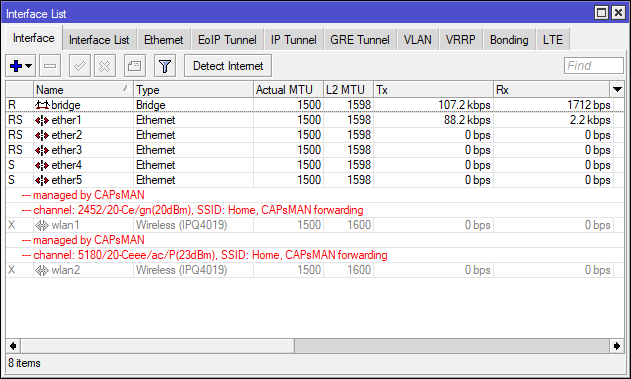
hAP ac2 ^
tribal ferry
Ah ok
tame carbon
I was thinking about putting an mAP in my bedroom
since signal is kinda bad, 2 walls inbetween

These are incredibly cheap
tribal ferry
Seems to be only 2.4 ghz
tame carbon
100M max yes
I only use wifi for my phone
@tribal ferry all mikrotik APs can be used as CAPs

I got like 4 mikrotiks :)
tribal ferry
I think with my current setup, it's the cheapest I can do
Microtik is already low-priced enough.
unless if I want to run those ethernet cables
tame carbon
@tribal ferry I have my doubts on the reliability of MOCA
tame carbon
Its not really something a consumer deploys
tribal ferry
Three*
tame carbon
And this is assuming, it works without a hitch.
tribal ferry
More, if my home has the correct coax wiring.
tame carbon
Just saying
I think MOCA is a dirty solution to your problem
if you are renovating, maybe just run some ethernet
tribal ferry
¯_(ツ)_/¯
tribal ferry
Mounting it on the ceiling?
tribal ferry
The attic is finished.
tame carbon
yeah but the space inbetween?
most ceiling constructs are wood
@peak cloak utility company is here again. lol, I will flip my shit if they shut down power again
tribal ferry
Well, I can look into it.
There's this week half part in my attic that's not finished
tame carbon
@tribal ferry do you have a contractor that does the renovating?
tribal ferry
Just plaster on the walls, no paint.
We're still planning the kitchen.
This is not a huge renovation - there's no specified contractor for our house.
tame carbon
So its DIY home improvement
tribal ferry
We do everything ourselves except for this kitchen.
tame carbon
mhm
tribal ferry
Essentially, yeah.
tame carbon
yeah kitchen you get a pro for
but painting walls you can do yourself
@tribal ferry if you don't want to cut into walls..
you can get those really small cable ducts
and run them along the edge of the wall near the ceiling
tame carbon
I've done my own electrical xD
peak cloak
I don't trust myself to do it
tame carbon
@peak cloak how hard can it be
peak cloak
In theory I know how
tame carbon
RCD & fuses are a thing for a reason
idk, I've soldered about in DMX lighting dimmers before
peak cloak
I don't think we have whole home RCD here
unborn sluice
I don't trust myself to do it
tame carbon
@peak cloak my most shocking experience
was 50kV from a photocopier
I woke up on the other side of the room
I don't really remember what happened
but supposedly I shocked myself unconciouss
 stable warren
Ok guys, i'm looking for a cheap solution to the following : Student housing, 7 rooms, 1 internet connection, every room has a RJ45 connection in the wall, and there's Wifi with client isolation. However i'm looking for a way to isolate all wired network connections.
I know of Vlans etc. Requires managed switch and it has to stay cheap. I wanted to get the cheapest routers and place 1 per room.
 tame carbon
@tribal ferry was fixing a feeder on a big laser printer
and poked my screwdriver in the wrong place
tame carbon
the actual roller that charges the laser printer runs at like 50kV
I'm lucky I survived
tame carbon
@stable warren VLAN with ingress protection
tribal ferry
I can try running cables in the unfinished part of my basement.
tame carbon
@stable warren on my mikrotiks I can map trunk ports to access ports

So the device connected to the switch, thinks its a regular LAN
the switch tags the traffic with a VLAN number
and on your router, you can then assign each port as a VLAN interface
and set up firewall rules
stable warren
hmm so it would be possible with 1 switch
stable warren
got modem (ISP) -> managed switch
tame carbon
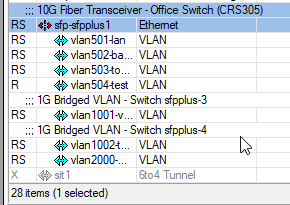 peak cloak
@stable warren you need a router
tame carbon
@stable warren ^ this is a single trunk line to my switch
stable warren
the modem=router
tame carbon
and every device on the switch has its own vlan
@stable warren yeh you'll need a new router
peak cloak
ISP router doesn't have VLANS, I would be very surprised if it does
tame carbon
your ISPs modem/router/wifi/whatever is not going to be able to do this
tame carbon
@stable warren https://i.mt.lv/cdn/rb_images/1633_l.jpg

This is a router
the port on the very left (that hole) is a highspeed connection, for say.. a switch
peak cloak
router != wifi
tame carbon
psshh
stable warren
yeah i'm not unfamiliar with routers/switchs/managed switch or L2/L3. But never looked at this part of it
tame carbon
@stable warren what you want, can be done
but not with consumer gear
mikrotik is affordable, and can do all of this
but it requires a bit of know-how to configure
stable warren
got a Ubiquiti edgerouter here should be able to do it
peak cloak
which one?
tame carbon
That one can do VLANs
stable warren
3 i believe
tame carbon
so you'll need a managed switch
stable warren
also got those
peak cloak
oh yeah, with the ER-X I would worried about performance
unborn sluice
just put them all in one router, then all of them have distinct subrouters, so double NATs for everyone
tame carbon
@stable warren set the switch up, configure vlan tagging per port
each port is for 1 room
then, use a single port as a trunk, that goes to your router
tame carbon
Set up the vlan config on those
stable warren
yeah, need to make a test setup
tame carbon
@stable warren I'm not at all familair with VLAN interfaces on unify
stable warren
me neither :P
stable warren
i'm guessing everything has to be bought,
 tame carbon
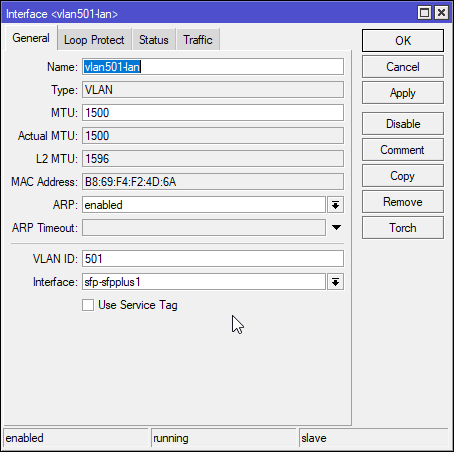
@stable warren this registers a virtual interface on the router, with vlan ID 501
stable warren
yeah Ubiquiti has some weird non standard stuff sometimes
tame carbon
@stable warren if you set the access port on the switch, to tag traffic with 501
it will appear on the virtual interface on the router
stable warren
Any advice on hardware to get?
stable warren
250/50
tame carbon
@stable warren any budget?
peak cloak
@stable warren for edgemax, you would setup a vif under the interface you want to use (eth4 for my example)
tame carbon

MikroTik is a Latvian company which was founded in 1996 to develop routers and wireless ISP systems. MikroTik now provides hardware and software for Internet connectivity in most of the countries around the world.
@stable warren I have a 250/250 connection at home
And I use the RB4011
I have two customers of mine, that get their internet from me
peak cloak
example of config under the vif
tame carbon
@stable warren those customers get internet from me, through VLANs, identical to what you described you wanted
You could use the edge router to do this
stable warren
i c sounds good
tame carbon
But that RB4011 I posted, its about 180 euros
stable warren
well the edgerouter is mine :P
tame carbon
and its capable of 10gbit/s total speed
It has 10x 1gbit (grouped into two groups of 2.5G each)
and a single 10G interface
stable warren
it's just for student housing, problem now is that some idiot ruins the network somehow
need to go there this weekend to figure out why/who/what
tame carbon
Mikrotik is deffo the way to go for DIY
stable warren
looks nice
tame carbon
@stable warren https://mikrotik.com/product/RB2011iL-IN
MikroTik is a Latvian company which was founded in 1996 to develop routers and wireless ISP systems. MikroTik now provides hardware and software for Internet connectivity in most of the countries around the world.
stable warren
yeah looking at it now, it has routeros?
stable warren
think i tried that on my vmware server
tame carbon
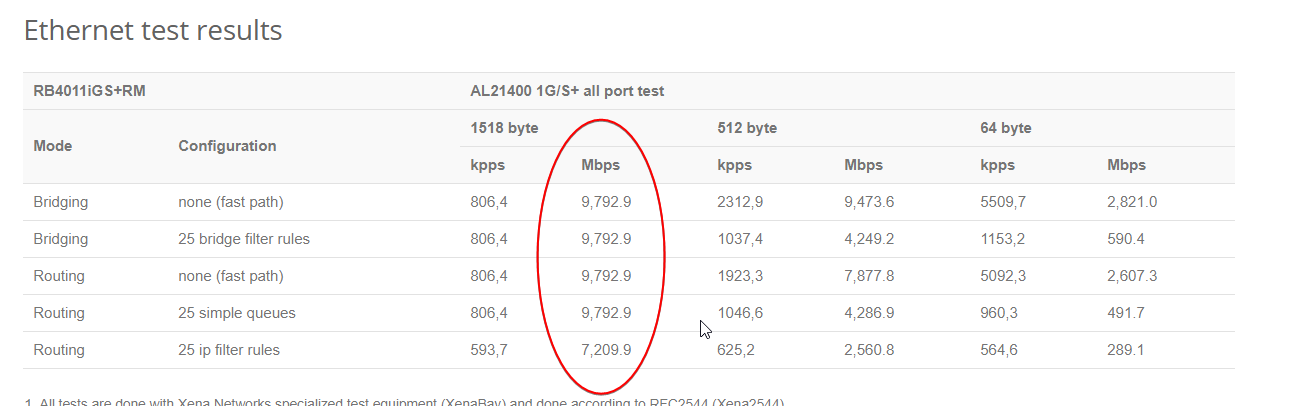
@stable warren when buying a mtik, make sure you look at the test results
That RB2011 is the smaller brother of the RB4011
Its low cost
Not as fast
but its still fast enough for your purposes
stable warren
looks fine by me, i got 500/50 at home myself but no advanced setup really, just 1 modem+router -> 5 switches
tame carbon
@stable warren I assume, each user in their room, will have their own router?
tame carbon
@stable warren you could set up DHCP pools for each VLAN
and allow users to hook up a switch
to their 1 port
stable warren
thought about that
tame carbon
all of that is quite easy on mtik
stable warren
i can get some cheapo crap switch for ~25 euro's a piece, and just put those between the switch/wall connector
switch = router
tame carbon
@stable warren yeah each room can have their own unmanaged switch
DHCP is all done by the mtik router
stable warren
yeah with the mtik solution
tame carbon
Traffic seperated by VLANs & firewall on the router
peak cloak
A couple of days from now a student asks why he can't port forward 
tame carbon
@stable warren well, with the RB4011
you could do it all in one device
it has 10 ports
more than enough
@stable warren oh yeah that is one issue. Port forwarding will not be an option.
Because you still share the same public IP
stable warren
now the modem/router has 4 ports, 1 goes to switch, and 7 wires
for each room 1
and on the modem itself it has 2 AP's fed with POE injectors
they got client isolation on
tame carbon
MikroTik is a Latvian company which was founded in 1996 to develop routers and wireless ISP systems. MikroTik now provides hardware and software for Internet connectivity in most of the countries around the world.
I'm still betting on this one
stable warren
that's an all in 1 solution
tame carbon
You can in theory get 20x gigabit out of it
that 10Gbit port can be hooked up to a switch
if you need more ports
stable warren
well there's a option to put the modem in 'bridge mode'
tame carbon
I would not do this on the modem
stable warren
but gotta go through ISP and it can take 1 to 5 days :P
tame carbon
@stable warren do you know what kind of plans the ISP offers?
I got a /29 range from my ISP
so each device has its own public IP
stable warren
nope not possible
tame carbon
rip
stable warren
they even do that 'public NAT' thing, where the exit IP is the same for several customers
not sure what it's called
tame carbon
CGNAT
aka; the bane of ipv4

Carrier-grade NAT (CGN or CGNAT), also known as large-scale NAT (LSN), is an approach to IPv4 network design in which end sites, in particular residential networks, are configured with private network addresses that are translated to public IPv4 addresses by middlebox network ...
peak cloak
does your ISP have ipv6?
unborn sluice
I love CGNAT
stable warren
yeah can't forward with that
unborn sluice
I can't port forward
stable warren
It does, however not everywhere :P
IPV6 that is
Also this depends on the modems used
tame carbon
in theory if you want to be able to offer port fowarding
you can set up a 6to4 tunnel
and set up dual stack
every client gets a NATed v4, and a public v6
peak cloak
doesn't tunnelbroker tunnel not work under cgnat?
tame carbon
fuck. you're right.
stable warren
i don't think ISP allows for multiple external IP's on the consumer versions
and business = expensive BS
believe you pay per IP
peak cloak
ipv6 is multiple ip's anyway, could you ask them for ipv6?
stable warren
hehe
tame carbon
getting distracted
peak cloak
the smallest routable ipv6 is a /64
stable warren
can't ask them for anything
stable warren
they allow for port forwarding on the modem, but disabled custom DNS with a update a while back
tame carbon
@stable warren besides recommending the RB4011, not really sure what else you'd need
stable warren
think that does what i need it to do
tame carbon
this solution expects all cables from the various rooms to terminate in one location
if you don't have that, you'll need a managed switch.
stable warren
159 euro's for that MikroTik RB4011iGS+RM
tame carbon
oh wow
Thats better than what I paid for it
I paid like 180 euros
@stable warren that router is futureproof too
 stable warren
any chance there's 1 with 16 ports/POE+ :P
stable warren
my GS110T is POE+ and managed :P
it's got 6 AP's on it, 3 x Ubiquiti AC something and 3 x Ruckus R510
And some IP cams
tame carbon
stupidly enough
mtik doesnt sell any PoE switches that arent outdoor

This is ment as an outdoor solution
stable warren
pff
stable warren
just need gbit lol
tame carbon
@stable warren no the 10G is for the trunk to the router
access ports are 1G
But this is a managed switch (runs routerOS)
and has 16x PoE
MikroTik is a Latvian company which was founded in 1996 to develop routers and wireless ISP systems. MikroTik now provides hardware and software for Internet connectivity in most of the countries around the world.
Its $279
There are probably better solutions for PoE
I just know that they are very expensive
stable warren
all i can find with some ports : https://www.cisco.com/c/en/us/products/routers/rv345p-dual-gigabit-wan-poe-vpn-router/index.html

Cisco
The Cisco RV345P Dual WAN Gigabit POE VPN Router gives small businesses a highly secure Internet connection and protects employees from malicious websites.
unborn sluice
oh no cisco
tame carbon
F cisco
stable warren
lol
tame carbon
might as well give the NSA your root password
stable warren
seems to be the only all in 1 solution, not sure about vlan though
tame carbon
@stable warren don't you already use injectors?
stable warren
yeah but i'm looking for a solution for home also :)
tame carbon
oh
Well that netpower_16p I linked, is ment as a junction box for public wifi
highspeed switching & PoE
stable warren
that one looks expensive :P
tame carbon
All PoE switches are expensive
stable warren
Cisco
Today, secure networking is imperative for every business, even the smallest one. The RV340 Series security router provides business users with advanced connectivity and secure high-speed access for the growing demand and usage of digital services.
actually looks like it does what i need, 32vlans
NSA can have a look if they want :P
tame carbon
I'm not certified to help with cisco
stable warren
lol
tame carbon
that shit requires like IQ 9000
tame carbon

stable warren
2 normal gbit switches, 1 4poe/4normal, 1 full POE-managed, 1 managed
tame carbon
 stable warren
that looks kinda childish? :P
tame carbon






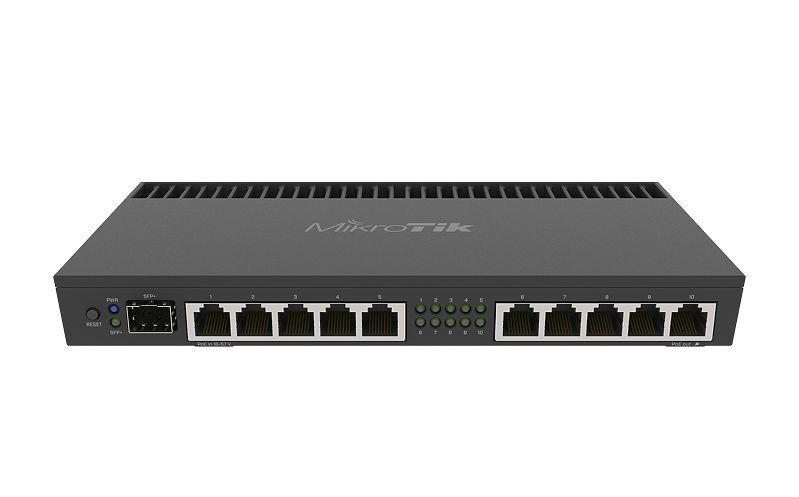


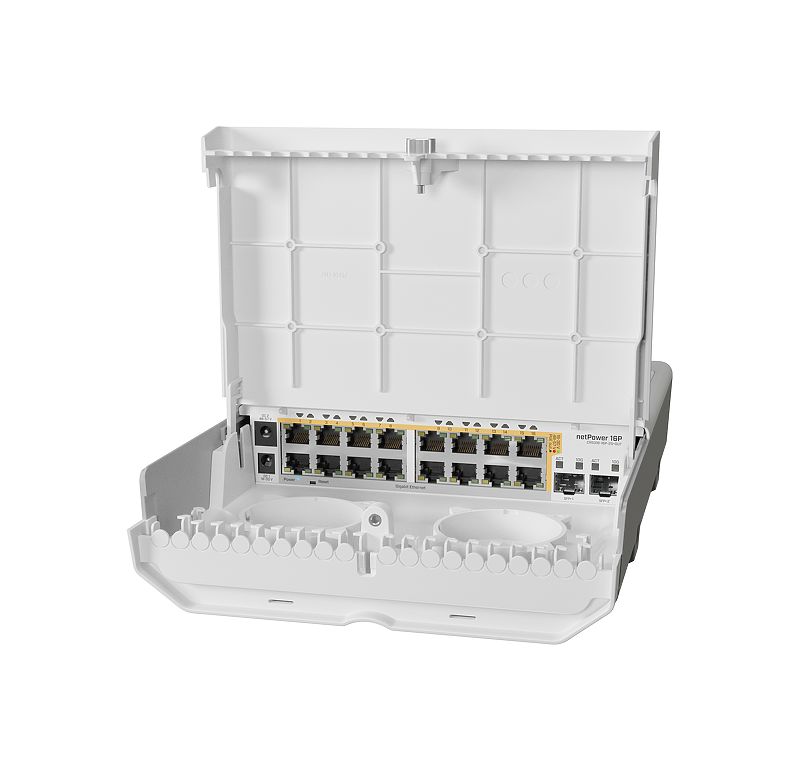
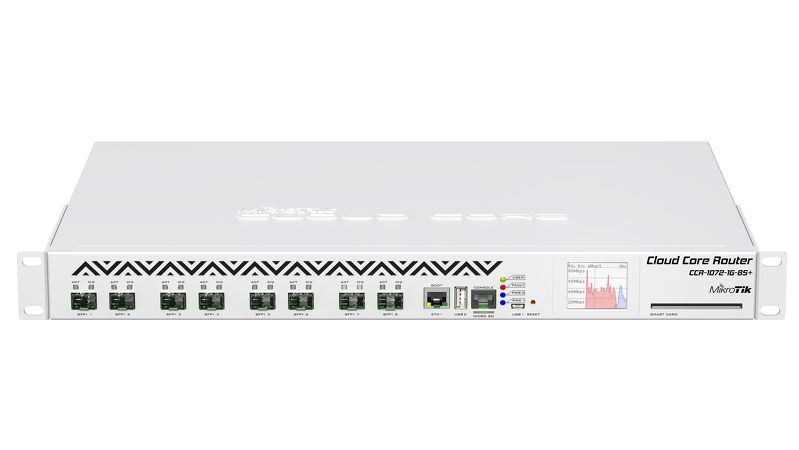
 stable warren
lol
stable warren
haha
tame carbon
and a $3000 pricetag
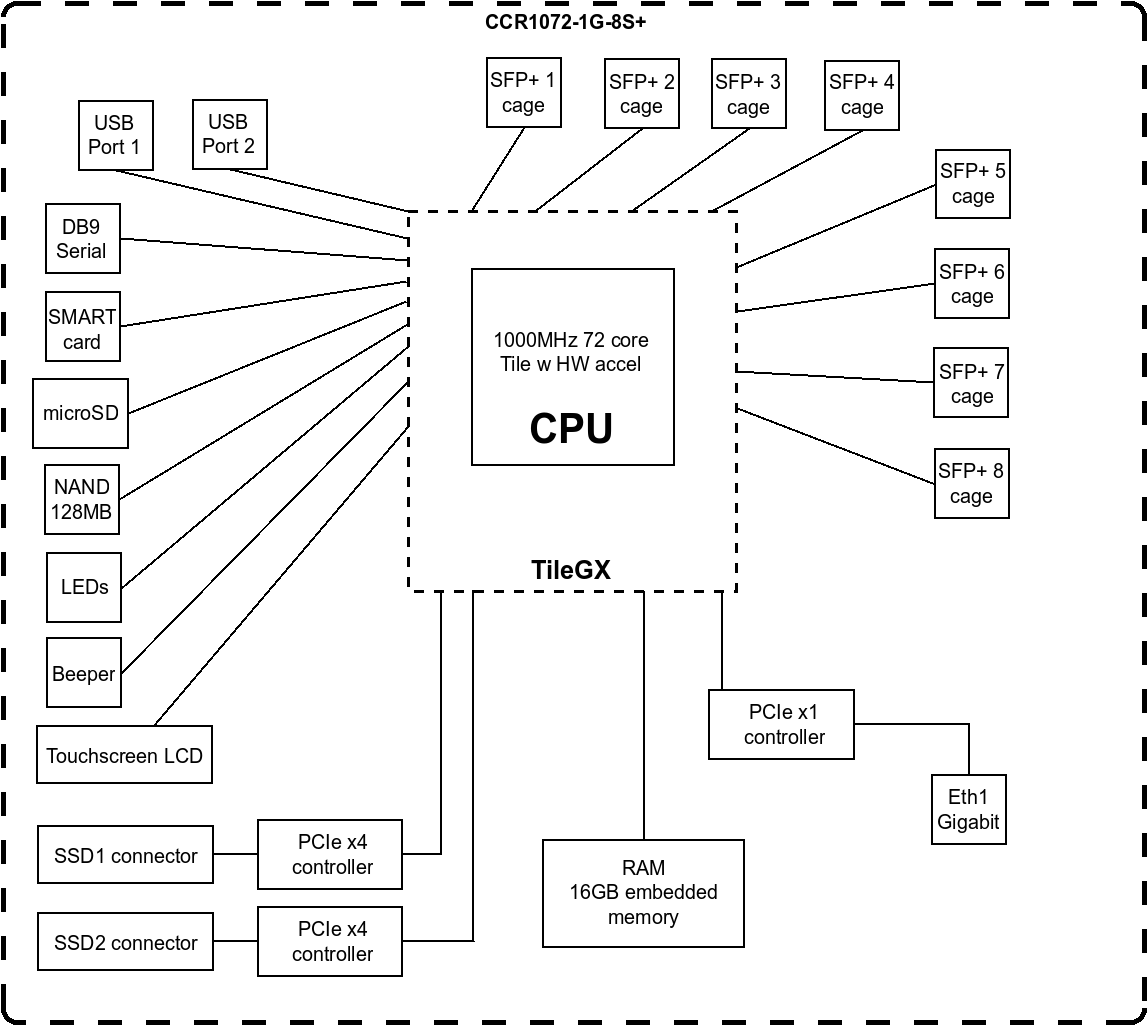

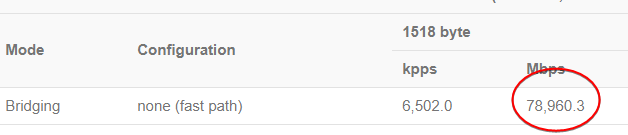
block diagram is nuts
each SFP+ cage is capable of 10gbit/s
stable warren
great for home solutions :P
tame carbon
more like a small ISP
you can serve a small town with this
and give everyone gigabit speeds
stable warren
with all the 'ISP rules' and stuff here that wouldn't work
tame carbon
If you run that kind of gear, you just sign up with an ASN directly
and do your own peering
you become the ISP
stable warren
it's more about the data that has to be stored
tame carbon
I don't log my internet, I made the two customers sign over liability on those IP addresses
so if I ever get police knocking on my door, I just forward their request
stable warren
already got those
stable warren
yeah
like ubiquiti/cloudtrax/ruckus
great fun and all until they make you pay per device
stable warren
Cloudtrax used to be free when it came to management portal. AP's ranged from 150-300 euro's
tame carbon
damn
tame carbon
MikroTik is a Latvian company which was founded in 1996 to develop routers and wireless ISP systems. MikroTik now provides hardware and software for Internet connectivity in most of the countries around the world.
stable warren
I got : 3 x https://www.ui.com/unifi/unifi-ap-ac-lite/ and 3 x https://www.commscope.com/product-type/enterprise-networking/wireless-access-points/indoor/r510/

The UniFi AC Lite AP features the latest Wi-Fi 802.11ac technology in a refined industrial design and is ideal for cost-effective deployment of high‑performance wireless networks.
CommScope
Indoor 802.11ac Wave 2 Wi-Fi Access Point for Dense Device Environments
tame carbon
how much are those unify ac lites?
stable warren
no clue
tame carbon
cus those are on par with the cAP ac I just linked
stable warren
and running the Unifi controller here also, looks great and all
around 76 euro's a piece for the AC lite
a 5pack = 347 euro's
tame carbon
@stable warren all the mikrotik devices running RouterOS L4 and up can be a CAPsMAN server
thats the 'controller' in essence
stable warren
I liked cloudtrax, all cloud no onsite bs