#networking
1 messages · Page 233 of 1
 tame carbon
 tame carbon
I got a stack of 2.5" 5400 RPM drives
from old laptops xD
not sure what I plan on doing with them
 nova igloo
Yeah its kinda when documents from years ago gone, u will miss them alot
tame carbon
when I switch installs
 unborn sluice
not sure what I plan on doing with them
@tame carbon I still have my dead HDDs
nova igloo
RAID 5
not sure what I plan on doing with them
@tame carbon
tame carbon
I usually make a clone of my image
and reinstall everything
if I need old data, I can just go into my archive of dead systems
nova igloo
Looking for ur forgotten old BTC wallet rite XD
tame carbon
I already got rid of my btc long time ago
before the big boom
:(
sold 20 BTC for 4,50 each
nova igloo
oh 2017
tame carbon
Im not investing into cryptos ever again
I made 2k with ethereum
and thats about it
its just gambling
I rather work for money and deliver useful work
stock market is useless for society
nova igloo
society like North Korea are so dead, everybody working with no efforts
tame carbon
yeah but NK is a ruthless necrocracy
unborn sluice
society like North Korea are so dead, everybody working with no efforts
@nova igloo
 nova igloo
Everything go ups and down, nothing go straight up perfectly
tame carbon
@nova igloo unregulated capitalism leads to rich lobbyists who make laws
nova igloo
Directly Propotional
tame carbon
not the people
nova igloo
Ermm yeah, but we need them
@nova igloo unregulated capitalism leads to rich lobbyists who make laws
@tame carbon
to stay balanced
tame carbon
I mean
if you compare developed european nations to the USA
the main difference
is that the monetary system is more strongly regulated
nova igloo
IDK im from Malaysia haha
tame carbon
@nova igloo haha ok then
nova igloo
I think the world should be balanced
tame carbon
yeah if you suggest to the average american that you want to regulate capitalism
they call u a commie
nova igloo
like now
tame carbon

Don’t Forget to “Subscribe”. Thanks
Pulitzer-prize winning Journalist, Author and Activist Chris Hedges, discusses modern day consumerism, totalitarian corporate power and living in a culture dominated by pervasive illusion.
If ur interested at all
nova igloo
they call u a commie
@tame carbon thats nature of human, they do this to protect their empire
Do u think i have got BrainWashed ? XD
nova igloo
but mostly 😆
tame carbon
Chris Hedges does good job explaining, something that even I didnt quite understand
like, why is it that people don't care about facts anymore
nova igloo
For exmple Area 51, they should have reason why they dont public the secret
nova igloo
If they have time machine, they should have a way to prevent people exploiting it. I believe this is the reason
IF <====
tame carbon
I'd love to continue our conversations
but I have some work to do
been putting this off for 2h now
unborn sluice
been putting this off for 2h now
@tame carbon keep going
tame carbon
nou
unborn sluice
big nou
tame carbon
fookin'
Error: Failed to lookup view "home/home" in views directory "/home/crystal/Projects/mvc/src/view"
    at Function.render (/home/crystal/Projects/mvc/node_modules/express/lib/application.js:580:17)
    at ServerResponse.render (/home/crystal/Projects/mvc/node_modules/express/lib/response.js:1012:7)
    at /home/crystal/Projects/mvc/src/app.ts:25:9
    at UmbracoRouter.<anonymous> (/home/crystal/Projects/mvc/src/heartcore.route.ts:30:76)
    at Generator.next (<anonymous>)
express is stupid
you can set the file extension
but it ignores it
 tame carbon
src/view/home/home.handlebars
unborn sluice
ikr
unborn sluice
too much magic happening in the background
tame carbon
express is le bumb
unborn sluice
what templating engine are you using
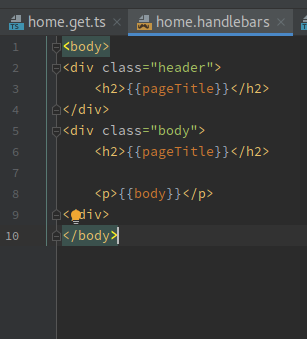 unborn sluice

tame carbon
sharex equivalent is being annoying

@unborn sluice here ^
I set the extension, which works fine for the layout files
unborn sluice
I see
tame carbon
but the actual views, it does not see them
unborn sluice
It can't view the view
tame carbon
@unborn sluice this is why I hate node
lol
cus I cant really go through the code and see why express is messing this up
its all a transpiled hell
unborn sluice
its all a transpiled hell
@tame carbon why I hate transpiling
tame carbon
@unborn sluice https://i.imgur.com/jrIWsqH.png
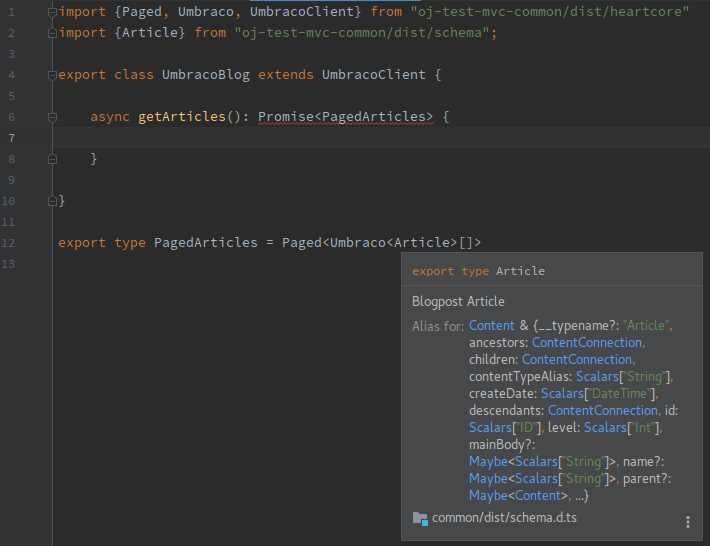
this is quite neat now
I can really easily code against the CMS now
typescripts composite typing system is really neat for this
 tame carbon
@unborn sluice this is quite neat:
router.get("home", (req: Request, res: Response, m: Umbraco<Home>) => {
    res.render("home/home", {home: m, articles: client.getArticles()})
})
I no longer have to specify the path
these are type controllers, so they get called when a view needs to be rendered for a specific type
paths are defined by the CMS
nova igloo
how many IPs are in a block of IPv6
2^128 ?
idk
googled a while, looks like there's no such thing a "block" of ipv6
idk the texts above said ablock of IPv6 cost 150$
yeah what does it mean "block"
a block of C-Class ipv4 means /24 = 254 ips
about ipv6 i have no clue
Do we use "block" in ipv6
 nova igloo
oh its use for someting like unit
nova igloo
Ah, use this table
using three `
uhh what unit
@unborn sluice like pounds, /4 pounds = 0.25pounds something like that
 nova igloo
nvm ignore it, even myself barely understand it
btw im happy if i can get /122 block of ipv6
nova igloo
lol Malaysia sell ipv4 which charge us monthly
unborn sluice
btw im happy if i can get /122 block of ipv6
@nova igloo that's way too short
lol Malaysia sell ipv4 which charge us monthly
@nova igloo it's not just malaysiaa
ipv4 is scarce , it's a resource
nova igloo
1 fixed Ipv4 charge us 50$
nova igloo
Actually its times to change from ipv4 to ipv6
most of the applicances support ipv6 now
unborn sluice
tell that to websites not supporting ipv6
nova igloo
I think not much? They only have to copy paste their public ipv6 to their DNS servers
 unborn sluice
But seriously though
nova igloo
oh idk abut that
nova igloo
how many usable public ip in /64 ipv6
 peak cloak
enough
tame carbon
more than you'll ever need
tame carbon
-1
nova igloo
oh only /64 are possible to be routed
tame carbon
yeah publicly routed
nova igloo
doesnt means only 1 public ip address
tame carbon
no you assign the prefix to your local network
and all your devices get an IP in the same /64
you don't need NAT
if you do the certification on HE, you learn about all this
nova igloo
2001:db8:0000:0000:ffff:ffff:ffff:ffff
tame carbon
yes
nova igloo
those f are usable right
tame carbon
2001:: is public v6
nova igloo
is that rules for ipv6, only can route public ip in column 1 to 4
nova igloo
But why ipv6 cant route public ip for 5th octet
tame carbon
Because it was decided to be done that way
nova igloo
rules of ipv6?
tame carbon
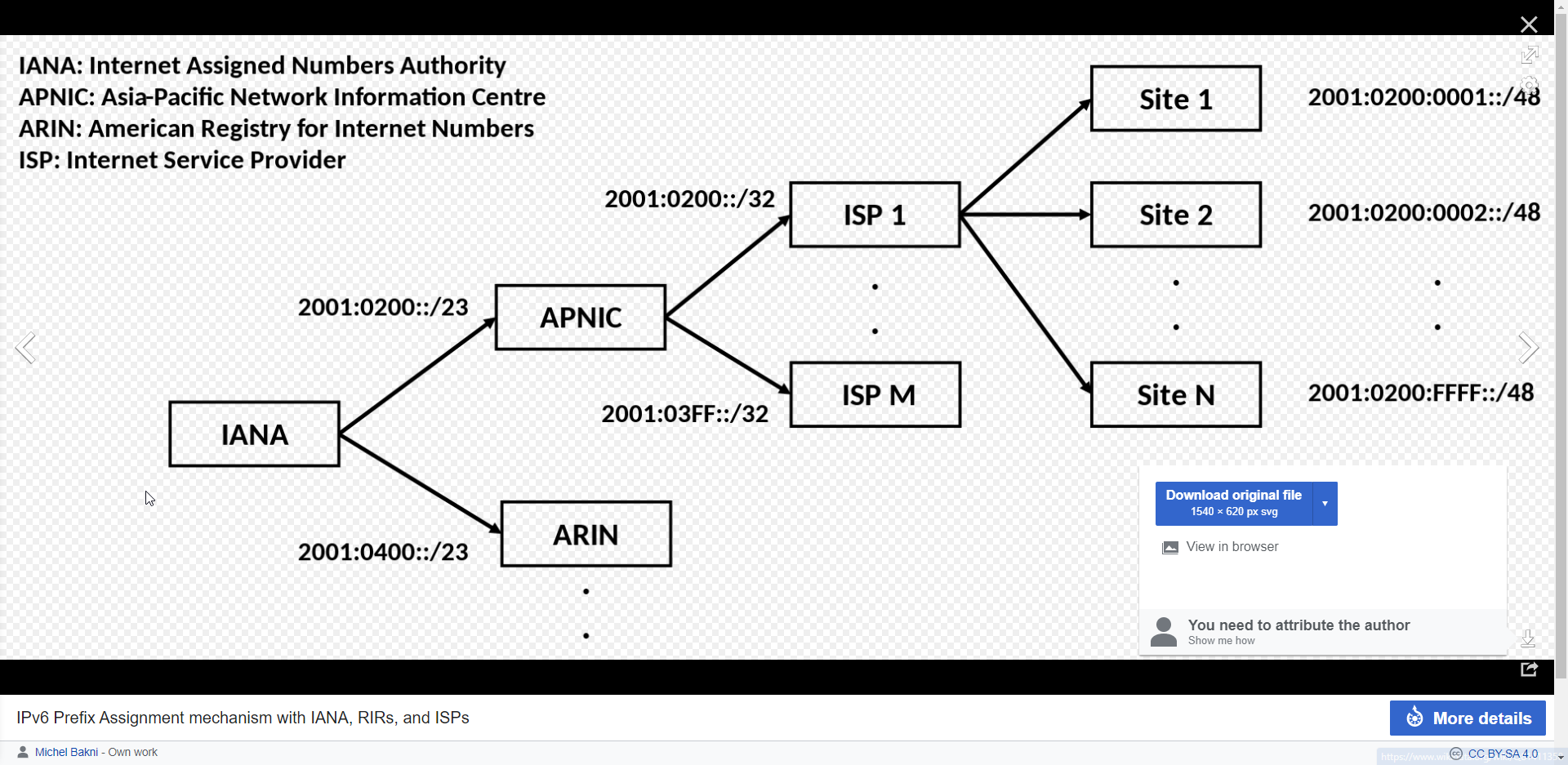
In the Internet addressing architecture, the Internet Engineering Task Force (IETF) and the Internet Assigned Numbers Authority (IANA) have reserved various Internet Protocol (IP) addresses for special purposes.
IETF and IANA decide on this
nova igloo
then how i going to assign ipv6 to my computers
2001:db8:0000:0000:0000:0000:0000:000X
tame carbon
SLAAC
and for v6, you can use ND to expose the prefix
SLAAC simplifies IPv6 address management by providing plug-and-play IP connectivity with no manual configuration of hosts. SLAAC enables an IPv6 client to generate its own addresses using a combination of locally-available information and information advertised by routers through Neighbor Discovery Protocol (NDP).
DHCP is obsolete
so is NAT
nova igloo
So its something like assigning ip to MAC address

 misty terrace
my brain doesn't accept ipv6
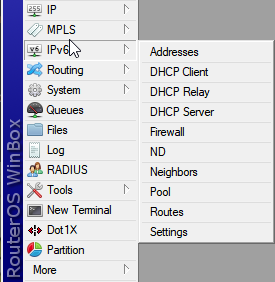 nova igloo
oh, so normally ISP distribute network to us by using this IP
tame carbon
since all your devices on your network, use the same prefix as your internet
no
there's no NAT
so no 192.168.1.1 equivalent
that doesnt exist on v6
nova igloo
so my neighbour can ping my device?
nova igloo
u mean Port Forward?
nova igloo
wtf eveything changed
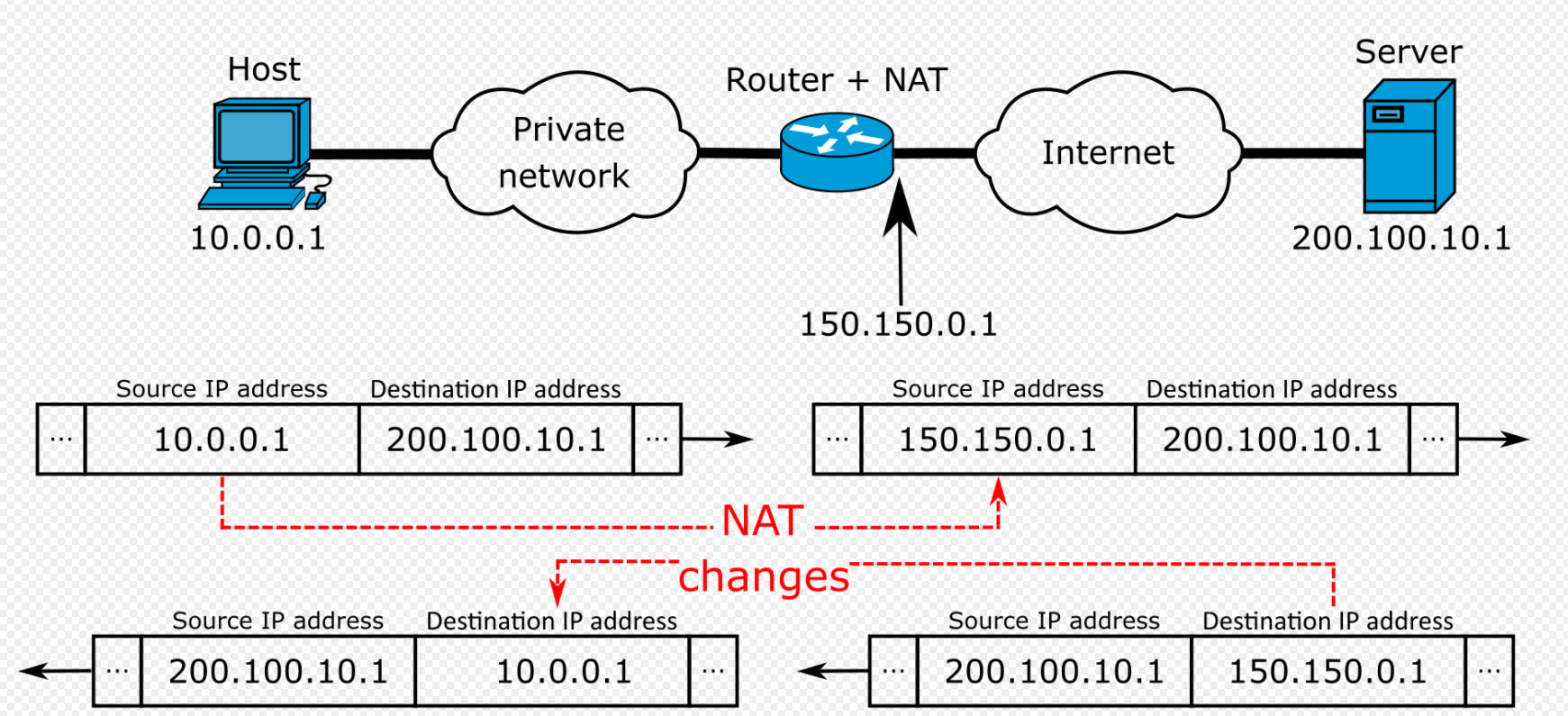 misty terrace
that's why my brain doesn't like ipv6, i'm too used to ipv4 to understand it
tame carbon
@misty terrace I had that too at first
peak cloak
you just have a firewall blocking everything from WAN
nova igloo
better spend more efforts in ipv6 than ipv4
tame carbon
v6 is easier
you don't need dhcp
you dont need NAT
port fowarding you don't have to do
you just add an exception to your firewall for a given IP
peak cloak
you just open the firewall
tame carbon
exactly
misty terrace
i... i can't understand how you don't need dhcp
tame carbon
@misty terrace SLAAC
stateless auto address configuration
you can still use DHCP if you like
NAT can also be done on v6, but I dont see why you would
nova igloo
So does it mean eveyone will get Public IP if we r on ipv6 network
tame carbon
its useless on v6
@nova igloo yeah thats the idea
every device on your local network, has its own public v6
firewall protects them
no more NAT, no more portforwarding
misty terrace
it sounds so wrong
i can't stand it
nova igloo
oh, firewall are having huge resposible for security now
misty terrace
nat exposes an entire network as a single ip
nova igloo
because in IPV4 u need portfoward to allow router send the packet to specific pc, even the firewall disabled
tame carbon
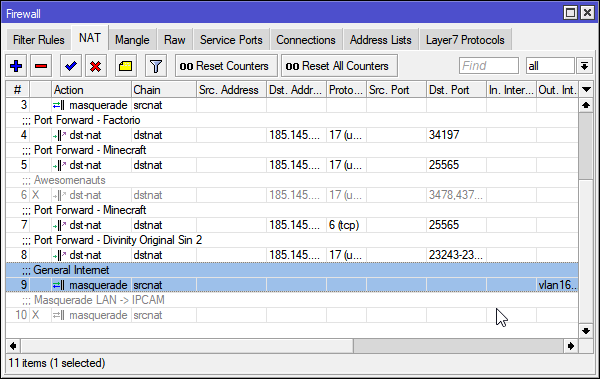
this rule ^
is what every consumer router does by default
any traffic for 0.0.0.0/0
is src-natted
nova igloo
So i dont have to request for Public IPv6 rite, its automatically a public ip
tame carbon
You get a /64 from your ISP
peak cloak
or from tunnelbroker
nova igloo
thats for ipv4 tunnel to ipv6
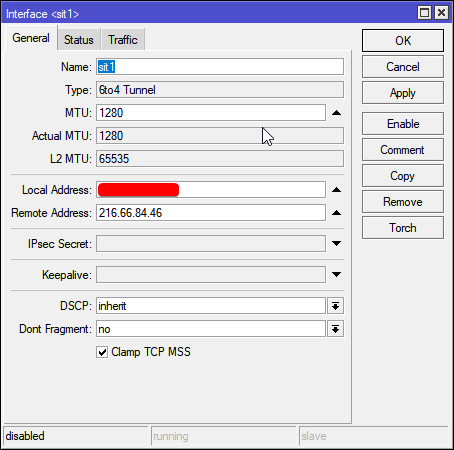 nova igloo
maybe we still have to request for the static ipv6
nova igloo
if not everytime i restart my 3in1 modem/router the ipv6 will change
tame carbon
dynamic addressing on v6 sounds like you need a new ISP
because
its stupid
the total amount of addresses supported by v6 is insane
nova igloo
so the ipv6 assign to my router's mac address permantly u meant?
tame carbon
it shouldnt change
I just have this on my router
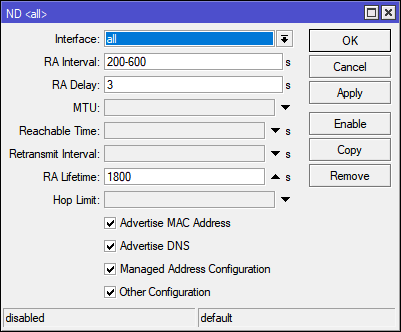
but its disabled right now
v6 tunnel is slower for me than v4, because I've not finished the certification 100%
hurricane electric does rate limiting for noncertified users
but if I enable it
I have a dual stack
so every device gets a local v4, and a public v6
nova igloo
How ISP gonna transfer packets to you if they dont know your MAC
 nova igloo
then how ur devices assign to an ip when we dont use mac
tame carbon
SLAAC
MAC addresses are always there
but thats a layer below
We're talking about Network layer when we talk about v4 vs v6
data link layer is what uses MAC addresses
thats for switches to know, which packet has to go out which port
ethernet frames are addressed by MAC
any switch can do v6, because they operate on layer 2
except for the odd egg out, like netgear
that locks down v6 on their low tier switches
which is 100% nonsensical
nova igloo
brb finishing my assignment
tame carbon
On system startup, a node automatically creates a link-local address on each IPv6-enabled interface, even if globally routable addresses are manually configured or obtained through "configuration protocols" (see below). It does so independently and without any prior configuration by stateless address autoconfiguration (SLAAC),[38] using a component of the Neighbor Discovery Protocol. This address is selected with the prefix fe80::/64.

In IPv4, typical "configuration protocols" include DHCP or PPP. Although DHCPv6 exists, IPv6 hosts normally use the Neighbor Discovery Protocol to create a globally routable unicast address: the host sends router solicitation requests and an IPv6 router responds with a prefix assignment.[39]

The lower 64 bits of these addresses are populated with a 64-bit interface identifier in modified EUI-64 format. This identifier is usually shared by all automatically configured addresses of that interface, which has the advantage that only one multicast group needs to be joined for neighbor discovery. For this, a multicast address is used, formed from the network prefix ff02::1:ff00:0/104 and the 24 least significant bits of the address.
multicast is also easier with v6
v4 multicast is a mess
IGMP :barf:
nova igloo
oh so it became ur computer are broadcasting IPv6 and occupying it
tame carbon
@nova igloo the idea of ND is that the computer announces itself to the router
nova igloo
not the switch assigning it to your pc
tame carbon
and the router responds with an IP from its own prefix
and then announces that to the network
nova igloo
oh so it become switch and firewall
nova igloo
how the firewall going to stop the external connection
dont broadcast the address + blocking?
tame carbon
SLAAC uses link-local
special subspace of v6, for local communications between devices
you've probably seen these IPs before
they start with fe80::
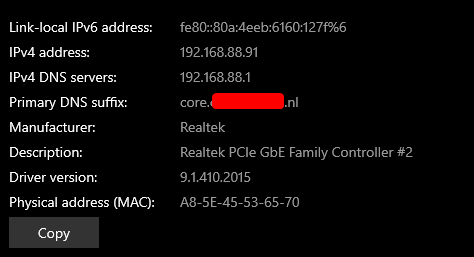 nova igloo
which whole network use one public ip which not accepting inbounds?
i mean all devices under it
tame carbon
yeah, so you typically have a v6 firewall on layer 4
that makes sure that only outgoing connections are permitted
and inbound is only allowed for already established connections
tame carbon
fe80:: link-local is someting entirely different from regular routing
link-local shouldnt be routed, ever.
nova igloo
i can have infinity more private ipv6 devices in a /64 public ip
tame carbon
if a local device on your /64 wants to communicate with a device on the internet
they route using the public portion
anything smaller locally, on your own internet
gets handled by the router at your house
nova igloo
yep
tame carbon
v6 only really uses those prefixes to "group" networks together
so its easier to route
but once you get to an endpoint for /64
you can do the rest locally
you can still set up subnets under the /64
set up a local /65
nova igloo
so the routers kept throwing the request to higher level router until the one router who recognize the prefix
tame carbon
yeah, routing tables use the shortest most specific prefix
that matches the destination IP
so public internet routers
only look at the first half of the IP
nova igloo
oh wow there's n+1 of ips now
tame carbon
you can divide a /64 into two /65's
nova igloo
even the public ip
tame carbon
and so on
a /96 would be equivalent to a v4 /0
v6 is 128 bits
64 bits are used for public routing
the other 64 bits, you can do with, whatever you want
nova igloo
who knows do ISP Malaysia going to give the clients fe80::
tame carbon
they wont
cus that is not routed by other routers
your packet goes straight to /dev/null
nova igloo
or use this? 2001:db8:0000:0000:0000:0000:0000:0001
and our devices going to use fe80::
nova igloo
yeah then it become every home have one public ipv6
tame carbon
link local is only really used to establish addressing for v6
once your device has a v6
link local will be replaced with the actual v6
let me show you
gonna enable my v6 tunnel
nova igloo
sure
Whats the function of tunnel?
dont u on ipv6 n v4 network
tunnels are for those who dont have ipv6
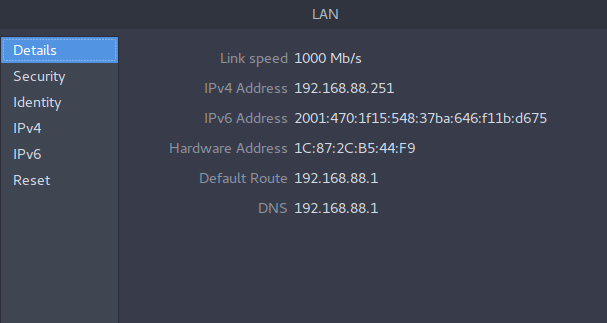 nova igloo
how ur laptop ensure it got the same address everytime it reconnect?
tame carbon
not sure I really care about that
I have a dns prefix here at home
so all my devices get a hostname
nova igloo
which part
tame carbon
Its not listed
but its like
watomat.irl.REDACTED.nl
watomat
is the name of my laptop
nova igloo
how many fe80:: I can create in a /64 address?
tame carbon
dont use fe80
thats for auto config
crystal@watomat ~ ping6 google.com
PING google.com(ams15s29-in-x0e.1e100.net) 56 data bytes
64 bytes from ams15s29-in-x0e.1e100.net: icmp_seq=1 ttl=120 time=75.4 ms
64 bytes from ams15s29-in-x0e.1e100.net: icmp_seq=2 ttl=120 time=8.64 ms
64 bytes from ams15s29-in-x0e.1e100.net: icmp_seq=3 ttl=120 time=8.40 ms
64 bytes from ams15s29-in-x0e.1e100.net: icmp_seq=4 ttl=120 time=8.31 ms
64 bytes from ams15s29-in-x0e.1e100.net: icmp_seq=5 ttl=120 time=8.43 ms
64 bytes from ams15s29-in-x0e.1e100.net: icmp_seq=6 ttl=120 time=8.31 ms
64 bytes from ams15s29-in-x0e.1e100.net: icmp_seq=7 ttl=120 time=8.29 ms
nice ping
tame carbon
first packet is slow, because the tunnel is only just up
so its still optimizing the route
nova igloo
why u need tunnel
tame carbon
because my ISP does not do v6
nova igloo
dont google support ipv6
nova igloo
oh ping6 is for ipv6
tame carbon
yep
nova igloo
lol dont work on windows
tame carbon
and routes
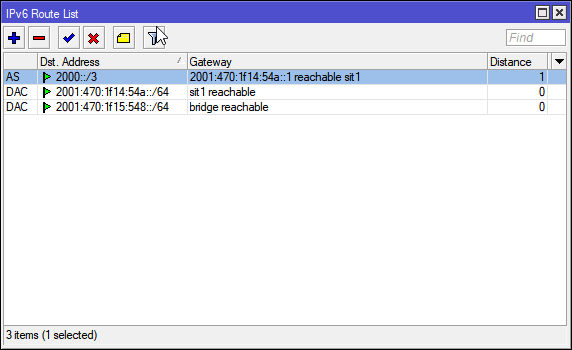
so the 2000::/3 for "default gateway"
and those 2001:470: bla /64
is my own prefix
tame carbon
exactly
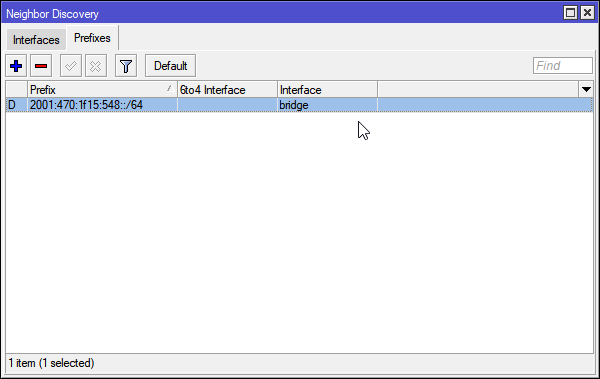
this is ND ^
and neighbors
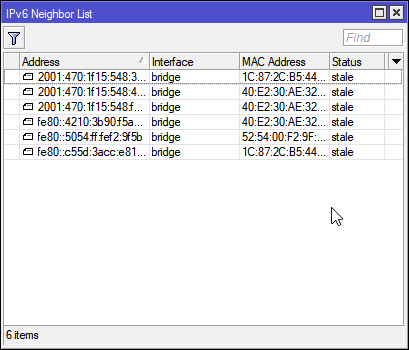
those three 2001: ips are
- my router, 2. my laptop
and 3. my pc
nova igloo
what u mean ur own prefix
tame carbon
you can sign up for a v6 prefix at hurricane electric
get your own public v6 addresses
its free
my ISP peers directly with Hurricane Electric
so ping is only like 0.5ms more
crystal@watomat ~ ping google.com
PING google.com (172.217.17.110) 56(84) bytes of data.
64 bytes from ams15s29-in-f14.1e100.net (172.217.17.110): icmp_seq=1 ttl=119 time=7.52 ms
v4 ^
 waxen scroll
@rocky badge u been pretty quiet
tame carbon
@nova igloo just sign up on hurricane electric
and begin certification process
they give you information on how it all works
the test service is automated
nova igloo
yep waiting for verification mail
waxen scroll
and dont forget that IPv6 needs a firewall on your router ideally.
blob didnt remember.
tame carbon
I just went to mikrotik website
and got a script for the default v6 recommended setup
nova igloo
sadd... the mail got thrown into SPAM folder lol
tame carbon
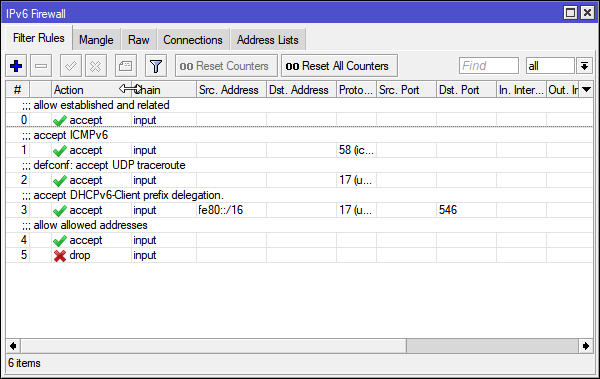 waxen scroll
*wonders how many prosumers forgot they need a FW when turning on IPv6
tame carbon
lol
waxen scroll
UBNT you cant even do a v6 firewall unless you do it in CLI
nova igloo
do i need public ipv4 for that
tame carbon
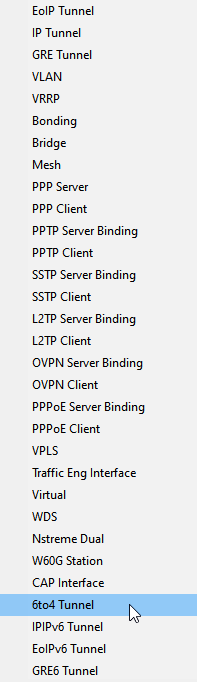
@nova igloo tunnelbroker uses v4 to tunnel v6
the routing is handled by Hurricane Electric
you need to have a device that maintains this tunnel
either a computer, but preferably a router
nova igloo
 tame carbon
yeah you'd need to be at home
and access your router
inb4 your router cant do v6
🤣
@waxen scroll took me a while to figure out that some features on mtik require a package to be installed first
ipv6, ntp-server and multicast are all optional packages
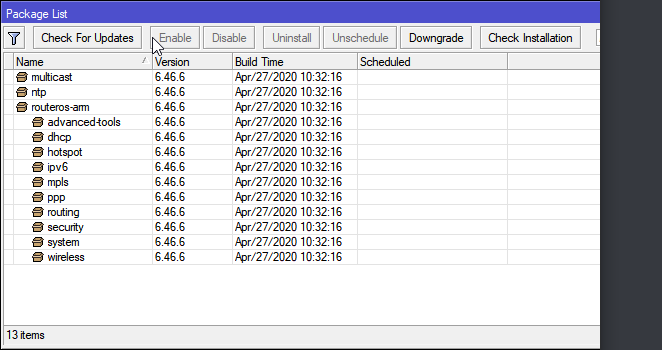 waxen scroll
oh wow. i didnt know they let you BGP over those tunnels
nova igloo
What should i type in the IPv4 Endpoint ?
tame carbon
your IPv4 endpoint is your own internet IP
oh
and this only works if you have a static public IP
tame carbon
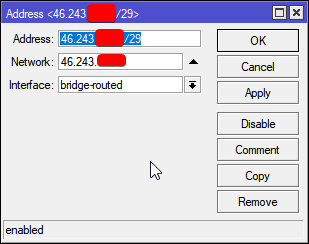
heres a fun thing
nova igloo
not sure mine, i mean urs
 nova igloo
yeah thats enough
tame carbon
/29 is like 8 addresses
only 6 hosts though
1 ip is used by router, and the other is broadcast
I use this for my virtual machines
dont want to port forward everything
only games and such on my LAN, I do port forwarding for
@nova igloo if you haven't got a mikrotik already, get one :D
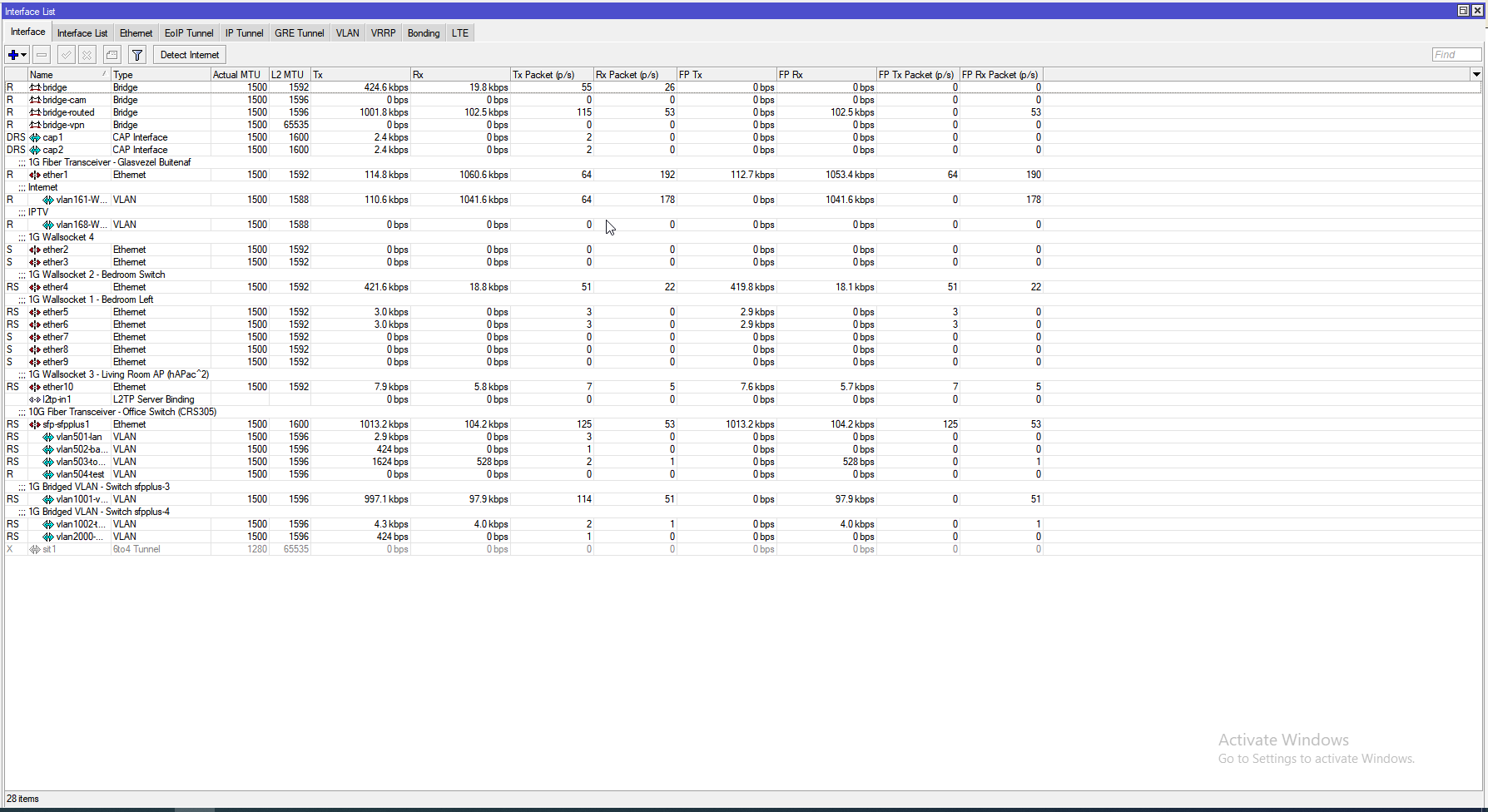 nova igloo
damn, what a waste, using public ip for router 🤦♂️
tame carbon
My network interfaces ^
@nova igloo its a public router on that subnet
but the subnet is public
peak cloak
I need to get the Hex S
tame carbon
git it
@peak cloak join the revolution
we will show these unify freaks how its done
nova igloo
@nova igloo if you haven't got a mikrotik already, get one :D
@tame carbon I'm more interested on Ubiquiti Edge
tame carbon
ew
nova igloo
???
waxen scroll

 toxic citrus
My 5ghz randomly drops out on my Asus dsl-ac55u. I saw one review that mentions this is a "common issue" but i checked around online and I can't really find any info on this one exactly, mostly about other ac 5x or 6x models. Any advice or are Asus modems just bad? I am granted warranty from the shop i bought it from so that's an option but ideally I don't want to lose my finely tuned settings for virtual desktop
And yes even when at default settings the 5ghz drops, just checked while typing above message
The modem is also not very hot on any surface. Not stone cold, but like about as warm as an idle phone
 stuck hawk
If you are concerned about modem/router settings, many allow you to export settings to a file so you could restore them after getting the hardware fixed/replaced.
By "drop" even on 5GHZ do you mean that you lose WiFi connection completely, signal is low, or signal is fine but internet connectivity is bad?
To determine signal strength, I'd get an app like Wifiman for android
toxic citrus
No like the modem literally stops sending 5ghz signal from time to time then turns on again..the light on the modem goes on and off each time the signal itself does. Nobody in the house knows what a router even does so it's definitely not a prank either 😂
Yeah I'll find a way to export settings or something, thanks
Also it happens at least once an hour but not exactly a set time
stuck hawk
Yeah that's far less likely to be a configuration or a reception issue since the 5 GHZ light turns off too. Some system or wireless log on the router UI should show errors or an indication of something at the time of a drop. I have an ASUS AC WiFi router myself.
peak cloak
could also just be a bad router?
toxic citrus
Oh right i turned it off already now as I'm finished with vr for the night. Thinking it's probably just a bad router, at least one other person mentioned the exact same issue online
 charred meadow
Could it be overheating? I've had to attached a fan to an ISP combo unit once.
peak cloak
yeah
toxic citrus
I mean it doesn't feel hot anywhere but it could
peak cloak
it could be thermal overload and it's shutting down
toxic citrus
Usually you'd actually feel heat on an overheating modem
Perhaps the cooling solution for this one is just terrible and doesn't even let heat reach the shell of itself 😂
Having to strap a fan to it would really break immersion in vr though but it's better than not having a signal lmao
I'll see what it does if i leave the window open tomorrow, promised cold but no rain tomorrow
Alright thanks, I'll see if it's thermals and if so find some kind of cooling solution. And If it's a bad router then just export settings
stuck hawk
It may just be a bad modem regardless of thermals, but yes normally if a hardware issue then a hotter device may occur.
 tawny hemlock
Anyone no a good 2.5gb 3 layer switch
peak cloak
anyone know vyos? Bascially i'm having an issue where the router itself can't resolve hostnames
the router has dns forwarding enabled and the router's devices can resolve hostnames just fine
forgot to set system name-server
waxen scroll
 cedar igloo
I'm currently trying to create a vSAN datastore on vCenter Server and it's wanting a "cache". Typically, what size would you all recommend for a SSD to act as a cache in a 10tb vSAN? Not sure if I am understanding how a vSAN actually works, so my question may not be clear
cedar igloo
Oh. I was thinking it's an SSD that was used as a cache
tame carbon

You're right
yeah, sorry got confused

Virtual Blocks
vSAN architecture consists of two tiers: a cache tier for the purpose of read caching and write buffering, and a capacity tier for persistent storage. This 2 tier design offers supreme performance to VMs while ensuring that devices can have data written to them in the most eff...
cedar igloo
I'm assuming vSANs are more recommended than NFS volumes for virtual machine storage?
 fading mesa
Had a q
cat5e and cat6 both support gigabit speeds, cat 6 has a higher bandwidth
does that make it faster?
peak cloak
for gigabit, cat 6 is no faster than cat 5e. However, if you are putting wires in your walles do cat6 since it has higher tolerances and can faster speeds (given the eqipment at both ends can suppor it) over longer distances
you can also have the most expensive ethernet cable in the world but just gigabit LAN cards on each end, you will only get gigabit
the cable won't make your connection any faster(generally)
fading mesa
thanks
 severe venture
when is ubnt gonna release new firmware for the UDM? its been months :\
yeah i figured UBNT is really testing out unifiOS
for a stable release
 thick minnow
An interesting desktop app. https://www.addictivetips.com/windows-tips/ping-system-tray-windows-10/?utm_source=feedburner&utm_medium=feed&utm_campaign=Feed%3A+Addictivetips+(AddictiveTips)

Ping is a small, but incredibly important component of internet connectivity. You may have a fast connection and lots of bandwidth but if your ping is
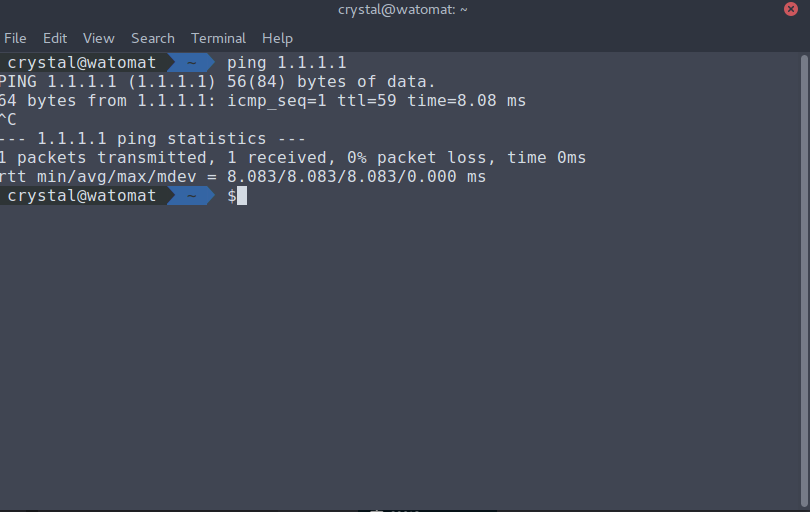 tame carbon
well ok then
@jaunty talon not sure why, but lowest I can get 7ms
even though the hop is not that far away from me
tame carbon
I got 3ms internal
for some reason
and 7ms to ISP
2: r2.serv.dro.weserve.nl 7.189ms
 jaunty talon
what type of internet?
jaunty talon
Sounds like a long distance between you and your ISP's router then
jaunty talon
indeed, should not be 7ms then
tame carbon
Netherlands is tiny
jaunty talon
my distance to 1.1.1.1 is around 40km I would say
tame carbon
@jaunty talon https://i.imgur.com/IJTp3FD.png

this is on my gateway
@jaunty talon what if its not a direct fiber path?
jaunty talon
If i didnt know know better, i would say that you have coax and that it's the CMTS that does the latency
better as in you saying it's fiber
tame carbon
Its a yellow fiber with a bi-di transceiver directly in the router
tame carbon
But the carrier who operates the fiber network, is different company
jaunty talon
ahh
tame carbon
do you think they have a DEMUX-MUX inbetween?
tame carbon
There's 4 ISPs that offer service
and from what I gathered, they just plug your house into the right patch panel
jaunty talon
or well, sure it could impact some, but there needs to be crazy amount of mux:es to do that kind of latency on first hop
do you have same latency if you do a tcptraceroute?
tcptraceroute 1.1.1.1 443
tame carbon
not sure mtik can do that
jaunty talon
from your pc then? :)
tame carbon
they do some bandwidth shaping
but only above 250mbit
Like, when I do a download
it spikes to 500mbit/s
and after half a second, starts rate limiting
jaunty talon
ahh, but you run linux on your pc there right? apt install tcptraceroute && sudo tcptraceroute 1.1.1.1 443
:)
tame carbon
I did that already
jaunty talon
also 6ms?
tame carbon
✘ crystal@watomat ~ sudo tcptraceroute 1.1.1.1 443
[sudo] password for crystal:
traceroute to 1.1.1.1 (1.1.1.1), 30 hops max, 60 byte packets
1 router.REDACTED.nl (192.168.88.1) 0.331 ms 0.386 ms 0.489 ms
2 r2.serv.dro.weserve.nl (46.243.152.3) 6.236 ms 6.176 ms 6.288 ms
3 46.249.55.194 (46.249.55.194) 7.160 ms 7.897 ms^C
wonder what they're doing between you and the first hop :D
 primal ice
some kind of tunnel?
jaunty talon
you should
then the tunnel would be between his router and the first hop
and that's not the case
tame carbon
not sure if that has anything to do with the access method
because WAN is given via a vlan & dhcp
tame carbon
nah, all ping is ~7ms
jaunty talon
yeah, but most isps uses mpls in core, which can give you jumps in traceroutes and ms
depending on current traffic engineering in the network for that specific isp etc
jaunty talon
if I was you, I would call and ask how can first hop be 6ms away
tame carbon
Yeah, I might tomorrow
jaunty talon
=)
tame carbon
its 5pm, so business hours over
jaunty talon
:)
I have been very productive today I feel, have ordered two new transit links and shut down an old transit
tame carbon
lol u too?!
jaunty talon
and ordered a new build cluster :D
tame carbon
I just got out of a teams meeting with coworkers
daily standup
literally everyone be like: I had a fantastic day today
jaunty talon
haha nice
 waxen saddle
Intriguing
waxen saddle
Princess Leah's words to Lord Vader come to mind when these things happen.
 near charm
Could anyone here help me with a network adapter issue? Every time i start my computer, or it comes back from sleep mode, I have to disable, and enable my network card again. This has been going on for a while, and it works fine once its enabled again, but its kinda annoying and shouldnt be like that.
I have unchecked the power issues (Allow windows do deactivate this device to save power), and i've reinstalled driver like a thousand times
Windows sees the cable as a phone cable, but when disable and enable, it works just fine
 vivid oriole
Hello. I've contacted a lot of people and posted on the forums to no avail. My wireless adapter keeps acting up and disconnecting when I open apps or plug and unplug devices. Could there be any fix to this? I really don't want to reset my pc as my backup NAS storage is offline for now.
tame carbon
@vivid oriole the solution is ethernet
vivid oriole
Any solutions to my problem?
waxen scroll
@tame carbon agree
 wary sequoia
since people in here probably know more, could i have some help in #tech-support
it only happens on my pc so i think it’s the wifi extender? but i tried a different wifi extender and had the exact same issue
so are wifi extenders just bad for ethernet use?
can you explain that in idiot terms, i don’t understand entirely
right i also moved house and the issue continued.
right.
so.. i need to implement round robin scheduling on my wifi extender for the issue to be fixed?
and honestly i hoped i could have an ethernet cord directly from my router to my pc, but my parents said no
i have a tp link ac1200 re305 right now. the connection on the extender itself stays up and running as my phone can still connect to it, but my pc just dies
stuck hawk
When the hell are consumer multi-gigabit routers going to get cheaper?
I'm wired up with cat 6 and 2.5 Gbe adaptors can be had for <$50, but you could buy 3 AC routers for the price of something that supports multi-gigabit
wary sequoia
so there’s no way to fix this problem other than that?
well great. thanks for the help. i’ll be moving again and my pc will be right next to my router, so i’ll be able to hard wire it this time
i would get a power line adapter if my@room didn’t only have two plug sockets and i was already using both of them
they would work with socket splitters? ok
i’ll have a look, i don’t think i’ll bother getting one though
ohhhhhhhh ok yeah
 hollow marlin
@wary sequoia How often is it dropping? Is it consistent?
wary sequoia
i get you now
It’s multiple times every day. I could be in a discord call or just play a game, the internet on my computer will die and i have to reset the ethernet adapter
stuck hawk
Well for all I knew, there was someone other than Netgear coming out with a router that has at least one mutli-gigabit that I hadn't heard of. Guess the answer is "no, that's it"
wary sequoia
i should probably say i have Virgin Media ISP running a third party tplink archer c50 router
stuck hawk
I said router as that's more relevant to wired connections
wary sequoia
virgin media sucks but their speeds are the best
hollow marlin
@wary sequoia Note the times it drops to see a pattern. Im going to say its not wireless if other clients connected to the extender work as a single device drops.
wary sequoia
A few weeks ago we would have the internet cut out at 11pm bang on for a good hour or so. Virgin Media is god awful
stuck hawk
ISPs are often a perpetual "the grass is always greener on the other side"
I have Windstream in the south, and my ignorant rural neighbors are begging for Comcast, not knowing how much of a nightmare they can be
The potential nightmare isn't just reliability, but also customer service, data caps, "slamming", etc.
That too, though they claim they don't allow public hotspots from homes - Only public places
Oh no doubt its on every modem, its just a matter of whether Comcast actually uses it for public purposes for every modem
Ah, I was thinking of non-customer access to modem APs
Because xfinity/comcast was like "its free for everyone because covid"
thick minnow
im new this
waxen saddle
The Router/Switch wouldn't be able to be used as the Network Interface Card on your PC.
waxen saddle
You still need a NIC to interface with the network cable. The network cable would then connect to the Router/Switch/BridgedAP
thick minnow
my router is a tp link archer c50
waxen saddle
And your PC doesn’t have an Ethernet port? Most PC’s have one.
thick minnow
i do have one
waxen saddle
Then you should be able to plug an Ethernet cable in and run it to a LAN port on your router. 🙂
thick minnow
i did, it detects it but it doesnt give me wifi
im stuck with a crappy usb wifi stick
can i get that in newbie speech
i dont know much about networking
fair
yep
so far so good
primal ice
i'm wondering why he's trying to get wifi when he has ethernet?
primal ice
i do have one
@thick minnow i did, it detects it but it doesnt give me wifi'
 thorny vector
@topaz quarry I've seen plenty of netbooks/smaller laptops without any rj45
I antcipate it'll become more common as usb-c/thunderbolt become more common, as we descend into dongle heck
 fleet copper
Dongle life.........
 little schooner
@waxen scroll I don't like writing papers in my internship class because the internship teacher doesn't let me write about what I do on the job. Half of the time, I am finding myself having to throw in a lot of extra detail just to fill the page requirement. I think there should only be one paper due for the class and the rest should be graded on job performance from supervisors/managers.
The school system should adjust for the times.
Last paper I wrote about the hiring process
waxen scroll
hmmmm?
@little schooner i never did internship
i was like "does the job pay market rate? no? pass."
little schooner
heh well this one does pay so I am happy for that
They said it will even go up another $5 on graduation
it stops at masters degree
waxen scroll
😮
little schooner
if you have a doctorate, HR told me they'll say you're overqualified and ask you to look somewhere else
like where you work for the big bucks @waxen scroll
waxen scroll
if i was hiring entry level and saw a masters i would be like 🤔 nahhh
waxen scroll
if i was hiring mid level and saw 10 certs i would be like 🤔 nahh
little schooner
@waxen scroll I have under 10 certs but a lot of them are expired now
so maybe really only 3 now
waxen scroll
i have 1 cert and thats only because the company was giving them out free, just had to study a little
little schooner
ccna, comptia and microsoft
if they ever say there is extra budget to provide me free training, i want to do something with cloud technology
waxen scroll
my cert is cloud lol
little schooner
I believe i'd learn it quick
waxen scroll
i was supposed to get the next step up, but a lot of the questions were topics I would have to do tons of study on, so i failed it and didnt go back
little schooner
well whats important is that you're successful at this point
waxen scroll
there were AD/Identity questions, application compliance questions, and stuff like that. im not a server person
little schooner
I see myself more as a server person.
I am not interfacing with network gear as much as when i was in netacademy
nothing ever breaks in the classroom
or even at work
waxen scroll
you wont either, you need to be working at a company with like 2,000 people or more before it gets that way
little schooner
yeah sounds right
waxen scroll
preferably you go so large that the network team is silo'd
too small and you'll be doing operations, engineering, etc. you really dont want that
waxen scroll
the varying skills you use at work will be a mindfuck and you wont like it
one minute you have to troubleshoot and replace a users patch cable, next is engineer a new datacenter segment
its crap
waxen scroll
yep. so dont work smaller companies!
little schooner
go big.... thats the lesson
There insurance companies around with networking and other ops
maybe I can get into those
employee count is well over 20k
waxen scroll
the next hurdle is siloing network technologies. it sounds sexy to touch firewall, load balancer, etc... but its really not
each technology has its own BS to deal with and can get complex. its another distraction
trust me when i say with firewall you do nothing but change rules, its boring and a pain in the ass if you are working all the other areas
its great to have an ops job where you get to manage and troubleshoot it, but not for long
once you do engineering you dont want to touch all
you'll get bitter about touching hardware and cables eventually too
the sexy wears off after a few years
little schooner
the unfortunate truth. makes sense, yeah.
waxen scroll
last few jobs i just open tickets and someone else does loading dock, rack and stack, plus cables
once you get that its hard to go back
i'd hire you if i could but job only wants senior now
lol
 loud anchor
Does anyone recommend which brand I should choose for a mesh wifi setup. Currently have 500/500. I was thinking amazon eero for google
 tall pagoda
TP link is always great value for money.
tame carbon
@tall pagoda meh
not really
tplink sells crap hardware
I've had their wifi routers crash on me so often
and they usually die after 2-3 years

MikroTik is a Latvian company which was founded in 1996 to develop routers and wireless ISP systems. MikroTik now provides hardware and software for Internet connectivity in most of the countries around the world.
this is a home router.
nova igloo
oh u mean the hardware aren't enterprise grade
BTW, can single mode bidi and wdm work together
nova igloo
wait lemme show u something

FS Singapore
FS 16 channels DWDM mux demux (C21-C36, dual fiber, w/ Monitor, Expansion & 1310nm Port) greatly saves optical fiber resources for long-haul, scalable OTN systems.
tame carbon
WDM uses smaller channels
nova igloo
no need modules
tame carbon
That's a passive filter
nova igloo
aren't WDM design for long range high bandwidth purpose
so we can get multi gigabit through long range on 1 single mode
tame carbon
WDM allows you to stack multiple fiber links on the same fiber
but the channels themselves are much smaller
You still need fiber transceivers, specific to the WDM setup you have
nova igloo
yeah I still need a sfp+ module for my router right
tame carbon

FS Germany
Check FS 10gbe DWDM SFP+ transceiver module Compatible Cisco DWDM-SFP10G-63.86 datasheet (SMF, 1563.86nm, 40km) and price list. 100% Compatible!
If you look at this product page
these are DWDM transceivers
nova igloo
oh I need specific channel module
tame carbon
they all have their own wavelength yeah
this is why bidi wont work
@nova igloo bidi is usually 1270nm and 1330nm
but DWDM channels are like 0.4nm wide
nova igloo
yeah different colors of lights
nova igloo
lasers
tame carbon
into many many smaller channels
nova igloo
yeah more sensitive to the colors
tame carbon
yep
this is also why its more expensive
because the laser wavelength has to be more accurate
there's also CWDM
which has larger channels
and its generally cheaper to deploy
for home use of fiber optics, bidi is just easier
FttH is often BiDi too
but fiber transit on the backbone
is all DWDM
tame carbon
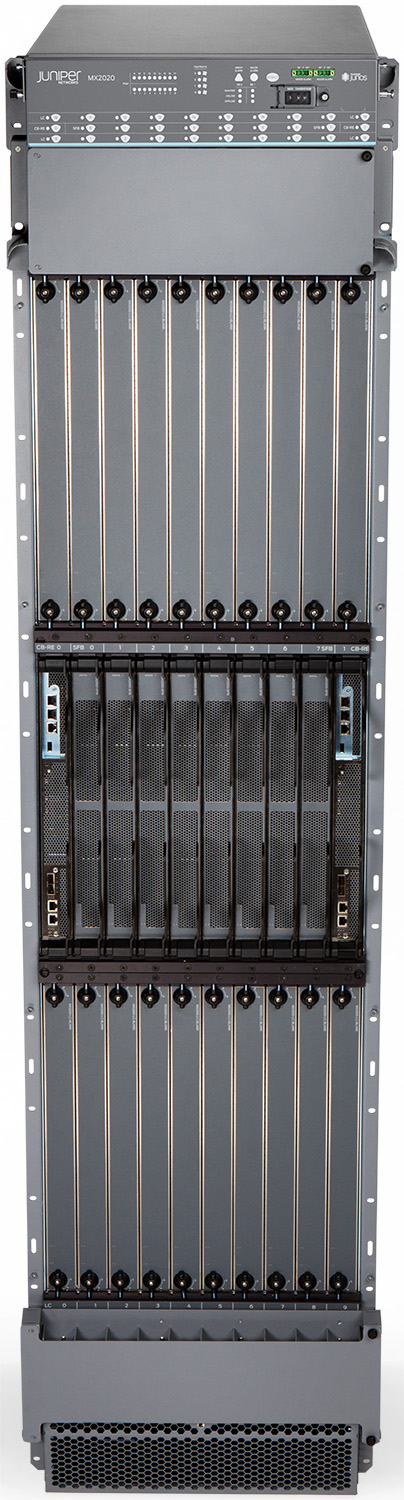
Juniper Networks
The MX2020 is the highest capacity, performance, and density edge router in the industry.
It delivers 80 Tbps of system capacity and supports up to 800 100GbE interfaces, 320 200GbE interfaces, or 160 400GbE interfaces in a single chassis when used with the Modular Port Concentrator 11E (MPC11E) line card.
nova igloo
haha juniper
tame carbon
Its the size of a full 48U rack lol
nova igloo
BTW SC twice the price if LC fibers
Its the size of a full 48U rack lol
@tame carbon that's huge
tame carbon
https://www.juniper.net/assets/img/products/image-library/mx-series/mx2020/mx2020-frontwtop-high.jpg
 nova igloo
not sure are there juniper authorized seller
in Malaysia
actually we are using router or switch connect to the isp
I think its switch
tall pagoda
tplink sells crap hardware
@tame carbon You mean Arris sells crap
nova igloo
@tame carbon You mean Arris sells crap
@tall pagoda Are Arris rebranded of TP-Link ?
tall pagoda
They are different companies, Arris is American and makes DOCSIS (Fibre-Coax hybrid) modems to end customers mostly in Germany, Belgium, Netherlands and the UK with garbage Intel Puma 6 chips.
And TP Link is a Chinese manufacturer from Shenzhen and is worldwide known for network equipment for both home and professional use
nova igloo
Oh i see
I think it's not crap, its just because their hardware cant chase us
i mean we are more heavy user
tall pagoda
200 mbps is nice, but 5 upload can better.
I have 250/25. And i'm happy with it
Horrible ping
(Picture showing ping to my server in Zwolle, Netherlands (60km away))
 heady sentinel
Does anyone know what any of these mean?
My wifi cut out will I was in a meeting....
There is also this
It frequently does this
waxen saddle
Cable modem?
waxen saddle
Try turning off the Cable modem for at least 30 seconds, then turn it back on. Then power cycle your router. This will allow the Cable modem to re-bind to the best available communication channels and might help with communication issues.
heady sentinel
This frequently happens and I have tried that before... Any other suggestions?
waxen saddle
Do you know how to log on to the cable modem's webpage?
heady sentinel
Yep
waxen saddle
Go ahead and log on to it, then check this website. It's pretty helpful in helping you read Cable Modem's status information: https://pickmymodem.com/signal-levels-docsis-3-03-1-cable-modem/

Signal levels on your home Cable Modem need to be at an optimal level for it to operate correct at best speeds, without any disconnections. PickMyModem helps you to understand your modem signal levels to avoid common speed and disconnections and provides recommendation of best...
If there's too much noise or too high (or low) of power for dBmV, that would be a key indicator of a potential communication issue and something your ISP would have to resolve.
Corrected and Uncorrectables are reset every time you restart your cable modem, That can be an indicator of ISP communication issues as well. Ideally, you'd have zeroes for those two columns.
heady sentinel
Hm
My un correctables seem to be high
And I just reset the modem around 4 hours ago
waxen saddle
Whoah. Yea. That's pretty bad then.
I last reset mine yesterday morning and I have all zeroes except for 1 corrected.
waxen saddle
I would definitely reach out to your ISP about that.
Keep it high-level jargon too. Like, "My modem appears to be having significant communication or line issues"
waxen saddle
NP mate. Good luck!
waxen saddle
I was about to comment I've never seen a not-locked channel
It looks like it's having such bad communication that it can't even bind the channel.
Usually by the time you can reach your modem config page, it has already bound itself to all the channels.
heady sentinel
Also channel 1 has "other" in it's modulation
And a few corrected errors
2,674,400,266
How is it possible I have almost 3 billion corrected errors in 4 hours
heady sentinel
My upstream Db also is low according to that guide
Welp the cable company will have fun with this
waxen saddle
lolol
 exotic crown
My computer keeps on saying "no internet, secured." I reset my network, pc and router but no luck. Can someone help me?
I can use some apps with wifi but some don't work
i dont know why im able to use wifi when it says no internet, secured
peak cloak
Wifi means you are connected to your WLAN, but you can't access the internet
that means your router (Ex: 192.168.1.1) is reachable, but devices on the internet aren't (Ex: google.com or 9.9.9.9)
wifi != internet
 clear igloo
A(Area)*
thick minnow
I have like 5 computers in my room that need internet hooked up to them, 1 being a main pc, another being a server, and the rest would barely use the internet (if that matters). Could I get an ethernet switch and hook them all up to it?
peak cloak
yeah, that's the purpose of a switch
 stone kite
So I found a switch that I think may be acceptable. I think I am ebay-ing wrong. 2 perfectly good units advertised here, why such a vast difference?
 full sigil
Could be just the amount of wear they have
One may be newer or in far better condition.
 dreamy cipher
unborn sluice
dreamy cipher
unborn sluice

nova igloo
sudo
 uncut fox
I have a question about trying to run a Minecraft server. If I have a setup like what the picture shows, and I run the server on the PC on the left, will the firewall protect all devices that are below?
 dusty osprey
From the way its set up, no.
If you have a firewall and its connected to the "PC" in this case then it should only apply its rules to the PC
uncut fox
What would be a better way?
primal ice
router to firewall to switch to everything else.
dusty osprey
Yes, that.
misty terrace
Disk Operating System
primal ice
heh
 strange lintel
Isnt DDoS and DoS the same?
clear igloo
DoS is me send you tons of data to overwhelm you
DDoS is hundreds (thousands) of people sending you data to overwhelm you
waxen scroll
@clear igloo hi i want to run a remote desktop server. what do?
primal ice
samba active directory. jk
 solar kestrel
What would cause a Cisco C2960X switch to constantly drop a port. TDR shows good on all pairs.
hollow marlin
You're getting very close to the limit. Just a single bad termination might cause it to flap once a load is on it
solar kestrel
That cable is to a Cambium AP at the top of a tower. Its running through 2 surge protectors (one on top, one on bottom). Could that be the problem?
hollow marlin
Wait is it also using PoE?
solar kestrel
Yes, but the POE injector is about 5 foot from the switch. When I look at the AP, it shows that it has never lost power. (Uptime is still counting)
hollow marlin
PoE cannot reliably run at 100m depending on power required. But if its going through surge protectors that can be a problem. If PoE does not drop but interface does I would say either bad termination of the inner pairs or the surge introducing too much noise
solar kestrel
That would make sense if it was getting too much noise. I'm having that issue at another site where an FM Transmitter is overpowering the cable. Also I've had plenty of issues because of bad terminations. I look into those 2 options being the issue. Thanks for the Help!


/OSImodel-8d93f19d50e543348f82110aa11f7a93.jpg)


 solar kestrel
That made me laugh too LOLLsss
 silver needle
What would be the best way for me to get a static Ipv4 address for my homelab without having to rent one from my ISP. Dynamic DNS won't cut it as some services I run require an IP address. I'm looking to do this as cheaply as possibly either via Google Cloud or AWS or if there is some other way.
 ornate jungle
If your ISP won't give you a static IP, then you have to use Dynamic DNS providers...
Renting a cloud server isn't going to give you a static IP for your home connection.
silver needle
Reverse Proxies exist...
waxen scroll
it can with a more complex setup, but im not about to go down that hole
plus some providers its against the rules to do so anyway
ornate jungle
Yup, but a reverse proxy isn't a static IP - it's a viable option though.
waxen scroll
like for azure i believe you still arent allowed to tunnel internet through them
silver needle
So maybe a VPS?
waxen scroll
the servers can use azure internet but not outsiders
silver needle
I'm fine with setting everything up myself just some game servers I want to host require a static Ipv4
so if thats someone connecting to a VPS and that traffic then gets routed back to my home then
waxen scroll
the high level is you need to make the VPS act as a gateway, which isnt too hard on any linux, then you need openvpn, then you need to tell your (non-consumer) router to NAT through it. It's going to be a double NAT though unless you want to pump all your traffic from home to the VPS.
note: I have no guide or anything. this is just networking 301. you'll have to figure it out
silver needle
no worries, I'm already familiar with PFsense ect
waxen scroll
reason for second NAT is because your home router will have a default route already for all your home stuff.... when traffic hits the VPS nat #1 translates it to your openvpn subnet which contains the home router. NAT #2 is the ovpn IP of the home router. So your server will see source as the ovpn and respond to it while your other network devices are using the default route to the internet with no tunnel
im a little tired, i think i covered it but if not its damn close
or if you install the ovpn client directly on your server at home, perhaps you can skip nat #2, but that means all traffic from the server will exit the VPS
anyway