#networking
1 messages · Page 231 of 1

 waxen saddle
But I'd also set up Multicast TV stations
 topaz quarry
i strongly believe in homerunhd self-hosted solutions
 unborn sluice
As long as the ISP provides
-Netflix
-Linux repos/distros
-Games
-All the otherr crap
topaz quarry
oh netflix rarely leaves my local zone either
like i did traceroutes for a lot of the netflix traffic
it doesn't even leave my county
unborn sluice
My ISP don't provide Games cache
But somehow downloading visual studio crap is fast
topaz quarry
i feel like the reason why Gigaverse has no bandwidth limit
is because At&t heavily invested in cache servers
Microsoft has so many edge servers
even like most of the DNS servers
i either get pensacola which is still in my state
or i get the austin DNS servers
quad9 has stuff really close to me so they happen to be faster than cloudflare somehow
waxen saddle
Speaking of Microsoft Edge Caching Servers, has anyone been able to confirm or deny if they run Linux?
unborn sluice
Probably Linux
unborn sluice
Windows already wants pepople to beta test their linux
fucking "insider"
it still "free qa"
topaz quarry
lmao
waxen saddle
There's a theory that Windows 10 downloads are delivered from Linux servers. So far, I haven't been able to find anyone who can say "nope, it's served by a super-hardened Windows IIS server"
topaz quarry
so what I can tell you
is the engineers in Redmond Washington
deeply desire Windows to be a WINE distro
because they're sick of windows
and not even their hard core engineers think IIS is ever a good idea
herb sutter makes windows patches on ubuntu
waxen saddle
lol
topaz quarry
so i can neither confirm nor deny any allegation that Microsoft may or may not be using Linux to prop up their core business model
waxen saddle
😛
topaz quarry
but you can take those statements and reach your own conclusion
waxen saddle
I've been considering virtualizing my main rig so that I can have me and my wife share it.
waxen saddle
Honestly, having 2 different physical computers is a bit overkill, but combining us on one machine is an even more overkill project.
lol, I personally use XCP-NG, but i've played around with Proxmox as well.
topaz quarry
two GPUs, two USB controllers
oh no xcp-ng has clearly worse performance than proxmox
waxen saddle
It does?
topaz quarry
i would take smartOS over xcp-ng for it's main use case
which is technically better security
yea xcp-ng has much more hardened virtualization vectors
it literally runs slower on my hardware than proxmox
waxen saddle
I wasn't crazy about smartOS locking itself to the physical host.
topaz quarry
naw, smartOS is for hard core people
it's great for ultra performance, reliability, and security
but it's hard core
waxen saddle
I haven't noticed any performance issues with xcp-ng. Actually, I have 4 VM's running on it right now and total CPU usage is around 7% - I'm actually quite pleased.
waxen saddle
lol.
topaz quarry
i'll try it agian soon maybe
waxen saddle
I chose it for 2 reasons: 1) It's similar to Citrix, which is a skill I want to work on for future hiring prospects. 2) Free live-migration of VM's.
topaz quarry
Citrix is dying
if you want future prospects use VMWare ESXi
it runs better
and has cooler features
waxen saddle
You're either the same person to say that or the 2nd person to tell me that. Though that may be true in the market (I haven't looked), it's certainly not true in my workplace.
topaz quarry
the problem with Citrix is while I was applying there and I was in the soflo office
waxen saddle
WE use ESXi too at work. And I am MUCH higher skilled with ESXi than any other Hypervisor. I love it.
topaz quarry
they tried to convince me Linux containers are a fad
and they'll go away soon
the management is gun hoe on doing the citrix version of application delivery
i've never empoyed vSAN but i've been informed it's amazing
waxen saddle
Citrix focuses on end-user application delivery. Docker containers are a close, but completely different.
topaz quarry
docker and Linux Containers aren't the same thing
waxen saddle
The fact that whoever you were talking to conflated the two isn't a good sign. Not to mention the whole "fad" comment. lol.
ah. Sorry. My fault.
topaz quarry
docker just uses a default specified runtime and a daemon thread
waxen saddle
I've been doing a LOT with Docker lately and it just slipped out.
topaz quarry
you can specify any runtime you want :)
lol we gucci
like one of Citrix's mainstays is delivery applications through their system
doing that with LInux containers is very easy
you just use the appriopriate runtime
if it's something like onlyoffice (eg office stuff) you deploy nextcloud/onlyoffice etc
if you want an actual GUI application, then you use hardware accelerated linux containers
either with something like the nvidia-docker-2 stuff with the nvidia-runtime
and literally use GPUs in your containers and delivery remote desktop experiences
or some other set of services, and provide it usually through a web portal of some sort
waxen saddle
I saw something about that in a security-camera platform I was checking out as a docker container. Fascinating stuff.
topaz quarry
LInux Containers can be viewed as a super set of what Citrix tries to accomplish
I do HW Emby/Jellyfin stuff at home with the nvidia-runtime
it's honestly amazing
installing applications hasn't been easier
i'm making a cool SIMD/Tensor Core accelerated security camera platform for my house
because A, i want experience with tensor cores
B, that mail man isn't allowed to get away
waxen saddle
LOL
topaz quarry
the house is being rigged with some unifi cameras
because they all support RTSP streams
so i can use the Unifi management while I create another management system
waxen saddle
Nice. Those things are pricy though.
topaz quarry
it's true
waxen saddle
Woops. Bed time. g2g. nice chatting with you.
topaz quarry
beez!
 nova igloo
Using multiple Internet connections as one is a thing if you're using the same ISP. It's usually referred to as a "trunk" and requires special equipment on both sides of the connection. It's not something I've ever seen done with consumer-grade cable modem infrastructure.
@waxen saddle Nono, i mean 1 fiber cable but 2 router/modem
nova igloo
keith barker, eli the it guy
@topaz quarry Whos tht
nova igloo
i thought u mean someone here hehe
topaz quarry
they could be in this discord
laughing in the background
Eli and LInus know about each other
nova igloo
Oh rlly
topaz quarry
pretty sure they message each other too
eli makes fun of LInus's sub bar office networking environment
Linus go you fuck
the process continues
 mortal stirrup
uhm, my pfsense is getting another wan ip adress then my local computer think he has, wtf?
topaz quarry
good question
is pfsense showing a local IP address as it's WAN?
so 192.168.x.x
or 10.0.0.x or something like that
mortal stirrup
no, wan adress
topaz quarry
so you're positive it's a public IP
mortal stirrup
100.64.122.xx and when i google whats my ip is it say 155.4.221.xxx
mortal stirrup
yes, i can access my servers from the ip pfsense say
unborn sluice

mortal stirrup
so my computer think he has another wan ipadress
topaz quarry
@unborn sluice don't you wish you could get free IPV4 addresses?
unborn sluice
is it that time again to say that ipv6 is better
 mortal stirrup
lets see now
topaz quarry
so instead of using a web browser
just use nslookup
like do nslookup www.google.com
see which public ip address it goes through
mortal stirrup
that only tells my pihole dns ip
nova igloo
Maybe it's internal IP of ISP?
topaz quarry
he's not suffering from cgnat
nova igloo
In Malaysia they give internal ip for the clients, they only give DYNAMIC Public Ip if we request
topaz quarry
this is called cgnat
unborn sluice
CGNAT is on the ISP level
not country
except if your gov controls the internet

mortal stirrup
Correct, i have no CGNAT, had that problem before :)
@topaz quarry https://paste.ubuntu.com/p/tWtjf2cvbd/
nova igloo
Na, because our ISP dont want to waste public IP
unborn sluice
wrong auto correct
nova igloo
because they sell the public + static IPv4 address
They sell 5 Static IP address for 125$
nova igloo
we use pppoe
topaz quarry
this is terrible
unborn sluice

mortal stirrup
@topaz quarry what is "Relinquish Lease" in pfsense?
topaz quarry
gives back the DHCP lease
mortal stirrup
in Status / Interfaces
topaz quarry
renew asks for a new DHCP lease
mortal stirrup
yeah, i did that earlier today, cause i could not access my server. our internet was dead yesterday and i thought somthing has happen with my ip
and i got a new ip, but my local computers does not know that, lol
they still think they on the old ip
this is so wierd.. maybe ill try reboot my router..
mortal stirrup
well, my ddns is updating with wrong ip (the old)
topaz quarry
excellent
mortal stirrup
yeah, so cant access my lan if it does update :>
topaz quarry
so do you genuinely get two different ipv4 gateways from pfsense
unborn sluice
time to reinstall windows
topaz quarry
and your computer
so like traceroute provides different gateways
on pfsense
and your computer?
mortal stirrup
not sure
mortal stirrup
doin it on my pfsense now
topaz quarry
is your default gateway
nova igloo
How BGP Anycast prevent receiving the same data twice
topaz quarry
it doesn't
mortal stirrup
topaz quarry
so on your router the first hop is your default gateway
idk why 1 is being bleeped out
on my stuff 1 is my default gateway on my routers
and on my computers 1 is self
and 2 is default gateway
nova igloo
btw why theres no internal ip
mortal stirrup
yeah, me too
i contacted my ISP now.. maybe they know whats goin on
i mean, i havent done anything
topaz quarry
yea 1 on my OpnSense install is my default gateway
mortal stirrup
it might be some configuration, but not that i know of
topaz quarry
your setup is whackadoodles
 dark kayak
lol, that old trick
 snow crane
Hi, I am trying to add, artificially, a bandwidth cap and additional latency to a server to simulate a WAN setup.
I was attemtping to use tc qdisc rules + wondershaper for bandwidth, but those two appear to be incompatible.
unborn sluice
QoS the server?
snow crane
Doing an experimental evaluation of a protocal. But I got a 10gb lan setup
so I want to make it a 100mb setup with 20/100ms of latency
What do you mean with a queue?

 tame carbon
@snow crane not sure how your gear does this
but on my mikrotiks, this is done with queues
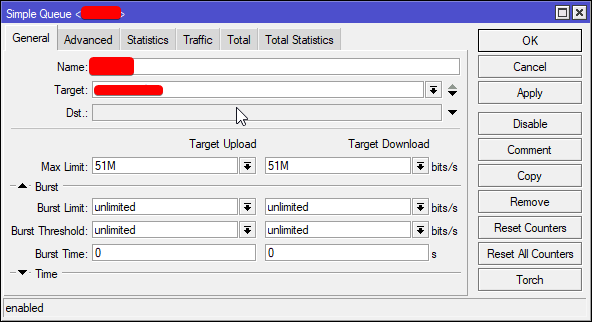
and artificially inflating latency
idk
not a typical feature of networking gear, cus it defeats the purpose
snow crane
I don't have physical access
it's a research cluster
I used wondershaper for the bandwidth restriction
(only cmd access too)
but wondershaper cancels my tc qdisc rules
tame carbon
not sure what you are testing
but for mobile purposes, and browsers
chrome has a builttin feature to simulate bad connections
tame carbon

Medium
Written By Mikhail Bakulin
This article suggests the use of the network emulator
built into the kernel
tame carbon
Yeah, that is for latency
bandwidth, you'd have to manage from the router
with a queue
snow crane
I don't have router access though
tame carbon
shucks
 daring ibex
hi! anyone know why error 2000 appears on twitch player on chrome?
deactivated adblocker
and from time to time still appears (internet stable)
will screenshot when reappears, pressed f5
 waxen scroll
nope, but their ads are redic
that feel when you want to check what your favorite streamers are doing really quick, oh. 30 second unskippable ads
never mind then!
waxen scroll
for some reason. i guess the adblockers dont stop them
i started getting ads this year
waxen scroll
i dont know the conditions for when ads show up, maybe you're just not doing something like watching specific people
 hallow nimbus
I only watch specific people 😂
waxen scroll
like im trying to find one to link you but its showing me no ads right now
it just does what it wants
hallow nimbus
twitch being twitch 
 mental topaz
Does somebody by any chance have the autonomous firmware images for the 1040/1140 (the labels say one thing, the internet another????) series Cisco APs flying about?
One of mine is not up-to-date and Cisco removed the images from their site 
 hollow marlin
@mental topaz Your best bet is to email Cisco and sometimes if the right tech gets the email will send you the firmware. But if anything fails you're out of luck
 little schooner
@waxen scroll I was trying to do an iperf3 test with my surface laptop using centos live environment and it tripped my secure boot and locked me out of my windows OS. Worse yet, it looked like I didn't backup the bitlocker recovery key for the surface laptop locally on a flashdrive or something. I was worried a little bit but then I remembered that the server at site 2 had a huge collection of bitlocker recovery keys saved in text files. Hoping that my key is in there, i went to site 2 and logged into with supermicro ipmi since I didn't have a 2nd monitor handy. I looked through the hard drive of the supermicro server and did a file explorer search. Low and behold, exactly one match for my recovery idenitifier came up. I double-clicked to open the file and it was a bunch of gibberish and no recovery codes. Then, I quickly realized that it had the letters "PDF" in the gibberish text. I renamed the file extension from .txt to .pdf and it finally loaded my recovery key. I went back home to enter the recovery key in and it is correct and surface laptop loads windows again! disaster averted thanks to backups!
Now, I am keeping three copies of all recovery keys to prevent this disaster from happening again.
and yes, iperf3 on windows is terrible and not as good as running it on a linux box
hollow marlin
Which people blame the network stack but iperf2 in windows was just fine. For a gig windows is fine but any higher is linux all the way
 peak cloak
thoughts on the nix package manager?
 thorny vector
@hollow marlin Not quite true multi-gig, but I have been impressed by server 2016's use of a LAGG connection
little schooner
So far, the engenius 4x4 ax access point i got from amazon is working quite well. They sent me HW version 1.0 though. They have a v2 one that has increased performance and reliability.
Hoping that amazon sends me the correct replacement.
 rich oracle
Any good tutorial on NGINX or APACHE2 REVERESE PROXY PLEASE !!!
rich oracle
@thorny vector How to add SSL from certbot with letsencrypt
- https redirect
aka upgrade
thorny vector
Where do you have the certs saved?
little schooner
The interface is good enough but no where near the fancy looks like ubnt
rich oracle
my certs are saved in /etc/letsencrypt/example.com
thorny vector
listen 443 ssl;
server_name example.com;
ssl_certificate /etc/letsencrypt/example.crt;
ssl_certificate_key /etc/letsencrypt/example.key;
ssl_protocols TLSv1 TLSv1.1 TLSv1.2;
location / {
proxy_pass http://local.webapp;
}
rich oracle
i have a webapp i made (stupid game me and my friends used to play in high school - tic tac toe but for 4 people) and i wonna make it accessable from cutomdomain.com with also www to apex redirect and i just cant make it work with https....
its too complicated for me to understand or i might have been burned down from coding it last 8h
thorny vector
@rich oracle That aught to work for ya
thorny vector
so just use nginx.
rich oracle
i think that i have to realax for today
thorny vector
Nginx headers are pretty easy too.
rich oracle
will save it for later thanks
I should have wrote it in php...
damn it i am stupid af
 native cradle
Would powerline only work over a LAN network or can it work a as a bridge between a modem and a router?
 ornate jungle
Powerline AV adapters essentially just provide an Ethernet link over household electrical wiring, so you can use them between a modem + router, but I wouldn't recommend it unless your internet speed tier is lower than the speed the Powerline AV adapters can deliver over your building's wiring.
native cradle
Well I am on VDSL2 and can't get more than 50mb/s so im sure Powerline is fast enough. But I have noticed with Powerline that both adapters need to be on the same circuit (my house has 3), or else the connection is really bad.
ornate jungle
If you've got under 100mbps, then Powerline could be a viable option, so long as you can find a circuit between both endpoints that doesn't cause the connection to be slow. I've had Powerline adapters experience terrible speeds on the same circuit between outlets on different sides of a room - we later found out that their refrigerator was disrupting the connection whenever the compressor came on because it put a higher load on the circuit in that room.
native cradle
The reason why I mention this is because I have 3 DSL ports in my house. For some strange reason the DSL port at the back of my house is the fastest, I can get at least 5mb/s faster. But there is no room for both my modem, router (usg) and ap (ac-pro), so im thinking maybe if I can get a good connection between powerline upstairs and another in the center of my house I can just have the modem on the fast DSL port and have the router and ap elsewhere. And I too have noticed inconsistency throughout the day, presumably from compressors turning on and off. My house is probably not the most ideal for powerline and to make things worse, I am using really crappy powerline adapters. But I might give it a go.
ornate jungle
Makes sense to at least try your theory for the small increase in speed.
native cradle
I sometimes wonder with this difference in speed between DSL ports. What if I payed someone wire a new DSL line from the Madison box straight into the house, and only one port could I get a huge speed increase. Maybe I have a good FTTN connection just really crappy house wiring haha!
thorny vector
@native cradle Something else that might work for you is a baseboard/sub-carpet ethernet run. Real easy, no modification of the house, and at most you'll need finishing nails
native cradle
My house is 3 storeys, part of which has a subfloor and has very low pitched roof meaning the parts of the roof that you can access does not have enough room to crawl in. There is no easy way to run wiring, trust me 🤣
thorny vector
Hah, fair enough. I'm leasing right now, so I just have a long run under my carpet and along the walls all the way to my server room from my modem
 cold sandal
Alr, why is it when I do a speed test I get 100mbs but when I actually download something it downloads at 10mbs???
I need answers and solutions
ornate jungle
Are you sure it's downloading at 10mbps or is it MBps? (megabit != megabyte) Also keep in mind that while a speedtest might give you 300mbps, file download speeds rely on the server the files are hosted on to be fast as well.
cold sandal
Speed test: 93.21Mbs
Downloading 4GB Update on steam: 11MB/s Peak
I don’t even know what the difference is
ornate jungle
@cold sandal Backblaze has a good article on the difference. https://www.backblaze.com/blog/megabits-vs-megabytes/

What's the difference between a megabit and a megabyte? "A factor of eight" is the obvious answer. But the real answer takes on an Internet history lesson.
native cradle
Steam is measured in megabyte but most speed tests are measured in megabits yeah
One megabyte is 8 megabit if I recall correctly.
native cradle
From Steam, yes.
cold sandal
Nice, now I gotta check my ethernet cable to see what kinda of cable it is...
I have like a 20ft cable. Any ideas where I would find writing stating what type it is
native cradle
On the cable next to me, it is every 1m (3.2ft).
native cradle
Well lucky it isn't just plain cat 5.
Cat5E sounds like more than enough (upto gigabit) unless you move massive files around via your local network.
cold sandal
Well it connects to my router straight to my pc
Private network*
But like, my phone gets 120Mbs and my pc gets 95Mbs
That shouldn’t be allowed to happen
native cradle
How many times have you tested it? Does your router have gigabit ports?
nova igloo
Ethernet cable speed cap?
 tall canyon
Hey guys a friend is installing a new network in his home
He will have 300mbps speeds so should he choose 5e?
I dont know anything about networking
And are there differences in 5e cables? Like some will have max 2gbps or 1gbps?
 shrewd spindle
Does anyone have an 803gv2?
native cradle
Palladrian, yes he only needs 5e. It is the cheapest option. But it's not a bad idea to choose higher specification of ethernet for future proofing, maybe he will get a faster internet plan in the future? Maybe in future he will have a NAS that has a 10GBE port and has computers with a 10GBE port, many motherboards these days have a 2.5G or even 10G GBE port. In terms of what speed to expect with 5e, expect up to gigabit not more. Also these is a installation that involves ethernet going throughout the home, then I do recommend a higher grade as they will do better over a long(ish) distance.
tame carbon
10GbE on copper is stupid
unreliable and expensive
unless you have direct attach, on verified cables, I would only use 10G with fiber
 onyx arch
im a big dumb dumb for not putting my 10 gb ip addresses seprate from my other network 
native cradle
10GbE is still faster than normal GbE. Expensive for sure but if you need speed then...
tame carbon
@native cradle with 10gbit, using RJ45 copper is limited to 25 meters
need well shielded cat7
and even then, crosstalk is still an issue
10gbit RJ45 interfaces are very expensive
if you ditch RJ45, and go to SFP+ with fiber
its like half the cost
two fiber modules, $18 each, and a length of fiber, 30 meters costing $5
That's $5 for prefabbed fiber, so they splice the connectors on it for you
native cradle
actually yeah i forgot how cheap sc fibre was (comparatively)
but it is practical when you have computers that support it.
 clear igloo
RJ45 copper over Cat6a is limited to 100 meters.....
Edit: for 10g speeds
It's still very expensive compared to fiber though and you have heat issues too
tame carbon
not for 10G
 acoustic lintel
hahaha
clear igloo
Yes for 10g
It's in the spec, 55m for Cat6 and 100m for 6a for 10G
Cat7 isn't even a TIA/EIA spec, it's an ISO standard only
The next TIA/EIA approved spec after 6a is 8.1 and 8.2 for RJ45 and TERA connectors for 25Gbit and 40Gbit up to 30m over copper
peak cloak
I don't understand, at that point just use fiber
clear igloo
100% agree @peak cloak
tame carbon
@clear igloo though, copper for long distance way more expensive
from economic standpoint, makes more sense to use fiber
copper is relatively rare
clear igloo
Yes, copper is pretty stupid in most cases at 10g and above
clear igloo
They are expensive and have heat considerations too
Since they are 2.5w compared to the usual 1.5w of fiber
little schooner
oh yeah. if you have like 20 of them connected at 2.5w, it gets toasty
clear igloo
Well I know many DC switches, at least from Cisco, won't even let you populate neighboring ports with the copper SFP+ modules, you have to do it in a pattern so you don't overheat anything
So if you plug it into port 1 you can't bring up port below or to the right with the same copper modules but you can do fiber just fine in those ports
little schooner
whoa, that cuts into the value of the purchased switch
if you cant even use all the ports
makes sense to stick with fiber i see
clear igloo
Well you can, just not with the copper SFPs, just have to use fiber on the other ports
little schooner
oh i read it wrong
okay, its a good balance.
When Comcast was installing wall port stuff, they didn't use this at all
They should of done it the right way
waxen saddle
When they wire up the MPoE. I don’t trust them to wire in my house.
waxen scroll
lmao yeah. they did similar to mine
i hate the speed tricks they do too
like if your TV is going to be near a closet, instead of neatly dropping the wires into the wall from the attic, they go YOLO and poke a hole in your closet celing and run the wire down where you can see it
thats what you get for $30/jack or whatever cheap rate they charge
tame carbon
Consumer internet is low hanging fruit
They optimized: whats the cheapest we can install, and get away with
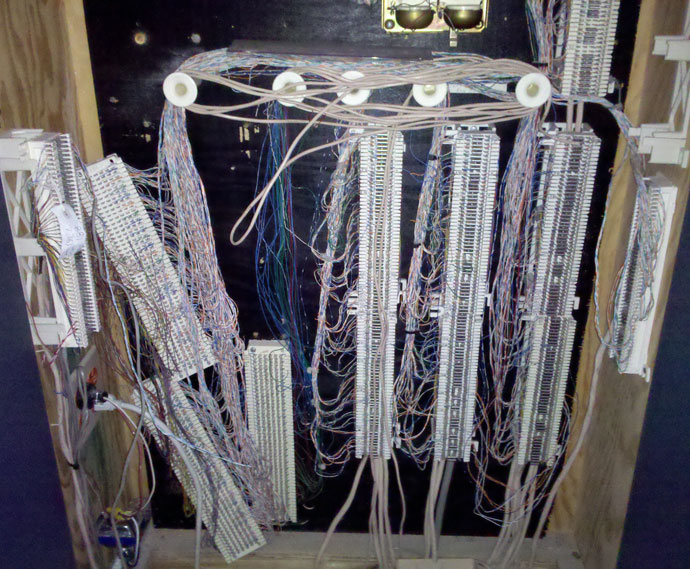
if you open up a DSLAM in neighborhood, a total mess is expected
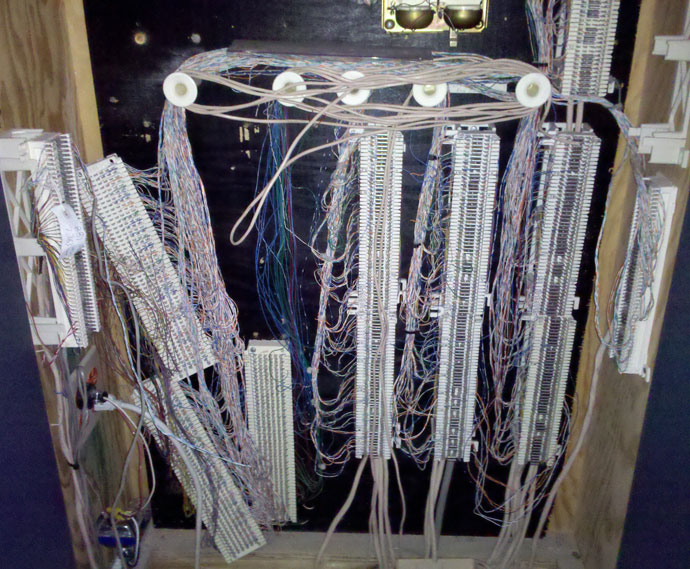
xD
"why is my dsl so slow"
hollow marlin
66 blocks should NOT be used for DSL
nova igloo
And this is fiber
 mystic plank
Hello I have a question, so I'm looking into getting a new wifi router so I'd get more coverage around the house, the problem with the network setup I have is it doesn't do good coverage through 2 60cm brick walls, so I'm not sure what to get
I don't have any wires nor the ability to put wires into walls
rn bouncing the signal from top floor to middle then to the side to the room
but its so slow and so bad
 charred meadow
An other option is powerline(https://www.techradar.com/news/networking/powerline-networking-what-you-need-to-know-930691)
peak cloak
depending on your home you could hide wires on walls in the corners
mystic plank
like each floor is about 8m*8m with 3 floors
peak cloak
you could also put the wires in a cable raceway
mystic plank
but there's really thick walls in the middle
i want to put a strong router in the middle floor in the middle
peak cloak
the router may be strong, but your end device might not be
unborn sluice
Routers route
Access points access
peak cloak
^
mystic plank
rn I'm looking at this TP-LINK WiFi Router AC1750 Archer C7
It's gotta be better than the isp router tho right?
unborn sluice
WiFi mesh 
peak cloak
that means an ethernet router with multiple AP's
mystic plank
I cant get a wired backhaul bruv
charred meadow
There's no way to do it 100% wirelessly because of the conctrete. Ideal would be to have somehow get ethernet to the seperate acces points. If there is coax cable in the walls you can use moca. Otherwise the other option is to use powerline which send internet over the electrical wiring.
peak cloak
I mean there is, but it will probably not be good
peak cloak
@unborn sluice I know your joking but someone actually did that
unborn sluice
I was thinking of like pointing lasers like bit by bit
peak cloak
Li-Fi (short for light fidelity) is wireless communication technology which utilizes light to transmit data and position between devices. The term was first introduced by Harald Haas during a 2011 TEDGlobal talk in Edinburgh.In technical terms, Li-Fi is a light communication s...
 primal ice
you want soup-- No Soup for you!
charred meadow
Other option if thicc concrete wall is in the way https://www.amazon.ca/Bosch-HC2088-SDS-Plus-Shank-24-Inch/dp/B001AHQXLC/ref=asc_df_B001AHQXLC/?tag=googleshopc0c-20&linkCode=df0&hvadid=292938351042&hvpos=&hvnetw=g&hvrand=10242548842534913878&hvpone=&hvptwo=&hvqmt=&hvdev=c&hvdvcmdl=&hvlocint=&hvlocphy=9000112&hvtargid=pla-569660855694&psc=1
peak cloak
or run it on the walls, not in the walls
peak cloak
time to setup kubernetes lab
yeah, that's probably what I'll use for the nodes
"nodes"
it's all on one machine, just in VM's
I guess I could do that too, but for now I'll use VM's to simulate actual metal hosts
little schooner
@topaz quarry you mentioned engenius and I am testing them atm for wireless. I did see they have a mesh setting in the controller and a speed test option for mesh to mesh
Wired when possible
waxen scroll
@little schooner plug your AP in at school for science
 inner lake
I need help with my crappy shit internet, it’ll literally have a stroke if ONE person is on and proceeds to turn offline for hours on end until we reset it
Like yesterday the internet was only one for an amazing 20 minutes!
TOTAL!
 sharp plaza
If your ISP offers support and the problem is that consistent, I'd contact them
inner lake
I use spectrum and also the internet speeds are complete ass we payed 300mbs but only get 20mbs and ive only gotten to 100 like 5 times
We’ve contacted shitstrum but al they said was to get a new router from them
It did not fix it whatsoever
sharp plaza
With that amount of info I wouldn't try to solve the problem, I'd try to get more info
inner lake
Wdym?
sharp plaza
Is the failure in your home (like a channel issue or something, or interference) or in whatever line your home gets a connection from
I'd try to figure out the answer to that question first
inner lake
the only thing I really know is my routers light stuff show online as off
So it’s “offline”
 stone kite
I am a noob. I have a question. My educated guess is that this is not a thing bu maybe I could be pleasantly surprised.
My pc has in board gigabit. My network equipment is gigabit as well. Would I get faster transfer speed if I add a second connection to my pc via PCIe gigabit and have 2 simultaneous gigabit connections?
Is this a hacky kinda way to get 2Gbps?
inner lake
All the other lights are turned on including 2.4ghz and 5GHZ
sharp plaza
That would likely be a line issue then puff
primal ice
@inner lake call spectrum and request a technician to come out.
sharp plaza
You should contact your ISP and say something similar to "I think there's a problem with the cable to my home, my router works fine (it's new) but I'm still having issues"
If they offer a tech to come out, accept
inner lake
I’m not even sure why they didn’t do that in the first place Ngl 💀
My internet was down the whole day last week Thursday
primal ice
@stone kite no you will not get 2 gb that way you will just have 2 1 gigabit connections to the router/whatever.
sharp plaza
@stone kite the answer is: it's complicated. Technically you can do this but you likely don't have the right kind of setup for it
inner lake
it’s so fun when they pay you monthly and it’s not even up for more than 10 days total lol
sharp plaza
Typically that's not a thing you can do at all
waxen scroll
you'll crash a non-smart router attempting it
depends how its set up i guess lmao
@sharp plaza every time mine goes down i call and ask for a refund
they give it to me too
sharp plaza
Dang, I WISH my ISP would listen when it comes to things like that
waxen scroll
mines comcast 😄
waxen scroll
the refund is crap, its only for 24hr of service but its the principal
im at my computer with no internet, might as well get some money
peak cloak
@stone kite yeah, technically it would be possible, but with regular windows, no. LAGG could be used, but you won't get 2GB for a simultaneous connection (ex: downloading a file). NIC teaming will get you 2GB I think, but the switch on the other end would also need to support it
stone kite
Then I feel my only other option is for a multi-gig (not 10G) switch
peak cloak
or just use fiber?
stone kite
That's a bit expensive.
waxen saddle
Fiber still requires a multi-gig switch.
stone kite
I don't mind getting 2.5/5G cards for my computer and just reconnecting the current cables.
If I WAS gonna redo my entire network, I'd go 10 no question about it
stone kite
Yes, I have a NAS
peak cloak
nice
stone kite
I have 2 NAS boxes. One for personal, made from an old Dell and the other for work, made from my Z97 extreme4 that was sitting around collecting dust.
I do audio and light video editing. Videopad, my software of choice, loads the file and then caches to disk. So does wavepad and Mixpad. I have been using all 3 at once more frequently.
I need an upgrade, just not a "balls to the wall" upgrade
waxen saddle
NAS or Network upgrade?
peak cloak
what's your budget?
stone kite
What do they go for? Lol
peak cloak
I mean for 10gig there's this https://mikrotik.com/product/crs305_1g_4s_in

MikroTik is a Latvian company which was founded in 1996 to develop routers and wireless ISP systems. MikroTik now provides hardware and software for Internet connectivity in most of the countries around the world.
waxen saddle
Microtik might have one. https://mikrotik.com/product/crs305_1g_4s_in
MikroTik is a Latvian company which was founded in 1996 to develop routers and wireless ISP systems. MikroTik now provides hardware and software for Internet connectivity in most of the countries around the world.
waxen saddle
Disclaimer: I've neverused a MikroTik product. I've heard good things about them though.
peak cloak
me neither, but people usually say good things about it
stone kite
I have heard of them while researching but I'm not sold on 10G. 149 for a 5port and the incoming source is 1G, so I get 4 usable ports. Altho that is the amount I need, I will want more in the future which makes it a waste
waxen saddle
10g will downgrade to multigigabit as well.
This is the next step up: https://mikrotik.com/product/crs309_1g_8s_in Also note: I'm not aware of any other manufacturer that can hit these price points.
MikroTik is a Latvian company which was founded in 1996 to develop routers and wireless ISP systems. MikroTik now provides hardware and software for Internet connectivity in most of the countries around the world.
stone kite
I'm looking to use my existing pleb copper too
peak cloak
what is it?
waxen saddle
SFP ports will allow for that.
peak cloak
cat6 can do 10gig
hollow marlin
So can Cat5e over about ~30m
waxen saddle
True
hollow marlin
If you are using SFP+ for copper it has 30m limit anyway
stone kite
30m=~100 feet. My longest run is 50feet, so I should be fine. I don't own my house tho and this could change when I get my own place
little schooner
@waxen scroll it wont work. They really have everything locked down real tight.
To the point where you need to contact helpdesk at a centralized building if you want to go outbound to a specific website
you need to get it approved
waxen scroll
you know the rules. once you have physical access its game over
little schooner
443? needs approval.
@waxen scroll true
@waxen scroll My work account just broke. I can't login to teams or sharepoint anymore
It is stuck in a redirection loop
waxen scroll
however i did work somewhere with a cisco IPTV solution that an old company left behind and it couldnt be broken into. cisco wouldnt help either since we didnt technically own the contract on it
little schooner
well its good if policies are actually enforced and dont just live as a document for looks
But who do I blame for my microsoft teams account not working anymore?
waxen scroll
why would you. just dial in using the info in the invite
waxen scroll
yes
little schooner
great. so that is the backup plan.
still, I will be lacking access to my sharepoint resources
makes me sad.
thorny vector
@hollow marlin I want to have some mad lad networking equipment company see just how much they can push through cat. Unsafely.
little schooner
One of the policies in AD they set was disabling UAC for administrator accounts. Each staff has an admin account but they are pushed to login with their regular one
I reenabled my UAC anyway
hollow marlin
@thorny vector currently there has been successful testing of 80gig through copper. It's a 2U chassis that's 90% heatsink with a single RJ45
thorny vector
that.... makes me so happy
primal ice
heh
 random tendon
Hey peeps I am wondering if someone knows, so I just got new internet and the signal keeps dropping to 5 Mbps and it should be 200 Mbps if you go into another room away from the router it tanks to next to nothing. Is there any tips to solve this? and I can't run an Ethernet cable through the house unfortunately.
peak cloak
what are your walls made of
random tendon
60 year old walls, thin plaster board and wood
peak cloak
ok, so it's not concrete or something like that
random tendon
Nope
random tendon
Ahh it's the Virgin Media 3.0 one that they give you
primal ice
hrm old houses used chicken wire to help hold up the thin wood and plaster board.
peak cloak
oh yeah true, it could be acting like a faraday cage
native cradle
What are you talking about. I have never heard anyone just "expect" ethernet run throughout the house by an ISP.
An ISP gets the internet to your house but their not responsible for the networking physically within your house, that's your responsibility and that's completely reasonable?
Maybe this is a Yank thing.
I know people will complain about the router provided but I have never heard people expect more than that.
Noobs
🤣
?
I mean here in Au, some ISPs don't have their own branded routers and just resell third party ones.
Hold on one second let me edit my comments
peak cloak
I use an ISP modem, I get what I paid for
yeah
optimum doesn't even have an option on their website to use your own router
native cradle
ISP routers are pretty decent?
native cradle
Compared to opnsense, ubiquiti etc yeah they aren't good
But they work
In Australia you don't get a modem from ISPs, and there is only one third party one from Netgear.
ISPs just give you a decent AC router
Modems are anicent?
Wtf
peak cloak
FTTH (Fiber to the home)
native cradle
I was thinking you meant DSL modem Lmaoooo
peak cloak
it needs to modulate the signal tho?
native cradle
We have modems (I would call it a NTD modem though) for HFC (internet over coax) but we don't have modems for fibre connections.
peak cloak
HFC? never heard of that, only DOCISS
native cradle
Hybrid Fibre Coaxial
peak cloak
comcast owns dociss?
as for fiber, verizon just has one box, the ONT that does authentication and the fiber conversion for GPON
hmm, never thought of that
native cradle
How
peak cloak
why?
I mean verizon ONT's have a costumer section and an ISP only section
the costumer part has the ONT outputs, Tel, ethernet, moca. Fiber is hidden away in the ISP part
 native cradle
But like most of Australia. I'm stuck with FTTN, aka VDSL2 speeds.
thorny vector
@topaz quarry DOCSIS was developed by CableLabs and contributing companies, including 3Com, ARRIS, BigBand Networks, Broadcom, Cisco, Comcast, Conexant, Correlant, Cox, Harmonic, Hitron Technologies, Intel, Motorola, Netgear, Technicolor, Terayon, Time Warner Cable, and Texas Instruments.[1][2][3]
clear igloo
Only the 9000 series APs and even then
native cradle
I see rubbish Cisco n aps for like $400 AUD
clear igloo
yeesh
clear igloo
Because you can totally manage 1000+ of them with a single controller?
peak cloak
TP-Link Omada ftw as well
native cradle
I just question if their aps are reliable
Are they just consumer grade (aka trash) stuff like netgear, Asus etc
peak cloak
I have one running for almost a year now with no issues
AC1350 Wireless MU-MIMO Gigabit Ceiling Mount Access Point
this one
native cradle
Those are like 70 bucks lmao
native cradle
They seem great
peak cloak
I just have one in the center of the house, no issues what so ever
roku is connected via ethernet
native cradle
Ok so weird storey: a couple years ago I started to have an issue. About twice a day the wifi would just CRASH into oblivion, I just didn't understand. I tried both my Technicolor router and Netgear router. Both had the exact the thing. And it's weird because the internet on LAN still worked. The only way to fix was to restart the whole router. So this is where I got my UAP-AC-PRO (which is great btw, expensive compared to TP-Link but cheap compared to Huawei, Cisco, Aruba, Ruckus.). The problem completly disappeared. I never found out why that was happening, 1-3 times a day and roughly the same times.
clear igloo
@topaz quarry I'm talking 1000+ APs off a single controller in one enterprise, one interface, etc. that's where Aruba/Cisco/Mist/etc. shine. For smaller MSP type deployments with a half dozen or so APs per customer I'm sure Ubnt and whatnot are fine
native cradle
Just don't run the 1000+ ap controller on a raspberry pi
clear igloo
I'm sure ubnt scales up decent to a point, just haven't messed with it to comment either way
native cradle
The thing with UBNT is the software. It's so sexy. Same with their website.
waxen scroll
the thing with ACI is the software is so sexy. hard af to use.
cisco's spine/leaf controller
clear igloo
You mean smart? 😛
waxen scroll
i thought this new way of networking was gonna be easy and put us network people out of a job. no. it looks sexier and got harder
native cradle
My school has $2000 aps in almost every class room and it hurts my brain. They use Ruckas btw.
waxen scroll
$2k is the list price. they probably got 70% off
peak cloak
they use cisco meraki in my school
native cradle
Why would list price be so high?
clear igloo
So they can discount your order and make you feel special
waxen scroll
because they want to charge different prices to different people
native cradle
waxen scroll
ebay isnt an authorized retailer, so of course you'll pay full price
i dont even know why because vendors typically have a set edu discount
edu discounts are like 80%
native cradle
My point is. I guarantee they payed at least $800 AUD even with huge discounts. And what's stopping them from using nanoHDs that cost 1/4 of the price.
waxen scroll
support
even i call cisco at 1am going OMFG why isnt this basic config working????
ubnt you cant
yes, they called it mo zalla
native cradle
No
clear igloo
I turn off spanning tree. Why network go boom?!?!
native cradle
My school should let me be head of IT. I can manage a Unifi network lmao
waxen scroll
anyway i ran into an issue at 1am where the hardware link between the line card and CPU was dropping packets and i had to call cisco
ubnt will be crickets
waxen scroll
im just saying when you work at a place that loses any kind of money while down, you need the support. If you have APs and controllers, you need support. somethings going to go wrong and you need help now. sometimes part swaps dont work
clear igloo
6 nested config lines deep is SOOO fun 😛
hollow marlin
And 0 support 🤷🏻♂️
native cradle
God typing on a phone is painful
Well
I find it hard to believe, even in a scenario of 100s of aps that thing go wrong on a regular basis.
clear igloo
Follow the sun
native cradle
Does Ruckus have good support?
Aren't they tiny compared to Cisco
Look how rubbish their website is
clear igloo
Ruckus is owned by Arris
native cradle
And yes I am aware thats not ruckus that's an Australian distributor
Probably

Huawei Enterprise
AirEngine 8760-X1-PRO - Huawei's flagship Wi-Fi 6 (802.11ax) indoor Access Point (AP) features 16 Smart Antennas.
That is one high capacity ap
Damn
clear igloo
Not just antennas but SMART antennas 😛
native cradle
I want to know how much it would cost
hollow marlin
High capacity APs are just marketing
native cradle
Hey you can't deny Huawei is an industry leader
clear igloo
@hollow marlin But don't you need 10Gb SFP ports on your AP?!?
native cradle
?
hollow marlin
Marketing cannot beat physics
clear igloo

hollow marlin
Like the Unifi "200 devices" rating
native cradle
But it's not even marketing. Huawei LOVE comparing their products directly to competitors in their product releases. It's funny.
They dont even go... Vendor a vendor b
clear igloo
Vendor A, Vendor C, Vendor H, Vendor J
😛
native cradle
J?
clear igloo
Juniper
hollow marlin
Pretty much all Juniper at this point
native cradle
Lol
hollow marlin
3k/4k are. The 12/24 port 3k are passive and the fanned PoE are decently quiet
The passive models run hella hot, same with the SRX300
 vale reef
what ethernet crimper do you guys reccomend?
charred meadow
How many cables do you need to crimp?
hollow marlin
@topaz quarry non-PoE are passive, but yeah the 4ks all SFP+ are definitely loud.
vale reef
Not a ton but I want it to work
I was looking at this one
Ive tried new cable, diffirent ends, everything and I cant get it to work
Its usually pin 1 that doesnt stay consistant in both my testers
charred meadow
I have used the cheap ones off of amazon with pretty good succes for the handfull of cables I've made.
vale reef
I have tried like 20 times with different types of ends and different cable and it still wont work for me
I'm following the B standard on the internet on both ends
charred meadow
Are the metal bits pushed in deep enough and to a consisten depth?
vale reef
Yes
Let me send pics of all my failed attempts
ignore the ones where i pulled the casing off when i cut it
pics from both sides (clip on top and clip on bottom) @charred meadow
charred meadow
It's hard to tell but it looks like some of the wire are not going in all the way.
vale reef
I will try again in a min
primal ice
charred meadow
Before you crimp make sure the all the wire are in all the way.
 stable iceBOT
 strange lintel
@vale reef how hard is it to make one? It cant be that hard
waxen saddle
Make sure both ends of the cable are following the same standard.
vale reef
Of course
waxen saddle
And just before clamping down, make sure the wires are up against the end
waxen saddle
Sweet.
strange lintel
I doubt it's that hard to make one 🤔
vale reef
im dumb lol
waxen saddle
No worries mate. Took me 45 minutes to make my first cable. Now I’m down to 2-5 minutes
charred meadow
They can be pretty awkward.
waxen saddle
Just takes practice.
 sour minnow
what specs do I need for a nas/plex server plz help. I'm using a r3 3100 and gtx 1050ti for video encoding acceleration with 10TB of storage do I need to upgrade
charred meadow
Took me a few tries to make them the first time.
peak cloak
Passthrough ones are nice
hollow marlin
As someone that has terminated 1000s of end:
- Strip 2" off
- flatten and put the wires in type B order while pinching them flat
- Take the tip of your index finger width from the casing and while continuing to pinch, twist the rest of the pairs a few times
- Cut at finger tip width from casing
This gives you the perfect length for the shielding to be crimped and the ends to be fully inserted. As a bonus, twisting the excess assist in keeping the pinched portion flat while not making a mess when you cut the excess off.
Its how I trained people to terminate
 sacred ocean
Passthrough ones are nice
@peak cloak I think certain devices get their warranty voided if you use passthrough terminations.
hollow marlin
Because many cheaper crimps and people who never change the blades, will leave some wire tips exposed and short if you use PoE. Im not a fan of passthrough to begin with
vale reef
im using keystones i cant fucking crimp
sacred ocean
Yeah. You're better off just learning how to crimp properly.
vale reef
im trying
lol
im soooo bad
thanks for believing in me
the new cat6 is so stiff
rip
sacred ocean
On the behalf of someone with small Asian hands, it helps.
charred meadow
As a bonus, twisting the excess assist in keeping the pinched portion flat while not making a mess when you cut the excess off.
@hollow marlin That's a great tip! Thanks
sacred ocean
Also, label your runs!
vale reef
yes ofc
sacred ocean
The previous person didn't.
Well, they did.
Just completely wrong
Yeah.
And they managed to mess up keystones.
hollow marlin
To give the benefit of the doubt I have seen atrocious keystones and ones with atrocious labelling which is what people tend to mess up with keystones
waxen scroll
@vale reef whose AlexT
vale reef
me
waxen scroll
whats your youtube
waxen scroll
🤔
waxen scroll
not me. theres tricks
@hollow marlin and I prob only botched like 2 out of 500
you should get some tools meant for it
xD
these are pretty critical
hollow marlin
Yeah, first 2 times were pretty much it with all other times bad caps where either the blades missed or were missing altogether
waxen scroll
for me, most of the success is from using the scissors to flatten the wires (after putting them in order) and then making a clean cut
you can use other scissors but its a pain in the ass since most arent rounded like that
 waxen scroll
what about it? just use the wrap around laser printer labels or a label cartridge that does it
:3
thorny vector
I always plan on it
hollow marlin
Dyno + nylon labels = perfection
waxen scroll
now im elitest. cabling and patching is beneath me.
thorny vector
I just remember what device I plugged into which port on my switches. With varying levels of success.
waxen scroll
@hollow marlin i just open tickets for it last few jobs
also on those 2/500 i had an expensive cable certifier keeping me honest
i miss that thing
we used it to tell customers off when they blamed the wire
we had a thermal camera for the same
"its too hot" ... yeah it sure is. why did you rack your servers like that?
thorny vector
@ionic forge What about it?
primal ice
Hacking of any type is a nono but go ahead with your question.
thorny vector
@primal ice not true. You can hack your own stuff, and stuff you’ve been authorized to touch.
nova igloo
I think they gonna teach you how to use those scripts hah
thorny vector
Trying to priv esc on a windows box?
 ionic forge
yes xp
thorny vector
Have you tried getsystem yet?
ionic forge
yes unknown command
thorny vector
Because you’re in a reverse shell, not a meterpreter reverse shell. Drop a meterpreter reverse tcp payload, launch it, and get $$$
Disregard, just exit your shell
thorny vector
Like I said, you’re in a system shell right now. Just back out of it and let meterpreter do it’s magic.
primal ice
if its your own stuff you are just troubleshooting vulnerabilities, if its something you are authorized to touch, you are penetration testing. there is no hacking. 😒
ionic forge
am not getting it I swear, I'm in meterpreter shell
pen testers are also called "white hat hacker"
thorny vector
Are all your plugins loaded? Did you initialize the metasploit DB?
thorny vector
Hmm. Not completely sure. Kali box?
Because it sounds like something just isn’t loading.
peak cloak
don't you just love typing an bunch of commands in hoping you don't misspell something
doing that with vyos right now
thorny vector
@nova igloo I take offense at that 😉
ionic forge
not sure to be honest with you, but basically i have 2 boxes. the target machine is just a machine that is turned on but account is locked and i can't log into it, so i netdiscoveered the ip, then applied tomcat vulnerability on port 8080, an dam stuck there 😄 maybe it does not work because it's not logged in?
thorny vector
No, it would be working. The fact that meterpreter is not running what should be a built in function means something there is broken
What’s the end goal? Just priv esc?
 jolly sluice
I need a help here
When I copy a compressed archive from my windows box to my SMB server, it gets stuck at 0% for a quite a while and starts to copy,
Can anyone guess whats happening
Stops here for a while
Larger the file, longer is the delay
ionic forge
Yes priv escalation and copying 1 file
primal ice
he was answering some else.
thorny vector
@jolly sluice might just be windows scanning it first, then transferring it.
primal ice
someone*
jolly sluice
But, i tested it with AV disabled too
thorny vector
@ionic forge double check your metasploit install, see if that’s the issue. Otherwise, you might be able to grab priv esc the old school ways.
primal ice
yes its your connection timing out for what ever reason is the smb server 100% load when it does this? and or your router? you would have to be logged into the machines to see this.
jolly sluice
Nope,
I had a eye on netdata while I was doing it
There is not bottleneck on the server side
The reason why I feel its client side is because it happens only with zipped files
Not with any other type of files
primal ice
it could be the windows machine. as its checking the zip file. then trying to calculate for the transfer. try changing it to .iso instead of .zip.
the windows machine may have an association problem with .zip's also.
 regal marsh
Can anyone here help With a streaming Netowrking issue
jolly sluice
Next question
SMB speed over WAN sucks
Same transfer over WEBdav is fast
Over WAN
SMB = 500 KB/sec
WEBDav = Max badwidth
Over LAN
Both are saturating the network
primal ice
your isp is limiting smb you would have to set up tunnel.
peak cloak
the internet isn't as "open" as we would like it to be
primal ice
and smb really shouldn't be used over the cloud. but eh.
peak cloak
Yeah that too
primal ice
@regal marsh what is your problem?
regal marsh
im trying to help someone but its outside my scope Every time he streams on discord his Connection Dropps hard and it laggs out he has a Gigabit up and down
@primal ice
It Redclaw in this voice chat
jolly sluice
try changing the stream server
regal marsh
Tried having them do it youtube instead and Same result
ionic forge
@thorny vector will do will try to install it, but now am passing out will do first thing in the morning .
thank you
 pale ridge
can you guys all solve my network issues?
thorny vector
Theoretically
pale ridge
to what level of networking?
thorny vector
One guy here is an ISP engineer. I’m a cyber security guy who focuses on networks.
pale ridge
so more then have you tried turn it off an on again
thorny vector
Hey, whoa there. Sometimes we ask you to wait 5 seconds in between turning it off then back on.
pale ridge
I am not actually that good at consumer networking
primal ice
or the 30-30 method.
thorny vector
My apologies.
thorny vector
It’s a pain. Whenever we’re traveling with our kits, our routers are pfsense boxes. I’m trying to push us away towards white box switch solutions, but Cisco is still a big name.
pale ridge
well if you do whitebox what are you going to drive it with?
also cisco do their own silicone for certain things
thorny vector
Cumulus Linux would be the goal
pale ridge
so in the DC say nexus platform you get defined performance.
then again a lot of their stuff is now broadcom silicon
I have had a look at Cumulus
it is linux 🙂
thorny vector
I think software defined is the future, at least outside of the truly high bandwidth scenarios. Those definitely still need asics
pale ridge
the goal is to get a version of AWS on prem
so do labels rather then routing
but they are not giving up that secret
thorny vector
Can do something similar with VMwares distributed port groups.
pale ridge
NSX?
thorny vector
More steps, but same outcome. And no, just esxi in a vSphere cluster. I haven’t actually mucked about with nsx much
Or at all, really.
pale ridge
it all depends on what you are trying to achieve really
also I did notice Linus did a bit with Cisco a little while ago and then stopped
where is the Nexus ACI DC upgrade!
thorny vector
I think Cisco is making to many business mistakes with their licensing model, geared towards only big organizations, making them lose the mid-tier and below markets.
pale ridge
they fucked up big time when it went from C1 to DNA
thorny vector
They have no answer for ubiquiti and mikrotik there, and the smaller networking companies are starting to punch up.
pale ridge
i bought like 1 mill of C1 and 2 years later found out they had to be rolled into DNA at some point
i was not happy
thorny vector
I do, however, love all of their discovery protocols. Makes enumerating a network very easy!
thorny vector
Most of our customers are enterprise/nation state level. I’ve seen it all kind of ways.
pale ridge
Meraki and little stuff i designed for a company that has little IT skills
and does not require feathers in the big bother stuff
thorny vector
But yeah, going back to your original question. Definitely more than “turn of rooter, turn back on”. Even if that is the level of questions we get most of the time. It’s also kinda the defacto homelab channel of the server.
pale ridge
sometimes works
 pure karma
hi
im trying to figure out whether or not i should run a wired connection or not
because when i look at router speeds of wired V internet
i see things like this
pure karma
why is the wifi speed higher?
it leads me to believe i should run wireless if anything
pale ridge
are they both internet connections?
as in these are the things you connect to your modem with or to the internet?
sorry i live in a CLI
wired is always going to be better
as it is a physical medium
wifi is a shared spectrum
so you compete with all other things and interference sources.
pale ridge
So we are talking form you computer to the internet right?
i would always wired
but that is me
pure karma
yeah
waxen saddle
Wired if you can do it, is always going to be better.
 finite salmon
If I had 2 routers with a network splitter, would I have 2 public ip addresses?
unborn sluice


 jolly sluice
is that public IP or local IP
native cradle
because you have to license them
@topaz quarry So this is why the make it hard to buy enterprise networking equipment for anyone but big enterprise and not residential or small/medium business? Is this true about other "enterprise" networking companies like Aruba, Ruckus, Huawei etc?
unborn sluice
Openwrt ftw
Routers and pc should have hazy boundaries
Use your pi as access point, no one cares
Virtual router?
I mean that's just like Putting components together
Like some people use their laptops s access point

V never stops
Soon we can run VMs in our smart devices
I can't wait to run Linux on the light on my room

Smart light plus access point is easily the best iot device
I dunno if someone already did that
Your smart light is now vulnerable to ransomware
What a great day to live
Yea we were discussing that
Iot device is the dumbest to ransomware unless you can infect other devices
That's when I realized my smart light can be turned off outside of my network
Who tf needs to turn off the light outside
I didn't even need to open a port
0 security 100% convenient
Forget security, light go brrr
Ah yeah security in cost of performance
You should create functions on the fly
Wouldn't bother with the performance too much tbh
It's secure
i'm basically JITing JS from C++
Perfectly balanced
As all things should be
If it doesn't cost a day to write the simple things, what's the point

Create templates for your JavaScript functions
So you could create js functions in c++ generics
One step closer to calling c++ a scripting language

native cradle
I don't mean to be specific about the definition of enterprise and I am more than aware that there are other companies I listed, hence why I said etc. I want to know about how licensing works and if it's just a Cisco thing, not what the definition of enterprise.
Oh this makes so much more sense now