#networking
1 messages · Page 230 of 1
 peak cloak
I'm trying to figure out what issue could be
 vagrant verge
Because that box in the left of that picture is the modem I guessing
That’s the internet
Has the dsl plug etc
 dark kayak
what you want here is ipconfig /all
vagrant verge
So type that?
peak cloak
yeah, I was about to ask for that
dark kayak
it appears to be getting an ip via dhcp, and has a gateway, next you want to know if you can get through that gateway, and whether or not you have any nameservers configured.,
dark kayak
subnet is there.
peak cloak
the things under ethernet adapter
dark kayak
just want to know if it has anything configured under nameservers for that adapter.
vagrant verge
Sending
vagrant verge
Pinged google request timed out
dark kayak
Something is fucked.
vagrant verge
dark kayak
can you ping 67.216.99.210 or 67.216.253.194 ?
that MAY not work though, I get no ICMP response form it
peak cloak
did you try 8.8.8.8?
dark kayak
it may just be that it's blocked to me because I'm not on your ISP, but it may also be that they block ICMP - which is why I suggest ping 8.8.8.8
dark kayak
8888 doesnt reject ICMP.
vagrant verge
Requested timed out for both
dark kayak
okay, so your issue is somewhere around the gateway.
vagrant verge
Which is
dark kayak
do you have the login details for your router?
peak cloak
Look at the router, the default login may be there
dark kayak
try pointing your browser to 10.31.3.254 or 10.101.1.3
some models have a default password on a sticker on the back. Others might just be admin/password or admin/admin
peak cloak
you want to go to http://10.31.3.254
dark kayak
chrome will assume :80 if you omit http://
vagrant verge
Site can’t be reached
peak cloak
yeah, but for discord hyperlink
vagrant verge
I just typed it in
Didn’t click nothing
Says refused to connect
Don’t you type in your up?
Ip normally
dark kayak
you want the ip of the device you're trying to get in to, in this case your router.
we want to be able to get to that to see if it's reporting anything as far as link status.
peak cloak
wdym?
peak cloak
we are trying to get the ip of the router to connect to it's web interface
dark kayak
and honestly at this point it's probably time to point you to the manual for your device, as it will have detailed steps on how to connect to it or reset it to default better than we can try to explain over discord.
vagrant verge
Before I do that
peak cloak
yeah, if you can't connect to the router to manage it, you can't do much
vagrant verge
You see in the picture the box on the left
peak cloak
a model number would be helpful
dark kayak
so you want the manual for the device on the left (not the netgear switch on the right).
vagrant verge
Is like main internet deal
Do I just need to run a cable from it
To the switch
For internet to normally work?
dark kayak
actually hang on...
Whats the model of that Netgear device
From here I can't tell if it's a switch or a router.
dark kayak
Okay, yeah. You just want the manual for the router on the left.
peak cloak
GS-308
vagrant verge
Ok
dark kayak
dang, there's a PoE version of that? I want one 😄
peak cloak
unmanaged tho
dark kayak
So yeah, the switch won't be a factor in anything discussed here. Just get the details of that router and go from there.
peak cloak
there has to be a model number on the router itself
dark kayak
Just look on the device, tthere will be amodel number somewhere on it. It'll be on the internet somewhere.
peak cloak
model number
vagrant verge
I got it
dark kayak
no, model or part number
dark kayak
Anything that tells you how to get in to the admin console, including default passwords
dark kayak
@peak cloak I'm gonna leave that to you, I'm not getting in to that level of detail ;p
vagrant verge
Smart/rg sr516ac
peak cloak
hmm, it says that it uses the 192.168.x.x ip range
vagrant verge
So
peak cloak
someone probably configured it differently
peak cloak
at worst, you could factory reset
vagrant verge
What will that do
peak cloak
yeah
peak cloak
scroll down so we can see the whole Wireless LAN section
vagrant verge
So
vagrant verge
Got it
peak cloak
@dark kayak kinda confused what could be the problem here
vagrant verge
1 sec picture
peak cloak
wait
peak cloak
maybe the router is in bridge mode
vagrant verge
I’m guessing yes
vagrant verge
So how do I make it work
peak cloak
what's the model of that tp-link
vagrant verge
Ac 1750
peak cloak
could you make a diagram on like paint, because I'm kinda confused
of like how the devices are connected
 vagrant verge
Ok
So that black box on the left
Is going to I think it’s called a switch
Which has ALL our Ethernet plugs in the house plugged into it
And that black box on the left has a Ethernet cable going to the router aswell
Need paint still ?
peak cloak
no I got it
vagrant verge
Ight bet
peak cloak
Yeah so I think the dsl gateway is bridging and passing internet to the tp-link router
peak cloak
Ideally you would want a ethernet router in that cabinet
and only an Access Point where the tp-link is rn
vagrant verge
Soo
peak cloak
do you have 2 ethernet lines going to the tp-link
peak cloak
did you move the tp-link to that cabinet
vagrant verge
So it’s close by
Uh
Yes!!!!
Ok so now I need to try the port in the other room?
peak cloak
yeah, to test the structured wiring?
vagrant verge
Yeah
peak cloak
yeah, then do that
 waxen scroll
@little schooner tell me more about unis network security
 modern bough
when you've been waiting for telus to install fibre obtics to your house since january and they still haven't done it
 warm sand
i got fiber installed in 3 days.......in india.
modern bough
they've sent two separate crews to install it and none of them have been the correct people to install it
the first time they said we had to wait 5 weeks for the specialist crew to be available and they sent the guy that just hooks up the modem, we thought they were sending the crew to run the cable from the roadside, needless to say he couldn't do anything. Then they said that they had a winter stop in place so they couldn't send a crew out because its winter... but we're in Victoria, BC there is no winter. Then the second crew they sent out were linesmen who install overhead wires, but the lines in my neighbourhood are all underground so they also couldn't do anything either, now Telus just isn't responding.
Simply sublime customer service if you ask me
modern bough
Big sad indeed
 tame carbon

Ars Technica
The threat comes as virus cases spike and the election nears the final stretch.
 tired raft
I want to buy a LAN cable tester. My boss lent me his, I was like 'this is pretty neat, how much could this possible cost'. Well, the answer to that is: "This company looks up to Texas Instruments." How did consumer and professional pricing get so disparagingly disparate.
 primal ice
it always has been. consumer stuff is generally just garbage. professional stuff is built to last more than year and normally for businesses comes with some kind of maintenance contract.
tame carbon
professional stuff can be just as garbage
tired raft
You'll never convince me that anything with a battery cover using this design
is anything other than a minimum viable product
 drowsy hull
you want some screws for your battery cover? 
tame carbon
I have a tendency to buy lithium ion cells for AA and AAA battery slots
they last a decade or more
 scenic void
What is larger, 1MB or 1mb?
scenic void
huh? i thought MB was megabit like 1MB/s is 10Mbps
peak cloak
lowercase b for bit, uppercase B for byte
and the x10 conversion is just an approximation
like 10 Mb/s is actually 1.25 MB/s
 elfin socket
@tired raft Do you just need to test continuity or verify speeds?
cause the latter is over $170 at best.
Theres the $10-15 Amazon/frys simple cable testers.
the $30-$40 Klein Lan Scout Jrs (Laurence systems likes those)
I have a tendency to buy lithium ion cells for AA and AAA battery slots
@tame carbon
Also people never put Alkalines in equipment they love.
 misty terrace
@scenic void one byte = eight bit
Lowercase b is bit
Uppercase B is byte
8 Megabits = 1 Megabyte
 unborn sluice
🅱️ is for
misty terrace
Bass
scenic void
Bass
@misty terrace B ass
tame carbon
@scenic void storage space is measured in Megabytes, network speed in megabits
1MB = 8Mb
 nova igloo
What's the size of a packet most of the time?
tame carbon
Ethernet frames are 1500 bytes
nova igloo
Oh its quite big
tame carbon
There's some loss here and there due to protocol overhead
@nova igloo https://i.imgur.com/z2IctzW.png
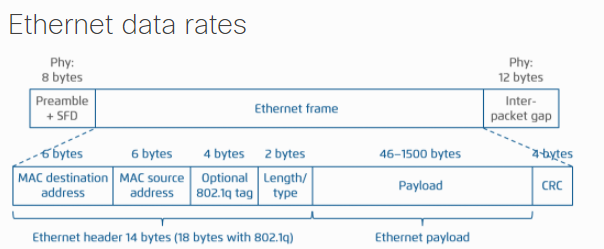
smallest ethernet frame as you can see here, is 64 bytes
This number, that defines the size of a frame, is called the MTU, Maximum Transfer Unit
By default, one uses 1500
This may be smaller, if you add things like VPN (with L2TP), where the protocol uses an additional 72 bytes
You can also do Jumbo frames on some networking gear, for frames >1500 bytes
nova igloo
Those occupation are the info to determine what data is it right
nova igloo
Yeah
tame carbon
which is IP
nova igloo
Oh IP are in the payload
tame carbon
These protocols are stacked ontop of eachother
so Layer 2, uses MAC addresses to send data between clients
nova igloo
Why we need IP when theres MAC address
tame carbon
Layer 3 is the network layer, which adds addresses
@nova igloo switches uses MAC addresses to know where it has to send a packet
the protocol used for this is ARP, Address Resolution Protocol
It broadcasts on the local network: Who has IP 192.168.88.1 (for example)
and the computer with that IP, responds
nova igloo
Why not broadcast MAC address
nova igloo
MAC address are unique too rite
tame carbon
so say, we're on a network, and I want to send you something, and I know only your network address
MAC addresses are unique within the same network, you cannot have two devices with the same MAC
So ARP is used to find what MAC address owns an IP
tame carbon
though MAC clashes never happen
or at least, I've not seen it happen

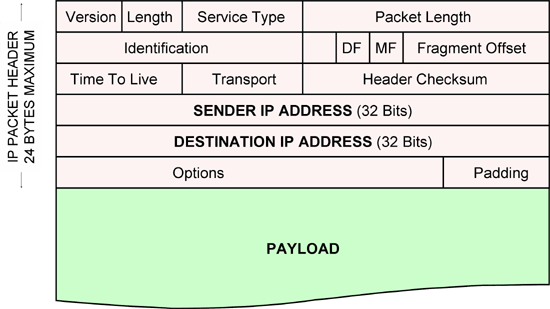
And that payload from the ethernet frame ^
this is what an IP packet looks like
It has sender and destination addresses
and a payload field
@nova igloo it all makes a lot more sense when you see this: https://electricalacademia.com/wp-content/uploads/2018/12/image-result-for-osi-model-layers-and-its-function.gif
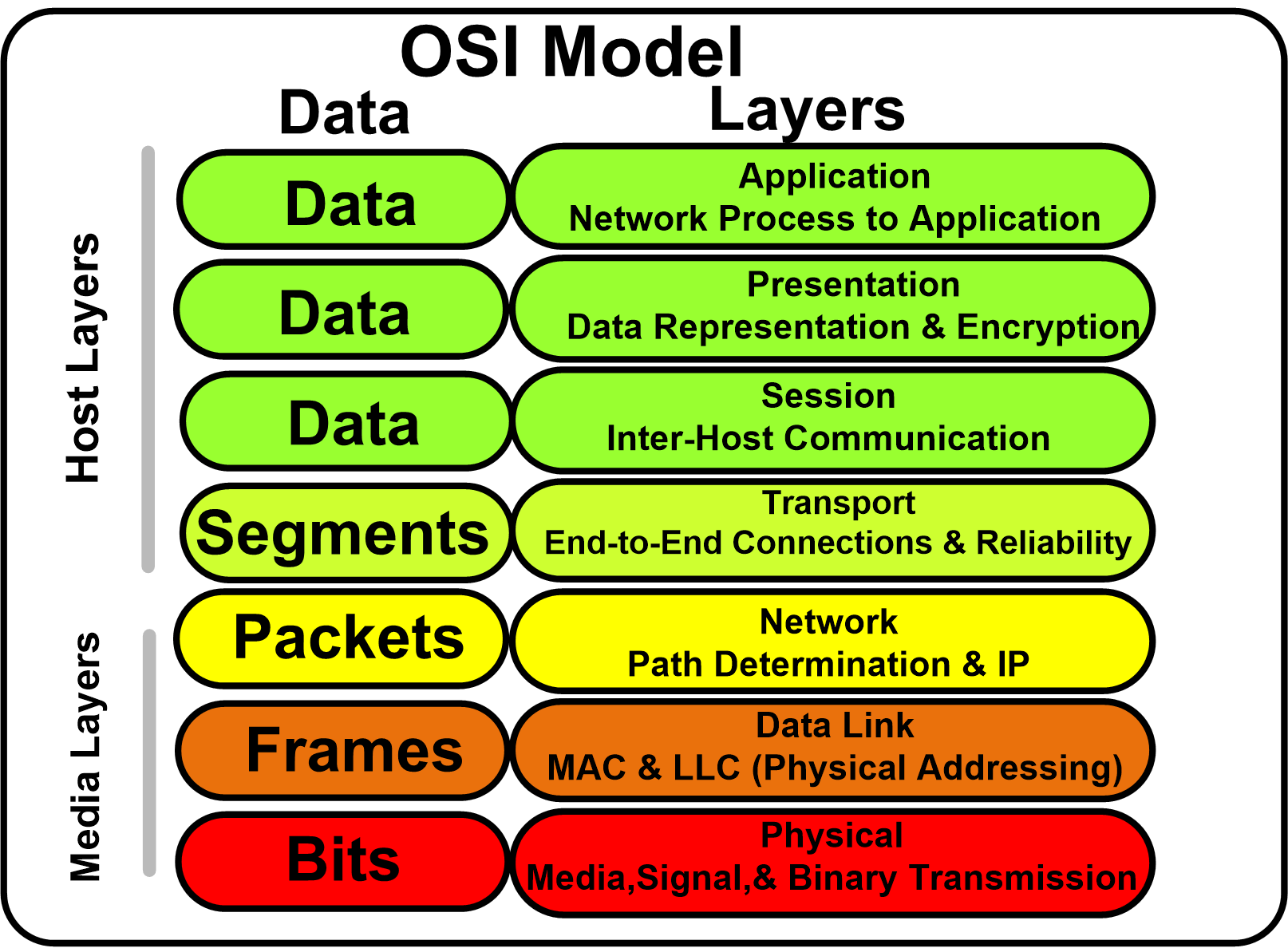 nova igloo
Router is layer 2 or 3?
tame carbon
So layer 2, physical addressing
a switch for example, operates on layer 2
it knows what MAC is on what port
nova igloo
so router is layer 3
tame carbon
correct.
nova igloo
i thought router r lower level lol
tame carbon
TCP and UDP live in layer 4
those are the transport protocols
so the payload of an IP packet, is a protocol like TCP
the idea of the OSI (Open Sytems Interconnect) model, is to abstract the layers away
the physical layer in wireless, is different than say, with an ethernet cable
nova igloo
But nowadays we only have three types of network right
tame carbon
All networks we have are same model ^
nova igloo
Applications, Transport and forgot
tame carbon
Yeah so your application that you use, is on layer 7
HTTP for example, is a layer 7 protocol
HTTP uses TCP for transport
you'll often see this coined as 'TCP/IP'
Transport Control Protocol over Internet Protocol
@nova igloo it also helps narrow down problems when you are debugging
nova igloo
tame carbon
layer 1 problems are things like: cable unplugged
nova igloo
Yeah something like this , one on another
tame carbon
Think of it as an envellope
Application has some data, puts it in a TCP envellope
TCP calls this data 'segments' which it puts into IP as packets
these packets are then put into another envellope: frames
The application doesnt need to know about the layers below
nova igloo
they cut the data in to pieces too rite
tame carbon
Transport layer, TCP does the cutting up and assembling back together
TCP can also do re-transmits if data was lost
nova igloo
TCP r quite busy though
tame carbon
TCP is most widely used protocol
nova igloo
have to manage so much of thing
arent there r only UDP n TCP
UDP r not safe, and resrouces waste
tame carbon
UDP is connectionless
so there's no initial handshake to establish a connection
There's also no fault tolerance with UDP
so if data is lost, its lost forever
Videocalls and voice calls use UDP
nova igloo
Thats why
tame carbon
Because a couple bytes lost isnt terrible, just a sound or video glitch
but UDP has the benefit that it works in realtime like that
nova igloo
isit possible to use TCP
tame carbon
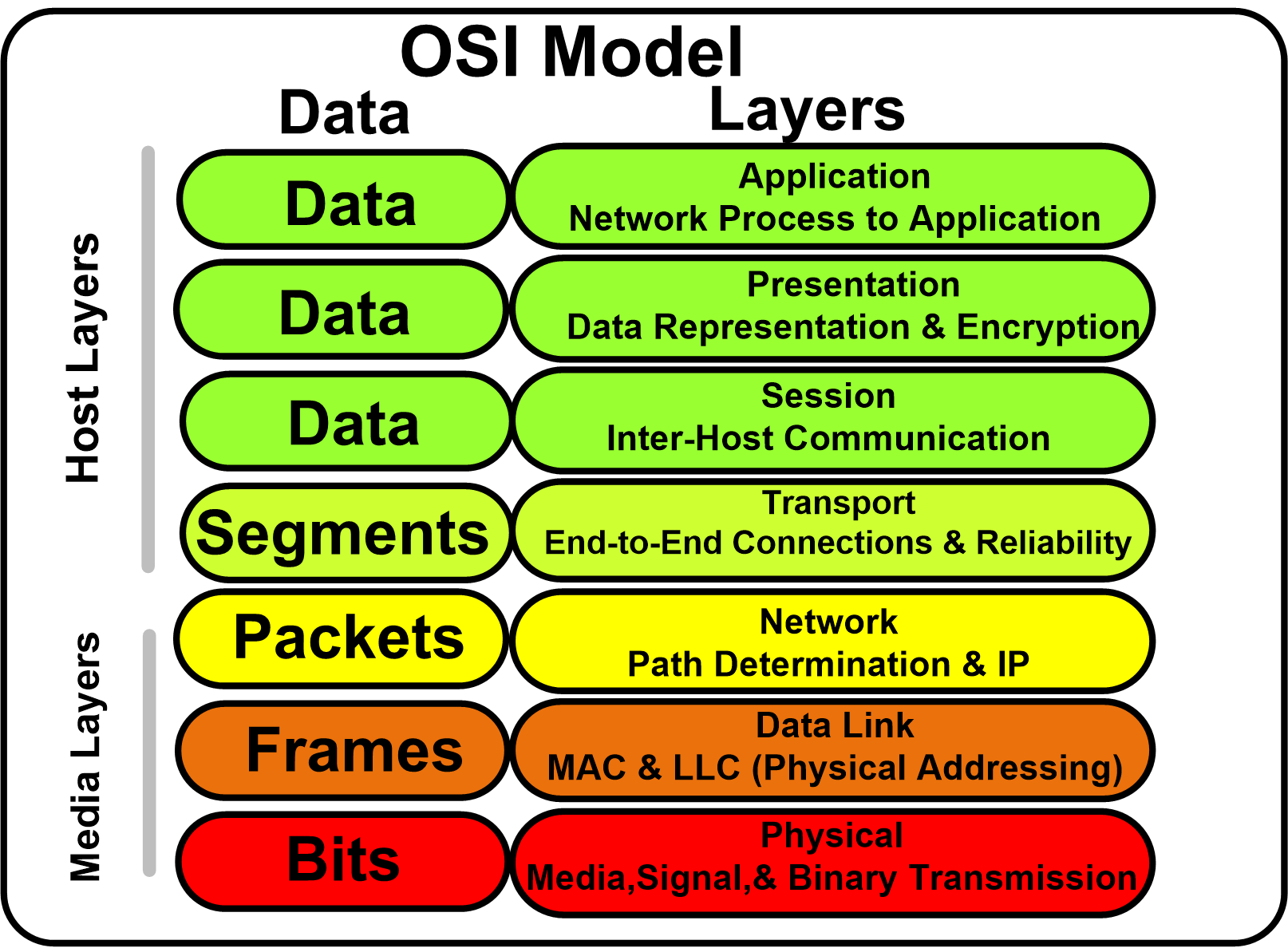
One thing you'll see in this ^
is the "Media" and "Host" layers
Media is the hardware
and the host is software
So transport (TCP) is part of the software stack, not the hardware
thats why we call them host layers
nova igloo
TCP r done on our compuetrs rite
tame carbon
layer 5 and 6 are quite boring
nova igloo
according to the OSI
tame carbon
things like encryption fit in layer 6
tame carbon
not sure about layer 5
From a networking perspective
anything above layer 4 is "overhead"
not interesting
Firewalls operate on layer 4
They can do filter rules, such as "port forwarding" some protocol, on some port, to some other IP and port
nova igloo
oh, it determines the datas r from which ip
 tame carbon
routers operate on IP
 little schooner
@waxen scroll I'm checking if they only allow known MAC OUIs to connect to the network. Hyper V is completely blocked from network access but I will try to spoof the MAC to see if that is the policy they are using
The net admin is gone for vacation so I don't have anyone to ask for help
Or if they only allow one Mac per access port. It's probably this.
Time for Wireshark.
Oh wait I need to check the company policy first about that
I don't think I can do it.
 cinder spindle
Someone knows if I can add up a tplink outdoor ap to an existing deco mesh system in order to extend the coverage?
tame carbon
I can say one thing
and that is, that everyone here, will advise against mesh/wireless extenders
because quite frankly, they are terrible.
little schooner
@tame carbon yes. I speak from experience trying to do this with a camera
It is awful!!
nova igloo
Use powerful AP instead
nova igloo
Yeah Ubiquiti Unifi eco system not bad
 obsidian token
Hi, is there anybody who can help me with my hardware NAS setup?
 thick minnow
@obsidian token How are you hooking it up? To your router or a separate device?
obsidian token
@thick minnow Its connected to both the router and an wifi AP over powerline
thick minnow
@obsidian token And does it show up yet on your network locations?
obsidian token
Yes it does, and it works, but the speed is not what I expect it to be
thick minnow
Oooh great
I tried it once and my router didn't support the HDD I was using 😭
What kind of speed do you get?
obsidian token
I have an SSD installed, and its only 7mb/s
thick minnow
Okay so it's connected to your router with a USB, and your router is connected to an AP that you connect to?
peak cloak
@obsidian token powerline can be iffy
obsidian token
Maybe i can draw the scheme for you
peak cloak
don't expect gigabit, sometimes it can be worse than wifi
if you have a NAS, it basically needs to be connected via etherent
powerline doesn't count
obsidian token
Give me a minute, ill send a picture so you can understand better
@peak cloak @thick minnow
thick minnow
Can't you hook it up with USB or ethernet to your router?
obsidian token
so I do understand that powerline is slow, but since the AP is connected to the NAS via 'switch' (powerline has 2 lan ports) whz does it not get the full speed?
Can't you hook it up with USB or ethernet to your router?
@thick minnow I could, but I'm most concerned about the Wifi connection (see message above)
peak cloak
hmm, idk if the PL is doing switching
I would hook it up directly to the router
and then check ethernet speeds
thick minnow
Yeah just hook it up directly
peak cloak
to see if it's the NAS or networks that's slow
 topaz quarry
at minimal you need a real switch behind the PL
i can confirm my TP-Link PL adapters suck at switching
btw when I use powerline networking in my house
apt-get update fails constantly
because the packets get lost
obsidian token
I tried this and got 10mb/s
topaz quarry
you won't get anywhere near 1000 Mbps
thick minnow
@obsidian token Why not hook it up directly?
peak cloak
try with a real switch
topaz quarry
your electrical circuits probably don't support it
thick minnow
You still have PL in between, just hook it up with ethernet or something
topaz quarry
the reason why people go out of their way to use Moca instead of powerline networking
is because if your fridge decides to cool the food
your bandwidth drops
thick minnow
Yeah this is the first time I heard of powerline networking
Sounds messy and cheap
There's a reason why high end ethernet cables exist
obsidian token
Yeah and this got me the full 100mb/s
primal ice
cheap no messy yes
thick minnow
@obsidian token Well then the powerlines were the problem it seems
topaz quarry
PL is actually expensive
obsidian token
So im guessing the powerline is just reallz bad at being a switch? or is it because the data has to go to the router and then to the AP
topaz quarry
powerline networking is entirely based on the infastructure of the circuits in the building
if someone's using power tools, bad day
if the drier turns on, bad day
obsidian token
I know, but my father does NOT want to run any cabke at all 
topaz quarry
if the washing machine turns on, bad day :/
then use coax
most homes have coax
do moca over coax
check every room for a coax node
obsidian token
Whats moca? a better powerline?
peak cloak
moca is a protocol for ethernet over coax
primal ice
@obsidian token and yes the Nas has to run everything through the router first.
peak cloak
really? I don't think so, probably just a bad switch chip
unless it's on two separate subnets or VLANS
topaz quarry
it's the best case scenario to put the NAS right into the router
i've accessed my NAS over moca and it works pefectly fine
obsidian token
moca is a protocol for ethernet over coax
@peak cloak So basically a TV port
peak cloak
yes, it's called coax
obsidian token
well the NAs sits right behind the tv, so this port is alreadz taken
topaz quarry
moca adapters can passthrough stuff
topaz quarry
you can use it for both things
peak cloak
TV, DOCISS, and MOCA run on different frequencies
topaz quarry
obsidian token
why can't the NAS be next to the router in the first place
@peak cloak The router has no more LAN ports, and again, my dad is really does not want any more ntworking stuff there
topaz quarry
you can buy a switch to attach to the router
if it can't be in the same room for political reasons
use a moca circuit
powerline probably won't work in your house as you've discovered
obsidian token
Weve been using it for years and its been more or less fine for our 50mbps internet plan. But now that theres a nas its kinda slow
Well the moca thing is definitely interesting, but also too expensive
topaz quarry
moca is the alternative to running wires in the wall
it's cheap with perspective
your powerline networking can probably do between 25-75 Mbps
by asking your powerline networking to do 1000 Mbps
for the NAS
you're clogging up the pipe
you're literally doing the comparable of clogging a toilet
there's no more room, so the pipes burst
obsidian token
Damn dude the saddest thing abiut all this is that router, AP and NAS are litterally only a few metres apart in the same room
peak cloak
can you move just move it all together
how do you get internet service? DSL, Cable, Fiber?
obsidian token
but no damn cable is allowed... I guess i will have to live with wasting a 550mb/s SSD in a 100mb/s NAS connected to 7mb/s powerline. Like, the speed is ok to live with, but it just hurts my nerd heart to know how much potential there is.
peak cloak
also is the SSD 550mb/s or 550mB/s
there is a difference
network speed is measured in bits
obsidian token
also is the SSD 550mb/s or 550mB/s
@peak cloak 550MB/s the typical SSD
topaz quarry
multi-node fiber
peak cloak
it's not a single disk right?
obsidian token
how do you get internet service? DSL, Cable, Fiber?
@peak cloak Cable
topaz quarry
it's not a single disk
peak cloak
idk, that's @topaz quarry
topaz quarry
what
lol autofail
each computer that directly accesses the NFS share has an inten log and cache array
each computer that directly accesses the NFS share has lots of DDR4 for pre-emptive writes
the SAN itself has optane for cache and intent logs
 wraith pivot
Password for jesse@//10.4.10.202/jesse:  ***
sudo dd if=/dev/zero of=test bs=4M status=progress
37950062592 bytes (38 GB, 35 GiB) copied,  12 s, 3.1 GB/s^C
9283+0 records in
9283+0 records out
38935724032 bytes (39 GB, 36 GiB) copied, 12.4636 s, 3.1 GB/s```the SAN has an array of spining rust with optane for cache/intent log
the NFS shares are accessed over a fiber network
waxen scroll
@wraith pivot 10.4.10.202 isnt reachable. pls provide public IP and real password
topaz quarry
lol
wraith pivot
...... @waxen scroll thats a local ip
waxen scroll
is it?
topaz quarry
lol LZDanger
waxen scroll
thats not a local ip
peak cloak
 waxen scroll
169.254.0.0/16 is a local IP
topaz quarry
lol did you figure out the trick yet?
the applications see 5 GB/s because it's being written to RAM
then it fully saturates the 10 Gbps pipe
wraith pivot
@waxen scroll ``` ip a
1: lo: <LOOPBACK,UP,LOWER_UP> mtu 65536 qdisc noqueue state UNKNOWN group default qlen 1000
link/loopback 00:00:00:00:00:00 brd 00:00:00:00:00:00
inet 127.0.0.1/8 scope host lo
valid_lft forever preferred_lft forever
inet6 ::1/128 scope host
valid_lft forever preferred_lft forever
2: enp42s0: <BROADCAST,MULTICAST,UP,LOWER_UP> mtu 1500 qdisc pfifo_fast master br0 state UP group default qlen 1000
link/ether 2c:f0:5d:59:88:ba brd ff:ff:ff:ff:ff:ff
3: enp33s0f0: <BROADCAST,MULTICAST,UP,LOWER_UP> mtu 1500 qdisc mq master br0 state UP group default qlen 1000
link/ether 00:90:fa:04:40:80 brd ff:ff:ff:ff:ff:ff
4: enp33s0f1: <NO-CARRIER,BROADCAST,MULTICAST,UP> mtu 1500 qdisc mq master br0 state DOWN group default qlen 1000
link/ether 00:90:fa:04:40:84 brd ff:ff:ff:ff:ff:ff
5: br0: <BROADCAST,MULTICAST,UP,LOWER_UP> mtu 1500 qdisc noqueue state UP group default qlen 1000
link/ether 00:90:fa:04:40:80 brd ff:ff:ff:ff:ff:ff
inet 10.4.10.137/24 brd 10.4.10.255 scope global dynamic br0
valid_lft 7098sec preferred_lft 7098sec
inet6 fe80::290:faff:fe04:4080/64 scope link
valid_lft forever preferred_lft forever
i could satuarate a 200 Gbps backbone
tame carbon
try 127.0.1.1
you need more horsepowers for that though
you can do bursts
bigger bursts if you have larger caches
wraith pivot
@topaz quarry cant wait to get 200Gbps fiber in my house
topaz quarry
fiber speed is limited by the controller
wraith pivot
yes ik
topaz quarry
not necessarily the glass in the cable
wraith pivot
ik
topaz quarry
lol gg
topaz quarry
especially the ones that support hardware accelerated NFS and iSCSi
even more so if you want SR-IOV
did you see the live Intel SR-IOV nvme over fabric demo
wraith pivot
although i would need better hardware cus lga1366 i think is the socket isnt going to work for that
wraith pivot
i have zfs with a 970evo as cache and 64gb of wam with 6 1tb sata hdd's
topaz quarry
ZFS is amaze
wraith pivot
yesh ik
wraith pivot
lol
topaz quarry
overclock the RAM
wraith pivot
cant
topaz quarry
then you get an overclocked ZFS
topaz quarry
i'm excited truenas scale came out today
freebsd ZFS with linux containers
i wonder what magic iXsystems did
wraith pivot
dont u have to pay for the software
wraith pivot
i know nothing about true nas though
wraith pivot
i use esxi rn but i want to move evry thing to proxmox
topaz quarry
it's all just TrueNAS now
wraith pivot
ohhh
topaz quarry
TrueNAS Core <=> FreeNAS
wraith pivot
intresing
topaz quarry
and i'm assuming because truenas scale just released they're letting plebs download it
so you have esxi
wraith pivot
ill stick with my jenk way of getting zfs working on esxi
topaz quarry
and you want to move to proxmox?
wraith pivot
yes
topaz quarry
why?
wraith pivot
cus proxmox is free and it has native zfs support
topaz quarry
so all the premium features from exsi aren't enough to make you stay?
like vSAN and stuff?
wraith pivot
nah
wraith pivot
im going to keep one esxi node for varios resons but the other ones are going to proxmox
topaz quarry
kubernetes everywhere
peak cloak
I'm planning on installing proxmox again and learn kubernetes
wraith pivot
kubernetes still learing that
wraith pivot
my freind is using rancher idk exactly how that works
topaz quarry
rancher is amazing
peak cloak
Single node kubernetes sort of defeats the point, so I want to have emulate multiple nodes in proxmox vms
wraith pivot
@topaz quarry i dont have ipv6 from my isp :::(((((
topaz quarry
you should always run kubernetes in a VM
peak cloak
@wraith pivot me neither
I setup an ipv6 tunnel
Don't know how to use ipv6 well though
topaz quarry
then use Hurricane Electric as your ipv6 broker
and use a GRE tunnel to get your prefixes
peak cloak
I'm in homelab
wraith pivot
no homelabnet
peak cloak
What's that
wraith pivot
becuse homelab baned a couple of us so we made our own server
wraith pivot
any way i only have 3 nodes rn so 😦 but its a lot of money to get more servers
topaz quarry
honestly i just kept all of my PCs I bult over the years
my old 2700x build
is now my GPU node
it's got the 2060 and a 1050 ti for transcodes remote gaming etc
nvidia-docker-2 is so fun
wraith pivot
intresing
topaz quarry
i also turned the dedicated router into a node by using vRouters instead of dedicated hardware for the core router
wraith pivot
lol
topaz quarry
so the xeon d router became a proxmox node
wraith pivot
i guess i could make all my pc's proxmox nodes lol but i use them somtimes
topaz quarry
my daily driver is also proxmox
wraith pivot
lmao
topaz quarry
it runs my desktops as VMs
Windows 10 is less annoying as a VM
it gets first class citizen updates
wraith pivot
intresting
peak cloak
I only have a raspberry pi and l and an optiplex 3010 for servers
wraith pivot
oh yeah i should put esxi on my rpi oh wait nvm i needs 8gb not the 4'
topaz quarry
only the stability of debian could taime arch
peak cloak
Idk how I feel about virtualized desktop, how's the latency
topaz quarry
yea you need 8GB of RAM for esxi
i was able to play overwatch at LTX through my ipad
using moonlight
wraith pivot
can u put proxmox on a pi
topaz quarry
i nodes are in Florida
i think someone asked the proxmox team and they basically said we don't support it
wraith pivot
aww
topaz quarry
but proxmox can be installed on debian
wraith pivot
ye ik
topaz quarry
so install debian
wraith pivot
true
topaz quarry
and install proxmox as a package
wraith pivot
sounds like alot of work
wraith pivot
make all my sbc's proxmox nodes
topaz quarry
ansible configs with rpis are really common
like all you need to do technically
is add a hostname in /etc/hosts
add the repo and the key
then install proxmox-ve using apt
wraith pivot
huh cool
topaz quarry
then reboot
only use ARM based images to not make your life miserable when virtualizing :/
LXC on ARM sounds fascinating
wraith pivot
also @topaz quarry there is a like 6 person vc in about 4-5 hours in that server
also the owners are owen and trevor janssen
both good freinds of mine
topaz quarry
i have no idea what those names mean
wraith pivot
oh can u look in the server i gave u
wraith pivot
ye
topaz quarry
names don't mean anything to me until I understand what the person is
wraith pivot
yeah
we recently made it public after me and trevor spent 120$ on boosting the server as a joke
topaz quarry
loool
topaz quarry
all the memes
wraith pivot
also look in quotes its very funny
topaz quarry
lol what is this homelab welcome rules
also the quotes are chen/10 funny
like who says in the welcome rules to be respectful but also not be a c* in the same sentence
topaz quarry
they aren't misbehaving with me in the server
maybe my reputation proceeds me
oh you're talking about reddit
waxen scroll
@topaz quarry cause you and I dont need a homelab. we work on $$$$$$$$$ and get paaaaaaaaid. who needs a home lab? lmaoooo
waxen scroll
i have a 6U comms rack and a 2U server thats powered off 99% of the year
topaz quarry
and shits and giggles
i do it to just stop using outside services
my 24U rack is pretty full with stuff
sometimes i use it for clients because they're like it's not working
and i'm like fine, I'll just simulate your entire infastructure
with my own infastructure
 waxen saddle
lol
 hollow marlin
@waxen scroll r/homelab is probably one of the most gatekeeping subs I know
hollow marlin
Want to run a 3950x for VMs for its core count and low power - not dual xeons and doesn't consume 600w constantly, not a home lab
Want to run a small external bay for storage for photos, files, etc - not a 4 RU chassis with 12 drives in raid 6 plus you are not running plex for your 8TB of movies to never watch, not a home lab
Not running running ECC memory - banned
If you cannot hear the photo - not a homelab
waxen saddle
It’s a home lab. Not an enterprise hosting site
hollow marlin
Hence why I said it's a gatekeeping sub
 hallow smelt
Hi guys, I have a problem and I am from Argentina. I have 300Mbps download and 17Mbps upload in my house, in the others computers it works just fine, like it should be. However, I can't reach these speeds, I am downloading at 800Kbps or less. I have tried veerything, I have deleted and reinstalled drivers, I have changed my ethernet cable, but I'm running out of ideas. What should I do? I've been thinking about deleting Windows 10 and intalling it again from the beginning.
waxen scroll
really? wow
@hollow marlin i unbox million dollar hyperconverged like its no big deal
i should go up in there and gatekeep the crap out of them
@clear igloo you ever show them your test lab?
🖕 😏 🖕 basically luricks face
topaz quarry
all the funnies though
the cool people with consumer trash
probably run better labs than they do
@hallow smelt it's probably just windows
waxen scroll
i find it hard to care about homelab and consumer electronics anymore
i want to do my tech job and clock out
i try to train on the job as much as possible
im on a lifecycle of sorts with home electronics
after 5 years then ill go hmm, whats the market look like
waxen saddle
5 years is a good time frame.
hallow smelt
@hallow smelt it's probably just windows
@topaz quarry yeah, I think so
well, I just have to do it
thanks
topaz quarry
honestly TR is technically classified as a consumer CPU
the 3900 and 3950x are technically classified as consumer CPUs
but are they
are they really
SR-IOV, good iommu groupings (pay attention to the board you buy)
TR platforms have a possiblity of supporting 256 GB of RAM
i mean cmon
waxen saddle
SR-IOV is definitely a consumer-level tech now.
topaz quarry
the 3000s series technically supports SR-IOV
 robust atlas
Anyone switch from an Amplifi router to the new Unifi Dream Machine (UDM)? For enthusiast/prosumer home network.
topaz quarry
SR-IOV is heavily relied on in enterprise though
or am i being lied to
routing != access point
if you're buying the UDM for routing, it's fantastic
waxen saddle
I haven't switched, but I've been running Unifi for a few years now.
hollow marlin
are they really
@topaz quarry I argue the line is blurring to the point its invisible. Most chips, if not all new releases, support virtualization, 7/24/365 is moot because CPUs rarely die (is all about the mobo) and even then life of equipment ran constantly have better longevity, DDR4s built in error correction is almost as reliable as ECC. Its really just max RAM, proprietary HA,some board hardware and the "extensive support"
topaz quarry
we almost have RAIM
and RAIC
we almost have them
we just have to make them make sense now
use the acronym RAID to understand RAIM and RAIC
and replace the word drive with the words memory and cpu respectively
my x570 and x470 boards have been running for like 4 months straight 24/7
so like . . .
Dell has some cool RAID1 features for RAM and DIMM failover but soon we will have cool options
and yea DDR4 RAM is basically DDR3 with ECC and better speeds :/
misty terrace
i don't want to know what C stands for
 naive tartan
anyone knowledgeable about MoCA adapters for using internet over coax?
peak cloak
 peak cloak
I can probably answer it, just ask
naive tartan
im upgrading internet from 100/100 to 200/200 with verizon fios
this apparently is only supported via ethernet from the com terminal to the router they supply instead of via coax
now since i wanted to move the router to another point where i hjave coax so that i could then hardline my gaming pc via ethernet
im wondering if i only need 1 moca adapter versus 2 since the router they supply has a coax connection
versus if i bought my own modern router
which wouldnt have coax and a change of router location would then require 2 adapters, since i dont have ethernet run in the walls
peak cloak
you don't use a modem with fios, it's just a moca connection on the back of thier routers. Modem is for dociss connections. Moca 2.0 can do gigabit theoredically, so for 200/200 it should be more than enought. Moca is backwards compatible, but idk if you will get full speeds from the ONT, that depends on the version of moca on the ONT. In theory you could just hook one end of the coax to the ONT and other to a MOCA adapter. However, the latest version of the fios routers have moca 2.0, so you should just be able to hook it up.
primal ice
do you have tv service through verizon?
naive tartan
I do but part of this upgrade in speed also has me stopping that service and going to youtube tv
tv is currently hooked up to the set top box and set top box to wall via coax, but after upgrade it will just be over wifi
primal ice
yeah they are disconnecting the coax at the ont. and running ethernet then.
if you want to use your existing coax then you would need 2 converters.
peak cloak
yeah, what's possible in theory would be different from what Verizon techs are trained to do
primal ice
their modem coax connection it just a moca converter.
naive tartan
hm, so even tho the router is moca enabled, I wont just be able to go ONT--ethernet---Moca Adapter--coax, then place the router on the other wall with that coax lline and be done with it?
well techs arent coming this will all be me
lol
and i have access to the ONT and the cables running to it since i picked the lock for great justice
peak cloak
there's a lock? never seen one
naive tartan
in my condo yeah theres like a tech only cabinet
peak cloak
oh
naive tartan
but i own the condo so i said eff that
naive tartan
so I assume then ill have to run ethernet from ONT to the router and wherever that is is where it stays and ill have to try and game on wifi (20 feet away might not be that bad?) OR option 2 is i would have to get the 2 moda adapters and then i could move the router to a coax spot.....is what ur saying
primal ice
yeah actually the coax connection on the router might work.
naive tartan
no ONT is newer
peak cloak
you would need to tell verizon to switch it over, since only ethernet or moca can be active, not both at the same time
in theory it should work right?
naive tartan
hm
primal ice
cause the ont coax is set for one speed / signaling only and they are going for faster speeds than what it can handle.
peak cloak
I mean, it doesn't hurt to try?
naive tartan
yeah verizon has this bs thing, they wont let you go over 100 speeds on coax by default
peak cloak
hmm
naive tartan
so i guess the question is, like ur saying the router isnt an adapter per se, so my idea of needing to use an adapter on the ONT end into the coax, and then just putting the other end of the coax right back into the router probably wont work for some reason?
primal ice
it could work its just a signal converter which is what a moca connector is. but to be fully prepared I would get 2 converters in case it doesn't work.
naive tartan
i know the coax is capable of almost gigabit so i just feel its odd you may need an adapter on both ends? I could see needing it if on the coax end i was plugging it right back into my computer but im not because thats the end the router will be on
such a pain lol, my next house ill make sure i pay to have ethernet run everywhere
im going to connect it next week when i get the kit they are sending for whatever is in there and see what the wifi looks like for speed, if its decent since i may not have to do anything and i might luck out and be able to game/stream over the wifi
primal ice
eh I would still use ethernet wifi is always a pain.
naive tartan
i know which will mean i need the adapters ugh
i bought 50 feet of shielded cat7 cable for the run i was going to make
but if i run it all the way to the router and skip the adapters, ill prob need more to be able to put it on the wall
well thanks for the assist ill see what they send next week and ill get it running first then ill mess with moca options later
peak cloak
btw cat7 isn't an offical standard yet
cat6a is the highest
if you really need fast speeds, just use fiber
naive tartan
its just the cable i bought i didnt need the speed the price difference just wasnt that much
peak cloak
true, just saying in case you buy a lot. No need to spend more more money than you need.
naive tartan
oh for sure, yeah the difference was negligible at the 50 foot mark
this one is flat and shielded the other one they had wasnt
versus cat 6 @ 12 bucks
so now the issue becomes lol get the adapters for circa 130 bucks, or spend 25 and get 100 feet of ethernet, put it on the wall and paint it and run it to where i need it...hmmmm
peak cloak
why can't you run ethernet outside?
naive tartan
outsdie the condo?
peak cloak
yeah, lots of providers do that, on the outside walls and then just go inside when you need
that's what I did
naive tartan
sounds pricey for me, its a 4th floor condo
naive tartan
the ONT is in the closet in my unit and i cut a hole in the wall and added a coax plug on the other side of the ONT, thats where the router is in the living room
peak cloak
oh, my ethernet router is in the basement and then have an AP on the wall in the stairwell
naive tartan
so ill need to replace that coax line with an ethernet one for the new speed and the router can stay there and i can run the ethernet over the cieling and down the wall and just paint it OR i can move the router to where its closer with teh adapter method we discussed
 naive tartan
hah prob
what ill need to do is wire the router with a dual coax/ethernet plate tho
in case whoever i rent this from later gets upgraded speeds for their own internet
one day new homes wont even come wired with coax anymore
praise the gods
waxen scroll
@peak cloak r/homelab would like a word...
A dlink for a switch? A Pi for a server? you donkey...
ISP provided modem? what is this
tame carbon

U.S.
The U.S. National Security Agency is rebuffing efforts by a leading Congressional critic to determine whether it is continuing to place so-called back doors into commercial technology products, in a controversial practice that critics say damages both U.S. industry and nationa...
Juniper O.o
 delicate kettle
waxen saddle
delicate kettle
waxen saddle
They totally do the same thing.
hollow marlin
No point having back doors when you're require by the gov to leave the front door open 🤷🏻♂️
vagrant verge
question so how come my internet speed test etc say i have about 20 mb download
but when i download games etc im only getting about 2
vagrant verge
epic games
peak cloak
speedtest reports in megabits
vagrant verge
ohhhh
peak cloak
so yeah you are getting 20 megabits
peak cloak
I would too
vagrant verge
went from 200 down to 750 kb down
peak cloak
starlink tho
peak cloak
vagrant verge
ooo
vagrant verge
i thought satellite internet sucked
peak cloak
I mean, yeah compared to fiber it does, but starlink is different from hughesnet or other providers
vagrant verge
ah i see its alot closer to earth
peak cloak
It's in Low Earth Orbit, which means SpaceX needs a lot more satellites to launch, but that means it's much faster
vagrant verge
our ISP said they ran fiber down here
but they still dont offer very much speed
50 is the max i think
peak cloak
Right now, as I understand it, it just does relaying to ground station, but later they will do sat - sat, laser coms
vagrant verge
sounds pretty cool
vagrant verge
pretty good
peak cloak
up to 160 it is
peak cloak
but it's not stable
vagrant verge
ahhhh
peak cloak
for now
vagrant verge
is regular satillite stable?
 spiral rapids
W
vagrant verge
if you live in the city just $$$$$ more
spiral rapids
Speak English
vagrant verge
that is english
unborn sluice

spiral rapids
isaac me and you both my friend
@vagrant verge ?#?#?#?
vagrant verge
???????
peak cloak
you both want faster internet
vagrant verge
yes
unborn sluice
Is he being pedantic
vagrant verge
lol
vagrant verge
they have different plans most of the time depending on where you live you can pay more to get faster speeds
is what i was saying
thick minnow
does anyone know how the vpn service and how to setup works on a netgear nighthawk mk62?
i couldnt find any videos that are new
ping me if you do
peak cloak
vpn to where?
peak cloak
oh
I think that's for making your router a vpn server
so you can access your LAN wherever you are
thick minnow
ah ok
i think i will actually use that, i found some netgear forum stuff to help, thx!
nova igloo
Are there a thing that load-balance routers?
Like multiple routers receiving from one ISP
nova igloo
Is that must?
unborn sluice
you're better off setting firewalls or other crap
I don't know why would anyone load-balance an ICMP
i dunno i would block them
instead of load-balance the garbage
or look into actual anti DDOS softwarre
topaz quarry
you just use something like fail2ban to prevent the abuse of network infastructure
if you want to be really really fancy you use Intrustion Prevention Systems and Intrustion Detection Systems
if you're in a residential neighberhood, i sincerely doubt your ISP will give you two lines
especially if you give them your reasoning for wanting another line
topaz quarry
keith barker, eli the it guy
understand L2 and L3 networking
then start asking about cool stuff
waxen saddle
Cable ISP's do that all the time for residential. It's so you don't have to share your Internet with, say, a roomate.
To mitigate a ping flood, just disable responding to ping on your router.
unborn sluice
This is the first time someone said they would load balance an ICMP attack
waxen saddle
Using multiple Internet connections as one is a thing if you're using the same ISP. It's usually referred to as a "trunk" and requires special equipment on both sides of the connection. It's not something I've ever seen done with consumer-grade cable modem infrastructure.
 waxen saddle
They'll do it if the person they are billing is different, but in the same household
AKA a roomate.
unborn sluice
I'm not saying if it's possible, I'm just thinking the benefits of it for the consumers
waxen saddle
But even if I somehow tricked them in to doing it for my house hold, I still couldn't load balance between the two other than to say "send packets out through this IP address/port for x condition, and this other ip and port for y condition.
oh. yea, the benefits are almost null.
If you're having to load balance over a cable modem because you're using up all the channels and need another physical modem to bind to more channels... you're exactly the kind of customer your ISP wants to drop because you're pulling hundreds of gigs per-month and their other customers are getting mad.
unborn sluice
For such, business plans exists lel
ISP wants to drop because you're pulling hundreds of gigs per-month
The reason data cap exists

wait, I thought hunders of gigs is fine

waxen saddle
Well, kind of. I personally don't believe in data caps, but I'm not an ISP.
topaz quarry
if an ISP didn't do stupid things with their infastructure
hundreds of gigs per day also isn't a problem
waxen saddle
If I'm paying for "up to x per month", and the limiting factor is speed, then why am I being punished for amount?
 topaz quarry
if you're on At&t Gigaverse they literally don't give a flying fuck
most fiber infra is designed to be hit super hard :/



 topaz quarry
if you're on DSL or what have you
waxen saddle
ISP's are going to have to do something soon because digital distribution of games is a thing that's not going away and I just got wind, today, that the new CoD is going to be something like, 50GB minimum and 250GB if you want to max everything out.
topaz quarry
pulling to much data can literally set stuff on fire
waxen saddle
250GB digital distribution for a game is killer.
topaz quarry
At&t literally has cache servers for them
waxen saddle
That's awesome actually
topaz quarry
because I can pull my game downloads at like 110 MB/s - 115 MB/s
waxen saddle
I'm ALL for cache servers.
unborn sluice
All ISP should have
topaz quarry
there's no way the video game company setup an gigabit pipe for downloads
waxen saddle
Smaller ones won't.
topaz quarry
they also do caching for all my linux distros
but that's easy to do
in fact most of my stuff doesn't actually leave my local zone
it just jimmies on to a cloudflare proxy/cache
raw internetting is a rare occurence
waxen saddle
I've had this ISP mock model in my head where I don't punish customers for staying on-network. Like, you want to torrent? Yea, max out your connection, I don't care. I'll only limit you if you're communicating outside my ISP.
unborn sluice
Like, you want to torrent? Yea, max out your connection
Just ensure you have thepirategreat content
waxen saddle
...and I give customers the ability to sign in to their account and set up firewall rules for my ISP interconnects. Got a DDoS coming in? I don't want that on my ISP network, block it at the edge.