#networking
1 messages · Page 220 of 1
 tame carbon
you know what doesnt have hardware acceleration?
 topaz quarry
java?
tame carbon
your toaster
@topaz quarry lol who cares about that stuff with java
better CPUs
xD
business applications do not really need the added speed
right tool for the job
 heady locust
hello, I have a issue. Twitch is buffering. it freeze every few seconds. I turned of the hw acceleration and low low latency mod but no luck. My down around 10mbps and up 2mbps
topaz quarry
are you streaming or consuming?
 little schooner
@hollow marlin you're going to buy a 3950x? What price are you waiting for it to drop to
 hollow marlin
@little schooner it wont be much but hopefully on the 5th itll drop maybe $50-75
 inland oxide
dont know if this is the right place to ask but im trying to port forward and i did this but the port still isnt open, i dont know what i did wrong.
 peak cloak
windows firewall open?
inland oxide
yes.
peak cloak
how do you know it's not open? are you using one of those websites? You need to have the server/software running
peak cloak
what's your ISP?
peak cloak
ISP's block ports
topaz quarry
it looks like normal web traffic if you do that
welcome to the land of networking
if you wanna tap out
topaz quarry
you still need to do port forwarding at your router
http://www.zerotier.com/ if you don't wanna bother with port forwarding
topaz quarry
a NAT whole puncher
you creaete a network on website
get people to download app
give them network ID
and they join
inland oxide
so hamachi but more complicated?
topaz quarry
no idea what hamachi is

Amazon Affiliate Store
➡️ https://www.amazon.com/shop/lawrencesystemspcpickup
Gear we used on Kit (affiliate Links)
➡️ https://kit.co/lawrencesystems
Try ITProTV free of charge and get 30% off!
➡️ https://go.itpro.tv/lts
Use OfferCode LTSERVICES to get 10% off your order at
...
peak cloak
hamachi is a VPN I think
topaz quarry
oh this is more than what hamachi is
zero-tier makes everything act like it's on the same network
instead of all of you going through logmein servers
it automates port opening for you
tame carbon
zerotier is quite nice
hollow marlin
So its basically DMVPN
topaz quarry
there's an extra step though
in the case of an public facing IP address change
the nodes in the cloud act as ochestrators between the multiple nodes
eg all spokes can have DHCP address from their ISP, have them change in the middle of the tunnel creation
hollow marlin
Yeah thats what NHRP does in DMVPN phase 3
hollow marlin
Yeah, build tunnel to hub, map NHRP from public to tunnel IP, in phase 3, if a spoke wants to reach out directly to another remote peer it will send the mapping to the spoke
topaz quarry
oh you're talking about the peer to peer tunnel building process
what if your public IP changes after the tunnel to the hub has been created?
hollow marlin
They will then build a tunnel to each other. This is it essential the same but instead it "pokes holes" in the firewall and just used IPIP
In DMVPN the hub is all that needs the static IP. Same with this software. The tunnels in DMVPN between spokes are temporary
topaz quarry
you mean a static internal mapping?
as opposed to a public facing static ip address?
hollow marlin
Hub has to have a public facing static and tunnel
topaz quarry
the instances of zero-tier are the hub yea
hollow marlin
All I am getting at is this is a recreation of DMVPN with IPIP. Not dissing it but nothing ground breaking
topaz quarry
the fact that it requires no real configuration is brilliant part
you basically get the comparable of an OAuth token
and it provides pre-fabed authentication
there's other coolio sutff you could do like vxlan, or automated wg tunnels
it's just a way to lower cognitive load
 thorny vector
Ya boi just got a win10/server2016 KMS key good for 1001 activations
 primal ice
grats
 delicate plover
Hi guys
Does anyone know what this problem is about?
I am using Wireless Broadband with CPE on the the Roof, and the problem started a week ago.
peak cloak
Ok I need some help. I have a bunch of vif interfaces created on what is supposed to be a trunk link to my core switch. The problem is that when I connect to any of the interfaces on the switch that I have untagged on a specific VID, it doesn't have connectivity. The switch web ui however does work
hollow marlin
What switch model is this?
peak cloak
dgs-1210-10P
hollow marlin
Can you copy the "vif" config?
peak cloak
wdym? from the edgerouter to paste in here?
and for the switch it seems the config is a binary file
Port 1 is to the router
2 will go to the AP
I'm trying to plug into port 3, I have a DHCP server setup, but no success. Even with a static IP I can't seem to ping the router
and this is a portion of the router config https://hastebin.com/ihiduhuxac.yaml
@hollow marlin
hollow marlin
It all looks correct. Are you testing with your laptop on port 3?
peak cloak
yeah
hollow marlin
If you have wireshark, plug your laptop in, filter for ARP and on the router try pinging a random IP in vlan 20 like 10.0.20.50
Just to see if you are getting the traffic
peak cloak
don't have wireshark, but I'll get it rn
peak cloak
Ok, so when I do that I have a bunch of Who has 10.0.20.50 tell 10.0.20.1
little schooner
@hollow marlin can you remind me what you can learn from arp requests for troubleshooting? Does the router return back to the pinging client that no network device has that ip?
hollow marlin
@peak cloak ok good, so you are getting traffic. Can you screen shot the packet in the middle section of wireshark
@little schooner wireshark with arp is a quick and dirty way to generate traffic to capture for tshooting. Nothing will respond but it will guarantee you have l2 communication
peak cloak
@hollow marlin
hollow marlin
Ok I just want to make sure it wasn't tagged vs what was configured. So set your NIC to an IP in the range and try pinging the router
peak cloak
Ok, now I have internet conectivity
idk why it wasn't happening before
but now, dhcp
hollow marlin
Sweet, yeah just remove the static but before applying make sure wireshark is running
just filter with dhcp
little schooner
thanks
peak cloak
ok, now it works 🤔
I did a wireshark filter on dhcp before
But with no response from the router
Thank you, wireshark is now a must have for me
hollow marlin
Wireshark is a must have the moment configs look correct but its outcome is not
 timid creek
What is the best VPN to buy ? And also the cheapest
 vagrant trail
hey guys
can anyone help me with a certain problem
basically when i have recently turned off my pc WOL works
when it has been off for like 2 hrs wol doesnt work
 waxen saddle
Oh no. I just got WoL working and I only tested on recently shut down machines.
waxen saddle
? Are we still working on WoL?
waxen saddle
The virtual server won’t help with that.
primal ice
windows 10 ? yeah it doesn't really shutdown when you tell it to shut down it goes into hibernation mode then turns off after bit. technically WoL should only work on machines in hibernation or sleep mode. to test this shut down and kill the power to the machine immediately (turn the power supply off leave it off for a minute turn it back on) then test your WoL - bet it will not work.
waxen saddle
Well, I can too, but I don’t expose a port to the world.
From what I understand, WoL uses the broadcast and you have to specify the MAC address in the WoL request packet. No IP addresses are involved.
waxen saddle
Most routers don’t have the ability to send WoL. I use a Linux server myself. I use the command “wakeonlan -i 255.255.255.255 (MAC address)”
vagrant trail
waxen saddle
Does WoL make you specify a local IP?
vagrant trail
yup
waxen saddle
I’m in unfamiliar territory then.
vagrant trail
ok
there is one more thing
there is one more thing i wanted to ask
i just bought a nintendo switch but the wifi in my room is trash
is there a way to share my ethernet connection with the switch somehow?
hollow marlin
@vagrant trail WOL in the router is being used just via IP then look up your DHCP lease time in the router, what does it give?
vagrant trail
hollow marlin
So that's about 2.5hrs when it will flush the lease and no longer have the permanent ARP stored in memory, hence cannot send the magic packet because it doesn't know the MAC. Increase it to 24hrs (86400) and it shouldn't be an issue anymore, at least if the PC is on once a day. Use it further if needed
vagrant trail
what is the max lease time
hollow marlin
It's how long a lease is valid. If a renewal is not received before that time it's invalid and flushed from the router
hollow marlin
Depends on the router
primal ice
well if that screen cap is accurate his lease is already 7 days.
hollow marlin
Oh, its in minutes. Didn't catch that
vagrant trail
can you guys help me with the switch problem
primal ice
does the computer that is hooked up with ethernet have a wireless adapter?
if not then you would have to buy one for the computer and then use it as an Access Point for the switch.
vagrant trail
well
i have one
not sure if it will work
i mean
it can connect
and browse the internet
primal ice

Windows OS Hub
Like in previous OS versions, in Windows 10 user can create a software Wi-Fi hotspot (access point). This hotspot can be used for creating a local wireless network or sharing…
primal ice
did you the netsh wlan show drivers from an admin command prompt?
you also might need the actual drivers for the motherboard manufacturer.
vagrant trail
the adapter is Tenda w541u
i cant find legit drivers for it
well
i have connected to the hotspot
but it says not internet
OH MY GOD
you are jesus
thank you
i can finaly play rocket legue in peace
primal ice
yeah I noticed so started looking for more info. seems its a very old usb adapter - you should be able to call up the isp and ask for a newer one if it was supplied by the isp.
vagrant trail
nah we bought it waaaay back
in like 2012 or sth
i mean
it was sitting in a cupboard
and now has a purpose again
 upper leaf
 thick minnow
Spam is against the rules anyways
 waxen scroll
@unborn sluice report to mods by tagging
 drowsy frigate
How do I find my 2nd ip?
It says my WAN IP is this for example.
12.34.56.78.910/11
What does the /11 part mean?
(Fake IP for an example)
 clear igloo
That's not even a valid IP, lol
/11 is a subnet mask notation
clear igloo
255.255.252.0 is your subnet mask then
drowsy frigate
Ok.
clear igloo
Are you trying to find the gateway address for your subnet or?
clear igloo
Do you pay your ISP for one?
drowsy frigate
I dont think so.
clear igloo
Then no you do not
clear igloo
UPNP can die in a fire, it's basically auto open ports as devices need them, very insecure
clear igloo
SIP ALG, if I remember right, is for VoIP (voice) stuff
Yah, lots of vulnerabilities with UPnP as well
hollow marlin
SIP ALG was designed to help with NAT and SIP, but in literally every vendor instance it ends up breaking SIP
clear igloo
Sounds about right, lol
peak cloak
@drowsy frigate Where did you find that IP, in your router?
That's the subnet of your IP, if the destination of a packet is outside the subnet it goes to the gateway
google won't know that info, while you router NEEDS that info in order for it to function properly
It's usually supplied by an ISP DHCP server
 flint venture
so got a question i got a router/modem from my ISP and they have the thing locked cant get into the settings to change the password is there a way to reset it I've searched everywhere to figure it out
clear igloo
or call the ISP?
waxen scroll
@plain siren help bigboy out, oh great one
 plain siren
waxen scroll
plain siren
waxen scroll
ticket creation 101
Hello, this is ISP support. We have opened case VTY-863047 and your tech @clear igloo will be contacting your shortly
Lurick: Hello can you provide the details? My shift ends in 20min
@plain siren i have a TAC case open right now where the person seems to be confused around the concept of VRF
We all joke about this but it seems like all network issues occur near end of day
so you open TAC and thats the response
peak cloak
@flint venture usually there is a factory reset button somewhere
flint venture
i have held the reset button for a few minutes never reset the ISP is a local company called Decatur Telephone Company they over charge for 3Mbps down
i have called the ISP and they told me they cant give the password or username for security reasons
clear igloo
Might be why they have 1.6 star rating, lol
 shut epoch
go to where they are based with the modem and light it on fire at their doorstep
if u have no internet
lol
 shut epoch
lol yes that too
little schooner
Try admin and no password and hit enter
waxen scroll
big brains only
thick minnow
why does the IPv4 address on my windws 10 pc keep changing on its own?
my router uses a static ip
I use SMB to connect my phone and pc to share files
and the address chaning like this causes issues
 cedar igloo
By your router uses a static IP address, is that a static public IP? If you want your PC to keep its IP forever, you are best setting it on the interface settings as a static IP
peak cloak
@thick minnow you have a public static IP, or did you give your PC a static DHCP lease?
thick minnow
no idea
peak cloak
@cedar igloo I wouldn't recommend doing that, use DHCP leases instead
thick minnow
what do you mean?
peak cloak
@thick minnow go into the router and give your PC a static IP
thick minnow
you mean go to the router's settings?
peak cloak
yeah
thick minnow
this?
thick minnow
uh
peak cloak
also unless you are paying for a static IP, you don't want to have that static
thick minnow
uh okay
peak cloak
that's the IP of the router
clear igloo
Address Reservations
clear igloo
Yup, add new and put in the MAC address of the PC and IP you want for the PC
clear igloo
That's the addresses the router hands out to all the clients on the network
thick minnow
is this fine? the PC reports the same IP address
That's the addresses the router hands out to all the clients on the network
@clear igloo OOOo
clear igloo
192.168.0.10 (start)
192.168.0.150 (end)
120 (leas time)
192.168.0.1 (gateway)
Then you can use 192.168.0.151-254 for reserved addresses if you want to set statics, it doesn't really matter much but it's cleaner that way 🙂
thick minnow
what is gateway?
clear igloo
That's the IP of the router, I would assume, since it says optional, the router will use itself if not specified
clear igloo
Yup 🙂
thick minnow
wait so
the start end thing
is the IP address my router gives out to my devices?
right?
and in address reservation, I can reserve IP's for specific devices
clear igloo
Yes
clear igloo
That's the DNS servers your local network will use
You can stick to 1.1.1.1 1.0.0.1 if you want or any other DNS servers you want that aren't your ISPs. If you want to use what your ISP provides just blank those out
thick minnow
why would my local network want to connect to some DNS server out there in the world to connect to my deviceS?
clear igloo
Faster lookup times, load times, privacy, etc.
thick minnow
okay so whats the difference between this DNS server and
this
they both are for the router right?
clear igloo
One is what your router will use locally to do lookups for anything it might need, the other would be for your devices
Like some routers have VPN stuff and other smart home features, they would need DNS servers to resolve hostnames to IP addresses
clear igloo
Yah
thick minnow
so whatever DNS I provide in the second screenshot
is what my devices would use to access say hotvideos.com
clear igloo
correct
thick minnow
okay I see
can I do something like
enter cloud fare's dns server in the first field
and google's in the second?
cause often cloud fare goes down while google stays up
clear igloo
Yup
thick minnow
so if i say nuke cloudfare's servers I would still be able to connect to the internet and same if i nuke google right? I am serious and I am sorry if I don't sound so lmao
clear igloo
For your static IP reservation btw, to get the MAC address of your PC you can do start > cmd.exe > 'ipconfig /all' (without the ') > Look for Physical Address of the NIC you want to assign a static address to. I'm going to assume you're hard wired on your PC. My MAC for that adapter is 04:D9:F5:7D:00:80 so you would put that for MAC address if you wanted to reserve the IP of your choice to that interface on your PC
Yes, that's exactly right, first is where it goes and if it can't find it then it goes to the second on the list 🙂
thick minnow
For your static IP reservation btw, to get the MAC address of your PC you can do start > cmd.exe > 'ipconfig /all' (without the ') > Look for Physical Address of the NIC you want to assign a static address to. I'm going to assume you're hard wired on your PC. My MAC for that adapter is 04:D9:F5:7D:00:80 so you would put that for MAC address if you wanted to reserve the IP of your choice to that interface on your PC
@clear igloo my router told me the IP address in the DCHP client list
clear igloo
@clear igloo my router told me the IP address in the DCHP client list
@thick minnow Even easier then 🙂
clear igloo
lol, that's odd but yes, that's right on the second picture
thick minnow
i guess i need to restart
clear igloo
Yah, it won't hurt anything 🙂
clear igloo
awesome 😄
 flat lion
Any suggestions on what else to use a pi4 as a network appliance for? I've already got: DHCP & DNS with pi-hole and unbound, samba (though the drive is sitting over here on my desk atm), with nginx running to serve the pi-hole admin page (and hopefully soon a wordpress instance alongside it). I'm planning on: openRADIUS, openLDAP, and OVPN/Wireguard. Anything big I'm missing?
topaz quarry
just go thorugh dockerhub and choose applications you want to deploy
the portainer templates usually give good ideas
i use minio and nextcloud for a bunch of stuff
 toxic citrus
I feel so stupid coming here and not understanding any conversations 😂. Ok but anyways here's my question. Is it a commom feature for modems being able to receive an internet connection through another modem WITHOUT becoming an access point slave (doesn't process any data just passes on to internet modem). Use case for virtual desktop and want to keep its LAN data transfers seperate from main modem but it kept defaulting to access point slave. If so is there a term for this feature? Thanks 😂
Please ping me if you do reply as I'm gonna be asleep on mute
topaz quarry
you can use VLANs to keep network segmented
get a real router that supports VLANs and put your modem in ip passthrough mode
toxic citrus
Thanks. Internet modem is a generic crap ISP zyxel modem, modem intended for virtual desktop is an Asus ac55u
Will check up on how to do this roughly, tomorrow 👌 thanks again
 lucid flame
Anyone able to help with a Drobo 800fs NAS?
thorny vector
I just watched a networking video that was probably 25 mins of harping on making sure you have redundancy.
Then I looked at my homelab...
 peak cloak
I only have one node, lol
peak cloak
one router, one switch, one isp, one gigabit port on my node, very redundant I would say 
thorny vector
You mean you don't have dupes of everything? /s
He also was going hardcore on how nice L3 switches were
peak cloak
my core switch is only L2
thorny vector
Yeah, all of mine are
Don't have nearly the Traffic, even internally, to warrant one.
hollow marlin
@thorny vector not as much as L3 switches as much as L3 itself. L2 bad, L3 good
thorny vector
@hollow marlin L3 is nice. I'm very happy the days of L2 troubleshooting is geeeeenerally behind us
That being said, just yesterday I had a fight with my work ISP because I had to change our edge router out, and it took forever for them to reset port security
hollow marlin
Well in the ISP space L2 is still heavily relied on no matter how much in my designs I try to eliminate it
thorny vector
Fortunately I don't build infrastructure like I used to.
thorny vector
Hah. You would weep at some of the stuff I've walked in on.
topaz quarry
fixable
thorny vector
Fix a legacy token ring network
hollow marlin
Automation only works on very particular use cases
No matter how many people try to market it it always fails in the long run
topaz quarry
automation can work in almost any use case
even with switches you can only ssh into
it just requires someone who is willing to put in the time
and understand their architecture
hollow marlin
Still only for very specific monotonous task
topaz quarry
no?
you can reconfigure an entire network dynamically
if you so choose to
just because you do not understand how does not mean you cannot
hollow marlin
I understand what you are getting at, I don't think you realize how much wasted time companies are putting into automation that ends up flopping.
topaz quarry
again just because people don't understand how does not mean it's not possible
yes if you put a bunch of IT gophers or python miscreants on the network automation team
the endeavor will fail
hollow marlin
Hell SD-WAN is basic under the hood but any complex designs brings it to it's knees
topaz quarry
SD-WAN is a buzz word
most companies don't want to pay for real IT automation
so they end up waisting time
you are correct on that point
hollow marlin
Yes, I know. My point is SD-WAN revolves are the automation mindset.
It's a lot of dynamic routing in the overlay
topaz quarry
it's a buzzword thus provides no value to the conversation
your indicated problem that companies want to overly simplify concepts
yes that creates problems
thorny vector
A healthy combination of automation and manual config should be the goal.
topaz quarry
you can automate networks without network overlays
yes you need to give the automation direction
hollow marlin
Yes I get that but its still a very narrow spectrum of what can be automated
I do not think you understand how much this is being pushed already
topaz quarry
reasonable minds can disagree
you can automate full L2 networks
without spamming vxlan (which is dumb)
and without spamming overlay networks
but that requires thought
spamming python for every IT automation causes a lot of problems
hollow marlin
Spanning L2 and not using overlays is the worse design decision to make
topaz quarry
i never said span them
hollow marlin
If you do not want scalability, sure
thorny vector
I'll put in from the cybersecurity side as well that automation can be a god-send to an attacker. On stuff I've red teamed, sometimes all I had to do to get persistence or access is edit whatever automation they had, and it never got found because its a native application that they set and forgot.
topaz quarry
i said they can be automated
if you put in correct checks
automation can be very difficult to deal with
yes if you just literally automate stuff without security in mind
yes that's a problem
many developers think of security last
so it's an after thought
thorny vector
If I have root, then it doesn't matter what security you have protecting it
topaz quarry
i can deploy applications so if you have root your access is meaningless
again just because you don't understand how
does not mean you cannot
thorny vector
People think just because its containerized something is safe. If I control a host/manager, I can change what I want
hollow marlin
The correct checks are already in place, designed into the protocols. Automating a network design is still not anywhere within reach. Cisco, Juniper, Arista, Fortinet, Calix all tossing billions into it with little to show
topaz quarry
no, i can design a system in general
installed on bare metal
to which you can do nothing with
with root access
being able to change whatever you want does not help when you don't understand what it is that you're looking at or to what extend it goes
many people have adopted the windows philosphy in networking
so if you corrupt one node everything crumples
if you break up services into invidvidualized segments and do not literally replicate all data sets like a nob
then red teams have legit problems with it
many configs are in plain text and stored in the same spot
for example (this is one example amongst many)
https://gravitational.com/teleport simply prevent the automation from changing at will

Teleport allows you to implement industry-best practices for SSH and Kubernetes access, meet compliance requirements, and have complete visibility into access and behavior.
only allow given moments which have to be literally approved by a physical human somewhere in the stack
security in depth is how you protect stuff.
and to your point microVMs are an evolution on the concepts of containers to make it even harder
hollow marlin
Automation that works so well you need to insert manual approval
Pretty much sums up my point
thorny vector
But you have to design a system from the ground up for all of this. If you try to just drop this into the majority of existing networks, it's not cost effective
topaz quarry
your point was that it can only be done in very narrow contexts
hollow marlin
In networking, yes
topaz quarry
reasonable minds can disagree
if you ask a bunch of python toddies to do it
sure they'll have problems
because they want to spam yaml files everywhere for configuration
hollow marlin
Cisco, Juniper, Arista, Fortinet, Calix How are these companies python toddies?
topaz quarry
legit these systems cannot be automated on their own
you do not install stuff on hardware level networking equipment to do the automation
having automation in the edge in the way you're probably thinking is dumb
you rotate keys with the actual automation tool
arista supports docker on some switches
it shouldn't
that's dumb
go look up what ansible is and think of how you could safely and securely automate switches with it
also at least from a cloud native landscape (https://landscape.cncf.io) these companies don't truly partipate in the ecosystem
so of course their security will be worse because their code isn't auitable
hollow marlin
I know what ansible is, I know its capabilities, I literally am an ISP network engineer that focuses heavily in design. I know what limitations exist, I work with people that automate, I speak with devs that live in ansible and kuberneties.
topaz quarry
lol Spectrum is ran by python toddies
like the people in charge of the IT automation
have no clue what they're doing
hollow marlin
Who said I work at Spectrum?
thorny vector
I know how to scare @topaz quarry
topaz quarry
i'm not scared
i use fpgas with random stuff all the time
btw unless you legitametly understand k8s
which is a very small bunch
securing it is unbelievably hard
most ISPs at least in the US
don't want to pay for real help
so they end up getting 2nd or third rate help
 dusty osprey
c0GenT coMmUniCatIonS
topaz quarry
no offense but like a lot of ISPs focus to heavily on python as a mainstay (at least in the US) and don't go into use C++/Go/Rust and having auditable practices
hollow marlin
I think you need some exposure to ISP environments and employees before going after their devs. I work with many providers and know their engineering/devs quite well. Business decisions shape a product more than the people behind it.
hollow marlin
r/gatekeeping vibes here
topaz quarry
like between At&T, Comcast, and Spectrum they're seems to be a misunderstanding of what security first actually means
well at it's core python is not a language designed for security
it never was and never will be
dusty osprey
man my isp is operated by python toddies thats agreeable at least. imagine havifn an ISP that blocks VoIP calls (free online calls...)
hollow marlin
I was not talking about security as thats a whole other topic. I am strictly talking about design and operation
topaz quarry
security is a part of design and operation
this is my point
yall think of afterwards
and then act surprised when bad stuff happens
your original point was that automation has narrow applications
that was your original point
and to your credit you sound education
i just don't agree with you
reasonable minds are allowed to differ
hollow marlin
Security is a part of design and operations, but if you cannot automate a simple collapsed core then you'll never get around to the security part
topaz quarry
If you use clumsy primtives, rely to much on dynamic allocation, rely to much onf plain text configuration files, do not harden applications at the application level while they are being designed and made
use a secure core while you're designing infastructure yes you will have a bad time
thorny vector
You're making an apple pie by first creating the universe. Fine and all in concept, but most of the time you don't have the time/resources to set everything up. Products still have to be sold, services still have to be hosted. They can't be held up by a long dev cycle.
Sometimes you have to work with store bought ingredients. (Most of the time)
hollow marlin
^
topaz quarry
no? we have a bunch of secure product
you just have to understand how to secure them
just because you two and most developers at ISPs do not understand how
again does not mean it is not possible
to your point(s)
developers at ISPs are both undereducated and underpaid for what they're asked to do
i'm not saying the ones I met aren't smart
or well educated in different regards
but when it comes to designing secure applications at lest the ones I've met from Comcast, At&t, Spectrum, and Arris are quite clueless
like it's so bad that At&t champions OSSIM for direct intervention
hollow marlin
Ill reiterate, if Cisco and Juniper are running into difficulties in full automation, then please apply to show them how its done.
thorny vector
Secure products that have to be paid for. Documentation that has to get written. Training that has to be done. Old infrastructure that has to get swapped out with minimum impact to customer. It's not feasible.
topaz quarry
why would I apply to Cisco?
they want me to move to their crumpy HQ in cali
the reason why they can't get good help is because they're obbssed with people being onsite
with people not being allowed to live in their own ecosystem and just perform their job
hollow marlin
Yeah that is the farther from the truth
topaz quarry
btw I have applied to Cisco, they literally demanded that I move to Cali
and i was like naw
like i don't believe you because i've gone through the process.
hollow marlin
I have 6 good friends that work in engineering/architect that are all remote
topaz quarry
good for them
every ISP i know demmands engineers to be onsight
Cisco (not just for me) has demanded for people to be o nsight
(btw work from home) is not remote
WFH != Remote
hollow marlin
Maybe for certain departments but its definitely not all
topaz quarry
it's a big company
i'm telling you everyone i know has personally been demmanded to move
a lot declines and not taking the offer
hollow marlin
Well all 6 of my friends live in my state literally across the US. Never were asked to move.
topaz quarry
dunno
vagrant trail
Hey guys
yesterday someone helped me make a wifi repeater using an old wifi adapter , but the network is unstable
its using netsh wlan start hostednetwork
any tips?
sometimes my switch connects to the repeater , sometimes it doest
 unborn sluice

 elfin socket
They want you to move cause middle management wants to prove they're effective managers by 'shoulder watching'
primal ice
@vagrant trail its probably disconnecting when your ethernet connection gets reset. not much to do other than restart the wireless adapter. and it is not something you should leave running all the time anyways. only when you want to use your Nintendo Switch.
vagrant trail
why ?
primal ice
cause wifi specially with that old adapter is easy to crack encryption on.
 vagrant trail
i live in a town
with mostly elders
XD
but
if i want a more stable connection i have to buy a better adapter?
unborn sluice
what's your equipment again
primal ice
basically yeah. something from 2018 at least 😄
primal ice
he's got a computer that is ethernet connected a usb dongle from like 2012 acting as a hotspot. it only has 56mb speed.
vagrant trail
nah
30 mbps
cant i make sth that will boost the signal so that it can make it to the 1st floor?
where my pc and switch are?
primal ice
you could buy an ethernet switch and a couple ethernet cables and an AP. take the cord from the computer plug it into the switch take the an extra cord plug that into the computer from the switch use another cord from the ethernet switch and connect that to the AP.
 vague storm
the jacks
vagrant trail
sounds too expensive
vague storm
@vagrant trail it isnt
primal ice
yeah probably about 150 all said and done.
primal ice
@vague storm where in the world are you?
vague storm
India
primal ice
yup don't know any suppliers for there.
vague storm
lol
 vocal tapir
Just a question, how long do you think it will be until I need to upgrade from Cat5e to a higher cable around my house?
 ornate jungle
Probably when you exceed the speeds that Cat5e is rated for. Unless you have a reason to need faster than 1gbit on your LAN, probably not for a long time.
vagrant trail
is there a way to use my phone's bluetooth on my pc
i want to use a bt controller on my pc
but i don't have a bt don't
dongle*
topaz quarry
yes but all the answers are dumb
vagrant trail
why?
elfin socket

Gotta hate it when termites get in your wifi 😄
Nice setup but all those strain relief boots having to do work makes me feel 
vocal tapir
@ornate jungle okay thank you. My main hub is around 70m from my pc so I covered the house in spare Cat5e that we had lying around so I can have it ethernetted in as well as installing a Linksys mesh system too for the WiFi. The only problem is, we have fibre optic coming into the village to the splitter where it goes to all the houses but from the splitter to the houses it is just copper wiring so unless we get an upgrade on the wiring, we’re at max speed anyway!!
tame carbon
Cat5e 1G < 50 meters afaik
Amount of cables and other electrical devices also plays a role
unshielded cables can suffer from crosstalk
this increases with length of cable
I run fiber optics here at home for the LAN backbone
50 meters fiber is more reliable than 50 meters of copper
and cheaper too
clear igloo
@topaz quarry It completely depends on which dept you apply for. If it's TAC or engineering they want you on site and it completely depends on which area you apply to. They have TAC hubs in San Jose, Richardson Texas, and Raleigh in the US. With the pandemic though that's changed completely. Sales is all over the place but recently, before pandemic, were moving to a more central on-site model as well with travel instead of having offices everywhere with a couple people using them.
With the pandemic though it's completely remote and they're moving to a much more fluid/remote model
 somber granite
I think before newbs come in here asking questions, I found this and I really like it, he explains things really well even for novice networking users and I highly would recommend pinning this.
https://www.youtube.com/watch?v=wwwAXlE4OtU&ab_channel=NetworkChuck

Ready to get your CCNA? Enter to win Boson CCNA Courseware and Lab here: https://bit.ly/3ixOr0c (Boson CCNA Courseware with NetSim)
🔥🔥Get Boson CCNA Courseware: https://bit.ly/boson_cw (affiliate)
(get 15% off by creating a free account here: https://bit.ly/3mxTXCn)
**Sponso...
tame carbon
^ why not
I mean, you limit a network segment to 1G
and single point of failure is kinda moot in nonenterprise networks
since the equipment isnt on backup power anyways
somber granite
Here is a question, one I could answer but prefer to get a quicker response.
Is it possible to get a WAN port to function as a Lan Port? I honestly have not tried but it would save me having to duel nic my server.
tame carbon
@somber granite that doesnt really merit any response
somber granite
Well I just wanted to try it
tame carbon
a wan port and lan port are both ports
doesnt matter which is which
just depends on how you address them, and then route over them
somber granite
Because my WAN port is 2.5gbit so is my PC nic the other ports 1gbit so I need to bridge two
Yeah but it would also be how the router handles that option wise it may not be exposed
in consumer grade
tame carbon
in most consumer routers, LAN and WAN are on the same bridge
and only the firewall keeps seperation
that's how you configure a network gateway
somber granite
does not matter anyway because its a behind the modem
I use the WAN port to the Modem
somber granite
Yeah I know
tame carbon
You speak of how you wanted 2.5G on your WAN port.. but does your modem even have that kind of uplink?
somber granite
I just wanted to see if I could get the port to talk to my PC just because I wanted to see how much data I could push through 2.5gbit
Right now I have to use 2 nics both of them are 2.5gbit but the Router ports are 1gbit so I ended with that 2 ethernet link method
somber granite
Yeah
tame carbon
I just go straight for 10gbit/s
tame carbon
switches aggregate, routers route
tame carbon
Yeah, but its the switch in the router that does that ;)
tame carbon
Consumer space is confusing
somber granite
we both know what is going on
tame carbon
because they sell "Routers"
somber granite
Yeah but they do it all
tame carbon
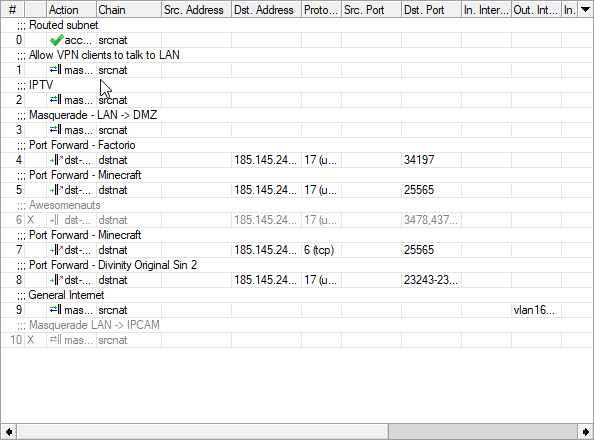
but really, its a modem, router, NAT, wifi AP and all
somber granite
Tell me about it
Well there is supposed to be a name for that
ISR
or something
 somber granite
but to make it sound friendly they call it a router
tame carbon
Thats my home router :P
somber granite
oh right
tame carbon
It also takes care of part of a business network
somber granite
So its higher grade then with proper setups
somber granite
I was wondering why it looked like that
somber granite
Me, I just have the old Telstra Broadcomm chip NBN modem sitting at front
tame carbon
 somber granite
with a tp-link AX6000 behind that
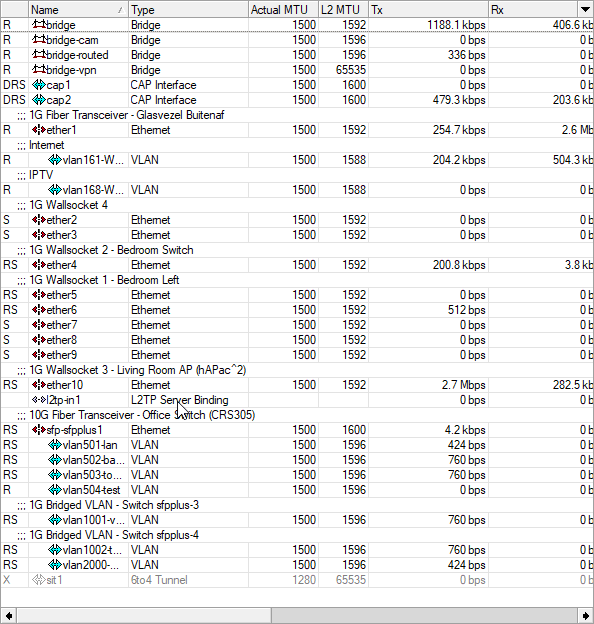
tame carbon
This router routes on like 6 subnets xD
somber granite
Yeah just looking at now
toxic citrus
Roughly how long would it take to set up a VLAN?
clear igloo
conf t
vlan 7
int Gi0/0/1
switchport
switchport mode access
switchport access vlan 7
About that long
tame carbon
 clear igloo
Commands may vary based on vendor but that's CLI for a single VLAN, pretty easy
toxic citrus
Oh right I don't really understand so probably a few hours 😂 thanks
somber granite
Need to support CLI first
Another thing some consumer stuff does not do at least not in a obvious way.
tame carbon
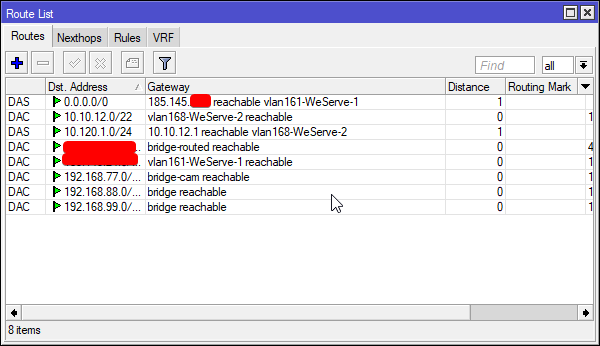
@somber granite most home routers only have that 0.0.0.0/0 rule with srcnat
@somber granite since 0.0.0.0 = all IPs
somber granite
hmm
tame carbon
ofc, the other rule most routers have
toxic citrus
Ah right, is there any other ways to set up VLAN if that's not an option?
somber granite
honeslty if I could find a Switch with Wifi that had higher than 1gbit ports and was not ubiquity I prob would try.
tame carbon
@somber granite I mean, I would suggest mikrotik
but that requires a bit of know-how to use
clear igloo
@toxic citrus Depends on your switch or other device being used
toxic citrus
@toxic citrus Depends on your switch or other device being used
@clear igloo Asus dsl-ac55u
tame carbon
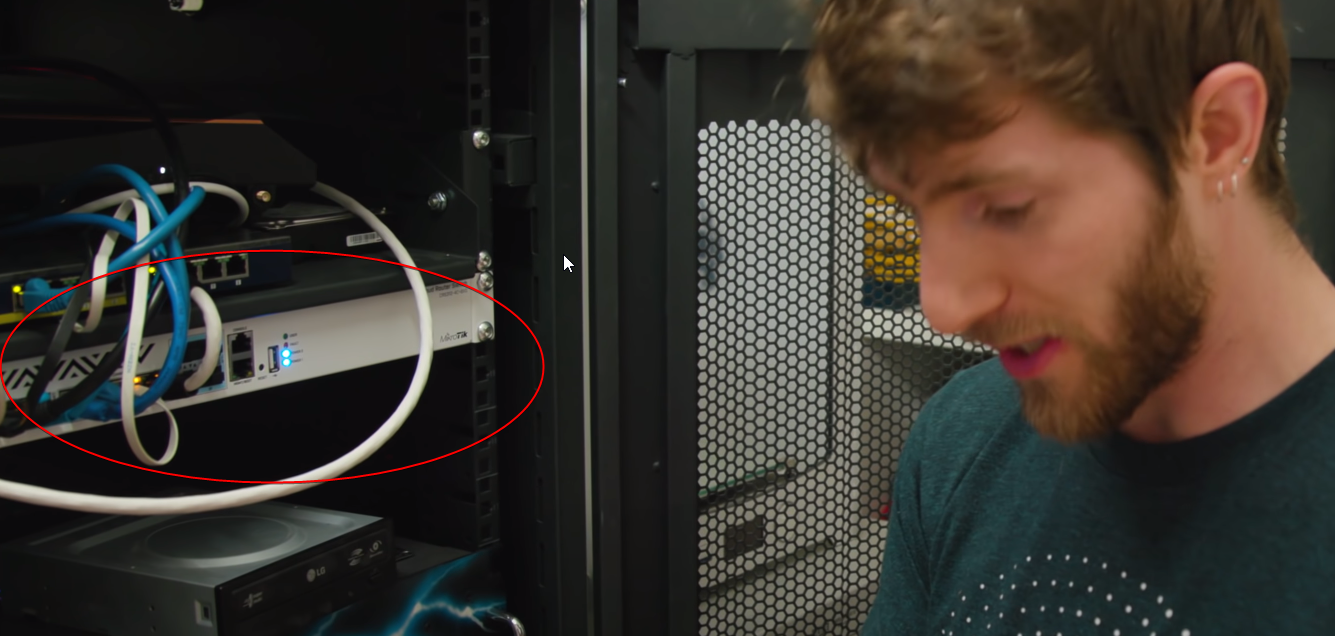
if I am not mistaken, Linus' home server rack actually has a mikrotik in it
toxic citrus
As the secondary modem
tame carbon
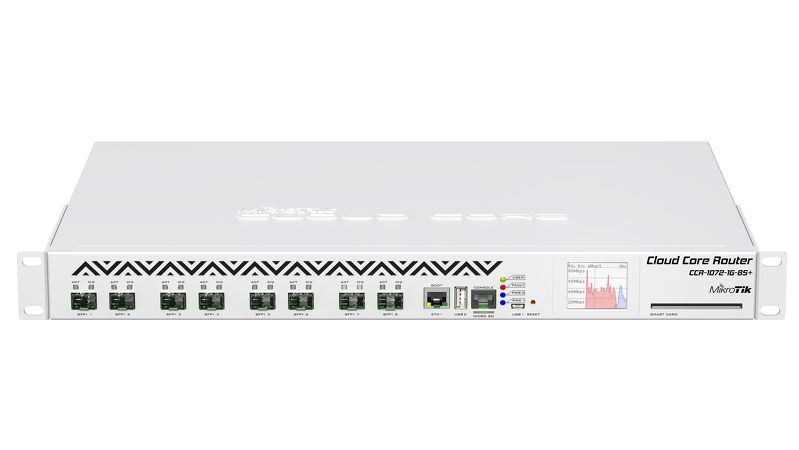
seen the white panel of a typical cloud core router
clear igloo
@clear igloo Asus dsl-ac55u
@toxic citrus Does that even support VLANs?
somber granite
oh cool POE
toxic citrus
I sure as hell hope so
 toxic citrus
I just assumed it would lemme check
 somber granite
well its close ish
tame carbon
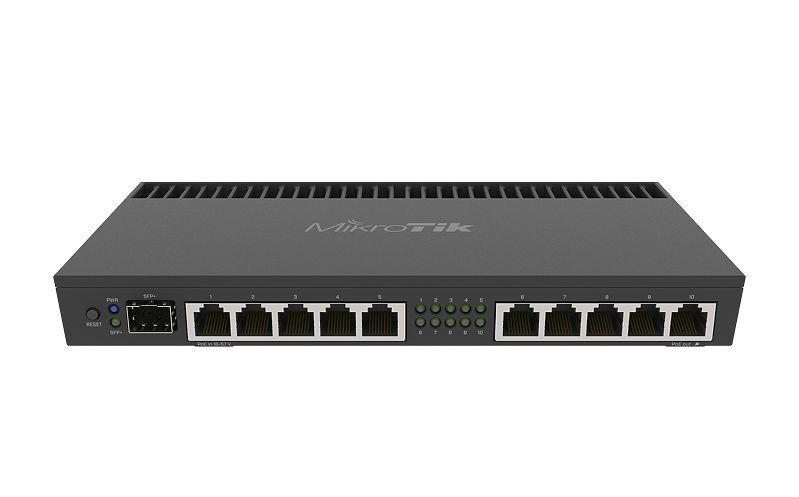
Thats the flagship mtik router lol
somber granite
but looks don't mean shit
tame carbon
it does 80gbit/s
somber granite
Just things to keep in mind as I need to setup an office in a few years.
for my drone biz
and I cbf paying out ass for point cloud comput cloud servers
tame carbon

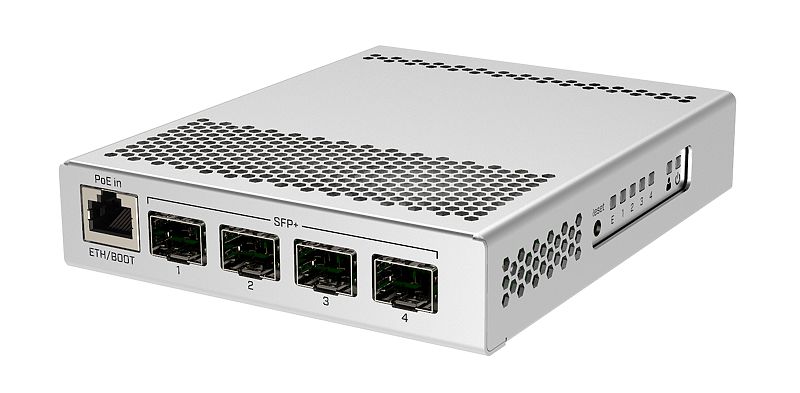
MikroTik is a Latvian company which was founded in 1996 to develop routers and wireless ISP systems. MikroTik now provides hardware and software for Internet connectivity in most of the countries around the world.
I got this in my living room ^
as access point/switch
it also does multicast for IPTV
somber granite
some $250-$400 per month or $3500 yearly ish
depends on software brand
Drone Deploy vs Pix4D
Fuck no
I just installed docker on a home server and setup Open Drone Map so I compute my own datasets just needs fairly beefed machine to handle larger sets of data memory wise and storage.
clear igloo
I sure as hell hope so
@toxic citrus It does not appear to support VLANs on the LAN
tame carbon
@somber granite https://i.mt.lv/cdn/rb_images/1633_l.jpg
 somber granite
Tho to an established biz $3500 a year is fuck all
somber granite
Oh looks good
tame carbon
its got 5x 1G, split into two 2.5G groups
somber granite
Well I am not sure if I want th WIFI or not I feel if I setup an office wifi should be dedicated
tame carbon
so each set of 5 ports can do total of 2.5G
tame carbon
and the port on the left does 10G
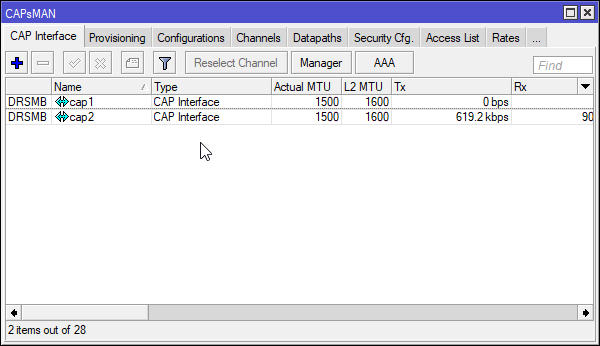
@somber granite with mikrotik you can use CAPsMAN
so you attach access points to it
and manage them from the central router
somber granite
neat
 somber granite
Have any advice for a generally cheap but somewhat scaleable 2RU or 4RU NAS bay?
toxic citrus
@toxic citrus It does not appear to support VLANs on the LAN
@clear igloo yeah I've come to the same conclusion there. Thanks for helping me though 👍 will get a better router soon
somber granite
It makes more sense to network data store in the office
clear igloo
@clear igloo yeah I've come to the same conclusion there. Thanks for helping me though 👍 will get a better router soon
@toxic citrus I would just get a smart switch that does VLANs and a router that can do multiple subnets
tame carbon
@somber granite I bought a 2U case, put a mini ITX board with a Ryzen 2600 in it
Ryzen supports ECC
somber granite
AH yep
tame carbon
 somber granite
Yeah I was thinking about that
tame carbon
^ remote radios
Since my router has only the single 10G
Need a switch if I want to use it elsewhere
somber granite
Yeah I am prob going to transplant my 3700X into a M-ATX server ish board
tame carbon
 somber granite
and throw in 32GB of cheap AF memory
tame carbon
Thats what I got this one for ^
somber granite
since speed is not important
tame carbon
4x 10G
somber granite
its just processing large data sets
over some 14 hours I just need memory more than anything quanity over speed
tame carbon
its tiny silver box
but its blazing fast
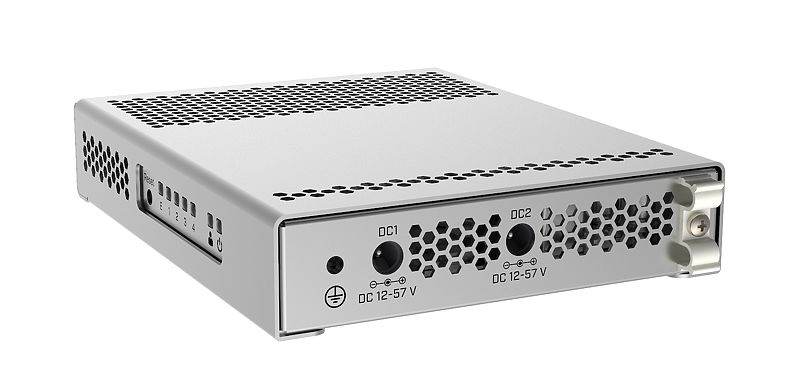
And its enterprise level gear

Redundant power
tame carbon
I only have the one hooked up right now
somber granite
Presume you have it on UPS
somber granite
I was thinking of something maybe dumb but maybe it will work
I wanted to grab a decent UPS right
but have it duel power aswell
so it can charge off mains or solar
tame carbon
the idea with redundant power like that, only makes sense in a datacenter
since datacenters always have two independent power supplies
A & B
tame carbon
Yeah but A fails
somber granite
and we use it
somber granite
Simply cannot afford for it be down, as it handles procssing of orthomosaics and 3D mapping rendering
tame carbon

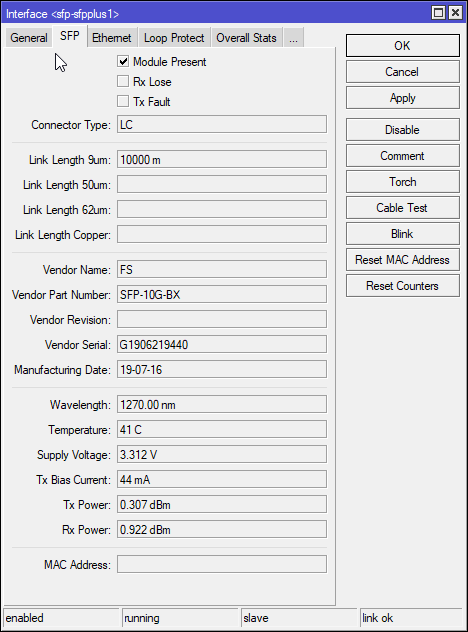
FS
FS is a new brand in Data Center, Enterprise, Telecom Solutions. We make it easy and cost-effective for IT professionals to enable their business solutions.
somber granite
that what the server is doing
tame carbon
If you are looking for affordable 10G networking ^
look no further
fiber optics > copper
somber granite
Hmm yeah but I am in AUD
tame carbon
 somber granite
so it may not be applicable to me
We have very limitd providers
for anything over 100mbit
tame carbon
My uplink is only 250M
somber granite
I need gbit at least
tame carbon
But I have 10G in LAN
somber granite
1Gbit or higher WAN
is what the office would need
Since I have to use the office like my personal cloud
and upload some 30GB ofshit
on the go
tame carbon
I do the kind of private cloud thing too
clear igloo
1bit 
tame carbon
I can use VPN to get into my LAN, even when abroad
somber granite
1bit
@clear igloo fk lol
tame carbon
UART with 1 databit and 2 stopbits
somber granite
hm
I don't need office yet its just food for thought for me right now
Trying to land some entry level gov IT jobs as it should be peace of cake for level 1 tech support
and move up from that I just need the $ to fund my own start up etc
That is the idea anyway
Then if that picks up enough to replace the job great, reolcate that into a office
tame carbon
I'm just glad my ISP actually gives out IP blocks :D
/29 is 6 hosts
So the virtual machines I host on my server, have their own public IP
somber granite
hell yeah!
tame carbon
@somber granite the wiring of the network itself is very very simple
its all on the same fiber
somber granite
ofc a pair each right?
somber granite
no hm
tame carbon
I use singlemode fiber
somber granite
AHhh
tame carbon
with two wavelengths on the same fiber
somber granite
That simplifies things
tame carbon
"BiDi" interfaces
somber granite
but are you worried about point of fail
tame carbon
Not really
BiDi works just as well
only situations in which you wouldn't want to do this
is if you use WDM
somber granite
yeah I don't know much about it but I think that is short for BiDirectional
tame carbon

In fiber-optic communications, wavelength-division multiplexing (WDM) is a technology which multiplexes a number of optical carrier signals onto a single optical fiber by using different wavelengths (i.e., colors) of laser light. This technique enables bidirectional communicat...
If you have a multiplexer
then you'd want seperate RX/TX fibers
somber granite
Oh yes I know a little about this not a lot
I have seen diagrams and been on jobs setting one up
somber granite
they carry what throughput though?
somber granite
geezus
somber granite
yeah that plenty
tame carbon

FS
FS passive CWDM mux demux (2-18 channels) greatly saves optical fiber resources for scalable OTN systems with full use of coarse wavelength division multiplexing tech.
CWDM = Coarse WDM
DWDM = Dense WDM
Coarse is only up to like 24 channels
But that image above shows how it works ^
you have two fibers go in and out on the left
and 18 channels on the right
This is all passive, so its just light filters and prisms
topaz quarry
@clear igloo that's nice but all I hear from colleagues is either on-site or remote until covid is over. There's a strong push for Work From Home sure (applause) but Work From Home is not remote
I only applied pre-pandemic and have no intention of really applying ever again. I've never gotten the sense they ever wanted to support vRouters or virtualized stacks.
clear igloo
There is some push for virtualized stuff but it's not huge for sure within the company
topaz quarry
honestly between their offering(s) at a hardware level. Going with stuff like mikrotik is just an easier business argument (for various reasons) and their main routing OS cannot be a vRouter
so that leaves me with sutff like vyos and RouterOS
i mean Vyos is basically iOS excecpt it's just debian
topaz quarry
yes but can I someone without an SLA or enterprise agreement deploy it in a homelab
because if the answer is no then i'm not going to validate it
and it's going to be up to someone in a huge af company to validate it
clear igloo
With very limited (200Kbps) throughput, yes
topaz quarry
then that's a bit useless now isn't it
i wouldn't never imagine pushing business models on companies
but there is something to be said for the vyos model
where you just never get a LTS branch without a SLA
but the rolling releases are stable enough for home labs for validation and off hours testing
the whole pumpkin at midnight stuff with their equipment just puts a bad taste in my mouth :/
clear igloo
I mean it depends on what you want to validate in a homelab, I don't consider that to be something that needs gigs of throughput. If you have an agreement or license you can get much higher throughput
topaz quarry
i'm literally testing 10 Gbps backplanes being automated with minio just to see if it's possible to reconfigure VLANs dynamically
i had no intention of paying for liscense just to develop against hardware
this is the same meme as when NVIDIA asks you to pay $10k USD just to have the privilege of liscensing NVIDIA GRID
of course reasonable minds can differ. Other platform(s) just get free engineering efforts. It's a self-correcting factor
 twilit garnet
is this about wifi
stuff
can i ask what is powerline adapter
and what is tje difference about wifi extenders vs powerline adapter

ping me @ if someone answers me
my wifi kinda crap KEKW

 undone adder
Wifi extenders are connected to the modem directly, powerline adapters are through your power net (2 stations connecting to each other through it)
unless it's a wireless wifi extender?
Powerline's performance depends on how the powergrid in your home is layed out
hollow marlin
I mean it depends on what you want to validate in a homelab, I don't consider that to be something that needs gigs of throughput.
@clear igloo Yeah you don't need throughput in labs unless you are testing certain scenarios and even then those scenarios tend to be QoS or failover during congestion and how loss of control traffic reacts. Honestly labbing it with with VIRL images that only have low throughput makes it that much easier to lab rather than managing generating 10s gigs worth of traffic
undone adder
@twilit garnet
topaz quarry
lol your biases are welcome
@twilit garnet powerline adapters use your electrical network as previously stated. Wifi Extenders accept a signal at 2.4 GHz or 5.0 GHz and retransmit it the opposite wave length it accepts.
i have never personally seen or heard of a wifi extender that accepts signal at 5.0 Ghz and re-transmits at 5.0 Ghz or accepts signal at 2.4 GHz and re-transmits at 2.4 GHz
this is not to be confused with mesh networks
which are an entirely different topic
unborn sluice
2.4 GHz and re-transmits at 2.4 GHz
I think my commodity asus router does that
yikes for the throughput though
twilit garnet
Will it work? a powerline adapter connected to a wifi wireless router /extender
topaz quarry
powerline networking only works if your electrical network supports it
 topaz quarry
the tl;dr is if there's a phase change in the electrical network - no
if you mean connect a powerline adapters to your router which is a router/Access Point combo
twilit garnet
ah..
topaz quarry
then you're using the ethernet functionality of your router
unborn sluice
@twilit garnet Router -> adapter -> (house eletrical wiring) -> adapter -> pc or something
topaz quarry
^
unborn sluice
^
topaz quarry
(house electrical wiring) must support this operation
if you have dirty power in your area
low chance of success as well
undone adder
I tried one of those and it didn't quite work
unborn sluice
Understandable
twilit garnet
so i guess a wifi extender would be better?
undone adder
so I got myself a 100ft ethernet cable and another router to act as a switch
unborn sluice
so i guess a wifi extender would be better?
yikes for the throughput
twilit garnet
i mean
tame carbon
wifi extenders are terrible
no matter how
just run a cable.
set up a 2nd access point through a wired connection.
@twilit garnet whats preventing you from running wired cables?
twilit garnet
ummm
unborn sluice
go on, we can help you
twilit garnet
It's hard to hide the cables
unborn sluice
checkmate
twilit garnet
well in my house
tame carbon
@twilit garnet have you got a clear path along the wall from where you could run the cable?
you can get small cable ducts
that you can mount to the wall, either on the ground, or near the ceiling
unborn sluice
well in my house
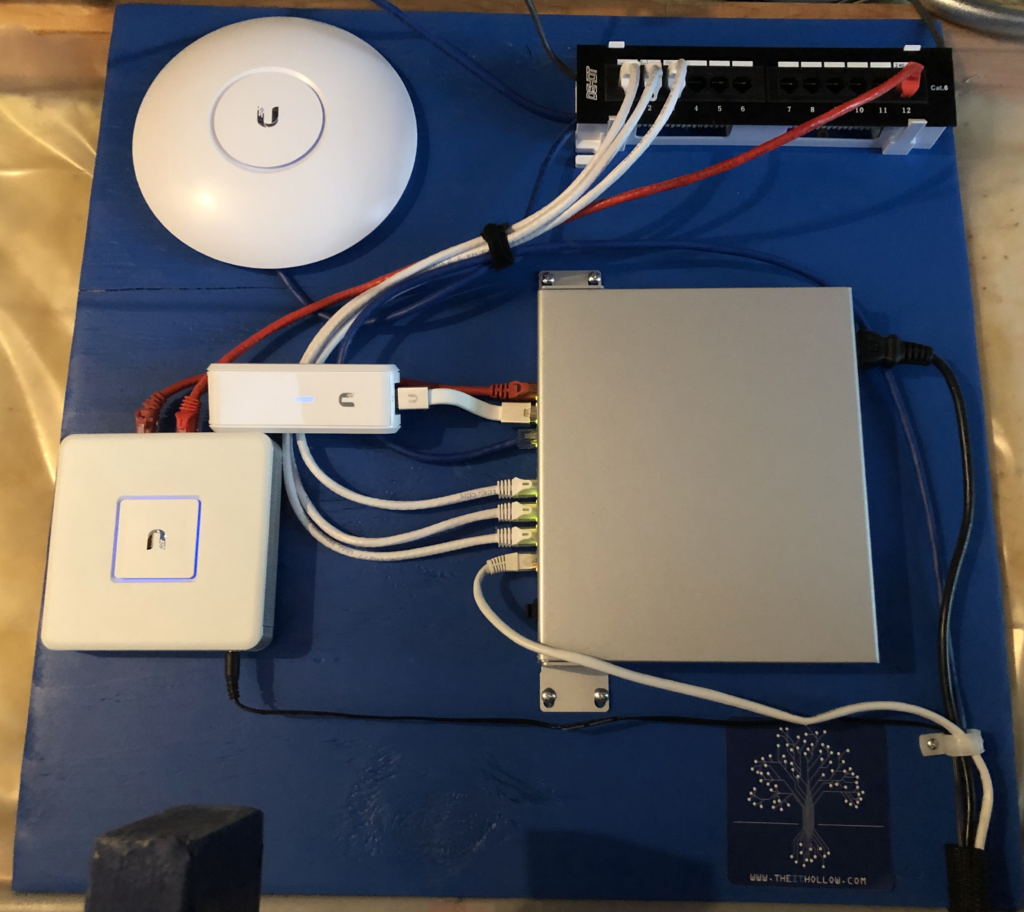
my cables are literally taped or stapled to the ceiling
hell I don't care lol
so I bought the neon green one






/cropped-hand-cutting-wooden-plank-using-saw-645895893-5810f7e43df78c2c731502b4.jpg) unborn sluice
unborn sluice
nice hands