#networking
1 messages · Page 218 of 1
 tiny tree
 peak cloak
don't know much about modems
tiny tree
me either thats the issue
peak cloak
as for routers, you looking for an all in one I assume?
so Router, Switch, and AP combined
peak cloak
if you don't know what those are then yeah, an all in one
tiny tree
alright so this, and then i'd need my own modem to run my ethernet through?
peak cloak
yeah
 tame carbon
do I smell mikrotik?
tame carbon
Ooh goodie
tiny tree
i have spectrum
not sure what the plan is but when i do speedtest i get about 120 down 12 or so up
tame carbon
@peak cloak you just recommended the hAP ac2
do you know there's a new variant out ?
ac3
peak cloak
^ follow crystal
tame carbon
it has same hardware, except external antennas
peak cloak
no I did not
tame carbon

MikroTik is a Latvian company which was founded in 1996 to develop routers and wireless ISP systems. MikroTik now provides hardware and software for Internet connectivity in most of the countries around the world.

came out, few weeks ago
I have the ac2 at home, and through two walls, only has about 10mbit/s intermittened
tiny tree
would it be worth it to get that for my router then?
tame carbon
@tiny tree these can do it all
tiny tree
only one or two people use the wifi
tame carbon
mikrotiks are very powerful
tiny tree
mhm, but i also need a modem cause im gonna get rid of this isp given 2 in 1
tame carbon
This ^
tiny tree
do you have any suggestions as to what i should get for a modem?
tame carbon
idk much about that
tiny tree
me either
tame carbon
I have fiber optics, none of that nonsense
peak cloak
what speeds? because that specifies the dociss version
tiny tree
i wanna get fiber but i dunno who to contact
peak cloak
depends if it's in your area
tame carbon
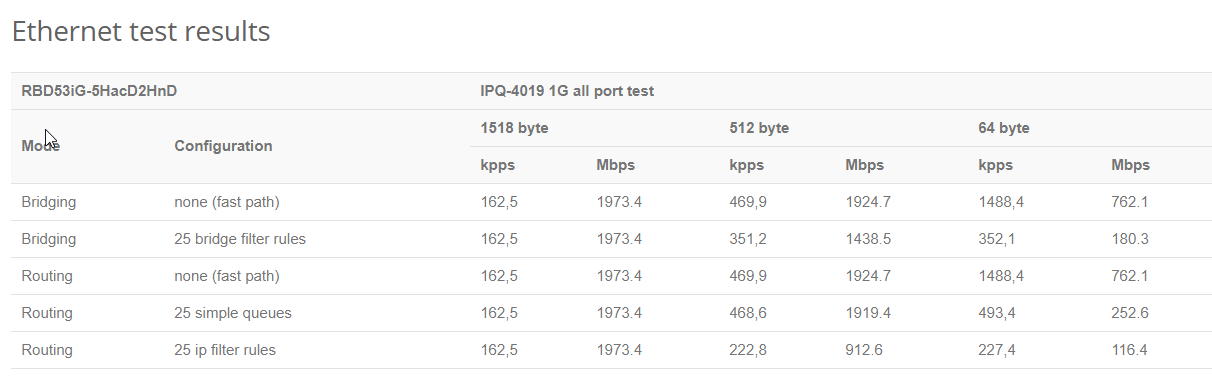
that hAP ac3 is rated for 2gbit/s
peak cloak
switching?
tiny tree
how do i know if its in my area?
tame carbon
Routing
peak cloak
@tiny tree https://broadbandmap.fcc.gov/#/

FCC Fixed Broadband Deployment
This application provides a visualization of the residential fixed broadband deployment data collected on FCC Form 477. Facilities-based providers of broadband service report Form 477 data in June and December each year. Providers report fixed-broadband deployment data at the ...
tame carbon
@peak cloak https://i.imgur.com/4pwZei1.png
 peak cloak
yeah I see
tiny tree
when i lookup my address it shows fiber is available
peak cloak
what ISP?
tame carbon
inb4 its GPON
peak cloak
Surprisingly I never had issues with coax
But I think that's because I'm close to a node
tame carbon
ur glad
tame carbon
@peak cloak I've had so many issues with coaxial
they used to do TV signals and internet over coaxial here
and literally, 1 broken device can jam the entire medium
and issues often are not close to the node, but on premises
so a neighbor with a Tesla Coil or something xD
peak cloak
what fiber tech does WOW use?
tame carbon
if they use a PON, better hope they sell you a decent 0-bullshit ONT
tiny tree
is there a way to tell or?
tame carbon
A passive optical network (PON) is a fiber-optic telecommunications technology for delivering broadband network access to end-customers. Its architecture implements a point-to-multipoint topology, in which a single optical fiber serves multiple endpoints by using unpowered (pa...

You can't really see the difference
peak cloak
wait WOW isn't fiber?
tame carbon
mostly has to do with the equipment you have on premises
peak cloak
it's DOCSIS 3.1
tiny tree
then idk? the map says wows providing fiber?
peak cloak
according to wikipedia
hmm idk
WideOpenWest (doing business as WOW!) is the sixth largest cable operator in the United States. The company offers landline telephone, cable television, and broadband Internet services. As of June 30, 2020, WOW! has about 844,500 subscribers.After a 2017 initial public offeri...
tiny tree
peak cloak
maybe they do have fiber in your area
tame carbon
@peak cloak they market their coaxial as "Hybrid fiber-coax"
tl;dr they have fiber to the nearest node
peak cloak
they advertise fiber for business
peak cloak
DIA
tiny tree
so i can get fiber?
tiny tree
i'll do that then
tame carbon
ask for what kind of modem you'd get
 hollow marlin
ONT*
tame carbon
^
peak cloak
for fiber no modem
peak cloak
I guess
tiny tree
actually i think i've talked to wow about it before
they said it's not fiber it's fiber to the node and from there its coax
tame carbon
Thats what it says on their website too
tame carbon
Generally, they use a “Hybrid Fiber-Coaxial” network structure which sends data over fiber most of the way to a customer and only switches over to coaxial within neighborhoods, where sending individual fiber lines to each house is prohibitively expensive
peak cloak
they will run a fiber line if you pay
tame carbon
^ quoted from their site
peak cloak
fiber itself isn't, but running it is
tame carbon
its the digging of a trench, to lay said fiber, that costs money
tame carbon
I paid 0 for my fiber optics
but only
because I took a 2 year plan
after that I am free to cancel
hollow marlin
running fibers runs around $10k a mile after you include everything
tame carbon
@hollow marlin I'm forced to pay either 20k upfront, or pay 13,50/month
that 13,50 is for just line maintenance
tiny tree
that's a ton isnt it
tame carbon
I did the math
 waxen scroll
13k/m is a ton
waxen scroll
yep. you used ,
tiny tree
13 dollars 50 cents?
tame carbon
@tiny tree corporate line, with 6 hour SLA
so if something goes wrong
they fix it immediately
tiny tree
mhm i'll definitely look into it
tame carbon
Trust me, this is a good deal I have here :)
tiny tree
ofc
peak cloak
give me some Utopia fiber
tiny tree
mhm, so i'll see if i can just get a modem and router for now and then look into fiber when i have some money 👀
tame carbon
lmao
windows be confused...
$ tracert 1.1.1.1

Tracing route to one.one.one.one [1.1.1.1]
over a maximum of 30 hops:

  1    <1 ms    <1 ms    <1 ms  ntp.local [192.168.88.1]
  2     5 ms     5 ms     5 ms  r2.serv.dro.weserve.nl [46.243.152.3]
  3     7 ms     6 ms     6 ms  46.249.55.194
  4     7 ms     6 ms     6 ms  185.8.179.34
  5     8 ms     9 ms     8 ms  cloudflare.telecity2.nl-ix.net [193.239.117.114]
  6     9 ms     7 ms     7 ms  one.one.one.one [1.1.1.1]

Trace complete.
ntp.local
xD
There is a timeserver on that gateway, but not sure why windows decided that that is the correct hostname
hollow marlin
Outside major cities there is no incentive. US is large and most of it is low pop density. Almost all top 4 would flop if they were forced to push fiber to everyone
waxen scroll
ATT claims fiber is in my city, yet a quick check of various addresses says its nowhere
;p
tame carbon
my old ISP told me i could get 20mbit ADSL
their smallest plan was 24mbit/s
I ended up only receiving 4mbit
after nagging them for months on end
managed to get a 25% discount
for their shitty service
which was also weather dependent
hollow marlin
Rain seems to always make its way into peoples NID and when freezing copper shrinks just enough to pull away from the block. I had to deal with that shit on the support side and I aint going back
tame carbon
@hollow marlin it usually presents itself as a bunch of ATM-retransmits
ping spikes in the 800ms
amount of times I had to explain latency issues to a support call
please kill me
waxen scroll
@hollow marlin i remember a phone call i had with comcast complaining of packet loss
"when did the issue start?"
tame carbon
xDD
waxen scroll
Hmm.. you know what, it stated on the first cold day this year
oh, i know the iissue
lol
tame carbon
my ISP always was like: ok we will put the line analyzer on your line for 24h
24h later, I call them, to be told: yeah everything checked out fine
still has packet loss
hollow marlin
Which is sadly true. My techs would run a test and forward it to me and it would be clean then to later find out every Friday at 6pm the neighbor 5 houses down had Christmas lights on a timer that would kick on and cause such a surge it would induce a current in the DSL lines 10ft below knocking out the modems on the line until they retrain
The test are accurate, its the guesstimating what external issue is causing the problem
waxen scroll
how did you get the neighbor to stop using the lights?
hollow marlin
That was left to the customer to ask the neighbor. I was not going to step into that conversation
tame carbon
The FCC will also make you take a tinkle when you actually want to take a piss
 river ermine
Has anyone here got some learning resources they can recommend/vouch for for networking? I took a college course, and it was super interesting, but Test-Out really didn't do it for me, i just don't feel like i actually learned/retained anything, which is a really rare issue for me.
I picked up the All In One Network+ book, which came highly recommended (i do plan to get the network+, sec+, and prolly some others eventually). It's helping a lot, but if anyone has other things that worked for them I'd really appreciate it.
peak cloak
A homelab is nice
just one spare computer can go alot
put proxmox on it and you can run multiple VM's
river ermine
So like, you can have it virtualize the hardware and mess with some interactions?
peak cloak
yeah, proxmox is a hypervisor so the main interface is a web interface
you can virtualize a router for example pfsense, or vyos, or many otheres
river ermine
Gotcha, ill look into it!
Thanks man!
peak cloak
@river ermine this guy has a nice guide https://www.dlford.io/
 river ermine
Sick!
peak cloak
how to setup pfsense, proxmox vm's etc.
river ermine
bookmarked!
 little schooner
@waxen scroll how should I interpret if a seller refunds me in full with no hesitation for a wifi pcie card?
That it would cost more to receive it and get a replacement or that they know they are selling some defects?
waxen scroll
can be both reasons
shipping sucks
i bought something for $40 and wanted to return it with some of the product used up. they said sure but pay shipping back
UPS waned $20
 red arrow
Can anyone here help me with making a VLAN
I have the VLAN made
I have a UDM btw
I'm trying to put my server on a VLAN
Do you have to dedicate a hardware switch port to a VLAN?
 topaz quarry
as long as everything is on the same physical network
and you're not filtering VLANs (eg restricting which VLANs can go where)
then you just setup your server to pick up on the VLAN
 clear igloo
Set the port as an access port with that VLAN
topaz quarry
what most sane people do is set the port you're trying to deal with with that VLAN as the default LAN
but security minded people would tell you to probably not do that :/
and make your server VLAN aware
clear igloo
No, most people set it as access
Native vlan is for trunk ports which is not what you want for single devices (in most cases)
little schooner
I use vlan 1 for the native vlan
clear igloo
Bad Xeon! Vlan 1 is the devil!
little schooner
It means I don't have to make changes to every switch that way
Anything important will have its own vlan
clear igloo
Security gonna get you! 😛
little schooner
Heh
peak cloak
I just use 1 for the default untrusted network
red arrow
I'm not a security freak I just thought it would be nice for my server and its VMs to be on a VLAN
But so far it doesn't seem like I can connect anything to the VLAN
Perhaps I'm misinterpreting the function of a VLAN
peak cloak
maybe you are thinking of subnet?
clear igloo
Ah, if you have multiple VLANs then you want a trunk port. Native VLAN is the default VLAN, usually for like ESXi or whatever to communicate on + any applicable VMs
red arrow
Yeah I am thinking of a subnet.
Ok
We'll go with that
I want to have my server on a different subnet
192.168.2.X as apposed to 192.168.1.X
clear igloo
Well a VLAN is segmenting at Layer 2 of the OSI model. Usually each VLAN has its own subnet and you need a gateway for each VLAN to route between the VLANs/subnets
peak cloak
on my ER-X I did just that by assigning an ip to another port I wasn't using
and making a DHCP server for that subnet
topaz quarry
yes you would need firewall rules to allow this to occur
otherwise in Ubquiti's case it'll just drop packets
peak cloak
I mean you don't need any, it worked without any
topaz quarry
that defeats the point of having a VLAN
peak cloak
but then I added some, such as allowing LAN to initiate a connection with the server subnet, but the server subnet can't see the LAN
topaz quarry
you mine as well have everything on a single subnet if your'e going to have no rules :/
peak cloak
yeah
red arrow
Is a network group the same thing as a subnet?
peak cloak
never heard of a network group?
topaz quarry
in unifi land?
ubquiti calls network groups subnet compositions yes
to confuse actual IT people
but help non IT people
you can specify if a network is VLAN only in the network group configuration

Amazon Affiliate Store
➡️ https://www.amazon.com/shop/lawrencesystemspcpickup
Gear we used on Kit (affiliate Links)
➡️ https://kit.com/lawrencesystems
Try ITProTV free of charge and get 30% off!
➡️ https://go.itpro.tv/lts
Use OfferCode LTSERVICES to get 10% off you...
topaz quarry
you asked about VLANs
topaz quarry
you specify the subnet somewhere else
you associate a VLAN ID with a subnet
watch some tutorials from crosstalk solutions and lawrence systems
it'll make more sense
red arrow
I can't figure out how to make a new network group
topaz quarry
VLANs are confusing until they're not
 rocky badge
@clear igloo 😂 https://blob.rocks/eXdVYexzUg.png
 clear igloo
Only 97%?!?!
rocky badge
Lol
rocky badge
no
red arrow
yes
topaz quarry
or the vlan will go poof into the void
red arrow
Ok, so how do I put it on the network associated with my LAN?
Ah crap my laptop is running out of juice
Gonna have to go mobile
waxen scroll
@rocky badge fix his vlan
 silver needle
Anyone have any idea why when I download through steam my entire lan would get packetloss going through a CSS326-24G-2S+
Was using 0 smart features at the time and no matter what settings I tried it would give packet loss
peak cloak
probably steam maxing out the connection
hollow marlin
Under switch - port - egress rate, set it about 10-20% below your bandwidth on the port to your PC. It should alleviate a major of the loss without having to setup QoS and even then QoS is not effective on ingress traffic
waxen scroll
@hollow marlin all im sayin is that doesnt happen on my ubnt gear at default and non-QoS settings

waxen scroll
oof
topaz quarry
cheap hardware
all the config
my 10 gigabit switch had controfl low on everything
in a p2p network
bad switch
tells switch to behave
waxen scroll
ive got a cisco switch that likes to drop ICMP.. pretty much all of it.. for no reason
hollow marlin
@waxen scroll I thought it likes to create ICMP traffic 
hollow marlin
Just call Tac, they'll take care of it
waxen scroll
i did, they're not.
they're taking their damn time
the CPU gets like 1 ICMP input per 10 seconds
thats not a flood
line card must be broke idk
@hollow marlin you got $20k so i can test a new card?
@rocky badge
those are coolermaster heatsinks btw
little schooner
@waxen scroll beefy heatsinks. But that won't be enough to stop human error in software department
I hate how my edgeswitch 8 takes a very long time to boot. It goes through this process, sending poe power for like 6 seconds and then resets all the switch ports again.
I'm waiting so long for my FlexHD to boot and bring its antennas up
It's a little annoying.
hollow marlin
If you want some fun grab some Juniper EXs if you like waiting 10mins to boot
 thorny sky
is it worth putting on QoS with 600 mbps
topaz quarry
yes . . .
thorny sky
still not sure exactly how QoS works
 unborn sluice
Control who uses how much
thorny sky
I optimized it for gaming for now
unborn sluice
is that a gaming router
thorny sky
Yeah Asus
 thorny sky
haha no I couldn't afford that one
 viscid matrix
Acer,Asus,Dell,HP,Lenovo,Samsung,LG,Evoo,who wins?
thorny sky
It's like a step down
unborn sluice
what does it look like then
unborn sluice
are you on wifi though
thorny sky
Nope I'm lan
unborn sluice
depends on the situation, you might not evne feel the difference between with and without QoS

thorny sky
I mean I'll keep it on but I never get slowdown
unborn sluice
Yup, as long as you get what you want
btw how many people are connected to this router
thorny sky
Currently 5
viscid matrix
HOW DO I FIX PING
unborn sluice
Currently 6
@thorny sky are they video streaming?
viscid matrix
Kyou is a bad person
unborn sluice
does that router do the QoS automagically?
like you just need to click a button to "optimized" ?
thorny sky
QoS Type Adaptive QoS Traditional QoS Bandwidth Limiter
Bandwidth Setting Automatic Setting Manual Setting
unborn sluice
uhh yea, so which one of these
thorny sky
then select mode
Might just keep it off it might not do jack shit
Most my devices are LAN
viscid matrix
😮 you cursed!!!
 feral roost
do i have to have a application listening on the port i portforward to even check if its portforwarded using a online website?
 robust crescent
i asked for help in #tech-support but its network related so ill drop it here too
some weird shit happened and even though my cords fine, windows refuses to recognize my ethernet connection
i uninstalled reinstalled drivers and on the network connections tab im just stuck at
the ethernet light on my io is on
topaz quarry
it means you have a layer 1 problem
if it was a software (layer 2) problem it would show connected but no internet
or give you a self assigned IP
robust crescent
i think its an issue with my router
or rather ethernet adapter on the router
or actually no its recognizing the connection now
just no internet
topaz quarry
so nowz it's a router problem
topaz quarry
your ethernet and wifi NICs aren't the same piece of hardware
one can work and the other doesn't have to
robust crescent
i mean
topaz quarry
they're not tied together
robust crescent
its all on one box and its weird for only one part to malfunction
generally if something dies everything has gone with it
robust crescent
:^)
 wide estuary
Guys all devices which r connected to my access point just get 1 ip. So if I upgrade to edgerouter x will sqm feature work?
Above 2 r connected to router itself
Orange logo is of access point where probably 1-3 devices r connected
But all it shows it 1 ip for those devices in my router, they don't come up individually
 waxen saddle
Lasber: Your access point is probably performing NAT. Is the AP connected to the rest of your network over the WAN port?
wide estuary
Yup
waxen saddle
Set the AP to be in bridged mode or use the LAN port on the AP. If you use the LAN port, be sure the AP has it's own unique non-DHCP IP address on your network.
wide estuary
Here this is how its connected
Ethernet out is for my desktop since only one ethernet is coming downstairs
waxen saddle
Also, if you use the LAN port on your AP, disable DHCP on your AP.
wide estuary
The gui of this router is rly basic, I dont know where DHCP is located
waxen saddle
Does it have a "Bridge mode"?
wide estuary
Wait i found dhcp server
waxen saddle
Yup. That's the one.
wide estuary
Since the router im using is already in ap mode I can't access its own gui
waxen saddle
wait
wide estuary
I'm connected to upstairs router gui
waxen saddle
The router that connects your household to the Internet. I'll call that "Router A". Does Router A have the DHCP server enabled?
wide estuary
Ok so what i need to do is disabled ap router dhcp
Got it but I don't know how to access it
waxen saddle
Are you connected to Router B on the LAN port?
wide estuary
Yup
waxen saddle
Open cmd and type in "tracert google.com" The first hop should be the IP address of Router B.
tracert = Trace Route
wide estuary
Got it and all I need to do is write that ip in chrome right?
waxen saddle
Perfect. I need to re-order the operations a bit.
wide estuary
I disabled DHCP
waxen saddle
We need to set the IP address of the Router B first. To do that, we need to log on to Router A as well and figure out the DHCP range. It should be something like 192.168.0.50-192.168.0.240
wide estuary
What should static ip pool be?
waxen saddle
We need to set the static IP to not be in the DHCP server range. I usually set it to +1 from Router A.
wide estuary
Ok so my laptop is connected to router a@waxen saddle
waxen saddle
go ahead and log in and check the DHCP server range
wide estuary
I don't see any dhcp range server
I see static ip end ip
Preferred dns
Lan ip
Subnet mask
waxen saddle
huh
If you don't mind my asking, what manufacturer and model? I'll see if I can look up the GUI.
wide estuary
Its tenda...i nvr heard of this brand
waxen saddle
AC??
wide estuary
Tbh we r tryin to make router b as wds bride mode right
Nope its connected via ethernet
wide estuary
How to check whether it has bridge mode or not
I think router a is the same model tenda n301
waxen saddle
We can either set Router B to bridge mode on the WAN, or we Disable DHCP server, Set static IP, and plug the cable going in to the WAN port in to the LAN port instead.
waxen saddle
Well hey, they may have made this a lot easier: https://www.tendacn.com/en/faq/3338.html
waxen saddle
Set that mode again, then try plugging the ethernet cord in to the LAN port instead of the WAN port.
wide estuary
I can't seem to find dhcp range at all
Tbh idk why both r the same model but router b has completely different gui than router a
waxen saddle
One might have a newer firmware than the other.
waxen saddle
ok. So Router A has the Start and End IP address range for DHCP. 100-200
wide estuary
So what should i set it to?@waxen saddle
And also i don't know what network guys did but there seems to be 3rd router....
Tenda n11
That's the gui im connected to
peak cloak
huh?
wide estuary
Ikr its soo weird
waxen saddle
Set the static IP of Router B (NOT the WAN) to 192.168.1.2
It might be called the LAN IP address.
wide estuary
Lan mac address right?
peak cloak
IP address
unborn sluice
it's aight
waxen saddle
Set the IP address to "192.168.0.2".
wide estuary
Got it
waxen saddle
Router A (Your router to the Internet) = 192.168.0.1, Router B = 192.168.0.2
After changing this, it may need to reboot and then you'd access it in your browser at http://192.168.0.2
unborn sluice
double nat?
waxen saddle
No way. We're trying to get rid of the double NAT.
unborn sluice

wide estuary
Yup its changed to 0.2
peak cloak
I think there is an AP mode
unborn sluice
no bridge mode?
wide estuary
Wait it changed it bck to 1.2 after reboot
waxen saddle
@unborn sluice There is this: https://www.tendacn.com/en/faq/3338.html But it was still performing NAT for some reason.
wide estuary
It says connection status disconnected when i change it to 0.2
unborn sluice
@unborn sluice There is this: https://www.tendacn.com/en/faq/3338.html But it was still performing NAT for some reason.
pranked
waxen saddle
LOL
waxen saddle
It might be that 3rd router you discovered. I should have had you check first.
ok! Are you able to get back in to Router B?
waxen saddle
open CMD and "ping 192.168.0.2" Do you get any replies?
waxen saddle
We don't know yet.
 peak cloak
maybe an nmap scan will help us understand, I'm sorta confused
waxen saddle
We could just try setting another IP address. "192.168.0.3"
wide estuary
Wait i pinged again and it said destination host unreachable
unborn sluice
Try to find the MAC of the ghost router, then blacklist its MAC, wait for someone to get angry
waxen saddle
We can probably tackle that later.
wide estuary
Same with 0.3
 wide estuary
Nope none
wide estuary
Hmmmmm
waxen saddle
I typed the wrong address. Sorry. It's fixed now. 192.168.0.20
waxen saddle
I suspect Tenda is doing something SUPER goofy.
waxen saddle
I suspect it sees a DHCP server already in use for the 192.168.0.x network and it's setting itself up to be 100% not in conflict.
...except it's misguided and doesn't understand people are smarter.
peak cloak
why not just have the router be under a static DHCP lease or I am not understanding something
wide estuary
So here's the issue, my tenda router which is acting as ap only show one ip for every drvice that r connected
Top 2 r the one connected via ethernet
Orange one is the one acting as ap
peak cloak
yeah, because it's performing NAT pretty sure
waxen saddle
That's the same conclusion I came to as well
wide estuary
So we t trying to make it as bridge or changing dhcp
Yeah
And wr found out there's another router other than 2 tenda n301
Its tenda n11
In the process
peak cloak
that's the third one doing tho?
wide estuary
The gui with qos is of 3rd router
peak cloak
could you draw a diagram maybe of your setup, I think that will help understand your setup
wide estuary
Tbh even I don't know how they setup everything...
All i know is there r 2 routers
One upstairs and other downstairs
waxen saddle
We may have to go back to this: https://www.tendacn.com/en/faq/3338.html ...and then unplug from the WAN port and plug it in the LAN port.
Tenda is not playing game with a setup that has worked for 20 years.
peak cloak
yeah, maybe WAN has permament NAT
wide estuary
Yup i unplugged wan port
Wait I don't think there's 3rd router, why does it says its tenda n11 even tho the model no is n301
I think its firmware
waxen saddle
Were you able to re-enable AP mode and change the ethernet cable to the LAN port?
wide estuary
Honestly I don't see any wireless ap mode....
In router b that is
Its so confusing
There's ap mode in router a
wide estuary
Yeah maybe that's what im gonna do
waxen saddle
Note: If you have a cable modem, you may need to reboot that after switching. They tend to "lock on" to the previous router.
 somber light
im trying to setup a minecraft server at my house with an old pc but my ip address is dynamic. Any good work arounds without having to get a static ip?
 waxen saddle
Most routers will also let you set a static IP for an existing network too, but here we are. 🙂
unborn sluice

tame carbon
@somber light DynDNS, No-IP, etc
Some services also can be directly configured in the router
saving you from having to run their software on your computer
peak cloak
also on most ISP's the IP will stay the same unless you turn off your router
peak cloak
yeah ik
tame carbon
DDNS is a crude fix
waxen saddle
...but it works and it's what we have to work with.
waxen saddle
Curiously, Ubiquiti doesn't seem to play well with IPv6 and VPN
tame carbon
@waxen saddle routerOS just has exactly the same things from the IP tab
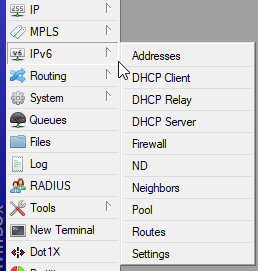
for IPv6
v6 firewall
v6 dhcp
not sure why you need dhcp on v6
cus you can just announce prefix
and be done
waxen saddle
Well, if I activate IPv6 on my network, No one can VPN in to my network even using IPv4. At least not with the built-in Windows VPN client. It defaults to IPv6 and never connects.
tame carbon
oof. thats.. odd
mh. I don't use v6 right now, I still have to finish HE certification xD
waxen saddle
Very. So I have to completely disable IPv6 on my network for VPN to work at all.
tame carbon
but if I enable my 4-to-6 tunnel, each device on my LAN gets a v6 assigned as well as a v4 NAT'ed IP
peak cloak
v6 is great and all, just that I know nothing about it, lol
tame carbon
@peak cloak you can self certify at HE
peak cloak
need to study once I have free time
waxen saddle
It's a different beast to be sure.
tame carbon
they have a tutorial
and its quite easy to learn
during their certification, they set you up with your own /64
/64 is the smallest publicly routed subnet
waxen scroll
idk my ubnt does ipv6 and vpn just fine
little schooner
@waxen scroll for SharePoint, where should I put my documentation for how to do tasks. OneNote or separate word documents?
waxen saddle
Are you using the built-in Microsoft VPN?
little schooner
I have access to SharePoint now at the job lol
 stone mist
Is the TP-Link Archer AX20 good for gaming?
peak cloak
yeah I will setup it up
 peak cloak
after everyone gets off school
tame carbon
once you reach Sage. they remove all bandwidth limitations
peak cloak
don't want to mess with my parents internet
waxen saddle
Gross
peak cloak
when searching for if my ISP plans on ipv6
fios is closer to having it, but still doesn't
 gritty garden
do you guys think there would be issues if I took my quest 2 downstairs to use virtual desktop?
I have a mesh system and my pc is connected to ethernet on the #3 router
peak cloak
depends on a lot of factors
gritty garden
would it increase latency if I went downstairs near the main one by a noticeable amount
peak cloak
walls are a big factor
especially since you said you are using mesh, not a wired backhaul
gritty garden
hm
peak cloak
you could try it
gritty garden
yeah
peak cloak
doesn't hurt
gritty garden
are there any tools to measure latency or network connections on the quest that you know of? or like an apk that I could sideload
peak cloak
if you have some sort of terminal emulator, use the ping command
gritty garden
okie dokie thanks :)
waxen scroll
@little schooner seperate word documents
little schooner
@waxen scroll is it because OneNote doesn't support sub sections?
To organize it better?
I saw that today
waxen scroll
one note is for notes. full documentation is more of a word/visio thing
this is for many people not just you
hollow marlin
@little schooner
Customer/device > technical > txt config
Customer/device > technical > Visio diagram
Customer/device > technical > Post maintenance > Date > Word for MOP summary
Thats how we store engineering docs in Sharepoint. I used Onenote/notepad++ when working on projects
 cedar igloo
microsoft need to understand people use linux... my company just installed InTune and stopped Teams and emails from working. now i'm forced to move to Windows as it is a requirement to have Teams installed >:/
hollow marlin
Microsoft is not going to spend time developing for a single digit percentage of people using linux. Teams/365 are primarily focused around business needs where its an even smaller user base.
little schooner
Thanks for the input
 simple current
Shoulda spun up a VM for teams
topaz quarry
just use alternatives to teams
 orchid shell
does where you get your ethernet cable affect ping and speed
orchid shell
i mean my dad got a whole damn spool idk what you call it, its purple
he got it from work
orchid shell
right ok
peak cloak
look what it says on the cable
usually there is some sort of writing stamped on the side
orchid shell
i have no clue where the spool is
also is there a way to have a long ethernet cable but good ping
cuz my cable is hella long
clear igloo
Length doesn't impact ping
orchid shell
ok
clear igloo
Unless it's over 100m
peak cloak
technically it does ^
clear igloo
Well yes, but not in any noticeable amount 😛
peak cloak
if it's a big spool I assume it isn't preterminated
topaz quarry
distance only impacts ping when you're talking about kiliometers
is your hosut kilimoters in length?
orchid shell
no
topaz quarry
do you have a super mansion in europe?
orchid shell
no
topaz quarry
then it's not distance
orchid shell
ok
peak cloak
if you are on wifi, then use ethernet. That's basically the only solution
orchid shell
ookay
topaz quarry
dah
peak cloak
if you are on ethernet <100 m you have the fastest ping already
orchid shell
is it even possible to get 1ms on like roblox tho cuz I get 100+ ping on most games on that platform
peak cloak
that's the ISP and Roblox servers
topaz quarry
if your ISP is nice
orchid shell
im pretty sure my ISP is rogers
topaz quarry
i get 3-40 ms ping to most game servers
it also depends on the location
oh you're a Canadian
orchid shell
yes
orchid shell
well im in whitby
topaz quarry
if it's not next to quebec or near a peering location in Washington
Michigan
or New York
then you'll have a bad time
all of these things are ISP related
orchid shell
i think the ISP is in Toronto or ajax idk i think ive seen it say that while doing speedtest
imma do one rn
yeah I'm pretty sure its in toronto
topaz quarry
toronto has pretty terrible service
for a variety of reasons
one of which is massive money laundering fraud
orchid shell
soooo whats an ISP that I should ask my parents to upgrade to
orchid shell
hmmmm
topaz quarry
if you're under the age of 18, ask your parents to ask your neighbors
orchid shell
whats the best one for whitby
orchid shell
i mean im pretty sure my parents pay like 50-80 bucks a month for just 10MB/s download internet
and its lower than that with wifi
topaz quarry
yea well buliding infastructure in Canada isn't cheap
you're probably out of range of where they've built stuff already
Roger constantly expands
orchid shell
right ok then
topaz quarry
it might take a long while
orchid shell
well is there any way settings related I can get lower ping
orchid shell
well I am
topaz quarry
then that's it
orchid shell
there's no like router settings I can change?
orchid shell
k den
orchid shell
well i get like 13ms according to speedtest and I get 100+ms on roblox games so
and the 13ms is my wifi on my phone
orchid shell
right
orchid shell
how would ik the host name
topaz quarry
it's the URL you use to connect
orchid shell
so would I use roblox.com
topaz quarry
if that's what you're connecting to
orchid shell
and how would I ping it
topaz quarry
is it like minecraft where people can host their own servers?
orchid shell
no
topaz quarry
go in the terminal and ping 1.1.1.1
ping 9.9.9.9
and roblox.com
go to search -> type cmd
orchid shell
whats a terminal
topaz quarry
a black screen will show up
orchid shell
oh
hold on lemme start my pc
i pinged 1.1.1.1, the time i got were 31, 34, 28, 51
9.9.9.9 was 64, 62, 56, 62
from roblox was 43, 38, 38, 39
topaz quarry
then your problem is the server response time for non-trivial packets
orchid shell
but when i play actual roblox games its usually 100+
topaz quarry
yes well ping is basically just say hello
orchid shell
right
topaz quarry
make sure it's actually roblox.com
orchid shell
it is
orchid shell
oh i dont think the url is for the game
plus a lot of people online say that roblox servers are shit
which they kinda are
peak cloak
roblox uses amazon e2 I think
somber light
@somber light DynDNS, No-IP, etc
@tame carbon Thanks! I'll try No-IP
My next question is with my server, can someone hack into my home network and steal data? If so, is there a way to protect myself? The PC the server is running off of is not used for much of anything. I have discord, chrome, and office but that's about all that is on it.
refrence: https://discordapp.com/channels/375436620578684930/387022787480387605/763060719436300308
unborn sluice

unborn sluice
Or hide your real IP address
peak cloak
Trying to setup an HE ipv6 tunnel rn, can't seem to get it to work
waxen saddle
@somber light I highly recommend NOT hosting a Roblox server.
peak cloak
you can't host one?
waxen saddle
The official way to host the Roblox server is to open 16,000 ports from the Internet directly to your computer.
unborn sluice
But it's a Minecraft server
waxen saddle
oh nvm
unborn sluice
Point still stands
waxen saddle
I got the wrong person
unborn sluice
Better to host it somewhere
unborn sluice
Fair
peak cloak
I host it for my friends and stuff, but if it's anything that you are advertising you want a VPS
I also used to host my own website
Need to get a good reverse proxy system going, probably gonna use caddy
rocky badge
I just host the MC server at home lol
VMs are on a separate VLAN and the MC servers are behind a proxy, waterfall, at home which idc about lol
 strange path
Does anyone still play half life? I have been trying to create a server for some time and I still can only create a counter strike 1.6 server when I need a half life server on the client program.
Got to love steam support for their old games.
 thick minnow
I have a question is the Dell Poweredge R610 a good server for AD DS
peak cloak
I mean it will work, I would avoid the Rx10's though as they are old, loud, and thirsty
Rx20 minimum for descent power efficiency
same with HP, G8 on par with Rx20
@thick minnow
thick minnow
Ok thx
peak cloak
Ok, I'm having issues with ipv6
So I'm able to resolve an ipv6 hostname via the HE tunnel, but no ICMP (ping) traffic will go through and say timed out
that's on a client device though
on the router I can ping any ipv6 server
orchid shell
whats a good router for a idk 20x30 foot room
is the tp link AC750 good enough for that
I just need it for my bedroom because current house modem thingy is like all the way across the house and needs to go through a whole fridge and 2 walls if anything to get to my phone
orchid shell
if a router has its own VPN will my ping be lower
unborn sluice
VPN to where
orchid shell
idk game servers
 primal ice
try wtfast https://www.wtfast.com/en/ its "vpn" tunnel it might work for what you want.

WTFast
WTFast is here to help you get rid of pesky online gaming problems and bid farewell to Fortnite lag, PUBG lag, Dota 2 lag, CSGO lag, LOL lag and hundred of other games.
but it will cost you a monthly subscription on top of what ever you are paying.
unborn sluice
@orchid shell basically no, VPN won't help your ping in most cases
primal ice
a normal VPN won't really help you, but wtfast isn't a normal vpn. thats why they call it a gpn. :p
orchid shell
so correct me if I'm wrong @unborn sluice but a vpn takes the stuff directly from the server of the game instead of the isp taking that info then sending it to me
 inner terrace
hmmmm I don't see how a tunnel would fix last-mile issues
the only thing I can see a tunnel fixing is your ISP's attempt at throttling certain protocols
but if your ISP is throttling then it's time to switch ISPs
(if possible)
primal ice
a vpn sets up a tunnel for your traffic to go through the vpn's network instead of what ever routing your isp is doing. normally you have an entrance point close to you and then you can select an exit point where ever they have a server. wtfast uses their network to prioritize your gaming packets for the fastest path to the server.
inner terrace
how do I know if theyre throttling
@orchid shell ask them if they have a FUP
orchid shell
whats a fup
orchid shell
ah
oh what do you know, Rogers is the worst of the throttlers
so what's an isp in like whitby that doesn't throttle
inner terrace
that's outside of my wheelhouse, someone local here might be able to give some insight
inner terrace
it used to when everything ran over copper
primal ice
depends on the routing
inner terrace
and it still does, but typically with modern BGP switching your main issues are when you're crossing oceans
domestic routing is so fast nowadays that it's unlikely to have much of an impact
orchid shell
riiiiiiiiight
inner terrace
there is an entire industry built around lowering latency for high frequency trading
and it drove the price of property in NY around wall street up like crazy
orchid shell
well what is an isp yk about in general that doesn't throttle
inner terrace
because they had to get physically closer
nowadays it doesn't matter if they're on the other end of the city as long as they can run fiber to it 😛
well what is an isp yk about in general that doesn't throttle
@orchid shell what country?
inner terrace

PCMAG
Which Canadian internet service providers offer the speediest service? You tested your connections using the PCMag Speed Test, and the results are in. These are the fastest ISPs up north.

PCMAG
If you want to dominate in online gaming, the first thing you need is a high-quality internet connection. Here's how the Canadian ISPs rank.
Telus seems to come up consistently high on those lists
 spare bay
I think you mean SIR (shared internet resources) policy not a FUP
primal ice
pretty sure rogers is a cable company, so yeah best you would get is fiber to the node. then coax to you.
spare bay
that's the legal term for it in canada
inner terrace
I think you mean SIR (shared internet resources) policy not a FUP
@spare bay interesting - they call it a FUP here (South Africa)
spare bay
also there is virtually no choice for ISPs in canada
At least for cable internet
different ISPs have zones where they own the cable
you can either buy from them or a reseller
unborn sluice
a vpn sets up a tunnel for your traffic to go through the vpn's network instead of what ever routing your isp is doing. normally you have an entrance point close to you and then you can select an exit point where ever they have a server. wtfast uses their network to prioritize your gaming packets for the fastest path to the server.
doubt this
spare bay
ISPs are legally required to disclose any SIR policies they put on their services and wholesale to resellers
inner terrace
is FTTH at least being somewhat deployed?
spare bay
Actually I got the name wrong
the correct legal term is: Internet traffic management practices (ITMPs)
FTTH is in some areas
unborn sluice
i thought FUP is the legal term
inner terrace
ISPs are legally required to disclose any SIR policies they put on their services and wholesale to resellers
@spare bay is it unilateral, or do they provide unrestricted service to some resellers so you can at least get better service from them?
spare bay
if you're curious what policies different ISPs have, they're all listed here:

TekSavvy Solutions Inc.
Learn about how we manage traffic on our network.
unborn sluice
noice
spare bay
under this heading: Is there any other traffic management that TekSavvy end-users should know about?
orchid shell
damn, telus aint available in ontario
spare bay
Rogers has not been doing any traffic management until recently
and it's mostly focused on upload, not really download
primal ice
@unborn sluice no its true I tried it out with swotor and a few different online EA games. cause my isps routing was sending me through chicago and new york which both have bad routing hubs that were constantly dropping packets bound to and returned from the EA servers. wtfast rerouted the traffic to california then along the bottom states to the EA Servers it was a much faster path dropped ping from 45-60ish latency down to 28-32 latency and no more dropped packets.
spare bay
Granted that link is for wholesale so it's possible they have different traffic management policies for their direct customers
I don't have links to that off the top of my head
unborn sluice
@primal ice that seems a rather niche imo
if anything, VPN might even add latency cause your packet would go to anohter ISP instead of the game server
inner terrace
I can only think that they're doing traffic shaping on a particular report
and using that VPN went through an unshaped port
correlation != causation 😛
inner terrace
lol that's exactly what I said up-thread as well
unborn sluice
yea, I was agreeing with you
primal ice
it was frontier so yeah.


 inner terrace
lol
 halcyon nest
Are there any issues you guys have found with Mesh WiFi? I have a NETGEAR Nighthawk MX system, and I was just wondering.
unborn sluice
wireless mesh yikes
primal ice
increases connectivity but lose some speed as all the ap's have priority talking to each other.
unborn sluice
wait what
halcyon nest
You can plug in via Ethernet, but it's annoying that I can't even use it bc none of the boosters are in my room.
unborn sluice
why not just wire the AP
instead of mesh
or you already have the equipment for mesh?
halcyon nest
Ok I'm not that into networking
I actually do not know anything really
I'm interested however.
When you say wire the AP, are you referring to Ethernet ports in your wall?
unborn sluice
yea, connect the AP through ethernet
halcyon nest
There isn't a port in my room
Or at least I don't think
I really got unlucky here.
halcyon nest
Isn't AP the ethernet ports that are in your wall?
unborn sluice
uhhhh
halcyon nest
(sorry for the lack of knowledge and bad grammar)
unborn sluice
AP = Access Point
halcyon nest
Alr
unborn sluice
it can be the small boxes that give you wifi
so right now what do you have?
the ISP router ?
halcyon nest
Okok
I don't think there are any APs in my room, and the router is the one that came with the mesh system
The modem is a stock AT&T one, but I think Imma try to convince my parental figures to get the NETGEAR one if it's compatible
primal ice
mesh system is wifi. so if the router is "mesh " that means its part of a wifi network.
inner terrace
mesh is a buzzword that means "slow"
primal ice
yes
inner terrace
even Ubiquiti's mesh stuff is a hot mess
halcyon nest
Why is mesh so bad though?
inner terrace
great question
basically even in the most optimistic scenario you have massive speed loss
as each hop in the path has to do figure out where to route the packets next
using a mesh network is a little like using Tor
and in less optimistic scenarios (eg. ZWave or ZigBee IoT meshes) you literally lose half your throughput at each hop
halcyon nest
Alr
inner terrace
so yeah the advice about physically cabling up each access point is the best
unborn sluice
Please like this.
tame carbon
dont forget to subscribe
clear igloo
and visit lttstore.com
thick minnow
and also visit the message from our sponser
 prime abyss
Honey
thick minnow
with honey you can save so much money it searched the internet for the best cupon codes possible and
peak cloak
@tame carbon I have some ipv6 issues, I can ping using ipv6 from the router, but not client devices
I tried doing things from the forums, but those didn't help
tame carbon
@peak cloak firewall?
do your local devices get a v6 from the prefix you announced?
fe80: is loopback = unconfigured
peak cloak
my laptop did, my desktop didn't
tame carbon
reconnect
peak cloak
nope, still only getting link-local. Maybe it's the switch?
yep
my switch doesn't support ipv6
tame carbon
what column is that?
tame carbon
well then
TOSS IT OUT
v4 jank
even my dumb 8 port gigabit switch from cisco does v6
peak cloak
that's stupid
clear igloo
A L2 switch CANNOT dictate IPv6 support
tame carbon
Yes it can
clear igloo
A L2 switch doesn't understand IPv4 or IPv6
tame carbon
ARP
if the switch doesnt have ARP support for v6 it will not work
ARP, while being a L2 protocol, still needs to have L3 address space for its table
clear igloo
A L2 switch will forward packets based on MAC address, it doesn't care about ARP or ND