#networking
1 messages · Page 217 of 1
 unborn sluice
 waxen scroll

waxen scroll
lame
 rocky badge

 hoary roost
A good budget router suggestion in India? Custom firmware support if possible?
 tame carbon
hap mini?
unborn sluice

tame carbon
idk what network speeds you have
 oak adder
I tried asking the same question about an ap but got nothing. Text wall for nothing. 
oak adder
Oh a couple days ago I was asking for ap help. Got ignored
tame carbon
oof
oak adder
Yeah
tame carbon
probably a boring question lmao
tame carbon
you still need an answer to your query?
oak adder
I'm still looking yeah
tame carbon
what are your requirements?
oak adder
Tired of consumer grade shit
I've been looking at ubiquiti aps
3 cell phones, 3 laptops, 1 smart TV, 2 chromecast ps3, ps4 all currently on wireless. I am making provisions to network the house however.
unborn sluice

tame carbon
hehe
unborn sluice
hehe
tame carbon
@unborn sluice knows pretty much what I am about to suggest
oak adder
I have 1080p content on my plex that I have issues sometimes
unborn sluice
don't you dare say hap ac3
tame carbon
@oak adder how familair are you with networking?
oak adder
Competent as I do all my own networking
tame carbon
for consumers looking up, towards entry level enterprise equipment, I always suggest getting mikrotiks
They have a huge featureset
oak adder
I've not heard of them
tame carbon

MikroTik is a Latvian company which was founded in 1996 to develop routers and wireless ISP systems. MikroTik now provides hardware and software for Internet connectivity in most of the countries around the world.
oak adder
You would suggest to stay away from ubiquiti?
tame carbon
Uniquity is overpriced
oak adder
They are high for ap prices
tame carbon
Yeah
oak adder
I'm using their wired router currently
 jaunty talon
its not overpriced :D
unborn sluice
Dream machine
tame carbon
with mikrotik, you can just buy smaller APs and incorporate them with CAPsMAN
manage them as one network
jaunty talon
Just because there is something cheaper doesnt mean that UI is overpriced :D
unborn sluice

tame carbon
@jaunty talon aren't they shafted, with a big lawsuit and all?
jaunty talon
dont know
tame carbon
nah
you are right
@oak adder either brand will do what you need, I cannot give any advice on unify, other than to say that its more expensive
unborn sluice
Yea unify are kinda on another level so it is kinda expensive
oak adder
I've read good reviews of speed and reliability
unborn sluice

tame carbon
except with mikrotik
oak adder
The more normal consumer stuff doesn't last for me
unborn sluice
I use a consumer asus router currently 
oak adder
I have a d'link router setup as an ap only. I have to reset it often
jaunty talon
I use UI AP's at home
oak adder
Had the same issue with 2 different Linksys
jaunty talon
never had to do a thing
oak adder
One of the Linksys bricked and got stuck in a boot loop
tame carbon

jaunty talon
This is my home GW: https://www.netgate.com/solutions/pfsense/sg-3100.html

Netgate - Secure networks start here.
The SG-3100 Netgate® Security Gateway Appliance with pfSense® software can be configured as a firewall, LAN or WAN router, VPN appliance, DHCP Server, DNS Server, and IDS/IPS with optional packages...
oak adder
So far my ubiquiti router I haven't had to reset since deployed
oak adder
I did have a custom pc setup with pfsense but I think the power supply died on it lol
tame carbon
@jaunty talon at what price, and what total bandwidth?
jaunty talon
dont remember what I paid for it
tame carbon
the RB4011 I got for 180 euros, does pretty much same thing
jaunty talon
but i get full 1Gbit/s (both ways) without problems
tame carbon
I use the 10G port it has, between my main switch and the server
so I can have > 1G NAS on multiple clients
oak adder
Lol 1gb internet. I'm paying for 25mb and I'm lucky if I get 3
jaunty talon
NAT 10G on the other hand is completely different
tame carbon
@oak adder you already have a ubiquity router you mentioned?
oak adder
Yes
tame carbon
If you already have some of their gear, its easier to just buy into that
oak adder
That's why I'm only looking for an ap
jaunty talon
my 1gbit is for free, or well comes with the apartment i own :D
tame carbon
@jaunty talon I got 250/250, and I forward two public IPs to two companies
oak adder
I have a 24 port network switch for the house when I get wired
tame carbon
they both pay me for it, covering around 80% of monthy bill
tame carbon
ouch
oak adder
Hence why I've got plex setup

 tame carbon
hol up
oak adder
Speeds took off after I moved
 oak adder
I'm waiting to see if I get into starlink
Applied and got an email back for my address
tame carbon
Skynet operational
tame carbon
@jaunty talon yes
oak adder
You're making me sick
tame carbon
@jaunty talon 10G ?
oak adder
Give me 1% of that
unborn sluice
No screenshots of speedtests, please.
tame carbon
@unborn sluice 🚪
 tame carbon
ProleteriatLAN
jaunty talon
@tame carbon indeed!
oak adder
My main issue with my speeds is they aren't static
oak adder
I pay for 25. I can get close to that between 1am and say 8am
tame carbon
farmers be streaming
oak adder
Rest of the time I get throttled to around 3
My isp oversold my tower
Not enough bandwidth to go around
unborn sluice
yikes
tame carbon
I used to be on the shittiest of ADSL ever
paid for their smallest plan, 24mbit/s
only received ~3-4
unborn sluice
gr8
oak adder
I've complained enough that I've got my bill down to half
unborn sluice
my old internet was about 15m
tame carbon
@oak adder hope that one day there's a fiber initiative in your area
oak adder
My phone lines in my area are so shit I can't get dsl
tame carbon
thats how i got hooked up
tame carbon
Or that ^
oak adder
@tame carbon I'm a few kilometres from town that at least has cable
unborn sluice
time to create your own isp
unborn sluice
I actually want to create a small ISP
oak adder
I'm surrounded by trees so I'd need a tower to reach anywhere else
unborn sluice
if you're in the suburbs or province
tame carbon
you need to dig
unborn sluice
just do cables
oak adder
Well for the wisps in my area
tame carbon
fiber goes into the ground
oak adder
Yeah I know
tame carbon
people who put fiber onto poles are to be hanged
oak adder
But the cost
tame carbon
using the very fibers they put up.
tame carbon
exciting
unborn sluice
what currency is this
oak adder
Canadian
tame carbon
rupees
oak adder
Yeah
oak adder
I don't have that money lol
unborn sluice
my shitty 35m is around $35ish (USD)
tame carbon
:(
I got lucky, the fiber initiative basically made a deal
you are forced onto a 2 year plan
oak adder
And before your ask if I can get my neighbors in on it, I have 2
tame carbon
but the initial digging = free
 misty terrace
can't wait to create my isp to share a whopping 3.5mbit/s
unborn sluice
And before your ask if I can get my neighbors in on it, I have 2
time to look into satellite solutions
oak adder
Very frustrating when I can see fucking 4 meters on the house at the corner lol
unborn sluice
can't wait to create my isp to share a whopping 3.5mbit/s
who needs that much bandwidth smh
misty terrace
steam
unborn sluice
bruh I played steam on ADSL that literally have 150Kbps down
misty terrace
steam updates*
unborn sluice
I once downloaded gta5 for DAYS
misty terrace
same
unborn sluice
and I'm not joking
tame carbon
when I was on that 4mbit/s
oak adder
@unborn sluice lol I tried to download call of duty recently. Gave up after 3 days
tame carbon
I couldnt play any game
@oak adder I bought all my games on GOG during that time, and had a friend download it for me
misty terrace
i can't leave it at full tilt, otherwise no one else can use internet
unborn sluice
I couldnt play any game
my past experience is literally getting kicked out of online games cause of high ping
unborn sluice
i can't leave it at full tilt, otherwise no one else can use internet
isn't steam showing MegaBYTES not Mbits
oak adder
Oh so I said my speeds were not stable right? I have to cap my speeds in my router. Sadly the QOS doesn't know what to do when your say you have 25mb speeds but it drops to 2.
tame carbon
QOS doesnt work, if you don't have any bandwidth to partition
misty terrace
i set it to bits
oak adder
SoI have to leave the speed around 3mb so that everyone gets something
unborn sluice
i set it to bits
@misty terrace I also did that to my old steam, just to comfort myself to see higher numbers

misty terrace
exactly
tame carbon
being on the shittiest of internet, also made me move to using linux instead of windows
oak adder
It's frustrating
tame carbon
I did that too
oak adder
I've gotten to leaving my pc on at night so updates are downloaded
misty terrace
being generous and leaving bandwidth for the rest of the family
oak adder
Lol during the day it's 480p
unborn sluice

oak adder
@misty terrace I have my steam scheduled for 3am
unborn sluice
I can't figure out the shitty QOS of my current router
oak adder
Full speed baby
misty terrace
i can't leave my jet engine on at 3am
tame carbon
WHIZZZZZZZz
misty terrace
i usually download on my laptop at night and copy over the steamapps folder
 oak adder
Watching 1080p content off plex wireless to my smart tv sometimes chugs
Have to pause it and do something else so I can buffer
unborn sluice
nah, the internal of my network is gigabit and ac wifi
the plex doesn't choke on me
the only problem is actually getting moveis into the plex
oak adder
My router is a bit to far for 5gh sadly
unborn sluice
i use chromecast on 2.4ghz
oak adder
Signal strength is a bit too low
unborn sluice
I'm actually on 2.4 rn
unborn sluice
I'm actullay okay with my 2.4 rn
oak adder
That and my wireless router is garbage
unborn sluice
1-3ms isn't bad for 2.4 wifi
oak adder
I'll ping ok but it doesn't like a sustained load
Router wifi locks up and I have to reset it
tame carbon
traceroute to 1.1.1.1 (1.1.1.1), 30 hops max, 60 byte packets
 1  router.redacted.nl (192.168.88.1)  0.141 ms  0.118 ms  0.102 ms
 2  r2.serv.dro.weserve.nl (46.243.152.3)  5.868 ms  5.943 ms  5.879 ms
 3  46.249.55.194 (46.249.55.194)  6.679 ms  6.751 ms  6.748 ms
 4  185.8.179.34 (185.8.179.34)  6.803 ms  6.648 ms  6.896 ms
 5  cloudflare.telecity2.nl-ix.net (193.239.117.114)  8.390 ms  8.398 ms  8.387 ms
 6  one.one.one.one (1.1.1.1)  7.737 ms  7.695 ms  7.457 ms
MikroTik is a Latvian company which was founded in 1996 to develop routers and wireless ISP systems. MikroTik now provides hardware and software for Internet connectivity in most of the countries around the world.
oak adder
3500sq ft house approx
tame carbon
PoE in and PoE passthrough
gigabit LAN
as well as dual band wireless
- ceiling mount
tame carbon
The variant without 5GHz is even cheaper
tame carbon
@oak adder you can configure these APs seperately, or use one of them as "controller"
and then configure your network once, and set the other APs to run in slave mode
or 'CAPs' mode as mikrotik calls it
tame carbon
Controlled Access Point
tame carbon

This is the view from my controller ^
you can see two radios, those are another device
oak adder
Rated to deliver 400mbps over powerline. I get around 70 that far.
I've favorited that device.
Thanks for the help
 oak adder
Now to save the 2 million I need to dig a fiber trench to my house
 fast gate
It was gonna be something insane like that at my old house
oak adder
I told these guys a 500m connection for natural gas to my house was going to cost me 80k
That's no joke
fast gate
So we just lived off a shitty 5mbps connection that died when it rained
Or when the wind changed direction
oak adder
My only internet option right now is lte wireless
fast gate
Oof
oak adder
No cable and phone lines too old for dsl
tame carbon
smoke signal
oak adder
Carrier pigeon
 oak adder
Lol
tame carbon
@oak adder fibers are less deep than gas lines
less deep = less earth moved = less cost
oak adder
@tame carbon but it would be farther
oak adder
I'd guess it's 8 to 10km to town where fibre comes from
fast gate
That'll be 10k+
tame carbon
here, you're looking at anywhere between 100-250 euros/meter dug
oak adder
I've not asked the cost for that service extended
Getting off heating oil was more a priority
tame carbon
heating oil
fast gate
Would you do it privately or get your isp to do it
oak adder
600-700ba a month for heat
oak adder
@tame carbon diesel is about 1.15 per litre here
Heating oil maybe a buck
I've been told if I keep calling the gas company for a price, they will get tired of me calling and give me a decent price lol
oak adder
Or I'll see what it would cost to have my brother do the digging. He's got a small construction company
tame carbon
idk how it is over there, but here, we call it red diesel
oak adder
Yep. Same
Dyed
Offroad
I'm expecting an inheritance so I may entertain calling them again
I need to hurry. Getting cooler now
Ok back to work
 tight tide
Experiencing code-10 error in my Intel-9560. Don't think it's the device issue as the bluetooth is functioning from same card. Any idea to resolve?
 wet robin
Can anyone explain what's this supposed to mean
I get the jist of it. It's something related to VoIP compression
tame carbon
@wet robin those are mobile call standards for compression
sound is compressed before transmitted, reduces bandwidth as well as reducing quality slightly
I'd advise against modifying those settings
 chilly lava
Mk
unborn sluice
Ml
 river ermine
Hey guys, ive been trying to figure something out and the forum posts im finding haven't been terribly helpful. My question is: Do ubiquity unifi access points nee to be hooked up to a Unifi switch/router, or can they be run and powered off an edge max network? I assume that they would run fine, since the edge max routers have the right type of poe, but idk if ubiquity tries to make you join their other ecosystem to use their access points.
 peak cloak
I've seen people use their AP's off non ubiquity switches and/or routers so I assume it would be fine. It also seems they support 802.3af POE so you don't need ubiquity poe for power.
river ermine
gotcha, that's what i thought but i wanted to make sure i wasnt missing something before i spent a couple hundred bucks on a few of em
Thanks Mr. @peak cloak
river ermine
gotcha. im looking at getting a few of the Lites, which look like they use 802.3af, which my 16 port edge max switch supports too, so i think it should work. worst case i can return em i guess, but as you say, people have used em with non Ubiquiti hardware, so i cant imagine they would have made it incompatible with their own.
 toxic citrus
Alright, so who has fibre and are promised half gigabit? What company and how much are they currently sending you these days? (Uk and Ireland)
 little shard
We're live with Intel networking team - in case anyone interested 🙂 https://techfieldday.com/event/nfd23/

Everyone wants NVMe over Fabric right?
 little schooner
Anything to make the Internet backbone faster, yes
little shard
🙂
 hexed vault
@river ermine If you want to hook up a couple of POE devices to it - you better also check your POE power budget. 8 POE ports doesn't mean your switch can handle them all at the same time at max power draw.
 south blade
Guys, what do you do when neighbor has their wifi on Wide mode, taking up channels 2-10? :/
river ermine
@hexed vault the switch has 150w limit, and the voip phones draw less than 10, and there are only going to be 4 on install, so it should be ok
@south blade you start a crusade
little schooner
@south blade go to their home and politely ask them to change it.
Or the realistic solution, use 5GHz instead of 2GHz
south blade
Ah man, I've got some weak spots even on 2.4Ghz, 5Ghz would be worse there. 😛 Any way to quietly kick the shit out of their WiFi? 😄
toxic citrus
Guys, what do you do when neighbor has their wifi on Wide mode, taking up channels 2-10? :/
@south blade you cut their cable outside 🤷🏼♂️
But fr though, i assume you're not on good relations with this individual otherwise you could ask, but can you use 5ghz in your setup instead?
peak cloak
you could get another access point so you wouldn"t have weak spots
 hollow marlin
Just ask the neighbor. 99% of the time they will have no clue what you are talking about so prepare for being responsible to fix it everytime. If you want jail time go a head and jam/cut their connection
toxic citrus
Just ask the neighbor. 99% of the time they will have no clue what you are talking about so prepare for being responsible to fix it everytime. If you want jail time go a head and jam/cut their connection
Can't go to jail if they don't know it's you
 hollow marlin
Pretty easy to locate who it is
 vapid dune
ugh speaking of which my neighbor has a mesh wifi with like 5x APs in 1k sqft
all using wide on 2.4Ghz
on the same channel!
rocky badge
@clear igloo and we're off spectrum
 clear igloo
Noice!
rocky badge
phone, 🤢, has been ported over
clear igloo
like landline? 🤮
rocky badge
Yeah
waxen scroll
@rocky badge meanwhile i have no cable tv
rocky badge
lol
 bright forge
Uhm, can someone help me understand why this is on and showing up in my task manager?
I noticed it because it shows up differently from my current wifi adapter / connection, and its occasionally sending out like 24kbps of data, i dont care much im just more curious
misty terrace
it's used for windows hotspot and wifi direct, it's a virtual card
 cobalt crypt
yes it is used for wifi hotspot and sth simmillar to apple airdrop
just forgot the windows name
bright forge
but like, why is it on suddenly, ive never used it and never enabled anything like that
 flat lion
So I'm pretty sure I've set up everything appropriately in Google Domains, waited out the TTL, but I'm still getting an nxdomain reply when querying for hostname.ddns.mydomain where ddns.mydomain shows the address
cobalt crypt
try cmd: ipconfig -flushdns
this will force to get the dns from the server
if not sth is wrong on dns side
flat lion
I've used drill and pointed it at ns-cloud-c{1,2}.googledomains.com/their IP addresses to try and check there specifically since I know it'd take time for the change to propagate, but there's nothing there despite having a cname record for hostname.ddns.mydomain that points to ddns.mydomain
bright forge
i just decided to disable the wifi direct virtual adapter cause im not using it anyways
 thick minnow
can anyone suggest a wap system? $150-175
south blade
But fr though, i assume you're not on good relations with this individual otherwise you could ask, but can you use 5ghz in your setup instead?
@toxic citrus I wouldn't know who it is actually, I see Suddnelink.net-, ATT***, etc. Nothing customized like mine where I actually have my address number as part of my WiFi name lol. There's like 5 other ones that show up in the area depending on the hour of the day. I've actually switched my WiFi to wide band before, had never seen anyone else in the area do it before, maybe they didn't like that? But mine was just to test...for a week. 😄
peak cloak
@thick minnow I have TP-Link Omada and I like it
thick minnow
@thick minnow I have TP-Link Omada and I like it
@peak cloak i have a deco system and it just like doesn’t work... the wifi doesn’t work half the time
peak cloak
keep in mind it's not a mesh system. You need to have ethernet to every AP and a machine running a Omada controller for seamless roaming
thick minnow
@peak cloak ight so you got any suggestions? like what i should look for as a easy solution?
 orchid shell
are there ways to amplify wifi
hollow marlin
No, but you can repeat it with mesh. There are regulations on AP Tx power. Some devices allow to tweak it but it provides no benefit because the devices talking back need it tweaked too or it will just be a one way communication
 primal ice
orchid shell
primal ice
orchid shell
so those wifi amplifiers you can buy on like Amazon don't do anything?
thick minnow
Yes they somewhat do but they repeat the signal and its not as good. A full wired mesh network is the best!
rocky badge
Hmm is Windows's networking stack really this shit
825/508 on my desktop
(Intel I219V)
920/506 on a VM under ESXi
huh ok, just updated Intel drivers...2018 Microsoft included
to latest Intel, 940Mbps
unborn sluice

thick minnow
is there a problem with win 10 pro 2004 networking. i have no internet when i start up my windows system
what i see when i first start windows top is a 2.5gb and second one is 1gb
same problem with the wifi as well, how do i fix and stoop this problem
it's also a windows clean install as of 30sep
thick minnow
i have found the problem it's a conflicting ip
i set static ip and was able to restore internet
and yeah it was doing that
tame carbon
@thick minnow do you have static assignments elsewhere in your network?
because DHCP address conflicts only happen if you have devices that use static IP, but that IP is within the range of the DHCP pool
Its a good idea to configure your router, to use only 2/3rds of your address space for dynamic assignment, and the rest static
thick minnow
only static ip's was on router ip's
tame carbon
for example. 192.168.88.0 to 192.168.88.50 is static in my network
mh, odd. address conflicts shouldnt happen normally
thick minnow
yeah, have sloved that now. set the main wifi router as internet it and run off a switch connected to main wifi router
thick minnow
i have 2 routers, second is backup wifi only
tame carbon
I take it, you disabled dhcp on the 2nd one?
thick minnow
now i have
tame carbon
good. two competing servers can cause issues like the ones you just experienced
thick minnow
but 99% of my network is on a 8port gigia smart swicth
tame carbon
I have one 8 port gigabit switch under my desk
everything else is wallsockets that go to a network cabinet :)
thick minnow
nice, wish i could do that. but i rent
tame carbon
thick minnow
and landlord is not happy about me having 3 long lan cables running about
thick minnow
the tower is my NAS
tame carbon
oo
thick minnow
my file dumping ground
tame carbon
Yeah I bought a random 2U enclosure, put a Mini ITX board in it
4x 4TB drives with btrfs raid
thick minnow
the blue is my main router, small thing on top is my switch
thick minnow
black router is back up, come guest wifi
 radiant shell
@thick minnow are both the "routers" broadcasting wifi
thick minnow
yeah, but when behaving works great
thick minnow
nope, black wifi is only used for guests and off most of the time
tame carbon
two wifi APs next to eachother, can work. but only if you have seperate channels.
radiant shell
The blue one should have guest option built in
thick minnow
the blue one is AC3200 wifi
tame carbon
that blue one, looks more like a crippled drone
radiant shell
yea, but i guarantee it has a guest option built in so you dont need the second router
thick minnow
it does have a guest option. but i like to turn off guest wifi when not in use
black is only on today as i was playing about with config
radiant shell
you can just turn it off in the nighthawk when you want
 thick minnow
it's the d-link dsl-4320L
tame carbon
"Combined speed of up to 3.2gbit/s"
radiant shell
Wow "Gigabit wired" i wish i had that......
thick minnow
yeap my average wifi speed is 800-900mb down and 500+ up
tame carbon
dual core 1GHz xD
how much does this thing even cost
160 euros
mh. waste of money
thick minnow
well i got it second hand
radiant shell
tame carbon
do you have ddwrt on it?
@radiant shell unpopulated fiber modules!
Wheres the rubber plug?!
if dust gets into that
you are rekked
radiant shell
i got a pack of 4 for $10 secondhand, i really dont care
radiant shell
i dont even own any fibre for them
tame carbon
multimode module are like 10 bucks a pop
I can understand
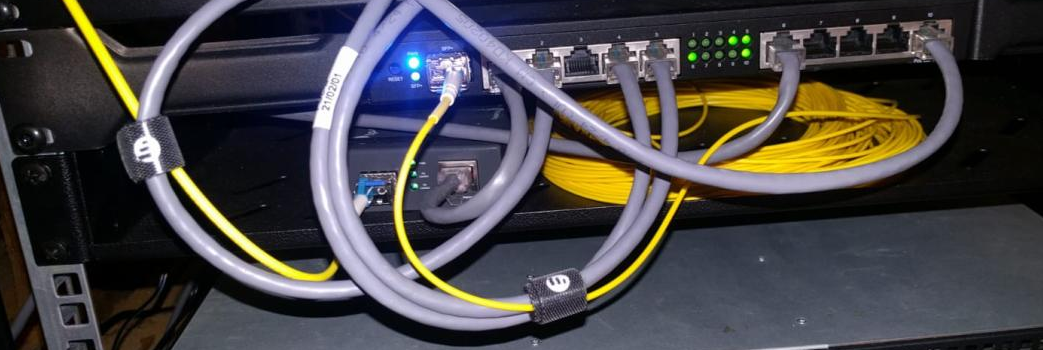
@radiant shell https://i.imgur.com/cvgoNT7.png
 thick minnow
im looking at upgrading all my network gear to 10gb soon
radiant shell
tame carbon
one yellow fiber, and there's like 10+ devices on other side
radiant shell
that came in this which i got for $20
tame carbon
100M or gigabit?
radiant shell
only 96 ports of gigabit
tame carbon
and those ports? SFP+ ?
thick minnow
poe enabled
tame carbon
@thick minnow you only really need 1 core router with a single 10gbit port
and a switch for 10gbit/s
That's what I did
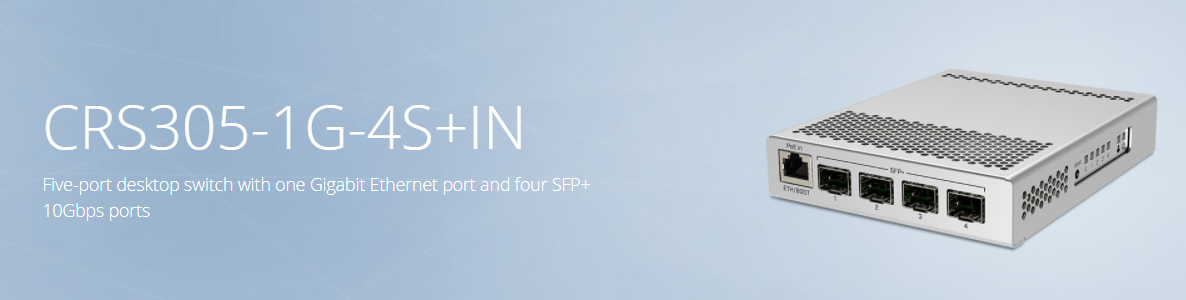
This is the switch ^
radiant shell
just sfp
tame carbon
@radiant shell what point is it if you have 96 gigabit ports
if you can't even have a highspeed uplink
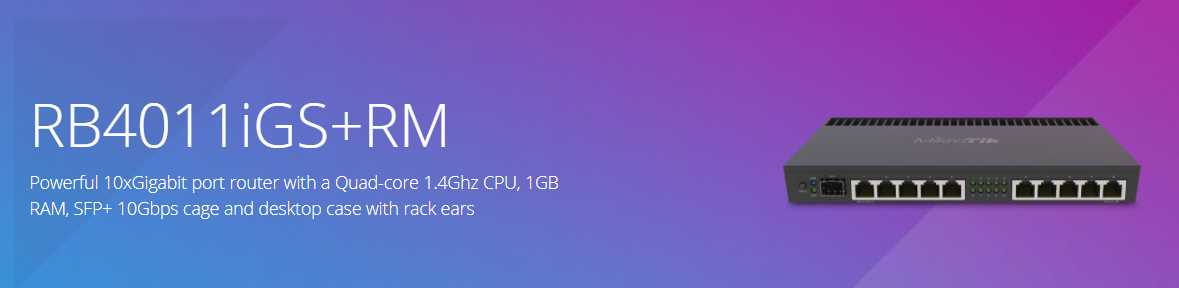
router ^
thick minnow
i know, but my street is getting a 4-10gb firber soon
radiant shell
cause you bond 24 of them... lol
tame carbon
@radiant shell oof.
I've never, used bonding
Its finecky, not every network protocol is a fan of it
radiant shell
you could get sfp+ modules for the chassis so it depends on your use case
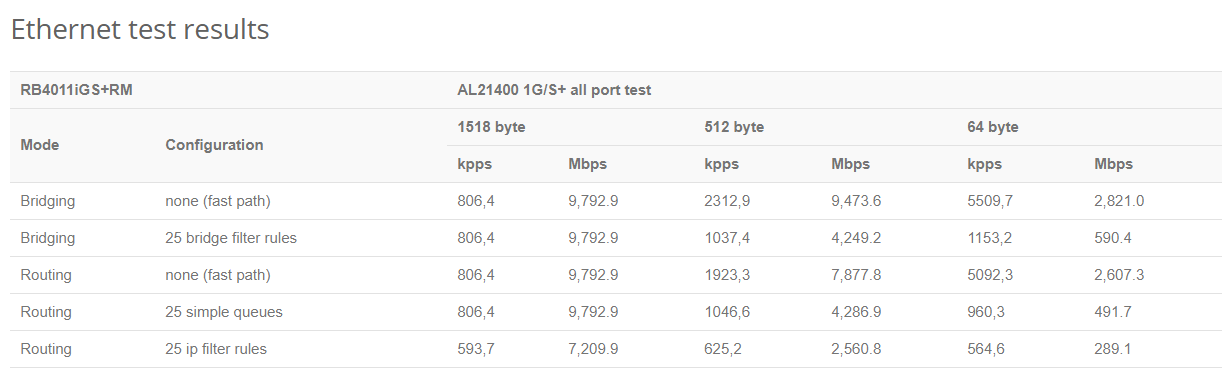 tame carbon
@thick minnow do some reading up on mikrotik before you invest in them
configuration isnt as intuitive as with consumer routers
I think its easier to use, if you know what you want to do on your network
consumer routing gear lacks heavily in features
radiant shell
they made bigger ones aswell
tame carbon
@radiant shell damn.
thick minnow
i do alot of 300-500mb+ uploads
tame carbon
That rs-232 port though :D
thick minnow
dam
tame carbon
I have one of those RJ45 console cables for my mtiks
but I dont need it usually
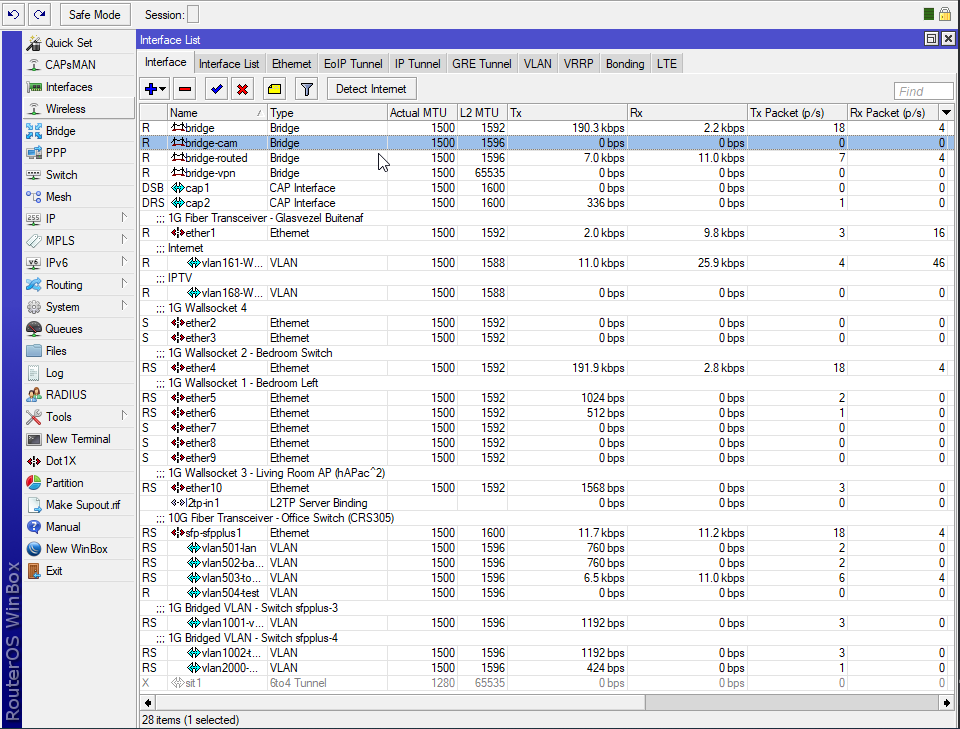
@thick minnow that first image I sent, two yellow fibers, are where all those ^ vlans are
thick minnow
okay, think im going to try and get a second ont soon
then try and get isp to setup as 1 down 1 up
radiant shell
good luck with that one Jace
thick minnow
well i know they can do it, my cable has 2 lines on it(sep)
i can run 2 connections just the ont is the limiting bit
it's caped at 1.1G
i work from home so i should be able to get the ont upgraded
tame carbon
about 100mbit/s of my network speed is shared with two companies
they get their public IP from my router, and have a 50mbit rate limit
radiant shell
do they pay you? have you read your terms of service from your isp?
radiant shell
fair enough
tame carbon
be it, hosting services on them
@radiant shell ISP only gets picky
if I dont use the IPs
I have a /29 from them
thick minnow
do they get nasty on fair use policy's
radiant shell
really? did they just disconnect you?
tame carbon
tame carbon
"got away with it"
xD
what point is it in offering high bandwidth
if you don't allow someone to use it
radiant shell
got away with it meaning, they dont care
thick minnow
yeah
tame carbon
@radiant shell ISP called me up, when I didnt properly firewall my DNS server on that /29
Was publicly accessible
oops xD
radiant shell
im sure they would
tame carbon
but that tells me
that they don't block ports
they did however, nullroute my /29 until I resolved it
radiant shell
they shouldnt on a commercial plan
im on a residential plan with a static ip with no port blocking or anything
thick minnow
only time i get a call from my isp is for feed back now days
tame carbon
@radiant shell thats the very least you can ask for. nice
radiant shell
its still only 100mbit down and 40 up
tame carbon
better than I had for many many years
4/0.6
ADSL2+ on a 4.5km line
4.5km, on old wires mind you
so if it rained, network speed went down
thick minnow
i remember my adsl2+ never going back to it
tame carbon
ADSL still more reliable than coaxial in most cases
Shared medium is stupid
Same thing with these ISPs laying out GPON fiber
its so stupid
thick minnow
well i went from 8-10mb on adsl2 to 1000/500
tame carbon
noice
I already pay a lot for 250/250
no need for me to go higher
peering is expensive
thick minnow
for me the firber istall was free
tame carbon
same
Once you get fiber, the "price" of the internet, isnt so much the fiber optics
but the peering that they have to do, to give you that speed
those deals with other networks they make, cost a lot
radiant shell
if i need to do anything high bandwith i just do it work, we have a 10gb link
tame carbon
@radiant shell I have 1gbit/s to my ISPs colocation datacenter
wider internet
250
This is very very nice for things like updates and software :D
radiant shell
we have 40gbit to our datacenter colocation and then 10gb to wan
tame carbon
I have access to a debian and ubuntu mirror @ 1G
radiant shell
my work had fiber installed to the datacenter where we have a half rack
tame carbon
one fiber is faster than the biggest comb of copper can ever be
with WDM limits are virtually nonexistent
@ 200gbit/s per wavelength and 96 channels
thats what, 18Tbit/s ?
radiant shell
we have a second 1gb backup link over wavelength to a localhosptial with a rack there that then runs over fiber to a different datacenter and the 2 datacenters have a fiber linkbetween them so its very difficult to take us offline
 radiant shell
they tested signal wavelength fiber last month at 180tbits
tame carbon
two paths to AMS-IX
the amsterdam exchange
its nice cus Serverius has only recently started operating for FttH
radiant shell
my works isp backbone. red is other networks
tame carbon
and they only have business customers
@radiant shell being able to pick up a phone, call helpdesk and get a person on the phone who speaks jargon, is such a step up in the world.
DSL providing ISPs know jack shit about networking
radiant shell
we have a direct connect into our aws virtual private cloud. none of this vpn rubbish
radiant shell
yea thats most people
tame carbon
though you dont notice a performance drop
the router has accelerator chip
for 2gbit
radiant shell
yea vpn works but its less things to worry about with the direct connect
 tropic jolt
Hi all! Is there anyone that can help me via DM? Got quite a ongoing networking issue that I need help with 😦
 waxen saddle
Just ask here.
tropic jolt
So In was hoping anyone could help me. On a wireless and wired connection I randomly getting a giant lag spike for 10-20 seconds which instantly kicks me out of any game or lags me during a zoom call which can be quite frustrating. Not really understanding why this is happening as I have a very good connection. Would anyone have any ideas or be able to help me? We do have wireless boosters in the house
tropic jolt
@unborn sluice ?
waxen scroll
@unborn sluice ?
tropic jolt
Can anyone help at all?
unborn sluice
@unborn sluice ?
 wary sequoia
what’s the difference between vdsl and fibre?
unborn sluice
Copper and light
rocky badge
@waxen scroll @clear igloo oof Teslas use underscores in the hostname https://blob.rocks/3U41Eja72A.png
 wary sequoia
so... is there a significant difference! the ISP at my friends house said it was fibre optic, but i just checked and it’s VDSL.
rocky badge
Fiber to the Node
VDSL last mile
Just like how cable ISPs advertise "fiber network", Fiber to the Node, DOCSIS last mile
rocky badge
FTTH ❤️
waxen scroll
@rocky badge i was so pissed when ATT started doing FTTN, might as well not do it at all. it didnt help them beat comcast
rocky badge
😂
 edgy pasture
Cat 8 exists, but is there any equiptment for 40gb rj45
rocky badge
just do fiber/DAC
edgy pasture
its fine
I was just confused
I am about to put ethernet in my walls, and cat6a vs cat7 vs cat8 are not supper different in price
its like 200 more for cat8
vs cat6a
clear igloo
I've heard no rumblings of 25Gbps copper switches (which Cat8 also supports) let alone 40Gbps. If it's going to be SFP based those are going to be some SPICY connectors because even 10Gb copper SFPs run stupid hot compared to fiber ones and you're not supposed to (or even able to for some devices) run them side by side
edgy pasture
would cat6a get me 10gb
clear igloo
Yes
edgy pasture
and any concern over running 2 next to each other
clear igloo
Cat6a is rated for 10Gbps at the full 100m
No concern running 2, if it were 10+ next to each other I would suggest maybe thinking about shielded but even then meh
edgy pasture
What would cat7/8 get me
the real cost is install for me, cable cost isnt a big deal
clear igloo
Nothing, 100m is the limit period for RJ45
Cat7 is also not a TIA/EIA standard, only an ISO standard, so it doesn't have any electrical requirements to adhere to so you risk much wider variation in quality
Sure it might be shielded better (or should be) and you might get good quality if you source from a reputable vendor but it doesn't offer speed or anything tangible over good Cat6a
edgy pasture
Who is the goto vendor
also I have not found anyone who I could pay to do this for me
I guess I can do it myself
but any rec on that
clear igloo
monoprice has always been solid for me when it comes to copper, fs.com for fiber stuff
 steady creek
For what it's worth monoprice just issued a recall on one of their spools that's a fire hazard. Which I installed a few months back ☹️.
BUT, they are asking me to call them and schedule an inspection and replacement where someone will come re-do the runs I've already done and replace the remainder of the spool.
Not sure how good a job they'll do but hopefully better than I did haha
edgy pasture
I wonder if I can just pay them to do the runs
oh also for POE anything I need to look for
clear igloo
If you see any cable that mentions CCA or aluminum being used, run. Some will say "pure copper" but always double check reviews to make sure they aren't pulling a fast one and just marketing as such.
Beyond that it's mostly down to Ubiquiti using Passive PoE vs active PoE but most stuff outside of them is all active PoE (802.3at/af/etc)
rocky badge
24V Passive is mainly Ubiquiti's "operator"
UniFi lineup is all 802.3at/af/bt
it's still annoying tho
tropic jolt
So In was hoping anyone could help me. On a wireless and wired connection I randomly getting a giant lag spike for 10-20 seconds which instantly kicks me out of any game or lags me during a zoom call which can be quite frustrating. Not really understanding why this is happening as I have a very good connection. Would anyone have any ideas or be able to help me? We do have wireless boosters in the house
@tropic jolt Anyone help me on this?
toxic citrus
im getting the same issues and it's my ISP. a load of people on Vodafone have this issue for 3 weeks
edit: Ireland is where i live
hollow marlin
@tropic jolt what type of internet do you have? Speeds/DSL/Coax/fiber?
I've heard no rumblings of 25Gbps copper switches (which Cat8 also supports) let alone 40Gbps. If it's going to be SFP based those are going to be some SPICY connectors because even 10Gb copper SFPs run stupid hot compared to fiber ones and you're not supposed to (or even able to for some devices) run them side by side
@clear igloo Packet Pushers had an engineer on that is working on the copper SFPs development. There were able to push like 70-100gbps through shorter runs. Only problem is its like a 4u box which is 90% heat sink and required power in the 100s of watts. Not sure why they are spending time pushing copper.
clear igloo
Wow, I haven't followed packet pushers much but I'll have to check that out. I'm sure the power and heat dissipation was stupid high for that.
hollow marlin
I wasn't a fan of it at first after listening to Network Collective back when Russ White was still on but they moved to more in-development technologies over the past year.
 fresh copper
I just noticed that this channel now says no screenshots of speedtests! I remember when that used to be half of what people talked about
clear igloo
rip 😦
hollow marlin
Seeing the post-install cost between our GPON and AE, there is a reason only our business customers are AE
 clear igloo
Slap it
waxen scroll
@rocky badge slapp like davie504
rocky badge
Lol
little schooner
My ubit intel ax200 wifi adapter is toast. It is not able to reach download speeds over 340 Kbp/s based on fast.com's metrics. Funny how it has this problem 92 days after the return period....
@waxen scroll this is where intel should make their official desktop pcie version of their wifi solution so I can throw money at that instead of cheap and fuzzy alternatives
Never had an issue when I used their version of anything... except for the xeon cpu
Unless newegg sold me a customer return
 lucid flame
Anyone have a idea what a Wide Area Visualization Network Engine does?
 ornate jungle
@lucid flame do you mean Visualization, or Virtualization? Asking because Cisco makes (or made) Virtualization Engines. https://www.cisco.com/c/en/us/products/collateral/routers/wide-area-application-services-waas-appliances/data_sheet_c78-685554.html

Cisco
This data sheet describes the benefits, specifications, and ordering information for the Cisco Wide Area Virtualization Engine Data Sheet.
 glossy lintel
Hi i have an issue in my HP 15 laptop
 thorny vector
@glossy lintel What's up?
glossy lintel
i can't connect to my Wi-Fi it says u cant connect to this network
The Driver : Ralink RT3290 802.11
thorny vector
Have you double checked password?
glossy lintel
yea
glossy lintel
i searched in HP site and they said the problem is with Ralink with Win10 not HP
thorny vector
Huh. Let me look that up real quick
Alright. Have you tried deleting the driver, and pulling a new one?
 white heart
So I called through an electrician to have a look to wire up my house with Ethernet he said it requires cutting a lot of drywall and is not feasible

thorny vector
If you have carpet, you can do what I did, and run it underneath
white heart
Unfortunately most of the house is hardwood
edgy pasture
Hmm house has coax running
Maybe i can use it to fish rest
Unless there are ways to do 10gb over coax
You can run outside
@white heart
I have seen people run in cormers
Outside
Powerline is good up to 50mbs
white heart
ah i see thats interesting ye i will look into fishing it through coax although from what he told he said a lot of the wiring in the house is stapled down due to regulatory rules or something
but i think gigabit should be fine over coax right
telus is ass though and they taking a month to get the fiber drop and all that setup
 topaz quarry
fire codes usually strictly require wires to be stapled to the wall yes
gigabit over coax is fine
waxen saddle
Any idea why fire code requires that? In the event of a fire, is the cable going to helicopter through the wall if it’s not stapled? I’ve wondered about this the past couple of years.
topaz quarry
on the notion that burnings cables come through the walls
they can emit fumes/noxious gas as well as whip
the type of cables they put in between walls can genuinely create permant damage to the human body if flung hard with moderate force
thick minnow
ight i got a question, I have 1gig fiber but am only getting 350 download yet 950 upload? What could i be doing wrong? When i "Speedtest" the att modem through their app it gets 975ish both ways
ornate jungle
How are you running a speedtest when you're only getting 350mbps download? Asking because web browsers aren't accurate after surpassing around 300-45mbps, depending on what you have running on your computer, how many extensions you have in the browser, and your hardware itself.
If you're testing over a wired connection on PC, use the official speedtest app for Windows. Could also be what PhoenixFlower is noting below. https://www.speedtest.net/apps

Quickly and easily test your internet connection with free apps from Speedtest—any time, on any device.
topaz quarry
your modem has more upload then download links?
just use an actual speed test application
thick minnow
no my pc
unborn sluice
so where are you measuring the 350?
thick minnow
website lemme download the app rq
topaz quarry
so as a cool reference if you were downloading an actual file
most of the world supports 220 most of the time
unborn sluice

thick minnow
yea ik
topaz quarry
only at google services do i actually get gigabit speeds
but sadly
i self host everything now
so i no longer use google services
unborn sluice
now that I think of it
thick minnow
still aint going above 350
topaz quarry
you mean like ookla?
thick minnow
i got 352 download 742 upload
unborn sluice
you mean like ookla?
@topaz quarry yea, but for self host
topaz quarry
oh iperf has a container ui thing
i'm sure it does
it has to
someone did
somewhere
topaz quarry
so you're getting 352 from the speedtest?
like form ookla?
not a file transfer test
thick minnow
yea on the windows app 352 download 742 upload
but like i have been able to get 950 950 before...
thick minnow
its been like this for a solid month
topaz quarry
then file a support ticket
thick minnow
ight
 wide estuary
Guys im thinking about buying edgerouter x and making my existing isp provided router (2 routers) as ap.
Will sqm and qos work on devices that r connected to dumb ap?
 mint viper
hey guys i need some help
i am running freenas for a nas and i wanted the cache limit of writing to be increased
i have 8gb ram and it shows about 6 or 7 gb free
as in omv everything is pre config for cache the write onto ram
peak cloak
@wide estuary depends on if it the AP's support 802.1p and I don't think the er-x is powerful enough for sqm
if you flash openWRT on the then it would probably work
wide estuary
Is there's a way to know whether router support it or not?
peak cloak
What router is it?
peak cloak
because how priority works is that the the packets would be tagged with what priority it is. the 802.1p standard defines that
wide estuary
So r there any cheap routers that support 802.1p that I could buy instead of spending a lot money in ap?
peak cloak
why not get an AP
wide estuary
Since over here it costs a lot, more than edgerouter itself
wide estuary
Yup and its out of stock in Amazon....
I already tried searching it
Eap110 is available tho
peak cloak
hmm
wide estuary
Does it supports 802.1p?
wide estuary
Does 802.1p mean qos?
peak cloak
that's the standard of how different devices communicate
wide estuary
I can't seem to find it in any router specification
The 802.1Q standard defines a system of VLAN tagging for Ethernet frames and also contains a provision for a quality of service (QoS) prioritization scheme known as 802.1P
This is what i get when i google it
peak cloak
for example the AP is configured so your phone is high priority, so when your phone sends a packet the AP would tag it as high priority and send it to the router. The router understands 802.1p so it makes sure it's high priority.
802.1q is for vlans
wide estuary
Ahhhh
peak cloak
I would be surprised if a higher end router/AP didn't support it, it's the cheap consumer stuff to watch out for
wide estuary
Sorry if im asking too much but can u find any cheap routers that supports it?
And does eap115 support 802.1p?
wide estuary
Can u confirm it? I can't seem to find any mention of 802.1p in its specification
peak cloak
let me check
wide estuary
Thanks
And does tl sg105e switch could support qos and sqm features?
I'll flash edgerouter if I need to
peak cloak
? You don't want to flash an edgerouter
wide estuary
I'll
For sqm
Everyone ping spikes a lot whenever someone is downloading something in our network
peak cloak
don't, you will loose a lot of features and hardware offloading
wide estuary
Well u said for sqm i need to flash it right
So no one gets ping spikes when someone is downloading or watching Netflix
peak cloak
no, I meant for the the routers you want to be AP's
wide estuary
Wait i can flash opemwrt to tenda n301?
peak cloak
idk
wide estuary
Im confused now
wide estuary
U first said edgerouter x isn't powerful enough to support sqm so i need to flash it
wide estuary
Well my speed is 80-100mbps not 150 so i think it can handle it idk i have no experience with these stuff
wide estuary
Well now all i need is 802.1p supported aps
Also should I get smart or unmanaged switch?
peak cloak
smart
wide estuary
So sg105e supports sqm qos?
peak cloak
Idk, I don't think so, but idk much about sqm so idk if it just needs to be on the router or it needs to be on the whole network like just qos prioritization
and about the EAP115 there is no mention of 802.1p anywhere, on any of the AP's so I think it might be there, idk. They advertise WMM QOS (WiFi multimedia) so there is some sort of QOS
wide estuary
Hmm ngl I didn't expected setting up network to be this harder
wide estuary
And I don't understand anything...
peak cloak
me neither
never messed with QOS
I've done VLAN's, servers, DNS caching, but never touched any QOS
wide estuary
Tbh all I want QoS is to not get any ping spikes because of other people in my house
waxen saddle
QoS is only really going to affect upload as you can’t control the incoming packets
wide estuary
At least its better than my cheap router
peak cloak
i've never had that issue so I never bothered with it
it could be your older router? idk
your on wifi?
wide estuary
Nope ethernet
I've been following this guy tutorial

In this video I show you how to setup an Edge Router X and a Unifi Access Point. The ER-X is especially interesting for gamers as it supports SQM, which helps to prevent ping spikes caused by congestion.
Giveaway ended on 2017-12-17
► Support Battle(Non)Sense:
https://www.pa...
peak cloak
wait why is he port forwarding port 80
rocky badge

 chrome cave
I recieved 3 of those blade boards, anyone knows how or what kind of motherboard it requires? Tried looking on the internet bur couldn't figure out
The model is SBC87862 Rev: A2.1
misty terrace
some kind of embedded industrial thing
it plugs into its backplane and it provides pci or maybe even pci-x
actually, seeing the memory slot notch, it looks like ddr3, so likely pci express too
chrome cave
Yes, it does look like ddr3
Do you think there's any chance finding a board that it will connect to?
misty terrace
looks like it's from axiomtek, but being dual lga1366 it's very likely eol
chrome cave
What does eol mean?
misty terrace
end-of-life
misty terrace
it was something like these https://www.axiomtek.com/Default.aspx?MenuId=Products&FunctionId=ProductInfo&Cat=188&C=PICMG+1.3+Full-size+SBC
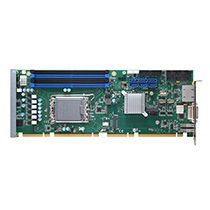
Axiomtek
Axiomtek's PICMG 1.3 full-size CPU cards (338 x 126 mm) offer high performance PCI Express slot as interface to the backplane, and improve I/O bandwidth and graphic performance from the original PICMG 1.0 specification.
misty terrace
it should be compatible with their picmg backplanes
something like this https://www.axiomtek.com/Default.aspx?MenuId=Products&FunctionId=ProductView&ItemId=922&C=FAB113&upcat=274
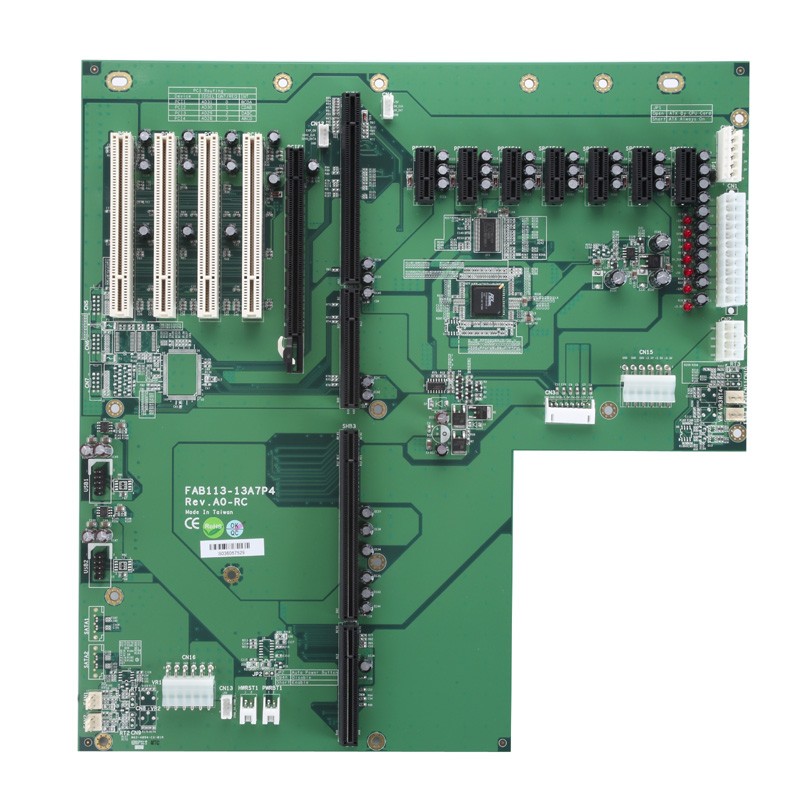 chrome cave
Oh I see, do you know by any chance whether it requires special PSU? It looks like it needs regular
misty terrace
unless it needs some weird voltage, it should work with atx
chrome cave
Cool, thanks a lot!
hollow marlin
I've been following this guy tutorial
This "smart QoS" is no more than a policer that caps TCP. Also people don't actually know what bufferbloat is and drives me nuts
rocky badge
oof
little schooner
@hollow marlin bufferbloat meaning the router is queuing up too much because the lack of available bandwidth to send out the packets?
I'm dealing with that problem myself. My upload speed is way too slow and when I'm uploading to one drive, theres huge latency spikes
peak cloak
found this nice illustration:
 rocky badge
@hollow marlin @peak cloak Any good way to test bufferbloat?
peak cloak
the guy in the video said to use this https://www.dslreports.com/speedtest

DSL Reports
Use our NEW speed test tool to test how fast your broadband or mobile internet connection really is. Read broadband news, information and join our community
rocky badge
ooh, ok, I swear they took that down for a while
rocky badge
Yeah
oof it doesn't even get to gigabit https://blob.rocks/GB8U3pOWVj.png

but 👌bufferbloat
compared to Spectrum
When it was SHIT
hollow marlin
@rocky badge Bufferbloat is when queues get too deep and begin to queue traffic far longer than it should and can begin messing with TCP. DSLreports and Laurence like to claim bufferbloat is everywhere and there is a fix for it but what you are "fixing" is not bufferbloat
rocky badge
Hmm

My ISP hosts a dslreports speedtest server
Nashville, TN, USA (Twinlakes coop)
hollow marlin
These "fixes" are nothing more than policing below your paid bandwidth. What DSLreports says is buffer bloat is your shaping/policing kicking in for the speeds you re paying for
That is not bufferbloat
peak cloak
hmm
 hollow marlin
The queues for customers are very small where bufferbloat is 100s ms deep which telcos do not do at a customer level
rocky badge
55.78s Total megabytes consumed: 2763.3 (down:1205.4 up:1557.9) 😂
in that short test
it used 2.7GB lmfao
hollow marlin
That graph is misleading. You can see the policer on download and the shaping on up with the few ms of jitter. Typically at the customer handoff is just policing with no queue which is why you see little jitter. You would never have bufferbloat at the handoff.
Upstream however, if a link is congested and the queues are configured too deep then you can have legit bufferbloat. That you cannot fix no matter what they say


 toxic citrus
I'll take my 2mbps, thank you very much
clear igloo
Blink all the lights! Data goes brrrrrrrrr
rocky badge
😄
waxen scroll
anyone else triggered that theres no eth0 ?
little schooner
I'd gladly take fiber service but CONcast scared away the competition
I'm waiting for that starlink beta test letter so I can give them a shot
waxen scroll
fibre*
waxen saddle
Be sure to let Comcast know you are dropping them because you don’t have fiber
rocky badge
😂
hollow marlin
Unless you can get your entire county/city behind dropping it, CC couldn't care less
 gusty summit
hey is it possible to connect to 5 ghz wifi if i have an 802.11 b/g/n wifi card?
tame carbon
802.11n should support 2.4 and 5GHz
though not all 802.11n adapters have support for 5GHz.
 wary fog
so this is the place to ask about NAS recommendations
wary fog
cant find it
misty terrace
@unborn sluice now you take care of this
unborn sluice
@misty terrace I think you now this field better than me
misty terrace
uh, not really
wary fog
ok, thanks anyway
 tiny tree
hey guys, im trying to find a good modem/router
my family needs wifi not really a speed requirement and i'm trying to get something good for ethernet because I play competitive gaming, any recommendations on what would be good?
tiny tree
do you have a recommendation of like what product i should get?