#networking
1 messages · Page 216 of 1
 hollow marlin
I would have gone EX4650 over QFX5120. Not a fan of some of the sytanx/limitaions on QFX
 jaunty talon
But EX4650 is just SFP(+/28)?
hollow marlin
Still rather negotiate optics cost than deal with QFX
jaunty talon
Would you then pull fibers in the whole office and have fiber patches in the whole office?
 molten swan
Slightly smaller scale than 600k employees, I am trying to get better wifi speeds into my bedroom for zoom calls, I can get around 300mbps near the router, but when I am in my bed I can only hope to get around 120, and the signal drops very regularly. Should I upgrade to a mesh router, or just get a range extender for the upstairs?
jaunty talon
and what would you do if you get a machine with just 1G?
hollow marlin
Why would you need fiber, just get coper SFP+
jaunty talon
EX4650 would not have scaled in our case where we want 10GBase-T to workstations and 100G links between access and in this case spine
That's just nasty :D
@molten swan we're not 600k employees. :) we're around 200. but this network (equipment wise) cost around 600k USD
jaunty talon
I hope that I dont have to do anything to it until we move office
Then it has been worth it 100%
molten swan
I suppose its scalable as well
jaunty talon
indeed
That's why I went this path!
There are some limitations, for instance if I would have to add 1x 100G link per switch, then I would need to extend the current spine switches, but then again if that happens it's for the better! :)
jaunty talon
Yeah, I don't see it happening, but then again I tend to end up in these positions more often than I want to with things outgrowing what I have built :D
jaunty talon
It's good also, 400G optics will be cheap in 3 years ;)
 waxen scroll
xD
jaunty talon
@waxen scroll manage as in central management?
waxen scroll
yes
jaunty talon
Tbh I havent cared about it, my setup is 99% ansible
But what it seems like is that a lot of the future development for that from Juniper side will end up in the Mist platform
And since the office network is static dont really have to care about 802.1x and stuff
And our PS/XBOX devkits does not like 802.1x :D
hollow marlin
Juniper's management is Sky Enterprise but now they pushed Contrail for central mgmt/SD-WAN
Mist is integrated within both but still separate in terms of mgmt. We are moving from Sky to Contrail in the next few months . Its nice but I avoid it
jaunty talon
The only thing I dislike with Mist is the lack of IPv6 implementation everything else is super neat!
hollow marlin
We are having good luck with Mist. AI was garbage at first but its better than a year ago.
waxen scroll
wow ipv6 in an office?
waxen scroll
ive tried in 3 offices and it never fully gets up off the ground. i usually get laid off right before it touches prod
lol
jaunty talon
haha
There you go, traceroute from my linux machine at office :D
I realize tho that only thing saying it's IPv6 in this case is PTR's of AS1299 routers :D
waxen scroll
i cant just decide to do it cause it can break the company if something works unexpected
needs tons of POC from all teams
hollow marlin
I've deployed v6 through most our network but its still only single digit business customers that are using v6. Pretty sure most those too are just in use because the customer FW had it enabled and they don't know they are using it
jaunty talon
The upside for me is that all my colleagues agrees with me when it comes to ipv6, we need to have ipv6 in order to make the best products!
waxen scroll
the biggest v6 i did was in a test lab that was build like production... so it was decent size
just never escaped the lab
😤
theres always people above me who say we dont need it (but its obvious they're scared of it)
 peak cloak
speaking of v6, anyone have any good resources for learning it?
waxen scroll
i think CCNA teaches it now?
jaunty talon
RIPE as good stuff for it
waxen scroll
i used a cisco book on ipv6 but i dont remember it
jaunty talon
But also https://ipv6.he.net/
waxen scroll
@jaunty talon are you natting v6?
waxen scroll
thats how i built mine, but the rules for what you can advertise to providers really suck
i'd have to assign huge blocks to smaller sites to not nat
waxen scroll
my needs were multiple datacenter w/ internet egress but then some local sites would do local internet instead of MPLS... but its been 5 years+ now so i dont remember what size prefixes i was doing to make it compliant with the rules of the providers
jaunty talon
Ahh, I have the luxury that all my infra is interconnected with DWDM
hollow marlin
The "standard" is supposed to be /48 but many accept /32
waxen scroll
so to not NAT at all via datacenter or local internet I would need to follow the rules
jaunty talon
I am not aware of anyone that wouldnt accept /32 if it has ROA/RPKI/IRR records correct
waxen scroll
honestly though lets say local internet fails... more than likely the users would notice and drop connections while routing gets figured out... also theres the firewall session issue... TCP out of state
hollow marlin
Thats why I mentioned what the standard should be. RPKI has finally kicked off over the past year
waxen scroll
so its prob best just to NAT for local internet
some providers wont even do BGP over those circuits
its rarely DIA
@little schooner i dropped a new term. are you listening?
@hollow marlin he likes sniffing packets
lol
@jaunty talon last job was literally like "yep, lets proceed to prod. lets do user networks first" and 2 weeks later "ooooohhh sorry. we shipped all of IT to india"

lemme know how that works out for you
jaunty talon
hahaha
waxen scroll
how dumb do you have to be to ship jobs when all the people you know at other companies who did it moved back. oh wait. wall street thinks per quarter
jaunty talon
I am the one that decides if we do ipv6 or not, so I am 100% sure it will happen here :D
that's true tho, so many companies outsources for the wrong reasons :D
waxen scroll
generally they do operations for the most part... this company went allllll in
shipped engineers
 cedar igloo
anyone able to help me boot into an OS on my Supermicro Server? I have been through the installer for XCP-ng, rebooted and am always shown the EFI shell. What are some common reasons for this that i can check?
 waxen saddle
Sounds like it's not installing. I'll be watching your issue carefully because I have the exact same issue on my Mac Mini with XCP-NG. The fun part is I basically install blindly because the video output show's maybe 1/4th of the actual screen. (everything is a colored pixel - absolutely nothing is readable or discernable)
cedar igloo
just made an ESXI usb and am seeing if that works
These are the only boot devices... SanDisk is my installer. Do I need to somehow format the other boot devices?
cedar igloo
esxi install didnt work. currently creating a live Ubuntu usb so try to format the drives. If im going off in the wrong direction, please let me know
 tame carbon
"didnt work"
@cedar igloo care to elaborate?
are you using UEFI
?
If you install esxi, you have to enroll the key for secure boot
cedar igloo
I previously was using ESXI, decided to change to XCP-ng (during the install i accidentally enabled software raid and cannot disable this) and then tried to install ESXI again, which just put me to the EFI shell
tame carbon
mh. typically. If you install an OS under UEFI. you setup one 500MB partition to be used as EFI
the installer then, asks for a one-time password
after the installation, you reboot, and the bios should ask for the one time password to sign the key
this makes sure, only that operating system can boot
security reasons
if you have some linux experience, you're better off just ditching vmware and either going for a linux/kvm host or install proxmox
cedar igloo
thats my plan, which is why i wanted XCP-ng
i just tried ESXi as it was a spare usb on my desk
cedar igloo
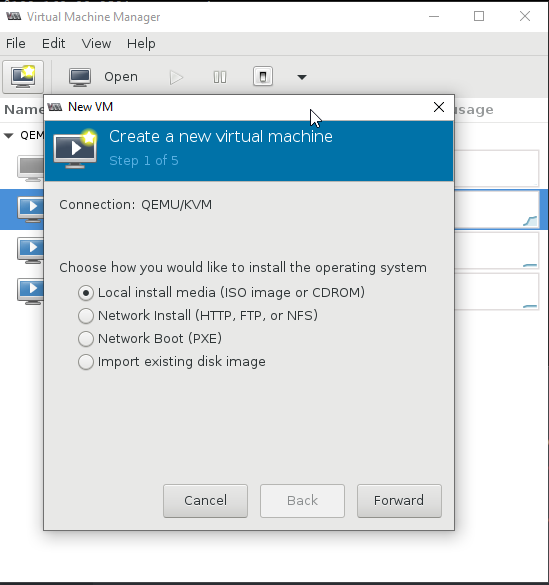
does it have clustering/resource pools?
 cedar igloo
the host os overhead is my main concern for something like that
tame carbon
mh, I never noticed any overhead
debian needs maybe 100-200MB total
everything else can be used by VMs
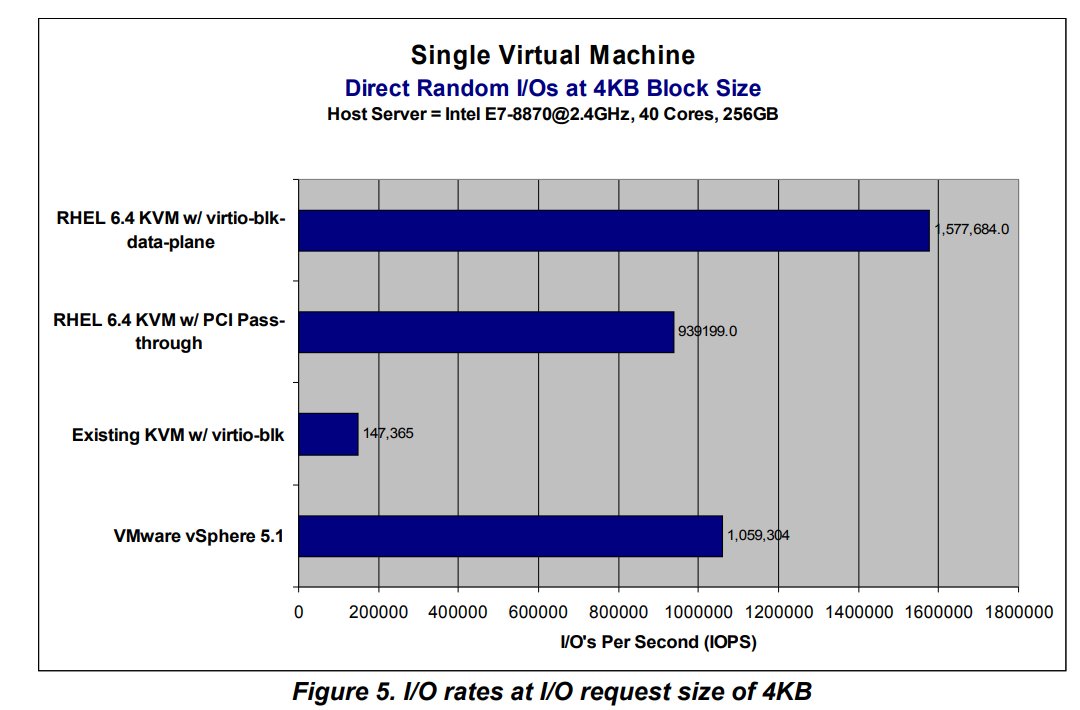
kvm is same thing that powers proxmox
kernel virtual machine
boo.
discord doesnt even do ftp://
Here's some more tests
 little schooner
@waxen scroll DIA meaning what?
and does this sound good for a checklist item?
2. Guest VM hardware resources are configured to meet minimum requirements of its installed guest OS.
tame carbon
@little schooner have you got defaults?
because I'd say: minimum requirements for the operating system, and its target software
allocating just the overhead, seems a bit.. dubious
waxen scroll
@little schooner you only need to validate whats directly affected by your change
if the change is not messing with VM settings, no point in checking
little schooner
Oh, no, this is a checklist for the professor to follow because he asks me what needs to be certain before it is uploaded to esxi
And to repeat it all the time isn't the best method
@tame carbon hmm good revision
tame carbon
@little schooner add the usual steps
user account configuration
firewall, and running services
verify network functionality
check memory usage, and note system overhead
more vms = more overhead
this is all hypervervisor ^
little schooner
@tame carbon oh, for the hypervisor, he doesn't really care about it
tame carbon
vmware has things like
ssh
running after setup
its common to disable this, if you use only the vSphere client
little schooner
I see
tame carbon
esp if you have a public facing server
you need to double check firewall configuration
its in settings in vmware
xD
idk, I just learned vmware by using it
its quite intuitive
little schooner
He said this was okay
little schooner
right? lol
tame carbon
@little schooner never let vmware do cpu core handling
but thats only because
the one system that i've used vmware on
was for a multiserver minecraft network
because IPC is quite fast
and with minecraft, you just dedicate cores to a server
waxen scroll
@little schooner the new term was TCP out of state
little schooner
@waxen scroll gotcha
@tame carbon you can pin cores to specific vms in esxi?
I'd like to do that for just 2 VMs that are running there.
2. Guest VM is exported in .ovf format
those make sense yeah?
dont mind the numbers, they shouldnt even say 1 and 2
tame carbon
@little schooner if you go to cpu allocation
you can click advanced core configuration
long time ago
dont remember
but you can do things like
little schooner
i can check now
little schooner
thats flexible
tame carbon
it not a bad idea to reserve half or one entire core to the host OS
little schooner
not even my firewall lets me do 44-50,8080
tame carbon
mikrotik 
little schooner
Ill have to check them out again
@tame carbon
oh shoot so its that empty textbox down there
I can type in those numbers
 little schooner
tame carbon
little schooner
tame carbon
basically
this is if you have two graphics cards
and you want to enable passthrough
the MMU = Memory management unit
each virtual machine has its own virtual address space
the MMU maps this using lookup tables, that point to the address on the physical memory
without this, the OS has to do this, which is very very slow
little schooner
it sounds so complex
tame carbon
its how VMs work
xD
like, I learn this stuff from the ground up
the fundamental idea
and then you have a number of implementations of this
like VMware
or KVM
little schooner
cool stuff for sure
tame carbon
but IOMMU
is for things like DMA
over network
if you have an NVMe drive as a NAS
its so fast that the operating system has difficult time keeping up with the IO load
little schooner
that reminds me of intel optane
tame carbon
with DMA, the OS just tells the nvme drive to make the data available on the databus
and then the network card can immediately stream this directly from the databus
it maps some virtual memory for this
little schooner
pretty cool
tame carbon
it skips having to load it into cache, then out to memory
so essentially
you can have
20gbit/s
of transfer
and cpu load is <10%
little schooner
I love to see that
tame carbon
hardware acceleration
xD
but this is what vmware doesnt tell you
is how it actually works xD
little schooner
yeah. the inner workings of it.
also....
how can i reword this:
1. The sign-in account used to access vCenter Administration console is permitted to perform actions on the destination ESXi host(s) and destination datastore(s)
What I'm trying to say is, "Don't continue to upload your .ovf to esxi if you don't have permission and get errors in the process"
To avoid any potential errors, do X before Y
Sign in to privileged account so errors dont occur
cedar igloo
im lost with this server stuff... cant install any operating systems. they all go through the installation from a USB and boot into EFI shell 😦
waxen scroll
you just want esxi?
cedar igloo
pretty much anything other than the EFI shell
tried XCP-ng, Ubuntu and ESXI
all just go to the shell
waxen scroll
did you use a tool like YUMI to format the USB and put an iso on?
waxen scroll
for esxi i usually use YUMI with "other" iso setting and ask for ramdisk
seems to work best on my dell
little schooner
@waxen scroll how can I say this better? 14. The Guest VM powers on and shows a display
im trying to say that it shows a working picture
like they expect it to show Ubuntu loading screen if its an ubuntu os
or that they see a windows logo
conveying that its working
waxen scroll
shows that the operating system booted ?
little schooner
that works.
cedar igloo
just reset the BIOS settings and it now keeps saying there's no OS on the drive & i need to change the boot drive
 rocky badge
@waxen scroll @clear igloo So my school changed how they're doing off site filtering
it's just a proxy lmao
Telling FF not to use a proxy
shows my guest WAN IP
Telling FF to use a system proxy shows a school IP
waxen scroll
y tho
rocky badge
Nah
They had a VPN before
But ofc that thing died
So now it's just a squid proxy
waxen scroll
but you need a vpn to reach it tho
rocky badge
Nah
little schooner
@rocky badge are they still looking for a scalable VPN solution that doesn't suffer such problems?
rocky badge
idk
waxen saddle
How are they changing the FF Proxy settings if it's not managed?
peak cloak
they aren't
FF by default uses what Windows is set to
but you can change it
@waxen saddle
waxen saddle
OH. hah. Makes sense.
little schooner
they are using the easiest solution by the sound of that
no extra policies needed
but they should be really doing it how my sister's school is doing. mitm and forced ca installation if you want to use your personal device, if they desire the control
waxen saddle
As a former System Administrator for a school, I agree. Any solution that can be bypassed, will be bypassed. Security-wise, every single student is a hacker that can't be touched by the law.
peak cloak
why is that strict of device management needed though, I understand if it's on the actual school network, but from home?
waxen saddle
The problem is two-fold. Legal liability (At least in the USA) and security.
peak cloak
Hmm, my school (in the US) does none of that
waxen saddle
You probably don't recognize it.
...and they may be fairly lax on things until an event happens.
peak cloak
I go to a school with many techy kids, things have happened in past years
rocky badge
They assume we're dumb as shit
waxen saddle
I'll admit that the "student=hacker" is a view I came up with myself. Many institutions treat kids as stupid when it comes to computers. But I took the complete opposite approach.
little schooner
Something may have happened in my school that made them require this policy or
maybe they realized the legal liability
I used to go to my sisters school
rocky badge
School used to do a full tunnel VPN
little schooner
and before they allowed everything like vpn too
rocky badge
but that died on the first day everyone tried to use the VPN at home at once
So they're just using a proxy now
waxen saddle
Split-tunnel VPN is a thing, but it's a bit more complicated to set up and not all VPN solutions support it.
peak cloak
someone hosted a halo server in the network lab once
waxen saddle
Nice.
little schooner
I was able to play an mmo game while in school during lunch period on school computer
waxen saddle
I ran a halo 1 PC server for a few years. I even went so far as to streamline a pretty solid way of hosting it on Ubuntu with WINE.
To be honest, I think schools should allow for that sort of thing.
Let the kids have fun using school resources to learn.
peak cloak
The thing is, that one was open to the internet
waxen saddle
How...
peak cloak
I ran a MC server at school, but that was only within the lab network, and could only connect to it via the lab AP
idk
he was 3 grades above me and pretty quiet
and I wasn't in the school when he did it
waxen saddle
Making it public would have required access to the firewall, which is a complete failure of the IT department if he wasn't working with them.
ah
peak cloak
or maybe some sort of tunnel, idk
waxen saddle
I was the admin who, after school hours during a school play, bumped up our 10mbit fiber to 20mbit so the kids could download steam games faster and take advantage of our agreement to not go over 10mbit for too long. (But we still could for a bit)
peak cloak
our school district operates an ISP as well
waxen saddle
Ouch.
peak cloak
400 students here and like 20 teachers
but in the direct it's much higher, they probably have a VPN tunnel between all the campuses
rocky badge
Us?
peak cloak
yeah
rocky badge
it's just layer 2 between campuses
peak cloak
or maybe they have their own dedicated fiber, idk
rocky badge
We do
peak cloak
wifi is capped at 20 mbps and is sometimes really slow even though speedtest is fast
rocky badge
They basically removed the rate limits now 😂
peak cloak
school is going back in 2 weeks, but at half the capacity
waxen saddle
What Wifi AP's are you using? I've been eyeballing the Ruckus, but I don't have anywhere to install it. lol.
 peak cloak
what's that? I'm still a noob
peak cloak
ah
I may get it setup on my lab network
seems cool, DPI on the ERX slows it down a lot
are you virtualizing it or is it on a dedicated appliance
waxen saddle
It does? I have DPI on my USG and there's no performance impact that I can tell.
peak cloak
Er-X is less powerful I think
rocky badge
ntopng? running on the pfSense
waxen saddle
WOW. How did I miss this? Unifi has time-based graphs now instead of just "dropped packets" that only tells you packets dropped some time in the infinite past?
ah. figured it out. I never scrolled down on the dashboard.
rocky badge
omg wireshark is so slow lmao
waxen saddle
@rocky badge Do you work with Multicast on Windows?
little schooner
@rocky badge so equally shared, 10000 school clients is like 400 kbps from the 4gbps pipe?
rocky badge
well
not all of them are gonna be using the internet
that 8000 students includes k-12
so not every k-5 will be on at the same time
little schooner
yeah
waxen saddle
Are you wanting to move seamlessly between the Wifi Router and the AP?
 primal ice
set them up with the same SSID?
peak cloak
if you really want it to be perfectly seamless you need a different solution such as TP-Link Omada
which has a controller - which manages the users and makes sures they transfer seamlessly
waxen saddle
Do devices still use 802.11r? If so, the hand off is managed by the device itself.
...which back in the wireless b/g days, meant the device stayed with a particular wireless router until it couldn't communicate at all with it, then it went search for a new network, found the same network, but with a different MAC address, and connected to that.
rocky badge
isn't roaming handled by the device, and it depends?
Because it really depends lol

Apple Support
Learn about how devices running iOS and iPadOS roam in an enterprise Wi-Fi environment.
 brisk acorn
Does anyone know of an app thatlls do that for you on "known" networks? I have no clue if that's possible but would be awesome if it exists
waxen scroll
@rocky badge that feel when twitch added video ads and for some reason your adblocker isnt stopping it
rocky badge
hasn't twitch been doing that..for like ever
waxen scroll
dunno. i havent seen ads until today
 edgy turtle
The archer T6e is a good WiFi adapter right?
cedar igloo
I have the T9e but i find the software that comes with it terrible however the overall performance of the card is good if you dont use that configuration utility. I guess it will be similar to the T6e
 safe star
network
 unborn sluice
network
tame carbon
wetwork
unborn sluice
no NSFW please
 radiant shell
The school i work at has its own fiber cable(not just a wave length) to a local datacenter which we are currently running 10gb(with planning to go to 40gb next year) with 10gb wan, and a direct connect in to aws vpc
we have about 1000 students and 200 staff
 radiant shell
yea...
 radiant shell
up until august we were using VPN to access our private cloud but we decided to upgrade
tame carbon
;-;
radiant shell
we also have a second 1gb link over wavelength to a local hospital which then goes to a different datacenter, where we have a wavelength between the 2 data centers.
jaunty talon
How come you will do 40G and not 100G?
radiant shell
money
jaunty talon
Already have routers/switches with 40G capabilites?
radiant shell
the new firewalls and core switch are only rated to 40gb
jaunty talon
ah okok
radiant shell
and honestly ~30Mbit per person is plenty
jaunty talon
I asked more because of the future, since the difference between optics for 100G and 40G is not that big if you already have the hardware to do 100G
tame carbon
cri trying to get acces to my work VPN
but the software they use so incredibly propietary
the client is .msi only
tame carbon
Ever heard of Checkpoint?
radiant shell
yea i understand that but 40gb is already future proofing
tame carbon
I use L2TP/IPSec at home
jaunty talon
I will never use anything but wireguard now
tame carbon
works on all devices out of the box
jaunty talon
so nice when it's included in the linux kernel etc
tame carbon
does wireguard work per default on other OSes?
jaunty talon
you need to install client on windows and phones ofc
tame carbon
lame
jaunty talon
This one was however what got us to move over to wg: https://www.wireguard.com/performance/#:~:text=In the intervening time%2C WireGuard,below benchmarks with newer data.
 tame carbon
are there even any benefits of wireguard over l2tp?
jaunty talon
And I can tell you that it was worth it
jaunty talon
But this is a discussion that wont go anywhere :D
jaunty talon
agreed
peak cloak
I sort of don't understand the obsession with VPN's, like why do you need one.
Wireguard is fast
 spark ice
my ping on some games are really high !
peak cloak
VPN won't help
if anything it would increase ping
there could be some edge cases, but generally it doesn't
peak cloak
no
unborn sluice
(i mean ryan)
 clear igloo
Yah, those still won't do anything if you're far away from their servers
unborn sluice
since he wants a VPN
clear igloo
You're at the mercy of the ISP up until you get on their (WTFast, etc)'s network
clear igloo
Yup ^
spark ice
i have Nord and windscribe. But i have to pay !

 spark ice
@tame carbon yes!
tame carbon
are you trying to ban evade some minecraft server?
tame carbon
... ? how would adding more complexity to your route, make your ping better?
unborn sluice
the easiest way to reduce latency is to just physically move near the server (datacenter)
 golden anvil
^^
tame carbon
nope.
spark ice
NAT! \
tame carbon
makes 🍿
unborn sluice
Does the VPN teleport your packet to the nearby server
if yes, I would also use one
tame carbon
xD
spark ice
lol no !\
tame carbon
@spark ice VPN allows you to reroute your public route to the internet
but generally, your ISPs internet, is already the fastest route you have
by using a VPN, you just add another layer ontop, and this usually makes the ping worse, not better.
unborn sluice
Unless you connect to the nearby AWS edge, that in turn have it's own backbone to connect to the AWS service

spark ice
IK, its just create a data tunnel
unborn sluice

jaunty talon
Scenario:
Your PC -> ISP -> VPN -> Gameserver
Your PC -> ISP -> Gameserver
In the two scenarios you have there, not using VPN is what is assumed best.
However, if you ISP doesnt exchange traffic with the gameserver provider it will go through another ISP and then hit Gameservers, and thats where the problem for most happens as that might be in completely different city. Instead of your ISP having peering with the VPN provider and the VPN provider also has peering with Gameserver provider
Only in this scenario you will actually in many cases get better performance from using VPN even tho there are overhead due to tunneling your traffic.
However you might also in many cases get worse performance if the VPN-endpoint is getting DDoS:ed or just overutilized with bandwidth or CPU
tame carbon
Really depends on the peering agreements of that ISP. and most of the time its already as good as you are going to get it
jaunty talon
Wrong!
unborn sluice

jaunty talon
Especially wrong in US :(
In Europe I agree with you on your statement @tame carbon
unborn sluice
anyways TLDR: Just let the goverment collect your data
tame carbon
@jaunty talon what, because we have actual competition?
unborn sluice
you're making FBI's work harder smh
tame carbon
I know the US broadband service areas are just another cartel
jaunty talon
Well for instance if you have AT&T and the gameserver provider has their US transit from lets say Comcast, the peering between Comcast and AT&T is notoriously bad where they only exchange peering in a few cities through whole US
tame carbon
Who puts their gameserver on either networks lmao
jaunty talon
If the VPN provider buys or peers traffic with both AT&T and Comcast they very likely improve your latency
tame carbon
afaik, Comcast and AT&T do not serve datacenters
jaunty talon
AT&T is a big transit provider in US
tame carbon
oh
jaunty talon
comcast is a big endcustomer
tame carbon
well, nvm
peak cloak
how can check what your ISP peers with?
jaunty talon
It's almost impossible
tame carbon
oof. BGP.
jaunty talon
unless you have machines in both networks
and preferably at many different locations
jaunty talon
Yeah, but thats smaller ISP:s
unborn sluice
Hopefully they actually release it
jaunty talon
those who make big money and traffic does not
tame carbon
:3
clear igloo
@spark ice
The VPN can be like a highway but your ISP is that windy slow back road where you have to drive 5mph to get to the highway with 20 stop signs along the way. It doesn't matter if the highway lets you got 500mph or 5000mph, you're still going 5mph to get to the highway with a lot of stops along the way.
It doesn't matter how fast the VPN to Game server connection is if your path to get there is crappy. The highway analogy isn't perfect but it gets a really high level picture (I hope) 🙂
tame carbon
 jaunty talon
@tame carbon yes, but those connections can all be in one datacenter in one city!
unborn sluice
ah yes, HE
tame carbon
@clear igloo I thought they were tubes and pipes?
jaunty talon
Depending on the size of the ISP that would be problematic :)
tame carbon
@jaunty talon well, in my case, they have a ring topology, with three datacenters in a circle
clear igloo
Oh right, and they get clogged up now and again 😛
Gotta shake out the data to clear the pipe
 tame carbon
Nice. if this was IRC. you'd have seen 10 pages of base64.
@jaunty talon https://www.weserve.nl/img/fiberpaden.png

This is the kind of backbone you'd expect from a non-mediocre ISP
tame carbon
Yes
jaunty talon
US is the problematic part in this case, and that's where VPN can solve problems sometimes when it comes to latency
jaunty talon
You could argue that yes :D
tame carbon
Have you ever seen how South Africa does their peering?
Afrinic has open peering, and anyone who peers, does this for free
They have a couple high bandwidth links from HE
and everything else, is open peering within their communities
its interesting, because everyone can decide to become their own ISP
and roll out networks in their area
peak cloak
My ISP doesn't have any info at all on these things
tame carbon
I know quite a lot of people from ZA, that made their living with this
peak cloak
only HE has some info on it
unborn sluice
its interesting, because everyone can decide to become their own ISP
sounds like a plan
tame carbon
@peak cloak you can also, just send out a couple traceroutes to various networks
and see what route it takes
peak cloak
found some good info on HE: https://bgp.he.net/AS6128#_asinfo
peak cloak
peeringDB also has some info
 peak cloak
yeah, that's good
tame carbon
traceroute to 1.1.1.1 (1.1.1.1), 30 hops max, 60 byte packets
 1  router.REDACTED.nl (192.168.88.1)  689.551 ms  689.549 ms  689.546 ms
 2  r2.serv.dro.weserve.nl (46.243.152.3)  694.217 ms  695.380 ms  695.378 ms
 3  46.249.55.194 (46.249.55.194)  695.989 ms  695.368 ms  695.976 ms
 4  185.8.179.34 (185.8.179.34)  695.972 ms  696.192 ms  695.332 ms
 5  * cloudflare.telecity2.nl-ix.net (193.239.117.114)  698.876 ms  698.861 ms
 6  one.one.one.one (1.1.1.1)  696.155 ms  24.398 ms  24.390 ms
@peak cloak anything with ix in the host is usually an exchange
but you can also just, toss the IP of a hop, into an IP WHOIS
and figure out where or what it is
also my ping is the worst ^ because wifi
tame carbon
hop 5 is your ISPs main router
hop 6 is same network as 4. assuming that is the same ISP
I'm checking hop7
peak cloak
yeah, that's what I think, but I can still host severs
peak cloak
yeah, I just did a whois on that
peak cloak
yeah
tame carbon
onto hop 8.
tame carbon
so they peer directly with google
thats very common
a lot of ISPs have their own google cloud instance on site
peak cloak
yeah, probably have CDN's as well
peak cloak
yep
tame carbon
and make deals with the ISP
peak cloak
what other servers are across the pond
tame carbon
Another good indicator, of checking if something is on-site, or a X-connect
look at the latency between hops
<1ms is usually same building
fiber signals at 2/3rd lightspeed
so you can somewhat estimate distance based on latency
make sure you divide the distance by two, because its round trip ;)
@peak cloak or, you be that guy and run nmap on 0.0.0.0/0
peak cloak
ngl, I once did an nmap on the subnet provided by DHCP
tame carbon
I use nmap quite often
@peak cloak zenmap is even easier
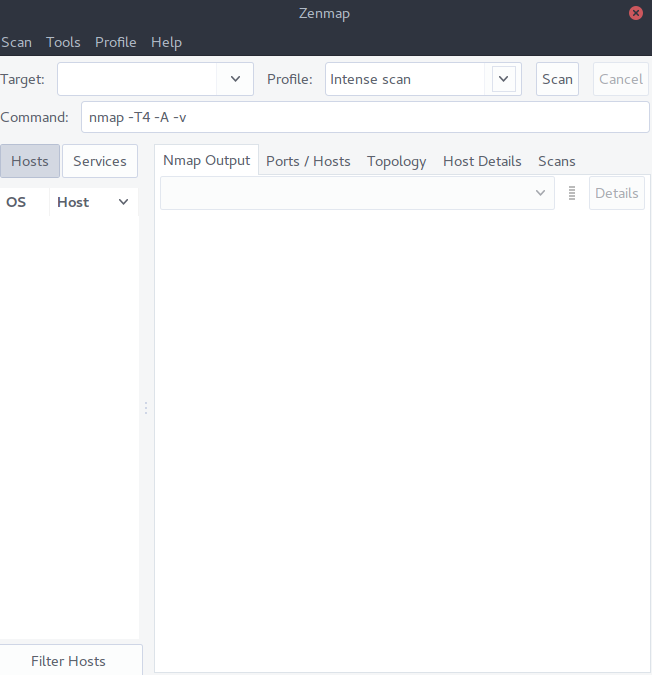
so you dont have to memorize nmap commands
xD
peak cloak
yeah, by nmap I meant zenmap. Yes, I know they are not the same
unborn sluice
do it in public wifi
peak cloak
zenmap is the gui component on top of nmap?
 charred meadow
It's against the rules of this channel.
 sacred plover
wdym
charred meadow
No speedtest screenshots.
cedar igloo
anyone know if when Windows Server 2019 eval expires, is the server still usable or does it shut down after a period of time? I'm not wanting to buy licenses for a home lab as they are £800 each but am wanting everything to remain working
primal ice
it will still run but will probably lockdown changing stuff and give you annoying watermarks.
cedar igloo
tbh, as long as the DNS server and AD works, it will be fine
what sort of changing stuff will stop do you think?
primal ice
no idea don't use it.
cedar igloo
follow on from my previous question, ive found an iso on microsoft's website for Windows server 2008 standard where there's no mention of price. Even though its EOL, do you still need a license?
primal ice
ehmmm gonna say yes to needing a license / key.
little schooner
@cedar igloo yes
cedar igloo
does anywhere still sell them?
cedar igloo
looking for a cheap windows server so i dont need to make a new server every 6 months
i think 08 may be cheaper than 2019 as its not supported
cedar igloo
ok, thanks
 red kettle
If I want to cap the speed of Internet on people on my home network, how would I go about doing that? I feel like Ubiquiti can do something like that, idk.
peak cloak
over ethernet or wifi?
red kettle
Wifi
peak cloak

Ubiquiti Networks Support and Help Center
Overview
Readers will learn how to set traffic-shaping parameters in order to manage bandwidth on UniFi networks. Bandwidth management is important to maintaining a functional network while avoidi...
red kettle
I know how to do it on ethernet, just change the port speed, but it would be 10/100/1000 Mbps.
Hmm ill read that
Would a Ubiquiti switch do that, or does the access point do that.
I would also have to make the ATT gateway handle all the DHCP stuff.
AT&T Fiber is stupid.
peak cloak
I honestly don't know. I have TP-Link Omada at home, and it's done by the AP
I would think the AP would be responsible to the limits
rocky badge
user groups apply to a client & SSID
waxen scroll
we ❤️ you @rocky badge
rocky badge
oof
 thorny vector
I have stared into the abyss, and it stared back. My mail server and web client are finally up, and I'm never doing it again.
thorny vector
So in production I'm using Cypht
But one of the ones I looked at, that you'd be interested in is Isotope-Mail
It worked solidly, but it requires remaking a container every time you need to login as a different user
 thorny vector
Yeah, they were designed as an ephemeral microservice
unborn sluice
thorny vector
postfix/dovecot
unborn sluice
there we go
thorny vector
Yeah, I was just bringing up isotope for the federated cloud you guys are working on
thorny vector
I'm just using Cypht, just configed it in my reverse proxy so I can touch it from the outside
And everything is 100% up
 thorny vector
It's been a half-ass project for a while. When I finally got down to it, and just did it, took me about 4-5 days
thorny vector
The amount of error messages I got that only said "Something didn't work" were unreal
And documentation was chronically out of date.
 zealous briar
guys which is a good router cause my current router (standard from my provider)
 severe wigeon
Kinda networking lmao. Radio go brr
tame carbon
@zealous briar depends on your level of expertise
I'm biased on mikrotik, and those require a bit of know-how to use
but they beat any and all consumer routers
at a good price, I might add.
Others here, might argue that if you just want a network and be done with it. Get unify
but be ready to pay up, that stuff is more expensive
But it does come with easy to use web interfaces to configure it
zealous briar
@tame carbon i know my way around webhosting and setupped my current router with a pihole so i think i have enough expertise
thanks for your awnser :)
primal ice
or build your own pfsense .
tame carbon
@primal ice not worth it considering performance/$
plus, pfsense machines are basically a full computer
lots of overhead and power use
@zealous briar if you need any recommendations on what mikrotik to get..
zealous briar
@primal ice i could but than i need to buy acces points
tame carbon
they all use the same operating system
zealous briar
ye sure
tame carbon
and mikrotik also supports adding additional access points
which you can configure from the main router
zealous briar
nice
tame carbon
Unifi does too
zealous briar
ye i saw soem guide son unifi but to expensive
tame carbon
@zealous briar Mikrotik just recently, released a new variant of their home wifi routers

MikroTik is a Latvian company which was founded in 1996 to develop routers and wireless ISP systems. MikroTik now provides hardware and software for Internet connectivity in most of the countries around the world.
zealous briar
so i was looking into netgear but they have a paid app and im to lazy to write my own software for it
zealous briar
i have 500 down 50 up
tame carbon
Then that router is more than enough.
I have the hAP ac2, older brother of that router
its in the living room as wifi hotspot & ethernet for TV settop
zealous briar
that logo on top of the i looks familiair from something 
tame carbon
MIkrotik is low end networking gear
but they have featuresets that is common on enterprise gear
I have this one as core router: https://mikrotik.com/product/rb4011igs_rm
MikroTik is a Latvian company which was founded in 1996 to develop routers and wireless ISP systems. MikroTik now provides hardware and software for Internet connectivity in most of the countries around the world.
@peak cloak hiya
unborn sluice

peak cloak
hi
I messed up badly, didn't create a backup of my config and bricked access to my router when trying to configure vlans
Needed to factory reset
zealous briar
F
tame carbon
@peak cloak OOF.
thank fuck I never run into that issue
mikrotiks can be configured without IP working :)
you just need to enter its MAC and boom, connected
zealous briar
@tame carbon currents etup is an Compal CH7465LG-ZG (Ziggo Connect Box) from my provider and an Asus RT-N66u upstairs
tame carbon
ZIGGO
zealous briar
xD
tame carbon
Asus also makes craprouters
peak cloak
I should have configured a port separate from the internal switch for management
zealous briar
bought it for 10 euros on marktplaats kinda like ebay
zealous briar
i flip computers on there
tame carbon
@zealous briar I managed to buy an entire container worth of old computer games
from a 2nd hand store that went backrupt
for like 1000 euros
zealous briar

tame carbon
I managed to sell about 3500 worth of stuff as seperate parts
and the majority of stuff left over
zealous briar
epic
tame carbon
I just pawned off to a guy who wanted it on the cheap
I've also sold old ProLiant servers on marktplaats
they had ddr2 memory lol
but went for 450 euros/unit
unborn sluice

zealous briar
some overpay for stuff like that
tame carbon
Yessir
peak cloak
speaking of used stuff, I got myself a network rack, so I can finally use some gear I got for free
zealous briar
nice
tame carbon
@peak cloak cool. how many U ?
peak cloak
forgot exactly, but more than I need, I think it's 18u
tame carbon
not bad not bad
peak cloak
bigger than it looked on the pictures
tame carbon
I got a 12U enclosure
peak cloak
it's a 2 post rack, don't have the space for a full 4 post server rack
waxen saddle
Wait. How does one enter the MAC address to connect to a network device?
peak cloak
probably using the utility not the web interface
unborn sluice
waxen scroll
@clear igloo wat ^^
primal ice
my tp link "smart" switch does the same thing but you need tp-links utility program to initially access it that way.
hollow marlin
@waxen saddle Mikrotik can use winbox over L2 to connect for configuration/recovery
waxen saddle
Ah. I'm not familiar with that at all. I'll look in to it.
unborn sluice
L2 configuration
Why not go the "serial" route

Brings me back to Cisco days

Do it crystal
tame carbon
what
unborn sluice

tame carbon
@waxen saddle winbox can scan for neighbors by MAC address
so it just shows up in the utility after 1 minute or less


 tame carbon
oh does it ?
usually takes a while
for it to list all devices
@hollow marlin mikrotik has its own discovery protocol too
MNDP an LLDP, yes you are right
and its CDP compatible too according to docs
hollow marlin
Yeah MNDP is nice because its not multicast but broadcast so can be discovered throughout a domain
tame carbon
@hollow marlin I got mine configured in such a way that it only accepts logins from the port that goes to my bedroom :)
you can see it, throughout the network, just not connect to it
 wide estuary
guys can i use ethernet to connect my pc to access point or is access point is wireless only?
 neon escarp
Depends on the model. Some access points have an "out" port usually used to daisy chain access points.
wide estuary
the way my home network is setup is terrible, we have 2 routers. One upstairs and other downstairs. Downstairs one is working as access point which connects to my desktop and every other wireless device
upstairs one is connected to modem
should i just buy 2 asus rt59u?
i seriously want its mimo feature
neon escarp
So you have no wire going from router 1 to router 2 ? and router 2 is used to wirelessly connect to router 1 and relays connectivity to wired devices ? not sure i get your setup. Getting an AP is solid advice though
peak cloak
depends
waxen scroll
2020 Oct 1 18:47:06 switch %$ VDC-1 %$ %COPP-2-COPP_POLICY: Control-Plane is protected with policy copp-system-p-policy-strict.
@little schooner today we copp
peak cloak
I would put a switch on the ethernet that is now connecting the AP and then connect the PC and AP to that switch
wide estuary
so there's only one wire going downstairs which connects to my current isp provided router which then works as wifi and also gives connection to my pc via ethernet
neon escarp
If you have no way to run an ethernet wire between the routers. I would look into power line adapters because any wired will always be better than wifi.
peak cloak
^ I mean not always
Powerline can be iffy
Ethernet > Wifi, but idk about powerline > wifi
wide estuary
Ok so this is how it's going to work?
Upstair Router->ethernet->Switch=which connects both AP and my PC ethernet
and bam network?
peak cloak
yeah, I mean that's sort of what I did at first
wide estuary
got it so thats what im gonna do as well
r there any decent switch? my ethernet is cat5
peak cloak
Coax -> Modem -> Ethernet to Upstairs Router -> Switch -> AP
that was mine
gigabit switch
idk about any specific models
wide estuary
whoah how's latency with coax?
peak cloak
ping to google is 14ms
peak cloak
do you want managed or a dumb switch
like will you be using vlans or any advanced features?
wide estuary
tbh there r only 2 devices that r going to connect to switch. My PC and AP
idk which one to go with
peak cloak
a dumb 5 port gigabit switch would do the job
neon escarp
Coax -> Modem -> Switch1(vlanx) -> Ethernet to upstairs -> switch2(vlanx) -> router(wan) -> switch2(vlan1) -> ethernet to switch1 (vlan1) -> computers
would also work
waxen scroll
@hollow marlin any idea what copp policy VPC keepalive falls under?
wide estuary
will switch add extra latency tho?
peak cloak
I don't think he wants to mess with vlans @neon escarp
neon escarp
negligible
peak cloak
technically yes, but my ping to my router through a switch is <ms
wide estuary
i dont know what vlans r
peak cloak
nor do I think your router supports them
neon escarp
just needs 2 managed switches
peak cloak
will you be using poe?
neon escarp
no need for router to know them
peak cloak
true
wide estuary
poe?
peak cloak
power over ethernet, used for many AP
so you only have one wire going to an AP
the AP needs to support it of course
peak cloak
this is the simple stuff
wide estuary
......
neon escarp
networking is fun XD
peak cloak
so you don't need poe, so this should probably work just fine: https://www.amazon.com/NETGEAR-5-Port-Gigabit-Ethernet-Unmanaged/dp/B07S98YLHM/ref=sr_1_3?dchild=1&keywords=5+port+gigabit+switch&qid=1601578805&sr=8-3
neon escarp
I had to do the setup i exposed in production in a hotel XD
peak cloak
actually don't use that
wide estuary
ayee Asus RT59U router, NETGEAR 5-Port Gigabit Ethernet Unmanaged Switch, now all I need is decent AP
waxen scroll
@neon escarp just wait till you manage 1000 cisco devices. fun stops
neon escarp
sounds like a dream job 😉
waxen scroll
@rocky badge right?
wide estuary
will mimo works though? my family watch a lot netflix, amazon prime
little schooner
@waxen scroll ive never heard of copp
rocky badge
?
little schooner
brand new to me
wide estuary
i dont want my ping to go high randomly
waxen scroll
@little schooner copp is evil
wide estuary
@peak cloak what router u use?
peak cloak
wide estuary
i'll probably just copy ur network setup
neon escarp
Just thinking about it now ... couldnt you just ... move your router downstairs ? and put a switch with an AP upstairs and call it a day ?
neon escarp
where is your modem curently ?
wide estuary
its probably upstairs with main router
peak cloak
with 2 different wifi sources wouldn't that be a problem if they have the same SSID without a controller?
do you have fiber?
peak cloak
so you don't have a modem
wide estuary
wait so thats how fiber works
peak cloak
internet plugs into your router via ethernet right?
wide estuary
yeah thats what i see
peak cloak
what's your ISP?
peak cloak
oh ok
verizon for example has an ONT that translates their GPON fiber network to an ethernet signal
each isp may be different
wide estuary
sht so what u r saying is i need to contact with the guys who setup network before doing stuff on my own
neon escarp
Where is the box that changes the fibre to cat5 ?
wide estuary
tbh i havent seen it, all ik is there's ethernet connecting to main router
i should've done more research
neon escarp
and that wire comes out of the wall ?
wide estuary
yup
neon escarp
i think 1st step would be to figure out where that wire goes . from then you might be able to design something smart on the 1st try
wide estuary
got it
peak cloak
do you live in apartment?
wide estuary
yup
wait no
its 2 floor
its prebuild house
idk how to say it
sorry my English isnt rly that good
peak cloak
because then maybe there is only one ONT per building and then it goes via ethernet to each apartment
wide estuary
tbh I didn't explained well, its more like a house than an apartment
2 floor house
with garden
neon escarp
im thinking dupllex is what you're trying to describe ?
neon escarp
In all likelyhood the cat5 cable comes from somewhere near your breaker box. IF it does then you can use a short wire and plug your router near there. and use the existing long wire to go upstairs from your router to a switch and then an AP for convenient wifi.
wide estuary
got itt
neon escarp
Hope that helps some 😉
wide estuary
yup i think i like ur idea
neon escarp
sure whats up ?
 thick minnow
we had the house rewired and it has cat 6 cables routed through the house, however, to connect the router to the switch and the patch bay plus wall to PC, could i us Cat 7 or 8 (just asking as after doing it for all the switches it seems to be cheaper and a lot faster, or is it not compatible, sorry, can honestly say i'm not sure about any of it, if not i'll just suck up the extra and buy a load of Cat 6 @neon escarp
neon escarp
All Cat standards are retro compatible. the speeds or crosstalk/impendense issue will follow the weakest link. From experience cat6 can easily go for 10Gbps up to 50ft.
i would be surprised if you had 10G appliances in your home so any cable cat5 or above should not cause any issue in your network.
thick minnow
okay cool that's what i was hoping, was just thrown off because an article online said cat 7 and 8 isn'#t compatible with 5e and 6 so i was totally lost
neon escarp
They say that because cat7 and 8 has metalic shielding around the cables inside to prevent interference. For home use i would say that can be ignored
clear igloo
Cat7 and Cat8 can use tera connectors which are not compatible with 8p8c connectors that 6a and lower use by default. I think 6 can use tera as well but never seen it myself
thick minnow
So long and short is, for cables you guys recon no issue, it's actual switches it might be affected by?
neon escarp
So long as you got an RJ45 plug on the switch with an RJ45 connector on the cable you should be just fine. My 2 cents.
thick minnow
I'll give it ago with one set it if works i'll do the rest that way Thanks dude, really appreciated 😄
rocky badge
@waxen scroll @clear igloo aaaa my braincells https://blob.rocks/2DThGGXdQk.png

 hollow marlin
100 gigabit or 100 megabit. Huge differences
No, outside very experimental testing, copper will not net you over 10g because there are no copper SFPs above 10gig. Whats this for?
Fiber only. Are there switches in place with 100gig capability?
What model?
waxen scroll
lol @harsh heron deleting and running away
@hollow marlin
boo
is it just me or did the color of our names change?

rocky badge
@waxen scroll I think it did
waxen scroll

rocky badge
before
waxen scroll
@stable ice thank you for the new logo