#networking
1 messages · Page 213 of 1
 hollow marlin
 hallow nimbus
So erm if i need a iso i can hit you up @rocky badge 👀
 mellow heart
What did I screw up?!
 rocky badge
@hallow nimbus 👀
 tame carbon
@mellow heart pub-ip:80 -> local:80
hallow nimbus
👀
tame carbon
but you can also do: @mellow heart pub-ip:8080 -> local:80
mellow heart
Hmmm
tame carbon
it just changes port numbers
mellow heart
Something seems off here
mellow heart
I didn't need to do anything this complicated last time
So I don't know what's going on
tame carbon
@hollow marlin does a /48 count?
mellow heart
It worked before
rocky badge
@hallow nimbus Lol
tame carbon
I know they hand em out like candy
tame carbon
@mellow heart if you can reach it locally, but not remotely
tame carbon
@mellow heart might want to check what is happening to the firewall on the machine
hollow marlin
I think we only have a /32
mellow heart
I really appreciate all of the help. I just think I'm too stupid to do this without handholding @tame carbon
tame carbon
@rocky badge I say. we squat on them
get your BGP spoofers ready
@mellow heart keep trying with port forward
mellow heart
already uninstalled the plugin
tame carbon
lol xD
but that wasnt were the problem was
you had it open on your local machine
just had to configure the router
mellow heart
but it worked out of the box last time
Maybe something I did when following the guide on setting up SSL screwed with it
tame carbon
@mellow heart the IP that the server gets, isnt always the same
most routers just give out a random one, if a device connects
mellow heart
I'm starting from scratch following this guide - https://www.youtube.com/watch?v=ETdlrNUGjZk&t=8s

Amazon Affiliate Store
➡️ https://www.amazon.com/shop/lawrencesystemspcpickup
Gear we used on Kit (affiliate Links)
➡️ https://kit.co/lawrencesystems
Try ITProTV free of charge and get 30% off!
➡️ https://go.itpro.tv/lts
Use OfferCode LTSERVICES to get 10% off your order at
...
tame carbon
so by restarting
rocky badge
@hallow nimbus https://blob.rocks/7Fyk6S42Ye.png
 tame carbon
could be that it got a new local IP
so your port forward is invalid
you can mitigate this problem, by using a static IP
mellow heart
I looked though and I can't find the port forwarding I did before
How do I setup a static IP?
With my router?
tame carbon
thats on the settings of your FreeNAS
tame carbon
@rocky badge he's got the most ghetto ass verizon GUI
I studied this shit, and I cant figure it out
rocky badge
Still not a good practice
tame carbon
@rocky badge I explained that earlier
yeah,
but we still havent found dhcp server settings
to set pool size
hallow nimbus
@hallow nimbus https://blob.rocks/7Fyk6S42Ye.png
@rocky badge

 mellow heart
I appreciate the help, but I'm so lost and don't want to get started on something. I'm gonna see if I can get someone on fivver to set this up for me cause I know I'm going to screw something up
I realize this is above my level
tame carbon
any mortal might want to do
hallow nimbus
Nice @rocky badge
 peak cloak
@tame carbon https://forums.verizon.com/t5/Fios-Internet/Quantum-Gateway-How-to-setup-static-IP-for-internal-PCs-using/td-p/868832
I would like to assign static IP addresses to computers within my home that are connected to the FIOS router. I would like to do it by using their MAC address so that each time they connect they are given that IP. I do not need this static IP to be seen outside of my network...
mellow heart
What is simple for you is totally new to me, and everything is confusing
tame carbon
Go to the “Advanced” tab. Then under Routing click “IP Address Distribution”. Click the red box that says “Connection List”. Go to the bottom of that page and you will see another red box that says “Add static connection +”
mellow heart
So yes, this might be simple for you, but for me it has been 3 hours of work so far
tame carbon
Thank you @peak cloak
3 hours?
pff
I once spent an entire weekend figuring out how to set up this damn IPTV crap on my router
mellow heart
I know you guys are trying to help, but I'm at the end of my rope. This is beyond me and I just want it working like it was
rocky badge
And that's ok
tame carbon
giving up wont help him either
rocky badge
And the things you're saying aren't helping the situation either
mellow heart
It isn't giving it
It is giving up on this tactic
I'm still going to try and set this up
but working with this install where scripts were run that I don't understand isn't helping me
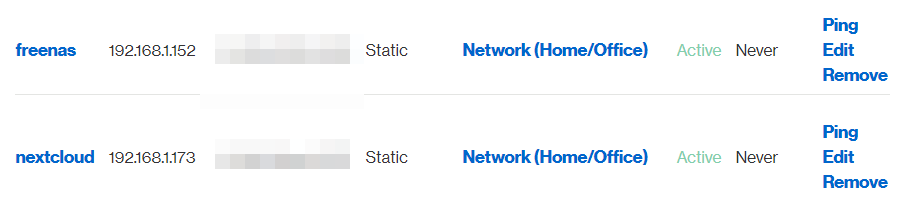
Also:
 peak cloak
Ok, does putting 192.168.1.173 into your browser work
mellow heart
I deleted it already, but it did work
tame carbon
mellow heart
I'm installing a new one now
peak cloak
Oh, ok
Were you using your public ip to connect to it before?
It could be some loopback thing
mellow heart
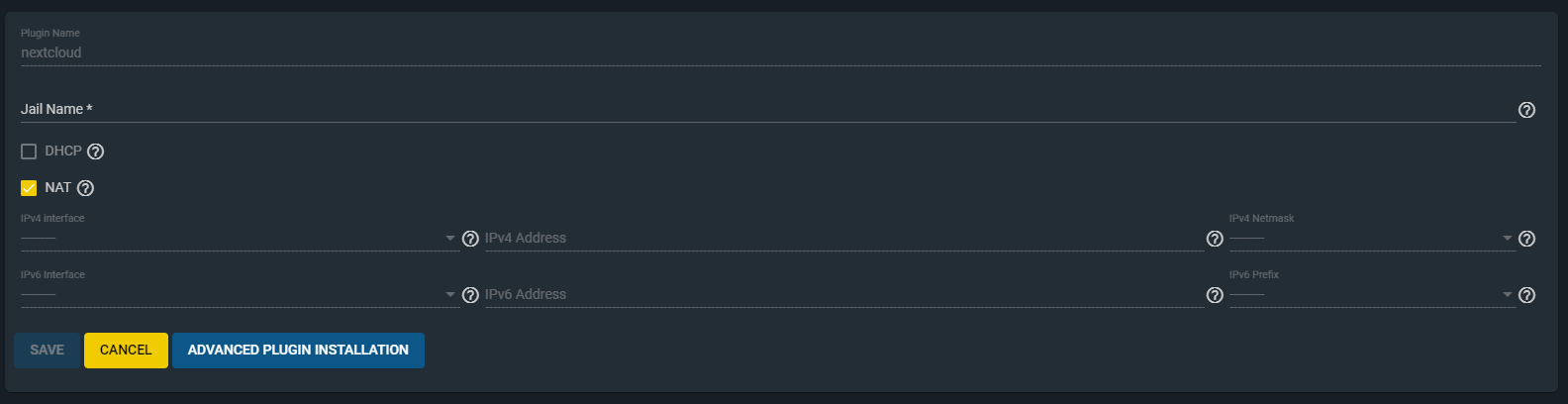 tame carbon
isnt that something else
mellow heart
Before, I was using my public IP and :8282 at the end
mellow heart
This is what showed up when trying to install the new plugin of NextCloud
peak cloak
@tame carbon idk, never used freenas
tame carbon
@mellow heart if you like
I can help you over screenshare
but thats only if you have some patience
mellow heart
I really appreciate the offer! How about this, I give it one more shot and if that doesn't work, I'll take you up on that?
tame carbon
You'd have to be quick
because I will be on for maybe 1 more hour
its already late
mellow heart
In that case, I'll take your kind offer for help
 bleak creek
does the 1.1.1.1 and 1.0.0.1 dns server make much of a difference
 topaz quarry
the DNS server you choose will depend on your location
bleak creek
ltt made a video on it a while ago and idk if it still works
topaz quarry
for example 1.1.1.1 is 18 ms for me while 9.9.9.9 is 2 ms for me
it physically depends on where their servers are in coorelation to you
bleak creek
is there a way to see whats besg for my location
topaz quarry
pick the DNS with the fastest response time for your exact area.
yea just ping the addresses
topaz quarry
oh, open up the command prompt in windows
and just type "ping #.#.#.#"
the 4 pound symbols represent whatever DNS server you want to test
cloudflare's is 1.1.1.1
google's is 8.8.8.8
quad9's is 9.9.9.9
peak cloak
There is a dns benchmark
topaz quarry
https://www.grc.com/dns/benchmark.htm, yea you could use something like this
peak cloak
Yep that
topaz quarry
https://code.google.com/archive/p/namebench/ is what a lot of people use
peak cloak
Never heard of that one
rocky badge
@hallow nimbus  https://blob.rocks/YVh5uDuPGO.png

 dense karma
when you server has a 10G nic but thats the only thing in the house with it
rocky badge

topaz quarry
lol it's time to create a cluster of computers
rocky badge
My server and pfSense have 10 gig
topaz quarry
and get a 10 gigabit switch
rocky badge
Because I ran out of ports
topaz quarry
i wanna see a chart of that
cause like everytime i see someone benchmark pfsense
it gets like 200-300 Mbps if that
rocky badge
There goes my two SFP+ 
I can do more than 200-300Mbps lol
I wouldn't be using pfsense if it bottlenecked my gigabit internet
But it doesn't
So I use it
And a literal potato can route gigabit on pfsense lmao
An AMD (pre ryzen) HP thin client can run pfsense
topaz quarry
oh, lol i'm a dummy I meant it never reaches 200/300 MB/s
of course pfsense can do gigabit routing
rocky badge
Well by then it gets a little more complicated, but my pfsense can do that, so can gossamers lol
He has 10gbps wan from Utopia and gets 8-9Gbps from it off of pfsense
4790K iirc
topaz quarry
without jumbo frames?
topaz quarry
idk, i soft gave up and just started using vyos for 10 Gigabit + routing
rocky badge
topaz quarry
that's not 10 gigabit
rocky badge
:P
It's fine for what it is 😂 tnsr should be better though
and it's free for homelab now
since tnsr is VPP and not kernel based
hallow nimbus
@rocky badge i also have 10gbit to all my servers 😂
rocky badge
yeet
rocky badge
oof
hallow nimbus
Cause work
topaz quarry
i mean having 6 Gbps for WAN is amaze
rocky badge
imagine sleeping
topaz quarry
i just meant for local transactions
hallow nimbus
Imagine being american and having a idiot as president
rocky badge

hallow nimbus
Cya
 chrome hound
getting a true speed test to run at 10g is harder than it looks
rocky badge
lmao my school laptop is using my DNS servers to lookup ldap services
and their sccm and file servers
topaz quarry
getting it to work with SR-IOV and vyos seems easy enough for me
rocky badge
@chrome hound The server actually being able to support it is hard lol
chrome hound
lol true
topaz quarry
lol if you have pfsense 10 Gigabit strats
chrome hound
but the one I test from have a 40g conenction to the fiber back bone
chrome hound
a lot of speed test server only run at 1 gig
topaz quarry
well a lot of tests I saw were literally like in hosue home lab stuff
chrome hound
but my speeds go up and down a lot
topaz quarry
no WAN connection
chrome hound
this one is to centerylink

 chrome hound
lol
topaz quarry
the true-est of roflcopters
chrome hound
well to be fair they don't like sending data out 😄
rocky badge
I limited my download lol
so parents would always have ~200Mbps
So they don't complain about me messing up their YT TV
chrome hound
wow my speed test server is struggling today I wonder whats up with it
topaz quarry
oh you do YT TV too?
rocky badge
TV is a scam lol
topaz quarry
pandemic time is the apocalypse for IT staff
 rocky badge
but my parents want it
topaz quarry
some people just like nice apps that look like the old top boxes
chrome hound
that from my PC to the other room and its dogging hard
rocky badge
if it were me I'd just do ATSC 3.0 (when it comes around 😭)
rocky badge
yup
chrome hound
oh hey @rocky badge I finaly got a real POE switch
chrome hound
a month ago
rocky badge
😂
topaz quarry
i'm gonna try to power my microtik SFP+ switch with POE from the unifi switch
lol i wonder if this will explode in my face
chrome hound
I got a unifi pro one I can't recall the exact model
topaz quarry
when i get the second box up
rocky badge
Production aka parents
topaz quarry
i'm going to put the vyos instances in VRRP mode
rocky badge
So it never goes down
chrome hound
rocky badge
 topaz quarry
so i can shoot one of the servers with a rocket launcher
and internet is still up
that's so clean
rocky badge
That looks like a USW-PRO-24-POE
chrome hound
chrome hound
thats the one
chrome hound
and I got my truenas server up
chrome hound
chrome hound
middle dell r730xd with 12 6t drives
rocky badge
😂 😂
chrome hound
hey spare parts man
rocky badge
😂 😂 😂
chrome hound
I haven't looked into the edge platform thing whats it for?
rocky badge
lmao
It's basically the same HW as UniFi, with some additional stuff in hw, with EdgeOS
but it's also a gen behind UniFi
rocky badge
@chrome hound https://store.ui.com/collections/early-access/products/unifi-switch-aggregation-pro-beta

Ubiquiti Inc.
USW-Aggregation-Pro is a Fully Managed Layer 3 Switch, with (4) 25G SFP28 Ports and (28) 10G SFP+ Ports.
Featuring a 1.3” touchscreen, it supports high-bandwidth links to provide link aggregation for higher capacity and increased availability. The USW-Aggregation-Pro is mana...
😉
28 SFP+, 4 SFP28
 chrome hound
that smells like effort
rocky badge
Lol
chrome hound
I am thinking of migrating my sped test server to its own blade, I think the ProxMox firewall might be what is slowing it down
rocky badge
chrome hound
do your parents know you are opening up dangerous equipment? you can send that over to me and I will take care of it for you
chrome hound
sure it is
rocky badge
https://www.servethehome.com/ubiquiti-unifi-usw-leaf-overview-not-review-48x-25gbe-6x-100gbe-switch/

Our overview of the Ubiquiti UniFi USW-Leaf 48x 25GbE and 6x 100GbE switch where we provide our feedback in something that is not a formal review
 undone adder
I have a question, I want to protect my dedicated gameserver (hosted on my home network and pc) using some sort of proxy or VPN (I want to keep it free)
I've tried portmap.io but I couldn't get it to work.. Does anyone know more about thise kind of stuff?
Please ping me if anyone has an answer c:
 worthy whale
@undone adder cloudflare
topaz quarry
you can use cloud flare for direct access if you can port forward
or you can use zero-tier with a public node
undone adder
I see, so how does the port forward look in that case?
topaz quarry
in your firewall you forward the required ports to your service
WAN -> Firewall -> Server
firewalls block all incoming port requests by default
undone adder
I see
What about the port forward in my router?
I'm guessing I'll have to use the external port value?
topaz quarry
you port forward from your router which is probably also your firewall
to your internal service
how you do the mechanic of port forwarding is 100% different from each vendor
it's the same idea, but different mechanics
undone adder
hmm
So what's the basic mechanic behind this then? I'm guessing the server port in internal and VPN (or whatever) port is external?
topaz quarry
Incoming Port -> Firewall -> Port to go to server -> server
use plex an example
apparently whinnie's full title is to long
so friend asks to watch whinnie on your plex server server
Friend's plex player -> outgoing request of 32400 -> (Internet) -> incoming request of 32400 (your firewall) -> map 32400 to 32400 in your network -> server
undone adder
Oh I see
topaz quarry
here's a list of examples
undone adder
Thanks :D
undone adder
So if I get it right:
Gamer -> Outgoing Request {External Port} -> Internet -> Incoming Request {Internal Port} (Firewall) -> Server
So let's say my OpenVPN port is 1194 and my server port is 7777
Gamer -> Outgoing Request __7777__ -> Internet -> Incoming Request __1194__ (Firewall) -> Server?
chrome hound
most cases your external port would be the same as the internal port because the client and server expect to talk on the same port, unless you are doing some kind of advanced config on the server
undone adder
Just trying to port forward through a proxy or VPN
chrome hound
are you in control of the proxy/vpn?
chrome hound
the above examples are for firewall setups, a proxy/vpn is going to complicate you setup
undone adder
Yeah, I'm trying to figure it out
chrome hound
typically a proxy is put in place by some one offering service to clients
undone adder
Yes
chrome hound
they do that to stop users behind the proxy from doing what you are trying to do
chrome hound
if you are not the controller of the proxy you can't really change how its setup
undone adder
Yeah, but portmap.io looks like it'd work, I just don't know how to get it to work
chrome hound
thats what I am trying to say, if you are behind a proxy that some one else controls you can't setup any port forwarding
undone adder
Even if you get a port?
chrome hound
its been a while since I delt with proxies, but typicaly they sit between the clients and a firewall and proxy connections
so you are removed from direct edge firewall access
hence the name proxy
so are you sure you are behind a proxy?
typical home setups have a router, then an ISP device of some kind
undone adder
I'm not behind a proxy, I'm trying to protect my network with one
chrome hound
ok, you really want a firewall not a proxy
undone adder
Hmm
chrome hound
so what router are you using?
undone adder
Linksys
chrome hound
most routers act like a firewall, they don't have to be complex to work
chrome hound
by default that router will block all incoming traffic and only allow some things to come in
undone adder
Nah, I can port forward, I just don't wanna get DDoSed
chrome hound
so in there setup it should have a section on Port Forwarding
in there you define the port you want to have forwarded and then you tell it the internal (private) IP you want traffic to be ported to
rocky badge
@chrome hound also is that a passthrough patch panel /s
chrome hound
yes blob it is I meant to put in punch downs, but effort got in the way 😛
rocky badge
lol
chrome hound
its not my fault the RJ45 plug can pass thoguh the hole
undone adder
I know how to port forward, I just can't get any protection to work
rocky badge
well I hope you can @chrome hound
because the port on a keystone is RJ45 lmao
So it has to be big enough
chrome hound
when you portforward you are effetivly telling your router you don't want protection on that port
rocky badge
you can even get HDMI keystones
undone adder
I know
chrome hound
you can't add protection when you want to use port forwarding
chrome hound
what are you trying to protect? no matter what you put in place traffic has to flow across the port from external to internal for any service to serve
opening a port and forwarding it, doesn't negate the rest of the ports coming in
the still remain blocked
undone adder
I'm trying to protect my network
chrome hound
so opening one port doesn't open them all
undone adder
I never said that
chrome hound
its just the one port needed to serve
 undone adder
That offers protection right?
chrome hound
I don't think you realize what a proxy really does, its not meant to allow any service through, it a very control concept
undone adder
I see
chrome hound
you have to know what your source IP is going to be to use source restriction
undone adder
Yeah
chrome hound
I would put a proxy in place for like a network of guest devices that I have no idea who they are that only need web browsing they would sit in an isolated section of my network and would only be allowed to browse out on port 80 or 443
think of a public library that had internet access, I could see a use case for a proxy there to ensure people are not setting up littler rabery pies to serve things off the free internet
 thick minnow
@tribal dome hi
chrome hound
so port forwarding is still protection, just not that port, you are opening it
undone adder
Well if the wrong person has your IP you're still fucked
chrome hound
but you are also controlling where it goes intenrally so its not like its a firehose
your IP is not secret
its public
and trust me you get scanned at least once or twice a week by forion bodies
in @rocky badge case 4 times a day
undone adder
Yup, so it's easy for someone to press a button and take you down for at least a few hours
rocky badge
@chrome hound lol
chrome hound
you have to be a target
rocky badge
I am
undone adder
Rip
chrome hound
like no one is going to waist time taking you down

 chrome hound
and that same effort to take you down will effect your ISP so they will either put in place temp prevention or have other tolls to monitor bot like network traffic and shut it down
chrome hound
well thats the internet game for you, open port = risk
undone adder
Fair point
chrome hound
but I highly dough you are a target
undone adder
Yeah-
chrome hound
fun fact @rocky badge I had to burn down a mail server I had because I forgot to update the SSH config to block password auth, and it got brut forced by a Chinese entity and they launched a 3.5 gig attach on a German company from my ProxMox cluster
rocky badge
lmao
undone adder
Ouch
chrome hound
one of my network eng slacked me going he do you realize youre a DDoSing a company in germany? I said what?? My Bad
 vale reef
my b
undone adder
b
chrome hound
you are a bad person
so yea @undone adder some one some where is always scanning for open things 😄
rocky badge
@chrome hound
bruh
this laptop has an Ethernet port
with a lot of room left over
also rear I/O laptops ❤️
chrome hound
nice
rocky badge
it uses a fucking 240W charger
chrome hound
ah they slimmed it down than
chrome hound
the m3000 had like a 280 watt
rocky badge
So the 4 M.2 NVME slots I saw in the BIOS is real....
chrome hound
yep
rocky badge
Two DIMM slots on the bottom
two under the keyboard
2x USB C with Thunderbolt 3
Damn this thing is loaded with PCIE lanes
4x4 16 lanes already used for NVME SSD
4x2 8 lanes used for Thunderbolt 3
bleak creek
i did a dns benchmark and i dont know which ones are best
 vapid dune
the lowest one
vapid dune
what are all these servers
what do these bars even represent
where's 1.1.1.1 and 8.8.8.8 for comparison?
peak cloak
the names are on the right
for me, level3 dns servers are the fastest
@vapid dune they are all dns benchmarks's dns servers for benchmarking
lower is better
hollow marlin
What do the bars actually mean?
hollow marlin
Interesting. Ill stick to 1.1.1.2/1.0.0.2.
bleak creek
so i should use these as the main and backup? since they are on top
peak cloak
I mean, not always. I would do some research on that dns server
 thorny vector
Don't know how I feel about a DNS server on a benchmarking list. Best stay reputable.
hollow marlin
As long as latency is fairly close real world performance difference is negatable
 forest ice
I've had luck with cloudflare and quad9's
seems to be pretty fast, never benched them, though
topaz quarry
so like cool fun facts
if you have a local DNS server that caches stuff from upstream providers
that's the fastest DNS server you'll ever have
like one of the biggest jumps from a consumer routers to real routers. Is that real routers usually have actual RAM
so they can cache more and more DNS entries
 unborn sluice
pihole
forest ice
I run a Sophos UTM here
so I do that already
It's a VM, so performance is kinda eh. May go the pfsense route with real hardware
Thing I like about the sophos end is most things just kinda work, and it lacks some of the jankyness of pfsense, but pfsense is probably more customizable
forest ice
Web filtering and profiles works better under Sophos, despite the fact that both probably use squid
got kids to watch over lol
I've used the netgates, too. Kinda hard to beat their 7100's in HA for $2k
if all you need is straight routing and stuff like OpenVPN for a small business
topaz quarry
web filtering is a service you have to pay for
like Pfsense and OPNSense are basically free solutions
it's the rules not the technology that make rule based filtering effective
like a nice networking deployment especially when you're willing to use vRouters (a Router in a VM)
is you just have the router, well route
and delegate other responsibilities to other containers/VMs
forest ice
so you can offload some of that to something like Umbrella, but if you wanna do any GeoIP or application control you usually have to do that on the Firewall
topaz quarry
or just have the router route to something to delegate to it
and have your clients use a different default gateway
forest ice
I think they have a free DNS filtering for home, but I have profiles that set time limits and individual devices for the kids not to go on things
topaz quarry
like i don't let my firewall deal with my self-hoting stuff
it just goes to an nginx instance
most reverse proxies have geo-ip stuff somewhere in their implementation
forest ice
I know nginx has a blocklist
topaz quarry
like hands down https://pritunl.com is just better at VPN tunneling than any firewall/router

Pritunl
Free open source enterprise distributed VPN server. Virtualize your private networks across datacenters and provide simple remote access in minutes.
forest ice
my GeoIP is more kinda just a "no no Russia/China/India/NoKo" catchall
topaz quarry
oh, yea you can definitely do those broad strokes
or just use cloudflare
if you want to go that broad
forest ice
Yeah I was looking at setting up Wireguard at work as that can run on the edgerouters now and we could use them as really cheap VPN appliances
topaz quarry
forest ice
But Sophos does similar to Meraki with their REDs
topaz quarry
is even easier
forest ice
You use pritunl for failover between sites or just client vpn?
topaz quarry
I mean i wouldn't use OpenVPN for failover between sites
and wireguard is still kind of a mystery bell
using a SD-WAN solution i what you want for failover
like zerotier or just using vxlan
tame carbon

BBC News
Every morning at 7am when the second hand TV was switched on, the village internet went down.

 violet sonnet
what do you think i upgrade from 1 gigabit
topaz quarry
in reference to . . .
 waxen scroll
i think you downgrade to 100mbit and pay less
having extra speed to get your 10min file in 8min isnt worth $20/m more
 plain siren
https://kuma.io/ @topaz quarry there is also shit like this @forest ice
 topaz quarry
traefik is so simple it's hard
plain siren
Well, it depends what you use for orchestration
if you do like... bare docker, no k8s, I usually push to Rancher Server v1.X with Cattle Orchestration
Traefik can use Rancher as a backend to monitor and attach to containers instead of like docker.sock
If you use k8s, it can straight up be your ingress controller
full integration
topaz quarry
so like, there's gonna be a flame forming soon
but i may try to make my own ochestration platform
plain siren
Aint even worth it with all the options avail
topaz quarry
k8s is really cool, but the type of learning required is an interesting hurdle
like docker is so simple
plain siren
You wanna be pedantic though?
Docker is the wrong name for the containers
Its the moby platform. Docker is an API of sorts that interacts with the containerd runtime and gives it deployment/control commands
Docker itself is not the container platform
its been seperated
containerd is the real runtime system
topaz quarry
well yes
unborn sluice
Good thing they actually seperated docker from the moby
plain siren
So you can ditch Docker entirely
podman.io
Podman is a daemonless container engine for developing, managing, and running OCI Containers on your Linux System. Containers can either be run as root or in rootless mode.
topaz quarry
i still have that tab open
plain siren
Podman. you could actually alias docker to podman command and itll all work
its pretty much drop and go
but it opens you up to OCI Containers and slowly migrating to k8s or things like kata containers
topaz quarry
btw i think etcd which came out of Google's interaction with k8s while they were making it
that's cool
the raft consensus algorithm blows my mind
plain siren
alias docker=podman
topaz quarry
i i use the s3 plugin to do automatic PV creation
will it break?
or wil it work 1:1?
tame carbon
alias docker=rm -rf --no-preserve-root /
topaz quarry
there's a s3 plugin to use it as a backend storage
plain siren
The storage driver
topaz quarry
the same way you can spam longhorn in k8s
yea the storage driver for s3 backend storage
they refer to it as a plugin though
topaz quarry
fantastic
plain siren

GitHub
Open Container Initiative-based implementation of Kubernetes Container Runtime Interface - cri-o/cri-o
topaz quarry
can they tell the router via etcd or something to use another node
plain siren
Actually yeah
and some even use BGP to do this
You want load balancing
not HA
yeah you can achieve both with the same set of tools
but
they are technically diff processes
one is failover only on failure
one is balance the load out
topaz quarry
well i was told layer 4 load balancing can lead to bad experiences
but yea
i'm not sure how one convinces a router to do L7 load balancing
i guess pfsense technically has nginx on it
plain siren
Actually
topaz quarry
routers in VRRP mode with nginx?
plain siren
The k8s ingress controller handles it
Traefik has loadbalancing.
VRRP is HA
not LB
OT: Ever seen juju charms? while I dig up LB tools/projects for you look at this
plain siren

GitHub
A network load-balancer implementation for Kubernetes using standard routing protocols - metallb/metallb
You kinda need an AS for something like this
for it to be easy
topaz quarry
so the ingress IP for k8s
what happens when it goes away
i shot it with a rocket launcher
what goes k8s do?
plain siren
Depends
your bridge to the WAN is gone
so
rip
If you are asking about the MetalLB though
topaz quarry
so the node responsible for ingress can't be promototed to another node?
topaz quarry
so if I have a 5 node cluster
plain siren
assuming you have failover systems in place to route to new ingress IP actually
topaz quarry
how does it give it's IP to another node?
plain siren
But all ingress IP's are valid
topaz quarry
okay so we're assuming L4 load balancing
plain siren
However......
MetalLB once again
This is using BGP
Itll assign a whole new IP off the public subnet
topaz quarry
now because i'm not in a public cloud and have to port forward like a bannana cake
will metallb tell my router to forward to something else?
or are we assuming the router will just do L4 load balancing
plain siren
The router has to support BGP
And you would prob want more than one
This would have the router under the MetalLB's controller talking to k8s
and it would tell the Routers public IP to route to X Y or Z ingress
so the LB is done on the router but commanded and controlled by the system

GitHub
Kube-router, a turnkey solution for Kubernetes networking. - cloudnativelabs/kube-router
plain siren
topaz quarry
okay so vyos supports BGP
would it still need to be controlled by k8 for this to work
tame carbon
can you run BGP on local networks? 10.0.0.0/8 ?
topaz quarry
yes
topaz quarry
you can just can't advertise internal IPs
plain siren
and BGP is how we give routing tables back and forth between routers
tame carbon
I know
topaz quarry
well you can, you just can't do it over a WAN
tame carbon
but can you set up your own BGP on non public ranges, ofcourse not announcing to internet
right ?
topaz quarry
yes
topaz quarry
At&t and Comcast have narly filters to make sure they don't advertise internal IPs to each other
plain siren
And You need a complex internal routing setup to do it
topaz quarry
they should have filters
tame carbon
lets squat on 8.0.0.0/8
plain siren
Thats called BGP Hijacking
tame carbon
I bet DoD will be overjoyed
plain siren
On the Internet, network devices exchange routes via a protocol called BGP (Border Gateway Protocol). Unfortunately, issues with BGP have led to malicious actors being able to hijack and misconfigure devices leading to security problems which have the potential to cause widesp...
Dept of Def is considered Bogon networks
Most routers wont let you even try
they just stop you before it even gets to the ISP
topaz quarry
btw the DoD has completely out of band networks
so like whatever it is that you're planning
plain siren
19 of them
tame carbon
set all nukes to target eachother
plain siren
Those are not on networks
tame carbon
I bet somewhere, someone, forget to unplug
plain siren
those are 100% hardwire controls
topaz quarry
you probably need floppy drive keys
tame carbon
xD
topaz quarry
and 1970s equipment to get in
plain siren
You use zip disks on some
topaz quarry
it's so old it's unhackable
plain siren
it so old, if someone tries to fuck with it to many times, it breaks
on purpose
and then engineers are dumbfounded for weeks
plain siren
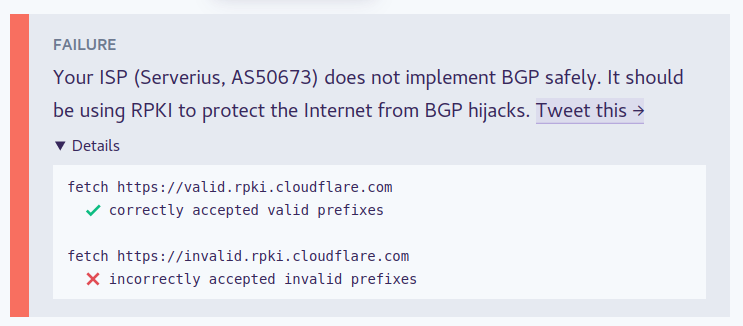
Without RPKI, you cant do much anyways
tame carbon


 topaz quarry
btw is there a way to get a VM or a container to failover
with the same IP?
in an automated way?
topaz quarry
yea the same local IP, new host
plain siren
Yeah the networking backplane you use should do that
Even on Docker with cattle (the basic shit type), it has the option to "Keep IP when replacing unhealthy or updating instances"
So no matter what that container has the same local IP
I use Calico for Policy and Canal (Flannel) for Networking on my k3s clusters
Canal gives all the containers an IP out of 10.60.0.0/16
From there, all my hosts are connected with a VXLAN Network
so it acts like one LAN no matter if the machines are spread out
topaz quarry
out of curiosity what do you think of zero-tier?
plain siren
You can basically self-host that outright
topaz quarry
yea
it has a lot of the properties of vxlan in regards to keeping the same IP infastructure
plain siren
Zerotier kinda caters to the "old style" setups
If you have multiple clouds, your networking backplane should handle it
Heres a good example
k3s
It uses Flannel by default (Canal)
--flannel-backend=vxlan
--flannel-backend=ipsec
--flannel-backend=host-gw
--flannel-backend=wireguard
VXLAN is Default, IPSec works kinda like a Mesh S-S VPN/VXLAN Hybrid to encrypt your traffic, Host-GW is Host Gateway and is basically saying "L2 Flat" and to rely on the router to handle it (if everything is like... on the same switch/vlan), Wireguard is IPSec but using Wireguard basically
Details for configuring the Calico CNI plugins.
It utilizes etcd for the networking discovery
so that should give you an idea as to its "healing"/LB/HA
topaz quarry
overall that's basically the goal in this paritcular segment
a self-healing network
topaz quarry
but
k8s violates the Sutter rule
Keep it simple, let people get under the hood when the need to
plain siren
Does it?
topaz quarry
i think k8s is to complicated
plain siren
k3s/k8s doesnt actually have any networking built in.
topaz quarry
even with a substantial background
plain siren
Its purely orchestration
You need a CNI
Flannel, Calico, Weave, Romana, Multus, Cilium, Silk, Knitter... VMWare NSX
Cilium is open source software for providing and transparently securing network connectivity and loadbalancing between application workloads such as application containers or processes. Cilium operates at Layer 3/4 to provide traditional networking and security services as well as Layer 7 to protect and secure use of modern application protocols such as HTTP, gRPC and Kafka. Cilium is integrated into common orchestration frameworks such as Kubernetes and Mesos.
topaz quarry
fear not, i'm watching a video on calico routes
plain siren
https://github.com/hustcat/sriov-cni You can get even more.... low levelish

GitHub
SR-IOV CNI plugin. Contribute to hustcat/sriov-cni development by creating an account on GitHub.
This uses SR-IOV On the nics
Basically gives a physical "virtual nic" to each container
and its directly talking to the router at that point
topaz quarry
so it bridges them? is that it?
because that's not quite the same thing as actually utilizing sr-iov
plain siren
Its like SR-IOV Passthrough to a VM for the Nic
it does the same thing
creates a VF
from a PF
topaz quarry
there's some weird macvtap stuff that uses a VF
plain siren
yeah there you go
topaz quarry
and it works substanially worse than just using vfio
plain siren
This works pretty well tbh
topaz quarry
the real answer is getting microVMs to be cool
topaz quarry
then you can take advantage of vendor magic
plain siren

GitHub
Bond-cni is for fail-over and high availability of networking in cloudnative orchestration - intel/bond-cni
This is bridging
LACP Bonding
it can use https://github.com/intel/sriov-cni to add VF's to a container too with that...
https://github.com/intel/sriov-network-device-plugin to let kubelets control the SR-IOV Networks
https://github.com/intel/multus-cni allows for multiple nics to be attached
topaz quarry
i mean SR-IOV VFs can be loaded at runtime
plain siren
topaz quarry
so making the requirement that you need to create them ahead of time is weird
plain siren
These are "meta" CNI's
topaz quarry
i mean i get it
topaz quarry
throwing exceptions in C++ programs use to be "meta"
plain siren
VLAN, VXLAN, PTP
Think about this...
Vyos in a Container
You would want to use SR-IOV
Or perhaps a transparent bridge for sniffing
in a container
What about a BGP Router
plain siren
And thats where I fucking love how all this comes together
topaz quarry
like they're still voting on if they'll support other container types
plain siren
K3S Running Katacontainers to run MicroVM's in a k8s cluster
With SR-IOV at the ready and all on a central networking backplane
Utilizing a centralized and shared/controlled datastore like SMB/NFS/S3/etc
topaz quarry
btw freenas supports minio
because reasons
like it's not a plugin
it's just a supported share type
topaz quarry
btw
plain siren
or it may be using the S3 FUSE Driver
topaz quarry
libs3 is so much less weird than the AWS SDK
topaz quarry
like the client for AWS's SDK takes like 5s to load as a C++ object
like how
libs3 takes the appropriate 0.086 ms
plain siren
This guide provides code, examples and insights for running MinIO in gateway mode to enable the S3 API for Network Attached Storage
topaz quarry
i'm actually going to deploy it in docker swarm soon
all the SFP+ modules will arrive tomorrow
and i'll test it on a 10 gigabit backplane
topaz quarry
it has vxlan though
plain siren
It doesnt have IPv6
topaz quarry
is there a magical set of helm repos
this is another part of the problem
dockerhub is my current source of docker power
plain siren
Quay is the best place to build, store, and distribute your containers. Public repositories are always free.
Quay is the OCI Repo
and Docker containers are.... proprietary in comparison
OCI is the evolved container layer
more stuff uses it
Discover & launch great Kubernetes-ready apps
This is the Helm chart repo
Otherwise, you can use a git repo as a private helm chart repo
topaz quarry
so i'm installing quay as an operator?
plain siren
and unlike dockers with compose templates, these are all "clean"
and follow standards of creation
so no need to DIY it to keep shit.... the same
Quay is simply another docker hub
but where OCI's live
topaz quarry
i think the other like huge bummer
is that swarm works on LXC
while k8s is like
hmmmmm
like this Google technical debt
plain siren
podman pull quay.io/sylr/traefik
plain siren

GitHub
a script to run docker-compose.yml using podman. Contribute to containers/podman-compose development by creating an account on GitHub.
topaz quarry
okay so there's a comparable
so podman does pods more directly?
is this the magic behind k8s?
plain siren
K8s is orchestration, keep that in mind
this is the lowdown on what k8s is really doing
The other pieces are diff
Podman replaces "Docker"
For one, no fat fucking daemons
podman doesnt need a service/daemon to work
it achieves that decentralization that is missing
Podman is capable of running containers in exactly the same way Docker does, but it is also capable of running Pods.
topaz quarry
so it's missing the huge attack surface
plain siren
So it can do Docker style
topaz quarry
+1
plain siren
Another fun thing
You cannot make "blank" Docker containers
Like... totally empty
But
OCI Containers?
Yes.
You can also build OCI Containers using the upstream docker format/a dockerfile
https://github.com/containers/buildah < This is closely tied to Podman.
GitHub
A tool that facilitates building OCI images. Contribute to containers/buildah development by creating an account on GitHub.
This is how you make OCI Images
And this allows for total control over the container
plain siren
Usually you use https://github.com/cri-o/cri-o which supports OCI Spec Runtimes (runc)
Katacontainers use OCI Spec Runtimes... like runc
GitHub
Open Container Initiative-based implementation of Kubernetes Container Runtime Interface - cri-o/cri-o
topaz quarry
can podman launch microVMs
plain siren
yes
topaz quarry
!!!
plain siren
thats what i was getting to
In fact, it can launch them in a k8s cluster

GitHub
Ignite a Firecracker microVM. Contribute to weaveworks/ignite development by creating an account on GitHub.
Combines Firecracker MicroVMs with Docker / OCI images to unify containers and VMs.
https://github.com/weaveworks/ignite/tree/master/images/kubeadm > Run kubeadm in HA mode with Ignite VMs
topaz quarry

This talk will describe all of the reasons for podman, all of its features demonstrate its functionality, I will cover the background of podman, how we built it, why we built it, I will demonstrate using it in multiple different ways, Running containers building container imag...
the indoctrination is so real in this video
topaz quarry
lol it's a good thing i'm using LXC for all of this
cause it makes it easy and less scary to do stuff like that
plain siren
This is cool too
https://github.com/containers/skopeo < Buildah, Podman, CRI-O, Skopeo, K3S, the big 5 to getting out of docker
plain siren
It gives you the stoopid simple rundown
"This does this, This does that, and this does that thing over there"
unborn sluice
seems like a good read
topaz quarry
you know honestly k8s has the same problem microtik does
it was designed around command line stuff first
plain siren
Actually
it was designed around the API first
docker, podman, kubectl all just interface with the API
The Container Runtime
K8s is one piece to a larger playout
The fact is, you can mix and match the diff pieces of it to achieve what you want
https://rancher.com/docs/k3s/latest/en/networking/ Btw here is how k3s default does LB
Default it has traefik as ingress
the LB is default Klipper LB
It can be switched to something like... MetalLB
k3s can run with Ambassador or even Envoy instead of Traefik
topaz quarry
so like raw moment
what if i just wanna run raw nginx
like i wanna be a lame duck
and edit a config
just to see what it'll do
plain siren
podman run nginx to run it in container standalone
In k3s/k8s, you would give nginx its own pod and disable the LB/CNI if Needed in its deploy config/helm
which is really easy
topaz quarry
cause like for SSO stuff it's so easy to run nginx + vouch + gitea
and then traefik and SSO is a fun journey
plain siren

GitHub
OpenID Connect Identity (OIDC) and OAuth 2.0 Provider with Pluggable Connectors - dexidp/dex
topaz quarry
i mean i know a lot this tech can automate it
but like

GitHub
an SSO and OAuth / OIDC login solution for Nginx using the auth_request module - vouch/vouch-proxy
C++ developers suffer from over-generalization syndrome
plain siren
I went a bit more than this
topaz quarry
a lot of this stuff reaks of over-generization syndrome
plain siren
I can login using Google as a source or Google can use my system as a source which uses other shit as a source
the whole point was to decentralize
There is a reason why its being used everywhere
If you have a usecase, someone made a piece for your usecase
Thats nice
plain siren
We can get real fun with SSO
Ever seen something like Windows Quick Assist but for SSH?
curl https://www.teleconsole.com/get.sh | sh
> teleconsole
Starting local SSH server on localhost...
Requesting a disposable SSH proxy for ekontsevoy...
Checking status of the SSH tunnel...

Your Teleconsole ID: 29382923a870075324233c490831a7
WebUI for this session: https://teleconsole.com/s/29382923a870075324233c490831a7
To stop broadcasting, exit current shell by typing 'exit' or closing the window.
Also works instead of WebUI: > teleconsole join 29382923a870075324233c490831a7
damn bot
Tbh my SSO system is kinda jank
I have Active Directory on top of it all too
topaz quarry
Active Directory ruins lives
SSO is one of those things people just don't think about
until they have an entire infastructure
and they're like
. . .
plain siren
Yeah
thats basically where I am
AD, LDAP, OpenID, JWT, fucking all of it
in one system
I also have 2FA to top it off
YubiKey
topaz quarry
like keycloak is the only provider i've found that provides scoped OAuth tokens
and i'm like
technically gitea and nextcloud are OAuth providers
they just don't scope tokens :/
unborn sluice
SAML 
topaz quarry
this is backend
plain siren

GitHub
OAuth2 Server and OpenID Certified™ OpenID Connect Provider written in Go - cloud native, security-first, open source API security for your infrastructure. SDKs for any language. - ory/hydra
The FULL spec of OpenID and OAuth is here