#networking
1 messages · Page 210 of 1
 tame carbon
yeah
with free refill
on your soda
thats one thing they need to do here too
here, you get what you buy
 plain siren
I just steal my food off the shelf and no one notices.
tame carbon
Thief
plain siren
eyup
At some point
I just started waltzing through life
very very very carelessly
tame carbon
I discovered weed and acid, and I pretty much am always seeing bright side of life
plain siren
I needed the ODB Software for my car
So I cloned the mechanics laptop
heuhuehue
I am literally tripping on acid rn
holy shit cant believe you said that
tame carbon
are you ?
tame carbon
prove it: https://msedgeportal.trafficmanager.net/en-us/microsoft-edge/testdrive/demos/TouchEffects/
Touch your way to a faster experience.
plain siren
it literally makes you stick
tame carbon
my last trip was in august, during a 5 day hike in the forest
with friends
good times
plain siren
idk where the hell all my friends ran off to this month
¯_(ツ)_/¯
Im finally starting to feel tired after day 4 or was it 5
Eh
tame carbon
wha
tame carbon
4 days
plain siren
Hyperinsomnia hurts
tame carbon
That doesn't sound healthy
tame carbon
I've chatted with methheads on their 4th day in a row
they talk only bullshit at that point
you saying 9 days, ??
what
plain siren
Eyup
plain siren
Yeah. Ill see you around
if you need some help with any of that... fun list lmk
im around
https://github.com/pikvm/pikvm Before I Go, here be a gift from me. This is a fun DIY Project

GitHub
Open and cheap DIY IP-KVM based on Raspberry Pi. Contribute to pikvm/pikvm development by creating an account on GitHub.
 waxen scroll
i didnt realize we were in #development
 thick minnow
Computer fan: starts rattling
Me: slaps computer
Fan: stops
Me: yeah thats right bitch
plain siren
ive done that an embarrassingly large amount of times
plain siren
how did you know it was corsair
waxen scroll
i got 9 fans and two failed in months
tame carbon
my first build started with 7 fans
its now down to just 1
dont even need so much airflow lol
 little schooner
3 fans and the cpu still failed
 brave pilot
Heyo.
I need some help with this setup.
I need OBS to use my WiFi while my game is using my Ethernet (PDaNet). My house wifi I want to use for the stream while I use my other internet for everything else.
little schooner
I think you need something like https://netbalancer.com/ or similar. I dont know if there is a free version that is open source but it can limit what traffic goes on which network adapter
NetBalancer home page, general information, download, news feed.
@brave pilot
plain siren
2. Open CMD as administrator, go to the "C:\{your_personal_path}\obs-studio\bin\64bit" path and type:
ForceBindIP -i {ip_adress} "C:\{your_personal_path}\obs-studio\bin\64bit\obs64.exe"````i feel like theres no real point to splitting it anyway, its all going back to your ISP router and its first in first out anyway... games use barely any bandwidth as it is
plain siren
@brave pilot
brave pilot
i feel like theres no real point to splitting it anyway, its all going back to your ISP router and its first in first out anyway... games use barely any bandwidth as it is
It's because of my internet. It is beyond bad.
If I stream, won't have enough upload for game.
plain siren
forcebindIP will force OBS to whatever you set it to
 peak cloak
how bad is it? on DSL?
plain siren
and everything else sticks to default route
waxen scroll
@brave pilot but arent the game and stream going to the router anyway or do you have two ISP?
brave pilot
I always play using my hotspot. Gives me around 80 ping. House internet gives me around 180.
little schooner
You dont suddenly get more upload bandwidth after splitting it
waxen scroll
ah
brave pilot
@brave pilot but arent the game and stream going to the router anyway or do you have two ISP?
I'll be using my hottspot for game so no.
Game will be hotspot, OBS will be router so WiFi.
If at some point I want to disable this, what will I do?
Or wait. I probably have to run the command every time. That would be cool.
little schooner
yes you have to run the command every time
throw it into a text file and rename it to .bat or cmd
then its a script file you can double click on demand
plain siren
Yeah you gotta run command every time
You can create a shortcut with the command args
a bit easier than a bat
brave pilot
I just made a bat.
I will try a shortcut
How can I find the GUID of my internet adapter? @plain siren
plain siren
Open uh...
Task manager
Go to services tab
Check to make sure "Wired Autoconf" and "WLAN autoconf" services are running
then I believe the commands are...
netsh wlan show interfaces
netsh lan show interfaces
``` First one is Wireless, second one is ethernetWLAN is running, Wired isn't/
plain siren
brave pilot
But I stil have what I need
brave pilot
rip, now I get OBS errors which I did not have before.
Failed to find locale/en-US.ini
Failed to load locale
oh
the shortcut
set the working directory
To the root install folder
C:\Program Files\obs-sutdio or whatever
brave pilot
"C:\Program Files\obs-studio\bin\64bit\ForceBindIP" -i 447f8bb1-fdcb-4562-a389-5fcbc3c89004 "C:\Program Files\obs-studio\bin\64bit\obs64.exe"
Those are my bat
Gonna make shortcut now.
plain siren
Put said Bat file in the folder of OBS
waxen scroll
F
brave pilot
ForceBindIP.exe -i 447f8bb1-fdcb-4562-a389-5fcbc3c89004 "C:\Program Files\obs-studio\bin\64bit\obs64.exe"
That's what I'm using.
That is the WiFi adapter GUID
plain siren
And what is it doing?
brave pilot
Using the ethernet.
I do a stream bandwidth test and activity is shown on the ethernet instead of the WiFi. That's how I verified.
I think I founnd a way to do it.
Start OBS, unplug ethernet, start streaming, plug ethernet.
My game should run using Ethernet, OBS won't.
So I think I did it.
 crimson marsh
Hi i am having trouble with something a friend of mine was living in canada , and moved the Malta , he is trying to use his google nest router (bought in canada) with his google nest acces points, (bought in malta) , he recieves a message announcing that the device weas built for another country so it cannot be compatible with his wifi network
will he really have to buy the EU version of the router ?
 misty terrace
Different countries, different bands. Even within European countries, there are some bands reserved for other uses
plain siren
if it aint certified for the region, its gonna lock itself out if its geo aware
crimson marsh
thanks
 winged harbor
Hey does anyone here have some experience with bridging network adapters?
plain siren
@winged harbor yus
winged harbor
Im currently using windows 10 and in total have three ethernet ports. One from my router to my motherboard, one from adapter 1 to my ps4 and one from adapter 2 to my xbox one. Is there a way to bridge them so I can have a connection to all three? I managed to get it working on my pc and ps4 at the same time but i couldn't recreate it
tame carbon
@winged harbor https://www.windowscentral.com/how-set-and-manage-network-bridge-connection-windows-10

Windows Central
This guide will walk you through the steps to configure and manage a Network Bridge connection on Windows 10.
You need a bridge
Only times I ever had to set up a bridge, was to create a wifi hotspot from a wired LAN
winged harbor
@tame carbon this is what ive tried but i need to do it with three devices and I cant get it working properly on all three
tame carbon
@winged harbor I am assuming you are going through this hoop, because you haven't got a network switch?
winged harbor
I dont
tame carbon
because bridging permanent devices through your windows host, is a bit... stupid
winged harbor
Why
tame carbon
for starters, the machine has to be always running
winged harbor
It is
winged harbor
But I know that it should be possible
tame carbon
well, it might work, but difficult to configure
have you got at least 1 interface bridged?
winged harbor
Yes
tame carbon
because a bridge can hold more than 1 port
winged harbor
I know
tame carbon
a normal router, has 1 internal bridge for all ports (except WAN)
@winged harbor open the settings of your network bridge
you should be able to add more interfaces
 tame carbon
I'm not sure if DHCP propegates through this
you may need to set up static IPs
this is way easier on linux with iptables xD
if you enable internet connection sharing, your computer itself becomes a router with src-nat & dhcp
@plain siren hey, got any experience with mtiks?
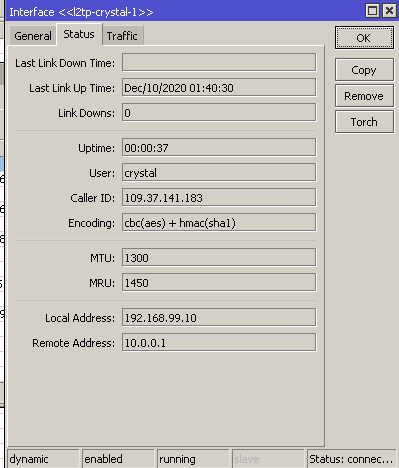
I'm having a bit of an odd issue with my l2tp vpn
somehow, ARP is not being forwarded, so I cannot access devices on my local /24, but when outgoing to WAN, it works just fine
if I ping in reverse, so LAN -> pings device connected over l2tp
then suddenly, the vpn device can talk to a LAN
plain siren
Its configured to route to default route Only
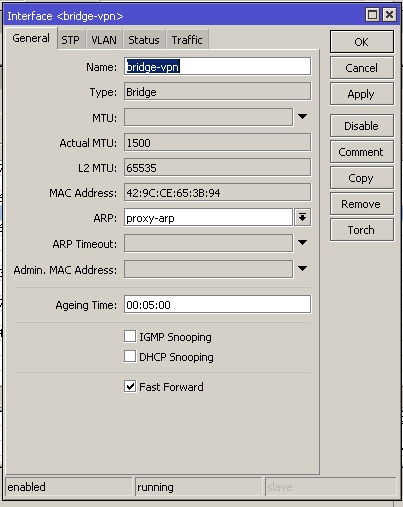 plain siren
I think the route table isn't being set right
plain siren
Until someone comes the other way to knock and say... No over here
tame carbon
yeah, but proxy-arp, forces the router to act as ARP source
plain siren
Wireguard spoils me
plain siren
I remember why I hate these.VPNs
tame carbon
My home internet
tame carbon
Nahh, its for my phone and laptop lol
so its just a user
I had my african friend help me out last time
plain siren
I'd the LAN you were on when connected sharing the IP space
plain siren
You have to move entirely out of the subnet
Or the broadcast will collide
And no arp
plain siren
Like if you used that and connected to some public WiFi that also used 99.0, its gonna freak
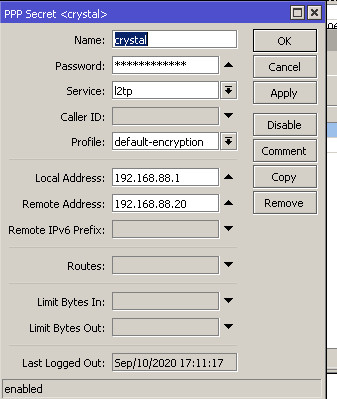 plain siren
If the network you were testing on was also using the same subnet with the same subnet mask size., Problem
How did you test the VPN and end up noticing Problem
From your own LAN?
tame carbon
my phone has it set to always-on-vpn
@plain siren it shouldn't there's an accept all from LAN -> LAN
and since its same IP range
plain siren
Isn't VPN -> LAN its own set
tame carbon
As of right now, no
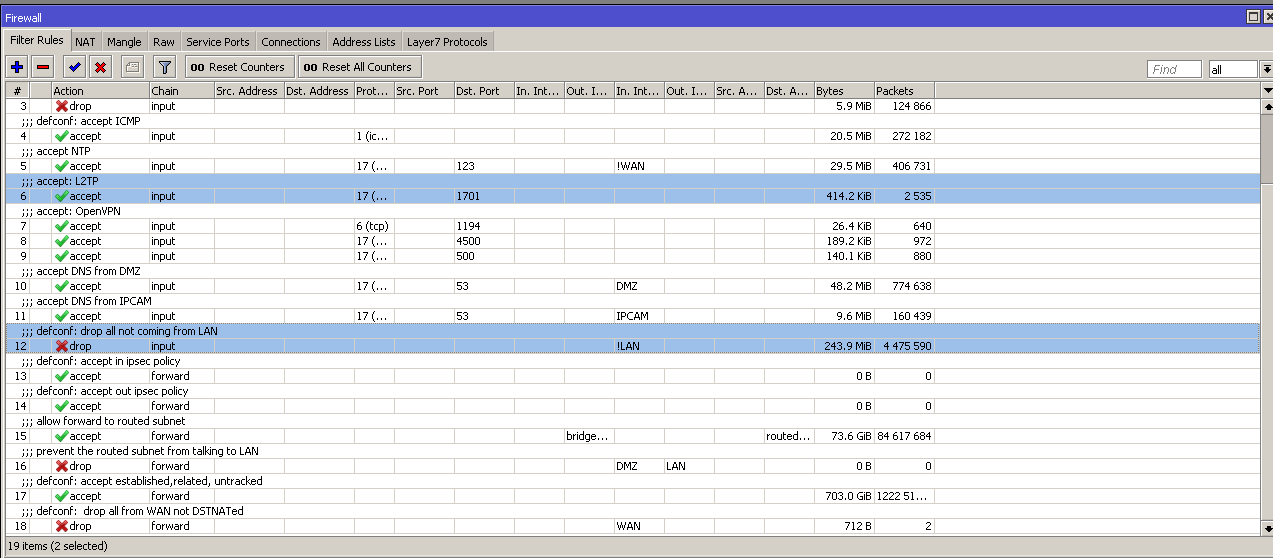
DMZ is something else in that ^ that's a public /29
ignore that xD
plain siren
I hate their UIs
tame carbon
I am not sure :/
plain siren
And uh
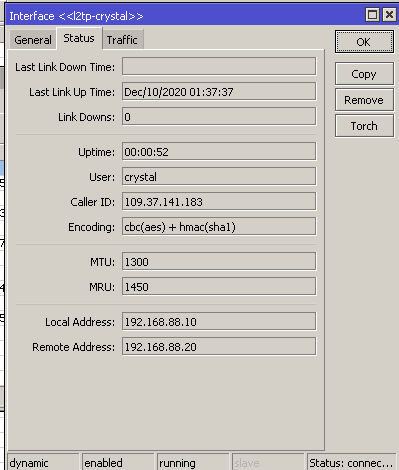 plain siren
You allow IPSEC into the firewall
But not to allow LAN-LAN between subnet
Which you also have to define.
tame carbon
Well, I haven't changed subnet yet, I will do now
plain siren
Explicitly
 plain siren
Basically 2 routers were screaming on the same broadcast
And it was hurting itself in confusion
You get fun logic results with mashups like those
tame carbon
the 192.168.99.0/24 range is on the same address list as my LAN
so I dont have to change fw
tame carbon
maek backup
plain siren
Yes
plain siren
I love how they try to put every possible config into a GUI system
And it looks cluttered and complex after
tame carbon
Its actually just a shell around the terminal
plain siren
You can make a mikrotik router
tame carbon
yeah, RouterOS has licences for x86
plain siren
Its using the Linux Kernel
Drivers for TCP IP To do things like bridges and MAC-SEC, etc
tame carbon
yep
tame carbon
I find, with mikrotiks, as long as your setup doesn't difer from what the wiki says.. you can make it work
plain siren
Haahhahah
tame carbon
xD
plain siren
I've made those things do some whack shit
plain siren
They are fun to toy with
tame carbon
Laptop crashed
plain siren
Pfft
tame carbon
Hasnt happened, since
Ever
we back
nothing useful in syslogs
not sure why it froze on me
oh, I think I may have
overheated it lol
I am on my bed, with laptop on blankets
asus-isa-0000
Adapter: ISA adapter
cpu_fan:     4300 RPM
temp1:        +82.0°C
toasty nuts
 peak blaze
wtf
 frank heron
 primal ice
except when they shoot themselves in the foot and blackout half the world.
quad9 has been a good backup slower though.
waxen scroll
@clear igloo have you used config sync on nexus?
 clear igloo
LAWL, never
waxen scroll
ugh
i ran into it the first time yesterday and its broken
the two devices are 30 change versions off
 hollow marlin
During their recent outages that would be knocked out too
little schooner
I use 1.0.0.2 and 1.1.1.2
 jaunty talon
there is no reason to use any of the providers secondary resolvers as theyre all announced behind same ASN and routed the same way!
thats why i use those three, all behind different ASN and all anycasted
little schooner
pretty cool
 hazy sandal
anyone a pro on pfsense that could help me a bit?
peak cloak
don't ask to ask, just ask
hazy sandal
okey xD got pfsense running in a proxmox VM like this: WAN -> ISP, LAN -> CT network (DHCP server, 10.10.10.1/24), OPT1 -> Home router (static, 192.168.10.100) and all I want is the webui available on OPT1. tried adding a fw rule through the console (only have console) with easyrule pass opt1 tcp 192.168.10.100/24 192.168.10.100 [port] with both port 80 and 443 w/o luck. Also tried with 10.10.10.1 as destination, whilst also adding a static route to windows (route add 10.10.10.0 mask 255.255.255.0 192.168.10.100).
hazy sandal
no,only from opt1
I want to be able to go to 192.168.10.100 on any device connected on our home router, and end up at the webui
peak cloak
i'm a bit confused about your setup, maybe a diagram would help
hazy sandal
ill hook one up. brb
I want to be able to access the webUI through the OPT1 IP from my desktop. Hope this helps
peak cloak
hmm, not a pfsense expert, just done some more basic routing within proxmox on one IP. Myabe someone else can help
hazy sandal
I dont think proxmox is the issue. the nics are forwarded to pfsense and assigned to wan/lan/opt, with fw disabled in proxmox. I can ping the pfsense box through the opt1 ip, but I cant view the webui 😦
and the mac address for the opt1 nic shows up correctly in my home router
peak cloak
@hazy sandal maybe try disabling packet filtering temporarily
in the pfsense console run pfctl -d
hazy sandal
no change.
peak cloak
do have access to the webui through a VM in the pfsense LAN?
hazy sandal
hmm, not able toping the pfsense vm anymore, but I can ping my desktop
I could setup a win10 vm and get access
ouch. gotta upload the damn w10 iso first -_-
hazy sandal
sure, but still need to upload the isos. only run cli stuff on the server so no ui dists of anything, and waay to unfamiliar with linux to install a desktop environment xD
 peak cloak
@hazy sandal you don't use proxmox webui?
I setup a linuxlite VM to access the pfsense LAN in my setip
hazy sandal
okey. that sounds like a pretty good alternative
peak cloak
It comes with a easy to use desktop environment ( I forgot which one)
Linux Lite is a free easy to use linux based operating system that is suitable for people who are new to linux.
hazy sandal
im planning to move away from windows on my desktop as soon as I've found a dist I feel comfortable with. so far manjaro or mx is the best options xD
hazy sandal
but for the coming 2 years I need windows for school. actually getting a server- and virtualization education 🙂
I might look into linuxlite as a temporary solution until we cover pfsense in school. think its a few weeks until then. but as of now I gotta go to sleep. thanks for the help!
winged harbor
Does anyone know if there is a way to use internet connection sharing (ics, windows 10) with more than two devices?My motherboard has one ethernet port and I have two ethernet network cards I got for free and I thought it would be pretty cool if I could make it so I get internet via my motherboard from my router, then output from the network cards to my consoles. Does anyone know how to do this without buying additional hardware like a switch? Surely there's a way to make the cards work in a similar way to a switch? I could get it to work with two devices but I don't know how to do it with three. Any help would be appreciated.
tame carbon
its called a switch
@winged harbor you can get an unmanaged 5 port desktop switch
brand is kind of irrelevant

But these basically allow you to "add" more ports to your setup
they dont have any configuration
I know you want to do this without extra hardware
winged harbor
And I know that it is possible
tame carbon
It is, if you can wrangle windows the right way
winged harbor
And I'm willing to do that but I don't know where to begin
tame carbon
and dont use ICS
ICS makes your own machine act as a router
you want to bridge the two parts of your network into one
winged harbor
ics seems to be working fine though
tame carbon
yes, but the device is on a different subnet
tame carbon
windows is silly
tame carbon
but you cannot add a 2nd interface to it?
winged harbor
but only for two devices because i dont think ics support more than two at a time, but bridging should if i figure out how
no
winged harbor
yes and I managed to bridge all three, but I can't get the connection to work on more than one at a time
but I know its possible, just not the how to
tame carbon
you should be able to bridge three interfaces together
winged harbor
yes
winged harbor
I don't really know how to do that properly
plain siren
I heard someone is trying to bridge nics
winged harbor
yeah
tame carbon
@winged harbor any chance you can screenshot the network interfaces you have configured right now?
plain siren
Before I even ask.... Has it been considered you also gotta do shit on the router
tame carbon
also, show us the status, and interfaces configured in your bridge
winged harbor
Yeah, that's fine
plain siren
Because windows is only 50% of the job
tame carbon
He wants to use his machine as a switch basically
winged harbor
that's okay, I just want it all to work using one cable from the router if that even is possible
tame carbon
^ that
plain siren
Windows has a router mode in it
It can turn the other ports into a switch
But not by bridges
winged harbor
how do I do that?
plain siren
Lemme get the instructions
winged harbor
okay
plain siren
But ... There is a catch
winged harbor
which is?
plain siren
Its windows server only.
winged harbor
damn it
tame carbon

winged harbor
is there any way of doing what I want within windows 10 at all?
winged harbor
okay
tame carbon
@plain siren do you even need any of that?
he's not trying to do routing
rather, same subnet three nics
plain siren
Switching is routing.
winged harbor
do any of you know of a pcie network switch? It would be cool if I could fit it all nicely in my computer
plain siren
What's the goal
tame carbon
@winged harbor just get a desktop switch
tame carbon
winged harbor
because I can only run one cable from my router as of now and I would like to connect both my consoles as well. I know I could get a switch but I would both like to try to hide all of it as well as possible within my computer if I could, and I would like to put my two ethernet cards to use instead of them just collecting dust.
winged harbor
I know but I'd rather not have a switch under my desk
waxen scroll
@tame carbon its so cute
winged harbor
I have no visible wires
tame carbon
you can always kick it behind a couch?
tame carbon
strap it to the underside of your desk?
plain siren
Put the switch in the PC then?
There is lots of empty room
I store shit in my PC
Its a box
Use it like a box
It holds stuff
winged harbor
is there any smart way of putting the switch inside of the case and routing the cables out of it without making it look too ugly?
plain siren
Run it through the PCI slots and don't have a window
winged harbor
well
plain siren
The easiest answer is sometimes the best.
plain siren
Mmm routerbox
waxen scroll
lol thats a key management box
plain siren
Its a box tho
tame carbon
@plain siren this is the security camera box
plain siren
A box is a box is a box
tame carbon
the hard tubing underneath, goes into the ground
the bunch above, goes throughout the building
plain siren
Is that box grounded?
winged harbor
my classmate grounded his bed
tame carbon
You can do one better
plain siren
Paint it to match your case. Double side tape it to the case
tame carbon
and get one that uses 5V usb supply
winged harbor
it already would match
winged harbor
okay
plain siren
Yes
winged harbor
thank you very much
tame carbon
PoE or USB-C
plain siren
It does
tame carbon
nice
winged harbor
I appreciate you guys taking your time with me
plain siren
Its a nice one tbh
winged harbor
honestly I think I might as well
plain siren
USB C is a nice touch
I love overcomplicating things but this is not one to overcomplicate
tame carbon
assign virtual machines to them?
makes life a lot easier if you dont have to use macvtap
@plain siren my setup ^ xD
 cursive valve
Or shoes
winged harbor
lol
tame carbon
socks, lacking sandals
plain siren
Shoes underside is nasty. Tracking that in the house is even nastier.
cursive valve
But the sunglasses show that you wear outside things inside
tame carbon
@cursive valve those are prescription sunglasses
I am near sighted
during summer those are my daily drivers
Im the guy who will wear sunglasses in the supermarket
winged harbor
my boss always wear dark tinted sunglasses
cursive valve
I do like the stereo propping up the switch
winged harbor
and half the year its dark 24/7 here
tame carbon
I chose tinted glasses, so when I am at festivals, ppl cant immediately see that I am hella high
winged harbor
lmaoo
also, do you guys think that a 750w psu will hold for a 3900x oc'd to 4,2 all cores with a 3090 strix?
tame carbon
Did you look up the power requirements for both?
winged harbor
yeah a 750 will hold stock but idk when I oc my cpu
tame carbon
if we have to believe this Verge article, nvidia says 350 watts for the gpu
and suggest using a 750 watt supply
tame carbon
Yeah, that leaves the OC on the cpu
winged harbor
because the oc is pretty hefty and I'd imagine that it would draw a lot more power
tame carbon
Ryzen only really starts consuming lot of amps once you push it to redline
its very efficient in lower clockspeeds
cursive valve
VERY
winged harbor
I mean now I'm running it with a 2080 which also has 750 set as recommended but idk
tame carbon
benchmarks
suggest power draw of around 150 watts
250 from the wall, for a full system
on a 3900x
add, 50 watts headroom for your OC
that's 200 + 350
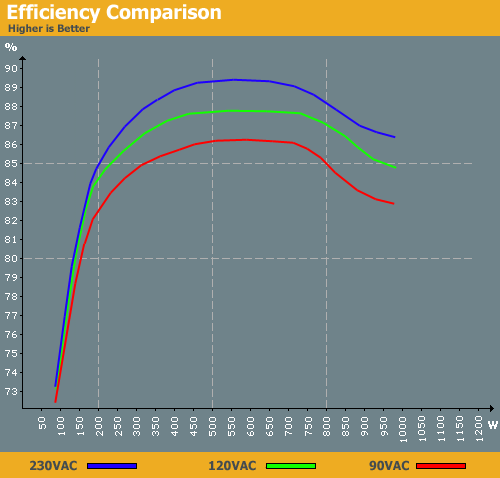
you got 200 watts spare, and these PSUs are at their most efficient ~ 80% usage
rest of your system is peanuts, maybe 100 watts at the most
thats including spinning hdds
and usb supply
750 is enough
tame carbon
people who buy 1000 watt supplies for a 450 watt system are spending their money poorly
winged harbor
yeah
tame carbon

most power supplies follow this curve
for exact numbers, check the manual of the one you want to get
winged harbor
I already have a 750w which is why I asked
tame carbon
how old is it?
winged harbor
three years, only used for 10 months though
tame carbon
okay, thats fine ^^
winged harbor

Corsair HX750i, 750W PSU - ATX 12V V2.4, 80 PLUS Platinum, Modular, 6x 6+2-pin PCIe, 12x SATA, 8x Molex
tame carbon
I recently threw out my 10 year old ThermalTake XT775 xD
I suspected it broke my i7 2700k
but I dont have the tools to test
winged harbor
ouch
tame carbon
that chip served me for 9 years
winged harbor
It's a pretty well respected processor though
winged harbor
yeah
tame carbon
It could also be the motherboard xD
but I dont think that chip will ever be switched on again
winged harbor
my old motherboard killed my last gpu lol
winged harbor
oh wow
tame carbon
after that, it became too unstable
had to run at 4.2
and the last year
stock
3.9
thats how overclocking can damage your chip
years upon years
winged harbor
cash well spent, I would say
winged harbor
yeah the processors today are pretty amazing
 winged harbor
My girlfriend just got a 3600X, an upgrade from some kind of athlon 4 core, no ht
tame carbon
perfect for a server
tame carbon
finding a board for this case was hard..
there's no FlexATX boards, or werent at the time, for AM4
winged harbor
so what did you end up getting?
tame carbon
mini-ITX
but now I only have one PCIe slot
which I used for a dual 10Gbit network card
(hence the yellow fibers)
winged harbor
what kind of server do you run?
tame carbon
there's bunch of stuff on that
private and for work
for private..
I currently host a factorio server on it xD
winged harbor
that's cool
tame carbon
benefit of a low power machine like that
is you don't have to worry about it being on all the time
winged harbor
yeah
tame carbon
lol the motherboard it has though.
couldn't get around the GAMING stuff
so it has RGB
winged harbor
that seems to be the case with everything pc related these days
winged harbor
should probably vacuum a bit though
cursive valve
It's all in the cloud now
winged harbor
ah
tame carbon
but rather, some kind of 'spray-on' foam
that got splattered everywhere
@cursive valve nice rack
cursive valve
🤜🤛
tame carbon
@winged harbor the server itself has Debian running on it
cursive valve
Love debian
tame carbon
@cursive valve I learned to ditch VMware
using KVM/QEMU now, with virt-manager as front-end
even works on windows clients, with X11 forwarding & putty
tame carbon
its so much easier
I use linux on my laptop, and vmware player doesnt work on that
so I had to run a VM everytime..
(ofc you can pay for VMware workstation player on linux)
which can connect to ESXi
cursive valve
I still have an esxi instance somewhere
tame carbon
I have two
somewhere
wait
nop
3
xD
@cursive valve I am so happy though, that the choice of ISP here, came out lucky
I got extra /29
cursive valve
Dang
I'm stuck with one isp and ofc it's shite
I think I have 2 or 3 proxmox severs
tame carbon
one possibility if you dont have more IPs, but a beefy line
set up a site 2 site vpn with a box in a datacenter
and then use that as gateway
added benefit, of hiding your address from the public
peak cloak
I'm using proxmox as my hypervisor
 abstract nexus
just installed proxmox and so far..the best thing a network can have..LXC and VM´s .. very happy that all my playground comming true
 idle bridge
I have the fastest internet on the planet 😏
 shut perch
£60 per month here in the UK
idle bridge
@shut perch I pay $70 AUd
shut perch
😔
shut perch
mobile phone?
idle bridge
All I have is an xbox and my phone 😂
Until oct when I get a PC that is. Although I don't think getting a PC would help my internet much especially since I can't use ethernet because of the location of my router 😪
idle bridge
Yeah
shut perch
Everything on your own?
idle bridge
Yeah
 elfin socket
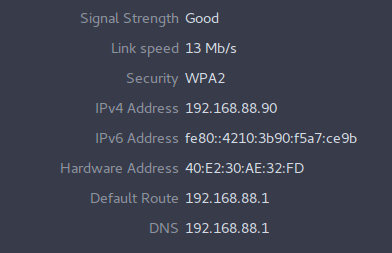
Ethernet just seems faster because they dont have to deal with as much 'overhead' in accounting for broadcasting in the air in a far comparitively noisy environment
 unborn sluice
Cause full duplex
 glad tusk
tame carbon
glad tusk
tame carbon
^ literally
unborn sluice
^
 unborn sluice
I am speed
tame carbon
I need another AP for my bedroom, this is kinda rediculous
unborn sluice
wireless mesh for the luls
tame carbon
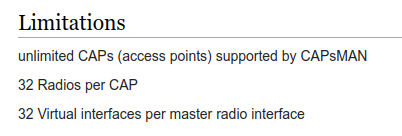
I already have my network under CAPs
so I can just add another radio, and add it to the provision :)
Mikrotiks propietary 'roaming' solution for wifi
unborn sluice
no [significant] performance hit?
tame carbon
none that I have noticed, then again this a small network
It supports accounting and Dot1X
so you can have EAP 802.1X authorization
which is kinda neat
unborn sluice
but do you use EAP though
tame carbon
@unborn sluice if you run bigger networks, your CAPsMAN (the manager) needs to be a bit beefy
since it handles majority of the traffic
unborn sluice
I got a small one, so not really much
unborn sluice
a small network
tame carbon
right
 unborn sluice
consumerish routers
tame carbon
https://mikrotik.com/product/rb4011igs_rm I love this guy

MikroTik is a Latvian company which was founded in 1996 to develop routers and wireless ISP systems. MikroTik now provides hardware and software for Internet connectivity in most of the countries around the world.
best investment I ever made into networking
it has so much CPU headroom, that you can disable hardware acceleration (fastpath)
unborn sluice
$200 ?
tame carbon
MikroTik is a Latvian company which was founded in 1996 to develop routers and wireless ISP systems. MikroTik now provides hardware and software for Internet connectivity in most of the countries around the world.
How about this?
This is more home oriented
has same luxurious features
less bandwidth overal
unborn sluice
$100 ?
tame carbon
$69
unborn sluice
oof,
 unborn sluice
lowest I can find (in nearby retailers) is 93ish
tame carbon
ow
hehe
this is the cheapest one they have: https://mikrotik.com/product/RB931-2nD
MikroTik is a Latvian company which was founded in 1996 to develop routers and wireless ISP systems. MikroTik now provides hardware and software for Internet connectivity in most of the countries around the world.
tiny fast ethernet router
300mbit/s
unborn sluice
that's really cheap though
tame carbon
but no gigabit
unborn sluice
exactly
unborn sluice
want gigabit ports

don't have gigabit internet but I want it internally
transferring files to NAS irritates me
tame carbon
MikroTik is a Latvian company which was founded in 1996 to develop routers and wireless ISP systems. MikroTik now provides hardware and software for Internet connectivity in most of the countries around the world.
This is the smaller brother of the 4011 that I have
there's also a variant without wifi
unborn sluice
oof how much is this supposed to be
tame carbon
$129
unborn sluice
Gotta love the conversions
tame carbon
question is, do you want wireless included
unborn sluice
almost over $200
 tame carbon
find a different retailer
unborn sluice
nvm, I found a seller for $186
tame carbon
but $186 for an RB2011 is overpriced.
unborn sluice
yup
tame carbon
I bet you can get them on ebay for less
since 2011's are last gen
I used to use bunch of TPlink routers, but they all died on me after few years
I discovered mtik, and just bought into them
few years, I will either buy more, or criticise them hard
tame carbon
oh yeah their low end rack unit
only has SFP, not SFP+
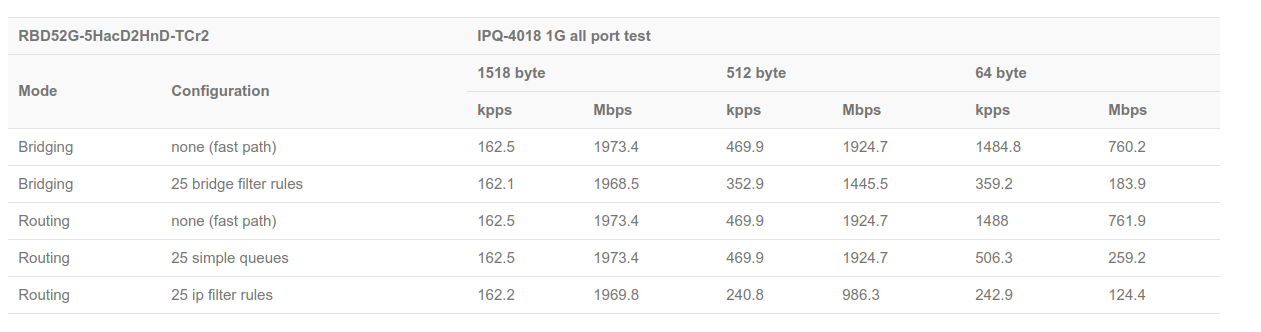
look at the test results for that model
usually have some indication on how fast total routing capacity is
unborn sluice
i'll look for results when I can see something that isn't overpriced
i'll take your word for it
tame carbon
MikroTik is a Latvian company which was founded in 1996 to develop routers and wireless ISP systems. MikroTik now provides hardware and software for Internet connectivity in most of the countries around the world.
tiny routerboards ^
no wireless though
2gbit/s routing, 450mbit/s IPSec acceleration
unborn sluice
$67
tame carbon
getting closer
tame carbon
The 'lite' variant of that hEX, is 100M, costs about half
the step to gigabit is 'double' the price
unborn sluice
oh no
not 100M
frankly for $67 if it isn't that overpriced (per your opinion) that would be my option
tame carbon
my problem with a bunch of these home wifi routers, that have 4x gigabit... is that once you put them under full load, you don't get the full bandwidth
@unborn sluice keep in mind: you get regular software updates, and new features
unborn sluice
my problem with a bunch of these home wifi routers, that have 4x gigabit... is that once you put them under full load, you don't get the full bandwidth
ish
RouterOS

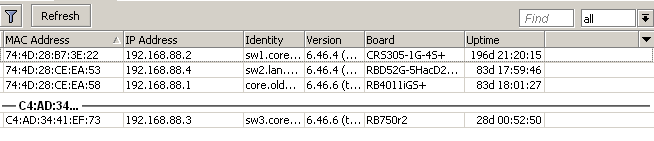 unborn sluice
any more recommendation or should I pull the trigger
tame carbon
Your call, I cannot make judgement since i am biased towards mtiks
unborn sluice
If you have more recommendations though
maybe I can check if their price isn't that far
tame carbon
MikroTik is a Latvian company which was founded in 1996 to develop routers and wireless ISP systems. MikroTik now provides hardware and software for Internet connectivity in most of the countries around the world.
You can filter on the left
all their devices run the same software
if you want to know which featureset they have, look at which license level you get
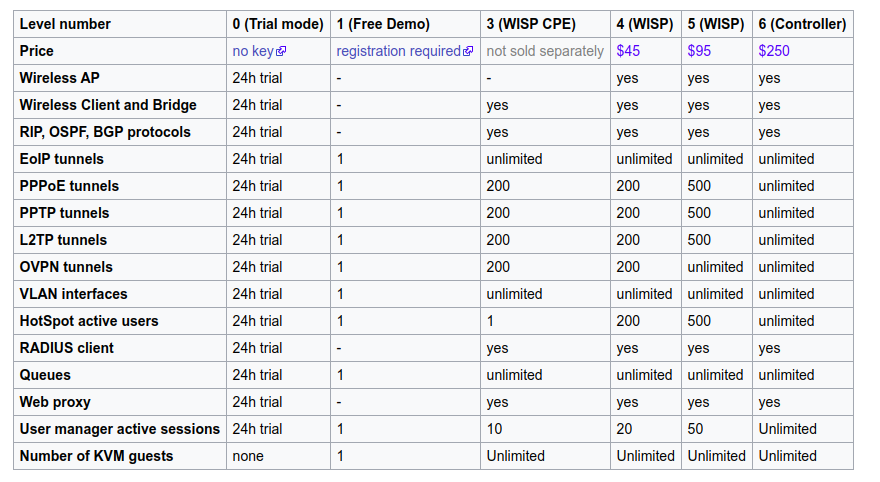
The license is included with the device
Most of their routers are L4
APs either 3 or 4
their big boyes are 5
unborn sluice
rb750gr3 would force me to buy a ethernet adapter for me switch
tame carbon
since internal antenna
unborn sluice
ohh nooo
tame carbon
@unborn sluice you can also go full ghetto
unborn sluice
I didn't check the back for antenna ports
tame carbon
and get just a RouterBOARD
unborn sluice
didn't realized it's internal
tame carbon
MikroTik is a Latvian company which was founded in 1996 to develop routers and wireless ISP systems. MikroTik now provides hardware and software for Internet connectivity in most of the countries around the world.
Check this ^ xD
unborn sluice
how far is it from other OS?
unborn sluice
I'd do the full 180 flip and use my rapsberry pi as AP
tame carbon
Everything is commandline based, the UI is just a shell for that
tame carbon
http://demo.mt.lv/webfig/#Interfaces if you go here
you can see the left menu
the native client, looks pretty much like that
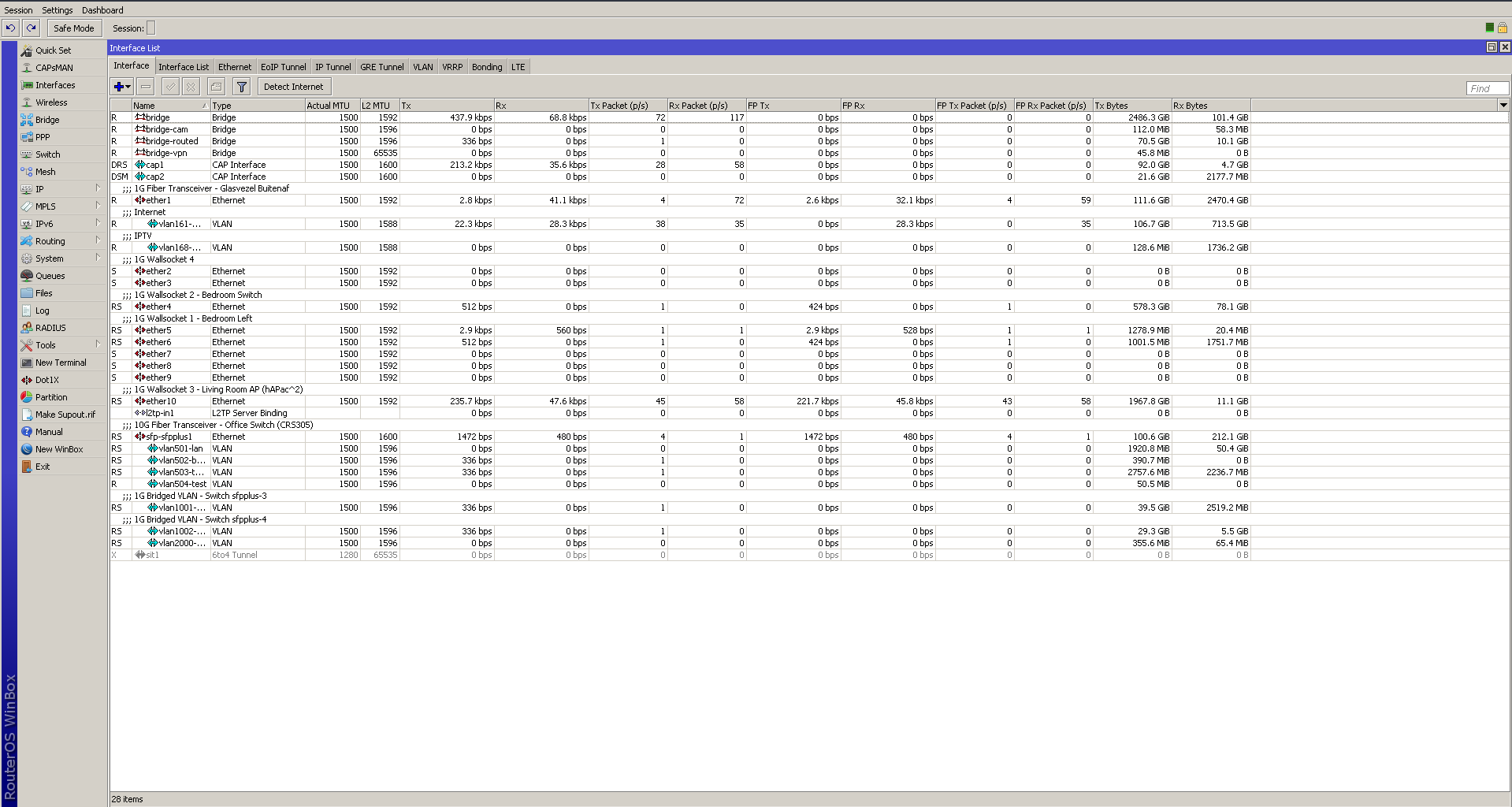 unborn sluice
oh wow, the colors brings me back to the dial up age
tame carbon
Yeah its UI is oldschool
tame carbon
All the rules you configure, are just commands
so exporting your config, is just a list of commands
unborn sluice
besides, if I'm going terminal mode, why tf would I need good UI
tame carbon
Basically, what you need to kickstart the use of a mtik
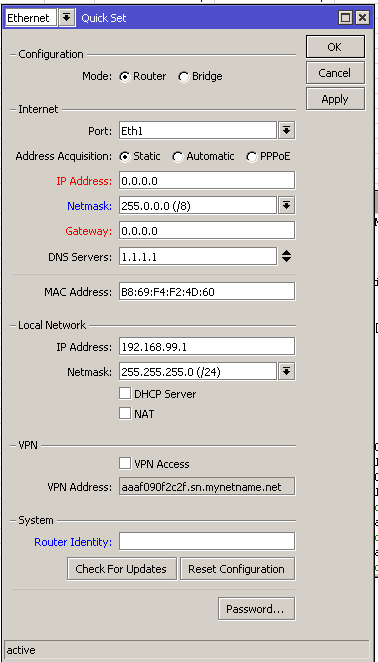
you use this "QuickSet" for the intial config
it sets you up with a default firewall config
and after that, if you want to do things, consult the mikrotik wiki
tame carbon
the hAP ac2 is great as a central router for a home network
you can always expand your network with more access points
just didnt expect such a deviation in price
 tame carbon
Import
unborn sluice
i'm lucky if I can get it with $10-$15 difference
Import
shipping fees normally can go for $20
so it's not that much logical
unborn sluice
probably gonna import just to spite the price deviation
 tame carbon
if you got any questions with configuring it, I can be of service
unborn sluice
I would ask you if I break it
tame carbon
I've only got about 1 year experience with the OS so far.. but already learned a lot
@unborn sluice you can make backups of your running config before messing things up
and restore with 1 button press
unborn sluice
nah, backups are for the faint of heart
unborn sluice
and I plan to tinker with it first, with only me using it for few weejs
before I totally swap ir with the old
 unborn sluice
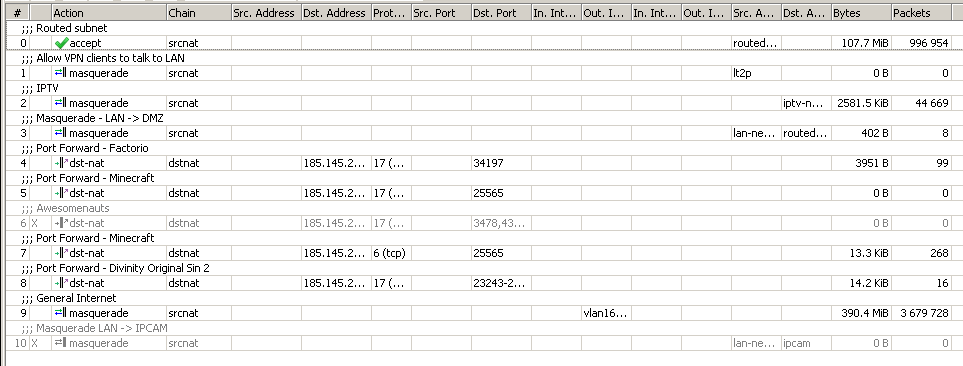
time to triple NAT it
tame carbon
srcnat masquerade is the 'default' for outgoing WAN traffic
thats what yo-average home router does
port forwarding is dst-nat
unborn sluice
time to buy cat6 cables
unborn sluice
i don't even know if mine is shielded
tame carbon
is it made of plastic?
unborn sluice
hmm, it's in my closet lemme check
unborn sluice
I actually forgot lol, I need to check what the cable looks like

 unborn sluice
yep, looks unshieled to me
too lazy to get off my ass and to go the closet
so I searched the internet for the product
unborn sluice
oh yea a noctua
tame carbon
only low profile 2U cooler I could find
lol
on a mini ITX server board
Ryzen 2600 with 16G DDR4 ECC (2400MHz)
tame carbon
most expensive part in that machine: the network controller
I had to... 'extend' the power supply
cut off some sata power headers
and spliced more onto them
I didnt have heatshrink tubing at the time, so electrical tape had to do
FlexATX parts are so hard to find
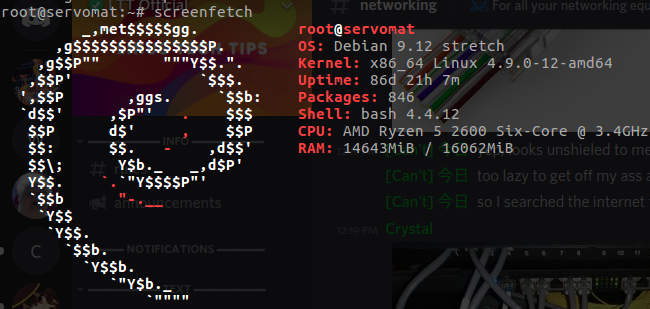 unborn sluice
but looks neat
too lazy to get a measure tape, I'll wing the measurement of the ethernet
tame carbon
10G fiber optics, 30 meters, costs maybe $40 nowadays
unborn sluice
$100 for the cables and the hap ac2
tame carbon
including fiber modules
unborn sluice
i'm okay with copper for now
unborn sluice
the distance of the AP from the router isn't above 25 so it doesn't matter in my case
now the problem is
my current router downstairs is from the ISP

tame carbon
What kind of uplink do you have?
coaxial, DSL, ?
mtik used to sell adsl modems too :(
If your $isp router has a DMZ feature, use that
basically forwards all incoming traffic to one IP, the WAN address of your mtik
unborn sluice
fiber
tame carbon
oh
 queen flax
friken picky mods
unborn sluice
NAS, and a fleet of PIs
nothing special
but plan to have cheap servers [in the future]
(cheap = 2nd hand or old gen)
tame carbon
but you just mentioned its fiber optics?
tame carbon

I got one of these from my ISP
fiber module plugs in on the left
ethernet comes out the other side
unborn sluice
I definitely can't see the fiber
hopefully the support of the ISP won't be a nightmare
tame carbon
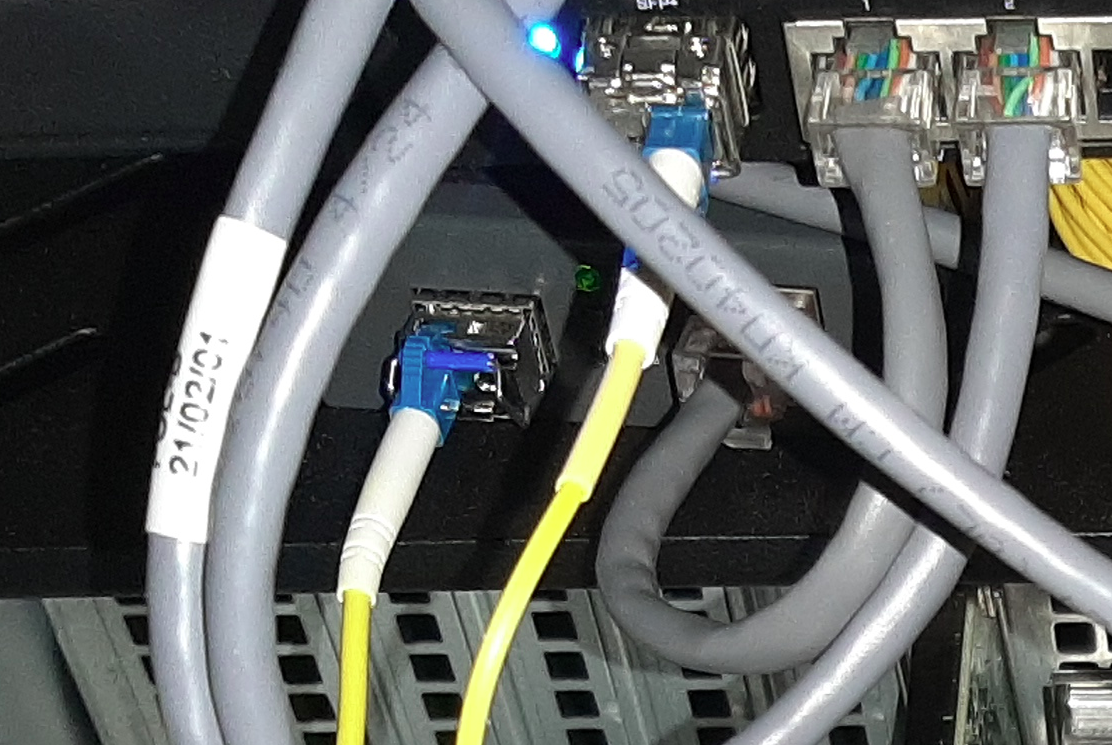




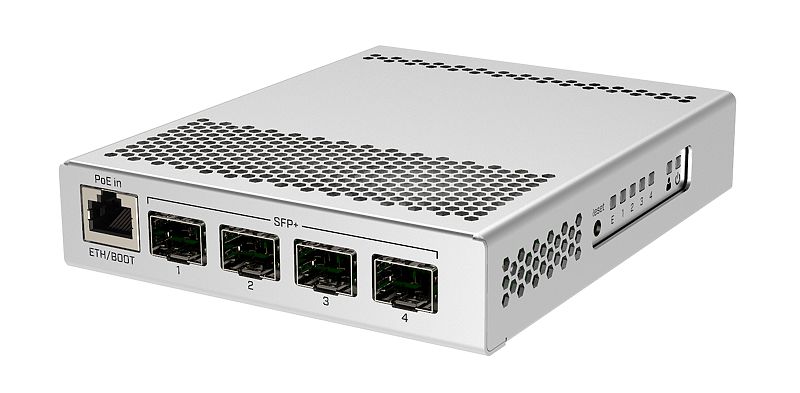

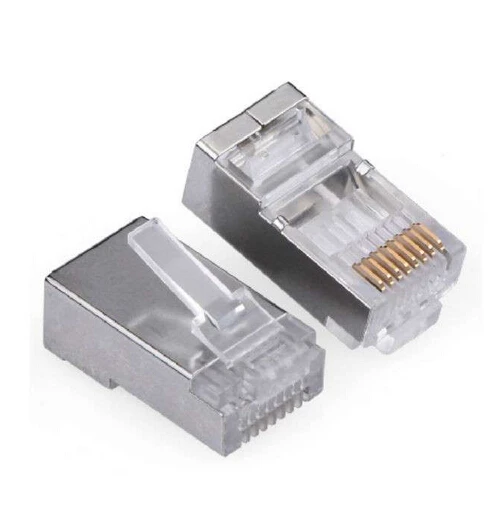


 unborn sluice
ahhh
tame carbon
thats where $ISP's equipment "ends"
and mine begins
maybe dig around the ISP router, send a picture?
if you can snoop into the router itself, maybe see how they establish your connection
if its PPPoE, you can request credentials from your ISP so you can do this on your mtik
unborn sluice
current one looks like this
tame carbon
GPON
unborn sluice
oh you mean the authentication
tame carbon
Thats a GPON module
unborn sluice
exactly
tame carbon
ISPs are stupid
they treat fiber as if it was copper
I guess, could try and contact your $isp and ask if they offer any support or specifications for your own equipment
unborn sluice
lemme dig into the router