#networking
1 messages · Page 207 of 1
 hollow marlin
 tame carbon
or how many ports are on one chip for bigger switches
 rocky badge
and the models/lineup is lacking
tame carbon
they usually have certain bandwidths between blocks
rocky badge
Most Ubiquiti switches have 8 ports/switch chip

 waxen scroll
@rocky badge so does cisco
rocky badge
yup
waxen scroll
@clear igloo F3 line card for nexus has 8 ports to a chip
and they all do line rate
soooooo
 clear igloo
Yah
 rocky badge
@clear igloo I have to do a presentation to....5-15 people 😩
clear igloo
rip
tame carbon
80gbit/s routing lol
rocky badge
Director of IT, Sysadmin, administrators of some schools, attendance, some teachers @clear igloo
waxen scroll
tell them to get creston
waxen scroll
nobody ever got fired for buying creston
rocky badge
we're throwing out our Crestron
Well, not entirely but at least replacing audio and video distribution part of it
I'd love to go Just Add Power for that
rocky badge


pfSense now redirects any external DNS on the "school VPN" to my internal Pi Hole
So I can block their tracking shit internally
rocky badge
I don't need to access anything internally at school
waxen scroll
lmao
rocky badge
the VPN was only used for filtering
waxen scroll
and you said its VPN or network doesnt work?
rocky badge
The VPN died one day lol
waxen scroll
hopefully vpn isnt used to take attendance
rocky badge
nope
waxen scroll

how many people have you shared it with
i would be pissed if i paid for a computer and i can only do school on it
rocky badge
one so far lol
tame carbon
I can't get my school mailbox on my phone, without giving them full control over my device
 lime sky
MDM?
tame carbon
Exchange
Microsoft
cloud bs
it used to be, that you could set up automatic forwarding
but since GDPR, they barred all external communication tools
lime sky
very common in enterprise, but usually on company devices
tame carbon
they use Dot1X for the wifi and ethernet authorization
a benefit is that you get a publicly routed IP, accessible from anywhere
just have to make sure you set your firewall to public xD
 peak cloak
Oh yeah, I don't use outlook for the school email because it wants full control, no thank you. I just use the web app
tame carbon
@peak cloak yea, and that is brilliant. Because my work mail is outlook too
and you cannot be signed into two mailboxes from two different organizations at the same time
and I'm currently doing an internship
hollow marlin
a benefit is that you get a publicly routed IP, accessible from anywhere
@tame carbon Wait they are giving a public to each device?
hollow marlin
Must have been one of the few still holding onto a /8 bought years back but are not under regulation. No, most universities do not have that
tame carbon
Really?
Okay, I guess must be netherlands only then
but I had it in germany too
I can use my credentials anywhere
hollow marlin
Yeah, especially for ARIN. You need to provide use cases for blocks. You cannot just buy a /8 and hold onto it. They cracked down on it year back. ARIN would not accept "to provide a public for every device"
hollow marlin
Not talking about v6
rocky badge
That's because there's a fuck ton of IPv6
tame carbon
v4 is dated anyways xD
rocky badge
not IPv4
hollow marlin
v6 they hand out like candy
rocky badge
Spectrum gives each residential customer a /56
tame carbon
I have two /48s
I dont know why
I dont even need v6 per say
even if you only get a /64, which the smallest you can get
you still have, more address space than you will ever need.
v4 is relatively expensive
I pay 16 euros monthly for a /29
hollow marlin
It was designed to never need NAT again. Thats why you will get a public. But I guarantee that when you hit a v4 site they are doing NAT64. Its why I questioned if they give everyone a v4 public
tame carbon
Yeah because of NDP
hollow marlin
Thats just the discovery piece
rocky badge
slaac
tame carbon
yep
hollow marlin
Well you still need NAT64 technically. v4 will never phase out
rocky badge
gig/500
 rocky badge
6ms to a non isp owned speedtest server
tame carbon
let me do iperf on serverius directly

 rocky badge
lol
tame carbon
crystal@watserv:~$ ping 1.1.1.1
PING 1.1.1.1 (1.1.1.1) 56(84) bytes of data.
64 bytes from 1.1.1.1: icmp_seq=1 ttl=59 time=7.61 ms
64 bytes from 1.1.1.1: icmp_seq=2 ttl=59 time=7.56 ms
64 bytes from 1.1.1.1: icmp_seq=3 ttl=59 time=7.85 ms
64 bytes from 1.1.1.1: icmp_seq=4 ttl=59 time=7.86 ms
64 bytes from 1.1.1.1: icmp_seq=5 ttl=59 time=7.83 ms
64 bytes from 1.1.1.1: icmp_seq=6 ttl=59 time=8.12 ms
64 bytes from 1.1.1.1: icmp_seq=7 ttl=59 time=7.86 ms
64 bytes from 1.1.1.1: icmp_seq=8 ttl=59 time=7.78 ms
64 bytes from 1.1.1.1: icmp_seq=9 ttl=59 time=7.53 ms
64 bytes from 1.1.1.1: icmp_seq=10 ttl=59 time=7.70 ms
64 bytes from 1.1.1.1: icmp_seq=11 ttl=59 time=7.71 ms
64 bytes from 1.1.1.1: icmp_seq=12 ttl=59 time=7.44 ms
64 bytes from 1.1.1.1: icmp_seq=13 ttl=59 time=7.68 ms
64 bytes from 1.1.1.1: icmp_seq=14 ttl=59 time=7.45 ms
64 bytes from 1.1.1.1: icmp_seq=15 ttl=59 time=7.47 ms
64 bytes from 1.1.1.1: icmp_seq=16 ttl=59 time=7.84 ms
--- 1.1.1.1 ping statistics ---
16 packets transmitted, 16 received, 0% packet loss, time 15025ms
rtt min/avg/max/mdev = 7.436/7.705/8.120/0.183 ms
@rocky badge the ISP that runs the network at my dad's camping place is horrid lol
rocky badge
 tame carbon
wifi lmao
they have around 20% packet loss on their point2point
and isp says "its all fine, we cant do any better"
rocky badge
lol
tame carbon
meanwhile
they charge per GB
it was either that, or isdn
Municipality is reworking the sewage systems, and are planning on digging a 2.5km trench
so we managed to contract an ISP to lay a fiber at the same time
and the idea is to set up our own public wifi service
tame carbon
have you ever seen how they do peering in South africa?
rocky badge
We only have one long distance fiber line that we own, IT office -> high school main campus
yeah
rocky badge
lol this speedtest server is shit
tame carbon
first time I did speedtest on a linode
I couldn't get conclusive results
cus all the testservers were trash
 rocky badge
270/500
tame carbon
fiber optic wavelengths come in pairs of up to 96
rocky badge
So it got my full upload but not my gig down on this server lol
rocky badge
we have several 48 strand fibers coming into the MDF at school
tame carbon
:o
rocky badge
Maybe, I can get the full gig to another speedtest server
tame carbon
There's one thing I've yet to get around to setting up
I want to expose my network services that I host privately, not through my public IP
rocky badge
Each IDF has at least 6 strands going back the MDF
tame carbon
I was thinking about maybe using a forward gateway/proxy on a cloud somewhere
and just tunnel it back home
maybe something that is close to the amsterdam exchange or peers with my isp
they are a corporate ISP with a datacenter too, perhaps they offer x-connects to a box
 vapid dune
better run smoke ping to find out how many problems you have
I sometimes smoke my IP for months for the heck of it
 tepid trail
So.. Ubiquiti EdgeRouter 10X and a EdgeSwitch 10X or may i want to look for something else? My choice for Ubiquiti is for easy to use and ok prices.
Home use, home network. 1gig LAN, 200Mbit WAN, No SFP for now. Vlan and VPN support are required, 10-16 port switch in one or two separate smaller.
some kind of wireless AP to work with those, maybe Ubiquiti UniFI AC AP?
No 19" rack are needed. Bench models.
I hope i made myself somewhat understandable.
tepid trail
Using the default ISP included router for now but i want to change that out. Technicolor TG799vac Xtream
Pretty locked..
peak cloak
@tepid trail ER-X can do gigabit
just make sure you enable hardware offloading
if you want something cheaper for wifi I like the TP-Link Omada series
tepid trail
So my suggested choice can work well for my need then? I have looked into Netgear also but.. cant find any similiar products there for about the same price. Less customizable also.
EdgeRouter X SFP and a EdgeSwitch 10X SFP could also be a winner.
I hope they will do 1gig on WAN for future ISP upgrade?
peak cloak
look at mikrotik, edgerouter's are not really supported anymore that much. Ubiquity is doing upgrades to it's UNMS lineup
@tepid trail It's one gigabit routing, there is no dedicated WAN port
tepid trail
ah, okey..
peak cloak
you can have two ISP's if you want
rocky badge
Edge is still supported, but not much new hardware
UniFi security lineup basically dead now for UbiOS devices (UDM(P)/UXG)
peak cloak
yeah it's supported, the web interface sucks and there are no foreseeable updates in the works afaik
rocky badge
UNMS lineup (UNMS Router and UNMS Switch) are the new "Edge"/ISP/Operator routers/switches
peak cloak
yeah UNMS not UniFi, I mixed my words
tepid trail
Maybe i want to look into that then?
tepid trail
Hmm...
peak cloak
I like more enterprise devices that way I can learn, also you can find many second-hand enterprise devices
tepid trail
I was recommended the EdgeRouter by a friend that works with CISCO systems.
That was hes suggestion
tepid trail
yeah, i know.. 🙂
tame carbon
cisco's view towards serious security is laughable
tepid trail
Dont want to buy something that i need to replace if i want to upgrade ISP connection speed in the future. For LAN i can always invest in 2.5 or 10gig used switch or such but. No need for that now. Im good as long as the Edgerouter can handle up to 1gig. Might be a good start at least. With the Edgerouter 10X.
peak cloak
Ubiquity UNMS is like the apple of the networking world, if you want it to just work, but you'll pay the price
tame carbon
@tepid trail https://mikrotik.com/product/rb4011igs_rm

MikroTik is a Latvian company which was founded in 1996 to develop routers and wireless ISP systems. MikroTik now provides hardware and software for Internet connectivity in most of the countries around the world.
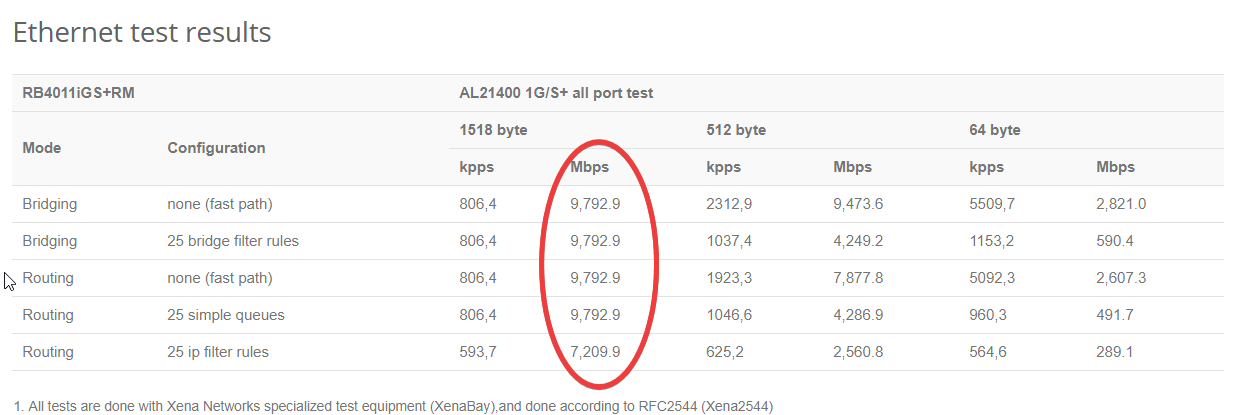
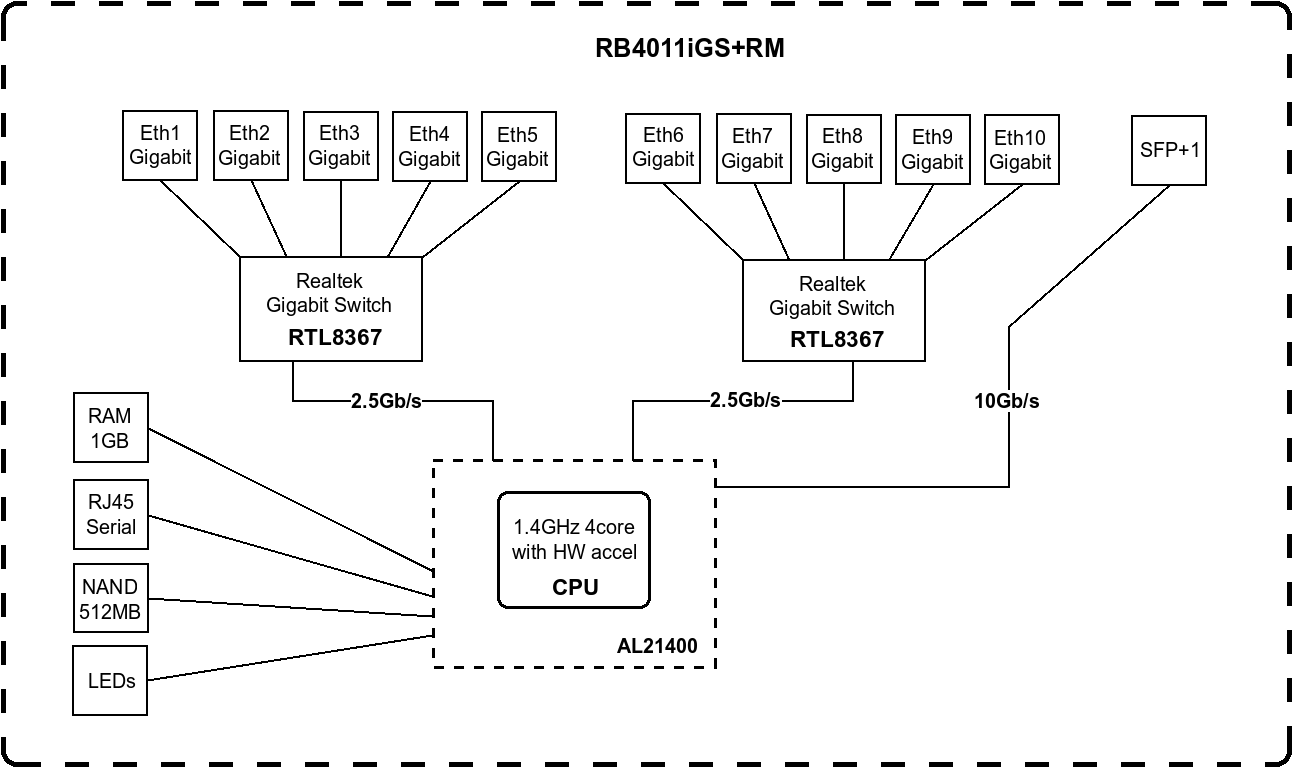
I have this at home, it does routing up to around 10gbit/s
if you have a small 10G switch, and your isp uses vlans
tepid trail
Thank you for the tip
peak cloak
for 200 bucks, that's not that bad really
tame carbon
you can set up a really small but powerful network
There's another RB4011 with wifi
but cmon, its a core router
not a toy
MikroTik is a Latvian company which was founded in 1996 to develop routers and wireless ISP systems. MikroTik now provides hardware and software for Internet connectivity in most of the countries around the world.
This is a datacenter grade 10G switch lol
it has reduntant powersupplies
I think the RB4011 does too
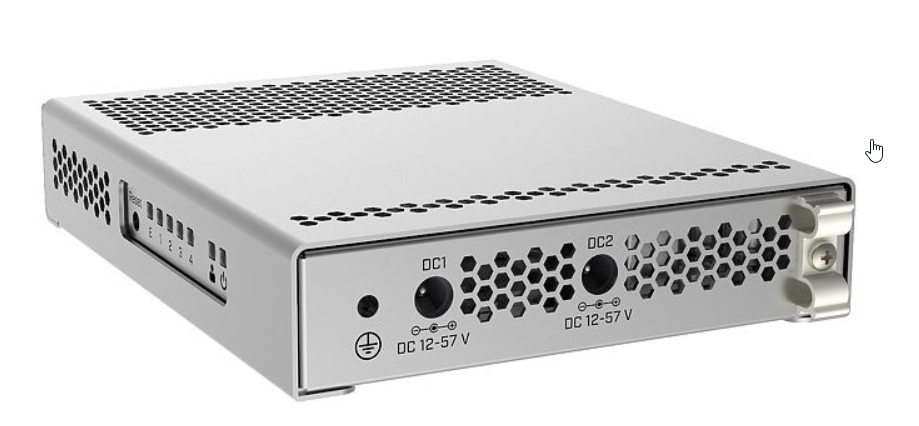
and it supports up to 57V
which is common in underground tunnels
and service boxes along the road
thats all low voltage DC
tepid trail
i really like the specs on RB4011iGS+RM
hollow marlin
I wouldn't say 4011 is a core router. Powerful but not really a core
tame carbon
Its their flagship desktop router
tepid trail
looks like a good home router
tame carbon
MikroTik is a Latvian company which was founded in 1996 to develop routers and wireless ISP systems. MikroTik now provides hardware and software for Internet connectivity in most of the countries around the world.
Once you go up in specs, price goes up a lot
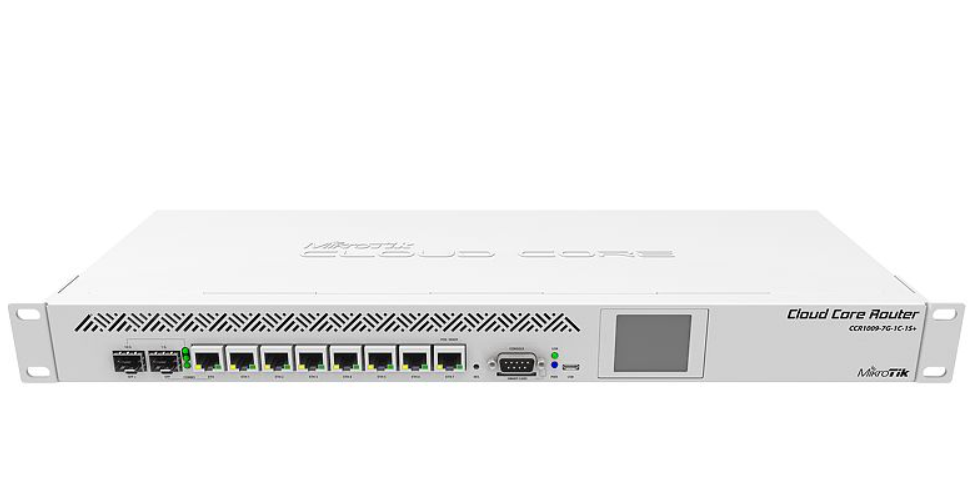
but this is an older model I believe
the newer ones have RJ45 console ports
tepid trail
i like that the RB4011iGS+RM has 10gig SFP port for future expansion for LAN
tame carbon
vlans are an amazing tool
you can do port mappings, so the device you connect to it, doesnt see the vlan
tepid trail
yeah, isolate..
peak cloak
I was thinking of getting a mikrotik router / switch eventually. RouterOS looks pretty dated but powerful. The web demo is nice: http://demo.mt.lv
tame carbon
but look
if you want to run a small enterprise
MikroTik is a Latvian company which was founded in 1996 to develop routers and wireless ISP systems. MikroTik now provides hardware and software for Internet connectivity in most of the countries around the world.
get this one
peak cloak
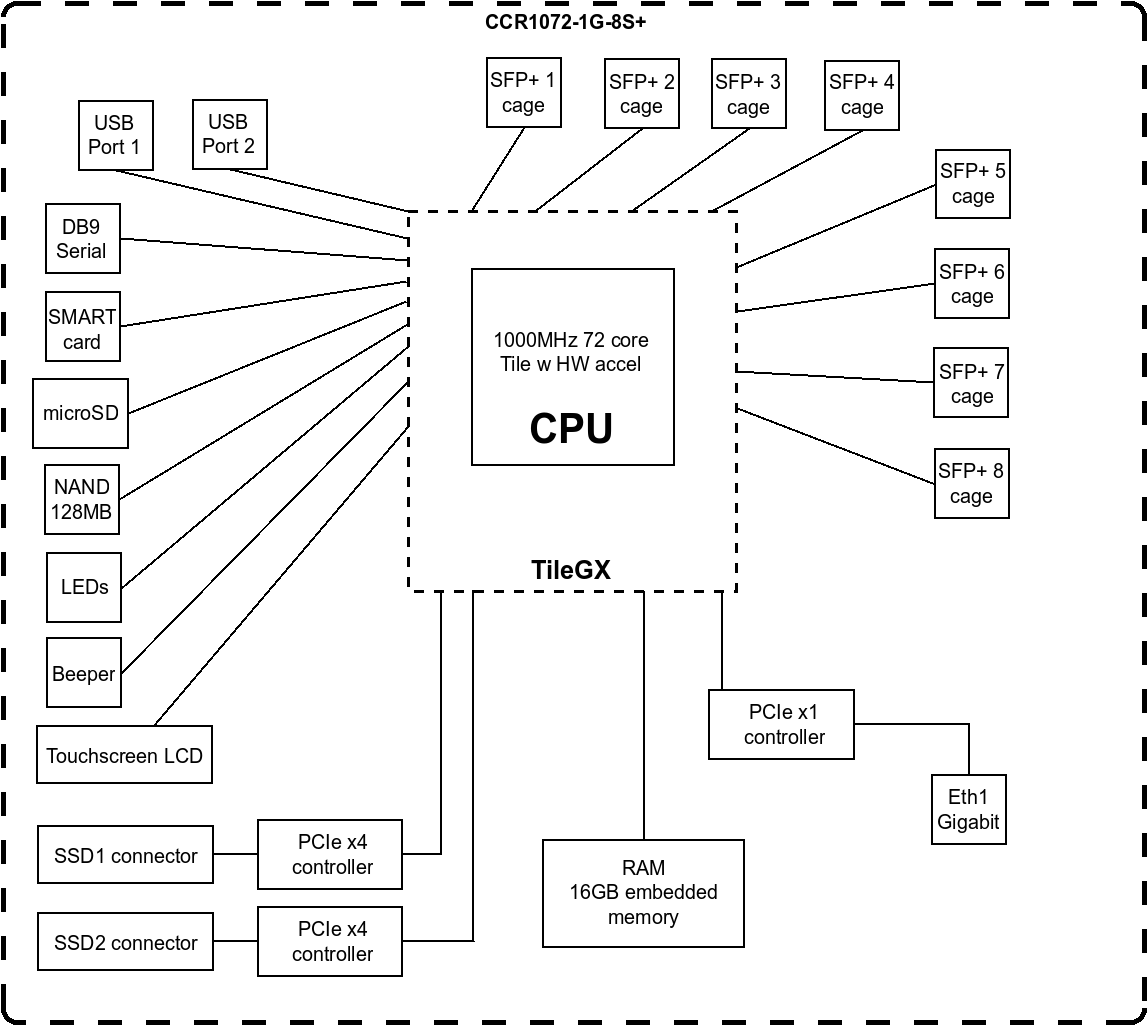
72 core cpu...
tame carbon
you can become an ISP with those
8x 10gbit
and the horsepowers to do 80gbit/s routing
120 million packets/s
tepid trail
i guess the price isnt fun though..
tame carbon
3k
USD
equivalent in cisco
is around 4500 starting
mikrotik is really well positioned in the low to mid tier
asus and tplink, netgear can all go suck it
they dont maintain their software
and their web UIs are a piece of garbage
lacks a tonn of features
peak cloak
too bad about I didn't know about microtik before
tame carbon
yeah this was a discovery for me too
peak cloak
TP Link's Omada AP's are real nice for the price though
tame carbon
the learning curve is steep
but once you get how it all works
since the UI is just a layer around the console
exporting config = a big list of console commands
but its all linux based
peak cloak
yeah, I use the config tree now anyways
tame carbon
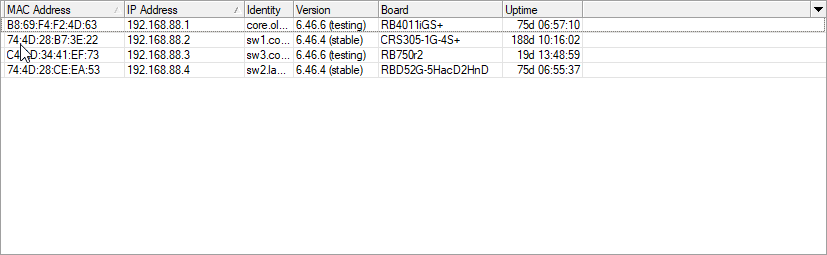
that tiny RB750 is only 100mbit
but it handles ipcam traffic
@peak cloak if you are looking for an affordable router
MikroTik is a Latvian company which was founded in 1996 to develop routers and wireless ISP systems. MikroTik now provides hardware and software for Internet connectivity in most of the countries around the world.
This is quite a decent one
tepid trail
i tried the WebFig demo.. looks good. A lot of features
tame carbon
the wifi antenna isnt the strongest one on the market, but the signal is very stable
@tepid trail there's a native client
works on linux and windows
peak cloak
@tame carbon I was looking at something a bit better, I already have a ER-X and have an AP and switch already
tame carbon
and if all fails, the machine is unresponsive
you can always connect to port 1
and use the MAC address to connect to it, no IP needed
tepid trail
@peak cloak aha..
tame carbon
@peak cloak as good as the RB4011, better or inbetween?
peak cloak
right now I'm looking to buy a server/network rack and a server for the homelab
tepid trail
Mikrotik it is then
peak cloak
@tame carbon inbetween
tame carbon
it has a smaller brother, an RB2011
hollow marlin
Mikrotik is prosumer and heavily used in the WISP world. You can serve a small ISP with that router but its missing to many features to make it viable more than ~1000 customers. Referring to the CCR that is
peak cloak
looks more pro than consumer compared to UNMS though
tame carbon
You can set up a public wifi hotspot with a CCR1072
hollow marlin
Thats where prosumer comes from.
tame carbon
and a bunch of small APs
tepid trail
I might order one..
tame carbon
use CAPsMAN to manage them as one giant roaming network
tepid trail
what have you done!?
tame carbon
so the thing that makes unify "good" that it makes a seamless wifi experience
mikrotik can do that too
 peak cloak
I plan on staying on the Omada line, already have them, already have the controller set up
hollow marlin
I have two hAP AC2s at home and with Capsman roaming isn't as seamless but that is the only downside I see
tame carbon
I have an old Cisco ADSL modem lying around somewhere
rocky badge
for something like that, I'd go unifi tbh lol
tame carbon
never know
it has 4 lines
and can act as DSLAM
if we ever get nuked into stone age
rocky badge
Local ISP is using lots of unifi for public hotspots
They have over 200 APs deployed around the county last time I heard
hollow marlin
We have moved that to our ONTs. Built in wireless is on par with Ubi
tame carbon
good labor is hard to find
rocky badge
Mainly installed at businesses with the local ISP
Each guest is rate limited to 20/20
@hollow marlin what ONTs?
hollow marlin
Calix 800/gigcenters
tame carbon
is there any other high end networking appliance manufacturer besides cisco?
hollow marlin
Yes, Juniper
hollow marlin
We are 80% Juniper now
hollow marlin
If its in the housing it'll most likely be a 717 or 727. In house are typically 716s or the rare 700 that has more a home router housing
 hollow marlin
Thats the baby
hollow marlin
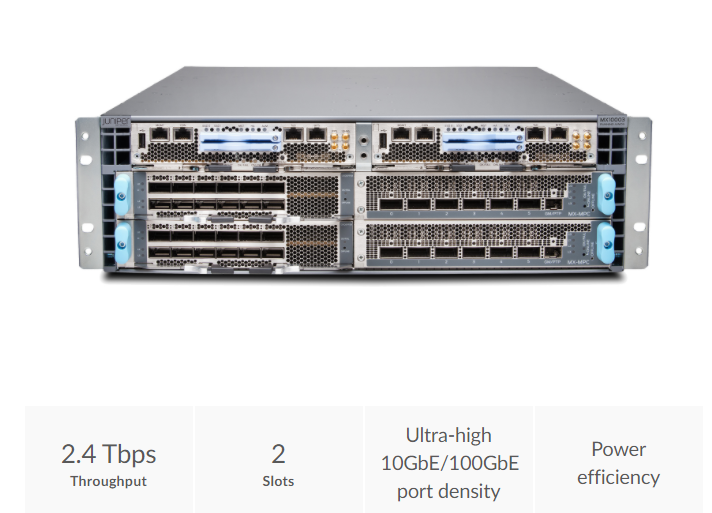
We have 7 MX10003s for our core/edge
tame carbon
That's an MX5
tame carbon
pfft. wat
hollow marlin
Yeah you need the camber tool with the key to open it
 rocky badge
@hollow marlin oof
tame carbon
is that qsfp+?
hollow marlin
Yeppers. Not bad in price either. $100k each
rocky badge
wait, so what would open it then? lol
tame carbon
24 100GbE interfaces in a single chassis.
tepid trail
@peak cloak you think i should skip the edgerouter then and order a mikrotik router instead?
rocky badge
I wish I could ask them to install inside lol
tepid trail
190 euro inc vat etc.. here in sweden.. and 100 euro for the SFP module
hollow marlin
peak cloak
@tepid trail yeah if you have the budget
peak cloak
or even if you don't the smaller models are nice too
tame carbon
yeah I go there too
not sure how you can pay 100 for sfp modules
that sounds overpriced
tepid trail
Mikrotik S+31DLC10D
tepid trail
i have fiber connection.. but its converted to RJ-45
tame carbon
yeah with a 20 dollar media converter
rocky badge
i just buy these

eBay
Original CISCO SFP-10G-SR V03 10-2415-03 850nm 10GBASE-SR SFP+ Multi mode Module. The Cisco 10GBASE-SR Module supports a link length of 26m on standard Fiber Distributed Data Interface (FDDI)-grade Multimode Fiber (MMF).
tame carbon
those are irrelevant
rocky badge
depends on what kind of fiber you're handed
tame carbon
more than 1G?
rocky badge
if its gpon, you can't go directly into a router unless it can convert gpon to ethernet
tame carbon
gpon is.. rare
rocky badge
gpon is common
peak cloak
the only fiber service we have is FiOS, but's it's GPON
rocky badge
very common
rocky badge
99% of fiber residential services are gpon
tame carbon
not seen that here... but ok
rocky badge
bet
tepid trail
it sound nice that i can VLAN the SFP port to use as a "WAN-port"
hollow marlin
We are about 50/50 AE/GPON
rocky badge
and depending on your isp
they may require their hardware for network authentication
or at least monitoring
tame carbon
@tepid trail how fast is your uplink though?
tepid trail
that is really future proofed then.. but not for the LAN-side..
tame carbon
more than 1G?
rocky badge
@hollow marlin Local ISP just pulled my Cat6 from the ONT to my pfSense lol
tepid trail
dont know what makes and models the routers and switches are but my router sees 1gig.
so at least 1gig
rocky badge
they asked how much do you want extra
tame carbon
the box please
tame carbon
nice
hollow marlin
@rocky badge Uh why. We mandate it go to a patch panel unless the customer wants to make the run.
tame carbon
I was on phone and had a service rep that actually knew what the fuck he was talking about
rocky badge
I can always cut off the end and go through my patch panel
tepid trail
im not experienced, im learning from you.
peak cloak
I don't even have a patch panel...
rocky badge
They gave me plenty of slack
tame carbon
@tepid trail if you only need gigabit ethernet
then you shouldn't sacrifice your single 10G port for that
peak cloak
first step is to get a rack
tame carbon
use a regular 1G port for your wan
rocky badge
My old modem went through my patch panel but I didn't really bother with them
peak cloak
you won't need more than 1G anytime soon
tame carbon
And once you need more than 1 >1G devices
peak cloak
I mean WAN wise
tepid trail
ok, but.. if i want to upgrade LAN to 2.5 or 10gig in the future? add a 10gig switch and connect it with the mikrotik router or what?
tepid trail
i appologise for my definitons... WAN....etc etc..
tame carbon
don't bother with 2.5G
rocky badge
tame carbon
just get 10G
@tepid trail https://www.fs.com/products/11552.html

FS
FS for Cisco SFP-10G-SR compatible SFP+ optical transceiver provides 10GBase-SR links up to 300m over multimode fiber (OM3 MMF) at a wavelength of 850nm using a LC connector.
rocky badge
The DAC goes to my 10gig switch, RJ45 from the ONT
tame carbon
@tepid trail your ISP should give you a way to just get ethernet (copper)
those modules I just linked, those are for if you wish to use that SFP+ port on the RB4011 for 10Gbit LAN
hollow marlin
@peak cloak True. I was surprised when I redesigned a a county and looking at average/peaks most typically sat around 25mbps and peaks of 120. Gig really is overkill at the moment for the average user
tame carbon
my NAS is on 10G
peak cloak
for LAN, why not?
rocky badge
rocky badge
Yes
peak cloak
Speaking of fiber, what's the difference between single vs multimode
hollow marlin
SM only Blob. MM is dead
peak cloak
Never used it, but I got a fiber media adapter for free
hollow marlin
meh, FS says otherwise lol
rocky badge
¯_(ツ)_/¯
tame carbon
@tepid trail 18 bucks for a multimode transceiver, you need two. And then you need some duplex multimode fibers with lc connectors spliced onto it
30 meters costs, 5-10 bucks
rocky badge
 tame carbon
they do custom orders
@rocky badge I like how they market the fiber as 10G
even though its layer 1
well, 0 even
tepid trail
Yeah, really like the 4011. Good price. I really cant find a comparable with the netgear, dlink and all those.. pretty locked up also featurewise.
tame carbon
@tepid trail just a tip if you go on this journey. Do not follow advice on the mikrotik forums
Use the wiki
tepid trail
rather follow you guys
hollow marlin
@peak cloak Single mode vs Multimode is based on the fiber quality and dimensions. SM has a smaller core for greater distances and cleaner glass. MM has two forms of dia which have greater loss but can be used with LED optics instead, which was cheaper but now its not even worth bothering about
tame carbon
no, but google searches for mtik lead there
tepid trail
does it have a loud fan?
tame carbon
its passively cooled
tepid trail
good
peak cloak
@hollow marlin so go SM if I ever buy fiber?
tepid trail
so pFsense... no go?
tame carbon
@tepid trail port 10 has PoE
rocky badge
pfSense is fine
hollow marlin
@peak cloak I would. But I am biased
rocky badge
*depends on your hardware
tepid trail
i had that in thought
rocky badge
HIGHLY depends on your hardware
rocky badge
you can get netgate appliances
tame carbon
netgear?
peak cloak
the people who make pfsense
rocky badge
Basic Traffic (Primarily Data Download): iPerf3 traffic is TCP - 1460 byte payload and TCP framing.
Complex Traffic (Voice, Data, Video): Simple IMIX traffic is sets of 7 (40) byte packets, (4) 576 byte packets, 1 (1500) byte packets, plus Ethernet framing overhead.
ok, but i was thinking of building my own
tame carbon
@rocky badge https://i.imgur.com/iSU14mc.png
 rocky badge
cool
tame carbon
Those pfsense boxes dont even scratch the surface
rocky badge
probably because the price? :P
rocky badge
because it's not mikrotik
tame carbon
that mtik is 200
rocky badge

peak cloak
PfSense is nice but dedicated router hardware is so much better: dedicated chips, etc.
rocky badge
Does he want to deal with RotuerOS? Probably not
tepid trail
i love this stuff, i want to learn
rocky badge
if he was looking at UniFi & EdgeOS, he probably doesn't want RouterOS
tame carbon
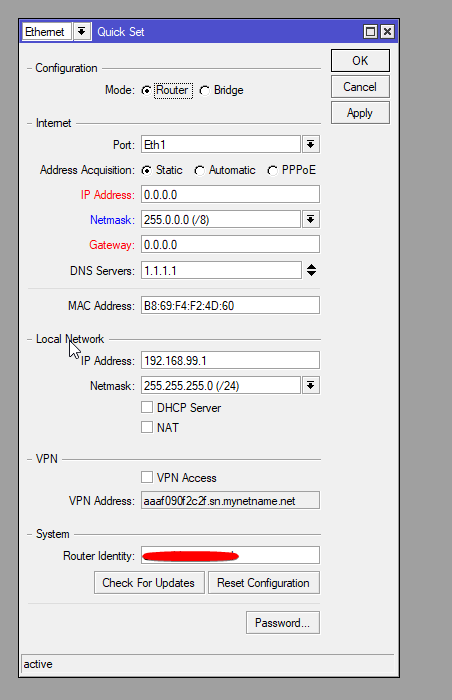
the intial setup, can be done with quickset
after that, you can make a backup
and play to your hearts content
tepid trail
"he" in your discussion is that person me?
rocky badge
Yes
peak cloak
@tepid trail how comfortable are you with networking?
tepid trail
Edgerouter and all that was just a suggestion based on my friend
tame carbon
thats one thing.. yeah
peak cloak
like prior experience
tame carbon
you do need to know how IP works
rocky badge
because if you're coming from whatever you had before, netgear? or some other locked down router, RouterOS isn't friendly
tame carbon
RouterOS is very... hands on
rocky badge
UniFi, EdgeOS, and pfSense are a lot friendlier
tame carbon
you need to configure everything
but the tutorials they have on their wiki
usually work out
rocky badge
While that's fine for some, not everyone wants that
peak cloak
So like Arch Linux vs Mac
rocky badge

 rocky badge
I'd put pfSense between UniFi and EdgeOS
UniFi is 100% GUI and basic (on older models) JSON config, pfSense is mostly GUI but configurable via CLI and files, EdgeOS you probably want to stick with mostly CLI with GUI to do basic stuff
peak cloak
edgeOS
rocky badge
yup
tepid trail
not experienced but im willing to learn.. did networking in school, also dipped in CISCO CCNA but didnt finish it. So i know what its about but not detailed.
peak cloak
usually you don't need to go to CLI, just do stuff in config tree
rocky badge
😩 I hate the config free lmao
tepid trail
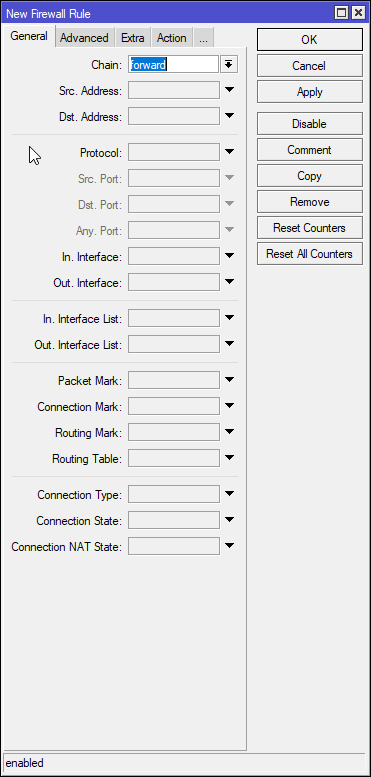
i like that i can configure mostly everything manually how i like it to work.
 rocky badge
You can do any of that on pfSense/EdgeOS
pfSense has a setup wizard for getting basic WAN/LAN, EdgeOS has some setup configs for WAN/LAN, dual WAN/LAN, dual LAN/WAN, fail over, switch etc
from there, its customizable
tame carbon
port forwarding is relatively easy for mikrotik
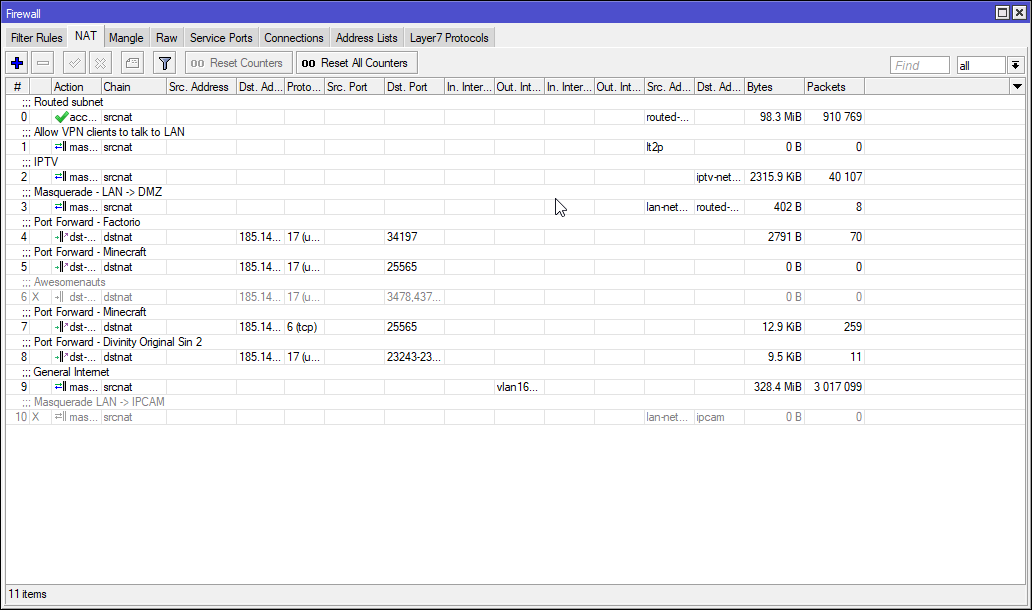
you do it once, then you just copy the profile
and change ports
rocky badge
You don't have to do either from either products
They will prompt you with it on first login, but you can dismiss it
pfSense comes configured out of the box to route and NAT with your WAN and LAN ports defined in the first setup on the console
rocky badge
But additional interfaces, VLANs, VPNs, additional firewall rules, etc you do by yourself
tame carbon
on 192.168.88.0/24
rocky badge
pfSense it asks which iface is your WAN and which is your primary LAN in the console
tepid trail
sounds good
 tame carbon
@rocky badge you mean like this?>
peak cloak
@tame carbon looks like your GUI is old, the new one in the web demo looks nicer
tame carbon
@peak cloak thats the desktop client
peak cloak
ah
tame carbon
there's a webclient too
rocky badge
lol
tame carbon
but desktop client is nicer
rocky badge
 tame carbon
cus you can drop files into it
peak cloak
yeah
rocky badge
I like pfSense because I can just install whatever freeBSD package I want
tame carbon
 rocky badge
because the ntopng package it ships with is 3.x, so I can just install 4
peak cloak
yeah don't do that
tepid trail
theres pros and cons with everything 🙂
tepid trail
i understand
rocky badge
pfSense is for my "production" side lol
tepid trail
better to learn with the manual setup
tame carbon
my isp gave me a guide for how to set up the IPTV on a Draytek router, they had nothing else
but the screenshots they provided, were so bad, cus DrayTek was super vague about what was configured when you [x] this box
rocky badge
ew IPTV from ISP
rocky badge
oof RouterOS isn't open source
tame carbon
I have a 2nd vlan, for that signal, and two subnets, one for streaming over IGMP multicast, and the other is the catalog server/network
But then getting IGMP and multicast to work, took me an entire weekend to figure out
tepid trail
@tame carbon that client gui looks good
 tame carbon
I threw myself off the deepend
did bunch of research ahead of time
bought all the hardware
and then just.. started
rocky badge
👌
for mdns ezpz, igmp is handled by the igmp pd
upnp is from miniupnpd
dhcpd for dhcp, unbound for dns
tame carbon
there's a multicast package you can add to mtik
for igmp
dhcp is in there
upnp is a backdoor for trojans
rocky badge
I like it because its mainly using open source packages for these services
So the config is the same as it is on any linux system
this just happens to be running freebsd
tame carbon
honestly, for these ready to use solutions
there's little to complain if its bsd or linux
rocky badge
tame carbon
they do equally well
@rocky badge I just go to my dhcp leases, click on the user's current session. click on "Make Static"
and then change the IP if you want and hit save
I use 10 min leases
rocky badge

same


All of these are DHCP static
Just for Infra and VMs though, there's other static IPs on other VLANs
tame carbon
I dont have that much on here yet
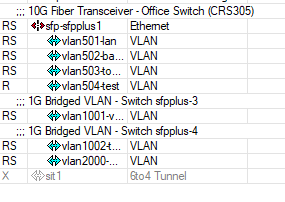
I started in november last year
with minor prior experience xD
I knew how to do udp flooding with code
and how tcp/ip basics worked
rocky badge
I nuked everything a couple of years ago iirc, then I nuked the network a year ago
So AD and infrastructure like that is < 2 years old
network is < 1
So this revision I started when I was 14
peak cloak
boy do you have a lot of stuff
 tame carbon
the need to run a server, learn networking; grew out of my need to deploy my own developed software on-premise
linux was part of that too
peak cloak
I honestly forgot how I started
Just started messing around with the default router settings
rocky badge
I started with a pi b+, installed nginx on that sucker
tame carbon
I developed half a dozen plugins for minecraft xD
and still manage a big gaming network these days
but thats all cloud
rocky badge
then started with php, played around with python then now node
peak cloak
Then I got a optiplex 3010 which I use to this day
tame carbon
@rocky badge things like proxying, shared state and middleware really came into play
rocky badge
I'm loving node though https://blob.rocks/E8gtGHAYDO.png
 tame carbon
not just running an sql server, but using redis alongside
peak cloak
I'm planning on selling it though in order to fund a HP DL380 G8 server
rocky badge
nice
tame carbon
for minecraft
peak cloak
node is nice
tame carbon
@rocky badge you know what would be epic? the ability to define factoids as small fragements of code
rocky badge
gotta get funding though :^) so I'm creating a presentation right now
tame carbon
that you can query with the bot as a command
peak cloak
I ran a bot for myself that would take attendance for me for online school using node and puppet
tame carbon
and then build small amounts of sandboxed js into those storeable statements
and then introduce the unix pipe to that
rocky badge
 tame carbon
xD
rocky badge
 rocky badge
¯_(ツ)_/¯
tame carbon
Having worked on java for many years, going back to php was a nightmare
peak cloak
@rocky badge what are you using to share the pictures?
tame carbon
I cant even begin to list all the things wrong with the language & ecosystem
peak cloak
I see it's on your domain
rocky badge
Xbox shit complains without UPnP and other shit, and I haven't had any issues
@peak cloak ShareX to upload, GCS Storage to store them
peak cloak
Can't you open a static port to the XBox so upnp is disabled?
rocky badge
peak cloak
Never had anything that required UPNPN
rocky badge
I can, but that's a lot of work just for gaming lmao
tame carbon
@peak cloak xbox live just uses a port range
if you forward those to your console you are good
tepid trail
yep
peak cloak
yeah, that's what I thought
rocky badge
yup, you don't have to have every port, or every ip lol
Right now it's limited to my home VLAN only
tame carbon
I turn it on sometimes to see if it fixes a game not working
tepid trail
Mikrotik where have you been all my life?
tame carbon
and then just use torch (packet sniffing tool in mikrotik) to figure out what ports are being used
tepid trail
thank you for the suggesstion!
 tepid trail
yeah, SSO was my thinking too for that.
 tepid trail
they are!
tame carbon
@rocky badge one thing I still have to figure out on mtik that will cost me probably another weekend. Is building a customized landing page for a captive portal and account generator script using the API
rocky badge
lol
rocky badge

GitHub
A vaporwave inspired external captive portal for Ubiquiti UniFi - RyoisMC/unifi-vaporwave-captive-portal
tepid trail
@tame carbon well invested time i guess
rocky badge
And that's why I like UniFi
tame carbon
xD
peak cloak
you can do that with Omada easily
rocky badge
I can point it to an external captive portal and the captive portal calls back UniFi API
tame carbon
@tepid trail my dad wanted to sell his own wifi passes as his camping grounds in germany
rocky badge
to allow the guest
tame carbon
since we are setting up a big wifi network
might as well, see if i can automate that
rocky badge

Ubiquiti Community
Hey, I did a complete w-lan installation on a campsite for my parents. But the hotspot manager that comes with the unifi controller was not very useful and a bit laborious to work with. I wanted a very simple all in one solution like, "Press one button and nothing else" to ge...
tame carbon
so that the office in the front, where people come in to checkin and pay
rocky badge
so this

I put our printer setup at the reception, so every employee can simple print a voucher for our guests with one click.
tame carbon
they can just use this tool of mine to print a piece of A4 paper with their login & instructions on how to connect
tepid trail
@tame carbon ah, cool!
rocky badge
user taps on screen, prints ticket, user logs in with the voucher
tame carbon
basicly
rocky badge
tame carbon
yep
rocky badge
because UniFi has this natively built in :^)
Payment, RADIUS, Facebook, Google, WeChat as well
tame carbon
this is maybe 100 lines of code
tepid trail
wow
rocky badge
or your own external captive portal with their API
tame carbon
but that is quite crazy yeah
tepid trail
i really like that!
peak cloak
that's real nice ngl
tame carbon
didnt know they support that
rocky badge
tame carbon
@rocky badge is there a simplified backoffice view? for say, just the vouchers?
tame carbon
but not the rest of the network settings right?
rocky badge
yup
tame carbon
kk
Might just consider
using mtik as a backbone for the p2p (cus we cant put cables everywhere)
using some antennas
and then just using unify xD
rocky badge
airFiber/airMAX is nice
and Ubiquiti Link is super easy to plan it
We use nanostations for p2p between press box and sidelines at the stadium
tame carbon
MikroTik is a Latvian company which was founded in 1996 to develop routers and wireless ISP systems. MikroTik now provides hardware and software for Internet connectivity in most of the countries around the world.
I've used these things before
rocky badge

The airFiber®5 is purpose-built for outdoor, PtP bridging and carrier-class network backhauls.
We have a pair of these between IT office and main campus for failover
cheap as well
tame carbon
how much for a pair?
rocky badge
$2000
tepid trail
@tame carbon so... for WinBox, no MacOS client? need to use like a VM for that then?
tame carbon
kek
rocky badge
can they do 1.2Gbps over 253m
tame carbon
but. there's a 5GHz model
rocky badge
tame carbon
@tepid trail do you have brew?
tepid trail
@tame carbon yes!
rocky badge
and $2000 is cheap lol
tame carbon
brew cask install nrlquaker-winbox
rocky badge
Especially when our private fiber line that only does 10 gig was $30k to install
tepid trail
@tame carbon ah, cool.. didnt know that there was a package for that.
tepid trail
many many years since i tried Wine..
rocky badge
10Gbps between schools (14 of them) is $630k/year as well, but that's because p2p would be stupid for that
tame carbon
never notice it though
rocky badge
the p2p link is only for failover
tame carbon
@rocky badge get the misbehaving students to dig a trench
rocky badge
So shit can migrate off a server if they needed to, and fast
it'll use 10gbps line and 1gbps line
and distribute between the schools
tepid trail
hehe
rocky badge
Since all of the hypervisors are managed and orchestrated with vCenter
so if a host goes down, its moved over to another host
Even across sites
rocky badge
So the 10Gbps between sites comes in handy, as well as to not bottleneck the 4Gbps WAN
tame carbon
I moved away from that
rocky badge
VMware is fine
tame carbon
and I am glad I did
rocky badge
Enterprise support, educational pricing
tame carbon
@rocky badge I was scarred trying to run esxi customerizer on the only windows 7 vm I had
had to install newer version of powershell
to get the package manager to work
3 extra packages from ms website
rocky badge
vCenter Image Builder
tame carbon
then needed another powershell extension
rocky badge

You can use VMware vSphere ESXi Image Builder CLI to create ESXi installation images with a customized set of updates, patches, and drivers.
inject VIBs and packages into ESXi
tame carbon
hm
this was with esxi 6.5
needed some drivers
for the raid controller
took me 2 hours
and everytime it failed
it had to redownload the entire package
rocky badge
lol
tame carbon
line wasnt the best xD
PowerCLI
thats what it was called
I needed that
but there was like 7 steps before, to get that working
tepid trail
7 Pre-steps before the 7 steps hehe
tame carbon
yeah thats the typical windows bs
@rocky badge proxmox is also nice if you run more than 1 host
I run KVM/QEMU here at home
rocky badge
I used to lol
rocky badge
I customized my vcetner login lol https://blob.rocks/OOEergceM9.png
 tame carbon
and you manage all your bare metal machines over IPMI using Ansible

Ansible is the simplest way to automate apps and IT infrastructure. Application Deployment + Configuration Management + Continuous Delivery.
rocky badge
My friend is using MaaS to deploy CentOS for oVirt
tame carbon
ansible is kinda insane
peak cloak
@rocky badge I was looking at that logo in the login and it looked awfully familiar, it's the r/homelab logo, lol
rocky badge
yup
tame carbon
you can completely configure multi-virtual machine constructs with configured software and settings
and then you can just hit
{Create new}
rocky badge
@peak cloak its just a css file lol
tepid trail
looks good
tame carbon
they set up a CI/CD pipeline for 52 customer environments
rocky badge

playing around with XOA right now
vsphere is still my main though https://blob.rocks/O2xD3Nrfqr.png
 tepid trail
"Before you work on any MikroTik equipment, be aware of the hazards involved with electrical circuitry and be familiar with standard practices for preventing accidents. "
Burning the house down?

 rapid sorrel
What are people's opinion on wake on lan?
tepid trail
hehe, have none of that system 🙂
tame carbon
@rapid sorrel its bloody hillarious if people have it enabled
esp in big office buildings
tepid trail
Ive seen them in datacenters
tame carbon
datacenters often use IPMI to do that stuff
rapid sorrel
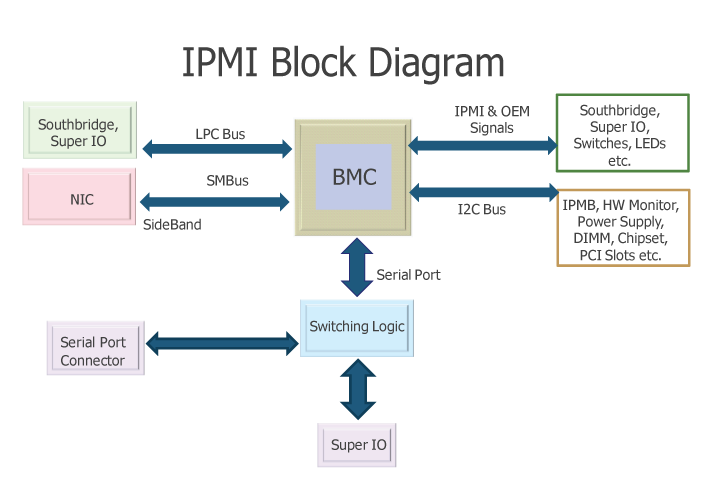
I'm mostly looking to use it for home remote useage when I am out of home.
 rapid sorrel
Port forwarding doesn't fix that?
peak cloak
@rapid sorrel My friend has a raspberry that runs in his computer sort of iDRAC or iLO and he has a web app that can manage his computer
rocky badge
My solution for that was to actually make python send WOL
So then I'd have a protected web endpoint
tame carbon
yeah you need some device on your local network
rocky badge
which I could trigger and it would send a WOL packet
rapid sorrel
@peak cloak I was looking at doing that with a esp8266.
rapid sorrel
Alright, that is what I will do then, thanks.
peak cloak
I had a project where an arduino would run a webserver to activate a relay to turn on power outlets
tame carbon
nice!
I did something similair but on a pi
and arduinos too slow in some situations
I've developed on the stm32 before
tepid trail
i have a spra RPI laying around
 waxen scroll
RIP blob when his moms PC gets an encryptor, uses WOL to wake other PCs in the house and goes to town
tame carbon
 peak cloak
I need to buy a raspberry pi for myself
tame carbon
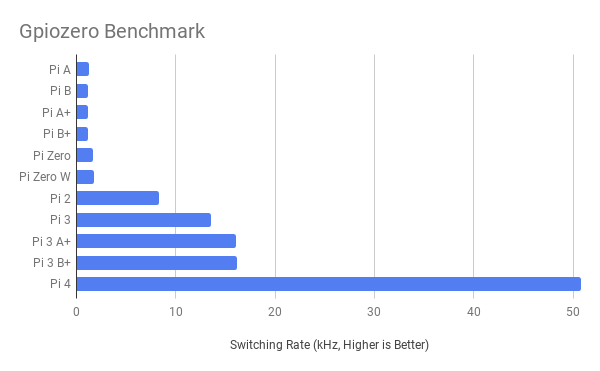
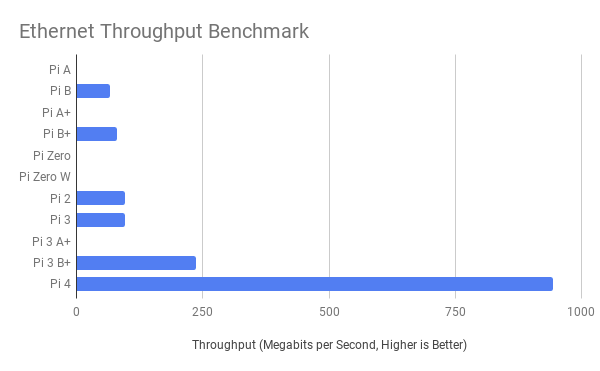
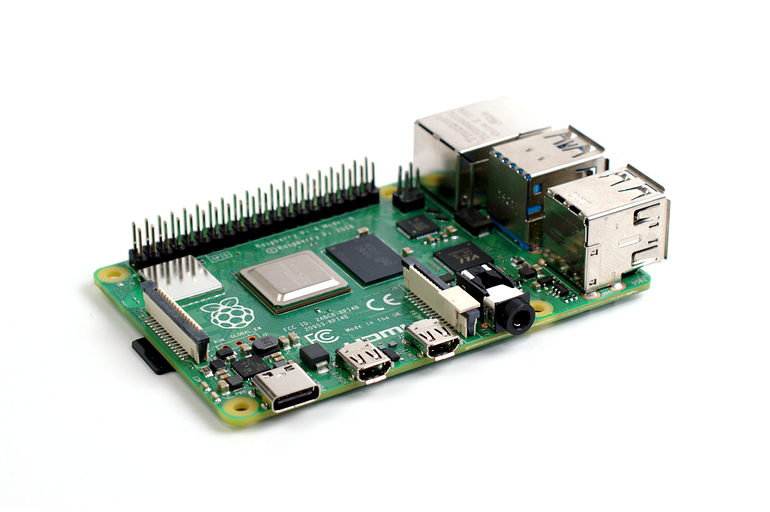
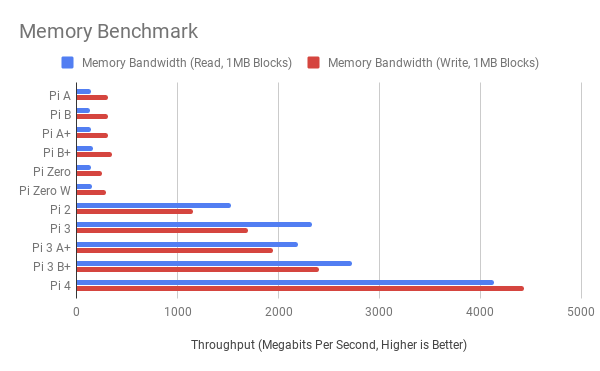
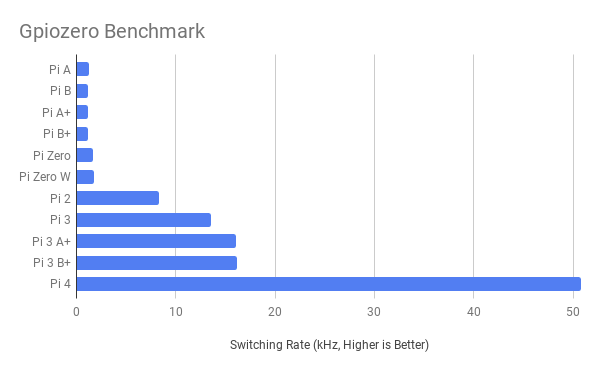
the pi 4 is amazing compared to the 3b+
they finally have a dedicated bus for the network controller
on the pi 3, the network controller was attached to the usb hub
tepid trail
that sucks
tame carbon
so if you wanted to use it as a NAS, you had a major bottle neck
tepid trail
yep
peak cloak
doesn't it also support PoE with a hat?
 peak cloak
basically gigabit
tame carbon
real world applications will be slower, since your cpu would have disk IO wait too
300mbit/s is what you'll see in file transfer at the most
the pi 3
50mbit/s
tepid trail
does it have one or two RJ45?
tame carbon
single one
tame carbon

it has two USB 2.0
and two USB 3.0
gigabit ethernet
dual hdmi out
with 4k support xD
 tepid trail
can the usb 3 be used for a usb nic? i guess the cpu still will be the bottleneck
tepid trail
ah, ok
tame carbon
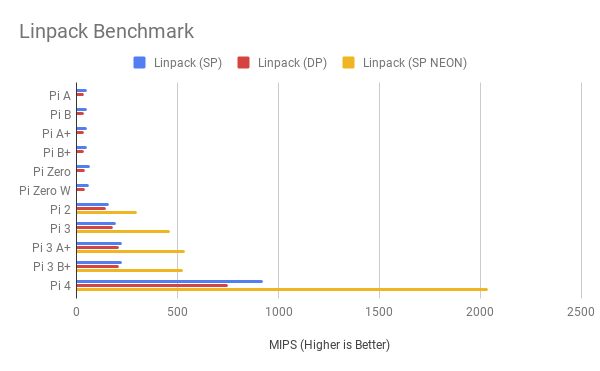
there's limited bandwidth to the different hardware

but look at this
compare the memory bandwidth
with older models
this is why the pi 4 comes in 1, 2 and 4 GB models
I think there's even an 8GB one now
peak cloak
yeah, it goes for 55 bucks on amazon nevermind that's the 4gb
 tepid trail
dear santa






 tepid trail
ah, the nano
tame carbon
Zero
tepid trail
yeah
tame carbon
it has 1 usb port, hdmi out, 1 core, 512M ram
tepid trail
a couple of them in a cluster then maybe
hollow marlin
Love my Pi4. Running Zabbix, Grafana and Pihole. CPU is barely touched
tame carbon
Zabbix :)
Grafana is cool too
I have that in combination with influx
I used that to collect metrics on the solar panels
before i moved
im gonna head to bed
its 2:30
hollow marlin
I was just looking for a basic dashboard for home network. Wanted some other features but didn't want to learn influx. I don't tinker much after work anymore because I like a separation from it
tame carbon
I have to get up at 8am
tame carbon
data ingest for that solar stuff
was just a bash oneliner with curl
and I also collected data from the electric meter, through a serial port
again, with bash and curl xD
tepid trail
will it be good for collecting wheater data?
tepid trail
sql?
tepid trail
ah..
tepid trail
i like the interface
tame carbon
you can customize everything
tepid trail
looks good
tame carbon
but if you have a lot of sensor data
or metrics
you can just push them to the influxdb
and then query for datasets
influx can also do things
like calculate a rolling average
over a dataset
but I am going offn ow
bai
waxen scroll
@rocky badge do you have a color screen TI-84?
 little schooner
How can I reach a VM's IP address if it's configured like this?
Home > OpenVPN net > Esxi VM > Nested VM with bridged IP in same network as Esxi VM
I tried pinging and it's not doing arp or the esxi VM isn't passing down my request to the nested VM
 feral roost
any ideas on how to turn off DHCP Server on my Router which runs DDWRT ?
little schooner
The solution I used (I don't think its a final one though) is to enable promiscuous mode in vswitch0 on management network adapter
 torpid crane
any ideas on how to turn off DHCP Server on my Router which runs DDWRT ?
@feral roost why would you want to do this?
I’m sure you have your reasons, I’m just interested
feral roost
ah as its gona act like a switch
its a bad idea to have alot of routers in the network to act as DHCP Servers
peak cloak
well yeah, if you want it to "switch" then turn off NAT and DHCP. One DHCP per subnet @feral roost
Setup -> Basic Setup -> DHCP Server -> Disable
feral roost
NAT?
i didnt see any options to turn it off im not sure
humm gotta do that as well
peak cloak
Network address translation, basically turns one ip into multiple devices. Normally you only get one IP from the ISP, but you have many devices that share that IP. NAT makes it work. But you don't want it to NAT, if you it to act like a switch
ah, in DD-WRT you just set it in bridge mode
that will disable NAT
@feral roost
waxen scroll
dat @little schooner . i did that with my colo server once to protect the esxi admin page and not waste a public IP on it
you need a basic linux VM, enable routing, install openvpn
iptables needs to have natting rules if you expect to use internet through it
or if you're a noob you can probably use pfsense