#networking
1 messages · Page 206 of 1
 vague geode
 plain siren
https://www.amazon.com/CCNA-200-301-Official-Cert-Guide/dp/0135792738
@hollow marlin I back up this recommendation.
If you want "more than" packet tracer, there is also:
VIRL, EVE-NG, GNS3, and CML
 forest tangle
Ello!
I asked this in a different channel, but thought this might be the more appropriate place to ask this.
Is it possible to chain connect homeplug powerlines?
I'm trying to get internet to my room without having to pull cables left, right and centre, so was wondering if chain connecting homeplugs until it reached my room would be possible?
Thank you in advance for any responses!
 open coral
@plain siren don't know if you remember me but a while ago i said i had 900mbps internet but was only getting like 600 download/218 upload and people was telling me the router they supply wont be able to achieve those speeds. well due to a error and having to reinstall my OS it actually fixed my connection to my pc via ethernet and yea... they have done what they said, their router is modified to handle the speeds lol https://gyazo.com/bb69e2c7db514d63852691332d5064e7

😂
plain siren
Finally
open coral
ahaa idk what was causing the internet drop
 vapid dune
what kind of internet is it @open coral
 unborn sluice

 wary rain
Hello everyone. I wanted to put q ethernet jack in my wall, i ran the cable qnd setup the box for the wall. But when i went to the store i accidentally picked up a cat 5e wall jack instead of a cat 6. And now when i connected the cat 6 cable which i ran to the cat 5e plug its not working. Any idea why?
 waxen scroll
looks like you didnt punch it down
wary rain
I did
I used the little black tool that came with the adapter. And no i dont have a cable tester
wary rain
Yes
vapid dune
I mean cable tester or toner would tell you if it's the same cable even heh
wary rain
I dont have the canle tester
wary rain
Yes the first initial picture i sent was the A type. Which didnt work
So i went ahead and did B wiring
vapid dune
you want it to match at both ends
wait how did you "redo" it?
cut off the end and re strip?
wary rain
Yeah
 spare bay
your cable looks like it's wired as b
do you know for sure that the cable works?
what's on the other end of the female plug?
wary rain
Yes i know the cable works, cuz i had been using it for months
vapid dune
punch down tool looks like this? https://www.monoprice.com/product?p_id=7041
This is a Punch-Down Impact Tool for 110/88. There is a sure-lock blade holder and high/low impact pressure adjustment. Length: 7.1"
spare bay
it seems very unlikely the punch down is the issue
vapid dune
I mean probably not
wary rain
spare bay
yes it is, just a plastic one
wary rain
🙃doesnt it just cut the cable itself?
spare bay
it's more likely it's miswired than the wires not making contact
vapid dune
ah my jacks never came with a plastic tool
wary rain
I took off one of the wires, and its not cut
spare bay
well, maybe I was wrong lol
wary rain
Let me use force
vapid dune
you have a lot of wire exposed between the jack and jacket maybe but probably not a big deal for cat5
wary rain
No i didnt strip the wires for the pins
wary rain
Should i buy this tool?
The pins i am refering to is the places where you connect the wires
vapid dune
I mean maybe the plastic thing works I haven't personally used it (since I haven't even seen it until now lol)
depends how many you're gonna do I suppose
even just a cheap cable tester would probably help
vapid dune
I mean you're certain that you have the right ends right?
I've once thought I had the right cable in my network closet and it turned out to be the wrong one
I mean you can just terminate all of them and find out I suppose
I just had a bunch I didn't bother terminating out of laziness heh
 hollow marlin
Those are the right ends. Since you are using Cat6 in a Cat5e jack the large gauge means you will need a proper punch down (the white tool in that kit) to punch it into the teeth.
@vague geode You cannot disable anything unfortunately. Since the device is serving DHCP, it knows the IP and MAC so it places the ARP in the table permanently until the lease expires. Any device then that trys to use that IP is just ignored and ARP will not update
waxen scroll
my jacks came with the plastic tool but i tossed it aside
that feel when a whole kit with a tester is $26 and you paid like $140 for fluke scissors, punchdown, and stripper
@hollow marlin i'm a man who appreciates the finer things
 little schooner
@waxen scroll me too. But I need help proving quality with some products
I'd spend more but not all parts are clear on how they are constructed
vapid dune
A tester and a toner are super useful
So is that plastic cradle to hold the jack to punch it lol
 thick minnow
question is it weird to have a gigabit switch and only get 100mbps download? i used to get like 950
vapid dune
more context. doing what?
thick minnow
vapid dune
and you pay for gigabit internet?
vapid dune
dunno try stuff like skipping the switch and if computers on the switch are bad etc
dunno try stuff like skipping the switch and if computers on the switch are bad etc
thick minnow
ight
 vale briar
no problem, and it might not have bricked if it detected the BIN file as being an "incorrect" firmware. But yeah, I'd wait and see if they release an official install BIN instead. Or buy a different router.
@ornate jungle hey so i finally ended with a successful install
but i can't seem the get an ip address while connecting to the 5ghz network
im guessing it has to do with the dhcp server
but not sure how to proceed further
 icy frigate
TFW you forget that your switch doesn’t actually need to be physically close to your router to work 😬
 green crest
how can I increase the speed of a powerline adapter? both of the adapters are directly connected into the wall but I am getting average speeds
 clear igloo
Rewire the house?
green crest
What if I cannot?
 ornate jungle
What if I cannot [rewire the house to improve powerline AV adapter speeds]?
@green crest buy a new house, install a professional level access point/repeater solution using Ubiquiti (or equivalent) hardware, or hardwire your devices with ethernet. Or try moving the powerline adapter (s) to other wall outlets to see if the speed changes.
green crest
I'll try the last option
vale briar
okay so i figured out its not a problem with the dhcp server
i have a pppoe connection and i changed my default dhcp settings to connect to pppoe
which prolly caused 5ghz to not work correctly
so now i created a new interface for pppoe
BUT my question being, how do i bridge it to my lan so that dhcp can function properly
Im connected to pppoe via broadband, but how do i bridge that connection to lan?
waxen scroll
@clear igloo ikr
if you dont have the walls for it, its time to frame your house. its 2020
green crest
I tried moving the adapter, got better connection in some outlets but it has become impractical for me. Any other options?
icy frigate
I tried moving the adapter, got better connection in some outlets but it has become impractical for me. Any other options?
@green crest Use ethernet. Powerline is a kludge by definition: it modulates the AC signal in your house to carry data, but AC far predates data-transmission technology & so it's not designed to carry data. It's fine for 100mb signals or less, but if the speed is unsatisfactory you're better off with specialized hardware
green crest
okay, specialized wifi hardware like repeaters?
icy frigate
I'd go for a mesh setup if you have a large area to cover
Or use straight up copper
Don't get me wrong, powerline transmission is a fascinating technology, but given modern data-transmissions speeds it's not a practical solution in many cases. I'd use it to carry smart-home signals (like if you wanted to set up a Hue bridge in the middle of your house but your router was closer to a side wall), but that's it
green crest
I have a pretty small space, it is that the walls block most of the signals
icy frigate
I'd recommend getting a good drill & running ethernet cables
If your walls are concrete & blocking wifi I mean
If they're gyproc then they shouldn't cause enough interference to a good router to matter
icy frigate
Depends on the issue
green crest
What is gyproc?
 knotty sundial
I'm basically trying to throttle the internet usage of people that are using my internet, but i don't know how to do that, i already logged into my router settings but i don't understand what i'm looking at
green crest
oh, I probably have those then
knotty sundial
well okay then
icy frigate
oh, I probably have those then
@green crest Then a decent wifi router (asus, tp-link, netgear, etc) should do the trick
I'm basically trying to throttle the internet usage of people that are using my internet, but i don't know how to do that, i already logged into my router settings but i don't understand what i'm looking at
@knotty sundial what kind of router are you using & why do you want to throttle?
knotty sundial
how do i check for what type of router?
icy frigate
The brand should be written on the front/in the settings
knotty sundial
it says product name is HG531s V1, is that it? also i'm trying to throttle cause they're using a lot of the bandwith
knotty sundial
yes
icy frigate
I'm digging, but it might be tougher - ISP supplied routers can be a bit limited in terms of their settings. Can you provide a screenshot of the menus available to you? I recommend taking it into paint & blanking out any number or ID info that could be compromising before sharing
green crest
Is there a way to check the speed in different areas?
 icy frigate
Is there a way to check to speed in different areas?
@green crest Your best bet is to run speedtest.net on a device wherever it's set up. It tests against the same servers every time so in principle you should be able to track changes
knotty sundial
second pic https://prnt.sc/udba1m
 icy frigate
Click WLAN & show that?
green crest
Don't devices have different wifi cards that give different results?
icy frigate
Don't devices have different wifi cards that give different results?
@green crest Use the same device
knotty sundial
here's the 3rd pic, i'll take a pic of wlan right away https://prnt.sc/udba82
 green crest
okay
icy frigate
@knotty sundial show me wlan & QoS menus?
knotty sundial
 icy frigate
WLAN filtering tab?
knotty sundial

this is if you wanna block someone from using the internet
i don't want make it awkward for myself when i have to face them so i'd much rather throttle
also pic of QoS incoming
 icy frigate
Yeah, I'm not 100% without being there & doing the digging myself, but it's likely your router doesn't offer the granular control you're looking for
Sorry
green crest
why don't you create a new network?
green crest
What do you mean how does that work?
As in how to set one up or what the point of one is?
knotty sundial
i have no knowledge of what you're referring to
icy frigate
If you just want to block the outright, then go to WLAN & change your wifi settings
Change SSID & PW
You’ll be good to go
*them outright
knotty sundial
uh the issue is my family will get mad at me as soon as they find out, i'd rather go with the option to block their mac address's individually
icy frigate
Blocking them individually would have the same effect as changing the Wi-Fi credentials
They won’t be able to connect either way
If you’re keen to avoid a confrontation then neither option is the way to go
knotty sundial
no no what i'm trying to do is only block a select few of them, if everyone but me gets disconnected i'll get found out
icy frigate
Ah, I see. Then in WLAN Filtering you can select “blacklist” & do it from there
knotty sundial
thing is, i have no clue where to find their mac addresses
icy frigate
You’ll have to do a bit of detective work - see what device is active in router settings while person x is using the internet
knotty sundial
Alright, on it
green crest
I just tested my internet speeds in different rooms. I got 60 in the room where the router is and 15 in the farthest room. The farthest room isn't even very far,100ft?
icy frigate
Powerline or wifi?
green crest
wifi
icy frigate
Also 100ft how big is your house?! My house is 40ft front to back
green crest
it isn't a house
icy frigate
Anyway, sounds like you’ve got a not super great internet connection & regular fall-off at a distance
ornate jungle
it isn't a house
@green crest distance from the modem isn't the only factor that impedes wifi signals. Number of walls and what those walls are made of play a huge factor in signal strength. Same with dense or metal objects.
Perform a baseline wifi test connected to the 5GHz network standing directly beside the modem using the same device you were testing with earlier.
green crest
why 5g? my 2.4g should be more than enough. I only have 200 MBs
 green crest
I tested 5G, performed worse than 2.4G
 thorny vector
@rocky badge it’s not the resources you have, it’s what you do with em. For a while, I was limited to 12 vcores, and 32gb of ram because I was traveling
 rocky badge
yee
ornate jungle
why 5g? my 2.4g should be more than enough. I only have 200 MBs
@green crest 2.4GHz is limited to between 30-60mbps on average, but goes through walls / longer distances better than 5GHz, whereas 5GHz can reach 450mbps ish give or take, but doesn't go through things that well at all.
 green crest
I was right next to router when I tested 5G
ornate jungle
Test with both and see what works best for you of course. And remember that speeds also depend on each and every device - a device with a cheap 5GHz WiFi chipset might operate like garbage on 5GHz but be fine on 2.4GHz.
green crest
Used my phone this time, 5GHz worked much much better than 2.4GHz
rocky badge
So we get fiber installed tomorrow @thorny vector
They said "yes, you may use your own router, as long as it has Gigabit Ethernet and wireless AC"

ornate jungle
K but like why... If they're letting you use your own router, why do they care what it can do, as long as it authenticates with the network in a satisfactory manner?
 thorny vector
I’m still waiting for an ISP to properly implement RFC 1149
rocky badge
So you get gigabit speeds
Lol
and it doesn't need to authenticate with the network lol
they hand off gpon and it goes into your ont, then take it into ethernet

Ubiquiti Inc.
Featuring an informational LED display, the UFiber Nano G is a robust, high‑performance GPON CPE housed in a sophisticated design. It is powered by 24V passive PoE.
Features:
High-Performance GPON CPE
Up to 2.4 Gbps Downstream and 1.2 Gbps Upstream
Supports up to 20 km GPON L...
Would love to get this though https://store.ui.com/collections/operator-unms-infrastructure/products/uf-instant

Ubiquiti Inc.
Gigabit Passive Optical Network CPEFeatures:
High-Performance GPON CPE
Up to 2.4 Gbps Downstream and 1.2 Gbps Upstream GPON structure
Supports up to 20 km GPON Links
Powerful Layer 2/3 Management Features
(1) GPON WAN Port, SC/APC
(1) 1Gbps SFP interface
Take GPON directly into pfSense
Replace that rj45 to SFP 😩
ornate jungle
Yaaaas if we could get fiber here, I'd be doing the same. Would straight up bite the bullet and get started with UBNT gear.
rocky badge
Would depend on what they use
Since local ISP uses ufiber this works
Managed and provisioned with unms like the standard nano g
Would love to get a CRS326-24S+2Q+RM
thorny vector
Who needs fiber when you can pump more power into the pure goodness that is copper? #HighVoltageEthernet
green crest
Is there anything I can do in my router settings to increase speed?
Should I enable QoS?
unborn sluice
If it's normal signal degradation, not so much
vapid dune
what's wrong with the speed
green crest
I’m trying to get the speed that the isp provides
vapid dune
You shouldn't need to config anything in particular
 torpid crane
@green crest How far is it from the advertise speed? I pay for 70 and get 60.
If it's massively off then contact your ISP. As long as it's meeting the minimum that they state.
Should I enable QoS?
@green crest QoS will only help get you more consistent speeds on certain devices that you have defined whilst bottlenecking the rest of the devices as it prevents other devices from using all the bandwidth.
 lapis agate
Hello, I got a question. Isn't cat6 Ethernet cable meant to be faster than cat5? With cat6 I got 20down and 2 up and on cat5 I got 60down and 20up. I'm just confused
icy frigate
I’m trying to get the speed that the isp provides
@green crest remember that Mbps & MB/s are different things, so 200mbps would be about 25MB/s
thick minnow
ya;;
yall
i need a good wifi router recommendation
not a tech nerd
but i need atleast 3 lan cables
and a good antenna that can reach a wide building
green crest
Oh, I see now. I am getting the correct speeds
torpid crane
@lapis agate Cat5 has a max theoretical speed of 100Mbps where as CAT6 can do 10Gbps. With that being said, both should be the same in your example because you're not getting above 100Mbps, when we're talking about raw data transfer.
I would think that CAT6 cable is damaged if you're getting a drop in speed like that.
Do you mind sharing how far it's running?
icy frigate
@lapis agate Cat5 has a max theoretical speed of 100Mbps where as CAT6 can do 10Gbps. With that being said, both should be the same in your example because you're not getting above 100Mbps, when we're talking about raw data transfer.
@torpid crane most Cat5 cables you’ll encounter in the real world are Cat5e & they’ll do 1000mbps
torpid crane
@icy frigate He specified Cat5 so I went on that.
wary rain
Hey guys so i was making a wall mount ethernet cable and its not working. Upon connecting cable tester it blinks till 6 and then it stops blinking twice and then goes back to 1
wary rain
How?
Like properly press then in?
vapid dune
diagnose what's wrong and fix it?
like you could have nicked the wire somewhere even
there's no one answer for you
wary rain
I dont know how to diagnose ig
vapid dune
I mean you could try to press it in? you could follow the wire, inspect it, or redo it
wary rain
Yeah ima try to redo it
vapid dune
you could also retest. switch wires. etc
wary rain
Question, can i use a cat 6 cable with a cat 5e wall connector?
 valid tapir
They are the same rj45 port but it may not be protected enough to carry a 10gig signal
rocky badge
@waxen scroll  Got fiber installed and activated
waxen scroll
no pics mean it didnt happen
rocky badge
Lol
waxen scroll
i failed trying to get hass to talk to google.. i think the directions are out dated
i saw some youtubes about it so ill probably try one of those
theres supposed to be a google integration and not only is it not listed but putting it in the config doesnt enable it either
rocky badge
Oof
rocky badge
Lol
@vapid dune https://blob.rocks/XU0YGHcDiy.png

its not a speedtest but WAN usage 😉
vapid dune
not 1G upload?
rocky badge
nope, fine tbh
 primal ice
which isp?
rocky badge
Local
primal ice
have ziply fiber. was frontier, or verizon before that.
green crest
What is a local isp? Aren’t isps the big companies?
green crest
Are those better than the big isps?
clear igloo
They provide actual customer service and care 🙂
waxen scroll
🤔
rocky badge
Mine said
"We have a customer service phone number, but I'd suspect the only time you'd need to call us is if the line gets cut"
green crest
Do they give better deals?
primal ice
yes and no, generally they are paid for by local city/county taxes - then what they charge for the actual service.
rocky badge
They basically asked "where do you want this to come in and where does it need to go?"
Lol
@clear igloo Local ISP also ran Cat6 for me instead of Cat5e
clear igloo
Noice 😄
rocky badge
"if you have any Cat6 we can run Cat6 for you, since we usually only install Cat5e for residential"

YEET
clear igloo
😄
hollow marlin
@rocky badge reverse your graph you barbarian
vapid dune
up is down and down is up!
 waxen saddle
That graph makes perfect sense
green crest
How do I find a local isp in my area?
rocky badge
@hollow marlin Lol
 rocky badge
@waxen scroll Can you explain something to me? o.O
rocky badge
So I'm tracerouting to my school's VPN appliance

those blurred out ones are the same as the tracerouting to
And it's the same host
waxen scroll
might be a NAT
hollow marlin
Its definitely NAT
waxen scroll
as hosts reply inside the NAT its translated
rocky badge
Ah
So those two that are timing out between the two ENA ones are the internal router/contentkeeper (web filter)?
waxen scroll
most likely
rocky badge
Wait....
Did the school finally learn to not be stupid
And the VPN is now a split tunnel
rocky badge
🤔
wait, lemme try a different destination
because 1.1.1.1 wasn't sent over the VPN
because that's not my school's network lmao
tracerouting to google.com and an internal IP at school is sent over the VPN
waxen scroll
i mean route print will tell you i think
 rocky badge
idk ??? 😂
oh wow, my VPN IP is now 172.17.1.x instead of 172.17.0.x
googling what is my ip shows school's IP and speedtest shows school's ip
rocky badge
yeah mine's 25
waxen scroll
anyway, unless the rules changed schools with government subsidized internet are required to filter it. my assumption is if you have a school laptop on school VPN, they wont let it go unfiltered
rocky badge
Yeah it's always been a full tunnel
Gov funded internet, so its required to be filtered
@waxen scroll Do routes get flushed/removed upon reboot? or nah
waxen scroll
when you disconnect it should get removed
and yes they do get flushed if you reboot... but if windows is anything like linux they also get flushed every 30min or so
waxen scroll
my work laptop is similar
though i can opt not to connect
if I dont, my network is useless. I cant connect anywhere
rocky badge
oof
little schooner
@rocky badge @waxen scroll so for my sister's high school, they released a guide to parents and students that describes how to add their internal iboss certificate to their chromebooks/windows/mac computers to do mitm to track everything they do on the company network.
rocky badge
lmfao
little schooner
Why couldn't they just buy a certificate from a trusted ca?
rocky badge
cheaper (free) to create your own
little schooner
but its a disaster in the making
the first day will be IT running around to each laptop im sure
rocky badge
and it won't get revoked from google/mozilla from issuing to domains like google.com lol
waxen scroll
@little schooner my last company was doing MITM and faking certs from real sites
rocky badge
Our ContentKeeper CA is installed via AD GPO
little schooner
@rocky badge hmm thats true
waxen scroll
they couldnt push the certs to my browser so I got warned when they did it
i raised hell
little schooner
its terrible. cant believe they have to put up with this
AND
they already have a filter on top of it!
AND
rocky badge
Because they use the cert to MITM sites and to HTTPS redirect blocked sites
instead of "connection refused"
rocky badge
My school also uses their CA to MITM youtube/google to block certain things
which you can't do w/o MITM
because safesearch isn't controllable
waxen scroll
i called their department out, I asked if they talked to legal or compliance departments before doing it.... they basically said "its in the employee guide that says we can do it"... i went UHHHHHHHH
little schooner
uh oh big trouble xD
rocky badge
it also allows my school district to cache CDNs
for static assets
so jquery cdn doesn't go fetch jquery each time lmao
waxen scroll
I asked them exactly how it decrypts and whats read and can a human download that data
they refused to tell me
I then told them they're violating HIPPA at a minimum if they're looking at our gmail and we're reading info from our doctor
rocky badge
well I mean, isn't school different from work
Because on a school owned device/school network you probably signed, along with your parents, that you expect no privacy
waxen scroll
not really... these are laws everyone needs to follow
rocky badge
But its not your PC
not your network
if you sign into something personal on a school owned PC....don't expect privacy
Which is why my school issued laptop stays on my guest network
waxen scroll
and thats a reasonable assumption, however health data is health data
little schooner
Well the laptop is ours but yes they did make us sign something
rocky badge
I don't/can't control it? it doesn't get on my main network
waxen scroll
😄
rocky badge
Well I'd argue how you access that health data
little schooner
Either we sign or she was not allowed to join the school network to do any schoolwork
rocky badge
If its through a school owned system, like their SIS that's HIPAA & FERPA
little schooner
and that translates to "stay at home"
rocky badge
but if its your personal email which you signed into, its still not your device
waxen scroll
normally this is not a concern because its encrypted, but they're breaking that on purpose
rocky badge
MITM? Depends
little schooner
i should clarify. having students trying to install certificates on their own machines
not necessary
rocky badge
Why do they need to even filter on their own machines
waxen scroll
most companies allow personal use on company devices as long as its not <things LTT censors>
little schooner
@rocky badge beats me and it is anti vpn like you wouldn't believe it
rocky badge
in that sense, it should be the parent's job if they want to filter their kid's internet access
not the school's
little schooner
vpn?? boom get disconnected
@rocky badge thats what im saying
and its not like you can control everything they see
what about their phones??
waxen scroll
a school has very little reason to MITM.... a company does MITM for DLP
rocky badge
I'm not installing their CA on my phone
little schooner
@rocky badge vpn to bypass filter
rocky badge
Ah yeah
little schooner
yes they want her to install the CA on the personal chromebook
little schooner
thats terrible
waxen scroll
does xeon know what DLP is
little schooner
data loss prevention
waxen scroll
good job
little schooner
i follow up on that stuff too
that was in my info assurance class
okay not follow up but
know about it lol
waxen scroll
lmao it cuts off all internet?
little schooner
wow thats awful
rocky badge
Normal blocked stuff doesn't
little schooner
but a great discouragement to keep people off it
rocky badge
but there's certain applications that do
Like Discord, VPNs, Spotify, Netflix, etc
CK MITM for Google search logging/filtering
waxen scroll
can you put a static route in to ghetto split tunnel?
waxen scroll
yes
rocky badge
then no
waxen scroll
can you get into the BIOS?
rocky badge
no, but I know how to get admin, I did that 2 years ago and got suspended for 5 days lol
I'd rather not do that again
waxen scroll
if it was me i would linux boot it and steal the SAM file
little schooner
@waxen scroll hah I was able to change the Windows XP startup sound to a remix version of it on 5 computers in high school. When the class started, all you heard was a rhythm going in the room :p
rocky badge
I already have the SAM/SYSTEM
little schooner
I was able to get in because they didn't password protect the admin account in safe mode
rocky badge
 little schooner
they called me to the office
rocky badge
grounded me for 7 days lol
little schooner
the principle was angry at me
rocky badge
school OSS for 5 days
little schooner
obviously none of that actually happened and she was overreacting
the IT guy backed me up 😉
rocky badge
and that UBNT Device Discovery was used to "find and attack their servers"
little schooner
the logic must be "if i dont know about, it has to be all bad!!"
rocky badge
"HTTPS Everywhere encrypts traffic so we can't inspect it", yes thank you for explaining HTTPS
waxen scroll
my companies IT manages chrome and its addons selection is super locked down. it did let me install ublock... thank god
rocky badge
And the teacher who caught me, the "media specialist" a mac lady, claimed I installed a VPN through the BIOS

My chrome web store for personal G Suite
You can install any
little schooner
@rocky badge too funny
 little schooner
almost as bad as one of my friends who changed his wallpaper picture by download image from internet and right-clicking > Set as desktop background and called him a hacker
vapid dune
blarg I shouldn't have upgraded to android 11
little schooner
xD
rocky badge
So I edit the local group policy which overrides domain group policy
vapid dune
phone won't stay connected to wifi
rocky badge
To allow google sync and sign in
little schooner
the teacher over reacted if anything was different
rocky badge
yup
little schooner
it broke their eb and flow
rocky badge
"hacker!"
little schooner
banned! you are banned from using the computer for the rest of the term!
im calling security and your going to the office!
rocky badge
I swear some teachers enjoy punishing kids
waxen scroll
@little schooner back when we had XP the school put in a pre-login disclaimer box that said bla bla you agree to follow policy if you click OK..... so I pressed spacebar instead.
rocky badge
like that's the only reason why they became teachers
little schooner
@waxen scroll ah ha.. thats some clever thinking
yes they cant hold you to it
wait wait... is it bad that my professor's classroom doesn't use a disclaimer message?
rocky badge
We wouldn't have been caught if the nosy media specialist didn't ask one of my teachers for their dyknow login 😐
like wtf
why did you ask another teacher to give you her password
IT didn't even know about this as well
And then SHE was the one who got us in trouble for "sharing passwords"
little schooner
terrible. simply terrible
rocky badge
like the fuck
waxen scroll
everyone uses disclaimer now
little schooner
doesn't NIST have a template i can borrow and use?
waxen scroll
last few companies ive worked for use custom login screen wallpaper too
little schooner
I guess it helps in case its stolen or something
rocky badge
yeah over the summer my school removed the ability to set wallpapers 😦
little schooner
can you believe that we still didnt buy locks for any of our systems?
waxen scroll
not mine... you cant even get it to boot if its not infront of me lol
it has a "if found call" sticker
rocky badge
Now its the district logo on the lock screen and a black background on the desktop
rocky badge
school name is plastered all over the laptop lmao
waxen scroll
i work somewhere where the laptop is a high value target
rocky badge
two stickers outside (1:1 sticker and IT asset tag)
waxen scroll
school, meh
rocky badge
yeah
District name for AD
then on the desktop, desktop info says school name and district, along with the computer hostname
waxen scroll
i bet patching sucks
rocky badge
they pushed 1903 over sccm and recently updated to 2004 via intune
they're trying to move to intune for mdm
ios mdm isn't using intune yet, still using jamf
rocky badge
yay finally https://blob.rocks/qc9Tsr5qbR.png

Yeah I have InTune for my home shit
I'm playing around with InTune & Google G Suite
waxen scroll
this is my most favorite feature
i can have 1 device and its the same as tossing my work phone away when im off
rocky badge
Yeeet
green crest
How can I find local isps?
waxen scroll
google 💁
green crest
tried googling, what exactly do I google?
icy frigate
i can have 1 device and its the same as tossing my work phone away when im off
@waxen scroll this is the next feature I want out of iOS. The app drawer & page hiding features in iOS 14 make me hopeful that it might be in iOS 15
rocky badge
the local ISP tech said "I can count on a single hand of customers who have a pc capable of even doing above 500mbps"
rocky badge
They signed up for gigabit but their windows 7 craptastic pc can't handle it
waxen saddle
Please provide any known limits or capabilities you are looking for. Otherwise, I’ll recommend Ubiquiti Dream Machine and it may not suit your needs. No need to ping me, just looking to get you started on a good foot.
 cosmic steeple
I have sb8200, an ax11000,switch and many wired devices to connect .How do I run the cables.
Can I run a wall port?
 normal tapir
hello, may i ask a question
is 500gb of data per month worth it for gaming / watching streams ?
espeically when you are online 24/7
 tame carbon
@cosmic steeple how about a termination panel, in a 19" rack unit?
They are relatively low cost, but worth it if you have a lot of permanent wiring in your networking setup
To get rid of the cables: use cable-combs or velcro :D
torpid crane
@normal tapir No.
You'll always be paranoid tbh, worth the unlimited.
Looking at my network statistics, my sister almost goes through that on her own.
 faint tendon
We can only pay for unlimited here in the Netherlands, unless it's for your phone ofc
 charred meadow
@normal tapir is unlimited an option and what’s the price difference?
cosmic steeple
I wired in my Xbox but it has connection to internet but I not getting update what can that be
Ax11000 lane port 1 via ca 6 to Xbox
normal tapir
@torpid crane yeah your right, to be honest i am paranoid right now
my isp provider got bought by a new company and my old plan got forwarded
which is unlimited . . . . and now they say that my current plan right now is 100gb of data and not unlimited
i could guess that 100gb of data per month is cover up and i am still unlimited becaus they don't have the same plan/price as my old ISP
anyway thanks
@charred meadow only difference is 100gb of data (which they said) but i am sure i am still unlimited 5mbs vs 500gb of data and have 10mbs
waxen scroll
you should call them
cosmic steeple
I can’t get on xbox live and WiFi calls suck did I do something wrong
thick minnow
Guys i need help, my wifi speed is 100mbps but it seems like my new router is capping it at 24
 peak cloak
internet speed is 100mbps?
and WiFi is 24?
I would do a speedtest when directly plugged into the router with ethernet @thick minnow
see what your bottleneck is
thick minnow
my wifi speed when using lan cable is 100
but when i connect through my phone
its capped at 24
@peak cloak
i even tried speedtesting w my phone literally beside my router
still 24mbps
at first it goes to 31+ and then it got stuck at 24
omfg im dumb af
now i forgot my router password
peak cloak
wifi != internet, try rebooting the router first, then you could try messing with optimal channels
you can factory reset
thick minnow
how do i factory reset my router?
and how do i uncap my wifi speed?
can we do this in the DM pls
vapid dune

reddit
30,154 votes and 999 comments so far on Reddit
hollow marlin
False advertising but thread is still full of comments that don't actually know what they are talking about
peak cloak
why you need to read the fine print
rocky badge
@waxen scroll reeee https://blob.rocks/rr0d0fZPrF.gif
 rocky badge
lol
waxen scroll
back when they were tiny
green crest
Hi, is there a way to wireless fax without connecting a phone cable to the printer? My printer is very far away from the phone
waxen scroll
@rocky badge use admin to put some routes in to make split tunnel
rocky badge
Lol
little schooner
Which one sounds better? Datacenter Server Upgrade or Server Upgrade for Datacenter?
vapid dune
is the server for the data center or is it a server inside the data center?
waxen scroll
both suck
little schooner
alright so how should I rewrite it?
What I am trying to say is that we are getting new server equipment and upgrading memory in existing servers
Project: Upgrading the blade servers in the datacenter to meet projected increased loads
hows that?
or <school_name> bladeserver upgrades
waxen scroll
whose the audience
little schooner
@waxen scroll people who sent out a RFP to companies to bid
waxen scroll
<school_name> bladeserver upgrades
waxen scroll
@rocky badge i helped
rocky badge
nice
I can't decide on Auth0 or custom password auth
Majority of the people signing in will be using Azure AD
little schooner
auth sounds more catchy
rocky badge
but external users can't
little schooner
awwwuth!!
little schooner
hmm that does sound better
things can be better if its automatically managed for you
little schooner
id go with auth0 then
my professor doesn't like many of the paid option solutions so he tells me to keep looking for free stuff instead
sometimes there isn't a good free alternative that is easy
I like paid stuff
I try to push him to include budget for paid services
like lastpass for teams as an example
waxen scroll
logmein is probably gonna make the price go up 1000% every renewal
rocky badge

Auth0 example universal login screen
I'd integrate Azure AD directly into the application
but Auth0 for password based

it went from $11k/year to get in touch lol
And that's why I'm only using it for external users, because they're cheaper
little schooner
@waxen scroll wait doesnt logmein own lastpass?
waxen scroll
yes
rocky badge
bitwarden
little schooner
@rocky badge hmm
rocky badge
self host bitwarden, or use their cloud hosted
little schooner
thats a good option too
rocky badge
https://blob.rocks/OKxtN7JnPG.png i personally selfhost
 little schooner
@waxen scroll ahh doesn't sound as popular then
you host it?
but locally?
@rocky badge
rocky badge
free

GitHub
The core infrastructure backend (API, database, Docker, etc). - bitwarden/server
little schooner
how does that even work
waxen scroll
ill tag you tomorrow when i find out
little schooner
is it slow to configure?
 little schooner
they should drop the word minimum from that
 little schooner
hmm alright
yeah thats pretty good then
hm
@rocky badge the one with cpu usage stats
is that from google cloud gui?
rocky badge
htop
little schooner
oh
rocky badge
@waxen scroll So uh
I so totally didn't setup a SoftEther VPN server at home
and set my DNS internally to redirect the hostname for the school's VPN to mine
so totally didn't do such a thing https://blob.rocks/GZB16SerkK.png
 peak cloak
is your school laptop on an always on VPN?
rocky badge
yes
rocky badge
their client VPN config doesn't check server cert
peak cloak
thankfully we don't have a VPN for school, everything is cloud based
oh yeah, certs exists
waxen scroll
wot
rocky badge

Something's still pushing 0.0.0.0 as the gateway
default gateway: 0.0.0.0, 172.17.0.1
@waxen scroll bruh it works
that's my home ip https://blob.rocks/ye7bfovLII.png

DNS is hard coded into the VPN adapter https://blob.rocks/03VnJ7HAb0.png
 waxen scroll
kek
rocky badge
this is funny af
waxen scroll
those poor admins got defeated again and they'll never know
peak cloak
speaking of admins, we had task manager disabled, but apparently process lasso without admin permissions was able to shutdown programs
rocky badge
lmao
waxen scroll
back in the XP days they locked us out of C
waxen scroll
i found that if you go to disk cleaner and run a job, then click "view files" you got access to C
rocky badge
lmao
thick minnow
Guys
Anyone have any idea why my router is capping wifi speed at 24mbps?
If i connect it to lan then i get 100mbps (my normal speed) but when i go on my phone or laptops its stuck on 24
no matter what distance its stuck on 24

 peak cloak
Nice
I need to get vlans setup
Waiting for a good marketplace or Craigslist post for a 12u rack so I can use the d-link rack mounted switch I got.
I tried 3 times before, messed up my internet
little schooner
@waxen scroll I learned that I'm bad at writing proposal for a rfp
rocky badge
@peak cloak lol nice rip
waxen scroll
I've never had to write or think of an RFP before
We know what we want and why, so we order it

thick minnow
Anybody know why i could be having little lag spikes? My ping is constant 12 and just spikes up to like 100-200
primal ice
spikes up how? locally on your router or when you are connected to a server?
primal ice
locally on your router - the router does not have enough processing power or qos is enabled - remotely connecting to a server then its the routing to that server being crap.
could also be you are saturating your upload and or download if there are other people using the internet connection or you are streaming.
 feral roost
i have a problem i have my main isp provided fiber router with builtin wifi and stuff but it doesnt reach my main computer room so i plan to add a router just near the pc in between the main router and my pc
i had a old router laying around which i used but not sure but kinda noticed packet drops
can some one tell me how to set it up correctly?
i just had the LAN Port 1 (MAIN) -> WAN Port of the secound one , and LAN port 1 of secound router to my PC
 vital silo
it does request wpad.... 🤔
@rocky badge What is wpad? i see it on my pi-hole all the time
primal ice
@feral roost is dhcp disabled on the second router if not disable it. you are double nat-ing. which could be causing you problems. basically you just need a switch so want the second router to only act like a switch.
feral roost
but i want to use the Wifi part of the secound router also
which requires me to use its DHCP i guess ?
primal ice
you will be able to the first router will handle it.
feral roost
oh ok
but i saw in a video
there is another place where i want to use my router as a switch only
at that place should i just ignore the WAN Port ?
thats what a video said
@primal ice any ideas
primal ice
you can or you should be able to assign the wan port to the lan making it a 5 port switch. if its a decent router if its some isp router - yeah just turn off dhcp and ignore the wan port.
primal ice
nope it will all go through the "lan" and the first router should assign IPs
primal ice
no its connect to the lan
if it was connected to the wan it would be open to the world and everyone would attack those devices :p
feral roost
oh
kinda makes sence
im ah just gona try stuff
anyways to test packet loss ?
or the overall network performance ?
last time was me using CSGO's Netgraph
but my ISP is kinda meh a few days so idk what is the issue
primal ice
csgo's netgraph is basically your connection to their server. so the packet loss you were seeing could of been from a router between you and them (your routing)
feral roost
ya even my isp comes in between
tame carbon
@feral roost use mtr or winmtr on windows
Its a continous traceroute, helps identify packet loss on a route
and identify which gateway is giving troubles
feral roost
ok
rocky badge
@vital silo web proxy auto discovery protocol
peak cloak
I really need to get pihole setup
Want a raspberry pi first to host all the non-intensive critical network tasks
 raw meteor
Australian internet Anyone know what causes this crazy fluctuation from my normal 1mb/s to like 5kb/s?
peak cloak
maybe a route is down?
hollow marlin
Thats jus DSL being DSL
little schooner
@waxen scroll I think that the school is trying to terminate our internet connection again. When we are downloading resources from a vendor for the esxi, we get a "network error" in chrome that requires us to restart the download. Is this a way for IT department to give warnings without actually calling us up ?
I don't understand why the politics of the college are like this.
Just ask us
waxen scroll
dont you work in the IT department?
@rocky badge one time we had a user unplug an AP and I was lazy (huge campus) so i didnt want to go out unless i had to
i logged into the switch and shut the port off
they gave up and put the AP back and i turned the port on
little schooner
@waxen scroll no, I am in the scripter/appliance manager position. IT is on a whole different floor
My workspace is near the supervisors desk
Its really just me, the supervisor and the network admin
Net admin says there is nothing he notices that is wrong and he was the one who hooked us back up in the classroom
But it feels like further up the chain they are messing with us again or something
He doesn't control that rooms access except for making sure its plugged into the distribution switch in the data communications closet
I should specify that there is another group of IT that manages the college's outbound network.
The one in my building can't touch anything major like that. They are more helpdesk oriented
little schooner
@rocky badge having a 48port switch with 4 sfp+ ports and one dedicated all 10G sfp+ for servers that need that bandwidth makes sense as a setup config right?
And link em together?
little schooner
Maybe I typed it wrong. But I meant a 48 1gbps ports with 4 10G sfp+ on one switch
tame carbon
I have a 10G home network, I could answer questions for you if you like
tame carbon
I'd hook the server up with a fat pipe yeah
If you plan on running virtual machines ,you can use VLANs on that fiber
makes configuring the network a lot easier
little schooner
And then link the 48port with the 10G only one
Yeah we were going to run vlans over it
tame carbon
Yeah, those SFP+ ports are considered 'uplinks' to a wider network
little schooner
Cool. I'll have to ask my prof to include that in the new purchase order
We got more money to spend again
tame carbon
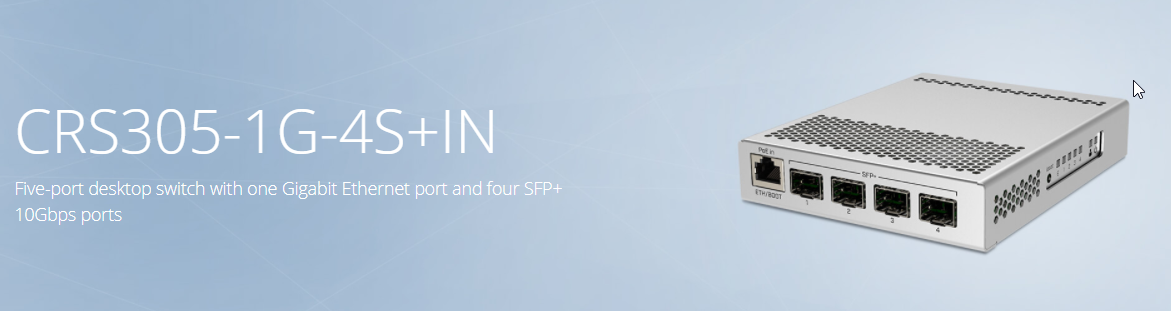
I have one of these switches ^
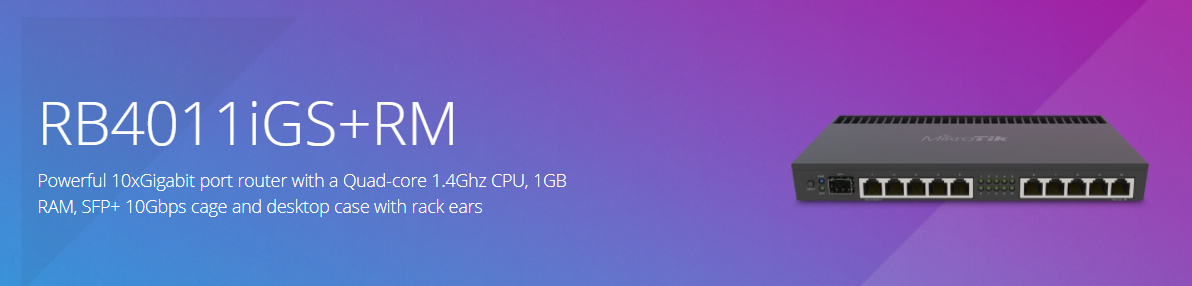
Paired with this router: https://i.imgur.com/0HUzPpZ.png
 tame carbon
Yeah, I have 4 mikrotiks at home lol
little schooner
Nice nice
tame carbon
@little schooner have you got a source for fibers?
or supplier

FS
FS is a new brand in Data Center, Enterprise, Telecom Solutions. We make it easy and cost-effective for IT professionals to enable their business solutions.
FS is where I get fiber modules and prefabbed lengths of fibers
10G fiber is cheaper than 10G copper
10GbE transceivers cost like 2x as much as the fiber variants
Multimode fibers go up to 300 meters and very cheap
Singlemode fibers can do 10, 40, even 80 kilometers without amplification
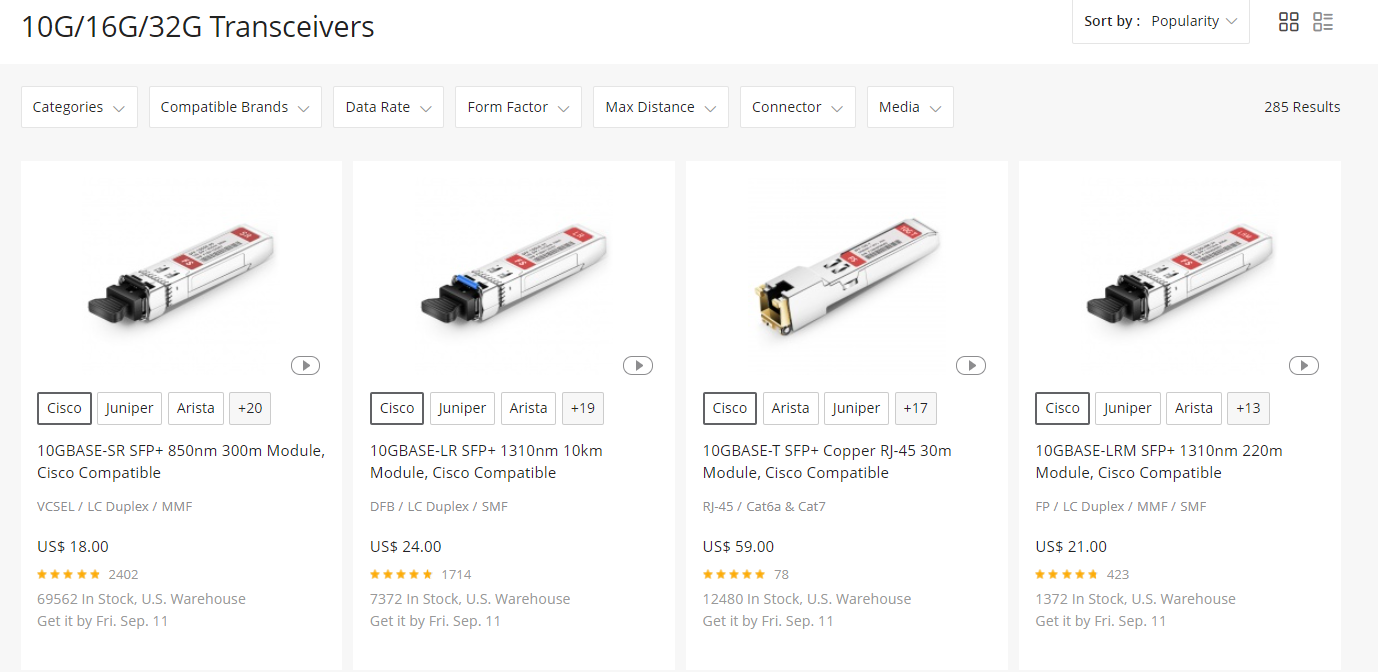
If you looking to buy any of this, feel free to ask me for advice. When I got into fiber optic networking I made a lot of mistakes
little schooner
@tame carbon was away for a few
uhh yes I use Fs.com as well :D
If I have any fiber questions, I will shoot them your way
I actually never used fiber to this day yet lol
tame carbon
I get a hard on when I see "Laser Power" in a terminal written somewhere
root@servomat:~# ethtool -m enp10s0f0
        Identifier                                : 0x03 (SFP)
        Extended identifier                       : 0x04 (GBIC/SFP defined by 2-wire interface ID)
        Connector                                 : 0x07 (LC)
        Transceiver codes                         : 0x20 0x00 0x00 0x00 0x20 0x00 0x01 0x00
        Transceiver type                          : 10G Ethernet: 10G Base-LR
        Transceiver type                          : FC: intermediate distance (I)
        Transceiver type                          : FC: Single Mode (SM)
        Encoding                                  : 0x06 (64B/66B)
        BR, Nominal                               : 10300MBd
        Rate identifier                           : 0x00 (unspecified)
        Length (SMF,km)                           : 10km
        Length (SMF)                              : 10000m
        Length (50um)                             : 0m
        Length (62.5um)                           : 0m
        Length (Copper)                           : 0m
        Length (OM3)                              : 0m
        Laser wavelength                          : 1270nm
        Optical diagnostics support               : Yes
        Laser bias current                        : 44.700 mA
        Laser output power                        : 0.7945 mW / -1.00 dBm
        Receiver signal average optical power     : 0.7566 mW / -1.21 dBm
        Module temperature                        : 44.33 degrees C / 111.80 degrees F
        Module voltage                            : 3.3131 V
Hi, can I connect the fax machine to the phone line by connecting the phone to router? Is that event possible?
tame carbon
Only issue I see with that is the compression on the line
Fax was designed with analog phone lines in mind
green crest
So if I connect the phone line from modem to router, my fax machine will be able to fax?
my fax machine is connected to to router wireslessly
clear igloo
If you plug an RJ11 fax cable into an RJ45 port it will not work
green crest
um, how do I know what the ports are?
 green crest
Does RJ45 have colored wires instead?
tame carbon
RJ45 (network cable) https://ae01.alicdn.com/kf/HTB1LAemSpXXXXbjXpXXq6xXFXXXA/BELNET-0-2m-1m-2m-3m-RJ45-CAT5E-cable-internet-CAT5-Ethernet-Internet-Network-Patch-LAN.jpg
 tame carbon
Yeah you need a PSTN port
Public Switched telephone network
regular phones, the ones that you connect to a landline use RJ11
And so does fax
green crest
So, what does the ISP provide?
tame carbon
Do you have a phone plan with your ISP ?
green crest
yes
tame carbon
Do you have a functioning phone?
green crest
yes
tame carbon
because you'd have to plug the fax in, where the phone is plugged in
Usually, you'd have a 2nd phoneline just for fax
green crest
um, I only have one port behind the phone
tame carbon
I say usually, but fax is unusual these days
@green crest then its either phone or fax.
green crest
What if the modem has two phone ports?
tame carbon
If it does, you'd need to check if that 2nd line is configured
because it would need its own phone number
green crest
oh, okay
tame carbon
Fax, quite simply: is just soundwaves to transmit images
It uses a technique similair to dial up modems
clear igloo
If you really want faxing though you could get something like an OBihai 200 or 202 which will let you plug your fax machine into the network and send fax over an IP network
green crest
Hmm, thanks for the answer Crystal. I'll have to decide if I want to set up fax then
vital silo
@vital silo web proxy auto discovery protocol
@rocky badge ey thanks
tame carbon
There's probably cloud faxing services too
google says this
but then again, this is a dutch company
efax is email to fax
but there's probably other services with just a web UI
if there isnt a service that just accepts pdfs like that, then there's your business idea


 latent furnace
why do people use fax these days
tame carbon
legal stuff
usually
these people
live in the past
@rocky badge the amount of money you have to sink into a pfsense box
rocky badge
you don't?...
tame carbon
can your box route 10gbit/s ?
rocky badge
~7-8
tame carbon
with how many firewall rules?
rocky badge
WAN is only a Gig SFP, but in a SFP+ port
https://blob.rocks/nH0dAceQQ2.png
https://blob.rocks/3YpkvxQyx4.png
https://blob.rocks/0oGUTEbB5E.png


ntopng DPI
tame carbon

FW

NAT
The columns in the middle are in and output interface filters
on the left you can set up layer 3 and 4 filters
on addresses
rocky badge
I can read :P
rocky badge
from geoip and blocked IPs
tame carbon
yeah but you also need some basic rules
rocky badge
Which are then in each interface
tame carbon
like, all packets that are incoming without an accepted connection, that do not have a NAT target, are dropped
then you can set up accept rules for traffic inside your LAN
@rocky badge I see now https://docs.netgate.com/pfsense/en/latest/firewall/floating-rules.html
These would be floating rules for you
You can directly set up rules
tame carbon
they go before everything else


 tame carbon
on mikrotik this is fastpath
but I have that disabled
at the cost of CPU
I tested it, I get around 11.2gbit/s of routing on that thing with the setup I have
now that device costs 160 bucks
rocky badge
and this is a free i5 4460 desktop I got for free :P
tame carbon
And I still wonder, how is pfsense cheaper?
hollow marlin
Unless you are doing queuing there is little need to to disable fastpath
tame carbon
@finite tree I do use queing
tame carbon
I provide internet service to small number of companies
peak cloak
I'm here with a ER-X, lol
rocky badge
If it was commercial, I wouldn't use pfSense
So its still being used for commercial...
tame carbon
Pfsense could do this too
rocky badge
Just with your personal slapped on
peak cloak
Isn't PFSense firewall first, router second?
rocky badge
Just because you can doesn't mean you should
tame carbon
@peak cloak you can do post and pre route filtering
depends on what you are trying to do
rocky badge
if I had to provide Internet to other people, esp. businesses I wouldn't use my personal gear on it
And I'd totally isolate my personal from that
peak cloak
I meant, that it's more of a firewall with routing functionality
tame carbon

MikroTik is a Latvian company which was founded in 1996 to develop routers and wireless ISP systems. MikroTik now provides hardware and software for Internet connectivity in most of the countries around the world.
peak cloak
I mean their website says: "World's Most Trusted Open Source Firewall"
rocky badge
Yeah typo lol
tame carbon
does it have an * at the end?
waxen scroll
@peak cloak i dont trust it soo
tame carbon
- only if configured properly
peak cloak
What's bad about pfsense?
tame carbon
@peak cloak the bang for your buck with building a computer into a router, vs buying specialized hardware at a lower price
peak cloak
@tame carbon yeah, that I understand
waxen scroll
specialized hardware has better support and can have lower ROI
rocky badge
looks at Ubiquiti https://blob.rocks/Hk2S08HIFh.png

 tame carbon
that stuff is so expensive
waxen scroll
my ubnt uses like no power vs a pfsense which is a full desktop
peak cloak
Ubiquiti has become eh now
rocky badge
Ubiquiti wireless is nice
waxen scroll
pfsense desktop is more expensive than ubnt base, but then you have power usage
peak cloak
I should have bought a microtik router instead of my ER-X
rocky badge
If you need basic soho stuff, it's fine