1 messages · Page 201 of 1
 waxen scroll
For a big example: all of your taps feed these and you'll have multiple in most cases: https://www.gigamon.com/products/access-traffic/traffic-aggregators/gigavue-ta-series.html
Next you'll feed the devices from that link into one or more of these: https://www.gigamon.com/products/access-traffic/physical-nodes/gigavue-hc3.html
Next you'll feed those devices from above into a storage server
GigaVUE® TA Series edge nodes aggregate multiple low-utilization links — optimizing, filtering and feeding the combined traffic to GigaVUE H Series appliances.
The GigaVUE-HC3 visibility node enables comprehensive traffic and security intelligence at scale to expand enterprise security and monitoring infrastructure.
 upper cypress
 hexed kettle
anbody know how to configure the dns for a certain application only nd not the whole system?
waxen scroll
its not possible afaik unless you use containers
 distant wedge
is this where we meet new people? I am looking to network
waxen scroll
@vapid dune uses containers all the time! tell us about DNS
 vapid dune
an application only? I don't think that's usually done. but yeah containers would be easier
apparently that does it on linux?
 rocky badge
iOS is allowing apps to override DNS now 😒
vapid dune
that sucks
I mean I was gonna say apps are gonna integrate DoH into their mix at some point in the future to get around the adblocking DNS
vapid dune
crappy lol
rocky badge

When people access the web within your app, their privacy is paramount. Safeguard that information by leveraging encrypted DNS across our...
vapid dune
that's so junky
I don't get why they would do that. what about enterprise customers?
or you know, people who want control lol
rocky badge
"Use a MDM"
waxen scroll
@rocky badge my personal phone uses an mdm
rocky badge
Same lol
rocky badge
Lol
waxen scroll
android has a work profile
i didnt know it did that before this
all the corporate stuff where they log are isolated to the work profile and my personal stuff doesnt mix
and i dont need two phones anymore
rocky badge
Yeah
 little schooner
I have Knox on my Samsung phone and yeah it works exactly like that
That was the day I was trying to understand why a VPN connection outside of it did not work inside the Work Profile space
It is because they are isolated
And the whole time I thought it was a OpenVPN config issue
 versed nebula
is it possible to do a diy nas ?
 spare bay
1000%
versed nebula
is it complicated?
little schooner
@versed nebula no. Use some hardware and throw something like freenas onto it
Or you can throw Linux on it and serve samba or nfs and call it a nas
vapid dune
I use the android for work on my phone too
versed nebula
I need to buy the hardware.
 icy frigate
is it possible to do a diy nas ?
@versed nebula I run an old PC with OpemMediaVault (a flavour of Debian). Super easy.
versed nebula
nice
its funny with my usb3 external hard drive. the speed always goes to one extreme to the other
from 300mb/s to 0kbit/s
any reason? I set it to "better performance" in device manager
icy frigate
from 300mb/s to 0kbit/s
@versed nebula depends. Could be the USB controller, could be level of fragmentation on the HDD, could be HDD cache maxing out, could be overhead while processing a lot of small files, the drive getting hot, the controller on the drive getting hot, etc
 clear igloo
Also depends on what you're transferring, small files will cause huge drops too
waxen scroll
WinAMP... ((winamppppp))... It really whips the llama
vapid dune
is that now offensive?
versed nebula
does winamp support flac?
waxen scroll
@vapid dune the bots here were configured by far leftists
tons of stuff is flagged
cant take chances
little schooner
@waxen scroll I get a little of both sides and see each of their exaggerations
icy frigate
Yeah, I’m sure us lefties have a big problem with the word ass
Also WinAMP 2.95 is the last time it was any good 😉
distant wedge
Winamp really whips the llamas ass
 subtle cosmos
Hey y’all I’ve been having some problems with my internet and I came here to see if anyone knows any solutions. So basically, my parents “upgraded” the internet; our provider offered a better plan that consisted of 1000 mb speed instead of our 50 mb speed. However ever since they made that change, whenever my parents would watch a movie or anything like that, the connection on my computer went to shit real fast. And other than that, overall the internet is just inconsistent now. Any solutions?
icy frigate
Sounds like maybe the included router is garbage
 vestal tendon
Hi all, wondering if someone can help me with a networking issue that I'm having. I'll explain...
I have 1Gbps FIOS coming to ONT at my house. ONT then to ARRIS router (let's call that RT1)...from there CAT5E to attic where it plugs into 8 port gigabit hub
hub then distributes to several rooms in the house
1 room it plugs into another ARRIS Router (RT2) which supplies internet and wifi to a device or two
another room it connects to a G1100 Router (RT3) and another room connects to another ARRIS (RT4)
RT2-4 are set to DHCP OFF
and all devices get their internal IP from RT1
what is happening is that when I connect RT4 to the network, I get massive system wide disconnects
so I'm wondering if a network can only handle so many daisy chained RT's?
also wondering WiFi overlaps could also be causing issues possibly
vapid dune
there shouldn't be disconnects like that. but why so many routers ugh
at the very least get some switches in place of those routers because they're not doing you any favors in terms of stability
distant wedge
I would highly recommend getting unmanaged switches in place of those routers you have. I feel as though you need to dig further into the configuration of each router and make sure there is no possible way for it to be assigned DHCP, and it sounds like RT4 is just creating a broadcast storm somehow. Something on your network does not play well with the RT4, and I'm starting to believe RT1 and RT4 may not be playing well with each other.
 kind sky
Anyone got ideas on how to get more ehternet throughout my house? Harder and longer spots wish I had more but looking nice too
little schooner
I'm stuck. I'm trying to set up a OpenVPN server at one site and have a router at another site peer with it.
My goal is to get traffic from a specific wifi device at site 1 to go to the internet through the OpenVPN server at site 2. As it stands now, both routers are connected and are peering. However, visiting any URL on the wifi device in Chrome shows a Rebinding error or the Not Secure red lock error. I think it might be intercepting https when it should only be forwarding it.
Is what I want to accomplish possible without having the wifi device at site 1 use its own VPN connection?
vapid dune
@kind sky what's harder about it?
kind sky
I mean my ehternet downstairs get x10 the speeds firstly thens secondly dont know how to run cables through the wall at super long distances 😦
vapid dune
x10 the speeds? o.O
my ethernet downstairs is just as fast as upstairs. but my place isn't huge
I mean you can look on youtube for advice how to pull cables in walls. but if you don't feel comfortable I'm sure there's people you can hire to do it
it's not a big job imo
will need some wall patches though
distant wedge
Running ethernet thru the walls is technically very easy, it would be easier if the house was being renovated but yeah, you just have to patch
I went a little overkill and instead have a 2 inch PVC pipe going from the second floor, straight into the basement
All my runs from the second floor including coax / ethernet all fly into it
vapid dune
I mean running conduit means pulling lines in the future is easier if you ever need to
but you could just double/triple up on lines when doing the initial pull to help combat that heh
or run fiber everywhere
distant wedge
I mean running fiber in a 1500sqft house probably isn’t the best idea 😅
distant wedge
Indeed it issss
I have 4 Ethernet and 2 coax running to each room, then have them lightly velcroed before they go down, that way if I need to re pull, it shouldn’t be hard at all
Just waiting for one of these to come in the mail
little schooner
I figured it out.... It was all because the NAT rule at site 1 applied in disabled state and the router at site 2 didn't have static route to find the OpenVPN server for 172.16.3.0/24 net....
 manic nebula
@distant wedge that's why we use installation tubes usually in germany
distant wedge
Installation tubes?
distant wedge
Lol, we use either PVC or EMT. It depends on what we want to do but usually PVC is cheaper and easier to work with
manic nebula
agree, EMT is just terrible and sturdy as heck
distant wedge
Well, in some buildings, we have to use EMT for building code. We have pipe benders and such but it's a lot of work
But that's usually only if we have exposed walls
manic nebula
luckily such a practice isn't common anymore in germany
distant wedge
That's good
It took me a little while to do the PVC in my house, but a lot of people I know have been asking me to do the same for them
It's become sort of a small business for me :p
clear igloo
Nice!
manic nebula
however. I have a question regarding my Asus DSL-AC87VG
I have a shitty ISP that doesn't wanna give me all perimeters required to set it up properly for vDSL.
Is there any way i can spoof the necessary perimeters for it?
Yeah, i know you guys wouldn't recommend vDSL at all, it was a bad choice back then, i gotta admit

going back to my former ISP in October anyways
because 1000k coax
kind sky
I have a cat 5e going upstairs to a room and another cat 5e right next to router. The one upstairs is not that long but its decent. Issue is one upstairs gets x5 lower speed than one down. Why is this cable bad or something else?
manic nebula
anything below 100 meters should actually have the same result. Check your LAN connection and Router settings. Maybe some settings are off or the cable got damaged somewhere. Intel Lan connections provide a pretty decent feature to troubleshoot where the cable might be broken
vapid dune
use a cable tester...
kind sky
yea well main thing is I switched internet providers
and the cable in the wall is like 7 years old now and was installed by old provider
plus Im paying for 1000 megabytes but im only getting 90 with cat 5e
so im assuming thats fine as cat 5e is rated for that I thought I need a new cat 7 cable I think
but downstairs i get 500 with cat 5e so makes no sense
kind sky
ah idk I thought it was 100 only yea idk then not good
little schooner
Check your cable ends they may have wires that came out
kind sky
when do slow downs begin typically?
kind sky
yea then something else is wrong
its the cable itself gonna replace it then iv checked and tried everything else
distant wedge
Actually
328m is the max amount before you need some sort of amplification
Wait no 328 ft
little schooner
Yes, that's about 100m
kind sky
also if you buy one of these plates it will work with cat 7 correct? https://www.amazon.com/Sancable-Ethernet-Plate-Keystone-Female/dp/B07LH1QD4B/ref=sr_1_3?dchild=1&keywords=cat+7+converter+plate&qid=1594572221&sr=8-3
i mean cat 7 and 6 are the same in terms of connections right?
clear igloo
Well considering Cat7 is not an industry approved standard and can use a few different proprietary connections which might or might not be compatible with RJ45 I wouldn't bother with it
kind sky
so what should I do for a wall connection then?
vapid dune
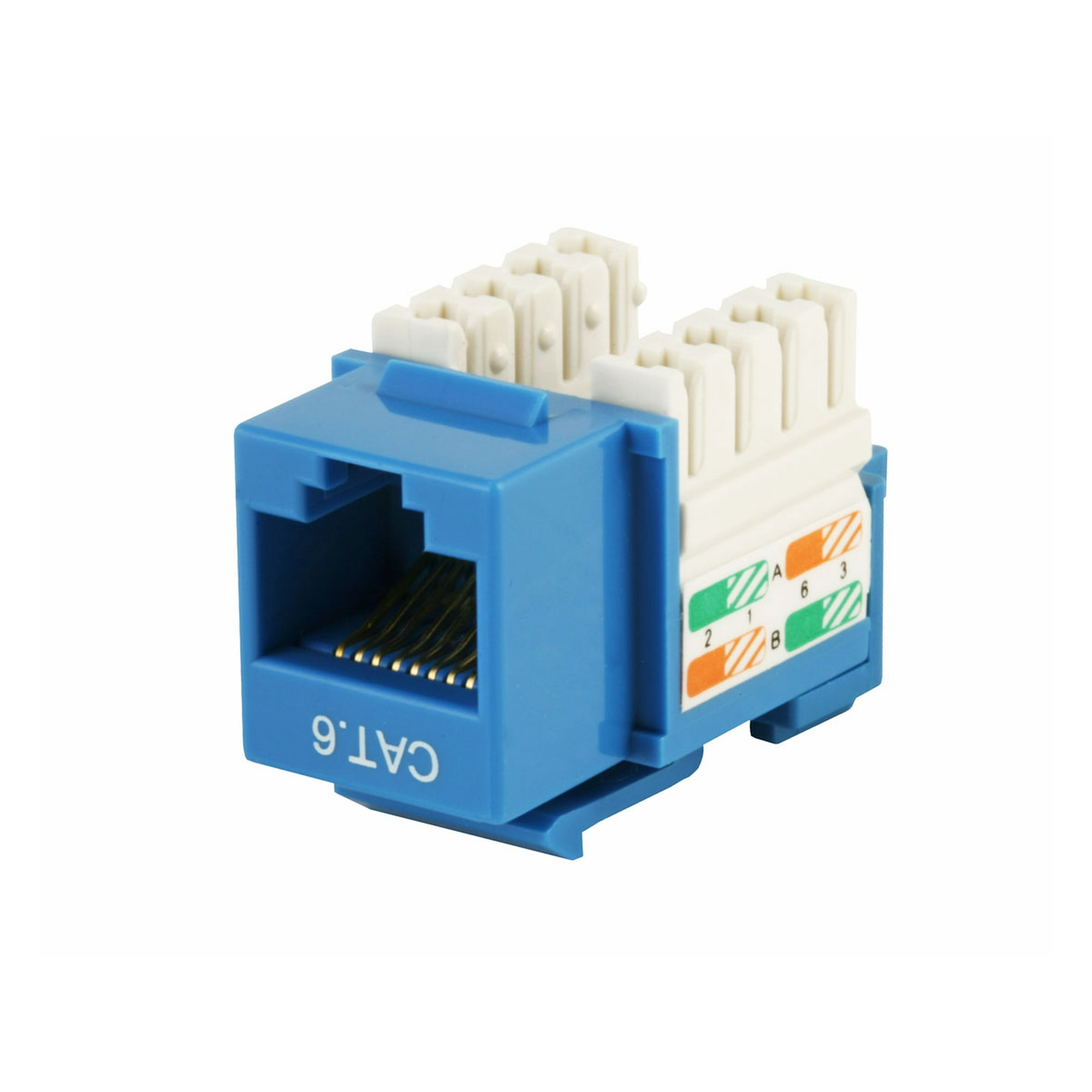
I mean the plate is a plate. I just swap out the keystone if need be
oh right I took a picture of the one I swapped out that was evil
I don't know who did that. but they managed to short two of them
I swapped it to one of the ones that look like this: https://i5.walmartimages.com/asr/b1a20fc1-dcf0-45e9-b3da-5209a8e2f6fa_1.24e5242398c79a2a56ae6d443dbee77c.jpeg?odnHeight=2000&odnWidth=2000&odnBg=ffffff
 waxen scroll
@little schooner i'm struggling to understand the usecase for that
if the whole site is VPN to the other site already whats the problem
manic nebula
Cat. 6A and Cat. 8 exist, but Cat. 7 doesn't work on RJ-45 due to interference, so it needs jacks with bigger gaps between each contact. That's why the industry scrapped the whole Cat. 7 spec
anything else to say?
clear igloo
Was just about to say that pretty much 😛
It's an ISO standard only basically but doesn't meet TIA/EIA specifications nor have its approval
manic nebula

Here are the approved standards
And till the consumer market really needs Cat. 8 it will take like 10 years till it becomes a bare minimum standard
vapid dune
lol yeah I hope 10gig is a standard consumer thing by then
and ipv6
but that might be a pipe dream
manic nebula
keep dreaming
clear igloo
lol, yah, one can dream 🙂
manic nebula
unless that monopoly game of ISPs gets crushed somehow i don't see any improvements in the next 25 years for the US
vapid dune
thankfully I'm in Canada 😄 but yeah realistically nothing will change
clear igloo
So 50 years for you then 
manic nebula
thankfully i live in germany with a synchronized 1 Gb/s connection, so idc, but stagnation in the US also means stagnation worldwide
clear igloo
Yah, I got lucky, Google was like "We're coming to Raleigh" so AT&T rushed and got their fiber down early so I've got gigabit 😄
vapid dune
o.o I was gonna say hopefully less time
gigabit fiber with ipv6 native can be found here. I wish they'd deploy more of it though
clear igloo
I won't go on my AT&T rant for IPv6 again but they have it, they just deployed it in the most stupid manner possible
vapid dune
lol how can it be stupid? does it work?
clear igloo
So for fiber at least you get a /64 and have to request, via some other device, additional /64s as you need them. They allocate a /60 per user but you can only get it in a /64 at a time -.-
They ignore any PD request for anything over a /64 so I've burned like 4 interfaces on my firewall so each one can request a separate /64
vapid dune
I forget what I get. Maybe a 56?
clear igloo
Yah, the other ISP I've got lets me send a PD for /56, /60, or /64 which is fine but they are slow and I only have them for TV, lol
vapid dune
At least it's not a 128
clear igloo
Fair enough, if only android followed DHCPv6 and not SLAAC then I wouldn't have a problem with even a single /64
vapid dune
Yeah it's a bit crazy there's two ways. That's what I hope gets fixed in 10 years lol
27% vs 43% IPv6 use Canada vs US from what I just searched
Interesting
clear igloo
that is interesting
manic nebula
still wonder if my Asus DSL-AC87VG can somehow sniff the necessary perimeters i need in order to use it as my main modem and router

because my current main ISP is total garbage
vapid dune
Search online? Someone must have tried
manic nebula
So i got forced to use my second ISP, which is connected to my server for internet service only at home while my main ISP connection is for IP TV only
Search online? Someone must have tried
@vapid dune already did, but germans somehow aren't good with networking
vapid dune
huh
manic nebula
guess that's the result of a nation forced to bring out elite engineers and craftsmen instead of electrician engineers
vapid dune
I mean can you just bridge or pass through an IP?
manic nebula
wrong channel, but my fangs are healthy and shiny
see?


I mean can you just bridge or pass through an IP?
@vapid dune yes and no xD I can, but that stupid Fritz!Box denies any sniffing at the perimeters
as soon as i try to spoof anything it denies any service
stupid ass bıtch ISP router
but my attorney is already on that case, since i'm allowed by european court to use any router i want as long as it supports the connection
which it obviously does
wish my ISP the best of luck to get away with such shady methods in front of a court
vapid dune
o.O
waxen scroll
dat new sword art online tho
 verbal charm
SAO has always been good. New episode is dope. Playing Lycoris, it follows Alicization closely. 
manic nebula
owwww, dat asuna emote

@verbal charm where did you get those emotes from?
I was probably the one with most Asunas someone could achieve in SAO:MD. I mean i had every single Asuna since release
verbal charm
I have them in my own discord 
little schooner
@waxen scroll for streaming. But it's proving harder to implement than I thought
Mainly because site 2 doesn't have enough bandwidth to stream the video back via upload
So it's a lost cause
little schooner
@waxen scroll now if only I realized that sooner
waxen scroll
i didnt label anything, the software did for me
little schooner
Oh
Packet tracer doesn't do that
I wish it did that and auto spaced
It only has those hover labels
waxen scroll
juan got me to install eve-ng so im messing with it
little schooner
Looks cool yeah
waxen scroll
running into some flaws, but i dont know if thats eves problem or what
like i see all the mac addresses in the arp table, but the layer 2 table only has the macs for the dist switches
so you have to wonder if all the traffic is just being flooded all over the place
like pings and such
little schooner
Yeah. Well I suppose each software has its own fair share of quirks
Packet tracer was lying to us when we made a template setup for an access server install
I knew we shouldn't of trusted it in our particular case
 hollow marlin
@little schooner never use PT for live simulation. It's a great study tool but lacks many protocols that also come into play in the real world.
As far as emulation, layer 2 is the hardest to emulate because so much L2 is in hardware and many virtual switches are needed to emulate even a single switch.
L3 is easy peasy to emulate
 long grove
hey guys, any one willing to help me set up my router for better ping?
 ornate jungle
Erm, step 1) disable QoS step 2) use cloudflare or google DNS step 3) move into an Internet Exchange Data center?
 thorny vector
If only I could live that close to a node 😭
vapid dune
I mean with fiber you're practically there
thorny vector
What’s that? Oh, the thing none of the places I’ve lived at in the past 5 years has had
vapid dune
Better find a place with it next
thorny vector
Military, I don’t get to choose where I live
 loud anchor
is port forwarding good for gaming
 lean pollen
If all current applications for future datacentres in Norway happen, and they use as much electricity as they say they will, they will use 20% of the electricity in Norway.
thorny vector
@loud anchor Not for gaming per se, but you need it if you're hosting your own server for something
lean pollen
ISP upgraded our internet to 500/20 (from 300/20)
I would personally rather have more upload
300 was really already more than enough
But that 20 up is what I want to be better
 waxen saddle
@loud anchor Is leaving your front door wide open good for walking?
Port forwarding is only useful if you are hosting something. If you are playing a game that requires it, consider why it requires it. If it requires a huge range of ports to be open, run away. The authors are completely incompetent and your computer will likely be hacked soon.
thorny vector
The house I'm leasing includes electric in the lease, so what's a homelabber to do? That's right, all spare resources are cryptomining now 😄
little schooner
@hollow marlin noted
waxen scroll
#devops #jira #ohgod
vapid dune
what's wrong with jira anyhow
 cedar igloo
nothing beats a good old white board & sticky notes
waxen scroll
Micromanaging
clear igloo
#agile #devops #thenetwork #intuitive
@little schooner Seems about right
https://www.theregister.com/2020/07/13/ibm_kubernetes_experience_job_ad/

Other job ads make similar mistakes, and candidates do worse
waxen scroll
@clear igloo dont h8
rocky badge
@chrome hound https://twitter.com/SnazzyQ/status/1283121441689354240
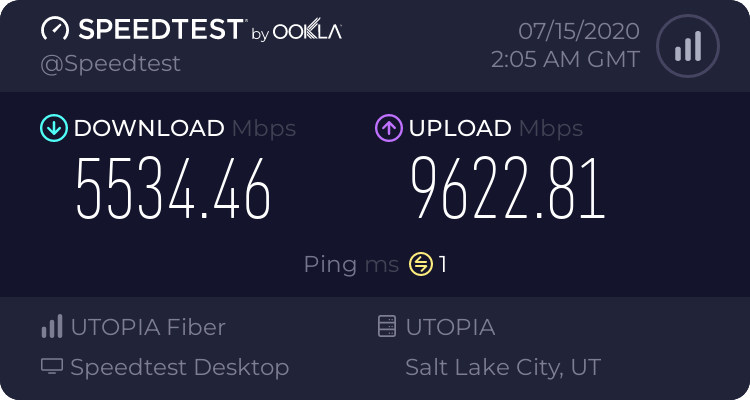
Did Quinn get UTOPIA 10 Gigabit? 👀

 chrome hound
I only saw an order for 1 gig, but he has a Juniper so he could get 10
rocky badge
Yeah, he showed he got gigabit....maybe he upgraded? 👀
chrome hound
possible or our eng gave him a temp allowance for 10g
rocky badge
Also I wonder if his router, UDMP, can actually handle 10Gbps, Ubiquiti only rates the UDMP for 9.5Gbps with NAT & FW and 3.5Gbps with IPS/IDS, so he has that off, and I've never seen anyone with 10Gbps + UDMP lmao
Ooh 👀
chrome hound
well thats Sumo Fibers Speed test server too so its not going to get to 10g, the best I get out of that one is 4
rocky badge
😂
chrome hound
he should connect to the Utopia sped net server its got a 40G card and directly connected to the core switch that has our 100g line cards
chrome hound
He did indeed get a 10G promo for 3 months
rocky badge
ah
chrome hound
I should poke him and see what he gets to my speed test server 😄
rocky badge
😂
I'd really like to see if it's the speedtest server or the UDMP bottlenecking him
@chrome hound I remember you have Extreme, you like it? Lol
chrome hound
its hard to bet for the price I paid for it
rocky badge
Did you actually pay for it...or was it free? lol
chrome hound
between ports I can get a solid 10g but when I connect through other stuff like proxmox I loss speed, which I can expect
hey I had to carry that all the way down to my car after picking it off the throw out table
rocky badge
😂
chrome hound
so I would SAY I paid by the pound
hollow marlin
@rocky badge I'd go with his UDMP being the bottleneck
rocky badge
yeah
hollow marlin
Tried looking on reddit if anyone actually tested 10g routing with the pro and no results other than Ubi's claims
rocky badge

This is the only info I have, which is from a Ubiquiti employee in the discord
one guy in Ubiquiti has 10 gigabit Internet, but can't put a 10 gig card in anything
vapid dune
UPS to the rescue... the power randomly went out for a bit
little schooner
@vapid dune UPS destroyed my package. I am disappoint
Now acer is saying stand is busted and can't be used
 ashen frigate
@chrome hound Who's your ISP in SLC? I've been on Google fiber and am thinking of shopping around and your speeds.... i envy them
chrome hound
I work for UTOPIA, and they are my ISP, but the UTOPIA network has about 15 or so providers that you can chose from, SLC is a bit hit and miss we have fiber there, but mostly business area's Centery Link and Google have a chock hold on the area
you can check your address on utopiafiber.com and see if there is service there or not
 plain zinc
@chrome hound how much you pay internet for that much download and upload?
chrome hound
it various from 199 to 250 depending which provider you go with
plain zinc
@chrome hound also can you help me out with my internet or i mean answer a quick question
chrome hound
but that is of course residential service, so its subject to rates not being 10g
I can sure give it a try, what the question
plain zinc
So i live in a small town with like 1,500 people
chrome hound
Utah area?
plain zinc
no oregon
chrome hound
oh ok
plain zinc
so
he pays 100 for internet and
im pretty sure that hes getting ripped of
bascially we pay for a certain amount and they arent even giving anywhere near the amount they are suppose to provide
chrome hound
well that's kind of depends, how fast is the line, how many other providers can get to your area
plain zinc
im pretty sure all the big ones we can go too
chrome hound
remote location with small population can cost more to get connections to
so 100 for what rates?
plain zinc
i know its alot more than this
chrome hound
what is this?
plain zinc
chrome hound
there is a link you can share to make that more readable, but I get the jist
how far away is the speed test server?
I can't see the small details
chrome hound
have you call Comcast and complained? are you directly connected to there modem or via router?
chrome hound
I mean is there another device between your PC and the Modem provided by comcast?
chrome hound
ok so you really need to get on there case than with cable modem there are a lost of factors that can reduce speed, including your neigboors
you are on shared media with a cable internet, so your internet takes a back seat to anything else coming down the cable
but they are do things to fix the connection, like adding a line booster at your house, fixing old cable connections, even a lose cable can cause problems
but your up will proablay never get better than 30 mb
plain zinc
line booster?
chrome hound
your down should be 50mb unless you are paying for a pro grade service, at 100 I think you might be on the higher teir, but I am not sure, it been a long time since I had to deal with comcast, My parents still have it, but its pretty well setup for them currently
yea its a device that plugs into the wall outlet and boost the signal to your device
well 50 or better, I know people localy that get 300mb down most days
on comcat that is
but you need to become a pain in there butt to get them to take notice and fix it, about 10 years ago my dads cable was having random problems, so it would cause internet drops station quailty, come to find out they have a run of 50 year old main line cable feeding my dads area and when the farmer that had a field across the back side of my dad plot water the cows it was shorting out the old line
took them 2 months to finally send a guy out at the right time to see the shorting and confirm what we had been telling them
comcast is a slow moving money sucking beast, and are never willing to do something until you have them dead to rights on proof
plain zinc
thats why i was going to ask, would it be better to switch to another company?
chrome hound
if they can offer better service yep always look for the best service
they aren't looking after you, or your speeds wouldn't be that crappy
chrome hound
np I didn't really do anything you were not already looking to do 😄
plain zinc
peace
little schooner
@chrome hound I think they are correctly referred to as CONcast...
little schooner
@rocky badge I'm feeling a little more neutral towards them as of late
I mean their service line never goes down...
its been a full year and its still up
rocky badge
nice lol
little schooner
ahahaha... now if were talking about Frontier Communications
lets not get started with how awful their track record is xD
rocky badge
cox/s
@bold shore can testify for frontier
(Shadow, remember, no caps the bot doesn't like it, I know you do tho :P)
 bold shore
Ah yes
vapid dune
little schooner
@vapid dune omg i feared thats what would of happened
but luckily, no it was just the stand that took a beating
bold shore
Can't wait till they go bankrupt and hopefully sell their fiber assets to a company that has more wits than a rock
rocky badge
😂
bold shore
Ah, a new blob pfp I see
little schooner

FCC issues 6-month delay on law banning rental fees for equipment customers own.
thats how you know froniter is worse than comcast
rocky badge
@bold shore yes 
 thick minnow
https://cdn.discordapp.com/attachments/732308604748693684/732887582978867250/ladda_ned_1.jpg
networking 100
 thick minnow
Hey, so I have kind of a though.. n*t to crack; Basically, my computer itself is capping my internet.
 frigid sphinx
Oh?
thick minnow
Graphs show it's only using 1% of my bandwidth. My ISP says I'm getting the full 2.5MB/s and my family confirms this, I've replaced cables, I've replaced the modem / router, I've turned it on and off, I've done virus scans.. Nothing.
I came back from vacation last Tuesday and it's been like this since, nothing I've tried works, and I can't factory reset my PC because I don't have a windows disc nor a disc port.
hollow marlin
What bandwidth are you paying for?
thick minnow
I'm not really too techy, and I'm not the one paying for this.
I'm supposed to be getting 20MBps, though.
I know that it's copper wire internet, though.
hollow marlin
20Mbps is equal to 2.5MBps. If you able to hit 2.5MBps on download in steam then you are hitting your cap. There are 8 bits in 1 byte.
frigid sphinx
umm I see a problem in that team fortress download...
thick minnow
Of course, I know that much, I was using the 2 interchangably.
You do? :p
I could be playing the Scream Fortress update when it's finished..
But yeah, that's the problem, speedtest says things are fine, everything else definitely says otherwise.
hollow marlin
They are most definitely not interchangeable. What is the highest you have gotten with Steam since this all started?
thick minnow
Yesterday I got a random peak of 1.7MBps while "test downloading" something just to see how bad things really were. Though the lowest I got was like..0.7kbps.
Don't know how long it lasted, musn't have been very long though.
Here's a pic of my resource monitor, it's something alright.
clear igloo
@waxen scroll I need to get gud clearly
thick minnow
I've no idea why my computer would do this, came back from vacation and suddenly my internet's like this.
thick minnow
My computer's wired to the router, yeah.
frigid sphinx
did someone roll a beer keg over the cable run ...
thick minnow
Unless we've got house elves, I don't think so. ))
frigid sphinx
the elves went too far!!
so if you ping the router do you see packet loss ?
but speedtest works.
which makes me think it's beyond the router but everyone else is getting ok speeds...
thick minnow
As I said, it's a tough n*t to crack. There's no forum threads I've come across that have had this same problem, and their solutions don't work on my end.
Mind, I've been looking and testing for a solution on my own for about a week now, I'm thinking if this place doesn't have an answer it's pretty much done for. 
waxen scroll
whose your isp
waxen scroll
is it DSL?
thick minnow
I'm not techy enough to know what that is, I know I've got copper wire though.
waxen scroll
is it a phone line wire ?
thick minnow
Yeah.
waxen scroll
yeah, so thats DSL and i cant speak for your area but the max ive seen offered over that tech is 1.5 - 2.0MBit/s
its very very rare its more than that
i think you're working fine
thick minnow
Well, we got 2.5MB/s when it was all working fine, but now I'm getting 5kb/s.
waxen scroll
but the speed test claims you get 2.0+ while the computer claims its not?
thick minnow
Yeah, speedtest says 2.5MB/s while of course, my actual download speed is between 1 and 150 kb/s.
It takes like.. 1-2 minutes to go to a webpage, at least 5 minutes to boot up Discord after I boot my computer, and maybe 6 to start steam after a boot.
So yeah
Not 2.5MB/s
And here's the resource monitor.
frigid sphinx
so that smells like packet loss to me
mtu fragmentation crazy?
if you're trying to send jumboframes or somethign and fragmentation is getting all messedup
thick minnow
..I don't know what half of that means, but should you give instructions, I'll follow them.
)
Turned Jumboframes off in the network config, hoping that might do something.
frigid sphinx
is local network performance also bad?
can you transfer things over the lan quickly?
frigid sphinx
like copying files from one pc to the other on the network
between computers in your house
thick minnow
Oh, it's only my computer that's hooked up.
In fact, I have the only desktop in the house.
But yeah, if you have anything I could try, don't hesitate to shoot.
In fact, if anyone has anything, just tell me. )
frigid sphinx
so is there anything else on the network?
thick minnow
Yeah, my family's got their devices on it.
vapid dune
2KBps?!
thick minnow
Finnish internet really be like that sometimes.
But yeah, it takes like 5 minutes to load discord after I boot my computer.
Sometimes Steam doesn't even count me as online.
Spotify doesn't work.
I can't get past the login screen on any games.
It takes webpages like a minute or 2 to load.
little schooner
I just found out the starlink is accepting addresses to beta test their internet. I hope this is my chance to finally do away with Comcast at least at my apartment
waxen scroll
i dont do a lot of latency sensitive stuff right now so im willing to see if i can give comcast an FU
no, months
waxen scroll
no, few days
little schooner
Just in time then
I read that it will be $1 during beta test?
I have large windows here that would be perfect for it
To get that line of sight
waxen scroll
im not sure what the cost is
i would probably opt to do outdoor antenna for best results
$1 would be ideal because i have an early termination fee on comcast
but i think its been cut in half by now
hollow marlin
@little schooner Didn't they say you can use pretty much any dish for the frequency they are using?
I haven't looked into it in a few months but I still have an dish from previous owners in the attic I might test this out with
little schooner
@hollow marlin not sure it was very light on details
The only thing ive seen for a dish is the recently fcc certified starlink router dish
@waxen scroll is it weather resistant?
what do you put on hardware to resist the rusting?
hollow marlin
There are special weather resistant coatings/paints you could use if its not already weather resistant
Typically the main points to a weather coating are UV resistance as well as hot/cold resistant.
little schooner
oh, none for preventing water from leaking in?
maybe use silcone for that?
you should see how my alarm system installer put my doorbell camera
hollow marlin
Yeah that as well. Silicon is an easy fix as well as gaskets if possible
little schooner
its pretty funny
i think its silicon or whatever but it is very messy and large
it doesn't look right
@hollow marlin hmm. yeah gaskets i think are better
they don't leave a hardened goo overtime
gaskets work because rubber and silicon are resistant against water?
my cameras use a black one
hollow marlin
Yep, mainly because they are hydrophobic and will cause the bead to use surface tension to create an addional seal
little schooner
thats pretty cool
hollow marlin
Also if you do not have a gasket for what ever project you are doing to can take silicon and bead it onto wax paper, let it dry and use that as a gasket. Did that in the past for some projects and worked great.
No mess when you take it off later on
little schooner
oh dang thats a good trick
yeah ill remember that one. I lost a gasket or two for some pillar lights that really need it again
water was getting inside the light
vapid dune
Facebook engineers have developed a new robot that winds fibre-optic cable around existing medium-voltage (MV) power lines, enabling the cost-effective expansion of high-speed internet infrastructure.
hollow marlin
All they did was add a motor to already existing tool. That tool is manual but is how fiber is attach to the tension line
As far as deployment good luck getting past the power companies to allow fiber being strapped to their lines
vapid dune
that sounds like a maintenance nightmare
little schooner
@vapid dune did you say this looked easy to you?
I don't even know if I'm right
they are making me take this as a networking admin major
waxen scroll
@little schooner how is circuit formed?
little schooner
@waxen scroll by connecting a wire to a positive lead and connecting the other wire to a negative lead of the same source
to make a circuit loop
now the danger that remains is that current is increasing rapidly
the resistor will keep that from going too high
waxen scroll
seems like you know what you're doing
hollow marlin
I don't mind the full work from home but the constant 6 figures worth of gear at home for provision/labbing and it's power cost is getting under ma skin. Having to find more random places to "mount" this crap
waxen scroll
slap a kill-a-watt on there and bill them
hollow marlin
As of this setup there is one at the outlet
waxen scroll
👀
hollow marlin
Waiting on the 100gig switch to arrive to fully test this setup along with my optics
little schooner
@hollow marlin wow they are beautiful
but yeah bill em for this
say its like driving miles in your car, except for power lol
hollow marlin
I like Ciena's design a lot. Their CLI is a nightmare though
waxen scroll
@little schooner cisco ASR9k has the total package
icy frigate
Dang that’s a sexy setup
little schooner
@waxen scroll I see
 west vortex
Hey all. Anyone familiar with OpenWRT? Curious if I can install a supported router’s OWRT firmware on a router that’s not listed that shares the same CPU
west vortex
@spare bay Will it matter if one router is AC1900 and the other is AC2600? Or will the firmware work just fine?
everything else seems to match up hardware wise
west vortex
Okay so as long as it's all there in the screenshot, the rest doesnt matter. Okay, awesome. Thank you
yeah SoC is the same and it's 128MB NAND
spare bay
for the record I take no responsibility and I have never done it myself but I know it should be possible
west vortex
No. Netgear Nighthawk R7450
It's physically identical to the R6800, the R7450 is the AC2600 version that is sold via Walmart (lol). The R6800 is AC1900
But all the hardware is the same.
ornate jungle
MediaTek MT7621AT
oof um yeah MediaTek based routers aren't great, but some are supported by OpenWRT.
west vortex
Yeah
Yeah I know. I am just looking to mess around with it for some more functionality. I am planning on going Ubiquiti eventually with hardwiring in the house and using the Dream Machine rackmounts, switches and APs
plain zinc
yo can someone help me out?
ornate jungle
We would first need to know what you need help with before we're able to gauge if we can help.
plain zinc
this might sound like a really stupid question
and i know nothing about it
if i live next to a school thats supplied with fiber optic internet, would that in anyway make fiber optic installation cheaper?
that might be a really dumb question
spare bay
depends
ornate jungle
100% depends on how the ISP in your area has run fibre to homes, if they even have
spare bay
that might mean theres hookups nearby for companies like comcast/whatever you have in the states
ornate jungle
you'll best contact the ISP to find out
spare bay
or, it's a business line and you can't afford that
if you can see where it connects, try and look for any ISP names on boxes/poles nearby
ISPs in my area have online portals to check if they do fibre to the house in your area, so you can look that up too
west vortex
@spare bay welp, that was fun. It accepted the firmware but I couldnt access the config page, so I had to restore the default fw and restore my settings backup
oh well
vapid dune
not bad not bad
little schooner
Flexing that upload speed. One I don't have 😢
hollow marlin
@little schooner Its easy, just get more
 celest zodiac
whats a good tplink router below the $90 price range
im looking at the C7 right now
 inland bluff
flexing my godly slow wifi
vapid dune
Why tp link
inland bluff
? sorry haven't slept in a bit
vapid dune
Oh not your message, guy above you
inland bluff
oh l
thick minnow
Good news, lads
Now I'm getting 18kbps instead of 2, progress!
Only 9 days and 21 hours to install Team Fortress 2, what a deal.
hollow marlin
@thick minnow Have you tried just rolling back updates? Update 2004 has been a nightmare with network drivers
thick minnow
How would I go about doing that?
( @hollow marlin )
Also sorry if my responses are a bit slow, I'm having family time and of course sending messages with this internet takes either 1 second or 120 seconds.
hollow marlin
@thick minnow Hold shift while pressing restart in the Windows menu and it will bring you to recovery. From there you can choose to restore to an earlier point. I would let that run and see if there are any changes
waxen scroll
@hollow marlin i dont play this dumb speed screenshot game
all that matters is I work on gear that costs $500k and you dont
#blessed 😇
hollow marlin
500k, awww how cute ☺️
I think each of our MX10003 with all the line cards/sfps is just shy of ~2-300k. The 4 of them are basically idle in terms of what we throw at them vs what they can handle. Juniper isn't expensive enough to push 7 digits
Our voice side of things is easily 7 figures
thick minnow
Hey @hollow marlin , when I do this, it brings me to the big blue windows screen, tells me it's prepearing to update windows, gets done with telling me that, then tells me it's shutting off.
Thing is, it doesn't shut off.
Had it saying "shutting off.." for at least 3 hours.
What do you reckon I can do?
Also, about the internet on our phones and stuff, I'm now noticing that we're not getting good reception, the vertical bars only go up to 2-3 out of 4, while the bendy horizontal bars are at full power.
thick minnow
Taken at the same time.

Oh- that doesn't say kbps, huh?
Well, webpages are still taking ages to load.
I guess that might be explained by the downloading, though?
This is quite something.
Are the boys back in town?
Is this it?
thick minnow
Now it's back to low kbps.
What could be causing this?
Oh yeah, I have a solid 60 TCPs, could this be part of the issue?
thick minnow
Deleted my cookies, 40TCPs now.
Man- I had 2.5MBps when I was downloading a WT update earlier, now it's back to 10-50kbps.
little schooner
The speed is low enough that it could be a problem with the signal coming into the home
Chasing it as a problem with windows update is unlikely the solution
thick minnow
How would I go about fixing that?
..And would I need a technician to fix it?
For reference we have copper wire, VDSL / ADSL
If anyone's got anything to say, don't hesitate, anything that MIGHT fix it is worth hearing.
 primal ice
its not going to show full speed unless you are using it normal traffic - discord steam what ever is going to be around 10-50kb usage. - the last time I had a similar issue like you are having the network card/port (built on to the motherboard) was starting to fail.
thick minnow
Alright, do you know how I might be able to fix the card?
primal ice
get a network expansion card and see if it fixes it.
thick minnow
Is that a physical item or something I can download?
I haven't access to shops atm.
primal ice
physical item
primal ice
where are you?
thick minnow
Finland, basically everything's expensive up here.
That's why my hopes are so low ))
primal ice
https://www.amazon.de/TP-Link-TG-3468-Netzwerk-1000Mbit-s-PCIe-Adapter/dp/B003CFATNI cheap tplink from the german amazon site.
thick minnow
Man, it's taking like 5 minutes to get messages through.
But, this might be the issue?
Is there anything else I can try?
There we go
Actually took 7 minutes to send.
primal ice
could try finding the drivers from manufactures site and reinstalling them. but from everything you said I would suspect failing hardware over a driver issue. but its worth a try.
thick minnow
Are you sure it might not have been a windows update? I was gone for a week, I think the PC might have updated while we were gone.
I don't know why hardware would fail when it's not on.
primal ice
hardware just fails. it doesn't need a reason to. try the drivers first though.
kind sky
Trying to replace a network cable having huge dl issues any suggestions to what the issue is beforehand?
thick minnow
How would I go about fixing the drivers?
primal ice
if your ethernet port is built on to the motherboard go to the motherboard manufacturers site. look for network drivers. if it is already an expansion card look in device manager to see what it says it is and google drivers for that.
thick minnow
I'll look into that, cheers.
Still taking suggestions of course, I feel the Network Card should be a last resort.
thick minnow
Damn, talking to another techie, I've apparently got a fouled Ethernet card.
So this means new MoBo
And because of my CPU being LGA 1156 I've got to get a new CPU.
And because of my RAM being DDR3 I've likely got to get new RAM.
AAAAAAAAAAAA
primal ice
Does not mean a new motherboard/system it means you will need to get an expansion card for ethernet. unless of course you want to upgrade.
thick minnow
Oh really?
I have no plans on upgrading, it's too much money and I'm happy with what I've got.
primal ice
oh and I like the company that took over for Frontier Washington State. They offer 1gb internet cheaper than their 250mb tier. (base price) if we qualified for their promotional stuff - the 250mb would be cheaper.
icy frigate
I have no plans on upgrading, it's too much money and I'm happy with what I've got.
@thick minnow @primal ice is correct, if you’ve got a 4x slot on your mobo & space in your case, you can pick up a gigabit NIC that’s decent for like $50
thick minnow
I know what about half of those words mean. ))
But yeah, fair enough, I guess this thing technically doesn't even have a side panel anymore, so why not?
Where could I get one, and how would I go about getting it installed?
..And is this even confirmed to be the ethernet that's fouled?
icy frigate
I was guessing about $50, but it’s even a lot cheaper than that
TP-Link TG-3468 10/100/1000Mbps Gigabit PCI Express Network Adapter https://www.amazon.ca/dp/B003CFATNI/ref=cm_sw_r_cp_api_i_MymeFb3282M71
That’s a TP link, relatively reputable networking brand
primal ice
his board is old - would need to find a pci 1gb ethernet card.
thick minnow
P7P55D, yeah.
icy frigate
That’s old
thick minnow
Old
icy frigate
Disregard
thick minnow
Some teen build this when I was a kid in 2014.
This stuff might've been old even at the time.
icy frigate
X-MEDIA 1-Port PCI 10/100/1000Mbps Gigabit Ethernet PCI Network Adapter/Network Card, Windows 10 & Linux Supported, Low Profile Bracket Included [XM-NA3500] https://www.amazon.ca/dp/B00YSNWLAC/ref=cm_sw_r_cp_api_i_xAmeFb859S847
Reviews are okay but I don’t know the brand so take it with a grain of salt
But it will fit a PCI slot on an older board
thick minnow
Ah, both out of stock and sold on a New World amazon site, I'm in Europe. )
Anyway, what should I be looking for, any specific terms?
primal ice
https://www.amazon.com/StarTech-com-Gigabit-Ethernet-Network-ST1000BT32 try that one on the euro site.
thick minnow
Hm, page doesn't work on my end.
primal ice
bad link on my part. 😒
primal ice
StarTech.com 1 Port PCI 10/100/1000 32 Bit Gigabit Ethernet Network Adapter Card (ST1000BT32)
yeah that one
thick minnow
Aha, that's another New World site I found myself on.
icy frigate
10/100/1000 mbps, PCI specifically (not PCI-E). The connector pins part of the board will be long, not short
primal ice
better than 800-3000 for a new system
thick minnow
Yeah, but of course, spending minimum on tech means I can spend maximum on tools for raiding France.
I mean food for me and my 9 children.
And 3 wives. ))
But yeah, I'll definitely look into it.
primal ice
though with something that old. a 300 dollar system would probably be an upgrade 😄
thick minnow
Yeah, but hey, it works, and I'll frankenstein this thing until the day I die.
..Or upgrade.
Probably need a new CPU though, this thing gets crazy hot.
Before I got new thermal paste this thing was IDLING at +99c, the boiling temperature for water, for like 2 or 3 weeks straight.
Of course I fixed it as soon as I noticed it but man, I don't know how this thing hasn't exploded yet.
Tukee: Windows 2000/XP/Vista/7, Linux.Myymäläpakkaus.
Doesn't even work for Win 10
I guess I'm lucky to have stuck with 7.
primal ice
that won't work for you you need pci that is a pci-e card.
thick minnow
Aha, the E stands for Express. Gotcha.
primal ice
Suorituskykyinen Gigabit kupari PCI-kortti työasemille.
primal ice
actually looking at the motherboard it does have pci-e slots also. so the pci-e card would work.
thick minnow
It just keeps twisting, huh?
Oh yeah, it does indeed say PCIE in certain ports on the MoBo.
primal ice
yeah I just looked up the socket and most of the stuff that came up for lga 1156 only had pci slots. but then you posted the motherboard model and I thought I would look at that. 😄
still 2009 motherboard though. its even older than my 2010 x58 boards.
thick minnow
Sheesh, did it get produced for a long time or do I actually have a product made in 2009?
icy frigate
Sheesh, did it get produced for a long time or do I actually have a product made in 2009?
@thick minnow Maybe a bit of column a & b? Processor tech was moving faster than it did for most of the 2010s around that time, though
 steel rock
so, i'm cheap AF, so I picked up a couple of PCI-X quad port ethernet cards, does anyone have experience running a PCI-X card in a PCI (conventional) slot? from a light googling it looks like it will work at a reduced speed
 deft pasture
@steel rock yeah pretty much
 abstract magnet
can somone help me
 rugged fern
so ive been having trouble with my ethernet to my rig. my speeds appear to be capped at 100mbps. I have the cat6 cable wired directly from the router. The cable showed speeds up to ~330mbps on different devices. when i use wifi on my rig, I get the speeds up to ~300mbps so idk why the hardline would be so much less. Any thoughts? (I checked the adapter settings and saw that it was at 100, but i can't increase it)
chrome hound
waht kind of adapter is it? USB?
rugged fern
its the cable provided router, but it has the correct speeds on other devices through wifi and cables. I tested the cable on other devices too and it gets higher speeds there too. the adapter is part of the mobo.
abstract magnet
i have this problem that when i do a speed test the speed spikes up to 550 (i am paying for 600) and then goes down and stays down in the high 300's to low 400's range. can someone help me. i do the tests wired to ethernet
chrome hound
when you say through WiFi that doesn't make sense, do you mean if you switch to WiFi? but it seems like the Port on the MB is either hard set to neg at 100mb or is a shit device that can only do 100mb
@abstract magnet speed testing has a vary wide rang of results
chrome hound
you will never see a 600 becuase of over head, and often times ISP will give speed test traffic less bandwitdh
abstract magnet
i have another device that gest 700
rugged fern
so when i run speedtest on wifi my speeds triple. the motherboard adapter says it is supposed to be a gig
abstract magnet
also i have a cm1000v2 and a tp link archer ax 3000
chrome hound
does your CPU max out when you run the speed test, and are you using the browser or the app?
abstract magnet
browser
chrome hound
@rugged fern if its sodl ass a gig than I would check your drivers and see whats going on there
@abstract magnet try the app
rugged fern
says up to date on all drivers for the adapter and everything else
chrome hound
but check your CPU if its pegging out you are probably hitting a bottle neck
abstract magnet
oh
chrome hound
you need to dig into the setting of the adapter, there is a negotation section that tells the adapter how to communcite
chrome hound
upgrading? depends are your use case
abstract magnet
cpu mobob cooler
chrome hound
that doesn't really address your use case, why do you want to upgrade and what are you needs of the system
chrome hound
ok
 strong escarp
Guys, If i want to host my own Personal VPN i have a Singapore VPS i want to create a vpn on that for my PC's
I'm not sure what to use.
distant wedge
hey y'all, anyone here know what's going on with this?
hollow marlin
Looks like there was a scheduled maintenance. We do the same. Lower DHCP lease times pre-dhcp sever maintenance and then increase it back after
waxen scroll
no need fam
if comcast doesnt have to do it, why do you
ive had the same dhcp IP for like 7 years
little schooner
@waxen scroll It's perfect because it makes it easy for me to do an IP firewall rule to only allow traffic from my other site, without opening it up to the rest of the world
Still, wish edgerouter supported dns names in firewall rules
same goes for pfsense
@waxen scroll why would the use of DNS names in firewall rules be a feature?
waxen scroll
because back in the day you didnt need to do that. its always static IP
distant wedge
Thank you @hollow marlin :p
hollow marlin
@little schooner even with Juniper you can use A records in the rules but upon commiting it resolves the name and replaces the record with an IP in the config. Reason I think many vendors impliment it that way is if the IP changes the networking stack has to be restarted. At least for Linux based OSes
little schooner
@hollow marlin hmm... so it sounds like that would be good if the IP isn't going to change as much
but then at that point, it was still better to use static
i don't think company wants router to restart at all
ahhhhh...........
i think with a network script it can probably work?
like a linux cron job
waxen scroll
@little schooner can we close cloudflare already?
vapid dune
what's wrong with CF?
little schooner
@vapid dune
vapid dune
lol
little schooner
@hollow marlin does CODEL help my connection not get overwhelmed if my upload speed is around 8mbps?
I'm trying to avoid the scenario where everything on my net gets slow when upload speed is being maxed out
Like http and https traffic
 delicate drift
hi guys I am confused, what are different types of modems?
 random fulcrum
Are you talking about routers vs modems ? @delicate drift
delicate drift
no i know their differences but are there different types of modems?
delicate drift
there are different answers haha some says there are two types cable modems and DSL modems some says there are 5 types
ornate jungle
there are many many types of modems - the most common for residential internet are DOCSIS (cable) and DSL (many variants)
delicate drift
oh okay thank you
icy frigate
In 6 hours I'm replacing Bell's garbage Home Hub 3K with Videotron & finally saying goodbye to that absolute garbage horseshit ISP after 5 long, LONG weeks
Do not buy Bell's internet service if you have any intention of using aftermarket networking hardware
Especially if remote management is important to you
After 7 phone calls with their tech support I can conclude that it is their goal that you not use any aftermarket networking hardware, so they have control over your home network &, more importantly, your data
vapid dune
Huh is that fiber?
icy frigate
Yup
vapid dune
I think you can just bypass it
vapid dune
I mean no ISP really wants to support third party but yeah
I hear the bypass is kinda rough
delicate drift
hi guys I have a question is going to college to study networking still worth it or just after highschool and taking some online course and getting certificates like CCNA, A+ Cloud services a better path?
vapid dune
They don't have control over your data...
icy frigate
The ONLY way to get your home networking hardware exposed to the WAN IP for your modem, as per their own tech support, is to stick your router in their DMZ & assign the WAN IP as a static IP on your router
Here's the kicker though: they kick your router off the network every 18 hours
And when you reboot their modem (which is the only way to get it working again) it assigns the modem a new WAN IP
Which you have to input into your router manually
vapid dune

Forum discussion: ANONYMOUS POSTS WILL BE IGNORED - PLEASE REGISTER AND LOGIN TO GET ASSISTANCE. USE AT YOUR OWN RISK - I take no responsibility and assume no liability for any of the following content Thanks to uid://1969009, uid://1540620, and uid://
Nah there's a thread about it lol
You can get around it from what I've read. I don't live in that area though
Agree with you it's generally not worth the headaches
icy frigate
The problem I have is that a particular computer can get around it sure, but I need my router exposed to the WAN IP to set up my DDNS to VPN into my home network
rocky badge
I wish AT&T would let you plug anything into the ONT 😦
icy frigate
So I can access my security cameras & NAS
vapid dune
The thread is about how to bypass it
So exactly that
Yeah I just have an ONT with my ISP @rocky badge
I hear there's also SFP but I don't have the hardware
rocky badge
I'm probably just use IP passthrough
vapid dune
Straight into the bloodstream is of course best
icy frigate
Yeah, this thread is about bypassing using a PC on the network with a particular set of broadcom chipsets
It's not about getting a WRT router to bypass
vapid dune
Apparently you can just take out the SFP too https://www.dslreports.com/forum/r32803491-Internet-How-to-setup-router-instead-of-using-bell-home-hub-3000
rocky badge
I'd love to take SFP into my switch
PON -> SFP in switch
everything's connected to my switches, including modem, soon to be ONT, lol
vapid dune
lol
vapid dune
I haven't even bought into the higher speeds on my ISP
I hear they just opened up 1.5/950
lol
rocky badge
Uplink trunks carry VLAN 100, but ports don't have access to it
Except WAN in and WAN out
vapid dune
Not sure I'd want to get 1.5... no reason to yet
rocky badge
Lol
vapid dune
I'm on 750 ... So that's like double down
vapid dune
lol
rocky badge
43 goes to mode, 44 goes to pfSense WAN
50 is SFP+ from pfSense LAN
45-48 is a LACP to the Cisco switch underneath that one
vapid dune
Huh 4 ports?
rocky badge
Yeah
icy frigate
Yeah, that PPPoE passthrough doesn't work - you set it up & it just rejects your credentials.
 stable iceBOT
@vapid dune you'd know why if your DMs were open.
icy frigate
Honestly, videotron is coming in at 7:30 tomorrow morning & installing a connection that is 1/3 the speed but at least has a simple bridge mode so I can avoid a gd headache
Bell can go to hell
rocky badge
Port 49 goes to desktop
icy frigate
@rocky badge I am jealous of that gorgeous switching action
vapid dune
lol sorry overlord bot
vapid dune
I'd take fiber with headaches over cable internet
With slower speeds xD
But depends how much you need
icy frigate
400mbps is fine for my purposes
vapid dune
Yeah I don't think I'd be happy with that anymore
Having a VPN hosted at home is nice
icy frigate
And honestly, after a month just trying to be able to see my security cameras remotely, I'm ready for a company to come in & make it simple
I'd kill for an unmanaged modem, but that isn't a thing anymore apparently
rocky badge
lol
vapid dune
How much upload?
rocky badge
tr-069 say hello
cisco web ui sucks, but I don't have my ssh private key on this laptop yet lol
so I can't ssh into the switch
icy frigate
Not 100% on the upload speed - I'm pretty sure 100+mbps, but I was running videotron's 120mbps before my move & it was fine.
icy frigate
I wanted gigabit for gigabit's sake & after my experience with Bell I'd take 10 mbps & a kick in the nuts over having to send them another red cent
waxen scroll
@vapid dune close it because they're constantly responsible for major internet outages and too many people put chokepoints on their DNS and websites
Some services I use also get affected by regional or state outages of cloudflare
little schooner
@waxen scroll after playing around with Qos a bit, it looks like its basically a necessity if I'm going to use it to upload files directly to another site?
Because everything comes to a screeching halt when file transfer starts
Upload speed for me gets maxed out
little schooner
@waxen scroll hmm like the one that's built into the onedrive client right?
That seemed to help
I put limit on upload
vapid dune

Maybe it was the old Lionel Hutz play: 'No-logging VPN? I meant, no! Logging VPN!'
icy frigate
Hey so you know how I was saying that Bell Home Hub 3000 has no way of enabling bridge mode & PPPoE & DMZ don’t work reliably to expose the WAN IP to third party routers? Videotron’s router/modem management page’s FIRST OPTION is “enable bridge mode y/n”
Relieved
frigid sphinx
I hate this wifi card so much.. I've got 6gb to upload and it's so very very variable.
 bold karma
My upload and download right now are matching exactly the same. 0/0
And ISP won’t be out until Monday. Which honestly is unacceptable since I pay for a business connection. 9th time in 6 months I’ve had to call them. So they are out the door.
frigid sphinx
yeah I've got a 6gb upload to complete in the next 4hrs or I'll get phhonecalls of 'where's the church stream'
vapid dune
use wired
that sounds like awful SLA for a business line @bold karma
there's no failover for a business line?
bold karma
The failover is a 5G hotspot basically
I’ve a new ISP that should be hooked up on Wednesday
I’m telling present ISP to take their router and GTFO when they come out Monday
hollow marlin
Well what did they do to fix it the other 9 times?
vapid dune
probably restart the modem 😄
vapid dune
little schooner
@vapid dune but at consumer pricing?
The pricing is stupid. How can it be $100... Almost 4x the price of 1gbps when it's only a 1.5x increase?
I get their the first to market but they should know by now that hardware is not where the money is
vapid dune
true
little schooner
@vapid dune better than nothing though
Unless nothing provides better value
Which is hardly ever the case
vapid dune
I mean unless my computers start coming with 2.5G ethernet
I'm not about to get one lol
distant wedge
@icy frigate yeah because Bell never wants you to remove their modem from the network by bridging it. They’ll hate you forever lol
waxen scroll
Most people who have a Nas don't really need it imo
Local storage is superior
Sorry not sorry
If you have two computers make a share
Don't need a nas
ornate jungle
While you're not wrong, it's far nicer for me to be able to have torrents, Virtual Machines, a Minecraft server, and a media encoder running on a low-power NAS box dedicated to doing just these things. That way I can shut off my power hungry PC at night and leave the other services running 24/7 for friends & family.
Then again, I do sysadmin / web design / server administration as a hobby / side job, so I have a real reason to have a NAS running certain services too.
delicate drift
hi guys what are static and dynamic routing?
ornate jungle

A Computer Science portal for geeks. It contains well written, well thought and well explained computer science and programming articles, quizzes and practice/competitive programming/company interview Questions.
 charred meadow
Also when you decide to put your steam library on a nas then you decide to go to a l'an party and can't fit any games on your 256GB ssd.
delicate drift
@ornate jungle nice source thank you
little schooner
@ornate jungle I turn off my equipment every night with a lightswitch
much better than leaving it on
ornate jungle
OK? I mean, that's a good way to ensure it's using no power at all. Luckily for me I live in a place where Hydro is relatively cheap, at least compared to the rest of the world.
little schooner
@ornate jungle I say that because my electric bill is like $55
and thats with the things mostly off
its expensive electricity
I think a big power sucker I have is the 3950x machine that I use
constant 130W
I might just remove its overclock to get back down to that sweet low power usage
delicate drift
what are physical and logical topology? physical is the actual connections right like for example Star, Bus, Ring and Mesh topology but how about the logical? I already search and found that the most common example of logical topology is bus and ring but isnt it already an example of physical topology?
vapid dune
little schooner
@vapid dune yes. Im trying to find where all this power sucking is coming from
I really think it's the computer and TV
vapid dune
o.O
little schooner
When off, the TV is producing 23W
vapid dune
I'm paying 60/month and my NAS is on 24/7
the UPS says it's drawing ~120W combined with the network gear I have
little schooner
@vapid dune at my other site, the bill is more like $106
@vapid dune I'm around 120W as well
vapid dune
my desktop is like 140W mostly idle lol
oh subtract 20 for my monitor
since I think my monitor is on the UPS
(it's just a UPS for this desktop)
little schooner
I need to cut down on more stuff
Oh I hate that my ups doesn't actually measure power draw if it's not on the Battery protected ports
Like what's the point of the power usage then?
Just for show?
@vapid dune makes me want to switch to a different ups brand
I have cyberpower now
But I'm maxed out with its outlets
thorny vector
@delicate drift Still looking for networking help?
 sinful musk
Is it a way to connect two antennas directly to have internet over two houses at once but not lose speed?
icy frigate
@sinful musk you probably want a mesh network wifi setup, but note that depending how far apart the properties are it may not be feasible & any mesh setup will likely come with a performance hit over multiple nodes