#networking
1 messages · Page 200 of 1
 vapid dune
 cedar igloo
on my android app, trying to connect to another profile while one is active disconnects the first. Not sure if there's settings anywhere to change this
vapid dune
I do it on my phone using two different apps but that's because my home uses wireguard and my work uses F5
 hollow marlin
But if your homelab is on the same network why bother?
cedar igloo
yeah. totally impractical, but its a learning experiance
vapid dune
performance would probably take a gigantic hit
hollow marlin
Its called firewall rules
vapid dune
I mean chaining VPN for privacy does happen
cedar igloo
Its called firewall rules
@hollow marlin do you mean just port forwarding a ton of ports on my firewall?
vapid dune
"There can be only one VPN connection running at the same time. The existing interface is deactivated when a new one is created."
huh
hollow marlin
Nope. Talking about rules allowing traffic from the main router's VPN.
vapid dune
ah nevermind I understand the problem now
hollow marlin
You're getting into tunnel within a tunnel.
vapid dune
I was mistaken about my phone using 2x VPN
my regular profile uses 1 VPN, my work profile uses the 2nd VPN
I mean what's hosting the VPN on the outside of your firewall?
cedar igloo
the router has an inbuild openvpn
vapid dune
either way I don't think android will let you. and it's not exactly easy to do on windows either
cedar igloo
ok, thanks
vapid dune
I'm mildly surprised each profile on my phone has a separate network stack
 little schooner
@waxen scroll hmm what about if ppl need IPTV and ISP is basically sending it in the WAN side?
I seen they said they use multicast to make it usable in their homes
Unless of course they explained it wrong
 steady creek
I picked up a unifi uap-ac-pro, and I like the unifi controller interface for managing it. This was to be my gateway into ubiquiti gesr.
Now I'm looking at routers and it seems the edgerouter line doesn't work through the unifi controller interface... Is it painful to mix ER line with unifi? Or even just to manage the er-x or er-4?
vapid dune
@steady creek not at all painful but it is seperate
ie ER Lite/X/4 are all log in directly
steady creek
Thanks @vapid dune, I'll need to check out what that looks like
vapid dune
I think if you like Unifi then nothing wrong with sticking to it. Though the UI will limit you at times. And then you'd need to drop to the config. On the edgerouter line it's more or less config with lipstick (in the form of UI) or just config
steady creek
Yeah I mostly was interested in ER due to specs for the price. But unifi makes configuration a lot nicer. Need to compare for myself I guess
 thick minnow
Hey Ho! Any 1 suggest a remote control software? the one like Parsec?
Parsec seems to run fine, just thought maybe there are other alternatives 🙂
I currently use it to control the PCs in my office when they need some maintenance when there is no work or when I am monitoring them, but maybe you guys could suggest other stuff
 kind sky
Hey I got a super annoying questions about networks
so we have a pc downstairs 1 upstairs. We have the upstairs and downstairs connected directly into the modem/router via cable. Downstairs gets about x5 the data compared to the upstairs why? Both are cat 5e as well. I pan to upgrade them to hopefully resolve this
little schooner
@thick minnow steam in-home streaming. I think parsec is the fastest you are going to find.
 pearl patio
@vapid dune
i found a 4u without rails for free
It kinda sucks bc it's very very old
And there is also a problem
The standoff in the centre shouldnt be here
And at the back i have 4 20mm fans i think
It's a kinda stupid fan setup😂
vapid dune
the standoff in the center?
 distant nexus
is ther a way to have one big network with de tl-wa850re v5
vapid dune
@distant nexus what do you mean one big network?
distant nexus
My setup is that ther are 2 diffrent network same ww but diffrent name
@vapid dune i want it to take the higher
vapid dune
you mean SSIDs?
distant nexus
yes
vapid dune
I don't understand your question still
you could name it the same if you want
extenders probably won't help you with speed though
distant nexus
i want it to take the one with the better range
i have a router and a accespoint
but the accespoint works like a router as well
and i want it to take the cabel that it is pluged in
into the acces point that broadcast the network
not use it and make an diffrent network @vapid dune
vapid dune
the range extender you pasted doesn't act like a wired AP
it's just a wireless extender
distant nexus
okay thanks
 nova igloo
Hi guys, what am I going to learn about "IoT" subject in university?
Wireless Arduino?
vapid dune
why don't you look at your syllabus
 icy frigate
Is it just me or do consumer ISPs need to go back to offering non-router modem options to customers who request them?
Because placing my aftermarket router in my modem's DMZ & assigning the latter's dynamic IP as the former's static IP just so I can VPN into my own network is a bit... Convoluted.
 craggy parcel
For cable providers where I live, you can put the supplied router in bridge mode, which lets your own router get the IP address the ISP assigns.
Most DSL providers has a similar option.
Not sure about the fiber ISPs though.
icy frigate
My cable provider only offered 120 mbps, so I went with the local fibre provider so I could get 1gbps. No bridge mode. The DMZ option was the only way I could get the DDNS I wanted for my ASUS router working
I really, really just want a modem that passes the WAN through to the next device in the chain
craggy parcel
And the DMZ is not the ISP assigned IP, but assigned from the ISPs CPE router
That is, the ISP CPE router still performs NAT on the traffic.
icy frigate
Yeah. It's not great.
craggy parcel
Nope.. Kinda sucks. But ISPs here, usually tries to catch the power users, maybe that's why getting the router/nat part in the CPE turned off, is so easy, and common place?
icy frigate
How do you mean?
craggy parcel
I mean they use bandwidth as an argument, and says it's great for things like gaming and other stuff where an extra NAT layer is bad, and where people usually has their own prefered equipment for eg. wifi.
They know the power users want the high bandwidth, but unlike typical power users the ISPs also knows, they will hardly ever use the bandwidth and therefore make a better profit. 😉
icy frigate
LOL
craggy parcel
They kinda try to capture the group of people that THINK they know a lot about their needs, but really don't.. 😉
icy frigate
Little do they know I have daily Backblaze NAS backups to get done
craggy parcel
Heh.
icy frigate
Seriously though, you're right that I actually don't need gigabit, could get by with 400mbps, but at the same price it means my backups get done in 6 minutes & I never have to worry about download speeds
craggy parcel
Too many ISPs, even on fiber, has stupid asymmetric speeds. Our former telephone monopoly provides stupid things like 1000/100 mbit on fiber.
icy frigate
Bell in my area does 1000mbps/808mbps
craggy parcel
Well, I'm in the group that would like to pay more, to wait less. 😉
craggy parcel
Also my employer pays my connection anyway, so why would I care? 😉
icy frigate
6mpbs up is criminal
Like why even have upload speed at that point. Jeez. Comcast are theives.
craggy parcel
6mbit? Seriously? That's hardly enough for a full speed FTP download...
little schooner
I keep telling them that
Criminals
I even had a fight with the new fiber isp that was supposed to roll out here
icy frigate
If it's not too personal (& feel free to tell me to fuck off) how much are you paying?
little schooner
They straight up didn't want my money or wanted to serve our community
icy frigate
Cuz my 1000/808 costs CAD$80ish
little schooner
It's $120
icy frigate
WHAT?!
little schooner
@craggy parcel not even begging the new fiber ISP worked. They offered 150/150 for $50
They said "we do not serve that community and will not for the foreseeable future"
In other words, they are afraid to battle concast
craggy parcel
As for price, I have 300/60 cable internet, for about $53 USD
icy frigate
Ok, wow. Hardware aside, I'm sitting pretty
craggy parcel
Interesting. No ISP would go out of their way to battle the former monopoly here.. They would LOVE to capture marketshare from them. 😛
little schooner
I just don't get it.
Because they provide service 2 streets down from me
Why not our street?
craggy parcel
(And in most cases the former monopoly laughs all the way to the bank, as the competitors use their infrastructure anyway)
Yeah, sounds weird.
icy frigate
You guys, I thought Americans had it made when it came to telecom because your cell phone plans are boss
But I gotta say... I think it balances out.
craggy parcel
1000/1000 from one of the larger fiber providers here, are like $74.. We have a quite competitive internet market. 😉
icy frigate
1000/1000 from one of the larger fiber providers here, are like $74.. We have a quite competitive internet market. 😉
@craggy parcel LOL! Fair enough
craggy parcel
For cellphones, I can see T-Mobile in the use has unlimited data, I don't think any company here provides that. But for about the same price, you get about 50 GB of data, and unlimited calls, texts and MMS. (Who in their right mind still uses MMS? 😛 )
Also unlike T-Mobile, our providers don't care if you use your phone as a hotspot and stream netflix in your computer, or use it on the actual phone.
icy frigate
I pay CAD$75/mo for 13GB & unlimited everything else
craggy parcel
Ouch.. Nevermind, just realised the T-mobile prices were with 4 subscriptions..
icy frigate
It's not great
craggy parcel
With just one, the danish market beats the US again. But they again, we've has a lot of investors making an MVNO, selling subscriptions at or below cost price, then selling the customers back to the MNO whose network they used, for a huge profit. After a few rounds of that, the prices has been driven down quite a lot.
And no one has been able to raise the prices to their former level.
And the funny part is, danes complains that phone and internet subscriptions costs too much, and just about every other country is cheaper. (We are at the bottom last I compared with neighbours.)
icy frigate
Yeah, we're being robbed on cell phone plans in Canada
craggy parcel
Then check prices in Greenland... 😛
They are outrageous compared to most places.. I believe the geography is to blame though. 😉
icy frigate
That's what they say here, too
craggy parcel
Well, I know too little about canadian geography to say.. 😉
craggy parcel
But I know that in Greenland they have all the cities spread over a huge area, and they are what? A few 100000 people?
Heh.. I think you're missing a key to write Grønland. 😉
icy frigate
I'm francophone, not danish :p
craggy parcel
Heh.. But yeah, with Greenland, I think they were dependent on satellite connections until quite recently. And of cause that adds to the expenses, and I assume that's the problem with Canada as well.
 ornate jungle
@novel furnace - All IP addresses can be traced, to a certain extent - IP addresses are "owned / assigned" to certain companies, and are usually related to a city or location. However, it's very general, so won't give away your address, at least not directly.
 novel furnace
i mean
are
@ornate jungle
can someone do anything with my old ip
i know they can’t ddos
ornate jungle
No need to tag me; I'm still here. Um, I mean, if someone had access to Facebook's logs for instance, they could correlate the fact that "BOBBY SAGGET" profile ID 5558675309 logged into their Facebook account 95.67% of the time from that IP, and thus they'd know who you are.
ornate jungle
But again, that would require they have access to the logs of websites / services you use.
ornate jungle
OK cool, so they can search whatever they want on the internet with it - same as anyone else you play games with where the server doesn't mask IPs, or any other services you use online, since your devices have to connect via IP addresses in order to use such services.
ornate jungle
They can search the internet via Google. That's about it.
novel furnace
from my pc?
ornate jungle
Did you let them install remote access software on your PC?
novel furnace
no
ornate jungle
Then how would they search from your PC if they don't have access to your PC? (They can't.)
ornate jungle
They can search the internet for the IP via Google, same as anyone else.
ornate jungle
Depends on whether you posted "dangerous" things using that IP, and whether or not any sites/services you used have insecure logging or databases that correlate the IP address to your accounts with said services.
novel furnace
it was over gta v
ornate jungle
I feel like we're going in circles here.... I'ma go eat dinner now.
 stable iceBOT
Use a VPN in the future. Your old IP doesn't mean much if someone can't find anything to link it back to you, and this channel isn't really a support channel.
ornate jungle
Thank you @stable ice - I'm having a cloudy brain day, so your explanation is much clearer than what I was trying to type. Off to dinner now.
novel furnace
o
vapid dune
lol
this guy is back with this IP
I mean really people could use your IP to call up your ISP for nefarious purposes. but pro tip. don't piss off skiddies on the internet. it goes a long way
 native plume
^
little schooner
@ornate jungle I loved your perseverance
vapid dune
Fwiw companies tend to be too helpful when it comes to that sort of thing. I'll leave at that
 distant wedge
I always get a laugh out of these ads
Yes, fix your slow wifi by making sure you have a wan connection to the internet first.
hollow marlin
Power does also seem to help with connectivity issues
 clear igloo
It's secure with no power applied 
vapid dune
maybe it's PoE
little schooner
PoE must be where the real security is at
Viruses in the electrical outlet are all the rage
 rocky badge
So the "new" "private" MAC addresses in iOS applies to new networks..... 
 waxen scroll
silly @distant wedge they're pointing out that they're using a crossover cable in the WAN port
distant wedge
@waxen scroll aw man, I had no idea. Clearly this was from a time where MDI-x didn't exist right
 distant wedge
I'm not sure to be honest. Back when I got them, I had no idea what any of the settings were so I'd always press the "quick setup" button, lol
distant wedge
I don't think I've ever used custom firmware. Sadly my router doesn't support any of the custom firmwares I'd want to use
 distant wedge
I want to try ddwrt one day, but I also want to try pfsense at the same time too, so many choices to make
Unfortunately my TP-Link Archer C3200 is not supported by anything lol. I bought the wrong router.
vapid dune
cname is slower than A
probably nothing wrong with using it though. just depends on your use case
waxen scroll
faster IP address updates with cname
thats what a cname is
put in 500 cnames, point it to an A record. when you update the one A record all 500 update too
namecheap.com A 127.0.0.1
minecraft CNAME namecheap.com
blue CNAME namecheap.com
vapid dune
Getting what?
 rose sparrow
is is configured correctly?
vapid dune
Looks fine
I don't personally like 1.1.1.1 anymore but no issues as far as that diagnostic goes
rose sparrow
I see many NOs
rose sparrow
Ok
vapid dune
It's fine
rose sparrow
Sure, Thanks
 lean pollen
Should I put DNSSEC on or does it not work if you dont do it right?
lean pollen
I am self hosting btw
vapid dune
self hosting what? the nameserver?
vapid dune
I'm confused, what are you self hosting
vapid dune
oh
probably better to have it enabled
though there's something about changing nameservers might cause issues but I guess you can disable it for a bit before then
lean pollen
oh, ok
little schooner
@thorny vector the 3970x?
 thorny vector
3960
couldn't justify the extra 500$, so that works for me
or well, maybe I can. Although if I'm going that far, might as well get the 3990, right?
little schooner
Well, I only mentioned that because its right in the middle (32 cores vs 64 cores in the 3990)
I only went with 3950x because I already had the board for it
3990 would of been nice when I needed it to convert a ton of videos to archive quality
like a lot alot alot of them
Have a queue and let it make quick work of each one
thorny vector
Its actually going to be an esxi host, but I'm going to pass through the stuff for a gaming PC, and have a nice Quadro RTX in there too
thorny vector
Yeah, just one. Thinking a quadro RTX 4000
the passthrough GPU is going to be a RX5700 XT, so I don't have to fight consumer nvidia drivers
little schooner
yeah. that makes compatibility problem not a thing doing it that way
thorny vector
And its only a performance loss vs a 2080 super of like 5-8% I think?
little schooner
I haven't used either card, but 5-8% isn't too much of a loss
in fact, my Optane 900p pcie card lost 20% of performance after security fixes
that is a huge loss in 4k reads
thorny vector
Especially not at that performance level. Going to be an upgrade from my R9 390 regardless. And oof.
thorny vector
Windows?
little schooner
intel's next optane storage release
whenever it trickles down to consumers again
thorny vector
Ah, gotcha, gotcha
thorny vector
I decided to just forgo any cache, and just raid 0 3 nvme's
little schooner
I bet that's extremely fast
the most i've seen on this one is 1.1GB/s
its endurance is through the roof
petabyte
thorny vector
We'll see
little schooner
I wish all ssds were like this
high, high endurance
it would of instantly fit into my server
all ssds
but no, I can't do that quite yet
@thorny vector https://www.bhphotovideo.com/c/product/1410516-REG/intel_ssdped1d960gax1_optane_ssd_905p_series.html

Buy Intel 960GB Optane 905P PCIe 3.0 x4 Internal SSD featuring 960GB Storage Capacity, Half-Height, Half-Length Form Factor, PCIe 3.0 x4 Interface, Up to 2600 MB/s Sequential Read Speed, Up to 2200 MB/s Sequential Write Speed, 1.6 Million Hours MTBF, 10 µs Read/Write Latency, ...
sigh why so expensive
look at that endurance
insane
 burnt oasis
All ya'll ubiquiti camera users -- ever have issues where cameras will disconnect and never come back?
be available by IP but not in the nvr?
vapid dune
I opened a drawer yesterday only to find another raspberry pi that I forgot about 😄
vapid dune
do you have tv?
kind sky
anyone know some stuff about ethernet?
My internet right next to modem gets the full speed I have a cat 5e connection upstairs then directly connected to that speeds tanked so hard
no clue why same cable just a little further
vapid dune
what do you mean full speed?
little schooner
@kind sky are the ends of the cable damaged?
Can you draw a mockup of how your setup is
In ms paint or something
kind sky
@little schooner cant its confusing but
I have the modem going from downstairs to a computer right next too it getting full speed. My second and main pc is upstairs and it has a direct line but its maybe like 50 ft if evne that at best.
 frigid current
@kind sky id say check the duplex rate? 10/100/1000 on the machine that's "tanked" . Could ber any number of reasons why your getting lower speeds. Try pinging back the gateway from and see what ms rates you get?
thorny vector
I doubt its latency related. Probably the cable got one of its twisted pairs cut, and its defaulting to either half duplex/fast ethernet
kind sky
im assuming its the cable in the wall
cuz its cat 5e i get max 100 mbs
but downstaurs its cat 5e too getting 500
so i dont get it
 stuck night
I’m getting fiber internet RIGHT NOW. They guys to install all of the equipment are coming any minut now
distant wedge
Congratulations
 uncut spruce
Noice!
 spare lava
cool beans
 wary stream
https://www.newegg.com/msi-mpg-b550-gaming-plus/p/N82E16813144325?Description=msi b550&cm_re=msi_b550-_-13-144-325-_-Product
What's the best WIFI card for this mobo?

Newegg.com
Buy MSI MPG B550 GAMING PLUS AM4 AMD B550 SATA 6Gb/s ATX AMD Motherboard with fast shipping and top-rated customer service. Newegg shopping upgraded ™
Also, are PCIe cards or USB adaptors better?
Is this one good?
wary stream
Is that card good though?
cedar igloo
May not be the best in terms of the health of the NAS but id try a thick layer of cloth or something for a day to see if it is the vibrations making the noise or not before buying something else
- someone please correct me if you have better ideas or if there's reasons not to use this
vapid dune
o.O
head seeking noise is too loud?
do you have rubber grommets to mount the hard drives in the case?
what kind of hard drives are they
 charred meadow
This guy talks about the same issue but for 3d printers: https://www.youtube.com/watch?v=y08v6PY_7ak

Go to https://BuyRaycon.com/cnckitchen for 15% off your order! Brought to you by Raycon
I'm not a huge fan of 3D printer upgrade but this piece of concrete paver is something I put under each of my machines that I run every day. Let me show you how you can severely reduce the...
little schooner
@lean pollen feet and rubber grommets for hard drives seem to work the best
I had to do the same thing for my subwoofer
Without the feet, it was vibrating below and above in the room
The people below complain
 paper plaza
Is there anyone that is a Ubiquiti expert here? I'm trying to plan a deployment, but want to make sure I'm doing it right as far as bandwidth allocations and concerns for relaying my network traffic down the line
hollow marlin
Vendor does not matter for requirements. What is the scope of the install
paper plaza
We're in a condo complex that is a series of townhouse units situated around a traffic loop with units inside and outside the loop, there is no common utility corridor between the units and we're looking to install surveillance around the complex
Looking at doing something like this
paper plaza
I know, I build that on link.ui.com 🙂
paper plaza
Aye, it's more that I'm wanting to ensure that I understand the bandwidth restrictions and such, like, I might have too many camera streams going through A to C, and might instead change some of the "routing" to go from F to a second radio at C
Though I'm still trying to get Ledcor to run me some fibre between C & G when they do the Telus PureFibre install, they've said they can install a Telus run at the two locations, but I don't want to independent connections that I then have to VPN together so the stuff connected to G can talk to the NVR at C
 zenith sky
in Pfsense i have 2 wans (dsl and phone) in a gatewaygroup
When i set them both to tier 1 it uses both interfaces equally.
When i set phone to tier2 and dsl to tier 1 it only uses dsl until dsl disconnects, then it switches to phone.
is there a way to use both at the same time but only use via phone if dsl cant give more bandwidth?
paper plaza
@zenith sky You should be able to set the 'trigger level' in the gateway group, is that not working for you?
zenith sky
I tried "packetloss or high latency" for trigger level. but it still only switches when dsl goes down.
zenith sky
ok i think i got it now. I gave the Dsl gateway a weght of 10. Now it prefers Dsl over phone.
waxen scroll
nope
little schooner
@daring blade you mean the one that's shutting down?
 daring blade
@little schooner yeah sadly I mean that one
Is there an nvr software I could use to replace it while keeping the cameras?
little schooner
@daring blade yeah, any NVR software really, since by this article, it supports standalone mode and rstp. https://help.ui.com/hc/en-us/articles/221314008-UniFi-Video-How-to-Utilize-RTSP-Directly-From-the-Camera

Ubiquiti Networks Support and Help Center
Overview
This article outlines how to stream RTSP (Real Time Streaming Protocol) from a UVC camera.
NOTES & REQUIREMENTS:
For airCams (screenshots...
@waxen scroll why and when do I have to use this...
in the course feedback, I'm really going to say this course is designed to make people question their life after its finished
waxen scroll
looks like subnetting
little schooner
lots of the prof's previous students hated that chapter
he's teaching the fundamentals for the first time
He was always regulated to 2-4, never 1
@waxen scroll and because of that, he spent some money turning a room in his house into a recording studio
little schooner
I mean at least this time I sorta understand it
she posted a powerpoint that has a simple example and explains a bit
little schooner
yes luckily straightforward
for now...
still am i really using this in networking??
highly doubt it
vapid dune
lol
little schooner
i can make more money creating ICs than building networks
but i love building networks more
im no programmer so Ill leave those to the experts
@waxen scroll yes yes, I will still learn some programming like python or whatever else networking appliances need in the future
I haven't gotten to it yet. Not when stressed out by this class
@vapid dune I've been feeling less motivated to do certain things and its scaring me
hopefully its something that passes over once things go back to normal
vapid dune
this isn't even programming
this is just like foundational background knowledge
as in everything reduces down to bits and here's how you string it together
little schooner
There was a section at the end that had some programming
yes your right this part isnt
vapid dune
but you soon forget about the details later lol
little schooner
to solve a real problem right now
vapid dune
HS especially
little schooner
yeh
vapid dune
no idea who needs to care about all the details, but I think maybe one person does eventually care
and then specializes in that area
the rest... move on LOL
vapid dune
not years in real time lol
daring blade
@daring blade yeah, any NVR software really, since by this article, it supports standalone mode and rstp. https://help.ui.com/hc/en-us/articles/221314008-UniFi-Video-How-to-Utilize-RTSP-Directly-From-the-Camera
@little schooner thank you man
Ubiquiti Networks Support and Help Center
Overview
This article outlines how to stream RTSP (Real Time Streaming Protocol) from a UVC camera.
NOTES & REQUIREMENTS:
For airCams (screenshots...
little schooner
when did i join this channel
i dont know if its been years
@waxen scroll Soon™
thorny vector
@little schooner military. Get paid to train, get certs, and experience 😛
distant wedge
If the CRTC could stop being a lil shit and just give spacex / starlink their license to operate in Canada that’d be great.
Also since we’re talking NVR software - I hate Blue Iris and the IPCamTalk forum. The dude that runs it is super condescending and if you ask for advice on cameras / how to connect em to BI, he will tell you to either buy a better camera or leave. Lol
I personally use Milestone, they have a free license that even allows you to set up a mobile app server and their software is super easy to understand and isn’t clunky at all. Lets you use up to 8 cameras for free before needing a license
waxen scroll
imagine where your life has gone when you are condescending over security cameras of all things
little schooner
@distant wedge I want an NVR that has similar features like hikvision. Specifically, where you can go back to the footage and create search criteria on the recorded footage (drawing line in one spot and it will show you all times it detected people crossing) or objection detection (when someone took or placed something). None of this happening during live.
That feature I've used to catch construction workers who destroyed my pillar lights
They put down a McDonald's soft drink and he hit his shovel against the light and destroyed it
Thanks to the object detection I confirmed that he indeed was there
distant wedge
@little schooner yeah idk if Milestone can do that, I can try and take a look
I know Genetec is able to do this
Hikvision is pretty good if you don’t want a stand-alone vms
little schooner
@distant wedge problem I have with hikvision is that nice spec hardware cost a fortune with them
When I have a server that can easily handle the load in software
distant wedge
@little schooner absolutely. What you should do is look for ONVIF G/S compliant hardware that way you can look for similar specs of cameras that are compatible with any system
I have two Axis Q3505-SVE’s that I got for free and I’m going to order a wide angle camera, I’m thinking of ordering the Axis P3225-VE
You can get away with adding the RTSP streams or use ONVIF
little schooner
Hmm. Yes all the cameras I have now are ONVIF supported
what was specific to hikvision was the NVR search features
milestone have those?
or do you think it would work good enough to forgo hikvision's offering?
axis is so pricey but its based in usa
distant wedge
Axis is $$$$$ lmao.
rocky badge
We use avigilon
paper plaza
Axis is stupid money, and the one I have has a busted temp sensor, so it always thinks it's overheating, I wish it would just work, and let me worry about the fact that I can't use it outdoor in winter anymore
distant wedge
Avigilon is nice
paper plaza
I've been transitioning to Amcrest, they're outta Houston
rocky badge
The NVR runs on R740xds
distant wedge
Amcrest is a good residential brand
distant wedge
Speco is the same
little schooner
@rocky badge the 45x zoom is really nice
rocky badge
On Axis or avi?
little schooner
avi
rocky badge
yeah
paper plaza
Amcrest is a good residential brand
@distant wedge Yeah, sorry, I'm 90% res here for security
little schooner
I would love to have that zoom potential on my street
all the action happens too far away from my house
rocky badge
Avi wasn't cheap tho... lol
rocky badge
There's so many at school....
little schooner
They must have a money tree somewhere
distant wedge
@paper plaza dont apologize, I specialize in residential and commercial security :p
little schooner
yeh xD
@distant wedge I should of not purchased the 8x zoom hikvision ptz
i should of gotten a different one
paper plaza
@distant wedge maybe you have some comments on my inquiries from yesterday then?
distant wedge
Ping me so I can see em, I’m outside rn
rocky badge
@little schooner @distant wedge Each NVR has 40Gbps links to the switches......
rocky badge
😂
little schooner
also it looks like I was wrong: its actually 4x zoom https://www.bhphotovideo.com/c/product/1346697-REG/hikvision_ds_2de4a204iw_de_2mp_indoor_outdoor_ptz_dome.html

Buy Hikvision Value Series DS-2DE4A204IW-DE 2MP Outdoor PTZ Network Dome Camera with Night Vision featuring 1920 x 1080 Resolution at 60 fps, Up to 164' of Night Vision, 2.8-12mm Varifocal Lens, 90.1-31° Field of View & Endless Panning, -5 to 90° Tilt Range & 4x Optical Zoom, ...
@distant wedge thats my ptz cam
@rocky badge so im guessing its the one with the 4 10gbps sfp+?
or using an add in card?
rocky badge
Nah, they added their own
paper plaza
@distant wedge
We're in a condo complex that is a series of townhouse units situated around a traffic loop with units inside and outside the loop, there is no common utility corridor between the units and we're looking to install surveillance around the complex
Looking at doing something like this
https://cdn.discordapp.com/attachments/387022787480387605/730154003161153556/ca666933-796b-489e-b4b1-ced031ee8b58.png
I'm wanting to ensure that I understand the bandwidth restrictions and such, like, I might have too many camera streams going through A to C, and might instead change some of the "routing" to go from F to a second radio at C
Though I'm still trying to get Ledcor to run me some fibre between C & G when they do the Telus PureFibre install, they've said they can install a Telus run at the two locations, but I don't want to independent connections that I then have to VPN together so the stuff connected to G can talk to the NVR at C

Cams will likely be Amcrest or Reolink, depending on the budget they give me
 ember stag
I'm planning on migrating my NAS.
I'm worried about data integrity and corrupted files since most of the data are raw DNGs.
If I use windows to copy the files from my network share to an external HDD, do I need to do something to ensure the data in the destination matches the source or does Windows do that automatically?
rocky badge
I wouldn't use Windows for that
rsync on Linux
rsync uses checksums to verify copies
paper plaza
or use FreeFileSync on windows if you must use it
ember stag
My current NAS runs on OMV (Debian), but installing rsync is gonna be hard because it's Debian 7 and all the repositories moved ages ago...
Would Bash on Ubuntu on Windows work too instead if doing it directly on the server?
paper plaza
What's the new NAS?
Rsync could run from either side, even easier if you NFS mount your old on your new and treat it as a nearly local rsync
distant wedge
@paper plaza cameras only operate on a 10/100Mbps connection
Meaning the max they can do is 100Mbps, but even if you do a 1920x1080@30/60FPS, you’re not going to see much saturation. It also depends on recording settings
Are you going to be recording 24/7, or on motion?
If you can get a fiber drop done between G,F,I, and one at H,E,C, that would help you
paper plaza
Well, the NVR would be viewing the streams 24/7, and the idea is for them to be available to view 24/7 by the ownership, so they can take an active role in the security of the complex, and also tag security incidents on their own should they have an issue that they need the video from
distant wedge
Viewable 24/7 is fine, it’s just recording wise
When streams are recorded they need communication between the NVR and cameras
ember stag
UnRaid, but I want to use the same hardware, so I think I'll move the data to a 6-8TB HDD that I can then later also use as UnRaids parity drive.
paper plaza
How's it different if the NVR is recording versus viewing? I thought it was the same stream going to the software regardless?
distant wedge
Ask ledcor to run a fiber drop on either one of these locations
Sorry, I’m still outside so pardon my ignorance
You’re right, but there’s double the bandwidth when it’s recording and you’re viewing as well
Because it’s gotta record to the server, and show the stream as well
With that fiber drop, route all cameras to a PoE switch there, and fiber home run
You’ll save yourself more issues than having to trace everything since all your pulls will go into a common area
paper plaza
Oh, I didn't realize it would open a second stream to the camera when recording, I just assumed that it just recorded from the same stream that it was showing in the window
distant wedge
Sorta but it depends on how you have it set. On some of the systems I’ve done we have an alternate lower res stream displayed and the higher res screen recorded
paper plaza
I don't have any common conduits, that image is showing my hope for wireless links
distant wedge
So stream 1 would be recording at 1920x1080@60FPS, low res remote client screen would be 1280x720@30FPS
paper plaza
Ah, gotcha, that's what it uses the substream for
I wondered the point of that, but it makes sense now
distant wedge
My example is an extreme but that’s what I’ve done in many buildings that use 400+ cameras
Because if you have 64 cameras all showing 1920x1080@60 you’re gonna have a bad time 😅
Anyway in relation to the wireless links... what resolution are the cameras going to be?
paper plaza
probably 2560x1920@30 if the Reolink or 4096x2048@30 if the Amcrest
distant wedge
And trenching / conduit would be costly for you guys right
distant wedge
Understood. You will have to adjust the resolutions so the wireless links are not saturated too much
You’ll also need to equip wireless repeaters
It’s a tricky situation
paper plaza
Hence why I'm hoping I can get Ledcor to throw me a bone and let me contract them to add a piece of fibre between those two common buildings so I can just use that as a backbone
distant wedge
I’m speaking from experience with a system we did with 9 cameras which included conduit, coring, etc
It cost roughly about $120,000
But don’t let that discourage you, there are solutions, I just have to hope ledcor can help you out
If they can toss you a fiber link then hopefully you can use that as a wireless backhaul to the switch
little schooner
@rocky badge do you think I should get rid of my intel xeon 1245 v5 system and replace it with ryzen? It has a bug where I can't install Windows 10 clean without having the CPU graphics driver built in
it always blue screens and then kills the CPU after a couple of boots
rocky badge

little schooner
my xeon failed because i didnt have a graphics driver installed
or it could of really been defective
distant wedge
finally I'm home
@little schooner Sadly I don't think the version of Milestone I use has the feature you're looking for. I wanted to confirm so I don't mislead you and get your hopes up
distant wedge
No worries. I know Genetec does this very well because I have also used Genetec, but I would never recommend it to someone using it for home or a small business
The licensing fees are just not worth it
paper plaza
@distant wedge Have you used Xprotect with LetsEncrypt certs?
distant wedge
I have not, but you should be able to use certs if you need to
paper plaza
I'm just installing it on one of my test beds, just was curious if it works with IIS straight up, or uses its own server, I'll play with it and see what I can do
distant wedge
Let me know if you run into any difficulties
If you want to set up a camera - https://www.youtube.com/watch?v=PeW1PoP-u8Q

This tutorial shows how to add cameras in XProtect VMS.
While this tutorial may have been recorded using a previous version, the task steps are valid for XProtect VMS 2018 R2.
Additional learning and performance information and tools:
Learning & Performance homepage: https...
Straight from Milestone
 paper plaza
Hrm... Xprotect is gonna take some learning... It looks powerful, but there's a lot of actions I'm just used to from BlueIris that I can't figure out intuitively
That said, I feel like BI might be more user friendly for my basic ownership people, but I do like the "investigation" view, being able to look at all the cameras in a point in time would quite handy for tracking someone across the property...
icy frigate
Hey, real quick, if you give a crap about controlling your own network DO NOT SUBSCRIBE TO BELL CANADA. I left Videotron for Bell 3 weeks ago because I wanted gigabit, but I just signed back up to Videotron because Bell does not support aftermarket networking equipment. They have been kicking my router off the internet daily, they will not let me use their modem in bridge mode so I can’t VPN into my own network. They’re awful, don’t give them your money.
paper plaza
Good to know... I take it you're in the East? or is this a business plan?
icy frigate
Yeah I’m in Quebec
paper plaza
Ah, figured something like that, partly 'cause I think Bell only does commercial installs here in AB, and I've only heard of Videotron being out that way, I'm all for knowing about more garbage ISPs though
icy frigate
Glad to spread the knowledge 😉
charred meadow
@icy frigate Can you still port forward in their router?
clear igloo
You most certainly can bridge through their stuff using PPPoE with your credentials. There are dozens of articles talking about that exact situation. Some even mention you need to use a specific VLAN (35 I believe) and you can bypass it all iirc
paper plaza
@distant wedge Maybe I'm missing it, or it's not available in this edition, but I can't see where I can rotate one of my cameras, not a flip or mirror, just a rotate 90deg
distant wedge
@paper plaza for PTZ?
paper plaza
no, just a camera feed needs a 90deg rotate, can't be set on the camera itself =/
distant wedge
Gotcha, one sec
icy frigate
You most certainly can bridge through their stuff using PPPoE with your credentials. There are dozens of articles talking about that exact situation. Some even mention you need to use a specific VLAN (35 I believe) and you can bypass it all iirc
@clear igloo they only let you use DMZ to expose the WAN IP to other devices with their newest modems, but it’s not a stable solution - kicks the aftermarket router off the internet connection every morning
I’ve spent the last three weeks speaking to their tech support team every 3 days
distant wedge
no, just a camera feed needs a 90deg rotate, can't be set on the camera itself =/
@paper plaza are you accessing the camera VIA RTSP?
paper plaza
@distant wedge Yes, at least I assume so, it's added as ONVIF conformant
distant wedge
hmmm.
@paper plaza I think the issue with RTSP streams / ONVIF compliant devices is that it can't flip the stream :/
I'm just learning this now because I have always set up Axis / Bosch cameras, but never a RTSP camera
sorry man
paper plaza
Ah, damn, k, just something to know, I'll keep that in mind, but it shouldn't be an issue with the cameras we're planning to use for the complex
this was just a cheap Chinesium cam that's mounted sideways here at the office in order to peer around a corner
distant wedge
Because you're using 9 cameras, you're gonna need to get a license if you plan on using Milestone. If the license is too much, a Hikvision NVR may be the better bet because it's a one-off
The Milestone License I believe expires after a year
paper plaza
Hrm... that may be another factor that'll push us back to BI maybe, the plan is for close to 30 cameras in total
distant wedge
Honestly, if that's the case, by all means go with BI, I just have a very strict bias to not do BI because of the toxic community
Milestone is generally very expensive if you have 30 cameras because they need one license per camera. At that point, it's not worth it
So yeah forget what I said, give BI a go :p
paper plaza
They're already concerned about an annual cost for the dedicated internet connection (12x$80/mo or so) so the ownership can access the feeds, "Why can't it just connect back to your house and use your internet connection" which I would be "fine" with, 'cause whatever... but an unknown number of people accessing it at any time, I can't be certain the wireless link back to my place would be sufficient, and I'm trying to build the solution so it will survive should I ever move out
Honestly, if that's the case, by all means go with BI, I just have a very strict bias to not do BI because of the toxic community
@distant wedge I avoid the community also, the IPct forums are trash, I learned that early when I was trying to get some help with these budget Chinesium cameras I started off with
distant wedge
Did Fender come and tell you off?
paper plaza
hah, I don't know who specifically, but like three years ago I went for some help, got an earful about them calling home and how "only an idiot would use those products" and while I did respond that I specifically provide them with a false gateway address and they can never reach the internet, that seemed to get ignored and someone else chimed in and when I was writing a response about how "maybe I'm an exhibisionist and want China to watch me" some other guy responded, and I just deleted my post and my account...
distant wedge
Sounds like Fender.
I have a wireless camera made by a company called Sercomm, and while it can technically reach the internet, it can't phone home after I flashed different firmware to it
It's also funny because they had a little stint with making cameras for the IPct forum that they would push, but those were Chinese Branded IP cameras that would also phone home.
This? Literally a rebranded Dahua.
paper plaza
Does HikVision have a web based interface that lets you view all the cam recordings at once? I've really quickly fallen in love with this 'Investigate' thing on XProtect... it's like that feature you didn't know you wanted until you tried it...
distant wedge
Oh man, the timeline scrubbing is why I live xprotect over Genetec / Avigilon
Hikvision I'm not 100% sure about their web based interface since I've always dealt with them in person
let me take a look
https://www.youtube.com/watch?v=XbMO6EcZtx4 Should be similar to this

Hikvision NVR Browser Video Playback and Download videos. How to download recorded videos using a web browser. Firefox and Internet Explorer web browsers are supported. Google Chrome is not supported.
paper plaza
k, checking it out
Ah, still just individual camera view
being able to see the state of all those cameras at specific times and essentially having the ability to follow activity across cameras... this is brilliant
paper plaza
Hence that mode title 😉
distant wedge
hahaha yup
I think the hardest part through all of this is just installing the new cameras or finding places to install the new cameras
It certainly is annoying that's for sure.
paper plaza
Yeah, once we get the final word on fibre/no fibre between the buildings, it will solidify my plan of if I have to use a bunch of wireless bridging, or can at least wirelessly connect my microsites to just two points and I can branch out my cameras from there...
paper plaza
Hrm... having a hell of a time getting XProtect to recognize my ReoLink cams
I'm in Canada
vapid dune
ugh I don't know who wired my ports but they're using A instead of B
past me also screwed present me with labelling a wire wrong
distant wedge
@paper plaza unselect everything but universal and set it to the IP of the camera in the next page
When you’re searching for cameras
And then use the RTSP stream. I don’t think milestone likes reolink stuff
BUT the other thing I remember about reolink is that some of their cameras do not even have a RTSP stream and require a brute forced firmware
paper plaza
Nah, universal is good, /h264Preview_01_sub and /h264Preview_01_main are the URI I have to add
though maybe I shouldn't add these and get more attached to Xprotect ;P
paper plaza
 vapid dune
ffs I found the right network port. and after doing one end there's a short in the cable somewhere
paper plaza
Nooooo! That's the worst.
vapid dune
I'll try to redo the end... that came with the place. but I suspect it's in a wall somewhere
paper plaza
Yeah, maybe you can use the "bad" cable to pull through a new one, I had to do that when replacing my thermostat
@distant wedge Bad news, it's easier than I thought... just had to look at Reo's support page: https://support.reolink.com/hc/en-us/articles/360004089374-How-to-Add-Reolink-Cameras-to-Milestone-XProtect

Reolink Support
Applies to: All Reolink IP cameras( Reolink E1 Pro& E1 Zoom are included) except for all Reolink battery-powered cameras, Reolink E1, B400, D400, B800, D800, and Reolink Lumus
You may refer to ...
vapid dune
probably won't be able to. it runs like 30 ft or so
I bet you the installer stapled it somewhere
the cover plate for the port is held on with 1 robertson + 1 flat screw
paper plaza
That's a good mix 😉
distant wedge
Close enough
vapid dune
I might have to convert some random phone port into ethernet
vapid dune
WOO it was the wall port
I put my own Keystone in and punched that down. Problem solved
burnt oasis
Ordered one of the unifi protect appliances today - super affordable until you have to order drives for it 😄
vapid dune
I wonder what monster wired this place using A
 rustic heron
Hello everyone , Ive been trying to set up wifi Hostpot Access Point on my ubuntu 20.04 machine , but the issue is it does not get detected in any of my other devices , Ive tried setting frequency band to 2.4ghz too (which is what most of my devices favourably use) but that was of no help too , so is there a fix for this? Im using ethernet cable to connect to internet on my linux machine , Hotspot works fine with windows , so some help in this regard would be honestly appreciatable.
 magic flare
I don't know a whole lot but it seems like you are missing certain software/firmware required for linux to operate the the access point.
I'm sure someone has had this problem and asked it online
maybe google something like "Hostpot Access Point Ubuntu 20.04 not found"
or someone else might be able to help
 coarse nova
Wi-fi on Ubuntu is still a bit of a minefield unfortunately
Did you check that your particular wi-fi chipset was supported before buying the machine?
rustic heron
Did you check that your particular wi-fi chipset was supported before buying the machine?
@coarse nova hotspot works completely fine with windows
so I dont think its a chipset issue
coarse nova
@rustic heron No, it might be a driver issue
Some chipset manufacturers don't allow their drivers to run on linux
coarse nova
Can you connect to a different Wi-fi access point from within Ubuntu
If it works from Windows but not Ubuntu it's almost certainly a driver problem
Also what model of either prebuilt system or motherboard are you using?
rustic heron
Im using Intel's i3 6th card and Realtek's RTL8723de PCIe adapter
Ive had issues with no wifi adapter found in the initial phases of using linux , so maybe yes u r right , should be some driver issue only
But in that case , I should be able to create an AP at all right?
Im able to do so
coarse nova
What happens if you try to connect to an existing AP from Ubuntu?
coarse nova
Do you already have a wifi network in your home?
If so, what happens if you try to connect to it on your Ubuntu machine?
rustic heron
Im currently using an ethernet to connect to internet , but Im also able to use wifi hotspots from other devices without any problems
coarse nova
right
I still suspect a driver issue
I can't really see what else it could be
Basically Realtek drivers for Linux are notoriously bad. A lot of them don't support operating in AP mode, or if they do it's incredibly buggy. Some chipsets have no drivers at all.
What I'd suggest is buy a USB wifi dongle. I've found that ones compatible with the Raspberry Pi have very good Linux support, here's an example:
https://cpc.farnell.com/the-pi-hut/100008/wifi-dongle-raspberry-pi-802-11n/dp/SC13270
It's perfectly possible that you can find and install the correct drivers though. Maybe give that a go first?
rustic heron
It's perfectly possible that you can find and install the correct drivers though. Maybe give that a go first?
yes I totally agree with u on that , but aren't the same drivers that run my wifi adapter are responsible for creating an AP too?
coarse nova
I've got to go now, sorry. Basically theoretically they should be, but some Linux drivers don't support operating the card in access point mode.
rustic heron
I've got to go now, sorry. Basically theoretically they should be, but some Linux drivers don't support operating the card in access point mode.
oh sure , thank u so much for the valuable help and advice
 drowsy frigate
I need help with port forwarding.
cedar igloo
wdym? how to do it in general or is there a specific question?
drowsy frigate
I have a problem
I port forwarded the ports 10000,28013-28014,28015-28016
For a dedicated rust server.
But when I go to a website like canyouseeme.org
It says the port is closed.
I have opened the port on my computer through windows firewall.
But I do have Norton anti-virus.
I have tested on another computer with windows defender and the same thing happens.
cedar igloo
without showing your IP address, can you show a screenshot of your router where you have opened the ports?


 hollow marlin
is the server running while you are testing?
drowsy frigate
Yes
I can reboot the server.
Another way I'm testing is my trying to use the Rust+ app on my iPad.
And it says its not port forwarded.
cedar igloo
might be a stupid question, but if you refresh your browser, do the ports still show as opened?
vapid dune
that doesn't really answer the question o.o
drowsy frigate

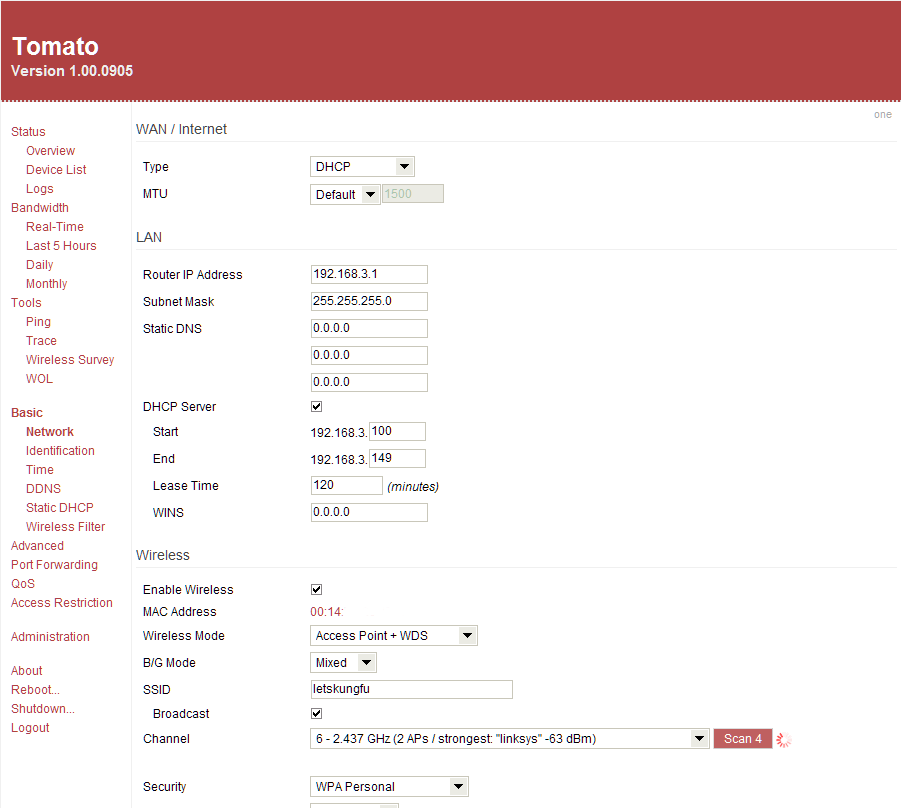
 cedar igloo
has your public ip changed?
vapid dune
the router is probably trash
cedar igloo
do all the other ports work?
vapid dune
get your own router LOL
vapid dune
a what now?
drowsy frigate
I can use the other one that has a coaxial port
Its a ASUS router.
But it has no coaxial port.
vapid dune
oh you don't use a splitter
or coax
you configure pass through on the hitron
and plug the router into it
you need to first call shaw and ask them to enable your second ip
drowsy frigate
There is no pass through tab.
drowsy frigate
yeah
vapid dune
it's either that or you call Shaw and tell them to bridge it for you (and this assumes you'll only use your own router from now on)
drowsy frigate
OOOOHH IP Pass through.
vapid dune
yeah but you definitely need the 2nd IP for pass through
personally when I was with Shaw I used bridge mode
but either should be okay enough for just getting the router to connect
for bridge you don't necessarily need the 2nd IP, for pass through you do
(and they give you two for free last I checked)
I was gonna say if you want to try and get the hitron to work, try changing it to "specific" remote IP instead... but really it looks fine the way you have it configured as far as I can tell. it's probably just junky modem fw
drowsy frigate
Dude.
My router reset randomly just now.
wtf
I can try to use another router.
vapid dune
yeahh
those ISP supplied things are usually junk
unless it's just a pure modem. then it's okay
vapid dune
yeah they used to have modem only
not sure if Shaw still runs those, but Teksavvy does
either way modem-only > bridged > pass through > junk is probably how I'd order it lol
drowsy frigate
1 sec
i will get the other router
I have the other router
Its a hitron CGN2-ROG
I have to use a 20m coaxial cable because its the only one I have.
vapid dune
I mean I don't see see you're focused on the coax part lol
like I said you use some device to convert coax to ethernet, and then your own router
drowsy frigate
Would it be a problem if I'm using a Cisco Catalyst to split the Ethernet ports?
vapid dune
you want to put a switch where now?
I remember having one of the hitron modems they're utter junk
but this was years ago
drowsy frigate
Ok.
vapid dune
shaw --> router --> your stuff. stuff being pc or switch or w/e
drowsy frigate
ok
vapid dune
and if you really want shaw --> shaw stuff can be done on the other ports if you're using pass through
it's probably your best bet to avoid headaches
drowsy frigate
Godddddddddd
My friend who gave the router did not give me the password or reset it.
So I cant use the admin panel.
vapid dune
hmm
can't you just reset the entire router @drowsy frigate ?
it should just go to defaults
drowsy frigate
I pressed the button and nothing happens.
I can try to use a backup of the router config
thorny vector
@drowsy frigate Press and held it for 10-ish seconds?
drowsy frigate
yeah
vapid dune
what kind of router is it?
cedar igloo
cedar igloo
wouldnt have thought this would be the case, but their website says you log into the admin panel using the WiFi password...
cedar igloo
and im assuming the password isnt password
vapid dune
o.O
why are you using that junk router
I don't understand
I thought you said you had an asus
drowsy frigate
So.
I have a modem to turn coaxial into my phone line.
And another that turns coaxial into Ethernet.
The ASUS does not have a coaxial port.
cedar igloo
doesnt your original router have something like "modem mode"?
distant wedge
@drowsy frigate what issue are you having
drowsy frigate
Ports that are "forwarded" are not forwarded
drowsy frigate
1: Yes
2: Shaw/Hitron
distant wedge
hmm.
vapid dune
I was suggesting bypassing the hitron since it's pretty flaky
the original modem you have and have access to should do fine without swapping it for another one @drowsy frigate
just need to either enable IP pass through OR bridge it if it supports that. you need to call Shaw to enable the 2nd IP for pass through... and maybe need to call for bridge too actually
vapid dune
usually pass through
ie you pass one port through to the other router, but it needs an IP to actually pick up from your ISP
since the original modem/router will continue to use the existing IP it takes
thick minnow
anyone know how i can get hyper V to properly detect my network on windows 10? i literally cannot figure out how to get hyper-v to properly connect to any network
its one of the major flaws with hyperv on windows 10 pro
networking is scuffed
little schooner
@thick minnow are you using an External virtual switch? Those and the one named Default can reach outside networks
An external switch ties to an interface
However, it will exclusively only work for VMs
That is unless you enable "Allow Management to share this interface " option
Not as good as VMware bridging imo
thick minnow
im using the default switch but i cant get it to connect im not sure if its related to my PIA VPN being used or something @little schooner
vapid dune
Try turning off the VPN...
thick minnow
ok
thick minnow
i kinda wonder if it might be related to wireguard protocol not working well with hyperv
vapid dune
o.O
or the fact you're using a VPN.
it really depends on the type of virtual switch you're using too
little schooner
For VPN, maybe create an external switch that uses the VPN Tap interface?
That should work too
thick minnow
killswitch set to auto and split tunnel giving hyper-v the ability to bypass the vpn works
vapid dune
what's the point of using the VPN? are you at home?
little schooner
Can you put the VPN software into the VM?
little schooner
@vapid dune I used to but now I stopped caring
Everything is encrypted for the most part
vapid dune
I mean I worry more when I use wifi (at home even)
little schooner
On public wifi I'd often use it
vapid dune
I mean that's fair
and by VPN I mean I use my own VPN that's hosted in house
on wifi
hollow marlin
VPN only for me is in public. At home there are too many other variables that allow companies to track you unless you're router is the client
vapid dune
at home for me is just from my own wifi to connect to my own VPN server. I mean on the go is always VPN to home
hollow marlin
Any reason to connect to your VPN you host while at home?
vapid dune
yeah WPA2 lol
hollow marlin
Still unclear on what exactly you are referring to. I cannot think of a reason to connect to a locally hosted VPN
vapid dune
nah it's not really an issue anymore I think but back when krack prevalent
waxen scroll
We wanted to let you know that we're increasing the amount of data you receive as part of your internet data plan from 1 TB to 1.2 TBs per calendar month, effective July 1, 2020.```its comcastic!
If you do exceed this new limit, you will be charged $10 plus tax for up to each additional 50 GB that you use. These charges can reach a max of $100 per month, lower than our previous max of $200 per month. Since we understand that overages might happen in times of especially heavy use, we won't charge for the first time the threshold is exceeded each year. This one courtesy month will be given to all customers effective July 1 for calendar year 2020.
vapid dune
lol
vapid dune
is it 1000 GB per TB? 😄
waxen scroll
-ish
hollow marlin
I'm at 900gigs in the past 14 days alone.
hollow marlin
Work from home+wife on maternity leave is the main reason. A power bill that followed as well
waxen scroll
@hollow marlin new gig is 4 days home, all days home till feb
they're talking about perma remote for many people too
hollow marlin
We gone full remote since US went on lockdown. I do have to occasionally go into grab equipment ot bring home for configuration.
waxen scroll
@hollow marlin im not allowed to touch
i do the console, remotely
i think you should join a layer 3 team
hollow marlin
Right now Im on the all team. If I could limit that to just L3 Id be happy
hollow marlin
I don't mind it. Still Tier3 and design focused. But if I could get away from L2 my life would be easier.
STP doesn't run in our distribution/transport or metro-e and VPLS BPDUs would fukk our network
90% of the time is preparation to avoid loops and becomes a nightmare when an order comes in for 10+ full mesh sites
waxen scroll
im tier nothing now
if im called its baaaad
@little schooner practice your fearlessness
you'll need it
hollow marlin
Tiers are here due to head count for engineers
vapid dune
o.O
little schooner
@waxen scroll like "The whole datacenter is underwater and we don't have any funds or backup to recover the company" bad?
little schooner
@hollow marlin is this good for explain "Absolute path vs relative path"?
`Think of Absolute Path as driving directions to your friend's house. You live in Sugarland and your friend lives in Candyland. The Absolute Path would be the full directions from your house to your friends house.
In contrast, you can think of Relative Path as the neighboring houses on your street. They are Relative, meaning you can visit the other houses without having to leave your street`
hollow marlin
@little schooner Sounds fine to me.
vapid dune
Huh? Without leaving your street??
hollow marlin
streets=fs hierarchy in his metaphor
vapid dune
I think of it as always directions from home to a certain location vs directions to the next street from where you are
The latter example being that you aren't at your final destination necessarily after one change
hollow marlin
Absolute - /us/vermont/burlington/state_street/1234
Relative - /1234
vapid dune
Step by step driving directions are a list of relative directions
../1234 is relative. /1234 is absolute
hollow marlin
Not the same when its applied here
vapid dune
./1234 is also relative
hollow marlin
And no, absolute is the full path
vapid dune
... root is /
hollow marlin
Yes, and your point?
vapid dune
cd /1234
That's absolute
No matter where you are you go there
You don't use current working dir as your starting point
hollow marlin
Yeah, I didn't mean to have the /. Point was that its from reference of already being that low in the hierarchy
vapid dune
lol well that / matters!
That's why it didn't make sense
In any case the second part of @little schooner 's analogy doesn't make sense imo
It doesn't clear anything up
hollow marlin
It applied to my early example
vapid dune
/foo/bar/../baz
hollow marlin
If hes only going to his neighbors on the same street he doesnt need country, city, street. His relative view is from the street directory
vapid dune
I can only get there from my house vs I can get there from here. lol
hollow marlin
Don't know what to tell you, think its a pretty simple analogy
hollow marlin
Directions are equivalent to the path. Its a high level analogy, you are thinking too hard about it
little schooner
@vapid dune I created it because my Linux admin teacher last spring semester was having a hard time conveying the difference to us in class
He liked when any of us enlighten him with a different perspective
waxen scroll

anyone else think that shortcircuit is the new LTT and they're gonna stop posting to LTT youtube over time so linus can stop doing videos? xD
 sturdy mirage
i don't think so, however i think the LTT schedule is gonna slow down a bit to allow them more time on bigger projects, which is fine to me
little schooner
@waxen scroll I'd hate it for linus to stop appearing in the videos
It wouldn't have the same vibe
sturdy mirage
i agree
little schooner
@waxen scroll So what about that "datacenter is underwater" thing?
sturdy mirage
Get comino'ed
little schooner
@waxen scroll my prof always says to pretend to be calm at all times, so the client you're doing work for doesn't question your ability
even if things are going downhill
you want to inspire confidence in them about you
waxen scroll
idk about that
little schooner
what life advice would you give for that situation
waxen scroll
generally having a sense of urgency isnt good for you
life advice is start thinking "ill fix it when i fix it"
im not saying "ill get to it when i get to it"
little schooner
Ill start using that
waxen scroll
you miss so much if you move too fast
little schooner
yeah. Thats why my prof calls me his second pair of eyes
he said i picked out the nuanced things that prevented, say, vmware vms from working correctly in the virtualized environment we have for our students
things like the inability to import vms into vcenter when error descriptions were terrible
it didn't explicitly say certain vmware vm versions were still not compatible to be imported
the fix was in the next release
the little details
waxen scroll
😤
you should also know when to give up. especially if you're the top person in the support chain
little schooner
@waxen scroll I struggled with that during our task at the dentist office. I was trying so hard to get MDT to work in their environment, but everything was going wrong
my prof said OKAY were just doing everything manually
and we got a lot more work done
@waxen scroll idk if I learned my lesson, as that will happen with more experience
but I want to
Im trying to be more conscious about it
9 out of 10 times, there is an alternative way to get the same task done
start easy and work up the ladder
waxen scroll
for me i try all the advanced stuff i know and if its an outage and im not getting anywhere within 20-30min, im calling vendors or pulling in others while doing much more difficult things like wireshark
try wiresharking during a major incident
its "fun"
charred meadow
An other way to explaing relataive versus absolute would be: You give your friend directions to a coffee shop from their house. Which would be an aboslute path. Then you give them direction to a park you could give them the absolute path from their house to the park or the relative path from the coffee shop to the park. In this situation their house is root.
little schooner
@waxen scroll dont you have access to other advanced wireshark tools too?
or do you use the free one more
I remember you told me with an advanced tool that you diagnosed a latency problem
fancy graphs and all
waxen scroll
sometimes i do sometimes i dont
to actually get the packets i dont wireshark most of the time
vapid dune
overthinking is what I do. I work in software @hollow marlin
waxen scroll
i use NSA type software with taps that record most uplinks in the datacenter
vapid dune
lol sketchy
waxen scroll
yep and it holds like a week worth of network traffic from all those links
waxen scroll
if someone has an issue i can get the tool to dump the packets even though its not same day
little schooner
so its stored somewhere
vapid dune
to overengineer you need to know what the problem space is lol
waxen scroll
yes it is
little schooner
with nsa security?
@vapid dune true
I know I overthink how i implement things in my network
so many rules
little schooner
I have to remember that its just me and a foreign adversary or theft is unlikely here
wth for only 2 ports?
oh that might be something else
waxen scroll
this is a very old model, im too lazy to find the new stuff
waxen scroll
its all expensive. you need to build a whole second network for it