#networking
1 messages · Page 197 of 1
 rocky badge
 vapid dune
e3 1220 v2 is what I'm using now
rocky badge

 oak prism
Hi guys i posted here earlier about using a nas for a project, i think im gonna diy it, but i cant find any good tutorials, any1 know any?
also is this video still relevant or is it outdated? https://www.youtube.com/watch?v=m_B8AFvguqo&t=123s

Are expensive NAS units your only option to expand your storage reliably? I think not...
TunnelBear message: TunnelBear is the easy-to-use VPN app for mobile and desktop. Visit http://tunnelbear.com/LTT to try it free and save 10% when you sign up for unlimited TunnelBear dat...
(feb, 2016)
vapid dune
hmm are you familiar with building a computer?
oak prism
yup just did my new build in jan
vapid dune
nice
oak prism
thx
vapid dune
even better if you have pc parts lying around
oak prism
im thinking of buying a refurbished server
vapid dune
vapid dune
refurbished server would be good, or you can DIY with parts
oak prism
one sec
vapid dune
I just nabbed a X9SCM-F last month with a E3-1220V2 off ebay for like 75 USD + shipping
IPMI on a server is a necessity imo
oak prism
would any of these be good? also trying to keep it cheap as possible as im using this nas for a ml project and thats taking up most of the budget
Refurbished Dell PowerEdge, HP ProLiant, IBM and many more. Professionally refurbished with 1 Year Return to Base warranty.
i only need about 2-5tb
but i would like the option of upgrading the size in the future
vapid dune
hmm if it's just 2-5TB. you could probably just do it on a Pi with some cheap hard drives you find in the paper or something lol
oak prism
bcuz im using this for the ml proj for the next 6mts but then repurposing it for home nas (general stuff like cad files, code ect)
vapid dune
ah I see
oak prism
I just this this is more economical
but im all for other options
i also like the idea of owning a rack server
vapid dune
I mean a refub server will get you a server chassis which is nice
vapid dune
it'll be the ram and hard drives that drive up the price
vapid dune
yeah probably, I've been using an atom board for a while
oak prism
hmm
what are the type of comp's do i need to watch in the sever for a nas, eg gpu and ram fro gaming pc
*for
vapid dune
if it's just file storage, not as much
oak prism
thats all its for
vapid dune
if you want to put some VMs on it and what not then you should plan that accordingly too
oak prism
oh one other thing
im writing 1 2.5mb file to it every 0.25 seconds
if you want to put some VMs on it and what not then you should plan that accordingly too
@vapid dune what like another pc?
vapid dune
so 10 megabytes/s?
oak prism
i was thinking of doing something like that for a ml workstation but too expensive for me(teen)..... right now
pretty much
also:
vapid dune
it's not a lot, I mean you'll more likely be bottlenecked by the gigabit network speeds
oak prism
"it's not a lot" whats not alot
vapid dune
10 MB/s
oak prism
also:
@oak prismwould a quad core xeon cpu be ok or would i want to go hexcore
10 MB/s
@vapid dune yeah
im just wondering about burning drives out, like it wont be running liuke the 24/7 or anything just like bursts when im running the program 5-7 hrs max but prob 2hrs normaly
vapid dune
are you trying to a lot of read/writes? or a lot more writing in terms of storage
oak prism
write jpg file from rpi with cam then open it on pc for ml
vapid dune
I mean if you buy cheap drives, plan to have lots of space
and run them redundantly
add in health checks
oak prism
hmmmmmmmm
vapid dune
and swap out the ones that are dying
oak prism
yeah
i think i will get cheap drives for this proj as they will prob get wrecked with all the read and writes
vapid dune
you can do raidz2 or maybe mirrors (2 or even 3 in mirror)
oak prism
and prob change the to good ones when i use it as household nas
is free nas the same as raid?
soz am noob to nas
trying to build instead of buy for learning
vapid dune
I'd avoid hardware raid
oak prism
ok
vapid dune
I haven't tried out unraid but some people like that too
vapid dune
just post it here lol. Some of the other guys here probably have more experience with this stuff than me
oak prism
Soz thats what i meant
 nocturne harness
I’ve had ZFS running for literally ever on my home server
nocturne harness
About 50k hours for most of my 4TB Seagate NAS drives
oak prism
oh!
nocturne harness
Ye like the better part of 5 years
vapid dune
But just determine you budget, how much space, and IO needs. It's not that CPU intensive imo
vapid dune
You'll be limited by storage, sata ports, hard drive slots, and ram
oak prism
im trying under 150 for refurbished hw
which of these r good, btw im able to choose 1 or 2
vapid dune
I'm running with overkill 32GB ram and 10 drives in mirror lol 3-4TB each
vapid dune
BTW servers are LOUD
oak prism
btw would there be any point in running a vm with any of these cpu's or r they trash
BTW servers are LOUD
@vapid dune Ok thx
is it just the fans that r loud
vapid dune
Another benefit of using a desktop case is room for a cooler and fans. But some people throw in noctua fans in a 4U too
Yeah the stock fans in a server tend to be super loud
oak prism
hmm
vapid dune
Just have to plan accordingly. They're optimized for air flow in tight spaces
oak prism
yeah
oak prism
if i can get a cheap server i may try wc
vapid dune
lol maybe for fun but it's not practical
oak prism
y not?
i guess size
thinking about it getting a pump + res 😂
inside it
which of these r good, btw im able to choose 1 or 2
@oak prism
brb
vapid dune
the fans would be there regardless though
you don't want to remove/restrict airflow from hard drives
and if you got a HBA card, those things run hot
oak prism
be in the same room quiet?
vapid dune
I mean I have a dozen of them around the house probably. they're worth it but only if you're willing to sacrifice a premium
I mean I don't run my fans full blast
oak prism
yeah m would it be quiet enough to have in a bedroom (dont ask) with noctuas
vapid dune
I'm just using stock case fans in my current NAS. but once again I'm using a desktop case vs a server case
maybe one of the guys in here could comment about a server case using quiet fans
oak prism
Yeah
I think i might go with a desktop nas?
would there be any diff aside from form factor?
vapid dune
I mean you can put a server board inside a desktop chassis
but you won't get stuff like a backplane for your hard drives
hot swap
loud server PSUs. redundant PSUs. rack mounting
that type of stuff
oak prism
yeah but that would eliminate the purpose of switching from server mount as im going desktop for quieter fans and i presume the server board is setting them at full
I mean you can put a server board inside a desktop chassis
@vapid dune /\
just for clarity
vapid dune
hmm I think fans are usually controllable
I'm pretty sure in a server chassis you just need them running fast because there's a lot of components to push through
you want it to blow the length of the server
though what ever is in the way. like hard drives
oak prism
would there be any real purpose of using a server mobo?
 fresh copper
Sometimes the BIOS sets a minimum RPM for the fans on a server board
vapid dune
personally, I really like IPMI
oak prism
btw whats a backplane?
vapid dune
ie being able to go into the BIOS on the network
oak prism
also redundant PSU
Oh nah theres no need for that i presume like a pc i can connect a display?
or at least freeraid would allow me to edit the bios
vapid dune
I put my server far away from me and then no need to hook up a monitor
just needs power + ethernet
oak prism
i mean to plug a monitor in when im editing the bios
do u think there would be any real reason i should use server hardware? or do u think i should just got with consumer stuff
oak prism
Yeah i heard about that
i dont wanna though tbh
i just dont think it will be reliable especially when i switch the nas for my household use
So could i use standard pc parts for it?
vapid dune
you could start by using what ever you got lying around
oak prism
hmm
vapid dune
and then upgrading / moving onto better stuff later
oak prism
i have an i3 8100 with compatible mobo
vapid dune
just start with that in that case
oak prism
would there be any point upgrading that for only nas use
vapid dune
what you have is essentially free
oak prism
btw its a proprietary mobo from a acer prebuild so i assume i would need a new mobo
vapid dune
not sure about compatibility with that, I'd suggest research it more or installing stuff on it and trying it out
oak prism
yeah
vapid dune
I mean is it a pre built with power supply and what not?
vapid dune
no? it's just an OS
vapid dune
yeah
vapid dune
except you want it on a separate drive than the storage disks
oak prism
ok
vapid dune
I run mine on a small SSD. but before that I was using a small usb stick
oak prism
is this vid still relevant or is it outdated
Are expensive NAS units your only option to expand your storage reliably? I think not...
TunnelBear message: TunnelBear is the easy-to-use VPN app for mobile and desktop. Visit http://tunnelbear.com/LTT to try it free and save 10% when you sign up for unlimited TunnelBear dat...
vapid dune
no clue lol
oak prism
its feb 2016 has much changed?
vapid dune
probably xD
oak prism
Ok I watched the vid and from what i gather
I just build a pc, mobo, cpu, ram, psu and then get lots of hdd's and install freeraid
but put free raid on a separate drive
and networking card
vapid dune
I mean yes those are the components to a NAS
oak prism
and im good to go?
vapid dune
mobo should have ethernet already?
oak prism
I mean yes those are the components to a NAS
@vapid dune yeah a nas is what i want right
mobo should have ethernet already?
@vapid dune true
Im still confused about somethings can u try explain plz:
What is the purpose of the cpu in a nas, is there any point in getting a better one like an i5 or i7
also would an amd cpu be ok, or is this weird where you have to use intel stuff
nvm googled it thanks
one thing i can find though is ram:
vapid dune
lol ram is kinda magic with freenas imo
oak prism
Do i need lots of ram due to my high read/write folumes
lol ram is kinda magic with freenas imo
@vapid dune ?
oak prism
"Compman55 said:
I once read in article 1GB per 1TB of storage."
That's specifically for ZFS and FreeNAS.
Well theres my answer
vapid dune
that's just a rule of thumb
vapid dune
but it's hard to apply generalizations to your specific needs
vapid dune
I think 8GB is what they recommend as a minimum
vapid dune
it's probably fine? I haven't run with that little. maybe @rocky badge since he just spun up a VM with 10 lol
oak prism
ok,
I still cant c how a nas uses that much 😂
i get hes running a vm but for a nas only xD
oak prism
ok
thx
do u think an i3 8100 will do the job @rocky badge
im only running a nas
with high read write volumes but low file size (jpg 2.4mb)
rocky badge
Yeah
oak prism
Ok thanks for all u guys help, i have decided to do a desktop pc build and run freenas on it using an i3 8100 and 8gb ram, idk the res yet
xD just did the calculations and my program will have 70 gigabytes of images every hour
 clear igloo
Are you recording completely uncompressed 4K footage or something?
 lean pollen
He said 10 MB/s
oak prism
no im running a ml script which has to take a photo every 0.25 seconds then theres 2 cameras doing that
clear igloo
Math, I did the numbers wrong 😛
clear igloo
I stopped at minutes and not seconds
vapid dune
need? no. want... maybe?
I mean here's a better question
if one of your drives completely dies
and your entire array is lost
is that okay?
vapid dune
in that case
oak prism
although
vapid dune
I'd just stripe across them all
and then toss out hard drives and build a new array LOL
oak prism
i would like to be able to use it for other file storage after this project.......
vapid dune
yeah but there's different use cases
oak prism
could i use 2 1tb drives 1 for redundancy and 1 small drive for os
vapid dune
I mean presumably you'd want to just delete the entire array once you're done anyhow
oak prism
yeah but if i was using it for normal file storage in a few mts
so could i use that config for my current purpose and then just use it for normal file storage in the fututre
vapid dune
I mean it's just software
vapid dune
you could use 6 drives all striped at first, then switch to 3x 1-1 mirror after
or 4 drives with 2 parity
vapid dune
I'd just work out what you want in the end, but in the meantime just stripe across if you don't care about loss of data
vapid dune
I mean really though
the data going in and out
isn't even that much
you could just use a single drive and until it burns out
lol
oak prism
well that is like 28800 files every hour
isn't even that much
@vapid dune thats actually not a bad idea
idk though
vapid dune
how much data do you need to injest
and how much do you need to keep around to process
do that math first
then work out how much space you need from there
oak prism
is it possible to use 1 drive like that anand have 2 drives also with redundancy for other files?
vapid dune
yeah you can have multiple arrays if you want
vapid dune
I mean more so can what ever do the processing handle reading in that much at a time
and if not how much time does it need and how many of the files before you delete it
gotta do the math
oak prism
is it possible to use 1 drive like that and have 2 drives also with redundancy for other files?
@oak prism So this would be possible... would i be able to write all the image data to the stripe drive and then put specific files in the redundant array?
vapid dune
yeah totally, you can have multiple pools
you need different structures depending on what your needs are really
oak prism
so essentially it would come up as 2 different drives like drive X: and drive Z: on win 10 and x could be the redundant one fir ex
vapid dune
I mean that's as simple as you can do it if you just want two folders
 little schooner
@vapid dune I only use ecc ram when it comes to keeping data safe
I've had maybe 3 photos get bit rotted on a non ecc system
oak prism
interesting
little schooner
Well, rather corrupted in memory and copied to disk corrupted
Bit rot is something else
vapid dune
I mean take no chances when rebuilding data you want to keep safe is the best advice
oak prism
im not storing anything super important so im designing a sys rn with 8gb norm ram 2 1tb hdds 1 redundant and another 1tb hdd for stripe
running freenas
vapid dune
like unrecoverable read errors and what not can be bad
little schooner
@oak prism yeah for data that is not important, you can save a buck there
If you can afford to lose it (because maybe you use cloud backup or it just isn't important) that is a cheaper route
 thorny vector
Everything raid0, no balls
oak prism
Yeah i can look at my other chats it explains y stripe. and the data im storing on the redundant drives is code which will be in the cloud im just keeping it locally for running and minor quick edits which i immediately push to GitHub
*u
 clear igloo
Did you break something?
rocky badge
Nah, I rebooted and changed a setting lol
clear igloo
lol
little schooner
@waxen scroll yeah..... The dfs channels bit me in the butt. I disconnected during a racing tournament and lost all chances of winning by 8th race
Because it waited until the radar thing or whatever was happening
Such bad timing
All the other channels here are terrible. Everyone has all 5ghz bands in use
vapid dune
super dense area?
little schooner
Yeh
 harsh wadi
Does anyone know if there any reasonably priced small 5GbE switches? Seems like everything I can find is either only Gigabit, or 10GbE and very expensive.
oak prism
poE?
harsh wadi
Don't care about PoE.
harsh wadi
Yeah, that's what I was seeing.
 waxen scroll
@little schooner im happy you learned something
vapid dune
there's not much in the way between gigabit and 10gige it seems @harsh wadi
heck even SFP+ is cheaper from what I see
harsh wadi
Yeah, that's what was seeing. There are decent cheap 5GbE NICs out there, but doesn't help much without a way to hook them up.
thorny vector
You could do endpoint to endpoint, or making your own software switch
 south blade
Anyone use PFSense?
thorny vector
Yes
harsh wadi
Looking at the SFP+ options now. Hadn't really considered that, but might be feasible.
@thorny vector Yeah, I had thought about doing that as well, but not sure if it would be the best approach.
south blade
Is there a way to get these LAN Rules I use to toggle VPN off and on onto the Dashboard?
thorny vector
I do endpoint to endpoint for some of my iscsi stuff @harsh wadi
@south blade I don't think there's a widget for firewall rules
harsh wadi
Yeah, I know it can work... I'll have to think about it a bit. Just kind of weighing options right now, really. Not in a huge rush to upgrade right now.
south blade
Ok, something probably solvable then, is this a real server? 0.pfsense.pool.ntp.org
south blade
lol, it's supposed to be the default timeserver I guess? I never questioned it, just assumed it was good.
thorny vector
It is, 1 and 2 also work, not sure if they use more
 burnt oasis
reviews on their other products range from excellent to "cheap chinese junk"
lean pollen
I don't like how people recommend me different things
Some say just go with a better consumer router while others say go Unifi for my case...
thorny vector
Everyone is going to have a preference from their experiences. At the end of the day, you're going to have a different answer than everyone else on how to do stuff.
rocky badge
it depends
lean pollen
I am bad at deciding things
rocky badge
I wanna replace some of my stuff lol
fresh copper
You're never going to escape that. It really depends on your exact situation, and even then, people have different thoughts depending on how much they want to spend, how much you want to tinker with things, how easy to set up, how well it works, user experience, looks, etc. I really like Ubiquity stuff and you almost always use it myself, but 99% of people only really need a consumer router. Even I only need a consumer router really.
At the end of the day blob is the most correct. I guess the problem is that there is no one solution. There are maybe 50 things that work, and 10 that are reasonable so you can only choose by experience, or at the start, guessing and recommendations
rocky badge

lean pollen
Is it any of these any recomend staying away from, or is it a case of choosing at random?
Price Group 1:
Asus RT-AC85P (112€)
TP-Link Archer A9 (101€)
Price Group 2:
Netgear Nighthawk R7800 (130€)
Price Group 3:
Asus RT-AC2900 (186€)
TP-Link Archer C2300 (174€)
TP-Link Archer C3150 (186€)
Ubiquiti Unifi FlexHD (206€)
 cedar igloo
been using nighthawk products for years now, and never had problems with them
rocky badge
FlexHD
Probably gonna get one myself for outdoor
4x4 MU-MIMO Wave2, 160MHz, outdoor
it also has RGB
lean pollen
I won't use it outdoor, and few of the others in same price range is also 4x4(that I don't know if matters)
rocky badge
Gonna get any more APs now or later?
lean pollen
Most likely not
rocky badge
The UniFi AC Mesh is 2x2, which is still fine but it's also not the best lol

Ubiquiti Store Europe
Build your Wi-Fi network with the UniFi® ac Pro Access Point, part of the Ubiquiti Networks® UniFi Enterprise WiFi System. The UniFi ac Pro Access Point, is an indoor/outdoor, high-performance, 802.11ac dual-band access point, capable of speeds up to 1750 Mbps with a range of...

Ubiquiti Store Europe
Omni-directional 802.11ac Wave 2 Wi-Fi Access Point with 4x4 MU-MIMO technology. The price / performance leader in enterprise Wi-Fi.
The UniFi nanoHD is a compact 4x4 MU-MIMO 802.11ac Wave 2 dual-band access point with an aggregate radio rate of over 2 Gbps and supports ove...
the nanoHD is small
like, small small lol
lean pollen
Roof mounted is not an option for me and antenna placement in them is made to be used that way
Weaker signal straight out to the sides than out the bulge
Or what you call it
But does 2x2 Vs something more actually matter?
In a home
 ebon wasp
you can also mount them on the wall. It's not like they won't work or be severely limited
lean pollen
Can't do that either
ebon wasp
Why not?
lean pollen
And some say they do get noticable less range when they are placed facing up, at least on the Unifi forums
Because for someone in the house wants it to be in the TV cabinet only
ebon wasp
Is it an open or closed TV cabinet?
if the latter, you will always have deprecated functionality
lean pollen
But even more if it's one of the Unifi ceiling mounted ones, it will be two times disadvantage rather than one
If it's nice and small enough it can possibly be placed on top but maybe not
It's not like its massive wood or metal, it's relatively thin wood and glass, Ikea
ebon wasp
Never experienced the problem of wrongly placing them, but my practical use only extends to the Pro and LR versions.
lean pollen
Someone spesifically said to me that for my use FlexHD is really the only reccomend option
Of Unifi
(And dream machine but that's a Def no go)
ebon wasp
well the placement and space requirement, means that you have very limited options
lean pollen
The list is currently my options really. But thinking of removing the AP-M and the ones that is close to the same cost as FlexHD.
If I shouldn't go for something that is 2x2
 broken trellis
running old cisco gear. whats the goto for 2nd hand gigabit switches not too pricey. or am i better off buying new. home network
 slow pivot
@lean pollen 2x2 and 4x4 refer to the number of transmit and receive antennas
Ideally the more antennas you have, the more data the AP can send/receive at the same time
thorny vector
@broken trellis you can get solid gbe switches on eBay for 40-ish bucks
got a powerconnect 5324 for 35, including shipping
broken trellis
ok sweet moving tb's on 10/100 makes one cry but its all i had access to
 hollow marlin
@broken trellis 3750x can be had for cheap, like hella cheap
 jaunty talon
3560X even cheaper if you do not need stacking
thorny vector
Got some crazies near me selling a fast ethernet switch for 120 bucks on facebook marketplace
 granite holly
Edge Router X, Im trying to add a port forwarding rule but am getting this error:
granite holly
Let me check that out.
I did not, what should I set that up as for mine? I have eth0 is internet in, eth1 is my PC, eth4 is my wap.
rocky badge

Ubiquiti Inc.
Powerful rackmount security gateway for medium to large sized networks. Dual WAN ports with failover support: (1) 10G SFP+ and (1) Gigabit RJ45.
UniFi NeXt-Gen Gateway Pro provides 10G SFP+ and 1 Gbps RJ45 WAN/LAN interfaces with enterprise-class threat management: DPI, IPS/...
👀
hollow marlin
@rocky badge need a screenshot for non-ubi people
rocky badge
 hollow marlin
Looks like reddit is losing its mind over price
$500 for a 10gig router is really not that much and as far as I know Mikrotik doesn't have a RB at that price range
rocky badge
We don't know IPS/IDS speeds or how the ASIC performs
hollow marlin
Meh IPS is only useful in certain scenarios. My gripe is they are marketing it as 10g fail over but only 2 10g ports
rocky badge
Yeah
hollow marlin
@waxen scroll Spent an hour farting with the SRX IPsec tunnel. Comes up, can see OSPF hellos, ping, etc from far end but not vice-versa, tear down SA, commit full to restart every system process. Gave up and rebooted and ta da...ffs..
Love Juniper but these bugs are too common. If I literally restart every process/service it shouldn't require a reboot. But thats where their RE-PFE fails constantly
hollow marlin
NGFW, Never Going to F@#$ing Work
waxen scroll
i wonder if ASAs even properly do DNS rules yet
hollow marlin
Wait really? (Have yet to work on ASA)
waxen scroll
yeah its timeout / cache based
so if i hit blobs.dumb.aws.com it caches the DNS response for like 30min
if the DNS changes on you, RIP
blocked.
yeahhhhhhh
an old job got into aws services which refused to pay for static IPs
that was one hell of a headache
hollow marlin
Ill have to check our SRX's and how they handle DNS. Haven't had any problems...well yet anyway
waxen scroll
not really
so my DNS server has 10min until the cache clears. my ASA just asked it for a record
the asa has a 30min timer while my DNS server is gonna purge in 10
vapid dune
ehehe LTT getting in the middle of SMR drives
little schooner
@hollow marlin ikr why even include service restart command f it doesn't even allow the new config to take effect?
I guess they don't expect it in serious installations
restarting hardware causes the downtime
like how Ubuntu supports hot patching without a reboot
except that works
hollow marlin
Not even just the config. Commit in Juniper is how you apply a changed config. Commit full does the same but instead restarted all processes running on the equipment.
little schooner
@waxen scroll Once I have my degree, I'll transform from CAT5e to CAT6. The master's degree will make me a fiber optic to race down the rest of the journey
hollow marlin
This was something stuck in the PFE (packet forwarding engine) (ASICs)
little schooner
i see
can't restart the asics really
commit full is cool that it restarts all processes
i can see that being useful
hollow marlin
Its useful but you have to be careful because it'll drop OSFP,BGP,IPsec,etc. Its a hidden command
for that reason
If I did this in our core all shit would break loose
waxen scroll
but but Xeon no
little schooner
@waxen scroll as long as it looks like your doing something, people trust that you know what you say and aren't wasting time
or something like that he said.
waxen scroll
IT job interviews dont care about degree generally
little schooner
basically dont look panic
waxen scroll
:3
hollow marlin
Some people have lab networks, ours is called production 🙃
little schooner
if they ask me what training resources to buy
i can ask if they can do education instead
waxen scroll
@hollow marlin current place does that 😦
little schooner
we test all the stuff in production lab
students find ways to break it all the time too
waxen scroll
going to a fintech with a lab
 thick minnow

hollow marlin
@waxen scroll if we were looking for another engineer Id shoot it your way. We just went full remote work last week (permanent)
waxen scroll
new job is 4 days remote, one office... boss is paranoid so its 5 days until Feb
little schooner
paranoid about what
waxen scroll
covid round 2
hollow marlin
Everyone knows you can only catch Covid Mon-Thur
little schooner
i heard friday was the shortest work day on average so that makes sense
waxen scroll
they had this work style since long before covid, so its nice that its a perk ill never lose
also im not on call ever and dont work any kind of support ticket
no war rooms either
little schooner
on call is terrible
waxen scroll
its gotta be so bad cisco/etc needs my help
little schooner
having to put down what you're doing
and go
my dad is on call 24hr for 2 days
they can call at 3am for all we care
typo*
hollow marlin
We go a week at a time. Not all bad as its a 2 month cycle
waxen scroll
ive had two other jobs with on call but has to be so bad cisco needs help.... i got called twice in 4 years
little schooner
for him, he fixes apartment buildings and get units move in ready
waxen scroll
its the NOCs job to open cisco tickets if they dont know how to fix it
little schooner
and maintanance
so they call more often than the tech jobs
but he likes the overtime
waxen scroll
@little schooner once you work at a giant company and get out of supporting anything, its so damn hard to go back
you'll get depressed
little schooner
@waxen scroll well if I can get to owning my own home, I think that will help me maintain happiness to an extent
so i dont get depressed
waxen scroll
the problem with that though is that all the stuff you do get is so damn hard it could take a week to troubleshoot
waxen scroll
if it gets to me its RIP. i cant escalate. its all me
clear igloo
It's fun 😄
little schooner
its fun because both of you guys are like experts at it
i wanna get to that point too
clear igloo
Expert? Let's not go overboard now
clear igloo
I'm an "expert" because I know there is far more that I don't know 😛
little schooner
I felt defeated before trying to solve a linux problem
waxen scroll
ive done more than lots of CCIEs and yet i cant pass the CCIE
little schooner
and it would of taken another 3 days to eventually solve it
that defeat feeling is what im scared about
waxen scroll
😘
clear igloo
Defeat is good, it means you learned something imo
And it means you tried everything
little schooner
@waxen scroll well the experience goes a long way and its good no one can ever take that away
waxen scroll
@little schooner some job interviewers get wet when they find out i know some advanced linux and networking
good job learning linux
little schooner
@clear igloo I guess... i think i just need to understand not to get tied up on something for too long
waxen scroll
;p
clear igloo
@little schooner Never be afraid to google, in fact if you don't google or search internal resources before asking, THEN you failed
little schooner
@waxen scroll like the golden apple inside of a red apple tree
@clear igloo oops, I think I did that a few times
hahahah
clear igloo
Haha, sometimes it's easier to ask but most of the times if you put in the effort to say you tried at first then you're good
little schooner
yes i agree
I'd like to pull my weight as much as I can
sometimes I forget though
ahhhhh my digital circuits class starts at 5pm
less than an hour away :/
waxen scroll
new job had a whole separate webex interview to figure out what i know about automation, linux, python, etc at a high level
dat automation train
got asked which API's ive used and how
this isnt normal, but you should probably look into learning that stuff just incase it becomes normal

clear igloo
python + API familiarity = good
waxen scroll
im a noob in the grand scheme of things, but ive made simple webapps in php which talked to mysql
i felt python was easy to pick up after i learned some terms
like an array is called a list and works like X'
python is also amazing for messing with excel files
i use it to do things that excel struggles with or maybe it can do but google is hard
thorny vector
I just got btrfs to work on windows XD
vapid dune
is it better yet
thorny vector
I’m digging it. The guy I got the driver from also made a windows Btrfs boot loader, but loading it on a physical system is awkward
I’m going to see what I can do with it
Make a btrfs windows install disc, maybe
thorny vector
I've been doing a lot of online training during this covid fun. And man am I getting tire of instructors that talk out of their asses
little schooner
@waxen scroll new network problem yesterday ruined my relaxing night. Wifi speeds went from full 120 mbps from 7pm to 2kbps starting at 7:30ish pm. Omg and you wouldn't believe what the solution was
I was checking unifi controller for issues reported. Nothing. Saw that my firmware for FlexHD was very out of date. Updated it. Checked if I had isp outage. I did see some nearby my area.
Tried new cable. Nope. Same Issue
Unplugged cable from switch and replugged it in. Did same on ap side.
Nothing
Only until I rebooted the switch, everything went back to normal speed.
So all the time spent when a simple reboot was all that was needed to solve it
Switches shouldn't be behaving like this
The asic may have crashed or something??
thorny vector
Are any of your ports sticky?
I've had that happen before, because of a promiscous port from an esxi box
little schooner
@thorny vector not sure but when I set it up first time, I only did vlan tagging and management vlan and the rest was default
thorny vector
The mysteries of networking...
waxen scroll

little schooner
@waxen scroll asic commands maybe would of showed me what held the port up?
If edgeswitch has them
Actually I don't know if it affected more than just that port
Since it's fixed I can't verify to do root cause analysis...
I'd have to wait for it again.
waxen scroll
you wouldnt have gone there first. need port statistics
 gilded ice
hey so me and my friends made a mc server and im just going to use my personal domain as the ip
i've done it before but just want to make sure i did it right
i have it set to mc that way doesn't mess up my website
nvm it worked
waxen scroll
idk about doing an SRV but the first image is right
gilded ice
kinda weird that the mc.neednot.net doesn't work but neednot.net does
like i just joined my server without the mc
and mc doesn't work at all
and my website still works
waxen scroll
im guessing because the SRV is telling it the port, where-as to use mc. you have to put :25528 at the end
vapid dune
the problem is that you have it as proxied in CF
you gotta turn OFF proxy when you want direct IP connections
waxen scroll
makes sense. i dont CF
little schooner
Same here
Well thats a lie. I did CF in the past. But only if CF means Crossfire and not cloudflare
burnt oasis
The next project..... yay pulling cable
vapid dune
lol I use CF. it's nice
 dire hearth
So I did VLAN 99 for management, and I put there my switches and APs. I also have the ESXI interface, vCenter, iDRAC and other server related stuff. Would you add them to the management VLAN or would you create a separate VLAN just for server stuff?
vapid dune
what's the goal of the vlan? keep stuff as isolated as possible?
 vapid dune
I mean I'd put IPMI on management and otherwise not
if I were looking to isolate stuff as much as I could
but I'm not
dire hearth
Well, I want to segregate my network, not trying to secure everything to the max but just starting to play with VLANs firstly.
rocky badge
 dire hearth
Currently I have this Vlans
dire hearth
The guest is separated and I have speed limit on it
vapid dune
I didn't want to deal with convoluted strategies to minimize internal compromised device attacks
dire hearth
Technically I don't need vlans but I just want them
rocky badge
 dire hearth
I am mostly learning by doing this
rocky badge

At first I was like "I'll just separate them and not really limit them"
Now I limited them lol
dire hearth
My original plan was to get ips to my docker containers from the router
and I was like
let's split everything
burnt oasis
I keep servers and switches on the management vlan, phones/intercom on one, AP's for each building on their own, etc.
dire hearth
right now my camera vlan is empty as I have no cameras yet. But that should have no access to the internet. IoT, that IDK yet what to do
I also host my work VM on the server
rocky badge
IoT I just allow access to the Internet
burnt oasis
What cameras?
rocky badge
Hiks cams? Defo no internet
dire hearth
and I want that 100% isolated from everything because I will allow VPN to it. They are RDPing to it
rocky badge
And tbh, any IP cam no internet
dire hearth
@burnt oasis IP cameras, obvs
@vapid dune https://docs.docker.com/network/macvlan/

Docker Documentation
Some applications, especially legacy applications or applications which monitor network traffic, expect to be directly connected to the physical network. In this type of situation, you can use the macvlan...
burnt oasis
I leave my ubiquiti cams on a network with access to to the internet from inside the firewall, but that's because discovery works a whole of a lot better if they are on the same network as the dvr.
dire hearth
@rocky badge IoT only internet? What if the lightbulb need LAN access to connect to the HUB
rocky badge
IoT can talk internally
vapid dune
ah yeah I setup macvlan too
it works nicely imo
I put my unifi controller in docker lol
dire hearth
@burnt oasis Well I plan to have the individual cameras and the DVR on the VLAN and the
and allowing ONLY the DVR to access the internet
burnt oasis
I have 100 or so unifi cameras, so I have 3 physical servers for them.
dire hearth
@vapid dune Can you help me setup macvlan, I don't get it TBH. How to set it up, how to do the leases, etc
burnt oasis
Speaking of cameras -- this finally got announced. I pre-ordered. https://wyze.com/wyze-cam-outdoor.html?utm_source=newsletter&utm_medium=email&utm_campaign=WCO+General+EA+Launch#pageDetails

Early Access - Item will be shipped after August 1, 2020
vapid dune
the 'tricky' part is making sure the shim network is recreated at boot
that is assuming you want the shim at all
dire hearth
@vapid dune Can the docker containers use the routers DHCP server for all address assignments and I'll make the reservations in the router?
vapid dune
no
no DHCP
you have to a subnet that's not DHCP from the router
docker can use it's own assignment via DHCP, or you statically map it
dire hearth
Oh, so basically I can't get what I want. The assignments are still done by Docker and I have no control over it.
Like I can't see them on the router
rocky badge
iirc there's an experimental one
cedar igloo
they should show up on the router if you use bridge networks in docker. This may be unrelated. havent read the full chat
dire hearth
hmm, right
dire hearth
how does vlans and IPv6 work?
I have a vm under vlan 50 and I don't get a ipv6 address
hollow marlin
@dire hearth VLANs and IPv6 are two different layers. If you want IPv6 you will need to have it properly configured on your router
dire hearth
Well IPv6 is setup
and it's working
Until I setup this new vlans on my network
now I see it doesn't
vapid dune
you need to make sure you allow the requests to get IPv6 addresses
hollow marlin
@dire hearth well the vlan interface needs a v6 address as well.
dire hearth
that I did
/ipv6 address
add address=2a02:2f04:c:550a:: interface="LAN Bridge"
add address=2a02:2f04:c:550a:: interface=Vlan50-Docker
/ipv6 nd
add hop-limit=64 interface="LAN Bridge"
add hop-limit=64 interface=Vlan50-Docker
Now I get the ip assigned
but it says no internet access
Do IP cameras need a DNS server if I don't want them to access the internet
hollow marlin
You cant have the samesubnet on two different interfaces
little schooner
@hollow marlin is that stated in rfc somewhere?
Because that's good
That it isn't allowed
hollow marlin
No, routing 101
little schooner
I see
dire hearth
So what would I do in this situation?
little schooner
Make new subnet
hollow marlin
Use another subnet or breakup your current subnet
little schooner
Yeh
oak prism
HI im building a nas, just wondering if ram speeds matter?
hollow marlin
@dire hearth is it a /64?
little schooner
@oak prism maybe for a ryzen based one but most aren't that
It would make little difference
oak prism
its intel.... so would something really low like 1600mhz be ok its a small nas anyway
little schooner
Yeah most def
oak prism
Ok thx
dire hearth
@hollow marlin yeah a /64
hollow marlin
RIP. You cannot break that down further or you'll break EUI-64.
hollow marlin
You can, just can't utilize v6
dire hearth
I was having problems getting V6 to work
I fixed them
Now I want vlans
That breaks V6...
facepalm
 little schooner
@waxen scroll CONcast
I have to say they have very reliable internet connection over here. Almost the entire year of uptime
It's good when big companies pump big money into making the infrastructure decent
Just hate their cost structure for something that should be a lot cheaper
waxen scroll
U mad? It's so many /64
little schooner
@waxen scroll well they would have that. They are big company
waxen scroll
Vlans for days
little schooner
@waxen scroll do you think it's fine to start out insecure, creating the initial structure of a business network, verify it works, then apply all the security measures a step at a time?
Or it's better to come in with known good framework and copy paste that thing
Reflecting on the job I did with prof , wish I had the framework already
waxen scroll
Oh hun
Generally you don't have many security measures internally until you get to datacenter. 802.1x or NAC usually comes way later, if at all

@little schooner what kind of security measures should datacenter have?
little schooner
@waxen scroll well first things first, physical security. 802.1x like you said, firewalls, onsite staff and some other stuff
Do you count well documented procedures as security measure?
Since it could save the datacenter in disaster
@waxen scroll since I'm looking at a screen for a lot of hours it was starting to get to me. The headaches, eye strain, etc
I got some blue light filter glasses and man it so much better
I needed these when I was writing complex powershell script for prof
Lots of white screens while troubleshooting made me see a darkened white
Very bad experience
hollow marlin
@little schooner Windows night mode helps a lot with eye strain. I need it because during the day I cannot use dark mode because its more on a straight on my eyes
All my promts are black on white
waxen scroll
802.1x in the datacenter? Wat
vapid dune
o.O blue light glasses
I don't like the way those are marketed. it's like it cures cancer or something
waxen scroll
All my prompt are black on green
Sometimes I'll make secureCRT highlight words in different colors
vapid dune
I use black text on white 😄
waxen scroll
You people are savage. I don't know who can put up with that when looking at tons of output
vapid dune
define ton
little schooner
@waxen scroll I misread your statement. Also how should I know... I haven't worked in a datacenter except our small one in the college. You know, the one where I can walk into it anytime with prof without us asking anyone to open the locked door
@hollow marlin black on white isn't that the standard color
hollow marlin
Black text on white background is what Im referring to. Might be referenced the other way around
hollow marlin
To me the left is much easier to read than the right
fresh copper
I don’t use either. My terminals are all different colors to help me keep track!
Here is my current set, white text on whatever color. Ignore the title of the last window, I cat a binary file that I thought was text
 silent zephyr
any good small networking switches for around 20-40 aud???
silent zephyr
like would this be good????
https://www.centrecom.com.au/d-link-dgs-1008a-8-port-gigabit-desktop-switch-101001000-base-t

The D-Link DGS-1008A 8-Port Gigabit Desktop Switch provides a convenient way to share a home or small office network connection with up to seven other devices.
-Non-blocking Architecture
-8 x Gigabit Ports
-IEEE 803.2az Energy-Efficient Ethernet (EEE)
-Compact Housing
-3 Year ...
silent zephyr
or even this???? https://www.centrecom.com.au/netgear-gs205-5-port-gigabit-switch
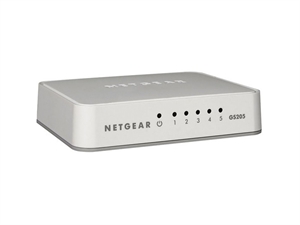
NETGEAR GS205 5-PORT GIGABIT UNMANAGED SWITCH
little schooner
@silent zephyr if that's how many ports you require, then yes
silent zephyr
alright awesome thx
 rose sparrow
Does PoE have limitations with respect to the length of the ethernet cable?
I am planning to setup an ubiquity AP using a 70m Cat6E cable
thick minnow
i Think That It Would Have Limitations if it was cat5e but if i were u test them thats the best way
 tiny forge
Cat6 POE limit is 100 meters
and there really isn't a difference in POE delivery between cat5e and Cat6
they are both similar size wires
thick minnow
he is under 100 so yeah he shouldnt have any problems
tiny forge
now all that said, the length is depended on how much power the device on the end needs
thick minnow
yeah also that could variate ur length limitations
tiny forge
but a single AP will be fine
thick minnow
yeah
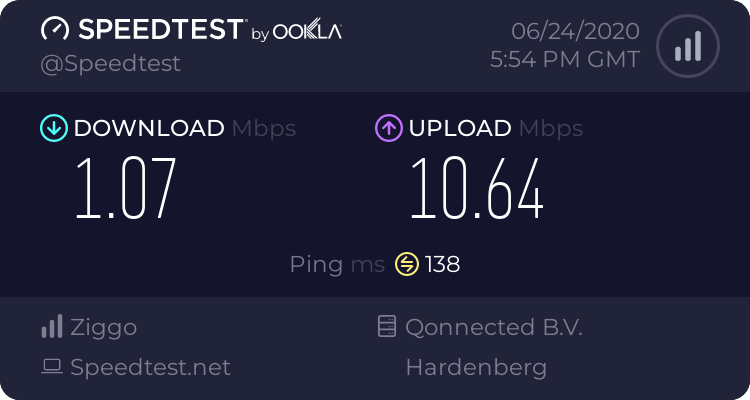



 vapid dune
a bad test result
thick minnow
WE ARE PAYING FOR 250
vapid dune
that's nice
thick minnow
72 euro/month
vapid dune
sounds like a rip off
thick minnow
yes
thick minnow
why is the up better then down?
vapid dune
I don't understand your question
thick minnow
upload is better the download
thick minnow
isnt it usually switched
vapid dune
mines symmetric
thick minnow
oh
thick minnow
yes 250mbps
little schooner
@thick minnow power cycle all of your equipment
thick minnow
have done
little schooner
I got speed test like that the other day and it was ports malfunctioning
Well how's the speed when your directly connected to modem? @thick minnow
Is it the same?
thick minnow
its via an extender
little schooner
Try directly connecting to it and run speed test
vapid dune
extender?
little schooner
You have to rule out what is working and what isnt
vapid dune
yeah
thick minnow
2 weeks ago it was 200mbps
vapid dune
this could be an issue in your own house
thick minnow
via the extender
little schooner
@vapid dune right
vapid dune
yes but things break
little schooner
Yes nothing is perfect
vapid dune
interference can be introduced etc
and things fail
cables get chewed on
stepped on. partially cut. etc
thick minnow
i have 2 cables pluged in for backup
hollow marlin
2 cables plugged into what?
hollow marlin
That's my point, most consumer equipment doesn't run STP
@thick minnow please try with other a single cable plugged in
waxen scroll
neither was blobs fiber run
little schooner
@thick minnow did you test directly to modem?
this could of been solved way faster than typing a new response
thick minnow
My router is on the other side off the house
hollow marlin
Are you plugged directly into the router or using an extender
hollow marlin
That's what he mentioned
little schooner
can you bring a computer over to where the router is, unplug the cable from modem to router, and plug it into your computer?
test the cable modem isp speed first to rule out that as malfunctioning since its the easiest thing to test for slow internet speeds
@vapid dune I used a unifi ap to extend outdoor internet. It just isn't the same and it was very poor
using AP to AP meshing
vapid dune
ah yeah
AP to AP needs dedicated backhaul
else it at least halves the bandwidth from the get go
little schooner
@vapid dune yes. This must be CRAZY onboard a cruise ship
Soooo many wires
I counted at least like 40 aps down one hall
waxen scroll
Hi @little schooner I was almost sent to wireless up a cruise ship solo
Back when the Bahamas got hit bad
Got out of that one lmao
little schooner
@waxen scroll what an experience it could of been. Yeah good thing you didn't go
waxen scroll
This was after
People were going to live on the ship temp and they needed a network set up when they had nothing
little schooner
I see
thorny vector
For any mad lad out here with cash to burn, intel just released a ruler sized nvme ssd, at 15.3TB
thorny vector
That’s it, lol
Could you imagine how much networking you would need to saturate a raid0 of those things?
Lol, or it’s so long and big that it’s an ssd with literal seek time
vapid dune
it's from 2019 apparently
thorny vector
Huh, looks like I dun goofed then
thorny vector
It would warm my heart if they tried to put it “in” a laptop
vapid dune
this looks nice but damn that price https://www.reddit.com/r/Ubiquiti/comments/hf4yqe/in_stock_unifi_switch_lite_16_poe_uswlite16poe_is/
rocky badge
I guess compared to the US-8-150W that's not bad
the US-8-150W is 8 port all PoE+ in a desktop form factor
the USW-16-POE is $299 in a rackmount
but that's also all PoE+ on every port, for $100 more
but not a desktop form factor
 delicate drift
Hi guys I have a question for my assessment in school, what is the example of Network stogare in WAN?
 tiny tangle
Hey so I have a Dell r310 server coming and I was wondering is there anyway to make it quite I've been looking and it seems to be very very loud
little schooner
@delicate drift iscsi
waxen scroll
@little schooner a trap?
@tiny tangle no 1u server is quiet. You need 2u minimum and even then those don't idle as quiet as you want. Only answer is to build one yourself in a 4u or desktop case
@delicate drift that question sucks. Answer what your lesson taught you. It might be cloud. It might be something else. You can do the same stuff over wan that you do locally, but the performance will be crap
waxen scroll
Those people don't have 10 years datacenter experience
😇
Never seen a commercial server that's 1u be quiet
Those small fans need to push a whole lot of air
vapid dune
lol
it's not designed to be quiet
you need high static pressure fans blowing at full blast
little schooner
@waxen scroll the question a trap? Yes, Cisco style
@waxen scroll our new dell servers are fairly quiet once they finished booting up and everything
rocky badge
My R620 (1U) is fairly quiet
rocky badge
And when the fans ramp up, it's not a screamer
Although I just throw it downstairs so idgaf lmao
little schooner
@rocky badge 😆
rocky badge

 thorny vector
@waxen scroll 1u’s are quiet when they’re powered down 😉
rocky badge
@little schooner
waxen scroll
@little schooner yeah because it's in a lab with other noise
If you put load on the cpu those things will ramp high
rocky badge
most of my load on that is RAM lol
thorny vector
I just gave up trying to keep things quiet in my home lab server room, so I just built a hot air exhaust system
All the Fans go whrrrrrrrrr
rocky badge
IPMI fans 100% override though lol it can get loud
But I've never seen it go above 20% fan rpm in my normal usage
waxen scroll
I did the opposite. I turn things off when I'm done
rocky badge
the switch I have is louder than this most of the time though lol
thorny vector
@waxen scroll it does have a downside. When things get quiet, I get anxious that my lab got dreaded
waxen scroll
Most things can be done on my quiet gaming PC. If I need ram, then the server comes out
rocky badge
I don't leave my PC on 24/7 lol
waxen scroll
Nether do i
waxen scroll
I don't do 24/7 services. I spot lab as needed
I do HA but that's on a raspberry on purpose
Low power consumption
rocky badge
I tried it on a Pi lol
It started getting slower and slower....
plus I like virtualizing everything lol
the only Pi I run now is backup DNS
waxen scroll
Only the history and log pages. You should make an automation to purge nightly and cut the logs to one week
rocky badge
Not even that, I've noticed faster controls when running it in a VM lol
Plus, I have full remote access to the VM as well 😄
thorny vector
I just collect all my logs to a Splunk cluster
rocky badge
I need to setup centralized logging again...
waxen scroll
Hm. Idk. Mines instant. It's attached to a traditional alarm system and it's able to toggle zwave actions from those wired sensors in under a second
rocky badge
Sometimes it took ~3-5 seconds to turn off a light ¯_(ツ)_/¯
waxen scroll
Something's wrong then 👀
rocky badge
Plus I don't want it running on a microSD card nor do I feel like setting up USB booting
So it's running off of the NVMe ssd in my server
waxen scroll
USB drives are basically the same wear tolerance as sd
rocky badge
Which is why I use my server 😛
in a VM
I've gone through 3 microSD cards now from Pis lmao
waxen scroll
I'm still on the first. I started with an application sd
Meant for this type of thing
thorny vector
That’s what net booting is for! Let the network storage do the work
rocky badge
They were these https://www.amazon.com/dp/B07FCMBLV6/ ¯_(ツ)_/¯
Plus there's more advantages for me to run it in a VM than not to
thorny vector
I know you’ve said it before, but I forgot what hypervisor you use
rocky badge
ESXi
thorny vector
VMware master race
rocky badge
Backup VMs from ESXi....backup directly from Home Assistant... 😛
Remote console access to the VM, remotely force reboot without having to SSH or use PoE/controllable plug
Plus, everything now uses Home Assistant for control, Google Assistant, SmartThings, etc. Along with automations and such
waxen scroll
Not me. I don't want to expose HA to the internet without knowing Google assistant ip ranges
rocky badge
Zigbee switches tied into HA automations
Location based automations using their app
So I want Home Assistant to be reliable as possible....
Lol
Internally, Home Assistant is 100% internal control which I like, along with external access for remotely doing stuff and allowing the app to report location
waxen scroll
I like it for super complex rules. I have what appear to be basic automations but what triggers them and the decision to ignore the trigger are based on a lot of nested rules across multiple platforms
Like my outside lights go off at 9p. But not if the door or garage is unlocked. If it missed the 9p because of the door locking all doors will trigger it after 5min (party mode. Assumes people are leaving)
The garage and the front door lock are two separate platforms
Ones zwave one isn't
rocky badge
Most of my automations include time, gps, activity, and states of other devices
Node RED?
waxen scroll
Nah. I write the yaml
I'm going to redo the whole ha install and rules once new ozw is supported and not beta
waxen scroll
Node red was sketchy on pi when I tried it a while ago. Never tried again
I don't subject my family to apps and all that stuff. Everythings built to detect using traditional methods like away mode, motion detection, etc
I don't know why you're using GPS, but for my automation it doesn't make sense. It's simpler to turn the alarm on and have ha figure out that means most automation are irrelevant
80% of it is messing with light states
I'd like to do more HVAC stuff but the ecobee API and it's uptime are just cancer
tiny tangle
so do u think i should look at something like a hp comap desktop as a server instead
waxen scroll
Why does it have to be a server? Huge memory requirements? I would get an EPYC chip and build it into a tower for cheaper than a similar spec server
If you want 300gb ram, that's the only downside
tiny tangle
aaa i only want a basic server
waxen scroll
Many of these can only do 128 or 64. Not sure about supermicro though
tiny tangle
like super basic
tiny tangle
i just want to host a few game servers for my friends and as a ftp server
thorny vector
Don’t do an FTP server
thorny vector
File servers are fine, or like nextcloud or something to have a webpage you pull files from, but ftp servers are not secure, and transmit everything in the clear
If money is a limiting factor, just get what’s affordable. At one point I had 2 virtualization servers in a carrying case built from cast aside consumer parts, and it did what it needed too. Don’t get trapped into thinking you need specific hardware for general tasks
tiny tangle
yeah i know i was looking at a
HP 8300 Elite SFF - i5-3470 Quad 3.20GHz 8GB 500GB - HD GFX - Win 10
thorny vector
Slap in some more ram, put a new os in, and that’ll serve you fine
tiny tangle
the dell r310 was 75 nzd this HP 8300 Elite SFF lowest is 150
thorny vector
Specs of the 310?
tiny tangle
CPU: XEON X3440 4core/8thread 2.8GHz
RAM: 4x 2GB DDR3 NON-ECC
HDD: 500GB 2.5" 5400RPM Sata
PSU: Dual Redundant 400W DELL Power Supplies
PCI: External SAS PCI expansion card
RAID: Internal removable RAID hardware controller
FANS: 5 Banks of dual fans
DVD: Slim DVD RW
only problem is the sound
thorny vector
If you’re going to run it like a desktop, get a desktop. I’ve done the song and dance of trying to add stuff to a server to run it like a desktop, it’s not worth the effort, and you end up spending more money
tiny tangle
i was going to run windows 2019 server
but i'm not sure i want to run a few gaming servers on it
thorny vector
Why server 2019?
And it doesn’t sound like you need sound anyways if that’s what it’s for
thorny vector
Oh. Eh, I’m the last person to advise about that. I’m comfortable sitting next to my rack of servers whrrring away
tiny tangle
hahah okay