#networking
1 messages · Page 193 of 1
 vapid dune
I like how freenas doesn't care that you swap the mobo/cpu/sata etc underneath it. still works
 south blade
I'm looking at FreeNAS now, how automated are the plugin installs on there? It has Emby Media server which I've been trying to snag a cheap PC on eBay to install on and that Zoneminder which would remedy these shit programs I'm using right now.
vapid dune
what ever plugins are in the ecosystem are quite easy to install
I run a few transmission clients
 thorny vector
Their plugins are alright
vapid dune
lol after upgrading from a avoton c2550 to an e3-1220 freenas ui feels so much snappier
not sure what to do with my old board yet. maybe swap over one of my rpi to it
 willow storm
Sorry, quick question, I'm running a NetComm NF18ACV-TP and it doesn't want to let go of ports 80, 8080, and 437 (it won't let me forward them to my Apache box because it uses them for its admin login) is that common? Is there a way I can replace the software running it to something less bossy?
thorny vector
@willow storm that's fairly common for consumer hardware. Replacing the software depends on if someone has written the firmware for it, and how locked the device itself is
@willow storm if someone has made firmware for it, check dd-wrt for it
willow storm
cheers 😄
I'm confident that I'm the right combination of foolhardy and rtfm-capable to get this right, especially given we're at the point of just buying a different router.
On that point, I have permission from my ISP to host a site from home, any suggestions on decent fibre-to-the-premisis modem-routers that will allow that level of configuration? or should I just get a modem and set up one of my nix boxes to route?
 vast juniper
What do you mean with "that level of configuration"? Hosting a website only requires the modem/router to allow you to set up port-forwarding, nothing else, unless you want to host a website on the router/modem itself
willow storm
no, that's exactly what I meant. I took port forwarding of all ports for granted until this piece of junk proved me wrong
Now I feel kinda burnt
I understand your reaction though
I really did think it was standard
vast juniper
Your box has ports 80, 8080 and 437 exposed on WAN-side?
I mean, it's irrelevant if they're open on LAN-side
It's the WAN-side that matters
willow storm
no, everything's behind the router, I can't expose those ports wan-side because the software on the router won't let me set up the forwarding tables to include those ports
vast juniper
Wow, what a piece of shite, really
willow storm
it won't let me direct them to other ports either
vast juniper
That definitely shouldn't work like that
willow storm
I know, right?
vast juniper
Never heard of a modem/router that does things like that
vast juniper
Aight. I meant no offense
vast juniper
I have encountered all sorts of terrible networking-gear in my life, but this is the first case where I hear of a situation like yours! That said, I have no recommendations to give, unfortunately.
Can the box be configured as a bare bridge? That way you could always use a separate router
willow storm
yeah that was on the to-do list
I've got enough *nix boxes on this side of it to spare one as a router
thorny vector
Does your ISP allow you to use your own modem?
willow storm
yeah, we're on speaking terms with the owner, he was the one who recommended that modem weirdly enough
because it is blindingly fast and reliable
which is sad, it is otherwise a fantastic bit of kit
so the bridge idea does appeal
vast juniper
No point in wasting money on another modem, if that one can be configured as a bridge, IMHO
willow storm
yeah, I'm going to look into whether it can be hooked up that way,
thorny vector
Fair. The only reason I would prefer not having my that extra hop would be to reduce potential troubleshooting spots in the future, and so my edge router would be the one touching the wan
@vast juniper also, is your profile picture a kiwi with a Thompson?
thorny vector
Lol, I love it
willow storm
That's brilliant
vast juniper
It's also wearing a red Rambo-bandana
thorny vector
Of course, why wouldn't it?
vast juniper
Hm, there's a bug with the moderation-bot. I just tried to explain the story behind the icon and it triggered a warning and censored me
thorny vector
Yeah, it's pretty sensative
I occasionally set it off with too many capital letters, or repeated characters
vast juniper
I didn't even say the word it claims I did, so it's not just sensitive, but triggers on non-existing things
Welp, that definitely puts a damper on my interest in staying here. The fear of random censorship will make me constantly second-guess anything I wish to say
thorny vector
It's not really that bad
 scenic rose
I'm using two different internet connection (with different isp's) for streaming. I'm using two pc streaming setup and one of my isp has a great upload speed, while other one has a great download speed and lower ping. So normally I connect the internet with the great upload speed to my streaming pc and the other one to my gaming pc. Recently I started to use a program called voicemeeter, it offer voice sharing via lan network so I can use the same mic/headset for my both pc's. I bought a usb to ethernet cable so now I'm able to connect two different internet to the one pc. The problem is I want to use one internet for general internet access and the other one just for lan sharing. Is there any way for me to achieve this?
vapid dune
anyone use cloudflare's free argo tunnel?
thorny vector
@scenic rose You can set interface preference in network settings
vapid dune
looks like the argo free tunnel has bandwidth limits. guess I can try to set up the same kind of tunnel on a VPS. anyone have any software suggestions
vapid dune
nevermind I settled on using nextcloud with ipv6 and cloudflare. I can just shut down the service when no one wants anything off it
 bold relic
Any UniFi gurus here? I’m looking for some assistance with setting up two WAN DHCP addresses on one physical port on the UniFi Security Gateway 3P, but I’m not sure on how to set this up with the gateway json file. Anyone with some spare time and who’re knowledgeable in this field?
Thanks in advance!
 little schooner
@bold relic kinda wish ubnt could expose more than one ip address in the GUI tools. It seems like an oversight
bold relic
Tell me about it 😛
I’ve tried to google my issue for a good hour or two but I’m not making any good progress ...
I’ve found some guides, but nothing that helps me with my DHCP issue
bold relic
Here’s the deal, to somewhat further explain:
My ISP offers their customers 5 dynamic WAN IPs per customer, but since I’ve just plugged their single port in my apartment to my USG’s WAN port, I’m really only able to use one of them.
I figured I could setup another interface on that same WAN port that requests another DHCP IP and my WAN side would now be reachable by two different IPs, and I could offer different resources on the LAN side depending on what IP the request is coming from.
From what I understand the setup is possible, but not with the UI as mentioned, but with a certain configuration in a 'config.gateway.json’ file.
I’m consequently looking for assistance with this file to get that functionality.
I realize this offers no performance increase ...
And I don’t want a switch between the wall and the gateway, which I realize would also be a (more expensive and cumbersome) solution.
vapid dune
a switch is probably way more straight forward though LOL
bold relic
Yeah, but I’d need to configure a separate port on the USG to act as a WAN2 port and/or VLAN the internal network and it just gets more cumbersome to maintain.
little schooner
@bold relic sorry I wish I could help. But I also read that even ubnt support team will not assist with any of this
It's only a ubnt forums community support thing
 slow pivot
@bold relic yeah I think you are out of luck with the USG
 rocky badge
my only idea is to ask on Ubiquiti forums or Discord
 kind sky
hey had a network question
so if for example your getting 500 mbs according to provider but only get for example 50 why could that be?
 cedar igloo
is it mbps or mb/s for both?
rocky badge
500Mbps (ex. Speedtest and ISP ad) would be around 62.5MB/s (ex. Steam downloads)
500MB/s would be 4000Mbps...aka 4Gbps....holy shit then lol
vapid dune
lol
there's usually at least two reasons you're not getting full speed from an ISP assuming accurate readings. your area is too busy and there's not enough capacity, or the server you're accessing can't push it out
what does a speed test show? try further away locations to see how it changes
rocky badge
try avoiding Speedtest servers ran by your ISP
cedar igloo
500MB/s would be 4000Mbps...aka 4Gbps....holy shit then lol
@rocky badge good point. I wasn't thinking of real life possible speeds. Just wanting to see if it was the same measurements
rocky badge
Yeah
kind sky
make sure they dont mean bytes probally does say bits
kind sky
what if they say Mbps though
rocky badge
Then that's megabits
kind sky
same thing right megabits
rocky badge
Yeah, Gbps, Mbps, Kbps
kind sky
yea and your saying 100 megabits equals too about 10 megabytes
so 1k megabits or 1 is 100 megabytes
rocky badge
👌 np
kind sky
do you think better modems/routers help or not really?
vapid dune
I mean it could help but it could not either
kind sky
yea was just asking and curious but really appreciate the insight
south blade
Is there some way to use PFSense to figure out how my phone is accessing the SD card on that WiFi camere I was talking about yesterday?
little schooner
make a firewall rule with logging enabled for all routed connections from phone to wifi camera
then check the firewall logs for ports and if it used tcp or udp
south blade
Hmmm, so From Source camera, to destination Phone? Flipped it either way, not seeing it log anything yet I'm scrolling around recorded videos and days....
I set it to any protocol, any direction.
vapid dune
100mbit router?
 high sundial
take away 1 "0" at the end of 100 lol
cedar igloo
Posted this in the tech chat earlier but no answer, so im posting it here where i know there are people who can help.
Are these disk speeds considered ok or slow for a vm in ESXI? The virtual machines always feel slow when doing anything involving writing data. I know it wont be anywhere near as fast as a desktop running ssds
if this is better suited for a different channel, please tell me and i will move it
 tribal ferry
Little issue I'm running into here.
I've been getting subpar internet speeds on my wired internet. 90mbps usually and I pay for 1gpbs.
Before I go through all of the issues of checking if wires are cat 5e, I wanted to check my computer's network adapter.
I have this adapter:
It says it's gigabit speeds, but after checking this thread: https://forums.tomshardware.com/threads/only-getting-100mbps-with-gigabit-service.2638944/

Tom's Hardware Forum
I just got Cincinnati Bell's Fioptics gigabit service installed. But I'm only getting 100mbps up and down. I realize I won't ever get the full 1000, but I should definitely get more than 100.
This is my modem's page.^^^
I've tried changing the duple...
it says to check the "speed and duplex" in the advanced section in device manager.
Speed and duplex says this:
Only 10 or 100mbps.
Now I'm confused - is my network adapter rated for 1gbps?
cedar igloo
mine only goes to 100 too
 waxen scroll
yep. typically 1000 only operates in auto mode. not every system can be configured for always 1000
tribal ferry
@cedar igloo @waxen scroll Well, what should I do then?
I don't mean to give you a massive thread but,
Linus Tech Tips
Let me give the rundown quick of the issue I’m facing. I’ve always not had the greatest network speeds with my computer. I pay for 1gbps down from Xfinity, they are my ISP. Issue is, I would usually only max out at about ~125mbps. To be fair, that is a very good speed and I’m ...
little schooner
@tribal ferry do you have access to a really long cat 5e or better cable and try plugging your computer directly to router?
That should rule out if it's the cable or the router or something else
 nocturne harness
make sure they dont mean bytes probally does say bits
@kind sky network speeds are basically always in bits/s
vapid dune
ddr3 ram is so expensive
kind sky
@nocturne harness Yea I appreciate it I mean a lot of the time I thought they were automatically in bytes you know you see the big number for a typical user they think its amazing when its not bad but yea
vapid dune
lol I was looking to buy some. been looking on amazon and ebay @little schooner
little schooner
@vapid dune what prices have you seen so far
vapid dune
for 4x8GB probably ~160 CAD which might need shipping
that's more than I spent on the motherboard + cpu lol
nocturne harness
network speed is in bits because that's what the hardware transmits
there's no concept of bytes in networking
vapid dune
packets are in bytes
you get nicer numbers if you use bytes ;p
network gear is sometimes rated in PPS
like my ERL advertises 1Mpps
little schooner
Yeah that's true
@vapid dune oh I only ship in usa
But yeah 160 cad expensive for old ram
vapid dune
ah yeah, that's why I'm shopping around. ebay tends to kill me on shipping a bit lol
it's at least 20-30 to ship it by my estimate
trying to avoid mystery ram from china
nocturne harness
packets /are/ network layer
little schooner
Ahh
nocturne harness
everything below the network later has no concept of packets
nocturne harness
yeah frames and physical
the determining factor in networks is the transport and physical, the latter just being some binary (bit) representation of whatever it's transporting
the whole PPS thing is just the processing speed of the routing hardware
if you look at the RFCs for stuff like ethernet frames you'll see they are specified as a certain number of octets
little schooner
Is there like a website that makes a general summary of the long rfc documents?
nocturne harness
and then when it goes to the physical layer it gets converted into 8b/10b encoding (for example)
little schooner
Not saying they are bad as they are but for other people to get the idea fast
nocturne harness
oh hmmm
wikipedia? lol
(8b/10b encoding is 8 bit words repesenting 10 bit symbols)
Hence why we don't use bytes in network, it starts getting odd
because for gigabit ethernet for example, we transmit 125 MBd/lane, there are 4 lanes in each direction, so we get 500 MBd/second per direction
little schooner
I think I got a mosquito byte
 thick minnow
Does anybody here use OpenWRT?
vapid dune
@little schooner curious what kind of ram are you selling? non-ecc?
little schooner
It's G.skill F3-1600C9D-16GXM sticks
So they are 8GB each
G.SKILL F3-1600C9D-16GXM Ripjaws X Series 16GB (2 x 8GB) 240-Pin DDR3 SDRAM DDR3 1600 (PC3 12800) Desktop Memory https://www.amazon.com/dp/B007CCV1TI/ref=cm_sw_r_other_apa_i_pR-0EbGDVW88A
That
vapid dune
oh lol 160 cad is ~120 usd
 last crest
Is there a way to increase upload speed without getting a better plan?
vapid dune
no no for 4 sticks of 8gb
little schooner
Oh
Yeah I just try to see what they go for on ebay
@vapid dune shipping to Australia for example was like 20 bucks for a Volta cable
I think Canada should be cheaper
I'd rather have the customs forms already pre-made within the label I buy
I don't like filling it out at the office especially now
vapid dune
ah yeah
nocturne harness
Is there a way to increase upload speed without getting a better plan?
@last crest not really
if you're getting slow speeds because of your local network, then I guess maybe?
but if you're getting the full speed of your plan then no
last crest
Ok
 burnt oasis
Anyone order any ubiquiti gear recently? curious what the turn-around has been
with the supply chain being hurt by the covid
vapid dune
direct or other?
burnt oasis
I'm not sure where my supplier orders from -- i'd assume direct
its a purchase covered by eRate so I can't place it until July 1 😦 Hoping the supply chain has been replenished by then so I can get the gear installed without people in the building.
burnt oasis
ok cool. I'm phasing out some 5406 switches. Ordering 12 of the gen2 48 ports on july 1.
rocky badge
@burnt oasis it's been decent, depends on where you live and where you ship to
 hollow marlin
@burnt oasis what's reasoning behind replacing Aruba with Ubi?
burnt oasis
this is pre-aruba HP gear. Main reason is because all of our AP's and cameras are ubiquiti. I'm not really replacing per say -- i'm just shifting the load. Back in the olden-days they ran 8 or so drops per room, not necessary anymore. So i'm shifting the AP's, cameras and phones to ubiquiti and leaving everything else on the HP gear until it fails.
my core switch will remain Hp/Aruba, I have a brand new 5406zl aruba branded switch I haven't deployed yet. My predecessor didn't make a true core, but instead used a 5412zl to pick up core duties and serve that chunk of the building. So the 5406zl aruba branded will only have the 10G fiber cards going forward and will be a true core.
 jaunty talon
@burnt oasis "true core" is such a tricky wording :) what's true core in your case? :)
little schooner
@jaunty talon a true core to me is one that doesn't suffer udp loss the way my switch does
burnt oasis
To me a core is a layer 3 switch that all other switch closets/locations come back to. ISP > firewall > core > closets
MDF
jaunty talon
Cool! :)
nocturne harness
I'd argue a core switch is basically any switch that can do full line rate on all it's ports
i.e. it has enough switching fabric capacity to handle full load
jaunty talon
But that can be a switch in the closet then!
nocturne harness
yep, there's nothing specifically magical about a core switch
jaunty talon
But in the wording of core, it's not very often used for closet switches! :)
nocturne harness
Normally a core would also have some level of redundancies (PSU, two in-depended ASICs, etc)
jaunty talon
For me core is somewhat traditional, and is in a layout where you have only L3 in core and then do L2 at distribution / access layer!
nocturne harness
Fair enough
Most of the work I've done around networks recently have been in a DC setting
so there's no closets 😉
hollow marlin
Well in DC the core would be synonymous with the spine
jaunty talon
in dc's today there is similar tho, but spine would be "core" and leaf is distribution/access :)
nocturne harness
yeah, core, spine
burnt oasis
In my case my "core/MDF", is in one building where my fiber comes in from my ISP, and all of the fiber comes in from the outlying buildings.
nocturne harness
Generally the stuff deployed as those were just low-latency high-throughput and redundant devices
jaunty talon
But mostly for me core is something you can reboot in your network without impact since you only do L3 protocols with redundancy :)
nocturne harness
I was a bit removed though since I was working on an SRE team though
burnt oasis
Redundancy in my environment is hard to pull off -- though a good chunk of my network will have a full loop of fiber in the next couple of months so if I had a break in a fiber I could theoretically send it the other direction and minimize outages.
I work in a school - we can't afford redundancy in most cases. I usually have enough old hardware laying around where I can make something magical happen if we had a switch go out though.
burnt oasis
A ring for me would be manual, i'd have to run down and swap some fiber to make it go the other way. Low-tech-half-ass, the public education way.
The only reason i'll have the ability to do that is we are adding some FEMA shelters and my path to the new closet in those fema shelters was easier to have them bury conduit instead of having to run fiber all the way around to the new addition.
nocturne harness
Ohhh fair, I was on an SRE team for a financial software service provider--needless to say we had carte blanche for infra
hollow marlin
Recovery should never be physical movement. If the fiber is that close nearby what is stopping configuration?
burnt oasis
knowledge, lack of hardware/licenses, to name a few.
jaunty talon
also depends on isp and their configuration :)
burnt oasis
Also that loop would only pick up part of the building anyways. Basically we have three schools all physically connected with hallways with the "core" in the center. So currently I have fiber going from the center building to the far end of the north building, we are adding onto the south side of that north building, so my cable path is shortened and underground. Allowing me to connect back to the center from the far end north. So the manual way would be for me to walk 200' and swap some plugs. I'm lazy, but not THAT lazy 😄
little schooner
@jaunty talon I was just joking
But core switch in Cisco language meant backbone, high speed switching fabric that is redundantly connected iirc
I would like a layer 3 switch but not the ones that can't do full router functions
Like the edgeswitch doesn't let you make complex ip acls
burnt oasis
I’m not even sure what all the Aruba 5406zl can do. I probably don’t have the license for it if it supports it. We just do basic vlans.
hollow marlin
@little schooner For core you want full L3 handling of traffic. This doesnt exclude all the one offs of say just L2 for metro-e or say a line card used for switching.
little schooner
@hollow marlin what brand offers full L3? Mikrotik for cheap?
hollow marlin
Mikrotik does have L3 and as long as fastpath is used its fine. The moment you break it thought performance craps the bed
 ruby ravine
Eh. Haven’t used acls but some edge routers have layer 2 hw-backed switching: https://www.ui.com/edgemax/edgerouter-12/ in addition to the normal l3 stuff.
 burnt oasis
Thoughts on fortigate anyone? I have a 600D at work. I probably barely touch the surface of what it’s capable of
 wild seal
Anyone have an idea what could be causing this. I am losing connection to one of my servers randomly daily now. My modem completely drops the ip and wont allow me to connect to it or ping it until I reboot the gateway super strange
cedar igloo
Thoughts on fortigate anyone? I have a 600D at work. I probably barely touch the surface of what it’s capable of
@burnt oasis I know this info probably isnt helpful, but never used or configured myself, however i know at my work, they swear by fortigate, and install/configure for almost every client.
burnt oasis
It was a pain to setup. First time I ever had to have a contractor come help me. Shitty part is I was so close, I just had one thing keeping it from working.
cedar igloo
the support is meant to be one of the best
 pearl patio
guys can you help me finding a new lan switch, possibly with at least 8 ports and not too expensive?
nocturne harness
just google netgear unmanged 8 port
and find a store in your region that sells them
they should be relatively cheap (like $30 CAD)
pearl patio
thank you very much
pearl patio
yup
nocturne harness
they're all pretty similar at that price point, I would just find the one with the best price/rating
pearl patio
this should get the work done
pearl patio
idk what they are
pearl patio
can you explain it lol, im new to networking in general
nocturne harness
They're a way to virtually segregate devices on your network
I don't think it's something you really need
pearl patio
mh i reading somethings about it and it's an interesting thing
i wont be using it for now
but can be useful
nocturne harness
Yeah, if you want something just for now get a cheap TP Link or Netgear unmanaged switch
and then in the future you can buy more fun gear when you learn more 😉
pearl patio
😁
and i have another doubt/curiosity about a server not showing up in the network
it's a dell poweredge 2900 iii
i tried to use win server 2008 r2 and 2012 but it still wont show up on the network
pearl patio
i got it configured back then with the old modem
 uncut spruce
you don't have an issue with the network card driver ?
pearl patio
with other devices no
bc it goes online
if i open google it works
fun fact i tried all the 4 1gb lan ports on the server
uncut spruce
I think you might need to disable "idle state" on the machine
uncut spruce
I think it on windows I will check really quick on my vm
 uncut spruce
F
idk what it is but when i boot it up it shows a "netmask"
@pearl patio the network's netmask or something else ?
uncut spruce
for your "offline server problem" try this
uncheck allow to turn off this device
for your network card
pearl patio
when i can i'll try it
uncut spruce
network
@pearl patio I think you let in the bios the option to launch windows using PXE Boot like the machine is given an IP then It can boot up using another server
pearl patio
i hope it work, im excited to see if 15k rpm sas hdd is fast lol
pearl patio
kinda
i want to fix this issue so i can use it as nas for files and a streaming server for films or tv shows
now that i think about it one time i used unraid
and i had to acces to it seaching the ip on google
uncut spruce
yup that indeed interesting
after if you want to dive into advanced stuff, you can replace the server's ip with a local domain that you can create easily on your w server
something like mynas.local
uncut spruce
it's a vast but still a great domain to explore
keep searching and don't give up on something difficult that's how you can learn and master stuff
 raw timber
What router do you recommend that better then Comcast all in one for 2 gamer and there phone and one office pc and printer
uncut spruce
depend on your budget tbh
raw timber
Something they don't lag when one person upload
vapid dune
I'm using 5400 rpm disks in my NAS
it's not really slow I'd say
each hard drive is like ~100MBps. once you put it into raid your network will become the bottleneck
little schooner
@hollow marlin it says in fastpath documentation that you can't have any firewall rules configured for it to work
thats disheartening
thick minnow
@raw timber what would your budget be for that router.
And what could also cause the issue is your speed from your ISP (internet service provider). So do you know which speeds you get from your ISP?
jaunty talon
@raw timber also important to know is that getting a new router will not likely solve your problem if you still need to have the ISP's modem/CPE infront of the router. this since the modem could very likely be the problem (poor buffers etc).
waxen scroll
LMFAO Cisco cancelled Cisco live for today... “In light of all we see going on in the United States and around the world, including feedback from some of you and our customers, we don’t believe the time is right to host an event in the middle of this tragic moment in our history. Our hope is that we can all use this time to process, heal and define the actions we will take to make progress towards a better, more inclusive world.”
I feel like they knew it was going to be bad so they killed it
No reason to cancel a virtual event
cedar igloo
companies are cancelling lots of events going on in the next few weeks. PS5 release, COD updates etc
waxen scroll

It's all virtue signaling. They don't care. They want the points
These decisions are profit driven some how I'm sure
cedar igloo
probably through advertising and sharing posts. while the whole thing is going on in america, thats all over twitter and other socials. theres no room for other companies' posts to be shared
waxen scroll
Makes sense
thorny vector
I don't doubt the virtue signalling at all for some, but I dunno. Seems MORE for a lot of em.
waxen scroll
@clear igloo thots?
 clear igloo
Meh
hollow marlin
@little schooner Fasttrack handles firewall rules, just an extension of Fastpath. You know, all super clear in their documentation 🙃
little schooner
@hollow marlin ouch. They have to step up their doc writing then
@waxen scroll yesterday I was up until 1:30am working on a Logic Gate assignment, designing the diagram based on output expressions. Since when does a network technician use this stuff?
It's the stuff with AND, OR, NOT and NAND gates
Annoying to do when I have like 29372722 different things to do
clear igloo
@little schooner Only 29372722 things to do?
waxen scroll
they dont
clear igloo
😛
raw timber
@jaunty talon i was told the isssue was other router not leave room for when you dowload data you computer have to send a small amout back ohter rotuer let some upload to max and not leave any room
little schooner
@waxen scroll sorry for the lack of context, but yes, my school does self host their webex. Today it says that the webex site is unavailable for my classes
well... no lecture unless they can get that fixed up today
jaunty talon
@raw timber sorry, not really understanding what you're saying now. :/
raw timber
is most router are not smart we had the same issue with the isp at my parent home we just put a pfsence router set up correct and with a limit on the speed to right below the max of the isp no more issue
jaunty talon
depends on issue I guess. don't really see how limiting your connection under a specific speed would solve the issue? unless your problem is that it lags when you max out your internet connection in which the problem will continue no matter what limitation you put if you reach it
raw timber
it work thre so many vidoe about people say ot put the limt t osovle the issue is upload get max out and dont leave any room for the computer to say i got the data you can send more
hollow marlin
Limiting the upload serves no purpose unless you are doing per client or QoS
raw timber
it work

Amazon Affiliate Store
➡️ https://www.amazon.com/shop/lawrencesystemspcpickup
Gear we used on Kit (affiliate Links)
➡️ https://kit.co/lawrencesystems
Try ITProTV free of charge and get 30% off!
➡️ https://go.itpro.tv/lts
Use OfferCode LTSERVICES to get 10% off your order at
...
that the type of limt i am talkg about
jaunty talon
but that indeed is related to buffers =)
hollow marlin
I hate when people claim you can fixed buffer bloat at home
raw timber
but it work
nocturne harness
wtf is buffer bloat
raw timber
@hollow marlin why do you say it dont work we use to get the issue all the time now we dont all because it go to 300 not 309 or 357
nocturne harness
I tried reading the website about it and none of it makes any sense
raw timber
iqrouter explan it the best it is clien seend too much data for the small isp pipe
and stuff get drop
grand i dont liek them but there explain make sence
hollow marlin
@nocturne harness Buffer bloat is when egress buffers are too large and latency increases, somtimes to the point TCP reports lost ACK
Typically with QoS and people who dont know how and when to configure it add large queue sizes
nocturne harness
interesting
Not sure why normal TCP congestion control wouldn't solve the issue
but 🤷♂️
jaunty talon
This is very typical in cheap modems/cpe's from ISP's
 shrewd pier
"Some communications equipment manufacturers designed unnecessarily large buffers into some of their network products." 
hollow marlin
This is not in the endpoint, this is in the transport
nocturne harness
I don't get your point?
Congestion control works for any part of the path from server to client
hollow marlin
Buffer bloat is in the transport...not the customer router, not the modem
Congestion control handles this as you said
nocturne harness
wow, I think I've found the first wrong technical description of something on Wikipedia
To TCP, a congested link can appear to be operating normally as the buffer fills. The TCP algorithm is unaware the link is congested and does not start to take corrective action until the buffer finally overflows and packets are dropped.
TCP uses RTT in calculating timeouts, so congested networks would quickly violate the timeout
Timeout = Estimated RTT + 4 * Deviation RTT
and with Tahoe and Reno a timeout results in a new slow start
Keep in mind none of this is impacted by the network between server and client
there's no way for the network to obfuscate congestion to TCP
since it tracks it exclusively on either end
raw timber
i am still confue it wokr
we use to get lock up oftne when some uplaod a huge file while we use thecomputer live stream have issue now we dont
nocturne harness
even simple QOS would probably have solved the issue
now that I think about it you probably aren't using TCP for both, otherwise it could never happen
TCP connections inherently equally share network links due to magic
hollow marlin
That description is correct, they are referring to the time it takes until the buffer fills and drops the packet the far end has already thought it was lost and started slow start
TCP connection sometime will share nicely but sometimes will be subject to TCP syncronization. Also with Qbic, Quic, BBR....standard TCP algorithms can be torn apart
nocturne harness
on a normal network the RTT should be low enough that this is not a problem, because the timeout should be low that timeout occurs before the local buffer is filled
unlesss you have bad behaving local clients, I can't imagine how it would happen normally
hollow marlin
With buffer bloat your buffers can exceed a few 100ms
This is due again to incorrect QoS setup
nocturne harness
Agreed, nothing a well setup QoS couldn't solve
hollow marlin
Queue gets full so they turn up the queue and all of a sudden you have traffic is 1s latency
QoS is largely useless, as most people dont understand when and when not to use it
Its not needed anymore in 99% of use cases
nocturne harness
TCP connection sometime will share nicely but sometimes will be subject to TCP syncronization. Also with Qbic, Quic, BBR....standard TCP algorithms can be torn apart
@hollow marlin this is the only thing I don't know about
raw timber
but what in the video wokr
nocturne harness
form my understanding of tahoe and reno, I can't see how they would not reach an equilibrium
raw timber
what would
nocturne harness
Multiple TCP connections
tahoe and reno are two of the protocols governing how TCP connections transmit data
hollow marlin
tahoe is extinct, reno is only used by Netflix as they modded the hell out of it. Cubic is the main TCP used today
hollow marlin
Yeah reno is trash but Netflix has such a good job at making it work very well
nocturne harness
We only talked about the implementation of tahoe and reno in my networks course--probably because they're simpler to implement
Have you heard about Elastic-TCP
hollow marlin
Take some time to look at BBR from google. Will load balance with other BBR streams and will absolutely crush Cubic/reno
nocturne harness
Yeah I was just reading up on BBR
I like how Google claims it's fair with Cubic but most other researchers says it's unfair
tbh I'm excited for more IPv6 prevelance
hollow marlin
Its a civil war. I am all for full BBR because it eliminates dirty traffic (un-necessary re-transmission) which makes congestions worse
hollow marlin
ECN is used in v4 as well but its only used with QoS
raw timber
i am still confuse on how this relate to my issue
hollow marlin
It was more with a discussion on buffer bloat really
If cutting your upload worked, I have no answer as of why
raw timber
why doint you know why i think it is 2 difer issue i think the issue is a lot of isp sofware limit i have 300/300 but realy they set it as 309 but it cause isse
becaser it is not as stable at that extra speed
hollow marlin
There will typically be a burst allowance for connections whenthere is not much traffic over all.
raw timber
some isp i thinnk comcaast and some people hate it
it can be long enouth that speed test look great
but you go dowload a file and it not very good
wild seal
Does anybody have any clue whats going on. I have a server that I connect to everyday via ssh. Everyday since last week it has been completely dropping out connection to it. Only for me this is happening to once I restart my modem I can connect to it again. I have never seen this before
 ebon wasp
easiest guess is that your modem/router can't maintain the connection for any reason
wild seal
ebon wasp
is 10.0.0.1 the router or your pc?
Sorry for the stupid question, haven't used tracert in a while
wild seal
my gateway
ebon wasp
basically your router states it can't connect with that protocol
wild seal
yea I mean the ip is completely unreachable
until I restart it
then its good for about 12 hours
very odd
ebon wasp
the server is on the same network?
wild seal
no
its in a datacenter which I have other servers as well this is the only one this happens to
ebon wasp
so the network diagram for the connection is: pc -> router -> internet -> DC router -> server
raw timber
who make the router sound like my issue a long time ago it was old router
wild seal
shitcast
ebon wasp
^ that. It could be a problem with your router or the DC router
or anything in between
wild seal
yea and its only happening to me other people no issues to this server
wild seal
time to get rid of this comcast modem anyway
raw timber
is it all in one care to share image or modle of it
i recoamnd go to this site https://approvedmodemlist.com/
Approved modems for Comcast XFINITY, Charter Spectrum, Cox, SuddenLink, CenturyLink, Midco, WOW!, Cable ONE, and more - updated monthly.
hollow marlin
@wild seal that's a protocol problem. Nothing to do with Comcast
wild seal
yea?
hollow marlin
The response is from the router to the local device.
wild seal
what is weird is the traceroute from the gateway itself looks ok
but no devices on the network can hit that ip
raw timber
did you even check to see if the modem is on the list
wild seal
pretty sure its a /31
hollow marlin
That's why...well mostly if on the same network
wild seal
matt its approved by them its literally the modem they lease to you ^^
hollow marlin
@wild seal When you try pinging the IP from a PC what response do you get
raw timber
@wild seal look up on google load of people say the modem comcast lease to you is trash
hollow marlin
Are there any firewall rules? Are multiple networks involved here?
wild seal
So I have google nest wifi points but im hardwired right to the modem / router
So Modem/Router is all in one then a google nest hub and im hardwired to the modem/router
no firewall rules
hollow marlin
Is the server also directly off the modem or on the nest?
wild seal
server is not located here but it is directly off a modem not behind a firewall
hollow marlin
Wait. So do you have any tunnel setup or just a server plugged in on some modem remotely and you are plugged into your modem? Because without a tunnel that will not work
wild seal
not sure exactly on the server setup since its at a colo but no tunnel just public ip connecting to
I guess I can try connecting to it via local ip when I vpn in
and see if that works
hollow marlin
10.x.x.x would be local so you'll need your VPN.
Outside a VPN you'll need the public.
wild seal
so the 10.0.0.1 is the reply im getting when i ping the public
hollow marlin
Yeah, youre getting a response from an 10.0.0.1 within Comcast Network which they have locked down
That's why you are getting the protocol denied message
wild seal
I mean I literally restart my modem and i can connect again
hollow marlin
Without a tunnel or VPN setup within the modem I don't see how that's possible
wild seal
yea I mean doesnt make much sense has to be something with the modem
hollow marlin
I don't think it has anything to do with the modem. If you are plugged in directly to the modem either you have a public IP or you don't, VPN cache is where the 10.x response is from and you should be connecting to 10.0.0.2 over the VPN only
wild seal
what do you know I restart the modem and I can hit the server again ><
raw timber
did you talk to who host the sever
wild seal
yea they want more info just weird that it only happens to me
ill have to dig a little deper
deeper*
thanks for the help guys
raw timber
yeah i run in to it too people say it must be me since it only hapen to me
my dad blame usless people updat for no reason just becaer it new
and look bestter
better
vapid dune
memtest takes forever. but IPMI to mount the iso is so awesome
little schooner
@vapid dune yes, especially when that function is very stable
No nonsense working
vapid dune
a bit over kill but finally finished testing 1 round of all 32GB memory
 raw verge
Been a while since i’ve been here but i’ve run into a problem that i can’t figure out for the life of me, been troubleshooting all day.
I pay for gigabit from Xfinity. Wired directly to the network I get exactly that for download. i use pfSense as my router with vlans to a unifi switch and 3 UAP-AC-Lites. wireless speeds is what is a thing to make me flip, I get a max of 150 down no matter what i try and change. I have 2 SSID’s. Guest and Client. Does anyone know what the issue is?
raw verge
tried it, same result
 fervent brook
are all the interfaces gb?
raw verge
Yep
fervent brook
have you tried a speed test within your network?
raw verge
Tried a linksys router in ap mode and got 450Mbps down and wired to my laptop and got 1.2Gbps down
fervent brook
so. what you're saying is a linksys router is a better AP than UAP
raw verge
in my current case, apparently so and i don't like it
What make it weird is this just started happening. my speeds used to be perfect
hollow marlin
@raw verge Well what devices are connected? If a single device connects at N it will force all other devices to use that band
raw verge
Looking at the unifi app, I have 5 devices connected. All of which say 5.0Ghz in green
hollow marlin
@raw verge Are they connected N or AC though?
hollow marlin
He said with another AP gets 450 while 150 is typical with N band. Im 100% positive a device is connecting with N
vapid dune
I mean I stand in front of my AP sometimes and it doesn't get super crazy speeds on my phone
raw verge
Did what i didn't want to do and factory reset them and readopted to the controller. they seem to be preforming significantly better at about 350Mbps. 
vapid dune
magic
raw verge
love technology sometimes
little schooner
@raw verge i love it when it just works
waxen scroll
xeon, baby, hi
vapid dune
lol that moment when you realize you were trying to login to the wrong ssh server the whole time
south blade
Hmmm, I just got the UniFi AP I ordered, but needing some help on the PFSense side to hook it up. I have a 4 port NIC with port 1 setup as WAN, port 2 as LAN, and 3-4 as OPT1 and OPT2. I have the AP hooked up to OPT1, am I supposed to bridge it with LAN or something? I don't plan on keeping the TP-Link router hooked up once I have this set up, but for now I am.
vapid dune
on an ERL I just run one port to a switch first and plug stuff into that
south blade
Honestly I don't have the best locations for this hardware in the house for now, hopefully building on my property soon, so I try to limit how much hardware I'm adding in the dining room! xD
fervent brook
make the ap your table decoration

A centrepiece or centerpiece is an important item of a display, usually of a table setting. Centrepieces help set the theme of the decorations and bring extra decorations to the room. A centrepiece also refers to any central or important object in a collection of items.Traditi...
nocturne harness
lol somehow I locked myself out of my GCP VPN VM
I mean, it's running just fine but I can't SSH in 😆
 little schooner
@waxen scroll I'm no baby but hey
@rocky badge I ended up not getting the unifi switch and went with edgeswitch. It was hard to give up the command line
rocky badge
oof
waxen scroll
weirdo
little schooner
@waxen scroll I don't like to tinker when I'm doing summer class
waxen scroll
whatever.
 sonic notch
I'm considering getting cameras for my home, but don't know much. I was thinking of getting a few of these (https://smile.amazon.com/gp/product/B07C5JWK4K/ref=as_li_ss_tl?ie=UTF8&psc=1&linkCode=sl1&tag=thehookup00-20&linkId=9f8e83696c83ad3e0cb7c074f9b17881&language=en_US&sa-no-redirect=1#customerReviews or https://smile.amazon.com/Reolink-Outdoor-Surveillance-Security-RLC-420-5MP/dp/B07FQ2T89L/ref=as_li_ss_tl?keywords=RLC-420&qid=1562879547&s=gateway&sr=8-3&linkCode=sl1&tag=thehookup00-20&linkId=92a2a3d1bd6a61fc8312146ee73873c7&language=en_US&sa-no-redirect=1) and upgrading my FreeNAS PC with more storage. I was considering going with Ring or similar, but I want stuff stored locally and don't want to pay a subscription fee. I also have a Unifi system (Dream Machine so no Unifi Protect ; ( ).
little schooner
@vapid dune more often than I'd like
But with cli, I can launch an ssh script on login to make a set of quick changes and revert them back the same way
If I need to test something quick
south blade
fucking hell, I'm stressing out over here bridging ports! 4 port nic, port 1 is WAN, port 2 is LAN, to make port 3 and 4 bridged with LAN I have to do what in PFSense?
Trying to follow this guide and then it loses me at "Navigate back to the Interface Assignments tab and change the LAN interface port to BRDIGE0" : https://protectli.com/kb/how-to-enable-lan-bridge-with-pfsense/
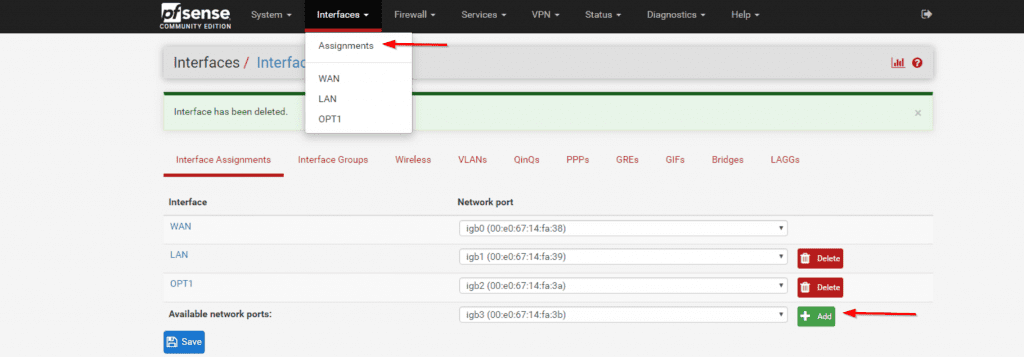
A guide to enable LAN Bridge with pfSense®: Assigning the LAN interface to a bridge utilizing the additional ports, OPT1 and OPT2, on the Vault.
I lose connection but connecting to port 3 and 4, which is supposed to now be assigned to Bridge, should get me back to connection? If so, I'm then supposed to go back in and change what was LAN to OPT3? which should be my 4....wut???
How is that supposed to work, give me connection back on ports 3 and 4, if they're only supposed to be with default settings which means no configuration past enabled....
 pseudo blade
@valid sonnet You can run RouterOS on the CRS112 without penalty as long as you hardware offload all switching and do not attempt to do any routing, but the switch chip in the CRS1XX series sucks in comparison to the 3XX ones.
Less features, less capable
 raven moth
uncut spruce
raven moth
uncut spruce
depend on the model
south blade
So, I ended up having to connect the UniFi AP LR along with the router as I couldn't figure out the bridging last night, it worked as expected but another thing though, issue maybe?, is it does it's own DHCP?
Like my phone, I already had a static IP address addressed to it with PFSense but now connected to the AP it shows a different MAC so now it's once again assigned to a random address in the DHCP pool.
vapid dune
the AP doesn't do DHCP
must mean what ever you plugged into is doing it
I would guess your second router isn't acting as a switch
hollow marlin
Why set your phone as a static? Android and iOS have already implemented random MAC add. generation which is why you are seeing a new MAC
vapid dune
oh the mac randomization? it's per AP as far as I know. and default is off
oops missed the part about different mac
vapid dune
oh weird. I didn't explicitly turn mine off on my pixel
I did turn off DoH though lol
hollow marlin
lol I would for a few more months when everything slowly gets sorted out
vapid dune
nah I don't use it since I'm using a home vpn
hollow marlin
Unless the VPN is being hosted in the cloud or local DNS using DoH, that doesn't really apply
hollow marlin
Yes, and if you are hosting the VPN at home, your request are still sent out that connection and viewable
vapid dune
yes sure, but there's only a handful of ways to mitigate against that
I don't expect to use TOR at home
finding a trust worthy VPN is also difficult
hollow marlin
DNS with DoH or a router that supports it are easy solutions
vapid dune
DoH only moves the problem
hollow marlin
That as well
vapid dune
you're still going to be connecting to the IPs lol
I mean if you're worried about DNS security, then unbound with DNSSEC is probably sufficient
hollow marlin
Well of course. The main reason people want it is to hide it from their ISPs
vapid dune
I was using DoT for a while
if they want to hide from their ISP then VPN is a better option imo
hollow marlin
Which while a cool concept, in practice, meh
vapid dune
I mean it moves the problem onto trusting who ever the VPN uses
I don't think DoH is a good idea really
nocturne harness
Why set your phone as a static? Android and iOS have already implemented random MAC add. generation which is why you are seeing a new MAC
@hollow marlin this is only for when searching for wifi networks
vapid dune
aside from the bootstrapping problem
hollow marlin
Thats why VPN through Assure or Amazon is the best option
vapid dune
LOL
you're kidding me
Azure or Amazon probably log your traffic just as much
@nocturne harness hmm I think randomized mac per AP is actually default
might just be my legacy connections from migration that don't use it

not my phone but that's what my screen looks like on my wifi settings
nocturne harness
Starting in Android 8.0, Android devices use randomized MAC addresses when probing for new networks while not currently associated with a network. In Android 9, you can enable a developer option (it's disabled by default) to cause the device to use a randomized MAC address when connecting to a Wi-Fi network.
In Android 10, MAC randomization is enabled by default for client mode, SoftAp, and Wi-Fi Direct.
Guess I'm not up to date with Android 10 😆
vapid dune
I think it was supposed to be even sooner than that, but likely will be delayed a bit
hollow marlin
@nocturne harness Its not just when searching for networks
If connected it will persist with that random MAC
vapid dune
we just covered that o.o
nocturne harness
@nocturne harness Its not just when searching for networks
@hollow marlin yeah, it used to be it was just for searching, then in 10 they changed it, scroll up 5 messages 😉
hollow marlin
oh lol
nocturne harness
all good haha
vapid dune
ugh I'm still not used to working from home with only one screen to RDP
I tried 2x screens and my RDP session blows up horribly
my work doesn't pay for enough VPN servers/bandwidth either .-.
hollow marlin
Well please tell me they are using an RDP gateway at least
vapid dune
oh no, I'm just on VPN and directly connecting to my box
hollow marlin
ok good. Last few months I can't explain how much RDP traffic im seeing in netflow
vapid dune
oh you mean it's directly exposed to the internet?
vapid dune
yeah but you're gonna get hammered by drive by attacks
hollow marlin
Yeah. ISP engineer. Its a concerning amount
nocturne harness
😬
oh actually you're a great person to ask this
my ISP modem running in bridge mode is accessible from my desktop by going to a 10.0.0.0 IP
but my internal router only has a publicly addressable IP assigned to it, so I'm not sure why it would think it can access a private network address through the WAN masquerade
hollow marlin
Default route and directly connected is why
You router sends all traffic not connected out WAN, modem sees it destined for itself, knows how to get back to your public and sends it back
nocturne harness
hmmm interesting
I was just confused because my understanding is that routers don't route private address out
They're normally non-routable address, iirc?
And there's no static or connected route in the EdgeMax UI saying there's a 10.0.0.1 next hop
It's shows 99.230.xxx.x as the next hop
south blade
Hmmm, yes. So it's not that the AP is doing any DHCP it's that my phone is showing a new MAC because it's connected to this new device, the AP, it seems. Reason I have static addresses is becasue I am using rules to turn VPN off and on on those devices.
I setup the AP with my phone, should the desktop UniFi controller program give me more settings than what the phone does?
hollow marlin
Private routing just applies to BGP
hollow marlin
You edgemax has a default route 0.0.0.0/0
nocturne harness
yeah
hollow marlin
Add a 10.x.x.x network to your lan and watch your connectivity drop
nocturne harness
that makes sense then
I thought the masquerade would prevent the routing but I guess it's not configured for that
I guess that's more of a firewall policy
hollow marlin
Yeah, all IP address are routable, caveats with multicast, but people tend to think private space cannot leave their router
There is a reason why firewall policies use BOGON list for filtering so your local traffic doesnt route outbound
nocturne harness
Yeah, I think the confusion is because the private ranges are defined as being not on the public internet
south blade
Would there be any issues having the UniFi AP right next to the router? :/ I was seeing 80Mbps on my phone while I had it hooked up in another room, now I'm seeing 30Mbps next to it.
nocturne harness
There is a reason why firewall policies use BOGON list for filtering so your local traffic doesnt route outbound
yeah, I realized I'm missing one--not that it's really the biggest of deals for a home network
hollow marlin
Its not really. There are "security concerns" but in all reality...
nocturne harness
Yeah my wirewall in rn is just allow established/related anyway.. drops everything else
hollow marlin
Just inbound, you can still send request out which if blocked would break everything
nocturne harness
Yeah, just WAN_IN and WAN_LOCAL rules
Would there be any issues having the UniFi AP right next to the router? :/ I was seeing 80Mbps on my phone while I had it hooked up in another room, now I'm seeing 30Mbps next to it.
@south blade assuming both places give your phone a good connection, it shouldn't matter
Also you phone would not get the static address if it has a different mac
since that's how the DHCP server decides what address to give it
hollow marlin
If Unify has a live view of traffic or AP stats it would be good to post a screen shot
cedar igloo
If you clone a windows vm, without generalizing them, are they still able to ping each other? I have two cloned vms, same subnet, same SID and different ips but cant communicate
but cant communicate
@cedar igloo I mean they cant ping. if i host a python http server on one, you can get to that on the other machine
south blade
UniFi Controller for Windows gives startup error, shows a very helpful "Start-up failed." and blank message window below, what do? 😛
I set it up with my phone but surely the desktop software has more options, no?
south blade
Shoot, figured it out port 8443 was being used by something else in the log, nice blank window.
 distant wedge
I'm just gonna leave this here
waxen scroll
theres two jokes in there
rocky badge
@clear igloo 👀 Xfinity Gigabit Pro is actually 2 Gig/2 Gig AND 1 Gig/1 Gig
clear igloo
@rocky badge lol, wat
rocky badge
it's just metro-e
clear igloo
Ah, ok
rocky badge
the CPE is just a Juniper switch
its basically their business service for home
1 static v4, static /48
clear igloo
Yah, I knew they installed a Juniper switch for the CPE, didn't realize it was metro-e but that makes sense
hollow marlin
What Juniper switches are they throwing out there?
rocky badge
Juniper ACX2100
hollow marlin
For metro-e we are using MEs and Cienas.
ACX are their barebones routers
I hate them
hollow marlin
Farthest from an L2 switch you can get
rocky badge
Yeah that's what I was thinking lol
its a long process as well lmao
you have to be within a certain range of the node
your project has to be approved, might take 3-4 months between first inquiry and activation
distant wedge
cost savingsssss
rocky badge
$500 install fee $500 activation fee
distant wedge
oof
rocky badge
but they pull fiber, splice it, test it
iirc you also have a SLA lmao
you get 6 strands of fiber
2 active, 4 dark
little schooner
@rocky badge is the activation fee really necessary?
rocky badge
yes
little schooner
Do you know what it really covers?
Like town fees?
Permit fee?
Since they own the line, the install fee should of been enough
Gigabit over here is $300 a month
rocky badge
I dunno
distant wedge
@little schooner Probably has to cover running the connection into your house if it isn't, splicing fibers, making sure the connection at the node is spliced / terminated
There's a lot that goes into it
rocky badge
@clear igloo When we get AT&T fiber installed, I'm just gonna let the tech do whatever he wants to lmao And then when he leaves, configure the gateway for bypass
And if he tries to give me the pace gateway, I'll throw it at him and ask for the bgw210 because the pace gateway is shit 💩
rocky badge
Nah I'm gonna bypass it when the tech leaves
waxen scroll
i do the same
i just shut up while the installer is there unless he tries to put software on my computer
rocky badge
🤢
little schooner
Eww Comcast tried putting the software on computer on my mom's computer
No need for that junk
vapid dune
lol
I think I'll aim to switch to SFP in the future when I can
in favor of the ONT I'm using
...mainly because it's smaller and eventually I suppose I can get a switch
clear igloo
@rocky badge Then tell them to peer better 😛
rocky badge
lmao
Because with the local ISP I can get one of these https://store.ui.com/collections/operator-ufiber/products/uf-instant

Ubiquiti Inc.
Gigabit Passive Optical Network CPEFeatures:
High-Performance GPON CPE
Up to 2.4 Gbps Downstream and 1.2 Gbps Upstream GPON structure
Supports up to 20 km GPON Links
Powerful Layer 2/3 Management Features
(1) GPON WAN Port, SC/APC
(1) 1Gbps SFP interface
Since they use UFiber OLTs
distant wedge
The contractor responsible for the trenching work laid off quite a few people so I guess it's gonna be another two to three years before I get fiber. oof.
rocky badge
oof
distant wedge
That's great. The ISP here uses huawei lol.
nocturne harness
Lol which isp??
distant wedge
Bell
clear igloo

distant wedge
@nocturne harness They've been using Huawei ONT's since the HH2000, the HH3000 is direct in but still uses the Huawei transceivers
nocturne harness
ohhh yeah bell
rocky badge
@dense moat omfgmgmgmgmgg https://cdn.discordapp.com/attachments/679716285927653453/718177831187906600/unknown.png

the UXG-Pro Beta is coming sooooooon
 dense moat
YESSSS
cedar igloo
a 10 minute old, clean install of windows 10 pro cannot be pinged from another machine. what are some steps to figure out whats wrong?
clear igloo
Disable the windows firewall?
cedar igloo
ill try it, but i thought pings worked straight out of the box
yeah
nope.
nope. both just in esxi server. nothing fancy
yes
both virtualized on same network in esxi
hollow marlin
@cedar igloo Pings in windows do not work right out of the box. Firewall needs to be changed
cedar igloo
i swear i never needed to do that before. does a default domain policy enable icmp when connected to domain?
clear igloo
Domain policy applies different rules
cedar igloo
Disable the windows firewall?
@clear igloo This worked, thanks. honestly, never messed with any firewall ports before and pings just worked
clear igloo
Yah, if Windows classifies the network as domain as opposed to Private then different rules apply. I think it's Private > Domain > Public with how strict the firewall rules are
 buoyant sun
Sorry to interrupt guys but I’m having an absolute meltdown
I’m trying to use the DHCP server on my pihole but it refuses to work
All devices connected to the WiFi get an IP address assigned, but no access to the internet
hollow marlin
What gateway address are they getting?
Make sure its of the router and not the pihole..also make sure its on the same subnet
buoyant sun
192.168.2.1 which is the IP address of the LAN port (of the router) it’s connected to
How do I know the subnet of the pihole?
Huh, that’s weird
The WiFi is working on my phone
The subnet is the same on my MacBook (connected to the pihole) and my router so that should be fine
vapid dune
o.O
why do you need DHCP on pihole?
can't get your router to push out the DNS settings?
buoyant sun
Because I couldn’t be bothered messing around with the DHCP of the double routers I have
vapid dune
I mean you need to disable both of the DHCP on those routers if you want Pihole to do it
buoyant sun
I have
vapid dune
I see
buoyant sun
I was having issues with my PC not getting an IP address
cedar igloo
bit of a longshot, but if you ping 8.8.8.8, does that work? just thinking it may be a dns issue
buoyant sun
Before DHCP servers were enabled on both routers
vapid dune
I was gonna say, you might need to figure out where your DHCP requests are going
and if the pi is responding with it
seems like a hassle
o.o fwiw my router literally has a field you plug in the DNS server that gets pushed out with DHCP. it's simple to change
buoyant sun
cedar igloo
ok. its not a dns issue
buoyant sun
Jesus Christ it’s still going with the timeout messages
cedar igloo
unix goes forever with ping requests
buoyant sun
Ah
vapid dune
I mean that's from the macbook
it's a DHCP problem
I assume if you assign yourself an IP on the macbook it works?
buoyant sun
I can try
vapid dune
diagnosing DHCP problems is a headache
two routers is also a headache
...have you tried picking 1 router. turning the other into a switch. using Pihole as ONLY dns?
buoyant sun
Hang on
The router is still set as 192.168.2.1 in the MacBook settings
Maybe that’s the issue?
vapid dune
huh?
it's not DHCP?
I mean the other thing is that if you previously had 2x DHCP servers
the gateway pushed out for each would be different
buoyant sun
This when I do it manually what it defaults to
vapid dune
the Pi can't know which gateway to push out if you're on the router 1 segment or the router 2 segment... probably.
I mean you can try to manually configure it. but see previous point about headaches
buoyant sun
To be fair 192.168.2.1 is the router port the data would go through. But I’d think you’d want it to go through the pihole first
vapid dune
maybe change your IP address to the same subnet as the router o.O
buoyant sun
Now it just says it’s online... weird
The subnet mask is the same as the router
Or do you mean actual IP address
vapid dune
but your IP address isn't even in the range
buoyant sun
It’s in the range of the pi
vapid dune
192.168.1.0/24 (or 255.255.255.0) goes from 1.0 - 1.255
buoyant sun
LAN2 is what the pi is connected to
cedar igloo
can the pi ping 192.168.1.1 (or whatever the default upstream gateway you have specified is)?
hollow marlin
If you are using the Pi on a different subnet you need DHCP relay. Its not worth it over just letting the router handle DHCP
buoyant sun
The issue is my phone works just fine, and that is connected to the same WiFi router the MacBook is
vapid dune
I mean you could hang the pihole DHCP server, but it better be off of the single router
lol what is your phone using? automatic?
buoyant sun
Yes
vapid dune
what kind of IP does it get?
buoyant sun
192.168.1.226
vapid dune
and the gateway?
buoyant sun
But router 192.168.1.1
Alright then
I hate my life
At least it’s working
Thanks guys
:D
Still doesn’t work on my PC though... It has a link with the switch and it’s all set to auto so it should work... but I’ll look at it tomorrow, I’m getting a headache from all this
For some reason it says the cable is unplugged
Doesn’t work on my iPad either. The hell is going on
Hang on
Did I not save the router change to 192.168.1.1 on the pihole
Because my iPad did just connect but the router is set as 192.168.2.1
Yup... good going, me
Alright, it probably definitely works now
vapid dune
throw it all out and restart is my advice
little schooner
Starting from a clean slate makes things clear. You can make changes one at a time until you hit the problem or the solution
buoyant sun
If it was my own house I would lol
But it’s my parents and I don’t think I can really do that
My PC is still complaining about having an Ethernet adapter plugged into it... while the LEDs on the back clearly show a 100mbit link
vapid dune
I wonder what is a good way to run unifi on a server while keeping resource usage low
nevermind. the unifi controller uses a lot of ports lol
vapid dune
oh interesting. docker has a macvlan mode where you can assign mac addresses to individual containers
hollow marlin
Each container is already assigned a virtual MAC. You can assign one if absolutely needed
south blade
Any idea why an iPhone would have the worst signal to the UniFi AP LR I just got? 😛
The mini PC with the cheap wifi adapter that's sitting not even 5 feet away from it has a better signal.
vapid dune
oops I mistyped. I meant IP addresses
little schooner
@south blade fully updated and everything? Was it a used model? Does it have a date code within the past year?
I actually ran into some problems with my new flex HD unit
It wouldn't provision correctly and would appear to be stuck for no reason
But after enough tries it finally worked
 fresh copper
I love my FlexHD. I did have an issue with it not wanting to update properly but I just had to restart and try again
little schooner
@fresh copper does it matter if I have mine on the floor?
I don't have a storage shelf thing yet to place it on for better coverage
fresh copper
Probably not too much. I think it's mostly fine as long as it's standing up
 upper cypress

 gilded ice
hey can someone tell me why my domain, and vps ip dont lead to the same page on the vps?
so http://51.222.19.119/ is my site and so is https://neednot.net/ and my domain is pointed to that ip but they lead to different parts of the vps
here is my .conf
    ServerAdmin need_not@neednot.net
    ServerName http://www.neednot.net/
    ServerAlias http://www.neednot.net
    DocumentRoot /var/www/webApp/webApp/
    ErrorLog ${APACHE_LOG_DIR}/error.log
    CustomLog ${APACHE_LOG_DIR}/access.log combined
</VirtualHost>``` ServerAdmin need_not@neednot.net
ServerName neednot.net
ServerAlias www.neednot.net
DocumentRoot /var/www/webApp/webApp/
ErrorLog ${APACHE_LOG_DIR}/error.log
CustomLog ${APACHE_LOG_DIR}/access.log combined
</VirtualHost>```didn't work
waxen scroll
that document root location might be wrong then
the IP uses the default location higher up in the config file
gilded ice
well hold on do i lead it to the .py file or where the .conf file is
because the .conf is /var/www/webApp/
the py is /var/www/webApp/webapp/
waxen scroll
maybe this is a better question, wheres the index.php or html, or whatever file located
waxen scroll
your website says
You should replace this file (located at /var/www/html/index.html) before continuing to operate your HTTP server.
did you restart apache after the config edits?
gilded ice
inside the webapp folder is this
did you restart apache after the config edits?
@waxen scroll yes i did
is it a cached result?
waxen scroll
it might be since cloudflare
waxen scroll
did you shut it down? i was trying to test and its dead
gilded ice
yeah i tried deleting the a records and adding them back
idk how long it takes for cloudflare to update
waxen scroll
so i bypassed cloudflare and it seems like thats not the issue
waxen scroll
open notepad as admin, then edit: C:\Windows\System32\drivers\etc\hosts
gilded ice
meaning the server is working but the doamin isn't connected
waxen scroll
put the following line at the bottom of the file
51.222.19.119 neednot.net
it ignores your DNS on the internet which is cloudflare and uses that IP
waxen scroll
go higher in the file and look for "DocumentRoot" thats that set to
its not under the virtual host stuff
gilded ice
wait so the location to the default html?
waxen scroll
yeah
gilded ice
ok
waxen scroll
that seems to be where its pulling your site from
waxen scroll
just wanna make sure its the same as the virtual host
waxen scroll
can you paste the whole line? i dont recall it being set to a specific file
it should just be a folder
waxen scroll
yeah, so for giggles do:
    ServerAdmin need_not@neednot.net
    ServerName neednot.net
    ServerAlias www.neednot.net
    DocumentRoot /var/www/html/
    ErrorLog ${APACHE_LOG_DIR}/error.log
    CustomLog ${APACHE_LOG_DIR}/access.log combined
</VirtualHost>```make a new .conf file in that directory and put that in it?
waxen scroll
nope. you have to edit the existing one
waxen scroll
httpd.conf or apache2.conf im not sure what its called now
waxen scroll
not sure, its still loading for me
waxen scroll
on the command line type "ps aux | grep apache" , if that doesnt work "ps aux | grep http"
im trying to figure out if its been told to use some random config file
gilded ice
root      1874  0.0  1.1  88964  5564 ?        Ss   12:34   0:00 /usr/sbin/apach                     e2 -k start
www-data  1877  0.2 13.8 913076 69084 ?        Sl   12:34   0:00 /usr/sbin/apach                     e2 -k start
www-data  1878  0.2 13.8 1044436 69512 ?       Sl   12:34   0:00 /usr/sbin/apach                     e2 -k start
root      1944  0.0  0.1  12948   924 pts/0    S+   12:37   0:00 grep --color=au                     to apache
ok so its probably using /etc/apache2/apache2.conf for the config file
waxen scroll
try putting your config for the neednot virtual host in there and see what happens
gilded ice


 waxen scroll
oh damnit this is the stupid new way of doing it
/etc/apache2/sites-enabled
whats in there?
gilded ice
YOU DID IT
it's a mirror of my first super bad .conf file that is in the out dated format
waxen scroll
haha