#networking
1 messages · Page 191 of 1
 forest phoenix
Not that I know of
The teacher can give us then
Them*
Like they can generate them
But we can’t
Probs because of that exact reason 😂
 pulsar thorn
forest phoenix
pulsar thorn
forest phoenix
I mean like
Oof I’m really excited
Did consider calling in sick for work
Then though not to
 thorny vector
Plenty of time to play tomorrow, when you're fresh. Gimme a ping if you want any ideas of what to do with a domain at home
forest phoenix
Will do
Going to do it tonight as I need it tomorrow for files and that
And my discord bot 😂
thorny vector
lol
 cedar igloo
Anyone who has set up a WSUS server before, do you need both an upstream and downstream server? or can you download the patches from microsoft through a single WSUS server, and link the devices to update through the same server?
thorny vector
@cedar igloo Literally just set this up, actually. You only need the one. Downstream is for stuff like load balancing, or shooting it to a more locked down LAN
cedar igloo
i have a subnet that is completely shut off from WAN (no internet at all). Would i need a downstream one for this?
thorny vector
Yes, unless that subnet does have connectivity with the WSUS server
cedar igloo
the subnet can see the wsus server, and the wsus server has access to https.
thorny vector
👍
 earnest depot
Hey, one of my friends has the problem, that his lan connection drops randomly... Has anyone help? (The cable is ca. 70 meters (229 feet) long)
thorny vector
@forest phoenix woop woooop!
@earnest depot Cable is still within the limits of CAT, so that shouldn't be the issue unless its crossing a lot of live wires
could be driver related, or some weird traffic on the net causing the drops
 thick minnow
I have bad internet please buy me internet
earnest depot
i don´t know exactly but i will ask him
thick minnow
I come bearing a gift of the nightmare that is my networking setup
 solemn mauve
jezus
earnest depot
@little schooner It is cat 7
 hollow marlin
Then its probably fake and where his problems lie. Tell him to replace it with Cat5e/6a
 rocky badge
@clear igloo
 clear igloo
LUL @rocky badge
 little schooner
@earnest depot I had a cable that was actually sold as a fake. It would drop the internet connection for no reason
I made my own and the problems disappeared
So the third party reseller I bought from didn't make them good
Cable Tester didn't detect the fault but with an expensive one, I probably would of discovered it
I thought my Edgerouter port was going bad
 craggy parcel
Heh.. Yeah, simple continuity testers usually don't tell you about bad connections.
hollow marlin
@little schooner Most Cat7 is. Its barely considered a standard but people dont realize Cat7 is incredibly expensive and requires special crimpers and caps. But people will still buy it when its really aluminum core cat5 which is cheap and breaks incredibly easily
 waxen scroll

 quasi cliff
My Laptop Wi-Fi keeps cutting out until I go into the my modem and restart the WAN interface, It happens quite regularly at least once a day
craggy parcel
Does the wifi really cut out, or are you just unable to access the internet, but your own network (like your router) is still available?
quasi cliff
I can still access the network and its only my laptop, my phone works ok
craggy parcel
Most modern phones use the cell network as fallback, if wifi is not working properly. Are you sure the phone is actually using your WiFi?
quasi cliff
Yep I have the cell network turned off
craggy parcel
How many WiFi devices do you have connected?
quasi cliff
2, my phone and laptop, I have tried setting up my laptop with a static IP
 keen ermine
Anyone can recommend me a alternative to FreeNAS that is still free for NAS use only
craggy parcel
There are a few options..
- Your router cuts the internet connection completely.
- Your laptop has DNS problems.
keen ermine
apparently my Q6600 system hates FreeBSD
quasi cliff
How do I find out which it is?
keen ermine
even downgrading to FreeNAS 9 causes kernel panics
craggy parcel
Haven't seen a NAS distro not based on BSD.
@quasi cliff When you have the problem, try accessing something outside your network, only using the IP address. (Eg. ping 8.8.8.8)
quasi cliff
Ok will do thanks 🙂
keen ermine
Rockstor looks to be CentOS based
I did wished this repurposed PC could just run BSD with no issues but IDK why Dell hates it
and unraid is not something my dad wants to buy for just me
 vapid dune
what's wrong with freenas @keen ermine
what about OMV? https://www.openmediavault.org/
keen ermine
FreeNAS' USB installer locks up the bios and if I install it externally and put the HDD with FreeNAS on it, it goes kernel panic. Tried even FreeNAS 8 and just kernel panics during install or python errors
thorny vector
@keen ermine you could just spin up Ubuntu, and run docker with pydio, smb shares, and an nfs share for fun
And do a software raid. Ubuntu also supports zfs
keen ermine
ah true'
thorny vector
Never forget, everything can be homebrewed
vapid dune
I mean if you're just doing a simple zfs pool then doing it via command line isn't too bad
thorny vector
And pydio give people the nice little web client a lot of people like 👍
Or nextcloud, but I don't like nextcloud
 slow pivot
hollow marlin
slow pivot
hollow marlin
Should be put down. We office space'd our 6500 last year
 hot patrol
Alright I know I am a rookie at the networking but is there a way to get two separate networks off of just one line coming in? I ask because I like to get dropcams onto a different network so they aren't killing the bandwidth.
thorny vector
If they're coming across the same cable, no amount of networking voodoory will get you back bandwidth
@hot patrol
hot patrol
Guess we need a higher speed then lol my gaming needs must be met
Thanks for the reply appreciate it
thorny vector
Is it a gigabit link?
vapid dune
I mean you can use QoS to limit the bandwidth but... you probably want the cameras to upload continuously
thorny vector
How many cameras though? I can't imagine it's enough to saturate a gig link.
little schooner
My 4 2mp cameras only send like 32 mbps of upload speed
But if it's doing that local, that shouldn't affect
little schooner
Setting it to Wumbo usually does the trick
 amber oxide
internet connection: no you can't just utilize all the upload bandwidth th-
cameras: upload go brrrrrrr
Here's a question
Was legally obtaining legal Linux isos from a legal and trusted legal torrenting site
Without a VPN or proxy which is top stupid in hindsight
And my internet creeped to a halt
It had never done that before
Went downstairs
And modem lights were off, but the Ethernet activity lights were still on
And there was some data still being sent
Did my isp nuke me?
Or is my modem conveniently failing?
It did it with a proxy too so I don't know what to say
Could be some sort of bandwidth limitation
Or throttling
I'll be quiet now lol
thorny vector
@amber oxide could be some sort DoS by your ISP, or just random connectivity issues
Hard to tell without an eye on the traffic
amber oxide
Indeed, my guess is probably that something somewhere determined I was too much of a strain on their already decrepit WiMAX towers
5mbps is fun
Whenever I did anything throughout the night it went okay
Additionally the torrents actually kept going even though the rest of the traffic on my network screeched to a hault
I checked and I wasn't hitting my 5mbps smart que in my edgerouter so it could actually be a setting inside the modem QOS wise
I'll have to do a lookover at what the firewall settings are
forest phoenix
Is there any decent windows server security?
Like im willing to pay
But like damn they make it hard to fund what you need
find*
craggy parcel
You can always lock your windows server in a vault, with the power disconnected.. That'll make it quite secure. 😛
cedar igloo
How do i make computers use my WSUS server? the GPO is linked and applied to all computers, and shows up correctly. In WSUS Update Services, i can only see my WSUS server under computers.
thorny vector
@cedar igloo you also have to force enable automatic updates in gpo, and set wsus to use gpo/registry to see computers
Yes, wsus is a pain to configure, and if you have a product broad environment, the initial update sync takes forever
@forest phoenix don't discount windows defender itself. I let it run on my hosts, and use nessus and snort at the network level to really drill down security
cedar igloo
Thanks. Gotta wait another 3 or so hours to change the computer assignment. initial sync 75% done
thorny vector
Isn't it fun?
forest phoenix
Well
I have malwarebytes for business now
just payed for a full year
Gosh dang
I love this server
thorny vector
lol
thorny vector
It always seems like a huge step at first
forest phoenix
I mean like
atm
I had a Active Directory, DNS, File Storage services, IIS, WDS
As the roles
And I have a media server running
Discord bot
And some other stuff running
With like 5tb of raw storage
thorny vector
Just running windows off of wds?
 crimson otter
Why not use linux for exactly that?
forest phoenix
Domain
thorny vector
@crimson otter Easy integration with windows AD
forest phoenix
Yes
crimson otter
Ah yes if its required
crimson otter
lol
thorny vector
I run a mix of windows and linux in my lab. AD is just so convenient for authentication, especially linux integration.
cedar igloo
What are some good linux infrastructure machines? i want to learn more about linux, but so far i only know how to make docker machines
crimson otter
i guess i do not need AD for my authentications, never really got the idea of integrating nodes all in one spot
thorny vector
@cedar igloo I would get a redhat dev license. It's free, and is good for up to 16 instances of it
Alpine linux is also another good OS to learn, because of how lightweight it is, and it also is used in a lot of docker images
cedar igloo
is there a difference between redhat and centos? i thought centos was almost an exact clone
forest phoenix
Full send
thorny vector
redhat has better support through their customer portal, and has a lot of enterprise related features that are good to learn
There's also some enterprise products I use that only run on redhat. And if its free either way, why not?
@crimson otter management. If I had to manage all my individual hosts one at a time, it would be a nightmare
crimson otter
i only have 6 servers to manage, no big deal but at times i wish i had it setup different, password nightmare sometimes, then again VLAN'ed the backend so its no big deal
thorny vector
Even if they are linux servers, you can use PAM modules for a unified authentication experience
 ebon wasp
Using windows for all that is a nice start to learn beign sysadmin
linux can always be added later if you want to optimize
except exchange, fuck exchange
thorny vector
exchange can go die in a hole. I only had to deal with it once on a consult, but never again
gonna pass that shit on next time
crimson otter
i started off with linux back in the days and never got the grasp of windows server as server OS
thorny vector
I just really like my mixed environment in my lab. Windows up front, all nice and pretty, linux lifting behind the scenes
cedar igloo
so what sort of stuff is your linux doing?
thorny vector
Security focused. I run nessus, a splunk environment, pihole, serving applications (file servers, website hosting, docker swarm)
and snort agents everywhere
and I guess my esxi hosts technically count
crimson otter
we'll count that too lol
thorny vector
using windows auth in my vsphere sso alone is worth it
cedar igloo
im still using the default administrator@vsphere.local. I wish chrome offers to save the login creds.
Firefox saves the creds but many features just dont load, such as updates
thorny vector
Definitely add your AD to your SSO
then you can use the vmware auth plugin, and one click login
cedar igloo
the problem is my whole domain is in vsphere. fully contained so my main pc isnt connected
thorny vector
Ah, ok. That does make it a pain
cedar igloo
just found out you can change the default domain. This makes life much easier
 spring beacon
Service Host: Network Service is using like all my internet bandwidth in task manager, any idea how to make it stop? windows isn't downloading updates, i checked... it's been going for HOURS pls help me make it stop bc i just want to use my pc
thorny vector
It also might be BITS, I'd kill those services if its that big a problem
spring beacon
@thorny vector it says it will like shut down my pc or something if i end it
little schooner
Splunk only let's 500 MB of traffic per day but graylog offers 5GB
Also graylog used to be free
thorny vector
splunk dev license, 10gig ingest
I also have a 50 gig license from work I can use, but haven't needed to yet
cedar igloo
I changed the WSUS to Use Group Policy, however there are still no computers showing up.
cedar igloo
no worries, you have given me a good place to start from
little schooner
@thorny vector oh right you mentioned this before. I already forgot
little schooner
Need to work on my memory
thorny vector
No worries, I shall forever spout the goodness that are dev licenses
little schooner
@thorny vector I'm totally going to get one. I've been meaning to install something like splunk to monitor router logs
cedar igloo
Figured out whats wrong with it. A few weeks ago, i tried making a wsus server, failed and deleted the vm. I also removed it from AD but not DNS. the current vm has the same hostname as the last one, but a different ip so the computers were trying to connect to an old server.
cedar igloo
i did that too at first, except i thought just using the https port would work straight out of the box. as you can tell, im new to this stuff
thorny vector
It's where we all start. Only way to go is forward!
@little schooner Lemme know when you do. I love splunk, all my logs from my everything get sent to it
waxen scroll
alright folks
i know we do a lot of career advice here
reddit
1,924 votes and 394 comments so far on Reddit
sage advice from the OP
clear igloo
@waxen scroll So I should email the CEO every 15 minutes AND proclaim to my coworkers they should bow before me?
 restive valley
is the base router that atat gives good for gigabit?
 south blade
Anyone know how to give DHCP clients a description on PFSense?
android-654vdfghe984qwf4q doesn't tell me anything. LOL
little schooner
@south blade yeah, give it a dhcp lease reservation and I think it let's you assign the name
Or on your android phone, set your profile name
south blade
I tried to do that but it had to be outside the range of where my devices are? :/
little schooner
The profile name often sets the hostname of the device
south blade
My devices are on 192.168.10.100-150, it says I have to be outside of that to reserve it.
little schooner
@south blade yeah. That is a weird limitation
It should still let you make it and be smart and look at the reservation
south blade
My Poco F1 does show it's host name as Pocophone F1, so that's convenient...how do I do the same on older Android devices?
little schooner
I guess you have to temporarily reduce the range to like 3 devices, make the dhcp reservation and add the normal range back
To see if you can trick pfsense to accept it
 charred meadow
Why don't you assign it 192.168.10.99 or 192.168.10.151?
little schooner
That would be the method requiring the least effort, yes
south blade
Hmmm, well one device is a printer and the other is a desktop with my Emby server, both auto discovered by the rest of my devices on my network.
little schooner
That's something I wish Edgerouter did better. Allow broadcasting of specific l3 packets to other networks
Is that even a thing for auto discovery
?
south blade
The Android devices I was hoping to be able to give descriptions to so as to know what exactly is connected, cause I think I see more devices than I have. LOL
BRB, gonna go around the house logging MACs of all these devices cause I don't like fishy stuff on my network going on. LOL
south blade
Anyone else use pfBlockerNG?
little schooner
@south blade yes but it only works best if your router has like more than 1GB of ram
I've seen it crash the sg3100 easily
south blade
I'm using a computer that I installed PFSense on. But the thing is I'm not sure just how well it's blocking ads. I've tried Pi-Hole and I could see it putting in work on ads with that, but the Pi Zero I was trying it on came damaged I guess as it'd often crash/lockup. I already had PFSense setup so thought I'd try that, but like I said, not sure I'm seeing it block that much. I did use the Wizard though.
I see this on my log actually: https://pastebin.com/iqXGv163
 little schooner
@south blade it looks like its having trouble downloading the block lists
Are the list urls accurate and not dead?
thorny vector
reboot
forest phoenix
I love the fact that windows server allows more then one anti-virus
Like it allows windows defender to do it stuff and malwarebytes to do its stuff
With no complaining or saying that the device is protected with a different program
thick minnow
oof
cedar igloo
Anyone know of any way to set up your own upnp thing to forward ports on your router without admin access to said router?
thorny vector
@cedar igloo that's definitely a "need admin access" kind of thing
 fervent brook
except for the phone complaining about power usage, it didnt seem to mind that i connected two ethernet ports to eachother via a usb C USB hub
cedar igloo
Any ways to improve my homelab network? Its meant to be as close to a real enterprise environment as possible. Also, any ideas of better ways of visualizing this would be great
thorny vector
@cedar igloo looks good to me. Visualization looks good to me to
 heavy cedar
I need some help with a unifi firewall
I have two networks and they are both segregated. I want to let an ip/mac address through. I have tried putting a firewall rule before and after m y network rules and it doesn't wanna work. How can I fix this?
little schooner
I just saw a duckduckgo highway ad. Thought it was neat that they decided to advertise privacy here
little schooner
@vapid dune dang I think this was the diagram I had been looking for last month that I didn't find
vapid dune
I guess there's this too but no good diagram lol https://help.ui.com/hc/en-us/articles/115003173168-UniFi-USG-UDM-Introduction-to-Firewall-Rules
little schooner
I was trying to troubleshoot firewall order operation
vapid dune
haha yeah that one is quite useful
heavy cedar
Okay, so for Unifi's port forwarding, they have an option that is called "from". There is limited and any. I assume that this is for "what ip is it coming from?" but people say that unifi doesn't support multiple wan ips. Does it really not support any more than 2 wan ips (2 for the 2 ports)?
little schooner
@heavy cedar the from should be all, unless it's specific IPs that you know are going to be the same coming in
heavy cedar
So it doesn’t have functionality for out but It does for in?
south blade
I'm new to Ubiquiti UniFi hardware, tired of my current old setup and going to need to be able to send signal at least 120 yards to 2 different buildings in the future. So getting rid of everything except the starting point, a PFSense box, what would I need to get?
south blade
Well, what's the legality of burying cable through a power line easement on my property?
little schooner
@south blade if you have to dig, my state says you have to call first
If you don't call and break something, that is where I would be in big trouble
But if you think nothing is really there and succeed, well no one has to know
south blade
Building on left is 120 meters away from main, other one is maybe 70 meters from main. What could be buried under a power line anyways? This is outside the city.
thick minnow
is the intel pentium j3710 usweable for a mc server of somewhat low sepc???
south blade
@thick minnow https://ark.intel.com/content/www/us/en/ark/products/91532/intel-pentium-processor-j3710-2m-cache-up-to-2-64-ghz.html
Intel® Pentium® Processor J3710 (2M Cache, up to 2.64 GHz) quick reference guide including specifications, features, pricing, compatibility, design documentation, ordering codes, spec codes and more.
thick minnow
i have one lieing around i just wanted to know if it would work
i know its specs i wanted to see what people thought of it
it would replace an intel core i7 860
vapid dune
there's gas and water pipes underground
but either way you could probably install conduit and run cables to the buildings. dunno if that's cheaper than wireless or not
but if you want good wireless then you're basically looking at point to point microwave
thick minnow
yummy
vapid dune
it's more designed for like km ranges though I think
south blade
As far as I know this land has never had anything but this power line ran across it. Water line is on the road infront.
thick minnow
ok
vapid dune
I mean you could probably DIY if you just call to figure out where you can dig/cover
thick minnow
that is what i was gona say
vapid dune
best to do it with fiber and conduit
less hassle of potential hazards like lightning lol
and if you keep a pull cable in there you can add more
south blade
Fiber, like optical fiber?
vapid dune
yeah
south blade
What kind of hardware do I need between that and my devices to send and receive through it?
vapid dune
curious how does the power get there
south blade
Power on the land?
vapid dune
something that converts fiber to ethernet =p
south blade
I'm just thinking something that works on fiber can't be cheap.
But I've never looked so what do I know. lol
vapid dune
I mean you could run ethernet instead since you said it's ~100m
just gotta plan for stuff like lightning
the cheapest is probably direct bury cable
assuming you can dig / cover a line straight to the building lol
oh didn't know they had kits like this. more in your range category: https://store.ui.com/collections/unifi-network-routing-switching/products/unifi-building-to-building-bridge
but yeah I was gonna say the other option is wifi but you need to make sure it's both directional and a clear line of sight
there's cheaper kits out there
south blade
I'm working on the line of sight. xD Nothing built yet.
vapid dune
lol in that case. back to the cables
vapid dune
cables and conduit I'd say
little schooner
Oh dang, I just tested my 10gbps cable and it has several cable faults
Ughhhhh
It's such a long run to replace
55ft
vapid dune
welp
little schooner
@vapid dune they are cat 7, before I knew they were fake
Welp, time to replace them with the real deal
south blade
shit, copper coated crap that's being peddled online?
little schooner
Amazon
vapid dune
amazon has a supply problem
little schooner
Third party seller
vapid dune
they have real mixed with fake sometimes
south blade
Oh damn, that's even worse than "scoring" a deal on eBay just to find out it's fake.
vapid dune
third party is the worst
south blade
xD I'm going to have to be sure I lay out my cable to test before burying 500 ft of it just to find out it doesn't work. LOL
vapid dune
that's apparently a shield indicator
vapid dune
seems fine in that case? lol
little schooner
Yeah this was another server cable I have plugged in
So that's good that this one isn't bad
But my 10g one is completely bad
I can't even browse my file shares anymore
little schooner
@vapid dune yes just the ends, but it's a shielded cable and everything
vapid dune
ah
little schooner
I don't think I wanna do all that stuff
vapid dune
haven't crimped that kind myself
but depends if it's cheaper to try it yourself before buying a new one lol
little schooner
Yeh
vapid dune
certainly more involved
little schooner
Id like to have access to the fluke cable certifier tool
Maybe my net admin at my old college can let me borrow one
Just for giggles
vapid dune

This video will show you how to terminate Mediabridge Cat7 bulk Ethernet SFTP cable using Mediabridge Cat7 RJ45 modular plug shielded connectors.
(Skip to 01:25 to see the orientation of the conductors when they are inserted into the load bar and then into the connector.)
M...
oh it's not that bad
little schooner
@vapid dune oh that's neat
vapid dune
guess it depends on the connectors you're using
little schooner
Looks that way
 ionic dagger
Hey, does anything think they can help me with some cloudflare hosting issues im having?
ionic dagger
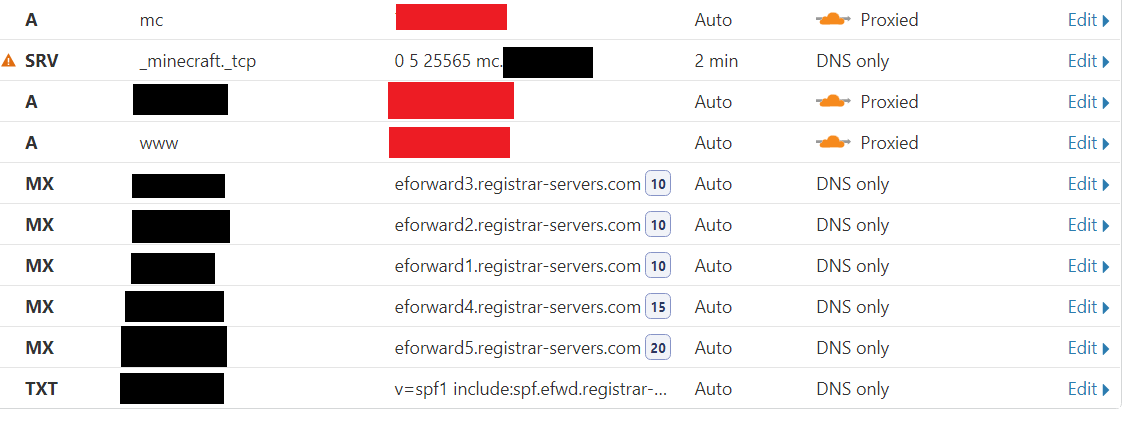
is this safe? Is there any way to trace back to my IP given my URL?
https://i.imgur.com/xSZnRYE.png (black is my website URL, and red is my home public IP)
 ornate jungle
Are you running that mc (minecraft) server on a computer running through your home internet connection?
rocky badge
CloudFlare can't proxy Minecraft, or TCP/UDP for free, you have yo pay for Spectrum
ionic dagger
@ornate jungle my server PC which is on my home network
rocky badge
Your origin IP will be exposed by that SRV record
ornate jungle
then yes, your home IP is exposed
ornate jungle
a dedicated server
ornate jungle
um, as far as i know, you can't use anything (free) -- see what blob said
ionic dagger
@rocky badge wait so how can i host this?
ionic dagger
@rocky badge what are the payed options (for keeping it at home)
rocky badge
An external server running bungeecord/waterfall or something proxying Minecraft
ionic dagger
@rocky badge i asked someone and they said to buy a simple cloud hosted VM, and route all traffic to that
 low gyro
You could pick up a nanode for $5 from linode, its one core, one gig. Thats what we use for our vpn at work
vapid dune
Or just host the MC server in the cloud and get a DDoS protected IP
I mean regardless I'd get a protected one
2G ram is like 7/month on a VPS
Add DDoS IP for a few more dollars
 quartz gate
2g for a minecraft server is garbage
vapid dune
Depends what you're trying to host
rocky badge
for a bungeecord/waterfall/proxy 2gb is plenty
little schooner
@rocky badge should I always be using fqdn for servers?
little schooner
i see
okay. well I only got a few of them to change
luckily it won't cause outage
forest phoenix
i was a smart boyo
When i setup the domain i needed all trafic to point to the DNS on the domain controller but when it went down for updates or be being stupid i would loose internet access
So i set 2 DNS servers with the domain controller as the main
Also learnt to not apply group policy updates to the server epically when it include "sleep after 30mins"
Also am looking into some new ap's that would be able to use the domain for login
Does anyone know any good ones?
little schooner
@forest phoenix for that problem, I am using dnsmasq to forward any requests for internal domains to a different dns server while the rest end up going to the router to resolve
that solves the no internet problem if the server is ever down for updates
forest phoenix
I mean like i also jsut cut updates
do they download and then it sends me a notifcation
on my phone
little schooner
yes they can do that
but an unpatched system gets me nervous
unless if its at a college lab
then im resting easier
i have openvpn open over here
forest phoenix
well i mean like
i have enterprise security
like anti-maleware
and my switch also drops a lot of the crap before it makes it into the network
i feel safe
little schooner
I have the basic junk
forest phoenix
but i also remote into it at least daily and check anyways
I got buisness antimalware and antivirus for it
little schooner
I moved from crashplan to idrive and so far its not what I thought it seemed
forest phoenix
and full protection for every computer on the network
little schooner
its a cloud backup solution
for businesses now
it used to have a home version
it was literally a set and forget system though
I really loved it
just cost too much money and slow download performance
little schooner
now I might be regretting it though
forest phoenix
Google provides rlly good unlimited backups for like 13 dollars
and dedicated software thats set and forget
little schooner
that was the problem though, it cost as much as crashplan
forest phoenix
yea fair enough
I had mine running when there were the big aussie bushfires
and they were getting close so it was chilling
and just left it because it dosent hurt
little schooner
yeah
 tall glen
I just bought a Cat5e Ethernet cable and the speeds are only 80 Mbps when I should be getting 250+ what is the problem? How can I fix it?
 dire flare
Well usually you'd want to plug the cable into something
First up, how long is the cable run & have you confirmed that the interfaces in all devices on the chain run at gigabit speed?
tall glen
well yes, plugged it into my pc and my router
the cable is 10 Metres long (32 feet) of Cat5e
my pc does have a gigabit port
not 100% sure about my router
clear igloo
what model router?
tall glen
let me check right now
dire flare
Look at router specs and confirm and also confirm that the port on your PC is actually running at Gigabit
It being capable of gigabit doesn't necessarily mean that the automatic configuration got it set at that rate
tall glen
Technicolor CGA2121
clear igloo
google says it's got gigabit ports
tall glen
can confirm looking at some sort of manual/documentation
clear igloo
but check to make sure your port is operating at gigabit
Control Panel\Network and Internet\Network Connections
Right click on the Ethernet port and click Status and it should say 1.0Gbps
dire flare
uhhh know where to change to a static IP?
The option for speed & duplex is in that menu somewhere
I dont have a windows pc handy right now to show you
Keep in mind though, failing speed autonegotiation is an indicator of a faulty cable/port connector
clear igloo
Instead of Status click on Properties > Configure > Advanced > then it's Speed & Duplex
tall glen
found a speed & duplex option in the settings
clear igloo
Set it to Auto first if it's not already
vapid dune
if auto doesn't work ... check your cable
clear igloo
If it is auto and you force gigabit then you'll either lose internet and need to drop it back to Auto or you'll be good
tall glen
it is on auto negotiation
clear igloo
can you link the cable?
vapid dune
your router might also have duplex settings
tall glen
don't think i'll be able to @clear igloo
im not keeping up. should i change it from auto negotiation to 1.0 gbps?
vapid dune
I mean you can, but auto should just work
tall glen
auto sets it to 100 mbps
well...
its still on 100.0 mbps
but the settings are on 1.0 gbps full duplex
vapid dune
do you have another cable you can use?
dire flare
apply the settings then disconnect/reconnect the connection
dire flare
Though, if it was just an autonegotiation misconfig I'd expect it to run pinned at 100mbps
Given that he only gets 80 mbps out of it, I'd suspect a fault in the cable
Would be neat if he had an extra PC we could do an iperf3 test with
clear igloo
Depending on overhead 80-ish can be about right
especially if Windows is eating up bandwidth 😛
dire flare
true true
tall glen
hello
clear igloo
ahoy
tall glen
i could test it on a laptop i have laying around
clear igloo
Can you link it by chance?
tall glen
i'll look at the store i bought it from website
vapid dune
unless your device is like 10 years old. most things have gigabit these days
clear igloo
Yah, lol, I was going to see if it said CCA or something and maybe it got damaged
tall glen
dont think it's damaged
dire flare
I'd try to see what the laptop has to say & if it gets up to gigabit
I remember a few cases on fairly decent x470 motherboards the onboard gigabit NIC had a faulty driver that locked it down to 100 mbps
tall glen
don't have another cable, i'll try on the laptop
wait.
i have another cable
but its way too short
also cat5e
i'll try the laptop first
vapid dune
could possibly be the router too
dire flare
If the laptop also doesn't get the proper speed, try a neighbouring port on the router
Could just be corroded contacts
vapid dune
or just bad settings on the router lol
dire flare
^
vapid dune
less likely but you might also have multiple coincidental failures too lol
vapid dune
ah yeah
tall glen
same ports and everything
vapid dune
time for a new cable
tall glen
does length have anything to do with it?
clear igloo
100m for gigabit or 2.5Gb for cat5e
tall glen
looks like I'm getting a refund then
vapid dune
hmm yes 100m. lol that's such a long cable
clear igloo
Yah, I've only run into a distance limitation a couple times when making some patches between different floors in the building
tall glen
do you guys reccomend any companies/cables themselves?
clear igloo
Cable Matters has always served me well
waxen scroll
@little schooner yes? hello! who just joined?
little schooner
@waxen scroll huh
My cat 7 cables are fakes ik
But what do you know... I actually had some spare runs already there that I forgot about
I'm so happy it was an easy replacement
The other cables I got were cat 6
 obsidian hamlet
does anyone know of any other bandwidth limiter programs other than "Selfishnet"? it just seems a bit sketchy
Because my router does not have QOS
little schooner
@waxen scroll not yet but he also hasn't asked me for anything too
I tried pushing for the grant money to be used to help fund my efforts
But of course covid had hit as soon as the meeting was scheduled just two weeks out
I have to look for a paid internship for this fall anyway
vapid dune
@obsidian hamlet I've used this one previously https://www.netlimiter.com/
obsidian hamlet
Thanks! I will check it out
@vapid dune does it only work for pc or does it work for every device on the network
vapid dune
just your pc
obsidian hamlet
ok thanks
vapid dune
np. you can't really do it for all your devices centrally without something on the router
vapid dune
what's a good/easy way to let someone download some files off my computer
little schooner
@vapid dune maybe syncthing or resilo sync?
vapid dune
more like if I needed to send some files to my parents
vapid dune
hmm maybe. I was hoping for less cloud
rocky badge
I like Synology's quick share lol
vapid dune
I mean I could set up an ftp server
but that's not really secure heh
someone suggested teamviewer to me. that might be good enough
little schooner
How is teamviewer easier than drive
But yes that works they encrypt the transfers
@rocky badge I was pulling my hair out with windows CA
Revocation list error... Blah blah blah it couldn't find it or it's crl was expired
Such a pain to login to server core and fix all the stuff
I should of never used server core for offline root ca
Lots of hurdles to jump through for no reason
And they don't support mmc cert authority module
All stupid decisions
rocky badge
lol rip
vapid dune
it's easier because I just have to send a link to my parents and tell them to read a code off the damn screen
 tired hearth
Hello you all, i would like to start my journey with unifi and their protect and wifi. What hardware, switch wise would I need for both cameras and AC's? I was wondering about Ubiquiti UniFi nanoHD, Ubiquiti UniFi Video G3 Flex , Ubiquiti UniFi Protect G4-PRO (in the future, that camera costs so much) and Ubiquiti UniFi 24-Port PoE Switch (USW-24-POE). Is having one POE switch good enough to start wifi and protect systems or do I need the UDM-PRO as well? I know that I would need to store the footage from the cameras somewhere so storing it on UDM would be ideal I think. But, is having a poe switch and poe cameras good enough to start using it as wifi? I currently have a router/modem from Virgin Media (UK).
 crimson trench
Anyone who knows a decent network switch (gbit), that has a decent interface to manage it (manageble), that also is rackmountable, has option for POE (I'd like to have it addressable per port, or go automatic when it has to feed power, but POE is NOT a must) and has enought ports (about 24 - 48 - 52) (I think 24 would be enough (for now)), SFP is something I don't need, except if I'd "need" to extend the switch to another one? Any recommendations? I like a good design too and currently have a 8-port tplink switch. Budget would be around 200€
hollow marlin
@crimson trench CSS326-24G-2S+RM. For PoE you're looking around double your budget with the CRS328-24P-4S+RM
 lofty oyster
I'll second a CRS328-24P-4S+RM
crimson trench
Mikrotec, I have never ever heard of that
hollow marlin
Mikrotik, its a Latvian company. They are in the prosumer space competing with Ubiquiti. However, unlike Ubi, the have some equipment that is not frowned upon for enterprise use
waxen scroll
@hollow marlin real talk. i was in a job interview once and was asked about my wireless experience. i asked if ubnt counted and was told no lol
hollow marlin
lol, I mean it should count. AP wise, setup and tweaks are not far off enterprise APs. Still follow the same physics.
waxen scroll
agree
hollow marlin
I would never deploy it but Id also never dismiss it as experience 👍
waxen scroll
some how 10 years in and i only messed with extreme/motorola, meraki(not deep), and ubnt
v_v
i usually work for places where wireless is not my problem
you never want wireless to be your problem, especially if you have warehouses
lots of support incidents
hollow marlin
Wireless is a whole nother world. I avoid it and give respect to engineer knowing what they are doing
Cisco and now Mist is what I deal with at a high level
I tend to not get involved in areas where the problem 99% of the time is on the far end of my equipment
waxen scroll
i dislike support so much im about to quit a job one month in cause i figured out theres a little too much of it. hopefully have a job offer for a place that wouldnt fathom wasting my time with a support request
lol
do you have that luxury?
hollow marlin
I was only in support for about a year getting into networking. Never going back. Luckily I work on the side of the ISP that is with business only so support isnt too bad when I need to step into an escalated ticket
waxen scroll
current place grew so they're kind of big but the problem is the IT team didnt mature fast enough, so they barely have a NOC and we get passed requests to work like "why is this power supply down?"
when i say support i mean level 1-2 network support
hollow marlin
Previous jobs grew like that. It gets out of hand quick.
crimson trench
Oh, I'll look in MikroTik ;o
hollow marlin
Especially when new products for "testing for a new service to offer" just keeps piling on with no time to understand it or train the NOC
waxen scroll
my concern about the NOC part is that ive worked at another company and have seen what a bad NOC can do, so i worry its going to be years before this place is not giving engineers tickets
they essentially decided they wanted a NOC one day, moved a manager to the NOC and then stole what appear to be average people across the IT teams and staffed the NOC with them. none of them know networking well v_v
^ current place, not past place
hollow marlin
Thats what happened to the NOC at my last ISP job as I was leaving. They were getting into MSP and hired on more generic IT which were thrown into the NOC because lack of MSP need for support at the time.
IT, server admin, voice, networking, wireless....yes they all follow under the umbrella of IT but too many managers think it can be supported at the same level
@crimson trench It has a learning curve but if you need help there are a handful of people here who use it to help
crimson trench
How do you mean it has a learnincurve? To set everything up?
hollow marlin
Its so popular because how powerful the OS is. Downside is this means you need to configure more than you would on consumer gear. For example if you want to add a VLAN you do not just click the port and choose the VLAN like other vendors.
crimson trench
Do you ba accident have a picture of the OS?
hollow marlin
Youtube a quick video on RouterOS. It will give you are feel. UI is straight out of 1995 so heads up.
hollow marlin
Its just looks
Its really all you have under your budget for a decent L3 24p switch. Else if you are looking for a pretty interface you will need to go Ubi and spend some more money unless you go used
waxen scroll
i sprung for the edgeswitch 24 and i dont even use the L3 #blessed
hollow marlin
Isnt Ubi still trying to figure out L3 for the Unify switches?
waxen scroll
dunno, mines not unifi
hollow marlin
I remember seeing a reddit post of the new switches and promised L3 but never delivered. Much difficult
little schooner
I still don't like how it isn't feature parity with the edge line stuff
@hollow marlin do you know offhand if mikrotik has something like ip helper
For Edgerouter, they are recommending bcast package for similar functionality
craggy parcel
@little schooner This you are looking for? https://wiki.mikrotik.com/wiki/Manual:IP/DHCP_Relay
hollow marlin
Tiks only have DHCP relay
little schooner
@craggy parcel except not for dhcp
@hollow marlin stinks.
I have this scanner that only works if you connect to it by broadcast packet
it refuses to connect any other way
craggy parcel
What else would you use it for, and is that possible while ALSO using it for DHCP relay?
little schooner
for chromecast, roku and scanner
where guests aren't part of the same vlan
but they still want to use the chromecast in the room
i tell router to forward that specific broadcast over to their vlan so they can see it without extra steps
like manual ip entry and the like
craggy parcel
Hmm.. How exactly would you do that?
little schooner
well I found a forum post on ubnt today that says you can use bcast package to get that functionality

Ubiquiti Community
Router: ER-X v1.10.8AP: UniFi AC Pro Version 4.0.21.9965, Controller Version 5.10.19.0 Both are setup as detailed in this guide: https://github.com/mjp66/Ubiquiti/blob/master/Ubiquiti Home Network.pdf but my IOT network is not a guest network, and "Block LAN to WLAN Multic...
craggy parcel
Oh, I thought you were doing it with a cisco router.
little schooner
Ubiquiti Community
Multicast, Sonos, Phorus & Play-Fi Broadcast 255.255.255.255: Discovery SolutionLicensesGNU General Public License, version 3GNU Lesser General Public License, version 3FeaturesUDP Packet Broadcast Relay compiled for EdgeMAX MIPS64Integrated with EdgeOS CLICan also be conf...
oh, with cisco, they have the command ip helper ready to use to make it easy to do
craggy parcel
And that works perfectly for both DHCP, printers, scanners and whatever? At the same time.
hollow marlin
I thought Chromecast was multicast based? If so you could use PIM
little schooner
@hollow marlin that im actaully not too sure, but i still have issues with my scanner being only broadcast
craggy parcel
Don't chromecast use broadcast for discovery, and something else for actual casting?
little schooner
i didnt research enough on chromecast
hollow marlin
@little schooner Just did a wireshark. Chromecast discovery is multicast
Client sends multicast to 239.255.255.250
Chromecast looks like it response unicast
TTL is 1 so forget PIM
little schooner
Hmm alright that is good to know
Ttl 1 meaning after it hits the first router, it is dropped yes?
hollow marlin
Yep. If you tried routing with PIM it would drop it
 lost charm
Hey guys I have a network cable and need it to go to two systems. Can I use a splitter from one to two cables?
I know i should use a switch or bring in a another port on the modem/router/switch combo but that is impossible cus the cable is coming thru a wall that will be a royal heck task to do
Main task for these cables is to be wired for network and gaming ie low latency
little schooner
@lost charm would a wall mounted switch work for you? or is power deliver still an issue
lost charm
I would like to avoid a switch as i can only get 5 port ones
and i need a 3 port one
and no one makes those that are from good companies
hollow marlin
5 port unmanaged switches are like < $20. Just take the cable from the wall to the switch then a cable to each PC
south blade
Odd issue after figuring out how to get pfBlockerNG to work right and fixing a DNS leak. I have this thing called AudioRelay and Unified Remote allowing me to control and hear my PC from my phone, but since fixing the above I'm not getting automatically connected to them, where do I start looking for the issue? :/ I can still connect manually with the IP, so the port must be open, and both apps are broadcasting/receiving once I do connect.
hollow marlin
Are you sure it's broadcasting? Are they in the same broadcast domain?
south blade
I didn't change anything on them, same IP to the desktop, same ports, not the same as pfBlocker.
Hmmm, just noticed AudioRelay says "Local IP address not found." LOL
Welp, restarted AudioRelay in administrator mode for a mode with more Firewall settings and that made that one work....edit: Just did some port forwarding for Unified Remote, worked without it before but easy enough.
 nocturne harness
Hey guys I have a network cable and need it to go to two systems. Can I use a splitter from one to two cables?
@lost charm no that's impossible
You quite literally need a switch, there's no way around it
craggy parcel
Actually, if you only need 100 Mbit, you can use 4 wires for one system, and 4 for the other.
Essentially splitting the one cable in two, but you need to do the same in both ends, that is, you can not connect 2 computer to 1 computer this way.
craggy parcel
If you use the right pairs, you'll get 100 Mbit for sure, as the crosstalk in the cable is not too high.
But I've never seen it used in the real world, for anything but IP phones.
nocturne harness
Well that will super depend on the in-wall cable
craggy parcel
Sure, but for most cat5 and up it should not be a problem.
nocturne harness
Honestly I'm not sure how you can assure that
There's no cable that's been rated for this
for a reason
clear igloo
Actually the single port on the other side would need to be broken into two 4-wire jacks
nocturne harness
And to expand on this, you lose all the cancellation of inner-cable crosstalk when you only use sets of pairs
clear igloo
You can't combine the signals into a single port on the receiving side, it won't work
nocturne harness
So even a cable with a decent NEXT might fail when you use them as two cables
craggy parcel
8 wire jacks will do just fine, with only 4 wires in place. 😉
nocturne harness
Anywho, if you care about reliability don't bother
vapid dune
lol
splitting a cable into two
would require two plugs at each end
it's sketchy af
just buy a switch
lost charm
Damn. Any solution?
vapid dune
yes. buy a switch
craggy parcel
A switch will not always be the right solution, in an office environment, where you would need a new workstation. A user accessible switch would be asking for trouble. 😛
vapid dune
you don't need a hackjob network solution when you can easily solve your problem with a switch
nocturne harness
You can macgyver if you really want
vapid dune
sure you'd need to pull cables, to a switch in an office environment
nocturne harness
But don't assume it'll be fast nor reliable
vapid dune
lol they pulled 2x ports per desk at my office for that reason
nocturne harness
Lol if someone did that hack-job at any office I've ever worked at they'd be fired on the spot
We're a company not a frat house
vapid dune
oh god, you haven't seen fiber ninja videos have you
there's like DIY PoE injectors you can make by splicing into an ethernet cable
nocturne harness
also how poor is your network security that a user-accessible switch (short term) wouldn't be acceptable?
Whitelist the workstation MAC, disable the other ports
craggy parcel
Mac address whitelisting? Yeah, because that's super secure. 😛
vapid dune
switches are fine
rocky badge
I need to get 802.1x wired setup
rocky badge
I have it for wireless now
nocturne harness
I mean, I also assume you have secure-access and some existing security beyond
so for temp yeah it's fine
Long term 802.1x sure
craggy parcel
If the number of available ports matches the needed number, sure, but open available ports (I assume you'd use an unmanaged switch near the workstations in that case) is a security risk.
vapid dune
lol my office doesn't use 802.1x or white listing afaik
they do scanning and quarantine
nocturne harness
Honestly if your security solution relies entirely on white lists or 802.1x you need to revisit the design
vapid dune
if they don't recognize your device, they put you off the network
nocturne harness
Zero trust corp networks 👍
clear igloo
^ bingo
craggy parcel
Well, the fewer entry points, the better, and unused ports, are an entry point.
nocturne harness
Or
Segment your sensitive devices to another network
And have gateways between networks
rocky badge
@clear igloo https://blob.pcmr.rocks/HotMuddyBlob.png

I like 802.1x for wireless lol
clear igloo
Noice!
nocturne harness
I work in finance, all the companies I've worked at have super segemented networks with layers of security depending on what you're trying to access
corp is not trusted
rocky badge
Managed Windows devices use the device's machine cert
Google MDM devices use GoogleWiFi
vapid dune
I think it was this one with the POE injector https://www.youtube.com/watch?v=amdfzcqaTIQ

Holy cow this turned out to be a long video! I will seriously be shocked to see if anyone manages to stay awake through all 2 hours. I was thinking of breaking it into parts but my wife talked me into leaving intact as a single video. I'd love to hear feedback from you all as...
nocturne harness
Layer 7 gateways between segments
VPN to corp when remote
Anything not privileged goes through specific DMZ
nocturne harness
I have no segments on my home, too much effort lol
rocky badge
 nocturne harness
I've thought about VLAN'ing my "smart" devices
rocky badge
I want to setup a No Internet of Things
 oblique sequoia
anyone here using Nest Wifi and NOT happy with it?
nocturne harness
NGL I use HomeKit for a reason
Probably the most secure smart home system I've seen
rocky badge
 oblique sequoia
@nocturne harness care to defend your position on that? I'm curious.
nocturne harness
Basically the whole design of homekit is let's only have devices use local network for control, and then have a local controller that can connect out to the internet
 nocturne harness
much smaller attack surface vs. others like Google which basically require your device to be open to the internet
oblique sequoia
How well would that integrate in a hybrid environment I wonder
rocky badge
@nocturne harness How much of your network is mDNS
oblique sequoia
uh oh
rocky badge
 oblique sequoia
😆
rocky badge
Wireshark doesn't scroll/update fast enough
rocky badge
This edgerouter X is in a switch config with nothing plugged into it, this is purely broadcast https://blob.pcmr.rocks/LoyalPointlessBlob.png

36.2GB of broadcast in 7 days
rocky badge
most of this is wrong, but lol https://blob.pcmr.rocks/LimeShortBlob.png
 nocturne harness
Their APs are "good" but not "great"
rocky badge
I hate the stats
nocturne harness
I had so many reliability issues with their stuff
rocky badge
rip
rocky badge
my USG dies with avahi
nocturne harness
they have reliability issues with the internal storage
Soooo many of them died after a few years
which is ridiculous for enterprise gear
and their warrant is not that good
My HP switch died randomly and HP overnighted me
My ERL died and Ubiquiti went 🤷♂️ buy another
rocky badge
rip
vapid dune
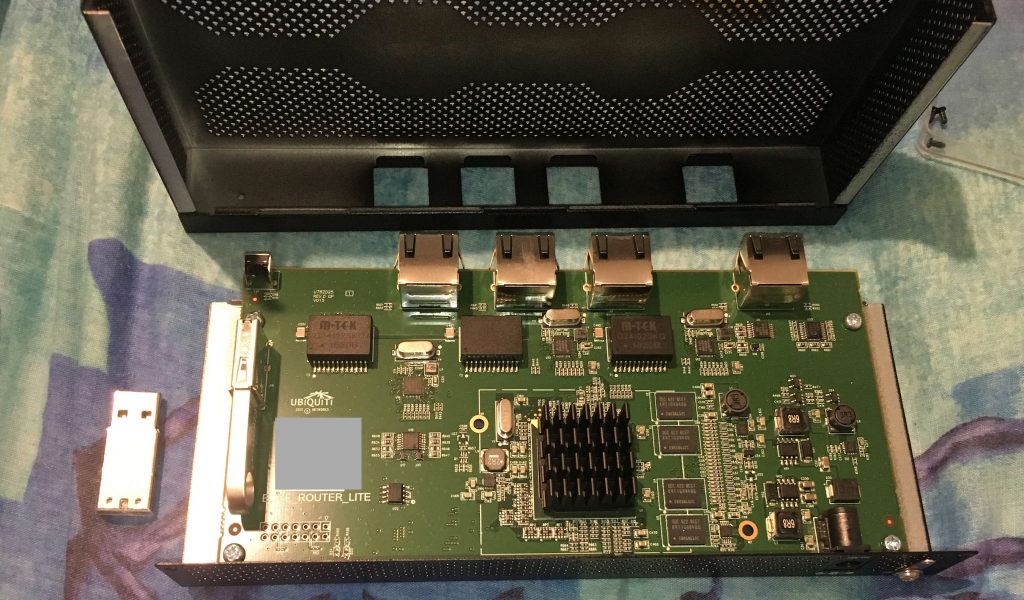
lol I mean. The ERL uses a USB key inside it
You can replace it but yeah it's not durable
nocturne harness
@vapid dune oh hmm I didn't realize it was servicable
vapid dune
@nocturne harness yeah it's just an internal USB https://web.rory.co.nz/wp-content/uploads/2018/02/Screen-Shot-2018-02-18-at-4.46.14-PM-1024x600.png
 rocky badge
@vapid dune my server boots from USB lol
vapid dune
I used to run freenas that way
the usb stick randomly died and I got fed up with it
so I switch to SSD and haven't looked back
vapid dune
I mean everything is fine until you either try to reboot or it locks up and reboots
rocky badge
vapid dune
and then you find out the install is corrupt
vapid dune
lol SD is worse
vapid dune
oh maybe two
rocky badge
ESXi is only 1GB, loads it all to RAM
vapid dune
hmm I don't think I've had my Pi card die yet
rocky badge
rocky badge
plus
the actual vms and datastores are on somewhere else
it won't allow you to use it as storage
vapid dune
I might consider switching my RPi to PXE but seems less good for my use case
I use the pi to monitor my ups and then shut down the NAS
rocky badge
I want a Synology RackStation
vapid dune
(among other things like pihole)
 waxen scroll
I wrote the initial article on upgrading an erl usb
🥰
It's not my best work but good enough
little schooner
@waxen scroll good enough is exactly what my professor likes
"yeah, let's just keep it Password 123 because what are the chances that any student is going to be destructive in the lab?"
"the best networks are ones with the least complexity."
"leave it the way it is its going to be too much work and the doctor wants this done now. We don't have time"
"forget the domain, we'll let them login to local users and install the software manually at every machine"
@rocky badge hey quick question, if I had a new http CRL update location to a enterprise CA, it only applies to new certificates issued right?
Or do I have to reissue the intermediate CA cert again and then reissue client certs again?
rocky badge
iirc, yes?
little schooner
Because the latter would be such a pain
rocky badge
to the first question
little schooner
Oh well that's good enough for me then
I just reissue the server certs
Yesterday it drove me nuts but I fixed it
I setup httpd like quick fast and it just works
I love Linux stuff that just works
Another good package is chronyd
Ntp package
nocturne harness
"the best networks are ones with the least complexity."
@little schooner Wait this is actually a good point
people over engineer and complicate stuff way too often
little schooner
@nocturne harness those were the professors quotes
To the best of my recollection
nocturne harness
No I got that
I was saying they were making a good point 🙂
As someone whos sat through a few different architecture meetings (at some non-insignificant companies), people love to create overly complicated convoluted designs, which end up being very hard to maintain and upgrade long-term
vapid dune
simple can result in convoluted workarounds too
it's a fine balance or art really
I speak more so from a dev background
hollow marlin
Too simple can cause problems, mostly when no what ifs are taken in account. Doesnt have to be complicated what ifs like additional routers/switches people never anticipate then run out of ports and need some wack af solution to implement the new equipment.
People that tend to go complex typically only do it because its this cool new toy they just learned about.
rocky badge
🤔 Should I try to get NVIDIA consumer cards working in a VM with ESXi or cough up an unRAID license....
I'd really love to stay with ESXi and VMware so I can manage it from vCenter....but I'd also like it to work
 distant wedge
Okay here's a question for all you networking nerds
I have a TP-Link Archer C3200 V1 I think it was. Router obviously. One day the router restarted and suddenly my DHCP settings were all changed. The IP Address Pool was set to 101.100 - 101.199 when it was previously set to something else, default gateway was 101.1, and my subnet mask was changed as well. Do you think it's time for me to replace my router with something else?
Before then I had all my settings where I wanted them and whatnot, but I have had this router for quite some time, and the last time a firmware update was pushed for it was around 2017. Do you think it's time for an upgrade?
 steady creek
Are there any well regarded consumer priced mesh access points that can be powered over Ethernet? I was starting to look at ubiquiti APs but some earlier conversations here suggested the quality and support (and warranty) are lacking in their offerings
little schooner
@rocky badge dang I would love to pass-through my GPU to my vm
Doesn't Linus use kvm though or something
rocky badge
unraid
little schooner
Or at home it's still unraid?
Ohh
But would you say it's easier than kvm?
Like you get paid support and everything
Worth it I think.
rocky badge
yeah
thorny vector
@rocky badge You probably already know you can do it, but its an ass pain
I just ended up trading someone for an AMD card that was more or less equivalent
vapid dune
With wifi 6e I wonder if 10gigE will become cheaper
thick minnow
this gets my hormones going ❤️ 
 stable iceBOT
 little spindle
this gets my hormones going ❤️
@thick minnow WOW
crimson trench
Warship likes hormones




 thick minnow
With wifi 6e I wonder if 10gigE will become cheaper
@vapid dune that probably will happen
tall glen
im the guy from yesterday who had problems with his ethernet cable
bought a new cable
same thing 80 mbps
but the cable i got from my isp runs normally
(around 300 mbps)
crimson trench
what cat is the cable?
tall glen
cat 5e at 10 meters (32 feet)
crimson trench
ALSO quick question for the network nerds here (I love ya all)
but what rack mountable switch with at least 24 ports would I buy? I want:
- easy to use (web) GUI
- tplink or netgear
- as silent as possible
- not getting to hot
- 1gbps on each port (if that is even possible? 🤔 )
Any recommendations? The price; as low as possible :x
@tall glen and what switch is between it?
tall glen
just my router
router is fine though, the cable i got from my isp runs fine
same ports, same router, same device
just the cable
im getting 80 mbps on the cable i bought
and the 300 mbps on the cable from the isp
cedar igloo
are there any coloured lights on the switch or pc ethernet ports? if so, what colour are they?
tall glen
let me look
router has the traditional light at the front which is green
my pc has a green light and a blinking orange/brown light
cedar igloo
that orange light should be green when its working properly. Do you remember changing any settings on your network interface recently?
- someone please step in if im going off track. just going off of little past experience i have
tall glen
i was fiddling about in the properties of my ethernet controller trying to get it work
mostly on my own
someone/people told me to change duplex settings
and i did
but still nothing helped
cedar igloo
did you revert the changes that didnt help? When i had this issue, duplex was set wrong
tall glen
i dont think so, they stayed the way they are
cedar igloo
do you know the name and model of the router?
crimson trench
Have you tried the old windows fix? Turning it off and on again?
crimson trench
Both?
crimson trench
Did you pull out the plug of the router? Like setting it without power for 5-10 minutes?
tall glen
yes
cedar igloo
If you have this page in your router settings, can you let me know what the link duplex is set to for your port?
tall glen
now, you see
i dont have a login
its locked
i've tried every possibility
admin admin
technicolor
admin
crimson trench
So you haven't done anything to the router? (settings)
tall glen
no
cedar igloo
try no username and password "default"
tall glen
nothing
charred meadow
Try
"username": "admin",
"password": "technicolor"
Then try to use the modem with another device that should have the full speed, if it's better, then it's a windows misconfig
crimson trench
Do you have any other device (laptop?) that has 1gbit ethernet?
charred meadow
Some routers have the password on a label attached to the device.
crimson trench
if yes, then use that to test the speed, if the speed is faster, then there is a misconfiguration in your windows
tall glen
@crimson trench i've determined that it's the cable im pretty sure
but they're the same types of cables
i got a cat5e from the isp which works fine
but i've bought 2 other cat5e cables which limit themselves at 80 mbps
cedar igloo
i cant read. last suggestion, no username, no password?
tall glen
@cedar igloo nope
@charred meadow doesn't have any info on the bottom
it only has a serial number, mac address etc etc
no login info
my isp doesn't let customers log into it
translation: Due to the provision of services depending on the specific configuration of the modem, Vectra does not allow configuration access from the device level.
To configure the basic parameters, i.e. broadcasting channel, password or network name, use the panel on the page
(vectra is my isp)
and the only settings available to change on the website they give is super basic
name, password and the channels
crimson trench
I'm pretty sure it is your pc 🙂
tall glen
why does the cable not work on the laptop then?
crimson trench
Do you have by accident a cable tester?
 wary sequoia
so, i have a router provided by my ISP. it doesn't cover the house enough, so we're thinking of swapping over to a mesh system (specifically, this one: https://www.amazon.co.uk/Tenda-Nova-Coverage-Ethernet-Configured/dp/B07CTKHRG8/ref=sr_1_4?dchild=1&keywords=tenda+nova+mv3&qid=1590588307&sr=8-4) will this replace my current router, or will it just be an addition?
cedar igloo
depends on your current system. with mine, i needed the original router to act as a modem, converting whatever cable it was to an ethernet cable which the new router supports
wary sequoia
so i have the singular router/modem combo, which connects to the wall directly
so... i'm assuming i'd run an ethernet cable from my current router/modem into one of the mesh thingies
then whack the others in other places around the house and then i'd have to do the app work?
so this is a terrible picture
cedar igloo
thats what i would have thought.