#networking
1 messages · Page 185 of 1
 waxen scroll
last place i worked had over 40,000
go there, type 10.0.0.0 , put 8 as netmask, put 10 as "move to"
it makes it easier to keep breaking down subnets
 oblique aurora
i looked online at these calculator, but we do it with pen and paper(to think for ourselves)
 craggy parcel
Good way to learn, not the way most people do it in the real world. 😉
 little schooner
You learn it for the exam really
But if you remember the strategies it will be simple to do mentally
craggy parcel
Well, in most real world scenarios you have tools to help you, but it always helps a lot to know, how the tools actually work, especially if you happen to stumble upon a buggy one. 😉
 hollow marlin
I agree with Xeon and practice with bit values and avoid tools. A few hours and you can do it in your head in a few seconds
waxen scroll
this actually reminds me of a funny time
@little schooner i worked at a company with a massive network and the datacenter had a major issue one morning
naturally the first question was OK, what can we reach?
try to go to sharepoint where all the diagrams are with the IPs and hostnames.... its down
queue going to the datacenter and plugging in serial lol
craggy parcel
@waxen scroll That's why we keep important documentation somewhere, where they are reachable without network access. 😉
little schooner
@waxen scroll it's very important not to forget the basic tech that is basically bulletproof in disaster situations
Also the whole virus thing brings into question how ill prepared the cloud is for the entire world
 severe wigeon
 bold karma
Getting 13 usable outward facing static IPv4 IPs on Saturday. What’s going to be the easiest and best way to manage these IPs?
craggy parcel
Excel?
bold karma
I guess ultimately I need to know if I’ll be able to just plug any IP in as a default gateway for a router, or set it up as the ip for any server without any special hardware first in place.
craggy parcel
It all depends on how they are delivered.. If they are delivered at DHCP addresses supplied by your ISPs network to whatever device you connect, then no.
If they are supplied as a routed subnet, then it depends on what IP you give your router.
But 13 IP's seem like a strange number if it's a routed subnet.
bold karma
The actual count is 16 but only 13 usable
craggy parcel
Then it sounds like a routed subnet, a /28 to be exact. Usually only 2 IP's are subtracted, that is network and broadcast. If your ISP says only 13 are usable, then they have already used one for the router, and you should ask them which one (Usually the first of last in the range, but that's just a convenience rule, more than an actual requirement.
bold karma
Ok. Thanks.
little schooner
I use phpIPAM for managing addresses
craggy parcel
Also you would need to set a netmask that fits a /28 (255.255.255.240)
little schooner
Works really well
craggy parcel
But overkill for 16 ips. 😉
I managed what would be close to a /25 in excel once...
Then we got a /22, and started subnetting, and needed something more useful, now we're using nipap
 mellow heart
Sorry about the noob question, but I have very little knowledge in networking.
I just got a new computer, but found that it can't seem to handle multiple downloads at once. For example, downloading a game in Steam and trying to play or watch twitch during that time makes for a bad experience. This isn't true when I use my laptop hardwired to the same router so I wonder if this is something that can be fixed. The laptop can handle everything without problems and automatically prioritizes twitch or a running game over downloads
oblique aurora
limit the download speed in steam
mellow heart
That's what I did for now, but I want this to be automatic like it is on the laptop @oblique aurora
oblique aurora
depending on specs...
little schooner
@mellow heart well what are the specs and your internet speed?
oblique aurora
twitch on full rez?
mellow heart
This shouldn't matter cause on the same router with the same connection this isn't an issue on the laptop (gaming laptop)
but I have 100/100
little schooner
Okay. Did you try updating the laptops wifi drivers? Any UEFI updates available for the laptop as well?
Start with that and if still problem, then maybe try using a new wifi card
mellow heart
The laptop is the one that works
I tried updating everything on the Desktop
The laptop is connected via ethernet (same cable and port) to the same router
bold karma
Is the the NIC in the desktop a 10/100 or is it a 10/100/1000?
mellow heart
Oh... Ummm idk
I have an x570 Aorus Elite
On the Amazon product page they state Intel Gigabit LAN
Did I make a mistake getting the none WIFI one?
craggy parcel
The laptop is the one that works
@mellow heart The laptop, probably being lower spec, might choose a lower stream quality, leaving more bandwidth for everything else. While the desktop machine, chooses higher quality, not leaving as much bandwidth for other downloads. It's also possible the disk in the laptop limits the download speeds, however, most laptops with SSD's less than a few years old should be able to keep up with a gigabit connection, without problems.
Did I make a mistake getting the none WIFI one?
@mellow heart Not choosing wifi can NEVER be considered a mistake, it's a wise choice. 😉
mellow heart
@craggy parcel - The laptop is fairly high-end as well. Intel i7 9750H & 2070 with an NVMe SSD while the desktop has a SATA SSD
This is also not the case most likely cause this problem is present when both computers are forcing the stream to 1080p 60fps
On the laptop is works great
On the desktop it chugs (unless I stop the download or artificially limit the download speed which is a solution, but I want it to figure things out automatically so I don't need to keep enable/disabling the download limiter
I'm like honestly going nuts worried I didn't get the WiFi version 😦
craggy parcel
I'm like honestly going nuts worried I didn't get the WiFi version 😦
@mellow heart What should WiFi change?
mellow heart
- This is more of an irrational thing of why didn't I get this if I could
- It would add Bluetooth to the computer which could be useful, and if I can do that now without adding additional dongles, why not?
craggy parcel
I can see why you'd want bluetooth, but not wifi. 😉
Anyway, the reason could be a lot of things. Best bet is to try to open the performance tab of taskmanager, while doing it, and see if anything is maxed out.
Also compare the results to the laptop, for a reference.
mellow heart
Will do
Thanks for the help
❤️
The performance tab isn't helping me
Cause I know what the issue is, windows isn't adjusting the download speed when I have other things (like games and streams) running at the same time
So what should I compare?
Like right now I'm downloading a game, and the Twitch stream keeps lagging
Instead of lowering the download speed slightly (automatically) it is downloading more than it should and the stream suffers
craggy parcel
Hmm.. Check the background download option in steam. Might be set differently?
mellow heart
I checked and the settings are the same
craggy parcel
Ok, then I'm out of ideas...
But I'm pretty sure, it's not windows that decides what traffic is important at what's not.
 stuck night
Guys, I think a miracle has happened . I live in the middle of nowhere and when I was coming back home I saw some guys going away who just finished some work with an orange cable. They left it under my fence.
I WILL HAVE FIBER INTERNET. That will be an upgrade from “LTE” limited data plan
waxen scroll
sorry to burst your bubble
fiber internet is yellow
the orange stuff is for phone line over fiber
hollow marlin
No Telco I know of would waste fiber for only voice. You can get drop fiber in Orange which this looks like but it's typically black to not be such an eye sore.
It might be 12 strand drop fiber but without seeing an end it's hard to say. Never seen that type of shielding before
craggy parcel
the orange stuff is for phone line over fiber
@waxen scroll Probably depends on the company. Our fiber at work is orange.
 dire flare
Orange coat is multi-mode, right?
That should still be perfectly fine for a last mile FTTH application
craggy parcel
I think that's the general rule for premade patch cables, but it's not like rules are never broken. I've seen lots and lots of orange fiber cables run outside, however, never seen a single yellow, even though telecoms usually use single mode.
 primal ice
yeah all the underground fiber runs in washington state by verizon/frontier/northwest fiber are orange cables.
stuck night
@waxen scroll my neighbor who was in her house, told me that some guys were installing fiber optic internet cable for Poland's only-providing fiber service ISP. @dire flare you're most likely right. My house is at the end of one way street.
hollow marlin
@dire flare mm is not used in the field. It's has too short of a range.
 strange silo
@hollow marlin To me it just looks like a reel of push rod for checking ducting is clear, looks very similar to ones I've used
craggy parcel
@dire flare mm is not used in the field. It's has too short of a range.
@hollow marlin 500 meters or so?
hollow marlin
It's around 300m. Also with PON your fiber run multiple miles to reach all the different customers. It's not reasonable to deploy. Plus CSFPs are only SM
You could manage with AE but as a standard we dropped MM altogether. It's not worth the trouble for pennies more for SM
strange silo
I don't see the point for MM in that kind of networking, the cost is so much lower on SM now and you can get SM optics that don't require attenuation at short distance
I've got 10 or so 10Gb 10km SM SFPs with maximum receive power high than maximum output power so I can use these in pairs perfectly safely, used to be one big reason you didn't use SM in short distance because it actually was a pain to do so
 half valley

little schooner
I know that this pandemic will prevent me from getting that paid internship secured during the summer
but thats why we have plan B
waxen scroll
Xeon nooooooo
little schooner
@waxen scroll what else should I do, eat packets on my network?
I actually started taking some long walks since it started
boy does it ever feel so nice :)
half valley
@little schooner just be careful you don’t overwhelm yourself and eat UDP flavors, unless you’re good at balancing
little schooner
I didn't know how to react to this
half valley
ooops 
little schooner
but good one though
 floral geyser
can someone help me setup this Dell R710 server?
little schooner
@floral geyser what did you need to setup on it?
floral geyser
unraid mostly but its not detecting my wd reds
my brother bought it like a year ago, tried, failed, then just gave it back to me and told me to actually try so i am now
little schooner
@floral geyser ahh. You need to setup the Dell servers hard drive using the built in raid controller software during POST
If you want the drives to appear in unraid to partition
little schooner
Yes unraid will set it up in the end
floral geyser
ok so like
little schooner
But the way hard drives connect in dell server, you need to create virtual disks
First
floral geyser
teeacchhh mee
little schooner
Let me see if there is video
floral geyser
theres video out
i can boot into a unraid install media
but obv i dont want to go there
little schooner
No, it's something you have to do before you boot into unraid setup
Search dell raid configuration r710
In YouTube there bunch of results that should help
1st one even
floral geyser
the video out is also shifted over and is cutting off the far left of the screen
reallly annoying
little schooner
And after following that, you basically want to create all single raid 0 disks (to make them appear as single drives)
https://youtu.be/EPe0BOJDMcA @floral geyser

Please follow the instructions on the video on how to configure the RAID on PERC6i Controller. This guide also works on any server with a Dell PERC6i/R Controller such as; Dell 2950, 1950, R900, R410, and R310
If you are interested in purchasing an R710 Server please visit our...
Doing that will then let you manage them with software raid in unraid
little schooner
You have to reboot the server and during Post you watch the monitor for the prompt to press the key combination
floral geyser
can i fix this stupid image shift first though
little schooner
k
floral geyser
it blocks like the first 10 chars or something
"er login:" something or other
how TF do i change this resolution
@little schooner during boot i see "RAC6 Config" but there's no key combo i can see
so this video "tutorial" thingy.. yeah,
There's NO post message for a "PowerEdge Expandable RAID Controller BIOS"
Avago Tech MPT SAS2 BIOS??
little schooner
Sorry I had to step out
But I still need to step out again
Thr login should be like username: calvin password: root
I think....
Google helps here
half valley
there's a 6 (ok 10 but might not need all of them) part r710 tutorial
i found
https://www.youtube.com/playlist?list=PL28eVGz5vFQ9hUBeeg5bxj-s0IeitoGIb @little schooner @floral geyser

YouTube
This is a series of videos show casing how I build up a Dell PowerEdge R710 server for use with software storage technologies like ZFS, FreeNAS, unraid, or o...
 raw timber
https://www.reddit.com/r/techsupport/comments/86brdj/my_isp_blocks_access_to_router_login_page/ wow some people are unlucy
reddit
44 votes and 100 comments so far on Reddit
our provdeir you can use yourown rout you just on the your own for suport with it of course
and be able to look at log in for wifi on the websit doint work
 thin estuary
 surreal finch
nice setup
dire flare
clean
 rocky badge
@clear igloo 😦 10/100 IoT
 clear igloo
rip @rocky badge
rocky badge
 raw timber
That big
Mine is one router a switch and a sever and switch upstairs with a access point
waxen scroll
2.4ghz IoT is just as bad
little schooner
@thin estuary neato
 thick minnow
so my SMB share (digitalocean droplet) is accessable from every network ive tried except my home network, does anyone here know if theres something about Linksys routers that causes this?
little schooner
@thick minnow did you check it's firewall setting? Maybe it's blocking it. I know for an arris combo router, they have firewall profiles that block both inbound and outbound connections
In addition, some ISPs may have blocked specific ports because your not supposed to do smb over internet
There are exploits available for that and Microsoft recommends strongly against that
 jaunty talon
Yeah, any decent ISP will block SMB over WAN. The correct way to do that is to setup site-to-site VPN between digitalocean and your home! :)
thick minnow
that what i was worried about, thanks guys
hollow marlin
We don't block certain traffic . Customer is paying for a connection and we have no say how they use it.
thick minnow
Can anyone help me out here?
Wifi jumps from 50 to 100 mbps to less than 0.10 mbps and even sometimes requires me to reboot my laptop and my phone continuously thinks there is no internet connection. WTF is going on?
even the rdp connection to my server is screwed up
little schooner
@hollow marlin Comcast blocks my internet when it thinks there's a botnet active
But I guess that's not the same as blocking a service
thick minnow
even switching my DNS to cloudflare doesn't do it justice. The bizare thing is that my wifi is coming up with all 5 bars so the connection is apparantly strong
half valley
yes but trying to solve wifi speed issues are a lot of variable interferences since it is basically jumping all around 
how close are you to the router, do you have any thick walls if you are on the other side
what frequency are you connecting on
thick minnow
Router is underneath the stairs and i am upstairs in my room with a windows laptop
I need to use 5ghz since i often connect to a cloud gaming service, namely GeForce now but soon to move to Shadow Tech
hollow marlin
@little schooner yeah different than blocking a service altogether. We do have an IPS for attacks but will never block a service outright.
thick minnow
right now on 2.4GHz but that is unacceptable when it comes to using GeForce Now and soon to be Shadow Tech
hollow marlin
@thick minnow you should be checking if a particular device is actually using the bandwidth. Typically when people have to reboot all devices, one of them is the cause of the issue.
little schooner
@hollow marlin I had a classroom network problem in the lab I support and the cause of it was on one server having a failed storage space.
The server doesn't even host active directory but it was enough to cause login problems and slow internet. All of which didn't make sense
Shutting it off fixed the problem 100%
Until we had time to replace drive
half valley
oh wow
thick minnow
now connected to my phones mobile hotspot, if this is more stable I am getting that £25 plan with infinite data.
half valley

thick minnow
instantly getting about 20 down and 10 up. I might as well forget my AP at home and just use this.
dire flare
If only a physical copper transfer medium existed for connections that require reliability
Also in a corner under the stairs is just about the worst possible place to keep a WiFi AP
waxen scroll
@hollow marlin RIP you. IPS is the worst
ive had a few "its not the network" arguments with server people and it turns out an IPS was doing the needful and obviously in packet captures you cant tell
hollow marlin
@waxen scroll We scaled it back to only DDOS and reflection attacks. It was a nightmare getting it to not flag almost all traffic
waxen scroll
i never had access to the thing so it was always a last resort to check it
hollow marlin
Yeah we had to implement one as the last time we had two significantly reflection attacks 2 days apart which wrecked our network. Still flags false positives every now and then but not enough to become a problem
 bleak inlet
anyone here using the Telus SFP module with pfsense?
bleak inlet
I just spent two and a half hours on the phone with Telus trying to sort out damn wifi issues with their crap-tier routers. They have no clue what's going on. Two different routers, speed tests get between 0.6 and 30 Mb/s down and random up, but on Ethernet I get 780/780 consistently
So I'm thinking pfsense with a wifi extender again
 fervent brook
What does Telus do?
looks like an ISP
why would you buy networking equipment from an ISP?
 charred meadow
They're a Canadian ISP and cell phone provider.
@bleak inlet What I have is my ISP's router in bridge mode going into my pfsense router. So no need for SFP.
hollow marlin
@bleak inlet so are your speeds with wireless the issue?
 hearty steppe
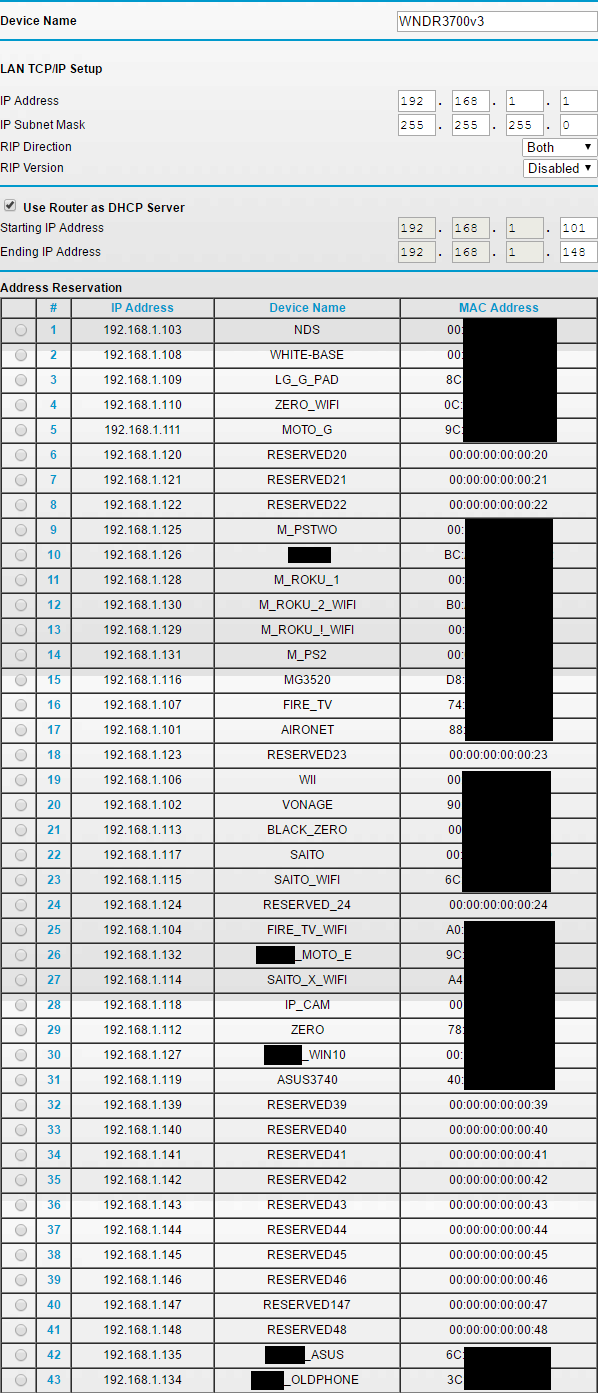
maybe someone can help me here. can i restrict traffic on 3 devices from seeing my network? I have three security cams and i want to make sure a "Bad actor" cant just plug in a laptop to my camera location and gain access to my network. Ideas? or should i just get a small business firewall like fortinet? I have a XR500 Nighthawk
fervent brook
find out what protocols the cameras need, block all others
hearty steppe
oh thats cleaver
fervent brook
in non-consumer scenarios, you would tell the switch to only accept connections from the mac address the camera has
hearty steppe
yeah i could easily do this with some of the equipment at work but im not so sure i can do it with this router
so i might be looking into an upgrade haha
fervent brook
how much time do you have? and how many other users do you have?
what about using DHCP reservation?
hearty steppe
This is my home network so its just me and a roommate
fervent brook
and limiting the number of available IP addresses in the pool
hearty steppe
oh i see limit the adding of new dhcp
i hate consumer routers ugh
if this was cisco or forti id have no issue doing this task 😦
fervent brook
 clear igloo
@fervent brook Just a small correction but in most scenarios you wouldn't do sticky mac since that's easy to bypass in a lot of cases especially when you have a camera with the MAC likely printed on it, you would do 802.1x authentication instead and no MAB on the ports
hearty steppe
yeah you're gonna be strapped to do 802.1x in a consumer environment though
clear igloo
Oh most certainly
hearty steppe
i have 802.1x i configured at work using ruckus and a radius server + AD
im thinking at this point of just picking up a unifi switch and run a controller for it on my nas
that way i can restrict traffic but that doesnt help my garage situation
i have a network extender out there
clear igloo
True, in your situation not a real easy solution for that stuff 😦
aside limiting the DHCP pool or something perhaps as mentioned before
hearty steppe
yeah im going to have to plan a careful upgrade eventually
not that i am really worried about such an invasion here but
best to be prepared
clear igloo
Yup
hearty steppe
having a camera system in the first place is a big move so ill get there
ideally if i can burry a cat6 to my garage i'd be golden
add a managed switch
boom
clear igloo
yah
hearty steppe
thanks for the ideas peeps
fervent brook
has anyone ever made a low profile rj45 spec?
 mild turtle
I appreciate this is going to be a stupid question but I still want to ask it.
Does any router or modem work with Ubiquiti Networks products?
Will I run into any problems? I already own a modem but have been looking at getting some WiFi solutions from them.
waxen scroll
no you wont
 fast gate
I think this is the right place
I have a ipv6 /48 and I am announcing the same ip 5 Vultr servers (dallas, chicago, sydney and 2 in paris) in hopes to create an anycast network (I am aware that an entire /48 for 1 ip is a bit wasteful). Because my isp is fat and doesnt support ipv6, I am using cloudflare to proxy my connection so I cant actually see my test page.
The idea is that you get routed to the closest server to you, even if one goes down. If i manually kill paris2, you'd assume I would be routed to pairs1 but cloudflare spits a 521. Its almost like cloudflare locks onto a server and wont look for a new one if it goes down. The same goes if I kill any other server, cf wont route users to another server it just provides a 521
bgp config is the same on all 5 servers
router id *Instance ipv4*;

protocol bgp vultr
{
  local as myas;
  source address *Instance ipv6*;
  import all;
  export filter {
    if net = *my /48* then accept;
    reject;
  };
  graceful restart on;
  multihop 2;
  neighbor 2001:19f0:ffff::1 as 64515;
  password mypassword;
}

protocol static
{
  route *my /48* unreachable;
  route *a /64* via *Instance ipv6*;
}

protocol kernel {
  device routes;
  import none;
  scan time 15;
}

protocol direct
{
  interface "dummy*";
  import all;
}

protocol device
{
  scan time 5;
}```the /128 for each server is announced through a dummy interface
the real question here:
is it cloudflare doing funny business or have I somehow missed an important step
I have had people test it in sydney, dallas, chicago and toronto and they all get routed to their nearest server, so that part works its just the redundant bit that has dipped
waxen scroll
cloudflare caches doesnt it?
waxen scroll
have you tried keeping the route dead for a while and testing later?
propagation is usually slow
also if you're turning it on/off some devices damper BGP advertisements that flap
i had one provider blackhole for up to 5min
fast gate
wait this could be the fatal flaw
my test site is a simple static express site and i just ctrl+c to kill it
let me actually kill bird
still no joy
little schooner
@waxen scroll not sure I understand what these linux questions are trying to get at?
@craggy parcel what do you think about those questions?
fast gate
Chicago is the only server running, a page load test from Vancouver displays the site but I get given the usual 521
I have killed bird on all the others
waxen scroll
- is a runlevel question
- shutdown command message question
2c ... a phone call?
d. keep personal shit outside of the office
😄
fast gate
cf development mode is on
i have a page rule to bypass caching on literally everything
i love cf but i dont now
waxen scroll
i dont know anything about cf, but it sounds like your routing is fine
waxen scroll
@little schooner when you override the runlevel in GRUB or LILO to single user, you basically get dropped to a root prompt with no login needed
fast gate
shame I cant get instant failover if something commits die
waxen scroll
it wouldnt be instant anyway, it would take some time for the internet route tables to refresh
little schooner
I meant for question 2
oops
sorry i didnt read the chat above
lol yeah these are funny ones
the author is having fun.
waxen scroll
these questions might be traps
they can all be answered as a delayed shutdown command, however i dont know if the author expects you to use the MOTD for the long one
OH
i just remembered
C is probably the wall command
i havent used that in YEARSSSSS
@clear igloo
🤔
clear igloo

waxen scroll
i want it
little schooner
@waxen scroll wow that looks pretty
i should show that to my 2year school prof
@waxen scroll I wish sentence structure wasn't so hard to grasp.
waxen scroll
@little schooner he wont pay
its like $200/yr and you need a good computer to run it
little schooner
well, he got more grant money last month. He ended up buying 2 more 12k servers i think....
Its in the 10k range
waxen scroll
he got money with the virus going around? wowwwww
little schooner
last month yeah
he messaged me the approval before all the things closed down
Funny enough, it had items in the proposal that we asked for last year in october
They take a long time
I haven't communicated with him recently, just been minding my own stuff
@waxen scroll but he's still a cisco trainer for the new ccna so
maybe he'd be interested
little schooner
@waxen scroll hows this for the answer to question 2b
waxen scroll
thats cute
little schooner
hopefully my prof for linux class likes it
 dusty ore
anyone check out any unifi switches and routers?
waxen scroll
ask @rocky badge
rocky badge
👀
waxen scroll
i only run non-unifi except for wireless
 sonic notch
What is a good and/or budget Wi-Fi setup for a 4000ish sq ft 2 story house? I am planning on routing ethernet cables, and I have a few Wi-Fi 6 clients.
mild turtle
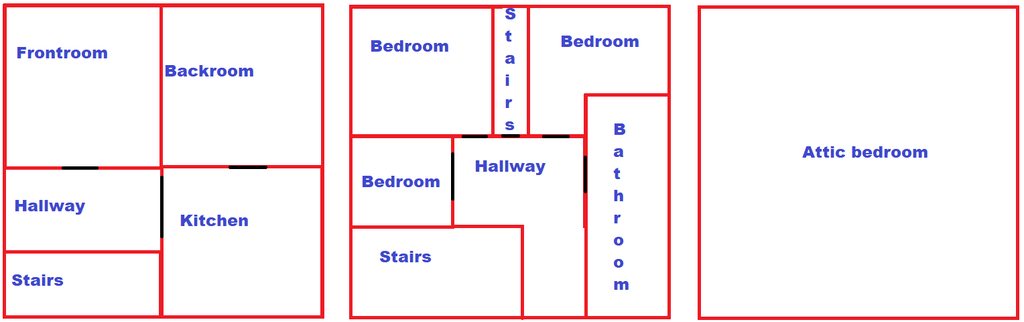
To keep a story short I have been considering Ubiquiti Networks for my wifi. We're currently using the generic ISP router but lately I've just been having various different problems with it. I stumbled over Ubiquiti Networks about a month ago and have been interested in them since. I'm unfamiliar with them and I hear that their UI is way more user friendly than it use to be. To the point. We live in a three story brick house. Downstairs, upstairs and a converted bedroom attic that is insulated. From what I have seen Ubiquiti Networks products use ethernet for connection so I am thinking I'm going to have to connect it in the backroom which means the signal will have to travel slight further. I was hoping you guys could give me some insight and help me make a decision. I know some stuff about networking but honestly not a whole lot and I'd like to improve that. I'll draw up a really shit sketch of what the house/room looks like so you get an idea of what I need. The black is to identify where the doors are and where the signal can travel. https://imgur.com/a/1nxVfZz
 mild turtle
Because of the time delay of no answer, which I understand, can whoever decides to answer if anyone does tag me please.
dusty ore
i saw their latest routers and switches, and they really look nice
they do have mesh enabled wifi hotspots, but also pretty good access points, from what i've heard in reviews
rocky badge
@mild turtle you can wireless uplink UniFi APs if you want
But yeah, they require Ethernet at least for PoE
dusty ore
but the best way to figure out the range of wifi signals would be to use wifi analyzers i believe
rocky badge
Depends on walls/construction of house/APs/nearby etc
rocky badge
Not the best way to mount these but oh well lol
my UniFi rack is messy lol
@bold shore's is better than mine :/
dusty ore
our house is being re constructed so i have time to plan lol
 bold shore
Oh shit we showing racks?
rocky badge
just 6 runs lol everything else is down near the rack
 ebon wasp
@rocky badge When I am finished I will be more messy
dusty ore
i'm thinking of having cat 6a through out the house and then going to a patch panel, from the patch panel they would lead into the switch, then the switch would be connected to the router through a 10gb sfp+ cable
bold shore
Don’t mind the cell backup, I still have yet to mount it yet lol
dusty ore
then from the router i would have another sfp+ cable going to their new camera storage rack, and then their power system
bold shore
Yeye, the OG Rev 3 first EA batch haha
YES I NEED TO AHHHH
I’m waiting for the USW XG Gen 2 switch with LCM
And an XG mini switch that isn’t the XG6 POE because FUCK it is expensive
dusty ore
i think you can order if if you're in their beta
rocky badge
I want the UXG Pro lol
bold shore
Oh I am in EA
rocky badge
Same lol
dusty ore
same
dusty ore
but yeah, i'm thinking of an all unifi setup with their cameras as well so it's managed through one application
their 1440p ones cause the 4k are expensive lol
rocky badge
I mean, 720p/1080p is fine 😂
dusty ore
I should add a 10gb network card to my pc tbh
dusty ore
i zoom in a lot lol
rocky badge
 dusty ore
i only got a 1g link lol
even though my mobo supports 5gb max, but canadian network providers suck
rocky badge
dusty ore
and charge a lot too
rocky badge
LC multimode om3 from the wall 😄
rocky badge
my GPU hides the green pcb card
dusty ore
rgb does too lol
rocky badge
yup
 fallow frost
You can do 10g between two computers independent of your link speed, can't you?
dusty ore
that's if your network card supports a 10g transfer, and the network media has an influence as well
bold shore
Imma get that juicy 10GB soon
rocky badge
you need NICs that support 10 gig
bold shore
Blob, we should petition for LMG to get a USW Leaf once it is GA
rocky badge
fallow frost
I know you need nics that support it, but if both your nas and pc had a nic, you could do it
rocky badge
look into dat laser
dusty ore
yeah, but a pc isn't going to be directly connected near a nas
rocky badge
@bold shore lmao, they won't because REEEEE it's too expensive 😂
rocky badge
lmfao what that's what they paid for it?
dusty ore
your pc would likely be connected through a wall port and then sent through a switch
bold shore
Yeah that's what they said when they put it in
bold shore
I was like "DAMN that's a lot of money for a switch"
rocky badge
That's the big kicker
rocky badge
because the USW-Leaf is cheap but transceivers aren't
bold shore
But, the USW leaf can do cooler stuff
rocky badge
yeah
rocky badge
Iirc they only have UniFi for wireless?
bold shore
They took out the Cisco AX ones
 bold shore
After the video I saw them in the ceiling and said "they couldn't stay away from UniFi"
rocky badge
What next, Aruba?
bold shore
Haha
rocky badge
Ruckus?
bold shore
They need to get their entire network Unified
rocky badge
the UDMP/UXGP can probably route better than their pfSense
bold shore
But once the UDM XG or UXG (XG?) comes out they should switch from pfsense
I know they have 10GB, so UDMP could not do that with IPS/IDS
But the UDM XG and UXG XG probably will
I will laugh my ass off if they have a UXG XG
 bold shore
What dat?
rocky badge
3CX pbx
bold shore
Ah
rocky badge
@bold shore It works :D
bold karma
3CX is pretty easy to deploy and maintain
 rocky badge
because I have some physical 10 gig clients
 dense karma
would i be able to drop a networking related freenas question in here?
fervent brook
find out
fervent brook
Is there a good serial terminal program for windows 10?
I use Putty, but someone said it's not good
charred meadow
I used Tera Term the other day and it worked well.
charred meadow
If it works well I don't see any need to change tools.
fervent brook
because someone said putty was not good. so it must be true
jk
time to play with this router for 5 minutes, then never use it again
i wonder what the status LED on the Console port is for
maybe load?
oh, it's the power LED
do the weird blocks mean i missed some data?
im no linux person...but i think this router is literally running on Linux
clear igloo
If you don't mind paying then SecureCRT is best imo 🙂
But if you only have a handful of devices then it's not worth it, when you've got hundreds, SecureCRT all the way
fervent brook
why does it seem like there are concurrently v1 and v2 versions of ubuiquiti's router firmwares?
"EdgeRouter ERLite-3/ERPoe-5 Firmware v2.0.8-hotfix.1 Firmware 2020-03-10"
Maybe there was a hotfix for the new virus
little schooner
I use royalts for managing different devices and it's been pretty great.
fervent brook
oh, cool. it looks like this thing might have a use
i can use it to add a failover WAN
i think
 river forge
hey - I'm looking into building a home lab and trying to figure out a few things. I made a post in the forum https://linustechtips.com/main/topic/1169643-advice-on-home-server/. Do you think that a used R710 would be a good option for what I want?
Linus Tech Tips
Hi all, Im trying to get some advice on how to build a home server. My main question is whether I should combine a NAS with a separate home server to get to my ideal solution or whether it would be better to have everything stored in one machine and then use VMs to create each...
 warm estuary
I have a problem with my ethernet network car it is showing 100 mbps but its capeable of 1gb
fervent brook
reseat the connector
 edgy pasture
I am looking to run 10g through my house
Is there a difference between cat7 keystones and cat6a?
little schooner
Cat 6a if you want 100m, otherwise CAT6 should also be fine
Cat7 isn't a real standard
You could argue that cat6a is well shielded to not need CAT7
craggy parcel
@waxen scroll not sure I understand what these linux questions are trying to get at?
@little schooner They are nice questions, but the way unix like systems are used today, maybe not very relevant. 😉
clear igloo
@rocky badge Nice 😄
warm estuary
I found that my cat 7 cable isn’t working properatly how can I fix it
I do not get higher than 100 mbps on my pc
 wary blaze
After months of working, at complete random, my network drives disappeared despite they are still being shared. What should I try doing to get them back? https://gyazo.com/50dc2c86c6fb0527ef3de084ec8de473
 waxen scroll
you should probably actually map them as drives and not depend on windows to autoscan devices on the network
my observation is network directory like that isnt reliable
@clear igloo hows your work from home? how do you lab
clear igloo
I open lab case and say "move the things" and then a lab monkey moves my stuff
waxen scroll
😮
clear igloo
Other than growing insanity though, I think it's going good twitches
sonic notch
What is a good and/or budget Wi-Fi setup for a 4000ish sq ft 2 story house? I am planning on routing ethernet cables, and I have a few Wi-Fi 6 clients.
wary blaze
@waxen scroll sounds like a plan. How do I map them though?
I don't really get any options. https://gyazo.com/bd8d6c0c8aff92189f7c34db316ed4a1

weird its supposed to show pcs there
wary blaze
but by default I've seen other people have a list there
hmmm
but even it doesnt see my own pc
waxen scroll
dunno. it works like crap on all my networks... i even have ghost PCs from other people stick around in the list when they're long gone
wary blaze
is it possible something is wrong with my router/modem? Because all of this worked just fine for me for months and at random now no longer works.
I didn't mess with anything either, just one day it no longer worked xD
waxen scroll
is it possible the workgroup names arent the same across all devices?
wary blaze
they are all running the same image of windows (all 3 of my pcs)
and it all worked perfectly fine for months until last night.
now no computers on my network are able to share drives across LAN
(as of last night)
something is going on with my network for sure because everyone else's can discover their pcs

that's not mine, just an example.

oh yeah something is messed up alright
sonic notch
Is it possible to run ethernet inside the walls of a 2 story house without taking off the walls?
 spare bay
you dont have to take off all the walls
but you'd have a lot of difficulty doing it without poking some holes
thick minnow
hey guys i have a question would love some feedback for the best setup currently im running netgear setup heres the list of models im currently running
-currently running comcast gigabit plan
-Arris SB8200 "dual wan output"
-Netgear ProSafe FVS336G "dual wan input 4 gigabit port VPN firewalled"
Port 1) Netgear Nighthawk Router setup as Access Point (used for streaming to 4 tv's)
Port 2) Netgear WNDAPP360 Prosafe Access Point (general wifi)
Port 3) Netgear Prosafe GSM7224R ( UNRAID SERVER,Gaming PC,4 port switch for PS4,xbox one,nintendo switch,smart tv. , work pc)
thats my crazy setup 😄 but the goal im trying to achieve is i want a reliable network "good firewall simple port forwarding and no bandwidth loss"
my current issue is this vpn firewall has throttled my bandwidth to maximum of 80 down and 40 up and thats with all the vpn firewall settings turned off
help me out with a good recommendation please and for the unraid setup i have 3 1 gigabit enthernet connected and planing to put dual sfp+ nic into it and have it connected into a gaming pc and work pc via sfp+
 ornate jungle
If the issue is that your current VPN limits your bandwidth, simplest solution is to switch to a VPN that can support your full internet line speed.
thick minnow
the issue is the LAN-to-WAN Throughput max is 350mbps
and this is my connection speed
ornate jungle
Righto, bypass all networking gear and connect directly to your modem, then re-test.
Then re-add networking gear one by one until you find the piece causing your slowness.
 heavy cedar
Hey (sorry for interrupting)! I have a solarflare 10 gigabit network card in my desktop computer and when testing from ram disk to ram with samba I could only acheive a few megabytes over 125. Is this a problem with my fiber card or sfp+ module overheating (I don't have very good case airflow) or my fiber cable bending at too sharp of an angle somewhere (multimode com3).
thick minnow
i know for sure its the Netgear Prosafe FVS336GV2 cause i went straight to the 24 port switch and my bandwidth went 950 mbps down and 300 up
ornate jungle
Boom, there's your problem. Time to check configuration, factory reset, or contact the manufacturer.
thick minnow
i got it i know its the router im going to return it but the question is that what would you guys recommend for a replacement cause i had a linksys rvs4000 and i had a similar experience bur my down was 400 and 100 up
heavy cedar
Fixed it, it was Windows limiting my 10gigabit card to 1gigabit because I was also using a 1gigabit copper card for my home network
ornate jungle
cxdave1 to be honest, I'm not familiar with the enterprise space beyond UBNT's EdgeRouter gear, and usually stick with higher-end consumer routers that can run a variant of OpenWRT.
thick minnow
which one would you recommend @ornate jungle
heavy cedar
cxdave1 I would recommend (if you want to get a bit more advanced) the unifi dream machine pro (and unifi controller on a raspberry pi) because it can handle 3.5gbps with ips and without ips 10gbps. Costs $500, but for that money you could potentially buy a server and (dell r420 or r430) and install pfsense on it.
heavy cedar
the usg pro 4p is also a good option, but can only do 200mbps (for me) with ips and dpi on
ornate jungle
What MartinIAm said cxdave1 - Tom Lawrence of Lawrence Systems (along with another channel called Crosstalk Solutions) both do amazing work with UBNT gear.
https://www.youtube.com/watch?v=uiy0yh8AV30
https://www.youtube.com/watch?v=IXLKkjo1EIk

Amazon Affiliate Store
➡️ https://www.amazon.com/shop/lawrencesystemspcpickup
Gear we used on Kit (affiliate Links)
➡️ https://kit.com/lawrencesystems
Try ITProTV free of charge and get 30% off!
➡️ https://go.itpro.tv/lts
Use OfferCode LTSERVICES to get 10% off your order a...

Amazon Affiliate Store
➡️ https://www.amazon.com/shop/lawrencesystemspcpickup
Gear we used on Kit (affiliate Links)
➡️ https://kit.com/lawrencesystems
Try ITProTV free of charge and get 30% off!
➡️ https://go.itpro.tv/lts
Use OfferCode LTSERVICES to get 10% off you...
rocky badge
All UniFi here 👌 and I wouldn't change
heavy cedar
I only wish unifi had a bit more options in their gui cause it is kind of limited atm
rocky badge
Yeah that's what happens when you want advanced config but with a simple GUI
but for the price and GUI with UniFi it's a killer deal
heavy cedar
yea, I would get the udm-pro (rn usg-pro) but I would need at least 3 ports on it for it to work as a solution for me
thick minnow
Hmmm that’s not a bad idea
rocky badge
iirc all of the ports combined (the 8 port "switch") is limited to gigabit
@bold shore is that correct?
bold shore
Ye
On all current revs
On Rev 3.1 (first EA batch) the switch is 2.5 gbps
I have the one with 2.5 gbps but locked SFP ports
Sadly
sonic notch
I have a 2 story, 4000ish sq ft house and I've been choosing between 2 ASUS routers and 2 APs from Ubiquiti. I like the features on the ASUS routers I've been looking at (built in WTFast and OpenVPN), but not sure if it's worth the tradeoff compared to Ubiquiti. I'm also wondering whether AiMesh and 802.11ax/Wi-Fi 6 are worth it considering I only have 1 Wi-Fi 6 capable device and 18 total clients. I also want to keep costs relatively low and am willing to wire the routers eith Cat6. I currently have an ISP modem that gives me (in LAN tests) 90 Mbps in good spots and 70 Mbps, and 600 Mbps between 2 wired clients. Any ideas on my best plan of action?
bold shore
I only use the UDMP for my DNS server
If the question is between Ubiquiti AP's and any other AP, the answer is Ubiquiti
rocky badge
@sonic notch UniFi > Asus APs
rocky badge
Unless you want to be replacing those ASUS APs in ~1-2 years
heavy cedar
man 18 switches are those all unifi?
bold shore
UniFi AP's have much better features
rocky badge
They're cheap :D
bold shore
Yep!
sonic notch
How much is a good UniFi AP and switch?
bold shore
rocky badge
@sonic notch How many ports
bold shore
Depends on your needs
sonic notch
And does it allow me to set up a VPN server?
rocky badge
USG/UDM(P) does
sonic notch
I need 2 APs and the required amount of ports for a switch
heavy cedar
]I made the mistake of buying a usg pro right before the udm-pro came out 😦
rocky badge
nanoHD/FlexHD/In Wall HD
bold shore
I have a mixture of UAP Mesh, FlexHD, IWHD, BeaconHD, and NanoHD
Oof
I knew the UDMP was coming 3 months before it was even in EA lol
heavy cedar
rocky badge
lol
heavy cedar
my isp's lantency sucks ass rn because of their networks being overloaded
sonic notch
Are UDMPs $500?
rocky badge
@bold shore I need to update my core switch
sonic notch
eek
bold shore
UDMP is best
sonic notch
I'm the only power user in my house lol
bold shore
If you have gigabit UDMP is the way
rocky badge
UDM can be one of your APs
bold shore
Yeah, but gigabit
rocky badge
UDM does gigabit tho
heavy cedar
but without ips
bold shore
Not with IPS/IDS
heavy cedar
it does ips at 850mbps
rocky badge
He's probably not going to run IPS/IDS lmao
sonic notch
I have 100 Mbps rn but may get gigabit in the future (2 gig if I switch to commiecast)
bold shore
Then go UDMP
rocky badge
commiecast lol
sonic notch
That's still a lot hmmm
sonic notch
Ye but I'm not sure if I need it
bold shore
I was thinking it was going to be $599 AT BEST when it came out
I was floored at the $379 price
sonic notch
I need something that can do better than my ISP modem and not much else tbh
- my wifi savings can get me more ethernet so idk
heavy cedar
Wait, can you forward public ips to certain ips on the lan network with the unfi controller?
sonic notch
Is ASUS remotely good or is it not worth considering?
heavy cedar
i would say its not worth considering compared to the price of the udmp
rocky badge
aaaaagh @bold shore
heavy cedar
wait but those are routers
sonic notch
The UDMP is a bit out of my price
rocky badge
something's fucking turning on my PC via WoL
bold shore
RIP
sonic notch
I was thinking of using one as a router and using the other for either Aimesh or another AP
rocky badge
rdping into it to shut it down lol
 stable iceBOT
Always disable Wake-on-LAN and shutdown-over-LAN
heavy cedar
did someone break into ur network?????
rocky badge
@bold shore lol UniFi really wants me to update this switch
 rocky badge
@heavy cedar nah, it's either something broadcasting or probably Corsair or something waking up my PC
heavy cedar
that sucks
sonic notch
I'm guessing Ac86Us aren't worth it at all?
heavy cedar
Actually, this kid told me he could shut down my network and he tried sending a shutdown on lan through windows command prompt to my external ip address.....
for the price of 2 not really @sonic notch
bold shore
Didn't know warship could respond, but the real question is, is it based off text, or is it someone else?
rocky badge
someone else lol
bold shore
Ah
sonic notch
@heavy cedar Would 1 router 1 Unifi AP be better?
heavy cedar
u said ur speed was 100mbps correct?
heavy cedar
^ true that
sonic notch
@heavy cedar I do
sonic notch
Do you have examples?
bold shore
IPS/IDS, DNS Filters, multiple network support, the controller and stats itself, etc
rocky badge
single pane management
rocky badge
fingerprinting
sonic notch
Hmm
heavy cedar
wifi metrics
rocky badge
VLANs, although may be supported by some, either really bad or limited
heavy cedar
you could build your house in their "map" section and see the dead spots
bold shore
They are more expensive becasue it gives you real features
rocky badge
Hardware lifespan
sonic notch
Is OpenVPN in that list? (client and server)
heavy cedar
yes
sonic notch
Ooo
bold shore
And has L2TP
heavy cedar
wait
bold shore
UI > anything else
sonic notch
How frequent are software updates?
bold shore
Very frequent
rocky badge
I have one pending
heavy cedar
ya
bold shore
With great communication
bold shore
5.6?
heavy cedar
schedule it for 3:59am
bold shore
BTW 5.6 with fast roaming has been great
bold shore
Depends on density, power, channels, etc
But overall, good
Multiple AP's are needed if you want extra density and coverage
rocky badge
heavy cedar
hey blob wat's ur internet speed?
rocky badge
200/10 rn
sonic notch
I'll see if I can get the UDM at least
heavy cedar
isn't the usg 3 limiting the ips speeds?
sonic notch
I have to justify the price with my father so we'll see how that goes
Thanks for the advice!
bold shore
I'm on "gigabit" from frontier
rocky badge
@heavy cedar I don't use IPS/IDS lol
heavy cedar
oh and just remember if you want any unifi equipment to work you need to install a unifi controller either on a computer (raspi even) or buy a controller
oh lol
heavy cedar
I have more than 10,000 threats blocked since the start of the year
sonic notch
@heavy cedar Does the controller have to run 24/7?
rocky badge
no
bold shore
Yes
heavy cedar
no
sonic notch
Alrighty
heavy cedar
unless you want to access it 24/7 then no
rocky badge
There are some stuff that requires the controller on 24/7
bold shore
On the UDMP though, it runs 24/7 as it is required
rocky badge
like captive portal
heavy cedar
oh ya
bold shore
But it is integrated into the UDMP
rocky badge
but otherwise, it doesn't have to
heavy cedar
isn't that why they called it the "dream machine" cause it has almost everything
sonic notch
Oh yeah, how do I get around the PoE requirement?
rocky badge
PoE injectors that come with it
you have to have PoE to power the APs
you only need Ethernet (with PoE) going to the AP to power and send data to it
bold shore
Buy a POE switch
They are cheap
$299 for the USW 16
The new one
With that juicy LCM
heavy cedar
man no offense but that is (for me) a bit too expensive
I got a 24port 10gbps switch from ebay for $250
rocky badge
You know if he says the UDMP is out of price range for him, $299 isn't cheap for a PoE switch
sonic notch
A lot of this is pretty expensive tho tbh
rocky badge
Where he can use the PoE injector that comes with the AP
sonic notch
I'm guessing it's not by enterprise standards
heavy cedar
yup. Cisco switches can cost more than linus's car (probably)
rocky badge
Yeah, it depends on how you look at it
heavy cedar
especailly those sweet 400gbps switches
rocky badge
@heavy cedar A fan tray for an ASR9K costs $6k
heavy cedar
lmao wtf
rocky badge
fan tray
rocky badge
don't forget Meraki's fuck the customer licesning
bold shore
Yeah
heavy cedar
oh that is so shit
sonic notch
How easy is the UDM to set up?
rocky badge
simple
rocky badge
If one AP in your network license expires, the entire network ceases to route traffic @heavy cedar
heavy cedar
one of my friends got a meraki firewall then it became a fucking brick because he couldn't use it because the licencing fees
sonic notch
Are there any optimizations?
rocky badge
automatic
rocky badge
WiFi AI auto scans nearby frequencies, some other shit also handles client connections
and network optimizations
heavy cedar
Sadly I'm going to be switching to pfsense within the end of next year
sonic notch
I see very mixed reviews on Amazon for the UDM
bold shore
Mixed reviews are people that don't know anything
We literally talk with the devs that make the stuff
heavy cedar
well i dont but im very happy with ubiqiti products
rocky badge
My network is only Ubiquiti lol @heavy cedar
heavy cedar
mine is mix of unifi, hp, and arista
bold shore
🤫
sonic notch
They're mainly about signal degredation afaik
bold shore
Signal degradation = buy another AP
"But why won't this one router cover my entire house"
Every person with a one router ever
sonic notch
Ye I have only 1 router and it sucks but for an expensive router I'd expect a bit better range (but I'm just a consumer)
heavy cedar
also, with enterprise equipment it'll last you a long time
sonic notch
Long time for updates?
heavy cedar
yea and for it actually working properly
bold shore
AP's are also limited by power regulations
heavy cedar
as far as i know they arn't gonna stop updating their products
rocky badge
yup, no more ASUS routers dying
sonic notch
Is there a cheaper non-wireless router so I can buy multiple APs instead?
bold shore
Not yet
rocky badge
UDM has an AP in it
heavy cedar
if you don't need ips (if you don't have ports open you don't need it) you could get something like the usg 3p
sonic notch
Huh the Amazon price is higher
rocky badge
Amazon pricing for Ubiquiti products this new isn't the best
Especially for Dream Machines
heavy cedar
I was gonna say he could get the unifi nanoHD, but those require poe and it is the same price as the in wall hd access point (basically the same)
sonic notch
I'm fine with PoE as long as there's an injector
rocky badge
So actually more value
heavy cedar
if he didn't need all the power of the unifi dm he could get a usg 3p which would bring his total cost down to $318
rocky badge
but he would need another AP, unless you're counting 2 APs in that
rocky badge
Just two in wall HDs is $385
sonic notch
Is a dual radio PRO decent for $130?
rocky badge
yeah, dream machine + in wall HD + poe injector would be better
UAP AC PRO?
Don't buy UAP PRO
Only UAP AC PRO
sonic notch
It's UAP-AC-PRO-US
heavy cedar
I have two in my house and they cover it
sonic notch
Is that + security gateway worth?
rocky badge
oh btw
sonic notch
- another AP?
rocky badge
Does that fit your budget?
sonic notch
Are nanos better or worse than AC-PROs?
rocky badge
nanoHDs are better
heavy cedar
wait
sonic notch
Ah
heavy cedar
are u sure?
rocky badge
you'd have 3 extra ports right now
@heavy cedar yes
4x4 MU-MIMO 160MHz wave 2 nanoHD
3x3 MIMO 80Mhz UAP AC PRO
sonic notch
How about signal wise?
rocky badge
Still better
sonic notch
What is a cloud key?
rocky badge
yup
heavy cedar
so you don't need to run the controller on another computer
little schooner
@heavy cedar correct
rocky badge
Usually yea
little schooner
ISP routers range wildy.
sonic notch
ActionTec T3200 if that means anything
little schooner
Yeah the dm would be better like blob said
It is made by company who are experts in wifi
Based on their website anyway
sonic notch
Alrighty
I'm going to pitch this stuff to my dad and hopefully I'll get the DM and a nanoHD
rocky badge
Ubiquiti's CEO and founder worked in Apple's Airport division
Apple Airport = wireless
Ubiquiti is very much a wireless focused company
They make lots of enterprise and normal wireless gear
WISPs use them for CPE and backhaul
sonic notch
Ye Ik but there are federal power limits and such so just wanted to make sure
I didn't know the Airport division thing tho
little schooner
I didn't know that either
My prof actually has an airport unit
Thing never failed us
sonic notch
Oh shoot I just realized there are way more APs
rocky badge
Yeah, nanoHD/FlexHD/inwall HD are generally the best now
sonic notch
Are they same or is one better than the other(s)?
little schooner
802.11ax still in draft?
sonic notch
So nano would be best because it's the cheapest?
rocky badge
They're all the same price
little schooner
But it's not a router just ap
rocky badge
nanoHD/FlexHD/in wall HD are all $179
sonic notch
Amazon sells the nano for $150
rocky badge
ooh nice
rocky badge
with that, you'd need a switch
sonic notch
Any switch?
rocky badge
in order of ports on the USG:
console - WAN - LAN 1 - LAN 2
LAN 1 doesn't talk to LAN 2
Yeah
any switch works
little schooner
If you like it all in one sure.
rocky badge
Yeah
sonic notch
Would an unmanaged switch show up as 1 device or 16 (if 16 are plugged)?
little schooner
As one device that you can manage
Sorry
You can't manage those
You just plug cables into it and it network jsut works
That's all it will do
rocky badge
Depends on what you need
reference to https://store.ui.com
Ubiquiti Inc.
Ubiquiti provides a variety of high-end wireless networking products that utilize our innovative and ground-breaking wireless technology
sonic notch
Does an unmanaged switch have its own UI or is everything controlled on the main router?
rocky badge
UniFi switches are managed through the controller yea
sonic notch
But a TP-Link one would use it's own thing?
rocky badge
ye
sonic notch
Alrighty
Ik this is the 3rd time I'm saying this but thank you all for the information and like 3 hours of your time!
rocky badge
np 😄
 random void
this decent for home gigabit?
clear igloo
yup
random void
currently only have one cat cable into my room
ah good
my current can only do 100 mbps
 scarlet wave
uhh Fast Ethernet
 cunning mango
could be worse
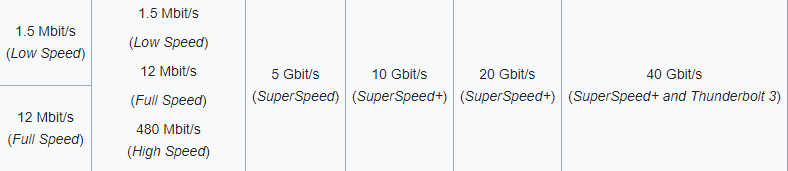
whoever designated USB 1.0 and 2.0 "Full Speed" obviously wasnt the optimistic type
random void
well its 35 usd for that netgear gigabit switch
dont remember my old one, been active for so long
fervent brook
get a router. unless you need more than 3 ports
sonic notch
I have 2 low end laptops and a NAS. Is it possible to have the laptops boot into my NAS' VMs?
fervent brook
yes, if they support it
wait, you want to remote into your NAS' virtual machine before your laptop boots?
@random void
craggy parcel
this decent for home gigabit?
@random void Depends. I killed one of those, by running too much traffic through it. I think it got too hot.
fervent brook

NETGEAR
GS724Tv2 — 24-Port Gigabit Ethernet Smart Managed Pro Switch with 2 SFP Ports
This is what I have. Paid 10 USD for it
craggy parcel
@random void Well, I set up 6-7 computer as iSCSI targets, and combined all of them in a software raid. So, unless you're doing something crazy like that, you should be fine. 😉
random void
lol
fervent brook
does your state have thrift stores?
random void
yes but electronics rarely get reused
fervent brook
what state?
fervent brook
i know that
craggy parcel
@random void Jamen så godaften da. 😉
random void
😛
fervent brook
i typically dont give buying advice for EU members, since obtaining goods seems hectic, at best
craggy parcel
And no, our thrift stores mainly sells clothing, kids toys, and various physical music and movie media. (Like Vinyl, CD, DVD)
random void
Yeah indeed
craggy parcel
However, there's quite a lot on facebook marketplace.
fervent brook
is facebook legal in the EU?
craggy parcel
Why wouldn't it be?
fervent brook
is facebook trading like two people decide to meet in an alley?
craggy parcel
Yeah, or offering the stuff on the bulletin board, at your local supermarket.
half valley
just Facebooks branding
make sure you know how to haggle well to the seller,most stuff I see are  /ripoffs
fervent brook
how would you feel if there was a game called Dansk Dansk Revolution?
 craggy parcel
I would think, that name made absolutely no sense at ALL. 😛
random void
Anyway, I think the GS108 would be alright then
To replace my Jensen 100 mbps switch
fervent brook
you could just put the jensen switch on one of the GS108 ports for low bandwidth devices
random void
Yeah I know
Another annoying thing with the Jensen is that the power supply whines a lot
But meh
 fallow ivy


 craggy parcel
@fallow ivy Depends on what you want to cache.
 vapid dune
it's essentially a DNS server that points you to the cache server instead for all the relevant games. mind you the files will be served (from local cache) via HTTP
half valley
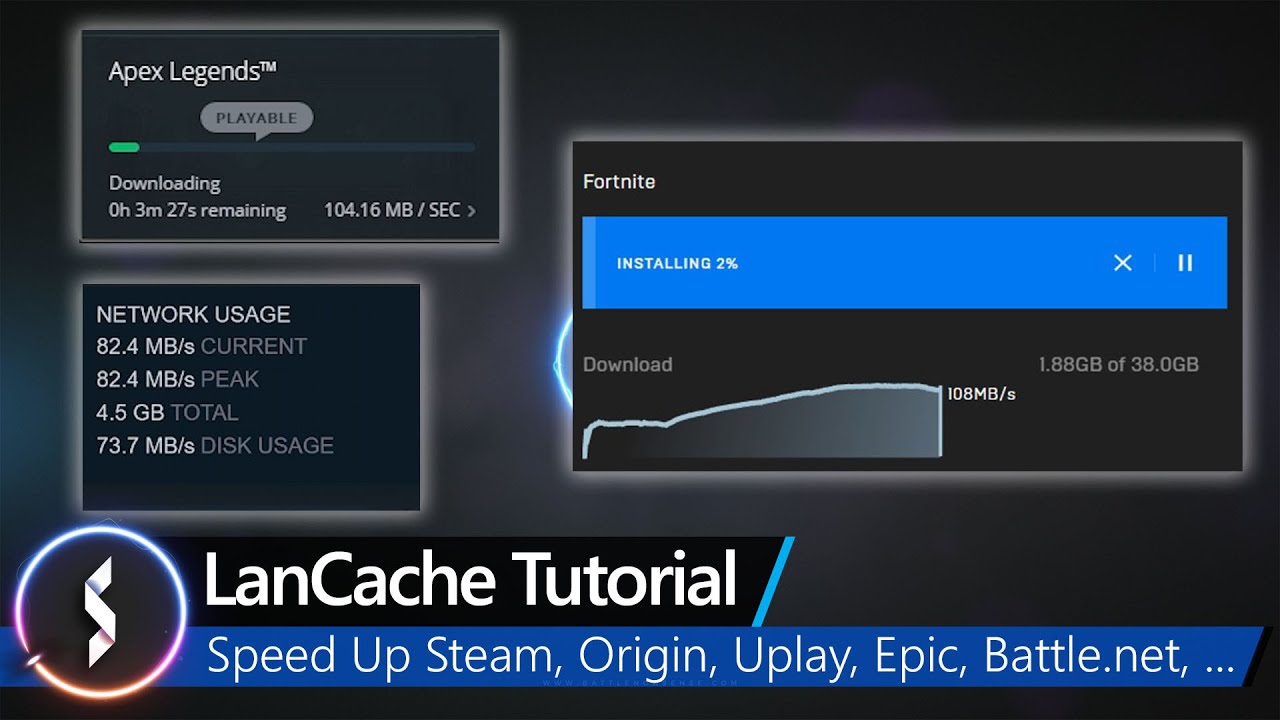
Got more than one gaming PC at home, or share the internet with other gamers?
If you do then you know about the downsides of having multiple people in your LAN download the same games and patches. Especially when you don't have gigabit internet or have a data cap to deal with....