#networking
1 messages · Page 180 of 1
 carmine moss
Have not really an idea on price but it's posible
 thick minnow
Okay.
I might just have to rip up the walls and run ethernet downstairs to a switch.
Doesn't seem like there's an alternative
carmine moss
Yeah that is the easiest thing
thick minnow
It's a good thing I can do drywall
 jaunty talon
@craggy parcel sure, but sadly IPv6 wont solve that issue if the gamedevelopers does not commit. And when it comes to directly playing with each other it's really not the case that point to point would be better than a proxy service from the gamedev or console manufacturer :)
 waxen scroll
can most game devs commit anyway? most of them buy an engine and the engine is supposed to do it
jaunty talon
As most of them have their own global backbone or use services that has backbone it might be better to connect to closest service to you and the other player connects to the closest point for them and then their traffic is moved in the backbone
waxen scroll

jaunty talon
All of them can, it's just a matter of investment
The later part is btw how valve has solved a lot of their services from both DDoS but at the same time getting better latency for endusers
There is a super good talk on that from GDC (https://www.youtube.com/watch?v=2CQ1sxPppV4)

In this 2018 GDC session, Valve's Fletcher Dunn presents a quick overview of denial-of-service attacks, standard solutions, and the unique challenges game developers face in preventing them.
Register for GDC: http://ubm.io/2gk5KTU
Join the GDC mailing list: http://www.gdco...
 craggy parcel
Why would it NOT solve the problem? Also if I play with someone next door, and the server is located in the US, the latency will be increased quite a bit when sending it through the server, instead of directly.
jaunty talon
Sure, next door will be in same L2 or at least same L3 router, but how often do you play against someone next door?
craggy parcel
Actually next door can be a different ISP peering in the other end of the country. But still faster than routing it from europe to the US.
jaunty talon
hmm how do you mean?
I would argue that it's not very likely that you would get better service with a port opened and going over ISP peering with ISP's rather than going to a service like amazon or valve both of you and the service backbone carrying the traffic between you
AT&T and Comcast as an example is not two ISP's who care about peering with each other and that traffic, in most cases they might just peer at one point in let's say chicago but you sit in miami and your friend in los angeles
waxen scroll
fun fact, ive been inside that chicago peering facility many times 😉
jaunty talon
then your traffic would go over chicago, that cant be better than going to a service like Valve or Amazon who peer everywhere since ISP's does not want to carry amazon traffic in their own network
waxen scroll
you'd never know its there
jaunty talon
And that's even more the case with for instance EU <-> US traffic or even US <-> CA
craggy parcel
If you have the global infrastructure, sure, but if I were to start a new company having NO money and NO infrastructure. Then you need to either find a better, peer to peer solution with a match finding service, that pair up players, or you need to let players have sub optimal latency, due to distance. Of cause if all the players are spread over the entire globe, it might not make a difference, but if both players are in the EU, and the server in the US, you will ALWAYS have worse performance with a proxy (Game server), than direct connection.
But if you have 2 players one in Japan, one in Europe, most traffic would be routed through the US anyways, and a game server there would not make much of a difference.
jaunty talon
What I am saying tho is not that you should remove portforwarding option, I am just saying that you should not make the player dependent on it :)
And you would ofc not be sent to a server / proxy in another region :)
craggy parcel
Most of the multiplayer solutions I've seen recently, does not need port forwarding. But I might just be playing the wrong games. 😉
jaunty talon
A lot of console games still needs it
PC games doesn't, and have never really needed it either. It's more a console problem
craggy parcel
That would most likely be because they depend on multiplayer services provided by the console manufactures, that's not been updated for ages.
 little schooner
@craggy parcel yes that's true
craggy parcel
(I'm thinking playstation network and xbox live)
jaunty talon
However both Xbox and Playstation has full support for IPv6 :)
craggy parcel
So there IPv6 deployment would most likely solve it. 😉
jaunty talon
Indeed, but then you require the whole worlds small ISP's to fix their shit
It would be much better if they would solve the IPv4 problem or disable the ability to play games on IPv4 at all so that endusers would have to pressure the ISP's
But the later part will never happen
craggy parcel
Well, most smaller ISP's in my country, does actually have full IPv6 support where they can, even to customers. But the larger ones does not even provide it if you ask, not even as an option you pay for. And I do not buy the argument that "it's expensive to deply" or "customers are not asking for it". I might be paranoid, but I suppose it's more the fact that they have lots of free IPv4, and by not enabling IPv6, they can force the smaller providers to use CGN, as not enough content is available via IPv6, and as such smaller ISP's can not provide the same level of service.
jaunty talon
I am pretty sure customers are not asking for it
Since when they start to ask, they have no other option than implementing
And yes, most large ISP's does not have the problem of being out of IPv4
craggy parcel
Sure, because they either do not know they need it, or they don't care, because they do not have problems with CGN daily.
Also, working at a VoIP provider, I've had my share of NAT problems, and we're not even talking CGNAT there. 😉
jaunty talon
@craggy parcel Why are you not doing VoIP with IPv6 only?
That should be the absolute easiest to do, as the enduser does not care about which protocol it uses?
little schooner
I know my prof would prefer easy
 hollow marlin
@craggy parcel it's not that they do not care, there is still quite a few carrier equipment that is just now getting v6 support. It takes time and a lot of money to migrate to that equipment
Not saying some ISPs don't care. We have 80% of our network dual stacked, the other 20% is v4 only because Calix and Adtran are just getting around for implimening features we need for v6.
Does it make more sense to dump $1.2mil into exchanging the equipment where we make $100k annual profits on? Or do we dump that into our core and edge to bump us up to 3tbps backbone and giving everyone a nice package bump in base speeds?
I am a strong enforcement of v6 and the death of v4 but people need to realise it's not always as simple as they're lazy or don't care
@jaunty talon v6 for VOIP has been the hardest thing for us to do as so much VOIP equipment and SIP switches like our Metaswitch don't have full support. On top of getting v6 to the end client as well
 clear igloo
@hollow marlin You just need to learn the difference between a modem and router and IPv6 will magically enable itself  (kidding) 😄
waxen scroll

Routers, switches, access points, modems, hubs, bridges...what is the difference between all these network devices?!
Freshbooks message: Head over to http://freshbooks.com/techquickie and don’t forget to enter Tech Quickie in the “How Did You Hear About Us” section whe...
 fervent brook
clear igloo
fervent brook
clear igloo
Shudder
🤢 HUB
fervent brook
it had a coaxial connector
and what i assume was serial
16 port hub...just imagine the possibilities
er....I mean chances
...of a collision
jaunty talon
@hollow marlin you work for an ISP that has 80% IPv6? :o
hollow marlin
Yep
jaunty talon
So 80% of your customers get's v6?
What size of an isp?
or even better, which isp? :)
hollow marlin
It's a regional ISP in the NE US. Almost all customers have v6 but beginning to see the light at the end of the tunnel
hollow marlin
Calix and Adtran for the access platforms with Ciena and Juniper in the mix
jaunty talon
A very uncommon sight, even tho US is doing OK, it's mostly mobile providers who have taken the big step
So residential customer gets Calix or Adtran?
hollow marlin
Both. Finally dwindling out the Adtran equipment though. Both robust but Calix is easier for our NOC
 subtle glen
excuse my ignorance, but why is ipv6 better? The only thing i know is the fact that we'll never run out of them
jaunty talon
then its not
 rocky badge
@clear igloo lmaoooooo the Internet came to a craw today.
clear igloo
crawdad @rocky badge ?
hollow marlin
@subtle glen NAT carries a ton a problems with it. v6 gets rid of all of that. Also the are a ton of quality of life improvements configuration and failover wise. Virtually unlimited IPs also take a load off our chest when planning and deploying
rocky badge
3Gbps isn't enough for entire labs of PCs upgrading Windows/Adobe/Solidworks/Autodesk @clear igloo
clear igloo
oof
jaunty talon
but there is nothing better with a public routed v4 address vs a v6 address :)
or vice versa
rocky badge
We really need more than 3Gbps burst at school lol
clear igloo
"need" 😛
subtle glen
@hollow marlin for nat problems you mean when an isp assigns a public ip to a neighborhood?
jaunty talon
for instance yes
rocky badge
More and more teachers are using the internet for their classes and right now that 3Gbps is shared across 8000 students and 2000 teachers
3000Mbps shared across 10000 people.
jaunty talon
Any type of NAT where you put multiple devices behind one publicly routed ipv4 address @subtle glen
rocky badge
people, not devices, there's more devices
clear igloo
@rocky badge Just need moar QoS 😛
clear igloo
Yah, all the interwebz
rocky badge
I mean, the infra is ready for faster internet
subtle glen
@rocky badge imagine that scenario but with a 100 mbps adsl connection, 100+m cat5 cables and 100 mbps switches
rocky badge
The infra right now can do a max of 10 gig and easily upgradable to 20 gig.
jaunty talon
When I worked with building DreamHack's the QoS is getting more internet =)
clear igloo
lol, nice
rocky badge
Lol
I mean, only the high school would get the full 10 gig 😛
The remote sites (all of the middle schools and elementary schools) would be limited to 2 gig
jaunty talon
booooo!!!
rocky badge
Lmao
jaunty talon
Dark fiber to all of them and more internet to them!
clear igloo
800Gbps to all!
rocky badge
I mean, it's a line limit 😛
jaunty talon
apply CWDM filters when you run out of 10G ;)
rocky badge
We only have 2 gig to the sites and 2gig over a 10 gig physical link
subtle glen
@clear igloo how do you test that 400 gbps switch you were playing with few weeks ago
clear igloo
@subtle glen waiting for Spirent to arrive 😦
jaunty talon
One big L2 loop :D
rocky badge
The IT office has a dedicated, privately owned 10 gig switch to switch
clear igloo
and that ^
rocky badge
Lmao
clear igloo
Traffic > Port 1 (Vlan X) > Port 2 (Vlan X) > Port 3 (Vlan A) > Port 4 (Vlan B) ...... > Traffic
Snake test 🙂
 dense karma
woo getting a 42U server rack tomorrow XD
goona be fun moving that thing into and out of a truck
dense karma
Not yet but I am about to go where I think they are
 quick hollow
Just about to grab a new edgerouter for my home network to get rid of the god awful pos which comes with the ISP
Whats the fastest modem I can get?
clear igloo
Depends on your ISP and what they allow
quick hollow
Anything they will allow whatever
I have a dynamic IP not static though
But whatever I want to do on my end shouldn't be an issue.
I just grabbed an edgerouter x since it was cheap and performs fantastic.
I have an old modem which I can use for now, but i'm gonna need a super fast one soon.
clear igloo
I mean no point in getting a DOCSIS 3.1 modem if you can't use it but Arris SB8200 is one of the top
quick hollow
Oh I don't have docsis no
Copper twisted pair telephone line over here.
Just a regular modem is needed
clear igloo
That's DSL and there are tons of different types
VDSL, ADSL, etc.
quick hollow
holdon lemme check
Yes VDSL I believe
Trying to squeeze every last mbps out my line. This stock ISP router gets me anywhere from 50-15 to 70-17
Varies quite a lot.
But I live out in a rural area and there is not a lot of people using the internet. Not a load based problem at all. It's just shitty router
The roadside cabinet reports peak speeds of 80mbps. So I know the speed is there, I just need to have faster equipment.
 deft pasture
If I created an A record on mywebsite.com that said activedirectory.mywebsite.com and it was pointed to a vultr box running server 2016 with active directory services running on it, I wouldn't need a site to site vpn set up right?
it would be the public IP of the vultr box
quick hollow

NETGEAR
The NETGEAR Broadband High-Speed DSL Modem provides a simple and cost-effective connection to high-speed VDSL/ADSL Internet. With Fast Ethernet connectivity, the NETGEAR DSL modem connects directly to the computer or wireless router. Compatible with major DSL Internet service...
This a good choice?
There is also this
DrayTek - Routers, Firewalls, Switches, Wireless Management, 3G/4G and IP PBX products
This is a lot more expensive but perhaps worth it?
 vapid dune
why not just ask the ISP for what ever they provide
getting your own is a recipe for trouble
(or maybe a list from them to see what they even support)
quick hollow
Its not. I ran my own for years before
My ISP is totally fine with me using whatever I want.
I have the latest router from my ISP. Its just not good.
fervent brook
the only time I ever had a problem using my own gateway/modem was when I got it used and the mac address had been flagged as a defaulted account
never had a problem with a fresh one
quick hollow
I already have my new router coming. I really just need advice on a decent fast modem.
waxen scroll
@hollow marlin any forum lolz today?
hollow marlin
nah pretty boring day
quick hollow
There is a 150gbps modem? haha
Insane
Don't need that fast though haha
I actually have a Huawei HG612 modem right now. I'm not sure if its any good though.
Apparently I can flash it with new firmware to get linestats.
I'm gonna try that
quick hollow
Woops. I did have an HG612. Flashed wrong firmware now its bricked XD
little schooner
I wouldn't of flashed it if it's a modem
You don't get access to original firmware
It's like wasted money at this point
quick hollow
No I already had it sitting around.
And also I can still get the original firmware luckily
Pretty sure I can just repeat what I did before to put it back into flash mode
Only soft bricked
I'll have to try again with the proper firmware
Nvm rebooted it and it took in the new firmware. Did it correct anyway
quick hollow
Thats weird. It's totally bricked now. It worked and the GUI opened for a few seconds and now it's just dead.
Oh well. Guess i'm still in the market for a new modem.
hollow marlin
Is there any real reason you are changing out your modem other than speeds fluctuating?
quick hollow
Yeah I want better speeds. This stock router from my ISP is pretty garbo.
Has a built in modem etc
Cheap shit they manufacture cheap and then give to customers for free.
Got my new edgerouter on its way.
Preferable would like a modem with linestats.
hollow marlin
Just change it to bridged and use your own router. DSL modems dont vary, the code has been stable for years
All DSL modems should have line stats unless they set the local accounts to user access instead of admin
With DSL you biggest factor is copper quality. Your new modem will not push anymore and I can guarantee that
quick hollow
My router doesn't support bridged mode.
hollow marlin
Pretty much all modems do
quick hollow
And the reason I was flashing this other modem I have is to get linestats
Nah this one doesn't. I've googled
And asked on forums etc
No way to get bridged mode
hollow marlin
What brand?
quick hollow
BT
Its the BT smart hub
They used to allow it on the older ones.
But not on the new ones
I'm thinking i'll just grab a DrayTek Vigor 130 modem. They are kinda pricey but I can grab one second hand cheaper. And it has linestats etc.
hollow marlin
Hmm. Yeah apparently the smart hubs cant. Thats fucked. The business hubs can partially bridge.
But still dont expect higher speeds from a different modem
quick hollow
I'll just be expecting a small bump really.
This router shits out frequently
Randomly dies in the middle of the night and comes back on 30s later etc
It started flashing pink the other day and I've never seen that before
I can pull stats from my roadside cabinet and it says highest peak seen was 80mbps. Also gives impacted figures etc
Right now I'm getting 50mbps. When I first had the internet I'd hit 80 no problem
So I think the shit router may be the culprate
quick hollow
Yeah it is slow as shit
All I can get here though
Shit I managed to get back to the flash menu. They might be hope after all!
Ayyy its working. I got in and have linestats now.
There is actually an incredible amount of settings in this modem. It's super solid. I'm happy with this now.
I'm pretty mental when it comes to quality. I crimped RJ11 ends onto a CAT6 cable for my dsl cable.
No interference here! Totally pointless but I want the best of the best.
waxen scroll
but did you replace the wiring from the building to the street? thats equally important
hollow marlin
yeah unless the drop has been checked or replaced and you were having it drop, you are still going to have problems. Again modems are almost never the problem but people refuse to believe that.
clear igloo
@hollow marlin You mean it's not the modem after I cut the line with a shovel and taped it together with scotch tape?
quick hollow
Nah my ISP is cheap as shit
It's all aluminum wire to the street
Not even copper
Might have to accidentally damage the cable so they have to replace it
I know their shit. If I report the drop theyll send an engineer out who will say there is nothing wrong and charge me a £120 call out fee
They did it before
craggy parcel
@jaunty talon Very simple. Our end users does not have IPv6 connectivity, as most ISP's won't provide it. Most of our network has been IPv6 enabled for years, but until ISP's start making IPv6 available to their customers, we can't use IPv6 to provide our services. So far we have to limit ourselves to ISP's that don't have the ability for offer VoIP services themselves, and are willing to make a NAT free connection to us. (Usually though some kind of tunneling). But as for our equipment all we need to do to enable IPv6 for our VoIP services, is really just to test that we haven't forgotten to setup something somewhere. And as the ISP we use at our office does not offer IPv6 connectivity, we can't really make a good enough test. (Only through a tunnel, bypassing all kinds of possible routing and firewalling issues)
@hollow marlin Well, the IPv6 standard was created back in 1998, which gives them about 22 years to actually do the implementation. I'd say that saying ISP's never cared much, is quite fitting here. If ISP's did care, they would have demanded IPv6 support from their vendors, who would have provided the needed equipment. I'm standing by the fact that lazy ISP's are the MAIN reason why IPv6 hasn't replaced IPv4 yet. If they had taken the issue serious, and not instead just stockpiled IPv4 addresses when it was still possible, to have a competitive advantage once IPv4 was depleted, we could had changed almost all of the world to IPv6 by now, or at least reversed the situation, meaning that IPv4 only services was the exception, rather then the other way around. Only smaller providers with too few IPv4 addresses seems to be interested in providing native IPv6 connectivity, other ISP's simply doesn't care, as long as their users can access the services they use on IPv4.
Imagine if google and facebook announced that 6 months from now, IPv4 access would be shut down. I'm pretty sure that most ISP's would be able to provide native IPv6 in time, as most equipment from serious vendors has had support for YEARS.
Also if you have equipment that lacks IPv6 support, it's either outdated and needs replacement anyways, or you didn't care about IPv6 at the time of purchase. I know that vendors like Cisco, HP and Juniper has had IPv6 support at least the last 10 years, sure a lot of the 10 year old equipment will experience a performance hit, as IPv6 may be implemented in software, but no ISP should be using that old equipment anyway.
But if you have equipment that does not support IPv6, it's because the company does not care, as it's been available for multiple hardware lifecycles.
quick hollow
Oh I didn't even know I have ipv6 too haha
Cool
I once disabled ipv6 in my router. Then I lost internet. So guess my ISP run out of IPV4 addresses
craggy parcel
@quick hollow Well, I suppose BT somehow cares. 😉
craggy parcel
I know that 3 also claims to have enabled IPv6 for their customers in Denmark, however, I never had a chance to verify that claim. 😉
quick hollow
This is very weird though. Only phone gets ipv6
My pc is displaying ipv4
I checked and its not my 4G causing the issue. That has an entirely different IP (also v6 though)
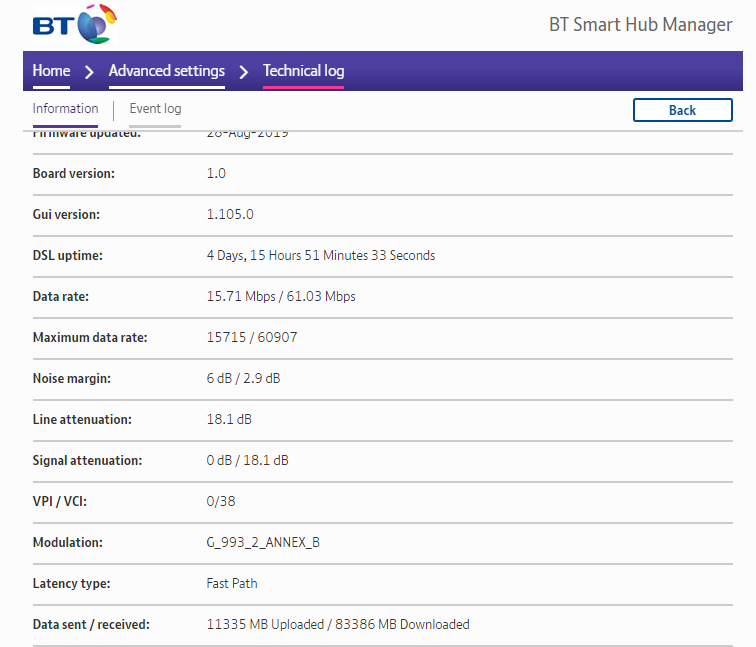
Oh wait I have line stats in this router. Never knew. Only basic though.
craggy parcel
Maybe you have IPv6 switch off on the computer?
quick hollow
Perhaps but then why is my router giving our multiple external ip addresses haha
craggy parcel
External IPv4 or IPv6?
quick hollow
Both it seems
My noise margin is very good though. 2.9db. My cable can't be that bad.
craggy parcel
That's strange... I would expect RFC1918 addresses for IPv4 and full public IP's for IPv6..
Addresses in the RFC1918 range: https://en.wikipedia.org/wiki/Private_network
vapid dune
A lot of consumer routers won't do IPv6
And certainly not well. Especially in terms of firewall
I've got native V6 from my ISP .-.
waxen scroll
im not even a typical consumer and it took me foreverrrrrrr to upgrade to AC alone. nobody gonna upgrade their routers unless the ISP makes them
craggy parcel
@vapid dune If IPv6 was the norm years ago, they would.
jaunty talon
Firewall IPv6 is the easiest tho?
Any halfdecent asic does firewall without problem
hollow marlin
@craggy parcel Just because carrier equipment doesn't support IPv6 doesn't mean it's old. Access platforms are just now catching up. You can't blame shit on the ISP for manufacturers code/hardware. We don't make the shit
jaunty talon
Oh well, you can blame some tho
hollow marlin
Sure, not saying some can't be blamed
jaunty talon
ISP's who buy equipment in the past 5 years that does not have full IPv6 is not caring about IPv6 :)
Could even go up to 8-10 years there
hollow marlin
Until you test most the available manufacturers. If we had a choice we would have.
The carrier grade space is just a small number of manufacturers
jaunty talon
I mean most ISP's with decent size of network does PoC on the hardware they buy before commiting to big investment, and if IPv6 is not included there it is really the ISP's fault and not the manufacturers
craggy parcel
@hollow marlin No, ISP's don't MAKE the equipment, but they choose what they BUY. If ISP's had demanded IPv6 support in equipment, manufactures would certainly had made it available sooner. The demand from ISP's and enterprises, are what drives the development of networking equipment. As I said, Cisco had IPv6 support a decade ago, it was available, but was not chosen by the ISPs.
jaunty talon
Sadly true
hollow marlin
Sure Cisco has, but Adtran? Ciena? Calix? They just are catching up.
You can't just fucking deploy Cisco and Juniper as access platforms
jaunty talon
Yeah, but fact is that if theyre doing that now. ISP's until now have not asked for it
hollow marlin
We shouldn't have to
jaunty talon
??
hollow marlin
We shouldn't have to push them manufacturers
jaunty talon
So you as an ISP have no place in the innovation and building of internet?
I would argue that you're the ones that should set pressure on the manufacturers?
Endusers dont know what router is next-hop from them, or even in their apartment. They cant pressure the manufacturers
hollow marlin
Please tell me why we should tell the manufacturers to incorporate IPv6? Why shouldn't it already exist
jaunty talon
Since you want to build a better internet?
I assume?
Since its better for your end customers?
It will solve your IPv4 issues
hollow marlin
Ugh... you're taking it wrong. v6 should already be in hardware and code.
jaunty talon
No I am not. I get your point, but why is it not up to ISP's to pressure the manufacturers to have IPv6 if they go and buy their products?
hollow marlin
My argument is manufacturers are lacking which is bullshit. ISPs shouldn't be the ones force to push them.
jaunty talon
It's not like anyone else except customers to the manufacturers can pressure them
craggy parcel
@hollow marlin You can deploy whatever you want. Also most of the cable providers I've worked with the last decade, has all had IPv6 support in the CPEs they used, for the last 8 years. At least they said so, when asked. Some of them actually deployed IPv6 a few years back, others have not. But it's still a matter of choice from the ISP's. If you wanted to support IPv6, you have been able to do so for a least a decade. Most ISP's have chosen not to care. I'm not saying it's the networking technicians, that don't care, most of them are probably quite technology interested, and would LOVE to work with the latest tech. However, when you have the choice of spending 5% more per CPE, for IPv6, has enough IPv4, and can see you'll be able to keep new ISP's from competing with you, because you can offer a more compatible connection without CGN, the math is not really hard to do. But it's an ACTIVE choice, not a technological limit.
jaunty talon
All I am saying is that it's also ISP's fault if there isnt IPv6 in their network. It's not their manufacturers to only blame as the ISP has the last call on which hardware to use and therefor also make sure there is IPv6 support.
hollow marlin
@jaunty talon I pushed out network to 80% v6. Yeah we are pushing against our manufacturers but you need to realize unless you are one of the 3 Giants, they don't give a fuck
jaunty talon
Sure, they you buy from someone else if IPv6 is something you value. That's my point.
craggy parcel
@hollow marlin No, it should not be needed to ask manufactures for IPv6, but the demand has to start SOMEWHERE, and when all IPv6 gives in the realworld, is a bigger address space, and no need for NAT, the smaller manufactures would most likely wait for ISP's to deploy it, and ISP's won't deploy because manufactures do not provide, and customers do not demand...
jaunty talon
If price is more important (which is understandable) then you buy from the one that does not have IPv6 support
hollow marlin
@jaunty talon and my point is the carrier space is not that large in terms of manufacturers.
jaunty talon
And there comes the point that ISP's cant only blame manufacturers if they dont have IPv6
@hollow marlin sure, but I am very sure that there are manufacturers in each layer that has full IPv6 support :)
jaunty talon
Which is my closing argument on the fact that it's both to blame :)
craggy parcel
@hollow marlin No, it's quite small. To my knowledge, the main manufactures would probably be Cisco, Juniper and probably Nortel.
jaunty talon
Naah
Nokia (Ex alcatel) and Huawei are big on accesslayer
depends on which part of the world ofc
hollow marlin
@craggy parcel no, that's for core equipment. I'm referring to access platforms. Calix, Adtran, Ciena..etc
craggy parcel
Well, they may be big where you are, but I've never heard of those before. 😉
jaunty talon
What type of cable doesnt really matter tho
little schooner
I demand higher upload speeds
Comcast is preventing fiber company from building in my area
hollow marlin
@jaunty talon I know, but because the Giants primarily used cable, they had more leverage to push manufacturers
jaunty talon
That's monopoly, has nothing to do with technology tho :D
little schooner
@jaunty talon well last year, I was told our area was in phase 3 installation
jaunty talon
Sure but that shouldnt matter, as they wouldnt use the hardware?
little schooner
This year its been scrapped because they couldn't get the ball rolling for poles
craggy parcel
To my knowledge most equipment used by docsis carriers here are mainly from cisco, while the CPE's are from either NetGear, Sagemcom or Technicolor. Don't know what they use for fiber, I'm not really in contact with fiber providers, however, I've heard Inteno mentioned somewhere...
little schooner
And they recently cut Frontier out of the neighborhood
hollow marlin
Not talking about the CPEs
Not the CPEs, not the core, not the distribution. Literally the access platforms are where we are stuck
craggy parcel
And by access we are talking about the devices connecting the CPE's to the rest of the network, right?
jaunty talon
yep
between CPE and distribution
that's access in this case
Typical large manufacturers of that in EU is Nokia, Huawei and Cisco (DOCSIS) nowdays.
hollow marlin
The chassis that provide the GPON/AE is the access platform @craggy parcel
jaunty talon
Typical switch for access-layer from Nokia/Alcatel is this: https://www.nokia.com/networks/products/7210-service-access-switch/

Nokia
Transform your network and prepare for growth with high-throughput, high-density access and aggregation routers
Time to leave the office! :)
craggy parcel
@jaunty talon Love that raw, industrial look. 🙂
@hollow marlin But ain't that a fairly new market? As far as I know fiber to the home, has been a thing for not much more than 10 years. Which makes it strange that equipment that's not considered old (In my world, that's 3-5 years at most), does not support IPv6. Also how much work does that part of the network even do? It bridges the GPON network to the rest of the network, but how much IP related work takes place there?
hollow marlin
@craggy parcel yes that is exactly what I was getting at. Sorry it took this long to get here
It's mostly L2 but there are a ton of port security, NDP, DHCPv6 stateless/ful, etc.. feature we need that are just not supported
Add on the lack of MPLS for v6 is icing on the cake for us
craggy parcel
So it's not possible to do the IPv6 related stuff further back in the network, and just use L2 until you reach a part that DOES support what you need? Or do you need to convert to L3 due to the number of ports?
hollow marlin
You want the security at the edge. Without it you can have customers just use a /48 and begin to interfere with a customer that legitimately has that space. They can also advertise as a router via NDP and you can image how well that would go over.
We want security first and foremost and it has to be protected at the edge.
craggy parcel
Well, what I was thinking was to tunnel the L2 traffic to another location, able to do the separation. Like a virtual cable. I know that if you want to use the DOCSIS or ADSL infrastructure of our former monopoly provider, you will get a product they call bitstream access, that is basically a layer 2 tunnel, from either the CMTS or DSLAM to your equipment. How it actually works, I don't know, but I'm pretty sure customers are properly separated, and I know for a fact that no IP traffic is in the mix, at least the product sheet says so. 😉 What you get is basically ethernet traffic.
hollow marlin
You can trunk it back but the problem is our Management system for accounts. It's tied to the access platforms where it manages accounts like bandwidth for example. No other equipment supports that. We still have legacy DSL customers that are setup slightly different at the access platform that's trunked to ASRs that dynamically created PPPoE dialers and shape based on the systems verified bandwidth. It's a very rudimentary way of doing things but we need greater control at the edge.
We could do that to the rest of the customers to get them v6 but then those 15,000 accounts all be come a manual process
craggy parcel
Yeah. Also still because it's a business decission, that IPv6 is not a feature, but a sideeffect. 😉
hollow marlin
It is. But once we get the funds to finally replace the chassis we will finally be fully dual stack and I'll be happy
craggy parcel
Yeah. It's a bit easier as a service provider. As long as your access providers support IPv6, you just need your internal network to support it, and as a small service provider (All equipment fits in a single rack), making your internal network compatible, is not a huge expense. It was more or less just how the equipment worked, and fortunately a decision to make IPv6 supported, when we were shopping anyways, was made. 🙂
quick hollow
Also no matter where I run a speed test I get like 50-60 megabits per second.
Yet when I go to download games this happens
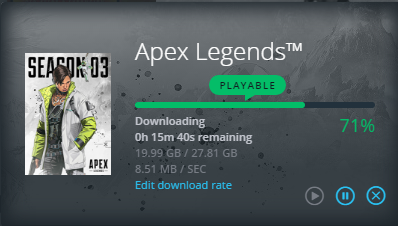
Does it on steam, origin etc. So its no glitch
My internet just downloads stuff much faster but shows a lot slower on speedtests. Makes very little sense
vapid dune
o.O
quick hollow
I bet BT has some dumb 'smart' traffic control or something
quick hollow
Yeah in speedtest.net and other speedtests I get like 50Mb/s max

Will be fixing up my network soon anyway. Might help with speeds a bit. Got that modem working good now. Got the edgerouter on the way. I bought some new patch cables because i'm using a myriad of super old janky ethernet cables.
Got a nice new 1U tray coming to put some devices on inside my rack too.
Need room for the nest hub. Ubiquity cloud key etc.
 hallow nimbus
Why so 👀
waxen scroll
theres a short code sending me phishing SMS and Fi support was not even close to being helpful. i need an engineer to look at it and block it on their end
Fi told me to register for the do not call registry, as if spammers read that?
laughably android doesnt stop SMS spams or blocks you put in
it sends those messages to the archive folder so you dont actively see them
if you have a car or bluetooth device it will pick those up
hallow nimbus
Oh shitte
hollow marlin
I'm curious if they are legally able to block text or calls from spam through the automated system
waxen scroll
i can tell you tmobile def does it
ive noticed a big increase in SMS spam with the same # when on Fi vs straight tmobile
ive ported the number between the two a few times over the years
not only SMS spam but call spam too
hollow marlin
Yeah I'm beginning to get spam SMS as well. Group text to make it worse as these random numbers reply with the "take me off this email" type of situation
waxen scroll
ouch
the short codes are supposed to be highly regulated too... they're not supposed to be sending unsolicited messages
you have to subscribe or do an action in order to generate a short code message, like password reset
craggy parcel
That's the idea. But in reality, any internet SMS service, will let you send a message with any number, for next to nothing. The wonderful world of telecom. You can NEVER rely 100% on caller ID, or the sender of a text or MMS message.
little schooner
@craggy parcel ever since the crackdown with STIR/SHAKEN, I've received zero scam phone calls from late December until now so far
It took a while for sprint to do anything about it. If anything, it was the government imposed law that made them finally give in to enable it
It's stupid how companies don't see the value and just opt into it on their free will
Do people really like to be annoyed by numbers from several states in a single day? No average person would want such nonsense unless they know who each of those persons are personally or business means
I once got a phone call from my own cell phone number and one from 000-000-0000
dense karma
Woo server rack in trailer on way home with it
hallow nimbus
👀
vapid dune
lol where you gonna put it @dense karma
dense karma
Not sure yet
little schooner
@dense karma in a place that doesn't disturb a good night's sleep
dense karma
I’ll put it in the roommates room then
little schooner
Nice lol
dense karma
Still gotta find the servers that iam putting in it
The rack has a few small dents and scratches on one side but nothing a hammer and some paint can’t fix
quick hollow
I wish my rack was 5u high instead of 4. I might just buy a new one. My enclosure is bespoke because a full depth box wouldn't fit where I have it.
 strange silo
A 4U rack?
dense karma
Me has 4 1u servers has a 42u rack
clear igloo
4 servers for now.....
😄
waxen scroll
I have one 2U server and it sits on a crappy table
 charred meadow
6Us and on a crappy shelf.
 fallow frost
I could totally make a wooden rack, but I still have to figure out what I want to do with this server I got
 cloud zinc
dense karma
cloud zinc
dense karma
Did you just make that XD
fallow frost
Does an old FX system count as a server? 
All it's doing is running a minecraft and plex server
 paper rampart
I found a 42U for free. Traded it with work for their 15U.
fallow frost
how did you find a 42u for free?
paper rampart
Some guy had it in his garage, wanted it gone
fallow frost
wow
dense karma
And I thought 40usd was a steal
fallow frost
I'd buy a rack if I had anywhere to put it
cloud zinc
there is space on your bed >_>
paper rampart
You can always get a lack rack; it's a rack and a table in one
fallow frost
Yeah, I was looking at building a desk that had space built in
paper rampart
That too; I almost did that.
quick hollow
Yeah my 4U rack is made out of wood.
It was custom built to fit into the shelf in my closet
But I have more vertical room in there so I wanna go 5 or 6u
fallow frost
I need to soundproof whatever I put this server in, loud as hell
quick hollow
Can't be as loud as the lady sitting the other side of the office as me right now eating an apple.
Dang that shit annoys me
fallow frost
poweredge 1950, I think six 40mm fans that are louder than my three 120mm fans at full ramp in my rig
quick hollow
Yeah those smaller fans spin a whole load faster
Choppin the air
Don't put your finger in there!
cloud zinc
or other body part(s)*
fallow frost
how do you have no fans?
quick hollow
I mean I only have router, patchboard, switches and a few other things
None of it requires cooling
fallow frost
Ah
quick hollow
I do have a storage NAS but that only has an intel stock cooler which runs virtually silent and a single 120mm fan which also makes no noise.
Harddrives need no cooling either
But thats not in the rack.
charred meadow
I resently cut a hole in the top of a switch and bolted on a 120mm fan.
fallow frost
That works
quick hollow
Why? It surely can't get that hot
Switch I have is rated at 55c max
I can't imagine it getting more than 30-40 in a cabinet with no ventilation.
I might be wrong though
fallow frost
I have no idea what mine is rated at, but I doubt either are ever going to hit their limits
vapid dune
How hot do the hard drives get? They generally need a bit of air
charred meadow
The switch came with a 40mm fan that was quite loud and I needed to use it for a lan party. Now it's barely audible over the desktops in the room.
vapid dune
swap it with a noctua 😉
little schooner
@vapid dune I would but after reading the specs of my NVR, delta fans have an rpm needed in order to prevent it from frying
If only noctua could also make high speed rpm small fans
They would be much quieter than the delta ones
 hasty kettle
delta makes the best performance fans
Noctua makes a lot of top tier fans for industry
and nowadays some really silent home applications as well
quick hollow
Sweeeeeet
I have most of my home network setup properly now
Got my managed switch. Line stats from modem is working.
Just waiting for my new router and its all done
vapid dune
it's probably not that expensive
quick hollow
Its actually not. I looked into it the other day.
Just a pain because you need expensive equipment to splice the fiber properly.
Hot melt etc
vapid dune
you don't need to splice it
quick hollow
GL fishing pre terminated ones though walls...
My house is wired with CAT 5e. Would need to rip it all out and rewire for 10g. And then again for 100g one day unless wifi gets fast enough.
Fiber optic isn't a bad idea since its future proofed.
little schooner
The thing that costs the most is your time for fiber
Buy them pre-made if you can
@quick hollow also you don't need to rip out cat5e for 10g. It's still good at 30m
quick hollow
Yeah preterminated is a pain in the ass to fish around the house
Because its gotta go down walls, across ceilings, though holes etc
little schooner
That's a real pain
quick hollow
You can get some pretty decent termination kits cheap from china now though.
Its coming down in price a lot.
I wonder if I should let my router do DCHP or use my switch for it.
little schooner
It's a toss up I suppose
quick hollow
Don't think it matters.
little schooner
It probably looks prettier in the usg
quick hollow
Perhaps
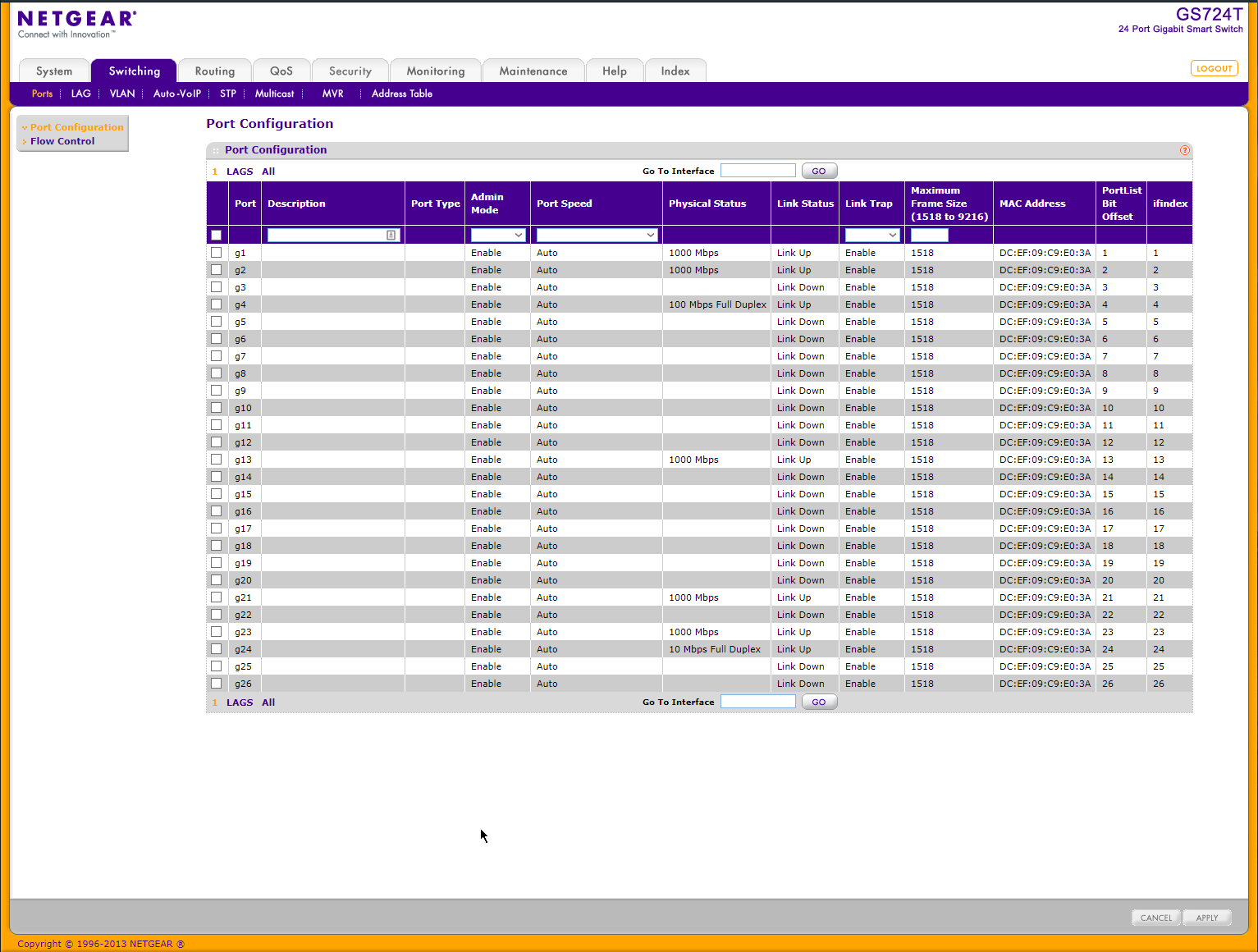
Interface in this netgear switch is actually quite modern too
I'd say equally as pretty
 rocky badge
@quick hollow @vapid dune SFP+ isn't expensive. I did my 10 gig network for less than ~$120 (excluding switch)
rocky badge
OM3
rocky badge
Yeah
quick hollow
Decent I guess
I might think about it
It would involve a lot of ripping up floorboards etc for me
Not even sure if I can get it down the walls easily
rocky badge
oof
rocky badge
quick hollow
5 meters of OM3 is like £9
So cheap
I expected it to be wayyyyyyy more
I know very little about fiber. I'm seeing switches saying LC and MTP?
Guessing LC is what I need
Bunch of these I assume for the switch:
And these to get ethernet for my PC unless I get a 10 gig pcie card which supports sfp+
 dry bane
Hey so I'm setting up an old PC as a NAS but have run into a hiccup because I don't know wtf I'm doing. I want to share a folder on the old PC so the rest of the house can use it for storage. Other computers can't connect. I think it's because I have a ubiquiti home network and all devices have independent static IP addresses.
little schooner
Did you try setting static ip for the NAS as well?
Also, when connecting to the NAS, if it's from windows client, use .\username notation
dry bane
Yes I can do that with the ubiquiti tool I just don't know how to have my computer's search for a specific ip instead of just searching their own ip
 little schooner
@dry bane in file explorer, you can type in the IP address, like \\192.168.1.10\shareName
quick hollow
Interesting
rocky badge
(USD) Amazon for fiber
little schooner
If it isn't discovered in Network and Sharing, manual connection is the next best thing
dry bane
@xeon the last parts for my PC build are arriving today. I'm currently testing the nas by trying to access it from my wife's Mac
dry bane
Looks like I'll just have to wait till I build my PC. Thanks your advice will make this go a lot faster once I have my rig done 😁
rocky badge
@dry bane SMB?
vapid dune
wait why would you even change it to gigabit ethernet @quick hollow
waste of fiber lol
that's pretty cheap @rocky badge
rocky badge
Yeah
vapid dune
can't you get something like this to finish it at the wall? https://www.cablematters.com/pc-782-163-5-pack-lc-duplex-multimode-fiber-keystone-jack-in-ivory.aspx
craggy parcel
@quick hollow You could also do the cabling yourself, and pay someone with the right equipment and experience, to terminate them for you?
little schooner
@craggy parcel thats what we would do at work yeah
the cable work we leave to someone else
craggy parcel
Yeah, a trained monkey can run a cable, but terminating them, is a different matter. 😉
quick hollow
Terminating fibre is expensive as hell.
I've watched some videos. It's pretty simple. Its just expensive equipment.
hollow marlin
Our fiber splicer is around $28,000. Cheap ones can go for $4,000 or so
Splicing is easy, just tedious
fallow frost
jesus christ
quick hollow
Well this modem I have supports a 100mbps connection only it seems.
I don't get 100mbps internet but I would prefer it be gigabit.
The setup is complete now though
little schooner
I can't decide where to put a rack if I ever manage to get one
Basement next to electrical.... Upstairs bedroom...
Ultimately I want a central place to then run everything from that place
fallow frost
Wouldn't it make more sense to put it next to the electrical?
hollow marlin
@little schooner Central as possible
paper rampart
Plus the electrical could interfere
little schooner
@paper rampart in what way
paper rampart
Electricity can interfere with data signals
especially when power and data lines cross
 torpid rover
Heya, anyone got a minute to help me out with a bit of stuff?
We're supposed to be getting gig speed internet, but we only are recieving 350-400 down. We upgraded our modem, from a 16x8 docsis 3.0 to a 32x8 docsis 3.1 but speeds only improved a small amount.
I am wired in.
torpid rover
This is an approved Docsis 3.1 modem
 spare bay
docsis 3.0 should be gigabit
torpid rover
and the modem claims to be running in 3.1 mode for downlink
spare bay
I guess they definitely support it then
torpid rover
(Arris SB8200)
I'm going to try upgrading the firmware of the mdem.
Holy sh*t
apparently it was just outdated firmware
after an upgrade it easily crested 800mbps
and bounced into the 900 range a couple times
dense karma
Nice
little schooner
Yes modems can have outdated firmware and isp should of pushed it around the moment it phoned home back to company
You can see modem power cycle a few times to see this
hollow marlin
@paper rampart electrical can interfere but I have never experienced problems or CRC errors intentionally putting Cat5e about 3" from our incoming DC power (240v AC 1000a circuit) just to see if I can get interference.
paper rampart
For sure it's not a major worry, especially for a home setup, but why put it next to power panel when you could do it somewhere else.
 hearty oxide
there are advantages to having your local network speed be much higher than your internet speed. For example, for my setup, I can move games, movies and other media at 1gbps even though my internet is only 250mbps, because I have it stored locally on my NAS.
And not many connections online support 250mb clients
vapid dune
I understand that part
I just mean why would you want a gigabit line to a modem where you only get < 100mbit to the internet
quick hollow
Because although its 100mbps... performance drops off towards that.
For example my modem according to forums can only output about 80mbps because it gets limited. It can push a little higher sometimes.
My internet has in the past gone towards 70mbps.
And every now and again my connection gets upgraded slightly.
For example this year my downlink SNRM went from 6dB down to 3dB which is a new thing my ISP is doing which boosts connection speed.
Also apparently the modem I have isn't that brilliant compared to zyxel and draytek ones.
So i'm gonna upgrade anyway. There is more speed to be had, potentially 5mbps more just from getting a modem with a better chipset. They are not all the same.
For someone with a reasonably low speed like myself, every little helps.
spare bay
the puma chipsets suck
little schooner
@quick hollow oh, so like, by having 100 mbps port, the chipset was only really capable of delivering like 87 mbps, whereas if you had a modem with gig port, you are extremely likely to hit the 100 mbps because of the extra headroom
Is that right?
hollow marlin
@quick hollow SNR is not something you can boost. It's the noise ceiling. Going from 6db to 3 actually means you have worse signal and will experience more drops. It's not dependent on speed but pushing it farther than a stable SNR will net you a little bit extra speed. The gain you get it's worth the duplicate traffic you get from retransmissions actually netting you lower real world speeds
@little schooner that's false
little schooner
@hollow marlin what part of it is
hollow marlin
Increasing the port to a gig will not gain you anything on a 80mbps connection
ATM=/= Ethernet
Two different chips
little schooner
@hollow marlin no, I was saying if his connection was like 120 mbps, but the chipset on old modem couldn't do line rate to get at least full 100 mbps from port, a gig router port on a different modem would at least hit 100 mbps because of the 900 mbps headroom it has
quick hollow
Not according to my ISP. Higher the SNR (which they can increase up to 18dB) according to their official page can cause lower speeds and more drops.
hollow marlin
@quick hollow SNR, signal to noise ratio
The higher the DB the better the signal
6db is a well known threshold for DSL stability
quick hollow
6db used to be default. But my ISP has started rolling out updates to make it 3db for improved speed. Thats what they announced.
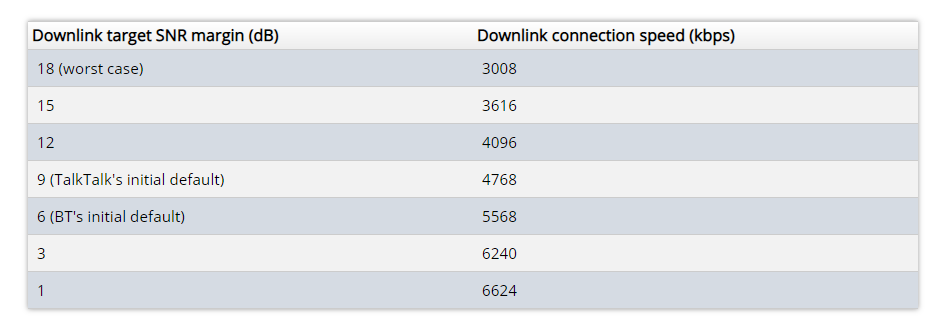
Look how the downlink speed changes.
hollow marlin
Yes, I started as an engineer in DSL, I get that.
quick hollow
Perhaps you are thinking of Line Attenuation. Mine is about 18dB
hollow marlin
Lowering the db threshold does increase speed at cost of loss
quick hollow
Oh I see
That makes more sense now.
How come making the signal worse increases speed?
hollow marlin
Basically on the blade you adjust the lower threshold (target) of signal to noise for the connection to try to train up at. It will try it's hardest until the SNR gets so low the modem retrains to try to bring thr connection back. The targets are typically 6db. Below that the ceiling gets too low and any bit of interference will begin to cause havoc
quick hollow
I see
hollow marlin
They are just changing the target SNR. Below 3 and the connection will not even connect
quick hollow
Oh earlier it was 2.9dB
I must have been right on the edge then

These are my current stats.
waxen scroll
2.9 db is loud fam
quick hollow
58mbps it says but I get 48-50 real world
hollow marlin
Yeah right on the edge
quick hollow
I got a new mk4 master socket coming.
I'm on an old mk2
It has a new filter etc
Gonna install that soon and perhaps that will change things.
hollow marlin
Careful investing too much money and time as you'll net very little gain. But it might make it a little more stable.
quick hollow
It was only £10 for the new socket. No problem
quick hollow
Also the manhole round back of my house regularly fills with water when it rains real bad. Which is has been doing recently. I have dropped from about 60mbps down to 50.
quick hollow
It got corroded so bad before that the engineer had to re-terminate it.
But they won't do anything about it
Phone line was crackling like hell
quick hollow
Unfortunately the line from my house only runs to a a pole and then everything goes underground.
The problem is likely the underground lines.
So they definitely won't fix it
 quick hollow
I have no idea which one is mine. I have seen in there before.
Its just a birds nest
quick hollow
Hhaha
hollow marlin
You got a pet squirrel? They love that shit
quick hollow
I wish. But If I got caught (the pole is in some dudes back yard) i'd be fucked.
waxen scroll
maybe spray it with peanut oil or something
thats not illegal
the squirrel did it
quick hollow
This is very weird because when I look up noise margin on my ISP's forum. People have been saying that the higher the dB the worse the connection and they get more drops etc.
It doesn't make sense.
waxen scroll
think of a restaurant with your m8s and its super loud and your m8s cant hear you
hollow marlin
Attenuation db = higher = worse signal
SNR db = higher = better signal
Attenuation is the loss over distance, SNR is the amount of signal to noise at the end of said distance
quick hollow
And better signal means worse speed.
hollow marlin
Yes
hollow marlin
DSL always has interference, there are actually deidcated channels that are used for retransmission or temp backups when noise knocks it down. Increasing the SNR can take non-backup channels (data channels) and use them as backup
quick hollow
Hmm
hollow marlin
Its a shit show at best on the ISP side trying to manage something that can get knocked out because Karen's bitch session the AM radio is live and happens to use the same frequency as DSL
quick hollow
Unfortunately if I fix the noise issue I'll end up with worse speed.
That kinda sucks
hollow marlin
Its a balancing act from pushing a technology as far as it can go. I am glad I do not have to touch it again
quick hollow
So my network provider literally made lines worse intentionally to give customers a speed bump.
Nice.
hollow marlin
yeeeee
quick hollow
My ISP is rolling out a tech called GFAST currently which gives up to 330mbps over these old ass twisted pair cables. I have no idea how it works but it does.
Bolts onto the side of existing cabinets.
hollow marlin
Up to 100ft from the chassis
quick hollow
Not in my area sadly.
hollow marlin
Basically only useful in apartment buildings
Same with VDSL, where its around ~200ft you can maintain near max speed but at 1.6km its ADSL again
quick hollow
I'm about 360m from my cabinet. I drew the distance out along the road etc not directly.
So over 1000ft
hollow marlin
Not worth it for the cost. Youll get the same speeds
quick hollow
I'm less than 500m from my exchange though. Thats nice I guess.
And i'm on cabinet no.1
My town is very small
quick hollow
Woah that drops off fast
quick hollow
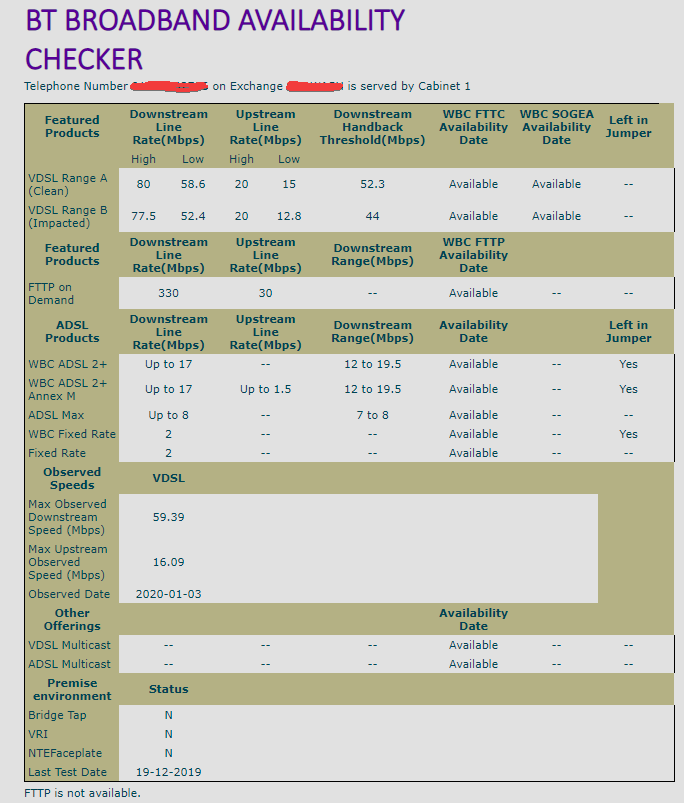
These are the stats from my cabinet.
Seems like i'm getting nearly all I can get anyway.
Not entire sure what it all means to be honest.
Max observed speed I guess is the fastest the box has ever seen since the last time it logged it.
hollow marlin
So the high-low ranges are in reference to the backup channels I mentioned before. As interference gets worse they get knocked down until the SNR is met and the modem retrains
If you increase the SNR that window widen but speeds drops as well
quick hollow
Thanks for the explanation. I understand it more now
Wonder what would happen if I sent mains voltage down the phone wires haha. Maybe they'd have to replace it all then!
quick hollow
No its something like 50v DC
hollow marlin
96v dc
quick hollow
On really that high?
hollow marlin
When ringing
hollow marlin
Yeah ive been bit by them working on pairs in the CO. You know when someone is calling someone
quick hollow
DC needs to be at a much higher voltage to feel than AC generally.
Can start feeling DC about 100v
AC is more around 60v
Makes sense
hollow marlin
Oh you feel it. DC I think takes more to be dangerous
quick hollow
Yep thats correct.
DC will make you grab on more
AC you can generally let go of
DC will also try and twist your arm around like a motor if the voltage is high enough
hollow marlin
Interesting...
quick hollow
AC has much more penetrating power though your skin.
Damn these MK4 master sockets have a lot more VDSL filter circuitry.
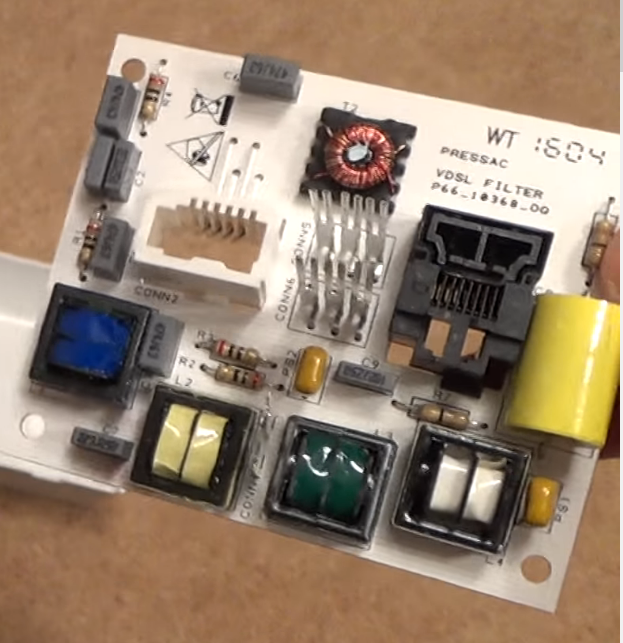 dense karma
both kill
and ac does more often do the it bein able to overcome your body resistance at lower voltages
quick hollow
Its only gonna kill you if you have a bad heart or are old etc.
I'm an electrician. Been hit at mains 230v about 7 times (not while working). Short shocks aren't that bad.
100V DC is not gonna kill anyone for sure.
It will hurt the fingers though
AC and DC can be equally as dangerous.
AC i'd say more so though since it overcomes resistance easier and can shock you are lower voltages as Kringe said.
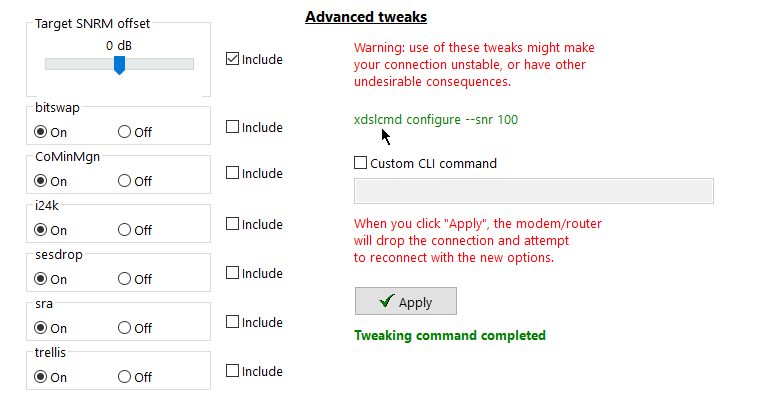
Any point in altering these?
waxen scroll
custom cli command sounds spicy
quick hollow
Yeah can also trigger custom commands under various circumstances such as after a resync, when DSL connection is closing down etc
Yeah I think adjusting the settings as such will be beneficial:
CoMinMgn = off
sesdrop = off
sra = off
Yes I dropped 1ms of ping and gained 2mbps changing those. My down speed link has increased to 59000kbps now
waxen scroll
@strange silo i miss you. did you go to summernats?
dense karma
Dident know that the microwave is on the same frequency as 2.4 WiFi and Bluetooth
waxen scroll
i think most of them are
dense karma
Prob cuz it’s a unlicensed frequency
hollow marlin
More like 2.4ghz is the best frequency that water absorbs
quick hollow
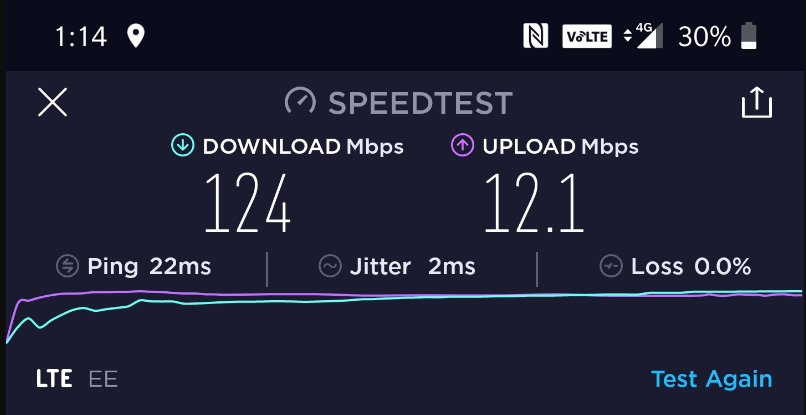
holy shit I guess my mobile provider upgraded the local antenna
Getting 125mbps sitting at my desk on 4g now
I'm gonna test that outside tomorrow for sure
I have unlimited data which is soft capped at 1TB/month. Might end up switching to 4G for my home internet. I know I use more than 1TB/month in my household but eeh, can always grab a second sim. My plan is cheaper than my home broadband.
waxen scroll
yeah but dat 30ms+ from you to the tower tho
quick hollow
22ms
And thats just on my phone. I bet if I grab a 4G router and big antenna (I have both since I was planning to switch in the past but backed out due to slower speeds) it will go down a bit.
6ms on my broadband. If I can get my ping on 4G to under 15ms i'd consider it usable.
strange silo
@waxen scroll I ain't no damn aussie 😉
quick hollow
 strange silo
But I did enjoy watching it on YT
strange silo
hell yeah bother
waxen scroll
that wrap was amazing
strange silo
pitty like only 20% of the sound makes it through recording and YT playback
That kid in the US when they started it up, LOL!
waxen scroll
@quick hollow i want to threaten comcast with tmobile 4g LTE but eeeeeeeehhhh
i get like 1-2 bars in the house so i think it would suck
strange silo
@hollow marlin I personally fear DC way more than AC myself. DC usually means very large batteries are involved (for me) and circuits are designed for high surge currents
I'm like way more likely to die working on DC than I am on AC, way more
strange silo
Also given that for DC it's anywhere from 72V to 600V-800V
quick hollow
Oh yes if you are working on big DC batteries in large UPS units etc
Very scary stuff
Also get a 4G router and external antenna. Omnidirectional antenna on the outside of the building makes a HUGE difference. Or directional if you have line of sight.
I was experimenting with this before.
3 bars on my phone normally. 5 bars maxed out when I was using my antenna.
Big ol mimo antenna is what you need.
This is what I used. I have LOS pretty much though.
Same company does a great omnidirectional one though.
waxen scroll
thicc
quick hollow
I also have a Huawei B525-4G router. It supports Category 6 4G which is up to 300mbps down 50 up. But you can get faster ones if your transmission tower can go that fast.
The tower outside where I work gets me 267 down 65 up on my phone.
strange silo
Nice
waxen scroll
@little schooner its 2020, whats prof plan for the network this year?
hollow marlin
Upgrading to Dlink
strange silo
But it's impossible to 'upgrade' to Dlink....?
hollow marlin
Not with that attitude
strange silo
lol
waxen scroll
who owns linksys these days?
hollow marlin
Cisco
waxen scroll
still? wow. i thought they sold it
strange silo
Still? ^
hollow marlin
Oh really, I took that comment a different way lol
strange silo
Parent organizations: Cisco Systems, Belkin, Hon Hai Precision Industry Co., Ltd.
sure it was 3 monkeys
Box of death
My DC box of death btw 🙂
quick hollow
6 sets of 6 batteries
If they are 12v thats what. 72v per series.
They hooked into there in parallel? Or is each level in series too?
hollow marlin
Thats what ours looks like. Thats a google. Ill have to get a pic of ours
Have about 3 stacks of those
Should be about 2 days of power if our 2 diesel generators shit the bed
hollow marlin
We saved a bar that was welded to the contacts because apparently 15 years ago a tech was working above them and drop a wrench across them.
Plexiglass guards are now mandatory 😛
waxen scroll
i know exactly who the sparky is in that picture
only 2 gens? pssh. we have 6-8, i lost track
strange silo
@quick hollow 6 72v strings in parallel as that's the voltage the UPS I have uses. It doesn't technically support external batteries like that only rack EBMs but meh it's fine and there's all the require safety MCBs and change over contactors for charge/discharge.
I get 6 hours on battery powering my server and gaming workstation, at 360W-400W
72v 144Ah total
For the cbf math people
Only able to drain out of it 2.5kwh of the 10kwh because of the config limits of the UPS and it's fixed string sizes and run times
Next upgrade is another UPS and a ATS so I can double the run time/drain
Just got to wait for another free one
Cos yea the UPS was free and so were the batteries 🙂
waxen scroll
STS pls
dry bane
I'm thinking of adding a rackmounted NAS to my home network. Is there a PCPartPicker equivalent for server builds?
strange silo
@waxen scroll STS?
Oh duh nvm, well I can get the ATS for free as well and I'd only be doing controlled switch over so no power source actually goes offline unexpected
ATS would be in front of both UPSs with UPS in A + B config but with only 1 live at a time at night. Both on during day time. Purely brute forcing around limitation of UPS run time counters, chaining time across two. Dirty hack but it'll work lol
just some old ass APC ATS
APC SU044-1
 heady sentinel

SignalBooster.com
SureCall Fusion2Go 3.0 3G, 4G LTE, 5G E Car and Truck Cell Phone Signal Booster kit is currently the most powerful vehicle signal booster in the market.* It is trusted by police officers for use in their patrol cars and SUVs. It boosts cellular connection strength for voice, ...
Do these things really work?
When I drive up to visit my parents the cell signal gets really bad in some areas
waxen scroll
I wouldn't think so. If I think about it why would a booster do anything better than your phone which already is in a mostly open car (windows)
little schooner
I prefer the ones where you can mount it to your home and the antenna is extremely directional. Then you have to pull up a map of cell towers to get a precise direction and angle to point at to your closest cell tower
if you point it well, the signal should be significantly better at a home
quick hollow
Yeah they work. You get signal further out of range but the speed is shit
Boosting an already weak signal etc
Fine for vehicles I guess
vapid dune

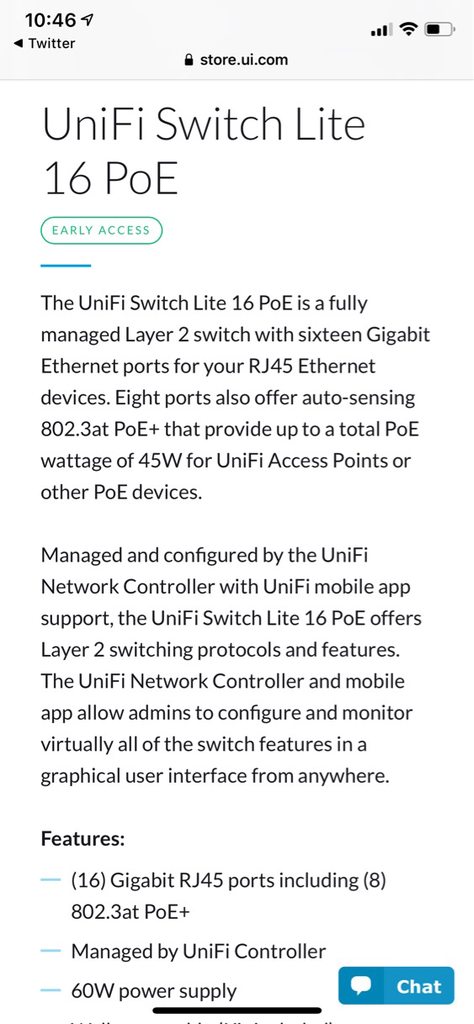
A team of four Danish security researchers has disclosed this week a security flaw that impacts cable modems that use Broadcom chips. From a report: The vulnerability, codenamed Cable Haunt, is believed to impact an estimated 200 million cable modems in Europe alone, the rese...
vapid dune
 waxen scroll
y
quick hollow
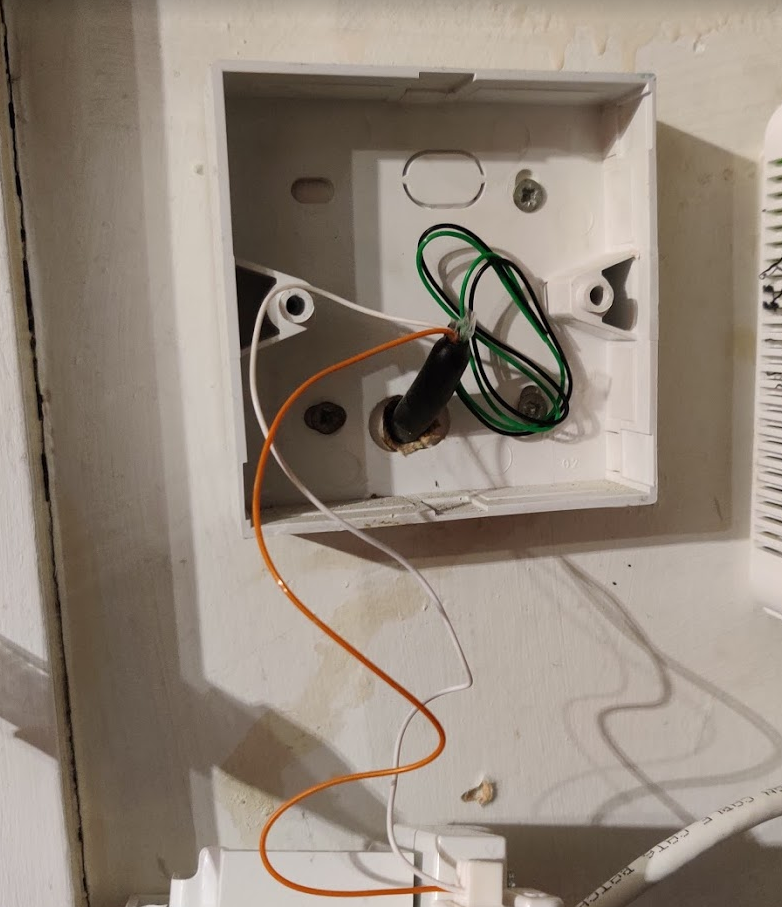


Re-terminating my phone line into a new socket
And completed
Now I wait and see. With any luck my profile will get better in the next 5 days or so.
waxen scroll
why does your phone advertise in its pictures?
waxen scroll
o_o
little schooner
That's a new one
quick hollow
Nah loads of phones have that option now.
little schooner
I guess that doesn't include my s10
waxen scroll
ooooooook
rocky badge
also, oof LibreNMS isn't updating at the interval I set
 primal fractal
Hi, is RDP secure enough over the internet ?
I'm getting a lot of Russian IP address that bruteforce my RDP Port (and my SSH btw but I have a fail2ban system)
 green compass
I would have VPN and then use SSH and RDP under VPN, over the internet is a big security risk
primal fractal
Yeah my ISP router can host bridged or routed openvpn server
And IPsec and PPTP
What should I choose ?
(go check mediapi.org open ports it's a big mess but a friend said it's fine, he tried SQL injection and stuff like that and everything seems secure)
I'm hosting a web/mail server + 2 Minecraft servers + 1 TF2 server
clear igloo
I mean if you have the default RDP port open you're pretty much just saying "hax0rz me!"
quick hollow
Yes we also have brute force attempt on our RDP where I work
Our security software blocks the attempts
We use randomly generated passwords from lastpass which only I and the IT manager have which was 12 digits long but we now have at 20. Not possible to bruteforce
We don't use the default RDP either
So these hackers are sniffing ports
little schooner
but in all seriousness, it takes 1 zero day to take down all that security
vpn or nothing.
hollow marlin
I thought the new standard for RDP is an RDP server with certificates or something like that?
waxen scroll
U wot
vapid dune
lol. The fewer services exposed the better
I'd go with a VPN that's certificate only over a password
 mellow garden
if a pc is connected to the internet by two connections (different isp) one wired and one wireless, is there a way to make an app like obs use the wired connection for streaming and the rest of the pc to use the wifi?
vapid dune
why bother?
you probably need this https://r1ch.net/projects/forcebindip
then set the network priority of wifi to be highest (though that's wrong!)
mellow garden
streaming, i have a network camera on one netowrk (wifi) and the wired was supposed to be the stream out
but i figured something else out already
primal fractal
VPN ready, thanks for your help
 faint iron
Maybe that would sounds stupid as hell but my whole home network runs on Huawei's B525 with LTE card
little schooner
@waxen scroll nothing but security fixes this bios update
intel has a serious problem.
the dumbest thing about the update is that it always wipes out my settings
waxen scroll
yes, even the profiles ;p
little schooner
@waxen scroll I will do mine but I'm waiting for my cloud backup to finish. After 29 days and it's almost done
I use idrive
waxen scroll
cheaper to have offline backup
safer to have offline backup
high speed offline backup
onedrive for high availability across machines, offline drive for monthlys or whatever
little schooner
I tested idrive download speeds, it saturated my connection for 40GB download
Onedrive for 3TB is costly no?
waxen scroll
you should have 0 reason to need cloud storage for 3tb
realistically less than 10gb
clear igloo
looks at the 6TB of Backblaze data
waxen scroll
you dont need to install games on your cloud drive, you dont need your anime collection synced to all machines
documents, etc only
ive been seeing threads on r/sysadmin of morons putting their whole application in dropbox and incuring all kinds of costs
clear igloo
lol
little schooner
I'm backing up a lot of videos and pictures
And some virtual disks
And some isos
Well not all of it is my information too
Family shared
hollow marlin
@clear igloo Have you used the latest VIRL IOSv/vL2 images?
clear igloo
@hollow marlin I have not
hollow marlin
Poo. Some reason the cli is dog shit slow with EVE-NG. I can use the previous image to ssh into in and it's fine. Something's funky with the new images
waxen scroll
wouldnt the cli be slow even on virl images?
they need a ton of resources
i swear i backed up all my images but i cant find them
i still have a VIRL VM with them though, its unlicensed at this point
hollow marlin
No VIRL images don't use that much resource. They are pretty snappy, the new IOSv/vl2 are just slow for some reason. Not performance wise, just cli responsiveness
Not game breaking, just annoying
waxen scroll
ill buy in if virl 2 comes out
most of my labbing in the last year has required hardware so i didnt see value unless they bring out the newest version lol
$200 is a little eh
i hate how they removed multiuser from it too
i dont blame them because it was basically CML at that point and i was using it for commercial purposes

little schooner
@waxen scroll instead, my prof uses packet tracer to do the class design. I tell him that it doesn't really represent the real thing that good.
There were times where it was so wrong how it was still working in simulation
He bought a VIRL license but never used it
waxen scroll
i dont know how packet tracer works exactly, i think it just keeps track of the outputs it needs to modify as you enter commands
little schooner
It's been a few years since I used it but I do remember using it for his classes
Yeah keeping track of output must be crazy
@waxen scroll I've given him his space since it's vacation and he hasn't said a thing for about 2 weeks
I mean I get it, vacation is your time and no one should bother
The only concern is when things have to be done at the very last minute
It's either planned or we should push it off
Not do a half baked fix
hollow marlin
@waxen scroll PT is a simulator instead of an emulator. You enter command to change a script essentially. Work reasonably well for a simulation
waxen scroll
@hollow marlin my lab testing in the past year has been "what happens when i replace this line card with a new model" and "why does VPC misbehave?"
that feel when you need $100k+ of lab equipment
i want a lab ASR9912 😦
they cheaped out and gave us the smallest model possible
thick minnow
hey can someone help me with a network concept?
its a question about fiber, iptv, and ont's
vapid dune
what about them?
thick minnow
@vapid dune So i have fiber, and an ont provided to me by my isp with a bridge, cable modem router all in one trash. Even if i had a vpn installed on my router could still track me through isp provided bridge? While still providing iptv to my mom's tv.
The bridge takes in fiber, sends coax to a downstairs tv receiver, ethernet to another switch that goes to another tv, and finally my router that distributes the wifi, connected with a pihole 3b+.
Are my solutions just install a vpn on router, or setup pivpn with the router connected to it. Or buy a fritzbox like this one. And hope my novice configuration skills can setup the new home network.
hollow marlin
@thick minnow are you just looking for privacy? ONTs are typically bridged most the time they don't track anything. Your IP and destination is always going to be visible to them whether your VPN is on the router or behind it.
thick minnow
@hollow marlin i live in an HOA and it is against the policy to use my internet for business purposes i.e. hosting my business website, and i don't want to get in trouble or they cut off my service
more privacy would be nice too
waxen scroll
hosting is like $2-5/m these days
plus i dont think they'd take action on you without one warning
you might even find out they're blocking port 80 anyway
vapid dune
I mean it's kinda weird that a HOA even cares about that
I don't think it's enforceable
but I'm not a lawyer.
either way you could get a VPN for peace of mind
*missed the part where they can cut off your service. so I assume the internet is provided BY them?
thick minnow
@Blue#7239 the hoa has a contract with fision fiber optic by hotwire communications
And it would violate their terms of service i think
vapid dune
in which case your best option is to get a VPS near by and then set up a VPN to expose anything hosted at home externally. (or just use the VPS)
thick minnow
will look into it
 ornate jungle
I mean, your BEST option would be to tell the HOA to shove it, or move somewhere that doesn't have you living in a dictatorship, but alas - moving is not simple, cheap, or easy, so VPS is next best thing.
vapid dune
lol I'm glad HOA isn't a thing over here
seems bizarre to me that they're responsible for individual houses fiber connection
I mean really if you think about it, if anyone in the entire HOA does anything bad on their connection. the whole HOA would get disconnected
DMCA especially
clear igloo
@vapid dune I've got an HOA and they aren't responsible for jack 😛
paper rampart
I could see where having a group of people negotiating could give a better price, but there seem to be a lot more cons than pros.
waxen scroll
@clear igloo i have multiple friends in FL with different HOAs... they all force you to buy cable internet and TV
its cheaper than what a single person can get, but it is forced
i dont recall the costs but i do remember saying "thats not terrible"
clear igloo
ouch
hollow marlin
Mine increased from 10g free to $60 😡, moved where our fiber wasn't
fervent brook
Which is better? IOS or iOS? go
fallow frost
Android.
little schooner
Obviously android because it's open source
Meaning you can skin it to be like iphone if you wanted
vapid dune
not networking?
little schooner
And Cisco IOS is pretty simple. I don't know how it works on those expensive switches and routers
fervent brook
IOS is definitely networking
maybe someday i'll get something fun. for now i have some Netgear switch
 jaunty sun
So I was directed over here to talk about home server setups. I'm currently running an older gaming desktop as my home media server and looking to upgrade the CPU/Mobo to ones that support virtualization so I can run some behind a VPN and some not. Unsure of the best OS to do this through (besides not Windows). Anyone have experience with this?