#networking
1 messages · Page 175 of 1
 quick hollow
Thats what I do.
But it forwards for the wrong IP
When I go to whatismyip.com on the server its definitely on .196
 shadow shoal
did you select the right interface and ip address?
quick hollow
Yeah
I'd show you but teamviewer has blocked me out of my server again for 10 mins. Incredibly annoying.
shadow shoal
I´d legit recommend that you use something else than teamviewer
very sketchy company
quick hollow
Yeah logging into my domain controller now using remote desktop instead
Can access the router from there
Here
You can see I have ports forwarded for both the main network and my server
Main network being 192.168.0.x and my server being 10.0.0.25
shadow shoal
and the router forwards it to the wrong subnet?
quick hollow
Yeah
Like I have a map for my game forwarded to port 8123
I should be able to use 196:8123 but its on 195:8123
shadow shoal
are you talking about your public ip?
shadow shoal
Try removing the extra nat rules you have
is this a static ip address or are you using dhcp
quick hollow
External?
Yeah a block of 8 static ips
Internally DCHP is disabled outright. On the main network we have the domain controller which handles DCHP and on my server I just set the IP in the ethernet adapter properties. Static
I only have two NAT rules
And those are needed to give my server it's internet
shadow shoal

Are you still using this? Because if you are then the server isn´t on the right subnet
quick hollow
I created that vlan as a test
Its not doing anything
But yeah eth2 is what i'm currently using for my server.
shadow shoal
and can you ping the router from the server and can you ping the server from the router
 vapid dune
port forwarding would forward ports on both IPs yes?
quick hollow
Thats what its doing for some.
For example my game on port 25565 is accessible though both external IPs
But not other stuff
vapid dune
I think the safest thing is to put in a second router so you don't muck around in a business critical router
shadow shoal
messing stuff up= learning ;p
vapid dune
assuming you can cable it as such
messing up a business for a personal server = trouble
quick hollow
I mean i'm doing it from home on off hours
And I have a backup of the config
So I can easily restore
vapid dune
you can lock yourself out accidentally though
shadow shoal
Yeah if you don´t lock yourself out
quick hollow
I get that
shadow shoal
The number one scourge of networking
quick hollow
But I mean I can go in the morning and restore it manually
vapid dune
that's why there's a serial cable
I mean assuming you don't happen to get robbed overnight and have all your IP cameras not working
it's a poor risk imo
shadow shoal
I don´t have a count on how many times i´ve had to reset my home network because i locked myself out
quick hollow
Nah those are all hooked with coax to a DVR.
But yeah I get the point
But can I connect two routers to a single gateway?
Sounds like it shouldn't work
shadow shoal
No you would connect the routers together
vapid dune
I was suggesting two parallel routers
but the question I'd have is how are you getting two WAN connections atm on the existing router
shadow shoal
I´d legit get a switch
Do you have two lines to your home?
or are you connecting through a vpn
vapid dune
it's a business not a home
shadow shoal
Yeah but he is at home?
vapid dune
what I mean is that, are you getting multiple external IPs through a single connection to the router from the gateway atm?
vapid dune
what about the 2nd ip?
shadow shoal
can we see your interfaces?
quick hollow
Yeah just a sec
shadow shoal
thanks
shadow shoal
))
vapid dune
ideally the red is already a switch and it's fiber to SFP lmao
shadow shoal
this is weird
quick hollow
This is just the default config of the edgerouter
Only thing I added which you can see in those screenshots is the second IP the wan interface
vapid dune
he has a /29
quick hollow
Yeah
vapid dune
so actually the 193 is assigned to the edgerouter
vapid dune
193 - 199 is the /29 I think
shadow shoal
so nat overload should work then

Ubiquiti Networks Support and Help Center
Overview
Readers will learn how to add Source NAT and Source NAT Masquerade rules to an EdgeRouter.
NOTES & REQUIREMENTS:
Applicable to the latest EdgeOS firmware on all EdgeRouter mode...
vapid dune
I think I was suggesting he'd first VLAN off the personal server
but yeah and then take one of the IPs for the vlan
shadow shoal
Yeah i´d recommend that
vapid dune
I was trying to suggest that if it's hard to do that he could plug a second router in parallel into the gateway, but I guess it's already assigning multiple addresses to the router so maybe that's a non-option in terms of mucking around with more config settings lol
instead of VLAN of course. since it's easier
shadow shoal
yeah not a great setup for a beginner in networking
vapid dune
totally lol
quick hollow
Its very confusing haha
shadow shoal
No worries i was very confused when i started
vapid dune
is there anyone at work who actually maintains the network?
because for them to set it up shouldn't take that much time
or is that you? LOL
quick hollow
Yeah the IT manager. But he knows about the same as me on networking haha.
vapid dune
I mean it's a bit weird to have a /29 yet only use 1 IP ever
at least to me lol
and I assume there are no VLANs already
quick hollow
Yeah as far as I know.
shadow shoal
Flat network baby
shadow shoal
lol same
vapid dune
and I have pretty bare bones level understanding xD
quick hollow
I mean we don't really manage any big servers or anything. Like I said we are small company.
We just have a few ports forwarded on our single IP and thats it
Our domain controller server does DCHP for the network.
shadow shoal
Yeah small companies are understandably not making a huge effort in their networking system
It´s how it is
quick hollow
Well small office I should say
We are a global corporation
But each office handles their own stuff
shadow shoal
yeah
quick hollow
We moved our file storage etc into the cloud.
The only server we actually have which is used everywhere is our sage accounting server.
vapid dune
lol computer security is quite poor for most things
it'll take 1 randsomware attack for your business to go under
that's how I see businesses die these days at least
quick hollow
Well like I said. Everything is stored in the cloud.
We use google drive for everything
We do take a backup of that though.
shadow shoal
What i would do in regarding to the server is: put it on a vlan, not vlan 1 btw
secure it by making firewall rules that disallow traffic to it
quick hollow
Will that stop the wrong IP port forwarding issue?
shadow shoal
I don´t think you need both destination and source nat to the server btw
You can try removing source nat rule
shadow shoal
vlans are love
vapid dune
except no inter vlan communication is desired in your case
quick hollow
Okay
vapid dune
I'm assuming other lan is the connection directly to your server?
vapid dune
regarding the dhcp server, I'd just use a static IP for the server since there's just 1 device lol
quick hollow
Yeah I am. Currently using 10.0.0.25 for the server
Set manually in the ethernet adapter
quick hollow

vapid dune
just realized it LOL
usually you do vlans like this: router --> vlan aware switch --> devices / server
and then you put things on specific vlan as appropriate and muck around the rules
what you have is you two lines into the router on eth1 and eth2
quick hollow
Yeah
195 to eth1 for the main network
196 to eth2 for my server
Thats what the 1:1 NAT guide told me to do.
vapid dune
I think all I'm saying is that you don't need to add VLANs since you can just do the entire interface
quick hollow
Okay that simplifies things.
My goal would be to put in some kind of isolation between eth1 and eth2
And to also fix this wrong IP port issue
shadow shoal
ok try removing the destination nat rule and only leaving the source nat rule
quick hollow
Okay
No that broke my server
Cant connect to it now
Yeah people on the server were fine. But anyone trying to connect couldn't when I deleted it.
I put the rule back and all is fine.
vapid dune
so what's the remaining issue? isolation?
also that port forward isn't right either right?
quick hollow
Yeah
shadow shoal
yeah its choosing the first ip always
vapid dune
ignoring the firmware version issue see: https://community.ui.com/questions/How-to-properly-set-up-multiple-WAN-IP-addresses-with-port-forwarding/6df70aba-0ae9-416f-b5c5-4cc07163f800
shadow shoal
having multiple wan ips confuses me tbh
vapid dune
isolation should just be firewall rules
quick hollow
Yeah isolation is my second priority
shadow shoal
yeah its always firewall for layer 3
quick hollow
I figure that can be done a lot of easier
The main problem is the port issue
Yeah I checked that link you sent Blue. Doesn't seem to be a fix in there. Just people trying to figure stuff out like here haha
What the dude said about there being no Original Address in port forwarding makes sense though. It seems like in another router this would be a lot easier.
shadow shoal
edgerouter can be clunky sometimes
quick hollow
I bought it because it was recommended to me here haha
shadow shoal
No worries i have one too
i´m currently using it with a bunch of vlans and to route my own ipv6 /48
works like a charm but configing it can sometimes be weird
quick hollow
I see
vapid dune
hmm? the guy at the end said he got it working
quick hollow
oh
shadow shoal
yeah by going to an older firmware
quick hollow
shadow shoal
btw never update firmware straight away
quick hollow
So that is what I need to use?
I'm on the latest stable firmware right now, not the beta.
EdgeRouter 4 v1.10.10
quick hollow
That screenshot I sent is what I need to do though right?
shadow shoal
I´m on 10.09 because 10.10 broke ipv6
quick hollow
nvm that wasn't the dnat thing
shadow shoal
It just wouldn´t route
vapid dune
oh nope. I'm on 10.9 too lol
shadow shoal
lol
vapid dune
ipv6 working
shadow shoal
yeah 10.9 is solid for ipv6
quick hollow
So which part of that forum post is the part I need to do then?
vapid dune
I think the part you highlighted or maybe the jumbled config
vapid dune
I didn't have time to read it past that he got it working
and that it's what you want in terms of functionality for the public ip
quick hollow
I dont think everything is there in that forum post tbh
quick hollow
I dont think I should be putting ports in the port forwarding section
Its opening ports for both IPS it clearly
So I need to do port forwarding using DNAT and SNAT I think.
Thats what I make from that forum post anyway.
quick hollow
Well
Just read in the forum post and he said 1:1 NAT doesnt seem to be possible.
So I think thats what he is trying to do
Which is what I have done already. I followed a 1:1 NAT guide to get to this stage
This is my current config for DNAT
shadow shoal
yeah you seem to need to use dnat rules for dnat
because the port forwarding windows doesn´t let you control which WAN
shadow shoal
yes kind of
quick hollow
Or Destination is inbound etc....
Okay I get that part
So I need to create a rule forwarding both?
But since I have specified no port shouldn't all ports be open?
shadow shoal
not if you have configured firewall correctly
shadow shoal
but yeah you should include the ports in the nat rules
quick hollow
I added a rule to the WAN_IN firewall policy to accept all protocols, with a destination address 10.0.0.25 for my server. Default action for WAN_IN is to drop btw.
I didn't add one for WAN_LOCAL though.
Not sure what that rule is doing.
shadow shoal
You don´t need to configure for wan local
quick hollow
What is the purpose of that rule?
shadow shoal
if you for example want to be able to connect to the router from the internet
It´s only to the router and not to devices on the lan
so only to interfaces on the router
quick hollow
So its configured correctly?
Sometimes you need to do a 1:1 NAT translation. With an EdgeRouter this couldn't be easier! Follow this quick tutorial to get your 1:1 NAT up and going! Need...
This is what I followed originally.
Exactly to the point i'm at right now. Maybe you'll see an issue.
vapid dune
quick hollow
Not quite
They didn't do the firewall rule in that article.
But everything else inc the NAT stuff is the same yeah
quick hollow
Ooh ohh ooh
Its forwarding ports to both IPS
So if I put a blockade between eth 1 and eth2 would that stop it?
Because on the main network I can write 10.0.0.25:8123 and it also shows my thing.
So maybe its cause both networks are connected
How would I go about setting up some separation?
 fluid meadow
Dose anyone have a good modem recommendation?
i want to buy the XR450 router
but i need a modem
 little schooner
NAT to the rescue
fluid meadow
?
little schooner
@fluid meadow I was replying to the other guy
 clear igloo
Who is your ISP @fluid meadow
fluid meadow
xfinity @clear igloo 1000mbps down and 45 up
shadow shoal
is the ISP provided modem just shit or?
clear igloo
Comcast charges $10? a month for theirs
shadow shoal
lol
clear igloo
So best to bring your own 😛
quick hollow
boost mobile hotspot
shadow shoal
strong contender for the top spot
little schooner
They push all fees to customers
They have bad negotiators
They give only 5mbps for a 300 mbps connection
shadow shoal
https://www.reddit.com/r/sysadmin/comments/e5ng0u/sprint_blocked_all_of_cogent_from_accessing_their/

reddit
So we have a number of clients with Cogent lines, we push them a lot for our client base. Today we had a few reports of people getting an error...
This is also hilarious
little schooner
Sprint has awful download speeds on 4g
shadow shoal
Also why is it so hard to get a sim card with like 20 bucks worth of internet data without doing a contract
If i´m visiting for a week or three i´m not gonna sign a contract to get data for my phone lol
little schooner
@shadow shoal but that was months ago. I did a test now. Looks like they finally Improved
 edgy pasture
Comcast is fi e
shadow shoal
:bless:
little schooner
@edgy pasture Comcast reminds me of the worst in people
Frontier is even worse yeah
edgy pasture
You have never met frontier
shadow shoal
lmao
edgy pasture
Frontier made me apprieciate comcast
 rocky badge
little schooner
rocky badge
little schooner
Frontier is a trap. I guarantee it. You see their trucks servicing neighborhoods more than any other isp
They have a infrastructure problem
edgy pasture
They lied, added random things on, and took 10 days to install my internet which consisted of them plugging in a wite
little schooner
They charged my dad from 100 bill to. 298
little schooner
@edgy pasture this
https://arstechnica.com/information-technology/2019/07/frontier-customer-bought-his-own-router-but-has-to-pay-10-rental-fee-anyway/

Ars Technica
Customer-owned FiOS router works just fine, but Frontier refuses to waive fee.
edgy pasture
Bill shows up 2 year contract with extra 70 install, 20 a month for security
little schooner
They force it on you
shadow shoal
damn they are squeezing every penny lmao
edgy pasture
They charged me for more
little schooner
Worst than Comcast
shadow shoal
90$ a month is redonk expensive for 150mbps
 vernal gust
At least y'all aren't rural schmucks like I am, paying $60 for 6Mbps down on AT&T DSL
edgy pasture
Comcast i paid 60
shadow shoal
god pls why
edgy pasture
For 250
little schooner
@vernal gust it's abuse that's what it's called
vernal gust
Wasn't internet declared a human right?
edgy pasture
No
little schooner
It should be
shadow shoal
Paying 120? ish for 1gb down/up in Euroland
edgy pasture
Eh
shadow shoal
Where around 80% of the people in my country have fiber
edgy pasture
You can live without internet
edgy pasture
I pay 60 for 1gb up down
No contracts
No fees
You plug in router, it asks you 100 or 1000
shadow shoal
Also no contracts or fees here
edgy pasture
And your done
little schooner
@edgy pasture I'm waiting for the new fiber isp to come to this area
The price will be like 50 flat for 150 up and down
little schooner
No. It's a different company
shadow shoal
lol its not fiber all the way to the home?
little schooner
They are building it out in my town
edgy pasture
It is but they cap it
shadow shoal
wat
edgy pasture
70 up down
little schooner
@shadow shoal AT&T pulled the same lie too
shadow shoal
is that even legal
little schooner
It was fiber to the neighborhood and then dsl to the home
little schooner
Trace down their management and hold em hostage
shadow shoal
yeah and its often that that certain ISP is the only one in that city or whatever?
edgy pasture
Yes
shadow shoal
so people can´t change their ISP even if they wanted to
edgy pasture
Yep
shadow shoal
which is just terrible monopoly
shadow shoal
Only like 5 ISPs in my country, most are pretty good
 viral lagoon
haha i only have 3 isps in my country
 slate beacon
shadow shoal
slate beacon
shadow shoal
competition is always good
 hollow marlin
While some ISPs do fuck customers over, people generally do not understand how expensive it is to be an ISP
little schooner
@hollow marlin but the big players really scam more often
Comcast wants $109 for internet only service for 100 mbps
But if you bundle it becomes 69.99
With price increase to 99 and then 150
Stupid
vernal gust
I would easily pay $100 for 100Mbps if the company business practices were upfront and fair
hollow marlin
Part of it has to do with legacy billing systems and consistency
little schooner
@hollow marlin gets me more excited to finally switch to fiber only isp
Where it's 50 flat
They use newer systems
hollow marlin
You'd be surprised how hard it is to keep track of all the billing and plans
little schooner
Yeah it must be challenging
hollow marlin
We cover almost 2 full states and its a chore. I cant imagine having to manage the entire US
Im in the process of closing a house and I cant wait to get fiber again
Im in the one location we cannot get fiber to
The people who own the poles on the street are being ass hats and not allowing anyone to lease more space
little schooner
@hollow marlin and that's probably what Comcast is doing to prevent this new fiber company from entering our neighborhood
Or something
hollow marlin
They tend to not own the poles, the electric company does. People like to point fingers at ISPs but electrical/sewage companies are actually the most impactful on where service can be provided
little schooner
I see
 leaden flower
Anyone here have a Security+ cert?
hollow marlin
Was just reviewing with a buddy who is taking his on Sat
little schooner
Is security + hard?
I don't have money to go for it
Need to ask company to pay for me
hollow marlin
Based on the study guide, no
leaden flower
I have the money, just wanted to know if it was worth it
hollow marlin
Network+/Security+ are worth it for people getting into the field
actually very good starting points
little schooner
I have the network+
leaden flower
Yeah I'm a late bloomer
little schooner
Ahh I'm missing the security plus
leaden flower
I dropped put of college after a semester because I didnt know what I wanted to do
hollow marlin
I stopped at my associates for the same reason
leaden flower
23 and I've been doing Tier 1 IT for a couple years and networking seems like something i actually enjoy
hollow marlin
Heads up, IT and networking are two completely different worlds
hollow marlin
Like I said, if you were in the NY area Id take you under my wing Xeon
little schooner
Yeah that would be cool
I know I have a lot to learn
It's been fun so far. At least with the prof projects
I've taken a strong liking for powershell scripting
Still have to do some python though
hollow marlin
I started Python but then couldnt find a single use for it in production
leaden flower
I know, I've done some glimpses enterprise level networking when I worked for the local school district
Glimpses of*
little schooner
@hollow marlin yeh if anything, powershell was being used like crazy in my prof classroom
leaden flower
Hate powershell
little schooner
For deployment and software pushing or inventory gathering
Like wow it's a lot of fun
leaden flower
Thanks Bill Microsoft
little schooner
Even to the point where it makes vms ready for every student account as soon as they log in
leaden flower
I know I'll have to use it at the server level though
little schooner
@leaden flower I do have a c# background and it made it easy to understand
But a good book is " Powershell in a month of lunches"
That taught me a lot of powershell
hollow marlin
Programming in networking doesnt come into play unless you are in mass SDWAN deployments
little schooner
@hollow marlin ohh. So I still have ways to go
hollow marlin
But even at that point there are dedicated programming teams for custom programs
leaden flower
Definetly looking into that book
little schooner
@leaden flower it's like the best book for it
leaden flower
Idk
Like, I always had a fascination with computers, but I was into it in highschool like I am now
Networking just seems high demand and interesting
little schooner
Security is more in demand than pure networking I think
Like route and switch is not in demand
hollow marlin
It still is but the market is starting to demand more rounded employees
little schooner
Cybersecurity is
hollow marlin
You need to know route/switch, security, little bit of wireless...etc
little schooner
Yeah
leaden flower
Which is why Security+ peaked my interest
hollow marlin
Honestly the expectations are becoming unrealistic for a lot of employers
leaden flower
Duh
vapid dune
That's how the big bucks are made
little schooner
@vapid dune but then what kind of life is that? Focused full time on work and learn?
hollow marlin
Big bucks? Entry positions are asking for 10years experience with professional level certs
leaden flower
Yeah, its crazy
hollow marlin
@little schooner My life is almost all work and study
little schooner
@hollow marlin I think that would be very hard for me
leaden flower
When I was a truck driver it was the same.
Everyone wanted 5 years+ experience
hollow marlin
The networking job market is starting to crash because of the dumbass requirements
vapid dune
dunno I'm in software. I'm always learning
hollow marlin
As the requirements and overall knowledge required is increasing, employeers are upping the baseline which is cutting off people trying to get into the space which is fucking reliable network engineers for the upcoming years
hollow marlin
Sure, you have to. But to expect entry level jobs to know route/switch/programming/SDWAN/firewall is plain asinine
clear igloo
Know all the things!
 waxen scroll
@hollow marlin i had this issue in 2009. its even worse in your space cause all the NANOG types have these "im better than you" attitudes and gatekeep jobs. ive been burned multiple times because im not in the club
the last burn was "oh you dont know MPLS from a provider perspective?" [goes and hires a DCtech friend he knows instead who doesnt know MPLS anyway]
they write you off for not knowing topics that take less than a day to learn
as for python, the only use i found was as a crawler where you need to make custom reports for a project that is too slow to use existing tools for
 shrewd marsh
I only have an education as a web developer. 1 year and 9 months. And then I have 2 years of experience. Last year I got offered a job as a senior test specialist after 8 weeks of testing and training. It can sometimes be difficult to measure competence within the IT field because of all the aspects of it. But a general understanding get you far. And if you can show that and a willingness to learn, then finding a job becomes easy.
That is at least my experience.
hollow marlin
@waxen scroll that is 100% correct as I see it
 frozen fractal

 inner bloom
So my residence for uni has decided to overpopulate the place with APs and my phone really dislikes that. I'm getting constant drops and I'm wondering if there is a way to force it to one AP (the one in my room) or just disable wifi roaming all together.
Currently on a rooted Andriod phone.
vapid dune
complain to them to see if they can adjust the minimum rssi?
shadow shoal
Not really, the phone decides what to do, you can try complaining to IT about their wireless performance
inner bloom
Already complained to IT and they cant do much. Phone drops when looking at all the connections with such similair strengths and gets confused between all of them. So it constantly switches between the different APs
little schooner
@inner bloom if only there were an app that could look at the specific mac address of the wireless access point and filter out the others
or get a phone that has better roaming capabilities
inner bloom
Well if it's getting the mac address of a specific AP then IT could probably help me with that. So long as there is a way to force my phone to connect to that one AP
little schooner
@inner bloom I think with root that's possible
Since you control the whole os at that point
And run some special code
To conditionally check before changing aps
waxen scroll
did you teach your professor about /31?
inner bloom
I assumed there was a way. I just need to know how to do it is all
little schooner
@waxen scroll not yet. I didn't mention it the last time we met since he was more razor focused on getting grant money responses emailed to people
Next time I will mention it
I did mention to him that we should charge like 30 for our work though
waxen scroll
my times worth about tree fiddy
little schooner
But he didn't take it too well based on lack of response
He said he didn't want to burn bridges
waxen scroll
i dont know how you havent figured out how to bill the uni for your time
use the budget
little schooner
@waxen scroll I'm not that good at leading action
But I'll get it down someday
When I start working for real
Right now I'm just thinking about passing my Chem and physics class
Chem is really brutal. One exam I got a 45
waxen scroll
@little schooner you need none of that in the real world
vapid dune
real world implies you pass the fake world
you need that piece of paper at the end of it
 fervent brook
@little schooner guns won't help you pass the exam
little schooner
@waxen scroll I know. I just need the paper because a lot of jobs here have it has the pre-req
Dat paper
waxen scroll

Receive an additional $25 credit for Ting today when you sign up at https://linus.ting.com/ Check out NVIDIA GeForce RTX Powered ORIGIN PC's at http://bit.ly...
cringe
vapid dune
did you mean #audio-tech lol
 radiant imp
isn't there a way to save the access point closest to you so that way when it comes within signal distance it give it priority?
vapid dune
they're all under the same SSID and the AP is responsible for the roaming I think
ie if you're in between 2 APs it might pick the one you were already on to a certain extent
"good enough" lol
then it's up to the AP config to determine how good is good enough
at least for unifi it's this: https://help.ubnt.com/hc/en-us/articles/221321728-UniFi-Understanding-and-Implementing-Minimum-RSSI
little schooner
Minimum is best used if there is a lot of downward facing access points on the same floor or something
When you start adding multiple floors and different ap orientations, minimum rssi backfires spectacularly
shadow shoal
I´m just surprised they didn´t do a proper survey before, or paid somebody to do it
little schooner
@shadow shoal guess they paid people who didn't do a great job
That happened with my towns selection of contractors too
shadow shoal
man that sucks
little schooner
They said they would pave the whole road, and the town wanted them to pave it this winter
But they only patched and they were angry
And they fired them
shadow shoal
good on them
vapid dune
at the uni I was at they had the IT guys driving around campus to detect rogue APs
fervent brook
Put them in...APVs
 pure kettle
building a home automation rack for my new house, if all that the rack will have is 4 sonos amps (250 watts per amp), a 600 watt multizone amp, some apple tvs, unifi cloud key/usg and a 48 port poe switch should i be concerned about cooling? Its going to be a 25u rack so I have plenty of room to split up the amps for ventilation and 99% of the time only 2-3 amps will be running at the same time on low load. The room is air-conditioned with a small closet vent and seems to get good flow, we keep the house around 74 because we live in Florida. This is my first time building a proper media rack for a house as this is our first time building where we could run cat6 and speaker wire everywhere, I'm fairly experienced with A/V gear and have done tons of research on UBNT stuff but I just want to make sure I shouldn't pay more attention to cooling everything.
radiant imp
I would say give it a shot. If it starts to feel a little warm back there, definetly look into getting one or two clip fans
 sour meteor
I forgot to backup my unifi controller before formatting my PC. Oh boy getting my USG set up to work with my unraid server and all its Dockers again is going to be fun.
waxen scroll
Oof
fervent brook
I'm not completely sane
waxen scroll
maybe you can practice fiber splicing new connectors on
they dont really make stuff with that connection anymore
the orange stuff has been mostly phased out with aqua
 sturdy mirage
true, i was also hyped when i got my cables, however beside splicing panels, ST are kind of obsolete ....
btw, if some one is interested, i got MTRJ cable tha i don't use
¯_(ツ)_/¯
 midnight heath

Cyware
An attacker can sniff, hijack and tamper VPN-tunneled connections by abusing a flaw in Linux, Android, macOS, and other Unix-based operating systems. Aviatrix VPN is also found to be impacted by multiple local privilege escalation vulnerabilities.
 median ore
Hello, do any of you know if in this world there is a switch that have 1Gbit ethernet ports and at least TWO SFP+ 10Gbit connectors (ideally tree or four) that doesn't exceed 100€ ? I think there isn't but if it exist i might try it.
clear igloo
Depends, do you want managed, unmanaged? How many 1Gb ports? New or used?
median ore
I'm trying to have a new one, unmanaged one. For Gb ports i think 4 will be enough
clear igloo
I'm seeing no switches in that price range unfortunately. Those that are are all copper based 10G ports, not SFP+
median ore
copper ? you mean ethernet ? Well it's even better (for 10Gbit ports)
little schooner
@median ore copper is the medium, ethernet is the standard
I've corrected my errors since I joined the discord lol
median ore
@little schooner sorry i'm a little bit lost sometimes, what is a medium?
little schooner
@median ore it's the physical cable that the network travels over. Like the rj45 cable or coaxial cable or phone cable rj11
Or not a cable like wireless
median ore
OK so when someone say that a switch is copper based what does it mean?
little schooner
@median ore in that case, they mean that you connect to the switch with copper-based cables like the RJ-45 cable that you know as Ethernet
People say ethernet but they usually mean its rj45 cable
Fiber is not copper based
So you wouldn't call it copper switch
Because it may support fiber and copper connections
median ore
And ethernet is the way it's wired?
little schooner
But if it's just rj45 ports, yes, it really is copper only switch
Ethernet is the rules to how data is formatted to be transfered over network
If it wasn't standard, you couldn't communicate with one brand of switch with another. Or in worst case, the US internet not being able to communicate with internet in China
It is there to help everyone agree on a standard to follow and be open
I'm generalizing a bit
median ore
OK thanks
 spare bay
If you want to get super into technicalities, the copper cable you use is probably cat5e cable, the connector is an 8p8c connector and ethernet is the network technology (which can run on copper or fiber optic)
rj45 is another connector that 8p8c is compatible with but not vice versa
since true rj45 has a key
and we use the rj45 wiring standard in the 8p8c connectors
 hoary cargo
Pedantic bunch...
I’m happy that there are a few plausibly priced 10 G switches at least, SFP+ or otherwise.
 mental shard
Hey! I'm planning on setting up my own mail server again, but I'm at a loss as to what I used before to mitigate the whole dynamic IP problem.. Anyone have ideas that aren't just "get a DynDNS account?"
little schooner
@mental shard yeah, buy a block of static IP
waxen scroll
lmao i was gonna make the same smart ass comment and decided not to
thx xeon
the real answer is dont run a mail server, its too much hassle
 oblique aurora
europe is out of ipv4, i belive
 craggy parcel
@little schooner That can be quite expensive, last I checked, people expected up to about €50 per IP, with €20 being normal. Same goes for the spam I receive from IPv4 brokers.
For residential connections the price for a single static IP, at least in my country, can easily be about 10-20 eur/month, depending on the ISP. In many cases that'll be the same as the monthly fee for the connection itself.
@waxen scroll I agree with the point of it being to much hassle. However, we still need people with the skills to actually setup and run mail servers, unless we should trust all our mails to entities like Microsoft and Google. So if people are NOT setting up and running mail servers for fun, because it's too much hassle, or always get's told not to, we could come to a point were all mail in the entire world will be controlled by a few large entities, like Google and MS for most of the world and one company for China, and another for Russia. I'm not sure if that's the way I would like e-mail to go... (And for the record, I'm using Google apps for my personal mail, and use office365 for company mail. 😛 )
craggy parcel
Oh yeah, they changed the name to gsuite some time ago.. 😉
craggy parcel
I switched to it because it was free back then, and easier than running my own.
I think the full old name was "Google apps for domains" or something like that. Ahh.. Wikipedia says it was "Google Apps for Your Domain".
little schooner
I like how easy they make it to spin up custom email domain
Hosted email is so fast to setup vs manual
craggy parcel
Yup, depending on your DNS provider, when doing the initial owner verification
My DNS provider can take up to 1 hour, before they've synced all servers.. The one we use at work, take only about 10 sek. (Self hosted)
little schooner
Wow fast
craggy parcel
Yeah, we host it ourself, and have a small timeout, due to frequent DNS changes.
little schooner
That's cool
The last place I setup email was at dentist office. They were small and they needed office too. They had money so they went with o365
But now we have to go back because they don't have enough users purchased
And they just only have one person using it in meantime
craggy parcel
Can you have too few users in office365? Didn't know that..
craggy parcel
Yeah, you pay per user, but what I understood, was that there was a limit as to how few users you could pay for. (Like say, no less than 5)
But yeah, you need a license for each person using the subscription.
craggy parcel
We have the extra licensing bonus of having a number of office licenses, along with 365 licenses. So some users will have no office access, and others will. Kinda confusing, but at least I know that the MAC users NEED Office with their 365 subscription, as the licenses we have, are windows only. 😉
little schooner
Really? It isn't for Mac version?
And yes you have to assign them the office license too as you like
That's nice feature to conserve office license I suppose
craggy parcel
But in regards to o365 users I think were the opposite of that dentist.. We have too many. We actually have a number of shared mailboxes, that are setup as regular users.
little schooner
I got a question for you
craggy parcel
O365 licenses with desktop Office are 5 devices, windows or mac, mix and match. But the standalone Office licenses we have, are for the windows version.
Well, we have personal mails too, and shared mailboxes is really an old exchange feature, and they are FREE compared to a user account for the shared box.
little schooner
Yeah. How I would I go about this? :
They have one user account in O365, and it is an administrative account. I want them to check their mailbox but not have the power to make Administration changes by accident
I was thinking that they have to make another account in order to do it safe
But is that thinking correct?
craggy parcel
Exactly. You make another account, that's the administrator, but assigns not license to that account. Then you revoke the admin rights for the daily use account.
little schooner
Okay, so as long as it not assigned license, it can technically be created for free
For use?
craggy parcel
That way the admin account can login to the portal, handle payments, and all admin stuff, but will not have access to anything but the admin portal.
little schooner
I see
craggy parcel
Exactly. At least, that's how I understand it. That is actually the situation you have, when you create the 365 tenant in the first place.
little schooner
And I'm guessing that shared mailboxes don't actually need licenses right?
craggy parcel
I've also accidentally removed my own licenses, and only warning I got, was the loss of data, that would happen after 30 days. 😉
little schooner
I can make 4 users and they can access shared mailbox?
craggy parcel
That's correct. However, when using outlook, users need to be aware that mail they send, from the shared account, is actually put in their own sent folder. I've not yet bothered looking for a solution, as my boss would rather pay MS for the extra mail accounts, than me to figure out how to solve the issue. 😉
little schooner
Hmm
That's good tidbit to know
@craggy parcel but wait, if it appears in their sent account, how can they see it if they don't have their own mailbox license?
craggy parcel
Yeah.. It was quite a show stopper for our customer service people. As everone knows, no customer knows how to quote a mail. 😉
That depends on wether you use webmail or outlook. In webmail you click your profile image at the top right, then select the option to open another mailbox (I guess that's the english name, I use the webmail in danish). In outlook it's a little more annoying, but only needs to be setup once.
craggy parcel
No to access the shared mail, you also need a personal account, to my knowledge.
craggy parcel
But the advantage is, that you don't need to pay for both the user, AND the shared account.
little schooner
Right. The shared account is a free thing
Which paid users can be assigned to to see its mail
If I got that right?
craggy parcel
Correct. You just assign the users full access to the shared mailbox, and they have access with either outlook desktop outlook web.
In outlook you configure it under advanced settings for your own mailbox. At least in the windows version. Don't have a mac handy at home.
little schooner
great. Yeah because I have to go back over there to finish some things that we didn't have time for.
My prof gave an unrealistic finish time
And we rushed a bit
He didn't want to burn bridges with the dentist since he's good friends with him
But still he should of been more realistic
craggy parcel
Unrealistic deadlines.. Love them.. I get them all the time.. Either that, or I'm too slow. Who knows. 😛
Most of my work is development though, it's a bit harder to estimate.
little schooner
The game plan was to:
-remove old desktops
-open new desktops and slide in
-make system image of old
-put system image on new
-make any changes/upgrade to windows 10
-image system
-push image over network to all new desktops
-upgrade router to pfsense
-install one unifi AP
But we discovered that they had one serious network problem with their switches. Dlink brand but it was causing everything to go at like 23mbps and imaging was failing every attempt.
Rebooted and nothing. Time is going by while troubleshooting. Ended up having to replace the dang thing with Cisco branded switch from Amazon. Another day past and we couldn't wait for imaging. So the last resort plan was to go to each workstation and configure individually.
It was probably the worst thing ever during the job
Because it went against everything I knew about automation
If he would of brought me to inspect their network first before we started the job, it wouldn't have played out this way
Nothing that iperf or Microsoft ncttp couldn't figure out
So I learned three things:
- never be fixated on one way to solve problem
- Don't panic so it looks like you know what your doing
- actually say realistic times to complete a job
craggy parcel
Sounds like the switch was quite old, and needed replacement anyway. Even my el cheapo home switch can deliver 1gbit between multiple stations, at the same time.
Hah... I'm quite an expert at number 2. 😉
Even though I'm in a situation, where I have NO IDEA what I'm doing, it looks like it to everyone around. 😉
little schooner
Yeah I gotta work on number 2 😂
But it was because I've never seen such layers of problems stack on one another
craggy parcel
Heh.. I've been working professionally in IT for 11 years.. Plenty of time to practice. 😉
craggy parcel
Yeah, keeping cool when shit hits the fan, can be hard... But when your colleagues run around like beheaded chickens, someone has to take it easy, and start analyzing the problem. 😉
little schooner
All in all, a good learning experience. I've never done it in a setting where it was critical to have everything working by a strict deadline (where it could then cost ten of thousands of dollars each day it's not working)
I've only done it in college lab setting
craggy parcel
Heh.. Yeah, it's a different kind of stress, when you need that someone will have a company that's at almost a standstill, until you're done. We provide telecommunications solutions. Imagine how satisfied customers are, when they have to send their entire call center staff home, because the phones ain't working. No outbound sales calls that day.
I'm sure, however, that the people that didn't get the cold calls, were happy though. 😉
little schooner
True
craggy parcel
I don't know what the hardest part is... The fact that you know the customer is loosing money, and is annoyed about it, or ignoring your impatient boss... 😛
little schooner
oo yeah tough decision....
craggy parcel
Yeah, but after that long in the same company, with the same boss, you know when it's just because of the potential loss of a customer, or he really IS annoyed and angry.. 🙂
Also my boss and I tend to disagree on how to solve a problem. I like to identify the cause of the problem, and prevent it from happening, and he wants to treat the symptoms first. But sometimes the cause of the issue is no longer present if you eg. restart a service or reboot a server, and it's just a matter of time before the issue comes back. And whenever I remind him of that, it seems to change his mind on the priorities.
But then again, it's him, not me, that has invested money in the company, and his reaction is actually understandable.
 errant hazel
I'll assume this falls under networking, but I might be upgrading the speeds on my fiber connection and I can get 1000 down/100 up Or 300 down/300 up for the same price. I am not sure if I would ever need the 1gbit download, nor do i upload soo many files that 300 mbit upload would be substantial.
I am just curious what people's suggestions are
little schooner
@errant hazel if you don't see yourself uploading big things in near future, you'd probably like the 1000 down more
Even 100 up is still good
I backup a lot of stuff to cloud, so I prefer more upload speed
I'm already at 250 mbps down, I don't even need more than that tbh
Comcast is stingy and only gives like 8 mbps up
errant hazel
I have been considering cloud backup solutions at some point, I only do a time machine backup to my hard drive
little schooner
Well, with a high up speed, your cloud backups will get done fast
Me I have to wait 10 whole days
errant hazel
Good point
little schooner
Also I am sharing iso files with others time to time
And virtual machines
So they benefit a lot from upload speed
I wish I could get fiber service here today
errant hazel
We got it about a year ago in my place, its a lifechanger. At my parents they have 30/5 on copper adsl
i have 100/20 atm.
little schooner
That's a lot better than mine
errant hazel
But with a scholarship its cheap to upgrade the speed a bit
little schooner
Mine is 250/8
errant hazel
the upload is the culprit here
little schooner
Even at 20mbps, the time to backup is cut to like 3 days
errant hazel
yeah
I will definately try the middle tier first which would be 350/100, I might not even need to go to any of the ones listed in the end
 finite schooner
IMO if they're both the same price, then the 1G down would be better, since you're more likely to throttle that (e.g. watching netflix, downloading games, etc. all at once)
But both are kind of more than most people need
errant hazel
Well I am literally the only one who would be consuming the internet at high speeds. my two roommates arent techy or anyhthing and youtube 1080p doesnt take anything haha
and only my laptop has an ethernet connection 1gbit, the rest of the devices are on wifi so the 1gbit is irrelevant to them
thankfully its 5ghz ac
finite schooner
Yeah it's more when you have multiple devices
I would stick to whatever is cheaper
errant hazel
at maximum 3 video streams and whatever i download
i might be happy with 350/100 in the end and this is irrrelevant, but I am uncertain yet
little schooner
If it were me, 100 down, is plenty and I'd take the up for my workload in particular
errant hazel
fair
little schooner
I think you can throttle 100 Meg if you have people like streaming multiple 4k streams
I mean it's a rare case
And probably never happen
4k streams can eat like 28 mbps
errant hazel
i do have a plex server that has 4k stuff on it at 70mbit/s, haha
errant hazel
but yeah, thanks for the cloud backup point, i will definately consider that
finite schooner
You could also just backup over night
errant hazel
i am in no position to complain anyway
finite schooner
At that point, who cares if it takes 6 hours
errant hazel
but a macbook running fans at anything higher than 3500 rpm makes it hard to sleep
little schooner
In the meantime, my data is vulnerable until it finishes
errant hazel
so the overnight is a no-no
little schooner
Yeah so fast upload speed mean you upload during like work hours
And can turn it off each night
finite schooner
If your data is that vulnerable, consider a better system
little schooner
@finite schooner throw me some suggestions
I have NAS and cloud backup to two providers
finite schooner
Depends on what the data is.
Development/Text = git + repo
Documents, Images, etc. = Plenty of cloud storage
little schooner
I rather just backup everything
finite schooner
¯_(ツ)_/¯
little schooner
Backblaze even says that
errant hazel
how do you upload the data? do they have a client or do you rsync or sth like that?
little schooner
Back it all up they say
Like really
They hate it when you selective backup
The software doesn't even let you
@errant hazel yes, usually a client exists and you use that to tell it what data to backup
Like I use crashplan and idrive
They both have client
errant hazel
I have been thinking of just using sth like cloud archive storage from ovh and just rsyncing the data daily to it, its cheap cuz its cold storage
little schooner
I guess that works yeah
errant hazel
since after the initial upload rsync will obvioulsy do just the diff
errant hazel
i have a full hourly backup on my 4tb time machine drive anyway
little schooner
Upload is free
little schooner
Yeah
errant hazel
thats in gbp for some reason
have the wrong site but you get the point
1 tb of storage is like 2$/month after its uploaded
it is cold storage so you have to wait a few hours or days to be able to download the files then
but as a secondary backup thats doesnt matter
 charred meadow
I'm backing up my nas to an unlimited google drive I get through university. But I'm not sure if it will be done uploading before I graduate.
little schooner
I read somewhere that gsuite is unlimited, even if you have 1 user
But Google can knock down that ability at any given time
 fresh copper
Upload and download
little schooner
Like slower than 50 mbps?
fresh copper
Download is not too bad but upload is pretty bad
charred meadow
Give me a couple of months and I'll have almost 7TB.
little schooner
No, but crashplan is SOOO slow to download from
Never count on them if you need a lot of data back fast
charred meadow
I'm currently uploading at 11Mbps.
fresh copper
The daily upload limit is like 2TB or something so if you can get it to go fast enough then it works
vapid dune
how much is gsuite?
little schooner
@fresh copper what about the download speed? 2TB locked?
fresh copper
They have increased the price a few times. It was $10/mo when I first got it, I think it's about $12/mo or so now
vapid dune
"Either 30GB, 1TB per user, or unlimited storage, depending on the plan"
little schooner
@vapid dune so basically it's all the above lol
vapid dune
nah the lowest tier is 30
fresh copper
The download speed seems good, it's not as fast as the connection but seems good enough for me
fresh copper
It's supposed to be 1TB if you have less than 5 users but they still let you use more anyway for some reason
little schooner
I'm currently using idrive
I looked at backblaze. Tested both. Both use full speed of my connection
It came down to backblaze being hard to configure exclusions
vapid dune
isn't backblack cheaper
little schooner
They don't like that
vapid dune
60/year sounds good
little schooner
Yes, but limited exclusion rules
vapid dune
oh? what rules?
little schooner
Meaning if you exclude something, it excludes for all drives in your backup set
And you can't deselect C drive
vapid dune
oh
vapid dune
can it do freenas?
little schooner
What can?
vapid dune
oh you need to use b2
little schooner
Ohhh
And that's what it was.
It can't be installed on server os
Stupid restriction
vapid dune
hmm that's dumb
little schooner
They want you to use b2
vapid dune
I'd have to install a windows vm via iSCSI lol
little schooner
Which is highly expensive
I could use a client windows but I have roles installed on server that I use... Or maybe I should look at that again
fresh copper
I do all of my backups with rclone which can use most storage things. It can only use backblaze b2, not the standard though
little schooner
You know, actually I probably could migrate my server OS to client windows but I need more server licenses
The backblaze could work but
Why would I go through all the work for one app
Doesn't make sense
fresh copper
This reminds me that I need to reconfigure some of my backups
 half valley
also and some backup services don't allow network shares to be included
 fierce prawn
Hello Guys, I’m looking to improve my home network. What is the pros and cons of this? I currently run BT router with a mesh system and want to upgrade my network. Is it worth getting my own router and access points eg a ubiquiti system. Or build up a rack. What would be recommended.
little schooner
Pros is that you can:
- Have a faster network
- Have more control over your network
Cons:
- Adds complexity if changing to managed network
- cost of managed gear
- some learning curve of managed gear
waxen scroll
faster is in the eye of the beholder
if you're already getting max speed test and you have no home server its debatable lol
little schooner
@waxen scroll oh. I was coming from perspective that I saw at the dentist office. They were still on 100mbps hardware
Yes so it depends on the current setup
 random nest
Anyone know any free decent software to monitor all devices on network?
random nest
good
little schooner
I don't use any now, but I liked what splunk had to offer
Since basically it's highly configurable with search abilities
random nest
Oh mk
little schooner
I didn't really need to monitor anything here
random nest
Does it mess with the network when I need to turn off my pc or
is it just fine
To turn on whenever and run
little schooner
@waxen scroll I've finally decided that looking for 10G router is unnecessary and that I will just put devices that need 10G onto a 10g switch and the rest will stay as is
and make use of host-based firewall to protect it
vapid dune
how much is a 10G switch anyhow
little schooner
as cheap as https://mikrotik.com/product/CSS326-24G-2SplusRM

MikroTik is a Latvian company which was founded in 1996 to develop routers and wireless ISP systems. MikroTik now provides hardware and software for Internet connectivity in most of the countries around the world.
clear igloo
Yah, 10G routing is much more expensive
little schooner
I really dont like how mikrotik switch is configured though.
The cli is much different compared to other vendors
also the concept of making bridge is a little confusing
I guess I am spoiled that every other vendor handles the bridge for me
little schooner
I dont want a unifi switch
they have buggy firmware
but that one has more than two sfp+
cost gonna go up expontentionally
again just two
Im actually tempted to buy this one with the connection between upstairs and downstairs though https://www.amazon.com/MikroTik-CRS305-1G-4S-Gigabit-Ethernet-RouterOS/dp/B07LFKGP1L/ref=sr_1_5?keywords=10g+switch&qid=1575932569&sr=8-5
ugh why does mikrotik the only one making these
little schooner
I did mention that.
and sfp+ modules as cheap as $18
specifically, i would use it to bridge the faster unifi AP downstairs to 2.5g speed back to server
I have 802.11ax in the surface laptop, so it will be able to saturate more than 1gbps
@vapid dune does discord search work for you?
Its not working for me
what the heck, is discord search down?
little schooner
great, just great lol
vapid dune
oh I you're doing it over fiber and not ethernet
nvm I just couldn't find any lol
so 130 + 18*8?
little schooner
the $18 i found was from fs.com
yeah it would be something like that
but I already have copper cabling installed so....
trying to see if its worth re-running or not
the copper sfp+ i would have to get it from amazon.com for cheaper instead of fs.com
 vagrant bloom
Hey guys I just need some help rn with my modem/router set up
So I got a new CM1000 and realized that it only one Ethernet port
And I didn't buy a wifi router
So can I just connect that Ethernet port to one of the ports on my cable provider's all in one router?
Although it doesn't have a dedicated LAN port
Just to temporarily give the house some wifi while the router is on its way
fresh copper
Usually, you would connect the one port on a modem to a wan port on a router. This is because the modems with one port are only media converters, not actual routers. Depending on the provider, it may or may not work to connect it to a lan port of a access point. It would be quite dangerous in terms of security to do that even if it did work. I can't really recommend much in this situation
Also, to go back to the GDrive thing from a few days ago, here is what rclone says as the limitations
Limitations
Drive has quite a lot of rate limiting. This causes rclone to be limited to transferring about 2 files per second only. Individual files may be transferred much faster at 100s of MBytes/s but lots of small files can take a long time.```
I'll also note that the default API key that rclone uses is shared among all people using rclone for GDrive so I would make sure to use your own. While I can't say exactly what these mean for speed, the limitations are 1,000,000,000 API queries per day, 1,000 API queries per 100s per user, and 10,000 API queries per 100s overallI believe that beyond the API limit, there is some sort of speed limit as well but I'm not sure what it is at I don't often transfer large files (one of my current backups is going at about 100 kBytes/s because it's a bunch of small configuration files for the most part)
half valley
@little schooner discord staff are working on fixing the search function since the partial Google crash over the weekend
oh nvm,it works now! or from what i've tested
 past prawn
I have Ethernet through outlet like wall plug and it is a lot slower than normal Ethernet, I have a gigabit connection and the adaptors are rated for 1gb but I’m getting around 300 mbps is there anyway to increase that to closer to the full capacity? Please @ me if you do have a fix so I see it
little schooner
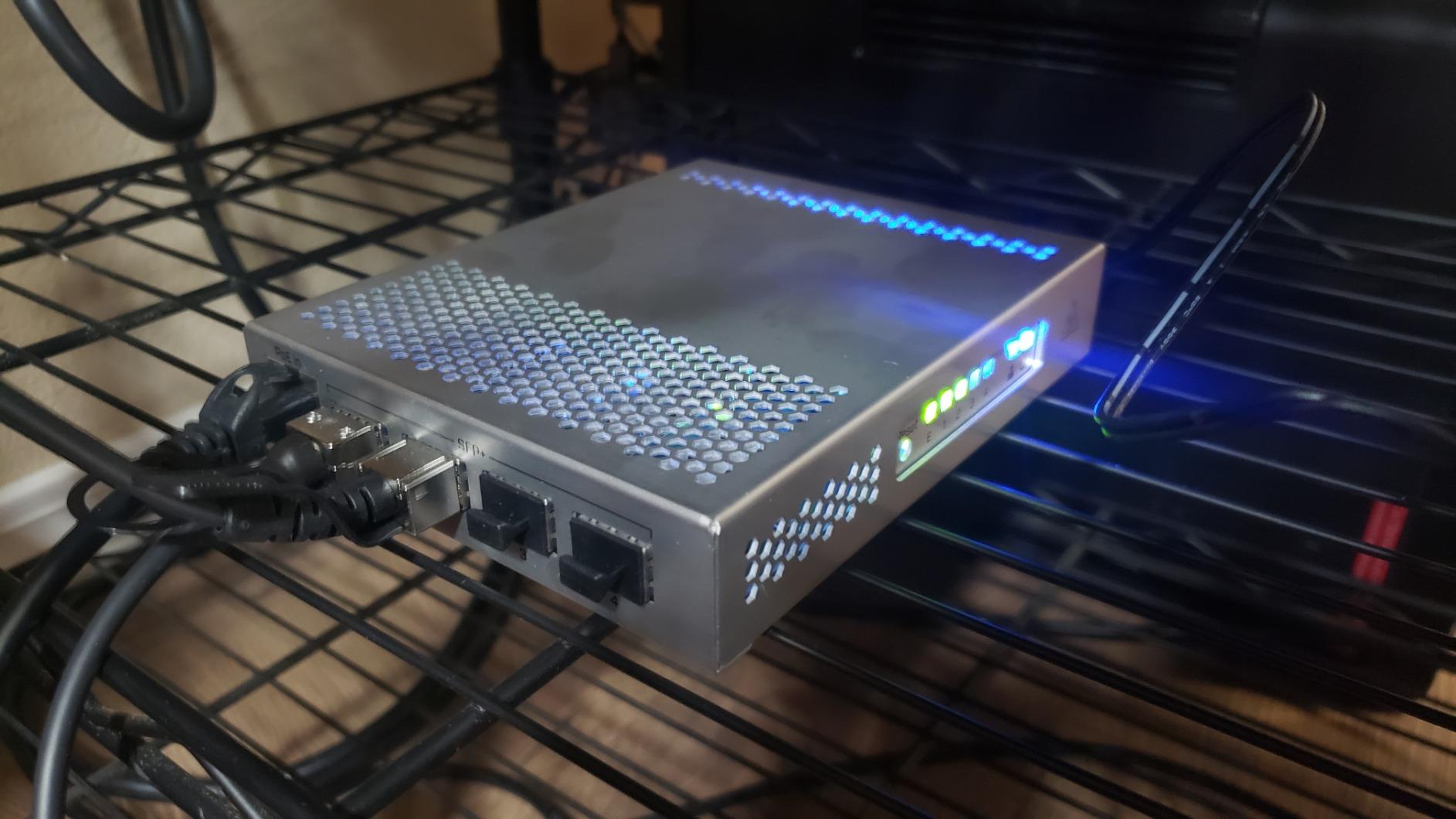
good to see someone else using a "wire" rack https://images-na.ssl-images-amazon.com/images/I/7188FkFUaeL.jpg
 fresh copper
I love those little SFP+ switches. I am thinking of getting one but I have not decided yet
little schooner
@fresh copper I am still on the fence with them, only because their cli is very different compared to other vendors
I didn't like it the first time with the cameras
I dont know if i'll like it this time
but it is an otherwise capable device
those led lights sure looking BLINDING
 deep verge
thats a 4 port sfp switch?
little schooner
sfp+
deep verge
10g?
little schooner
yes
deep verge
how much?
deep verge
$133?
deep verge
i can get a 48 port one for not 10x that price, god damn
little schooner
this one was perfect for me to throw in a in-between point of upstairs and downstairs
I have it hidden behind couch
deep verge
i mean, ok, but thats expensive as shit
at least, by my standards
i got a $50 48 1g + 2 10gb switch
little schooner
that would be too big
physically to fit where i have it
honestly, I was really happy to find it, because I was about to consider running new cable to downstairs
this will save me from doing all that hassle work
deep verge
yea, this is going in a rack, so i didnt give a fuck about much
deep verge
size, ehh, so long as i can mount it, power, ehh, noise, ehh,
fresh copper
Note that it can also route at about 1G so it could be useful if you wanted to get into a little bit of 10G and route a few things
deep verge
i wanted a pair of 10g sfp ports, 48 port rj45, and all of those are managed, so i can use vlans.
not that i need to
little schooner
mikrotik sells other switch like that
deep verge
for $50?
little schooner
no.
deep verge
didnt think so
deep verge
ebay
little schooner
sounds about right
deep verge
Quanta LB4M
little schooner
cant say ive heard of that brand
deep verge
i hadn't before i bought this
it was the cheapest that met the above qualifications of what i wanted
happens to be dual PSU
also happens to be L2 only, dont care
well, it may be L2 only, im really not sure, there is conflicting info there
really this is just temporary, at some point a Ubiquiti US-48 is gonna come in, no clue when thats gonna happen though
it was ordered months ago, and it seems its still months out, yay
little schooner
that reminds me of how the 3950x is still out of stock and bh was taking orders and they say they dont know when they will ship
deep verge
this is government shit
little schooner
@fresh copper why is SR fiber sfp+ cheaper than copper sfp+ option?
I thought copper was cheap to make
little schooner
300m