#networking
1 messages · Page 168 of 1
 hollow marlin
 little schooner
yeah... :(
hollow marlin
This was a setup at a conference with about 200 clients. I got a call 10mins after it started...
little schooner
interesting
 pseudo blade
I actually don't know what Mikrotik is like in an enterprise environment because we don't really do that here.
Probably not great, but cheap.
little schooner
@pseudo blade well, it definitely can handle the extreme cold temperatures pretty well
hollow marlin
This was an oh shit moment, grabbed 3 hapAC2, threw them, to at least get them connected then built capsman on one and had zero problems from there
pseudo blade
Oh it's good for that kind of thing.
little schooner
@hollow marlin the important thing was you solved the problem as quickly as you could and was successful
that is awesome
pseudo blade
Routerboards are good at dealing with lots of wireless clients.
hollow marlin
They worked great for a temp solution
hollow marlin
One AC2 I think peaked at around 100 clients, no drops, ~80% CCQ
pseudo blade
Not bad.
hollow marlin
@little schooner Tiks do have their problems but there are few and far between for me. On the official forums where people are doing very low level, configurations there seems to be more of a problem
little schooner
seems about right.
I read on forums that a wireless access point is like a hub and not like a bridge?
hollow marlin
Wireless is half duplex
little schooner
sorry lol typo
when anything is half duplex, that means its hub characteristics?
they can collide
hollow marlin
A hub is half duplex by nature. I wouldnt say an AP is like a hub, the wireless is what acts most like a hub
pseudo blade
This is one of the reasons it can make sense to turn down transmit power on your APs.
hollow marlin
Yep, AP can be too "loud"
little schooner
okay, just wanted to clear that up
if its too loud, it collides more with other signal i suppose?
and has to wait
even for the client, the client can barely "speak" loud enough back to it
pseudo blade
No, it's just that more APs at lower transmit power will be dealing with less users and less interference (if done right)
hollow marlin
Yep
little schooner
yeah... I dont think I did my wireless right xD
i have it on medium transmission but...
it still manages to grab clients one floor down instead of using AP on the same floor
that must mean its too high?
hollow marlin
Yep, situations like that are a reason
pseudo blade
We crank ours up to the legal max, but that's because I don't have to deal with walls, rather hills.
hollow marlin
Also why I cant wait for AX, the 60ghz version to finally come out
AP in every room with zero interference
little schooner
that'd be nice
on another note, whoever said passthrough RJ45 plugs were a bad idea..... yes, I really agree with that statement. It is more work and harder to get the wires to go in straight since they are bend a lot more when long.
hollow marlin
mmmmhhhhhmmmm
Again, I dont like them
For people who occasionally terminate they are just fine
When I did installer work, every other installed would use passthrough
little schooner
so far, I terminated at least 6 new ones
well, 12 if you count both sides
also this is where I will leave off as practice of just re-creating it
as an exercise to learn how to use draw.io
hollow marlin
👌
hollow marlin
Also important shortcut not explicitly given, ctl+move, copies and move+alt, allows a connection to move into a shape, avoiding connection points
After a template or two you will be able to throw them together quickly
little schooner
I will keep at it :D
thanks for the shortcut tips
off for the night so cya guys
hollow marlin
Peace dude!
little schooner
@pseudo blade almost panicked configuring powerbox pro with vlans
The way its presented to config it is not the usually method I've seen on other hardware
At first I thought it had to be applied on a separate bridge but then I saw interfaces section
And then I had to apply the IP on vlan, not the interface itself
I'm glad it's working now xD
pseudo blade
Yeah, you can't apply IPs to interfaces you're putting in VLANs or bridges.
Also true for Cisco stuff+any other systems I've used, or if it lets you they simply don't work.
Makes sense, really.
hollow marlin
Once you apply an IP to an interface, it's not longer a switchport but now a routed port.
pseudo blade
That's usually not an automatic change, normally you have to go and remove it from the switch, bridge or whatever first.
hollow marlin
Yes you have to manually change the port. Just giving a reason why it's not built on an interface
 clear igloo
It just works!
The more you buy the more you save!
 edgy pasture
How do you transport a nas?
little schooner
@edgy pasture pack it into another shipping box, put airbags in the shipping box and send it away.
If it has hard drives, you can take the drives out and put it in another smaller box just for hard drives. So one shipping box within the bigger shipping box that shared with the NAS
edgy pasture
Wont the vibrations damage drives
 jaunty talon
high risk of that yes
best would be to transport them separate in same kind of box they're shipped in when you buy bulk
they tend to protect the drives the best
edgy pasture
I kept boxes
little schooner
@edgy pasture well, they won't vibrate if you pack it really well
If you don't pack good, yes, expect it to be disaster
Add bubble wrap if you want. But the smallest sized box that can fit the hard drive separately with some packing material will have such a hard time moving at all
Physically, it couldn't move unless they are really throwing these boxes really hard
Harder than the standard ups throw
little schooner
@pseudo blade if I just want to make a port part of vlan 50, interface vlan section is where I have to do that?
Or because I have bridge1, do it from there?
Mikrotik has things I don't understand.
little schooner
If anyone knows how, I do not know how to figure this out.
 thick minnow
Do you know what's depressing? Cisco IOS
little schooner
if this was in cisco IOS, I would have been done with it so fast
mikrotik is a completely different syntax to learn
almost too much flexibility that adds complexity
well i am following this guide for now...
clear igloo
How is IOS depressing?
jaunty talon
there are so many worse CLI's :D
thick minnow
It's just depressing, It never works, Everything always breaks, and it's slow.
clear igloo
are you on some old 12.2 code? 😛
jaunty talon
hahaha
I have never had that problem with IOS
the only annoying part is that it applies the command directly when sent
no commit
clear igloo
yah, XR is nice for that feature
jaunty talon
everything else is just fine with IOS
yeep
and juniper
Damn it's hard to find good 10GBase-T switches with 100G Uplinks, with stacking features. :(
hollow marlin
Holy shit gang, just found out I’m finally going to be a father 🥳🥳
clear igloo
@hollow marlin Congrats!
little schooner
@hollow marlin congrats man, happy 4 u!
clear igloo
LUL
hollow marlin
@pseudo blade https://forum.mikrotik.com/viewtopic.php?f=19&t=151903 it’s happening
Also thanks guys @clear igloo @little schooner
 waxen scroll
someone tell me my options to migrate a VPC from F2 to F3 cards with no second VDC and very little packet loss
i tried getting around dual active VPC with a non-VPC port channel but it seems to not work and blocks that path
i get why... but LAME
clear igloo
Move the fiber extra fast
waxen scroll
the shitty part is you have to rebuild the port channel config regardless, so it will drop
i cant put in two temp F3s somewhere else with a temp link
i still have to move the po config
pseudo blade
@hollow marlin Well there you go. 6.45.5, but with a recent kernel.
little schooner
@pseudo blade any reason why bridge1's IP address gets ignored when its given a management IP address and management vlan?
pseudo blade
You'd assign the IP to the VLAN, not bridge.
little schooner
Oh. so basically that is done under IP > addresses menu?
pseudo blade
Should do.
little schooner
Last time I tried it, it killed all trunking functionality. But that was with a very corrupted config
I will try again. will assign it to ether1 interface
pseudo blade
Should not assign an IP to ether1 itself.
little schooner
okay, make a vlan 99 under ether1
pseudo blade
If it's in a VLAN.
pseudo blade
Assign the IP to vlan99.
little schooner
Okay. but I add vlan99 under bridge1?
the way mikrotik works is crazy
it is not clear.
pseudo blade
I'm just on my phone atm, let me drag out a Mikrotik and I'll show you.
little schooner
Okay thanks
From what I gather, vlans can only be created under an interface. Unless I am wrong about that information or missed something.
will have to step out for now though
pseudo blade
@little schooner https://wiki.mikrotik.com/wiki/Manual:Basic_VLAN_switching#Other_devices_with_built-in_switch_chip Start here and have a play around.
My computer had a vlan interface (id 99) which was used to simulate your second switch's tagged management traffic.
I only have the hex at home so that was about the closest I could simulate it.
waxen scroll
yikes, what the hell is that gui
that looks like an industrial controls GUI from the 90s
pseudo blade
I mean if you prefer SSH or a webgui they have those too.
little schooner
@pseudo blade having used the terminal for a while, its okay once I figured out the needed commands
In fact, I think configuring it from GUI was what caused the problems I faced
pseudo blade
Yeah, I use the terminal a lot (but usually from inside winbox, funnily enough), but it's easier to lay out cause and effect with the GUI, hence I did.
Frankly Mikrotik have many things I'd rather they do than add glitter and sparkles to Winbox, which indeed seems to be their current approach. It's perfectly functional.
At work we're planning to ditch it for plain embedded Linux in some cases(because we don't really do any routing on the vast majority of our "routers", mostly other goals which are hard to achieve on any router OS or hardware we can find), but aesthetics aren't one of them.
hollow marlin
I still go with CLI 99% of the time with Tik, but there are definitely things the GUI that are much quicker to do
pseudo blade
There are a few things you can only do in the CLI, a fact I find annoying.
hollow marlin
Almost every update in the change notice has 2-4 items of (cli only)
pseudo blade
Consistency is important.
 torn frigate
Morning guys, ever since I bought a small NAS to backup my Youtube work. I have been having problems maintaining a local network, you see. I can have a local network fully functional If I unplug my internet connection from my switch (not using Router, only one pc in the apartment), but as soon as I connect internet again I lose my local network.
 ornate jungle
@torn frigate what NAS do you have.... and how is your network laid out?
Sounds like you might have 2 DHCP servers connecting to the switch, causing a conflict when the NAS + modem/router are connected. (possibly both your modem/router and the NAS, if you left DHCP enabled on the NAS.)
torn frigate
@ornate jungle Its a Zyxel NAS326, the cable goes from the plugin the wall to the switch. From there one cable goes to my pc the other one to my nas.
ornate jungle
Righto so you'll want to find out if your NAS has DHCP enabled or not, since you're only losing connection when your internet modem is plugged into the switch at the same time as your other devices.
torn frigate
That's the million-dollar question
torn frigate
@ornate jungle Think it's the dam buildings router in the basement that screws things up.
ornate jungle
That could be it too yeah.... T.T unfortunately makes it difficult when you don't control all aspects of the network.
torn frigate
@ornate jungle it's back online, ran a systems tool I found that fixed it the last time. (I thought I lost it.) AiO-SRT_Lite
pseudo blade
Who enables DHCP on a NAS?
clear igloo
@pseudo blade People who want a separate DHCP server but don't want a cheap raspberry pi? Or crazy people who make it a DHCP client, lol
Not sure 😛
pseudo blade
I actually use dynamic-only at work, can export that config section and import on another device if the main router carks it.
We don't really have on-prem servers, so it really doesn't matter much (even if I lost the configs... one printer and a Windows box I RDP into when I have to deal with Excel? It'd take like 5 minutes to remap or reconfigure the reserved leases...)
Plus it makes reconfiguring the network very straightforward, and it's not like the leases matter much if the router's dead anyways.
We have like 60 spare routers I could drop in if we ran into trouble with the main router anyways, being Australia it only has to handle NAT for 50mbps/20mbps.
Heck I could do it with an SXT or Groove if I really wanted to.
Spare L3 switch... Raspberry Pi... My laptop... Wifi-enabled toaster :P
Really anything with a CPU clocked north of 300mhz can handle speeds like that.
waxen scroll
@clear igloo oof
clear igloo
@waxen scroll Did it go boom?
waxen scroll
i feel bad for the hiring manager with all the likely unqualified applicants who just want to hang out with the team
clear igloo
yah
waxen scroll
i also pray thats wrong by $60,000
but who knows, they might use their names weight to screw over people on pay
waxen scroll
long ago when i was working NOC we were getting applications from people whose experience was just supervising kids at school
RIP a sports team
im curious if you'd get hired by not giving a shit about sports at all
perhaps thats a plus? you arent distracted
clear igloo
Hmmm, possibly
waxen scroll
people get disappointed when they ask what sports i watch.. they list two or 3 and after saying nope they are like.... oh.
😄
clear igloo
Sports is the game with the yeets right?
waxen scroll
"is that the one with the ball?"
then i explain that i bowl, but i dont watch it
haha
little schooner
It's awful how Samsung limits the downloading speed for drivers to a measly 2.2 mbps
This is the most annoying thing ever
And how the sound driver is like 800MB big
Like cmon
waxen scroll
👺
pseudo blade
@waxen scroll Here in Australia the unemployed have to apply for a job quota or their payments get cut, so basically any job you can think of has like 200 applicants.
 hollow marlin
You guys are freaking out but 60k for sys admin is hella high in my area
waxen scroll
I didn't post the requirements, but that's a 100k job for my area
hollow marlin
There are zero jobs in the IT field here for 100k unless you are management
 sinful vortex
unfortunate location then
little schooner
It would cover my bills here
I would be okay to do it
I gotta get out of the debts
hollow marlin
@sinful vortex it's why I'm trying to find a remote job. Have a house and property and a family, so getting up and moving is not as easy
 strange silo
@hollow marlin yea 60k is fairly normal, it's not like it's a systems engineer position and sys admin can mean a great deal of different things and cover a wide pay scale
and that's 60k NZD lol, RIP any US person that does the conversion
strange silo
lol
waxen scroll
when you specialize at a mega corp a lot of the time what you do compared to the job description is nothing
strange silo
I mean it's all relative, my house cost me 290k so getting what I get (a lot more than 60k) means my income ratio and rather good
waxen scroll
i lucked out. mine was 290 on sale from the bank and now is worth 375
strange silo
spots a kiwi a mile away
waxen scroll
they get me on 12k in real estate taxes though
strange silo
we could always settle this with a game of rugby 😈
strange silo
neither 🙂
I'm same situation though, to get paid more means management position or move to different city
and I have no interest in either
sinful vortex
well as long as it's more than sufficient, it's fine
unless you have a sudden interest for yachts

waxen scroll
honestly i think for a sysadmin of a sports club, they should have no interest
less distraction
strange silo
haha I spend all my money on stupid shit like servers, solar power, batteries etc
sinful vortex
sys admin for a sports club sounds like either jank setups, or no work 80% of the time
or both
strange silo
I'd vote both
waxen scroll
dunno about your area, but here we have large arenas/venues so the IT gets serious
strange silo
shouldn't be too much support time for it's size though, stuff done well doesn't incur too much pain
but if it's not...... fml
waxen scroll
i think at idle, maybe not... but special events like super bowl... yikes
strange silo
things would be so much better if people didn't use it 😉
they have some really cool tech at those venues
HPE was talking about some stuff they did where you can order food and they bring it to you even if you move
strange silo
or tracking lines at toilets so it'll guide you to the best one, not as creepy as it sounds
honest 😛
waxen scroll
HPe was pitching that tech to my company
its a pain in the ass to manage from what i heard
you need like 3 full time staff
for us it would be conference room map tracking, potentially people tracking, and some other things
but because its not open to everyone, theres some management involved with a people directory
@strange silo wheres our @unreal wedge at? its been like 2 months. he posting on the forum still or just dropped off?
strange silo
@waxen scroll Can't say, circumstances outside of here. Not that I know anything either
waxen scroll

reddit
What seemingly harmless changes have you seen made that left people scratching your heads saying "that shouldn't have done that."
because i dont want to post to reddit, ill start
Changing the time on Cisco ASAs running OSPF causes neighborship loss and cannot be restored until rebooted.
Learned that one during business hours across 5 major sites
@clear igloo
"ill just put ntp in before tonights change really quick"
i bet @little schooner has a story
little schooner
I just finished properly installing a concealed cable run outside for a camera and unifi mesh ap
And finally have proper PoE and no more power adapter junk
I am sooooo happy
And it was my first time dealing with a junction box. And how 3/4" meant the pipe fitting on the junction box
And how there is barely space to fit all the cameras cable stuff in the junction box
clear igloo
@waxen scroll It's a feature 🙂
waxen scroll
did you use the correct kind of box? is it grounded?
home depot gives you the bullets, you shoot the gun yourself
just cause they sell it doesnt mean it meets code
🤗
our area doesnt allow romex
home depot gladly sells it
little schooner
@waxen scroll is it correct to think that passing one interface's firewall ruleset automatically allows that traffic to bypass the firewall's Internet-facing interface?
Or would the rules on the Internet interface also get applied to stop it if need be?
hollow marlin
@little schooner are you talking about inbound and outbound rules or just traffic crossing the firewall? Firewall rules are just inbound. You would need ACLs for outbound
little schooner
@hollow marlin oh. I didn't specify. Yes it's inbound first and then outbound rules when it tries to leave internet-facing interface
hollow marlin
Yeah just on inbound. Route decision for in/out/zones, then run against rules and away she goes
little schooner
@hollow marlin perfect. Yes, because my goal was trying to stop my cameras from going to China IPs with telnet, smb and ssh. There are some attempts by the cameras doing that. By blocking that Lan from internet access, they can't do anything except local lan
Which then I can still access them and stuff
little schooner
@hollow marlin how would I adjust the Key box if a vlan has more than one network subnet?
10.10.10.0 is also in the vlan of 10.0.0.0, but separated by a router between
Do I type
GW: 10.0.0.254, 10.10.10.254
Or that doesn't look right?
hollow marlin
@little schooner you can format it how you like, just keep it clear and consistent. That format looks good
little schooner
Okay thanks
 green sphinx
Thinking of renaiming my network hostnames and domain to something tech and geeky, ideas?
little schooner
@pseudo blade is mikrotik routers known to struggle with bridge mode when a unifi AC mesh is connected to it that tags other vlans on a wifi SSID?
I can't seem to get it to pass properly through
/interface bridge port
add bridge=bridge1 interface=ether1
add bridge=bridge1 interface=ether2 pvid=50
add bridge=bridge1 interface=ether3 pvid=50
add bridge=bridge1 interface=ether4
add bridge=bridge1 interface=ether5 pvid=50
/interface bridge vlan
add bridge=bridge1 tagged=ether1,ether4 vlan-ids=20
add bridge=bridge1 tagged=ether1,ether4 vlan-ids=40
add bridge=bridge1 tagged=ether1,ether4 untagged=ether2,ether3,ether5 vlan-ids=50
add bridge=bridge1 tagged=ether1,ether4,bridge1 vlan-ids=99
Shouldn't the above configuration allow Unifi AC-Mesh unit attached to Ether4 pass along the vlan tags from SSIDs to clients? For the other vlan stuff, it is working fine. I am just unable to get DHCP to work for clients connecting to AC mesh AP. I also tried statically assigning IP address to my phone for VLAN 20, and it says there isn't a connection to the gateway.
hollow marlin
@green sphinx we have gotten refurbished models with hostnames after Pokemon, love it
hollow marlin
@little schooner what vlans are coming from your AC? Look at your config one more time. On ether4 you specify it had to be tagged, but under the port it's not associated with a vlan, so it's just dropped
little schooner
@hollow marlin so, if I associate the port with a random vlan (maybe vlan 20), it will then be able to forward 20,40, and 99?
the AC hosts vlans 20 and 40
Its management vlan is 99
hollow marlin
They should be all assigned to the port
little schooner
Okay, perhaps it is that.
I will assign it ports.
set bridge=bridge1 interface=ether1 pvid=20
set bridge=bridge1 interface=ether4 pvid=20
that should do the trick right? it wont disconnect me?
@hollow marlin ```/interface bridge port
add bridge=bridge1 interface=ether1 pvid=20
add bridge=bridge1 interface=ether2 pvid=50
add bridge=bridge1 interface=ether3 pvid=50
add bridge=bridge1 interface=ether4 pvid=20
add bridge=bridge1 interface=ether5 pvid=50
I guess now it should work?
hollow marlin
Just assign it to port 4 and maybe to say 5. Just so if it doesn't take you don't lock yourself out
little schooner
So I did that and it still isn't passing AC Mesh's VLAN tag for SSID
if I change SSID to vlan 99, it passes it perfectly and DHCP response is received at client
hollow marlin
😑 hmmmmm
little schooner
This is the other switch its supposed to connect to as it travels along the line with the tag
oh wait.......
wth
I think I tagged the wrong trunk port for vlan 20,40 on this netgear switch...
ahh that was the problem
G8 was the wrong port I tagged with 20,40
it was supposed to be G2
G2 has no tagging for its port. Ugggggggh how could I have missed this -_-
hollow marlin
Well that'll do it too
hollow marlin
And you still have the ports on the til tagged 20, 40?
hollow marlin
@little schooner sorry I meant on the Tik
little schooner
@hollow marlin I removed them and when I ran a print statement, it puts them automatically in vlan1
So it looks like I could leave it or remove it either way
My wifi is so fast outside
170 mbps
Since I finished this project with wiring
hollow marlin
Nice 😎
little schooner
Life in the fast lane 🏎
hollow marlin
What Mikrotik model do you have again?
little schooner
@hollow marlin the powerbox Pro router

MikroTik is a Latvian company which was founded in 1996 to develop routers and wireless ISP systems. MikroTik now provides hardware and software for Internet connectivity in most of the countries around the world.
hollow marlin
So here is another thing @little schooner that model has a switch chip which means you should build it on /switch to use hardware offload
Building vlans via bridge go straight to the CPU
little schooner
Yeah. I was just concerned about touching the config again when it is now working good
I think I'll leave it since it serves mainly the cameras
pseudo blade
@hollow marlin /interface bridge port add int whatever hw=yes does hardware offload.
hollow marlin
@pseudo blade only for certain switch chips. As far as I know, the CSR3xx is the only series that supports it.
pseudo blade
Above works on most Mikrotik devices, including my hEX and powerbox pros, though the supported feature set is... lackluster on some of them. @hollow marlin
Most Mikrotik devices to this point have switches for cost reasons, not performance ones, but basic hardware switching and VLANs are supported by nearly all of them.
It's funny all this comes up just as I buy a pair of CRS3xx series switches for work stuff.
hollow marlin
@pseudo blade supported yes but not hardware offload as per above. It's the reason so many love/hate the 4011 because it's powerful but cant offload vlan filtering and shitty 2gbps between switch chip and CPU. So people just use bridge for CPU
We deployed a ton of the CSR1xx switches. Wish I could replace them with the 3xx
little schooner
@waxen scroll I did that with my teacher last month
hollow marlin
@waxen scroll it’s as simple as cutting POwer*
Getting the equipment isn’t the issue, customer down time is
little schooner
@hollow marlin and that is why we didn't order the other stuff because we need to move the whole lab to a new room
Downtime hurts the teacher
waxen scroll
if you didnt write preventative maintenance in the contract to bypass SLA levels, you legal team suxxxx
hollow marlin
@little schooner most our maintenance windows are usually 2-4 hours assigned. It’s pulling teeth sometimes for customers
little schooner
Seems reasonable
hollow marlin
@waxen scroll that’s what emergency maintenance notices are for
waxen scroll
@hollow marlin thats why you give them two rescheduled then "EMERGENCY"
you beat me
i hope they pay $$$$$$$ because you should have $$$$$$$$ to be stupid enough not to get redundant circuits from POP, LEC, carrier
😄
hollow marlin
There are a few a few customers immune to emergency maintenance like hospital, state colleges and 911 of course
hollow marlin
Hospital pays bank here but I know what it’s like working there and no way in hell
waxen scroll
the system around here outsources their IT and is a mess. my coworker worked for them
hollow marlin
We have around 30 circuits for them and I had to go assist with their shit show
They’re not outsourced and it’s a mess
pseudo blade
@hollow marlin Hardware offload itself is supported, but yes vlan filtering via switch is a 3xx only feature.
You can offload if you don't do vlan filtering.
The 4011's a strange device for Mikrotik.
Fast CPU, probably way more RAM than needed, SFP+, optional wireless that looks pretty good... But no USB? Can't saturate that 10gbps SFP+.
It's powerful, but strangely handicapped at the same time.
2.5gbps per bank of 5 gigabit ports, of which it has 10.
waxen scroll
30? sounds like MPLS
i have no idea how many circuits we have, but we have like 400,000 prefixes on the WAN
circuit management is some other team
i just tell them what i want
pseudo blade
I'm sure there are situations in which the RB4011 is excellent, particularly smaller offices with 1-5gbps connections.
(Is that a situation that happens often? Australia networking kinda distorts my view of what everyone else is working with as far as uplinks)
Like the US's average internet speeds are apparently 115mbps, which is near unheard of here for political reasons.
waxen scroll
i have access to a gig
two gig if i want a car payment
for $300/m they install a small comm area in my house with fiber and a juniper managed switch
ive been sort of tempted because having the setup there already makes my house very valuable
the next person wont have the pay the fees
hollow marlin
@waxen scroll hah, MPLS...no try metro-e.
waxen scroll
Gross
hollow marlin
@pseudo blade I thought VLAN filtering was needed in most cases, but looking further I guess that’s wrong. Ugh, VLAN management needs to be cleaned up for MikroTik
@waxen scroll yes, fuck L2
little schooner
@hollow marlin Im just glad it works. Now I can stop touching it until the replacement switch from fs.com comes in
Ultimately, this mikrotik powerbox pro will be regulated for PoE to the cameras in the front porch
@hollow marlin my school stopped paying for microsoft imagine and now I lost the access to free Windows software :(
hollow marlin
@little schooner I forget what it was I had at my first job as a sysadmin a few years back, Microsoft cancelled it. Dont miss it. Give me Notepadd++, putty and im a happy man
little schooner
Technet?
waxen scroll
i used to have technet 😦
little schooner
msdn is basically for devs only
hollow marlin
yeah that one
waxen scroll
nah fam, MSDN is also used for universities if the school is any good
hollow marlin
It was for a college so we all got accounts for.."teaching"
little schooner
@waxen scroll well yes that too
waxen scroll
community college gets dreamspark or whatever it is now
waxen scroll
its so dumb... if i want to learn AD i have to do it on a 100 day trial and keep wiping it out
hollow marlin
Maybe it was MSDN, no clue, most sysadmin responsibilities I forgot and have no intent in going back
waxen scroll
rude
little schooner
msdn was the one that included vs enterprise and office
if you didnt think technet covered it
waxen scroll
all of my technet keys still work too
little schooner
@waxen scroll yes due to perpetual use rules
they are yours forever
hopefully I used the word right lol
waxen scroll
but now the software has aged out and isnt what i want
server 2012 r2, windows 7, idc
little schooner
yeah im glad to be done with that legacy stuff
powershell has made management sooo much easier
its not without its quirks, but....
Powershell was the #2 reason my teacher went from Ubuntu on workstations to windows on workstations. The ubuntu got regulated to vmware with a script
#1 reason was ease of management
@waxen scroll This might be a violation at your workplace, but we have no security locks on the new workstations in the lab. So, anyone who gets any ideas can easily open up the case and take components out of the system
Fortunately, our students haven't gotten curious enough to test that
hollow marlin
I have never seen a buisiness make use of those locks
little schooner
@hollow marlin His classroom is the only room that doesn't have locks because IT does not manage it.
IT is hands off unless we buy their models of choice, etc
waxen scroll
we dont use locks
waxen scroll
most everything is also laptop now in most of the offices ive worked in
hollow marlin
They should be used, but like LZ said, most places are laptops
little schooner
@waxen scroll they want the employees to never stop working i suppose
waxen scroll
they can try all they want. i keep 40hr only
i play time card games... if i go over 8hrs one day, i subtract it from some other day in the week
i dont read email after hours
hollow marlin
Somebody isnt on call
little schooner
yeah, work should stay at work after hours
waxen scroll
im supposed to be on the rotation and they've forgot for over a year now
we have very little calls so it isnt noticed
waxen scroll
i wont be so lucky next year once the schedule is redone
my job isnt operational, you're only supposed to call me if shit hit the fan that Cisco TAC is asking for an engineer or the business is screaming
hollow marlin
Residential hits our outsourced call center, business hit my phone. Also I need to respond to any major alarms in email
waxen scroll
99% of my job is determining what needs to happen in the network and then writing the scripts, POs, etc and either letting india push the config or DIY
1% is support
hollow marlin
Like this evening one of our SIP trunks dropped around 7pm and after shooting the OTDR I noticed a break 43miles out, mice got into conduit
waxen scroll
once you get in a large company doing actual engineering, you'll be broken and never able to go back to wearing all hats
nor smaller company
i HATED doing user patch cable ticket one minute and next minute designing an SD-WAN architecture
nope....
hollow marlin
Im the only master of all trades at my company
they throw me anywhere and everywhere
little schooner
@hollow marlin do you know how to precisely add connector points to the edge of a shape in visio?
I am able to add points but it is not spaced evenly and stuff
Or it doesn't attach to the edge
hollow marlin
Zoom in further, at least thats all that is needed in 2013
little schooner
What about in 2019? Still zoom in is the best way?
hollow marlin
Not sure, dont have 2019 lol
pseudo blade
@little schooner Powershell might be one of the strangest reasons I've ever heard to switch from Ubuntu to Windows
Management can be a little different for Linux, that I'll agree with. You can actually manage Linux with AD if you're patient.
And now... sudo snap remove powershell
 pseudo blade
And on today's episode of "Meagus has not much data left and is too cheap to pay for the NBN"...
little schooner
Well, if it wasn't for the profile and custom functions that I created, the sell would of been harder. The script I made does a few random things that he liked. Simply type out the single line command and he is able to run anything against the computers. One of them gathers computer spec info and puts it into table. Another copies missing VM files to the workstations if student accidently deleted it. The other one activates all workstations with their corresponding product key of education.
If I didn't show him any of that stuff (and mdt), I'm very sure he would stick with Ubuntu
Thank you powershell lol
So far, I have received good feedback from students that this semesters environment is working a lot better. Last semester was testing and this one was refinements.
 strong tusk
@little schooner btw the intel nic didn't fit inside my case and oddly part of the shielding on the mobo blocked me from installing it too. Luckily, I forgot I had a TP-Link gb x1 adapter, so I threw it in there and fixed my headache
little schooner
Glad it worked out in the end
thick minnow
hey can any of u guys help in tech support this kid needs pfsense help
 stiff panther
@thick minnow Its solved
stiff panther
@thick minnow anyway the speed are up at 240 Mbps/s
thick minnow
Good
 wise bluff
Hey, I was just watching a ThioJoe video and was wondering what the silver box with blue light was in his network setup, if anybody recognises it?
https://youtu.be/zulHWla9xmk?t=251 timestamp 4:11
Looks like an ethernet port and two usb-c

ARE THEY REALLY WORTH THE PRICE? ● More Tech Discussions ➤ https://www.youtube.com/playlist?list=PLFr3c472Vstwe0Yk43UDnpqib5ReTwaJ- ● Subscribe Here ➤ https:...
clear igloo
@wise bluff It's the cloud key Gen 2
https://unifi-protect.ui.com/cloud-key-gen2
Scalable, plug-and-play network camera system. View your live video and recordings anywhere with free cloud access and mobile applications.
wise bluff
Oh awesome, thank you
Last time I saw one they were tiny little dongle things
clear igloo
Yah, took a bit to figure it out myself, lol
waxen scroll
;/
"If you think $1000 for a switch is expensive, you’ve never worked in the enterprise."
lmao, i thought the same
1k is a bargain
clear igloo
Yah
They clearly haven't heard of as ASR9900 😛
Or a ER or ZR optic XD
100Gb-ZR optic, only $120k each
 subtle glen
🤔 only? Might consider buying one then 😄
clear igloo
Need 1 for each side so buy 2 😛
subtle glen
ye so i can do trunking between garage and home
clear igloo
Remember kids, always stare into the optic directly for at least 10 seconds for enhanced vision 😄
subtle glen
unplugs fiber from isp modem
waxen scroll
ill have you know i priced 10G ZR
chinese brand beats cisco by half
and its probably from the same factory
clear igloo
Pretty much the same thing for all optics from any vendor
little schooner
@waxen scroll spent almost 4 hours of research as to why I can't RDP to servers after connecting to a VPN connection on android and the culprit ending up being that, if you are using apps in the Secure Folder of Samsung phone, they don't share VPN connection state to those "non-secure" versions of the same app.
My VPN app exists out of Secure Folder while my RDP app exists in Secure Folder. I would of never guessed this would be the cause.
clear igloo
VPN? Just open the ports to the internet, nobody will do anything bad with them 😛
little schooner
@clear igloo I was really looking through packet captures for a cause
And was seeing nothing
Nothing in firewall either
Lol I know some places like the dentist office, that had port open
Firewall was set to minimum too
clear igloo
Yah, it's always that one thing you never think would be an issue or don't even think to check that's usually the problem
little schooner
@clear igloo and this has been bugging me for more than 2 months
I just don't like giving up on it but needed a break
clear igloo
Stepping away and usually help too
little schooner
Yeah. That helped me finally solve it. I put it to the side for a bit
Come back with fresh mind
And not repeating the things I've tried already
hollow marlin
@waxen scroll I need that to function daily
subtle glen
oh wow
hollow marlin
@subtle glen yesssss....more vibrations....HDDs love vibrations
pseudo blade
But why do you mount it up there? Oh, so it doesn't get wet when it floods? Then what do you think being above water will do to it?
Also yeah that's really stupid on so many levels.
hollow marlin
@pseudo blade Well technically its stupid on only 1 level...clearly
waxen scroll
You'd still hear it though the floor too
I can hear mine from the main floor when it's near the ground of the full height basement below
12 feet I think. This pic is like 4 feet plus it's up high
pseudo blade
MikroTik is a Latvian company which was founded in 1996 to develop routers and wireless ISP systems. MikroTik now provides hardware and software for Internet connectivity in most of the countries around the world.
They really do beat the "this is not a router" bit into you, don't they? the CPU in this one's slower than in the rest of the CRS line as if to tell you "a tiny bit of management traffic and switching only, if you do anything else your performance will evaporate like dry ice on the surface of the sun and you will get many tens of packets per second of routing throughput on your 10 gig switch.
The gigabit w/10gig SFP CRSes have 512MB RAM and an 800mhz ARM CPU. You wouldn't try to use it as a router if you had a ton of bandwidth, but it can do some stuff when it has to at good enough speeds. This has 650mhz MIPSBE and 64MB of RAM.
little schooner
@pseudo blade I'm having trouble determining what cpu speed and amount of cores I need for quad 10gbps ports, non blocking
If I want to make an ITX server
Low power.
pseudo blade
It's very dependent on what features you want the router to have.
Is this just pure routing? Are you masquerading? Any firewall rules?
little schooner
@pseudo blade well, I was going to make it a OPNsense box
So OpenVPN, some firewall stuff
And masquerade too for DNS resolution forwarding
pseudo blade
How much firewall stuff?
little schooner
@pseudo blade I'll say like 150 rules max
pseudo blade
That's quite a lot of rules.
little schooner
I'm being generous lol
I didn't count how many rules I am using now
Maybe it's like 40
But spread across different vlans
But I know the 8100 is OP for this
pseudo blade
8100?
pseudo blade
80gbps aggregate at 64 byte, masquerading in one direction with 150 rules isn't exactly trivial.
little schooner
But let's say realistically today I needed just a single 10gbps port and routing only 40 rules
A pentium could handle it?
40 rules spread over different vlans, no more than 10 rules per interface
I wish it were that easy to say "x cpu can handle x speed with x rules"
little schooner
Ughh lol
waxen scroll
then when you get there and it doesnt work they say sorry
little schooner
True
little schooner
@waxen scroll is this an example of passing the blame onto another vendor?
According to our HQ, our NVR/DVR cannot support the 3rd party camera via ONVIF HTTPS mode. The only way is to modify the camera to HTTP mode. Then try again.

Thank you!
So, instead of fixing the root cause, they make me downgrade security
waxen scroll
its not on them to work with another vendor
i have the same issue on my alarm system
3rd party controller doesnt do encrypted mode
sometimes you just cant
hollow marlin
@waxen scroll @clear igloo you guys ever run into a link not going up/up because its too hot, alarm hot, not threshold
waxen scroll
No
waxen scroll
all of my shit is in AC rooms
ive seen switches fail due to heat before anything else on it tho
little schooner
@waxen scroll oh. So I should be concerned that my Edgerouter runs consistently hot, enough to burn if you leave hand there for about an hour?
I never understood why the ER PoE 5 runs hot. It's not even using PoE
Unless they leave it running 24/7 anyway
hollow marlin
@waxen scroll by too hot I mean too bright lol
Like the laser is at high alarm at -5db
waxen scroll
no, i never really deal with that kind of optic
hollow marlin
Yeah its a weird one. Got a call this morning of a circuit flapping for a huge customer, saw it was at low threshold bouncing in and out. Light was at -8db days earlier. So I said fuck it, threw in a ZR until OSP can repair the fiber. Later tonight get a call again and now receive it too hot and link just went down.
Something is on the fiber somewhere on the poles or it was and has been removed
I have just never seen an optic not link when in warning
little schooner
Well, I got to give the helpdesk person credit, he personally asked the development team if they could consider developing the https ONVIF feature
But unfortunately he said they aren't considering it this year
waxen scroll
they will if you pay
little schooner
Interesting
waxen scroll
yep. sometimes saying no or "we'll do it later" is the wrong move
little schooner
Yes, my teacher would say the same
waxen scroll
ive done similar in the service provider realm
ATT pissed me off, so i redirected a bunch of business
ATT was working with a 3rd party to get us internet access in a bunch of different countries
the 3rd party was irresponsible and half the time ATT couldnt get status with them or internally
ended up giving the business to a company whose CEO personally answers my emails for quotes and orders
😄
little schooner
That's one ideal outcome
waxen scroll
i bet @hollow marlin dreams of a power move like that
alpha chad
you gotta love it when you keep getting screwed over and its very visible to you but your company takes no action
hollow marlin
@waxen scroll well that's what they get for setting up a resale account
 subtle glen
aaah the sfp ports are just gigabit
waxen scroll
of course. 10G routing is expensive
subtle glen
true
hollow marlin
Mikrotik can do 10gig routing for 199
waxen scroll
Line rate?
little schooner
@hollow marlin also in small form factor?
MikroTik is a Latvian company which was founded in 1996 to develop routers and wireless ISP systems. MikroTik now provides hardware and software for Internet connectivity in most of the countries around the world.
That one right?
hollow marlin
Yeah the 4011. Line rate of you are not going through the switch chips
little schooner
The issue I see is that it doesn't have dnsmasq
To me, I would say having dnsmasq on router is valuable.
little schooner
@hollow marlin I use it to forward DNS queries to different DNS server, like for an internal active directory
Ever since I did that, turning off the server computer no longer brings the whole network down
 brave prairie
Link to where to learn a good tutorial about how to start networking?
little schooner
@brave prairie udemy courses, YouTube or, if you can afford it, a school that is member of Cisco networking academy
Packet tracer or gns3 is your friend when learning networking stuff without a hardware investment
I prefer Netacademy and it helped me learn A LOT
hollow marlin
Packet tracer is hands down the best way to learn networking in an environment
 vocal swift
 slow pivot
The mikrotik switch I have can’t route line speed; it can switch line speed though
thick minnow
TP-Link TL-WPA8630 KIT AV1300/AC1350 Gigabit Powerline Wi-Fi Adapter Kit - HomePlug AV2 Technology w/Beamforming, Plug, Pair, and Play https://www.amazon.ca/dp/B07JK8GC2Q/ref=cm_sw_r_cp_taa_gFSGDbR3XQD4T will powerline adapters work with old knob and tube wiring
Knob and tube wiring is ancient wiring from the 1930s, it's a thick rope with one wire inside of it also every circuit has to be separated you can't add a new outlet on a knob and tube circuit without causing a fire, knob and tube wiring is no longer used since its difficult to use, it's safe to have as long as you dont modify the circuit, some insurance companies won't insure your house if you have all knot and tube wiring
Old houses from the 1920s-1940s likely have knot and tube
pseudo blade
Well it's a switch, @slow pivot :P
That said I'd like them to stretch the few extra dollars towards making the CPUs in the new ones a little less shit.
slow pivot
@pseudo blade I know 🙂 I'm just saying that even the Mikrotik stuff can't do routing at line speed, they only can in the switch portion
pseudo blade
The RB4011, which was the subject of the above conversation actually can do 10-gig routing.
slow pivot
@pseudo blade At line speed? that is impressive
pseudo blade
It can't do a ton more, but it can do that.
little schooner
It doesn't do Line speed with rules
pseudo blade
Quad-core 1.4ghz ARM
little schooner
pseudo blade
If you're throwing a ton of rules at anything it's going to be slower.
little schooner
But why? :(
pseudo blade
More CPU processing involved.
pseudo blade
I'd doubt it.
hollow marlin
Yeah no hardware rule acceleration yet
pseudo blade
Xeon, for what you were asking the other day... I did some tests against a 3570k, which isn't that different.
pseudo blade
No, you probably need a better CPU.
little schooner
Oh
And the only reason mikrotik comes close is because the cpu is designed to route fast with specific instruction sets right?
pseudo blade
The CPU's not that special, besides the hardware-accelerated crypto.
But Intel has that too.
little schooner
Although at lower power
pseudo blade
It depends on what you're buying and how you use+configure it, as always.
pseudo blade
The RB4011 would certainly be quieter than a PC routing at the same speed, but you have less options for interfaces (only one 10 gig port, so you'd be doing router on a stick)
pseudo blade
They have other ones with more.
Their CCR line has options with way more SFP+ ports, but honestly I'm not sure if I could recommend them due to Mikrotik's reluctancy to multithread certain stuff and uncertain support in future.
They're cool to look at, though...
little schooner
My future setup would eventually consist of a SFF server with 10g nic (like Intel nuc or wider size), a 10g router (like mikrotik or other) and rack mount switch all in a single cabinet
I'm trying to get rid of my big server since I use 4TB NVMe for the server storage
That's blazing fast
@pseudo blade
pseudo blade
That's very fast.
72-cores @ 1/1.2ghz, 8 SFP+ ports, that's what $3000USD gets you in Mikrotik land.
little schooner
That's highly affordable
pseudo blade
They have basically this cut in half for $1095
but 2SFP+ ports
They proudly claim they'll support it long-term with software updates, but I don't know. First Routeros V7 beta is ARM-only, (mipsbe is a claimed future addition) so I'd give it a miss for a few months and see what they do.
The software's the biggest letdown for them, sadly. When your cores are that slow and plentiful, you feel anything that won't scale properly.
I reckon these would have simply been unbeatable if they'd shipped them with said scaling issues fixed from day dot.
hollow marlin
The cores wouldn’t matter if they put more hardware level routing in so it doesn’t have to hit the cpu
pseudo blade
That would entirely defeat the point of such a processor.
Hardware routing is inherently limited and inflexible.
The reason you'd get such a massively parallel processor is so you can route very quickly and with the ability to implement whatever routing features you deem necessary in software.
hollow marlin
I get that, but there is a reason other vendors are throwing more hardware at the problem than just more cores.
Single core bottlenecks are not just Mikrotik
But adding hardware to support queueing and rules alone would be massive
Low clock speeds can only process so fast.
 plush wolf

I just changed to a gigabit network, I should be getting 800 down 200 up
I'm using a gigabit wifi dongle
and 5 GHz, however it's not just about the wifi
the entire connection is rather wack
Considering I'm on the same provider and switched from FTTC to FTTH, the fastest speedtest I got so far was 250/200 standing next to the router
sinful vortex
well have you tried ethernet
plush wolf
I tried on my laptop but im not sure it has a gigabit ethernet and the results were worse than wifi
thick minnow
Bad splice?
thick minnow
yeah that's a pretty bad ping
plush wolf
this is what I got on my phone standing in the exact same point
I was expecting an improvement going from 100/20 FTTC to 1000/200 ftth
fastest speedtest so far was 220/200
thick minnow
As I'd expect too.
thick minnow
The thing with fiber is that the line can't have any hard bends in it, and the splice has to be good.
conecting 2 ends of a fiber cable together is spliceing
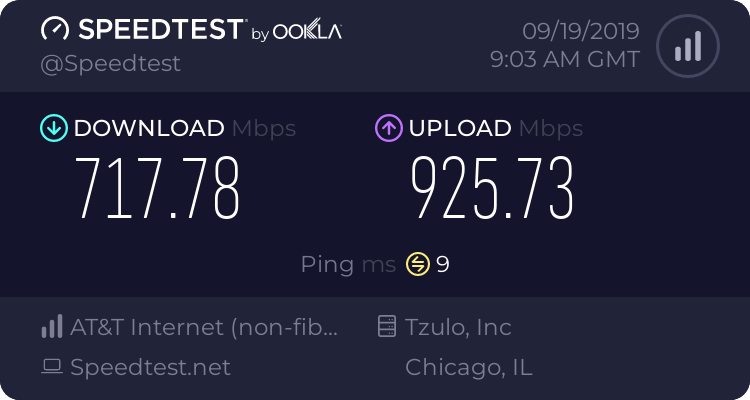 plush wolf
is there any way for me to check whether the splice is good or not?
thick minnow
Idk
plush wolf
I mean I should have a device that im 100% sure can achieve 1000 mbps
thick minnow
On mine the tech had to check the levels.
plush wolf
but my phone had faster speedtests in 4g
thick minnow
YOu didnt check it on lan?
plush wolf
well I did on my laptop
but im not sure it could achieve that high speeds
because im using an adapter
thick minnow
The wifi router they gave you probably isn't good then.
plush wolf
🤔
guess i'll settle with this for now
too bad they went away before i could properly test
thick minnow
Like the one they gave me, I can only do 100/100 on wifi.
plush wolf
my brother has a laptop with a good ethernet
should try on his
but i dont think the ping will improve
one thing i noticed is the wifi always says 3/4
while it said 4/4 before
with the same 5 ghz connection
thick minnow
No, having wifi, the ping is only like a 1 ms diffrence.
plush wolf
the 192.168.1.1 used to say the speed received by the router
from the external connection
now it doesnt say it anymore
this honestly doesn't feel like FTTH
I did a ping test to google and it says 122 ms that's wack
bruh
plush wolf
tried with ethernet and its like it was capped at 500 mbps
thick minnow
Yeah, that's how it is on mine during peak hours.
subtle glen
@plush wolf Are you using openfiber fiber infrastructure?
plush wolf
Yes
subtle glen
i cant reach the 1 gbps in download too even tho im connected with ethernet etc
i think its also the fact that there were some bends in the fiber when they installed it
subtle glen
italy
subtle glen
im using infostrada
plush wolf
My brother achieved 500 Mbps via Ethernet with a cat5e
subtle glen
i bypassed the modem tho
plush wolf
I'm hoping they capped me at 500/200
If they did I'd easily get to 500 WiFi and 800 cabled
subtle glen
isp modems are never that good especially over wifi
subtle glen
thats why i bridge mode'd mine and i use a tp link one for wifi, not the best but definitely better than the isp one
plush wolf
I wanna buy a 7530
But idk it's kinda expensive and I'm about to move
However the signal is weaker than before
subtle glen
fritzbox?
subtle glen
did open fiber put the media converter in your house? Ive heard they do it with vodafone
plush wolf
And the connection is worse but faster
Idk what you mean
Media converter as in ONT?
subtle glen
i think it's also the fact that the passive fiber cabinet in the street has to share something like a 10 Gbps link and those boxes can have 250 homes plugged in, so thats why the connection is never as declared
yeah
like this one
plush wolf
Yeah I have the exact same one
subtle glen
so it's common for vodafone
subtle glen
with infostrada i dont have that, fiber goes into an sfp module and into the modem
nah i was just curious since u said u wanted a fritz box
plush wolf
Idk if I would be able to use it
But I'm not sure I'm willing to do anything to get it better
subtle glen
you might have to copy the mac address of the vodafone modem or the pppoe credentials
but i dont think it's necessary with the ont
plush wolf
Nice
subtle glen
i was expecting at least 800/900
subtle glen
i get 3 on google.com lol
plush wolf
I think it's the same
subtle glen
i think google is connected to the MIX (milan exchange point) which is the one im probably conencted to so that might explain it
yep, there's a 70 gb link to google there
subtle glen
italy, milan
thick minnow
Let me look what my ping is to Italy
subtle glen
216.58.205.99 i think this is the ip of that exchange point
*of the google server connected to it
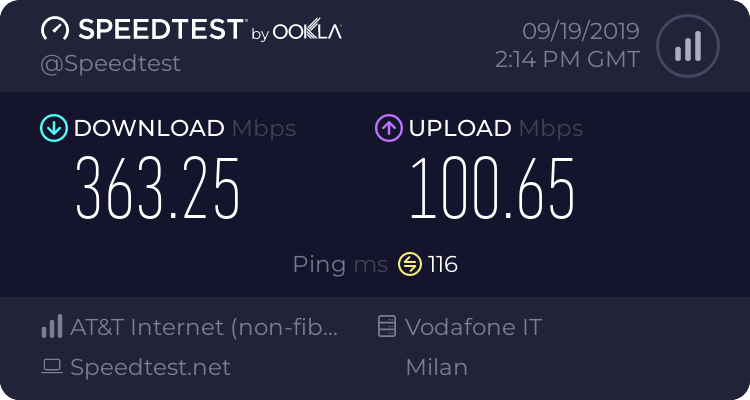


 subtle glen
oh well
subtle glen
also a friend from usa playing in my minecraft server had 100 of ping
i guess theres nothing you can do to lower it xD
thick minnow
No
I think on my server it would be even worse for you.
I force all my traffic through a bungeecord proxy in Canada.
OVH
subtle glen
it would be like playing on mineplex xD
thick minnow
You would probably get like a 130 ms ping there.
Yeah
It's ping to OVH + 30 ms
OVH is 30ms from me lol
subtle glen
when all the americans get back home from school i can feel the slow down lol
thick minnow
Like I know that people can still get IPs behind bungeecord proxies but it prevents just anyone from DoS ing the server.
Like noobs, they won't be able to DoS it
DDoS/DoS
subtle glen
some kids that watched yt tutorials
thick minnow
Yeah they would never find the real ip
They would find the cloudflare IP, what method they use? Ping?
To find the IP? lol
subtle glen
good luck ddos'ing cloudflare kids
thick minnow
They could get the proxy IP from wireshark
plush wolf

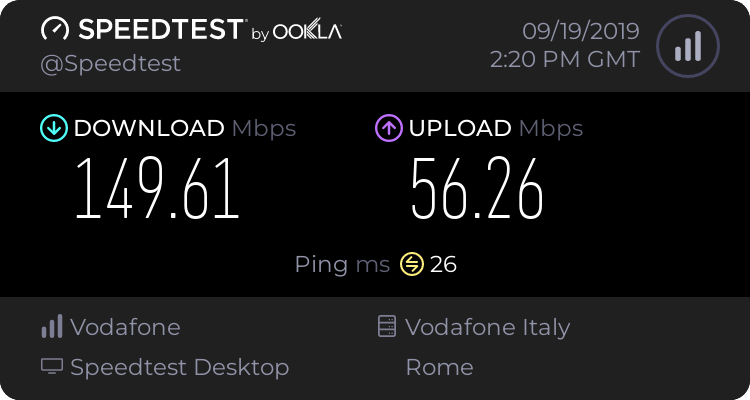
what i dont understand is why it marks as 3/4 signal
both on phone and pc
on mobile i just got 80/160
thick minnow
But they wouldn't be able to get the actual backend IP unless they scanned it with nmap, I don't even know what the command is for that though.
pseudo blade
NBN fixed wireless in Australia is soul-crushingly slow around that 5-12PM mark. 40/10mbps connection becomes a 2/5mbps connection.
subtle glen
we all know australia is famous for its internet infrastructures
thick minnow
Yeah
pseudo blade
I could blame schoolchildren, but the problem is that the people responsible for infrastructure were fucking morons who deserve their own special place in hell.
pseudo blade
oh hey let's provision zero with rounding error backhaul per connection it'll go great
plush wolf
if only i could get above 500 in down iwould know its bad quality
thick minnow
For some reason, I heard that AUS only has 1 big fiber wire going to to their island from Asia.
subtle glen
mine should be 1000/100, the upload is 100 but the dowload varies a lot
pseudo blade
No, we've got a few dozen @thick minnow
pseudo blade
They go everywhere.
thick minnow
That's what I was thinking.
Someone told me it was just 1 big wire from Asia lol
I was thinking "There's no way"
pseudo blade

https://www.submarinecablemap.com/
A comprehensive and regularly updated interactive map of the world's major submarine cable systems and landing stations.
subtle glen
lol imagine someone dropping an anchor and shutting down an entire continent internet
pseudo blade
I don't think that is exhaustive, but gives you an idea.
subtle glen
with 1 cable only
pseudo blade
I think even NK has redundant links.
plush wolf
I'm honestly fine with the speeds
but I can't get why the signal is weaker than before
my mom's room is not covered anymore
or barely
pseudo blade
i'm not please my country is dying
plush wolf
like plz help
subtle glen
buy an access point like an ubiquiti one and disable the isp modem wifi
plush wolf
my mom will kill me because i wanted to change
duud the question is why should I change anything
the signal is supposed to be stronger than before
not weaker
subtle glen
thats why u should change
plush wolf
the router is another one with the exact same design ports etc
so should have the same antennas
i dont see why the connection would be weaker tbh
subtle glen
i had problems with the 5ghz modem wifi band even tho the modem was "new model" etc etc
plush wolf
yeah but it doesnt show
it should, but it doesn't
it used to when i had the 100 mbps
now even my moms iphone when next to the router doesnt cross 200 mbps
and its an iphone x so not the device
i really really cant stand this lmao
subtle glen
on my old adsl line i could see the speed thing. On the fiber line i dont remember if i could see it or if it was showing 0 even tho internet was fine
lol buy an access point if you want faster wifi
plush wolf
i dont understand why i would
connection is stronger than before
its not about access points
pseudo blade
@hollow marlin Mikrotik have parallel queues, see the graph provided. Wirespeed at larger MTUs.
subtle glen
or maybe its peak hours?
plush wolf
Doubt
nobody has this connection yet
here
I'm confident im the first in the building getting the ftth
anyways i dont see how peak hours would reduce the range
subtle glen
i thought i was the first one to get ftth since they put the cabinet less than a week ago when they connected me, but it seems like there were already some clients connected
the wifi is a modem problem
subtle glen
did they reset the settings or something when connecting it to the ont?
subtle glen
maybe wifi channel changed or something
pseudo blade
@hollow marlin Also keep in mind that said routing ASICs are not in the same league for pricing, and are targeted at a completely different market. If you're not hitting architectural limitations for how much you can route with processors available to you, ASIC routing is often not an economically viable solution.
hollow marlin
@pseudo blade I can't argue about cost for sure
pseudo blade
Like here in Aus if you didn't own an undersea fiber cable, a commercial datacentre or go by "Optus" or "Telstra" I doubt you need routing ASICs.
And even then I'd doubt they'd be needing all that many.
 fleet widget
@pseudo blade So wait, if Huawei is laying all the undersea cable, and they are banned from the US, then how are they going to replace undersea cable if it gets cut (because obviously Huawei can't arrive on US shores).
pseudo blade
Hm? They aren't laying all of it.
fleet widget
Ok, so how does Huawei even play into it?
pseudo blade
You're the one that brought up the name. Do you mean that they sponsored the map I posted earlier?
fleet widget
Yes
fleet widget
So like inspections of undersea cable?
pseudo blade
Go look what you want up if you're curious. I don't claim to be an expert in what Huawei do.
fleet widget
K
subtle glen
i'd say huawei its one of the many companies that lay undersea cable
there's google, amazon, facebook, microsoft and more