#networking
1 messages · Page 167 of 1
 clear igloo
 waxen scroll
yep
all i do is layers 1/2, it gets handed off to our many telco partners in carrier hotels
hate ATT? fuck em, buy verizon
VZ being slow? fuck em go to china telecom
so all i do is put the line in and thats it.... you go to the site, sign up for a provider... the provider ships you the gear specific to them
that way you can have internet, phone, TV... whatever
you want fucking MPLS from your house direct into financial buildings? GREAT
if its in a carrier hotel its possible
basically im the new comcast at this point... you need to use and pay me to reach the consumer
and now you gotta compete with 100 people in your old area
 hollow marlin
@waxen scroll so essentially you want to start a dark fiber company
waxen scroll
yes, but consumer focused and easy to use
hollow marlin
being in this area, it's harder than it appears
waxen scroll
im aware.... the running fiber part is the hardest
thats how you get sued into nothing
or just plain told no
the fact that google had to back down says how hard it is
hollow marlin
It's a bitch and biggest hurdle is pole or conduit grants
waxen scroll
that shit should be illegal
but whatever,
i'd have to sue a whole lot of people
just to get a ruling on legality
hollow marlin
Yeah it should be. We are waiting on one BS ordeal where one pole out of 30 is owned by someone else and getting denied
 hushed cliff
Any of you have experience with cat5 runs being put out to RJ11 instead of RJ45?
waxen scroll
yes, but its been a while. i could try answering
hushed cliff
This shit is actually dumb
I understand it was originally wired just for phones and early dsl routers
But like
Wyhy
hollow marlin
@hushed cliff because they'd rather run cat5e which can be used later on than just cat3 or single pair
hushed cliff
I’m wondering, if they’re two separate runs, or if its just one massive loop
hushed cliff
Central point would be the original box then i assume?
From where the DSL came in from the street?
hushed cliff
Well
waxen scroll
sometimes its nicely put into a box to duplicate it... sometimes you get like your picture
hushed cliff
I just wonder where the point is
I honestly just want to improve the network at the house
And if I could do rj45 out to every room then that would be great
hollow marlin
@hushed cliff it's not looped. Two runs with weather crimps on the ends. Still don't understand why people do that because the corroded ends will be cut anyway.
hushed cliff
House was built in 2003
Might explain it
Back when people had land lines
Pepega
waxen scroll
mine was wired for one phone jack in the entire 3 floors
theres no phone service outside...
just a cat5 wire dangling with no box
hollow marlin
I started as an installer/OSP. Most the time I would just end up ripping out whatever shitty cable was installed and reran it. Most were only single pair
waxen scroll
it made me lol because this house had like 3 owners before me
not one of them had phone service installed
i also put in 20 cat6 to various rooms
next owner will thank me if they're not a normie
clear igloo
You put 6 cats in the wall! You monster!!
waxen scroll
the TV areas get ~4-6 connections
i didnt want switches anywhere
now i dont really want to plug anything in because the internet of shit devices for media run ads sometimes
still nice to have
hushed cliff
I wouldn’t mind ripping wall to replace the wiring and box it
But i don’t the parents would
Honestly, if they ever wanted to sell the house, they’d have to get all the ethernet wiring redone
hollow marlin
@hushed cliff if the cable isn't stapled down just tape the new cable to one end and pull through
hushed cliff
I’ll take a look at that
 little schooner
@hollow marlin I did just that the other day and it worked pretty well. I used the plastic fish line thingys and had to use the hook attachment to finish pulling the cable to the other side
It looks like that I put on the rj45 plug too early before pulling it through the wall. More unnecessary work than needed to be
The hole was a horizontal line the thickness of a pencil but a tad bigger
Someone else made the hole before me, so I am not sure why it didn't break into a circle cleanly. Luckily it didn't cause any kind of problem
waxen scroll
oh sweet summer child @little schooner
i switched to using these at home: https://www.amazon.com/gp/product/B00204HDUE/ref=ppx_yo_dt_b_asin_title_o08_s00?ie=UTF8&psc=1
god send
hollow marlin
Pull lines with people not experienced enough always result in broken cables. Kinked and taped end are always the best route because some people think pulling harder is best
waxen scroll
kink and tape is a bitch through populated conduit, walls holes, etc
i also use cable lube... speaking of pull hard
i dont in walls, but i do in populated conduit
i put like two cat6 through a 2" PVC pipe before and it became much harder to pull cables with just tape and rope 😦
i think theres a bend or two in it but i cant see
little schooner
@hollow marlin yeah I took it slow to make sure I didn't destroy the pin contacts
If you pull hard enough, they do bend and damage
@waxen scroll does that fit copper cable 24awg?
If so, that's my new toy too
@waxen scroll that's the one that constricts whatever is inside it to make it tight?
waxen scroll
i dont know, it fits 23 fine and thats almost the max it supports, so i assume it can still grip 24
its a chinese finger trap, the more you pull the tighter it grips
actually i dont think it matters if its 24 or 23 because the jacket outside is still a similar diameter i think
 ancient osprey
Hey, anyone here used Cisco Packet Tracer before?
waxen scroll
a long time ago
ancient osprey
Oof... I am cofused and I'm doing something for my CCNA class
ancient osprey
How do I connect a device to a WRS in packet tracer?
ancient osprey
I tried that and it wouldn't let me
So, I'm configuring everything in the devices config settings and trying to get it to connect.
waxen scroll
i think the WRS is added way after ive used packet tracer so im not sure. maybe someone else
perhaps packet tracer doesnt like you connecting anything but a switch to a WRS
have you tried that?
ancient osprey
I have not, but I got another simulated laptop to connet with ethernet
I was trying to get a smart phone to connect to the WRS and it was not working at all. 😦
 pseudo blade
Testing 4G failover.
Windows clients on router: 8 seconds.
Linux clients on router: 8 seconds.
Android clients on router: Will not work until the devices are disconnected from the AP, try and fail to fallback to their own 4G connections, resulting in no connectivity at all.
hollow marlin
@pseudo blade weird, I find android transitioning between connections the most reliable of the bunch. But I also have Smart Select turned off in wireless settings
waxen scroll
I don't have issues with it on Android either
little schooner
For me, android always drops the connection when it transitions from WiFi to celluar
@hollow marlin since replacing the cable, it hasn't downgraded its link. This looks promising so far
I mean the cable I purchases a couple years back claimed it was CAT 6 but there were review pictures of people opening it up saying it wasnt. The construction of the cable could not be trusted.
hollow marlin
@little schooner sweet. The cable could have not been copper core also which is brittle as hell and causes most wiring issues
little schooner
Yeah that was probably it.
what is the cheaper copper? cca?
maybe it was that one
hollow marlin
Not cheaper copper, it's aluminum core with copper coating. Stuff breaks in RJ45 jackets
Sorry, I'm mean 8P8C connectors....🙄
little schooner
Im glad it is fixed
waxen scroll
@hollow marlin cisco sucks ass
line card upgrades on nexus are my nightmare right now
oh my god its obnoxious
you think its easy and then your lab says NOPE
1st gen cards and 3rd gen cant work together at the same time
ok that sucks for me.... but i have only 4 chassis like that
my other 20 i have 2nd and 3rd gen
its supposed to work together in the same chassis
go to configure a new port on the 3rd gen card so you can migrate an edge switch LACP cleanly with no outage one fiber at a time
NOPE. not allowed!
ok fine. what if i dont use 2nd and 3rd on the same chassis but 3rd on chassis A, 2nd on chassis B. I can still do it with no outage, right?
NOPE. not allowed!
@little schooner this is why im paid the big bux... but oh my god this is obnoxious even for good pay
as i break down in my head, i wonder "is it worth it?"
xD
the answer is you need to make a new port channel ID that only lives on the 3rd gen card and migrate the access switch with two port channel IDs going. spanning tree protects it from loops. you have to migrate with a small outage while spanning tree does its thing
@subtle glen did your internship prepare you for this?
this is the kind of crap that happens in networks all over the world
little schooner
I'm not prepared to handle that situation in a quick manner but I'm ready to make the mistake, let it take longer than it has to plan it out (even if I still don't get a clear picture in the end) and eventually get it to work @waxen scroll
I appreciate the simple aspects of networking
I noticed that I need to do better with time management when projects go south
waxen scroll
@little schooner it took me a good 2 weeks of work hours to lab this
little schooner
Yeah that is long time
waxen scroll
i didnt just "do it" though... i had to build configs like production to pretend migrate
i got devices that are monitoring for packet loss as well and tell me how long the outage is ❤
little schooner
The other day, I was just tasked to get a new vlan created for vms in esxi to use as a safe internet access, prevent them from accessing prod network
Little did I know that I forgot what type of net adapter I had to create and couldn't do it right then and there
Oh lucky you. Yeah, we don't have any monitoring system
I mean, besides just email alert
But that's nothing like real Time monitoring
At the dentist office, we wasted like a few hours just to get MDT to work only because we didn't accept the fact that the network was giving us a hard time. If we had just put in a new switch first or reboot the old one, we could of used faster imaging method
Instead, we did everything manually and I really didn't like it
It went against everything I believed in
waxen scroll
normally i use VIRL to lab but lucky for me my work has a big network lab with the expensive devices in it.... so i can test and break before destroying production with an unknown behavior
little schooner
VIRL has the expensive equipment virtualized?
waxen scroll
yes, to a limit
little schooner
My professor did have a license for it, but he let it expire and didn't even use it
I think because he didn't know how to deploy it
waxen scroll
nexus chassis run what i call VMs in them, so for example VIRL limits you and you are only allowed one VM
i do tests where i need 2-3 VMs
little schooner
One VM of the nexus chassis?
waxen scroll
with a nexus you can make 6+ switches (VMs or VDCs) in them and carve out the hardware (ports) to those VMs
so its like you have 6 independent switches
waxen scroll
so yeah, sometimes i need to see the effect of VM1 talking to VM2 in special ways and VIRL wont support it
waxen scroll
they have a professional version of it called CML, but i dont know if even that supports it
VIRL and CML are CPU and memory intensive as it is
little schooner
Do you know what is the bandwidth limit of the nexus?
Or that depends on the line cards you push in?
How does that even scale
I remember someone saying that most solutions aren't built to hyperscale, but maybe Cisco nexus does just that?
waxen scroll
Depends on cards. You can usually look up the max the chassis supports though
little schooner
I bet it gets real complex when you link them together to appear as one
Two nexus switches
waxen scroll
I don't think Nexus supports that
little schooner
Yeah that is really crazy
waxen scroll
I don't remember the name of the feature you're taking about, but it exists on other switches
little schooner
Yes, I think called stackwise or something
waxen scroll
It's VSS
waxen scroll
VSS is exactly what stacking does, but the stacking protocol can run over SFP and fiber.
little schooner
Oh, now that's useful. No need for proprietary connector
 subtle glen
@waxen scroll hahahahaha, we didn't do much networking. It was mainly preparing computers with special ISO's, installing software on them and give them to people in the same building or ship them to other offices around italy. Or removing voip phones/ fix broken thins etc
clear igloo
@little schooner Nexus doesn't do VSS, only the Catalyst switches (4500, 6500). Nexus does vPC which appears as a single switch to the downstream connected device
clear igloo
a who what now?
clear igloo
I have no knowledge of those 😦
 fresh copper
I’m making a new wifi network and I’m trying to think of good (pun) names. I’m currently thinking of calling it Iron LAN which I admittedly stole from an r/homelab post. Thoughts?
fresh copper
Free WiFi but it’s password protected would be funny
Wired LAN is also good
Thanks for the suggestions
clear igloo
Free WiFi that's WPA2 Enterprise protected 😛
subtle glen
Someone I remember called their wifi network "bomb detonator" and he got arrested lol
 oak frost
subtle glen
oak frost
subtle glen
My 2.4 ghz one is still the one the router came with lol
I renamed the 5 ghz one only
little schooner
Calling the 2GHz WiFi "5G" and the 5Ghz one "2G"
waxen scroll
Xeon tech tips
 steel cosmos
In the recent video on ad blocking via a DNS server run on a Raspberry Pi video Linus mentions possibly doing a video Jake has been wanting to do for a while, a DIY VPN server. If Linus/Jake happens to see this I highly recommend SoftEther (https://www.softether.org).
subtle glen
That wasted ups
waxen scroll
https://www.softether.org/1-features/1._Ultimate_Powerful_VPN_Connectivity#1.5._NAT_Traversal
wow, they actively advocate breaking security policy
steel cosmos
China hates them, but seriously it can do some pretty impressive stuff that makes it harder to detect by more strict firewalls
waxen scroll
im having trouble believing it actually works. why wouldnt firewalls be blocking https incoming?
firewalls are stateful
its not going to let https open from the outside
steel cosmos
the client initates the connection
waxen scroll
right, and if it does it wont work
steel cosmos
depends if you block outoing https
waxen scroll
the VPN server would need to reach out to the client technically to bypass a corp firewall using https
steel cosmos
then it needs to go via icmp
i mean if your corp firewall blocks https why even have internet access?
waxen scroll
because its stateful
steel cosmos
that's not a reason why
it's like having a car that can go nowhere
but thaqt's the defautl behavior, over https traffic
waxen scroll
you can block https incoming to your firewall if theres no request for it in the connection table. thats the stateful part of it. a connection isnt allowed in the connection table unless a machine inside the corp network opened it first
steel cosmos
openvpn does the same thing but only partially since the initiating protocal has some stuff doesn't look like https
so openvpn is easier to block/detect
waxen scroll
@clear igloo hi.
steel cosmos
you can get around outgoing/incoming restrictions by basically using a proxy
both connect to a proxy as outgoing and bind that way
there's also other tricks softether can do such as piggy backing via icmp
i mean i woudlnt' recommend doing any of this if you're not authorized of course, could be risking your job, but for other places go gangbusters, honeslty once you have physical access all other security measures go out the window
softether can also work as layer 2 vpn, meaning for older games lan support, so a homegrown tunngle, hamachi, etc...
waxen scroll
unfortunately they dont get really technical when explaining why it gets around a fw, so i dunno. all i know is if the VPN server on the corp network isnt the one starting the https connection with the client at the remote end, it wont work in any of the networks ive managed.
steel cosmos
if the corp network needs to go through the vpn that's not any kind of restriction that matters
basically double vpn it, vpn within a vpn
it's all opensource if you really want to know the internals
softether has been publicly available since 2013 and has been pretty well battle tested
little schooner
@steel cosmos well somehow our college has blocked softether
waxen scroll
"NAT traversal" is a super generic term for like 10+ technologies
steel cosmos
@little schooner softether has many connectivety methods, you don't simply "block it" you have to block all its methods
steel cosmos
what about using a proxy outgoing via an azure server or similar?
little schooner
Well, I didn't set this one up, my teacher did years ago with another student.
steel cosmos
my softether didn'tw ork intiially over a pretty restrictive firewall
once i configured it properly i could do it
waxen scroll
my current job blocks http/https to the internet. you are forced into a proxy server hosted internally and then that is allowed http/https to the internet
steel cosmos
@waxen scroll that's not a hard restriction to get around, simply have softether also run through the proxy server
it can look like regular https traffic
going over the proxy
little schooner
@waxen scroll how does the firewall allow traffic through?
waxen scroll
the proxy server actually does MTM attack on HTTPS and reads it unencryped
little schooner
Is it looking at ip or something else?
steel cosmos
so it's breaking security to enable security?
little schooner
@waxen scroll couldn't someone use the same ip as the proxy and get internet access?
Or is there something else I'm missing
waxen scroll
no, its not possible
you'd need to go to the datacenter, find a switchport in the same vlan, then duplicate IP it
waxen scroll
they use it for making sure data isnt leaking
like health info, secrets, credit cards, etc
steel cosmos
just hope you don't do anything with passwords you care about over that proxy
waxen scroll
luckily they are only targeting obvious stuff
email, google docs, etc
not banking
you can tell based on what cert your browser is using
little schooner
Hmm, so the firewall is intelligent enough to inspect it for things like social and other sensitive info?
waxen scroll
yes
little schooner
That is layer 7 inspection?
waxen scroll
yes
they got mad at me because i found out about it on accident cause i use a browser which doesnt trust their certs
and i bitched them out
nothing i can do about it unfortunately
little schooner
Strict company policy
waxen scroll
im not sure its legal and they refused to tell me if they talked to legal or compliance teams before doing it
they are hiding behind existing company policy
steel cosmos
if your proxy trusts a proxy you can connecto to such as microsoft azure then that's a vector for connectivety
waxen scroll
the firewall team and I joke that we're gonna make our own proxy
the proxy team is infosec and they arent related to most of our network teams
steel cosmos
do they allow cell phones at your work?
waxen scroll
yes, but only work phones on work wifi... personal allowed in the building but not on our wifi
steel cosmos
boom security bypassed
connect to softether via cell phone
bridge it to physical computer
that's why phsyical security is the only one that matters
waxen scroll
@little schooner sooo when you getting your own internet
little schooner
@waxen scroll well this will probably happen when we move everything to the new room they allocated for us. It's looking like summer of next year
The supervisor told us this late after everything was put together nicely and racked
The teacher was concerned about having nothing ready again if we moved it
So he opted against it during the month of July
And he went on vacation for 3 weeks after lol
little schooner
Is there a reason why companies use 10.x ranges like 10.164.x.x in small offices and schools?
Is there a reason they aren't starting low like at 10.0.1.0 or something like 10.10.0.0?
Is it for VPN purposes if a IT company needs to VPN to them without address conflicts among the many small businesses they support?
hollow marlin
@little schooner I think I brought it up with you before about having a scheme to keep order. Like 10.164 for site X and 10.174 for site Z.
Having dealt with 100s of circuits for schools and offices this is why
waxen scroll
most of this shit is just scraped together.... you dont know why or how
technically you should be thinking global
how many regions of the world will i be in
assign LARGE subnets to each region
keep going down and they get smaller once you get to offices
schools and small companies? yeah.... they're not doing any of that i bet
just assigning subnets all random
ipv6 is similar.... companyid:regionid:siteid:subnetid::
depending on your allocation, thats how i subnet it
little schooner
Thanks for the explanations
waxen scroll
do your homework.
little schooner
@waxen scroll I haven't had a single class related to networking for the past year. I miss homework in networking classes
I'm still trying to get through all my generals
Degrees, especially the one I'm trying to get, put so much unrelated courses. Chemistry, trig and physics are annoying
Trig is a nightmare
little schooner
https://www.amazon.com/dp/B00204HDUE/
@waxen scroll is the loop able to be disconnected to hook onto another fish attachment?
I'm not getting a clear picture of how it's supposed to look when attached
little schooner
So I learned today that you cant crimp a pass through plug without a pass through compatible crimper that has a blade to trim it
hollow marlin
@little schooner you can, just cut the pairs flush
I hate passthrough, but I've also terminates 1000s in the past
little schooner
@hollow marlin my shears don't cut it flush
I guess I need new ones
@hollow marlin what specifically did you hate about them?
hollow marlin
By cut I mean with electrical scissors. I hate pass through because it's almost more work, blades get full quick and sometimes cuts leave enough behind to not seat properly
little schooner
Hmm yeah that sounds very annoying
Well I am trying a small pack of them
Hopefully I have good luck with the batch for a trial
hollow marlin
They are good for people who occasionally terminate. I started as OSP so I've had to master it.
BTW, get these scissors and you'll never need a new pair again
little schooner
@hollow marlin these can cut it flush?
Or will there still be a little sticking out?
The tab on the rj45 plug looks like it won't cut it flush with these
fresh copper
I’m not a big fan of passthrough either. Mainly for reasons already mentioned but I also feel like the connector looks worse. I know if hardly matters and no one will see it but I still know that it is there
little schooner
The problem I have with non pass through is that sometimes I don't cut it short enough and then I have to take it out again and trim. Then there are times where I trim too much and have to do it all over again
Also when I cut, one wire is longer than the other
So it must be true that you have to terminate thousands of them in order to do it so quickly
hollow marlin
@little schooner best trick is to cut the pairs the width of your pointer finger. For most people I show to it's perfect length to keep the jacket still in the clamp.
- Strip 2" off
- Untwist and order pairs
- Cut finger width
- Cap it
little schooner
Hmm. Thanks I will try that
I got three more to make. They are for outside cameras
I didn't use outdoor rated cable but it will be sitting inside of the soffit spacing
Should be fine. Heck even the one connected to the mikrotik router survived in below 0 Temps
hollow marlin
It’s should be fine. The sun is what kills cables, temps, not so much
little schooner
Haha I will remember that one
 noble summit
waxen scroll
noble summit
waxen scroll
dat spectrum
 fleet widget
High Energy Youtuber Triple your internet speed in 5 mins with these 10 tips
waxen scroll
@little schooner another ltt hiring video. Still no dedicated IT person
little schooner
@waxen scroll I guess because then everyone will be mandated to create a ticket when there is a problem and that is something they want to avoid. No ticket = no service problem.
I guess freedom to make choices and your own solutions is enough and no need for IT when you have tech people in your company
clear igloo
Yup, Nexus 7018
Not much in terms of 100G port density and no 400G coming so it's meh 😛
 sinful vortex
welp, we're only a PaaS DC so no cutting edge stuff 
clear igloo
😦
sinful vortex
which also means no EPYC
sinful vortex
Yes, I need one in my home ;)
clear igloo
Haha, power the whole town
subtle glen
Hook me up
clear igloo
ouch =/
I assume you're going to do a mix of 10G and 40G in the N7K?
or is it going to be mostly/completely one or the other?
sinful vortex
probably, since that's how the other N7K's are set up, but I don't call the shots here
clear igloo
Took this about a year ago, still looks pretty clean :)
It's a lab setting though, not prod
https://i.imgur.com/OXqFzDw.jpg
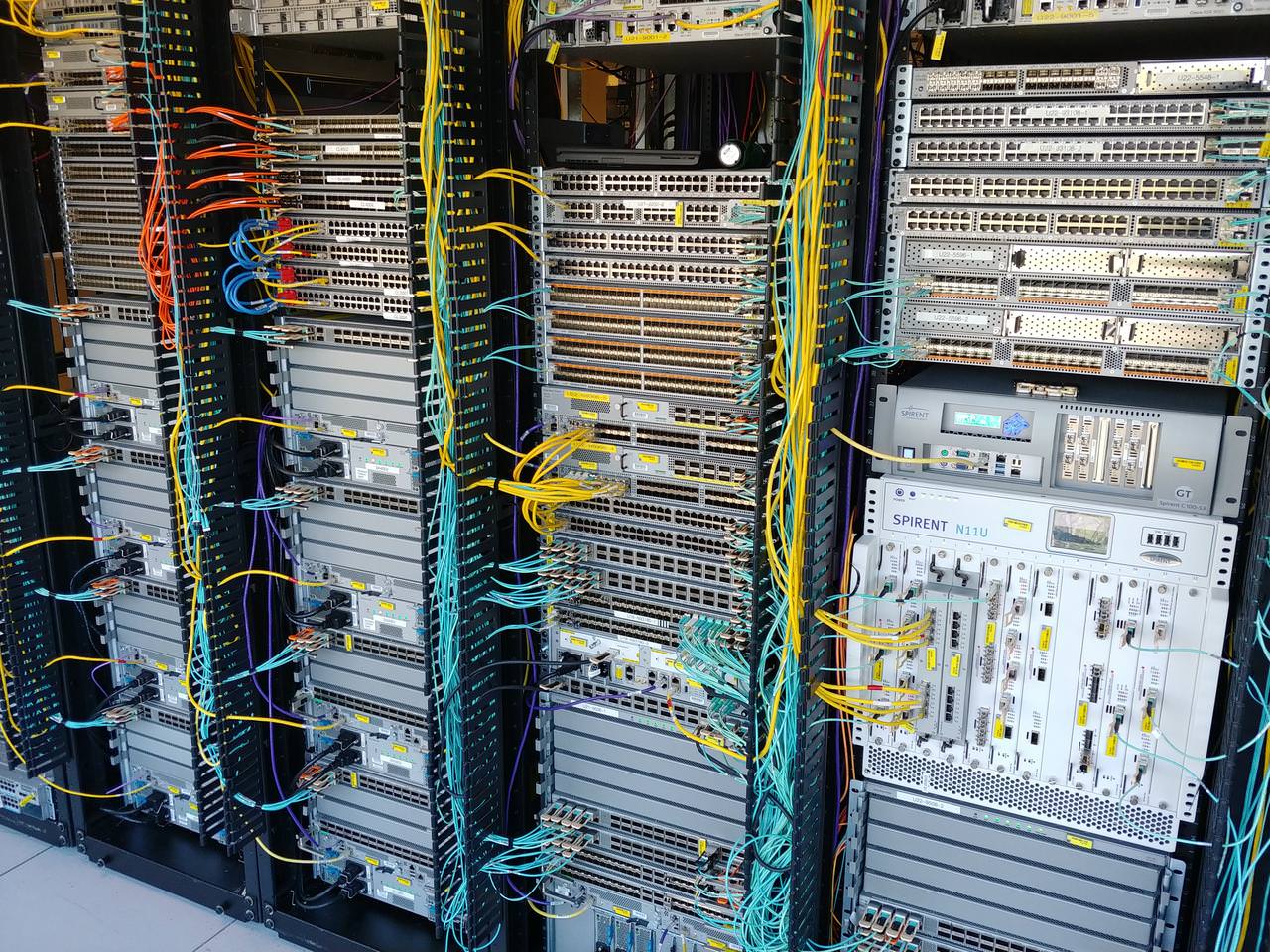
I need to update it though as a bit has changed but it's mostly the same
Not shown is the other ~50 racks as part of my lab, which are nowhere near as pretty looking
@subtle glen Identify everything, 30 seconds, go!
subtle glen
I got this
Switches
Router
A lot of fiber
Wow theres no ethernet in there, just those blue cables at left
clear igloo
The yellow cables are copper too
clear igloo
Data center testing
One half is for standalone testing in a typical 3 tier architecture, the other half is for a new VxLAN eVPN deployment
subtle glen
Why you need all those switches for testing xD
clear igloo
The customer wants all the flavors of switches tested + FEX to the switches as well
subtle glen
And whats that spirent thing at the right? Is that where the internet connection comes in?
clear igloo
That's a traffic generation tool for spewing traffic into the network
subtle glen
A traffic generator?
clear igloo
Mostly used to test convergence, route scale, and various RFC testing
clear igloo
Ummm, right now for that row of 12 racks, each rail is pulling about 170A at 220v (I think it's 220v at least), so probably somewhere around 9kWh per rack or 110kWh per 12 racks
subtle glen
And you leave this on all the time?
clear igloo
Yah
subtle glen
Whaaa
clear igloo
power draw doesn't include cooling either
clear igloo
Oh wait, I can't math today. it's 15 racks of gear, so more along the lines of 7.3kWh per rack
subtle glen
15 racks full of switches for testing purposes?
clear igloo
but the whole lab has probably 2400 racks of gear so my section is chump change
obviously not all at the same power draw level
subtle glen
Wtf
clear igloo
My lab is about 55 racks of gear right now, looking to expand into another 15 in the next year or so
waxen scroll
My lab is 30 racks
clear igloo
Not just me but I'm the "owner"
waxen scroll
I'm technically not allowed to run wires in my own lab, and that's fine. Let the help do it
😘
I hate physical layer
clear igloo
I love going into the lab and messing with stuff 😛
clear igloo
Room? This is an entire floor 😛
subtle glen
😂
clear igloo
2400 racks of stuff on the floor (roughly)
subtle glen
Do you wear ear protection there?
clear igloo
I should, but I don't, lol
subtle glen
I see
clear igloo
I don't stand behind the gear with my ear to the fans
subtle glen
Are there also some servers in these racks or just network equipment
clear igloo
Oh yah, servers, routers, switches, firewalls, storage, etc.
subtle glen
It's a playground for adults
clear igloo
Exactly 😄
waxen scroll
No xeons
clear igloo
Many Xeons 🙂
subtle glen
Wait, whats this stuff
clear igloo
Blade servers and storage
subtle glen
Cisco makes servers?
subtle glen
What?!
I recognized the blade one but after seeing the cisco mark I was like "cisco doesn't make servers..."
clear igloo
Haha, yah
subtle glen
Do you also have racks for batteries/ups'es or each rack has its own ups?
clear igloo
UPS?
HAHAHA, that costs money 😛
I keep pestering the budget people to let me buy a couple UPS for the infrastructure of my lab but they never get back to me
The main lab infra has some UPS but nothing in my lab does 😦
subtle glen
So in case of a power outage, this all shuts down?
subtle glen
I can imagine when power comes back and all the fans ramp up to 100% for a few seconds xD
clear igloo
Yah, it's eerie when the power goes out
subtle glen
All quiet xD
clear igloo
Yah
subtle glen
Oh btw serious question: I remember that when I called the fiber guy to connect the fiber plug in the apartment, the fiber in the splice box was left in there by the previous guy in a bad way, like all tied up in a corner and I remember there were some bends in the fiber strands. Could that be the thing that is affecting my internet speed?
sinful vortex
yikes
subtle glen
Cause like with the current fiber architecture (gpon) I should get 2.5 down and 1.5 up as max and my contract is 1000 down and 100 up but the download is very unstable
Is it like an isp problem or bad installation
clear igloo
So your download should be 1Gbps but it's not consistent?
clear igloo
Ah, ok, that sounds like perhaps a bit of both almost
subtle glen
But the upload is always consistent 87/90
clear igloo
Hmmm
Sounds more like an ISP issue then
Speedtest from the desktop or from the website?
clear igloo
Ah, the website is terrible at over 200Mbps usually
subtle glen
Oh ok
clear igloo
Try a couple runs from the desktop app and see
subtle glen
Cause people on another forum said it's cause the passive fiber cabinet outside has like a limited bandwidth that goes to it (10 gbps or something), so when more people is at home the speed decrease. But that seems like bullsh** cause that cabinet can have 250 houses connected to it
clear igloo
Yah, they can overprovision a cabinet
If the speed is constantly low at like 5PM or something then you know they overprovisioned by a lot
Ideally you would overprovision by between 2:1 to 5:1 but you can definitely see some ISPs do like 50:1 or 100:1
subtle glen
Ye but 10 gbps for a cabinet that should deliver a minimum of 1 gbps to 250 houses isn't much
Like ofc the speed will slow down
clear igloo
Do you have a linux VM by chance?
subtle glen
Yea
clear igloo
gimme a sec, let me find my speedtest script
clear igloo
Run it every 30 minutes for a few days and see the results
subtle glen
Ok
clear igloo
Sent via DM
subtle glen
oh ye got it
clear igloo
It's not always the most reliable thing in the world but it should give you a good average
subtle glen
oh wow this is harder than i expected. What should i google to find a guide xD
clear igloo
for which part?
subtle glen
mostly the thing to put in the file
clear igloo
Oh, just copy and paste
clear igloo
😦
waxen scroll
its hidden UPS! it takes up a large part of a room somewhere else
its a datacenter pod inside of our existing datacenter
sinful vortex
Performance Optimised Datacenter(tm) ;)
little schooner

FS - Fiberstore
FS 8-Port Gigabit Managed PoE+( Power over Ethernet) switch with 2 SFP, supporting both PoE and PoE+ devices with a 260W PoE budget. Best Price, Free Shipping!
Was ready to buy that this month and now there is a month long wait for it
waxen scroll
do you really need PoE?
you can get way more ports for $40 more on ubnt
fanless too!
little schooner
@waxen scroll it's going to sit on top of a cabinet, can't be big
I only need 6 but most other brands are either not full poe or they are big or their power budget is really low
And it has to support vlans and be managed switch
subtle glen
if i do trunking between 2 switches but there's an unmanaged switch in between the 2, would that still work?
waxen scroll
im sure it depends on what the unmanaged switch can forward, but logic says the frame is too big once you add the vlan tag and the unmanaged switch might see it as corrupt and drop it
ive never tried
subtle glen
oh, so the 2 would have to be connected directly
waxen scroll
yes
subtle glen
ok ill find a way around it
little schooner
The way around that is to not use vlans
subtle glen
Welp... I have a security camera and a server that needs to be in their own vlan
hollow marlin
Some unmanaged switches do pass tags. Give it a shot but don’t bank on it working
little schooner
It would say if it passes it in specs. Look for 802.1q. I think I've seen a few that supported the standard but not let you manage it. It basically is allow vlan 1-4096 statement on each port. My cameras try to phone home back to china, but I'm not concerned since they have no default gateway. Hikvision discontinued the wifi cameras I was using, but dahua was the next best one for me. Zmodo was a doorbell camera I tried, it has terrible two way talk function but was cheap and affordable. The Lorex cctv system I had before was super stable but image quality is beyond terrible.
 subtle glen
uu shiny
little schooner
@hallow nimbus my led died and it doesn't even have a light anymore
waxen scroll
rossman repair
little schooner
Doesn't he only take apple stuff
 hallow nimbus
RIp @little schooner
waxen scroll
nope. he takes anything he thinks he can work on
little schooner
@waxen scroll even a solar light fixture?
waxen scroll
i tried giving him a surface laptop with the instruction that im fine with it destroyed but i need the SSD chip put into a chip reader
i get referred to jessa
lol
hallow nimbus
XD
waxen scroll
never did do it. my family member decided $300+ data recovery wasnt worth it when they need to buy a new device ontop of that
 pine nimbus
Can someone with some server knowledge and network knowledge dm me please. Im trying to buy a vps but i dont know what to put in ns1 and ns2.
little schooner
Just write it here so more people can be of assistance
pine nimbus
Ok
So im using this website called my.rocket-hosting.com
And I looked into buying the Large UK Budget Plan
When i go to order
it asks me this
@little schooner
little schooner
The hostname is the name of your server, like GamerServer1.contoso.com. GamerServer1 is name of your server and contoso.com is a domain in your control.
Root password is a password for privileged access to your server.
Ns prefix are just the hostname of DNS servers you want to use to propagate your DNS record to other internet DNS servers so you can find your server on Internet.
I think you can just leave the defaults for Ns prefix unless you have specific DNS server you want to use. Like a Cloud flare one. @pine nimbus
subtle glen
is it mandatory to assign an ip to a switch?
clear igloo
Define "mandatory"
subtle glen
im trying to do trunking between 2 switches and i factory reset one cause the console would not load. Should i give it an ip first or no?
clear igloo
Yah, if you can't console then giving it an IP is needed for management
clear igloo
yup
subtle glen
alright
subtle glen
wait is it just a matter of selecting "tagged" under vlan2 to add that port to the vlan?
little schooner
Yes.
@subtle glen
Also, when vlans pass from switch to switch, they are always tagged. The tag leaves as it exits the port towards the destination host
subtle glen
oh ok
little schooner
@waxen scroll uhhh can't remember the finer details
@waxen scroll except if the adapter at host is a trunk too?
waxen scroll
native vlan
little schooner
Right I know that detail
waxen scroll
just gonna sneak in a @unreal wedge mention again
 strong tusk
So, I'm having issues with my onboard LAN. The drivers are causing problems with the OS, so I was thinking of getting a lan card. Any good ones?
I would rather not spend more than 50 USD, but I can spend up to 400 which is probably way too fucking much for one. XD
little schooner
Some Intel nics on ebay will do you some good. Does it matter if it is used?
https://rover.ebay.com/rover/0/0/0?mpre=https%3A%2F%2Fwww.ebay.com%2Fulk%2Fitm%2F193032430916
4 ports, gig speed?

eBay
We are sure the problem can be resolved! This is a limited warranty and does not cover performance, appearance or compatibility. Item Functionality Refurbished.
strong tusk
@little schooner dun care if it's used or new I just need something better than the onboard that's giving me a headache on my x399 taichi
strong tusk
will do I can actually afford it, my vii, a cooler for my roommate, and a thing for my treadmill XD
strong tusk
I think I sent this to you in general while still drunk
noble summit
 fickle lotus
 spice cairn
I can't fix this problem I tried updating the drivers didn't work either. ANY HELP?
I'm on my laptop btw
little schooner
Is it disabled in the Bios? @spice cairn
little schooner
Integrated NIC says enabled. Okay it's not that. Can you check in device manager to see what icon is next to it?
Does it show up in windows device manager?
spice cairn
waxen scroll
hmmm so the wireless is built in or no?
spice cairn
It used to work just yesterday
Is there a chance the wifi chip might be loosen?
Because i just dropped the laptop yesterday
The ethernet works btw
waxen scroll
nope. if there was you would still see an unknown device
spice cairn
Oh
What could possibly be wrong 🤷♂️🤦♂️
Isn't there supposed to be wifi options on there left?
little schooner
@spice cairn well, try to reseat the wireless card back in
I thought you were trying to get the rj45 port to work again
little schooner
Yes, so open the laptop and try to reseat it
little schooner
If it was working yesterday before the drop
Well maybe it was because of the drop
little schooner
No problem. Thank lzdanger too hehe
spice cairn
Yeah sure
spice cairn
Didn't fix the problem😂
little schooner
@spice cairn the last thing I can suggest is reset your bios settings to default and try installing the wireless drivers one more time
What is the model of the card?
little schooner
Although rare, I've had some devices Not show up in device manager even if they are plugged into the system
Oh okay so it's built in?
spice cairn
Yes
I just opened the laptop and the chip looks fine😂
Isn't there a software to check if the chip is working or not
little schooner
I mean it is strange.
The drop probably did something to it, but...
Without another card to test with
Hard to say
little schooner
Yes, the Dell diagnostics thing
The laptop should come with that
Maybe run that?
spice cairn
The ether works fine
I'll use that
I just wished that windows update could fix any bug
But they don't do any good 😶
little schooner
Well if it's broken, no software will fix it
spice cairn
I don't ever update my windows
And i don't even use this laptop
I'll just be using for the first semester 😂
God help me
little schooner
@waxen scroll does your company have any speaker loudsystems that power over PoE?
I don't know what name I'm looking for. I'm looking for something like the ring floodlight but just the Loudspeaker system part
Loudspeaker over PoE
waxen scroll
not that im aware of
little schooner
Wish smart home device manufacturers could make stuff like that
Maybe with an app too
waxen scroll
i'd imagine powering a speaker is much harder over PoE
waxen scroll
ubnt has a product i think but its attached to an access point
little schooner
Yeah that is what we have in classroom
But if they could just separate it from it..
That would be good
That is what I'd want to have actually. Since it has app and you can play recorded messages
hollow marlin
@little schooner I though Ubiqi has APs with speakers built in no?
Maybe it was ruckus, I don't remember. I've seen APs with speakers for paging systems that are PoE
 radiant shell
No idea on pricing but i found these https://www.axis.com/en-au/products/axis-c2005/
Scratch that $400USD from B&H
spice cairn
@little schooner man it worked 😂😂😂
The original dell website didn't have that driver
little schooner
@spice cairn wow. So maybe the updates included some detection fixes or something
Was it the updates?
Yeah sometimes it doesn't show in device manager due to that
@radiant shell thanks
But... Hmm, wonder how I am going to mount this vertically
 little schooner
Wow that's awesome
radiant shell
No idea how they perform but at 6w they should be decent enough for background music/ annoucments
little schooner
Yeah I'd use it for announcements
radiant shell
Then you wont have a problem
radiant shell
Yea, I'm a audio technician by trade so make sure they are mounted above head height and you shouldn't have a problem
little schooner
Alright. Thank you
radiant shell
They are little bit more expensive but here is the B&H Link https://www.bhphotovideo.com/c/product/1298787-REG/axis_communications_0923_001_c1004_e_network_cabinet_speaker.html

Buy Axis Communications C1004-E Network Cabinet Speaker (Black) Review Axis Communications C1004-E

Buy Axis Communications C1004-E Network Cabinet Speaker (White) Review Axis Communications C1004-E
radiant shell
Yea i noticed that
little schooner
Now i just need to save up about 2 months for it
radiant shell
whats it for if you dont mind me asking?
little schooner
Well, because at night we see a lot of activity outside and during the summer, there was a lot of people breaking into cars and no one has a car with an alarm here
By making the announcement, we hope to scare them away and make known their presence
Like how the floodcam from ring does
Except I hate the floodcam and just want the speaker feature it has
radiant shell
Fair enough, bit of an odd use i guess
little schooner
They do run away if they hear the noise. There were some videos of the floodcam users doing that
The thieves usually ran away from the neighborhood or the residence
radiant shell
Im not sure how you would trigger the speaker to make the announcement or would it be manual trigger?
little schooner
Manual trigger. We are awake to see it at night most of the time
radiant shell
depending how you wanted to do it, the speaker has the sip option so you could just use a phone to make an announcement if you wanted too
little schooner
Yes I saw that sip feature
radiant shell
i believe there was only the windows software so you would need that to trigger all the time
little schooner
Hmm. Yeah I have windows desktops here so Ill be able to install it
radiant shell
do you already have the ethernet cable run?
little schooner
Yes I ran it the other day. It took sooooo long to do because the holes were not there already
The house has double siding with insulation and something something not level that made it hard to penetrate
radiant shell
It wouldve be a lot cheaper to do it the traditional way with standard satellite speaker
radiant shell
normal speaker basically with a ~$20 amp/soundboard you could just press a button to trigger the sound
little schooner
I guess that works too. Just basically something to scare them off.
radiant shell
because that speaker i think is more aimed towards shops/ large installs where the network really helps. for 1 speaker it doesnt really make sense
subtle glen
u can use an adafruit sound board, drop the audio file on it and connect a button that shorts 2 pin to give the board the input to send the sound. Then you connect a cheap amplifier to this board and connect the speaker to the amplifier
radiant shell
^^
Tbh you probably still could use that ethernet cable, just cut the end of and just use 2 pairs for each negative and positive
subtle glen
https://youtu.be/lv8wqnk_TsA?t=136 like this guy did, you, instead of using 3 buttons, you use one and hook up another speaker

This horn is SO courteous my car was granted Canadian citizenship yesterday. FREE Audio Book- http://bit.ly/AudibleMarkRober A review of all the books I've l...
the timestamp is already in the link
radiant shell
A pair of speaker is a fraction of the cost, it would be safe to say you could have it all done for under $100
radiant shell
fleet widget
Ok, so how would I, say multiplex multiple analog signals into 2 wires?
radiant shell
What are you trying to do?
fleet widget
I'm trying to make a catdusa, without having to buy one, and without having ADCs and DACs.
It's essentially just a XLR snake, without the bulk.
*an
radiant shell
Lets move to dms since this is technically a networking channel
fleet widget
Ok
little schooner
Sound is really that simple? Red and black wire from each speaker, run it to that amplifier and have an audio input plugged into the amp and the magic of sound happens?
@radiant shell
radiant shell
Essentially, yeah
little schooner
I thought it would be much more difficult. But im feeling a bit more confident about it now
radiant shell
So it will go button -> Adafruitboard -> Amp -> Speaker
little schooner
I just never really thought about it
The fruit board is where the file will be placed I am guessing?
Whatever file I want
radiant shell
Yep
radiant shell
And hopefully 1/5 the cost
But you can just use the cable you already ran for the speaker since 1 speaker should be more than enough
strong tusk
so my motherboard has an x1, and 4 x16 slots. The nic is x4. Do I put the nic into an x16 or?
radiant shell
Is it a 1gigabit nice?
 sterile mesa
 radiant shell
Then 4x is fine for it
little schooner
If you have spare x16 slots, it can go in there too
I like how the older Intel nics are very cheap
radiant shell
PCI-E 4x has a bandwidth of 4gigabits/s so that is more than enough for the nic. It can go in the 16x if you dont have a graphics card but there will be no performance increase
little schooner
@radiant shell with pcie4.0, it crazy that it means Intel NIC dual 10g ports could be in a x1 slot
In future release
radiant shell
It will be a couple years before PCI-E 4.0 will be widespread
strong tusk
@little schooner Yes, asked on another discord. forgot that x16 supports them It's an x399 taichi, so I have 4 x16s and 1 x1. I'm using the top slot for a 1080 atm, but swapping that to my radeon vii when it gets here on saturday.
So I'll probably use the 2nd or 3rd slot for the x4
little schooner
@strong tusk perfect. Glad it worked out
little schooner
@hollow marlin the sales specialist people at fs.com write like this sometimes
This one I'm talking to is really helpful though
clear igloo
@little schooner Did you do the needful?
little schooner
@clear igloo huh?
They didn't have the switch in stock but they said they would let me know and that if I had more question, I can send it there wsy
But I noticed they shorthand a lot
clear igloo
Yah, it's basically saying "Did you do what I asked you"
little schooner
Yeah I did lol
hollow marlin
Honestly I've never had to contact them other than 2 bad SFPs and that was opened support and just sent me a return label
little schooner
I think they are fine. In fact, they were willing to send me the discontinued model
1 stock in Asia
But I said I'll just wait for the current one
clear igloo
Nice
little schooner
Yeah really helpful sales people
Why isn't all sales that helpful everywhere lol
I had dell misquote our classroom lab purchase. Wrong RAM, wrong tower, wrong CPU
Wrong wrong wrong. Even we sent them the list of part numbers
They still ignored it
hollow marlin
As you can tell FS is not about making top dollar. It's the consumer base they have built up which keeps them going
little schooner
Yeah. I like to be thought of as the customer, not the product for a company
 thick minnow
So I want to be able to port foward on a LTE hotspot, the only way that I know of doing that after doing research is to get a VPS and install openvpn.
little schooner
Since you dont control the LTE network, yeah.
much different than say, controlling the connection to a comcast ISP home. You control the gateway that could forward requests to different ports
hollow marlin
@clear igloo just so I am not going crazy VPNv4 AF just refers to prefixes pretended with RD correct?
clear igloo
@hollow marlin Should be if I understand it correctly, yes 🙂
little schooner
@waxen scroll Not that it was worth the wait for or anything, but here was the basic diagram the teacher wanted for the lab, that I finally got to show you now lol
Sorry it took so long.
little schooner
@waxen scroll teach me again. It only shows what was most important to know for the teacher.
You should of seen the old one that was scrapped
It was oversized, way too many object links, long descriptions, multiple rooms
@waxen scroll what was wrong with it? I know the chart is bad in the right corner
Also, I tried, but the teacher wanted to use a /24. He said something along the lines of "the best solution is the one that is the most simplest and known to work in the face of ignorance"
waxen scroll
@clear igloo what was wrong with it
little schooner
So I could learn from mistakes
hollow marlin
@little schooner here is a quick diagram I put together for your topology, with changes
With some sampling of keys, VLANs keys, charts
little schooner
What software did that?
little schooner
Well I will have to keep practicing
I've saved your example
Thanks.
@hollow marlin what if there are multiple rooms?
hollow marlin
Just try to make sure you find a standard and stick to it. Should remain consistent but there are situations where there is so much going on you have to ommits some things
little schooner
How would I show it's connection
hollow marlin
Physical locations should not be in diagrams
little schooner
Oh
hollow marlin
there are few situations where physical locations matter
little schooner
So just show the network equip of other room in same diagram?
But not show a room?
Just the hardware
hollow marlin
Yep, just hardware
little schooner
Like R1 and R2, closely in diagram, connected (but no mention that R2 in in room 11)
Oh okay
Well I think I was overthinking it then
Okay, standard diagrams to follow do make sense
The one you did looks like a good template to use?
hollow marlin
let me see if I can even find one of my larger diagrams
little schooner
For most env
The diagrams I'll make will usually just be for small business or labs
At least for the time being
hollow marlin
I dont have it on me. It is basically a almost GB visio of my entire network segment. I wish I had it as its what helped me organize such a diagram.
little schooner
It's okay. Thank you for trying to find it
noble summit
little schooner
Pay more
clear igloo
@little schooner Come on now
If you do the internet speed dance you might get some more gigabits
It's 100 iterations of: up down up down left right left right b a
Followed by 35 chants of: R2, R2, L1, L1, Left, Down, Right, Up, Left, Down, Right, Up
And then never-ending monthly installments of: $34.99
Topped off with 5 iterations of: Circle, Circle, Circle, Circle, Circle, Circle, R1, L2, L1, Triangle, Circle, Triangle.
little schooner
That's a lot of steps. Might need to contract that out to someone else lol
But seriously, the zip code pricing is awful for Comcast. If I were to move a couple blocks down the street, 50mbps internet drops to 35.99 while in my zip code now, that same internet is $69.99
Why the price descrependcy?
That's why I've been following a local fiber isp called netspeed and hoping they can get over here and blow Comcast out
They are coming, but there is lots of hurdles they have to get through. I. E. One being Comcast monopoly
@clear igloo
sinful vortex
cos Murika
clear igloo
Yah, Murica! Where ISPs write the laws and they get passed without question 🙂
little schooner
The school system for degrees is so broken. It would be better if they graded more on effort than the answer for some courses
Math in particular
 rancid hollow
does anyone know how to set up static ip on tehnicolor 7200 wifi router
wink wink its for pyhole
can i simply disable dhcp?
little schooner
@rancid hollow, well on a Comcast router, to set static IP, DHCP has to be enabled first then you set the LAN IP. Then, you disable dhcp again, and now the IP will be static
@waxen scroll it's hard. Are you any good at trig?
 stoic tendon
I changed my internets passwd, but my phone doesnt connect with the new pass, but only with the old one pl0x answer
Oh trigonometry is just hell btw
clear igloo
Android or iPhone? Did you go into WiFi settings, find the network, and change the password? Or just forget the network and readd it?
stoic tendon
Nono
I went to the router page, and changed the password
As some ppl got in (i had wps open) and i wanted to change the password
But my android device accesses it with the old password and not the new one
Btw its a cbn router
clear igloo
Ah, so your phone still connects using the old password then?
Does it have separate 2.4GHz and 5GHz networks with separate passwords and did you change both if so?
waxen scroll
hi @clear igloo
my "favorite" android OS behavior is it tries to use your password on any secured wireless network with a similar name
Lurick, Lurick_5G
you only connect to 5G because its 5G only, your phone might keep going to the non-5G network cause its stronger
little schooner
@pseudo blade just noticed in the mikrotik config that I disabled all ssh and telnet and http access to the power box pro router. I have to get it back from outside and bring it in to change it. But I'm moving it back to inside since now I have 6 new copper cable runs
I thought it was going to be worse but thank goodness for those new cables
little schooner
@hollow marlin actually, I really think the teacher will love the layout standard, since we were supposed to add vlans to it. The color helps separate it better
The firewall thing is also good to know.
Whoops wrong person xD
@hollow marlin thanks lol
waxen scroll

pseudo blade
@little schooner Winbox into one of your other Mikrotiks and test something for me.
You probably forgot to secure one of three options: MAC-WINBOX, MAC-TELNET, and possibly RoMON if you enabled that. The first two are enabled by default.
The first one's what's used when you select the MAC address in Winbox rather than the IP, also discovery. The second one lets you use a mac-telnet client to connect (this is not telnet) and RoMON lets you manage routers from other nearby routers.
And as all three of these are layer 2 features, they are not located in or configured from ip services, and are such commonly missed.
waxen scroll
*headpats Meagus
pseudo blade
the ip neighbours section in routeros has a mac telnet client in it.
little schooner
@pseudo blade heh. Well I believe I should disable those then for some security
Project for tomorrow
pseudo blade
Yeah yeah, use em to break in first, then fix them :P
hollow marlin
@pseudo blade you made me question my config and checked my tiks and did have those services turned off.
pseudo blade
Good.
little schooner
@pseudo blade https://wiki.mikrotik.com/wiki/MAC_access
well, i didn't see that one. Default is set to all interfaces
crazy.
@pseudo blade Is there a reason why this page isn't on the main page? https://wiki.mikrotik.com/wiki/Manual:TOC
well, maybe I guess I would of caught it if I saw this page (which is on the main page), Securing your router: https://wiki.mikrotik.com/wiki/Manual:Securing_Your_Router#RouterOS_MAC-access
pseudo blade
The information isn't hidden, but yeah it's definitely a gotcha.
pseudo blade
I'm currently configuring a Mikrotik switch with 20 DHCP servers.
little schooner
per vlan or 20 instances?
pseudo blade
It actually doesn't have VLANs configured, I just needed something with a ton of ports to do this.
It's a PoE switch and basically each port on it has a DHCP server devices will get one IP from.
The dhcp pools have only one address to ensure this.
We'll see how we go with CPU, I might still be forced to use VLANs if it can't handle this.
low bandwidth scenario, basically it pushes 20MB or so to each device, then the device gets yanked.
little schooner
ahh thats cool
pseudo blade
I needed a way to address devices by interface predictably, obviously can't pin by MAC if the MAC isn't consistent.
Also wouldn't be by interface if I did that.
hollow marlin
XD
@pseudo blade any reason you wouldn’t just put the server on the bridge with size of 20 and just set lease to say 1 min? Enough to attach a device, lease, transfer, then pull and replace. Or do you need specific addresses per port?
pseudo blade
specific addresses per port Yes.
It's so deployment can pull kits off the bench and they'll always be treated the same way, the configurations pushed are not identical and depend on many variables.
little schooner
@hollow marlin If the draw.io shape size controls disappear, how do I bring them back?
I was able to initially size the rectangle to what I thought I wanted, but now when there is text in it, i cant resize it
Oh, I think I know what it was. I am using a text control and probably that does not support sizing controls
pseudo blade
My job's weird like that. I don't do much normal networking stuff, it's dealing with Mikrotiks etc. in ways they were probably not designed to be treated.
hollow marlin
@little schooner You should still be able to resize while under text. I use it under minimal theme which changes some of its use
pseudo blade
That's a text field, right?
little schooner
yes
pseudo blade
Just change text size?
hollow marlin
Oh in a text box, just move you mouse to the dotted lines to resize
No handles like images
hollow marlin
@little schooner just resize it like resizing a window in windows, grab a corner or edge of the dotted line around the text box
little schooner
This is what happens when I try to do that
it draws the selection blue
It shows the quad arrows too if i move a little bit more in, but that just moves the textbox
hollow marlin
Ugh....yeah trying it now too. TF, did they change this. I was using it a few days ago
little schooner
oh wow. Well talk about timing
hollow marlin
It always pissed me off cause I would move a window but accidently grab it and resize the text
I mean good for me
hollow marlin
I would just still to changing text size. Never had to resize a text box, its all automatic
little schooner
Hmm. I started to edit a text box again with new words, and it didn't resize by itself
hollow marlin
little schooner
it resizes correctly on new creation of text box
hollow marlin
This is how it was
little schooner
yeah that is what i was looking for
i guess they changed it for the better then
to avoid accidental grabs?
like you mentioned
I feel like im taking a long time to develop this map
I dont have the speed of map making
hollow marlin
If you really need to enable it
But as you enter text the text box will NOT change until you are done and either TAB or click out of the text box
little schooner
ahh okay.
Its nice that all of this is starting to make sense. I am getting the hang of draw.io faster than visio
much more straightforward
hollow marlin
its much simpler, really only has the features you need.
hollow marlin
There are some feature comforts I miss from vision though, like adding connection points to stencils
little schooner
thats true. I've used that feature a couple times
great when you are making custom stencils
need to be able to add those points
uhh what wifi hardware do you like to use?
are you a rukus fan?

Extreme Networks
Learn more about the Extreme Networks AP 3935, and enterprise-grade, ultra-high performance indoor networking access point for high-density deployments.
a public school over here uses that
hollow marlin
I dont have a preference for wireless. I just dont have the experience for it. We deploy Cisco APs but now that Juniper bought whatever that company was called we will be trying their APs shortly
I still run into Ruckus everywhere and what I gather from r/networking is it has the better roaming
little schooner
In the diagram, you didn't like unifi? Well, there support line is basically useless for immediate answers or next-day hardware repairs
my teacher had his ceiling leak water into his access point and it no longer holds the signal at all for wireless clients
he contacted support and they said they didn't want to cover the damage
hollow marlin
My last use of Unify APs almost cost us a $100,000 contract
little schooner
yeah, not really ready for big enterprise stuff
hollow marlin
They are great for home use, but in the enterprise, no
little schooner
I will say that
hollow marlin
There was and STILL is a bug that I ran into where if you dont have the USG then after ~20 leases the AP just stops passing DHCP request
pseudo blade
How convenient.
hollow marlin
Like it was passing discover and offers