#networking
1 messages · Page 159 of 1
 void oracle
 thick minnow
I'm not even sure if you need an IP on your switch
void oracle
got my wan routed to my internet
and all 4 of my lan ports are switch ports now
well shit
apperantly its not gigabit
 little schooner
The Wan port is routed port so it will require an IP. The rest of the ports on the router are most likely ports in switch/bridge mode
Perhaps switch group switch0
void oracle
yeah
Its a gigabit router
But it will only transfer 500 mbps
so pretty much useless for what i wanna do
i wanted to take advantage of all my ports in my room
but nah
will figure something else to do with it
just gonna buy a gigabit switch
still was fun learning a bit about open wrt
i atleast can now competently set it up every time
figured out i cant save settings if im currently using that lan port
Is what kept corrupting it
so had to connect my phone via wifi and it stopped corrupting because its not actually connected to anything so it could change every setting
thick minnow
What exactly is a Floatplane Pilot?
 waxen scroll
yay @thick minnow is back
thick minnow
Thanks LZ, but what exactly is a "Pilot"? Is it just a term for a Beta-Tester?
 hollow marlin
I am sorry but Pilot and beta-tester shouldnt be in the same context
 drowsy fossil
why not?
hollow marlin
Pilot, planes, beta testing...nvm
drowsy fossil
🤷
 pseudo blade
I dunno about you, put I'd prefer if aeroplane pilots didn't do too much experimenting with the plane while flying.
waxen scroll
@pseudo blade can we pretend that airplanes in the night sky look like shooting stars?
little schooner
@waxen scroll I saw a light speed across the sky at unrealistic speeds
It was probably in space though
waxen scroll
@unreal wedge get out of that voice room. its degenerates in there
 unreal wedge
Guess you're looking in a mirror.
waxen scroll
no oofs, i wasnt in there
little schooner
It's annoying that when my college is part of the state, the shipment of packages take an even longer time to get to the security lab for us to install
All this extra processing time added by the state
waxen scroll
should have gone around it
@little schooner part of being an adult is getting around bottlenecks
@little schooner for shipping, depending on the country, sometimes "donations" are needed

OOF
@clear igloo
hollow marlin
Why the fuck are there scotchloks on the fiber

 mint shoal
well the way the blue cable bends behind the yellow one... RIP fiber
oh so the others are just regular coper wires then
wait nvm
pseudo blade
Cable's printed CORNING OPTICAL
Unless someone went out of their way to fake that... it's fiber.
 green sphinx
👀
 hallow nimbus
👀
 clear igloo
👁
little schooner
I still don't understand why we didn't get 4 sfp+ 10g ports on our switch
The school business order only approved the two sfp+ model for us
My teacher called me at the last minute and reviewed all the parts over the phone without any warning
He said it was final and that the order could not be changed to adjust for 4 sfp+
Ugh the state restrictions
little schooner
@waxen scroll so how would you get around a state bottleneck
does that involve participating in my local elections that are rigged anyway?
waxen scroll
you set up your own agreements with suppliers and order direct from them
or just order the stuff and expense it
little schooner
Well, my teacher said he didn't trust himself with the money. Technically, the grant was written by him and could be disbursed to him, but he was worried that it would corrupt him and he'd spend it on things that we didn't need or something
there would basically be no check and balances if he controlled the money but if it affects school operations, its all on him
waxen scroll
the grant is there to be spent 100%
if the school didnt like it, it would have been denied
little schooner
Hmm, because originally he bought servers earlier in the year and this project was something i convinced him to consider
the renovation of the lab to have better desktops and switches
@rocky badge like getting rid of that 100 mbps bottleneck as the uplink
waxen scroll

 dull furnace
@little schooner that just hurts me ..
little schooner
@dull furnace I blame asa 5506
Oh wait a second, was it 5505 or 5506....
whichever one had the FE ports, its that one
This puppy
dull furnace
@little schooner For how many people at once? :/
little schooner
@dull furnace there are 19 seats + 1 for teacher
all downloading isos, 10GB total worth, at the same time
it basically shuts down internet access
dull furnace
...
little schooner
It was a onetime thing, but when many workshops happen in here
dull furnace
that just makes no sense ..
little schooner
it happens more often than not
it doesn't make sense your right. Which is why I wanted him to upgrade it so badly
basically the uplink port was oversubscribed so much that it couldn't reach the router
The isos are on a file server
dull furnace
best you can do if you havnt yet, make people complain to them :/
after you sent them an email about that
once the people who pay come to complain to you, you show themthe emails, and thy will have to suck it up
:/
dull furnace
done that a couple of times, they just feel stupid and sooner or later fix it
little schooner
@waxen scroll after some further testing, it appears that dnsmasq.d directory in Edgerouter is where edits to Config files are to be placed.
Everytime dnsmasq or config is saved, if auto-generates the dnsmasq.conf file, so any edits to that caused my custom domain lookup DNS server to be ignored
I'm glad it's 100% working now. Thank goodness for linux/Unix stuff. They are the best
Much more reliable than windows utility
waxen scroll
Yes, but there are many ways to make it stick I'm sure
green sphinx
https://youtu.be/WBEs_hqe_sA bootup of the switch I sent a pic of yesterday

It's not that bad once it has bootup up completely
waxen scroll
kawaii
little schooner
I don't think I ever told this story but basically the college purchased about 40 different network surveillance cameras and installed them in stairways, Mac lab and medical department floors with the expensive gear.
About a week later, there was a bad storm that surged through the college building and, unfortunately, the cameras were connected to a switch that was not connected to some kind of surge suppressor strip. The end result was that 30 of their network cameras didn't survive the surge and were all bricked. They were denied warranty replacement because they did not follow proper installation procedure that the manual describes to protect the power provided for the camera
So they wrote it as a loss and had to wait for more funding to do all those camera installs again.
hollow marlin
@little schooner Damn man
pseudo blade
Well if it was a direct hit all the copper going everywhere probably wouldn't have helped.
boy oh boy do i love ethernet cables acting as antennas!
What's the signal today? Lightning strike? Voltage spike it is!
waxen scroll
x-xeon s-sama
clear igloo
@waxen scroll Got to write a paper on LAN topologies and "cite sources" xD
clear igloo
Finishing up the bachelors remember?
Yah, I just grabbed a couple links off the web, threw them in a citation machine and stuck them at the end. Didn't use them in the paper or anything, just put something down
waxen scroll
ORLY
when i did papers we were required to cite in-line and at the end
(Last Name, Page Number)
so that wouldnt have worked
clear igloo
Yah, I did the same for my last paper too, still got full marks
waxen scroll
are you getting a masters
little schooner
I am when I finish my bachelors, in cyber security and info assurance. Or maybe another program that incorporates cloud options
but that's down the road, I am not ready to take on the debt
Im serious about paying my debts back. I kinda almost went overboard with one of my cards with getting tech gear. I caught myself before it would of been impossible to pay it off
But a 4TB samsung 860 pro ssd was totally worth it though
waxen scroll
o_o
clear igloo
@waxen scroll Bachelors degree
waxen scroll
so you're never gonna get a masters
having a masters means you're a better engineer
clear igloo
lul
hollow marlin
I dont understand college IT degrees. Its so high level and doesnt seem to cover anything real world
Nothing against it, it makes me mad. But most college paths seem to be similar
clear igloo
So far it's been pretty relative. I haven't gotten into the higher level IT classes yet but next semester I will. I just hate having to take Calc as a network engineer >(
waxen scroll
i have a degree for networking and some business stuff added on
i think its helped get past HR but it didnt prepare me for legit networking jobs. that was me self studying
hollow marlin
@clear igloo Thats my point, why is it filled with unrelated mandatory classes
clear igloo
@hollow marlin Yah, thankfully I skipped most of them from my Associates degree 😄
I just hate the concept of "Well you probably haven't seen math in years, so lets start you with a Calc class" x.x
hollow marlin
Yeah Id be screwed if I was thrown back in calc lol
waxen scroll
you wanna know the best part? the school ended up paying me back everything i spent with them because i worked for them way later for just under a year
clear igloo
lol
waxen scroll
😄
hollow marlin
If you get it for free then why not
waxen scroll
its a joke because they paid me a ton, it wasnt free
they did offer free while you work there but honestly who wants to juggle class + full time job
i dont exactly like IT degrees because ive seen the types of people they sell them to
only like 40% of the people should be there
the rest are "my HVAC career failed, i think i can do IT"
and that never works
clear igloo
Do you have a job? Do you have $99?
Then come to Degree Master 9000's IT Degree School today!
In 6 months you'll shit money so hard it will make your parents sick!
waxen scroll
the few people who graduated with me that i keep track of are working average IT jobs, or not working IT at all
it took me almost 10 years to reach 100k
though honestly i wasted 5 years not being proactive at leaving jobs
if you're at a company you really like but arent paid what you're worth, leave that shit
;o
hollow marlin
Thats what I am about to do. I had this VAR head hunt me and have quite the offer. We'll see how the interview goes this week
Well speak of the devil, just posted on r/netorking lol
waxen scroll
RIP
well i mean come on.... if you dont know how to justify it to your boss, how do you know its beneficial to you?
little schooner
I saw the masters degree program, it's more of the stuff I'd like vs. Taking trig math or other scientific stuff
My current bachelors is a lot of classes I don't see myself using but some of them are nice to learn
Like marketing and the tactics used
Engineering technical writing wasn't that bad of a class
@waxen scroll is there such thing as a switch that can have multiple port mirroring sessions running at once? The edgeswitch I got can only do one at a time and that's really annoying
I have a master workstation in which all the traffic can forward to as much as they want and it makes getting Wireshark captures so much easier
 nocturne agate
is there a way i can replace my fios router with a 3rd party one
little schooner
Fiber works a little bit differently, it might be hard to find replacement for it that isp will support
 serene drift
Anyone know what a good gaming modem is that won’t break the bank
clear igloo
no such thing as a "gaming" modem. There is only the DOCSIS 3.0 modems that do or don't have a Puma6 chipset and you should get one without the Puma6 chipset
hallow nimbus
My isp will start using DOCSIS 3.1 like next year or the year after that
thick minnow
lol “gaming” networking equipment.
Sounds like a marketing term to sell more expensive networking hardware to uneducated people that don’t know any better.
The Asus Nighthawk, is primarily targeted at games and heavy WiFi users because of its MIMO and like 6 Antennas.
But it’s ridiculous, why should I spend $200.00 on a router when I can a very decent router based for my needs in like the $100 range or less?
drowsy fossil
cause fq-codel
thick minnow
Then again, I’m still using my ISP networking hardware so I really shouldn’t be playing like I’m smart here.
drowsy fossil
a 100$ wifi router wont have smart queuing
thick minnow
Why would I need that for my personal home network?
I don’t have like 300 devices connected all at once.
drowsy fossil
you will notice a difference with only one device connected
hollow marlin
Nope
drowsy fossil
run a ping on google or 1. continuous while you run a speed test
20$ says your ping jumps to at least 100ms
hollow marlin
Of course it does, why does that matter?
If you pin your connection, shits going to queue up
drowsy fossil
have you played a game?
thick minnow
Obviously because I’m on copper, and it will be on wireless. If I do that speed test.
drowsy fossil
like any online game?
thick minnow
If I did the test on wired the ping would be less.
drowsy fossil
no, wired
hollow marlin
Look dude, trust me I know
thick minnow
But im still using copper media, at least in the house.
 chrome hound
I switch to fiber to my PC, going back to copper would be hell
drowsy fossil
my ping jumps to 100 when my phone does a background download on wifi at 10 mbps
my internet is 120 mbps
if i pin my connection my ping jumps to over 1 s
rn im working on building my own router to fix this
hollow marlin
I get your point but QoS is not going to save you
thick minnow
IDK what my ISP actually uses to connect to their crap. Probably fiber I hope.
But I’m most cases unless I sigh up for a “business” plan I’ll always have lower priority service.
drowsy fossil
thing is i know that qos will save me
thick minnow
QoS can help to some extent, but having fiber helps the most.
drowsy fossil
i put ddwrt on my old router, and when i pin my internet my max ping spike is 40ms
the problem is it can only handle 50mbps
hollow marlin
If your ping does not spike with QoS on then the algorithm is shit
ICMP is not priority
thick minnow
I would like to install fiber in the house, trust me I would, but it just isn’t practical because it would be an expensive logistical nightmare.
I’m stuck using copper for the time being for now, but I do get very decent speeds for what I’m paying for.
I pay for 250Mbps, and I get around 300Mbps on wired sometimes.
Wireless will obviously be slower than wired. But even on WIFI I get decent speeds on my newer devices.
My tablet gets around 100Mbps from upstairs in my bedroom.
Not bad.
drowsy fossil
thats what i get everywhere no matter what
thick minnow
Nice.
drowsy fossil
yay google wifi ||hello google spies||
thick minnow
I really should get a decent pack of mesh WiFi range extenders.
hollow marlin
NO mesh
thick minnow
Why?
hollow marlin
Wired APs or nothing
drowsy fossil
google wifi you have the option of wired or wireless
thing is tho it supports gigabit full duplex over the backhaul so...
hollow marlin
Longs story short is MESH uses existing channel bandwidth to communicate with each other. Halving bandwidth and cutting air time
thick minnow
Excuse me but I don’t want to have Ethernet Cables running across my ceilings just to plug into my router.
hollow marlin
Google wifi is decent but cannot handle a gig
thick minnow
I’d rather have a wireless range extension if possible.
drowsy fossil
i mean i can download data from my dad's computer which is 2 hops away at 120MB/s
hollow marlin
You mean 120mb
drowsy fossil
nope
thick minnow
I don’t need Gig service in my house. My family has been fine so far with the service we have.
I’d only be getting some range extenders as a QoS type thing.
drowsy fossil
windows says 120 MB/s
hollow marlin
Literally impossible
drowsy fossil
no?
hollow marlin
over wireless, yes
hollow marlin
There is literally no device on the market that can pull over 800mbps
drowsy fossil
🤷 thats very not true
the maximum speed of consumer wifi is 4GB/s
(one device only)
and thats using ac not ad
hollow marlin
You have no clue how wireless truely works do you
drowsy fossil
i mean im pretty sure i understand
hollow marlin
Theoretical with all antenna's is what you are refering to
drowsy fossil
yep
hollow marlin
Ok so we are in the real world, and gig is still impossible
drowsy fossil
1/4 of that speed half duplex is easy
hollow marlin
1 retransmission length of air time will ruin that instantly
which in the real world is guaranteed
There is no device using non-60ghz channels that can pull a gig. Plain and simple
I am not arguing theoretical
drowsy fossil
ok so im not talking wireless from my laptop to the google wifi through the google wifi wireless to the other computer
im talking wired to the google wifi, wireless to the other google wifi wired to the other device
its ac wave 2
2x2
ac wave 2 can acheive real world speeds of 500mbps per channel
hollow marlin
Yes in that case than it is possible. Its how mesh works. I was referring to end devices
hollow marlin
Yes thats why I was under the impression of wireless to end device
drowsy fossil
also google wifi refuses to do wide channel for end devices
yea no thats impossible without ad
actually hmm
in theory it should be possible on a 4x4 router and 2 2x2 devices
but i dont own any 4x4 devices period
me: i really need to buy a device to use as a router that can fix my problems
me to me: $21 is so cheap
hallow nimbus
What do you need wifi 6 for lmao
AC is fine even for me
With my movie stream from the plex server
drowsy fossil
yes but wifi 6
hollow marlin
Wifi 6 is just better overall
hallow nimbus
What was special about it again 😂
hollow marlin
mainly with air time
drowsy fossil
^
instead of all the data reliability features and speed improvements that were introduced with ac being optional
they are all required and they added a few more
hollow marlin
I am glad they didnt focus on bandwidth. The problem is and will always be handing talking devices
drowsy fossil
ofdma hype
mumimo both directions hype
dynamic fragmentation hype
anyways have you tried smart queuing?
like in an actual system
hollow marlin
No and dont plain to. I setup QoS and call it a day
Smart queuing is no more than marketing
waxen scroll
@thick minnow i mean you're gonna spend $300 on an AP
sooooo
shouldnt $200 router with wifi be a bargain?
drowsy fossil
i mean the google wifi is 100$ per ap
thick minnow
Because it's Google. kek
I have an older Netgear wifi extender, i'll test that out later.
waxen scroll
ive never put QoS in any of my home networks
i never have issues, even with 5 others using it
hollow marlin
QoS does little
dull furnace
on a small network yes
hollow marlin
Only needed in specific situations
hollow marlin
Yes, that is what qos was designed for
 tranquil jewel
Use case long term dorm: They have rj45 connector connected to broadband thru firewall modem routers multiple switches.. my goal is to make wi-fi acces point i have permissions to use it as funky i want.. would something cheap like Asus RT-AC51U do the job? Please @tranquil jewel me
tranquil jewel
I would use it as wi-fi acces point... for phone mostly.. long term usage
dull furnace
@tranquil jewel yeah, should do
little schooner
@waxen scroll 😂
tranquil jewel
Thanks!
thick minnow
hey guys i have a somewhat confusing question
im wondering if anything is bottlenecking my network speed, im wondering why my geforcenow isnt up to par with my fast internet
 humble quarry
are you connected to your router wired? is anyone else using the network?
thick minnow
r/ProgrammerHumor is a good one as well @waxen scroll.
unreal wedge
@drowsy fossil @hallow nimbus you're both noobs.
drowsy fossil
Hmm?
hallow nimbus
👀
unreal wedge
That wireless card won't do for a router if you're thinking of broadcasting your ethernet connection, unless you have a very specific use-case, and there's never a reason to not use the latest standard of something. If I had the option between a wifi 5 or wifi 6 card, I'd take the 6.
You can always find a cheap, functional router used online, and if needed, reflash to a better firmware.
drowsy fossil
no the wireless card is for my laptop
and im looking for a router that can handle my internet connection, and can get rid of my ping spiking issue that is caused by other people using the internet at the same time (which i cannot fix)
unreal wedge
Depends on your ISP, modem, quality of the cable running into your home, quality of your ISP's node, the quality of the connection (network-wise), and then in-home things, like the router, location of the router, signal extenders (boosters), etc.
drowsy fossil
and?
unreal wedge
If you want speed, those are the places to look.
drowsy fossil
you can (and i have in the past) fixed the ping spikes with fq-codel
speed isnt a problem
im better than advertised so whatever
the problem is buffer bloat
with my old router i couldnt get my full speeds without very awful ping spiking
and the router was too slow to run fq-codel at full speed
so now i need a router
and im working on making my own
 strange silo
Well I hope you're referring to in application/game latency spikes and not icmp ping spikes, because who actually cares about that? Your game doesn't so if you prioritize that you're just masking the issue
plus dropping traffic to put icmp ahead of it which is counter productive
hollow marlin
Buffer bloat and pings spikes are not magically fixed with a consumer router
strange silo
I haven't used one of those since.... hmm probably 2003
annoying thing is you can't stop ISPs sending you the free routers
got my hands on a 600C btw, don't need the hEX's anymore
hollow marlin
@strange silo I should have said consumer end not router as people think it's something they can fix. RIP mikrotik. But how are you liking the 600c? About to cut our vpn over to fortigate shortly
little schooner
@waxen scroll for Comcast here, it's rental cost is 14.95
They can keep their junk
waxen scroll
OOF
that must be those wifi pods... here you can get the standard router for like $5
little schooner
It looks like this

Yeah it has wifi built in and phone line
But $14.95 a month..... For something that will never be owned
thick minnow
I had that gateway from Comcast, until It got fried from a lightning strike near the house.
My antenna on my wap broke, would I be able to replace it with a random antenna off another wires access point?
Overall it was an okay piece of equipment.
If the connection point is a standard one, than I don’t see why not. Unless Asus wants you to use proprietary hardware.
I believe so.
I'll let you know. THe unit has 3 radios ( 2.4, 1 5hz, 1 5hz) they all broadcast at full bars in terms of signal except 1 - so interested to see how if that lost antenna is the reason.
waxen scroll
@unreal wedge i like how the press is just starting to figure out that IT contractor abuse is a problem. three companies i worked at had IT contractors outnumber employees and doing the same job

By DAISUKE WAKABAYASHI
The tech company has long used contractors, but some employees worry that a growing reliance on them represents a shifting, less admirable work culture.
little schooner
@thick minnow yeah they sell replacements on eBay for that too. The antenna is just a way to control the direction of the signal
For reference, the Nintendo switches antenna is a pcb trace, but they could of put a antenna in there if they wanted albeit very small
The antenna would control it better if you wanted to focus it somewhere or everywhere
hollow marlin
CCNP tshoot scheduled for tomorrow boys...
thick minnow
Ahhh I didn't know. Thanks Xeon
good tip, I thought it was the primary component to get a signal out
hollow marlin
Thanks dude. Last one. Time is my only concern
thick minnow
Hey guys, so I'm trying to think about how to set up a NAS or something for my dad's home office
I have 3 options
I'll give background: basically my dad needs this software set up such that it can work through the entire network, so that anyone accessing the software will basically have updated data and it's all synced. Ideally, he might also want it port forwarded so that it's accessible beyond his own network but I'm not so sure if that's possible.
Here's my options:
- Somehow tinker with this QNAP TS-228 NAS that has an ARM architecture and get it to work.
- Use an old lappy of mine as a server
- Running 2 operating systems or using a VM on his main computer
What would you guys think would be a better choice?
(I'm not sure if I was supposed to put this on #tech-support but given that it's a general networking question I thought of putting it here)
Oh crap forgot to say
The file is .exe
/program
drowsy fossil
First this would only work if either the program is designed to handle other people working on the same file at the same time, or if noone is editing it at the same time as other people
thick minnow
Yeah it is, it's an insurance software that this guy has set up for us before
drowsy fossil
If that's not a problem, I would start with the dedicated Nas box
thick minnow
it's designed to run ideally on networks and stuff
Yeah, problem is
I'm not sure if it'll necessarily take it that well you know
we've tried using it before to no avail
again, it's an ARM based processor on the NAS so I don't think the .exe file would be able to run
drowsy fossil
Wait what file is an exe?
thick minnow
well, the actual run.exe file for the software
drowsy fossil
Ok but aren't you editing some database file?
thick minnow
yeah
drowsy fossil
That's what goes on the nas
thick minnow
hm, yeah that's what I thought earlier
idk, the guy who programmed the software said that the entire program has to be on the NAS itself
so at this point I'm thinking that the least space consuming way would be to run an instance of windows or FreeNAS on this computer, be it VM or be it an actual second instance
drowsy fossil
Then it has a program designed to run on windows that deals with that stuff for you?
thick minnow
I'm guessing so, yeah
drowsy fossil
Ok
thick minnow
Right now I can't really make too many guesses because I don't have the software on me but, I just wanna put this NAS to use somehow LOL
sorry if I'm making it a bit troublesome
drowsy fossil
Yea I don't think you are gonna be getting that Nas running Windows any time soon
thick minnow
Yeah :/ shucks man
I really wanna put it to use though lol, a family member bought it and they realized the mistake of not just building a NAS
it's a QNAP NAS so, don't know what they were expecting lol
drowsy fossil
I would just run it on a PC that is relatively close to the router
And have it automatically back up that PC to the Nas every hour
thick minnow
right, well
drowsy fossil
Or at least the folder the database is stored in
thick minnow
is it possible to run a 2nd instance of, say, freenas?
while running windows?
I'm pretty sure that if it's feasible this computer wouldn't have trouble running it
9600K might just do it lol
I've seen people run multiple OSs at once so I'm not sure how they got that working
drowsy fossil
Possible? Yes
But if it has a dedicated windows program as a server, that won't run on freenas
Freenas is Linux not windows
thick minnow
so I need another instance of windows instead?
drowsy fossil
No?
drowsy fossil
Yep
thick minnow
I just don't want to get it cluttered up amidst the forms my dad has here and such
that's why I suggested lol
although this is a brand new computer so
drowsy fossil
Again configure it so that it and only it is backed up to a dedicated folder on the nas
thick minnow
the program or the OS?
drowsy fossil
The database that the program edits
thick minnow
okay, I'll let the guy know about that then
One last question before I stop annoying you LOL
thick minnow
Say I were to port forward this computer or the database itself on the NAS
drowsy fossil
Dont
drowsy fossil
Accounting is generally something you want private
thick minnow
okay, because my dad has multiple offices right
and ideally we want to get the software working so that the NAS and the actual program is in one place
but it could be accessible through the different offices and everything too
is that possible to do on a system like this?
Ooo I think one of my friends has my back LOL
He said to use something like a reverse SSH Tunnel
clear igloo
Or just setup a firewall at each office and do site-to-site VPN between the offices and setup a VPN as well
thick minnow
@clear igloo (sorry for tag, just addressing your point) so port forwarding + what you said would be a secure option?
What would the VPNs be for in this case? Added layer of security?
hollow marlin
You wouldn't need port forwarding if you use a VPN
thick minnow
how do you vpn into a network that has no exposed ports tho?
 fleet widget
Does anyone know any good wifi Routers that are comparable to the D-Link DIR-868L? Need price less than $200, reliable, moderate-long range indoors. Oh and it still has to be in production.
unreal wedge
Don't use D-link.
little schooner
@thick minnow you don't. There's only a single port open and then an encrypted tunnel is made to pass username and password/certificate securely to the VPN server. Based on the traffic VPN server receives, it will allow the user into the remote network and then you have access to internal resources at the remote site.
Port forwarding uses no encryption and lets people walk right into your network
thick minnow
right
thick minnow
okay, is it okay if I ask you some more questions privately? I don't want this chat to be taken up by me only
You don't have to help me if you need
little schooner
You might get more insight from people here
thick minnow
Sorry that sounded a little presumptuous
little schooner
I'd say type it here
thick minnow
I'm VERY new to networking
like
the most I've done is very basic minecraft server port forwarding some 3 years ago LOL
and I'm really hoping to get this set up today before I go to bed xD
Okay, so, let's say I use VPN
how would I use a VPN to "port forward"?
waxen scroll
you dont. the VPN drops you into your home network behind your firewall. if you configured it right you can access any computer on the network with the ports open
thick minnow
@waxen scroll ohh, okay; in that case, confidential information would not be easily accessible but would still allow me to run, say, that program on this "host" computer?
such that I could run it on computers on different networks?
waxen scroll
depends on whatr type of VPN it is, but yes
if you linked all networks with VPNs you can run the software on any of the networks and have it get accessed securely over the VPN

A site to site VPN setup is where two (or more) different networks are connected together using one OpenVPN tunnel.
this is a basic explanation of what type of VPN you would need
thick minnow
@waxen scroll oh sweet, I see. Therefore, I should be able to keep the data here while mapping all other computers (including ones in different computers) to it?
This might just be the solution I need xD
Oh and, which version of OpenVPN has that? Business, consumer, or private? I'm assuming they all work just fine but just wanna make sure
little schooner
@thick minnow OpenVPN is open source, it's not private, consumer or business
It's a solution for all
thick minnow
okay, I've been talking it over with a friend of mine
I think we're coming to conclusions xD finally
little schooner
Awesome

 lean pollen
RGB
unreal wedge
Classic? Blue? Why not white, or red.
clear igloo
why not red white and blue? 😛
So long as it's not CCA cable then it doesn't matter what color it is
lean pollen
I am not a network person, but 90% of ethernet cables I have seen have been white
clear igloo
Purple = console
Yellow = straight through
Blue = Crossover
Red = NO TOUCHY!
little schooner
Just make sure the color you choose has a purpose if you start adding other colors into the mix @remote kernel
 remote kernel
probably gonna go with blue
unreal wedge
If it were up to me, red would be important backbone shit, if not black, white would be typical runs, and yellow would connect shit like switches, APs, etc. Fuck blue CAT cable.
drowsy fossil
Aww
remote kernel
yeah colorcoding is cool
but not cheap
im buying one 1000ft reel
this is what im gonna buy
drowsy fossil
Yay blue
lean pollen
Some might shit on me for this, but I got some tool less RJ45 plugs for use where I live
waxen scroll
red = fire alarm cable
lean pollen
But hear me out, I dont, and won't ever need many at all
So it was cheaper
It was not as easy to use as expected tho
Little bit fidly for the wires to be placed right
And not jump out when you close the thing
waxen scroll
@remote kernel dont you dare on that cable
remote kernel
@waxen scroll what do you mean?
waxen scroll
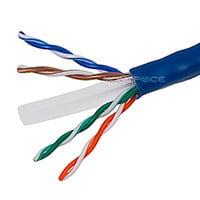
Monoprice.com
Avoid having excess Ethernet cable lying around by building your own cables to the exact length needed using this Bulk Ethernet Copper Cable from Monoprice! Features: Unshielded Twisted Pair (UTP) Category 6 Ethernet cab...
what you want is double the cost of that
thick minnow
okay so
here's the conclusions I've come to regarding that jumbly mess from earlier
lean pollen
I bet Fanman03 is usually just looking at Amazon and not other places, like many is but I don't understand
thick minnow
There's 2 options that I've boiled down to:
- Port forwarding with login access
- OpenVPN
I'm leaning more to the OpenVPN
Let's say I have my program and its data on this computer rn
And I wanna use a cloud based server, with a linux VM/Machine in my dad's office; what would the purpose of the cloud based server be? How would that compare to using OpenVPN + Port forwarding?
waxen scroll
6a is shield
6 does not require it
if you want 10G over copper with a long length, then you need 6a
thick minnow
(hopefully by now you can tell I'm an absolute heckin noob at networking)
remote kernel
i dont plan on running 10gig over copper
im going to run SFP+ AOC to my main rig
everything else will be fine with 1gig
remote kernel
No
little schooner
I ran my 10gig over copper and get the full speed
@thick minnow option 1 shouldn't be a choice unless you want hackers in your network
Login access isn't enough to stop them. VPNs stop them
thick minnow
Yeah that's the thing
Some of my friends said
to use port forwarding
but I'm like
'eeeeeeeeeeeeh"
I don't want to do that
little schooner
Yeah not the best idea.
thick minnow
hence why I wanna set up OpenVPN
but I have like
questions on actually setting up OpenVPN
etc.
and going on their website has given my beginner networker intuition hardly any idea of what to do
thick minnow
Hey
I got a National Cyber Security Competition going on in 6 hours! Im going to get there and yeah. Any suggestions to protect linux and windows from outcoming attacks?
I know iptables is a good tool
serene drift
This is safe right
drowsy fossil
wcgw
unreal wedge
Windows. Windows could go wrong.
fleet widget
@thick minnow yeah, you will have to fake it pretty good. First of all it's outgoing. But you can't protect yourself from outgoing attacks. You can protect others from being accidentally attacked by you. What you usually want to protect against is incoming attacks from the LAN. Because of your machine is compromised, there is no preventing outgoing data with that machiene alone.
*if
fleet widget
@thick minnow The best way to prevent incoming attacks, is by blocking stateless packets and unnessicary incoming packets. Never block any valid stateful packets, they are always legitimate traffic, unless you have malware on your machiene. You will also want static DHCP, with ARP Spoofing Detection. Also Block Multicast Traffic, it has no real use.
hollow marlin
"block multicast, it has no real use".....hah
fleet widget
Yes I know it has a use for like IPP, but in high security networks, it's disabled.
thick minnow
IOh ok
 fresh copper
Multicast has good use but you should only have it going to the places it needs using IGMP snooping so for a lot of situations, it would be blocked in most locations. I agree with @hollow marlin That's it's limited but almost never entirely disabled
fleet widget
For example, one really creepy thing about multicast, is Andorid sends multicast packets every time you turn on the screen, with a UUID. But yes, multicast is locked down. The better network topology is just Device-Gateway-ISP, with LAN Isolation.
fresh copper
Generally, device-gateway-ISP with lan isolation is that proper topology with maybe a few explicit exceptions.
fleet widget
Like when you need access to a print server, yeah.
@thick minnow One other thing that you want to block outgoing is the Network Discovery Service, and the Update Optimisation Service. The less your machine knows about it's environment, the better.
thick minnow
nice ty
Btw im going in CyberSmart 2019
I think we're going to be live
Im in the BlueTeam
RedTeam is attacking us (Professional Hackers)
Not scripts
fresh copper
If you really want to go crazy, you can even have an outbound firewall with explicit exceptions which is what some high security organizations. Though there was a big argument on NANOG about if it's always required. Since this is a competition then it may be a good (but time consuming) idea.
The biggest thing is to turn off as many things that you don't need as possible
I'll try to watch it live if I can figure out how
thick minnow
Good idea
 distant wedge
@rocky badge So basically
 rocky badge
ye?
distant wedge
I'm crap when it comes to VLANS, and I was trying to understand this
basically, a lot of people are overriding FTTH by using their own switches with fiber going in
but the data going out has to be tagged as VLAN35
do you know what that even means
rocky badge
your ISP uses VLAN 35 for internet
rocky badge
Idk how to dumb it down more 😂
rocky badge
lol
distant wedge
My buddy who is a network engineer came to a site with me, and we were basically inspecting the network. He said it was a flat network, it wasn't even layer 2 or layer 3 and it was split between campuses
And basically they wanted to make it layer 2 at least, but the issue is that campus 1 was using the 172.36.. range, and campus 2 was using the same range
and they wanted to basically bridge everything together
I was like you guys have to be fucking kidding me
rocky badge
😂
distant wedge
I don't understand networking that much but I understand what he was saying about the ranges
Basically, if they did merge everything together, they'd lose about 85% of their cameras
fresh copper
A VLAN is a way of having multiple different networks go over the same cable without interfering between them. There are a number of reasons why someone would do this but for whatever reason, your ISP decides to run multiple VLANs down their FTTH cable. Maybe some are for IPTV or VoIP. They have decided that VLAN 35 is the one that they use for the normal internet. This means that when your switch or router gets a packet directly, it will see that packet as being "tagged" as coming from VLAN 35. When you send a packet, the ISP's side will look at the VLAN tag and decide where it goes. If your packet intended for the internet is not tagged with VLAN 35, then the ISP's side would not know to which of these virtual networks (or Virtual LANs, VLANS) it goes to, should it go to the internet, or to the IPTV system or whatever, so it would never reach the internet.
distant wedge
I see
My research said that the internet traffic goes to VLAN 35, and IPTV goes to VLAN 36
But for me it's just a bit more confusing because I've never configured VLANS nor do I understand the "tagging"
Then I'm seeing Trunk ports being mentioned and I don't even know what those are either
fresh copper
The trunk port is the one that contains multiple VLANS, all the other ports are where they are "untagged" which is just normal.
The tagging is like channels on a TV, the same cable can contain multiple channels (or VLANS) and the TV (or switch) can choose which one it wants to look at. The best thing about a switch is that it can then send different channels to different other ports so you can split the incoming trunk port in to ports for each VLAN that work normally. The tagging itself is just a few extra bytes added onto the packet which have the VLAN ID, that the switch then looks at and removes when it sends to a port that is not a trunk port
distant wedge
hmmm
Okay, does this sentence make sense to you?
- Create a VLAN with id 35 so that uses your SFP port interface.
fresh copper
Yes
distant wedge
Are they saying that it has to be done on the SFP port?
Meaning I'm only concerned about it going through SFP, it doesn't matter for the ethernet ports?
fresh copper
Yea, you just want VLAN 35 going though the SFP port. The other ports will be "untagged"
distant wedge
AH
okay that helps so much more
But then what about VLAN 36 which I will also have to use? Do I need to multicast that or?
Or is it possible to add another tag specifically for this?
fresh copper
Then you would just also add VLAN 36 to the SFP port
And it would be untagged on different normal ports
distant wedge
hmm, so if I had for instance, TV connected wirelessly to the router/switch combo (I'm considering getting MikroTik as this is what was configured to work properly with this), I would just have to tag the SFP port with 35 and 36?
fresh copper
That should work. Though the wireless might cause issues
distant wedge
Understood. In the event it does, I have no issue running new lines for Cat6
fresh copper
Ok
distant wedge
I'm still fairly new to this but thank you for the help
fresh copper
I try my best to help
distant wedge
The other thing is, if I'm using TV under VLAN 36, how would the switch know that the TV would go to VLAN 36? Wouldn't I have to tell it which port the TV is connected to?
distant wedge
Make sure your crimper supports passthrough cables
otherwise you're going to have a bad time
fresh copper
The switch will be configured so that VLAN 36 is routed to the TV and 35 to everything else
distant wedge
Also make sure you have a bix punchdown tool if you're using keystones, and that you're using stranded wire and not solid copper
fresh copper
I personally dislike passthrough cables
distant wedge
I really enjoy passthrough cables, but that's probably because I haven't terminated them way before they weren't passthrough
hollow marlin
I hate passthrough but because I've terminated literally 1000s of ends.
remote kernel
@distant wedge wait, so I can't use solid copper with keystones?
distant wedge
I've tried and had an issue with using solid copper with keystones
My ethernet tester was telling me some wires were not receiving signal
But I may just be wrong and it may just be the quality of the keystone
fresh copper
Depends of if they keystone is made for solid or stranded
The little end bits are also different depending on solid or stranded
distant wedge
That makes so much more sense now that I think about it lol
Now I just have to figure out why my speeds from my ISP are tanking
my ping to my ISP is 179ms what the fuck
 ornate jungle
Directly connected to your modem, or through other networking equipment?
distant wedge
it's a lil tricky for me to explain but here goes
Computer> Switch in basement > router on main floor > ISP Modem
Honestly I think it may just be the weather
okay f this gonna restart my ISP modem
ornate jungle
Connect directly to your modem, then test again.
remote kernel
Hopefully my terminations will be good enough to run at 1 gig
distant wedge
Holy hell why are my speeds all of a sudden way better than what they should have been
unreal wedge
It's not the terminations, but the cable.
unreal wedge
@distant wedge ISP is probably debugging in your area. Don't expect it to stick.
distant wedge
I'd be surprised they're doing that at 10:30PM at night lol
unreal wedge
Rebooted modems pull a fresh config from the UVR, and if they're testing (which is usually at night), it may pull a config during testing times, which will revert on the next config pull (usually 6-24 hours).
distant wedge
Yeah, kinda strange because I was losing connection a bit earlier on in the evening (around 7-8PM) and suddenly I was getting pings of around 179 and 1/100th of my actual speed
unreal wedge
inb4 you think about hacking it, it's both illegal, and they can see the bandwidth your modem has at all times, especially during debug testing.
distant wedge
Lol no I'm too stupid to do any of that stuff
distant wedge
Rogers
unreal wedge
Can't speak for them, but would bet that's what they're doing. What speed do you pay for?
unreal wedge
So then you're getting what you pay for. Perhaps it's not a debugging session then. They may have patched something broken.
distant wedge
obvs coax, Downlink is DOCSIS 3.1/Uplink is still 3.0, don't know what their intentions are
unreal wedge
DOCSIS will always be that way. It's intentional.
distant wedge
I see
My only hope is that I get FTTH sometime soon. The contracted network engineers for my area are still finalizing their aerial runs and stuff.
unreal wedge
They don't want someone hosting from home. DOCSIS can have symetrical channels, but most ISPs don't do it that way for a reason.
Fiber doesn't obey DOCSIS at all and can be symetric, like ADSL.
ADSL can reach speeds of up to a gig, so 500/500.
distant wedge
Funny you mention that
because the other ISP that uses DSL for that matter has capped everyone at 50/10
the highest they've gone is 100/10 but they were mentioning something about dual twisted pairs
unreal wedge
ADSL != DSL, it's slightly newer and more efficient.
unreal wedge
Dual twisted pair = two phone lines, dedicated.
distant wedge
is ADSL newer?
unreal wedge
VDSL2 is like ADSL iirc, can't remember.
distant wedge
fair enough
unreal wedge
Think ADSL is the category, VDSL is the type.
distant wedge
I just read that ADSL / VDSL are two diff things and ADSL is pretty much just symmetrical, so it makes sense that my DSL lines were in fact VDSL
unreal wedge
That sounds accurate.
ADSL is the latest, I really can't remember. It's DSL, not something important in my line of work.
distant wedge
Lol, I understand
My main priority right now is to get FTTH, and get a switch that can support VLAN tagging
little schooner
Hey guys does it make sense to have scripts local to workstations in a lab, rather than have all of them run them from a file share?
And use Group policy to push out any updates to the scripts in a tools folder or something?
pseudo blade
@distant wedge the "A" in ADSL stands for asymmetric.
DSL was symmetrical. SDSL was symmetrical.
ADSL is asymmetrical.
 naive meadow
hey anyone here got suggestions for a good modem?
looking at upgrading from the cheapo Huawei one that was installed with the cabling
strange silo
@hollow marlin Yea I meant all consumer stuff, not had any of that in use for ages. Fortigate ASICs are great though so you get really good VPN speeds even on cheaper stuff like the 60D on the other end. Negatives is you don't really get any modern features though the ones it doesn't have are less firewall features like VXLAN, it has it but you shouldn't actually use it or be really careful how you do.
hEXs can do more things, just lacks the polish
hollow marlin
Yeah we wouldnt be Implementing VXLAN. We just need to replace the shitty firewall IT (politics) installed and the 60Ds looked quite nice.
And yes I cant argue Tik polish
strange silo
60D or 60E? D's are getting rather old now
little schooner
What do you think about the brand watchguard?
hollow marlin
60D, old but we dont need much
strange silo
ahk, E generation got a really big jump in performance so you can drop down a lot in model but I'd never go below 60
hollow marlin
Ill have to look epecially is price difference is minimal
strange silo
personally not used watchguard or if I have I've forogtten
the main weakpoint about the 60D is it has an extremely weak CPU so if it falls out of an ASIC path its really crap
E fixes that
oh and if your internet connection is PPPoE you can't use the IPSec offload
hollow marlin
Dont need PPPoE when you are the ISP ;)
strange silo
the sub interface it creates doesn't support offload
hollow marlin
lol
strange silo
yea well mine uses it, dicks lol
going to try and use the hEX as a bridge to hide it from the 60D or get the other 600C I should be able to get
if the 600C even allows PPPoE offload
hollow marlin
Yeah we wouldnt be running any thing were the CPU would be gettiung involved. Mainly just looking for a cleaner client which Foritnets is acceptable
strange silo
my ISP even has them as a managed option and well as their managed VPN so it surprises me they aren't aware or care about that PPPoE limitation
hollow marlin
Did you have any luck with asking your ISP to remove PPPoE?
I doubt they care or possible pure ignorance
strange silo
didn't bother, I pretty much know it's going to be a no
hollow marlin
If you get a static they tend to remove pppoe
strange silo
I mean I really should ask
hollow marlin
Its a bitch to manange on the ISP side
strange silo
I have static and a /29
hollow marlin
oh, well fuck them
strange silo
it's only a low end business plan
hollow marlin
Thats too much work for nothing. We have PPPoE for DHCP but that is it
strange silo
doubt anyone actually uses it like I do
I also know it's not needed, the infra is shared because UFB network is a wholesale utility but the other connection the ISP doesn't use it
and has DHCP fallback on it plus static
so if you forget or the config gets wipe it'll DHCP which I think is nice
none of the /29's will route but you'll have internet and remote access
oh and those /29 from them were a one off $200 fee and you get it for life and no monthly cost
900/900 static + /29 for $99/m 😃 ($65USD)
clear igloo
@strange silo I'll take 2
lean pollen
Does NAS go in this channel?
strange silo
I'd take another one but they refused to let me get another one haha
lean pollen
It isn't really network
strange silo
it was like a one off thing when they entered the market, think they realized how insane they were
pissed me off
exact same thing from the other ISP is 160/m ($105USD)
@lean pollen there isn't a server channel and far as I've seen anything server/IT goes in here
lean pollen
I guess that's a yes?
strange silo
how big those disks?
lean pollen
8TB
strange silo
nice, still using 3/4s TB myself
lean pollen
It was the NAS drive with best Price per TB
rocky badge
I wanna do a PowerEdge idk which model, but probably XD models. With mainly HDDs but with some SSDs. Some to boot and some to cache/accelerate.
strange silo
that's good, 6TB were that for so long
lean pollen
Btw I am not going to run Freenas before anyone asks, going to run Unraid
That's at least the plan
lean pollen
Unraid is what people recommend to me
clear igloo
@rocky badge Why not keep it simple/quiet with a QNAP or Synology?
lean pollen
That mobo only because it had 6 Sata ports really,just in case I ever need it
rocky badge
because hypervisor 😛 and PowerEdgey @clear igloo
lean pollen
Never know if I actually will tho, probably not
strange silo
@rocky badge Get the 2.5" bay model and use an external shelf for the 3.5"?
24 SSDs!
strange silo
if you have the money for the 30 then I'll have to come over and slap you, don't ask why it'll just make me feel better
clear igloo
He wants to flex the d?
strange silo
because you're totally going to get U.2 NVMe SSDs? 😃
rocky badge
maybe
clear igloo
@strange silo blob gets his parents to buy all the kool stuff 😦
rocky badge
:D
strange silo
I still need to figure out how to Hogan's Heroes old kit out of work
strange silo
I wish
clear igloo
That's how I got half my stuff 😛
Although if I ever leave I have to return it all, which is fine, but until that day I get to use it and break it to my hearts content
strange silo
I would go for that same deal, not very likely though
sucks we you watch Netapp 8040's and trays of disks go out to ewaste
clear igloo
ooof
strange silo
they're still good!!!!!
rocky badge
@clear igloo when meraki's site says Say goodbye to flimsy hard-coded passwords and self-signed certificates, say hello to two factor authentication and peace of mind
they're literally taking a stab right at cisco's stuff 😂
strange silo
NOOOOOOOOOoooooo
clear igloo
@rocky badge XD
There's actually been a lot of internal changes to triple down on making sure that stuff doesn't happen ever again
strange silo
call me old fashioned but, pfff meraki
clear igloo
@strange silo It's all in the cloud man!
strange silo
I still think tp-link is a garbage knock off company lol
I don't care how much better they have gotten
clear igloo
haven't used tp-link gear in forever, aside one wifi outlet
strange silo
D-Link can go die in the same hole too
rocky badge
zeeeee cloud
clear igloo
Buffalo >.>
strange silo
3COM
rocky badge
zeeee cloud https://pcmr.rocks/b/CooperativeExperiencedBlob
 lean pollen
ITX mobos is packed
strange silo
The new ubnt cloud key is massive
strange silo
ate all the pies
rocky badge
I'm running my controller on Windows Server
strange silo
@clear igloo You used any HPE Apollo servers?
or anyone else here
Specifically the HPE Apollo 4510
clear igloo
@strange silo I have not
rocky badge
Horrible Products Enterprise
clear igloo
Boss just stopped by and gave me great news. YAY 😄
rocky badge
oof working /s
strange silo
so like it's 889mm deep, our racks are old and only 1000mm and it says you need a 1200mm rack because of the cable management arms but we don't actually use them on any of our Proliant servers
clear igloo
of course @rocky badge
I start work at ~6:30 every day
rocky badge
oof
clear igloo
because I hate traffic
strange silo
we're doing the will she fit pondering lol
@rocky badge I'd still buy HPE over Dell
 strange silo
There's like no real difference at all and I have all the HPE access where I don't for Dell
rocky badge
@clear igloo I got automated deployment working :D
clear igloo
@rocky badge Auto deployment of what?
rocky badge
Windows 10
And I think my naming scheme is good  https://pcmr.rocks/b/DeadlyAverageBlob
 clear igloo
nice
rocky badge
D-%SerialNumber%
O365, Chrome, Firefox, VLC, PuTTy, LAPS, Google SecureConnect, 7zip, etc are installed.
strange silo
Automatic Windows 10 Deployment = Get-VM | Get-View -Property @(Guest.GuestFullName) | Where-Object {($_.Config.GuestFullName -eq "Windows 10") | Remove-VM
 wide estuary
Guys is netgear nighthawk x4s a good router
 hollow marlin
New CCNP on the block boys
waxen scroll
no?
 turbid valley
@chrome hound you know what's up with the utopia\xmission ddos attack?
chrome hound
they are happening
its not limited to there utopia customers because they are targeting the Xmission core, they also hit Veracity and sumo and even us until they got board no one complained about Utopia getting hit
thick minnow
So USB exists - it gets a bandwidth of around 2GB/s (with thunderbolt getting more ~ 40Gbps)
So why is it that LAN/ other networking is severely limited? (I mean 10Gbps is regarded as high end - no way near consumer level)
drowsy fossil
usb is 1GB/s for 3.1 gen 2
thunderbolt maxes at 2.7GB/s but with better latency
and wdym?
10 gig lan is 100$ for a nic and 200$ for a used 10 gig switch
the longer a cable the harder to maintain speed
also technically thunderbolt can be used for networking
thick minnow
Thunderbolt 3 is also rated for 40Gbps (5GBp/s)
Is running powered thunderbolt lines for stuff not an option, or is signal integrity still the issue even with powered ones?
Whoops meant to search USB4 ;-; relevant info still came up
drowsy fossil
no its just data rate vs bandwidth is still an issue
the highest ever seen out of a thunderbolt chip i believe was 3.2GB/s
dont remember how that was obtained
and my benchmark results with powered vs passive cable were identical
naive meadow
https://www.pbtech.co.nz/product/NETUBI171217/Ubiquiti-UFiber-UF-Nano-Gigabit-Passive-Optical-Ne hey would anyone recommend one of these?

PB Tech
pbtech.co.nz Ubiquiti UFiber UF-Nano Gigabit Passive Optical Network
thick minnow
Hmm Thanks, still a lil confused on the topic but I'll take you're word on it ^^
dull furnace
@naive meadow Seen some people using it in other groups, not a single complain so far
naive meadow
thanks me and my dad have been thinking about upgrading from the gear that was provided by our internet provider and the Huawei PON that came with the house
@dull furnace
strange silo
@naive meadow I don't think you can replace the ONT on the UFB network, you won't have any of the required configuration to make it work and nobody is going to give you that information. You'll have to ask your ISP before you try something like that but I highly doubt you can.
waxen scroll
That was my thought too. So I didn't link ont
strange silo
I'd be interested if you can, don't particularly see the need to though since the ONT doesn't performance limit you in any way. Mostly a feel good change than a practical benefit.
hollow marlin
The ONTs are all layer 2 and there is no gain using your own. Most PON cards don't support 3rd party ONTs
little schooner
I saw a Comcast XFinity rep in my local Wal-Mart today and he asked me to ask if I had Comcast. I replied I did but also went on a mini rant to explain how cost ineffective their packages are, complained about the fees and said that "I'm actively trying to get rid of you guys" to his face. I said that in one year, competition will be here (local fiber isp) and he didn't have much to say except "sorry to hear that. Thanks for your time." and I left it at that. I was looking for some binder clips so it's not like the guy was gonna cut my bill in half by talking with him
waxen scroll

naive meadow
@strange silo the device which takes the fibre connection is a GPON connection and can be removed
waxen scroll
ya but i dont think anyone wants to take responsibility and tell someone it can be done when it probably cant. we dont know
most of us are on ADSL or cable
naive meadow
ignore the labels I don't have a unedited version on my laptop
waxen scroll
the only reason our store bought cable modems work is the provider allows it and then takes it over management wise
for all i know 3rd party GPON devices need to be allowed
naive meadow
the white box in the top is a Huawei device that takes the signal
it is not supplied by our actual provider it was installed when our house got built
@waxen scroll
hollow marlin
The ONTs still need to be approved @naive meadow
unreal wedge
The Huawei device is your ONT, and it would have been supplied by the ISP, which may have put it there at the time the house was constructed, which isn't unusual.
Regardless, there's no danger in having or using the device. Huawei doesn't actually spy. The lies of a trade war.
naive meadow
I realise that also the fibre was connected by a different company than who supply our internet
hollow marlin
It's probably dark fiber then, still the ISPs ONT
unreal wedge
Still the ISP's fiber, regardless of who put it there. ISPs do NOT share. EVER.
Chances are, it's a leased/purchased fiber from a company that ran the fiber, but it belongs to the ISP. Running it into a house isn't always easy, so they do it during construction. That's a typical thing.
naive meadow
the fibre in our house was installed by a company called chorus and our provider is Vodafone who I believe do allow for ubiquiti devices
unreal wedge
Unless you're referencing a Ubiquiti ONT, I don't see what you're referencing.
hollow marlin
Jumping into my CCIE but don't know where to start 😭
little schooner
@hollow marlin congrats on your ccnp
Also what book materials would you get for ccie?
hollow marlin
Thanks man!
So what I found everyone gets is two OCGs and INE's workbook which is like $300
And just read all the topics links on Cisco's site
1000 hours minimum of study time
little schooner
@hollow marlin how to get the workbooks?
Also did you do practice labs?
The classes to earn ccnp are so expensive
hollow marlin
The INE workbook is right off their site @little schooner
As far as CCNP I did all self study with Cisco OCG for route and switch and Boson for TSHOOT
Test($900)+Boson($550)+Books($80)
It is expensive but honestly if you just look at the exam topics and read through one a day it would work just as well
 fathom sail
Any network engineers want to give me a crash course on how the internet works
A bunch of the links on an MIT course's reading material are broken and I'm going to want to die if I try to search for any longer
 subtle depot
Does anyone know a good relatively cheap router/AP combination that can do AC wifi? Preferably one that runs custom firmware like dd-wrt. It'll be used to give a single room and about 3-4 clients basic internet access. Gamer/edgy aesthetic is tolerable but not preferred.
strange silo
@naive meadow I know what it is and how it works, I work in IT and have deployed many UFB business connections and have already asked and the answer back then was a hard no and I don't think that's changed. The issue has nothing to do with getting a GPON device, this is the ONT on your end, but configuring it to work on the UFB network. These are not a zero configuration device.
Ubnt routers are supported, as well as USG, after the ONT
Always ask before touching the ONT, if they think you are the cause of damage you are liable and you have to pay for the repair which is not gov funded and really, really expensive
 half valley
https://www.anandtech.com/show/14453/sapphire-shows-off-10way-gpu-compute-system-with-amd-epyc new idea for Linus’ for a multi-user 1 computer video?

 subtle depot
that's okay it seems this one supports it.
drowsy fossil
can confirm
void oracle
any of you network guys around
waxen scroll
nope
void oracle
Alright so i just got a 48 port network switch
would this be able to gang 2 connections together?
so that i wouldnt have to run it on a windoows server
pseudo blade
Could always hook up to the console port and have a look.
void oracle
alright so normal ip entry
or the one thats listeed on the sticker
or wil i have to telnet in?
pseudo blade
Port on the left.
void oracle
yeah im just wondering is it gonna be a normal control panel
OR like telnet
setting
pseudo blade
Doing it that way would give you a CLI via serial. (Kinda looks like a telnet connection I guess? but no network connection is involved.
My guess would be that you'll need to wipe the switch before you can do much of the fun stuff.
void oracle
got it second hand for 10 bucks
pseudo blade
Such is the way.
void oracle
plus some dac cables with sfp
so what up should i connect too
it cleared the fault check and diagnostic
ip
would it pop up in network devices?
reseting and clearing rn
yeah im not understanding how to open the console interface
do i seriously n eed a vt100 emulator to set this up
 glad prism
hey guys. has anyone experienced a phone's wifi radio MAC just seemingly change on its own?
I didn't think this was something that was possible.
void oracle
no point in posting in here you'll only get half an answer
glad prism
:(
void oracle
waxen scroll
@glad prism my full answer is: No.
glad prism
the answer was yes and I figured it out
modern devices, mostly iphones, will randomize MAC when sending probe requests
this is to protect against tracking when your device is passive
waxen scroll
dunno what to tell you. i have an android on the latest OS and it does not
😄
dat pixel XL lyfeee
@void oracle you need a serial cable and putty
when the serial to USB cable is connected you look in device manager to see what COM it reads as, like COM3
then put COM3 into putty and change any additional settings the switch manual asks for, such as speed
generally speed is 9600 but some switches are special snowflakes
glad prism
android doesn't do it by default, has to be enabled. iphones do.
 glacial glacier
Anyone here got experience with Ubiquiti Unifi USG?
waxen scroll
nope. we all run edgerouters here
fresh copper
@glacial glacier I have some experience. It's not my favorite device but I've used it
fresh copper
@void oracle I'm not exactly sure on your question but it appears that you are asking about how to connect to the switch to configure it. Since you got it second hand, you need to reset it first, this is different on every switch so you will need to google the exact model to find out.
The next thing is the actual connection, there are a number of ways that this could be made. Some switches have a web GUI, some have ssh, and some have telnet; there are also some with combinations. It looks like yours also has a serial terminal connection. You will have to look at the manual to see which are a available for your switch. A lot of information on how to connect will be in the manual which is available online for just about any switch.
For a web console, you either plug the first port into your existing network and it will DHCP an address or plug the first port directly into your computer and there will be some default address (in the manual) that you can use to connect to it once you set a manual address on the computer. Usually the port is just the default one so you probably won't have to specify it.
For ssh, it will be the same address config as the web console. The port would be the default one (22). You will need an ssh client. On macOS you can just access ssh though Terminal but on Windows you will need to download Putty.
Telnet is almost the same as ssh but the port is different and you use the telnet command (or option in Putty), usual 21 but it could be almost anything so I would recommend looking at the manual.
Using the serial connection is the most difficult but is sometimes required. You basically connect a special serial console cable to the switch and then get a USB to serial adapter to be able to connect it to your computer. You would still use Putty on Windows. I'm actually sure what you use on macOS. There are more settings that need to be changed, mainly the speed (which is usually 9600) which you will have to look up in the manual. It then acts very similar to a telnet connection but you often can't do a backspace.
Also, to answer some of your questions:
It would not pop up in network devices.
Ganging two connections could mean a lot of things because gang is not really a technical term. If it was something like LACP then it would work but it sounds like you are trying to bond two separate internet connections which you can not do on a switch (maybe a layer 3 switch but yours is probably layer 2 or layer 2+ only and even if was
it would probably still be impossible)
Also, there are always network guys around, see the pinned post
void oracle
my switch is a layer 3 switch
its a 2910al
hp
48 gigabit port
I figured it out no one explained to me that its a r232 in rj45 format
Thats why i wasnt finding anything
fresh copper
Yea, the serial ports are not ethernet ports and need special adapters
void oracle
It has a console port which needs the ethernet to serial or ethernet to usb addapter
with a virtual com port
but i've got it mostly figured out now by perusing through their foruming and reading the manual
fresh copper
The thing is that they just look like ethernet ports but really are not. If it was ethernet then you would just connect it to a computer normally. It just happens that the 8P8C connector is also used by ethernet. I presume that they use them to save space and to require fewer unique parts
void oracle
Yeah it had me confused for so long
Until someone explained that it looks like the same port, Ethernet will even click in correctly but its wired reverse or in a different way
Im planning on making a pfsense router now with 2 sfp ports 1 in 1 out would this network switch allow that pfsense router to assign ips to anything plugged in?
im trying to minimize the extra equipment that i have to buy
I have this 48 port switch but my router is holding my computer back completely
fresh copper
As long as you configure everything correctly then it will all be possible
void oracle
so i was planning on making a pfsense router with a https://www.ebay.ca/itm/IBM-P004096-Emulex-10Gb-s-Dual-Port-FC-Network-Card-HBA-SFP-OCE10102-49Y4202/183748875047

eBay
Find many great new & used options and get the best deals for IBM P004096 Emulex 10Gb/s Dual Port FC Network Card HBA SFP+ OCE10102 49Y4202 at the best online prices at eBay! Free shipping for many products!
and that being the only port on the router
and the switch being the rest of the ports
Since i need to bypass the router to a new router from the new router to a switch and than from the switch to the old router for tv and stuff
since that router sends the tv authentication code
but its a shit router in general that cant handle my gigabit traffic