#networking
1 messages · Page 143 of 1
 daring plover
 little schooner
It's a service now, so we can expect it to work like that
They can ship broken stuff and fix later
 clear igloo
It's the DevOps model. Push stuff out ASAP and just roll the fixes out as things break
 inner hound
that's not even like
untrue
lol
devops is such a mess
ci/cd is great but like.... not every build is a release lol
clear igloo
Release all the things 😛
Network catches fire? Release it!
little schooner
Any opinions on WatchGuard products?
 turbid oriole
can anyone help me with my wifi pls?
ever since i got my pc its slowed considerably
probably my wifi adapter
its about 4-5m away but it displays 2/5 bars of connection
and sometimes its ok
other times its so slow to the point where i cant even do anything
and my ping in games like csgo and fortnite jumps around all the way to like 1000
 fresh copper
Are there any large metal objects in-between? Microwaves or cordless phones? Lots of Bluetooth devices? If it’s a desktop then maybe the adapter is on the other side of the computer from the router? Too many devices (even those not using bandwidth) connected? Maybe the router or the adapter is very old? If the adapter is USB then that could be the issue as USB adapters are known to be really bad. Maybe there is a driver that was not installed?
Without knowing what adapter and what router I can’t say more. It also could by an issue with the ISP so maybe try and test plugged right in. Also, if it’s only 4-5m away why not just run a cable anyway. It’s way better than wifi for gaming and anything else.
 gritty owl
Also, do you get full speeds when wired (as a sanity check)?
 sand tree
I need some help guys
Do you guys know what "Ethernet" or "WiFi" doesn't have a valid IP configuration mean?
fresh copper
Depends where you are seeing this notification and on what OS but my best guess it that whatever ethernet or wifi network you are on does not have a DHCP server or the one it does have won’t give you an Ip
sand tree
Windows 10 & 7
The weird thing is. Internet was working 2 days ago.
Then it said something about dns service not responding.
So I called Comcast & had them reset the box
Then they installed the new X1 box. Because the one we had was old
Now I'm just stuck.
But what's even weirder is out of 10 computers.
9 can't connect to the internet. But 1 can
fresh copper
Have you tried restarting the networking on the computer?
Sometimes if they reset the router you have to restart networking on the computer
sand tree
Could you elaborate a bit
fresh copper
Like for wifi disconnect and reconnect and for ethernet, unplug and replug in the cable. Maybe unplug and replug in the router too?
It’s hard to troubleshoot this kind of issue as it’s a weird issue that is hard to pin down and could be from a number of issues. If restarting everything does not work then I don’t really know what else you could do without a lot of difficulty
 plucky marlin
If 1 can but 9 can't and you've seen DNS issues - it probably is a DNS issue.
Is your router providing DNS and is it the only thing trying to provide DNS?
Also, I've found restarting a computer doesn't always solve DNS problems which doesn't make sense. But opening a cmd window and running ipconfig /release and then ipconfig /renew works. You should be able to just do the latter but I always run both.
Next thing is to make sure that each adapter is set to obtain IP and DNS automatically and isn't set to something specific unless needed.
@sand tree
fresh copper
DNS is always the issue lol
But I feel that the bit about an invalid IP config is usually more of an issue with not having a static IP and not getting one via DHCP/BootP although I suppose that it could be a DNS issue. I’m not sure how it’s done on Windows but maybe trying 1.1.1.1 in as a manual DNS server would work?
sand tree
Alright let me try what you guys said
plucky marlin
Yeah, any known working DNS should always™ work if set statically.
Quick question - sorta networking....
sand tree
Okay it says an error occurred while renewing interface area connection. Operation was cancelled
plucky marlin
I've got a basic little web server that's pretty much only used by me for copying files to and from places quickly. But I also use it to keep track of what game servers I'm currently running and occasionally send files to friends with it.
I'm unfamiliar with Linux and web development so just hosted it on XAMPP on Ubuntu as recommended on the LTT forum a few years ago. Since I'm currently reworking all my VMs I'm just wondering if I should transfer my existing VM/create the same thing again or if I should look into something else.
It does all I need but I'm in a testing/fixing/breaking mood so just curious.
@sand tree Hmm. That makes it more weird that it's an issue on several computers. And frankly, I have no idea. Any idea what's particularly different about the one that works?
sand tree
I honestly don't know what's different about that one PC. We do have a mix of old & new PC's. Windows 7 & 10. Wired & wireless. This place has 35 years or wires & networking in it. So it's hard to pinpoint wahat the problem is.
This isn't the first time having issues too.
That dns service issue has happened serveral times before. But after a router/ modem reset. It would be fixed.
plucky marlin
Wouldn't be something as simple as a looped connection somewhere, would it? Seems odd that even one could connect then, though.
sand tree
Yeah I'm not sure
plucky marlin
If your network isn't a nightmare, try tracing the wires in all the switches and multi-port devices (including wifi). If you've got any bridged adapters on a PC and then plug in while connected to wifi, that would cause issues.
sand tree
Okay
Checking everything is going to take me a while.
I'll update my findings later.
plucky marlin
Good luck!
sand tree
So I figured out the all the PC's that can't connect are set to automatically obtain an IP address.
The the one that does work & connect. Is set up manually
plucky marlin
Then is there a DHCP server and DNS server on the network? Because no DHCP or DNS is what that sounds like. Check your router settings and make sure it is enabled (and configured correctly).
Also, can the other devices access anything on their local network?
sand tree
Yeah I can access the other PC's on the locol network
plucky marlin
Huh... Sounds like @fresh copper knows what he's talking about more than I do. Any suggestions?
fresh copper
That’s really odd if you can access other PCs on the network. If you can access cmd, try ping -n 10 1.1.1.1 on one of the PCs that does not work. If that comes out with request timed out, then something really weird is going on. If it works then the issue is DNS.
Also, just got my IPv6 Sage shirt
sand tree
Okay so my problem is fixed! Hurray.
plucky marlin
Congrats! What was up?
sand tree
Whoever suggested the network looping was I think the problem. I had someone else come take a look. After disconnecting & reconfigureing some stuff. Everything started working again.
plucky marlin
Haha. Yeah that was me, you don't want any loops in your network... I've learned that one the hard way and been baffled by it for hours.
sand tree
Haha, yeah. Thanks for the help though.
plucky marlin
No problem. Glad you could get it sorted.
turbid oriole
@fresh copper its a tplink archer t6e and the router is an optus one idk
 pseudo blade
Disassembling my nth ISP home gateway that had sucky wifi. The antennas are literally a piece of wire bent 90 degrees. Dual gigabit, 3 10/100. 400mhz dual-core CPU. 128MB RAM.
I wonder if it can even actually route at gigabit?
pseudo blade
Haven't actually bricked one yet.
I've got about 4 ISP "routers" in this room alone, plus a pair of Mikrotiks and an ancient Cisco I should have tossed ages ago.
Three of the ISP ones have vulnerabilities I have exploited to gain root access.
The last one has LTE backup provided at no cost as part of the deal, which I am hesitant to mess around with lest they deactivate the SIM in it.
Only 6/1 (limited by some method, suspiciously as-if done by the router itself), but better than nothing by a long shot.
Only real annoyance is that I lose my IPv4 address whenever it falls back to LTE, as it's just on their regular network, behind a CGNAT like all other mobile plebs.
pseudo blade
Eh, it depends on what kind of performance and features you need.
Some advanced packet processing might need to be passed through the CPU (at significant cost) on high-end routers, like IPS-related stuff. Performance increases are possible by breaking that out to a dedicated appliance.
For slower speeds, CPU is perfectly fine, and that cuts an FPGA/ASIC out of the price. Mikrotiks use CPU-only, and can pull off gigabit with dual-core 880mhz, including a reasonably long firewall rule list and some packet mangling for $60 USD.
Sadly, I live in Australia, and 100mbps is presently the fastest speed in the pipeline for almost all citizens and SMBs until after 2040, due to dependence on VDSL2 or inferior.
FPGAs aren't really needed south of 10gbps now, though I'm not really exposed to much that's faster at this time.
fresh copper
I agree that routing ASICs are not really needed for less than 10G or so. Especially as you may want advanced features that require CPU processing that would require really expensive ASICs. I have seen basic routing ASICs that can only do very specific tasks like NAT but not the actual routing itself on consumer devices to help those with lower powered CPUs still handle even very fast consumer connections.
What is important is switching ASICs which I find very commonly. Many consumer routers have multiple switch ports and usually have switching asics for them because CPU switching is really bad. In fact, many of them are actually secretly managed switches that just expose a WAN and LAN VLAN to the CPU over only one connection to the CPU itself. If you put OpenWRT or similar on them then you can often even control the managed switches
pseudo blade
Leveraging a switching ASIC for that purpose actually works really well.
Actually adding that many CPU-attached ports is relatively expensive, and managed switch chips aren't.
Only downside is that you're still using the CPU for routing and you're relying on that one dot1q link, but for most "inside/outside"-only style networks that works just fine, as most traffic is internal and as such won't touch the CPU or that single link in that configuration.
little schooner
@pseudo blade I'm not sure if it was you or someone else, but I ended up buying the recommend PowerBox Pro router for my cameras outside for PoE output and connection
pseudo blade
How did it go?
little schooner
It works great. Poe is auto on, which is very simple
I used winbox to configure it
little schooner
Very easy yes
The cli was still new but
Winbox had everything I needed
At least now I dont have to worry about it failing
pseudo blade
(Yes, it was me.)
little schooner
Thanks for the suggestion. Yes a great buy
pseudo blade
No problem! I'm glad I could assist.
little schooner
I got the last one on Amazon at the time from flytec
They probably have more in stock now
What shocked me was the DIN mount. I didnt know that it was going to be like that
@pseudo blade I guess the mounting system was something new for me
pseudo blade
I've only ever pole-mounted them.
 wide estuary
Hey guys so i finally tried to do this 1.1.1.1 DNS server thingie cuz i had nothing to do but I don't know what to put in 3rd DNS server and I don't even know if im doing is correct or not
 green gazelle
You dont need another but 8.8.8.8 is an option.
 hallow nimbus
Elias ur young af get over it
little schooner
Server 2019 still hasn't been released to eval??
fresh copper
By the way, someone was asking about LACP on Windows 10, apparently it is possible on the standard version. Let me see if I can find the article
little schooner
Is it really though? @fresh copper
If you install ans for intelnics yes,
But it's not going to be a supported configuration out of the box for anything else
fresh copper
Not out of the box
But if you wanted stuff to work out of the box then don’t choose Windows
little schooner
@fresh copper I guess by that comment I meant to say supported by Microsoft and not a third party solution that isnt backed by a company
Like installing server stuff on client windows, etc
fresh copper
Ah
Most of the stuff I do is unsupported so I forget that sometimes people do supported things
 swift fractal
wireguard is a pretty damn fast vpn protocol

Speedtest.net
Test your Internet connection bandwidth to locations around the world with this interactive broadband speed test from Ookla
little schooner
@rocky badge I noticed that it doesnt work too well with unifi ap
There is something buggy with them and 802.x
little schooner
What did you change
I still get failures. Unknown messenger-something from ip <ap ip here>
Definitely not production ready if I am seeing that
Even my Apple airport never got such an error
It's been serving 802.1x for the past 2 years with zero downtime
 subtle glen
I cannot connect to another windows PC with Remote Desktop. The 2 PC's can ping each other and i already tried to disable entirely the pc i want to connect to firewall. Any ideas of what's wrong?
clear igloo
Did you enable remote desktop in the settings? To allow remote connections?
subtle glen
yes
clear igloo
Did you uncheck the box to require network level auth?
subtle glen
network authentication remote desktop
clear igloo
Yah, disable that
 dull star
Does the user you try to log in with have a password?
subtle glen
should have one, yea
subtle glen
home
clear igloo
That's why, remote desktop isn't supported
subtle glen
i used it before between a win10 and a win7 machine and it worked fine
clear igloo
You can remote desktop from Windows 10 Home but not to Windows 10 Home iirc
subtle glen
...
pseudo blade
You need Pro if you wish to connect to said Pro machine via RDP.
 rocky badge
Home cannot be a terminal server
pseudo blade
^
You can use VNC to get a single session, but that's all.
That might be your best option.
Otherwise, upgrade to Pro.
rocky badge
Pro, Enterprise, Education, and Server SKUs can be terminal servers
With Pro, Enterprise, and Education limited to one user
Server without CALs is limited to two
clear igloo
@rocky badge HyperFlex is a go!
subtle glen
😂
clear igloo
Simply put, combination storage and compute clusters
rocky badge
oh
clear igloo
Right now we've got about 500TB of storage 😛
rocky badge
REEEE Google homes and Chromecasts don't support 802.1x
hallow nimbus
😂
clear igloo
@rocky badge You didn't know that?
clear igloo
Yup
rocky badge
 clear igloo
SkynetIOT ftw
clear igloo
OMG! You use the same name as me 😄
pseudo blade
Internet of Shit
rocky badge
the S in IoT stands for security
clear igloo
😄
pseudo blade
Pretty much.
clear igloo
F is for firewall with secures the network
rocky badge
SkynetX (legacy): 2.4GHz WPA2-Enterprise with Smart Card, certificate or mschapv2.
SkynetX: 5GHz WPA2-Enterprise with Smart Card, certificate or mschapv2.
clear igloo
U is for understaffed network teams
N is for no down time
Down in the deep blue NOC
rocky badge
lmao
it's pretty cool https://linusdrop.tips/PVZCWSb.png

Since any PC in my AD can automatically join
since it uses the computer's certificate

Google Home App YOuRE noT COnnEcteD to tHE WIfi that YOUr DEviceS are
hallow nimbus
😂
green gazelle
I have been having some wierd networking issues with my Google Home devices over the past few weeks.
 deft pasture
Is it PCI Compliant to have a computer with internet access rdp into a computer that is on our PCI compliant vlan?
little schooner
You might have better luck asking your pci equipment vendor that question
deft pasture
@little schooner email was already sent was just curious on others thoughts
 jaunty cargo
little schooner
jaunty cargo
little schooner
@jaunty cargo well if it's Cisco brand, it's simple enough
fresh copper
I hate Cisco syntax and comands
It’s probably one of the better out there
But still not fun
 foggy comet
I hated what ever hp uses on their enterprise switches/routers
pseudo blade
Mikrotik and Cisco are both fairly easy to set up L3 on, though I couldn't recommend the former's L3 switches for high bandwidth users, as they tend to rely on a single gigabit link to the CPU for routing. (Switch performance appears to be very good).
clear igloo
@fresh copper IOS or XR?
little schooner
@fresh copper They exposed their cli syntax to me so much that I could memorize so many command line statement variations. Not even the actual exam for ccna could fool me and they did that a lot. Slight variations that you could only catch sometimes by reading everything carefully
I kinda forgot a lot of them now since I don't use Cisco equip everyday and use GUIs for edgeswitch, etc
fresh copper
After routing in Linux for so long, I find Cisco config to be annoying
Even configuring BGP in cisco is nowhere near as good as in Bird
clear igloo
I find it simple but I've been doing it for a long time although I will say the experience between different code bases is a bit annoying. Jumping from NX-OS to XR is the worst imo
 tribal pulsar
I have a question. So I have a gigabit connection and I am directly hardwired to my modem. But when I test it sometimes I will get like 300mbps. Then I will refresh the page and get like 900-950mbps. My speed seems to fluctuate a lot. Does anyone know why that is?
clear igloo
What kind of connection? Cable? Fiber?
tribal pulsar
Cable.
clear igloo
Forgot to ask, what modem model?
tribal pulsar
It’s that new xfinity xFi modem. The model number is cgm4140com.
clear igloo
Hmmm, its got a good chipset (ie: not the Puma6 chipset). I'm wondering if it's related to errors on the cable line causing issues or some throttling by the ISP. You can login to the modem and check for errors and whatnot on the line usually
tribal pulsar
Would it have anything to do with the flat ethernet cables I'm using.
clear igloo
It shouldn't, unless they are near some heavy interference like running next to an AC unit or other high powered device
tribal pulsar
Oh, well that rules that out. No errors were reported in the modem default gateway. I have no idea what is wrong.
little schooner
@tribal pulsar did you ask them to update the firmware on the modem?
Also what is the PC specs you are using it with?
Using hard drive or a slow cpu?
tribal pulsar
Firmware is up to date. And I have an m.2 nvme ssd and an i5-7500. Not the fastest CPU but it gets the job done
little schooner
@tribal pulsar hmm okay so it's probably not that then. Did you try resetting network stack in windows?
It could be anything really. Maybe even a bad ethernet cable if it's not consistent
tribal pulsar
Resetting network stack actually helped a lot. Thank you.
little schooner
No problem
fresh copper
Merry Christmas my networking friends
rocky badge
@fresh copper 
 nocturne arrow
Hey could anyone assist me with some questions I have about Unifi?
hallow nimbus
👀
 edgy island
🇴 👄 🇴
 foggy warren
I'm not an expert, so what would you recommend as an Wi-Fi access point in a household of 3 with quiet some smart lamps and a couple echoes?
I'm pretty sure the Wi-Fi module on the Fritz box is ge5ting overwhelmed since the network is just cutting out and unresponsive recently a lot
Pls no overkill solutions
foggy warren
Changed some settings around in terms of the channel, let's see if that helps it
hallow nimbus
I didnt read the pls no overkill 😂
foggy warren
Was still optimized to Live TV which we aren't watching over that really, and only used channel 1
@hallow nimbus I already know you guys lol
hallow nimbus
So is that a problem 😄
How about a second wifi network that cant be seen(Hidden ssid) and put all the IoT stuff on there
foggy warren
I also noted down some Macs of devices without proper network names
Amazon echo doesn't do hidden ssid
We used to have it hidden
hallow nimbus
Oh what
foggy warren
(At least iirc that was the reason we put it to visible)
hallow nimbus
What a dumb piece of tech that it doesnt support it
foggy warren
Something was the reason at least and I think it was the echos
foggy warren
anyhow, what would be a good solution for a 3 person household?
clear igloo
I would say a Ubiquiti Lite or something @foggy warren
foggy warren
u think that would be worth the update/ fix the issues?
or am i on the wrong track
Ubiquiti Networks 2.4GHz/5GHz, 867Mbit, 122m 1x 10/100/1000, 24V Passiv PoE, UAP-AC-LITE
somethhing like that?
clear igloo
Yah, that should do nicely
The Fritzbox I've seen people say it has lots of issues with more than a few wireless devices while the UAP should allow for 50-100+ without issue
foggy warren
Yeah, easily over a dozend now.
80€ tho.
I'll recommend it to my dad next time we got issues
Putting it on the outside wall where all that stuff hangs now should work out okay. Altho then Wi-Fi in the garden might suck 🤔
hallow nimbus
^
clear igloo
There will be so much non-ionizing radiation that it will turn into ionizing radiation! And then one day you'll wake up like the hulk!
hallow nimbus
😂
fresh copper
@foggy warren I agree with Lurick here, the AC-Lite is definitely the way to go. I would get an AC-Pro myself but you probably don’t need it.
foggy warren
cool. yeah, i put it on the amazon list for future reference
also, being EU the maximum signal power is restricted anyway
subtle glen
run a copper wire all around ur walls so that you get a massive antenna
 fading mantle
So the C5400 has a bug where the Wi-Fi shits itself after about two weeks of uptime. TP-Link hasn't released an update for it in over a year.
My fix? Put a smartswitch on it and schedule about 3 minutes of downtime Mondays at 3AM.
You can't schedule reboots in software.
I've grown to dislike TP-Link APs now. the AD7200 I had before had a similar but more annoying problem where devices even with reserved IPs on the DHCP server would not reconnect unless forced.
So I'd get devices randomly disconnecting and never reconnecting unless I forced them to. It made all my smart shit a babysit fest unless I realized it wasn't the switches, it was the AP.
green gazelle
I do that with my direct tv box
fresh copper
@fading mantle sounds like you need some Ubiquiti!
fading mantle
That or Asus just because it's basically DD-WRT
fresh copper
The Asus stuff is good for DD-WRT (or OpenWRT which is what I use)
 tall mulch
My Internet sucks.
foggy warren
Hmm I think i would need a small switch to go along with that.
Just anything basic should do, right?
gritty owl
@foggy warren Yes, unless you want a POE switch (The AC Lite comes with a POE injector) I usually just get the Netgear unmanaged switches
foggy warren
I think my dad just got some random tp link one.
They seemed all the same tbh
(I personally have had terrible Netgear experience 10 or so years ago)
gritty owl
Yeah, the unmanaged dumb switches are pretty much the same.
Hmm, the unmanaged switches generally are pretty solid (They don't do much...the all in one routers though...a bit of a mixed bag)
foggy warren
Yeah, the all in one router is why we're upgrading the Wi-Fi solution.
I guess going full out with a proper router would be best but I don't know if that's easily doable with our ISP since it's direct fibre with the translation box in the basement which then goes over Ethernet into the router and last time we updated we had an issue where update was real fresh and the isp hadn't enabled it on their site yet
So the all in one has 4 ports, one of which is the input
With he ac taking another port in the future, well need the switch cause 2 free ports for devices isn't enough
clear igloo
Why not a /31?
Why? If they are point to point links
The other option I can think of right now would be private VLANs
 pale falcon
Hey, i am having issues with my windows server and was looking for some help, here is the problem.
I have 2 centos 7 vm's
Both VM's can ping host, host can ping both vm's
VM's cannot ping each other
Host cannot connect to webserver on VM1
All 3 are connecting to the same external Vswitch.
-Thanks for any hlep you can give
green gazelle
how is your virtualization software?
pale falcon
HyperV
green gazelle
I dont know hyper v well but something would tell me the networking / routing is foobared
pale falcon
thats what i thought
I dont understand how.
The HyperV Virtual switch should allow all 3 to comunicate with each other, and with the www
fresh copper
@ancient vigil you actually can usually use a /31 fine in most cases. On some systems you can set it up as a /32 netmask and then have the client and router addresses discontinues which sounds like what you want
 subtle marsh
Can anyone here answer a question in regards to Hosting a Dedicated Server through SteamCMD on Server 2012? More specifically why I wouldn't be able to connect locally to it once online?
 snow burrow
having a weird issue with my PFSense setup:
Windows Server 2016, Hyper-V locally hosted VM
VSwitch 1 is a dedicated NIC for WAN/hn0
VSwitch 2 is Hyper-V internal switch for LAN/hn1
The PFSense VM has internet connectivity and can see devices on my network, it was assigned an IP via DHCP from my current router/gateway. Nothing else on my network is able to see it or ping it and I can't even ping it from my router
Is ICMP blocked by default on PFSense?
If so, that still doesn't explain why I can't reach the web gui from literally anything
at this point, I don't intend to use it as a full on firewall, I mostly plan to use it as an openvpn host since my router's firewall theoretically supports passthrough. I am considering moving my network topology around and putting the PFSense in line behind the moca bridge, but I think I will need another nic to push the connection through to the router
if that ends up being the case, I'll probably buy a dedicated device for the PFsense because at that point I'm gonna want a span port to my SIEM
 safe sage
hey, so I just setup a desktop that was older than three of my siblings. It's running Ubuntu and currently has a webserver on it. For some reason, I'm not able to connect to it, the connection just times out. The desktop's wired into a switch that's wired into the router, my laptop's running via wifi
any insights?
 silk oracle
for the record 11.x.x.x is PUBLIC space
so you are locking off part of the internet from yourself if htat is you config
And what is the use case for each device on it's own network? Do you want broadcast to go away or is there something else?
 silk oracle
I wish netonix were that cheap
but then that is a diffrent use case heh
@ancient vigil what might serve you better if you just want to keep the broadcast away is using Isolation, depending on your specific use case that might give more mileage
inner hound
i have a feeling this is gonna be ios version 12 though
which is gonna be annoying
but i have some cisco friends so i can probably get 15
silk oracle
yeah I would do cisco things but been working in wisp for 4 years and most of the things I have for my house are wifi, I have UBNT AP so poe is better to keep down the clutter
POE switch for the professional WISP
Lacking on some of the silier features but most of the basic are there and without cli as well
silk oracle
at least you aren't working out of plano totes without racks outside... That is always a fun place for a network closet...
silk oracle
I do wonder if Linus got the upgrades to infrastructure done at the office though, I am surprised that they didn't program the router ahead of time...
I would offer to help, but I am US based and that might get a little silly
fresh copper
I’ve offered to help before. I live only about 15min away. Linus likes playing around with the stuff himself and trying to figure it out
silk oracle
yep that makes sense, still boggles my mind that he didn't pull the config ahead of time and get the router and switch programmed and decided to do it on the fly
that seems like a way to have a nice 48 hour fun time
fresh copper
It’s a bit odd for him doing this at his business. It sounds like something that I would do with my personal equipment or maybe even non-core parts of evix but never for a business or core parts of evix
Definitely not something I would do at a client (I configure and install networking equipment). I always configure everything before it gets anywhere near a client. I should be able to just plug it in and have it work. Theoretically I could even have far away customers and get installers to plug everything in since it’s configured
silk oracle
yeah they had a pile of vlan and advanced configs and were just winging it
I also had a giggle when they did the UBNT ptp links
That was my bread and butter for almost 5 years until I quit a week ago because my boss put someone with no clue in charge of field work and forbid us from prepping equipment in advance...
I have a bit of a thing about winging things and then having an expectation of a timeline that needs to be met
rocky badge
Linus and networking, what could possibly go wrong
silk oracle
better question what could go right?
rocky badge
😄
silk oracle
though for biz critical systems, winging it invites disaster
especially since it is internal networking that leads to the storage for video editing lol
 opal bison
Hey guys would it be possible to do my own wifi Hotspot with windows 10, I want to connect to the 5ghz wifi with one adapter and spread it via a 2,4ghz with a different adapter, would this work?
The build in option just uses the first and also send via 5ghz. My goal is receive 5ghz and spread it via another adapter thru 2,4
Hopefully it's clear what I mean
Is this even possible?
 hazy wigeon
It should be. I'm using one of my 24/7 servers to do a hotspot using the build in stuff on Windows 10 (however this is going from a wired connection to a wireless one).
I don't see any options for selecting a specific WiFi cards however I'm pretty sure it will automatically use the one that's not currently in use otherwise you should be able to change it using some CMD commands (I think).
opal bison
I'd love to do the same, but sadly I don't have access to the router, and it only sends out 5ghz,but for a few devices I'd need 2,4
silk oracle
you may need a second wireless adapter a usb one would do the trick probably
opal bison
I have two adapter, one for 5ghz and the second can only do 2,4
silk oracle
generally wifi cards don't do simultaneous connections in windows from what I have seen
opal bison
But if I create the Hotspot with win 10 it receive and send with only the 5ghz one
silk oracle
ok so two seperate network cards or one adapter that does both?
opal bison
And there is no option to change the sending part to the second one
I habe two separate adaptera
silk oracle
k
opal bison
If I create the Hotspot it send simultaneously from just one adapter
silk oracle
i'm mostly just curious but what is the use case for this? is the ap you connect from 5ghz only?
hopefully it isn't wireless A
opal bison
The router is the problem, it only has wifi ac.
But a few devices need b/g/n
opal bison
And I have no access to it, to do wired connection and can't change settings
Yes it's 5ghz only
silk oracle
odd
what I would almost recommend is get a wireless repeater if you have a few bucks
opal bison
Will try to use a Programm so I can select wich adapter will send and wich receive
Would the repeater be receiving 5 and spread it via 2,4 bgn?
silk oracle
it should if it is a dual band repeater
most should do it
the main diffrence would be rather then needing the computer to be turned on it would be always on
opal bison
Actually I have one but it's only bgn.
If one with ac would do the job, this would do the job
Lol
opal bison
Will need one with both
silk oracle
a/b/g are single band
yeah a dual band repeater would be infinitely easier for you I would guess though
opal bison
The one I have can't receive the signal since it's ac sadly
silk oracle
easier then mucking about with windows for 10 hours for something that Might work
hmm
opal bison
Yea
silk oracle
is it college wifi or just an isp router that locks you out?
opal bison
ISP Router
silk oracle
have you tried reaching out to their support? and can you get access at the router to an ethernet port?
opal bison
And it's also not my own network, I'm allowed to use it, but not to change settings
silk oracle
ah ok neighbors?
opal bison
Yes. I already tried to gift em a new router, but they don't want to. So I'm stuck with it kinda
silk oracle
ok things are starting to make sense now lol
opal bison
Getting my own doesn't make sense since I'm mostly home for around 1/2 days a week for a couple hours
silk oracle
what is the model of the repeater you have?
opal bison
But if I want to use older devices with bgn it sucks
silk oracle
and in most cases they would have to actually manually turn off backwards compatibility...
silk oracle
ok yep that is 2.4 only
so if only 5ghz is off their router that would explain why that isn't working
opal bison
Yes, it's only 5ghz via ac
silk oracle
got it
opal bison
Pretty strange settings
silk oracle
yeah
never heard of that
that should do the trick
assuming that the problem is as described
opal bison
Pretty cheap
silk oracle
yeah tp-link is china best brand
opal bison
Will get one local, shouldn't be much more
silk oracle
yeah what you are looking for is a Dual band wireless repeater
in store i have seen them usually around $50
mileage may varry
worst case I have done 16 mile 5ghz links...
I can make something work
opal bison
Here they are mostly 5-10more
silk oracle
where are you based out of?
silk oracle
yep
it declares so on the product page
with this model at least
some those are for uplink ports
so make sure you reference the marketing materials before choosing a specific one if that is something you want
opal bison
Oh nice to know, thought all are down
silk oracle
yeah it is designed as a wireless connection extender and as a wifi adapter for things that only have ethernet
though it is only a 10/100 port
but hey who cares 100mbps ports max out at 92mbps you won't hit that repeating from the neighbors wifi!
opal bison
Oh idm that ^^
silk oracle
suppose...
cheap...
opal bison
It's only a few old devices that need it, and they don't use much bandwidth
silk oracle
makes some sense
hit me up if you have issues, I have 95% of a networking degree and until a week ago I worked at a WISP doing wifi for a living
at least if others aren't hopping in to help first!
opal bison
Thank you alot for helping me out! :)
silk oracle
hey nerd people is USUALLY good people, I do what I can to help when I can
clear igloo
Very true, nerd people are usually good 😛
silk oracle
one of the things i do occationally is just go to microcenter (nerd candy store) and chat and give advice to peepz because it iz fun!
clear igloo
You should go to Best Buy and do that, see how long before they kick you out >.>
clear igloo
22 servers to upgrade firmware on and I have to do them one at a time for the most part and then I get to swap the FIs around next Friday. Fingers crossed 😃
clear igloo
mfw error counters go from 10 to 270
Nothing like a mini heart attack 😄
rocky badge
🤔
 rare stirrup
I love how Xfinity reset my wifi even when I told them not to
hallow nimbus
😂
rocky badge
XfiniNOPE
clear igloo
XfiniYouHaveNoChoicebutUsHAHAHAHAty 😄
rocky badge

 chrome hound
I had Xfinity, it was a dark time in my past, I go to bad places when I think about it
rocky badge
lmao
 edgy pasture
Ds918
Im about to pull trigger
Xfinity was fine
U just have to know how to deal with them
opal bison
So I have done a clean Windows install on my notebook, using my wifi adapter it doesn't find the wifi anymore. Can I somehow force the adapter to search only for ac wifi?
fresh copper
@silk oracle that sounds fun. Going to a tech store and giving advice. That’s basically what I do here anyway
silk oracle
yeah pretty much, I usually gawk at the candy then stay for the nerds
and noice the first mention and haven't even been here 24 hours...
clear igloo
No loopback for you!
I can kind of see the logic there but it's still kind of dumb
You trying to mock up the scenario from earlier?
Just test it on production gear 😛
Packet tracer is good for some stuff but it definitely has some weird limitations too
gritty owl
@clear igloo Ah, back from CCNA Cyber Ops exam 1...failed by a single question. So close...
Will be attempting CCENT very soon as well. (After I retake and pass the cyber ops one)
 thick minnow
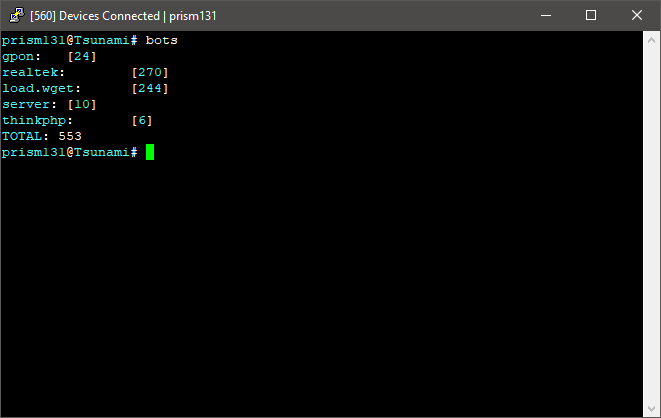
Currently locking down Realtek from being infected by any other botnets by locking down all the ports when I infect a Realtek device. https://i.imgur.com/sLB3Xaz.png
 shy iron
hi. so I've currently got a modem/router/wifi combo box from my ISP and I want to stop using the wifi from that box and use a separate AP instead. https://www.ubnt.com/unifi/unifi-ap-ac-lite/ would this one work for that?

The UniFi AC Lite AP features the latest Wi-Fi 802.11ac technology in a refined industrial design and is ideal for cost-effective deployment of high‑performance wireless networks.
gritty owl
@shy iron Yes, that works. or if you want more WiFi, the AC-Pro / NanoHD
shy iron
more wifi in what sense?
gritty owl
More antennas / bandwidth
gritty owl
and MU-MIMO
shy iron
well I really only have my phones, raspberry pi and occassionally the nintendo switch connected to it
gritty owl
Oh, yeah, the lite is fine for that
But yeah, it works fine on the ISP router. I had mine running on my verizon quantum router
shy iron
but I'm actually running into issues where the signal to the pi just two rooms over is pretty bad, even though it's just 2 drywalls
alright, thanks
thick minnow
the AC-Pro is not worth the price in any home environment
thick minnow
well most of the other unifi gear is made for mid to low device counts whereas the pro is made for high device counts with no other tangible benefits
rocky badge
@clear igloo
clear igloo

rocky badge
R6, more like, R720
clear igloo
lol
fresh copper
The AC Pro is useful in some situations
I would never use the NanoHD at a house though
The AC Pro is good if you have people trying to get >500mbps over wifi and have devices that can support it. I would want to see >10 devices with >3 that support the higher speeds. Desktops with good wifi cards and some laptops. Even a few tablets are at that level. No phones though
subtle glen
i sent a similar screenshot too asking the name of those servers xD
subtle glen
Are those thinga universal? Can I just get any ups that has that slot?
clear igloo
Unless the UPS has a slot which fits that interface and has compatible firmware, no
subtle glen
i've seen ups'es with that slot but not sure about the firmware thing.
so since this is a Dell ups card, i would need a Dell ups to be sure it works
clear igloo
At the very least, I would imagine so
There could be generational differences and it might only work on some UPS boxes as well, hard to tell
subtle glen
Dang it
 stiff copper
 high anchor
"After 6 months of testing this in my company, i can confidently say it takes one registry key to make Windows Update bearable"
"TL;DR it blocks automatic restarts completely. Period."
https://old.reddit.com/r/sysadmin/comments/aavocr/after_6_months_of_testing_this_in_my_company_i/

reddit
TL;DR it blocks automatic restarts completely. Period. Windows Registry Editor Version 5.00 ...
(small bonus point, it looks like it also works on W10 Home !)
hallow nimbus
👀
 cedar igloo
In the UK, there is a network provider (virgin media) that gives the highest upload and download, however provides one of the worst routers (https://www.techradar.com/uk/reviews/virgin-media-super-hub-3). I am wondering if i replaced the router with something like the Nighthawk D7000 (https://www.pcworld.co.uk/gbuk/computing-accessories/networking/network-routers-and-switches/routers/netgear-nighthawk-d7000-wifi-modem-router-ac-1900-dual-band-10137115-pdt.html) how much of a difference it would actually make
i know next to nothing about networking
 upper tinsel
 grim ice
Hey guys, recently my computer's internet been dropping in and out. Here's the problem I'm having:
- Can connect to the internet (Window's says so.)
- Can google stuff on the internet
- Can see discord messages, send messages on steam etc.
- Cannot join a discord call, stuck at RTC Connecting.
- Cannot connect to gameservers such as CSGO, R6S etc.
I've tried looking up for this issue and any solutions provided has not helped me at all. Can someone help me out please? Thanks!
clear igloo
Are you connecting to your own wifi or something like school/work/public/etc?
grim ice
mmm... not that i know of.
Doesn't seem like it affected anyone else in the household, just my computer
clear igloo
Hmmm, that's odd
Is it possible to connect your computer to the router with a cable directly? Just for a bit?
grim ice
Mmmm, sorry can't
The router is located very far away. But i can try to see if i can go to the shops and buy those power ethernet thingies
or find one in the storage tomorrow
clear igloo
It doesn't make sense that the wifi is now suddenly blocking those things though
clear igloo
Hmmm, UDP isn't enabled which would stop RTC and some other protocols from working
grim ice
How can i enable UDP?
clear igloo
That's the thing, if nothing changed on the router and nobody messed with any settings it should be enabled
So for some reason just your PC is impacted. Have you updated any drivers lately? How long ago did this start?
grim ice
Probably weeks, though it gets resolved in the next hour or so.
clear igloo
So it's intermittent?
grim ice
randomly, theres no set time.
Sometimes it works, like 40 mins ago
And now its dropped
clear igloo
You can try running 'netsh winsock reset' in the command prompt
grim ice
okay
clear igloo
You'll lose connectivity for a minute but that might reset whatever is borked
grim ice
Restart the PC?
clear igloo
Nah, it just resets the network stack
grim ice
ahhh all g
clear igloo
Yah, reboot and see 😃
grim ice
i'll restart it 😉 Thanks for helping
clear igloo
Tag me if that doesn't fix it though
clear igloo
Hmmmm =/
Try to completely disable Windows Firewall
Just to run the test, if it comes back green then we know where to start
clear igloo
ok
grim ice
Switched Relay connectivity on
and i can now connect to discord channels...
Lemme test if gameservers work...
and it works...
Thanks for the help Lurick, but since that reboot fixed all the problems, what would you think was the issue?
clear igloo
Something in the services might have gotten messed up, or the ISP pushed an update that threw something off until a reboot. Hard to say really
 frozen badger
hello, im trying to find a free way to do internet bonding, ( where you have client router or device at home with multiple wan, and another remote router virtual or not, and you send you data over multiple wans and joining the outgoing data is done on remote router while incoming data is split on remote router over multiple connections and is joined again on client router at home)
so does anyone know of a free way or at least inexpensive way to do this ?!
fresh copper
@frozen badger There are multiple ways to go about this. Without even using a remote server you can have load balancing on your local router. You could probably do it with just about any router but something like an EdgeRouter X or a Unifi Security Gateway can do it out of the box. If you want to have the remote server, which helps a lot with just one client connecting, it's a bit more complicated. There are services that you can pay to do this (https://www.youtube.com/watch?v=tqbnjgbtDl0). If you want to do it yourself it's a bit more complex. It's similar to the first way but you have tunneled connections to remote router (preferably gre) and then load balance between them but with a mode that is more similar to round-robin.
I can help you with the first two but the last one would be complex enough for me to do so I really can't help over Discord.

Do you want some of the creature comforts of a business internet line, but don't want to pay the ridiculous price most cable companies offer? There may be an...
frozen badger
thanks for the reply, i defenetly dont want load balancing
what do you mean by "the first 2" load balancing and what is the other sorry i didnt get it !? 😐
@fresh copper
fresh copper
The other one was using a service like the one in the LTT video
frozen badger
@fresh copper oh ya i tried to find isp that does 4 years ago and still we have no isp that does that. i live in Lebanon middle east sooooo ya 😑
fresh copper
Ah, that't going to be hard to find then
frozen badger
anyway the reason why im searching for bonding methods is that i already setup my own, and i've been using it for the past 3 years with minor issues, and minimal cost, like about 100USD for extra hardware and licenses and only about 2.5$ monthly fees the cost of a small vultr vps, bonding 2 x 10mbps connections
fresh copper
What licenses are you paying for?
frozen badger
so i want to check different way so i can improove my method
i got a mikrotik chr license
fresh copper
ah
frozen badger
cloud router
fresh copper
I would probably use pure Ubuntu for the routing myself but that's just personal preference. Mikrotik is fine too. It sounds like you are doing basically the same thing I would do. Vultr is even the provider that I generally recomend
frozen badger
i dont have xp with ubuntu! can you manipulate pakets and change their routes in ubuntu ? @fresh copper
HNY btw
fresh copper
Yea, if you know enough about it you can do some really advanced stuff. All the policy based routing and such. I have a lot more experience with Ubuntu as routing but other people like Mikrotik, VyOS, Cisco, Juniper, or Fortigate better
frozen badger
can you guid me to the right direction with ubuntu where should i start, i know my way around it, compiling and installing, so what apps should i use to get started ? @fresh copper
fresh copper
I use ubuntu server so I don't have to deal with the GUI. If you do have the GUI then get rid of NetworkManager as it is really bad. Then just get used to iproute2 as those commands are used for most of the networking. Just make sure to make a startup script because all of the iproute2 commands are non-permanent.
inner hound
i hear bsd is good for networking
but i dont konw what makes it better than a linux distro
pseudo blade
I use CHR and have toyed around with building something similar.
@frozen badger So you're running a CHR in Vultr, what's going on locally?
fresh copper
pfsense and a number of other router fws are based on bsd
fresh copper
Happy new year
pseudo blade
Most routers run Linux.
PFsense 3.0 is fast, previous versions don't offer much over Linux.
And 3 isn't "ready" yet.
So at this point it's mostly personal preference. Some vendors like Mikrotik have a fast track already, so you can use their stuff (Linux) for a performance boost over stock.
clear igloo
New year new network 😄
clear igloo
New compute/storage :>
rocky badge
@clear igloo megahyperflex
clear igloo
hyper flex
 carmine moss
can you give me some random networking gear lurick?
carmine moss
don't you have some old random stuff you don't use?
clear igloo
Not that I can give away, no
carmine moss
i hope you can get more stuff so you can have one of the best networks
clear igloo
Nah, what I've got at home is more than enough, probably overkill already.
All those servers are at work for my lab (thankfully)
 opal ice
just paying the bills for electricity if they were home.....
subtle glen
@carmine moss if you give me a bigger network rack i'll give you this router.
i would say it's a good deal
clear igloo

 stuck forum
First time posting in here. I work in a small regional private datacenter. We are looking at buying some cheap used HPE ProLiant G9/G10 servers. From my understanding, you need to have an active service contract with HPE in order to obtain firmware/drivers (I know, its honestly stupid as hell). I am wondering if anyone has had experience with HPE and how much their support contracts cost on average. I dont need on site support or parts, JUST firmware and access to drivers etc.. I have been looking around online with little luck on pricing. Any thoughts or help?
clear igloo
I thought HPE was one of the only vendors to not require a contract for that stuff? Or is it just code updates for networking gear I'm thinking of
hallow nimbus

stuck forum
See, we are getting the servers from another datacenter (the company is going out of business). I think they are registered with that company. I don't know if I need to rebuy service (which is a big no-no if its too expensive!) or if it is transferable. I highly doubt you can transfer it... So I guess i'll just call HPE and see. They are such a pain for support but in this particular case the hardware is too good to pass up at this price point. It's got those new Intel Xeon Scalable CPUs
clear igloo
Oooo nice 😃
stuck forum
I'm more a Dell guy myself. IBM/Lenovo is ok I guess
clear igloo
I like my Dell R610 and R620, they are nice and quiet 😃
hallow nimbus
Airplane quiet ?
chrome hound
Hey I can't hear any of my dell servers running, they are at the other end of the house, but still 😛
@stuck forum is it possible to buy support for just one of the servers? then you would have access to firmware that you could use for all of the servers
stuck forum
I think so, not sure. I'm going to call them tomorrow when they open. Basically I can get these two servers for 2.5k
which is like the price of one
IF I can't get any bios or firmware it could be a deal breaker. That or I'll steal the parts out of them or something
I want everything to be updated with latest security since its mostly a virtualized environment/shared clusters
clear igloo
Yah, definitely need security updates for that stuff 😃
high anchor
Lol, I just saw that my old PowerEdge R510 from 2010 are still updated by Dell (bios and CPU microcodes) ^^
 carmine quartz
Who can help me with a little problem in networking unraid windows 10
windows 10 wont show network device from unraid and if i install SMB 1 on windows 10 it wil show the server but still cant connect
 plush pewter
Hey guys, I just bought this small TP-Link Ethernert switch, cause it was cheap and I needed something for free shipping on Amazon. I got a standard WiFi router and 3 machines + TV, phones etc. I'm looking for ideas what to do with this thing, other than an oldschool LAN party with friends.
high anchor
Small friendly reminder :
hallow nimbus
Yikes
 ashen kernel
Is there a way to get steams game streaming thing to work over a X over cable without internet?
 carmine breach
Any software that works on 2008 should work on newer versions though.
little schooner
@high anchor thank goodness because now powershell can finally get closer to taking over. Management with powershell on those old OS is such a pain
fresh copper
@ashen kernel I don’t know much about steam game streaming although I suppose it’s possible. I just wanted to note that you won’t need a crossover cable. Every NIC, Switch, and router made in the last decade or so has what’s called auto-uplink mode. Basically, the port itself will automatically switch the signals if it detects that it needs to do that.
 heady hare
Need help with networking on unraid windows 7 vm
 fluid sigil
What is a good access point that you guys would recommend? That also is POE (power over Ethernet)
fresh copper
@fluid sigil I would recommend, and I presume many others here would too, a Ubiquiti AC-LITE. Although it depends on your situation. There are cases where I would recommend an AC-Pro. I almost never recommend an AC-LR
fluid sigil
I putting this next to my garage where I want kind of fast 5ghz performance
Because I have a car that uses wifi, garage door openers, and I do sometimes work in the garage
fresh copper
Yea, Ubiquiti AC-LITE is probably the way to go. It's POE and is one of the better access points out there without spending significantly more for features that are unneeded
clear igloo
@fresh copper Is it standard PoE powered? I know some of the Ubiquiti stuff uses non-standard PoE (24v instead of 48v iirc) but that might just be the switches
Or am I confusing their PoE with something else?
fresh copper
They used to have some stuff that was non-standard
Now the question is if it's active or passive and if it is active, does it require at vs af and if it is passive, which voltage
I think the AS-LITE allows both? It's been a while since I used one
clear igloo
That makes sense, I was probably mixing up passive and old stuff in my head 😛
fresh copper
The website says 802.3af/A PoE and 24V Passive PoE which are the most common
802.3af is compatible with 802.3at too
clear igloo
Yah, if it can support that then it should be fine
fresh copper
I think that the HD and SHD can take 802.3at (which makes sense) but also 48v passive which is non-standard
The reason that they do that is that they need more power than 24v which 802.3at can provide, but they also want to allow for POE injectors which can only do passive POE
 unreal wedge
ipv6 is still broke af in some implimentations.
fresh copper
True lol
Teredo and 6to4 are a pain too
I host a Teredo and a 6to4 relay myself
That site misses out on those waiting for IPv10
Here is the IPv10 RFC https://tools.ietf.org/html/draft-omar-ipv10-06.html
little schooner
@fresh copper that's pretty cool rfc
fresh copper
If it was ever implemented it would be awesome
But it will never happen
It’s more likely that one of the v6 transition technologies will be used backwards to get v4 access
fluid sigil
Since I’m thinking of putting this access point in my garage, which is not heated, it can get as low as freezing or as low as 20 degrees F. Do you think the ac lite can withstand the cold temperatures or should I go with a ac pro or ac nano hd. I would think that the HD’s would be more robust to harsh conditions.
fresh copper
As a follow up
If you needed something more resilient, do not get the Nano HD. That thing is for offices where there are 15-30 people in a meeting room which all have a phone and a laptop. It’s got pretty bad range but can handle a ton of clients. The standard HD is meant for things like stadiums which also have tones of people.
If you wanted something more in the outdoor kind of resilience, I would actually go with the Unifi Mesh Pro. You don’t have to use it as a mesh, it can be just a access point. It can handle -40F to 158F and 5% to 95% humidity. It is outdoor rated so while you can’t submerge it in water, it can handle rain, wind, dust and even being sprayed with water. It does require 802.3af but it comes with a poe injector. The non-pro version can also take 24V passive which is standard but it’s not as good and the price difference is not much.
 tawny seal
thick minnow
tawny seal
thick minnow

 wind umbra
oh wow.... That's just sad
thick minnow
years of "oh, that cable is just a patch"
"I don't wanna touch it just in case i break it"
hallow nimbus
😂
subtle glen
years of laziness
"why wasting time to cable manage that tiny cable i just added, it's just one"
then they become 30 and so on
hallow nimbus
😂
clear igloo
And then it gets ripped out when I get tired of looking at it 😛
clear igloo
Depends on the mess, it could be two days to remove the cables 😛
rocky badge
@tawny seal KILL IT
subtle glen
hallow nimbus
Could be better
hallow nimbus
How about zip ties never heard of those jezus
hallow nimbus

hallow nimbus
"Currently unavailable.
We don't know when or if this item will be back in stock."
subtle glen
so that is in english
hallow nimbus
Google translate does le job https://bluecrazii.nl/images/Mcy3SMFYcoQAd6BTikNK.png
 hallow nimbus
👀


 subtle glen
the king.
rocky badge

 rocky badge
lel
subtle glen
you also want a mini patch panel
gritty owl
@subtle glen Congrats on getting the rack set up. Mine's still messy (Slowly making cables for it)
subtle glen
thanks. Why don't you buy premade cables? I got tired after making 2 custom ones
gritty owl
because I want to have some pretty cable combed looking cables. haha.
I found out that pass through RJ45 jacks were a thing and a tool exists that crimps / cuts the excess wire...much easier now.
I sadly need to swap out the punch downs I put in for keystone couplers. I seem to have bad luck with punchdowns even with a tool (Some wires came loose...my server is 100Mb/s on one port)
subtle glen
Rip for the 100mbps server 😂 . I should try those rj 45 jacks too, it really seems way easier than normal rj45 jacks
so that i won't get tired after crimping 2 cables
fresh copper
I love crimping cables
clear igloo
says the dark lord 😛
fresh copper
Since when is this a thing
hallow nimbus
Since a long time
 mild turtle
I have a question I'm hoping someone here can answer for me because I'm not entirely sure. I'm looking at getting my house wired with Ethernet. I have to take it up the highest of two floors. I'm looking at taking a wire from my router into another room at the bottom floor and hooking up an eight port switch. From there I'll take it up a floor into a room where I want to connect devices and then up another floor to some more devices. Getting to the point. What sort of effect would I get if I hook multiple switches up? So I'd have one downstairs and then a cable up a floor and hook another switch and then up another floor. To be clear I will not have three switches on one line. There will be a maximum of two. I'll refer to bottom floor as switch A, the second floor as switch B and the third floor as switch C. One cable will go from switch A into the second floor and switch B will be connected. A second cable will go from switch A up two floors and switch C will be connected. From there all and any new devices on floor two will be connected to switch B and any current and new devices on floor three will be connected to switch C.
I apologies for the essay and I appreciate your time and your answers. Thank you. Also a side note, could you please tag me if answer my question.
fresh copper
@mild turtle
There is no problem with having multiple switches in a row. Classically, you would never have more than three switches in a row, but that is no longer a requirement. The reason people generally still don't like linking switches in a row is that you will create a bottleneck somewhere. Each ethernet cable that you run can only handle 1G (unless you are crazy and go for 10/40/100/400/800G). This will not be an issue for your because it's unlikely you have multi-gigabit internet speeds or a significant amount of internal traffic.
TLDR; it's completely fine
Let me know if you have nay other questions
subtle glen
i have a similar setup with a POE camera and a Wifi access point in the garage connected to an 8 port switch. That switch is then connected to another 8 port switch where the ps4 ps3 tv etc are connected. Then it goes to a router (configured as an access point) where i use the 4 LAN ports on the back as a switch and from there it goes to my main switch where the router is. Everything works fine
mild turtle
@fresh copper I'm looking at a total of three connections per switch, for now at least. Switch A will have two cables leading up floors and one for a PC on the bottom floor. Switch B will have have potentially three, for now also. Switch C will have one device but also options for expansion.
chrome hound
still won't be an issue for most cases since your typical home use is for a device to get to the internet. even local file sharing is really not going to cause any real bottle necks unless you have some application use that requires heavy data transfers
fresh copper
Oh yea, it's fine if you have multiple switched connected to the same switch
Especially since the only thing on the other side of the main switch is the router
mild turtle
Currently my Internet handles between 30-40 Mbps. Some time in the future I may switch to a 100 Mbps connection when a company with that speed finally comes out or my current provider actually bothers to spend money replacing all the old way out dated schizer. File transfer on LAN is going to be non existent. At what point would connection bottle neck and why?
subtle glen
when you have a high flow of traffic. But i see that is not the case so you are good
mild turtle
What's considered high traffic? I could have four devices all drawing a connection at the same time. Previously I'd felt traffic when there were eight devices at a time using a connection*. But to be fair WiFi is pretty bad from varying variations.
subtle glen
maybe everything slowed down cause a lot of devices where using bandwidth
hallow nimbus
File transfers = high traffic flow
subtle glen
not cause the LAN network was congested
like if you have at the bottom switch some servers sharing files and some other devices on the top switches
that would cause congestions cause all the traffic for the file servers would have to pass through the other switches where more stuff is connected
mild turtle
OK so in a hypothetical situation. I have four PC's all using the bandwidth at the same time. All four are playing games online. Will it bottle neck? If the answers no how about this. Four PC's all downloading something at the same time. Will this bottle neck? My assumption is the first device will have the better bandwidth because it's first in the queue.
I'm just trying to work out what I may or may not need to do to try and guarantee an all round great connection for everyone with one person slowing down.
subtle glen
i would say no and no. For what i've seen games don't take up that much bandwith and won't use the full1 gbps speed of your LAN network. Downloading stuff from all the pc's would have some slow downs cause of the connection to the outside world
but for some devices like pc's and stuff, switches staked up on others switches will work
The "ideal setup" would be to put outlets where you need them, route all the cables to a central location and connect them to a main switch. but no one stops you from doing what you want to do.
mild turtle
Interesting. I've heard of bottle necking from the connection from the actual hosts, more so at peak hours. Although I don't think I have experienced that in several years with the company I'm now with. Aside from LAN bottle necking. What causes WAN bottle necking?
subtle glen
if for WAN you mean the connection going to the outside world, too many devices downloading/uploading stuff that slowly fills up the available bandwidth
mild turtle
I considered doing exactly that. The problem is the cost of cable and the amount that would need to be installed. I want at a minimum of three to floor two. Then a further at least three to floor three. Right there is alone is six cables. It doesn't leave room for expansion.
To your latest reply. I make the assumption that this overall slows everyone down, correct?
subtle glen
yea
mild turtle
I mean everyone as well, not just everyone in my house.
subtle glen
to make it cheaper you could, instead of making a hole in the wall and put the outlet, keystone etc, just have the bare cable exit the wall through a small hole and terminate it. Then in the future you can cut the cable and put a real outlet
gritty owl
Yeah, your WAN speed will probably never be bottlenecked by this setup...30-40 Mb/s is not much at all.
If you were to add a NAS to the mix, then you might start seeing trouble.
You could also go nuts and run fiber / use SFP switches...haha
subtle glen
and instead of a patch panel, plug the cable directly into a switch
why not qsfp @gritty owl
😂
gritty owl
lol, I think that's too overkill
gritty owl
haha, just presenting options with how hard / painful it will be to run CAT6 or CAT6a from floor to floor
at that point the wire / fiber is way cheaper than the labor involved
subtle glen
i didn't even know there were SFP or fiber outlets
mild turtle
As a complete novice what the hell is a keystone? An outlet I assume is one of those that looks like a plug socket but for Ethernet. Seen them in the US, never seen them here in the UK for some reason.
subtle glen
apparently there are so you could do it in a professional way
this thing that you attach to the wall outlet
gritty owl
Yeah, keystone jacks go into a wall plate or patch panel for keystones
You probably don't see them in UK much for the exterior walls since I think europe they use concrete exterior walls?
subtle glen
or you can use those pre made outlets
mild turtle
If you guys know of a good video I can watch to get a rough feel of setting up Ethernet I'd love to watch it. Gives me some insight.
Yeah, the walls are made of brick here.
subtle glen
i would recommend a pre made plug then
gritty owl
Well, if you're doing this DIY, I would recommend buying a cable tester (Just lets you know if you screwed up the physical wire connection...it happens)
subtle glen
it sticks out but you don't have to break the wall, patch it back etc
gritty owl
Yeah, having to deal with the brick wall is a nightmare to deal with
subtle glen
personal experience too?
gritty owl
Yep, some buildings have cinderblock only walls here (rare though)
ended up having to make a interior wall inside of it for wiring
mild turtle
I'm not doing it myself. I don't have the tools, cables run under the flooring as well as pipes. Really not worth the risk. Decided to pay someone to do it for me. Plus I have electrical work I need done.
subtle glen
just the other day i had to put a plug under my bed and it appears that the wall was a reinforced one. i had to make pauses to let the drill but cool down and only ended up using 2/4 screws cause it was taking too much effort
gritty owl
Oh, okay, I was about to say having to deal with the brick wall is not something I would mess with for DIY. haa.
subtle glen
yep
and i still have to put the cable channel thing cause now the wires are dangling on the floor, door
gritty owl

Showing some of the lessons learned that I've gone through dealing with patch panels over the years. I've pretty much arrived at what I think is the best sol...
I love fiber ninja's channel. The wiring work this guy does is pretty insane
subtle glen
he uses the keystone with the double female connector for what i see from the video miniature
gritty owl
but yeah, instead of the patch panel, the jacks would go into a keystone wall plate

Monoprice.com
Wall plate for use in conjunction with gang box and keystones. Use appropriate keystones to create a nicely finished, professionally installed look for Ethernet networks or Home Theater interconnects. Eliminate that cluster of wires and hide them behind a wall.*Monoprice cont...
Yeah, I use keystone couplers myself. the connection is way stronger than punchdowns / easily removed
mild turtle
Alright well you guys know my plan. Cable from router to Switch A, two cables to connect switch B to switch A and then another cable from switch A to switch B. Hopefully all goes well and the bandwidth isn't interrupted.
subtle glen
wait, 2 cables between 2 switches?
gritty owl
Yeah, I doubt you'll have any issues. It's only if you had file transfers you should be worried
mild turtle
I meant, one cable, I mixed my sentences up, lol.
subtle glen
oh ok cause that would mess up the network
mild turtle
It would create a loop, right?
subtle glen
yeah
gritty owl
Yeah, you would need managed switches to make a Link aggregation for multi port
subtle glen
like i said, i use a "multi switch" setup too and i don't have any problems
mild turtle
The only time I'd ever transfer from PC to PC would only be exactly that, a PC to another PC. Never anymore than one device transferring to another.
subtle glen
will still be fine
mild turtle
I know most modern routers are built in with a modem and wireless. A related but sort of unrelated question. At what point would someone warrant buying a modem and just a modem?
gritty owl
well, if PC to PC, if on the same switch, it'll be fine.
If it's from base floor to the next, you might be having some issues if you hit it 100% for a long while
subtle glen
you mean buy a router and a modem separated?
gritty owl
Ah, if the person wants to buy their own modem (Not sure how it works in the UK for ISPs), but here in the US they charge a monthly fee for the ISP modem or Modem router combo
It's usually popular to just buy your own and it pays itself off in a year or two
Also just the ability to have your own router as the main is very nice
subtle glen
do you have the ONT with media converter? @gritty owl
gritty owl
Yeah, I do. I still need to get my lazy self up in the attic and bring the fiber down (I have it run, just laying up there in the attic
mild turtle
I think there has been a misunderstanding. I already own a router. It's your classic two in one. The modem with the WiFi. I'm talking if I bought my own modem. I'd never and I mean NEVER would buy a modem from an ISP provider. Most providers routers are s%i3.
subtle glen
well, if you have the media converter is easy to use the router you want xD
mild turtle
As for the US, as far as I am aware we own our routers. They provide and you pay a one off fee. I have previous providers routers, they've never asked for them back.
Plus you could go and buy your own if you want. Most ISP's force you to pay for their routers. Although I'm sure you could bargain your way out without having to pay for it. Like if I decided to switch company I'd make it a set rule that I wouldn't* have to buy a router from them.
subtle glen
for what i know, here in italy there are rules that says that the customer must feel free to use their own equipment, isp's don't respect this rule or they make it harder for you to use your own modem
gritty owl
Ah, that's nice. Here in the US, they charge a monthly fee for both the modem (if applicable) and router
Yeah, in it's pretty hard to get ISP approved modem router combos here.
lol, I bought a used ISP one from ebay so they could set up the connection then just replaced it after the guy left
subtle glen
like if you want to use your modem, with some isp's you have to put the same ISP modem MAC address on your router, change other settings etc and if you use your own you don't get technical support, if something is wrong with your internet speed its your fault
 ornate jungle
ISP's don't provide routers @mild turtle - they provide either standalone modems, or modem+router potato combo units that usually have very poorly designed firmware. What it sounds like you want is a standalone modem you'd purchase outright (making sure it's supported by your ISP before purchase) and a decent dedicated router from ASUS or Netgear, or something more professional from UBNT.
mild turtle
Hmm. I know here when you change companies they have this forced in fee when you take up a contract with them that it include the router. It tells you what it is and how much the fee is. As I said I'm sure you could haggle here and say you refuse to accept and if they wouldn't agree to you not having to pay for the router then you simply would take your business elsewhere. I'm sure they wouldn't force you, they want your business and I'm sure they usually don't have people try and enforce it.
ornate jungle
Most ISP's in Canada require that you use one of their provided modem+router combo units, however, you can bridge them (usually) to turn off the WiFi & DHCP server, allowing you to run your own router. Plus, in Canada they provide these as free rentals with most Internet tiers.
gritty owl
Oh, that's nice, but man it really sucks having to bridge those things
mild turtle
@ornate jungle That's exactly it. Personally the modem wifi combo that they provided works well. I have no issues with it. I probably wouldn't bother replacing it. I have however considered buying just a modem.
subtle glen
i want to try to connect the ISP fiber to a VLAN on my switch with an SFP (and fiber to SFP module) and an ethernet plug as media converter and use my UBNT router
dunno if it will work
ornate jungle
Um not sure how you'd use the modem+router combo as just a router if you replaced it with your own modem there @mild turtle , since the modem+router combo unit would no longer be receiving an internet signal - modem+router combo units don't usually have WAN ports.
gritty owl
@subtle glen Depends on how the fiber is setup, but I doubt you'd be able to plug it in directly...at least verizon here, you have to go through an ONT
mild turtle
Well for now I don't actually intend to buy a modem. If I did wouldn't connecting the router to the modem work? I don't know if you've read the all the conversations I've been having with the other two but I explained I am a complete novice with basic knowledge so forgive the ignorance.
subtle glen
some isp's put the ONT and media converter, others just the ONT. i dunno if it's a real ONT, it's just a fiber plug with nothing inside
mild turtle
My one has four WAN ports.
ornate jungle
Please provide the exact model number of your existing modem+router combo unit and I'll tell you if this would work. (Sorry if you listed it before - I only just woke up.)
subtle glen
My isp modem has a wan port xD
mild turtle
It's this @ornate jungle https://www.shop.bt.com/products/bt-smart-hub-088138-C6NX.html
BT Shop
BT Smart Hub (088138) at great prices. Full product description, technical specifications and customer reviews from BT Shop
ornate jungle
The real question is it actually enabled? Cause my ISP's last gen modem has USB ports for NAS / Printer sharing. Oh but wait, they're permanently disabled in firmware 😄
subtle glen
that also has 2 usb ports enabled
i think i saw something about that WAN port in its setup, never really bothered looking at it
mild turtle
Right now I have an Ethernet cable hooked up to my router. I'm using it right now to communicate to you guys.
subtle glen
if this is the one, i dont see any WAN port
ornate jungle
Depending on the model of the BT Smart Hub you have, you may or may not have port 4 labelled as WAN. You'll want to contact BT to determine if this port can be used to provide internet from another modem to the device. https://community.bt.com/t5/Home-setup-Wi-Fi-network/BTHub6-Smart-Hub-As-WiFi-Extender-or-AP-Access-Point-amp-HH5/td-p/1675678/page/4

Alright people! I know some people are staying away of using the HH6 because of the bugs and trhe glitches in the firmware, but its just such a shame to have a expensive and powerful router sitting there gathering dust. Im writing this post for anyone interested in Sett...
mild turtle
It's not that one. I'll try and find an image.
subtle glen
or just look on the back of yours
if there is anything labelled as WAN or like a separated port with a different color it means there is one
ornate jungle
Yeah or just take a picture of the back of yours? Then we'll know for sure what you have and don't need to play 20 questions + guess that picture on the internet.
subtle glen
since he said he is connected via eth, i guess hes on a pc
mild turtle
Here. This is the exact one. If the link doesn't jump you to it as it should go to 2:01. https://youtu.be/x3k3fHKu13E?t=121

This is the BT Home Hub 5 Unboxing and Review. The Home Hub 5 is the latest in the range of routers from BT and comes as standard with every BT Infinity Pack...
gritty owl
Oh, I've seen this model before on the forum (someone else asked about it)
mild turtle
Right now I have my Ethernet hooked into port 1.
ornate jungle
Yup, and it appears that video shows ADSL being used for internet connectivity. So as long as the WAN port is enabled in firmware, you should be able to run ethernet from a third party modem to provide a connection to the BT Home Hub 5.
ornate jungle
However, if you only have DSL there's not really much point in buying your own modem... 'cause DSL is pretty limited as an older technology as it is. Are you planning to get FTTP or DOCSIS Cable?
mild turtle
Like I said, I'm a novice. I don't know any of those letters you just typed. I know random mixed bag of knowledge on the topic.
gritty owl
@subtle glen lol, discord doesn't approve of your fiber
ornate jungle
Right, so why do you want your own Modem then? (Pro tip, if you don't know, then you don't really need one. I am NOT trying to be harsh, but the reality is that unless you know why you need different networking gear, you probably don't need it.)
subtle glen
@gritty owl ouch
mild turtle
I've seen ADSL in the network settings before, so I think it's enabled. If it isn't then I think the simple answer would be that I'd buy a modem and a router separately.
I don't want one. I said that at the start. I was asking why someone would want one.
ornate jungle
OhhhhhhOOOOOOHhhhh OK OK so basically, if you'd a real networking professional (or someone who actually wants to learn networking) you'll usually want your own modem to do the dedicated translation of internet from Fibre (FTTP/FTTH), Cable (DOCSIS), or Telephone (ADSL) to ethernet, then have your own dedicated routers, switches, and other networking gear run off that.
subtle glen
lol ive understood wrong too then
gritty owl
Yeah, if you don't have any issues, this unit was pretty okay from what I remember
mild turtle
This is originally what I said so you know I'm not BSing. "I know most modern routers are built in with a modem and wireless. A related but sort of unrelated question. At what point would someone warrant buying a modem and just a modem?"
ornate jungle
Gotcha, yeah I had missed that - sorry. If you're an average home user, you usually don't want your own modem, because aside form the costs of buying one, you'd then need to know how to setup & configure any networking gear beyond the modem, since the ISP has no responsibility beyond that.
However, if you like to tinker or are self-teaching networking like I am, you may want to buy your own modem (or bridge your ISP's modem) so you can configure all networking gear yourself, albeit at the cost of many hours of your own time doing your own troubleshooting.
mild turtle
@gritty owl Previously with a different company we had one of their routers. At the time I knew nothing but I'm pretty sure it was complete rubbish. In the end I used my own pocket money and bought a net gear.
@ornate jungle It's not a problem. I was just curious to learn more was all.
subtle glen
cause you have more control of your network and you would have a "only" modem just to "communicate" with your isp and then have your own gear i would say
gritty owl
Just checking...so you have this bell smart hub, which is plugged to that netgear router?
subtle glen
if you had a modem/router combo and connect your own router you would be running into a double NAT problem (if the isp modem is not bridged)
gritty owl
But yeah, main reason to get a modem only is because some of those modem/router combos don't actually let you bridge (disable the router part / make it passthrough like a normal modem)
mild turtle
I'd heard that a modem gave a more "streamlined" experience. streamlined may not be the right word. I'd heard that a dedicated modem would out put an overall better connection to multiple devices because that's what it is intended to do. Rather than an ISP's router that may or may not struggle to handle multiple communications.
gritty owl
That is true, if you had Coax / cable. You can get a modem with more channels.
At least if that's what you mean
unreal wedge
I buy Nighthawk X8's and refurb them. Would never go back to a typical ISP setup. These things are powerhouses.
subtle glen
you mean flashing on new firmwares?
gritty owl
Otherwise router and switches are what handles the multiple devices
gritty owl
There's an X8 now? I'm scared to see the amount of antennas that thing has. lol
unreal wedge
There's the new AX14 coming this year. X8 is a few years old.
mild turtle
I mean for right now, I'm happy with what I have. It works and it does it's job well. Maybe at some point in the future I'll have my own router and modem set up.
subtle glen
gritty owl
Ah, I thought they would keep the antenna wars going with the ASUS rog router. lol
subtle glen
mmmmmm
unreal wedge
More antennas doesn't mean better. A few is ok, but you run into interference.
gritty owl
@mild turtle Yep, if it works for you, just stick with it for now. I'm sure the cost of running that cable killed your wallet a fair amount
ornate jungle
A modem's job is simply to convert an outside connection to ethernet. I have no idea how DSL modems work (nor do I care), and Fibre modems are either ON or OFF, but Cable DOCSIS modems can indeed have more downstream & upstream channels, allowing you to achieve faster speeds from your ISP. (assuming you have a fast internet plan, too)
After that, whatever you're using as your router is going to handle the devices, so having a $30 router for 20 devices will create a terrible experience, and having a $300 router for less than 5 devices is absolutely overkill. There's a lot of poorly made devices in all price brackets too, so you really have to research before you buy.
unreal wedge
Fibre also uses DOCSIS. DSL is a 2wire setup.
mild turtle
Anyway. It's been a delight to talk to you guys. Without sucking up I really do appreciate the help. Without it I wouldn't know what to do and you're enabling me to learn more. Cheers.
subtle glen
here to help
mild turtle
@gritty owl Hasn't killed it yet. But it will. lol.
unreal wedge
My X8 was $50.
subtle glen
@unreal wedge do you have a fiber cable going into your router or an isp media converter?
subtle glen
wow.
unreal wedge
Fibre >> ONT >> MoCa >> X8.
subtle glen
there's something i still dont understand. For ONT you mean a box with something "smart" inside like a converter or anything or just the bare fiber plug coming from the isp
nvm scotty just told me xD
mild turtle
@gritty owl More like* half a Tie fighter or a stealth bomber with the wings bent up.
subtle glen
at first i thought that pic he sent were like 2 laptops facing each other
mild turtle
It looks stupid but at the same time beautiful.
Man I love technology, even if I don't understand it.
gritty owl
I'm just going to stick with my army of Ubiquiti APs on the ceiling...but that does look quite neat (How long until someone drops it and breaks a wing off though...)
subtle glen
COUGH linus
mild turtle
Probably straight away? There's a video of that guy dropping the first iphone whatever version it was.
subtle glen
the one where everyone was like OOOOO when he dropped it?
subtle glen
hahaha yeah, always funny
mild turtle
The only thing is though whoever drops that drone router won't have a public audience and therefore won't feel public embarrassment.
Unless you're a sandal wearing guy who just doesn't care.
unreal wedge

 alpine ridge
Hello
I have a Linksys E1200 and I am having to do a cold boot (unplug it and replug it in the reset button does not work) to it about every week. I will have internet(wireless) on my device and then one of them will claim that it is not getting signal (connecting, saved, secerd over and over again) I will have signal on the other device (never the same device each time). I cannot look at the settings for the router even when though I still have internet when connected though I can still search the web. I have already updated the firmware. I was wondering what I could do to fix this issue.
chrome hound
it sounds like the router is on its way to router heaven, tbh it probably something has fried onboard and its about ready to fully die
ornate jungle
They already left the server when we told them to replace the E1200 with something that isn't a potato, I think. Don't get me wrong; buy whatever router you can afford, but don't complain when a cheap router decides to start to fail.
mild turtle
@ornate jungle Lol. If you're talking about three comments up they're still in the server. Just haven't responded.
ornate jungle
I see that now yeah - anywho, point is that there's only so much that can be done with a product before you have to replace it. For instance, there's no way you're going to improve or even maintain the towing capacity of a minivan if your intention is to tow... anything bigger than a small utility or tent trailer. It's not meant for towing heavy items, just like how an inexpensive router like the E1200 is only going to last so long and support so many devices before it starts to wear out.
unreal wedge
Uh.
thick minnow
its what google brought up
unreal wedge
It's the "modem" of a coax fibre network.
unreal wedge
CyberPower doesn't make modems...
thick minnow
well its really not a modem but after the ont we have a cyber power box and then the router
and yes we at my work use them
it has a battery back up and stuff
but we also have just cat 5 after the cyber power box up to the router
i stand corrected its just the power supply
CyberPower
CyberPower manufactures high-quality FTTS, FTTP, FTTH telecom products for consumers and IT professionals.
alpine ridge
I have a Linksys E1200 and I am having to do a cold boot (unplug it and replug it in the reset button does not work) to it about every week. I will have internet(wireless) on my device and then one of them will claim that it is not getting signal (connecting, saved, secerd over and over again) I will have signal on the other device (never the same device each time). I cannot look at the settings for the router even when though I still have internet when connected though I can still search the web. I have already updated the firmware. I was wondering what I could do to fix this issue.
thick minnow
its dead jim @alpine ridge get some money and go buy a real router
alpine ridge
I have a real router
thick minnow
its $50 its an ok router to begin with and can i ask how old and how many devices are connected to it
@alpine ridge
$27 on amazon
and tbh if you have restarted it and updated it there is not much else to do but get a new one
fresh copper
@thick minnow I know a lot about MoCA so let me know if you have any questions. It's basically a way of getting IP data over a coax cable and can co-exist with TV/DOCSIS signals. It's mainly used for IPTV installs in houses with no ethernet and systems from cable tv providers that let you watch tv in multiple rooms often with the ability to access recordings from the other rooms.
thick minnow
oh thats cool but doesnt coax have crap data speeds
and the suck to work with you have to screw them in
fresh copper
MoCA 2.1 can actually get 1G speeds
Although the older MoCA 2.0 can only get 300mbps at the most
And yea, screwing them in is not fun
unreal wedge
My ISP offers massive speeds, so coax can transfer huge amounts of data.
fresh copper
Yea. MoCA is somewhat limited. DOCSIS 3.1 can have >1G speeds if set up correctly
 fierce locust
Has anyone here messed with steam caching servers? If so how did you guys handle the dns crashing issues from the docker containers? DId you use pfsense router as the primary dns the back to the servers to check then out to the internet?
high anchor
In theory, if you set a secondary DNS server on each of your clients (or on your router), you shouldn't encounter any issues if your cache DNS crashing.
hallow nimbus
I cant edit the dns server on my router 
 zenith ridge
You can look into a new router or, if you like risking it, check if something like DD-WRT works with your router and install that. At the risk of breaking the router in the process but I actually never have it failed
fresh copper
I vote for OpenWRT over DD-WRT
fierce locust
Also eventually looking to run a few csgo servers in the future would it be wise to set the dns to the cache server once I get it up and running correctly for faster updating with the different servers? Or will the cache server actually have csgo server updates due to the fact its command line steam not windows client side.
high anchor
Steam CMD and Steam Desktop client work exactly the same as for downloading stuff, if your server is setup to use the Cache DNS then it will download through the cache server. Although, it may not change anything as the game files are a bit different from the server files (Steam App IDs should also be different which may apply different files signatures and so it won't benefit from game update cache)
thick minnow
initiating rant protocol
O M G my mother, she started pulling cables and pressing reset buttons on switches, routers, modems,.... because her phone coudn't connect to the internet, but her pc, her laptop, my dad's phone, my dad's laptop, his tablet,.... all had 0 internet issues.
Result: she fucks up the network to a point where i have to drive over and spend 4 hours fixing everything.
In the end her phone's network connection had the wrong wireless password.
\end Rant
At least i had a backup of network config files in the Domain controller Vm in their attic [they don't know it exists & it's bolted to the wall in a cage they cannot open, it's been there a year and they haven't noticed yet]
fierce locust
Lol sounds like some thing my Boyfriend would say.. Lol I have learned to back up the router before i play.. Well sort of.... Nothing like rewriting over 1000 nat rules..
Oh and five network segments and DNS resolver for 8 domains and over 300 subdomains.. Yep..... I have wiped it all..
hallow nimbus
Yikes
fierce locust
Its like some thing on the order of 8 to 10 hrs just to bring up the network I think its been a few months since i have done this..
hallow nimbus
So about time to redo it all 👀
thick minnow
@fierce locust At least my domain controller backup helped me recover
i spend about 30 hours writing out everything to make it close to imbicile proof [virus/ad/browsing experience wise]
fierce locust
Lol reminds me of a time i did rm -r / on my web server..