#networking
1 messages · Page 129 of 1
 bright forge
 unreal wedge
If no version is marked, it's version 1.
bright forge
like i said ive had to unbrick it twice via serial cable and what not
unreal wedge
I've had to help both myself and other a few times, lol. Bricks aren't fun for noobs without the hardware to fix it.
What do you use as a jumper?
I use a TTL-to-USB + breadboard wires to do mine.
bright forge
yeah i have a ttl to usb
theres actually this really nice simple video i followed when doing it for the first time: https://youtu.be/PZYXKAkuJ5w

This tutorial should guide you through restoring your Linksys WRT router that no longer boots. What you need: TTL Serial to USB Cable: http://a.co/bRqxI2G Pu...
it was really easy for me to understand what to do and whatnot
unreal wedge
I just use random colored cables and connect RX TX and GROUND.
Only hard on a board without jumper pins.
I don't solder.
bright forge
yeah i dont even have a soldering kit if i had wanted to
unreal wedge
Last time I used the butt of a razer blade in a holder and some scotch tape.
The butt has a safe rounded edge.
And the sharp edge lock into the holder.
It's like a handheld scraper.
bright forge
yeah the cables were lose so i just used tape to tape em together than taped to cable partially down to the router to prevent me from accidentally pulling htem all out at once
unreal wedge
Almost gave up on a router that only spit out gibberish in the console. Thought it was corrupt until I noticed some of it was legible.
Then I refined the method I'd held the connection together, and got it working again.
bright forge
yeah mine does that
it looks half giberish but it works
this is the janky way i held the cables in (camera is terrible cause i had to use my tablet's cause my phone was charging)
unreal wedge
I have breadboard cables, which are made for the type of connector you're taping to.
I had to tape to actual pads, no pins, lol.
bright forge
lol
i had to slighly bend 1 pin to geth the white cable to fit next to the black one while still on the pin
unreal wedge
You can get breadboard wires from China for dirt cheap on ebay or Newegg.
They come in 40-packs.
bright forge
yeah this is the cable i used (or one almost identical to it)
unreal wedge
Mine looks like this.
bright forge
oh wow
unreal wedge
Assembled.
This pic is 5 inches, for reference.
Actual board is like 1.5 inches. Wires are 4 inches.
bright forge
ahh okay
unreal wedge
Altogether less that $10 USD from China.
This is the pack of breadboard wires
I've used like 8, so there's 32 left here.
bright forge
geez
unreal wedge
Again, cheap af.
This row here's the size of a business card.
Just pull off the amount you need and use. It's very simple and all-around easy to use.
Though you'll need a USB 5-pin micro male to USB-A Male connector, which I picked up from Staples.
If you have a TI-84 laying around, it's the same USB cable that fits that type of calculator.
*Do note the board has to be set to 3.3V instead of 5V, otherwise you could harm your router if you were to accidentally connect the power pin.
unreal wedge
@bright forge luck?
bright forge
i dont have the time to do it right now so i was gonna do it later
unreal wedge
Ah, ok. Been 30 mins, so figured you'd done it.
 silver tendon
How well would an AMD athlon 64x2 run free nas running zfs
 subtle glen
@@unreal wedge isn't that a breakout that you use to configure things like arduino mini's etc?
unreal wedge
Technically
 fresh copper
@torn stump there are a few differences between the aircube and the ap lite. The main thing to think about is that the ap ac-lite is part of the unifi line which means that you can easily add more aps in the future and do all the cool software defined networking stuff. I can’t say which would be more fun for a nerd as that’s not really the audience that I usually cater towards and I myself use old routers from clients that they did not need after I upgraded them.
The aircube does have lightly better wifi than the ac-lite. Equivalent to the LR model.
If you want to use it as a router (not just do wifi but also dhcp and nat etc) then you would need the aircube as the ac-lite is only an access point. The aircube also has three switch ports and one can be used to power the device over poe but you can power it normally if you don’t have one. The ac-lite requires poe and comes with an injector if you don’t have a poe switch. I believe it has one additional switch port to daisy chain but that could be only on the larger models.
I don’t think I would really recommend the aircube over the amplify line unless the price was a big issue. The amplify line can do all the things the aircube can but has some additional features as well and includes two additional mesh nodes to extend coverage. You can get more mesh nodes as well.
Depending on how you use the amplify (as just an access point or a router) is has many additional features such as a guest network that can be temporary and have limitations. The device also has a small display on it that can show the amount of data going in either direction or do and display speed tests automatically.
There are other features available too.
You may want to go with a consumer router and use a different firmware like OpenWRT, Tomato or ddWRT.
fresh copper
I should note that there are two models of aircube. The normal one and the ISP one. The ISP one only supports 802.11n, no ac. So I definitely don’t recommend it unless it’s all you can afford
 dense orchid
How to make QoS work on a linksys router or OvisLink gateway so my game doesnt have high ping while others are using internet??
unreal wedge
Set your PC to higher priority over theirs.
fresh copper
Depends on the exact router (not all linksys routers have the same QoS setup). Most of the time you just enable it and then make your PC at the highest priority. It’s slightly different on the WRT32X and a few others. This is assuming stock firmware.
unreal wedge
That's not how it works...
root@labs3[/home/showboat]:sysinfo
Debian GNU/Linux 9.5 (stretch) (GNU/Linux 4.9.0-7-amd64 x86_64)

System information as of: Tue Jul 31 01:23:49 EDT 2018

System load:    0.67    Hostname:               labs3.dooleylabs.com
Usage of /:     13%     Disk space:             2.4G/20G
Memory usage:   9.2%    IPv4 address for eth0:
                        IPv6 address for eth0:
Uptime:         5 min

0 updates to install.
0 are security updates.

root@labs3[/home/showboat]:nano /etc/dpkg/dpkg.cfg.d/01_nodoc
root@labs3[/home/showboat]:rm -rf /usr/share/doc/
root@labs3[/home/showboat]:rm -rf /usr/share/man/
root@labs3[/home/showboat]:rm -rf /usr/share/locale/
root@labs3[/home/showboat]:sysinfo
Debian GNU/Linux 9.5 (stretch) (GNU/Linux 4.9.0-7-amd64 x86_64)

System information as of: Tue Jul 31 01:30:26 EDT 2018

System load:    1.36    Hostname:               labs3.dooleylabs.com
Usage of /:     24%     Disk space:             4.5G/20G
Memory usage:   30.5%   IPv4 address for eth0:
                        IPv6 address for eth0:
Uptime:         12 min

0 updates to install.
0 are security updates.

root@labs3[/home/showboat]:
deletes three things, used disk space doubles.
 misty warren
@unreal wedge Those are all docs. Those packages are recommended by debian, but not required. so you can apt-get --no-install-recommends install <package>
you may have wanted some of the locales though 😃
 fathom ember
hey fellow twitch users come check me out when i go live ill be destroying in some overwatch annd other games!! lets hang out and chat it up!! https://www.twitch.tv/phant0mz0ne

 clear igloo
woohoo! Kernel panics!
 high warren
Anyone here uses PFSense?
high warren
Disregard, I figured out my issue. I was going to ask if there was a way to view the last time a device connected to PFSense, but I found it.
 waxen scroll
our pfsense expert is @subtle glen
 slow pivot
You set up QoS with great pain, and in a lab environment
 rocky badge
xD
fresh copper
I did not know you could do QoS in pfsense. I will have to try that out
fresh copper
That one is very nice. I use an Edgerouter X myself because I am too cheep to get the better ones
A lot of good things
especially if you learn how to configure things in the Vyatta based back end
rocky badge
I love my Edgerouter X 😄
fresh copper
Me too
So far the best router I have used
I would like to get a hardware VyOS router at some point
There are a few features such as NHRP missing from Router OS
rocky badge
I need to redo my networking...physically
I wish I could move my router, modem, AP, and switch ;-;
 chrome hound
I have heard a little about VyOS but when I was trying to install it, it didn't like my NVMe disc and I couldn't get the installer to complete
 torn stump
thanks @fresh copper
fresh copper
You're welcome!
 rocky badge
lol
fresh copper
Oh STP. The one thing keeping me from a CCNA
clear igloo
STP kept me from having a boring day today 😛
 hollow helm
anyone here happen to be on virgin media in the UK? Trying to find out if I can replace the default modem or not
I know that they don't technically "Allow" third party hardware. But I don't know if anything would actually stop it or not
 wheat harness
I'm with Virgin, but I'm not sure about that
fresh copper
I don't know much about virgin media but I will tell you what I know. In Canada most internet connections either come from fiber with an ONT and a modem or as cable. This info would likely be different if it used a wireless connection of some sort or somehting else.
wheat harness
Because they use a thing that is special
Not your standard old broadband phone line-y thing
fresh copper
In general there has to be some sort of device from the ISP on site. They usually won't activate a 3ed party device. So I am with a cable company and I have to use their modem I can't get my own (I have heard in the US they will sometimes do it though). What is interesting is with the fiber company at work you have two devices, an ONT and a modem. You can't replace the ONT with something better like the ones from ubiquity sadly but you can replace the modem which is really just a router.
I will have a look at what I can find out online and let you know
rocky badge
I mean, I can use a modem that isn't Charter's
It just has to be activated by Charter
fresh copper
Usually if nothing else you can put the modem in bridge mode and use your own router
rocky badge
Yeah
fresh copper
@rocky badge That's really interesting. with my DOCSIS connection they won't activate any other modem, you have to use theirs
hollow helm
@rocky badge DOCSIS I believe
rocky badge
fresh copper
I know that is the case for most people outside of the US
rocky badge
@hollow helm Do you know the model number of the modem?
@fresh copper Charter has a list of approved modems but you can call them to activate any modem
fresh copper
For DOCSIS the ISP has activate the modem
 fresh copper
So if they have a policy saying that they won't activate modems other than the one they supply then you can't replace it
fresh copper
Here is what I found online
Virgin Media is a closed network so only VM supplied hardware is permitted. If you connect anything not supplied by them to the network you are in breach of contract. You can use 3rd party routers, but you must use VM supplied modems.
rocky badge
OUCH
fresh copper
I wish I could use my own modem. The one I get is not that good
hollow helm
Well that sucks balls

 fresh copper
The main reason a lot of ISPs don't let you use other modems on docsis is because the maximum speed is set in the modem. So if you used your own modem then you could theoretically modify it to get faster speeds than what you pay for. In reality this is not true though which is why many ISPs in the US allow it. Unfortunately, outside of the US they have not realized it yet
rocky badge
If the speed is set by the modem that's dumb 😄
subtle glen
omg
in the last week i saw all my street covered with those spray paint things around man holes
then i found this and i saw that they put a strange cable in the building
i went downstairs to check what the cable was and IM GETTING FTTH
fresh copper
Nice
subtle glen
FINALLY
fresh copper
My parents have FTTH
Sadly, you have to use the ONT provided by the company. I would much prefer to have gotten them a UFiber Nano G
Here is the reasoning by my ISP as to why you can't use your own modem:
There are real, technical, reasons why we use only certain modems. DOCSIS is a standard, but not all modems behave the same, having many different firmware authors, chipsets, and operating systems. It takes a LOT of work to fully test a modem against our systems and ensure we can provide great support on the modem, and it will behave properly, as well as to get any bugs, odd behaviors, or even security errors corrected and upgraded for our customers. Then we have to produce documentation and training for operations and support staff. Then there is the warehouse and staging staff, and the installation and maintenance staff.
Even in the USA where you can buy your own modem, you'll see that ISPs publish a list of 'supported' modems (known and tested to work, as well as supported for firmware and upgrades), and if it isn't on the list you are literally on your own if the modem doesn't work.
The thing is, I am ok with being on my own if I use my own modem. They already basically consider me on my own since I use my own router
rocky badge
RIP
fresh copper
I find it's pretty good. Depends exactly what you want out of it. If you need more range, while it will increase the range, it would be much better to add a second ac lite if possible (If you don't have ethernet runs and can't or don't want to make a new one then you can't really do this and the ac pro would be good). If you are getting it for more speed/more devices then it is the correct option.
I often recommend the ac pro to my clients but most of my clients have lots of smart home stuff (that I also install) or are businesses that have a lot of people using the network.
What I can say is don't go for the LR. The benefits is gives over the lite are small and it's way better to go for the ac pro.
The AC pro is also good if you are planning on building a Unifi mesh network.
I would probably say to go for it. As for range. If you put it in the center of an average two story house it could probably reach most of it with some drop out near the edges and not much reach outside.
If you have any other questions feel free to ask. I try to monitor this channel but you can always @ me or DM me to get my attention.
 hardy kestrel
so... AC Pro
hardy kestrel
Ok Thanks
We we're planning to do a network mesh anyways. since we're running out of range
fresh copper
Yea. The ac pro works well as the base for a unifi mesh
subtle glen
Well I mean, in my case ofc I cannot use my actual modem
Its rathed for fttc 100 mbps and it has a rj11 connector
And with the fiberjack they will install, It would not be compatible
also today they opened all the junction boxes on each floor to run that big white (i think its fiber) cable(the one that terminates into that box of the picture). How are they going to run fiber to each apartment? Do they cut it and take the fiber cables they need for each house? It doesn't seem like there is so much leftover to make it go inside the single house.
the one in the 3rd slot from the left
waxen scroll
should you really be screwing with all those boxes? probably illegal
subtle glen
nah
its not public like a manhole (that i open sometimes)
also they were open already
the technicians opened them all
but about the fiber, how do they make it go inside my home 👀
 hallow nimbus
😂
subtle glen
ill stalk everyday to see what the technicians do
hallow nimbus
😂
subtle glen
even tho im going on a vacation on the 2 of august
hallow nimbus
👀
subtle glen
and now i'm wondering: they will probably put the fiber jack somewhere near the entrance (where everyone probably has their modem). But i want to have the isp modem in my bedroom where there are no phone line conduits they can use
i could use one of those fiber extension cords
you already have fiber @hallow nimbus go away 👀
leave it to me
cause i really need it
hallow nimbus
I dont have fibre
subtle glen
but you have 500 of download
subtle glen
STILL
hallow nimbus
👀 👀
subtle glen
the fiber.is.mine
hallow nimbus
Nein
subtle glen
none will take it away from me now that they are SO CLOSE
hallow nimbus
👀
hallow nimbus
I have been waiting since 1996 for fibre
subtle glen
but you friking have 200/20
i cant even vpn
or have more than 2 ppl on my mc server
hallow nimbus
😂
subtle glen
i have to leave my pc on for 2 days to download gta
hallow nimbus
Oh and i will be upgrading soon to 400/40 coax
subtle glen
MMMM
https://cdn.discordapp.com/attachments/387022787480387605/473927964954984450/IMG_20180731_205256.jpg

how much fiber are they adding
isn't a single cable for each house?
there are 14 houses in this condo
hallow nimbus
😂 😂
subtle glen
finally my 1 gbps home network will have a purpose (if they are adding ftth 1 gbps)
hallow nimbus
😂
hallow nimbus
Atleast its better then you have
hallow nimbus
What
subtle glen
what
hallow nimbus
I aint paying shit
subtle glen
pay me fiber
hallow nimbus
For you atleast
hallow nimbus
lmao
subtle glen
ahhhh having a dynamic ip is so goddamn bad
hallow nimbus
I also have my own vpn XD
hallow nimbus
I am still using my isp provided shit
Because i dont host my shit at my house XD
All my shit is in a datacenter in france
hallow nimbus
LMAO
subtle glen
eyyyy 
hallow nimbus
This isp has as a max 150 down and 15 up
subtle glen
that is considered a lot here
hallow nimbus
And is charging more then i pay for 200/20 tv and Phone XD
subtle glen
your american prices for internet are really bad
subtle glen
canadian
subtle glen
its the same
hallow nimbus
Hamsterdam ~ Dooley
subtle glen
america, netherlands
hallow nimbus
lmao
subtle glen
the same
hallow nimbus
Dooley called amsterdam hamsterdam once
subtle glen
mmmm so you are really close
hallow nimbus
XD
subtle glen
and you would have low ping in mineplex.eu
 subtle glen
naaaaaah
i want to see the chinese version of hypixel
but i remember you gotta be chinese to enter
they probably see your ip
hallow nimbus
I think you cant connect to it from outside of china
hallow nimbus
Buys a host server in china vpns the shit out of it
hallow nimbus
XD
subtle glen
is it korea that only has a private internet?
hallow nimbus
china had private internet but openend up alot
Like: facepoop twitter youtube
And more
subtle glen
baidu is their google
hallow nimbus
Not anymore
hallow nimbus
lmao china https://bluecrazii.nl/images/O381E1HH4.png
 subtle glen
cya
hallow nimbus
👋
subtle glen
oh also, do you get an error if you were trying to connect to google or something?
or just "the server isnt responding"
👋
 hazy compass
@subtle glen Baidu is absolutely amazing
Not really
but still
I have a teacher that even told me the correct way to pronounce "Baidu"
unreal wedge
@hallow nimbus mcprohost is shit.
hallow nimbus
Yes i know @unreal wedge thats why i dont use them
unreal wedge
It's all shit.
subtle glen
When the fiber here will be ready to use, can I connect this media converter to the fiberjack they will put? So that I can use my own router and not having the isp one limiting stuff? Or this thing not going to work at all?
Because I haven't find any fiber modem to buy, except for the isp one
fresh copper
Depends on how they do the fiber. Most use GPON connections. For those they will send you two devices, one converts the fiber to Ethernet and you usually can’t and should not replace it (that usually use good ones anyway). They would also send you a router which you do not have to use, you can plug your own router into the fiber modem and it will get a public IP and everything.
There is a small chance they will send you just a router modem combo with an SFP connection. With that you can bypass the ISP equipment entirely, all you need is an SFP to Ethernet media converter or a router that has an SFP port like the Edgerouter X SFP
I can send some pictures of the setup at my parents to explain better
subtle glen
I noticed that this company sometimes installs a fiber jack and a media converter next to it and other times just the fiber jack
I am 90% sure that the fiber connector wont be sfp
It is probably going to be something like this
Do your parents have the isp's media converter or it's just the fiberjack
fresh copper
They have the media converter
subtle glen
Oh, so they can use all the routers they want
fresh copper
Yea
subtle glen
In that case is the media converter the one that gets the isp ip?
fresh copper
You usually can’t replace the media converter because it has to be registered with the ISP’s end and they usually won’t do that. I have heard of it happening once.
So yea
The media converter is given by the ISP
subtle glen
So if I don't have it.... I cant put my own
fresh copper
Maybe? I have not heard of them not sending one before so I would check with the ISP. If they do let you use your own I like the UFiber Nano G.
What’s the ISP?
subtle glen
I still don't know. The one that lays down the fiber is a "3rd party company that collaborates with the power company". Then after they put the fibers, isp's decide if they are going to buy some lines or not
I would say that wind, vodafone, tim, fastweb would buy it
Not sure tho
Or what if they only put the fiberjack? Can I use a converter to sfp and hook up a sfp ubiquiti router like you said? Or no cause it has to be registered to get a public ip from the isp?
Oh btw the 3rd party company that installs the fiber/fiberjack (and apparently the media converter sometimes) is openfiber
fresh copper
If they only give you one box, a modem/router combo, then it is probably by SFP and you can just take the SFP out and put it in something else. The SFP itself has electronics so putting it in something else keeps it registered with the ISP. If they give you a media converter and a router then you can replace the router and probably not the media converter (but you could ask). If they jus put in a fiber jack then I am not sure
subtle glen
If they dont install the media converter, the plug to the router would be this
No sfp. My friend has this one
I've never seen sfp being used here in italy :/
chrome hound
thats pretty typical for ONT hardware to not have SFP cages
subtle glen
So I am guessing that if I don't have the isp media converter, I cannot use mine and I'll be stuck with the isp modem
chrome hound
not exactly
is the fiber coming in single?
and do you know if the network is active or like a Gpond
subtle glen
I dont know. The just put the backbone in the building and a box in the power room. That's it. Few meters away they are mounting a fiber rack
Can you understand what kind of fiber this is? I know that now they put some sort of small white box in each floor
subtle glen
Its a palace with 14 houses. 7 floors 2 houses per floor
On each floot there is a junction box and now they added in each of it a white box crimped on that thick cable in the 3rd slot from the left
Guessing its to connect the 2 houses per floor to the fiber line
If you zoom near the bottom of that slot you see 2 pipes. One for my house, one for the neighbour with the existing copper line
They will come inside with fiber from there
chrome hound
they could do a couple of things, they could drop an a device in a closet that take the fiber and converts to a copper switch, what speeds are you ordering?
subtle glen
Pretty sure thats 1gbps by default
Nah, seems like they are going completely fiber
Pure ftth
chrome hound
any ftth has to convert at some point
subtle glen
Maybe when I comecom back from vacation I can see what that little box they put is 👀 👀
chrome hound
thats what the ONT does
subtle glen
I guess its gonna be the router/modem
Or the media converter if they go with thay
That
chrome hound
well you won't know until you see it, do they offer other service like phone and tv?
subtle glen
Nah tv here is separate. Some isp's offers some sort of internet tv
Pretty sure they will offer voip aswell
fresh copper
That one that your friend has is an SFP
subtle glen
Thats from another company tho
subtle glen
HeI said that fiber line was placed like in 2009
chrome hound
oh yea if you look at it closely you can see the pull arm
fresh copper
His is very weird. His is active but most ISPs use pasive now
chrome hound
well I run 10g fiber to my desktop PC
subtle glen
Lol that patch panel with empty slots and eth cable coming out of it😂
chrome hound
but that is a active juniper with BiDi optics
fresh copper
Media converter from my parents ISP. This one also has telephone ports. The reason there is more than one Ethernet is for if it was a condo or something multiple people can use the same fiber
subtle glen
The one under it is a 10 gbps.fiber switch right?
chrome hound
hey sometimes you just can't be bothers to patch 😛
subtle glen
Thats a big media converter @fresh copper
chrome hound
that's more like what I would expect for a ONT
fresh copper
It’s weird
chrome hound
you can also provision other services for like TV on the other ports
its not really that big
chrome hound
well that one has POTS so it can run a telephone with out like a VoIP box
chrome hound
tbh your are best to leave the ISP ONT in place unless you have a real need to change it out
subtle glen
Me?
fresh copper
It all depends on how the ISP sets it up. It looks like yours will be GPON but I won’t know exactly what it will be like until the ISP puts their stuff in
chrome hound
yep
subtle glen
Yeah I was planning to run a fiber extension cord from that box to my bedroom since its where I want the isp router to be
Or if I get the media converter
Just an eth cable
chrome hound
I hope you have active, GPON sucks
fresh copper
Yea
subtle glen
How do you recognize it?
fresh copper
Better than DOCSIS though
chrome hound
true
 gritty owl
Yeah, I still need to run fiber myself to drag the verizon ONT inside of my room. haha. GPON is what we have.
subtle glen
Can you do it by looking at the street rack?
fresh copper
GPON will plug into a green port
subtle glen
can you tell from something like this
fresh copper
Active will usually have two fibers going into the thing
subtle glen
Guessing ill get passive then
fresh copper
From what I found online, OpenFiber usually runs passive
gritty owl
1Gbs...so fast...
subtle glen
Can you actually only have internet via fiber line and have the phone on the old copper line or nah?
Ikr?
Finally
gritty owl
I mean, you could just do VOIP.
chrome hound
subtle glen
GIMME DAT
chrome hound
thats one of our super huts
subtle glen
Sir, ill take that
gritty owl
haha
chrome hound
the wall AC died so they have to rig in a portable
subtle glen
Lol
How do you call those black cylinders they put on poles or in man holes?
For fiber
chrome hound
gritty owl
so much fiber
subtle glen
chrome hound
a cap?
subtle glen
Is it its name?
subtle glen
Gimme 2 of those yellow cable thanks
chrome hound
you only need one, with BiDi optics 😛
subtle glen
Is it where they combine different light waves into the same cable?
chrome hound
yep
subtle glen
More cables, more light
Now I'm thinking: the fiber backbone of the palace has really small fiber inside but then when it comes inside your house it becomes a bigger cable
Is it cause its less fragile for consumers?
chrome hound
If I was to guess that looks like splice case that could fit in a plug, but I don't know its true name
fiber its self is very tiny, but yea thats to protect it so it doesn't get damaged
subtle glen
here is what they are (kind of doing). the blue dot is where they put that box in my building, the green dot is a copper line manhole where I guess they will put a black cylinder. the pink dots are powerline (especially for city lights) that are marked aswell and the orange circle is where they put the base for a rack and new manholes
chrome hound
when did they say it would be complete?
subtle glen
One that lives in the palace that talked with the technicians says at around september
Also currently the last floor wont get ftth for now xD
chrome hound
really?
subtle glen
They said that they could not slide the fiber cable in the conduit and they will fix it later
So at like the 6 floor you find the cable with a zip tie to avoid it from going down
chrome hound
oh
chrome hound
lol
subtle glen
At the last floor there is like an old lady that probably doesn't have internet and someone else that I don't remember who he is
Basically I am the only one that uses internet a lot
And probably the only one that will pay to get connected to ftth
Or they pay to install the fiberjack?
fresh copper
Usually the ISP will cover the installation fee for a new build like this. It’s entirely up to them though. When my parents got fiber they covered the cost of getting fiber from the utility pole on the street to the house and installing the gear. This took over 30 different people coming to their house so it must have been expensive for the ISP
fresh copper
With passive what they do is send off one line from the datacenter and use optical splitters (basically 50% mirrors) to send separate connections to up to 128 customers (most ISPs do 32 though)
chrome hound
the average install cost for street to home on my companies network is 2750
subtle glen
They are installing a new rack (if you see the picture above, its where the orange circle is). Maybe in there they will put some sort of amplifier?
I have no idea
2750 per home?
chrome hound
yep
chrome hound
trench, conduit, fiber, zone/juniper
subtle glen
Don't you use existing conduits?
chrome hound
they have options like leasing where you just pay 30 bucks a month
but you don't own the fiber with those
street to home, there normally isn't anything
chrome hound
power company doesn't share its conduit 😛
chrome hound
and yea, in my case my fiber is aerial
subtle glen
I know that some isp's use sewers to lay down fiber
chrome hound
yep
subtle glen
With a robot that hooks the cable in the pipe
fresh copper
A GPON can go up to 20km. Less if they split it a bunch at the beginning
chrome hound
it all depends and what the city will let you do
subtle glen
But passive is worse than active right?
Ive read that it slows down more during peak hours
Well, also the idea of leaving the isp to use the power company's conduits/substations seems a great idea
Power arrives everywhere, the conduits are there already... why not
fresh copper
I am interested in how they do it when the ISP buys the fiber. Maybe they will use active to make it easier for the ISP to choose what datacenter they want to use as the base
Maybe just active to some intermediate locations and pasive from there
subtle glen
Like the last meters
fresh copper
I know a guy in NZ who has the same situation. I will ask him how it works over there
subtle glen
I also don't totally understand how do they share the line with all the isp's
fresh copper
There are a huge number of ways
subtle glen
The main line goes to a building that then gets hooked up to the isp station?
fresh copper
I wonder if one building can have multiple ISPs going to it
subtle glen
Here you can choose who do you want to activate the fiber
 ornate jungle
A single building can indeed have different ISP's install differing lines at the same time.
subtle glen
Dont they share the existing one?
Like "I want my fiber line to be telecom" so telecom connects to that line
fresh copper
Most of the time it is different ISPs installing the lines but in this situation a third party is installing and the ISPs buy transit from them to the end user
ornate jungle
Depends on how the building was wired. Here in west Canada, some buildings use Coax or Fibre run by a single ISP, but our anti-competition laws require ISPs to allow other ISPs to borrow the lines when the customer chooses to go with another ISP.
No idea, you'd need to ask a network technician.
fresh copper
I’m in west Canada too and can confirm
ornate jungle
The exchange point is the node servicing the neighborhood
However, in LARGE apartments / condos, the building itself may have its own node in the maintenance room.
subtle glen
And from there you have single cables going to isp's?
Or to a building that is then connected to all the isp's
ornate jungle
Having a dedicated node in the building's maintenance room actually makes it easier to run multiple cables from the node/split hardware out to different lines on the street.
But again, I'm not a network tech so I couldn't tell you exactly how this is done.
fresh copper
I know a lot about how it works here in my part of Canada but not so much for other places. Then again, I’m not even sure how the third party ISPs get transit. Like where I am an ISP called Teksavyy can install on either Shaw or Telus networks. I don’t know how it works. ATM maybe or some other tunneling.
Most of the network installs I do are client level not ISP so I don’t know. I have done a few BGP installs but no networks at the scale of an ISP
subtle glen
I dont know how those american system works
ornate jungle
In your building, maybe. Or maybe that's just a single junction box, and you haven't followed the lines out to the DMARC point, then along the drop cable, and then out to the node. Are you building maintenance or just a tenant?
subtle glen
I'm slowly learning
Tenant that likes to open breaker boxes, junction boxes, manholes etc etc
And see whats in there, how it works
The orange circle is where a future rack will be
Maybe thats it
Thats the exchange point
ornate jungle
Coolio. Yeah, what I'd recommend is next time you see someone from an ISP working on anything in the building, politely ask if you can just stand far back and learn by observing what they're doing.
As long as they're in a good mood, and aren't doing anything dangerous or private, they might be OK with you simply showing interest in how the network gets delivered to your building.
subtle glen
Actually when they put that backbone in the palace
They were working on another building and I went in to see what was going on
Later I came back and found the box unlocked
I opened it and took some pics👌
😂
I'm always sneaky trying not to get busted by the kind of annoying people that lives here
Today I opened a manhole to check if I could put a grounding rod
ornate jungle
Your building will have an Distribution Frame somewhere in it (or something similar) where things are... well.... distributed. This will be where everything comes into the building as well. https://en.wikipedia.org/wiki/Outside_plant

In telecommunication, the term outside plant has the following meanings:
In civilian telecommunications, outside plant refers to all of the physical cabling and supporting infrastructure (such as conduit, cabinets, tower or poles), and any associated hardware (such as repeat...
subtle glen
Yeah
Something like this that has written on it the name of the 3rd party company
In this case, open fiber
here you also find those racks but I am pretty sure it is just fttc 100 or 300 mbps. you can see the dslam on top of a standard copper rack
The boxes near it are for a power meter and probably a breaker in the white one
An isp placed it and others companies buy lines from that isp
 viscid juniper
We're getting those outside plants where I live. At last fast internet...
rocky badge
Ours does stuff in the telephone poles lol
A local company want's to lay down fiber tho 👀
viscid juniper
My friends in Spain talk about 600Mpbs (symetric).... and I cannot believe it
 viscid juniper
11/0.9 here
viscid juniper
ADSL2, telecommunications in Greece are not so advanced yet
 quasi isle
i might get 500/50 today
quasi isle
atm still "stuck" with 50/10
viscid juniper
Send those 50/10 here 😄
quasi isle
upgrade from isp to atleast 100/40 was promised last year
quasi isle
for the next 11 month i'll be paying only for the 50/10 line but can use both
so if you would be in Berlin i could maybe share xD

 clear igloo
They do
They just force the modem to talk in IPv4 or something like that iirc but you can get IPv6 addresses
It just depends on the modem because there is a bug, where the f*cking morons can't provision things properly on all their modems
clear igloo
and if you enable IPv4 and IPv6 at the same time on the adjacent router then the modem crashes and goes into an infinite reboot loop until you disable IPv4 or IPv6
Because logic
rocky badge
xD
 mortal galleon
Vodafone/Kabel Deutschland gets me 400/20
quasi isle
i really hope they'll give me stable 500/50
 meager hazel
Would be nice
fresh copper
I am supposed to get 300/20 over DOCSIS 3.1 at my house. I usually get close on download and a bit higher on upload. I also get v6. At some point I am going to run my own cables to get transit from some transit providers and peer up with some other ASs. I have my own /48 and I am working on getting a /24.
Just jumping through hoops to get permission to run the cables on utility poles
chrome hound
I don't miss the days when I had to deal with cable modems
 chrome hound
@viscid juniper
rocky badge
6to4 works... but not native v6
fresh copper
Yea. I still have to tunnel anyway if I want to use anything from my /48
@chrome hound how?
fresh copper
How do you get the speeds
chrome hound
it also helps that I work for a fiber network company 😄
chrome hound
or I would be paying 300 a month for 10g service
rocky badge
😄
chrome hound
but I have to say even at 300 I would still do it, moving the bottle neck to the internet makes a world of difference when you have a house full of streamers and gamers
fresh copper
Yea
chrome hound
and the 4 or 5 servers doing various server things 😄
fresh copper
The ISP must be spending a lot. They only have three peers and two are transit providers
Or they are really oversubscribing
I guess I could imagine
chrome hound
for residential yes its oversubscribed, which I fall into
chrome hound
how ever our business class customer are not oversubscribed, but they also pay for it so
chrome hound
yea that about what I would expect for a biz class circet
and oversubscribed is a funny thing
chrome hound
I have never seen any issues even when peak times
chrome hound
but I know should all the business class customers max out I would get dicked first
fresh copper
Yea
chrome hound
even more so than Joe blow res customer, because I am a company connection I would get cut before Residential would 😛
thats the breaks of only paying whole sale for transport 😛
fresh copper
If I were them I would try and get some more peering up
Not have to send everything down transit
chrome hound
They are working on more peering, it takes time, we just moved to a new IP space, we were renting from Centrylink (formally Level 3), 5 grand a month for IP space, bastards
chrome hound
lol well you need IPs so you kind of stuck 😄
fresh copper
Yea. Buying them is worth it in about 2.5 years
chrome hound
one day @rocky badgeby is going to by me a shinny new dual port SFP card for my firewall so I can get 6gb speed tests 😄
chrome hound
hey you are not to be paying attention when I commit you to things 😛
rocky badge
😄
fresh copper
I have three v6
And two v4
But I don’t have any v4 space
So no v4 transit yet
I have one more transit provider I am working on a connection with. It’s just currently failing
That’s why first thing I did on here was ask for more peers
I would peer with your ISP but I am not in the area and most actual companies won’t peer over a tunnel
I will send the NOC an email anyway
wheat harness
I've never used v6😂
hallow nimbus
XD
fresh copper
I love v6
So many addresses
I have a /48
Which is a huge number of addresses
2a06:e881:121::/48
I can get a quite a bit with dhcpv6 pd from my provider
Like a /56 or something
 neon bay
So after 2 weeks of trying to get my router to work again I am giving up. I have tried everything I can think of. Anyone got recommendations for a new non-Netgear router for less than $200?
fresh copper
If you just need an access point then the Ubiquity ac-pro is really nice (or a pair of ac-lites for extra range). If you need a full router then there are a couple options. If you can find one of the non-HD amplify setups that would be one of my favorites but most places only sell the HD model which is more expensive. You could get just the base and not the mesh points though. The aircube (not the ISP version) is nice but a bit more basic.
As for my non-ubiquity options, I personally use a Linksys WRT3200 which works well and is especially nice if you want to put a different firmware like OpenWRT on it (but it works fine without). Linksys makes a lot of good wifi routers.
While I have not tried it myself I have heard good things about the Asus routers.
Try to stay away from mesh routers. Most of those are out of your price range anyway but a lot of them are overly expensive and not very good. The ubiquity ones are nice and the OpenMesh ones are nice but most others are not that good. I do like the OpenMesh routers but those are more meant for wifi installers and not so much end users.
Probably your best bet is something from Linksys like the WRT3200 (or the gaming version the WRT32X)
neon bay
Ok thanks
unreal wedge
@fresh copper condense your messages.
clear igloo
He's spreading too much information! He must be punished! 😛
waxen scroll
@clear igloo hi
that feel when you have to trace down a poorly documented site and find a huge routing issue for many sites in the datacenter
users dont notice but its a crappy behavior
@clear igloo the backup path was being used as a primary in one datacenter and in another datacenter it was a 50% chance of using the backup over the primary
OOPS
@rocky badge whats the fix?
rocky badge
For what?
waxen scroll
i have to fix eigrp, silly
rocky badge
Oh
fresh copper
It’s hard to condense messages. I know so little about the situation I feel like I should give the full binary tree of options. Even then there were things I did not mention
unreal wedge
@waxen scroll condense your messages.
 ashen lily
why does no one ever spell Ubiquiti right. Its litterally plastered infront of ur eyes yet people still put a y at the end
 wispy plover
Autocorrect and/or spell check, most likely.
ashen lily
If they're on pc, nope. If they're on android, the google autocorrect would know its Ubiquiti.
wispy plover
On PC, my spell check complains about it. On Android, it suggests "Ubiquity" as the word I'm typing far before it does "Ubiquiti".
I'm assuming you've added the word to your dictionaries.
fresh copper
Because it is supposed to have a y. It’s like how Google can’t spell its own name either
Spell check also hates traceroute and edgerouter
I should be able to spell Ubiquiti due to the sheer number of products I have from them
fresh copper
Unifi is less hard as spell check has no idea what else I could be saying
I make sure to spell check for Ubiquiti when I am emailing a client but I care less here
Wait, I was supposed to condense my messages
I don’t know why though
 frosty geyser
I'd imagine it's to not spam the people who have notifications enabled with unnecessary pings
fresh copper
Who has notifications for this server. There are way too many people on here
 high anchor
I always check some specific channels on this server
Mostly Floatplane stuff and some "other" channels (but no general channels, too much people down there)
fresh copper
Yea
I only check this channel so I just click on the server every now and again to see new messages
I only keep notifications on for very slow servers
 loud lance
I plan
on building a massive R710 server
max out cpus and ram
also
O_O
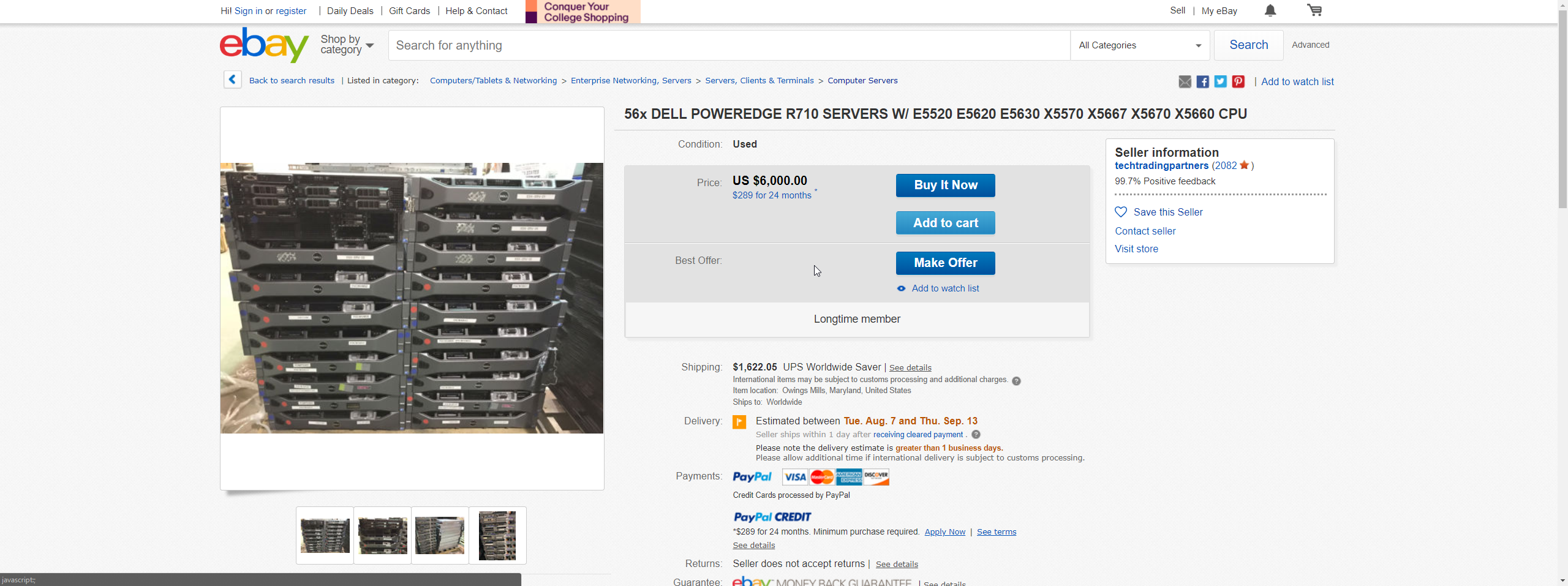
That's not a bad deal if you sell each for $300
and keep a rackful of them for yourself
quasi isle
that looks good
hallow nimbus
I want that kind of upload 
quasi isle
i want this to be stable
clear igloo
http://www.speedtest.net/result/7523120607.png
Moar upload!
 rocky badge
Lurick,  give, me your upload
Wait, that's at work. 😄 but you still have gigabit at home
clear igloo
Yah, thought I was VPNed back home but it's about the same regardless 😛
rocky badge
lol
 hallow nimbus
Prob samsung ssds 😂
fresh copper
Yea
IonSwitch has been the best so far
If you get a normal vps (rather than the special deal since I know the owner) you get 1G speeds
They do some cool stuff
[ ID] Interval           Transfer     Bandwidth       Retr
[  4]   0.00-10.00  sec   780 MBytes   655 Mbits/sec   24             sender
[ 4] 0.00-10.00 sec 780 MBytes 654 Mbits/sec receiver```Decent iperf3
rocky badge
o.0
iperf3 to my server?
[ ID] Interval           Transfer     Bandwidth       Retr
[  4]   0.00-10.00  sec  7.12 MBytes  5.98 Mbits/sec    0             sender
[  4]   0.00-10.00  sec  6.94 MBytes  5.83 Mbits/sec                  receiver
My shitty home internet ;-;
hallow nimbus
😂
rocky badge
[ ID] Interval           Transfer     Bandwidth       Retr
[  4]   0.00-10.00  sec  2.34 GBytes  2.01 Gbits/sec  12438             sender
[  4]   0.00-10.00  sec  2.33 GBytes  2.01 Gbits/sec                  receiver
between DigitalOcean NY3 and NY1
hallow nimbus
Perfect for having friends over 15+ pcs and still no peoblems with download and upload
rocky badge
testing NY1 to NY1
hallow nimbus
Mind you they are pretty content heavy
rocky badge
[ 4] local 142.93.3.115 port 53262 connected to 206.81.4.247 port 8443
[ 4] local 10.136.107.73 port 53988 connected to 10.136.30.89 port 8443
haha yes
CRAPPP
They're limited to 2Gbps
- - - - - - - - - - - - - - - - - - - - - - - - -
[ ID] Interval           Transfer     Bandwidth       Retr
[  4]   0.00-10.00  sec  1.89 GBytes  1.62 Gbits/sec  148562             sender
[  4]   0.00-10.00  sec  1.89 GBytes  1.62 Gbits/sec                  receiver
Yeah
fresh copper
Lol
waxen scroll
@rocky badge that feel when a server person who understands subnetting takes the .0 address before you can get to it for your VM
rocky badge
😄
fresh copper
People who have routers that support using the .0 address
waxen scroll
i only work for places that have money
rocky badge
😄
rocky badge
mm
waxen scroll
idk, im sure you can find some. most of these places are rock hard about outsourcing
we're outsourced but not engineering
such a shame really
not sure how young network engineers are going to find the experience

clear igloo
@waxen scroll Need up upgrade to the 9922 with 32x100GbE cards 😛
waxen scroll
yeah but whose going to pay for it
clear igloo
Order first and ask for forgiveness later? 😛
waxen scroll
our procurement system will cause me to get approval at the CIO level for that expense before it goes through
due the the amount
clear igloo
Sounds about right
waxen scroll
also cisco is really angry at us right now
clear igloo
lol
waxen scroll
they did go and buy HPe
clear igloo
ooof
waxen scroll
honestly if it was me, i would have white boxed
these are not used for anything special
clear igloo
Ah, sounds right
waxen scroll
its going to do basic switching, no routing, PoE
with cisco you gotta pay up for all the features you dont use
clear igloo
They are features you don't know you need 😛
waxen scroll
you arent wrong, but its unlikely
i dont know why they didnt test white boxes but i think this is a back room deal
HPe CEO probably visited personally
waxen scroll
yep
clear igloo
Yah, should have had the Cat 9200 out sooner but shrug
Not my call, not for me to care 😛
waxen scroll
its for the remote, non-office locations if you know what i mean
clear igloo
Yah
waxen scroll
which basically nothing special happens in
clear igloo
Exactly, bare bones switching and a single router
clear igloo
Yah, pretty much everything requires a firewall these days
clear igloo
Interesting, didn't know that
waxen scroll
so we can remove more gear
looking at forti, viptela, and a few others who obviously wont make it past round 1
im sure the preference is viptela but we cant ignore getting rid of 9,000 routers
clear igloo
Nice, hopefully things go well regardless 😃
SDWAN is one of those things I can barely spell 😛
clear igloo
SDA, SDWAN, SDDC, SDCore, SDWLC, SD all the things!
waxen scroll
i think DNA is def a fad if anything
clear igloo
That is the one I'm really waiting to see how it plays out over the next few years
waxen scroll
one its vendor lockin
two it just makes shit more complex
we'd have to refresh so much shit to deploy that
clear igloo
Refresh all the things! You need to renew every year 😄
waxen scroll
i wonder what ryois is going to do when he grows up
waxen scroll
what do you want to do for work
waxen scroll
his mom wont approve
rocky badge
XD
waxen scroll
i think hes going to be a youtuber
clear igloo
blob 4 prez!
rocky badge
😄
@clear igloo @waxen scroll https://linusdrop.tips/Uu7Iw1

Look at how smart Charter is
clear igloo
lol
waxen scroll
yeah i bet they figure out how much you should buy based on the amount of computers and phones you have too
we're all doing 4k video at the same time EVERYWHERE
rocky badge
😄
hallow nimbus
I am the biggest data user in my house :D
And @rocky badge Knows why 😄
rocky badge
xD
waxen scroll
my dad is
hes visiting and my usage spiked
getting close to the data caps
its odd though because im not noticing it
i think he uses a constant 20Mb/s throughout the day or something
hallow nimbus
lmao
Mine is 2MB/s only while uploading stuffz
And then whats coming in
;D
Erm
My nas is on 1896.26GB in the last 30 days and my main pc is on 1021.36GB
high anchor
Thanks to a friend, I'll be able to get some decommissioned Dell servers (and maybe parts) for free !
(If no one take them, they'll be thrown at the dump, so totally worth the shot)
fresh copper
Nice!
high anchor
Damn, LMG router is dropping more packets than Linus dropped stuff in the whole LMG lifespan.
rocky badge
rip
fresh copper
Like my pfsense router which hates me. It drops packets for rules that don’t exist when I have rules explicitly allowing it
rocky badge
rip
 stiff totem
I had a modem that got taken out by lightning last week and somehow it managed to take out one port on my edgerouter x, but it wasn't the port that the modem was plugged in to and everything else works fine on the edgerouter. I've already got a new one to replace it, but anyone have any idea how that could have happened or if there's any possible way to fix it?
stiff totem
The port the modem was connected to with the edgerouter is fine though which I thought was weird
rocky badge
And I'm asking because I have a modem and an ER-X, did Ubiquiti send a replacement for free or what
stiff totem
I didn't bother with it since they are so cheap and I needed it fast
just ordered a new one
rocky badge
Ah ok
Yeah they're cheap 😄
Please tell me you made a backup and copied it over to the new router lol
stiff totem
Oh yeah I did. The old one still works fine from what I can tell, just one port is dead.
fresh copper
There are ethernet surge protectors if you are concerned about it
fresh copper
Never used one myself though so I don’t have a recommendation
 wise prism
Hey guys, I wanted to make a SSH server for my friends to connect to but the problem is that I don't quite understand SSH yet and I'm behind an ISP block.
I've used Hamachi with my friends before but the ping is too high and the virtual adapter likes to fail. While Evolve gets the job done it has ridiculous ping so can you guys help me with this?
I've heard of something called "Reverse SSH" but I'm not quite sure how to do it
 wraith reef
What kind of ISP block? Does your ISP block by port or by service?
If it’s the former
I would imagine that you could use a different port and use PAT (port address translation) to take that external port and map it to the correct internal port 22.
wise prism
I think my ISP used NAT since I've used a port testing tool and every port show up as blocked
clear igloo
Do they use CGNAT or just PAT for your external address?
If they use CGNAT you can't do port forwarding without setting up a VPS or something similar to tunnel it back to you
Scanning ports that don't have anything listening will show them as closed/blocked
waxen scroll
stop using big words
rocky badge
😄
rocky badge
lol
fresh copper
Probably the correct thing to do is some dynamic dns. Problem is we don’t know if the isp does cgnat or blocks ports or other issues.
To test for these issues you would have not o make an ssh server then port forward on your router to the server. The problem is that it is different on every router so I doubt I could explain it in a way that would guarantee you could figure it out. It gets a bit complicated as there are a couple of steps you have to go through.
Just using a port tester without opening any ports will always show them as closed
 spark orbit
What does everyone use for speed test? I just use the website
rocky badge
I use Speedtest app on mobile
spark orbit
ok
fresh copper
Me too
Or the python version for my cli only routers
And sometimes iperf3 to iperf.he.net
 fresh copper
I used to use that for an auto speed test that went in a csv to use for a nice graph
I should turn it on again
rocky badge
It doesn't like results with 3Gbps or more in one any direction ;-;
Share results: http://www.speedtest.net/result/0.png
fresh copper
Depends on what server. Many don’t have more than 3Gbps per the requirements


 fresh copper
 radiant plover
That ping though...
radiant plover
Damn. That sucks.
rocky badge
@fresh copper Yeah, but to get a 1Gbps+ result the server has to be higher lol
Most of the servers are 10Gbps anyways
fresh copper
Yea
I wonder what would happen if you hosted a speed test server and just put a huge number amount of bandwidth to your computer to test. Just throw in a couple 40G cards on either side
rocky badge
You'll get 40Gb
rocky badge
But all of their server hosters would have to support https
Iirc Chrome blocks XHR to non https sites if the site was loaded over https
fresh copper
I just have to move on from it consulting to making an ISP
I’m part of the way there
My public wifi is so slow
Faster than I expected
But still
rocky badge
😄