@gritty valley What email provider are you using? Gmail's spam filter has been pretty competent for me across 5 different accounts. If you are using Gmail, I'd recommend getting in touch with Google Support and see what they can do. If there isn't anything that they can do, it might be best to just say screw it and make a new email account and start moving all of your services over.
#networking
1 messages · Page 114 of 1
 calm oak
 gritty valley
@calm oak Its companies exchange server, so filters/rules/etc are under our sysadmins discretion (and hes puzzled with this fun task)
calm oak
Oof. Is it a customer facing server, or can you cut it off from the outside and put it in a vpn (hypothetically, just to start thinking of options)
gritty valley
Already thought of it, but VPN is not a option.
Ill try to aquire the email headers from the spam to see if I can find something common in all of them
calm oak
Alright, good luck
 raw verge
Who can help me with IIS and HTTPS redirecting, I want all HTTP traffic to redirect to HTTPS. Cert is all setup
 rocky badge
@raw verge
<?xml version="1.0" encoding="UTF-8"?>
<configuration>
  <system.webServer>
    <rewrite>
      <rules>
        <rule name="HTTP/S to HTTPS Redirect" enabled="true" stopProcessing="true">
        <match url="(.*)" />
        <conditions logicalGrouping="MatchAny">
          <add input="{SERVER_PORT_SECURE}" pattern="^0$" />
        </conditions>
        <action type="Redirect" url="https://{HTTP_HOST}{REQUEST_URI}" redirectType="Permanent" />
        </rule>
      </rules>
    </rewrite>
  </system.webServer>
</configuration>
Make that your web.config
in the root directory
so if you're using the default C:\inetpub\wwwroot\
 thick minnow
I'm biased to recommend Cloudflare.
They have a free service which gives you an SSL cert, along with other bonuses like a CDN for static images.
so your servers aren't hit as hard
 slow pivot
For free SSL, LetsEncrypt is excellent
raw verge
I’m using LetsEncrypt
thick minnow
LetsEncrypt is great, I like CF though because of the free CDN that comes with it. It's a great bundle imo.
plus the basic ddos protection and such that you get with it
rocky badge
I'm biased towards Cloudflare as well @thick minnow
 hallow nimbus
^
thick minnow
It's just an all-around wonderful service.
I use it for every website I work on. It's fantastic.
rocky badge
Same
hallow nimbus
I dont YET
 elfin socket
Anyone here familiar with surge protection for exterior run cat 5e cable?
Trying to find a good brand and the good price for one.
Its run alongside a metal conduit for my pv system running about 7000 W DC, and im worried a fault or lightning strike on the system will feed into my router and fry the network
Looking at L-com
 ivory drift
My internet is limited and for some reason I’ve tried restarting and i troubleshooted in windows and it says no dns server. I logged into my router and nothing is in the DNS server. What do i do (I’m new to this)
thick minnow
@ivory drift You might have better luck asking in #tech-support
elfin socket
@ivory drift Did you get your issue fixed?
What router do you have?
 tardy shard
Hey can anyone tell me what the advantages over a tesla card relative to a quatro when looking at models with the same flops/s
of a tesla*
 ashen lily
tesla's are designed for DC use aren't they?
so they'd work better in a server
like, most servers have fans at the front that push air through, so the tesla has a different heatsink design
tardy shard
I know they are designed for servers, but I can't find much on what actual benefits they have over similar cards
 ionic notch
I totally read that wrong, was wondering for far too long "Why is he asking about a Car for a Server?" was about to say that Tesla's run on both AC and DC before I stopped being stupid.
 agile basin
ngl thought the same thing at first
hallow nimbus
oof
 muted smelt
Might not be approved of, but worth the question; anyone able to help with uni assignment/ confirm answer is correct here?
 unreal wedge
@muted smelt https://www.tunnelsup.com/subnet-calculator/
The most user-friendly IPv4/IPv6 subnet calculator.
muted smelt
ah awesome thanks dooley
unreal wedge
Some quick notes from memory:
- /1 is half of all IPv4 addresses
- /2 is a fourth
- /8 is an entire block
- /24 is an entire range (like 0.0.0.0 - 0.0.0.255)
- /28 is 16 IPs (If I recall correctly)
- /29 is 8 IPs
- /32 is a single IP address

These end numbers (being the final number in the address, like 0.0.0.*) do not get assigned (or face "fun" conflicts):
- 0 does nothing, technically usable in ranges larger than a /24
- 1 is reserved for gateway use (If I recall)
- 254 is reserved for gateway use (If I recall)
- 255 is the highest number allowed in an IP (0-255) reserved as the broadcast address.
ya nah just got even more confused with all that shit. just spinning wheels in this course
to be clear; that was regarding the website; followed 1/4 of what you just posted
something about the math im just not following
unreal wedge
Just posting that for future reference and for any network professionals to correct me if I'm wrong.
That question with the 180.16.0.0/16 is asking you to break that up into 8 separate subnets, so 256/8=32 meaning 32 different 180.16.*.0 IPs. Basically the answer to that part should be /19 if I'm correct.
muted smelt
See that would've been my impression from what i've seen online (not textbook) but the question is basically 8 marks, so they are looking for 8 different answers
slow pivot
@muted smelt that /[number] is the number of bits allocated to the network portion of the address. If you look at an IPv4 address as a 32bit number (4 bytes @ 0-255 per byte) then you can start at the left more bit and count towards the right the number of bits that comprise the network portion of an IPv4 address
So, for example: 10.0.0.0/8 means the first 8 bits of that address are for the network, there for it describes the network 10.x.x.x, or all addresses from 10.0.0.0 to 10.255.255.255
generally we reserve the first address, so 10.0.0.0 as the "network" address, and the last address as the broadcast address, 10.255.255.255 in this case
 sonic field
I've got one quick question would you be able to daisy chain infiniband from multiple PC's to server so have only one pc connected to a storage server but then have all the other servers connected to each other and they can still access the storage server and every other pc?
Posted this in #tech-support then moved here
 high anchor
Is there some cable issue of some sort that's prevent you to just use a switch to link every PCs and the server together ?
If it's a local network without internet access/router, you could add a DHCP server somewhere (the storage server would be the best) to give IPs to your devices.
Perhaps they could get one by auto-discover and so you wouldn't need a DHCP server.
It would be a bit easier if we get a bit more infos on your network and what you exactly want to do (some kind of basic drawing to explain the situation also helps a lot) and also will improve our answer and better match your needs. @sonic field
rocky badge
You're BlueCrazii?
 last comet
Yes
rocky badge
Why?
last comet
Does your frimware work with the R7500 ???
rocky badge
Idk

AdvancedTomato
Download AdvancedTomato router firmware for your Tomato supported router.
 idle stratus
So is it possible to install games on a storage server and run them?
high anchor
I've tried this with a local iSCSI target (server) and it worked quite well (iSCSI shows the storage server as "true HDD's", not as a "network disk/mount")
slow pivot
A deal if you are looking for a rack for networking equipment
Also, keep in mind the 200lb weight capacity
 subtle glen
dont you know LB-Link ?
 full glacier
 umbral ruin
literally baloney link
elfin socket
As in same model with same features.
 pseudo blade
I don't intend to buy a consumer-grade router ever again if I can avoid it.
Modem > real router > dedicated AP or several.
If you know what to buy, it can even end up being cheaper.
umbral ruin
isp modem/routers are generally good enuf if its from a good brand but the inbuilt ap always sux
pseudo blade
Can't usually isolate traffic properly on the LAN, generally flaky software unless you flash your own.
My ISP shipped me a router running OpenWRT and still managed to find a way to ruin it.
elfin socket
LB link?
umbral ruin
until recently isp provided modems here have been pretty damn good when we were on ADSL. now since we've moved to VDSL in most areas theyve turned to crap... mediocre hardware and god awful fw on the current sagemcom stuff most ISPs are handing out (theyre cutting as much costs as possible because the government fucked up bigtime with this new broadband thing). maybe itll improve soon idk. nowadays i generally reccomend WISPs instead of what the government is doing cuz they generally give out ubiquiti gear (sometimes tplink but theyre alright) and the network is more reliable to begin with.
elfin socket
lol, inbuilt AP is good enuff... if you happen to be in the same room
 lean pollen
The built in router/modem in TV box I have seen quite good for what it is
Probably one of those rare cases tho, they are usually bad
An it's trough a floor and two walls at least
elfin socket
When the homeowner demands you put the gateway in a Media cabinet butteressed with a UPS, a DVR, and a metal filing cabinet, and complains his connection routinely drops out
elfin socket
Im just going to leave this here.

Linkbasic CFK02 / CFK02-LJP / MTC04 / MTD06 / MTE01
hallow nimbus
Zipties are a great solution
 still briar
got my nas working today
still briar
anyone know if i can add storage to my nas after i have it all hooked up
subtle glen
tyty
so that the tension of the blue cable doesnt lift the router
since the cable is a bit too short
 ebon terrace
Free rack? That's one amazing steal.
raw verge
got a buddy who’s dad has a telecom company. he asked if i wanted to take a rack and a few other things off of his hands
and i gladly did
rocky badge
@raw verge what poweredge is that?
raw verge
2950 mark 3
raw verge
I have around 3Tb after raid
elfin socket
I'd get myself a full size rack if I had a place to put it.
 sullen tulip
Gonna try to get a CCNA networking certification
 unborn fox
Does anyone know anything about the cisco 2112 wireless lan controller?
subtle glen
isnt that thing a lil bit old?
hallow nimbus
Nah mate its new for him
hallow nimbus
Rips
subtle glen
i tried to open these one
i tried those one aswell
i tried both and i got an incompatibility problem
hallow nimbus
¯_(ツ)_/¯
subtle glen
how many ports i have to add
hallow nimbus
All of them
subtle glen
i just want to have the firewall on high but sill be able to play
now im gonna put the range from 1 to 10000000000000. i want to see if it doesnt work now
hallow nimbus
XD
subtle glen
meanwhile i tried to power my house on the ups
without things like the fridge
surprisingly i managed to power the tv, a router, a switch and a light for 25 mins
with an extra battery connected
subtle glen
pure battery
hallow nimbus
Oof
subtle glen
now i added a third battery
hallow nimbus
😮
subtle glen
make sure u disconnect the power from the grid or (if u have a modified sinusoidal wave ups) everything goes boom
hallow nimbus
Lol
My dads work has powerplugs for generators at the breakers boxes in case power goes out
hallow nimbus
Youtube you are drunk go home https://bluecrazii.nl/images/588534c02.png
 subtle glen
lol
wtf is dat
im wondering what if i connect two plugs together with a cable
if i get sparks or nothing happens
rocky badge
Lol
hallow nimbus
Funny thing is i am listening to music and that work LOl
subtle glen
@rocky badge why r6s port forward doesnt work
tell me
i have enough of those shitty servers
aaaaa
unborn fox
No cisco gear is classed as old @subtle glen it's called legacy and cisco legacy equipment is still used globally
subtle glen
@unborn fox ok
 autumn estuary
@rare elm
I am! I am excited to be getting UniFI products down the road!
 gritty owl
@rare elm I am, but I can't touch that price yet sadly. I'm plenty happy with two AC-Pros and a Edgerouter 4
autumn estuary
I'm stuck with Cox Communications "Panoramic Wi-Fi" garbage
 ornate jungle
I'd love to get an Edge Router Lite / X (or whatever one comes with PoE) and a couple of AC AP-Lite's to replace my R7000 Netgear, but until it dies I can't justify the cost. I have mudflaps and floormats to buy for my car. 😄
thick minnow
https://mikrotik.com/product/RB952Ui-5ac2nD <-- go for specs n price not marketing and looks

MikroTik is a Latvian company which was founded in 1996 to develop routers and wireless ISP systems. MikroTik now provides hardware and software for Internet connectivity in most of the countries around the world.
 rare elm
Sorry but the routerboard isn’t even in the same class of hardware as above, I’m looking at balls to the wall stuff currently, and seeing that sorta tech becoming a reality in smaller brands is getting me all kinds of excited.
 lilac zodiac
Man I got this ubiquiti edgeswitch es 48 500w, but I have a router and a computer which cannot register the cable, the cable should be fine, but the issue is almost impossible to pin down, any ideas?
Supplimentary info: The DHCP is controlled by a pfsense router, and it doesn't seem to be able to fve found by said connection, but the physical ports are fine. I even see a little led light up indicating connection, but the router says no cable is connected
rocky badge
Try a different cable?
rocky badge
Hmm
Does it work on another router?
Because you'll want to know if it's the edgeswitch or the pfsense box.
lilac zodiac
Here is the thing, its not the first time this had happened last time I swaped port cause I believed it to be dead. Yesterday I got connection to it and just wanted to swap the cable back, but the result was once again that it stopped being recognized. Resetting the dhcp doesn't work, and all other connections seems to work.
So I dunno, but issue does persist across the two ubqti switches
rare elm
Speed and duplex detecting ok?
Both ends set to auto, or is one potentially staticly assigned?
lilac zodiac
Yes its all fine, auto both places. I sometimes get the errors: dhcp not working properly, proxy service not working, or just that there is no cable connected, it looks like a corruption of some sort in the ports on the switches, or similar.
 vagrant heath
@rocky badge I have a Netgear Nighthawk X10. Should I load custom firmware on it? if so, what?
lilac zodiac
I have now confirmed that the cable is fine by using a crossover patch at the rack and a laptop to connect two computers.
rocky badge
@vagrant heath get advancedtomato if you can
 viscid warren
I am new to the networking field. I am just starting my CCNA study. If anyone has any good recommendations on equipment to get for lab study. Also looking for some good resources to look into to attempt to become more informed. Also, I would appreciate any good idea for starter projects. I want to try and outfit my house with a good home network setup.
I am not familiar with brands. I am just looking for someone that has some kind of networking insight that wouldn't mind being bothered by a few questions in the future.
Would it be advised to purchase a router like the Netgear Nighthawk X10 mentioned earlier and use the custom firmware? I was thinking of setting up wired wireless access points around my house so idk if it would be necessary. I am just trying to learn.
/endrant
vagrant heath
do not get an X10
I got one because I got a huge discount.
You don't need an x10
thick minnow
@rare elm are you a service provider?
vagrant heath
@viscid warren Look for cheep cisco gear. Lots on ebay.
rocky badge
No X10
thick minnow
Well i am super experienced in wireless to tell you that those wifi ap "specs" are bull shit
viscid warren
I guess I am asking to vague recommendations
thick minnow
Or' try a virtual machine with pfsense
Or even sophos
Those are router firmwares
And they are free
U can mount a virtual.networking lab in vietual.box
But if my memory doesnt f with me i think cisco has a network training software
Where you can dimulate networks, etc.
rocky badge
Run pfsense in a VM
thick minnow
After you get the basics of how to make a network @viscid warren most of the stuff to learn isfrom the device brands. Cisco/meraki, Sophos, netgear. Look up for utm's ( unified threat management ).
thick minnow
Thats the cisco training software
viscid warren
ye
thick minnow
Theres i brand that i love.
Called mikrotik
Is latvian
I love their network stuff, super reliable and powerfull.
But
Good luck learning how to set up the config lol.
viscid warren
Thanks for the tips
If I wanted full house wireless coverage it is a good idea to setup multiple wireless access points in my house correct? Also, if so what brand?
thick minnow
How many devices u want in the network?
viscid warren
I prob has almost 30 wireless devices
thick minnow
How big is your house and what bandwith u r working with?
vagrant heath
.....
viscid warren
@thick minnow It is only a big two story idk sqft but maybe its more like 20 devices between all the alexas,phones,laptops and streaming devices
thick minnow
Allright wireless is very limiting
rocky badge
@vagrant heath I have the R7000 and Advancedtomato supports it
vagrant heath
the R7000 has a Broadcom chip
thick minnow
If you have devices that aint moving wire them
vagrant heath
the R9000 has a QUALCOMM chip
viscid warren
@thick minnow I am working on wiring the house currently.
viscid warren
I am just ignorant oh what kind of router/switch etc physical equpitment to get.
Yes I have
vagrant heath
looks like my options are
Kong DD-WRT
or
Voxel
@rocky badge
thick minnow
Well for router u can get a cheap used pc with a second lan card and load pfense on it
A dual core u know
thick minnow
One of those dell acer or hp used pc
Telling you a pc as router could be cheaper and lots of times more powerull
If you habe streaming boxed like thenones from amazon n stuff you need qos
Bandwitj management
So you can make your boxes get the speed they need
vagrant heath
I might stick with the stock firmware for now.
thick minnow
O my i am butchering it qith my phone lol
thick minnow
aight i am on my laptop now.
@viscid warren if you want a wireles network that can cover your entire house with out any issues get a airmax 2.4ghz omni antena n rocket m2 from ubiquiti
make sure the rocket m2 is not doing any routing
just expanding the network
and put em in the middle of your house ,first floor close to the roof
make sure the antena is vertical
once is setup later you cans et up how strong you want the signal
you dont want it to make noice outside to the rest of the block lol
is a really powerfull radio n antena
you can get signal mile away
thick minnow
if you have a hacker as neigbour
they can hack into your wifi easier
if is spreaded a mile over lol

Featuring enhanced radio performance and mix-and-match industrial design, the Rocket™M is ideal for deployment in Point-to-Point (PtP) bridging or Point-to-MultiPoint (PtMP) applications.

Pair the airMAX® Omni Antenna with a Rocket™M BaseStation for 360° coverage in Point-to-MultiPoint (PtMP) networks.
make sure you reduce the chanel width to 20
thats all ya need
ashen lily
@viscid warren thats me with music, fuck the neighbours.
viscid warren
@thick minnow Thanks
 wispy plover
@viscid warren I need to note something that I didn't see @thick minnow mention. A strong wireless access point is a great thing, but it's useless if your device doesn't have a strong enough radio to communicate back with it. Signal a mile away is useless without a radio strong enough to talk back to it.
I would say go a different route and go with a few access points, on various floors, staggered from one side of the house to the other. If you manage a system that can do good zero handoff, great. If not, stagger the channels. You may find you want to reduce your 2.4GHz output power to better match the coverage you'll get on 5Ghz. If you're not doing zero handoff, make the SSIDs different or you're going to have issues unless you turn the output power down low enough that the APs cannot or just barely see each other.
I never got the tech-boner for pfsense, so I'd steer more toward an Ubiquiti USG (if you don't care about the CLI you get with the edgerouter) or use an ASUS RT-N66U or ASUS RT-AC-68U. Beastly hardware and pretty good stock firmware (but still capable of taking DD-WRT if you feel you need to have the extra features you realistically won't use). Doesn't really matter which since you wouldn't be using it to serve your wireless.
For wiring your house: here's a tip: get a flexible drill bit, a placement tool, and glow rods from Labor Saving Device. Grab their EZ-cut for cutting out your low voltage rings, and spend a little extra and use Arlington LV1. The orange Carlon ones you get from a home improvement store suck, a full blue carlon box sucks, and the only time I'd recommend something different is if you have lathe and plaster walls, where a WBF1 from Minerallac actually works better. If you need to make a pull point somewhere for some reason, cut out a space to put a double gang low voltage ring. The hole is big enough to get your hand/arm in to use as a pull point, then you can put an LV2 and a blank cover on it without having to do any drywall repair.
Source: I was a Telecommunications Technican/Engineer at a university in Michigan. I was responsible for all the physical plant (fiber, copper, coax, point to point, access control, and put in a lot of the A/V wiring for the media group), I assisted in the wireless design and distribution of access points, and I do this work on the side.
thick minnow
@wispy plover the omni antena is good enough for listening that far. i work for a wisp we use this equipment i know what i am talking about and i dont recoment the routers from ubiquiti at all.
the radio alone from ubiquiti cant propagate or listen farther than 5 meters in a sphere, thats why an omni antena with a gain of 13 dbi goes with it
gritty owl
@thick minnow Curious, why don't you recommend the ubiquit routers?
I do plan to try pfense one day (really want to try it), but I can't really complain about my edgerouter 4.
thick minnow
is a price thing
you rly dont need em
for tha price you can get a more powerfull router
but if you want the full ubiquiti experience with their ui and their ' management' software
having all the devices on the network being ubiquiti helps
even tho they have a mess with their managment software
if you are looking for open source firewalls
wispy plover
@thick minnow I know it can listen that far, but you still need a powerful radio to talk back. Your phone or laptop isn't going to do that. That was my point
Have an AC omni setup at an airport with around 10 nanostations for cameras and access control equipment. Farthest link is around a mile and a half. Stuff works great.
gritty owl
@thick minnow Will keep that in mind.
I'll be sure to look into the firewall.
wispy plover
Also have them for cameras around a housing complex. We have one radio pulling 750Mbps throughput all day.
gritty owl
It must be fun being able to run that much wireless power in a network (just a normal home user here)
wispy plover
What's the sustained throughput you guys get at your wisp?
wispy plover
Actually, I have a few questions on wisps if you don't mind answering. I've dealt with small scale outdoor distribution and large scale indoor, but never the logistics of widespread outdoor networks.
thick minnow
Our main client is the gobt
We have over 30 miles of fiber, over 400 towers and we manage 25 gigbits from cogentco, we give internet service to all the rural counties in 3 states, means; schools, offices, police, court houses, well over 5000 points
And @wispy plover if an antena can listen a radio speak thats all ypu need for a link
..
Thats one of the reasons why in ptp links is comon practice to have diferent antenas.
wispy plover
...huh, that makes a lot of sense!
Never really thought about it that way (again, log distance outdoor is not what I'm used to).
Do you ever run into having to run parallel links in the same direction? Like, you have enough clients it's saturating one radio.
Was going to ask about interconnecting towers but you answered that before I asked lol.
Do you own the fiber or is it leased through a company like level 3?
thick minnow
we own the fiber
subtle glen
hook me up
thick minnow
we do have parallel links
theres a limit on the 5ghz of what can be done
if we reach that limit we analize going with a permit with a another freq
if is not posible then we run fiber
subtle glen
then hook me up
i want a double fiber link
wait
3
none will laugh about my connection anymore
thick minnow
we dont deal normal household clients
subtle glen
also i live in italy :/
but, pss you can close an eye on that
lets suppose im a hosting business
hallow nimbus
@subtle glen Hook me up to fibers
subtle glen
Lol
thick minnow
theres 2 types of fiber
subtle glen
hallow nimbus
Lol
rocky badge
Oof my eyes
subtle glen
the fastest u can give me
subtle glen
@rocky badge you have to see how i grounded them
hallow nimbus
LOL
subtle glen
UU
rocky badge
Inb4 that brony comes in and says he has a company
subtle glen
@thick minnow what about the therabit fiber
hallow nimbus
^ i am in
rocky badge
rocky badge
"I have Comcast cable and DSL"
subtle glen
i have a copper rj 11 cable
rocky badge
"Which gives me the fastest connection in the city"
subtle glen
yeah
rocky badge
"In fact I run servers"
hallow nimbus
OOF
rocky badge
Oof
rocky badge
I have coax as well
hallow nimbus
Coax is for Tv,phone and internet lol
rocky badge
If I go ATT I will get DSL
hallow nimbus
Our modem sorts that shit out
rocky badge
Coax is TV, phone, and Internet
subtle glen
nope
rocky badge
Yes
hallow nimbus
Ey @subtle glen How else am i getting internet XD
subtle glen
we dont mix that shit together
hallow nimbus
AND NO NO MAGIC (caps caps caps caps caps caps caps caps caps caps caps caps caps caps caps caps caps caps caps caps caps caps )
subtle glen
coax is for tv
rocky badge
We have a splitter that splits our one coax cable into 3.
rocky badge
That then go to our TV box, phone modem, and Internet modem.
ashen lily
starting around mid june, there will not be a wired internet connection to my house
subtle glen
rj 11 for internet/phone (or voip router which then connects to ur phone), fiber (with voip if u want a phone line, coax for pay tv, normal antenna for free tv
ashen lily
there will be a cable going to the roof from my bedroom
rocky badge
Here it's coax for all 3
subtle glen
also, we dont use solid copper wire for our electrical wiring
ashen lily
that cable will be plugged into a NanoStation AC
subtle glen
and we dont have the black and white cable
ashen lily
pointed at a house about 5km away
subtle glen
and our grounding cable isnt exposed
how bout that
also we dont have to reset our socket breaker if it tripps
rocky badge
Iirc it's VoIP over coax lol
rocky badge
Because we don't have landlines
thick minnow
all fiber?
rocky badge
It's not FTTH it's FTTN
ashen lily
VOIP over power... jk
subtle glen
i know FTTC FTTH
rocky badge
And let me rephrase that. My house doesn't have landline.
subtle glen
mine too
rocky badge
Some houses around me have landlines
subtle glen
underground cable to the closest street rack that then connects with fiber or copper to the isp central
thick minnow
gobts needs to figure out how they are going to reorganize the frequencies because we are running out
subtle glen
we have those things in the building basement, each house has a red and white cable
rocky badge
subtle glen
thick minnow
the key word is touch
rocky badge
"high speed" max speeds are 300/20 xd
subtle glen
https://www.google.it/search?q=chiostrina+telefonica+cantina&source=lnms&tbm=isch&sa=X&ved=2ahUKEwjUrLbewPnaAhUP3KQKHQkYAhQQ_AUoAXoECAAQAw&biw=1440&bih=794#imgrc=2lYcTN9jf_lngM: that then goes to a rack like this ( the white block should be the connector for 100 mbps fiber that goes to the DSLAM)
rocky badge
Lol
subtle glen
mmm if the phone wires short, they make a spark
thick minnow
i doubt it
subtle glen
and if you are reiceving a call u might get a lil bit shocked if u touch them
the normal voltage is 50 v
rocky badge
subtle glen
they say when someone calls you it can get to 100 v
rocky badge
the wires are a mess
thick minnow
 thick minnow
propper cable managment
rocky badge
Wow
subtle glen
i was thinking about them to get internet to my garage
thick minnow
you can see some cheap office max switch
rocky badge
Oof
subtle glen
can they bypass around 50 cm of reinforced concrete with dirt and rocks on it?
to a distance of 10 meters?
thick minnow
yep
subtle glen
u surE?
subtle glen
nothing, i used powerlines and they work fine
i get same speed
i tried to put a wifi router on the balcony and one in the garage
if i close the door the connection fails
its a steel door
subtle glen
prob
thick minnow
if thats the issue forget bypasing that
subtle glen
i mean it can hold one of those little excavators
thick minnow
with wireless
subtle glen
gigabit powerlines ftw
i also found in my house, " the perfect plug" that never makes the powerline disconnect
those are the kind of cables the isp uses to connect a lot of homes @rocky badge
im wondering who has to strip them all
rocky badge
lol
thick minnow
All the data those wires are able to transmit a couple of optic fiber threads can do.
wispy plover
@subtle glen you don't typically strip 'em. I mean, you strip back the outermost jacket...but you'd use scotchlocks or dolphins to splice the cables, which don't require stripping. And in the event they're landing in a distribution ped with cross connections...you don't have to strip the individual wires for the 110 or 66 block.
ashen lily
 livid vine
You could always look into powerline adapters if you want something cheap and easy.
ornate jungle
Powerline AV works, or lots of drilling and planning. Alternatively, just run Ethernet cables all over the floor and play "the floor is lava"
 heavy meteor
Does anyone know if the us-24 ubiquiti does policy between vlans? Port blocking etc.
ornate jungle
I was joking about just running ethernet all over the floors but you'd have to avoid tripping on them, so apart from drilling holes in the walls and trying to feed the cables, you'd need to powerline AV it.
Or hang them from the ceiling, that works too
 night night
If I have gigabit switch #1 connected to a single computer as well as gigabit switch #2, where gigabit switch #2 is connected to two more computers, is there any sort of bottlenecking I should be worried about?
night night
#2 has two computer connected to it, and #2 is connected to #1, and #1 is connected to the internet
thick minnow
whats the bandwith speed of your internet service?
if is less tan 500 mbits then dont worry about any bottleneck
@subtle glen why dont use tacks
is the concrete too brittle?
thers also a more expensive solution
wall cable covers for ethernet
subtle glen
here ive done a better job, withg cable clips and sylicon. The white cables are like that cause i thought it was something temporary
now it been over a year and they become sort of permanent
the second cable got added recently, it powers the router from the ups in my bedroom so if the power goes out im still online
u almost cant see the cable in that picture @thick minnow
thick minnow
looks good
subtle glen
Ikr
thick minnow
thats how its suppoused to be almost invisible
subtle glen
I could also not add the clips
The sylicon was added later on cause the cable wouldn't sit flush
Pretty proud of that job
wispy plover
Temporary has a funny way of becoming permanent....
wispy plover
Could just get some surface mount raceway to cover it. I like the LD series from Panduit, personally.
thick minnow
''temporary for ever''
wispy plover
Like that, yeah.
unreal wedge
It's 2018. I prefer Ubiquiti.
ashen lily
^
thick minnow
Ubiquity for the win
ashen lily
Ubiquiti*
thick minnow
Thanks for the correction, autocorrect is a btch
 meager hazel
Lol
wispy plover
Juniper is where it's at.
wispy plover
I like Aruba switches when having their wireless controller...not sure how they are now after HP bought them.
wispy plover
Ignore support and Juniper just makes a better network product. Cisco has APs and phones under it's belt as well, but there...well, there was a pretty strong Juniper, Aruba, and Shoretel alliance, if you will. It's hard to find people that know Juniper, but that also means people that do will typically make more.
Price isn't the only driving factor in them gaining market share.
subtle glen
Anyone knows the connection requirements to set up a vpn? Cause with the connection I have now, I cant make one
hallow nimbus
Requirements: have a fast enough connection
rocky badge
Lol
ashen lily
Well, if you want to actually be able to use it properly, then I'd say 100mbps
ornate jungle
Do a speedtest.net without the VPN enabled @subtle glen and let us know the results. Chances are this error is either a configuration issue, or exactly what it says: The VPN server is at capacity or disconnecting you for some reason. Also, who's your VPN provider?
 snow obsidian
So I'm having a issue with my wifi extender and I'm not sure why it will cut in and out and if I connect to it it will say settings of upstream ap changed
unreal wedge
Have you tried moving the extender closer to the router, or checking for interference?
snow obsidian
It's at its recommend distance
And what do you think could cause interference
There are walls, a security camera, hub for the camera, Google home, and normal kitchen appliances in between the extender and the router
 azure whale
WiFi is... Finicky. Literally anything can cause interference
snow obsidian
It has worked in the past
But ever since spectrum bought time warner it's been all weird
I'm also supposed to get 30 upload but I get 5kb/s
unreal wedge
On the router, the AP, or both?
snow obsidian
Both
But that's fine I only seed stuff
I would rather fix the extender so I can actually use my phone in my bedroom
unreal wedge
And what's your ethernet speed?
snow obsidian
200-300 download
unreal wedge
Like, ethernet jacked into the Spectrum modem*
snow obsidian
20-30 upload
unreal wedge
And yeah, that limit's on your router then, possibly interference, or something else.
snow obsidian
But even though it says that upload I don't get it when I'm upload stuff
Uploading*
snow obsidian
Still get it for free and it's better then dial up and att
unreal wedge
*and nothing's worse than AT&T
snow obsidian
Unless it's fiber
There is fiber near me but I don't get me
It*
I can't spell today
unreal wedge
You can edit messages, even on a mobile device.
unreal wedge
You can't long-press?
unreal wedge
Anything from http://192.168.100.1?
snow obsidian
Nope
unreal wedge
What's it say?
snow obsidian
nothing comes up
unreal wedge
Connect directly to the modem.
snow obsidian
i am
unreal wedge
Arris/Motorola?
unreal wedge
I can read through typos. What brand?
unreal wedge
Send a pic? DM?
snow obsidian
i remember logging in before and it was not arris
unreal wedge
They can rebrand the UI.
snow obsidian
it started with a s
snow obsidian
its a techicolor
unreal wedge
What.
snow obsidian
yup
unreal wedge
They still exist?
snow obsidian
yup
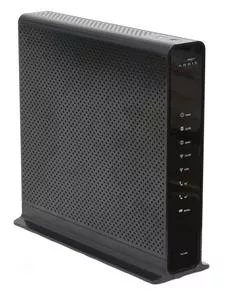
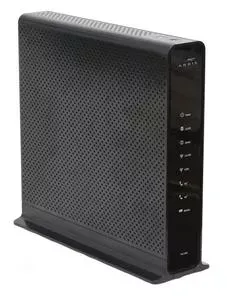 snow obsidian
its a Media access TC8717T
unreal wedge
100% has to be a rebranding of the ARRIS TG1682G
unreal wedge
 snow obsidian
yea they had to give us a 2 in 1
unreal wedge
This is the Arris one http://m.setuprouter.com/router/arris/tg1682g/login-69264.jpg

See the "similarities"?
snow obsidian
Yea
unreal wedge
#rebranded same 2-in-1 modem.
Default login is admin and password, followed by a change password prompt (normally).
snow obsidian
already did in the past
unreal wedge
Was working on one earlier today, is what I mean.
I go through a lot of routers in my day-to-day.
snow obsidian
btw i just wanted to say that it took 6 of their tech people to fix our wifi
guess what the issue was
you will never get it
unreal wedge
Out with it.
 unreal wedge
Not the first time I've seen that.
snow obsidian
only the 6th got it
snow obsidian
ok so what should i do now?
unreal wedge
I need to see DOCSIS levels.
 unreal wedge
Find the info page, think maybe under troubleshooting.
Has numbers and words on it.
snow obsidian
Under troubleshooting there is Logs, Diagnostic tools, reset
unreal wedge
What's under the tools.
snow obsidian
Test Connectivity and check for ipv4/6 address results
snow obsidian
 unreal wedge
Advanced
snow obsidian
holy shit this 2in1 can run off battery
unreal wedge
Yes it can.
snow obsidian
advanced options?
unreal wedge
mhmm.
snow obsidian
 unreal wedge
You won't be able to set static IPs via DHCP nor your own DNS on that router.
Which I dislike.
unreal wedge
sigh... Where's the signal level area...
snow obsidian
signal level was good atleast thats what they said
unreal wedge
Click through the pages until you see something with levels and stuff.
snow obsidian
they replaced the coax cables and everything
unreal wedge
Fresh RG6 doesn't mean good signal.
snow obsidian
and according to their test things
but then again our neighbors have had issues too
🤔
so im looking for levels?
i did find the upstream thing
which according to my extender was a issue
unreal wedge
Something like this https://dooleylabs.com/?q=-eqwki.png
 snow obsidian
up i found that
unreal wedge
Also, is there a booster in the line at all?
snow obsidian
like a cell booster?
unreal wedge
No, a coax booster.
 unreal wedge
Thing plugged into the wall with a coax in it.

 unreal wedge
Upstream feels a touch low, but it ok (not to my standards though)
unreal wedge
Downstream's a little too high... meaning you're either close to the node, or it's being boosted somewhere
snow obsidian
can you elaborate on the node?
unreal wedge
Nothing like this anywhere? https://www.pctstore.com/v/vspfiles/photos/APA1260315URH-4.jpg
 unreal wedge
And the node meaning a Spectrum node, where your neighborhood gets it's lines.
snow obsidian
there is a spectrum box right outside of my house
ornate jungle
Those levels are within spec for the cable provider I work for, however, maybe it's different for your provider. If you're getting good speeds when hardwired via ethernet directly to the modem, then that rules out the connection coming in.
unreal wedge
I know, but I'm an optimalist.
Those levels don't explain his router issues at all though.
unreal wedge
What speeds do you get connected to the router directly over wifi
snow obsidian
hahahahaha
ornate jungle
oh yeah, for sure. do you have a modem/router from your ISP, a router, AND an extender?
ornate jungle
are they all spewing out wifi signals? if so, I'd recommend turning off the wifi on the modem, or asking your ISP to bridge it if you can't do it via the interface
snow obsidian
the modem puts out its signal and the extender copies it and just extending it no?
unreal wedge
@ornate jungle you can.
Bridge mode button is on page one as soon as you log into it.
But they generally have great wifi.
snow obsidian
do i click it?
unreal wedge
NO
unreal wedge
Send an pic of your wifi setup page in the router.
ornate jungle
Good to know 😛 this does appear to be using the same newer firmware that Comcasts' ARRIS XB6 modem uses, so I was hoping you had the choice to bridge.
unreal wedge
@ornate jungle it's the same exact modem, but rebranded.
snow obsidian
 unreal wedge
Print screen, then ctrl+v
For your own security, none of us need your devices and their MACs.
snow obsidian
idc
unreal wedge
We could spoof a MAC and you'd know what prison is like.
snow obsidian
🤔
unreal wedge
It has happened
unreal wedge
Heard of the Cloud Act? Yeah, it's not your friend at all. Neither is the FOSTA or SESTA Acts.
snow obsidian
FOSTA 
unreal wedge
There are trolls and bad people here.
18.1k people.
Most of them hiding, and for probably bad reason.
snow obsidian
tbh i would be more worried about NSA then fosta
unreal wedge
NSA doesn't allow free access to your devices, cloud-stored data, and breach of the 4th amendment. Those acts do.
unreal wedge
I meant that the NSA isn't going to call the FBI on you.
snow obsidian
oh ok
unreal wedge
That's not their job.
snow obsidian
i thought you meant they couldnt get on my computer
unreal wedge
They certainly are.




 unreal wedge
Try channel 161. I've had good use of it.
unreal wedge
Not a chance.
snow obsidian
they got mad when i forwarded some ports
snow obsidian
they said im supposed to ask them first
snow obsidian
ok
unreal wedge
@rocky badge forwards ports. They haven't snapped at them yet.
You seem to have a b*tchy Spectrum office. Call corporate and chew them out. The office will be reprimanded.
snow obsidian
Ive called before and nothing changed
and really i think the issue resides with corporate
because i know a large chuck of people at the regional office here
and most of the stuff is out of their control
unreal wedge
Sounds like parts of the dying Time Warner remain. Things have "degraded" under Spectrum because TW doesn't like Spectrum's standards. Sucks to be TW, they no longer exist.
Basically sabotage
snow obsidian
yea used to work for time warner
unreal wedge
Run a speedtest under the new channels.
I'm not saying TW the company, I'm saying a few bad techs and office workers, not all of them.
unreal wedge
Spectrum's "home" areas are a lot better than your area. You must have gotten the short end of the stick.
unreal wedge
On wifi?
snow obsidian
no ethernet
unreal wedge
Needs wifi.
Channels mean nothing over ethernet.
You hit save on that page after changing the channels, correct?
unreal wedge
Erm... what...
snow obsidian
what
unreal wedge
Something's not right here...
snow obsidian
whats wrong
unreal wedge
Those speeds.
snow obsidian
good or bad
unreal wedge
Bad af.
snow obsidian
it is a phone
unreal wedge
Should be higher even on a phone.
snow obsidian
same thing on my mac
unreal wedge
My phone hits 300Mb/s easy.
snow obsidian
they dont guarantee speeds over wifi though
unreal wedge
Here's earlier today
snow obsidian
lucky 
unreal wedge
And the ethernet speeds are the same over wifi if configured correctly.
That's at a client's house ^
Technically my cable guy's house.
He has gigabit.
But phone can't pull it all.
snow obsidian
i would kill for that
unreal wedge
He gets it "free" in his HOA.
unreal wedge
Gigabit and fibre included in his HOA fees.
snow obsidian
damn
unreal wedge
Appears to have Alexa integration possibly, and his works well.
So something's not right with the wifi in your location.
snow obsidian
But i should not be getting my stuff for free right now but their division to handle it is pretty dumb
unreal wedge
Rename the 5GHz to something other than the 2.4GHz and connect to the 5.
Then run a test.
unreal wedge
Are you connected to the 5?
snow obsidian
i can be
unreal wedge
Always use 5 if you can.
unreal wedge
5GHz range should be at least 30+ feet...
snow obsidian
new test is 88.1 download
unreal wedge
It covers my entire home...
snow obsidian
and 22.4 upload
unreal wedge
Your home is borked af.
unreal wedge
The modem/router should be located in a central location in the home, closest the the middle, and pretty high up because wifi signals travel in a cone shape downwards, in my understanding.
snow obsidian
its slightly above average for my city
yea its not in the middle
its near the front door
middle would be in the kitchen or in a closet next to the kitchen
unreal wedge
There's some damn high interference in your place.
Are you near the router while running the tests?
snow obsidian
ok
unreal wedge
Walls are bad for 5GHz.
Especially entire floors.
Run the test next the the router and lemme know.
snow obsidian
download is the same within margin of error
unreal wedge
The Extender should be hardwired to the router over ethernet for optimal speeds.
snow obsidian
same with upload
unreal wedge
Hmm.
snow obsidian
the extender is not
unreal wedge
On the computer?
snow obsidian
it is over wifi
unreal wedge
Then it needs to be close to the router, like right above it... but then you could run a CAT6 cable though the wall for it
snow obsidian
running cables is hard in this house
unreal wedge
Test is on the computer over wifi connected to the 5GHz band?
Drill a hole, tie it to a running stick, and shove it up the wall to the next floor?
snow obsidian
if i run the extender above it then half the house gets no wifi
we have tried it next to it before
unreal wedge
You'd need a second extender then.
snow obsidian
I already have a 75 foot cable going to my pc from the modem
unreal wedge
AP does not need to be next to the router. That has no purpose and can only cause interference.
snow obsidian
there are no more ethernet cables ava for the extender
all four slots are taken up
unreal wedge
You need professional help in this situation, but you won't be getting it from Spectrum apparently. Know anyone local?
snow obsidian
for wifi?
unreal wedge
To run some ethernet and fix your signal issues.
I'd be able to do it, but you're obviously in the New England area.
snow obsidian
err that costs quite a bit no?
unreal wedge
And no, if they're a friend.
snow obsidian
and no im in North Carolina
snow obsidian
they are based in NC?
unreal wedge
I never knew that.
snow obsidian
i was the third in command for the Accounting division and we are based here
unreal wedge
Thought they were the NY area.
Goes to show what I know about TW and cable companies locations.
snow obsidian
They have a cool thing they built next to the building that is super high tech
very high security
i only got to see it once
and if im not mistaken they put biometrics in there
but TWC is based out of New York, Stamford, and charlotte where i am
unreal wedge
I'm heading of for a while, but I suggest finding a buddy from the company to assist in running areas in your home with ethernet so you can get some APs put in. You'll need a dumb 10/100/1000M switch for the runs to connect to - which connects to the router, and preferably a gigabit router so you can stop using that inferior free one that's collecting your browsing data and habits.
snow obsidian
yea but its free
snow obsidian
i like free over dropping 300$
unreal wedge
"Free" is the reason your speeds suck.
unreal wedge
I could scrape together the stuff to do it for maybe $100 since I know a few people and have a few routers lying around.
Literally two Buffalo APs sitting next to me to be tested...
snow obsidian
so for 100$ i could get the stuff to do it>
unreal wedge
And an Actiontek router sitting on my shelf behind me
You could do a lot for $100.
I could do it all for free with the stuff I've collected.
snow obsidian
i mean if you will sell the stuff for 100$ i like 100$ over 300$
unreal wedge
I'm not selling. The two APs beside me belong to the cable guy.
snow obsidian
rip
unreal wedge
I'm testing them so we can run them in his home.
Basically doing the same thing you need to do.
snow obsidian
ok well if you could send me links to the stuff i need i would appreciate that
unreal wedge
APs all over, and a new router with the cable company's router in bridged mode.
unreal wedge
Basically lookup a few decent APs (2 or 3 of them), a box of CAT5e or CAT6, and a router not provided by your ISP (Spectrum), and a 10/100/1000M switch for the APs connection to the router.
snow obsidian
so i dont need a modem?
unreal wedge
You see that router you're currently using?
snow obsidian
the 2in1?
snow obsidian
no i dont see that
i dont have a router
its the 2in1
thats the only thing that is plugged in
ornate jungle
its a modem/router combo unit. it contains a modem, a network switch, and a wireless AP. most of these are potatos though
snow obsidian
yea so i need to get another router?
unreal wedge
@ornate jungle I'll let you take it from here, I gotta get out for a bit.
ornate jungle
sure thing. i'll reply in between deaths in Overwatch :p
snow obsidian
what about the new razer portal
ornate jungle
personally I'd buy products made by a networking company.
snow obsidian
asus?
unreal wedge
Nothing Razer.
snow obsidian
new portal looked good though
ornate jungle
Yeah, not by a gaming company... ASUS, or Netgear work. I actually run multiple R7000 netgear routers at various locations..
unreal wedge
Ubiquiti's nice, but pricey.
ornate jungle
Ubiquiti is love is life. So good but it's a lot more cost and effort to setup.
snow obsidian
how much more?
unreal wedge
Keep in mind Netgear doesn't get updates forever, so any later security flaws will be ignored.
snow obsidian
like hundreds more?
unreal wedge
One 400 yard AP can set you back $80 if it's on sale.
ornate jungle
Correct, this is why I actually only recommend routers that can run DD-WRT or TomatoWRT https://advancedtomato.com/downloads
AdvancedTomato
Download AdvancedTomato router firmware for your Tomato supported router.
snow obsidian
90% of this is going over my head
ornate jungle
It's not perfect as Ubiquiti, but it's the next best thing. I think the Buffalo AP's you were mentioning @unreal wedge run on OpenWRT.
So do most ASUS routers out of the box. Er, MerlinWRT, which is custom made by ASUS.
unreal wedge
(None of this is over my head, but I try to keep it simple for my audience.)
snow obsidian
i like when people just link me something tell me its good and i buy it and it works
thats how my first computer was built
unreal wedge
I haven't even looked at these APs yet. Just got them a few hours ago.
snow obsidian
and now look at me my second pc is fully custom
unreal wedge
Speaking of... There's a switch sleeping in my car I need to fetch...
Here I am, the guy that made the mistake of putting liquid metal in my PC.
snow obsidian
i did that too
unreal wedge
When I only needed a new system fan.
snow obsidian
i went with glass tubing for my first water cooled pc instead of soft tubing
im pretty dumb
unreal wedge
But I only realized that after the fact. Apparently the old fan had been going marginally slower than the new one of the same model.
I'm air-cool only. Water is high-maintenance.
snow obsidian
Will this work? https://store.amplifi.com/products/amplifi-mesh-router

Amplifi Wi-Fi
The AmpliFi™ HD (High Density) Mesh Router can be used as a stand-alone router or with other AmpliFi™ Mesh Routers for multi-hop, self-healing wireless coverage and enhanced range. For a typical home, the Router alone delivers maximum through...
unreal wedge
And I don't like the idea of water in a PC.
unreal wedge
Not needed.
snow obsidian
should i just get the router i just linked
ornate jungle
Go fetch it ! lol @snow obsidian I hear you there. WiFi is really one of those trial and error things, since everyone's house is different, but if you start with something good as a base, then you can expand later.
I'd recommend what @unreal wedge has suggested and buy a decent router from ASUS, or a good router that you can custom flash with AdvancedTomato (if you're willing to tinker), then expand with additional AP's as needed.
Or go full bore and jump into Ubiquiti's newer MESH network stuff, yeah. Keep in mind that MESH networks need multiple AP's to be of any use, as the idea is to install say 3 or 4 AP's in various locations in your home so they can all talk to each other, but it's a bit overkill for home use really.
snow obsidian
what about the Amplifi HD mesh router and one mesh point hd?
unreal wedge
I'm out for a bit.
ornate jungle
Yeah, AmpliFi is made by Ubiquiti Networks, so it might be a nice option if you want something really simplistic. Just be sure that wherever you buy from has a good return policy in case it's not what you need/wanted. https://store.amplifi.com/products/amplifi-mesh-system
I wasn't following the entire discussion, but if you draw up a very basic layout of your home, with the location where your cable modem is located, we can recommend some options.

Amplifi Wi-Fi
The AmpliFi™ HD (High Density) System includes a router base station and two wireless super mesh points for maximum Wi-Fi coverage throughout your home. The HD Kit provides maximum wireless performance in an innovative and elegant design. The r...
Basically you've got the Cable Modem from your ISP, which will connect to a router from ASUS or Netgear, or something like that AmpliFi MESH network system. (Google's WiFi is also a MESH network too https://store.google.com/product/google_wifi )
If your cable modem is bridged, this means it should pass an IP address straight through to your router and won't broadcast a competing wifi network or handle any routing functions, since that's what the router is for.

Google Store
Google Wifi lets you stream in the living room or game in the playroom without a battle for bandwidth.
unreal wedge
Technically don't need a router if you have APs, but haven't tested that yet.