#networking
1 messages · Page 104 of 1
 lilac zodiac
 rocky badge
Oh
lilac zodiac
so for 10 gig future i may have to switch server blade
rocky badge
Ok
lilac zodiac
Should i make a ring topology when i only have two switches then?
lilac zodiac
That looks healthy?!
rocky badge
...
Or server is being stupid and the service isn't running
You could use two switches if you want to
lilac zodiac
im not following i have to use 2
lilac zodiac
I have to use 2 since the 80 appartments require 2 48xport switches
rocky badge
Ok
 idle stratus
Heloo Heloo i have thought about making an small 10gig network storage server thing inside my house with as little as possible do you have any suggestions for gear i should use?
rocky badge
Ubiquiti with Intel NICs. 10GigE
rocky badge
:)
rocky badge
Lol ok
 vagrant heath
@dull iron
http://www.speedtest.net/result/6969283764.png
http://www.dslreports.com/speedtest/28464298.png

 vagrant heath
California Higher education+High school gets access to gigabit. (some even get 10gig). Most have the school name. else it defaults to that.
I think AT&T is the fiber provider if I rememember right.
rocky badge
AT&T fiber is good anything else from them is bad imo
vagrant heath
Also it seems that DSL reports does not like going through a Intranet.
vagrant heath
DSL reports is okay for testing home connections. But it fails at enterprise grade connections. @dull iron
 night night
So how do you guys encrypt your network traffic?
I'm trying to use OpenVPN but it isn't cooperating with me
lilac zodiac
I am a bit confused here... so my intuition tells me that if i have a fiber with 1gbit in it...both ways... That should be the broadband i can expect. So if lets say 10 people use the internet at the same time that would be split to approximately 100mbit/s each right?
But how come if this is the case ... how can it be that 80 appartments can share the same fiber... but still everyone gets 100/100?
This doesnt make any sense to me
 lean pollen
Not everyone can actually use 100/100 at the same time
That's how it works
Probably
 winged moth
for an appartment building where they're expecting to get 80 clients, it would be pretty cheap to put in 10Gb/s allowing most of those people to not really notice that they're getting split up. Peak hours, it will get saturated and some people will see issues, but it should still be pretty quick.
lean pollen
Btw a company would get shit trown at then If you didn't get the speed you paid for fiber even on peak hours here. I think
lilac zodiac
I mean, Technically there is an issue with 1Gbit/s on our WAN, but our switches are old and only certified for 100Mbit/s LAN... our Pf-sense router runs on a Dell PowerEdge R200 with 2x 1Gbit/s Full duplex. plugged into a smaller switch with SFP interfaces on WAN and on the Uplink to the 100mbit switches... In effect.. we should be able to run Gigabit/s - overhead, but we are bottlenecked a few weeks until we get our new gigabit switches included in the trunk.
Does any of you know of a 4 slot SPF+ switch?
just a small cheap one
winged moth
I mean really. If you have like a 10Gb/s or 40Gb/s link and any hope of supplying it beyond the link back to your distribution point, you could have 100 people with "Gigabit" and would likely never see saturation. It would be like a dozen or more people trying to download at max speed to actually start to notable impact people who are just wanting to stream Netflix or Youtube or something.
I think there are some Netgear Prosafe switches with 1-2. I'm not sure if there are any 4 port ones. Generally it's 2 for high speed interlinks or a large number as it's going to be a backbone system.
lilac zodiac
Yeah well I think i need it for future upgrades, since the PowerEdge R200 only has 2x Base1000Tx, so if i want to utilize a potential 10 gig wan link in the future i would need to be able to utilise an sfp+ port, problem is the stack uses 1 sfp on each port in the trunk. So a i am 1 port short. But it doesnt matter that much rn. In the end it might be better to just buy a new PF-Sense Router when that time comes. The builiding isn't wired with anything above cat5e anyway
It would be to provide that extra stability
I am not sure how it works either, but i was wondering if the problem could be solved by inlcuding the router in the chain link as a loop chain. or as the Wan entry point instead of between switches. I believe the last thing would be possible
For now though its just gonna be upgrading from 100mbit to gigabit.
idle stratus
always when i come here i feel like an idiot 😑
idle stratus
im trying
rocky badge
I dont know much either
idle stratus
im watching ltt's 10gig upgrade videos but still cant wrap my head around this mess 😄
 idle stratus
just this is not cheap for me and the chance to f@#k something up is trough the roof
rocky badge
lol
idle stratus
i just dont want to break or miss wire an 300€ part
times whatever
😄
do i need like an i5 for the s server to handle 10g?
idle stratus
I have thought of an simple 2 computer system so i dont want it to throddle too much under that load 😃
- the server ofcourse
rocky badge
Ok
idle stratus
Helo my friends 😄 can someone come to the noobie chat to help us out at little networking problem?
rocky badge
thanks charter http://beta.speedtest.net/result/6972639048.png
 vagrant heath
You want #crypto-currency
@fathom hound deleted his message
rocky badge
Lol rip
night night
Anyone who has verizon fios: is getting the 940mbps down / 880 mbps up plan worth it? It seems so overkill lol
rocky badge
For some it is.
For business uses, many people living in one house, and people who just wanna have it.
 agile basin
300/300 is all you realistically need
rocky badge
Yeah I would like those speeds.
 fathom hound
Nah, gotta get that 1000/1000
rocky badge
Especially right now...
rocky badge
Getting 25/5
agile basin
here you go sir
rocky badge
Lol it's 0 bytes
agile basin
Lol
rocky badge
This is gonna take for ever
How can a txt file give you internet?
Gimme your directacces exe 😄
agile basin
Change to .txt
vagrant heath
How to get free gigabit internet:
Go to cmd.exe
Right click, run as administrator
Type rm -rf
Hit enter
Profit
agile basin
Shhhh
rocky badge
Yup
agile basin
You revealed my secrets
rocky badge
Even better, ssh into your router and do that
agile basin
lol
vagrant heath
sudo rm -rf --no-preserve-root /@agile basin
agile basin
I got you
rocky badge
Nor is 200Mbps link speeds
agile basin
agile basin
lol yeah
rocky badge
agile basin
shhh
rocky badge
vagrant heath
+1
rocky badge
Charter needs to get their shit together
vagrant heath
Comcast is shit. But my internet works
Like, almost all the time
Now if only they would stop rebooting my modem at random times
rocky badge
We get some outages and rarely do we get less than 100 down
But when there's outages or slow speeds it takes them forever to get stuff back up and functioning
And I cannot tether from my Verizon hotspot at full speeds 😦
Why cant US isps and cellular providers be better?
 ashen lily
Cause all they care about is money
rocky badge
Lol
vagrant heath
Spoiler, That's like. every company ever
That's why you don't give company's power over the consumer.
rocky badge
We can pay 10$/mo/line to Verizon to get faster hotspot and throttling at 22GB
 desert moss
Latvia has great internet but our house can only get 10 mbps but the house opposite gets 2 gbps
rocky badge
Lol rip @desert moss
desert moss
That moment when 10 Steam updates pending
rocky badge
Even bigger rip
My VPN speedtest http://www.speedtest.net/my-result/a/3567497340

Speedtest.net
Test your Internet connection bandwidth to locations around the world with this interactive broadband speed test from Ookla
night night
I was asking about FIOS speeds because I used to have 100/50 with optimum (with TV and landline for my parents), but for like $10 more we can get 940/880 with FIOS with TV + landline
rocky badge
This is with Verizon and a vpn
@night night if it's only 10$ more get it
I'd rather use this than my home internet http://www.speedtest.net/my-result/a/3567515050
Speedtest.net
Test your Internet connection bandwidth to locations around the world with this interactive broadband speed test from Ookla
desert moss
Meanwhile at school 90/90
winged moth
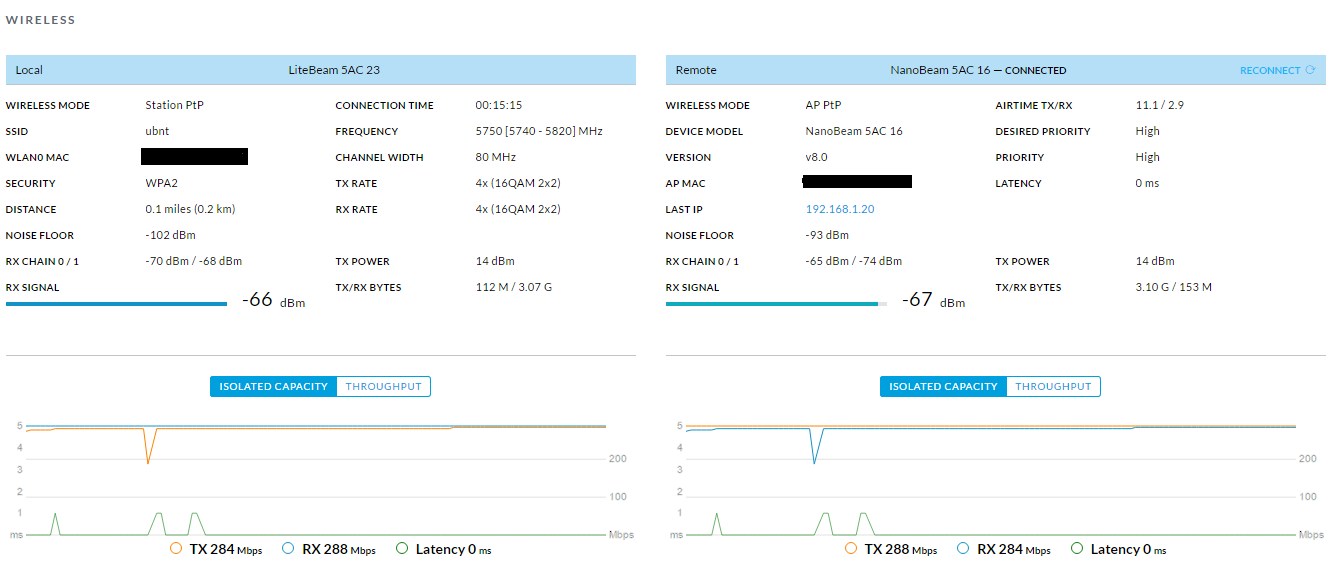
😦 I think I need to replace my point to point solution. I might have burnt out one of the radios.
 digital haven
The other day, every speedtest I tried was reporting ridiculous upload speeds. I am yet to figure out why, although it was mildy amusing at the time.
rocky badge
umm
digital haven
winged moth
"Excuse me while I upload blueray movies in a couple of seconds"
rocky badge
you have fiber?
because no docsis can do above 10gigabit 😄 except for 3.1 full duplex which is at 10gigabit up
digital haven
`
 thick minnow
Dat is an amazing upload speed
rocky badge
or is it the testing applications being stupid
rocky badge
oh
thick minnow
Lol
rocky badge
you're not getting your 40 down
and I dont think you have a 10+ gigabit NIC and home networking soluton thats 10gigabit 😄
winged moth
I wonder if some odd caching bug was causing it?
rocky badge
I had some speedtests say that my speeds were 100/200 which is incorrect
winged moth
Somehow it instantly thinks that it's uploaded the file so it's basically thinking it's just transferred the entire file in the time it took to initialize the upload connection.
rocky badge
I wish I could tether at my full Verizon speeds 😦
what happens when I tether http://beta.speedtest.net/result/6974071496.png
 winged moth
Oh god. People think the "up to" promises of so many ISPs are bad. The "up to" promises of cell carriers is absurd. Even on an uncongested tower you probably still won't see full speed.
winged moth
4G?
 winged moth
Data speeds of LTE-Advanced
LTE Advanced
Peak download 1000 Mbit/s
Peak upload 500 Mbit/s
Trying to promise 4G LTE is promising speed that they can not offer.
rocky badge
yeah LTE-A is in our area its just I'm not close to a LTE-A tower
so it chooses 4G LTE
Verizons LTE-A cities https://www.reddit.com/r/verizon/comments/50e87w/ltea_cities/

reddit
For those who are having issues navigating the verizon webpage(frontpage lol) or are just too lazy. Here are the cities Verizon has listed. LTE...
winged moth
Data speeds of LTE
LTE
Peak download 100 Mbit/s
Peak upload 50 Mbit/s
That's soemwhat more reasonable to try and offer, but you will still basically never see proper 4G LTE speeds.
rocky badge
yeah
winged moth
Actually, there's a Tims where my parents live, if you went there at like 2AM you might get full speed. They have a tower on the other side from the drive through.
rocky badge
Signal Strenth: -104dBm using LTE
winged moth
Wow.
rocky badge
lol but thats in the morning
winged moth
So that's what that ~-100DB noise floor on my point to point is.
winged moth
 rocky badge
Ubiquiti?
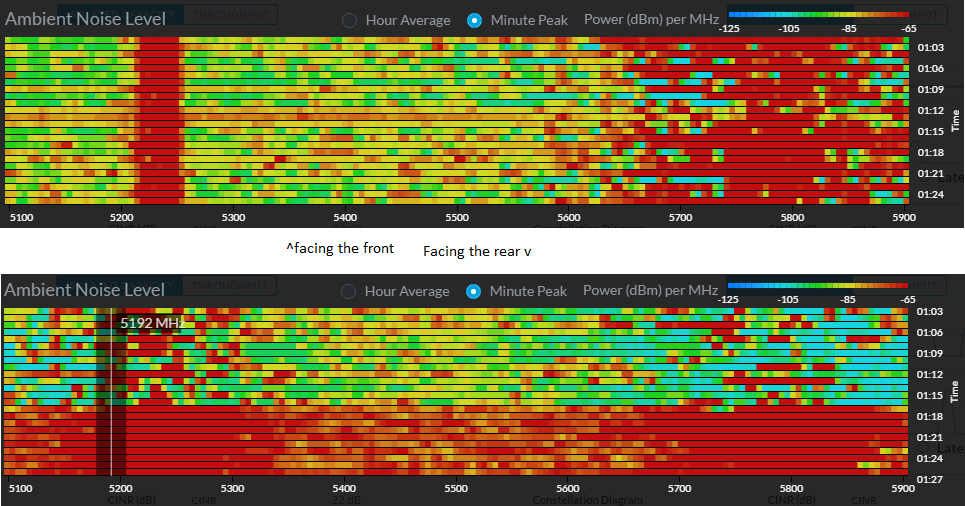 rocky badge
is that how you get internet PtP?
winged moth
Kind of. I run a point to point from upstairs to downstairs to get better internet.
rocky badge
ah
winged moth
Because I'm not allowed to punch holes for a cable.
 winged moth
That seems... wrong.
rocky badge
its very close to the rrouter though
winged moth
How high is the gain on your AP?
rocky badge
hmmm idk
winged moth
Because if the signal is that high, you might be damaging stuff.
rocky badge
all there is between the chromecast and router is a wall
winged moth
Like when I first installed my point to point. An ISP tech came in and repositioned some stuff and put a new AP basically in front one of the antennas and it burnt out in about 3 days.
winged moth
Yeah. I was wondering why I was getting kind of poor signal all of a sudden. I went upstairs and told my landlady that wireless stuff really needs to be kept out from directly in front of it.
rocky badge
lol
winged moth
I mean, I don't blame them. It looks like some access point. How are they supposed to know this thing is pumping out enough power to send a signal like 5-10 km?
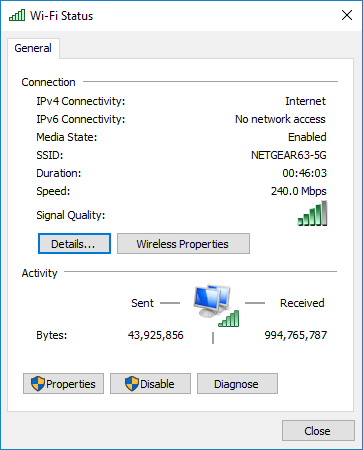 winged moth
Nice.
rocky badge
I want a higher linkspeed
rocky badge
1 device is plugged into Ethernet https://i.imgur.com/1OGDK4Y.png
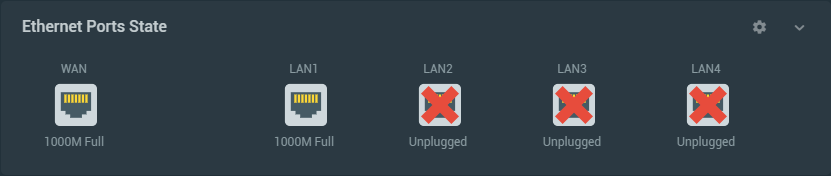
I want a ERX and some of their APs
winged moth
From what I've heard, I don't think you want to use ERX. ERL or better seems to be the suggestion.
winged moth
Apparently ERX has a limited CPU or something so if you're trying to pass gigabit it'll start to choke.
Like even between LAN ports.
rocky badge
hmm
winged moth
Although I've also heard rumors that they've fixed that making the ERX a good starter level, but I would probably just go with the ERL just to be safe.
thick minnow
This cant be normal
Internet needs cutting out
Pinged myself and got 0 percent loss
a few seconds later redid
and got 100 percent loss
same story over and over and over again
agile basin

thick minnow
It may take me a min to answer
when it has a cutout show
My messages dont send till its over
 swift cairn
That isn't right
 deft bronze
its wrong
swift cairn
Could be your router
thick minnow
lol
swift cairn
And then try resetting it
thick minnow
Totally gonna work
swift cairn
Then I recommend hanging up on useless tech support
thick minnow
tech support never works lol
thick minnow
idk
swift cairn
We all know rgb add 150% better stability to your internet
deft bronze
Throw It Under A Steam Roller
swift cairn
What tech support or the router?
thick minnow
I might monitor the internet on my phone see if it happens on there
swift cairn
Or both
deft bronze
Both
thick minnow
I'll have to get my wifi admin pass
oof
I might have it saved somewhere
Lot more than what it says are connected
swift cairn
It says your network is not connected to the internet so contact your isp
I've had that before
 heavy meteor
So is Ubiquiti good?
agile basin
yes
heavy meteor
Is WIPS worth it on a home network?
rocky badge
they protect against rouge APs. So unless someone can hook an AP outside your house I wouldnt think I would get one.
heavy meteor
Fair enough
 slow moth
sooo i have a slight issue
i need to set up my ethernet for a wireless printer to my pc yet i need to keep my wifi network
rocky badge
So you need to keep WiFi on the printer yet connect it to a PC via USB? Why can't the PC use USB to the printer? @slow moth
slow moth
not my printer for my room soooo
and no i need to keep my pc on wifi
i want to use the printer over a access point wifi
rocky badge
is your PC on Ethernet or WiFi? Because if its on WiFi you should be able to print to it.
slow moth
my pc is on wifi connected to a phone providing a mobile hotspot for my internet
also knowen as the wifi down under
rocky badge
what printer do you have?
winged moth
One of my radios is starting to show serious signs of giving up the ghost. I've wanted to get a proper AP too so I've ordered my new network setup.
rocky badge
rip
winged moth
Yep. Kind of annoying. Although this will be a nice upgrade.
winged moth
Shows the hardware I ordered without showing costs.
winged moth
I'm not sure. Someone else asked that and I thought I was somehow protecting information.
rocky badge
lol
winged moth
rocky badge
thats not bad
winged moth
Not terrible. But for what is basically doing what an ethernet cable could do, it's pretty damn steep.
But I'm not allowed to drill holes, so this is what I'm stuck with.
rocky badge
rip
winged moth
Gives me some interesting practice for work. And part of the cost was entirely up to me since I didn't need the AP and the POE injectors was just because of a bad experience last time.
rocky badge
so you got a poe switch instead of using the injectors?
winged moth
No. all 3 devices come with injectors. I bought a spare for each because my last bridge came with a faulty injector.
rocky badge
ah
winged moth
I might get a switch for upstairs where one of the Nanobeams and the AP will be.
rocky badge
why?
winged moth
Alternatively, I might get a pair of ERLs and a second AP that I put into bridge mode then setup RIP or something similar so I can have failover wireless.
To get rid of the additional cables.
rocky badge
ah
 buoyant gorge
hey i dunno where to post this but, what is the -c on linux?
ashen lily
huh?
rocky badge
What?
buoyant gorge
just forget this
desert moss
So i have a mikrotik router set as ap and its in the way from my house router and my pc
If i try to port foward an ip address and bind it to my pc it doesbt work
What do i need to do in the mikrotik router?
rocky badge
get a ubiquiti one 😄
you'll have to port forward both routers if both of them have their own firewalls but if ones AP mode port forwarding should only have to be done on the router
heavy meteor
I'm getting an ubiquiti network in Feb.
rocky badge
yay, I want to get Ubiquiti
heavy meteor
I am thinking about running cat6 throughout my condo, but I'm not sure about hiding the wires
I can't run through the walls, I don't think.
rocky badge
I wanna relocate our modem and such to my room
 high anchor
Speaking of routers, I had to do a funny thing for a ESXi host (VM hypervisor) on a dedicated server, I had to create a pfSense VM with a fail over IP to provide internet and IPs to each of my VMs (because ESXi doesn't include NAT).
It was a funny but really complicated (and nearly undocumented) thing to setup.
And I had to also do some funny stuff to allow my VMs guests to have IPv6
high anchor
Spoiler it's hard and painful stuff to do but it's funny to see those "under the hood" stuff and it's a joy when a VM finally can connect to the internet ^^
agile basin
Lol
Might do it if/when i get a server
Kinda scared it might leak into my responsibilities...
high anchor
Funny thing, you have to get an 2nd IPv4 for your server, one for ESXi host and one for pfSense
BUT
You could do it with only one IPv4 BUT it's a risky and hard thing to setup, you have to PERFECTLY setup your pfSense router, then set your IPv4 on the pfSense VM instead of your ESXi host and pray for your VM to show up then setup a VPN like setup to access to your ESXi host.
Definetly the funniest thing to do (spoiler, it's a lie)
high anchor
I wanted to try it but I didn't wanted to reinstall for the 3rd time my ESXi host ^^ (I've mistaken my virtual NIC with the default one, when I wanted to delete it, my host lost connection, I had to reinstall...)
agile basin
rip
high anchor
Hopefully I didn't have anything important on this server at the moment
agile basin
lol
agile basin
I believe you can yes
high anchor
@heavy meteor But, even the ssh wasn't showing (and I didn't have "hardware" or KVM access to the server)
heavy meteor
It's been a while since I was in the console of an esx host
ahhhhhhhhhhh
That makes a difference
high anchor
Yeah, dedicated server stuff ^^
heavy meteor
wait, if it's a dedi they often have a java based solution to see the "console"
maybe not java, but something.
high anchor
I could have asked a KVM over IP but it's a paid option for something I would have needed for 1-2hrs, and that costs more than a failover IP that saves me so much trouble to setup everything
high anchor
KVM IP prices on SoYouStart (OVH subsidiary) (one or seven days)
Then the IP cost on the same provider (one time fee, there is a monthly fee when you are over 16 IPs on one host tho)
fathom hound
I've used SYS before, they're pretty decent. Wasn't hard to set up a second IP, never used KVM with it thought
high anchor
SYS is very good when you need "small" servers (but "bigger" than KS ones) at good price, never had issues with them (well... only once, when RBX datacenter completly lost connection for an hour due to routers that, by themselves, lost their config from a bug)
I have a SYS-SSD-1-16 (nearly the same as the SYS-SAT-1-16, https://www.soyoustart.com/us/offers/1801sys02.xml, but with 2x300GB SSD) a powerful machine that I used for some load testing on some web apps and now as a ESXi host ^^
fathom hound
I've only used both OVH and SYS GAME servers, I can say I had a better experience with the SYS server by a fair amount
high anchor
I also have 2 dedicated server from KS and both never failed me, I only went to SYS for a dedicated server because I wanted some SSDs to test some projects.
fathom hound
I considered going with KS, but they didn't have anything with a fast enough CPU for what I need
I wish OVH would pass some of their older game servers down from SYS to KS, I know they had stuff below an i7 4790K and 16GB of RAM
high anchor
Yeah, that's the major issue for KS servers is CPUs, hopefully I only needed some i5 (small servers to host a TeamSpeak server and from time to time little game servers like Minecraft, CSGO or Team Fortress, and a personnal Plex server for one of them)
fathom hound
I had been using mine for a modded Minecraft server, so a fast CPU was a pretty high priority
Ended up downsizing to shared hosting since it's a bit cheaper, but I'm stressing the E3-1231 v3 that it's running on pretty badly
high anchor
I've done multiple FTB/highly modded MC servers (with at least +200 mods) and the only thing that was slowing us down was the HDD i/o when we were generating too fast or too much the map.
fathom hound
I'm sure that was on a more recent version of MC though
agile basin
My main problem was RAM, but i was attempting to run the server AND run the game on the same machine
fathom hound
I'm running a Tekkit Classic server (MC 1.2.5), so optimization is pretty weak
high anchor
But the CPU never was a bottleneck, and yeah, the minimum version we used was 1.6.4 I think
fathom hound
Yeah, newer versions like that are usually a bit better with threading
high anchor
Maybe once was a 1.4.x (a old and huge FTB modpack)
fathom hound
I've easily pushed CPU usage over 100% with 10-20 people on
high anchor
We definetly need a #server channel, to speak only about server stuff ^^
high anchor
I'd definetly share some of my random server experiments, so much little stories about me trying some new stuff on VMs or dedicated servers ^^
(see the pfSense thing on a ESXi host)
fathom hound
Soon I'll be experimenting with installing Ubuntu or some other flavor of Linux on a 2009 Mac Pro
Might try it on the PowerMac G5 that I have laying around too
high anchor
Should be easy on the 2009 Mac Pro, the only thing tho would be the GPU, Linux have a lot of issues for those kind of stuff, but they also work a lot on Apple hardware so, you should be good.
The only time I tried to install Linux on some PPC machines (a PowerBook G4 17" early 03' and a PowerMac G5 early 05') it was a horrible mess, burning a lot of PPC distros and try to install/boot them...
Funny experiment tho. But I ended still using Mac OSX 10.5 (the best version of Mac IMO)
high anchor
Mine still have 2 250GB HDD, which I'm using to store some older stuff and sometime power it up. Still working great !
My PowerBook G4 is so slow tho, but it have a WD Blue 250GB drive, I've replaced it in 2014 i think, when I was using it as a daily driver, since I didn't had anything better, and I stopped using it only 2-3 years ago as a web dev laptop ^^
I was a poor student but impassioned by the web dev at this time ^^
But this PowerBook was working and that's what I needed at that time ! ^^
winged moth
Oh man. Just took a look at the internet packages available from my ISP.
Up to 950 Mbps download and 250 Mbps upload speeds```
Oh god. I want.Welcome to Canada.
agile basin
rip
winged moth
That's actually a really good deal.
And the upload isn't terrible. The most annoying thing is that if I could get my landlady to upgrade to that, I couldn't use it since I cap out around 300Mb/s.
Stuck on wireless.
agile basin
oh rip
winged moth
Oh. Just pictured somehow teaming multiple wireless radios to get gigabit wirelessly.
agile basin
Don't think that would work, sadly
agile basin
Nope
rocky badge
Thanks satalite internet
agile basin
*satellite
winged moth
And It's not like teaming wireless NICs. It would be teaming these things.
Would need to have a pair of devices on either side to do the aggrigation.
agile basin
hmm
winged moth
And then 3 of those on either side.
Although I would run out of 2.4GHz band if I wanted to run 3.
rocky badge
I wonder if multiple devices can be a hotspot via USB to a laptop and we could get 20/20 internet
agile basin
with enough usb ports, yeah
winged moth
I mean. Satelite can do fairly high speeds. It's just terrible latency since you're talking to a device ~24000km away which then talks to a device on the earth.
rocky badge
The laptop is a latitude e7470
winged moth
Although slow and high latency. How's the connection stability?
winged moth
Are you out on a boat or something or is that your normal internet? I'm wondering how you would watch Floatplane on that kind of connection.
winged moth
Oh. so are you out there camping or that's where you live?
rocky badge
Out with a group. This is just where we're staying
winged moth
What do you mean force 3G?
rocky badge
Not connect to 4G towers and get 3G reception
winged moth
Oh, do you pay out the nose for 4G use or is there just no 4G available out there?
rocky badge
4G is very bad out here
winged moth
Hmm. It should automatically downgrade to 3G if it's available.
winged moth
Might be no 3G setup in the area.
thick minnow
why ;-;
 carmine spindle
what can you do to make the most of your internet connection if you live in an area where there is only fibre to the exchange and copper cabling from the exchange to your home?
My internet connection is getting unworkable. Any upgrade to a fibre connection would still be deemed below par to countries with true fibre connections however what can be done to get the optimum performance out of your connection?
I know there are powerline adapters but what setup works best
vagrant heath
Don't use powerline. If your connection is shit. DON'T USE WIFI.
Unless you 110% have to.
Wire everything.
thick minnow
^
rocky badge
I use WiFi and I get the same speeds as if I was on Ethernet
Maybe a loss of 1mbit and adds around 2ms but it's small enough not to matter
vagrant heath
Yeah but most shit uses 2.4 and 5.0 and does not let you choose. so 
rocky badge
Lol all of our devices are on the 5GHz
lean pollen
I have WiFi on my computer because it would be a pain in the ass to put a cable there. I have a good WiFi card tho. Get the full speed and it ads less than 1ms.
 keen sorrel
@lean pollen I tried using just 5Ghz and even then it was just too little bandwidth for my preference for moving files between my rig and my NAS ended up figuring out how to run a cable through my attic using a drill and caulk because an good old cat 5e cable was so much better.
winged moth
With AC 5Ghz is where a majority of the speed comes from. If you are the only client and you've got a Mimo 3X3 AP and a NIC capable of using that then you can get above gigabit peak speeds.
lean pollen
@keen sorrel my WiFi card is a good WiFi card. I don't really transfer much files between computers in the house tho, I do not have NAS. But I did it once and found out that my router somehow is slower at transfering between two computers and from one computer to the internet.
I would probably get a NAS sometime in the future tho, but then I would probably get a small swiitch to Buypass The router sort of.
Putting ethernet cable down would where I currently have my setup to the router would require it to go through the floor and 3 rooms or something, go around the house on the outside.
carmine spindle
Could be expensive then. Our house has no Ethernet points in any room. No idea how much it would cost to have a couple put in. What benefit would there be over power line adapters? less interference and perhaps slightly better condition copper wiring?
winged moth
Powerline is pretty crap unless it's all on the same circuit.
Depending on the speed you want to get. There are some point to point wireless options. Like you could get a 900MHz point to point. It's limited to about 150Mb/s but it'll go through walls with no issues. You could kind of make hubs in your house using that. Have a point to point setup where your internet comes in, and then have the other side where your computer is and then try and centralize around those two points. It's possible to do point to multipoint, but then you would want to have the point of entry to your house be in a corner or something to allow the easiest coverage of your entire house.
Alternatively, get a high end access point like the Ubiquiti UAP series. You could also look at Meraki, and I think Microtik has a good line of access points.
 warped aurora
Hello LTT gods. I'm currently using the original modem router I got from TalkTalk. I'm looking to upgrade to a standalone netgear modem (Need to buy) plugged into an airport extreme (Already have). Would this work or would I need a router as well? (For a family of 5, with Echo's and smart lights, as well as PCs and smartphones each)
rocky badge
@warped aurora you will not need a router. The airport can plug into the Netgear modem.
warped aurora
Ok, thank you!
rocky badge
😀
winged moth
Don't try to push the Airport too hard. They have serious overheating issues.
thick minnow
networking isn't really my thing so i decided to ask the gurus here, is there an easy way to get networked storage done directly, cutting out the need to have it on, well, a network, all of my mass storage is on my server and in the space of the next few months im moving into a house share where we only have wifi and i don't really want to have to access my files over wifi as i like them hot and fast, is there a way i could use a 10gb fiber/ethernet card in both and do it closed so to speak?
 turbid frigate
@thick minnow https://www.youtube.com/watch?v=YJdopedfh9E

So, some of you didn't like my "Improve your Network speed for $100" video... Maybe this is a bit more up your alley! TunnelBear message: TunnelBear is the e...
agile basin
SFP isn't THAT much
agile basin
or RJ45 w/ 10GbE
turbid frigate
^
although SFP NICS are cheaper when it comes to 10gbe
nvm, forgot about ASUS's red one
thick minnow
Thanks, I remember Linus doing something about the this subject but I forgot the name of the video xD
winged moth
Something you could do is get a switch and an access point capable of being put into bridge mode. Then you connect the access point to the wifi and plug it into the switch. You connect your computer/s and your server to the switch and then you have access to the network/internet and wired access to your server. Although this will share your server out with the rest of the network.
It's pretty simple to put an access point into bridge mode. It's in the same place as where you would configure the wireless options normally and you should be given an option to set it to bridge mode. From there everything would basically be plug and play.
@thick minnow ^^^
Also, it kind of depends on why you're stuck on wireless. I'm stuck on wireless where I live because I can't punch holes for a cable, so I'm doing the step up from what I described and I'm using a commercial point to point wireless solution. It provides an extemely stable high speed and fairly low latency connection for my computer and server. Although this option is more expensive it works very well.
However that option will require some research and a fair learning curve if you haven't do much with networking before.
desert moss
meanwhile mobile data
thick minnow
Lolz
desert moss
thick minnow
 sage arch
the title said something about restricting someones axxess before firing them
thick minnow
Lol
sage arch
https://www.reddit.com/r/techsupportgore/comments/7s4wzm/this_is_why_you_should_restrict_access_to_the/ top post on r/techsupportgore
reddit
5058 points and 255 comments so far on reddit
winged moth
It's been posted a few dozen times. I don't think we know the real cause.
agile basin

turbid frigate
@thick minnow I must applaud you on your username and profile picture
thick minnow
lol
 gentle spire
https://www.netlimiter.com/ <-- is this legit or snake oil for stuff you can do with windows already?
looked like something interesting from a home network management tool
turbid frigate
so... its windows firewall basically?
 pseudo ermine
oi who here would spend $1600 on a dell r510?
pseudo ermine
it has 24tb storage, 32gb ram 2xx5672
and its 1600 with shipping and tax
so base price $1399
pseudo ermine
im thinking of using it for a freenas server
pseudo ermine
it would be 18tb of usable if in raid z
agile basin
Raid Z?
pseudo ermine
it might be cheaper tho then buying a new drive everytime i need space in my current freenas server
agile basin
Yeah, that's true
pseudo ermine
useing 3tb iron wolfs
agile basin
I have a couple 8TB drives i use when rendering that i got on sale
But they're 3.5", and the r710 chassis i'm getting uses 2.5" 😦
pseudo ermine
rip
pseudo ermine
if 2.5" prices weren't bad id get a 24bay supermicro
pseudo ermine
plus I kinda have the money but i work sh!t hour
hours*
so my bank account wouldbe in shambles for a while
thick minnow
i am thinking to use freenas os for storage maybe
agile basin
it's pretty good tbh
pseudo ermine
yo seller just message back the drives are seagate sasa
agile basin
lol
thick minnow
seagate sas ....
pseudo ermine
thats all he said...
agile basin
interesting
pseudo ermine
i aksed yesterday what model the drives were
agile basin
Ahh ok
agile basin
Do you have enough money left over incase something breaks?
pseudo ermine
yes
agile basin
What if your car or something dies?
agile basin
i am not a financial analyst but i'd say do what you think is right
pseudo ermine
imma do it
agile basin
lol
pseudo ermine
any other comments b4 my bank account kills me?
turbid frigate
How to tell if you can afford something: 1). Convert the price tag into hours depending on your wage, 2). Is it worth spending that amount of your time for?
thick minnow
need help for hacking your bank account 😛
turbid frigate
@thick minnow Step 1). Make fraud site, Step 2). advertise it
thick minnow
make a website when people join you ean bitcoin 😃
pseudo ermine
make another million pixle site
agile basin
lol
thick minnow
i removed it
agile basin
So.... POE is pretty gr8 m8
turbid frigate
I can help you out because of my drug- totally legal medicine firm in Cuba gives me some experience with making totally-real money
nothingtoseehere
agile basin
something to see here @ mod
turbid frigate
Closes laptop and runs out of public library before FBI can find me
turbid frigate
Totally nothing learned from sites based off ancient trade routes
agile basin
lol
thick minnow
@agile basin it is/ is it @ Mod
agile basin
or... is it???
thick minnow

turbid frigate
@thick minnow Please revert your profile picture, high elliot is creepy elliot and I feel his eyes are staring into my soul
agile basin
Looks fine to me tbh
agile basin
then get banned
thick minnow
for what
agile basin
reasons
thick minnow
🤦
agile basin

thick minnow
😒
agile basin

thick minnow
pay for emote nahh
thick minnow

 turbid frigate
the secret is he is linus's sexual escape. In return he gets stuff as linus gets the discord gods to give him blessings
agile basin
I can neither confirm nor deny that accusation
turbid frigate
Sorry Ivonne
agile basin
*Yvonne
 thick minnow
chiness version of apple
agile basin
Interesting 
thick minnow
Yesterday a known security vulnerability [CVE-2018-1000006] affecting Windows users of Electron based programs (like discord) was made public.
Electron itself has been patched, and some apps based on it (e.g. skype, slack) have already been patched. AFAIK, Discord has not yet been patched, nor have they even admitted that they suffer from it.
Scope of vulnerability: Windows (not linux or macOS) users who have installed the discord desktop app can click a crafted URL (perhaps obfuscated via e.g. tinyurl) which can cause download and execution of malicious code on their computer.
Scope of damage: Malicious code could in turn read user data and encrypt it (wannacry style) or farm passwords/bank-details/credit-card or other personal data that is not encrypted at rest and send them to other parties.
Defence: Do not click on any untrusted links. Do not allow webpages to open the discord desktop app.
Fix: There is no fix at this time. Presumably discord will incorporate an updated client in time.
Since this is electron based, any other electron app may also be affected. A list of all known electron-based apps are available here: https://electronjs.org/apps - note this is a list of all apps, not a list of vulnerable apps.
Apps Built on Electron
fathom hound
I assume it also has no effect on iOS or Android devices?
 placid rune
only Windows
winged moth
What I'm reading from that is that there might be malicious sites that you can get linked to from Discord. So as usual, don't click on suspicious URLs that someone linked you.
How is this different for anything else?
vagrant heath
COMCAST WHY. The default DHCP lease time on my Comcast modem/router was 3 years............
thick minnow
Rip
rocky badge
rip
I have to change my routers mac address then reboot both router and modem to get a new IP hopefully.
thick minnow
Mine is leased until i get a new modem/router combo shit thingy
rocky badge
rip
rocky badge
rip rip rip
agile basin
Mine is 120 minutes
 valid mango
Are ISP Provided Routers bad?
rocky badge
Depends but usually yes
sage arch
mostly just mediocre
rocky badge
What router is it?
valid mango
I believe it is BT Infinity 2
agile basin
Looks ehh
valid mango
Main problem is local cabinet
A new one has been built, just waiting for it to be installed
agile basin
right to an edgerouter infinity
rocky badge
should I use 802.11 X authenication?
rocky badge
well im gonna do it anyways
desert moss
Has anyone heard of mikrotik?

MikroTik is a Latvian company which was founded in 1996 to develop routers and wireless ISP systems. MikroTik now provides hardware and software for Internet connectivity in most of the countries around the world.
Its a latvian company
winged moth
I've heard they're decent.
No personal experience so I can't say much more than that but people with homelabs are pretty fond of them if they don't want to go with used Cisco devices.
desert moss
winged moth

Need to do a little more tweaking. But I'm pretty pleased with this replacement wireless bridge setup.
winged moth

Told them to stop pushing for a connection protocol that they didn't have a stable enough connection for. Seems to have killed some of the retransmit allowing better transfer.
 rugged geyser
i have gigabit at my house. 
 compact jackal
I have 4mbps internet (megabits no megabytes) :(
rocky badge
I get 115/5 with 22ms ping at home.
 unique island
My average download is around 400-500kBps and sometimes it goes to 1Mbps
desert moss
Same
lean pollen
I got 80/15 with usually like 6 ms ping
 solar bolt
Hi can anyone help me figure out why i cant get any website to ping my ip address? i dont get it...
i covered my ipaddress with blue
i tried this on multiple websites all of them have 100% packet loss
what did i do wrong?
heavy meteor
Is your router dropping icmp ping requests?
solar bolt
i have a edgerouter x. how do i check this? internet is working fine.. i just wanted to monitor uptime.
rocky badge
@solar bolt if you still haven't gotten it to work. Try this https://community.ubnt.com/t5/EdgeMAX/EdgeRouter-GUI-Tutorial-Allow-ICMP-ping/td-p/1495130

Here is another quick video tutorial for those of you who want to use the GUI to enable ICMP on one of your EdgeRouter WAN interfaces. This is quick and dirty, video link below instructions: Step 1: Log into your EdgeRouter. Step 2: Click the Firewall/NAT tab. Step 3: Click the Firewall Policies ...
winged moth
Right. I hate wireless. I now have someone sending frequent deauth packets to the station of my point to point setup.
rocky badge
lol rip
winged moth
Luckily, if I can track them down and log the traffic, I could report them since stuff like that is illegal.
Would be really nice to track them down and kneecap them, but that's rather frowned upon.
rocky badge
lol
solar bolt
@rocky badge thanks that worked!
rocky badge
:)
heavy meteor
😃
rocky badge
good luck Windows https://ryois.me/i/a77cb243b.png
 agile basin
What are you connecting to?
rocky badge
I have remote access services and it automatically added this via a gpo
high anchor
https://9gag.com/gag/aDx3b7x
Sadly OP didn't told the actual uptime at shutdown of this server :/
 rocky badge
😦
agile basin
😭
winged moth
Yeah, we had to take down a server with ~4000 days of uptime about 8 months back. It was dissapointing.
agile basin
oh no
winged moth
Yeah. It was on a building scale UPS so it was plugged into the wall and we had no reasonable way to move it from the site without powering it off. At which point we retired it since it had been out of prod for like 3 or 4 years at that point and was just kept running for the uptime counter.
agile basin
i cri everytime
rocky badge
thats good
 tough dune
10 years
winged moth
Your name pretty much explains it.
agile basin
lol
tough dune
poor fan
agile basin
macOS is clearly superior
tough dune
LOL
rocky badge
my laptop has been up for 1 day because I needed to install AD DS 😦
tough dune
macos..................
fathom hound
Lolnope
agile basin
lol
tough dune
just no
fathom hound
MacOS, more like AssOS
agile basin
macOS finder = trash
winged moth
Why did you install a directory on your laptop?
agile basin
why not
rocky badge
because
fathom hound
Gonna install Ubuntu on my Mac Pro pretty soon, can't stand MacOS
rocky badge
I later uninstalled it 😄
agile basin
want an 8.1 iso?
fathom hound
nah, already have a few
 agile basin
but.... do you have Windows Vista Business 32 bit?
rocky badge
yes
fathom hound
I'm set on windows disks lol
agile basin
i don't see windows vista business 32 bit smh
rocky badge
 fathom hound
I need to learn more sharepoint and AD shit
rocky badge
lol
fathom hound
All I can really do with it right now is reset the passwords of dumbasses that can't remember them even if their lives depended on it
fathom hound
That's literally the only AD stuff my job requres (Well, that and unlocking accounts, and sometimes moving computers around)
rocky badge
its there on open https://ryois.me/i/39da33b1b.png
 rocky badge
or Azure portal its easy too.
oh
this is easy too https://ryois.me/i/9960035dc.png

 fathom hound
Meanwhile I'm running a web server on a minecraft server because I was too lazy to find and setup a legit web server
agile basin
ya know, ive never extensively used win 8.1
rocky badge
wow
fathom hound
All it does is hosts this page xD
rocky badge
I use IIS for web and Multicraft in a Ubuntu VM
agile basin
Oh lol ^^
fathom hound
I just wanted to be able to track that shit on my phone, laptop, and desktop xD
and it auto refreshes every 15 or 30 seconds, I forget what I set it to
rocky badge
can you change how many users can rdp on 8.1 pro?
should my VMs have a private 10 gigabit connection?
high anchor
It's always useful
rocky badge
I set up the Win 8.1 pro now setting up the ubuntu one
agile basin
why not 100gig?
rocky badge
cuz
high anchor
Also, (on VMWare hosts) VMXNET 10 Gb interfaces have less latency
rocky badge
 high anchor
(Thx pfSense doc)
fathom hound
O.o
rocky badge
 fathom hound
How'd ya get a 10Gb/s connection with the VM?

 high anchor
I just found out that all my dedicated server are at the same place but not at the same datacenter, none of them is in the same, and I find it quite funny
thick minnow
Lol
 foggy sand
Can't wait until I get my new routers tbh
But of course Newegg doesn't ship out over the weekend so I have to wait until Monday for the shipping confirmation
 peak walrus
What IS Active Directory?
Seen it so much but can never totally grasp what it actually is
rocky badge
I dont know how to really explain what AD is but I do know what it does.
Active Directory (AD) is a directory service that Microsoft developed for Windows domain networks. It is included in most Windows Server operating systems as a set of processes and services. Initially, Active Directory was only in charge of centr...
 quiet flicker

 quiet flicker
quiet flicker
quiet flicker
it used to have cortana completly disabled
rocky badge
and did you use snipping tool?
quiet flicker
yes
 quiet flicker
yah i bought it used, it had a odd amount of ram in it and i just through in some spare sticks, right now im using it as my main pc, but over the next few monthes it is going to replace my core 2 duo server
rocky badge
ah
my AD server is a dell inspiron with an i5 and my laptop is from asus and has a i7
quiet flicker
im using a dell optiplex with a i5 2400 for my pfsnese router
rocky badge
I'm creating a VM of Server 2016 Essentials
quiet flicker
i put a 1050ti in my dual xeon box, but dosent fix the best..
 rocky badge
WHY ON FIRST SETUP YOU CANNOT CONNECT TO A DOMAIN??!! caps filter caps filter
quiet flicker
because microsoft
rocky badge
I have to make an administator password then join the domain
https://ryois.me/i/5ab99c3d2.png oh well rebooted now
 rocky badge
Im running 2 physical and one virtual
thick minnow
😮
rocky badge
No wonder why I couldn't access my servers
That's good I can't though
@thick minnow why you use that emoji
lilac zodiac
So i am pretty novice when it comes to linking rack switches, and I have this problem where the DHCP server only works correcly on the primary switch, and for the secondary switch only IPv6 works.
Im using 2 Ubiquiti ES-48-500W switches connected by an SFP+ 10gigabit copper hotswappable 0.5m cable, and the primary switch has both wan and lan side of the pfsense plugged in along with the WAN fiber. I think the problem is related to me not knowing how to properly link the two switches so that the Pfsense DHCP server routes both switches.
Any Ideas what might be wrong?
sorry: the Primary is the problem secondary is fine
high anchor
Be sure that your switches have their DHCP servers disabled (if they have one)
That could be your issue
high anchor
I am not familliar with Ubiquiti hardware but do they have this thing about "enabling" an interface (like cisco routers) ?
lilac zodiac
no idea
high anchor
I just re-read everything and that would makes no sense if IPv6 is working...
Did you tried to manually set your IP and gateway on a client to see if IPv4 is working ?
lilac zodiac
yes it doesnt
The wierd thing is i cant even connect to the switch guis from the primary switch
high anchor
Yeah so there is some kind of issue with routing (from your switch or pfsense) or it could be some kind of interface issue, maybe pfsense doesn't listen to your sfp link
You can try to swap cables on your pfsense router and see if it switches which switch is working
lilac zodiac
it does, yesterday it was the other way around
rocky badge
Are you using SFP+ 1 to go from router or the other switch and SFP+ 2 to go to another switch?
rocky badge
Ok
Because I was like, there's only one sfp+ link up
@lilac zodiac theres a unofficial ubiquit discord server they could probably answer/help you. I can send you the invite if you want it.
lilac zodiac
Yes please 😃
rocky badge
Let me get an invite.
rocky badge
Hmm
So is the bottom switch giving ips?
Let me reword that...
Ae the clients on the bottom switch getting an IP address from the dhcp server?
lilac zodiac
yup
rocky badge
Ok
rocky badge
Are they going directly to wan or going to the router?
Can the clients on the top switch access pfsense?
rocky badge
But internal?
rocky badge
Then the ones on the top are going directly to wan I would assume...
And manually setting one doesn't work?
rocky badge
Could you put the router between your isp and the top es48?
lilac zodiac
I even set the linked switches as trunk Untagged
rocky badge
Hmm
lilac zodiac
I am not sure if I have to set some kind of vlan for the PFsense. but in regards to the switch between, its a difficult one.
I do have a switch that could run between them with an SFP module, but I dont know if it lost its settings after i removed it along with the old switches
rocky badge
Try it
lilac zodiac
Why could it work though?
rocky badge
Idk but I would connect the top switch to that switch along with the pfsense box
lilac zodiac
why though?
lilac zodiac
One other thing though the primary switch seems to attempt to subnet and provide 2 connections when plugged into windows.
rocky badge
I've never played with edgeswitches before and sadly ubiquit doesn't have a demo like they do with unifi so I couldn't play around with it.
lilac zodiac
thanks for your effort though 😃
rocky badge
Sorry 😦 Hopefully you'll get in the ubiquit server and ask them
lilac zodiac
I think it will take a bit of time, though they dont seem to respond. But i have 2 guys helping me with the upgrades. They are just as novice, but 3 brains are still better than 1
 slow umbra
 toxic quartz
@slow umbra go outside and play?
ashen lily
Smh, this is the ltt discord, do you really think anyone here plays outside?
 frail igloo
LOL
lilac zodiac
@rocky badge I managed to figure out what was wrong with the IPv4! It turns out that i needed to split pfsense' 2 interfaces LAN and WAN into 2 different VLANs. So that the WAN Fiber linked in with ONLY the WAN Ethernet to pfsense, and trunking between the switches with tags. This way the Wan can be linked together without messing arround with the DHCP from the LAN side, effectively making 2 connections run with conflicting DHCP services. In other words I had to Isolate the Fiber WAN and Pfsense Ethernet WAN.
lilac zodiac
Remember you told me to put the old switch in? That didnt work, and I started to think about why that could be. During a game of overwatch someone mentioned isolation, which got me thinking that it might be the VLAN anyway, as i might have tried the wrong thing. So i found an old video clip on my phone where i had recorded the old setup, and by getting incontact with the old switch, i managed to reverse engineer that the wan side had been isolated. So i thought this might be it, I went back into the switches created a WAN VLAN, and set it to include the WAN ethernet and the Fiber, and on the default to exclude the 2 then i fixed the trunk, and the DHCP started to send out a bunch of leases. I called my assistant whom quickly replied: "I think you did it!" After a bit of testing i could not replicate the error. Im 99% sure it fixed the issue.
rocky badge
Ah, ok 😄
lilac zodiac
The reason why IPv6 worked im sure has to do with the fact that the pfSense does not do DHCPv6 it only relays IPv6 from the ISP, which means it only had 1 ipv6 dhcp connected.
rocky badge
I don't do ipv6
Well, all of my windows machines don't use ipv6. Everything else is going through a 6to4 tunnel
lilac zodiac
in principle they are the same... an adress for your mechines, but they are also very different, and im not 100% sure about how it all works, but since the bitrange is so much higher there are ipv6 adresses for everyone, so subnetting and local dhcp is unnessecary. Therefor the solution for us is to use passthrough.
winged moth
I know that 150Mb/s download isn't all that impressive, but now that I can actually use it, seeing it cap out makes me feel like this.
 rocky badge
Lol
To some 150Mb/s is impressive to others it's not.
Just depends on where you live and what you can get.
winged moth
Yeah. Depending on time of day I'll post here about having 150Mb/s internet and some people will respond with "What? Why not more?" and at other times people will respond "Better than my 2.5Mb/s down.".
 subtle depot
http://www.speedtest.net/result/7009507702.png
imma just drop this here

 rare ember
impressive we went a whole weekend without someone posting a random speed test lol
agile basin
Just wait till I get home...
night night
So I got FIOS today, I can't wait to run a speedtest when I get home
supposedly 940mbps down & 880 mbps up
agile basin
it'll be close
night night
I hope I notice a difference coming from Optimum's 100/100 conenction
rocky badge
Lucky
lilac zodiac
with a ping at 3, you must have close to 0 security protocols
 lilac zodiac
Nice! I cba to pay the money for a new pci card for our router, not that it matters BASE1000T FD is our limit to Cat5e wiring anyway xD
 lilac zodiac
cheating
rocky badge
lol
lilac zodiac
However, pfSense is a nice solution for routing
rocky badge
yeah
lilac zodiac
i dont even understand 30% of its capabilities, but alone the FQDN DNS resolve is bae
rocky badge
Im just trying to get remote access working
lilac zodiac
well be carefull to use the right interface
then just give it an FQDN in the settings, and a DNS resolve alias
rocky badge
I think I am
agile basin
i momentarily forgot how confusing networking speak can sound
rocky badge
lol
lilac zodiac
I dont know how you set it up, but for us the WAN IP was like 10 different ones... i had to look it up
agile basin
I might play around with pfsense, so expect questions
 lilac zodiac
I like your thinking nobody would make algorithms for IPs that high xD
rocky badge
im not. its windows
lilac zodiac
really... ? I mean you sub it at the first byte
Or did you set the mask at 255.0.0.0?
or did windows?
rocky badge
no its /32
lilac zodiac
oh Im used to runnung /24
rocky badge
My home network is /24
agile basin
Why not use /16?
lilac zodiac
because i dont have a billion clients
agile basin
Fair point
lilac zodiac
although i was about to wonder if should go down a bit, due to modern times
not everyone uses routers so the adresses are about to be to few if everyone had 4 devices active at the same time
but then i thought to myself... nobody has 4 active devices per avg.
not when they are students in small appartments
but Ryoi§ isnt the /32 reserved?
255.255.255.255/32 is used for broadcast right?
turbid frigate
As a broadcaster, I have no clue what you are talking about. Usually we just have a storage and render server somewhere on the network with something like 172.60.32.10 as its IP
😛
 elfin socket
Also, I hear never reserve something to x.x.x.255 because thats used for overhead or error checking?
I assign my printers from 250-254
vagrant heath
.255 is the broadcast address. You can use 2-254 in a /24 (255.255.255.0)
rocky badge
I wish you could rdp into a hyper v guest os
foggy sand
Also, the higher the amount of bits a subnet mask is, the less hosts you can have
For example, if you have a /30 (255.255.255.252) mask, you can only have 4 hosts, but on a /8 (255.0.0.0) mask, you can have 16777216 hosts.
vagrant heath
Found it
foggy sand
Generally you will find that /24 (255.255.255.0) provides an adequate amount of hosts for your network
Especially a smaller one that you'd like to expand in the future
vagrant heath
And if you need anything lower then a /16 you would not be asking here
heavy meteor
Why can't you RDP into your guests?
heavy meteor
ahh, then you can, you just have the vswitch set differently 😄
I had three switches setup in hyper-v. nat, vm only and bridge
vagrant heath


 heavy meteor
is pfsense connected to your vm network and the lan?