For example two vertical stacks will always ensure you have a two column layout (two columns that are side by side on large screens, or above one another on small screens)(
@knotty quest so if I want 3 columns I have to make 3 vertical stacks to start out but in the correct order because I won’t be able to change its order later?
#frontend-archived
1 messages · Page 177 of 1
 wintry gull
 knotty quest
@wintry gull That's correct. I think there are some custom cards that allow for drag and drop (and it might be on the roadmap for the official release too)
@wintry gull so for three vertical columns I would make 3 vertical stacks combined into a single horizontal stack
 proud ibex
hi guys, looking for a bit of advice, i have a few motion sensors and door sensors and i want lovelace to display when they were last opened or when they were last detecting motion rather than the current status. does anyone know if this is possible? thanks!
 gloomy chasm
I have home assistant on my tablet which I will mount to the wall. what is the best way to get rid of the side bar on the tablet?
With side bar I mean the bar with map, tools, etc etc
 formal tide
just activate "always hide sidebar" in your device profile?
gloomy chasm
Well
haha I can't thank you enough!
then question 2:
I have all these circles entities in the top of my UI , how do I get rid of these as example: Sun, hacs , remote UI
formal tide
those are "badges" and you need to switch to a custom lovelace dashboard or edit the dashboard in raw to get rid of them
gloomy chasm
Ahh ok, well I am not a code pro
so getting a custom lovelace would be the best option I guess
got it, ty @formal tide
 split granite
@proud ibex Have a read of https://www.home-assistant.io/lovelace/entities/#secondary_info
proud ibex
@proud ibex Have a read of https://www.home-assistant.io/lovelace/entities/#secondary_info
@split granite thank you 🙂
 plush stratus
So, is there a nice "go to"-card to show Temp/Humidity/Barometric pressure in a pleasing way? 🙂
 dark dirge
Like this? https://github.com/bramkragten/weather-card
 lone hill
I use the Mini-Graph card for grpahing temp and pressure
For me, tracking it over time helps in predicting migraines (or at least explaining them)
 tame crescent
hello guys
I have made a DIY curtain controller relay board for my dooya curtains. I am using esphome as firmware and
it works great but the slider in the UI is opposite how can I change it?
yaml config is fine and also when i say google assistant to open curtains its perfect.
Only problem is the slider
 quaint barn
Has anyone had issues with Home assistant loading in the latest release. I get like half a UI and everything slowly loads in over the course of 5 minutes. I didn't have this issue with .116. I am probably going to head back to .116. I was just curious if anyone else had this issue?
 frail bridge
anyone have ideas on how to get election results on the lovelace dashboard
im bored and want to do that
 mild veldt
type: iframe
url: 'https://www.cnn.com/election/2020/results/president'
aspect_ratio: 200%
awesome thanks!
frail bridge
eek
it looks like the dark mode in HA is effecting iframe backround colors?
cant send a photo, but the cnn website is usually white, but it's black in home assistant? I cant read the text lmao
 vapid field
"Not sure where this Q belongs but was curious to what people are using for interfaces for their HA systems? ... was thinking of either making some raspberry Pi touchscreens to put on the walls or to get some cheap android tablets and putting on tabletop mounts & wall mounts ?" was advised this Chan may be best to reach out on 😀
 somber crest
Hi,
who can possibly help me? How is it possible to close all shutters at the same time with Home Assistant? i use shelly 2.5
Entities are available, but cant shut down all at the same time
 stone bolt
@somber crest you could use a scene, an automation or a script.
stone bolt
yes, there's about a dozen ways you could accomplish modifying multiple entities at the same time
 potent pecan
i'm trying to add a button-entity-row element to one of my lights in my entities card. i keep getting "Custom element doesn't exist: button-entity-row." on the card. i added it in the lovelace resources section. anything off the top of your head someone can point me at?
if it matters, i'm running everything off of the HAOS
 pine bluff
Going crazy over something that should be easy peasy! Done it all a long time ago, so likely I'm missing somthing obvious... Trying to set up a normal light group, but get:
Invalid config for [group]: value should be a string for dictionary value @ data['group']['light']['entities']. Got None. (See /config/configuration.yaml, line 13).
Line 13 is the include groups.yaml line.
From groups.yaml:
`light:
- platform: group
name: Koksobelysning
entities:- light.kokso_1
- light.kokso_2`
Can't get my head around it, spent a few hours on this already!  Any ideas?
potent pecan
i was looking at light groups about a week ago. it seemed to me like the 'groups.yaml' file was a different type of group than a light.group group. i could be way off though. related links (that are still open in my browser tabs): https://www.home-assistant.io/integrations/light.group/ and https://www.home-assistant.io/integrations/group/ also https://www.home-assistant.io/docs/configuration/splitting_configuration/
hope that helps in some way
i wonder if you add that config to the actual configuration.yaml if it will work for you
pine bluff
@potent pecan Thanks, already read those without success. According to that, it should be working.
potent pecan
understood, @pine bluff. did you try to put it into the configuration.yaml directly, though?
i'm curious if it works there
i actually decided that i didn't need the feature, so i stopped looking into it
pine bluff
i'm curious if it works there
@potent pecan Hmm seams like the yaml doesn't generate the error in configuration.yaml. Thanks for the advice, never would have guessed. So then I need to fins why the include fails instead...
potent pecan
yeah. again, i'm sure someone here much smarter than i can chime in on why, but to me, they looked to work differently
vapid field
Is they a way of making a picture-element card full screen ?
This is all I am using right now as a getting started bit - currently using a full panel width with just picture elements in there - https://hastebin.com/boheboraqi.yaml
 clever obsidian
is there any way to hide logbook and history from non admin user?
dark dirge
did you ask this earlier?
there's an outstanding request for exactly that in the forum that hasn't yet been implemented, but you can remove them from the sidebar by clicking-and-holding the "Home Assistant" title or hitting "edit" in the profile
 rain briar
type: entities
entities:
  - entity: sensor.dishwasher_remaining_program_time_2
show_header_toggle: false
name: ' '
state_color: false

Why is the entity name still displaying when I use this card type in horizontal card?
Trying to display only % complete (which i can see) however its truncated because the work "dishwas.." fills the small card
is there any way to hide logbook and history from non admin user?
@clever obsidian
I requested the same thing.. link : https://github.com/home-assistant/frontend/discussions/7461#discussioncomment-111848
 kind shellBOT
@rain briar To format your text as code, enter three backticks on the first line, press Enter for a new line, paste your code, press Enter again for another new line, and lastly three more backticks. Here's an example

Command '~format' was invoked by: RobC
dark dirge
But it doesn’t look ‘name:’ is valid there: https://www.home-assistant.io/lovelace/entities/
rain briar
Odd show_name is not working well either.
clever obsidian
@rain briar that would be great
dark dirge
I don’t see that in the docs at all
rain briar
I don’t see that in the docs at all
@dark dirge https://community.home-assistant.io/t/how-to-remove-the-name-and-state-of-an-entity-in-a-entity-filter-card/232499/5
dark dirge
That’s an entities card
rain briar
Correct that's what I'm using "type: entities" .. Or did you mean to say that's a entity filter card
dark dirge
It sounds like you’re pointing to an entity-filter card as a reason that show_name should work in an entities card
rain briar
Caught that minor detail after you posted.. my apologies.
proud ibex
hi guys, whats the best way to display a live feed of an ip camera as a card?
 viral eagle
a still image at a glance or live?
proud ibex
live if possible
viral eagle
I used to have mine live in a card, but I've since converted to using picture-glance. It updates the image every 10 sec.
proud ibex
ok that sounds good
how would you do that without having your cameras set up as entities?
viral eagle
Idk
proud ibex
no worries thanks anyway
proud ibex
thank you
proud ibex
good luck
@viral eagle got it working thank you 🙂
picture at a glance updating every 10 seconds and when u click the card it shows the live stream 🙂
 tawdry moat
is there a way to minimize (or fold out of view) a card in Lovelace? so that I could toggle with a click if I want to see it and otherwise it doesn't take up much space
here's a quick mockup of what I have in mind

 karmic tiger
You can have conditional cards. Then you'd just need to have a toggle (input_boolean or some other logic) to show/hide.
tawdry moat
right, I hadn't thought of that. and would it be possible to do it without a backend state? it would be cool if I could style it like a nice little bar similar to my mockup
karmic tiger
No sure how you'd do it natively without a backend state to support it. There may be custom cards that 'collapse' a card. I haven't seen one but I don't do much custom work on my dashboards.
Maybe start by checking out some of thomasloven's custom cards: https://github.com/thomasloven?tab=repositories
tawdry moat
yeah, his cards are legendary. there is the fold-entity-row. unfortunately it only supports the entities card though, not the map
karmic tiger
Yeah, I didn't suggest that one because your mockup suggests you want to fold an entire card.
See if someone else comes along with a suggestion 🙂
tawdry moat
yup 🙂 thanks for your help
also thanks for mentioning the word 'collapse', it's far easier to describe it like this haha
 sly tapir
Hi everyone
I'm having a problem with a timer in an automation. When I trigger it a timer is set to six hours after which I get a notification that the job is done
I created this timer in yaml, problem comes when I restart HA, timer gets cancelled. I tried creating something retrieving the "remaining" attribute of the timer before I restart in order to reset the trigger to that amount but the "remaining" attributed doesn't seem to update properly, it's been showing 6 hours for more than an hour. I also tried adding an event to google calendar since it would surive both HA restart and Node Red restarts, but I can't find an easy solution for this... is there an east way to have a timer that survives both situations in node red? Thanks in advanced
ups sorry, I'll move this to the Node Red section, my mistake
vapid field
i created a person ("that can login") for my wife. she logged in with the home assistant android app just fine. but now if i go to "people" tab, i only see myself there. if i try to recreate the same user for my wife it complains that the user already exists (when trying to set a password)
where do these passwords / users get stored? how do i remove a user that is not shown in the people view?
(i've restarted supervisor, hard refreshed the home assistant web ui, no luck. can't find anything related to persons in the yaml configs on the samba share either)
vapid field
found it. .storage hidden folder had the good stuff
 polar kelp
Make a backup before you poke anything in there. It's really easy to mess up.
 little scarab
Hi, I have an issue where history graphs are flatlining even though I can see the values have changed. ie the thermostat value is different from the current value on the graph and the last 24hrs have not changed. I'm guessing somebody has seen this before?
dark dirge
maybe your database is corrupt/broken and is not retaining state? Or the entities you're looking at have their state excluded from the recorder:?
little scarab
I was just looking online and I can also see that the state history is not showing either
That points to a corrupt db
I guess
 honest ridge
Hello, I would like to put N cards in lovelace pointing to the same script, each one passing a different value for a variable in the script. Is it possible? In the doc I just see it possible when calling a script in an automation
dark dirge
it doesn't matter how scripts are called
variables passed to scripts go in the data: portion, so should work the same way from Lovelace
 proven tree
Maybe a stupid question, but I notice my HA has my phone listed as an Entity...I never added it...did it discover this because I have the Home Assistant App on my Android device? Or else how does it know?
proven tree
Kick Ass, I am gonna go put that app on my kids and wife's phone so I can track them...lol
honest ridge
@dark dirge so if I have ```type: entities
entities:
- script.1604525546541``` I just need to add a data behind?
dark dirge
I was thinking of "tap_action", really
honest ridge
right now I'm creating the card 100% via UI
if I edit it as YAML I get that
I'll check the tap_action thing
dark dirge
entities have a tap_action: https://www.home-assistant.io/lovelace/entities/#tap_action
and then that takes a service: and service_data: block
honest ridge
ok...and I can call a script just like a service?
dark dirge
yes
honest ridge
ok let's try that
honest ridge
oook, I think I was mislead by the autogenerated card for a script. If I start from a generic button I get the tap_action
@dark dirge thanks a lot! Just achieved what I wanted!
 paper shuttle
Quick question if I’m using the kiosk card to make some dashboards fully kiosk for a tablet how do I temporarily disable it so I can edit the cards on it or add new ones?
frail bridge
Is there a way to center the title on a card?
mild veldt
@frail bridge probably with card-mod
 faint echo
Would anyone know if there is a way to automate switching views. I was looking for a service maybe that could do it but didn't see anything. Wondering if anyone has done this.
frail bridge
I also need a way to have a drop down menu to select things?
I was using fold-entity-row but you need an entity as the title
and also, is there a way to hide the state in a entity?
show_state doesn't seem to work on a switch
or change a state text to a button
 latent bramble
Hi, I'm trying to update the input_select based on the button and not working, https://pastebin.com/xnuvy0E1
frail bridge
any way to open a lovelace link in the same tab?
latent bramble
so it be like this? , still not good
service:
              domain: input_select
              action: select_option
              service_data:
                entity_id: input_select.fan_speed
                option: one
the "domain" and "action" tags come from the UI editor, but hopefully they translate into a service of input_select.select_option. If you actually have an option named exactly "one", then I would expect it to work
It could just be that that particular syntax isn't allow there, and you actually want this:
      tap_action:
        action: call-service
        service: input_select.select_option
        service_data:
          entity_id: input_select.fan_speed
          option: one
that "service:" just hanging out there is probably causing problems
 mossy timber
So I have a bunch of mqtt sensors defined, coming in from Zigbee2Mqtt ... why would those get marked as 'unavailable' in lovelace?
latent bramble
thanks @dark dirge that did work but is it possible to update the colour of the button by automation?
latent bramble
Hi there, how come my Fan does not have a white background, how do I fix that?
https://paste.pics/c5ebce66e7bbe06d6f0dfd74f8677980
and the code is
https://pastebin.com/FHAK9yG9
 tired wind
Hello! Is this the right place to ask for help installing frontend components with hacs for lovelace?
polar kelp
Here or the hacs discord.
tired wind
Ok.
I installed a plugin with hacs (vertical-stack-in-card) but, when I try to use it in lovelace it says component does not exist. Do I need to do anything else besides installing it through hacs?
 sour coral
How can you use icons from places other than material designs? For example I found this icon that I’d like to use in Lovelace: https://iconify.design/icon-sets/wi/hot.html
dark dirge
tired wind
Hmm I don't think that's the problem as I'm copying the lovelace yaml from another user
vapid field
hello
I am very new with home assistant and I'am trying to configure it with HACS - button-cards
custom-cards/button-card
I am reading the documentation, but I find it a little difficult to start configure it
there is any "start guide" for that ?
tired wind
@dark dirge http://prntscr.com/ve6mib
dark dirge
you probably need to add the resource in  -> Lovelace & Dashboards -> Resources that HACS mentioned when you installed the card
tired wind
Ah, damn, must have missed that, i'll try it out, thanks!
dark dirge
there are some situations where HACS automatically installs the resource, which is the most user friendly thing, but others where it doesn't. I don't remember what the difference is
something about whether Lovelace is in "auto" mode vs. taking control
tired wind
yay, it worked! Had to activate advanced mode so I could see the Resources tab in lovelace
dark dirge
that, too :). we're still not quite to the point where you can just click/install/use
karmic tiger

tired wind
It's not bad though!
 modern needle
Hello everybody! I have a little question. I use a Sonoff Door sensor with a ZB bridge that I've flashed with Tasmota. But There is something bothering me. The status of the door state has a little mistake. It is written "Fermé" instead of "Fermée" (in French a door is "female" therefor it takes a "e" at the end). Any idea how to change it? I tried the custom sensor one, it kinda works, but I loose the good color scheme of the "Opened/Closed" and the history under it. Thanks!
karmic tiger
You can contribute to the translations if you find mistakes: https://developers.home-assistant.io/docs/translations/
modern needle
How can I see if there is a mistake in the French translation, which file is used?
karmic tiger
I don't know. Those instructions should give you most of the information. If you're still unsure, try in #devs_frontend-archived
 wheat current
modern needle
wheat current
modern needle
Ok thank you
karmic tiger
That's... what I just linked 🤔
wheat current
A good message is worth repeating 😉
dark dirge
there's an echo in here... 🙂
wheat current
...in here...
 solid jacinth
Hey guys, I don't know if this has been posted before. But after the update the initial loading (or page refresh) takes a really long time. (When fetching the locvelace/default_view)
modern needle
@wheat current @karmic tiger I think I found the issue. When I look this https://github.com/home-assistant/frontend/blob/dev/translations/frontend/fr.json I see that my current sensor is considered as a "device_class: opening". I guess before it was a "device_class: door". Now I need to find how to change it. Any idea?
wheat current
modern needle
I’ll answer myself, and help others if needed.
I’ve added the following code in my “configuration.yaml”
homeassistant:
customize:
binary_sensor.porte_ias_zone:
device_class: door
wheat current
oh, I assumed you wanted to change for everyone and not just you
modern needle
Oh no
tired wind
One other question: Where do I use templates? I have a template that I tested on the Developer Tools and it works. Now what do I do with it?
 icy cradle
How is the https://community.home-assistant.io/t/lovelace-battery-state-card/191535 different from a regular entities card? it seems like the main difference is that you can tweak the colors and stuff?
 limpid radish
Is there a card that folds out like the media player card does? I'm looking to hide a few ugly settings behind a pretty face! :)
Also, how do I fix the bug where, when I click on the yellow + add card , there are no card types to choose from? Just the selector between by card and by entity 🤷♂️
icy cradle
bug?
icy cradle
and it can't be your browser?
limpid radish
restarted firefox already
and it doesnt show anythin on my phone either
Sorry, nevermind, it works again 🤷♂️ a card screwed with me
 distant silo
Hello, Why would someone choose to use yaml for the default dashboard, using ui-lovelace? What are the benefits?
I want to use custom cards but I think that is really only doable in yaml lovelace
polar kelp
Third party preprocessors and simple version control are some reasons. Custom cards can definitely be used without being in yaml mode.
limpid radish
Is there a card that folds out like the media player card does? I'm looking to hide a few ugly settings behind a pretty face! :)
The king of cards @polar kelp . Do you have something in mind for this? :D
polar kelp
fold-entity-row
distant silo
@polar kelp i was actually installing your slider It is very nice. I have seen where they get added to the front end but then where do I put the resources? in the configuration.yaml or the ui_lovelace.yaml?
polar kelp
Configuration -> Lovelace Dashboards -> Resources
You need Advanced Mode enabled in your profile settings to see the Resources tab.
distant silo
yeah so that is where I put the module
icy cradle
It would be nice indeed if we could handle custom cards like the default cards.
From the gui
Now only default cards are listed when you edit the interface
polar kelp
A few ones have a gui editor, but it's a lot of work to set up for the maintainer.
distant silo
but then where do I add the slider, I get this https://gyazo.com/3f9b17d5c5d8593c8edae44ef4b2bda9
oh so that is normal then?
polar kelp
That's normal, yes.
icy cradle
Yeah, it probably requires additional work. However next to that, it would still be nice if you could have an overview. You know, when you edit a dashboard (+) button.
distant silo
I mean it looks like an error so I get all paranoid lol
polar kelp
But you just made me realize you can add a card to the card picker dialog even if it doesn't have a GUI editor... 🤔 That's a start
icy cradle
Yes, all the way in the bottom there is enter manual yaml mode/card or something like that.
It is a start. but having just an overview of actual available custom installed cards would be nicer 😄
distant silo
Is that why it is bet to just modify all from the raw config editor rather than a manual card? what is the best approach?
icy cradle
No, just modify as much as possible through the gui. Why make it yourself so difficult.
polar kelp
There is a mechanic for adding any card to the list, but few people know about it, and I only use it for one of my cards...
icy cradle
Same here Thomas. I typically just end up clicking a random card or duplicating an existing one and then going in to yaml mode. As I forget sort of that option.
polar kelp
No I mean there's a mechanic for the custom card developer to add their card to the list, like the Custom: Browser Player one in that screenshot.
icy cradle
Oh! I thought you were talking about the "manual" section. I see now.
So there option is already there. 🎉. Everyone just forgot about it / didn't know.
I Googled for it earlier. Couldn't find anything on it. Any pointers?
distant silo
Yeah that manual card.. ok, thanks, one last question, It is my understanding that /config/www = /local/ but your card through hacs is /hacsfiles/lovelace-slider-entity-row/slider-entity-row.js however the file is actually in \config\www\community\lovelace-slider-entity-row
Is that wording too confusing
icy cradle
I am not sure rachet. I agree. I had it similar the other day. Have you installed the samba add-on? Try creating a folder named "icons" in the www folder via Windows. Doesn't work.
distant silo
hmm there is something behind that, wierd
i bet there is a sudo command or something prohibiting that
the folder is owned by root:root
distant silo
you can prob docker inspect
icy cradle
but internal you have hacsfiles and community pointing to the same folder. Where as hacsfiles seem to be a symlink. As I can see a community folder in config/www/
I guess
icy cradle
@polar kelp any idea on how to get custom cards in to the gui card editor/picker?
This is how:
window.customCards = window.customCards || [];
window.customCards.push({
  type: "combi-card", //name of the card
  name: " my card!",
  preview: true, // Optional - defaults to false
  description: "A custom card made by me!" // Optional
});
I think this got seriously overlooked by many! Well got it working for my custom card. This will go nice with ha-hacs integration.
 robust compass
can anyone tell me how to hide this? https://www.dropbox.com/s/vfqgenqid4a9irb/Screen Shot 2020-11-06 at 1.03.41 pm.png?dl=0
 icy cradle
@robust compass maybe here: https://www.home-assistant.io/lovelace/entities/
 spark quartz
Hi there, I am trying to access my HASS using Nginx Proxy Manager and when i visit my domain, there is an additional login before the HASS user login. None of my hass credentials work in this pop up login and I am really lost. Has anyone experienced this before? I've been scowering forums and youtube and am ready to pull out all my hair
here is the login i was referring to https://imgur.com/dFuxeC6
robust compass
couldnt find it on there @icy cradle , but thank you
dark dirge
@spark quartz Have you created an access list?
an access list attached to a host can create an extra layer of authentication
spark quartz
@dark dirge I put this in the yaml with my domain
http:
base_url:
use_x_forwarded_for: true
trusted_proxies:
- 192.168.0.140
spark quartz
🤦♂️ that was it
@dark dirge i don't remember setting that up
@dark dirge I see the HASS login now but it doesn't work, just shows the symbol and retry under it
kind shellBOT
Generally, don't tag people to ask for help - it comes across as bad manners, you’re demanding somebody answers you. It’s different if you’re thanking somebody, obviously. If you do tag somebody keep it polite and respectful. Remember that everybody is a volunteer, and nobody has to help you, and people may block you.
Similarly, please don’t DM (direct message) people asking for help. It also comes across as demanding, and means that others can’t learn from what you do.
Finally, please keep tagging people in replies to a minimum. That too can become annoying very quickly and should be used only when it's necessary (such as if it's been a long time, or there's multiple conversations going on).
Command '~tagging' was invoked by: RobC
spark quartz
my bad
dark dirge
I have a pretty simple http: block:
  auth_providers:
    - type: trusted_networks
      trusted_networks:
        - 192.168.1.0/24
    - type: homeassistant
BTW, base_url is deprecated in favor of internal_url and external_url
I haven't spent any time on my http: configuration, so it's possible that it could be better. But it works fine with NGINX for me
 strange sedge
I am looking at options for using a floorplan in HA - I stumbled upon https://github.com/pkozul/ha-floorplan, which seems to be unmaintained. Then I found at the lovelace-floorplan thing, and am not sure if that depends on ha-floorplan or if it's a replacement. I also looked at picture-elements, but the positioning with percents does not really work for me, because when I resize the window, the items are off 😕
What would you folks suggest to look into for floorplans in 2020? 😉
 celest jackal
How can I change the size and make a popup card created with the custom component browser mod transparent?
I need to enlarge a popup card if not everything is piled up and if I enlarge it covers the elements
we risk popup cards with button cards
 tight plank
So I was able to add the nest integration, and the only thing that shows up is my thermostat, even though I have a nest hello ring doorbell. I was trying to get that on my front end as a view
 flint hazel
How can one move a device from one area to another and how can a “No area” device put to an area first time? HA core 0.117.0.
Only while adding a new integration found this possible
distant silo
Hello.
Instead of trying to guess what I'm trying to do let me lay it out there, I have a horzontal button card for my two garage doors, I have a zwave sensor on each to tell me if it is opened or closed, I'd like to take the state of those binary_sensors and color the garage door icons based on that status so like a redgarage door means it is pen Green means closed.
Thank you in advance
 autumn swift
Hi I'm using Iframe card do embed my media player collection in hass, It also has ability to play to the browser but when I change tab in the web browser, hass after few seconds removes the content of iframe probably to save resources, how can i stop that or do I need custom card for that ?
 halcyon basin
Afternoon everyone, could someone possibly give me some assistance with the folllowing please, I'd like to setup countdown timer displays in lovelace, however i'm unsure where to save the files config template card and Jquery Countdown.
 hallow mango
hey all, trying to use an include in my lovelace, which is indicated as working here: https://community.home-assistant.io/t/lovelace-include-files/81641
but i always get an error when trying to put in the include in the lovelace raw config editor
the wled_card.yaml is just copied out of a card that does work just fine in lovelace
ideally trying to make one card i can edit in yaml and have changes synced between anywhere in lovelace where it's included
vapid field
why wont this work? yaml tap_action: action: call-service service: shopping_list.add_item data: name: milk
hallow mango
i think it's service_data
tap_action:
  action: call-service
  service: shopping_list.add_item
  service_data:
    name: milk
thx man
hallow mango
👍
vapid field
Hello,
I am trying to work with custom-cards/button-card
does anyone uses Shelly Dimmer with that ?
How can I do for instance: if I have brigthness < 50 then color ==> red
and I also want to show the bar to change the brigthness, directly on the card. Is it possible?
halcyon basin
Hi, could someone possibly give me some assistance with the following please, I'd like to setup countdown timer displays in lovelace, however i'm unsure where to save the files config template card and JSquery Countdown.
https://github.com/photinus/HomeAssistant-Misc/tree/master/LiveTimer
hallow mango
anyone know a way to accomplish this? https://github.com/benct/lovelace-multiple-entity-row/issues/68
frail bridge
Is there a way to install python3 or pip through the ssh terminal?
halcyon basin
@distant silo You can do this using the custom:button-card
I did something similar today with my doors and windows..
this did it for me:
entity: binary_sensor.livingroom_window_left
name: Left
show_icon: true
show_name: true
state:
  - color: '#008000'
    value: 'off'
    icon: 'hass:window-closed'
  - color: '#FF0000'
    value: 'on'
    icon: 'hass:window-open'
type: 'custom:button-card'
@halcyon basin I am currently using that card
However as far as I know the switch I am using only uses on / toggle
I set the device_class to garage_door but it always say off or closed
halcyon basin
you don't need the switch to do anything, it is just displaying information, if you take a look above, it is pulling information from the binary sensor livving room window left, then if it is open it is showing one icon in green, and if it is closed, it is showing another in red. copy and paste the text above and change the binary sensor and the icons.
distant silo
I have a zwave tilt sensor binary sensor that will state if the door is open or closed
halcyon basin
ok, does it report as open closed, or on off?
distant silo
well i can adjust that, The tilt sensor or the switch?
halcyon basin
the sensor. the custom button isnt actualy being used as a button here, it is just being used as an icon.
if the sensor reports in HA as open and closed rather than on / off just change the above on to open and off to closed.
distant silo
oh ok I want to get the state of the tilt sensor and based on that set the color of the button color
halcyon basin
that should give you the output you're looking for. you'll need two of these though, one for each door/ sensor.
distant silo
The switch always states off, maybe that is the issue
halcyon basin
What is the name of the sensor in HA, and does it show as open/closed, or on/off?
if the sensor always shows as off, it will always report as closed.
distant silo
binary_sensor.ecolink_dads_garage_door_tilt_sensor_sensor
halcyon basin
and HA will alway show the same thing. you need to get the sensor to be reportng different outputs depening if the door is open or closed.
halcyon basin
forget the switch. you don't need to wrry about taht at the moment.
does the sensor report correctly when the door is open?
distant silo
yes
halcyon basin
entity: binary_sensor.ecolink_dads_garage_door_tilt_sensor_sensor
name: Left
show_icon: true
show_name: true
state:
  - color: '#008000'
    value: 'closed'
    icon: 'mdi:garage'
  - color: '#FF0000'
    value: 'open'
    icon: 'mdi:garage-alert'
type: 'custom:button-card'
that should do it.
green garage door for closed, and red garage alert for open.
distant silo
Cool, That gets me closer, how do I then hit the door button to then closeor open it
halcyon basin
in lovelace create add a new card, select manual, and copy/paste the above in.
distant silo
maybe I need to reconfigure the switch somehow
 young valley
Can someone point out where my syntax is failed here: https://paste.ubuntu.com/p/xzqqjCcSfw/
halcyon basin
i think you might need to resetup the switch as a blind, but that one is beyond me at the moment i'm afraid. I didnt see you ask about actually opening and closing the door with a switch.
young valley
Getting a 'failed to called service group name' error
distant silo
to remember like it is currently closed now remember that, then when iopen it ha shows open, but then what if someone uses the RF car opener or the likes..
 mystic kite
cant find option to set sensor card update interval, isnt there one? Wanted to see my airquality sensor data better but this thing seems to update so seldomly..
halcyon basin
@young valley replace data with service_data
llooks like @dark dirge got there before me!
young valley
Ah - ok!
distant silo
They should probably update the documentation, unless it is a different use case.
everything I have seen under service call or action > service has
service: data:
halcyon basin
the example i found here shows service_data https://www.home-assistant.io/lovelace/picture/
Any advice on this would be helpful...https://discordapp.com/channels/330944238910963714/460846676358332417/774324006387712000
dark dirge
the action docs cover everywhere it appears in cards: https://www.home-assistant.io/lovelace/actions/#tap-action
distant silo
true under lovelace.. so yeah cards
halcyon basin
@distant silo did that work showing the correct colour for the open/closed door?
distant silo
automation actions not so much
halcyon basin
I struggled to get my head round automations in HA, so i use Node-red.
distant silo
I haven't tried as this does not make it tapable does it?
halcyon basin
not, but once you know it is reporting, you can add the open / close part after.
distant silo
is node-red easier? I thought it would be more complex
halcyon basin
i found it easier, but it can take a little getting used to.
distant silo
I think it needs to be a script scene or template lol
halcyon basin
i think that the switch needs to be setup as a blind, but you'll ned to get that sorted before you add it to a call / tap action.
the original question was about showing the sensor information wasn't it?
distant silo
the tap card works with no state information, I'm sure that your code will work for showing the status
not really
halcyon basin
so if you tap the button it will toggle the door being open or closed?
distant silo
it will open or close the door, but the end state is always off / closed
young valley
Quick check - is there any reason these service calls only work the first time? https://paste.ubuntu.com/p/5FxvDnfGNv/ I can run it fine through the developer tools, but it only works the first time I click one of these, rather than letting me click between Hue scenes?
halcyon basin
if the button is working, you could just include it in the same config. Can you send me the setup for the button and i'll try and add it in for you.
distant silo
sure, I mean I can try, I didn't know if that was the right way or try to get fancy with a template or something
``
type: horizontal-stack
cards:
- cards:
- type: 'custom:button-card'
entity: switch.dad_s_garage_door
tap_action:
action: toggle - type: 'custom:button-card'
entity: switch.mom_s_garage_door
tap_action:
action: toggle
icon: 'mdi:garage-variant'
type: horizontal-stack``
- type: 'custom:button-card'
kind shellBOT
Please use https://paste.ubuntu.com/ or https://www.hastebin.com/ to share code or logs.
Command '~share' was invoked by: RobC
distant silo
@halcyon basin I'll mess with it some more, that would change it temporarity as like I said the state is always off /closed
I need like a witness
dark dirge
@vapid field Example: https://www.home-assistant.io/lovelace/button/#tap_action
distant silo
like yo switch this sensor says the door is open change that button to red son
I'll mess with it, on another topic, I see the hass: icons, where can I get ino on those, is there a list, an integration?
vapid field
hmm yes i just would like to add multiple entities and the button card only has the option to add one
dark dirge
If you want to control multiple entities, call a script
or create a group and control that
halcyon basin
@distant silo try this: https://hastebin.com/elificujig.less
you should be able to copy and change it for mum garage door
distant silo
@halcyon basin That did it! 🙌 I have to look at the colors as they are blue and yellow, that is a small thing, this is great, Thank you much
halcyon basin
not a problem. you can change them smply by change the hex code to something like red or green, or blue, or pink etc.
halcyon basin
not a problem. Glad i could help someone! not great at this myself tbh. lol
 stone galleon
can ui configurations etc get saved in the configuration.yaml? or must they be done in the ui editor itself? the same code i have doesnt work in creating a card in the configuration.yaml file, but in this case, where is it stored in case I'd like to back it up?
type: glance
title: Maintenance
show_header_toggle: false
show_state: false
entities:
  - entity: zone.home
    icon: 'mdi:restart'
    name: Home Assistant
    tap_action:
      action: call-service
      service: homeassistant.restart
 plush fulcrum
Hey, I don't know how to search this on the internet, so I am trying to ask here. I have a sensor and a switch, I have them above each other in the Entities card. Is there a way to get the sensor on/off info in the switch itself? For example instead of that "1 day ago" text? https://i.imgur.com/mLhD526.png

 keen quartz
Hi, does anyone know the if the big number card still works? I'm trying to install on hassio and it says it doesn't exist. I put the .js file into /local/plugins/bignumber-card-masterinstead of /local/bignumber-card-master. I guess I could try that but curious if anyone has it working currently.
 hidden plinth
anyone know if it's possible to edit the elements of an iframe card with card-mod?
I have the media library dashboard inside an iframe, but I want to change the background color of that page inside the iframe card
frail bridge
Reading through the reddit at all the amazing lovelace configs makes me want to do so much
And then I try it and it fails
And my lovelace is still the same :)
Fun
 astral sail
Hi, I'm new to templates and I've started with hass 2 months ago. I want to sum all power sensors(sonoff POWR2), I've got 3 of them on each floor and I want to sum them to show me just 1 value, not 3 seperated. Hope it makes sense. I've tried to use some codes in configuration.yaml, but it didnt work.
 shell torrent
@astral sail you need a template that does the math for you. you may also need to convert the values from a string into a numeric value like an integer or a float.
a basic example of 3 washing machine sensors that rounds every value to one decimal and then add it to next (you should round as the last step, this was just a really fast example)
   washing_machine_weekly_energy_round:
      value_template: {{ states('sensor.washing_machine1_weekly_energy')|round(1)|float + states('sensor.washing_machine2_weekly_energy')|round(1)|float + states('sensor.washing_machine3_weekly_energy')|round(1)|float}}
@shell torrentThanks for answer, should I put it inside my config.yaml or should I use Templates in supervisor? Didn't experience some of this before.
shell torrent
oh, yes. start with reading this: https://www.home-assistant.io/integrations/template/, then you can use my example as inspiration
if you have all your config in configuration.yaml, yes, then this should be in there as well under sensor:
 devout hatch
can I put template into custom button card
color_type: card
icon: 'mdi:television-classic'
name: Watch TV in Livingroom
tap_action:
  action: call-service
  service: media_player.livingroom_tv
  data:
source: {{ input_select.livingroom_tv_source }}```?
astral sail
Thank you vm
shell torrent
I just noticed we are in #frontend-archived . For further questions on templates, use #templates-archived for better support 🙂
astral sail
I've just made it, wow, perfectly working mate. cheers.. and ye, sorry for that, didn't know where to put my question.
 plucky rock
Hi. Just upgraded to the latest version of HA and now my config validation just spins any clue why
 gilded swallow
Is there a way to see the remaining time of a timer?
karmic tiger
With the native cards, you'd have to click the timer. There are custom cards like this that show more: https://github.com/custom-cards/timer-card
 livid escarp
test
 hallow niche
Hi all. For some reason I can't add entities from the "Unused entities" page. When selecting one or several entities and then clicking the "+"-button in the lower right corner, I select a view I want the entities in and then get a list of suggested cards/entities. When clicking "Add to lovelace UI", nothing happens but the console is outputting {code: "error", message: "Not supported"}. Running 0.117.5 in a dockerized environment on Ubuntu (unsupported). Any suggestions?
keen quartz
Hi, does anyone know the if the big number card still works? I'm trying to install on hassio and it says it doesn't exist. I put the .js file into /local/plugins/bignumber-card-master I also went to Configuration > Lovelace and added the resource path. Anyone have this working?
shell torrent
@vapid field Customize how? With customize_glob you can do a lot of customization for a wildcard selection https://www.home-assistant.io/docs/configuration/customizing-devices/
For example:
    "light.spotlight_*":
      icon: mdi:chart-timeline-variant
basicly to change all lights icons so that would be yaml light.* icon: what ever icon?
karmic tiger
"light.*":
vapid field
thanks
karmic tiger
It's a dictionary, you have to use the right syntax.
vapid field
it works
wintry gull
Hello. I’m using the mini graph card but for some reason the closed bars which should be 0 have values for them. Is there a way to reset the values to a mini graph card?
Like there’s values for dates before I even integrated the graph.
It seems to be repeating the oldest value on each bar before that date
 vocal kiln
anyone have a good digital clock card?
viral eagle
@vocal kiln I have a time/date markdown card. It doesn't have the blinking : if thats what 're looking for though
Can you add more than one call-service to an action?
vocal kiln
@viral eagle just looking for something i can read off a tablet from across the room, so not an analog-style clock 😛
 dreamy tree
Hello, I am setting up a custom rgb light, I have set rgb to true in the configuration, but I can't seem to be able to see the rgb contol card
If I manually craft the mqtt message with the "color" field populated, the lamp does work
I would expect to see something like this: https://selfhostedhome.com/wp-content/uploads/2018/10/homeassistant.png (minus the "effect" selector on the bottom)
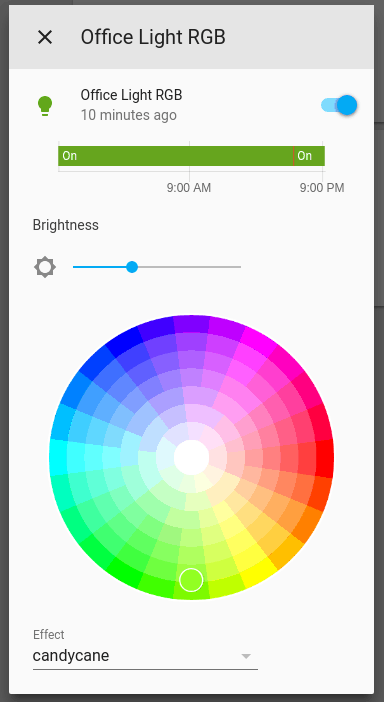
but I only see the brightness slider
viral eagle
@vocal kiln https://ibb.co/h7MVwqF like this?
vocal kiln
yep!
viral eagle
I have these as a horizontal stacks nested in a vertical stack, but here are the guts you can play around with: https://pastebin.com/fNfi9Rfy
vocal kiln
thanks!
viral eagle
I have a picture entity I use as a button to turn all lights off, using call-service/turn.lights_off/all. Works like a charm. How can I add a second call-service for switch.turn_off in the same picture entity button? Code: https://pastebin.com/WBn1aBRL
 tawny vault
This seems kind of impossible 🤔 https://imgur.com/a/yz3nm7t
young valley
Hi all - quick steer. I've got Hue lights in every room and I've got a tab in Home Assistant for each room in the house. I have made picture buttons for quickly setting the scenes in each room which works great, however given the scenes are standard across the whole house, is there a way to have a single place for these template elements and then just load them into entity cards dynamically?
 rare jetty
I am looking for an option to limit access to lovelace view especially for user ( ofcourse non admins) . view1 for user1 , view2 for user2 ..
can someone guide me for a document to it?
shell torrent
on every view, you can select visibilty per user
Edit Dashboard, select view, Edit pen, Visibility. I don't know how secure that is, but to protect a view from a partner or kids it works fine 🙂
rare jetty
Thank u , wondering why u think it isn't secure?
sometimes we need to show our work as a demo or while teaching someone...I do not want everything to visible which can be personal to me ..
shell torrent
I just wanted to point out if you need it to be secure, read up on it and be your own judge. I don't know.
Maybe you can manually address a view directly or something like that. I just haven't tried and it was never important for me.
rare jetty
got it, I gonna try it 🙂
 rustic notch
Is there a way to give one light two names? From the front end?
shell torrent
@rare jetty for that use case, you may want to check out the conditional card. then you could just hide all cards you want to hide with a input_boolean before a demo. a little extra config, but also quite nice.
rare jetty
@rare jetty for that use case, you may want to check out the conditional card. then you could just hide all cards you want to hide with a
input_booleanbefore a demo. a little extra config, but also quite nice.
@shell torrent This for sure will help me I guess, Gonna try these once I am home. Thank u
keen quartz
Hi, does anyone know the if the big number card still works? I'm trying to install on hassio and it says it doesn't exist. I put the .js file into /local/plugins/bignumber-card-master I also went to Configuration > Lovelace and added the resource path. Anyone have this working?
 near knot
Well, here's the oddest thing. I have temperature sensors on lot of my SonofOff Basics, flashed with TASMOTA. HA 0.114.4 on Mint Linux. When I display a graph over 48 hours, card (a set of entities within a vertical stack) only shows 24 hours. However, when I go into EDIT mode, the window alongside the editor shows 48 hours. I have another graph for 12 hours, but it only shows 6, whereas the graph in the editor shows 12. I've tried ctrl-F5 the browser (Google Chrome) tab. Anyone got any idea what the issue might be, please?
 frail vale
Heya, i have a question about lovelace views. The docs and even a bit above in this channel it shows you can limit certain views to users, but it seems i can only limit them using the userId and not the username. Is there a way to achieve this with username instead of user id?
My point is, i store full config in git with nothing set in gui, so that i can get it going quick. But this way in case of a reinstall, i would have to go through and change all user ids.
Is there a way to achieve what i want?
viral eagle
@tawny vault I can create 2 separate buttons, one for light.turn_off and one for switch.turn_off
I might need to use a template
 harsh plaza
is there a common solution to tablets constantly getting logged out, even if you press the keep logged in button
dark dirge
you mean disconnected after inactivity?
harsh plaza
probably a week or two ago my tablets i have on fully kiosk are getting logged out after a day or two, had them logged in never being logged out before that for weeks? months maybe ha
can't figure out what I did that broke it
dark dirge
did you turn off "Automatically close connection" in the profile?
I don't know why it would just log out
harsh plaza
let me see
didnt even know that setting existed, is that new? 🤦♂️ this last week was so annoying haha. thank yoU!
mild veldt
@frail vale if not using the UI you need to look up each id in the Person configuration panel
frail vale
yee, wanted to avoid that, since new install would have different ids
mild veldt
Configuration> people> usrrs
frail vale
but i guess there is no way around that
mild veldt
There is not. It is based on id
rare jetty
I have registered and set external URL with duckdns . I am able to login , all good. But when I click refresh on browser, its going back to login page.. how to fix it ?
I guess this qn belongs here
viral eagle
@tawny vault going to solve this with an automation. Feels dirty and not my preference
rare jetty
Can I control visibility of items on left panel ( not lovelace) for non Admins?
 pine shadow
I've got some wake on lan switches in my configuration that are working fine. I am trying to set a custom icon for them, but am not sure what the correct syntax is. Is anyone able to advise?
pine shadow
I'm just working on my configuration and all of a sudden I cannot access the web portal, just get connection refused. The PI on screen log keeps saying 'entered blocking state'
 torpid echo
did you run the config check last time you made change?
hidden plinth
does anyone know if it's possible to use a template for the 'entity' in custom:button-card? Basically I want it to use either entity A or B depending on their state
vapid field
I need to integrate HA into a company intranet and therefore I need to make small adjustments to make it fit the CI. I saw the Jinja templates, but I am not sure if this is the way to go. I need to change some labels in the sidebar, change the title in the sidebar and maybe add an icon. Can someone tell me what the easiest approach to do this could look like?
 median sage
Ok, right, I thought working out hue groups would solve this. It did not. So, what I'm trying to do is set up a button card that activates one scene in living room on tap/toggle, one scene in living room on hold, and turns off lights in living room on tap. To be honest the specific action tap/double tap/hold don't really matter, just the idea is turn on two scenes, and turn off all lights in a room with a single button card. From what I can tell this should be possible, and I almost got it working, however, when I tick the 'group' option in the hue integration it seems to break the activate scene service. Anyone have any insight into how I can do this?
median sage
Ok - I have now somehow made it work 🤷♂️ Don't ask me how, I don't understand, but I rebooted the server and now the group option works.... turn off and on again clearly...
 marble bloom
What's the best way to make the lovelace cards mobile friendly? I am setting up a tablet for the frontend but the lovelace cards look kind of big. Would love to resize them.
karmic tiger
They're already 'mobile friendly' in so much as the layout is responsive.
Do you have a particular issue you're trying to solve?
marble bloom
Mainly looking to resize each card.
karmic tiger
If you do that, they'll be smaller on desktop too. Alternatively, you can use panel mode and vertical/horizontal stacks to make your own layout.
That way, you can effectively force everything into a single column, subdivided how you want. I do that for my light controls, since I only ever use those on mobile.
Like so: http://prntscr.com/vflotq
mild veldt
@karmic tiger suggestion: replace icons so they represent the room and ditch the names
marble bloom
@karmic tiger So in your screenshot, your icons/cards shrunk simply because it's on mobile?
karmic tiger
The cards shrunk because they were constrained to a single column. Lovelace normally decides how many columns to use based on your device's screen width.
If I hadn't used stacks + panel mode, each of those 9 buttons would be one after the other in a long vertical list.
But each would still be full-sized 😉
I might do that, ian. I just haven't touched that dash in a while. I'm more interested in UI-less stuff, so that's not a screen I see often.
mild veldt
Understandable, ideally you never have to.
karmic tiger
I think if I review that tab, I'm probably going to use button-card to really make it pretty.
vapid field
I need to integrate HA into a company intranet and therefore I need to make small adjustments to make it fit the CI. I saw the Jinja templates, but I am not sure if this is the way to go. I need to change some labels in the sidebar, change the title in the sidebar and maybe add an icon. Can someone tell me what the easiest approach to do this could look like?
dark dirge
The only one of those things that's easily done is to add an icon to the sidebar, but it depends on what you want that icon to do. "panel_iframe" allows you to "insert" a separate web page into the HA interface like that.
you can't currently change the title in the sidebar (it's not really the "title", as described in the docs). Look into this for more sidebar customization: https://github.com/Villhellm/custom-sidebar
You can also move or delete items in the sidebar by clicking and holding on the title or selecting "edit" in the profile
median sage
I think if I review that tab, I'm probably going to use button-card to really make it pretty.
@karmic tiger I'm literally setting this up at the moment. I'm right in thinking button-card is more versatile than the button card built into HA right?
karmic tiger
Yes, it's more customisable. Way more. But the trade-off is that it takes more work to get it the way you like it.
median sage
The fact that they have both button-card and a button card is just so.... bleh
(I do actually have button-card installed - but button card on its own is fairly solid)
 proud lodge
hello guys. is there a way i can show brightness value (of my light) in a graph. I have automation setup to change brightness over the coarse of each day and would like to see the ramp up/down in a graph if possible.
to clarify my question bascially to create a graph (in lovelace) showing numeric state of my light entity brightness. any help would be apprecaited.
vapid field
@dark dirge thanks for the hints!
median sage
So @proud lodge - haven't managed to make it work, but I'd imagine work out how you can take the 'brightness' state out of your light you can then just use sensor (or equivalent card)
proud lodge
the value can be used as in a condition for automation so i know it can be retreived. just need to figure out how to make a sensor out of it.
my lights are pwm controlled by my esp32, i was even thinking of using the duty cycle component to create a new sensor but that does not quiet work plus im not sure if i can read that off from the same pin.
would apprecaite if anyone has had experience doing this and or knows of some documentation that explains on how to do this.
rare jetty
I have created an entity to show see my phone GPS location . I see lot of lag in updating( bt I believe this qn make to be at Android channel) , with whatever coming is there a way I can show a template with detailed map showing exact location when I open my page ?
current I am using Map Card Configuration but this is not what I am looking .
viral eagle
I have a markcard that uses {{ now().strftime("%H:%M") }} to display the time. Is there a way to make that : blink?
mild veldt
@rare jetty create a template sensor to track your brightness
vapid field
I am running Home Assistant OS and would like to tweak some things in the JavaScript chunk files served. Can someone tell me where they are? I tried /var/www and searching them by name while logged in via SSH but could not find them.
dark dirge
rare jetty
@rare jetty create a template sensor to track your brightness
@mild veldt I read ur comment twice, Sey .. didn't get what you are referring meto ?
median sage
Think you actually want @proud lodge ?
proud lodge
Oh I tagged the wrong person. Sorry. Was for @median sage
@mild veldt im checking template sensor. Can you post a possible example that may have worked for your scenario.
 ornate mason
Is there some sort of super-caching for resources? Nothing I do seem to reload them... I'm getting reports of the new release of one of my cards being broken, but I'm not able to reproduce it in any way.
Even tried switching browsers.
ornate mason
(This is the issue: https://github.com/DarkFox/rejseplanen-stog-card/issues/1#issuecomment-723668400 )
wheat current
@ornate mason The error there tell you the issue, Identifier 'n' has already been declared
From DarkFox/rejseplanen-card/blob/master/dist/rejseplanen-card.js:
class n extends ...
From rejseplanen-stog-card/blob/main/dist/rejseplanen-stog-card.js
class n extends ...
I've had similar issues in the past which I got around by changing the output from es to iife
ornate mason
Argh. I didn't even think of that. Of course. That still leaves the issue of my HA install seemingly not reloading the scripts fully, meaning I'm not able to reproduce the issues... No amount of clearing site data or reloading/restarting HA seems to surface the issues. :/
wheat current
To clarify, personally I never saw it, but it got reported to me, and changing stoped the reports sooo 🤷♂️
When I think of it, i don't think I ran the minified versions myself, are you?
ornate mason
Yeah. I run the version from HACS usually, and switch to my local ones when developing on it.
To try and make sure I catch such issues. I guess I'll still miss some, sometimes.
wheat current
Changing the outupt will probably work, the HACS frontend used iife for that reason untill it was moved to iframe and lazy loading
Also make sure that your users do not have multiple resources pointing to the same file...
ornate mason
Yeah. Makes sense. I guess it'll also pop up if someone have other cards using the same minimizer.
ornate mason
Yikes. :/
 copper charm
So I just upgraded to 0.117 from 0.115. I probably should have disabled/removed my compact header. Now lovelace won't load any of my pages. Any idea how to disable it now?
Hmm, I think I got it. I just removed the "custom header" section from the lovelace JSON, and everything is working now.
 minor scroll
I just added a Tradfri RGBW bulb and I'm confused about the color picker control on the hass interface.
Bulb comes on initially decently bright, obviously using the W channel. If I use the color picker in hass to make it red, then go back to the center of the wheel for white, it's obviously doing just RGB channels on full, it's dimmer and slightly blue
how exactly do you use the color picker to control the W channel?
this is through zigbee2mqtt, not a tradfri gateway
 undone viper
@minor scroll I change it above the color wheel: there's a warm to cool white slider there.
minor scroll
@undone viper it's confusing whether this one has RGBWW or just RGBW. I have only the one slider
I'm not even sure whether this is a zigbee error telling hass the wrong thing, or a hass error with a bad UI
figured I'd start at #frontend-archived
currently doing a firmware update on the bulb
undone viper
not really sure.. I get a bar and a color wheel. the bar controls white warmth, color wheel changes it to rgb.
 undone viper
weird, I have a bar below that with a warmth setting
minor scroll
it looks like zigbee2mqtt is telling mqtt this is " extend: generic.light_onoff_brightness_colorxy,"
and not " extend: generic.light_onoff_brightness_colortemp,"
I'lls tart on that end
minor scroll
there's too many google results for Ikea doing strange things for color temp on these bulbs, undocumented zigbee commands
I'm taking them back and buying Hue.
 deep kindle
Not sure which channel this goes in... But figure since it is the Home Automation Cast, it might count as frontend since it is a UI thing.
I am trying to get it setup. However, no idea whats going on. When I click cast, it just shows a screen with a heart.
I read it needs https, so I figured id try to get the DuckDNS with LetsEncrypt working... But my ISP blocks port 80.
Am I overthinking this or something? I know there is the simple service I could subscribe to, but tryin to avoid all subscription costs.
 placid atlas
Where would be the best place to ask about configuring SSL certs?
I'm new to hass.io (was using Hassbian on an older version before) and everything's changed.
 fiery pulsar
Hi all.. I might need some help here. Having some things I can't explain. Yesterday I rebuild all my dashboards. Using all yaml mode. Working perfectly on my laptop in Chrome and Edge. Call it a day and when I go to bed I check the phone. Turns out iOS companion is throwing red for every custom element, not found. Try to clear cache, nothing works. Today I went to work, and checked from my worklaptop, Chrome. What the heck, some of the custom resources load up fine, other's don't. So I check a different laptop, some others load up fine, the ones working on the other laptop don't. The only one who has them all working is the on I developed them on. Configuration > Integrations > Lovelace dashboards is listing all dashboards and resources fine on every device.
What am I missing? 🤔
fiery pulsar
Ok, it's always the same, ask for help after searching everything, and find it...
I had an old ui-lovelace.yaml in my config root, while also specifiying everything in configuration.yaml with includes. Seems to be working now 🙄
pine bluff
Trying to setup one-click glance cards to activate a scene, but the cards require me to click twice; open and then activate. Tried action, tap_action etc, but nothing makes the extra window go away. Any suggestions?
 oak parcel
Hey all, got a small question about the layout
Is there a possibility to have my screen showed in the 20/60/20 ratio or something?
I want some switches on the left/right, and a bigger floorplan in the middle between
@pine bluff I'm using the following:
- entity: scene.ochtend
tap_action:
action: call-service
service: scene.turn_on
service_data:
entity_id: scene.ochtend
pine bluff
Thanks, will try
Thanks alot, it worked! I tried that code before, but think I placed it at the wrong place of the card. Your -entity-part helped! Cheers! 🙂
oak parcel
You're welcome 🙂
 marsh current
is there a way to just show a single lovelace dashboard on login, without any access to anything else?
pine bluff
Is there a possibility to have my screen showed in the 20/60/20 ratio or something?
@oak parcel After what I've found, you can't. With adds you can though, like the https://github.com/thomasloven/lovelace-layout-card.
oak parcel
Ok, thanks, will look into that one
shell torrent
@marsh current If you're after something like a kiosk mode, I can recommend https://github.com/matt8707/kiosk-mode combined with visibility per view in HA.
 hexed owl
Anyone got a good idea on how to have the max value of a Guage follow it's historic maximum from the sensors HA history?
 oblique apex
short question to recorder/history. is there a way to show 3graphs in one window? (I would like to have temp humidity and pressure in one graph per room)
shell torrent
@oblique apex I don't fully understand what you mean by 3 graphs in one window, but maybe a card like https://github.com/kalkih/mini-graph-card is what you want?
oblique apex
@shell torrent that is ABSOLUTLY what i ment (at least it looks like it) thanks a lot
hexed owl
The regular History Graph Card will do that too.
shell torrent
If you don't use HACS, follow the instructions at https://github.com/kalkih/mini-graph-card > Install > Manual install.
When it's time for adding a card, scroll down to Example usage > Multiple entities card
If you're not comfortable with manual install and config, maybe it's not the best route for now.
oblique apex
thanks
 left current
Is there a way to mix YAML-defined dashboards with UI-managed dashboards? I just want to have one dashboard be auto-generated from a script but generally manage the main one from the UI.
wheat current
left current
Aaaaah! I missed that section (and had it open). Thanks!
 sullen stream
hello all, I'm wanting to get the brightness control slider for a TP-link switch that I have in the kitchen. I had it before but now I only have the toggle switch in Lovelace and the wife wants the brightness slider back..... can we add entities as switches and lights both or?
shell torrent
@sullen stream if HA identifies it as a dimmer, you should get the slider automatically. does the entity have a brightness: attribute?
and you can create a light from a switch https://www.home-assistant.io/integrations/light.switch/, but (as far as I know) not the other way around
frail bridge
Any way to not center cards in lovelace?
 weary axle
So when I click the media browser icon on spotify then I get up a popup box with a spinner, and then it is just stuck. Anyone know what can be wrong?
 worn parrot
Looks like putting a title on horizontal stacks causes elements in lower rows to be too tall now
- Before (116.4): https://i.imgur.com/B9ij8to.png
- After (117.5): https://i.imgur.com/XMTNMtt.png
- No title (117.5): https://i.imgur.com/jblWNW1.png


Simply removing the title, they go back to being the right height as they were. However that's not ideal of course if you want a title 🙂
mild veldt
@worn parrot should be fixed in next release https://github.com/home-assistant/frontend/pull/7534
worn parrot
❤️ I checked Github for open issues, didn't think to check for closed!!
Was juuuust about to submit an issue. Thank you.
mild veldt
@frail bridge easiest option would probably be to use the custom layout-card
@weary axle try clearing your browser cache and check the browser console
 blazing hamlet
Howdy Howdy
a simple question it' possible de define a severity value lovelace Gauge from an input number ?
like green {{ states.xxx.state }}
karmic tiger
Have you read the documentation yet?
The severity options appear to support integers only: https://www.home-assistant.io/lovelace/gauge/#severity
mild veldt
@blazing hamlet templates are not natively supported within Lovelace outside of the Markdown card
karmic tiger
Generally speaking, cards don't accept templates. Custom cards may.
mild veldt
you can check out my config-template-card as a potential solution
karmic tiger
Even then, you'll have to learn to do the templating in JavaScript.
blazing hamlet
you can check out my config-template-card as a potential solution
@mild veldt any link ?
mild veldt
I believe you'll be able to find it pretty easily via google
blazing hamlet
thanks
 slow brook
Hi guys, can someone point me out on how adding custom fonts on HassIO?
 midnight moon
Hi everyone. I've had homeassistant running for a while now, and I've just been interacting with it through the web dashboard on my PC as well as the android app on my phone. I'm at the point where I want to set up a wall panel for guests and other people in my home to use. I'm having a little bit of trouble understanding how this is done. Is it best to have another instance of homeassistant running on the panel or do you just point the panel at the dashboard with its webbrowser or what? I'd like something that doesn't allow the user to get into the settings or leave the dashboard, and have it power up directly to the dashboard when the power goes out. Where do I start with this. thanks!
karmic tiger
Most people use something like Fully Kiosk to just point at the web interface of your existing HA instance.
There's no point having multiple instances running across devices, that's what the web interface is for.
shell torrent
For Android, I can really recommend https://play.google.com/store/apps/details?id=com.thanksmister.iot.wallpanel which support MQTT-sensors, autostart and basically just works great.
midnight moon
Thanks for the suggestions, fully kiosk looks promising
sullen stream
@shell torrent when I add ```
- platform: switch
name: sink
entity_id: switch.kitchen_sink
to my configuration.yaml and do a restart I'm not able to add it to Lovelace as: ```
 - entity: switch.kitchen_sink
    name: Sink
    type: light
To answer your other question it does not seem to have a brightness attribute... can I add one.... the light switch has a dimming capability and I had the circular dimming slider before but now can't get it back
https://imagebin.ca/v/5gu9cWRKIFmJ the one on the left is what I'm looking for....
shell torrent
that looks a bit strange. let's start with the switch. a switch can (as far as I know) not be a dimming switch in HA.
a dimming switch is in the domain light:
sullen stream
maybe then I've classified it wrong in my config.yaml....
midnight moon
is theme selection suppose to save across sessions? it seem when I log out and log back in, my theme is back to default.
or actually, it's backend-selected
shell torrent
I don't know how a TP-link switch is integrated, but above it looks like you define a switch which becomes .. a switch
does it work? check it in dev tools - states
sullen stream
ok, wled is listed as a light and a switch.... interesting.....
shell torrent
click the light in dev tools - states
the (i)
do you have a slider in more-info dialog?
sullen stream
no slider... but it does show up now as a light and as a switch
shell torrent
a switch can be handled as a light https://www.home-assistant.io/integrations/light.switch/. but that is not changing the way it actually works, it just "..allows you to expose this switch as a light source, allowing you to add, e.g., the wall plug controlling your Christmas Tree, to be part of a light group."
it won't be dimmable
since it is still a switch
so I'd recommend you look at the TP-link integration and verify that the actual device is integrated as a dimmable switch (a light)
sullen stream
I have this listed at the same time ```
tplink:
switch:
#kitchen sink
- host: 192.168.xx.xx
ok. in https://www.home-assistant.io/integrations/tplink/ it states "There is currently support for the following device types within Home Assistant:
Light
Switch"
so I guess you should integrate it as light
not as switch
sullen stream
I believe a HS220
shell torrent
"HS220 (acts as a light)"
karmic tiger
Yeah, so you'll want to configure it as a light, not a switch.
bonehead is correct - if you don't configure it as a light, HA has no idea how to do things like control brightness.
shell torrent
probably something like this:
tplink:
  light:
  #kitchen sink
    - host: 192.168.xx.xx
that seems to be doing the trick but now it's "unavailable"
it was the light vs. switch part....that was the dimming difference
sullen stream
makes sense now
sullen stream
I restarted home assistant....and I could do it again. I am able to reach the Light with the KASA app
shell torrent
you need to restart after you changed to light
sullen stream
I also removed an orphaned entity
here's a snippet from the documentation..... tplink: discovery: false light: - host: 192.168.200.1
how important is the "discovery: false" ?
do I need to cut the power to the light and let home assistant discover it again and then add it?
I've restarted HA twice but it still says unavailable
shell torrent
I guess we should have moved to #integrations-archived a long time ago. Continue there if you need more help with the actual device. I have no knowledge of TP-link devices
the main thing here was to investigate the absence of the slider, and I think we solved that one 🙂
sullen stream
you did... thank you...I'll head to integrations.
 echo pumice
Hi. Pretty new to HA and learning some stuff. I have a question I am hoping someone can bump me in the right direction or tell me it is impossible or something. I havea couple weathery things in the spirit of but not quite exactly like this: https://www.smarthomebeginner.com/weather-radar-on-home-assistant/
I am wondering if there is a way for me to do the same sort of external deep linking with something that results in a specifically named HTML file.... like this for example: https://bao.arcgis.com/covid-19/jhu/county/12093.html
I have a couple weather maps that are not working as described up above and I think it is because they are not a graphic format. Wondering if there is a similiar trick for HTML
and if this is the right place to ask such a question
shell torrent
it is officially depreciated
shell torrent
no. the header is smaller by default now, but not as small as in CH
 honest herald
Oh that's sucks.
shell torrent
it's ok. and some features have moved to https://github.com/matt8707/kiosk-mode
CH was awesome, but according to maykar it grew out of proportions. that happens. I'm glad some features are moving in to HA instead
honest herald
I was actually looking for a clock card solution in lovelace then realized that CCH did have that option so I was making sure.
For my wall tablet
shell torrent
I saw someting about that the other day:
<#frontend-archived message>
<#frontend-archived message>
haven't tried it, but have a look
karmic tiger
Getting HA to talk to devices is done via #integrations-archived. This channel's for help displaying information (or video feeds, in your case) to a dashboard.
Though you may have better luck in #cameras-archived, since that's more specific 🙂
 misty gale
Thank you
echo pumice
and if this is the right place to ask such a question
@echo pumice Still wondering
slightly CH... he he he
 tired igloo
would love some assistance on not being able to access the frontend GUI after a power outage. here's my forum post -> https://community.home-assistant.io/t/cant-see-gui-but-can-ping-ip-and-access-samba/244082
tldr; I can ping the host, access the files through samba, and get into the CLI interface of Home Assistant through the ESXi terminal.
echo pumice
ouch.
tired igloo
yeah, pulling my hair out at the moment.. driving me nuts
icy cradle
@tired igloo I don't think is a front-end problem. But a problem with HA then itself (#551864459891703809 ) or could it be your server.
See also https://www.home-assistant.io/hassio/commandline/ for some of the command options as I am reading you able to get to HA itself?
tired igloo
a few of those commands worked, however when i try to restart it fails. i'll try again and find the actually error
should i move this question to the homeassistant_core area? that doesn't say support, that's why i defaulted here
icy cradle
From my understanding this channel is really about the front-end itself. Like the cards / layouts etc. But I could be mistaken.
and if it should be _core, I think maybe or in your case _supervised or _container. I always get mixed up with that.
and check ha core logs
or ha supervisor info if that is the install you used
maybe its even _os... since that also lists images for virtual machines
😅 ..
tired igloo
yeah i'm with you on that. the new naming convention for all of them has me confused as well
icy cradle
yeah just post in those channels, they probably know more and otherwise will tell you which channel
kind shellBOT
Not sure which install you're using? If you have system_health enabled you can check Configuration -> Info, or see the following.
-
If you're using HassOS, flashed an image, or booted a VM with an image you're using #330990055533576204
-
If you installed Linux and then ran a script to install HA and have add-ons then you have #330944238910963714
-
If you're running
dockercommands or use a Docker manager and have no add-ons then you have #449717345808547842 -
Finally, if you use
pipto install or upgrade you have #551864459891703809
Having difficulty chosing an install method? See this blog post for guidance.
Command '~which' was invoked by: RobC
stone bolt
i'm noticing that with my custom:template-entity-row's, when I set active: true the icon is set to color: var(--paper-item-icon-color, #44739e); (bright yellow) but for the one's that I'm not overriding it uses color: var(--paper-item-icon-active-color, #fdd835); (dark yellow)... is there any way to fix this?
oak parcel
Hey all, small question about the lovelace Glance card. In the entity cards we can add the "attribute" to just show the attribute, isn't there such an option for the glance card entities? So that we show attribute data there?
polar kelp
No
oak parcel
Ok thanks thomas, just curious, why is it added for the entity cards itself, but not for things with entities lists? (so the glance card for example)? Is that a technical thing, or is it just not made yet? 🙂
polar kelp
Probably just not made yet.
oak parcel
Ok thanks for the answer, and also for your awesome lovelace elements you made 🙂 Really appreciated
 robust mist
Hello everyone ! I'm looking for some ideas/example of cards or custom cards to integrate a UPS in the frontend (provided by NUT) .
midnight moon
Hi. I'm using animated backgrounds... I'd like to use local video files, but I can't figure out how to reference them in the yaml correctly. I've uploaded mp4s into the config directory via ftp and tried to ref them like:
animated_background:
default_url: config/background.mp4
but that doesn't work
worn parrot
try putting them in your "www" directory and referring to it as "/local/..."
e.g.: file at: /config/www/background.mp4
animated_background:
  default_url: /local/background.mp4
perfect, that worked. thank you.
worn parrot
Welcome!
 round lily
anyone seen this weird issue? https://imgur.com/a/IhUocYS
overflow menu stuck behind a card
formal tide
I thought .117 introduced the auto closing of persisten notification sidebar on dismissal of the last notification, did I misread some of that? Never seen it happening
 inner wagon
Guys I have a motion sensor that only shows on for ~5s before going to off. I have an entity filter badge for it. The only issue is it flashes on for a few seconds then goes off right away. Is there a way in the UI to hold that state on longer without doing any automations?
karmic tiger
The UI doesn't 'hold state'. You need to sort your integration out first.
 fathom vault
I never know which is the right channel, but here goes... Im trying to retrieve a counter value from my HA instance, via HTTP (on my LAN). Ive added a sensor platform: rest to my config, but it shows a 404. What could be wrong here?
sensor:
- platform: rest
resource: http://smart:8123/counters/office_thermo_temp2
method: POST
payload: '{ "device" : "counter.office_thermo_temp2" }'
am I using the wrong port? 8123 is what the frontend is running on
dark dirge
this is unrelated to #frontend-archived (the user interface)
you want #integrations-archived
 severe flame
I think I asked my question in the wrong room earlier. I have an entity that is behaving oddly and has the colors for a ping entity inverted. They are inverted as shown at https://imgur.com/a/wAsuLZP, but it's ONLY when in that same card as the MQTT sensors. I just found out that if I put it in it's own card on the front page, it works as expected. Has anyone seen this or would you have any advice on how to get them to work together in one card?
Ok, I have no idea. I just added it to a new-combined card and removed the old one and it seems to be right? I have no idea.
kind shellBOT
@halcyon basin posted a code wall, it is moved here --> https://paste.ubuntu.com/p/T3xRvTXBPZ/
halcyon basin
Evening, just wondered if someone can help with this please:
it generates an error:
Cannot read property 'setConfig' of undefined
I'm trying to create a live echo countdown timer from:
https://github.com/photinus/HomeAssistant-Misc/tree/master/LiveTimer?fbclid=IwAR3WX68ujgGVNBqA3EvZFVDVh3N8O3UcOURjKJxk8YIKhkBo_YgjWLaoCB8
I've also tried the example on the page but that generates a similar error. 😦
severe flame
Ok, I have no idea. I just added it to a new-combined card and removed the old one and it seems to be right? I have no idea.
@severe flame Nevermind. The "suggested card" by default doesn't change color of icon based on state. Once I set that again, the card is wrong again. 😦
FYI - This is a picture showing the issue. The entity can be in it's own card and works as expected. https://imgur.com/a/yDlVCRK
Is there a way to debug the frontend/lovelace/builtin overview page?
halcyon basin
is it possible to tell me where my indentations are wrong, or why i cannot create a card from this please.
https://paste.ubuntu.com/p/7Hj2QcrGc9/
halcyon basin
 upper zephyr
quick question, is there a way to change the button execute when running a script/scene? like maybe change the name, or change it into an icon?
stone bolt
i'm noticing that with my
custom:template-entity-row's, when I setactive: truethe icon is set to bright yellow but for the one's that I'm not overriding it uses dark yellow...
@stone bolt I ran this down and realized that whenactive: truethe icon is using the HA default color, but when the icon color comes automatically with the light entity that the darker color comes from my theme. So this is either a bug in template-entity-row (not using the theme color) or a bug in the theme (not overriding the active color properly).
icy cradle
It can also use the rgb values from the light itself I believe
stone bolt
https://github.com/seangreen2/slate_theme/blob/e6c2e5622c06bca7bf0835c3828920fc982a05f0/themes/slate.yaml#L31 it looks like the color is set properly, which means that from template-entity-row's perspective either --paper-item-icon-active-color isn't set or it's set to the default for reason
@icy cradle I checked and the icon colors rendered for the lights are precisely the ones specified in the theme
stone bolt
i'm pretty sure this is a bug in template-entity-row, using card-mod if you style: | :host { --paper-item-icon-color: red; --paper-item-icon-active-color: green; } all of the icons that do not have active set show red or green, but with active: false show default grey and active: true show default yellow. It would seem that these lines never pick up the color var and always use the default: https://github.com/thomasloven/lovelace-template-entity-row/blob/a8dce27ad9cadc0809f02a8e4293577ef05ab374/src/main.js#L104-L105
 wraith stump
I have an input boolean set up to change state via an nfc tag. I set up a button card in lovelace to show the state but rather than change color, I would like to change the icon (dishwasher to dishwasher-off). Is this possible?
mild veldt
@wraith stump config-template-card
wraith stump
thanks. I will read trough it and see if I can get it working
weary axle
I’m not sure if this is the right place, but I created a group with all my Sonos speakers and I’m trying play a certain playlist. It all works however my problem is that the playlist starts at a different time on each speaker so the sound is bad.. anyone know how I can go about that?
 errant plover
Probably better asking in #integrations-archived this channel is for the UI (Lovelace).
 jade wigeon
Hello, Can i ask a thing with the allarm control pannel with code. i have my mqtt allarm that when is enabled it writes 1 and disabled 0. with Topic Allarm. To controll it i use topic CommandAllarm and payload 0 to disable 1 to enable how i can do with the allarm control pannel? Thanks
polar kelp
If you set up an mqtt alarm control panel correctly in the backend, you will get an alarm_control_panel. entity, which you point the card to. https://www.home-assistant.io/integrations/alarm_control_panel.mqtt/
jade wigeon
@polar kelp yes i arrived there but in the pannel i read Disarm but is alrady disarmed
marsh current
Any help on something im stuck with: ive added a picture dashboard in love lace, but if i log into HA with another normal user they cant see the picture on the dashboard, thanks
halcyon basin
afternoon all, I've managed to setup an echo timer outlined at the link below, however there seems to be a discrepancy between the running timer, and the flip timer, any idea's why that might be?
https://github.com/photinus/HomeAssistant-Misc/tree/master/LiveTimer
I've also noticed that if I cancel and start a new timer, the flip countdown either doesn't refresh or or is well out of what sync with the actual timer.
 crimson fable
So for some reason I am unable to use templates for parameters in developer-tools/service. They just get sent as-is
e.g.
data:
  chronometer: true
  when: >-
    {{ (as_timestamp(now()) + 60) | round }}
This is normal. You can't use templates there (yet).
Put it into a script/automation and call that instead.
crimson fable
weird. I'm sure that it did work at some point 🤔
anyways. Thanks!
 plain onyx
added a custom card through HACS , but when trying to make the custom card , i get an error ?
UI editor is not supported for this config:
Cannot read property 'setConfig' of undefinedYou can still edit your config in yaml.
karmic tiger
I guess you're going to edit that config in yaml...
formal tide
You can still edit your config in yaml.
Continue doing that if you do
marsh current
Any help on something im stuck with: ive added a picture dashboard in love lace, but if i log into HA with another normal user they cant see the picture on the dashboard, thanks
@marsh current any help? 😦
mild veldt
@plain onyx most custom cards do not have UI editors
plain onyx
thnks
so most need to be added in configuration.yaml
and then they show up in UI after restart ?
karmic tiger
Cards are not added in configuration.yaml. The Lovelace UI has a YAML mode for cards.
plain onyx
dowloaded the .js file through hacs , but when trying to add them via UI --> manual
i always get error
UI editor is not supported for this config:
Cannot read property 'setConfig' of undefined
You can still edit your config in yaml.
kind shellBOT
Please use imgur or other image sharing web sites, and share the link here.
Command '.images' was invoked by: mono
formal tide
mono is screenshot king 🔥
mild veldt
@plain onyx those examples are for the raw UI configuration if you see it like that
i.e. raw configuration editor
karmic tiger
mono is screenshot king 🔥
@formal tide Sometimes images are best. I know we hate text as images... but this time 🙂
 median saffron
hello, can anyone help me please? is it possible to add confirmation: text: "are you sure?" for tap_action: action: toggle, but ONLY for TURN OFF ?for turn on without confirmation
 stone fog
Hello, one (stupid i think) question: i'm using default frontend; i have all the lights listed; on the top, i have generic title "light" with button that power on/off all the lights. How can i remove this bottom? Thanls
marsh current
😦
formal tide
sensor with platform: smells like #integrations-archived - add it to config.yaml
@marsh current so you have 2 users? and want the same dashboard for both?
marsh current
well i guess so yeh
formal tide
cards entirely not showing up or images missing?
marsh current
its not restrcited to admin only
images missing
card is there so are the entities
formal tide
check your browser dev tools for missing ressource errors
marsh current
ok, so unauthorised on the image path
i used file editor to dump the image into a image folder, but there arnt any sec settings
how do i give access ?
formal tide
how do you transfer files?
 formal tide
are you familiar with (web)terminal?
marsh current
nope
formal tide
is it #330990055533576204 ?
formal tide
you can try the samba addon
or even afp/netatalk if you use osx, should be available too
marsh current
i do have the samba addon
so should i delete the image and dump back in via samba?
or check the sec settings of the file?
formal tide
it is apparently a permissions issue, could also be a unauthorized link to a image from a addon according to the weird link example includding the ingress point - did you link a grafana graph or sth?
marsh current
i dont kno what the words mean sorry
formal tide
te image address looks like : http://192.168.0.3:8123/api/hassio_ingress/5LSMXZuiSsJ0bJwtK-gpJvcx0KvBZx6xW53pfUgiQUk/api/file?filename=/config/images/foorplan.png
@marsh current where is this image served?
marsh current
served to a lovelace dashboard - its served from the same device (sorry if thats not right)
in the dashboard it looks like this:
type: picture-elements
image: >-
http://192.168.0.3:8123/api/hassio_ingress/5LSMXZuiSsJ0bJwtK-gpJvcx0KvBZx6xW53pfUgiQUk/api/file?filename=/config/images/foorplan.png
formal tide
that is one weird link
marsh current
how should i link an image file normally?
formal tide
did you place it in /config/www ?
formal tide
what? no
place it in /config/www/images/whatever.png and use http://HA:8123/local/images/whatever.png
 karmic tiger
If it's not under /www, it's not accessible via the world wide web.
marsh current
i see
crimson fable
hm. isn't that a security risk? 🤔
karmic tiger
Isn't locking down HTTP access to files to a single folder a risk? What?!
formal tide
was much discussed in WTH month, it is until you know that the attacker need to know the exact url, so debatable... you could go the token route to /media i believe though
karmic tiger
That's exactly what you should do... because you don't want people to have full access to your host.
You realise that when you access a website, you're traditionally accessing the /www directory of a server, right? You just don't know that, nor do you know anything else that exists on that server.
crimson fable
nvm I apparently wasn't following along
 hallow juniper
not sure if this is the right channel, but: can I somehow do something like this: https://paste.ubuntu.com/p/449P3fVM49/
so that if my soundbar is powered on, the tv media_player card would have different values for max_volume and volume_steps
and if this was wrong channel, please guide me to the right direction
and yes, I know that is a custom component, but I thought that this was a core feature and not component specific, if it even is possible of doing this
formal tide
I use the "bravia psk" custom component for mine and have added amp: true in the config to get louder/quieter buttons instead of a slider because neither the tv nor HA know the volume of the soundbar
https://i.imgur.com/9enq4Ha.png
 karmic tiger
It's a custom card, so here's fine 😉
type: 'custom:mini-media-player' = card
Sneaky, @formal tide
If a card supports templating, it'll usually be with JavaScript (that's what the browser understands) rather than Jinja (which is what the backend understands).
But only some custom cards support it. You'll have to check their docs.
The syntax usually looks similar ([[ template goes here ]])
An example from button-card:
confirmation:
text: '[[[ return `Are you sure you want to toggle ${entity.attributes.friendly_name}?` ]]]'```so the templating comes from the component itself and not from the core features?
ooo, if I can use JS there, it's even better
but anywho, I think templating should come from core, instead of from component itself. it would streamline the user-/configuration experience, but that's a whole another topic and perhaps not the best forum to have that kind of discussions on this channel :)
@formal tide false, HA knows both my TV and my Soundbar volume. the problem is that my soundbar has different values than my tv (even though both are Sony and they're synced via Bravia). if I set the volume to be 20 in TV, it will become 10 in the soundbar. and if I turn the soundbar off, then TV will be at volume 10, which is somewhat as loud as the soundbar, so that's why I'd like to set different max volume and steps for the TV when the soundbar is off. TV volume 20 = pretty much the same as soundbar volume 20 (which would be TV volume 40. for some reason the TV says 20 and soundbar says 10)
both the tv AND ha knows the volume of my soundbar (well, at least HA knows, not sure about the tv :D)
formal tide
TIL, mine does not, I have a panasonic amp though
hallow juniper
well that could be the issue, idk, but both of mine are Sony and they talk together kind of seamlessly
mild veldt
@hallow juniper there are some custom cards that support Jinja templates and are evaluated by core, but that comes at a performance hit. JavaScript templating is better for performance
To do what you want, check out my config-template-card
hallow juniper
thanks :) I'll try that. JS is far more closer to my heart anyway, but anywho my point was that it would be much better if this kind of feature/support came from the core, instead of the component, thus making the configuration more streamlined/consistent. but that's whole another topic, so I won't go there. either way, thanks, I'll give that a shot :)
so, which cards should I take a look into now? 😅 bravia psk and config-template-card ?
(not to be an ass, but it would be really nice to have a screenshot of the component in the readme)
either way, I'll give both a shot
hallow juniper
yeah
mild veldt
So that's a card
hallow juniper
not sure would it be even possible of having a screenshot, since I don't know anything about it :) and as I mentioned, I didn't mean to be a dick
mild veldt
No, it is just a wrapper. I could have a gif showing it off, but I'm not really motivated to either.
hallow juniper
I'm fairly new to the whole HA (joined like 3-4 weeks ago or so), so I'm kinda newbie and trying to get along with configurations 😅 but when checking components, I tend to first check what does it look like
so, did I understand correctly: I could wrap the mini-media-player into that and have better configuration experience?
 stuck dock
Hello, I am wanting to add a floorplan view and control to my Home assistant. However I can not figure out the current version of floorplan for home assistant. can anyone point me in the right direction? I am running Home Assistant Core 0.117.6, HassOS 4.16 on a raspberry pi 4.
mild veldt
@hallow juniper again, those are both cards. Not components. Components is not really a term used in HA anymore. config-template-card does not have a look.
hallow juniper
well, cards, sorry..
mild veldt
@stuck dock have you tried just using picture-elements?
The term "component" has a history in HA, hence the confusion
hallow juniper
@mild veldt so was my assumption even somewhat correct? that as config-template-card is a wrapper, it provides extended configuration possibilies, for other cards? or am I completely off-track?
stuck dock
I have not, Im new to home assistant and have not came across them. I started by searching how to add a floorpplan view to home assistant and came across some post from 2018 and was following that until i saw that it was no longer supported because of lovelace, which pointed me to a newer version which also doesn't appear to be supported. Is there a good place to learn how to use picture-elements?
hallow juniper
but using JS in a card ❤️ loving even the idea! haven't been the biggest fan of the Jinja(?) templatings thus far
median saffron
hello, can anyone help me please? is it possible to add confirmation: text: "are you sure?" for tap_action: action: toggle, but ONLY for TURN OFF ?for turn on without confirmation
karmic tiger
You might be able to use template-config-card for that. Normally confirmation is just on or off. With a template, you could have a rule that is only true when the device is on.
mild veldt
@hallow juniper yes. It allows you to template options in cards
kind shellBOT
@median saffron posted a code wall, it is moved here --> https://paste.ubuntu.com/p/gnBDWvR4f5/
mild veldt
@stuck dock Lovelace docs to start
@median saffron that might be tricky using the core feature. Possible with my custom restriction-card though
stuck dock
I found this tutorial https://www.juanmtech.com/set-up-the-picture-elements-card-in-home-assistant/ that i am following however I seem to be missing a ui-lovelace.yaml file. can i just create one?
median saffron
@mild veldt i can use any custom component, if it will work on web and android app
mild veldt
@stuck dock you can but don't need to. That's just your config. Just add a picture-elements card and go from there
stuck dock
okay. thank you
mild veldt
@median saffron the card works on all devices to my knowledge
plain onyx
tts voice on google device is different(sounds less fluend) , than default google voice
?
mild veldt
Okay...?
median saffron
@mild veldt i down understant, how to add my condition to restriction-card, my code is:
`cards:
- cards:
- entity: switch.pc
tap_action:
action: toggle
type: button
confirmation:
text: "Are you sure????"
type: horizontal-stack
type: vertical-stack
`
- entity: switch.pc
plain onyx
wanna make an automation , when my garbage bin will be emptied, my google nest/minis will do text-to-speech "the container needs to be put on the street" but TTS doesnt make fluend sentences , more a spelling contest "P
karmic tiger
This isn't the place for automation talk... 😉
mild veldt
@median saffron haven't tested but something close to this
type: custom:restriction-card
restrictions:
  confirm:
    text: "Are you sure????"
    condition:
      entity: switch.pc
      value: "on"
card:
  type: button
  entity: switch.pc
  tap_action:
    action: toggle
And to be honest, I don't even think the problem is the automation if your TTS is attempted on the correct device.
median saffron
@mild veldt ok, thanks, i will test it
@mild veldt i cant find your restriction-card in hacs?!
 clever ore
HACS > Frontend > click the plus in the bottom right > search for "restriction"
median saffron
@clever ore i know: No repositories 😕
No installed repositories matching "restiction" found in this section.
Try searching for something else!
installed 😄 ok, im moron 🙂
@clever ore thanks 🙂
 bleak osprey
Hello, I have a component generating n sensors that I want to display as rows in a view.
I wrote the lovelace config to generate a row with multiple cards and now I need a way to repeat this for every sensors.
I don't know how to make this happen and couldn't find anything.
Does anyone know of a way pls ?
clever ore
No problem, also there is no need to keep tagging people in your replies
kind shellBOT
Discord isn't like IRC, you don't have to tag people on every response. Keep in mind that every time you tag somebody, they get a notification ping. That can very quickly become annoying and people may block you.
Command '.irc' was invoked by: maykar
hallow juniper
@mild veldt oooo, nice! That sounds really good
median saffron
maykar: ok 🙂 (is this ok? 🙂 , restriction-card is working, but i need "click" button twice. is this normal behaviour youo component? 😦 OFF state, clicked => "lock" disapear, and i must click again to turn on 😦 (same in ON state)
hallow juniper
@mild veldt I suppose that Picture-elements card example of your card would be a good example for me to take a look into, with my mini-media-player (or what ever) card?
mild veldt
@median saffron ah yes, restriction-card is an overlay on the card beneath it. so yeah, a bit different behavior than what you might be after
median saffron
its ok, for now (better thant excidently turn off computer:D) but i must find solution without "double" click 🙂
mild veldt
more straight-forward method would probably be using conditional cards
or state-switch custom card
display an actual "different" card depending on state of the switch
but the only difference between the two cards being the confirmation
median saffron
hmmm, ok, i will check it
can i use your component in entities?
`entities:
- card:
entity: switch.pc
restrictions:
confirm:
text: "Are you sure????"
condition:
entity: switch.pc
value: "on"
type: custom:restriction-card - entity: binary_sensor.pc_status
show_header_toggle: false
title: PC
type: entities
state_color: true`
it does not work for me: No card type configured
wheat current
Which is correct, on the base there you have not configured a card type
median saffron
and what is the solution? I think I completely do not understand lovelace ui logic 😦
mild veldt
You need a type under card
E.g.
card:
  type: button
Or you need to set row: true
Which is likely what you want
kind shellBOT
Please use imgur or other image sharing web sites, and share the link here.
Command '.images' was invoked by: Ludeeus
median saffron
amazing 🙂 thanks a lot 🙂
stuck dock
is there a way to have an image scale to screens size based on each device with picture-elements card? so the image is fully shown. I know in css there is, which is what picture-elements card are based off of if i am understanding correctly.
karmic tiger
Do you mean it's too small on larger devices?
stuck dock
it fits width wise on the screen but not height. however when i made the image i made it to the screens size. so it apears home assistant is scaleing somewhere and didnt know if i can have it fit like css on web pages
karmic tiger
If it fits the width, how do you expect it to be scaled to fit the whole screen? It would have to be stretched rather than scaled.
stuck dock
the image is being stretched by home assistant currently. I do not know why as I am not seeing any code for it to stretch. So i am trying to code it to not do that
karmic tiger
How are you displaying it full-width? What device is this on?
stuck dock
I figured it out. It was a user error when saving the image. The software scalled the image and didn't realize it. Thanks for your help
karmic tiger
Heh, no problem 😄
 carmine fern
Anyone else using the RGB light card find it has suddenly stopped working?
Nevermind, it's all frontend HACS addons
 meager orchid
I'd like to do some template math on this numeric value from my UPS, but I can't figure out how to apply a template to this. Where am I going wrong? https://i.imgur.com/oSU8epp.png

I'm looking at https://www.home-assistant.io/lovelace/entities/ and I can't see where I can put in some text to template for the value of that entity.
mild veldt
templates are not natively supported by Lovelace, outside of the Markdown card
check out my config-template-card
or create a template sensor
meager orchid
Thanks! Futzing with template sensors now.
 graceful dagger
Not sure if this is a frontend question. I'm working on migrating to a new server (3b+ to a 4B). I wanted a partial fresh start to get cleaner config and everything because of all the improvements the past year or two.
Anyways, I have a secrets.yaml file. It's not seeming like I can add Integrations using !secrets credentials? Is that the case now?
mild veldt
Integrations added from the UI? No. But it can not be viewed from the UI after entering it either. Many integrations don't even store it and just use it once to get a token.
graceful dagger
Ahh, okay. Cool that sounds even better.
I suppose that makes sense. We're not needing to share yaml files that'd have things in there anymore.
 sly marsh
Can someone easily see what I'm doing wrong with this entity filter card? No matter what value or operator I put there, it shows every entity listed, without filtering.
type: entity-filter
entities:
  - sensor.hallkontroll
  - sensor.kokskontroll
  - sensor.sovkontroll
state_filter:
  - operator: "<"
  - value: 50
  - attribute: state
You list all entities that are Either less than, have the value 50 OR have a state.
Try ```yaml
state_filter:
- operator: "<"
value: 50
attribute: state```
polar kelp
Because 100 > 50, not <
Oh, you mean you set the value to 100, not that the entity has that.
Actually, you should probably leave out the attribute line
sly marsh
Yes, exactly. Either way, it shows me no entities when I set value: 0 as well.
polar kelp
state is not an attribute
keen quartz
Does navigation path or URL still work? I've tried both on my picture elements card under the tap action and I can't get either to work. I've tried both the tab numbers (0,1,2, etc) and the tab name (floorplan-lights and floorplan_lights) but nothing happens when I tap the icon. Can anyone help?
tap_action: navigate navigation_path: floorplan_lights
is an example I tried
polar kelp
I think you also need the dashboard name, e.g. lovelace/floorplan_lights
keen quartz
Oh I think I tried that originally but more recent docs were showing without. Will try right now and report back thank you
polar kelp
I assume the indentation error is due to you copy-pasting the code?
keen quartz
tap_action: url url: 'https://www.home-assistant.io'
not working either
yes I have them both lined up the same
Could it be because I'm using the UI editor?
polar kelp
Ah. I see
https://www.home-assistant.io/lovelace/actions/#tap-actionyaml tap_action: action: navigate navgation_path: /lovelace/floorplan_lights/
 loud thistle
https://imgur.com/xuFET7V any way to change font sizes of lights and switches? Looks a bit out of place here...
keen quartz
When I did this my icons disappearedtap_action:
action: navigate
navgation_path: /lovelace/floorplan_lights/
it added null after tap_action tap_action: null action: navigate navigation_path: /lovelace/floorplan_lights
polar kelp
Then your indentation was off. action and navigation_path should be to the right of tap_action.
keen quartz
Woohoo you're the man. Love your cards and mods by the way
polar kelp
Thank you
keen quartz
Are any of the cards from a year or 2 ago not working or do they all still work?
I've got maybe a dozen of them to work but ones (may not be yours) like roku card and battery card I haven't been able to get running
Do you know if the secondary attributes will become available on the custom cards eventually? I love having my motion sensors in your folding card but I can't put the last triggered attribute below them because it's in the folding card
loud thistle
bump 😛 https://imgur.com/xuFET7V any way to change font sizes of lights and switches? Looks a bit out of place here...
mild veldt
@keen quartz re: roku-card, put an issue on the repo
vapid field
Is there a way to show album cover art in the media browser? I have music in there and it all works but it doesn't show the cover art.
 marsh delta
hi, im running HA in docker and im trying to add my first custom card to the ui the "mini-graph-card" https://github.com/kalkih/mini-graph-card I have downloaded the file to my folder "www" that are inside the config folder and i have added the resource both in the configuration.yaml and I have also tried adding it throught the UI Resource since I get warning I'm running Lovelance in storage mode. But the add on can not be found:
Custom element doesn't exist: mini-graph-card.
type: 'custom:mini-graph-card'
Any tips?
dark dirge
don't add it to configuration.yaml - do it in the UI