#frontend-archived
1 messages · Page 176 of 1
 kind shellBOT
Hass.io was the old name for the appliance like install option, that uses Docker. It is now simply called Home Assistant OS (see #330990055533576204).
Command '~hassio' was invoked by: RobC
 minor wedge
Honestly not sure of the terminology - I installed via HACS, and now it shows up under "frontend".
But haven't done anything else.
 dark dirge
Add reference to vacuum-card.js in Lovelace. There's two way to do that:
Using UI: Configuration → Lovelace Dashboards → Resources → Click Plus button → Set Url as /local/vacuum-card.js → Set Resource type as JavaScript Module.
dark dirge
but don't use that path. Use /hacsfiles/vacuum-card/vacuum-card.js
minor wedge
Works (almost) like a charm! Now to figure out why vacuum isn't showing up under "entitites".,.,.
dark dirge
that would be an #integrations-archived problem
minor wedge
Got it working, I just left that blank and it's working like a charge. Onto the live map next.
Recommendations for the best floor plan plugin?
dark dirge
I don't use one
 hybrid trail
Hi there, i have a rather puzzling problem. I am trying to make a custom card using vuejs (¯_(ツ)_/¯) .
- i found a way, to mount vue within a custom element and actually render stuff.
- i bundle everything using
rollupand load it into lovelace - the code is kind of dirty, as i used the example on the website and mounted vue on top of it
Problem:
- nothings shows up, not even the
hui-error-card - in the inspector the error card is set to
display: noneand says there is no custom element - the custom element is registered in
customElementsand i can retrieve it usingcustomElements.get(element_name) - no errors showing up in the console
Component: https://paste.ubuntu.com/p/MHgHgsrz4M/
 ornate mason
Is there ay way of hiding the header without cch, that works for the android app, and doesn't involve making a custom theme?
ornate mason
Ah ok. I only saw the compact header part. Nothing about hiding it.
 shell torrent
if you want to hide it completely, you can use https://github.com/matt8707/kiosk-mode
not as easy and slick as custom header, but it works fine
I'd recommend a separate dashboard for them though
but it's not necessary
ornate mason
Should work. I've already got separate dashboards for each tablet. I can just theme the default path in them to kiosk.
shell torrent
yep
ornate mason
S/theme/rename/
shell torrent
I'd like someone to check their History.
Mine is acting strange - when selecting "last week", it actually selects the correct days, but a month forward in time. (november 18 - 25).
but I'm on 0.117.beta and I'd like to know if it's a beta thing or previous error
minor wedge
Anybody been able to setup the Valetudo Vacuum live map lovelace card? The card yaml is:
entity: sensor.eva_map
rotate: 0
crop:
  top: 0
  bottom: 0
  left: 0
  right: 0
min_height: 0```My sensor setup in configuration.yaml as:
  - platform: mqtt
    state_topic: "valetudo/rockrobo/state"
    json_attributes_topic: "valetudo/rockrobo/map_data"
    name: eva_map
    value_template: 'OK'
My rockrobo works just fine, as all it's related cards do.
The roborock uses MQTT authentication, but from what I understand that doesn't matter in my configuration.yaml for the valetudo map card config.
 tranquil gyro
Hello guys,
So i develop a custom card a while ago (https://github.com/DBuit/Homekit-panel-card) since v0.116 the card won't always show up when opening home assistant. there are no console errors or anything but in the html there is this a hidden hui-error-card with the error: "Custom element doesn't exist: homekit-card.".
When i use the 3 dots on the top right corner en click on refresh the card loads.
I did not change anything what is wrong with the card that it doesnt load anymore? Someone can help me?
 hybrid berry
Does it never show up? When developing i sometimes have the same issue but spamming F5 normally solves the issue...
tranquil gyro
If you hit F5 a few times sometimes it shows up maybe
 polar kelp
Have you tried rebuilding it with the latest card-tools?
It's not an unheard-of problem, but I don't think anyone has nailed it down yet.
tranquil gyro
havent tried that yet will do that
polar kelp
Also, are you using the card by itself or is it wrapped in another card?
 karmic tiger
What about Ctrl+F5 to skip the cache and force a reload of all assets?
hybrid berry
even a hard reload won't work every time
karmic tiger
Can you see in the network tab whether it's attempting to load the .js?
It's ultimately going to be one of 3 things, right? Not trying to load, can't load, can't execute the script. Might be helpful to know which of the three.
tranquil gyro
Using it by itself
hybrid berry
it seems like the page is rendering before finished loading the js files
polar kelp
When this happens, could you try selecting <hui-masonry-view> in the element inspector and type $0.cards into the terminal to see if your card is in the list or if there's an error-card instead?
hybrid berry
the cards are there
just not being rendered
But a error card is being rendered
Custom element doesn't exist: power-distribution.
polar kelp
and what about customElements.get('power-distribution')?
tranquil gyro
customElements.get('homekit-card') gives me the card
can't find hui-masonry-view...
hybrid berry
yes... i get the js file aswell
polar kelp
Getting closer. I need to think about this some more.
hybrid berry
i cannot send images here... i will send it to you directly @polar kelp
this makes sense actually:
Action: Hard-Reload -> all files are requested.
1. Finished Loading everything up to the additional resources.
2. Rendering the Page (Red-Line)
3. Finished loading all Additional Resources
Try now
hybrid berry
I don't know why it takes so long but this is a different story...
basically before the red line its loading standard Lovelace
and after it, its loading custom-cards
So as far as i understand it, its not rendering because there is nothing to update...
And doing the second reload (not hard-reload) solves the problem for me every time. Which makes sense, because everyting is cached and can be referenced now
polar kelp
The weird thing is that the error card is built first, but hidden. Then after two seconds it should become visible. But, if the customElement becomes available during that time, that timeout is stopped and the card is replaced with the real one.
So it fails somewhere between stopping the timer and replacing the card.
And the rebuilding happens two ways, by replacing the element in the DOM and by sending a new list of cards to hui-masonry-view.
Since there's no error messages my guess is that the replace succeeds, but then hui-masonry-view immediately rebuilds itself with the old list, and when it gets the new list it doesn't rebuild again for some reason.
hybrid berry
And how does one aquire the roles ? 😅
polar kelp
Thing is I'm not sure which one does what, so when I need to see a picture I add both to someone, and then remove them to be sure 🤷
Don't want the mods who actually know what they're doing to get angry with me.
If I was sure what they did I'd let you keep them.
hybrid berry
Is there a way to earn them by being active or how is it linked?
polar kelp
🤷 Or just asking the right person.
polar kelp
I’ve been educated.
 white glade
hey how can i have a toggle in my dashboard that toggles my automations?
or a switch
polar kelp
Just add the automation to an entities card
 formal tide
or make a group of them and toggle the group
kind shellBOT
@hybrid berry The Padawan role (purple) is given to our community members who have shown that they are willing to learn, have shown progress toward becoming a bigger part of our community (a.k.a. a Jedi), and try to lend a helping hand to others when they can. Please do not request to be assigned this role. It must be earned.
Command '.padawan' was invoked by: mono
karmic tiger
The important bit: Please do not request to be assigned this role.
hybrid berry
i never did 🤔 was just interested in how it works . Thank you
karmic tiger
I didn't say you requested it. I'm pointing out that you shouldn't.
 onyx plover
Should I talk about maps and zones here?
karmic tiger
Depends on your question. This is for the Lovelace bit of the UI, not the whole HA UI. What would you like to know?
 mild veldt
Channel description should be updated. This channel is for the whole UI
karmic tiger
And just like that, the channel description was updated 😄
 smoky depot
maybe the channel name should be "lovelace" lol
 hoary gull
Hi i seem to have a problem with my dashboard, where custom components like 'stack in card' don't load untill i go to edit the dashboard, and then return. Anyone got any idea? https://imgur.com/a/t2mqaXx
 hybrid jackal
hello, i need to understand in general file structure in hass. my installation is in docker under Ubuntu and my files located in /usr/share/hassio/homeassistant/ (configuration.yaml) . When i do install for some add-on, it is going in www/community/(dir name)/file.js and adding in my resource tab /hacsfiles/button-card/button-card.js for example. But when i try to add new card mannualy it say me "No card type configured."
what i doing wrong
 wheat current
hoary gull
wheat current
hoary gull
I have the problem that they do work, they just don't load
until i go to edit and back
wheat current
"No card type configured." that's wrong configuration
hoary gull
Any idea about my problem tho :?
wheat current
card might use elements that are lazyloaded
Open an issue with the developer of it
hybrid jackal
sure I will go there, but it is work now 🙂
hoary gull
This is happening even with the layout-card, i assumed that such a popular custom component would work. Thats why i suspect its something on my end
wheat current
Update to 0.117.0 beta and see if that helps, there was some load issue that was solved
polar kelp
@karmic tiger This was about the Accio/Aparecium, which as it turns out only lets you post pictures.
 proven ether
@polar kelp
I have worked my way into Auto-Entities. Runs perfectly with other custom cards. <3
Thanks so much for this effort
 echo notch
Hello, I have installed a theme, but the header is still the original color, even though it's supposed to change. What's the best way to troubleshooting it?
app-header-background-color: 'var(--background-color)'
  accent-color: '#ffffff'
  accent-medium-color: 'var(--accent-color)'
Is this supposed to change it?
 cold sedge
I can remember that there was a site for Lovelace cards demo, but I can't find it.
As far as I remember, you could click on different types of cards (e.g. Glance Card) and it showed an example of that type of card.
Is it still available somewhere?
echo notch
When you click add new card in Lovelace it kinda shows you preview for each card type right there, with random actual entities from your own instance
cold sedge
Yes, thank you, I'm aware of that, but that page was a bit more convenient, because for example, if you don't have Calendar integration you can't see the preview.
this is what I see for a fresh install: https://imgur.com/GbK0hLG
 haughty yarrow
not sure if this is the right area but, how do i get the media player to play a whole album rather than just one song then stop
echo notch
@cold sedge https://demo.home-assistant.io/#/lovelace/0 maybe?
cold sedge
Nope, I've checked this, and it has the same issue :/ The one that I'm looking for was a separate website.
echo notch
hm sorry no idea.,,.but that demo site does allow you to add cards and prefills it with sample entities
cold sedge
@echo notch Thank you, it seems i was looking for this :(
https://community.home-assistant.io/t/i-really-miss-https-home-assistant-lovelace-gallery-netlify-com/161753
 soft turret
Hi, hopefully the right channel to ask, but would it be possible to add a "do you want to arm the alarm" check/question to the alarm panel? Got some angry family when I accidentally clicked the arm button in lovelace.
hoary gull
Hi guys back with my problem. Tried updating to the beta version but custom components still only load after i try and edit the dashboard (example gif: https://imgur.com/a/t2mqaXx) any ideas what to do?
polar kelp
@hybrid berry @tranquil gyro Good news! Bram already fixed the invisible card problem. https://github.com/home-assistant/frontend/pull/7407 I've thoroughly tested and could reproduce the problem before this fix but not after.
 gloomy chasm
Hi guys, anyone able to help me out with this?
https://github.com/bruxy70/Garbage-Collection
I have it all installed but I want to add the images like he does (scroll down a bit)
dark dirge
like where do the images come from? all the code is there
gloomy chasm
Well it says, no card type found
gloomy chasm
I have
wheat current
gloomy chasm
Ty, gonna read it
 tired vigil
Has something changed with lovelace-background in themes? Since I updated, my backgrounds no longer apply, and can't work out what's changed. I feel this should be simple to find out and I have tried but failed !
gloomy chasm
Error: Custom element not found: card-templater
wheat current
And you installed that card? https://github.com/bruxy70/Garbage-Collection#with-images-picture-entity
 runic ridge
Hi
How I create sensor to mibox4
Want to know if it's stream or not?
 remote jackal
Can i force the frontend to be max 2 cards wide?
 winged vector
I just updated to 0.116 and it seems to have messed up my wall tablet panels. I ran 2 verticle stack cards that fit snug side by side. Now they are on top of each other and all the cards look roughly 50% taller and wider. I am not seeing anything in the breaking changes of the change log. Any ideas?
 little ridge
Trying to add a button card to lovelace dashboard and I want the tap-action to be mqtt.publish. I can not figure out the correct YAML and can't find docs for this specifically. Can anyone help with some details here?
type: button
tap_action:
  action: call-service
  service: mqtt.publish
data:
  topic: Test/food/dispense
  payload: 1
entity: switch.test_food
I'm getting UI editor is not supported for this config: Key "data" is not supported by the UI editor.You can still edit your config in yaml. and required key not provided @ data['topic']when pressed
dark dirge
service_data:
And at the same level as service:
There’s an example right in the docs: https://www.home-assistant.io/lovelace/button/
little ridge
Doh. Somehow missed that example. Thanks
 crystal oyster
I have a scroll bar next to a temperature graph that doesn't do much - how can I remove it?
 true iris
I'm having some trouble getting a history graph to fill a whole panel. When I add the graph and set panel=true it goes to width 100%, but it's still really short. I want to make it take the full vertical height or at least be able to enter a static pixel height. Any suggestions? I can't seem to find any combination of config that lets me do this. I was able to mock it up by messing with the height in the browser developer tools.
dark dirge
You may be able to use card_mod to replicate what you did in the developer tools
true iris
@dark dirge I spent some time messing with that this evening. I am able to successfully change the height of the history graph's title, but as soon as I get into the ChartTarget section it seems like I can't find a combination that'll work as css, only in the developer tools.
kind shellBOT
@true iris posted a code wall, it is moved here --> https://paste.ubuntu.com/p/yjFKS6rSJC/
shell torrent
I want my template sensors to use active/inactive icon color, for true/false states just like lights to automatically in the frontend to the colors defined in the theme.
is that possible without using https://github.com/thomasloven/lovelace-template-entity-row (which works great, but it generates a lot of code in the cards after a while)?
mild veldt
No
shell torrent
would it make sense to suggest that as a future feature or has it been discussed and turned down?
polar kelp
type: entities
x-row: &row
  type: custom:lovelace-template-entity-row
  is_active: "{{ is_state(config.entity, 'yeah!') }}"
entities:
  - <<: *row
    entity: sensor.my_cool_sensor
  - <<: *row
    entity: sensor.even_cooler
  - <<: *row
entity: sensor.a_third_one_are_you_serious```That'll break the gui editor, though.
smoky depot
I thought there was discussion at one point to add in the ability for us to color icons in default cards
 carmine fern
Ahoy all. Finalising a picture-entities card for my home layout and want to dynamically theme the picture for my strip light so the colour matches the current output colour. Happy to create custom assets to match the actual colours if I needed but how would I go about doing it?
shell torrent
cool, thanks thomas
karmic tiger
🌮
 quasi birch
Hi All, could someone point me in right direction?!?
I'm trying to get graph of sensor value changes/variance instead of its value? is there any way to achieve this?
karmic tiger
You can probably do fancy graphing with Graphana.
 onyx mesa
is it possible to get a ui-less custom card to load once, regardless of what view/page/panel I'm on? (ie. loaded with the ha chrome?)
smoky depot
what is a ui-less custom card?
onyx mesa
yes, i understand that. i'll explain...
i have custom cards that use custom elements. For instance "myToggle". when i add a "my-toggle" element to my card, with an attribute specifiying its HA "boolean", my-toggle renders a toggle switch, tied to that boolean and handles the events and hass state updates. i have a similar control for input.numbers. I have to make the eventing act like SINGLETONS, or i wind up with multiple event handlers. I've moved my shared custom-element to a shared resource, and that works great, but I'd like to load my "watcher/updater" as a shared resource... so that it watches and updates all of my components.
karmic tiger
So... a custom component like card-mod?
Something that is just present in the background at all times?
onyx mesa
yes - maybe i should look at card-mod, assuming it loads once, and only once, and is always available... that would be what i want to do 😉
karmic tiger
  customElements.define('card-mod', CardMod);
  const pjson = require('../package.json');
  console.info(`%cCARD-MOD ${pjson.version} IS INSTALLED`,
  "color: green; font-weight: bold",
  "");
}```That takes care of the 'load only if not already loaded' to fulfil your singleton requirement.
You can look at the rest of the code to figure out how to build your custom component based on your other requirements. I can't help there, as I've never tried.
If you need help on developing something, check out the various dev support channels further down the list.
carmine fern
Any reason a custom icon using an MDI would stop displaying? I've confirmed it's still active on the MDI site.
If I change it to any other MDI icon it works fine. This has happened to several custom icons for a few entities.
smoky depot
this happen after an update? or just out of the blue?
carmine fern
I honestly just noticed it then. It's on a dashboard I don't use often.
toilet, stairs, bed-empty aren't showing.
smoky depot
verify you have the name of the icon correct, you could try adding it to something else it see if it won't show on anything at all, and lastly try restarting HA and see if it persists
carmine fern
Yeah definitely correct names. Doesn't seem to work on any other cards either. I'll give a reboot a shot.
carmine fern
So this is my first time using themes. I've installed Caule Themes pack via HACS and inserted the below code into my config.yaml under my frontend: section but even after restarting I don't see a themes options on my dashboards/cards.
themes: !include_dir_merge_named themes
 latent storm
Hi everyone, I've got a strange issue: when I put a local network Webpage card in Lovelavce, it shows as unavailable, even though I can access the site from my PC.
Any thoughts?
by local, I mean another device on my network.
carmine fern
@formal tide turns out my "reboot" earlier didn't actually do it
Got it working all fine, thanks though
gloomy chasm
Anyone able to help me out setting up the lovelace card templater with https://github.com/bruxy70/Garbage-Collection
I added it but for some reason it is not working
after adding the code as provided in the github I get the following error: duplicated mapping key at line 3, column 1: type: picture-entity ^
tired vigil
How do I set a background in a lovelace theme? I used to use lovelace-background but this doesn't seem to work anymore?
 stiff perch
hey guys! im trying to use port 80 and port 8123 side by side. i used to always use port 8123, but i want to switch to 80. but then, all my bookmarks and shit will break. so, i tried port forwarding both port 8123 and port 80 to my server's :80 port. However, when i try to login, i get unable to connect to HA. anyone got a clue?
formal tide
is this all on one host?
stiff perch
the port forwarding is done from my modem, and the server is running on one machine with docker.
formal tide
do you use certificates? else do not forward port 80 to 8123 from your router
stiff perch
im TRYING to use SSL but i cant get it to work, it needs to be on port 80 for that to work right
or am i being dumb
formal tide
nah, 80 is just used for letsencrypt afaik. 80 = http, 443 = ssl
stiff perch
yeah when i set my ssl cert it just gives me SSL PROTOCOL ERROR
formal tide
use IE on windows / safari on mac to trust it anyway
stiff perch
but i do got my certs
formal tide
and afterwards use curl --insecure -vvv to have a look whats wrong
stiff perch
mhm
lemme see
ah got it to work, any way to redirect all requests starting with http to https
formal tide
sounds good, 80 should only be used in local net
stiff perch
i have a bunch of shit setup to use http://URL:8123 but that is not going to work anymore, as i cannot use HTTP when ssl is enabled on the server
i just get empty response without https
formal tide
you can keep HA on 8123 and use stunnel with your certs:
https://www.stunnel.org/
stiff perch
i'll look into that thank you
formal tide
output = /tmp/stunnel.log
cert = /ha.cert
key = /ha.key

[ha]
accept = 443
connect = 8123```
something like this should docan i do it the other way around too, have HA running with SSL but redirect http traffic to https?
formal tide
any reverse proxy should do
but yeah, again... keep that to your local net then, do not port forward to this on your router
stiff perch
thing is, all my bookmarks are http: so whenever i type in the first letters of the url and hit enter it's going to end me up in the ERR_EMPTY_RESPONSE lel
formal tide
browsers give funny answers to errors, tell ma what curl says
stiff perch
sam@skynetbams:/allejezusgrotedrive$ curl --insecure -vvv subdomain.url.nl
*   Trying x.x.x.x:80...
* TCP_NODELAY set
* connect to x.x.x.x port 80 failed: No route to host
* Failed to connect to subdomain.url.nl port 80: No route to host
* Closing connection 0
curl: (7) Failed to connect to subdomain.url.nl port 80: No route to host```
i replaced my ip and domain but you could probably tell lmaooops wait forgot the port
formal tide
there is nothing running to accept your connection
stiff perch
sam@skynetbams:/allejezusgrotedrive$ curl --insecure -vvv subdomain.url.nl:8123
*   Trying x.x.x.x:8123...
* TCP_NODELAY set
* Connected to subdomain.url.nl (x.x.x.x) port 8123 (#0)
> GET / HTTP/1.1
> Host: subdomain.url.nl:8123
> User-Agent: curl/7.68.0
> Accept: */*
>
* Empty reply from server
* Connection #0 to host subdomain.url.nl left intact
curl: (52) Empty reply from server
sam@skynetbams:/allejezusgrotedrive$ ```@formal tide this time i did it with the port... lol
formal tide
there is nothing running to accept your connection
same again, nothing responding on 8123 on this url / ip
stiff perch
not with http, but it does work with https
formal tide
so you have tls enabled but still run on 8123?
stiff perch
yes, because again, all my bookmarks and configs etc are on :8123 😛
formal tide
well then just remove the certs from HA and use stunnel, this way you can keep talking http:// on 8123 and https:// on 443
formal tide
ther could be, I'm not sure because I once ran into kind of the same issue.
someone else might have the right answer,
np
shell torrent
am I just having a bad day or is friendly_name_template not available in binary_sensor templates?
karmic tiger
You mean when creating a template sensor? Docs say it's supported...
But you'll want to ask in #integrations-archived about integrations... or in #templates-archived about templates. 🙂
shell torrent
yes, but it may just be for sensor, not for binary_sensor and yep, will do!
and actually, it isn't in the docs so it makes sense it doesn't work.. https://www.home-assistant.io/integrations/binary_sensor.template/ 🤦♂️
karmic tiger
D'oh. I was looking at template, not binary_sensor.template.
 echo rapids
Hi there can anyone explain what link target is in atomic calendar and how it works
also how do i get in calendar mode the ability to click on the calendar date and have it show events for that date
karmic tiger
Looks like the linkTarget controls the behaviour when you click a link. See here for how targets work with web links: https://developer.mozilla.org/en-US/docs/Web/HTML/Element/a
echo rapids
@karmic tiger thanks
in calendar mode, why can i not see any events like if i hover over a date it i want it show what is in for that day etc if i switch to event mode it see the info i need
@split granite ok so in in calendar mode how can i see my events
 split granite
No idea 😉
karmic tiger
Your question is now on screen 3 times. Be patient and someone will answer. Or maybe they won't.
split granite
I vote won't
echo rapids
lol how mean
split granite
You're the one impatiently tagging me 😉
latent storm
Hi everyone, I've got a strange issue: when I put a local network Webpage card in Lovelavce, it shows as unavailable, even though I can access the site from my PC.
Any thoughts?
By local, I mean another device on my network.
karmic tiger
Are you using HTTPS or HTTP to access your HA?
latent storm
HTTP
 stone bolt
using a auto-entities card, is it possible to set options for entities included via template?
karmic tiger
HTTP
@latent storm And is the site you're trying to access HTTP or HTTPS?
latent storm
@karmic tiger Also HTTP
 formal gulch
Is there anything else I need to do besides the following to be able to serve static assets up to lovelace views?
http:
  use_x_forwarded_for: true
  trusted_proxies: 10.0.2.10
Dropping files in /config/www/ does not seem to make them accessible at https://my-rpox/local/whatever.png
https://jon.party/s/Izk4HeinIJ.png for a screenshot of the file tree
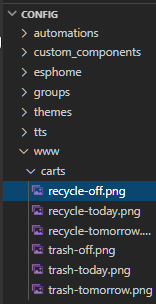 formal gulch
@ me with any info, i don't check here often
stone bolt
is there a time_date sensor that will update every second?
smoky depot
stone bolt
yeah i was looking at that, it would seem i can only update with a resolution of one minute
smoky depot
the date_time_iso is every second
I believe
I could be wrong, I think it was every second tho
stone bolt
oh, i will try that. basically, i have sensor with "seconds remaining" that updates every longish period and i know the "last updated", using that I want to show the current time remaining
i will check and let you know
no, it just updates once a minute
smoky depot
well you could create an automation that invokes the update entity service every second
stone bolt
i tried that, didn't work
i'm trying that on a template sensor that just invokes now().strftime('%s')
that does work!
 silent quartz
can you please tell how to integrate the weather display in floor plan, as mine shows a meter icon only. Thanks
stone bolt
eyyyy {{ ((states.sensor.prusa_mini_rest.last_updated.strftime('%s')|int + state_attr('sensor.prusa_mini_rest','time_est')|int) - states('sensor.time_s')|int) | timestamp_custom('%H:%M:%S', 0) }} nice
fuuuuck timezones
lol
carmine fern
So I have a weird issue where sometimes I have to refresh my HA screen for cameras on the Lovelace to show up. Wondering if using the "Lovelace Card Preloader" addon would help fix this issue up or if there's something else I need to do?
silent quartz
Can anyone also confirm if drag and drop in lovelace posible?
polar kelp
Not yet
@stone bolt No, you can't add options to templated entities in auto-entities. That might be possible to implement with some changes that's coming in 0.117 though...
stone bolt
@polar kelp it might be interesting if template was available in the include/exclude lists instead of a seperate option. I was able to get my desired result by using a template sensor with template attributes that I could then filter for.
 lyric swan
hello.. does anyone know how to have a graph with 3 weeks data of ultrasonic sensor. I could only get a day and half of data to show
nevermind i got ot
it
 hazy dawn
is it possible to create a button to trigger and play directly a radio station on the media player card?
 vapid field
where do i put```resources:
- url: /local/mini-media-player-bundle.js?v=1.11.0
type: module
@vapid field in general, Configuration; Lovelace Dashboards; [Resources] tab; yellow +
vapid field
@shell torrent stilll wont work ```No card type configured.
- type: 'custom:mini-media-player'
entity: media_player.living_room_tv
hide:
volume: false
source: false
power_state: false```
carmine fern
@shell torrent I don't have the Resources tab option in my "Lovelace Dashboards" area. Only have the option to add a new dashboard. Running HA on HassOS.
polar kelp
You need to enable Advanced options in your profile settings.
shell torrent
@vapid field Have you verified that the js file is accessible in that path?
you can try <http(s)://yourhahost.yourdomain>/local/mini-media-player-bundle.js
if that's a 404, that's likely your problem
 desert flame
Hi there, I was using FB to get user picture in my HA frontend. It stopped working couple day ago. It's probably not related to HA itself, since I can't get picture if I use this link in browser. I'm wondering if this is still working for anyone. https://graph.facebook.com/1720655394/picture?type=large
wheat current
It redirects, but it's working
desert flame
can you see a picture pls? All I can see is empty picture silhouette
wheat current
it's their default image
desert flame
but there were actual pictures, I was using this in HA for long time. It provided my actual profile FB picture in HA or redirected in web browser..
wheat current
You need to ask the owner of that service for help with that
desert flame
Facebook? Profile picture is public
wheat current
Yes
desert flame
ok, just an update for future reference: I created access token under fb developer page and updated url with token and now I can get actual picture. It seems they locked even public profile pictures. It stopped working couple days ago.
but this is working only for my profile picture. I can't resolve my wife picture - invalid token
 magic jasper
I have a light-fixture that contains 2 individually controllable bulbs. How do I tell Home Assistant that this is actually one light?
 cerulean brook
I am having trouble with the simplest stuff. Trying to get pics in person badges on the dashboard. I have people set up in Configuration -> people. Uploaded the pics through the UI, I get pics in the ui but not in the card. When I click on the person to modify i get the error
This entity does not have a unique ID, therefore its settings cannot be managed from the UI. See the documentation for more detail.```
When I add a unique id in my config yaml the people show up twice in my people page. What am i missing?
edit: in the dash configuration i set under the person
```yaml
image: https://myserver.duckdns.org/api/image/serve/90c086768873abc5b464640073d9e91c/512x512```
thats the location HA gave when i uploaded the pic. honest moon
if i don't want to see certain devices/sensors on lovelace if a certain condition is true (sensor.attribute.something == true), is that doable?
shell torrent
@magic jasper https://www.home-assistant.io/integrations/light.group/ perhaps?
 slow brook
Hi everyone, I was wondering if someone knows if it is a problem with the custom component, light-popup-card, or if I'm doing something wrong.
Everything works fine beside that over the table my lamp actually has 2 bulbs inside, so I tried to add the group.table_lamp which inside has light.spot_table_1 and light.spot_table_2. The slider seems that it can not manage the group, the percentage of the brightness seems to be ok but the slider keep going back to the middle.
shell torrent
@honest moon with https://github.com/thomasloven/lovelace-template-entity-row and/or https://github.com/thomasloven/lovelace-auto-entities you can do basically anything
so yes, it's certainly doable
 main fjord
Hey guys, I am using generic thermostat card, is there anyway to add additional Preset to it? currently it only has "None and Away".
http://snpy.in/aYLfWf this is my current card
honest moon
i think that depends on what your thermostat device supports
i have an Ecobee, and it shows me 1 of 5 different states (Home, Away, Sleep, Idle, Hold)
gloomy chasm
How can I get the circles entity states in the top of my ui out of view?
gloomy chasm
Really,, where? when I tried on 1
it just left a yellow circle
with enity not found
dark dirge
I edit my config in YAML, so I don't know exactly what you'd do in the UI
gloomy chasm
hmm.. maybe I can edit my Yaml aswell to get rid of them
dark dirge
you can also switch to "panel" mode to get rid of them completely and use the full browser width
that's what I do, and then build the whole view as I wish
dark dirge
somewhere in Google? 🙂
gloomy chasm
haha thought u had a quick answer , but ill google it
dark dirge
again, not sure where do that in the UI. You might need to edit the raw config to add panel: true
admittedly, the docs are definitely not geared to editing things in the UI
 runic heath
Has anyone else had issues on 0.117 with trying to edit an automation or something and having the quick bar show up when typing “e” or “c” on mobile?
 umbral harness
did anyone else's hass reset the ui dashboard layout after updating?
rather, was this a feature / expected?
lmao im silly
hacs update to unifi protect moved them all and made it look like everything was shuffled around
dark dirge
runic heath
@dark dirge awesome! Thanks! I’m not familiar enough with GitHub to open an issue, so just wanted to ask here first. Thanks a ton though! Glad I’m not the only one haha
dark dirge
it was discussed during beta and I can't repro on the desktop, so hopefully it's a straightforward fix
feel free to add your comments, since I don't manage my automations through the UI
runic heath
Ok will do!
dark dirge
@latent moss pointed out that there's a setting in the profile to disable it, which is perfect for working around this: As a temporary solution you can disable Keyboard Shortcuts on your profile page while on your mobile device. The preference is device specific.
@runic heath
runic heath
Oh sweet that will be perfect then! Thanks guys!
echo rapids
Hi there is it possible to specify a colour of an icon within the glance card if so how
echo rapids
i have a folder called /config/themes , how do i used themes: !include_dir_merge_named themes/ instead of the one themed yaml file
echo rapids
Hi there in my zones options there are two zones that i can not delete or edit and they are both giving my location as netherlands when i am in the uk, how do I edit/delete these
 icy cradle
I have a question regarding an example on "https://developers.home-assistant.io/docs/frontend/custom-ui/lovelace-custom-card/" - Defining your card. How am I able to fetch/select the HTML elements that have been generated. A document.getElementById does not work.
Just below this.content.innerHTML I try to do document.getElementById() and that doesnt work
 gilded swallow
So I've upgraded to 117, how do I change the header?.. can't find any option
 empty heath
@gilded swallow What about the header are you trying to change?
gilded swallow
Well, (strating to think that won't happen..) moving it to footer mode?..
dark dirge
It’s only compact for now, not a replacement for CH
empty heath
@dark dirge Is CH still compatible with 0.117 that you know of?
dark dirge
I haven’t tried it, but maykar claimed that it would break
gilded swallow
It did break... :(
Will it be a replacement for CH?.. will it have more options of changing the header?
dark dirge
Don’t know. It sounded like all that feature creep was part of the problem
gilded swallow
Well, keeping up to date as an add-on probably took a lot of work..
But, if it's part of the core, should make it easier, no?
It was one of the most popular add-ons.. so sad to see it go to waste.. :(
dark dirge
What made it into Core is like 90% of what I used it for, so I don’t miss CH
gilded swallow
I can't seem to understand what made it into core??
Looks the same before using CH.. (or have I forgotten how it used to be..?) Is it any different?
gilded swallow
that's that?...
Well, hoping more options will be available soon...
Footer mode was one of the main features I liked about it..
gilded swallow
🙄 huh?
kind shellBOT
Want to see what issues are open (or were open and are now closed)?
- The core (backend) - for HA itself, and integrations
- The frontend (UI) - for cards and display issues
- The Supervisor
- HassOS
- The documentation
Finally, don't forget to check for any alerts
Command '~issues' was invoked by: RobC
empty heath
@gilded swallow FR = feature request, PR = pull request
gilded swallow
Any other alternative for CH, to accomplish footer mode, maybe? 😏
empty heath
The only alternative currently is to downgrade and still run CH. 🤷
slow brook
Hi everyone, I was wondering if someone knows if it is a problem with the custom component, light-popup-card, or if I'm doing something wrong.
Everything works fine beside that over the table my lamp actually has 2 bulbs inside, so I tried to add the group.table_lamp which inside has light.spot_table_1 and light.spot_table_2. The slider seems that it can not manage the group, the percentage of the brightness seems to be ok but the slider keep going back to the middle.
polar kelp
Use a light group instead https://www.home-assistant.io/integrations/light.group/
@gilded swallow card-mod can do it
gilded swallow
@polar kelp how??
polar kelp
iirc there was something here about it https://github.com/thomasloven/lovelace-card-mod/wiki/Theme-cookbook
Probably needs some tweaking for .117, though.
gilded swallow
Ty, but I've got CH to work once again... 🙂
slow brook
@polar kelp thank you, I'll give it a shot
gilded swallow
I would too, but I can't understand it.. Better not make mistakes.. 😉
 covert ivy
Sorry wrong channel
gilded swallow
Gonna keep using CH until "footer mode" (or it's "replacement") will be available 😏
 river vault
hey guys, I'm looking for something like
https://www.home-assistant.io/integrations/panel_iframe/
but with reverse_proxy instead of iframe, so I don't have to expose everything to the internet and use the hass authentication and ssl
polar kelp
Sounds like you're looking for the Supervisor.
river vault
can I use the Supervisor without Home Assistant OS? I'm running Ubuntu 20.04
polar kelp
Yes. You can find more info here https://community.home-assistant.io/tags/c/community-guides/51/installation and in #330944238910963714
river vault
okay Thank you
proven ether
With the new 0.117 "Compact Header" - Can i put the time/date in the Header? Like the Custom Header before?
 lucid bronze
Hi, is this still the best way of doing this or is there a better way? https://github.com/royto/logbook-card - premise I want a card that says last time a motion sensor was activated
icy cradle
I have a question regarding an example on "https://developers.home-assistant.io/docs/frontend/custom-ui/lovelace-custom-card/" - Defining your card. How am I able to fetch/select the HTML elements that have been generated. A document.getElementById does not work.
Just below this.content.innerHTML I try to do document.getElementById() and that doesnt work
shell torrent
@lucid bronze I like https://github.com/thomasloven/lovelace-template-entity-row to show the last_updated attribute as secondary info in ordinary entity cards. there you get a lot of other options as well, like change icon if active, hide entirely if not active and basically anything else as well. example below: set as active if the state is above 0 (which changes icon color), show last_changed as secondary row.
  - entity: sensor.unavailable_entities_tmpl
    active: '{{ "true" if states[config.entity].state | int > 0}}'
    secondary: '{{ as_timestamp(states[config.entity].last_changed) | timestamp_local }}'
    type: 'custom:template-entity-row'
 tacit cave
@icy cradle #devs_frontend-archived
icy cradle
@tacit cave thanks. I just found that channel and put the question there too
carmine fern
Is there a way to modify my Lovelace background if I'm using the UI and not lovelace.yaml?
polar kelp
With a theme or with the Raw editor.
hybrid berry
btw. The card loading error is fixed with 0.117. Actually the loading speed is increased around 10x....
polar kelp
which one?
hybrid berry
It's not an unheard-of problem, but I don't think anyone has nailed it down yet.
@polar kelp this one
 green bough
is it possible to make the camera cards wider?
polar kelp
In panel mode
green bough
but than i can only show 1 card
polar kelp
That one card can be a stack.
Or this card https://github.com/thomasloven/lovelace-layout-card
green bough
found it
use vertical stack or horizontal stack
is it possible that a horizontal stack is horizontal at desktop view and vertical at mobile view?
tranquil gyro
@hybrid berry @tranquil gyro Good news! Bram already fixed the invisible card problem. https://github.com/home-assistant/frontend/pull/7407 I've thoroughly tested and could reproduce the problem before this fix but not after.
@polar kelp New version is released but it does not fix the problem for my card 😦 Any idea maybe what else could be the problem?
polar kelp
@green bough with layout-card it is.
@tranquil gyro no idea. I really couldn't find anything else that could cause that. IIRC you had the same symptoms? Replaced by an invisible error-card?
tranquil gyro
cant send screenshot but yes got the display:none hui-error-card which is saying: Custom element doesn't exist: homekit-card.
polar kelp
@desert flame /config/www corresponds to /local i the frontend. So it's /local/pictures/sima.jpg. You also need to restart Home Assistant after first creating the www directory.
carmine fern
Is there a way to use the /media/ folder to serve assets instead of the /www/ folder? Using /media doesn't seem to work
polar kelp
desert flame
oh, it's working 🙂 /local/pictures/sima.jpg is correct
polar kelp
Using media-source:// like that will only work in Home Assistant, and that automatically adds access tokens and stuff
carmine fern
Ahh okay. Thank you
 fiery mortar
After upgrading to 0.117 it looks like my dark mode themes don't work. Is this a thing?
Looks like if I set it for the user then it will change all of HA, but specifying that same scene for a particular dashboard does not change the background color
which it did for 0.116.4
tranquil gyro
@tranquil gyro no idea. I really couldn't find anything else that could cause that. IIRC you had the same symptoms? Replaced by an invisible error-card?
@polar kelp i think i found the problem. i have panel:true when i make it false it is working.
 hoary thunder
so- here is a random question.
I am updated to the latest version. On my mobile app, I can see the new features.
However- opening hass via my desktop's browser- it says its 0.117, however, NONE of the new features are visible at all
Have flushed cache/reloaded. Any ideas?
Its pretty interesting. On the mobile app, I can see/tweak/use the custom header, new helpers. etc. But, literally none of it is visible in a normal browser.
formal tide
Try inkognito mode or a different browser
hoary thunder
No dice.
formal tide
unpossible
hoary thunder
I'd post a screenshot, because it makes no sense to me either.
formal tide
maybe someone finally achieved hassio in docker on hassos
formal tide
using chrome?
hoary thunder
yes
 hoary thunder
no dice.
formal tide
reboot that windows box, else you have 2 HA instances running and I'm running out of ideas
hoary thunder
hah, it makes no sense to me either.
but, I updated one of the dashboards on the mobile app(which shows 0.117 stuff), and I can see the changed panels on the desktop app
fiery mortar
Anyone know what I would need to do to get my dark mode theme working on a per-dashboard basis? After the upgrade to 0.117 it doesn't change the theme unless I change it for the user.
formal tide
you should remove CH with .117
Anyone know what I would need to do to get my dark mode theme working on a per-dashboard basis? After the upgrade to 0.117 it doesn't change the theme unless I change it for the user.
@fiery mortar per-panel basis?
hoary thunder
it has been removed since it was depreciated
formal tide
then you need to clear cache on mobile
fiery mortar
yes. I have the theme set for a particular dashboard. After the upgrade it doesn't look the way it did using ios-dark-mode theme
however, if I go into setting and set that theme for HA, then all panels have that theme. So it would seem the theme settings are still good but I can't just set the theme for one dashboard
hoary thunder
oh- I think i figured out the issue.
Something to do with nabu casa. I d idn't have the internal url set, I set it....
And both appear the same now.
Very weird though.
I am going to go force the docker to update. It acts like I am on the latest version... but, Its still missing the features...
hm. pulled the latest image down from :dev. No dice.
I am going to assume its something in my config. Let me wipe and see if that resolves it.
Ok. got it working.
I... deleted .cache,
Restarted, no update.
Deleted deps/
Restarted- it finally prompted for a front end reload.
Reloaded, and voila. the 0.117 changes are now visible.
And- by 0.117 changes- I mean, the ability to add one of the new types of helpers, or use the new keyboard shortcuts.
This also seems to have resolved the issue with connecting remotely via the mobile app / nabu casa.... where it still showed the old custom header menus.
@formal tide
formal tide
👍
 glacial ledge
When I run "reload scripts" in the server control panel of config is my HA server supposed to restart?
karmic tiger
Nope. That's why it's a reload, not a restart.
glacial ledge
Thats what I thought too. Whenever I click it it restarts. 😦
glacial ledge
any idea what I can do?
glacial ledge
Nothing. I click "reload scripts" it does its thing then it turns green like it supposed to then a few seconds later "connection to host is lost" for a while and then "homassistant is starting...."
 onyx kelp
Heya guys and gals, would this be the right place to ask about porting a Node-Red flow into the Lovelace UI? I've got a pretty detailed node red system set up with their dashboard add-on, but the hass UI is much nicer looking.
 lapis hatch
Probably 🙂
onyx kelp
Ok cool I'll be back when I have better questions, thank you
lapis hatch
Probably just as valid to post in the node-red channel... but since you're porting out of it, frontend seems fine
Depending on the questions you might also want to use #automations-archived
onyx kelp
Makes sense! Ok, once I've dipped toes in the UI side of hass I'll see how far I get before tripping. But if anyone's already done it i wouldn't mind pointers.
glacial ledge
didnt see anything in logs.
onyx kelp
Cool, trailblazing
lapis hatch
@glacial ledge What happens if you go to developer tools -> Services and call the script.reload service
glacial ledge
i'll let you know shortly.
same.
"Connection lost. Reconnecting..."
"Home Assistant has started!"
Pretty quick this time. usually takes longer
lapis hatch
What about automation.reload
glacial ledge
works fine.
 plain onyx
so i added multiple integrations through HACS , but in lovelace , there is no way to add them , the themes show up fine
 gusty salmon
I have a time picker card in lovelace, which I use to set the time to start my vacuum, and also a card that has some other vacuum settings. Can I combine these somehow? Or make sure the are always together, like one below the other?
glacial ledge
I think I fixed it. I had the appdaemon "check config" app installed and it restarts when it runs the check config script. I don't think it should affect script.reload but when I uninstalled it script.reload does not trigger a restart.
dark dirge
that app doesn't seem that useful considering that a restart already does a config check prior to restarting
gusty salmon
When I add lovelace resources, like js files, can I load those without restarting the whole HA?
 unreal urchin
hi friends. i'm using a giant picture elements card for several of my dashboards and am having trouble getting 'vertical-stack to work within it. the error i'm getting is Unknown type encountered: vertical-stack
kind shellBOT
@unreal urchin posted a code wall, it is moved here --> https://paste.ubuntu.com/p/8N93GgMhN5/
 formal karma
any one know how to
a) remove status of banner icons
b) only show banner if status is X (like is at home)
 soft crystal
Possible memory leak in 0.117? Since updating to 0.117.0 I've seen the memory usage gradually increase. The memory on my Rpi 4 (8GB RAM) was using less than 1GB for the last several weeks. Now it's into 2GB and rising over 12hrs. I've rebooted and then tried a complete shutdown power off and on and it's still rising.
Any ideas? What data can I give for this to be looked at?
vapid field
Hi, how would I show the state for a light group?
vapid field
So the group of lights I have created shows if it's off/on the lovelace icon
I can change the icon, but it doesnt show the state
dark dirge
it depends on the card, but setting state_color: true is how you would do it for an entities card
vapid field
Ah it's working now, thank you!
 stoic widget
Is there a setting to hide the sidebar for a particular dashboard? I can use kiosk mode on an ipad to hide the browser controls, but don't want the sidebar visible for a wallmounted installation
dark dirge
it already is hidden on my mobile devices. I need to hit the hamburger button or swipe to get it to show up
but yes, there's a profile option for that:
Always hide the sidebar
This will hide the sidebar by default, similar to the mobile experience.
@stoic widget
stoic widget
Thanks!
lapis hatch
@soft crystal I also have an rpi4 with 8gb ram. Unfortunately I've been on beta and I don't have history going back before beta to know whether 117 uses more ram than 116. But I'm not seeing any memory explosions
Ha. Oddly enough. The more I hang out in history tab, the higher it seems to spike 😛
But maybe that's normal. Or maybe it'd happen any time I'm actively looking at the app
soft crystal
I can't add an image to show my graph, but I have data going back over a year!
@lapis hatch I appreciate the reply and someone else having a look. Thank you. Hopefully we can figure it out. There's also a correlation in CPU usage that goes in the same direction.
https://prnt.sc/v9vpif This image shows two graphs of the same Memory sensor. Top one shows usage over the last three days, bottom is over 9 months. The memory usage used to sit just about 1GB happily. In the last 2 days, since I updated to 0.117.0, there are three spikes because when I first spotted it rising I did a reboot to try clear it. I saw it rise again a few hours after the reboot so I did a complete shutdown power off and on again. The third spike is where we are now.
polar kelp
@polar kelp i think i found the problem. i have panel:true when i make it false it is working.
@tranquil gyro That helped. Here's the fix: https://github.com/home-assistant/frontend/pull/7535
formal tide
don't see any significant change, the big break was me changing to 64bit
https://i.imgur.com/3tz2uf5.png
users reported memory leaks with onvif integration, I don't use that
 soft crystal
@formal tide I don't use onvif either. If it's not affecting two other people who have checked, then it's likely a combination of add-ons on my system. Grafana and InfluxDB are two that spring to mind. As a test, I will stop add-ons individually and monitor memory over time to find a cuplrit.
 raven pecan
Hello! Would it be possible to use Home Assistant for a Magic Mirror? (black Theme, no header, no sidebar)
shell torrent
absolutely. I'd suggest https://github.com/matt8707/kiosk-mode to make sure there's no sidebar or header at all
tranquil gyro
@tranquil gyro That helped. Here's the fix: https://github.com/home-assistant/frontend/pull/7535
@polar kelp Thanks!
 loud spoke
hello all, i hope i'm in the correct channel (sorry i'm new on discord). did some one use Nginx as a reverse proxy with home assistant and have the message unable to connect" on the android app ?
soft crystal
@lapis hatch @formal tide I have rolled Grafana back from 5.3.3 to 5.3.2 and I think it may solve the memory eating issue. I can now see individual panels again in Safari and in the iOS app, and I am keeping an eye on the Memory graphs which do not seem to be showing the substantial rise anymore. Will confirm later after some time.
raven pecan
How could I change the theme for one dashboard?
hybrid berry
@loud spoke you are aware that you would need to change the address in the app aswell after activating nginx for port 8123 for example
loud spoke
i change the external URL for the android APP
i have access to the Hass login home page but after the login i have "unable to connect"
i do nothing more on the Hass configuration
soft crystal
Update re memory leak: Rolling back to Grafana 5.3.2 did not solve the memory issue (but it did solve the Sarafi non-display issue). I will roll back to Home Assistant 0.116.4 later and see if the memory leak disappears.
 nimble furnace
Is it possible to have a glance card with lights and still be able to dim them?
Right now I can only turn them on or off
 sudden hearth
Hi All. Just wondering if there are any tips when getting a "Custom element doesn't exist" error in lovelace.
Does that error always mean that it doesn't know what the card is, or could it suggest a configuration error?
The javascript is being served fine from /hacsfiles/bom-weather-card/bom-weather-card.js and if I go into Configuration, Lovelace Dashboards and view Resources, that URL is listed there
wheat current
clear browser cache
sudden hearth
Ok that's strange - tried an incognito window and no dice. tried a different browser and no dice. loaded up Edge (didn't even know I had it installed), and that works fine.
so sounds like a browser cache clear is next
thanks
voila. that worked. Thanks heaps, feel like an idiot with that one..
loud spoke
no one for the unable to connect problem ?
 regal ravine
Hi all! I am going through the auth providers, and was wondering if there is an OIDC auth provider, so we can integrate with things like google/github/facebook/azure ad?
 waxen prism
Is there any way of making the map card 'previous locations' clickable, to show the details?
 clever ore
@loud spoke #android-archived
loud spoke
yes, Android
 rustic oar
file editor won't load, just looks like basic html when I click the tab
 midnight nexus
This morning I received my new Amcrest ProHD 1080P 2MP camera IP2M-841B. Nice, and I can see it in chrome unlike my D-Link DCS-5030L cameras. I successfully created a simple setup allowing me to view in lovelace and was able to click on the image to expand it. Reading the '// Amcrest' section of the Home Assistant documentation I came across this config example that overlays arrows to move the camera https://www.home-assistant.io/integrations/amcrest/#example-card-with-controls I tried this out verbatim except to change the entity: name which works - very cool. Except that when I hover over the image my mouse pointer doesn't change to a finger pointing and clicking the image doesn't expand the view. The motion controls work, I can see the camera feed but can't expand the image. Is this behavior possible in this config? Any suggestions?
 dry trout
Just updated to 0.117.1 and my lovelace cards are all over the place and I'm not able to reorder them like before. It seems they order left to right instead of up to down. Someone knows if it's a bug ?
 plucky dawn
hello all, I had a bug, from 2 day I have the graph in UI that display the same data, on the configuration/entity I can see the right value. After reboot HA, Now graph display the actual value, but the old value seems not record
 sour coral
Does anyone know if it’s possible for ui-lovelace.yaml to use !include that specifies a file that is in the packages directory?
dark dirge
I don't see why not
just keep in mind that if you include files from ui-lovelace.yaml, changes you make to those files won't be automatically recognized unless you at least touch ui-lovelace.yaml. It's annoying enough that I stopped including files
sour coral
What would the !include directive look like?
dark dirge
just a relative path?
sour coral
Wait a sec, you’re saying even if I have the include, and the included file is changed but ui-lovelace.yaml isn’t touched, the changes won’t be picked up?
dark dirge
correct
sour coral
Well that’s a kick in the dick
dark dirge
I was adding a space, deleting it, saving. It was a pain in the ass
sour coral
As Adam Sandler would say.... FMITGA!
dark dirge
I ended up moving my never-edited tabs to separate files, but kept the main dashboard in ui-lovelace.yaml
you shoulda seen my face after spending what seemed like a few hours trying to figure out what was going on
 restive flicker
Hey everyone, happy Friday to you all! I'm trying to install a HACS frontend called mini-media-player... I'm getting "No card type configured" . I looked in resources and it looks like it's been added but I'm not really sure. Any suggestions to help troubleshoot this?
wheat current
restive flicker
nice, i'll take a look 🙂 ... thank you
sour coral
@dark dirge did you open up a bug report?
dark dirge
nope, but you're welcome to 🙂
kind shellBOT
Want to see what issues are open (or were open and are now closed)?
- The core (backend) - for HA itself, and integrations
- The frontend (UI) - for cards and display issues
- The Supervisor
- HassOS
- The documentation
Finally, don't forget to check for any alerts
Command '~issues' was invoked by: RobC
sour coral
It’s definitely a bug
dark dirge
"frontend". they take FRs there
restive flicker
@wheat current ... love that theres a simple page to solve this... my issue was the first one " - "
thank you
 strong cargo
I try to make my header smaller (latest version) with:
  themes:
    default:
      header-height: 44px```
Result is smaller header, but no longer possible to set theme to dark...
I would like to use the default dark theme.
How can I do this ?in the HA lovelace page the middle circle icon between the Updater and Sun up/down icon , also says entity not found ? but i cant click it what is it ?
split granite
Take control of your UI and you'll find out
plain onyx

split granite
 in the top right 😉
plain onyx
yeah it used to say my name in the middle but now gives an exceptio/error
should be person.me
gives error
wheat current
then that entity does not exsist
plain onyx
got it again , but does say unknown under my photo ...
plain onyx
trying to get trakt integration
says on their git :Install this component by copying custom_components/trakt to your config folder (or install using hacs)
restarted but doesnt show up in UI
wheat current
clear browser cache
plain onyx
installed through HACS, but ended up in /homeassistant/custom_components/trakt
should i move to /homeassistant/config/trakt ??
soft crystal
Further update on memory issue: I’ve rolled back from 0.117.1 to 0.117.0 but same issue exists. Rolling back to 0.116.4 solves the memory problem 🤷♂️
plain onyx
everything added is not showing up in UI as card or entity
cleared cache restarted container
to no avail
wheat current
your expectations is wrong
just downloading stuff will not make things magically configure themselves
you have to do that
plain onyx
yeah but the readme's contradict themselves
wheat current
nope
configuration -> integrations -> +
That's how you configure UI #integrations-archived
plain onyx
from a garbage disposal entity:
Copy the files in the /custom_components/afvalbeheer/ folder to: [homeassistant]/config/custom_components/afvalbeheer/
but i dont have that config dir ???
mild veldt
@plain onyx trakt is an #integrations-archived
 hallow mango
here's one, I have a light entity with effects. can I expose those effects as a drop-down in lovelace?
ohh I guess I can make an input select with the effects and use an automation
echo rapids
Hi there is it possible to do what i am trying to do here
type: glance
entities:
- entity: automation.calendar_light_turn_on
- entity: automation.calendar_light_turn_off
- entity: automation.christmas_lights_effects_2
- entity: calendar.christmas_lights
state_icons:
'off': 'mdi:calendar-blank'
'on': 'mdi:calendar-today'
state_color: true
title: Automation States
columns: 3
what i am trying to do above is give the enitity calendar light an on off icon
shell torrent
looking at https://www.home-assistant.io/lovelace/glance/ I can't see that allows which icons to use.
but you could use https://github.com/thomasloven/lovelace-template-entity-row for that
and it's easier to help if you do the three backticks
echo rapids
thanks
another question, with the animated weather card is it possible that next to the for example the cloud showing raining have txt next to it that says Rainy, like on the built in card
 fierce quarry
Is it possible to enable or disable a card from being shown?
Via an automation I mean
hallow mango
how can I get the exclude here to hide switch.hyperion whenever light.wled_tv is off? https://pastebin.com/L3JqUj2P
dark dirge
@fierce quarry Use a conditional card based on something like an input_boolean?
hallow mango
condition card? is that a thing?
dark dirge
yes
hallow mango
o_O
fierce quarry
Didn't realize there was lol, thanks!
hallow mango
nice
fierce quarry
Figure I don't need to look at my pool card all winter lol
dark dirge
you can make a state from an attribute, so no biggie
hallow mango
oh yeah right, the dot way instead of methods?
dark dirge
no, template sensor
echo rapids
Hi all
hallow mango
I suppose I could not use exclude, and use a more comprehensive template maybe
but I need to set the icon and stuff for the entity before it's excluded
echo rapids
On the zones Tab, my Home location is greyed out, when hover over it it says unable to edit radius yet. can anyone tell me if this feature is coming as i dont realy want to overide it with a manualy created zone
dark dirge
first, line 11 needs an "else"
it's not a valid template as-is
I think you're better off writing a template that generates a list both with and without that entity based on your condition
and ignore the exclude/include/etc
hallow mango
but I need to set the icon and stuff for the entity before it's excluded
^
setting them in customization doesn't seem to "stick" when the entity gets hidden/shown
and it's a rest switch, which won't let me define an icon in yaml
dark dirge
that's not the point of auto-entities
now you're trying to solve some other unrelated problem, it seems
dark dirge
you asked this, and I was answering it:
how can I get the exclude here to hide switch.hyperion whenever light.wled_tv is off?
and I'm saying that I don't think that will work. you should create a template that generates a different list if the condition is true and false
stop trying to include/exclude something from the master list
I don't think you can optionally say "exclude nothing in this case"
you can try, of course. But the template you were using in exclude: isn't valid
and I don't think it even accepts a template there, but I could be wrong about that
hallow mango
gotcha, thank you
umm, any reason why those customizations wouldn't stick that you can think off?
I'd be fine to just give the id from a template if the icon and name would stay
dark dirge
nope
dark dirge
looking closer, it looks like you just need the same conditional card that I mentioned earlier. You're using auto-entities for a single entities card for which you're manually specifying the entity
it's overly complicated for what it appears you want to do
something like this:
- type: conditional
  card:
    type: entities
    entities:
      - switch.hyperion
  conditions:
    - entity: light.wled_tv'
      state: 'off'
ah, I've got other entities in there I'm autoing
I did have it in a different card (an auto entity as you mentioned, so I could use a conditional in that case), but I didn't like how much space was between them lol
a minor nitpick
I'll get it later when I'm back to my laptop 😅
dark dirge
conditional card does leave some space behind for some reason. someone was looking into it a while ago
it annoyed me, so I move to mostly auto-entities as well where I could
hallow mango



 clever obsidian
is there any way to hide logbook and history from non admin?
 hoary lava
my persons don't work properly in 117... hmm ...the image doesnt show on the map . hm
hallow mango
@dark dirge got it like this: https://pastebin.com/KX0h3q3n 👍 thanks for the help 👌
how to karma?
hoary lava
Ahh. I think the new ruckus integration is broken
clever obsidian
is there any way to hide logbook and history from non admin user?
dark dirge
You can hide them in the sidebar on any device
mild veldt
@clever obsidian https://github.com/home-assistant/frontend/discussions/7361
 plush stratus
Soooo, any clever way to batch-edit friendly names? Id love to just have a long table with entity names and being able to enter their friendly names. That would save a metric crap tonne of clicking
shell torrent
@plush stratus are you editing yaml or using gui? if yaml, I usually use Excel to create a table with 3 columns; id, entity name, friendly name. then I enter the data, write the formula needed (often just to add som spaces and a dash before the value) and lastly paste it all in to VS Code. when editing large tables, that saves hours for me
even though I realize it's not very developer-y to use Excel. but it rules for fast and easy data managament
vapid field
Hi folks, hope all are well.
Like a plonker I've forgotten my user password, I understand I can reset it with console access...but it does not work via SSH. And when I connect my Pi to a monitor via HDMI I don't see any output?
plush stratus
@shell torrent well, I'd like to try to keep as much as possible out of the configuration.yaml
shell torrent
well, using a GUI, batch edits is one of the downsides
plush stratus
@vapid field unless monitor is connected at power up of rpi it will deactivate unless you modify boot params.
vapid field
Ah ok @plush stratus thanks
I don't want to reboot the Pi as in assume it will log me out. Damn
plush stratus
@shell torrent yeah I know. 🙂
Actually.. Where/how is that data stored... Hm...
shell torrent
sure, you can edit the files in .storage, but I wouldn't recommend it
 prime umbra
hi what would be the directory to send like a doorbell camera record directly to the media browser folders or that is not possible?
plush stratus
@shell torrent well... I suppose this gives me something to do NEXT week as well... sigh :p
shell torrent
I like that more and more is available in the GUI, but when it comes to things like configuring 10 identical template sensors, nothing beats text editing with CTRL+H 🙂
prime umbra
ok figuer out for some reason was not able to do it before 🙂
 frank juniper
Failed to load ‘https://me.duckdns.org:28123/frontend_latest/app.8efb5ced.js’. A ServiceWorker intercepted the request and encountered an unexpected error.
I just updated Firefox to 82.something and I'm getting this error when trying to authorize a user after clearing cookies
Chrome is loading the page fine. I also had to clear the cookies for gmail to work so it may be just a Firefox thing with this update.
karmic tiger
Service workers generally don't care about cookies. If you want to reload a service worker (or its data), you'll have to force refresh the page. Ctrl+F5 usually does the trick.
frank juniper
@karmic tiger Thanks! Well, I did get the login screen, and I filled it out, but I got the same error. I also have this warning in yellow --> Loading failed for the module with source “https://me.duckdns.org:28123/frontend_latest/app.8efb5ced.js”.
When I try to load that page, Firefox tells me: "The page you are trying to view cannot be shown because an error in the data transmission was detected."
I am getting an error in Nginx (using proxy_pass) that reads: "020/10/31 05:45:42 [error] 1761#0: *1847 connect() failed (111: Unknown error) while connecting to upstream, client: ::ffff:192.168.1.1, server: me.duckdns.org, request: "GET /api/websocket HTTP/1.1", upstream: "http://127.0.0.1:8123/api/websocket", host: "me.duckdns.org:28123""
karmic tiger
Other than restarting everything, I don't know what to suggest. If it's an upstream error, it's HA that's failing to provide the content.
frank juniper
Okay,
🙂 I'm going to clear the Firefox cache and try again. It just started happening after the update so it must be some kind of Firefox issue.
karmic tiger
Maybe try another browser to prove that
And I'm not sure clearing the cache clears service workers. They're persistent by design. I don't remember the steps to reset a service worker for FF but you'll find them online easily enough.
kind shellBOT
@plucky dawn Don't ask to ask, just ask your question. Then people can answer when they're around.
When you do ask a question, try to provide as much background detail as possible. Ask yourself these questions first so that others don't have to:
- What version of the Home Assistant are you running? (remember, last isn't a version)
- What exactly are you trying to do that won't work?
- Is the problem uniform or erratic?
- What's the exact error message?
- When did it arise?
- What exactly don't you "get"?
- Can you share sample code, ideally with line errors where the error occurs?
Command '.ask' was invoked by: mono
plucky dawn
I run 0.116.4, after some time the database seem not store the value and UI diplay a flat line, I havn't any error message, I can see the good value in the configuration section
karmic tiger
Which value? For all integrations or just for specific ones?
plucky dawn
for 2 integrations maybe all (3 only)
karmic tiger
What are your recorder settings in configuration.yaml?
plucky dawn
nothing specify, I have configure MQTT and modbus sensor
karmic tiger
.share your configuration.yaml
kind shellBOT
Please use https://paste.ubuntu.com/ or https://www.hastebin.com/ to share code or logs.
Command '.share' was invoked by: mono
shell torrent
the times I have experienced that, it's been one of these two:
- out of diskspace
- a template sensor that made the recorder break down, but didn't break the rest
plucky dawn
I have a 32Gb storage
the config file
it's in production since 1 week
I store 6 value every 5 sec
karmic tiger
What's in your logs?
plucky dawn
hum... maybe:
Error saving events: (sqlite3.DatabaseError) database disk image is malformed [SQL: INSERT INTO events (event_type, event_data, origin, time_fired, created, context_id, context_user_id, context_parent_id) VALUES (?, ?, ?, ?, ?, ?, ?, ?)] [parameters: ('panels_updated', '{}', 'LOCAL', '2020-10-31 13:12:43.883841', '2020-10-31 13:13:11.261618', 'c32477d81b7a11eb8b8789f2362d1d30', None, None)] (Background on this error at: http://sqlalche.me/e/13/4xp6)
14:13:11 – Recorder (ERROR)
karmic tiger
That'll do it 😉
kind shellBOT
Oh boy! :scream:
database disk image is malformed tells you that your database file has been corrupted :cry:
But do not worry, there is an easy fix :tada:
- Delete the
home-assistant_v2.dbfile in the same folder asconfiguration.yaml - Restart Home Assistant.
Sidenote: this will cause you to lose all your history, but it's broken anyway, so just do it.
Command '.malformed' was invoked by: mono
plucky dawn
I will lost my data?
shell torrent
I run 0.116.4, after some time the database seem not store the value and UI diplay a flat line, I havn't any error message, I can see the good value in the configuration section
@plucky dawn is it happening regularly or is this the first time?
karmic tiger
You'll lose your history
shell torrent
ok, something else is wrong then. should "never" happen
from a history perspecitve, I'd recommen influx + grafana since it's a better platform for doing analyse over time, but back to this - an error after a restore or a power outage may happen, but not twice a week
karmic tiger
You're missing the point here, bonehead.
plucky dawn
can we store in an sql database over ethernet?
karmic tiger
It's not a problem viewing the data. The database is corrupt.
And to say that should never happen is wishful thinking.
shell torrent
yeah, delete and it will recreate, that's fine
karmic tiger
can we store in an sql database over ethernet?
@plucky dawn Yes, you can write to and read from databases across networks. But I already gave you the steps to solve your issue.
Follow the official steps before doing anything else.
shell torrent
but I don't think it's normal to break down twice a weel
karmic tiger
Running something like HA off an SD card is asking for failures.
plucky dawn
it's run on rpi3 but I have a NAS with sql database
maybe better to store in this for limit access to sd
shell torrent
maybe I was unclear. absolutely, first delete and let it recreate. I'm think about the next steps, if it keeps failing, something else is wrong.
plucky dawn
okai now it's running normaly
karmic tiger
Noice. So it's not the frontend... if it continues, ask for help in #integrations-archived
plucky dawn
witch integration?
kind shellBOT
Command '.recorder' was invoked by: mono
karmic tiger
The one that was complaining in the logs 🙂
karmic tiger
Two things didn't have history... because the recorder integration couldn't record to the DB.
The problem wasn't modbus or MQTT. The problem was the recorder.
karmic tiger
Now you do 😉
plucky dawn
see this in few hour/day
shell torrent
so, to summarize: you run a rpi3 with a 32 gb SDcard, using just 2 integrations besides the default_config, modbus integration and MQTT.
and problem is that the recorder (the default integration that saves history) breaks down every other day with the effect no history is recorded after that, and you lose the history at restart since the database needs to be deleted and recreated. no other known problems. since the error is related to the integration recorder, future discussions should take place in #integrations-archived
 barren marsh
Anyone know how to change font size on entity cards by chance?
 stray ferry
I am looking for a way to represent some MQTT sensors on a graph that always shows say the last 10 updates ignoring the time between updates. Currently I have history graph but it is mostly useless for this. Any ideas?
karmic tiger
Something like Grafana would probably suit you better than the built-in graphing. You can write your own queries and customise the output.
You might want to check out the #analytics-archived channel for tips with that.
 livid escarp
Hello all does anyone in here have their HA on a Raspberry pi in Docker and have the ability to connect to it with VSCode?
dark dirge
not a #frontend-archived question. What part of "connect" are you having trouble with - accessing your files, connecting the Home Assistant extension, ... ?
hallow mango
why can't i get this to work in lovelace?
  - type: button
    name: Save Preset
    tab_action:
      action: call-service
      service: mqtt.publish
      data_template:
        topic: wled/all/api
        payload_template: 'PS={{ states(''sensor.wled_preset'') | int }}'
i tried taking all the extra quoting away, but it saves it back to that
dark dirge
because data_template: isn't a thing in lovelace
hallow mango
ohh
dark dirge
nor is tab_action:?
hallow mango
ahahaha
dark dirge
dark dirge
in short, you made a bunch of stuff up 🙂
hallow mango
surprised lovelace didn't gripe at me 🤔
dark dirge
probably just ignores things it doesn't know about
hallow mango
so from this i get an error:
  - type: button
    name: Save Preset
    tap_action:
      action: call-service
      service: mqtt.publish
      data:
        topic: wled/all/api
        payload_template: 'PS={{ states(''sensor.wled_preset'') | int }}'
voluptuous.error.MultipleInvalid: required key not provided @ data['topic']
dark dirge
please read the docs
fierce quarry
Haha! Nested Conditional Cards, to achieve OR not the default AND for multiple states
 dusk holly
Hey guys, little bit of a question. In lovelace you can add a picture (using one of the card). Is it possible to use a file stored in the media browser?
Like, media-source://media_source/local/image.jpg?
mild veldt
karmic tiger
data: -> service_data:
mild veldt
And under tap_action. You entity breaks the map
type: button
entity: ""
tap_action:
  action: call-service
  service: notify.discord
  service_data:
    message: "A message from Home Assistant"
    target: ["627312658164744203", "765080958285643787"]
Service is not a list item, so no - before it and move entity so that it didn't break tap_action
 thorn mulch
picture-elements, is there a way to change size of mdi icons?
 static cloud
how can i use a button to open up a separate browser with a http link. Any suggestions appreciated.
icy cradle
how can i use a button to open up a separate browser with a http link. Any suggestions appreciated.
@static cloud A button requires an entity right?
static cloud
No just a standard http://website.com link
icy cradle
I just created a button w/ no entity and an URL as action. And for me it opens in a new tab
static cloud
perfect. I will try thankyou.
icy cradle
@static cloud Yeah let me know if this is what you mean
static cloud
yes this worked!:)
icy cradle
Glad I could have helped
 vagrant ivy
I got a new one:
Upon upgrade to v0.117.1, I received this error:
Logger: homeassistant.components.frontend
Source: components/frontend/init.py:253
Integration: Home Assistant Frontend (documentation, issues)
First occurred: 6:54:57 PM (1 occurrences)
Last logged: 6:54:57 PM
Please remove javascript_version from your frontend config. It is no longer supported
I have no clue is causing this.
dark dirge
Seems like it tells you 🙂
wheat current
You have
frontend:
  ...
  javascript_version: xxxx
In your configuration, remove javascript_version from it.
vagrant ivy
That was it. I wonder when on earth I added that. Oh well. Removed the line. No error now. Thanks
thorn mulch
question, is there a reason why picture-elements / state icon for "person" does not have different color for "home/away"?
mild veldt
@thorn mulch Because a consensus on which is active was never reached
thorn mulch
@mild veldt okay. strange is that state-label and state condition for image works just fine, but state icon does not (for person entity only. lights etc. work just fine)
 zinc sparrow
Is it possible to make a 'dropdown' menu where the 'input_text' or 'input_select' will be generated from a local file?
karmic tiger
Both of those things are #integrations-archived. And no, not natively... you'll have to use a script or #automations-archived to somehow do the 'read from file' part.
zinc sparrow
I was sent here by the guys in the #the-water-cooler , but thnx for the answer. It will be too much time and too less effort then !
 strange sedge
I am looking for something like lovelace-auto-entities, but in a way that it creates one card per entity - does something like this exist?
slow brook
Hi guys, I'm trying to use the horizontal-stack card, but I do get the error: Unknown type encountered: horizonzal-stack. I still have the 0.116.4 version, could it be the problem?
shell torrent
if that actually is the error message, it looks like a typo
"Unknown type encountered: horizonZal-stack"
slow brook
ahah jesus, sorry
that was my rewriting that was wrong
Unknown type encountered: horizontal-stack
shell torrent
added manually or from GUI?
share some config?
slow brook
manually through yaml
shell torrent
if you don't want to share the config, I'd suggest a new dashboard where you add the horizontal-stack card from the GUI and add a few card in it
then you'll get great examples
kind shellBOT
@slow brook posted a code wall, it is moved here --> https://paste.ubuntu.com/p/ggfR4v7h7x/
shell torrent
and if that doesn't work, then we'll start in another end
slow brook
it is actually inside a popup of the browser_mod.popup but the error persist even in this simplier config
it looks like it cant be a child of another card
shell torrent
yeah, looking at https://www.home-assistant.io/lovelace/picture-elements/#elements I agree
slow brook
I'll try with thomasloven's custom:hui-element
as it does have an horizontal-stack thing aswell
shell torrent
thomasloven got a card for every thinkable scenario - and a few more
 autumn summit
I'm struggling to get https://github.com/kalkih/mini-graph-card to work... I've installed HACS, installed the mini-graph card via HACS... what now? resources config shows the mini-graph-card-bundle.js file is there... but i dont see it as an option when making a new card, and when I try to add a custom card with type: 'custom:mini-graph-card' it says
* No visual editor available for: custom:mini-graph-card
You can still edit your config in yaml.```@autumn summit That means just that - you need to configure it manually. There are a lot of examples in the link you provided. https://github.com/kalkih/mini-graph-card#example-usage
 vital forge
Hello. All of a sudden, after an upgrade, I get the following error on one of my lovelace dashboards:
Unknown type encountered: entity-filter
Is entity-filter not valid anymore? Did something change recently? I could not find anything about it....
plush stratus
What actually causes a refresh of a Lovelace screen? I see most things (lamps, sensors, badges etc) update quite handily when something changes. But then i made a custom card, and that does not toggle over to "the other image" until i refresh the UI. So, I assume that I must be missing something simple?
kind shellBOT
@plush stratus posted a code wall, it is moved here --> https://paste.ubuntu.com/p/p54NY3gzdg/
plush stratus
@karmic tiger that explains it all. Thanks, how did I miss that
 main meteor
Using the Card-mod, how the set a conditional style on a decimal value?
 frail bridge
is there a way to scale a badge in the picture elements editor
 hard raft
Anyone know how to turn back on the menu from the hamburger that lets you manage the icons, what is displayed, etc.? I pushed a button and it disappeared from the menu. I am using version .117
I only have Edit Dashboard and Help
karmic tiger
Edit Dashboard and Help are the only two options. Compact Header was a custom component that's no longer compatible with HA.
It was mentioned in the release notes. You should really read them before updating. https://www.home-assistant.io/blog/2020/10/28/release-117/#compact-header
 marsh wyvern
@delicate plinth top right of your "dashboard" aka "front end" in the upper right hand corner click the 3 dots, then edit dashboard. Then at the bottom right click the + button. From there you should have choices
good start from there would be clicking "by entity" search for the entity and then use the suggested card
your probably looking for an "entity" card most likely
GL
 compact pebble
I did not have a ui-lovelace.yaml so I made one. in line 1 I wrote lovelace: and it says Missing Property "Views". How do I fix this?
dark dirge
Properly format it 🙂
if you're following this, then you put that in the wrong place. it goes in configuration.yaml
the parts below are what go in ui-lovelace.yaml
icy cradle
I did not have a ui-lovelace.yaml so I made one. in line 1 I wrote lovelace: and it says Missing Property "Views". How do I fix this?
@compact pebble I think you might get access to this via the UI also, in right top corner just say configure and then again right top corner raw config editor
mild veldt
@icy cradle those files are not the same.
If using yaml mode you cannot edit from the UI
 idle lodge
is there a reason why the cast lovelace card updates so much faster than an android tv card? It feels so slow to get updates, press play/pause etc. Even with android tv with a polling of 2s
raven pecan
Is it possible to set a theme for one dashboard?
polar kelp
Only if you set it for each panel in that dashboard.
 mossy timber
I'm seeing something in my sidebar called "Media Browser" ... how do I turn this off?
polar kelp
You can click and hold the Home Assistant text at the top for a second, then remove the items you don't want.
mossy timber
Ah, ok
mossy timber
I don't have any media on my HA install, so it seems pointless 🙂
Thanks @polar kelp
 velvet heart
Hey, I have a Question about Lovelace.
I want to install the "custom:button-card" (https://github.com/custom-cards/button-card) for Lovelace in hass.io.
but it does not work for me.
I dont want to use the yaml mode.
I followed the Instruction and but it does not work.
it was curious that in my config path was not the folder /www so I created the folder and put the custom-cards.yaml into it.
When i want to create a custom- card it says: "Custom element doesn't exist: button-card.
type: 'custom:button-card"
what have did i do wrong?
polar kelp
After creating www/ you need to restart Home Assistant once.
velvet heart
yes i have done that
can you tell me in which folder/file i have to add the "ressources: "
polar kelp
Resources are added under Configuration ( ) -> Lovelace Dashboards -> Resources
You need to enable advanced mode in your profile settings to see the Resources tab.
And then you need to refresh the page in your browser.
polar kelp
Where did you place the js file, and what did you enter as a resource?
velvet heart
the file is in config/www/button-card.js
in which file do i have to enter the ressource? configuration.yaml or ui-kovelace.yaml or ui-lovelace-card.yaml?
polar kelp
Resources are added under Configuration (
velvet heart
and i dont have to enter in any of the config files anything ?
Thank you., the old error is gone. 😄
now it shows only:
"UI editor is not supported for this config:
No visual editor available for: custom:button-cardYou can still edit your config in yaml."
THANK YOU. now all works fine! 😄
polar kelp
That's to be expected for almost all custom cards.
 winter blade
Can I add custom buttons to the sidebar?I believe I saw some people do it since the HA update that let's you change the sidebar but can't find how to do it.
winter blade
Ah there it is, thanks!
main meteor
Using the custom card-mod, how to set conditional on a floating value?
                name: Electricity Price
                style: |
                  :host {
                    --paper-item-icon-color:
                      {% if states(sensor.elpris)|float < 0.3}
                        green
                      {% else %}
                        red
                      {% endif %}
                      ;
}```Try a % between 0.3 and } and that should work.
 lavish solar
i notice things like my camera cards require a browser refresh when I am in other tabs. I switch back to HA and see stale data. Is there a way to keep things active while the HA tab is not the active tab? or have it update when the tab becomes active again?
polar kelp
It will disconnect after five minutes of not being visible (to e.g. save battery on mobile devices). You can turn this off in your profile settings.
lavish solar
i should have searched better
prime umbra
thomas was wondering how to get transparency in your popup cards, i have tryed about everything and not able to make it work
in dev tools im able to change color on the
.mdc-dialog .mdc-dialog__surface {
    background-color: red;
}
but then for some reason not able to setup in the HA side
icy cradle
Hey, I have a Question about Lovelace.
I want to install the "custom:button-card" (https://github.com/custom-cards/button-card) for Lovelace in hass.io.
but it does not work for me.
I dont want to use the yaml mode.I followed the Instruction and but it does not work.
it was curious that in my config path was not the folder /www so I created the folder and put the custom-cards.yaml into it.
When i want to create a custom- card it says: "Custom element doesn't exist: button-card.
type: 'custom:button-card"
what have did i do wrong?
@velvet heart install HACS, it makes it much easier to install such custom components
 wooden carbon
Does anyone know how to increase the size of state-icon in the 'picture elements' card? https://www.home-assistant.io/lovelace/picture-elements/
I tried 'icon_height', '--iron-icon-height' and a few other ways i saw in old youtube videos but doesn't seem to work. Home Assistant version 117.1
main meteor
Try a
%between0.3and}and that should work.
@polar kelp Its not working 😦 Is the % the UoM? since the 0.3 is Sek/kwh
polar kelp
No, it's % as in {% if <condition> %}
main meteor
                style: |
                  :host {
                    --paper-item-icon-color:
                      {% if states(sensor.elpris)|float < 0.3 %}
                        green
                      {% else %}
                        red
                      {% endif %}
                      ;
}```It's elif in jinja https://jinja.palletsprojects.com/en/2.11.x/templates/#if
Also, test run all your templates in developer-tools/template and make sure the result type is a string.
(or number)
main meteor
Also using the auto-entites and fold-entity-row combined. Can the card-mod be used there too?
 languid axle
any ideas why I can't add to lovelace. I go to edit but i cant add or edit. I did update today.
polar kelp
@main meteor Sure. All my stuff can be used with all my other stuff.
 split matrix
Is there a way to have a pin-protected card? For a garage door for example
mild veldt
@split matrix https://github.com/iantrich/restriction-card
split matrix
@mild veldt Is this possible on every installation method? I'm running home assistant in docker on my synology
mild veldt
yes
split matrix
@mild veldt superb! I'll give it a try ☺️
main meteor
@main meteor Sure. All my stuff can be used with all my other stuff.
@polar kelp Like this? Its not working
- type: custom:auto-entities
                show_empty: true
                style: |
                  :host {
                    --paper-item-icon-color:
                      {% if states('sensor.count_alarms')|int > 0 %}
                        yellow
                      {% endif %}
                      ;
                  }
                card:
                  type: custom:fold-entity-row
                  head: sensor.count_alarms
                entities:
- binary_sensor.altandorr```style belongs in the card:
Well... actually, since you are using this inside an entities card, this should work too...
main meteor
using it inside the entity card couses other icons to change color too
Moved it to card but cant get it to work
- type: custom:auto-entities
                show_empty: true
                card:
                  type: custom:fold-entity-row
                  head: sensor.count_lights
                  style: |
                    :host {
                      --paper-item-icon-color:
                        {% if states('sensor.count_lights')|int > 0 %}
                          yellow
                        {% endif %}
                        ;
                    }
I think I know what the problem is. Try changing :host { to fold-entity-row {.
main meteor
No luck 😦
- type: custom:auto-entities
show_empty: true
card:
type: custom:fold-entity-row
head: sensor.count_lights
style: |
fold-entity-row {
--paper-item-icon-color:
{% if states('sensor.count_lights')|int > 0 %}
red
{% endif %}
;
}``` tepid sundial
@polar kelp I'm using your slider-entity-row. It's great, but I can't figure out how I can just add a heading over a full row. I'm guessing it's really simple but I can't seem to find it in the entities docs. I could use a regular entity, but that would create an on off button and in this case I don't want the light ever to be turned off completely.
polar kelp
Either use a section row with a label, or this https://github.com/thomasloven/lovelace-template-entity-row
tepid sundial
I saw the section one, but it looks different from an regular light entity, I'll check out your link. thx
polar kelp
@main meteor It may need to be with the style outside the card.
main meteor
But then it goes for all the cards
polar kelp
with fold-entity-row {?
tepid sundial
@polar kelp Your template-entity-row worked brilliantly. Exactly what I was looking for, thank you
polar kelp
@main meteor
main meteor
@polar kelp
- type: custom:auto-entities
show_empty: true
card:
type: custom:fold-entity-row
head: sensor.count_lights
style: |
fold-entity-row {
--paper-item-icon-color:
{% if states('sensor.count_lights')|int > 0 %}
red
{% endif %}
;
}
entities:
- light.guestroom_window``` timid moss
I feel stupid that I can't find where groups are in the WebUI. Can someone point me to where to make them?
Like I want to make a group of every smart light in the apartment and then make an automation to turn that group off
 fierce harness
@timid moss Currently, that's not available in the WebUI. There is a feature request for it you can vote for
https://community.home-assistant.io/t/create-groups-inside-ui/187448
You could modify your groups.yaml file to create them yourself though
 knotty quest
Hello all. I have a question about displaying data from an ecobee in lovelace. The default history-graph has something called "Downstairs Heating" but I don't see a state_attr that matches this? Where does it come from?
dark dirge
that sounds like something specific to your thermostat, at least the naming. What does it represent?
 random isle
I am building a control panel where device property names are coming from core. Should I translate the device property names in core or in the frontend? I am leaning toward core because the names are selected in core so it is cleaner to create the translations there too but wanted to validate that choice.
 tired wagon
Is there a way to use vertical stack with card and entity together? i.e. I want my ecobee to show up as thermostat card and add my sensors with temp and humidity (which is only on the entity tab) so that they are connected. Otherwise I cant get them to line up atop one another in the UI
fierce harness
@tired wagon that's exactly how I have one of my dashboards, you first add vertical stack and then you add the cards you want in that vertical stack to it
So card one would be your ecobee card, then you click the plus and card two could be your entities card with temp/humidity
tired wagon
boom. thanks @fierce harness , i overthought it and added the thermostat then gauge cards. THose were super huge. Thanks for the tip, looks sweet!
fierce harness
Also keep in mind you could combine horizontal stacks inside vertical stacks and vice versa. May not be applicable here, but it can keep dashboards looking manageable
tired wagon
Good point. It can get looking pretty rough. Now i've just gotta figure out how to get my Ring Doorbell to show more than just the most recent motion
fierce harness
I haven't even begun to tackle cameras yet, good luck!
tired wagon
Thanks 🙂 You too once you get there! I've been able to add the ring doorbell and my IP camera (simcam)
 viral eagle
Is it possible to use something like '{{ now().strftime("%a %b %d %H:%M:%S %Y") }}' in the title of a card?
dark dirge
do you have a specific card in mind?
many custom cards support templates
but many cards do not, so you need to follow the docs for the card you're using
dark dirge
Look into a markdown card, which does support templates
 wintry gull
Hello. What’s the best way to organize the Lovelace front end? I mean like how to make specific cards be in specific places without counting on auto arrange.
knotty quest
@wintry gull You want to use a combination of vertical and horizontal stacks
For example two vertical stacks will always ensure you have a two column layout (two columns that are side by side on large screens, or above one another on small screens)(
carmine fern
Is it possible to add a brightness slider underneath
a light entity when it's turned on? Inside an entities card.
 scarlet frigate
How do I remove things like the calendar and logbook from the sidebar?
viral eagle
@dark dirge thanks again for the tip! I’ll check that out
magic jasper
@scarlet frigate Click on your profile link in the lower left corner. It should be the 5th from the top.
scarlet frigate
thx