#frontend-archived
1 messages · Page 136 of 1
 turbid badge
turbid badge
turbid badge
I didn't knew, I just came up with the add-ons I use on a daily basis.. Gonna check it out right away
 ancient harness
lil demo for ya
has an eyedropper with mag glass as well 🙂 pretty nice for built-in
turbid badge
never knew that was clickable 🙂
 viral sorrel
cool.. but as far as I can tell it's not working in the card
 amber sun
@smoky depot still doesn't seem to change anything: https://i.ibb.co/4PPXycS/Screenshot-from-2019-12-27-20-22-01.png
viral sorrel
it straight out refuses to save quotes around one of the values
always reverts to this
  - entity: sensor.office_humidex_index
    name: Humidex
    show_legend: true
    show_state: true
    color_thresholds:
      - value: 0
        color: '#3498DB'
      - value: 29
        color: '#F1C40F'
      - value: 39
        color: '#FF9800'
      - value: 45
        color: '#E95648'
nope.. that was all me being blind.. forgot the hash
but it still doesn't change the colour.. does it only work for the future? or should the line be rendered correctly with each threshold?
even though the value never reaches 45 it always displays the line in red
viral sorrel
doesn't appear to make a difference
turbid badge
uhm.. actually, is entity used correctly in your config. just checked mine and they are different
viral sorrel
that's at the end where home assistant shifts it (keys are alphabetically ordered)
turbid badge
indentation seems wrong there as well, but otherwise you wouldn't see anything I presume
  entities:
    - sensor.sensor_temperature
  show:
    labels: true
  color_thresholds:
    - value: 20
      color: "#f39c12"
    - value: 21
      color: "#d35400"
    - value: 21.5
color: "#c0392b"```it doesn't let you do incorrect indentation or it would show anything 😛
it's because you have just the one entity
turbid badge
still, for multiple entities; - type: custom:mini-graph-card entities: - entity: sensor.outside_temp aggregate_func: max name: Max color: #e74c3c - entity: sensor.outside_temp aggregate_func: min name: Min - entity: sensor.outside_temp aggregate_func: avg name: Avg color: green name: Temp outside daily (last week) hours_to_show: 168 group_by: date
viral sorrel
maybe threshholds don't work for multiple entities?
amber sun
I can't even get one basic icon to change color in lovelace, what is going on with my installation?!
type: entities
entities:
  - entity: switch.garage_1_light
    icon: mdi:leaf
    icon_color: green
icon changes to a leaf, but color is still default dark blue
 smoky depot
other than what's posted on on the git i dunno what to tell you. you could try using a different card like https://github.com/custom-cards/button-card
turbid badge
well you could download a green leaf icon and customize the entity icon, but that seems weird to me..
amber sun
So there is no way to change any icon colors in HA/lovelace? So the default dark blue = off and yellow = on is all we get?
turbid badge
on the entities card yes
smoky depot
the custom button card i linked does that
amber sun
I will try that, thank you!
 atomic glacier
@amber sun umm...if you are just looking to change every icon on and off colors, that can be easily done through theming as a whole or on a per card basis as theming was added pretty much for all stock cards.
 still quail
Listicon & saveicon are set to --primary-color. Shouldn’t it rather be --paper-item-icon-color or some such?
I want to theme them to color, different than primary...
Also, in the logbook, the color for ’a’ is primary-color. Shouldn't it also be set to something else?
In some places, dark/light-primary-color is used. Primary/secondary text color also seems like good options?
Not sure where to report or discuss the above though?
 wheat current
https://github.com/home-assistant/home-assistant-polymer Look though the issues there, it's probably allready been discussed
 heavy cove
How can you assign pictures (of people or something) to a device tracker icon?
wheat current
That's a #330944238910963714 question, use customize https://www.home-assistant.io/docs/configuration/customizing-devices/
 stoic glacier
Can you have multiple lovelace configurations? like one for tablet A, one for tablet B?
 split granite
Not natively, but there's custom cards that can do that kind of magic
Custom Header is one of those
stoic glacier
ahh.. so it's not per-user or anything like that?
split granite
Not natively currently, no
stoic glacier
hadashboard looks like a potential solution.. but omfg does it look annoying to setup.
split granite
Install HACS, install Custom Header, go...
wheat current
You can hide views nativly now
split granite
stoic glacier
I haven't switched to the edited config yet, because once I do I know it won't auto-add devices anymore... and then I will have to hunt them down while I'm still setting up.. thats.. mildly annoying..
split granite
All those appear in the same place, making them trivial to "hunt down"
stoic glacier
where? entities? they don't
split granite
 -> Unused entities
stoic glacier
ahhh
split granite
And if you're using the UI editor, you can add them from there
stoic glacier
but does that get it from the developer states list, or from the entities list? because I've found the entities list to be highly unreliable
split granite
 -> States is the truth of everything
 -> Entities is the list of entities supporting the entity registry - a subset
stoic glacier
ahhh.. ok
 wind spire
does anyone use the "Mini Graph Card"? I installed it via HACKS and added - url: /community_plugin/mini-graph-card/mini-graph-card-bundle.js type: module
but i still get an error when i want to use this card
The error is: Custom element doesn't exist
stoic glacier
but the .. -> unused entities would use the same logic as the magcially appearing cards when I leave lovelace in default mode?
split granite
Yes
stoic glacier
ok.. thats helpful. thanks!
split granite
It uses the true view, not the subset
stoic glacier
I created a view, added some entities to it, but none of them show up. when I try to delete the view, it says you can't delete a view with cards in it......
I wonder if naming it A/C is the issue...
I was able to create one called "test" and it worked
stoic glacier
is it possible to add custom cards and still use the web-based lovelace editor?
 modern breach
yes
wheat current
Yes
modern breach
it might no work for all cards ofc, but the few i use are fine 🙂
stoic glacier
where do I add the code for them? just add lovelace: and then the code snippet?
stoic glacier
got it.. thx
 worn delta
inside the yaml file when i set an icon for my button card and i have to button call a entity script it removes the color of the icon even when i have it set to something els, is there a way to overwrite the entity script color ?
 cloud elm
G'morning, im having a heck of a time getting the camera proxy to work... keep getting 401 unauthorized.
Running Home Assistant 0.103.4 in docker/ubuntu
http://<ip>:8123/api/camera_proxy/camera.frontyard?token=(longlivedtoken)
I've tried to put trusted networks in the config
auth_providers:
- type: trusted_networks
trusted_networks:
- 192.168.0.0/16
currently trying:
http:
base_url: http://192.168.100.204:8123
use_x_forwarded_for: true
trusted_proxies:
- 192.168.0.0/16
modern breach
that's a lot of things at once, but perhaps start in #cameras-archived ? PPL there tend to know about cameras
cloud elm
apologies to dump it all at once... figured it was best to give all the detail I can.
that said, its not really a camera issue it's an auth issue... but i can try there
modern breach
yeah, info is good 🙂
 vapid field
-- DELTED --
Wrong channel, sorry!!!
 muted inlet
DELTED
 void island
do i need some other download to be able to add horizontal and vertical stacks? I keep getting "No visual editor available"
wheat current
There is currently no visual editor for them
void island
gotcha
 mint geode
Does somebody know the css var for the red dot on the sidebar hamburger icon that appears when you have unread notifications?
wheat current
accent-color
mint geode
Ok, nothing more specific? If I’m changing that I’m changing a lot of other stuff, too
wheat current
correct
wheat current
maybe
https://github.com/home-assistant/home-assistant-polymer
Create a PR to have it be a standalone var, with fallback to accent-color (for compability), if accepted, wait for an update, then update your theme
mint geode
👌
 half cairn
sup 🙂
I have a fold entity row with 3 entities in a picture element card, but when I click the main row to open the 3 folded rows it vertically re-centers the 4 rows (the 3 entities that open and the original row) to where the original main row was. Is there a way to open the folding rows under the main row, without it re-centering? (like when using the fold entity row as a seperate card)
worn delta
i have one problem with some code i would like to get some help on 😮
https://pastebin.com/zyZjTW8p
atm im just testing but when i add the 4 th vertical-stack it derps out and add the horizontal- stack on the next line instead of right below it like test1 - 3
smoky depot
it just shifts it over a column you mean?
worn delta
yea
smoky depot
yea thats the auto-ness of the ui
if you want one long card just add it as one huge vertical stack
worn delta
that wasnt my plan 😛 just wanted to have it show to rooms in a box over it with some icons for some scenes for my philips hue scenes
smoky depot
I think there is a some custom mods you can install that will give you more control over how the ui handles the placement (don't know what they are off the top of my head) that you can try and find
vapid field
lads do I undestand correctly that lovelace doesn't have anything to represent simple buttons? imagne a "tv remote" type of thing
loads of button/text that send commands
smoky depot
@vapid field there are tons of custom cards out there that can give you just about whatever you may want
worn delta
@smoky depot https://github.com/thomasloven/lovelace-layout-card you mean something like this right ?
smoky depot
yea but i think there is something called custom-ui you may wanna google that can do a whole lot more
vapid field
I guess, they should be button not toggle states, but yeah
I google, but there's not "central library"
not sure if I do it all from the start myself, maybe someone has made something already
smoky depot
@vapid field check this out https://hacs.xyz/ makes finding and installing easy. however it dosen't have everything that can be had out there
vapid field
thnx @smoky depot I'm just creating a IR repeater/relay using nodemcu so I want to communicate over mqtt basically
to serve the IR needs at home from one central place
smoky depot
if you have the entities set up and just want to make the toggle switches into buttons with some customized icons you can use something like https://github.com/custom-cards/button-card to achieve that
that can be installed with or without hacs
the card can get pretty elaborate as well so the icon can even change depending on states of the entities ect
so like if you wanted the play icon to show a pause icon while it's in play it can do stuff like that
vapid field
yeah I even found it while googling but it lookled too much info/too much for my project
not sure
smoky depot
it's HA, getting the hands dirty is inevitable
vapid field
i have no problem with that, more worried I so something that is already done by someone else better/take the wrong approach
smoky depot
thats where google fu comes into play
I know they make a card for like the roku with all the buttons ect
so you may find something your after already made, just go find it
vapid field
that is what I do... but homeassistant/hass.io/etc naming is not the best for googling things tbh
smoky depot
I usually just use hass or hass.io in the search and it finds me what i need or gets me close enough to it
vapid field
hassio seems to work for me the best
but in general, your reckon the reasonable approach is add entity (platform: mqtt) etc, send info back to nodemcu using (custom or not) cards
I was thinking of creating an addon but then thought it's not probably the right approach
smoky depot
if you want something specific that you cannot find then building yourself is the only approach
worn delta
@smoky depot i fixed my problem i saw that i derped with the code so i hade it set alittle wrong in the spacings between lines :p
smoky depot
good stuff
worn delta
oh yea one other problem i have: https://pastebin.com/MFSiKeBY
when i use that code the icon that runs the script arnt working right. it changes the color to the theme instead of the color i told it to ?
This is how it looks right now:
https://i.imgur.com/ANDvWcy.png
 uncut oasis
Hey all!
I've searched online and not seen any good examples of a "cinema card/template" for lovelace.
Anyone aware of any good examples?
I'm hoping for a consolidated card that can look after 1-2 media players (DVR + ChromeCast) plus a screen & projector (I've already got all of these running in hass, just want to consolidate them).
 heavy bear
Is there like an “awesome Lovelace” compilation that anyone is aware of that’s any good? Trying to figure out some neat things to do with Lovelace and not very inspired
 maiden dagger
can I use my own svg as an icon for stuff not on MDI? tried setting icon to /local/... but doesn't display
only google result I've found said no but it's from 2 years ago
for an entity-button in this case
split granite
The answer is still no
maiden dagger
alrighty cheers
split granite
Now... if you made a custom card, you could then have whatever you wanted
 mild veldt
@heavy bear https://sharethelove.io/
heavy bear
Thanks @mild veldt
 glossy solar
Hi all! I have a new Z-Wave device that I added to my network. I can view it in the Z-Wave configuration, as well as the Tools->States screen, but I can't get it to show up in the "Z-Wave" or "Light" card on my main screen. What should I check to figure out what's wrong?
(The device is a dimmer. I have other identical dimmers that show up under "Light")
glossy solar
I'm not sure what is, but it shows up as enabled. One thing I noticed, it seems this third dimmer was named under the "light" domain instead of "zwave":
Disregard that- there are entities under both the "zwave" and "light" domains for all three dimmers, including the one that is not showing up.
glossy solar
Found the answer. I must have attempted to "Take Control" of the UI and not made any modifications. I moved the lovelace config file (under .storage) and the new dimmer then appeared.
vapid field
Guys is there a plug icon in HA?
vapid field
Thank you
 mellow stone
When I Install a plugin from HACS and place the 2 lines of code under the resources section in the raw config editor they do not work and the error message of "entity not available" or "No visual editor available for vertical stack" I have deleted the lovelace file under .storage and tried re-configuring but no luck. any suggestions what else i can check. My config file is not set to manual YAML mode.
 cursive quail
ok so I got sent here to whine:
seriously does "entity" on a card not use "name override" as autocomplete search function. That is really annoying
does anyone know if there is a plugin/fix/addon for this? Not super important but I would imagine if you get a lot of entities the overridden more friendly name is easier to search with
cursive quail
when adding an entity on a lovelace card you use the select Entity (required)
to find an entity you can filter by writing some of it's name but it seems to use entity name only as oppose to the "friendly name"
wheat current
That piece of the code is in the polymer repo, I suggest you go there and make a PR with the changes you want
cursive quail
cool thanks
 devout karma
Looking for some help in creating an entity for my thermostats. I have 13 Tekmar WiFi enabled Tstats. But when I create a generic card for them it only gives a random numeric with decimal points.
It only gives me the entity listed as device tracker vs. climate which my Honeywell thermostats get
mild veldt
@mellow stone you haven't really explained enough for anyone to help
devout karma
What am I missing?
How can I specify those entities to be within the climate domain?
mild veldt
@devout karma question for #330944238910963714
 mental kayak
is there an official repo of lovelace community built cards?
mental kayak
I wanted to share a light card for those interested in vertical sliders...
split granite
Then the forum would be the place
mental kayak
mental kayak
anyone know if there is a view card?
never mind I think I can use a button card that navigates to a particular view
wheat current
you can
mental kayak
can someone help me figure out how I add a custom icon to that entity button card? I added the png to my www folder and then configured my icon path as /local/xxx.png and I get nothing
mental kayak
sorry didn't realize I can only use mdi icons
 harsh plaza
hey all, any recommendations on integrating some cards to track to a database for a fitness / health view?
modern breach
no but suddenly I am really interested in the outcome of this idea
harsh plaza
haha dang yeah I was hoping to make two views for me and my wife for daily tracking on fitness goals & healthy habits  but not needing a full influxdb... I would think at least but really not sure
modern breach
I suppose that would depend on where you are pulling the data from
harsh plaza
well I want some that I would be tracking with buttons on the lovelace view
stupid example but should serve the purpose - Tracking towards doing 50 pullups in a day. Push a button and it will go up in increments of 5. Logging daily and time stamps would be useful for then later making some cool scoreboard / progress snapshots
modern breach
a while back I was feeding lots of data into the jefit app, but I cant use that it would only upset the gf 🙂
hmm, there doesnt seem to be a single integration related to training, but you can get pizza
oh wait there is one, fitbit
harsh plaza
yeah i just was wondering on metrics I make myself
is there any other option than influx?
or i guess il ljust try to tackle that since i guess this is time series data
I haven't seen any use-cases for someone sending data to influxdb from lovelace button touch. is that possible>?
modern breach
I cant see why not
but if you just want to count things you dont need influx
ha does that nicely by itself
harsh plaza
hmm just log it right in and not use a database of any type?
modern breach
harsh plaza
Okay ill go digging into that or just using influx and see if ic an call and track.
ancient harness
yeah but sometimes time series are important, as well as automatically dumping old data... i was going to look at bringing in telegraf data at some point
mint geode
In the last two days one of my Lovelace views was completely empty. It’s always the same one. If I select the view it’s just empty. If I look into the raw config it has the cards in it, it doesn’t show them in the frontend though. After a while it gets back without me doing anything. Same behaviour on all devices. Also I didn’t find anything in the logs.
That's what I get when I open the console: https://imgur.com/a/LyeTMtC
mint geode
Found it out, looks like I forgot to remove a card for wich I had commented out the integration in my configuration.yaml for testing. After removing the resource from my lovelace I had no problems. The card also was only shown, when I played a song on my spotify. That explains why it only was happening some times and then started working again.
 twilit dragon
Can someone help me with setting a profile picture for persons? I've did it through the customization UI, added custom attribute, chose Other and entered entity_picture with the var /local/picture.jpg. After a reload it sees that there is a custom picture but it keep showing a white picture. I've placen the picture in the www map under config, i've read that /local/ is actually /www/ (created the www folder myself).
Am I doing something wrong? Does the picture needs to be a certain size of extension (png?)
split granite
Did you create www/ inside your configuration folder?
wheat current
If you’ve had to create the www/ folder for the first time, you’ll need to restart Home Assistant.
twilit dragon
I thought I already did that. I'll be right back.
 ornate mason
Hmm, I'm having some issues with theme stuff carrying over from one theme to another. I'm trying to switch to the "clear" theme from HACS, but pretty much all the colours of cards are sticking around from the Dark Orange theme I used before. No amount of hard refreshing, reloading, and restarting seems to change it.
It applies fine in menus, and in HACS itself, funnily enough...
wheat current
You are probably using CH, which has/had some theme cache issues.
OR You have defined a theme in your lovelace config
twilit dragon
@wheat current thanks, it worked 🙂
ornate mason
@wheat current CH? I'm reasonably certain I didn't define a theme in lovelace, at least a search for "theme", or dark_orange didn't turn up anything.
wheat current
CH = Custom Header
Try incognito, if it still show it is in your config
ornate mason
Aaah, right. Yes I am.
Yeah, that's it. I'm guessing CH follows the backend selected theme always.
twilit dragon
Now I added the picture, thanks for that. Now the only thing I noticed is that my device (mobile) does not have my picture. So if I go the the map I only see GS (Galaxy S :)).
How can I fix this?
wheat current
Get iPhone / Clear cache 🤷♂️
twilit dragon
Haha nice one
Not an iPhone lover. But you think clearing the cache may work? Cause I didn't change the enity_picture of the smartphone
 tired quail
Can you adjust the padding of ha-card through a theme?
wheat current
I think you need card-mod for that
tired quail
boo, was afraid that was the case
with card-mod that would mean i'd have to set the padding on each card individually wouldn't I?
smoky depot
yea be like that for any custom card that supports it
wheat current
Maybe you could load a custom js file to modify the custom element, but I have no clue on how
smoky depot
that can have some irregular results as well
but adding things like a font ect is easy lol
 odd axle
Hi, I've been tinkering with lovelace and want to be able to style a particular card (the thermostat card), to my liking fairly radical CSS - I have installed card-mod and can configure styles for each individual thermostat, but I would like to configure all of them with the same styles? Is there a way to do this, without hacking the thermostat card itself, as I just want to override styles and allow updates. I tried loading in CSS at the top of the entire panel, but because each entity is a shadow dom there is no way to style all the components collectively. There must be a way to do this, I just can't seem to find it on the forums or docs, i might be looking at the wrong thing.
smoky depot
you've done all people have managed to find out how to do
odd axle
Can you not insert custom CSS via theming?
smoky depot
you can manipulate certain aspects as you have probably read, can even inject css through the lovelace which is essentially just !imporant to override but beyond that you are limited. it's why custom cards are kind of limited in thier abilities too
course if your planning on using like a dashboard set up on a central monitor or something it would be way easier to externally manipulate the whole thing local side which can be done with browwers like chrome ect
wheat current
If you use yaml mode, you can leverage anchors
odd axle
I am using YAML mode - can you elaborate with regards to that?
 kind shellBOT
:point_up: Let me Google that for you...
Here , try this:
http://letmegooglethat.com/?q=yaml+anchors
Command '.lmgtfy' was invoked by: Ludeeus
odd axle
gotcha - i thought you meant HTML anchors
harsh plaza
wow anchors seem nice
smoky depot
yea that anchor is pretty slick
harsh plaza
i still am the noob putting all my stuff into one config yaml. haha not yet into the clean up and make my code nicer phase. still just trying to get all the card elements "working" 😄
is there something that could be going on that makes my dark sky card work, then not work between restarts with no changes to code?
 calm rock
hi all , browser mod question , is it possible to make browser mod to work even if the browser screen is not in the front?, it becomes unavailable if it is not open in front , couldnt find any parameter to modify this behaviour , comments appreciated
atomic glacier
@calm rock what device type are you referring to? I get different behavior between mobiles Vs tablet, Android Vs iPhone, etc...
calm rock
@atomic glacier , testing with two android phones now
wheat current
try with 3
calm rock
jaja
 undone egret
4 is better
wheat current
probably
undone egret
5 is a postive
wheat current
10-4
atomic glacier
Better than 10 iPhones
undone egret
maybe .... a little overkill but still iphone so i say 👎
atomic glacier
Fully kiosk browser fixed all of my Android problems for mobile
calm rock
ok, i see , i was wondering if i was missing something basic ..
atomic glacier
On my mobile it seems to be very responsive with browser-mod when I use the blackout function and just leave my phone laying there and everything comes through, (popups, cameras, etc...) Using browser-mod to run all functions
calm rock
ok, i see that function very useful if you have a dedicated device , like a tablet for HASS ,
makes sense?
atomic glacier
Yes, I will be replacing my wall mounts with Android tablets because the function for browser-mod is so fast and responsive. Not too slow on Windows, but I prefer the other features you can get using Android devices, especially the media player talk function seems to work pretty flawless and announces my outside motion along with popping up the cameras and it all happens before the door opens fully upon detection
undone egret
@atomic glacier we got to get toghter we live too damn close
calm rock
that is nice
atomic glacier
@undone egret just down the street from you...🤯
undone egret
i gotta get new amp and another set of atmos speakers ....then we get toghter @atomic glacier
the amp is in addition to the yamaha 3080
atomic glacier
Lol, Digiblur(Travis) was over here a couple weeks ago, nice to chat about stuff and not get the deer in the headlights look
undone egret
cool ....at least i will be able to show you true atmos at +- 1500 watts
harsh plaza
i broke apart my views .yaml into separate and referenced them with !include's but it seems like its still showing my exact old view I found in .storage or something. Do i need to delete that or clear something after I restarted with my changes?
split granite
Did you enable YAML mode?
harsh plaza
awe shit haha
i didnt even know I needed to
where is that. sorry im a total noob here haha
split granite
Look in the channel topic - there's a link
Click the link, and look at the sidebar on the right
split granite
No worries - when you're new this is a "bit" overwhelming
atomic glacier
the only dumb questions are the ones not asked😉
harsh plaza
I have been getting the wife aggro with the all to common phrase "stop trying to do this stuff you are just making it worse" hahaha
sadly true too lol
atomic glacier
it gets better...I made it and I am still married LOL
harsh plaza
hahaha
split granite
Yeah, the initial learning curve is steep, but it does level out... eventually 😛
smoky depot
when is that again? lol
harsh plaza
i bought some fire's for little dashboards and want to get it so we can see the locks, the cameras, and all the other cool stuff. sadly upon upgrading from RPI to new server I know can't get Nest to re-authenticate 
https://pastebin.com/raw/2VvjX6ac
What does that mean on my vs.code "end of the stream or a document separator is expected" google saying space instead of tab. I copied this from a github for the roku remote
smoky depot
the docs should include the statement, "do not copy and paste" lol
harsh plaza
gagaga
nice
it "was" working
but I was trying to be cool and separate out my views into different yaml docs
split granite
I'd guess that the spacing is messed up
Yup, those last two lines aren't indented
Add two spaces and it validates
harsh plaza
jfc
thanks
HA! progress. it is using my views now...and they are all blank hahaha
what does the "path:X" in the lovelace.yaml for a separate view do? is that supposed to match my filename?
split granite
harsh plaza
oh cool ok
 heady berry
Hi guys, I finally have my installation up and running in Docker on Ubuntu Server 18.04 LTS, but my UI gets refreshed all the time, deleting all the changes im making until saved. I found some stuff about HA Proxy but I dont think thats in use in my case. Installed after this guide: https://community.home-assistant.io/t/my-way-to-install-hassio-on-qnap-nas/92257
 plucky storm
Can anyone think of a reason why my alerts wouldn't be displaying in the front end when they're firing? I have had to manually add an alerts card in order to silence them.
split granite
Is your UI auto-generated @plucky storm ?
@heady berry How are you editing your UI? YAML, UI editor?
plucky storm
The only thing I've done to change the UI since the migration to lovelace, is to use the built-in UI editor
So..yes? I think?
plucky storm
UI is one thing I have barely messed with. I had done some customizing back when the states UI was still around, I forget how that was even done
split granite
I'd add them to https://www.home-assistant.io/lovelace/entity-filter/ so that they only show when alerting
plucky storm
So the documentation stating "Alerts will add an entity to the front end only when they are firing." needs to be updated?
split granite
Maybe
plucky storm
That's how it worked with the states UI, as I recall
split granite
If you've left the UI auto-generated it likely works that way
But, as you've taken control, you've taken control
heady berry
@split granite UI Editor, but atm I did no changes to it at all. No edits or anything until now.
split granite
I'm confused then
Can you explain what you mean by
but my UI gets refreshed all the time, deleting all the changes im making until saved
If you've left it auto-generated then it'll refresh "all the time" (as required)
Until you take control, it'll update itself
heady berry
I tried to edit the automations and while doing that, a refresh of the complete UI happened and it forgot my unsaved (obviously) changes to the new automation. I dont have that problem with the installation on my rPi. So it should be gone if I tell Lovelace that I will edit it myself? Going to give that a try
split granite
Ah, hang on, editing automations and editing UIs are different
If the UI refreshed while you were editing an automation, that's not something that Home Assistant did
Likely it's a browser issue
tired quail
i think i'm going to rapidly reach the "smarter to switch to YAML-mode" point of moving from tileboard to lovelace for everything
heady berry
Same client and browser, I even see a little grey box in the left bottom corner that disappears in seconds with each refresh. Looks like a HA issue to me. I found something that sounds like that referring to HAProxy, but that's not the case in my installation
split granite
Any custom components, custom Lovelace resources?
I've never heard of that happening
wheat current
Check you browser console when that happen
heady berry
I just managed to read a little bit of the notification coming up, seems like its reconnecting every 30-60 secons for whatever reason
@wheat current that actually sounds to get in the right direction
"Die Verbindung zu ws://192.168.3.220:8123/api/websocket wurde unterbrochen, während die Seite geladen wurde." something like the connection to ws.... was closed while the site was being loaded or something
wheat current
Then you (your client) lost the connection to the server (Home Assistant), did home assistant restart?
heady berry
no, for about a second the frontend gets white and then shows again. I think I know whats the issue, I just check that
nope, still happening. I thought it was a firewall rule I added for the Pi and not for the ubuntu server but that didn`t change anything. thats really strange now
wheat current
Check your HA/Host logs, something stopping the communication between the client and the server
heady berry
nothing in the HA log, do you have any hints for the Host logs? That would fit, SSH to the host drops out reliable after a few seconds also
wheat current
Depends on your OS
heady berry
Ubuntu Server 18.04 LTS
I barely touch linux at all atm, so I have absolutely no Idea what to look for
wheat current
There are probably a few that know, I'm not one of them.
This is out of scope for #frontend-archived
#general-archived might be better, or maybe the forum
heady berry
alright, thanks for the hint 👍
 granite prawn
hey guys
happy new year
i just wanted to check if the divider option under entites has been removed
since it says entity not found
split granite
https://www.home-assistant.io/lovelace/entities/#example shows it in use so you can compare what you've done
 pallid needle
how do I filter the visibility of a select input based on the value of another select input?
split granite
pallid needle
@split granite thanks, I was reading those docs wrong
kind shellBOT
Tinkerer is away for 10m 57s with a message :point_right: Happy New Year everybody
pallid needle
Is there a way to hide the card dilineations in a vertical stack card?
I'm using a vertical stack card, but I want all the cards to look like one
tired quail
anyone using layout-card have issues with vertical layout and - break? It's not working for me
just shows everything in a single column still
atomic glacier
@tired quail should be panel: true for anything using lovelace-layout-card like here: https://github.com/Dino-Tech/Home-Assistant-Main/blob/master/ui-lovelace.yaml#L1112-L1140
simple example of lovelace-layout-card inside another lovelace-layout-card https://imgur.com/a/HsQLL29 code: https://paste.ubuntu.com/p/Vkz22WbTcv/
atomic glacier
@pallid needle fairly easy on a mobile layout, but takes a bit of patience for tablet or PC screens, but doable by all means. Set all cards in the v-stack to clear and then apply the color or tint you wish the cards displayed with to the v-stack itself, thus giving the illusion of one big card, (and I would recommend custom:vertical-stack-in-card as it removes the padding
The calendar in this screenshot is actually 6 different cards: https://github.com/Dino-Tech/Home-Assistant-Main/blob/master/screenshots_tablet/30.png
tired quail
if any of you custom cards gurus are listening: i want an easy way to make columns be different widths 😇
 dark dirge
I struggled with that forever
tired quail
also a button-card that can fire arbitrary javascript
mild veldt
@tired quail use layout-card like @atomic glacier suggested
tired quail
i saw column_width: for layout-card but it looks like it makes every column the same width
dangit i'm blind, there's an example with a list of column widths 🤦♂️
 untold siren


 tired quail
is there a way to fire a javascript function with a button-card button? Wanting to add a couple buttons to trigger fully kiosk commands to launch plex and adjust the screen brightness
mild veldt
@tired quail nothing like that exists yet to my knowledge
tired quail
sounds like a good project for someone 😉
mild veldt
You could create a wrapper card that did it I giess
I don't want to research fully integration, you have examples
?
tired quail
yeah i need to learn how to do custom cards
fully integration is basically just a few javascript functions that it injects, so the ability to fire a raw javascript function is all it needs to do
vapid field
Is it possible to combine slider-entity-row and secondaryinfo-entity-row?
vapid field
mmm, was thinking of applying both for the same entity, not two separate ones...
smoky depot
you can use a card like custom button to resize the individual cards so small and take out the padding that several cards look like one card but give completely different control but depending on what the options for the two cards you mention they would have to support the ability to smash down like that
other than that you are what they call sol
vapid field
hmm, that sounds complicated for something that small. at least i got the option...
mild veldt
@vapid field just use both in an entities card with no toggle on the slider
 scarlet osprey
can I somehow move horizontal-stack to entities card?
https://u.teknik.io/9TQAr.png as I want to move those button to Bedroom card (those are custom:button-card inside horizontal-stack)

 errant schooner
I installed a Conbee II stick in my Raspberry 3B. Configured deCONZ in Hassio. Now I want to add an IKEA Trådri bulb by going to deCONZ > Devices > Lights > press Add new lights button. The Searching lights starts. I turn off/on the Trådfri bulb. Nothing happens. Am I doing something wrong?
Raspberry Pi 3B+, Hassio 103.5, Phoscon-GW version 2.05.72 / 12-12-2019, firmware 264A0700, IKEA Trådfri LED 1000W.
Please ignore. Wrong group 😦
tired quail
whats the custom card that you can tap and have it expand with entities or other cards
like an accordion
wheat current
popup-card
harsh plaza
is there a way to ensure a horizontal-stack will keep the same height on both cards?
atomic glacier
@harsh plaza AFAIK the only way is to set the card height: and make the shorter one matches the taller one, but results vary depending on what and where your placement in the screen layout is.
harsh plaza
yeah that's what I was worried about with that. Dang.
atomic glacier
you can also use gap-card and dummy-entity for spacing as well, big helpers
harsh plaza
is there a quicker way to refresh changes after adding manual height adjustments then so I could find the correct amount?
atomic glacier
reload lovelace or refresh browser is all that is needed, no need to restart HA
harsh plaza
ok
atomic glacier
-> refresh
harsh plaza
so adding height: 200 px for example should set it manually?
atomic glacier
only if the card has that as a function, otherwise you would have to use card-mod or card-modder (<--the latter is deprecated, but works and for me it's easier to use 🤷🏻♂️ ) really need to switch over...but
harsh plaza
yeah dang okay im using a custom card already for the one having the problem - big number card
atomic glacier
on that one you can use scale: as that is built in, but also changes the number size
 versed elbow
hey folks, question about contributing/fixing something on themes
.toolbar in hass-subpage defines background-color: var(--primary-color);
which is quite problematic since primary-color is used for a large variety of things
it seems like maybe instead it should use var(--primary-background-color); ? (or just inherit)
basically this is the dilemma - primary color gets defined as white which causes: https://www.dropbox.com/s/4kau5nxltyrxdym/Screen-Shot-2020-01-01-12-18-45.85.png?dl=0 but if you define primary color as dark, it will make the links dark here: https://www.dropbox.com/s/4khawtc05bi8gw9/Screen-Shot-2020-01-01-12-19-00.83.png?dl=0


maybe a better question for devs_frontend
atomic glacier
Well known fact. There are work arounds as I have done, but mainly just be selective of how the base theme you are altering is constructed and it will save many headaches @versed elbow
versed elbow
i cant find a way to actually fix both concerns fwiw
to me it seems like toolbar is just broken, but maybe im misunderstanding
wheat current
Try app-header-background-color
versed elbow
it doesnt apply to toolbar (that was one of the first fixes i was after)
like should toolbar just also use that same var? i think it just needs patched to be alterable
ill just open a PR and folks can leave feedback/discuss there
 steel nexus
Anyone familiar with the mini-graph-card ?
Trying to show a card with all my motion sensors like in the docs. All is well, but the motion detection text under the header only shows the motion for the first entity.
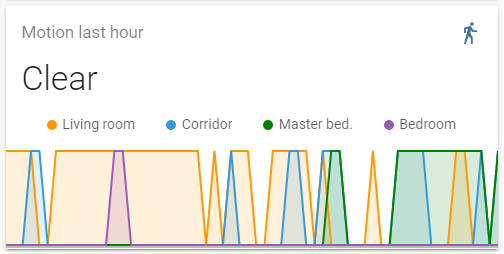
Clear is only for 'Living room', not if any of the other motion sensors are triggered.
vapid field
state-based icon-color, anybody?
 forest onyx
Hey, anyone got a good card/markdown for a welcome card? So I'm thinking a title on the first page saying "Good morning, Sam' for example - dynamic to time of day and user logged in ...
vapid field
forest onyx
Thanks @vapid field . It says it's all built into HA now natively, but I can't get a template for "user" to work using [[ {User} ]] ... Should that work?
vapid field
sorry, never tried it myself. But i would guess {{ states('person.freekeys') }} might work as that is how HA uses templates normally...
vapid field
No way of doing that right out-of-the-box that i know of, but don't take my word for it. Other might help you there...
 rose garden
How can I change time in graphs from ampm to 24h?
 pallid dune
I would like to use polymer in a custom card, can I somehow reuse the existing imports?
I try to use code from demo-more-info.js, but those imports are only for built in cards as far as I understand?
 ivory horizon
Is there a way to make a view that is not seen on the tabs but can be accessed directly via the path url
when I set view's visible property to false and enter url directly it just takes me back to the first/default view
setting visible property to true makes it show in tabs and I am able to access the view by url. Trying to split the middle and have a view that does not show up in tabs and is accessible by path
pallid needle
you can add it and not have a title or the icon
just put it at the end of the list, technically you can click it, but it doesn't really show up
 strong ridge
hello, im new to HA is lovelace already installed by default?
I do not have a lacelace.yaml file
dark dirge
Yes. By default, it is configured through the UI
mild veldt
@pallid dune yes you can use imports within the polymer app https://github.com/custom-cards/boilerplate-card
@vapid field state-based icons https://github.com/iantrich/config-template-card
pallid dune
@mild veldt is that TypeScript specific? I get Uncaught TypeError: Failed to resolve module specifier "lit-element". Relative references must start with either "/", "./", or "../". in my .js module
 meager blade
Is there a way of displaying temp sensor data in c and f?
twilit dragon
Does anyone know why my manual card disapears after I remove default_config from the configuration.yaml?
This is the card:
current: true
details: true
entity: weather.huis
forecast: true
type: 'custom:weather-card'
It doesnt give any error but just doenst show anything
I also added the resource to the raw ui config
Strange thing, it only shows up if i disable current
Already fixed it, had to add the sun: to configuration.xml
smoky depot
@meager blade you can create a template sensor and convert C to F and vice versa.
mild veldt
@pallid dune that will only work if you are bundling the card. If you just need lit-element try
var LitElement = LitElement || Object.getPrototypeOf(customElements.get("home-assistant-main"));
var html = LitElement.prototype.html;
thanks @smoky depot I'll try and figure that out. No luck so far, can you se anything obviously wrong with this? https://paste.ubuntu.com/p/sV55zCZR7x/
smoky depot
sensor:
  - platform: template
    sensors:
      temp_conversion:
        unit_of_measurement: '°F'
        value_template: >-
          {{((states('sensor.probe_1_temperature')* 9 / 5)+ 32)|round(1)}}
try it like this
split granite
@pliant snow See https://www.home-assistant.io/lovelace/picture-entity/
There's show_name and show_state options
 pliant snow
😍
split granite
All you have to do is read the docs for the card 😉
pliant snow
thats the problem as a true dyslectic, and a non-native english speaker. it takes AGES to go thru all documentations
split granite
Ah, yeah...
pliant snow
but i was there but could not find the "right" variable
split granite
Even with dyslexic fonts, that's not an easy piece...
meager blade
"Error loading /config/configuration.yaml: 'utf-8' codec can't decode byte 0xb0 in position 856: invalid start byte" @smoky depot
pliant snow
nope 🙂
but that's why i love the comunity of HASS
meager blade
Is there a syntax checking editor?
pliant snow
there are cool people to help you out 🙂
smoky depot
did you copy and paste? don't copy and paste lol
meager blade
😳
 polar kelp
0xb0 is a degrees sign
mild veldt
@polar kelp do you practice ASCII conversions on a regular basis 🤣
polar kelp
man ascii is never far away
 dusk hamlet
Hey everyone 🙂 Glad to join this amazing group of folks.
Had something that's been bugging me and can't find an answer.
I added shadows with card mod, but there's a overflow-x:hidden style that cuts them off
smoky depot
I didn't even see I put that there lol
dusk hamlet
Anyone know how I can override that .column style? I couldn't find it anywhere
polar kelp
Also 0xb0 is 176 in decimal. Alt+0176 is one of the combinations I use most at work.
wheat current
I use alt+255, because our ticket system sucks and strips new lines
dusk hamlet
@polar kelp any idea if card mod can be used or that? from what I was able to see, it only changes ha-card entities
polar kelp
I was looking into that a while ago for some reason.. wonder why...
mild veldt
you mean you don't google "what is the ascii symbol for degrees?" and then copy and paste it? 
polar kelp
Ah, yes. @dusk hamlet No. Card-mod can't do that.
I discovered that while adding animations to state-switch. So installing that (even without using it) would add an overflow-y: hidden, though.
You know... in case you change your mind and want to actually do the opposite...
However. That gives you a simple solution.
dusk hamlet
hmm interesting, I don't think I have any animations
polar kelp
Copy this into a new js file. Import as a module, and change as wanted. Done. https://github.com/thomasloven/lovelace-state-switch/blob/master/src/main.js#L228-L244
dusk hamlet
oh! checking it out
meager blade
no bueno @smoky depot "Update for sensor.temp_conversion fails" in the logs https://paste.ubuntu.com/p/kQNkB5zQBF/
smoky depot
post your sensor code block
meager blade
sensor.probe_1_temperature is available and posting data
IS it necessary to specify the unit of measurement - it should just do the computation regardless
dusk hamlet
Copy this into a new js file. Import as a module, and change as wanted
@polar kelp worked like a charm! Thank you so much
smoky depot
don't see what's causing the issue
this the only sensor you have? is this in the config.yaml?
meager blade
Its not the only sensor but its the only sensor entry in config.yaml - Would I be better creating a templates.yaml and including it?
smoky depot
no it should work in config. if it's the only one listed then it should work
meager blade
🧐 its a mystery. I'm going to assume its a layer 8 issue
wheat current
@meager blade && @smoky depot #330944238910963714
 crude geyser
Does anyone know if the secondary_info: last-triggered value is still allowed in entity cards in Lovelace? I've got an entities card of all my automations and want to display the last time it was triggered.
secondary_info: last-changed works fine but doesn't display the last time an automation was triggered obviously
`entities:
- entity: automation.barn_heat_lamp_turn_off
secondary_info: last-changed - entity: automation.barn_heat_lamp_turn_on
secondary_info: last-triggered`
 charred pecan
Are there buttons in the ui to increment or decrement a value?
wheat current
Add a counter to an entities card
charred pecan
Ok thanks
How can I add an automation to an entities card, it only shows entities?
charred pecan
Ok
split granite
If it shows up in -> Services it's a service
wheat current
If it does not show, it's broken
split granite
Or it was an event
charred pecan
I see, I will try it
Thank you
I see the counter as an entity but when I create inc and dec buttons I get an error when I click them
Can't call counter/increment, must containt at least one of entity_id, area_id
charred pecan
Can someone please help me with this, I set up the buttons and the entity to view the counter but I can not change the counter using the buttons
mild veldt
@crude geyser yes, last-triggered is an allowed secondary_info option
works on my end
oh, reread you "problem" that just means the UI editor doesn't support it, it still works
crude geyser
@mild veldt Nope not that the UI editor doesn't support it. It doesn't work for me. Code example above of my Entities Card for my automations. The last-changed displays but last-triggered does not
`entities:
- entity: automation.barn_heat_lamp_turn_off
secondary_info: last-changed - entity: automation.barn_heat_lamp_turn_on
secondary_info: last-triggered
title: Automations
type: entities`
mild veldt
🤷♂️
what does the dialog show you when you click on your automation for last-triggered?
has it perhaps never been triggered?
crude geyser
Yup when I click on the entity it shows Last Triggered 3 hours ago
Darn, well glad it works for others.. not sure what I've done to anger the HA gods 😉
mild veldt
those are two different automations you're listing. is one incorrect?
crude geyser
I just listed two to show last-changed works and last-triggered does not
crude geyser
0.103.5
mild veldt
try clearing your browser cache or opening a private session?
crude geyser
Well now I feel silly. Works in the private tab. Just not my regular browser or iOS app...
Force close iOS app and there it is as well...
🤦♂️
polar kelp
Happens to the best of us.
crude geyser
So on a similar note. Is there an easy way to display entity attributes in love lace cards? Just started using sun2 and would be cool to display some of those attributes in cards. For example next Civil twilight (date/time) or amount of daylight tomorrow for example. There seems to be lots of attributes available for all the awesome states in sun2
From what I could read, it doesn't appear that attributes are easily accessible in love lace and it is not on the roadmap?
Just wanted to confirm
mild veldt
@crude geyser I use this one https://github.com/custom-cards/secondaryinfo-entity-row
So I can do things like this with it
  - entity: sensor.bedroom_temperature
    name: Master
    secondary_info: "\U0001F50B [[ sensor.master_multi_sensor_battery_level.state ]]% \U0001F4A7 [[ sensor.bedroom_humidity.state ]]%"
    type: 'custom:secondaryinfo-entity-row'
you can access the attributes using jinja2 templates in that way
polar kelp
That's not jinja. It's Stupid-templates ™️
mild veldt
oh right, that's why I have template sensors for relative time to use in it...
twilit dragon
Does someone know how I can count all devices?
I want to put it in a glance card
found this: https://www.home-assistant.io/integrations/counter/ but don't know how I can convert the code to devices instead or errors.
mild veldt
that would be entities...which would include probably a lot of junk
need to get your devices in states wish granted @polar kelp 😉
polar kelp
ikr
mild veldt
@twilit dragon would need to filter out things you don't want and then get the count as thomas did, within a template sensor
e.g. automations, scripts, inputs
twilit dragon
Do you have an example?
polar kelp
{{states.sensor | count }} + {{states.light | count }} ...etc...
twilit dragon
i'm sorry, i'm pretty new to this, I'm not sure where I should paste this text
mild veldt
I would recommend using this though https://github.com/custom-components/templatesensor Allows you to make template sensors without restarting. Very handy
@wheat current remove that installation section and just point people towards HACS 😜
smoky depot
@mild veldt is the only benefit using that custom template sensor to not have to restart?
pliant snow
i have lost my configuration menu/option when i switched to lovelace
any idea how i can get it back?
wheat current
yes @smoky depot
pliant snow
wheat current
i have lost my configuration menu/option when i switched to lovelace
That does not make any sense.
It should be above what you posted now anyway.
pliant snow
fuck do i know... realy nothing, new instance of vm, migrated the old config and started cracking away on lovelace, and when i want to set up some test automations it's just not there!
wheat current
Add default_config: , run a config check if it passes restart
pliant snow
@wheat current you are the man!
fore some reason i had commented default_config out
way to little coffee in my body to do this now...
pallid dune
Thanks @mild veldt works, pretty much what I was looking for.
 calm temple
Hi,
I'm trying to use a conditional card to hide my kodi remote which is composed of - cards: type: vertical-stack. Is this at all possible? I cannot get it to work? I get "No card type configured", I guess "cards:" is not supported...
mild veldt
Just a single card
calm temple
ah i see thanks
 strange hull
what do I need to know before I get started messing up my lovelace ui?
dark dirge
I don’t think that’s answerable
strange hull
is there anything you wish you knew about it before you started?
I just want to clean up my ui but like everything else ive done with HA i'm sure ill mess it up
mild veldt
 tacit cave
@strange hull anchors, and go
 errant plover
@polar kelp v2.3 to v6 numbering for the layout card seems odd. What gives?
 severe fox
I am struggling. I have made a floorplan in svg format. I want to picture this in a view and later add lights etc to it. But I don't know how. Is there a simple how to to do this. All the how to's on YouTube seems to be old and not working.
smoky depot
did you check this? https://youtu.be/XV4xzgraNEk
polar kelp
@errant plover Consistency with my other plugins. And easier for me to keep track of.
kind shellBOT
@charred pecan posted a code wall, it is moved here --> https://paste.ubuntu.com/p/FRPt9s3Zq7/
Please use imgur or other image sharing web sites, and share the link here.
Command '.images' was invoked by: Ludeeus
charred pecan
Failed to call service counter/increment. must contain at least one entity_id area_id.
I am not sure what I am doing wrong
wheat current
you are missing the service data which needs to contain a entity_id
charred pecan
I am not sure what that means
charred pecan
I see, thank you
 frosty fiber
Hello! I am new to this whole thing and am probably doing something obviously dumb, I cant get my temp sensor entity to be recognised by lovelace
I tried using the entity id and the name override
charred pecan
I changed it to this:
tap_action: action: call-service service: counter.increment service_id: entity_id: counter.my_custom_counter
But the error is still the same
wheat current
You need to use an entities or sensor card @frosty fiber
Read the docs 1 more time @charred pecan
charred pecan
Ok
frosty fiber
Thank you @wheat current 🙂
charred pecan
Thanks for the help
 wheat current
add a light to a entities card
frosty fiber
and then just copy paste? awesome will do thanks 🙂
vapid field
It it possible to create a Lovelace card that just contains a list of notes?
My use case is that I want to put a card on my battery status page that tells when each battery was last changed
wheat current
markdown?
 lyric swan
can anyone point me to a custom gauge card for water tanky?
vertical guage possibly..
gauge i mean
lyric swan
can i add custom card to lovelace without yaml mode?
wheat current
yes
polar kelp
 violet swallow
Is there any way to change the icon of a Media player, based on what's playing? e.g. I have an Nvidia shield, using ADB I can detect when it plays Netflix for example, or Kodi, is there any way of changing the Icon for the Media Player based on its state?
mild veldt
@violet swallow media player integrations update the entity_picture attribute on source changes
Do you not get that functionality from the Android TV integration?
 errant birch
I have this on one of my lovelace pages and it works great
although since a few updates ago the playstation component reports "standby" instead of "off"
so the state filter does not work for the ps4
is there any way I can filter entities that are not "off" or not "standby" without making a new card ?
as u can see I have a fixed card height, and not having this would fux0r up my layout...
now that I come to think of it, sometimes I have my media players report unavailable too, so those should also not be shown
violet swallow
my shield just shows as the Cast icon the entire time unfortunately
errant birch
@violet swallow perhaps by templating, but I'm not good at that.. at all..
violet swallow
@errant birch Yeah, me neither hah
mental kayak
anyone know if it's possible to style a view instead of an individual card?
 deep moat
I'm having issues getting PiHole lovelace cards running. the cards all currently say unavailable and I've had a few different kinds of errors in the log file
I do have tracebacks on the 4 cards / sensor.pihole entities I'm trying to show, but the general gist is: Update for sensor.pi_hole_dns_queries_cached fails
wheat current
Lovelace cards will not work untill you get the integration to work
The frontend can not display something that do not exist
deep moat
the frontend integration or the pihole integration?
wheat current
pihole
deep moat
What channel is for integration questions then? The addon is working for sure
wheat current
 compact ledge
In an entity, how can I change the icon status? I'd like to add an entity associated to a boolean input, but the active/inactive icon should be changed according to a switch value
mild veldt
@compact ledge you'd have to use the custom button-card or config-template-card
harsh plaza
Could i possibly inject CSS in to some of these custom cards to get them so whether in portrait or landscape I could get horizontal-stacks to always match vertically. it's driving me crazy haha
 civic sedge
for the lazy ones the link
https://discordapp.com/channels/330944238910963714/397426163649216512/662742210944696330
 errant grail
The view is a shit
mild veldt
there's numerous ways to display the way a set of lights are displayed, but I couldn't say which is vest
errant grail
😂
mild veldt
which is your subjective opinion; is my point
errant grail
i'm looking to install floorplan
mild veldt
And my opinion would be that is even worse 😜
regardless, my point is that you don't give us much to work with with just "improve". that's all
I prefer entities cards. Clean and compact
wheat current
and packed with features
mild veldt
Lots of people like button-card, which has a huge set of features
 dreamy tendon
I use custom:slider-entity-row for my lights but that was a while ago so maybe there are better options now
wheat current
I think entities card have that now?
mild veldt
well it is placed in the entities card, but it is not part of core
@errant grail if you haven't already, get HACS installed and check out some of the custom options as well like @dreamy tendon referenced. There's a lot out there
errant grail
Yes but the floorplan could be a good complement, to summerize the appartment (lights temperature, …)
dreamy tendon
I've spent countless hours with the 3d floorplan and I wouldn't recommend it honestly if you have overlapping lights 😄
mild veldt
In my experience, it is a cool "wow" factor, but not very functional for day to day use
but that's just my opinion 😉
dreamy tendon
totally agree
atomic glacier
I am actually working on a floor plan now, but the only thing I am using it for is for motion detected zones... And probably ceiling fans because they look cool on the floor plan lol
errant grail
When i invit someone
errant grail
HACS is a pluggin to replace lovelace ?
dreamy tendon
easy way to install custom components
wheat current
among other things
wheat current
@split granite ☝️ he is reading the docs
split granite
Wait?
dreamy tendon
oh HACS has updated. Better do that without reading the change log like I did last time
split granite
Really?
wheat current
or atleast pretending to, which is someting
atomic glacier
🤔 I obviously do that all the time
errant grail
Not the doc, the website, sorry 🤣
wheat current
same thing for that one
mild veldt
there's docs on that site?
wheat current
At least an attempt of it 🤷♂️
But I wouldn't trust it, the person that wrote most of it where probably drunk while writing
atomic glacier
👈🏻 reads while update is finishing
mild veldt
@wheat current start putting out fake releases. e.g. 0.20.5 "Only update to this if you don't know how to read"
wheat current
tempting 😂
dreamy tendon
It took me some time to fix HACS after the last time I updated it. Who reads change logs anyway...
wheat current
@split granite does, but Im pretty sure he is the only one.
dreamy tendon
what a nerd
split granite
I'd say the devs do, but I recently found that out to be a lie
wheat current
I think they are the worst of it 😛
mild veldt
Why do things differently than I do things at work? "test it in prod"
split granite
There's a dev?
wheat current
Works in dev
dreamy tendon
All this joking and I think I broke HACS again by updating. I really am dumb aren't I...
wheat current
Could be something else, I'll refer you to @mild veldt's post above https://discordapp.com/channels/330944238910963714/460846676358332417/662748263279230977
dreamy tendon
nah, it usually is my stupidity tbh. The only way I get HA to work is to break it so many times I run out of ways to do it
wheat current
There is always a way
dreamy tendon
clearly, as I'm stuck at the onboarding process. I guess I'll read the change logs and fix that tomorrow 😞
 brisk bay
I'm trying to add the custom_header component using the raw config editor in lovelace. I just dont know how to format it properly. Can someone help or point me to some documentation?
split granite
Which integration? loading of what?
 dark dirge
@brisk bay See the ‘resources’ parts here: https://www.home-assistant.io/lovelace/yaml-mode/
wheat current
@dreamy tendon read the actual message on your screen 😅
ancient harness
wait i thought HACS was HASSio only?
wheat current
Why?
ancient harness
hot diggity dog
i dunno, i thought i read that somewhere
yay more stuff to play with!
wheat current

NO, no, nope, this is for all Home Assistant installations (windows may have issues)
ancient harness
i might be confusing the name with the addon solution
 brittle eagle
hello!
i've been searching without any luck, id like to have a monstercard/autoentities inside a fold entity row, any pointers?
dreamy tendon
Ludeeus, I am but choosing to ignore it. I have no patience to wait.
dark dirge
There’s an example right in the docs: https://github.com/thomasloven/lovelace-fold-entity-row/blob/master/README.md
 orchid folio
hi! is it possible to hide certain elements from the sidebar on a per-user basis?
wheat current
Don't make them admins
mild veldt
@dark dirge @brisk bay yaml mode is not required for custom header
@brisk bay you should need to touch the raw config editor unless your doing some advanced templating (assuming you've added it to your resources)
There is a GUI editor for the custom header
dark dirge
This says that you still have to add a resource: https://maykar.github.io/custom-header/#installation/hacs
deep moat
what are the available graph types? I can't seem to find the right documentation
dark dirge
Do you not need to use the raw editor to do that anymore? @mild veldt
deep moat
I have one right now that uses graph: line
wheat current
Raw editor is not yaml mode @dark dirge
dark dirge
I get that. I wasn’t telling him to use YAML mode. He was asking how to format the resources
So I pointed him to that
wheat current
ian? that does not sound right 😄
dark dirge
Looking back at the original question, I assumed resources because he said ‘add the component’, but maybe I misunderstood. I agree that once it’s installed, it can be configured via the UI
As long as you’re not using YAML mode
deep moat
maybe there is a better question. how do i combine an entities card and a history-graph card?
entity is a cover, not a sensor
polar kelp
Do your thing @wheat current
If you're quick it's 90 minutes from setting up the folder structure to getting it on HACS
deep moat
I figured there was something similar already. I already have this one: ```
cards:
- entity: sensor.pi_hole_ads_percentage_blocked_today
graph: line
name: Percent Blocked
type: sensor - entity: sensor.pi_hole_domains_blocked
graph: line
name: Domains on Blocklist
type: sensor
type: horizontal-stack```
polar kelp
Thank you!
wheat current
must be a record
deep moat
Does the card i posted only work for sensors ?
polar kelp
template-entity-row? Anything you can put in a template.
deep moat
erm, nvm. i see
polar kelp
history-graph-card? yes
deep moat
is that in HACS now? Must have to update
polar kelp
That's "the thing" I asked Ludeeus to do. It should be there now.
smoky depot
@winged wing https://github.com/ljmerza/light-entity-card may not be what you want tho
 winged wing
@smoky depot Thanks for that. That actually might work out better.
wheat current
It's there https://hacs.xyz/docs/default_repositories#plugins close to the bottom
mild veldt
@polar kelp I think that will find a place in my UI. 👍
 odd light
What kind of cool stuff is out there for lovelace these days? Any good websites to check out?
mild veldt
HACS
odd light
I'm looking through all the stuff in hacs, anything in particular to check out?
mild veldt
Plugins are Lovelace related...so all of those...?
odd light
I mean, any plugins you like, etc.
there used to be a website with all kinds of HA stuff on it
mild veldt
I think they are all great in their own right 😜
odd light
hahaha
I'm just looking for ideas and stuff
maybe spruce up the ol' lovelace or something
harsh plaza
sup dudes. curious can I do something like
        labels: false```

on entity cards too? trying to have the "who's home" card just show our pics not names too.the card you use has to support the feature. features are not universal
now the glance card can just show an icon with no name
harsh plaza
ok
odd light
what edits the customize.yaml now? I go to entities and can't find stuff I have in that file.
there used to be a gui for it.
oh damn it was at the bottom of the screen, duh.
 feral rivet
I am trying to create a horizontal cards to display various sensors around the house. my first attempt is not going well.
title: Sensors
cards:
  - type: sensor
  - entity: switch.front_yard_gate_78
  - name: Front Yard Gate
- icon: Gate```What am I doing that is not correct?
mild veldt
type: horizontal-stack
title: Sensors
cards:
  - type: sensor
    entity: switch.front_yard_gate_78
    name: Front Yard Gate
    icon: Gate
 dusk isle
hi every bođy
I have a problem with the effect when tap (click) the button in the Lovelace user interface on IOS
i have post in forum https://community.home-assistant.io/t/ripple-effect-when-click-button-not-working-in-ios-13/160248 but no response yet
when tap (click) the button in the Lovelace UI with chrome on Android is ok
but IOS, I did not see any effect when I clicked on the Button card
I think the problem is related to the tag: "mwc-ripple"
dreamy tendon
Most likely someone at some point
vapid field
cool, so I am trying to play a sound when someone hits a button in the svg of floorplan. The idea is to use browser mod for this as its provides a media player for each browser and I would be able to call the play script. But, the floorplan.yaml file has a bit different syntax for triggering an action. I basically don't know how the action part in the floorplan.yaml should look like
 devout hatch
why when I accessing thorugh my localhost I can see midnight theme, but when I go via nabu casa, I see default theme?
do I need to select twice once for localhost and once for nabucasa theme in my profile?
wheat current
sure, not the same device
wheat current
just stop
mild veldt
See above
devout hatch
and if I want to make an automation like when is day set default theme, but after 5pm, set midnight theme
how this will be reproduced?
wheat current
then you select "backend selected" in your profile
But this is not #frontend-archived this is #330944238910963714
devout hatch
ok thanks..I will check
Im also fgetting in my logs warning that theme: is absolete
but I cant find theme: in my config
wheat current
Still #330944238910963714
devout hatch
ok, thanks @wheat current
and just another question

till recently I had chart, like graph with history with temperatures, but now I dont have
wheat current
Does it show under "History"?
devout hatch
        name: Light level bedroom (LUX)
        entities:
          - sensor.lightlevel_bedroom_right
for example this is one card, I am using mini-graph card
I do not have History
I deleted recorder
logger
wheat current
🤦
wheat current
yes
devout hatch
I wanted to remove all "unneccessery" things
pliant snow
I'm storing some images in /config/images/ that i want to display in the lovelace with a picture card but no photo is shown :(
type: picture
image: /config/images/door_latest.jpg
tap_action:
action: none
hold_action:
action: none
and i see nothing in the logs
kind shellBOT
To format your text as code, enter three backticks on the first line, press Enter for a new line, paste your code, press Enter again for another new line, and lastly three more backticks. Here's an example:
```
code here
```
Watch the animated gif here: https://bit.ly/2GbfRJE
DO NOT repeat posts. Please edit previously posted message, here is how -> https://bit.ly/2qOOf1G
Command '~format' was invoked by: Tinkerer
wheat current
Yeah.... you cant do that, you need ti use www
split granite
Your path is wrong though
pliant snow
ait
pliant snow
cool thanks
tired quail
anyone know of a custom entity row for an input_number that has buttons to increase or decrease the number instead of a text input?
wheat current
I tought the entities card did that
tired quail
it just gives me a text box for mine
atomic glacier
Yes it does, I use that for my coffee timer
mild veldt
If you add that as an option
atomic glacier
Like a dimmer slidrr
tired quail
that's what I have, but would prefer to have a + and - button (or up and down arrow) to change it
atomic glacier
What about cover ? Up and down arrows?🤔
wheat current
Just note that if you have an automation listening for that value change it will trigger 1 time evey time you increase, where as with a slider it only trigger once
that will be 99 triggers for going from 1 to 100
atomic glacier
Oops🙄
mild veldt
@atomic glacier cover row calls cover specific functions
atomic glacier
Ah, I see, was just thinking about something stock that had both up and down...and I'm just getting up 🤪
Shouldreally have coffee before I jump in here lol
tired quail
I think that button-entity-row will do what I want, thanks @mild veldt
🤦♂️ i already have button-entity-row installed even
 tepid locust
can I make the conditional card work off of OR logic instead of and with multiple conditions or should I use a different card to hide/show stuff?
 slender wraith
I really wonder why my UI cannot manage more tabs or pages - trying to add a printer page with an image (MDI) is not possible - how can I reset? I would love to add a screenshot here but - I got spanked last time when I used imgur
 mortal cape
I've got 13 views and no problem with icons
are you sure it isn't the icon itself? not all of them are available
split granite
Only time they don't work is if you try to use one that isn't included in HA
slender wraith
Ok but now my "3d priner" tab cannot be deleted - it shows the same as my mish-tab (4th tab from left)
Can it somehow reset - I can now make a page with my 3d printer image
slender wraith
Don't change anything https://imgur.com/ayhUgE8
I just tried to add a new page: Div2 - then I can move content from Div to Div2 - but then when moving elements I see this: https://imgur.com/6rWOrlS
 sacred onyx
How would I be able to display big icons like this? https://i.imgur.com/HuxSJ4G.png

What card type should I use for that?
wheat current
custom button card, probably
smoky depot
you can use a custom card like this for that https://github.com/custom-cards/button-card
sacred onyx
How could I forget that... Thanks guys!
mortal cape
@sacred onyx entity-button card (not a custom card) would also work
 honest elbow
has anyone been able to get an .mp4 that was created with the camera.record service to work in lovelace? I have created a camera that is a local_file that points to its path but it is not showing up correctly or playing once it is clicked
harsh plaza
for a simple entity-button card for a door lock and having so when we tap it locks or unlocks. Do I have to do some conditional swapping? I was adding service call but, seems like a single add.
oh, maybe tap_action: toggle
zwave network still starting up, hoping this is it
 velvet marsh
hi is there a way to stop a certain user from opening doors or restrict them from using a certain card in HA app ?
velvet marsh
i dont want my wife pushing the garage open in her pocket
split granite
Then don't give her account any view with those controls
velvet marsh
that tap action confirmation is only aailable on an entity button right ?
what happens if you using a cover for example or a switch
i find the entity buttons take up too much space
wheat current
I think it's there for any tap_action That does not make sense. yes, it's only for button
split granite
As I said - hide that view
You can customise the UI per account
Then she gets a view that gives her the features she needs, and you don't have to worry about her opening doors
velvet marsh
ok ill look at the UI per account
but is there no way to do a confirmation box on a switch or cover ?
split granite
There's probably custom cards
velvet marsh
ok sorry for stupid questions i havent really played around with lovelace only in GUI. so this would all be done in the lovelace raw editor top right ?
wheat current
adding custom cards, yes
split granite
Same for per-user settings
velvet marsh
so a custom cards is some 3rd party addon ? or is there a thing called custom cards ? or is it just some card that you customise ?
split granite
Custom cards are third party cards
Like there are custom components for third party integrations
kind shellBOT
:point_up: Let me Google that for you...
Here , try this:
http://letmegooglethat.com/?q=lovelace+lock+card
Command '~lmgtfy' was invoked by: Tinkerer
split granite
There's a bunch of options there
velvet marsh
ta
i cant believe there is no way to put a confirmation dialog on a switch surely there must be ?
split granite
Why?
Just because you think it matters doesn't mean everybody else does
If nothing else, this is a home automation platform
The UI has always been secondary
There are a bunch of ways of solving the problem you're after, and we've given you them either directly, or pointers to them
wheat current
And what's wrong with the link @kind shell gave?
That is exactly what you want
velvet marsh
tinkerer ive actually been googling for days. there is no confirmation way on a switch. yes there are locking cards. i dont want a lock card.
kind shellBOT
The XY problem is asking about your attempted solution rather than your actual problem. This leads to enormous amounts of wasted time and energy, both on the part of people asking for help, and on the part of those providing help.
The problem occurs when people get stuck on what they believe is the solution and are unable to step back and explain the issue in full.
Command '~xy' was invoked by: Tinkerer
split granite
You're stuck on your solution
We've given you alternatives
Maybe if you take a step back you'll see how you can use those
velvet marsh
and lovelace is a UI platform ontop of HA. any UI needs these type of thigns built in. i mean web based java a confirmation: was one of the first things that was incorporated
velvet marsh
dont get me wrong - i love HA. i just find lovelace a little limited.
split granite
Then develop your own UI
velvet marsh
yea i get your point.
split granite
Or otherwise contribute
velvet marsh
just suprised thats all