#frontend-archived
1 messages · Page 132 of 1
 kindred junco
 flat timber
my first time using tap-action and I can't figure out what I'm missiing
cards:
  - image: /local/hunger_games.jpg
    tap-action: call-service
    service: script.hunger_games
    confirmation: true
    type: picture
  - image: /local/hunger_games_catching_fire.jpg
    tap-action: call-service
    service: script.catching_fire
    confirmation: true
    type: picture
title: Movies
type: horizontal-stack
I've tried it nested with calling out the action separate from the tap action, I've tried as many configurations of that as I could think of
flat timber
perfect thank you very much
 mild veldt
@flat timber do you watch those movies a lot or are you planning to extend this for your full collection? Not judging, just scared of the configuration file you're going to end up with
flat timber
my wife watches those movies constantly, so I'm building WAF (wife acceptability factor) into my system lol
mild veldt
👍
flat timber
you think that configuration is bad, testing and redoing the buttons on the harmony remote so that no matter what state the system was in it would work out correctly was a nightmare
mild veldt
you should create a google action "hey google, i volunteer as tribute" that plays a random one
flat timber
😂
kindred junco
😁
kindred junco
So I'm at my HA - just updated to the latest docker image - 101.3. I don't have the Lovelace UI
how do I enable it?
 vernal dawn
configuration.yaml - frontend:
 kind shellBOT
@vernal dawn posted a message that is too long, it is moved here --> https://paste.ubuntu.com/p/Yk9k2byq4t/

 sage egret
Hey there! I've got some noob questions here! Just started with Home Assistant, and i installed hacs tried to add the "Mini Media Player" aaaaaand after the installation, i should add this to my ui-lovelace.yaml or the Raw-Config-Config Editor:
- url: /community_plugin/mini-media-player/mini-media-player-bundle.js
  type: module
So... where do i put this? Couldn't find the ui-lovelace.yaml via ftp, and if i add this into the Raw Editor thing it gives me an error:
Unable to parse YAML: YAMLException: end of the stream or a document separator is expected at line 27, column 1:
    - url: /community_plugin/mini-me ...
    ^
I was in #330944238910963714 before, and they said i should add resources: before the url, but i still get the error.
What am i doing wrong? 😅
 elder pendant
You'll need to post a little more of your config than that. Where exactly are you putting that?
kind shellBOT
@sage egret posted a message that is too long, it is moved here --> https://paste.ubuntu.com/p/pbfPTZHrsZ/
elder pendant
Your resources line is.... very badly indented
Remove all the spaces before resources:
sage egret
Oof... i never thought that would make a difference. The error is gone, thanks 😄
elder pendant
Whitespace is very important in YAML
sage egret
Well... this is gonna be a lot harder than i thought. ^^ I'll be back soon with more noobish questions 😉
 muted inlet
kindred junco
muted inlet
kindred junco
Took a look at https://www.home-assistant.io/blog/2019/01/23/lovelace-released/ and it seems to imply that I should have just ended up with a Lovelace UI. If I added cards under the old UI in YAML, do I need to get rid of that YAML to get Lovelace?
elder pendant
What does the browser url say when you go to your overview?
mild veldt
@kindred junco when you first visit lovelace, it should look about the same as your current until you take control of it to customize
 wheat current
Then it can be blank if you prefer that
kindred junco
@elder pendant the url is: http://site:8123/lovelace/default_view
elder pendant
Who told you it would be cool and dark grey?
That's just the default theme. You can change that
kindred junco
like this video: https://youtu.be/XY3R0xI45wA
OH
because mine has these circles at the top
Update, my name, a sun/cloud, and sun
and someone told me that meant I was using the old UI
elder pendant
Well that person was wrong
 split granite
Your URL says lovelace you're using the new UI
kindred junco
gotcha
 inland ice
Hello guys. I must be extremely dense. I have not used my Hassio for a while, and plugged it in today and updated it (8.0 now). However I simply cannot find out how to get the Lovelace UI going! Every video says it's sooo simple and just works automatically
elder pendant
The UI in the video is using a theme. You can find information on themes here https://www.home-assistant.io/integrations/frontend/#defining-themes
inland ice
I have now made a ui-lovelace.yaml which just gives me a while screen
split granite
@inland ice -> Info
kindred junco
thanks @elder pendant
inland ice
Info what?
split granite
There's a button there, it says to use either States (if you're on Lovelace) or Lovelace (if you're on States)
inland ice
It's just blank now after creating the empty yaml
Before it simply said the yaml didn't exist
split granite
You don't need to do any of that
The recommended approach is... don't enable YAML mode, and just use it
It'll auto-generate a UI, at least assuming you're on something current
Not sure what (8.0 now) meant
split granite
You updated to that 😱
inland ice
Yes
split granite
That's ancient
inland ice
I just updated today
mild veldt
How can we purge old Lovelace info from the internet?
split granite
Flamethrowers
elder pendant
Literally over a year old
inland ice
I don't know how to update it
split granite
Then #330990055533576204 can help you
 odd gulch
is it normal for chrome to spend 50-75% of its time on _enqueueUpdate()?
odd gulch
like in a 5 sec profile i'm idle for less than half the time
split granite
@inland ice There's a mountain of breaking changes ahead of you
Including - be very sure that you've commented out api_password
inland ice
Now I have!
Luckily I never really got anything useful out of HA
Only connected Philips Hue and Darksky
So that should limit the amount of stuff that can break 😉
elder pendant
You'd be surprised
inland ice
Is it better to do a clean install ?
mild veldt
I would if you only have that
inland ice
(maybe save some old scripts and configs)
Could I go to snapshots and just reset everything?
split granite
#330990055533576204 would tell you no - that'd restore your previous install
#330944238910963714 can advise you on whether it makes more sense to start fresh
mild veldt
isn't hue config flow now?
split granite
It has been for quite a while
It was when I tried it, and that was ... 6+ months ago
 neat juniper
How in the world do I re-arrange the order of my side panel icons?
It's driving me mad
elder pendant
Default or custom ones that you added?
neat juniper
Some are addons, some are custom.
I have 3 floorplan icons and right in the middle is Node Red
I thought names or maybe even the url affected it but neither have any impact on the order.
elder pendant
afaik there is no built-in way to rearrange side-bar options. A JS plugin that does that should be pretty simple to whip up
neat juniper
Thanks, at least I'm not crazy. I've been looking for hours and was sure I was missing something.
elder pendant
I'll look into making this possible tomorrow. I would also be interested in controlling the order of things
neat juniper
That would be awesome. It's far, far over my head. I can usually wing things if I have something shoving me in the right direction, but from scratch I am useless.
 slow wave
Meh, I need to look into floorplan too
neat juniper
I adore floorplan. It's the entire reason I started using HA. It was my first project. Go big or go home.
muted inlet
But I'm already home
slow wave

neat juniper
I saw something that said you could use a RPI and I thought "Wait, I bought my kids one of these and he doesnt use, I will steal it" and it was over
elder pendant
alright, I made a very hacky plugin that... works. You can define the order of the sidebar items with the option to choose if they should be grouped in the lower section with "Configuration" and "Developer Tools" or up top. I'll clean some stuff up and add it to HACS when I get to work tomorrow.
 polar kelp
Did you see this? https://gist.github.com/thomasloven/2a37152725c582fec4420ecedb65ebe3
slow wave
hmmm, using a lovelace entity button, is it possible to make it dynamic so that if I use it as a garage door opener that it shows it open if it is open\opening and shows it as closed if it is closed \ closing and also trigger up \ down cover based on the state of it ? 🤔
polar kelp
Yes. Via a template switch.
 stark kayak
I changed some entities (lights) in my .yaml files, renaming them from Dining_Light1 to Dining_First_Light.
Now my lovelace ui shows “entity not available: light.dining_light1” and also shows the new light.
I assume I have plenty of these changes that aren’t registered by Home Assistant. How can I make it regenerate the UI and other parts?
polar kelp
Are you sure the places where you get the "Entity not available" aren't groups where you forgot to change the name?
slow wave
@polar kelp know of any good examples with a cover ? my google fu was not strong enough
I think I know what to do, hang on 🤣
slow wave
my fu was just shitty, this works for anybody looking, it's in the docs even  https://hastebin.com/nagokekeya.cs
stark kayak
@polar kelp thank you, that was it!
 stiff perch
ok so, i added a camera to my HA. how do i now add it to ll?
camera:
  - platform: generic
    name: Streaming Enabled
    username: 'root'
    password: ''
    still_image_url: https://192.168.178.55/cgi-bin/currentpic.cgi
stream_source: rtsp://192.168.178.55:8554/unicast```If you've taken control of your UI, just add it using the  menu
menu
stiff perch
its not in the unused entities section of the lovelace gui
split granite
The entity exists in States?
stiff perch
i cant find states 😦
split granite

stiff perch
i cant find it @split granite . where is it supposed to be?
stiff perch
i just realized i should probably do it
split granite
Did you check the log (file) for errors 😉
split granite
UI lies 😉
kind shellBOT
Always run the configuration check command when you make changes. Don't trust the UI check - it misses some problems.
Command '~check' was invoked by: Tinkerer
stiff perch
ah ok ty
if i wanted to, could i back this up and transfer it to the pi3b when that starts working?
split granite
Yes
stiff perch
awesome.
@split granite i found the camera in the customization bit
but how do i actually add it to #frontend-archived
split granite
-> States shows a camera. entity?
stiff perch
wait i thought you were meming me for not finding it myself by posting that hammer
there's a hammer button somewhere
lmao
split granite
🤣
stiff perch
i get it now
split granite
https://www.home-assistant.io/lovelace/picture-entity/ would be the card most folks use
stiff perch
but that just asks me for a image path
AHH WAIT
the freaking thing is alphabetic left right
i was so confused
dont mind me
hey @split granite - in that lil blob of yaml i sent, should the username and password be surrounded by ' or nah
split granite
The rules are not black and white, but generally safer to if they've got anything other than letters/numbers (and generally safer all around to quote things that aren't numbers)
slow wave
I just do it as simple as this to view my cameras in LL
cards:
  - type: horizontal-stack
    cards:
      - type: picture-entity
        entity: camera.fremme
        camera_view: live
not even if you open the cam entity itself ? and have you enabled the stream: component ?
stiff perch
yes, i did enable the stream component, it's just showing me a loading circle. might be a fat fingered password thing, brb
what i dont get is that it's asking for a still image url
slow wave
Yes, that is mandetory
I just gave it a random image, I don't care I never see the image anyway
stiff perch
my camera tells me its video feed is at rtsp://192.168.178.55:8554/unicast
oh my
i just realized something
i can use this to setup door sensors finally
rebooting takes long
split granite
Upgrade from the Pi 😉
stiff perch
i'll absolutely plop down some kinda NUC but i dont have that money rn haha
ok so the still image works, now for the stream itself...
gosh darnit...
stuff's tricky
@split granite ok so you told me to wrap the switch as a light, but it still shows up as a switch.. frick, this is harder than i remember
restarting HA
kind shellBOT
Discord isn't like IRC, you don't have to tag people on every response. Keep in mind that every time you tag somebody, they get a notification ping. That can very quickly become annoying and people may block you.
Command '~irc' was invoked by: Tinkerer
stiff perch
ah yes, good point. sorry!
im used to discord servers with hundreds of people talking simultaneously
split granite
And it's fine in those cases 😄
 vapid field
hello everybody ... how can I have different ui lovelace layout to different user ... If I change layout to my user , the same change affect un other user ... I don't want so ...
slow wave
I just asked the same yesterday @vapid field what I have done is add visible to my views and split up views in different files
worked out really nice for me
that way I can just copy a view and make it horizontal or vertical depending on the device and use visible to redirect it to a specific user, I use a tablet for displaying calendars \ weather etc
that is mounted sideways
 slender wraith
Oh I need some serious assistance for this UI Lovelace interface (this part is still too complicated in HA I think) - I cannot see the logic in building a manual card from scratch and I have searched this stream for guidance but didn't find anything that made any difference. I'm simply trying to show my google calendar in my HA. I can find all my calendar entries in unused entities - but how do I get my custom atomic calendar card or just my custom calendar card to show anything ? I have added lines to my RAW setup
elder pendant
@polar kelp I had not seen that 😓, but what I came up with is very similar. I might steal a couple things to clean everything up, thanks!
 autumn star
okay
autumn star
atm the only custom card i have is the manual card i made that works
when i added the component to the configuration.yaml they automaticly showed up in the interface
muted inlet
oh so you haven't taken control of lovelace?
slender wraith
I was trying just the calendar-card - but that didn't work. Now I tried atomic and now I see something: https://imgur.com/xaE2IBP
autumn star
i think i just did but not fully sure
muted inlet
wait nvm, you said you made a manual card
slender wraith
nope I'm quite naive and think UI should be controlled by UI and not text files
muted inlet
@autumn star click the overflow menu in the upper right, then click "configure UI"
autumn star
done
muted inlet
can you edit the card in question to remove the entities?
slender wraith
yes but what to enter in a manual card is still very very unclear to me
muted inlet
@slender wraith that's usually when you're working with a custom card, so look at the docs for the custom card to see what to enter
@autumn star oh the BADGES
slender wraith
wow very nice - that's what I'm trying to get
autumn star
@muted inlet sorry i didnt know the name for them
autumn star
god ffs
muted inlet
you're good lol, i was wondering why i was so confused
autumn star
@muted inlet sorry for being such an idiot xD
muted inlet
just need a visual
slender wraith
yes but docs never shows anything related to ui only to lovelace.yaml
wheat current
Same thing mostly
muted inlet
@autumn star you're good lol... visuals help
i'm over here thinking "why tf can't you edit the card" lol
@slender wraith you can't do everything in the UI, lots of things still have to be done in YAML
let's back up though, what problem are you having?
elder pendant
What can't be done in the UI in regards to lovelace?
slender wraith
sorry I'm quite slow (not English speaking) but arh ok - should I then redo all my UI in yaml files?
or can I have both?
some from yaml files and some from UI
muted inlet
@elder pendant i'm referring to the card editor where you have to use the code editor for custom cards
muted inlet
@elder pendant but yeah that was a blanket statement about configuring things in general
when you see a tag with a username it means someone's talking to someone specifically
elder pendant
Well that might be confusing to someone that's asking about files 😉
muted inlet
true
autumn star
now to find a way to get them side by side and find which tuya module i need for my door sensors
muted inlet
@slender wraith you don't need to redo anything if it's working
slender wraith
I can see I can get atomic calendar to show from entering these lines into manual card editor (so no need for yaml stuff here) https://imgur.com/xaE2IBP
elder pendant
There are some benefits to using YAML files for lovelace, but it's mostly just organization. Everything can be done in the raw config editor in the UI @slender wraith
muted inlet
thank you, that's a good explanation
slender wraith
but it is the logic behind entering these lines into manual card editor I'm missing and you say that I should look into the Docs - but they never works
thanks @elder pendant good to know
then I know I just have to fight
to get something showing
muted inlet
this page shows all the config options for that custom card: https://github.com/atomic7777/atomic_calendar#3-calendar-mode
admittedly, it is a lot of info so i can see how that could be confusing
slender wraith
@muted inlet I just miss my lines in that doc - can you find it? https://imgur.com/a/QgYVQWl
muted inlet
what do you mean?
slender wraith
@muted inlet well - I haven't tried all combinations of semantic - but when I tried with calendar-card I just tried and tried and tried but all the same - nothing showed only a big red error. Then I started with atomic to enter the 2 lines in my example and Bingo something showed up - Why can't I find this kind of simple example in the Doc?
muted inlet
the docs for a custom card generally show which options are required and which are optional. here's where that is for that custom card: https://github.com/atomic7777/atomic_calendar#2-options
it says type and entities are the only two required options
slender wraith
Yes - thats exactly what I figured out
muted inlet
there aren't always examples for everything unfortunately
but i've usually seen simple examples in the custom cards i've looked at. just depends on the creator of the card i suppose
slender wraith
@muted inlet clearly but this option 2 is exactly what is helping me now
@muted inlet Thanks
kind shellBOT
@slender wraith Discord isn't like IRC, you don't have to tag people on every response. Keep in mind that every time you tag somebody, they get a notification ping. That can very quickly become annoying and people may block you.
Command '.irc' was invoked by: Tediore
slender wraith
@kind shell So Sorry
muted inlet
but yeah, as long as you look for the required options for each card you should be good to go 👌
 main meteor
How to set a theme color to a additional data pop up? Eg when I look at the history for the entity.
stiff perch
hi guys! im using a fritz!box and its showing me some values, but if i make a sensor card and pick the sensor, it only shows online. how do i get these attributes into a sensor card?
is_linked: true
is_connected: true
wan_access_type: DSL
external_ip:
uptime: 23593
bytes_sent: 395734290
bytes_received: 277347382
transmission_rate_up: 251719
transmission_rate_down: 60850
max_byte_rate_up: 7507125
max_byte_rate_down: 27115250
friendly_name: fritzsensor
icon: 'mdi:web'
im googling
stiff perch
 - platform: template
    sensors:
      uptime:
        friendly_name: "Uptime"
        unit_of_measurement: "seconds"
value_template: "{{ state_attr('sensor.fritzsensor', 'uptime') }}"``` - platform: template
sensors:
uptime:
friendly_name: "Uptime"
unit_of_measurement: "seconds"
value_template: "{{ state_attr('sensor.fritzsensor', 'uptime') }}"
you can use mathematical expressions in the value_template
if you want to convert to minutes, hours, etc.
oh. you mean like HH:MM:SS?
stiff perch
yes
muted inlet
never done it before, but i found this: https://community.home-assistant.io/t/getting-the-number-of-minutes-that-a-binary-sensor-has-been-on-then-resetting-to-zero-when-turned-off/114983/3

Home Assistant Community
I can confirm that the History Statistics Sensor, configured the way you have it, didn’t work for me either. I used it to monitor the on state of an input_boolean. Even with state: 'on', it failed to display the elapsed time. I’m not sure why it didn’t work because eve...
stiff perch
sensor:
- platform: fritzbox_netmonitor
name: fritzsensor
host: 192.168.178.1
- platform: template
sensors:
uptime:
friendly_name: "Uptime"
unit_of_measurement: "seconds"
value_template: "{{ state_attr('sensor.fritzsensor', 'uptime').format(t // 3600, (t % 3600) // 60, (t % 3600) % 60) }}"```` calm temple
Wondering if there's another method to enter a custom UI element (i'm using 'custom:button-card') besides working with the UI editor?
stiff perch
that didnt do the trick. it now shows as unavailable. hold on
it gives me the error t is not defined
and i agree, it isn't
kind shellBOT
@stiff perch posted a message that is too long, it is moved here --> https://paste.ubuntu.com/p/cyggCZCCcb/
@stiff perch Rule #6: Spam will not be tolerated, including but not limited to: self-promotion, flooding, codewalls (longer than 15 lines) and unapproved bots.
Please take the time now to review all of the rules and references in #rules.
Command '~rule6' was invoked by: Tinkerer
stiff perch
ah yeah, im kinda used to making every sentence a new message. will keep it in mind
split granite
@calm temple If you're using the UI editor, that's basically it - you can use YAML, but only if you switch entirely to YAML
stiff perch
that sounds scary
calm temple
@split granite thanks, i tried that and it shows every entity on the UI, which scared me as I thought i messed something up and went back...
split granite
Nah, it's just a different way of doing things
calm temple
where would I put "button_card_templates:"?
stiff perch
weird. i straight copypasted the code from that guy but it breaks for me
elder pendant
a single missing/extra space will break everything
calm temple
I'm using Button Card, anybody have experience with this?
elder pendant
@neat juniper https://github.com/Villhellm/custom-sidebar welp, time to see how badly I screwed this up
muted inlet
var hacky_hackerson lmao
dude, how the fuck did you just "whip that up" in like a few hours??
elder pendant
That is.... not the preferred method nowadays, but it's the only thing that worked consistently
muted inlet
almost 2000 friggin lines
elder pendant
99% of it is the YAML parser that I shamelessly stole
only the first 57 lines are me
elder pendant
lol I wish I could take credit for writing 2000 lines that quickly
elder pendant
inb4 someone comes in to say "that already exists" and links to a better project
elder pendant
likely
muted inlet
that's alright, i can't do even one line of that
 strong falcon
I am using a static image for camera_image in a picture-glance card. Quite often, Lovelace on FKB shows a broken image until I refresh. Any idea why that could be happening?
elder pendant
Are you seeing any errors in your HA log?
strong falcon
nothing related to that card
elder pendant
It would be a camera error
strong falcon
the "camera" is
  - platform: local_file
    name: aow
    file_path: /config/www/images/aow.png
Oh I see, I thought it was being generated by a camera. Why not reference the URL directly in the card? What's the point of turning it into a camera?
strong falcon
thats a good thought, i had found that recommendation in one of the forums I think, will give direct URL a try
neat juniper
@elder pendant ooh I will check it out in a few!
 olive aspen
Having an issue editing my UI not sure when it started but when I click on the menu in the top right nothing happens no drop down from which I can select configure UI. Anyone have any ideas?
elder pendant
Are you in YAML mode?
olive aspen
No
 rose wind
👋
elder pendant
What version of HA are you using?
rose wind
Which "tag" defines the background color in myfancydomain.com/config/devices/dashboard
olive aspen
193
muted inlet
home assistant, not the hassio supervisor
olive aspen
Sorry that's the hassio supervisor
rose wind
I've changes few color in themes.yaml and everything is white...
rose wind
olive aspen
Also tried different browser and mobile VS desktop
Ha e another instance running the same beta version and it's working fine
elder pendant
data-table-background-color @rose wind
olive aspen
Under Lovelace section of system health I show mode = storage resources = 6 views = 10
elder pendant
@olive aspen is your user part of the admin group?
olive aspen
Yes
Group administrator, owner = true
Just tried logging in as another user also in the admin group and no luck either also just tried creating a new user and same thing
elder pendant
Is there a reason you're running an old beta release?
olive aspen
That is a brand new beta release just updated today
elder pendant
Oh wait, that is the current beta. Sorry, brainfart
And I assume you've tried restarting?
olive aspen
Yes reboot and hardware restart
vapid field
Hi, is there someone who has a nice looking card like custom button card with the availability to use input_datetime in the card it self with out popup or sliders?
rose wind
|| - data:
entity_id: light.hue_ambiance_ceiling_1
service: light.turn_on
brightness_pct: 5||
split granite
🤣
kind shellBOT
@rose wind To format your text as code, enter three backticks on the first line, press Enter for a new line, paste your code, press Enter again for another new line, and lastly three more backticks. Here's an example:
```
code here
```
Watch the animated gif here: https://bit.ly/2GbfRJE
DO NOT repeat posts. Please edit previously posted message, here is how -> https://bit.ly/2qOOf1G
Command '~format' was invoked by: Tinkerer
rose wind
  - data:
      entity_id: light.hue_ambiance_ceiling_1
    service: light.turn_on
    brightness_pct: 5
SPOILER ALERT
rose wind
I tried to setup an automation that will turn on my light and set the brightnes to 5%
But it doesn't work 😕
rose wind
like that?
  - data: brightness_pct: 5
      entity_id: light.hue_ambiance_ceiling_1
    service: light.turn_on
or more like:
- data:
      entity_id: light.hue_ambiance_ceiling_1
      brightness_pct: 5
    service: light.turn_on
oh, my bad. forgot to switch! sry
neat juniper
@elder pendant it's perfect! Thank you!
https://imgur.com/a/E12eKEw
You seriously have no idea how much this made my day. Something so little was bugging the shit out of me.
elder pendant
Glad to help 👍 I'm using it as well now
neat juniper
Did you post it in the forum? When I searched, I found lots of posts where people were looking, but no options were available.
elder pendant
I haven't, I'll do it when I get home in a bit
muted inlet
What are the four home icons??
neat juniper
Different floor levels for floorplan. I need to change the icon. I have one showing the entire layout, one for the floor with bedrooms, one for the living room/kitchen/playroom and one for the garage and my shop
So I can see my entire house at a time, or just an individual floor
neat juniper
Oh, I love Floorplan
Its the entire reason I started using HA. I found a blog post and it was my first project.
muted inlet
I started using home assistant because I wanted my lights to turn on at night when I disarm my alarm
And all the other ways I tried sucked lol
neat juniper
What triggered it for me was a $800 power bill in July and I got mad and yelled at my husband and kids for 2 days about leaving lights and shit on all the time 🤣
muted inlet
Holy shit
neat juniper
800 not 8000 lmao
muted inlet
My power bill has never been more than $80 even with AC in the summer...
But I'm in an 1100 sq ft condo
Yeah I'd be concerned if it were $8K lol
neat juniper
Oh god mine runs $300 most the time, but in the summer it gets HIGH. I have a split level house but I'm in a south facing, unshaded house in Atlanta so it gets really, really hot here. Plus, I work from home and my shop generates a lot of energy use
muted inlet
Chicago here... Not sure how that compares to Atlanta but it definitely gets hot here too
neat juniper
Well, it was like 100 here last week if that tells you anything, lmao
neat juniper
until the next day when it was 23 😂 😂 😂
neat juniper
It is here. We have 2 seasons.
Hades, and Winterfell.
muted inlet
Ours are winter and construction
 atomic glacier
Added a new theme here: https://bit.ly/334CK8w . I know, like we needed another dark theme...🤣
 fleet barn
Hello all! Does anyone here have experience with animations in floorplan?
I have dug through hundreds of posts, I have found people with similar errors, but I can't for the life of me get those fixes to help and I am tearing my hair out.
Basically my fans are flying all over the page. Similar to the problems these folks were having. But page after page, retrying has yielded my no success.
 viral sorrel
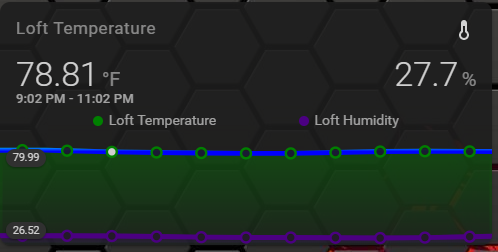
trying to figure out how to get both temp and humidity on the same card with the mini-graph-card.. has anyone done this? I think I managed it on a much older version of the card but I'm a little overwhelmed with how powerful and configurable it seems now 😛
 tulip mulch
entities:
  - sensor.temp
- sensor.humidity```yeah I literally just tried that seconds before you posted and was amazed that it actually did something 😛
not quite how i was imagining it.. but it's a good start
tulip mulch
you could use this..https://github.com/AmoebeLabs/flex-horseshoe-card
i'm not sure what you want the outlook to be
viral sorrel
doesn't quite work for me as a temp/humidity indicator but looks great for some other things.. thanks for pointing it out
thinking maybe I should try and create a humidex card...
I suspect I can probably actually make something using the mini graph card since it's insanely configurable
can i get it to show current temp on the left (which it does) AND humidity on the right? I mean the large number
looks like I can.. but I have no idea how..
talking about something like this
aha! show_state: true ..
I want to jam in a 3rd text sensor in there somehow but I don't see how that would work
I feel like it must be possible to add a sensor text label somehow
wish I could have a tertiary y axis (without scale).
i guess that would actually be a secondary x axis
why does hover only update the left y_axis? I can't find a way for it to also update the corresponding secondary y_axis
I think it's just not supported (yet?)
and extrema only works for the primary and not secondary y_axis?
stiff perch
im so glad i finally started working on my HA again
it's so insanely capable
now im trying to setup a dark theme, but thats proving a little harder than i thought
anyone around? im running into an issue where the card is just going to 1% of my screen size...
and when i make it a horizontal stack, its even worse:
strong falcon
How can I tell what is throwing this error?
http://192.168.10.25:32500/frontend_latest/chunk.c6c3ddfdd942fe69060c.js:3968:244 Uncaught TypeError: Cannot read property 'replaceChild' of null
elder pendant
Where are you seeing that error?
 plush shadow
https://github.com/iantrich/list-card
I have been using the UI, never touched ui-lovelace.yaml. Is there a way to implement the above custom card from UI?
wheat current
Yes
plush shadow
I think I can do manual card and put the step 3 in. But what about step 2
  - url: /local/list-card.js?v=0
type: js```That needs to go in the root of your config. You can use the Raw Config Editor in the frontend to do that. Same 3 dots you clicked to start editing, click it again when you're in edit mode and you will see the option to open the raw config editor
plush shadow
ooooooh. Thank you!
 random root
is there someone who knows
how to change font color in the generic-thermostat widget?
it's an SVG TEXT
so I should add an attribute like fill="white"
but how can I add the fill attribute to the SVG text?
polar kelp
It uses --primary-text-color and --secondary-text-color.
random root
@polar kelp since 0.102.0
it uses black
no care what is defined in the theme
I'm changing various themes
that have various --primary-text-color and --secondary-text-color
and the font is still blackk
polar kelp
Yes. Sorry. I was looking at the source for 0.102.1
elder pendant
So it's just a bug of 0.102.0?
random root
@elder pendant yes, the problem happen on 0.102.0 only
ah
I don't checked in 0.102.1
there is no 0.102.1 on my hassio installation
0.102.0 seems to be the latest version for me
but on 0.101.x worked well
 charred fable
I'm having a bit of a problem with the entity-filter, or likely just a misunderstanding:
entities:
  - sensor.advisories
  - sensor.statements
  - sensor.watches
  - sensor.warnings
  - sensor.endings
state_filter:
  - operator: '!='
    value: ''
The state of the sensor (from environment canada weather alerts) is empty, but I can't seem to make a filter that only shows when the state is set.
It's showing all the sensors when I want them hidden.
mild veldt
@charred fable empty as in '' or ' '?
charred fable
The state is not set, so I'm not sure if it's '' or null or there's some other filter I should use
charred fable
I've tried value: null to no avail but I'll try again
mild veldt
I don't recall ever testing with an empty state when I added those to the entity-filter... 🤷♂️
muted inlet
same
charred fable
Ok I'll try some more and might open a bug for discussion
I have an automation using template condition on != '' which works, but as you noted no templates here
wheat current
can a state be empty?
muted inlet
maybe if it's assumed state and no command has been issued to it yet?
charred fable
I could update the sensors code too...
muted inlet
can you share what those sensors look like in dev tools > states?
kind shellBOT
Please use imgur or other image sharing web sites, and share the link here.
Command '.images' was invoked by: Tediore
wheat current
muted inlet
false
muted inlet
sorry, i meant showing the table below
charred fable
Yeah I might fix the sensor itself
muted inlet
template sensor that displays something else if it's blank?
is potentially an option
or yeah, edit the integration i suppose
charred fable
Gross work around
charred fable
I'm surprised I can't do != On the attributes that are ''
I'll figure it out. Thanks for the insight
Just thought that I was doing something dumb
muted inlet
well you might be, with something else 😉
charred fable
Lol
muted inlet
but no, that's kinda strange, i've never seen a blank state before
charred fable
Yeah I think I'll attack that side of it
muted inlet
could right click on the states page, click "inspect" and see what displays for that element
but this is really reaching
like... i see this for each row in the table: https://hastebin.com/lipixideye.xml
the state is on line 7
charred fable
yup sry had a meeting to run to
<td></td>
I need to patch the sensor to say like "Clear" when there's no weather alerts or something
 woeful plaza
What is the best up-to-date way of making a florplan? I hav this image and going to input temperatures, light status ect. The usage is a information-display with no input (just display). https://i.imgur.com/f168hlX.png
muted inlet
@charred fable yeah a blank state definitely seems odd lol
charred fable
@muted inlet I'll fix it at that level. Thanks for the rubber duck.
strong falcon
@elder pendant was seeing it in the main HA log
vapid field
I am attempting to set up an iframe card to display a simple mopidy UI. not using ssl, just local addressing. when setting up the iframe im using "192.168...:6680/..." but the frame is rendering the ha lovelace ui rather than the mopidy ui. is this a common problem? can someone point me to a resource that would show me what i am doing wrong?
(replies may be slow...typing one handed at my laptop. baby napping in the other...)
(venv of 0.101.3 on raspbian, if that matters)
split granite
Did you include http:// in that URL
 narrow osprey
Hi everybody! Has anyone else had issues with the picture-elements card since 0.102? I upgraded today and all of a sudden my state-icons and state-label aren't showing anymore.
vapid field
Interesting. "http://" fixed it this time, though I know I have tried it in the past. Thanks for the help, @split granite 🙂
 modern breach
evening, quick question - is it possible to hide items from the config tab? like for example the automations?
elder pendant
Yes
mild veldt
Hold on; @modern breach you mean the configuration panel which has automation editor, script editor, etc?
 sullen stump
is there any replacement for on wall tablet view
using HADashboard for sometime now, b ut looking a little dated imo
or are people just full screen browser to lovelace UI using that as the dashboard
 summer tiger
Hi all - I seem to be having issues editing my UI and it started when I upgraded to 102.0. When I click on the Date and Time up in the corner nothing happens now. I just tried to upgrade to 102.1 hoping it was discovered and fix but same issues. I dont get the drop down so I can click on Configure UI. Noticed at least one other above and wondering if a fix was found? Thank you!
 summer tiger
I apologize I'm using Compact Customer Header and it appears that is whats broken since 102. It doesn't allow access to the Configure UI. Thanks for bringing my attention to it with your question above.
viral sorrel
weird.. one of my climate controls is mis-rendering.. two of 3 had been so i switched the heatpump on and off and it fixed itself but the 2nd one is still messed up.. the little dot indicating the temperature is rendering as a cericle taking up half the card
shift-refresh doesn't fix it..
using a different browser does...
quitting and reopening the other browser doesn't fix it though
this is WEIRD.. deleting the card and re-adding it still has the problem but just for this one entity
I was able to fix it by adjusting the temperature from the ... part of the card.
modern breach
@mild veldt yeah exactly, its getting bigger and bigger, and since i edit automations manually anyway i do not want to accidentally push that one.
 ionic coral
Hi guys, is it possible to change the color of sensor badges from blue to something else?
autumn star
Would it be possible to switch views with keyboard combinations or else i have to find a 15.6" usb touch screen
polar kelp
You can tab to the view tabs, select view with arrow keys and switch with enter.
But it's not very clear when you're there.
Or you could go to the view you want directly https://.../lovelace/2
vapid field
Anyone else have problems with the light card on mobile? Since the last update it does not render correctly when the light is switched off, the blue ball (to control dimming) becomes huge...
It is both in browser and in the app (iOS)
polar kelp
In 0.102.1?
vapid field
Yes
vapid field
Mobile Safari, mobile chrome and also the Home Assistant Compainion beta. All have the same issue.
Desktop Chrome is ok
Internet Explorer doesn’t even seem to load the Frontend; only the blue header without text.
polar kelp
All browsers on an iphone are actually safari, so that's no wonder...
I can do some actual debugging once I get home from work.
vapid field
Ok, thanks!
mild veldt
@modern breach you can't edit those
polar kelp
@split granite Clarification; Apple still forbids duplicating OS functionality (I think), so you can't put your own web rendering engine in an iphone app (I'm certain).
So Chrome for IOS is just safari with a google account connection, I believe.
split granite
Which ... given their standard view of things ... makes sense
polar kelp
There used to be Opera for ios too - and maybe still is, I don't know - which sent things off to be rendered by a server cluster somewhere...
The results were sent back compressed, so you could save a bit of data.
muted inlet
@ionic coral what do you mean by "sensor badges"?
 sacred quarry
Hey guys, does anyone know if it's possible to split the decluttering templates in different files? I tried to include_dir_list in ui-lovelace.yaml to a specific folder where I have a template-per-file structure, but doesn't seems to be working
polar kelp
decluttering card should be splittable. You just have to use the right function in the right way to put it back together.
sacred quarry
I tried include_dir_list and include_dir_named but none of those works
On the card docs I cannot manage to find anything that refer to this
polar kelp
Let's see... it's something like
sacred quarry
(if I include a simple external file it does work, but all the templates must be in a single file)
polar kelp
templates:
  template_1:
    stuff: more-stuff
    etc: other things
  template_2:
    blah: ...
``` right?mmmh no the file is more like ```
template1:
info info info
template2:
info info info
this is how I've been using it so far: decluttering_templates: !include lovelace/decluttering_templates.yaml
polar kelp
I mean the configuration in lovelace_ui
sacred quarry
And this way, with the above config, it works
polar kelp
Then templates: !include_dir_named dirname should do it, I think. with the contents of dirname/template_1.yaml being yaml stuff: more-stuff etc: other things
sacred quarry
without "---" on the top of each file?
because I tried that way already (with the "---") but doesn't work, when I try to load the template it say it doesn't exists
polar kelp
--- is a marker for the start of a yaml block. Included files are assumed to contain yaml anyway...
sacred quarry
Oh okay, I used it on each included file anyway 😄 No problem from that.. but the include_dir_named doesn't work 🙂 Already tested that 😛
polar kelp
Do you have card-tools installed?
sacred quarry
yep
polar kelp
Then you can go to your browser console (ctrl+shift+i in chrome) and type in cardTools.lovelace to see your processed lovelace config. That might give a hint on what's happening.
Also, did you do -> Refresh?
sacred quarry
Yep I did 🙂
I will check the console
Ah, I don't need to, I found the include method 😄
decluttering_templates: !include_dir_merge_named lovelace/templates/
this is it 😉
polar kelp
Then you also need the template name inside the file.
sacred quarry
yes I do have the template name inside the file 😉
---
house_cost:
  card:
    type: custom:vertical-stack-in-card
    cards:
house_cost is the template name 😉
polar kelp
... which is at least part of why it didn't work...
sacred quarry
ah
polar kelp
But go with include_dir_merge_named anyway. That's better.
sacred quarry
sorry I didn't explain myself correctly
sacred quarry
Thanks Thomas, now my LL code looks much cleaner 🙂
autumn star
seems interesting thomasloven i'm thinking of using a teensy with some buttons to do things like turn on the notebook remains, and switch the views and mabye do things in the view
or i need to find a cheap 15,6" digitizer to controll lovelace
elder pendant
@modern breach how important is it to you? I could make a simple plugin that will remove the item
elder pendant
It would be 99% the same code as my last plugin, so it wouldn't be very difficult. I just want to help 🙂
autumn star
what have i missed @elder pendant
elder pendant
Probably lots of things
Right now we're referring to a plugin to rearrange the sidebar items
elder pendant
Like remove it completely?
wheat current
.cch
autumn star
yea mabye on keyboard combo
elder pendant
it's possible, sure
autumn star
I'm planning on using an old laptop on the wall in a frame to display
but as i dont have a touch screen i need to use a teensy with keyboard_remote
wheat current
No
muted inlet
ludeeus has spoken
mild veldt
@autumn star I run HA on a ThinkPad X230, have it wall-mounted and runs great. Would recommend. Got it for only $80 on eBay
autumn star
yea would love to get something but i already have this laptop
an acer apire v5-571g
i can mabye find the screen for the p model
is a old laptop i got 4 years ago and i want to make use of it
mild veldt
🤷♂️ sunken costs
mild veldt
I have tons of old junk, sometimes you just have to move on
mild veldt
I would seriously question mounting a non-touch device to a wall. If you're doing that, I would not expect to interact with it at all
 fluid shoal
anyone here using the button-card for lights?
fluid shoal
I have a few dimmers (lutron caseta) lights and would like to know how to control the dimming
right now it can just toggle the lights on/off
wheat current
You mean like the way a button should work?
elder pendant
https://www.home-assistant.io/lovelace/entity-button/#tap_action you can make the button do whatever you want
mild veldt
@autumn star that sounds like a lot of work when you can get something cheap for much less effort and probably money
fluid shoal
yes - I have the tap working (turns the lights on/off)
I'm looking for a way to control the intensity
like if there was a slider at the bottom of each light
wheat current
Isnt that around it?
fluid shoal
or "-/+" buttons
elder pendant
Why does it need to be a button card?
mild veldt
@fluid shoal you can add custom elements, so you could add the slider row, I guess
mild veldt
or that
wheat current
Moving on
fluid shoal
I like the look of the button-card 🙂
wheat current
No you dont
elder pendant
You like the look of something you want to completely change the look of 🤔
fluid shoal
well to be honest, my WIFE likes the button cards
mild veldt
the button-card doesn't have a look
wheat current
She will like the light card too, try ir
mild veldt
it is very customizable
fluid shoal
I originally had the entity cards and just tried the button cards
anyway, I'll see if I can add the element like @mild veldt suggested
wheat current
I give up... 😭
mild veldt
fluid shoal
Sorry for the headaches - I was just looking to see if someone had a sample I could review
mild veldt
that thread has what you need, just need to find it
fluid shoal
Thanks
mild veldt
actually, I found it https://community.home-assistant.io/t/lovelace-button-card/65981/2620?u=iantrich
fluid shoal
thanks for sharing the link
autumn star
wait i might still have a tablet i can use
just need to find a way to make the wifi work properly
fluid shoal
@mild veldt - thanks for your help (and for creating the button card!), I was able to get the slider setup for the dimmers 🙂
split granite
@sour crag 👋
I prefer floorplan because it's easier to make something "nice"
I can put things where I want, as I want, trivially
 sour crag
Ok, i see, thanks, i guess the position of the elements in the picture elements card is somewhat of a hassle.
split granite
I had the pre-Lovelace floorplan, and when I tried to move to Picture Elements couldn't make anything I was happy with
With Floorplan I can make anything change state, the way I want
That means that the actual doors and windows, for example, change state
stiff perch
lmao. i was unable to login on my ipad 2 i wanted to use as wall kiosk. reported it yesterday, and now there's an update to fix that single issue
atomic glacier
@summer tiger The new replacement for CCH will be released soon. Please keep an eye out in HACS for the replacement plugin, Please see: https://bit.ly/2ObeQUy Thanks!
... in the meantime, remove voice: overflow and maybe even the hide: functions for now(worked for me) and the header should shrink back... "The latest HA update changed the voice buttons element and I added a quick fix, but can't be bothered to chase down the rest of the issues related to it, so it's best to remove any voice option except for hiding it"
vapid field
@polar kelp Thanks for the quick search & rescue mission 😉 look forward to the new release with this bugfix!
polar kelp
Well, it's kind of personal for me when it comes to the light and thermostat cards...
 simple steeple
@muted inlet I still get "Custom element doesn't exist: xiaomi-vacuum-card."
even though the file is in config/www
muted inlet
did you add the lines under resources: using the raw config editor?
resources:
  - url: /local/xiaomi-vacuum-card.js?v=2.3.2
    type: js
that's part of the instructions
simple steeple
yepp, all the way in the top?
muted inlet
wherever
simple steeple
I did it..
muted inlet
as long as it's under resources:
but don't add resources: again if it already exists
simple steeple
yeah, it is.
kk will check
nop, only written it on
I found a guide for it, and it seemed like it was quite strait forward
muted inlet
it usually is
simple steeple
Because I only downloaded a file and uploaded it to config/www/xiaomi-vacuum-card.js
muted inlet
can you share the yaml from ui-lovelace.yaml? (raw config editor)
kind shellBOT
Please use https://www.hastebin.com/ or https://paste.ubuntu.com/ to share code or logs.
Command '.share' was invoked by: Tediore
simple steeple
@muted inlet https://paste.ubuntu.com/p/2WQwcSvxTF/
If i understood you correctly
!link
I followed this one: https://github.com/benct/lovelace-xiaomi-vacuum-card
muted inlet
looks ok to me, not sure what's wrong
maybe check the path to the background image or remove it entirely from the card config
strong falcon
what could this error mean? I am getting it for 3 different tabs.
http://192.168.10.25:32500/lovelace/tablet:0:0 Uncaught
simple steeple
in "/local/xiaomi-vacuum-card.js?v=2.3.2" is "local" the same as "config/www"?
wheat current
yes
simple steeple
thx 🙂
@muted inlet lol, found the fault.. it was the "?v=2.3.2 that was the problem -.-
wheat current
nope, if it was, the problem was really cache
simple steeple
It was the fault, just tried removing it, and it fixed it 😛
wheat current
of you add it back with ?v=2.3.3 that would also work
strong falcon
is there a way to get more detail on a log error?
simple steeple
😛
 tacit cave
@wheat current updated to the GUI hacs, do I need to 'install' everything that was previously configured? Installed page is empty.
wheat current
That statement does not make sense, and #609399695466430465 for #609399695466430465
ionic coral
@muted inlet Sorry for the ambiguity. I want to change the color of binary sensor badges, I was able to change the color of device trackers and other sensors. I have tried setting the color with "ha-label-badge-color" but couldn't get it to work.
 smoky depot
is it not possible to add an entities state to the name of a card? Like have the name say Garage Open or Garage Closed?
mild veldt
@smoky depot config-template-card
smoky depot
whoa that tutorial on how to install plugins is awesome I never could fully figure that part out lol
 potent harbor
hi all. ive created a new view but it just shows the view preceding it
its entirely custom cards
nvm
any idea why they are stacking?
 solemn loom
Hello. I'm looking for some help figuring out where is the background color for the header set in Lovelace/HA. I'm working on a theme and the header's background is set to --primary-color which is also used for foreground elements. I understand untangling it is not a simple task, but thought I could start by separating the app-header background color from --primary-color
sullen stump
Are people using Lovelace as the UI for wall tablets or still using hadash or tileboard ?
stiff perch
hey guys, i need some help. i installed HACS and added some stuff to my lovelace yml, but i cant add the cards in lovelace.
i put this in the top of my lovelace file
resources:
  - type: module
    url: /community_plugin/mini-graph-card/mini-graph-card-bundle.js
  - type: module
url: /community_plugin/surveillance-card/surveillance-card.js``` is that correct?Are you using YAML mode for Lovelace?
stiff perch
raw config editor
stiff perch
If you are using the GUI editor for Lovelace, you can add the resources section using the Raw config editor, which you reach by entering Edit mode and then clicking the three dots in the top right corner.
from that page
stiff perch
ohh, yeah. but i did add the resources section using that raw config editor, that should work right?
split granite
Yes
stiff perch
should the new cards show up when i press the + button in lovelace through the gui mode?
split granite
No
The editor can't support an infinite number of custom cards, it has no idea what they want, or how they're configured
stiff perch
ahhhhh yeah! thanks! i figured it out
it worked all along, it just wasnt in the gui, makes a lot of sense
wheat current
do yourself a favor and enable experimental features in HACS, then you will get a new fancy button to handle that part for you
tacit cave
@wheat current Is there documents on the current experimental features? Or do I have to follow the code? Went to the confituration options and it didn't mention anything.
 rain briar
Adding resources to the top of lovelace UI -> Raw config editor... is that the equivalent adding resources to ui-lovelace.yaml (which currently does not exist for me) ?
troubleshooting "Custom element doesn't exist: garbage-collection-card.
type: 'custom:garbage-collection-card'"
split granite
rain briar
Fixed my issue : "The url is the path to your downloaded file. Replace <config directory>/www/ with /local/."
was using absolute path.. not relative to local
 wicked raven
Hello everybody. I'm having a hard time adding a custom card to my lovelace. I want to add a calendar card called Atomic Calendar. I've done everything that I can understand to do from the readme, but i still can't add the card. I've installed and configured Google Calendar as a prerequisite. I've installed Atomic Calendar with HACS and I've added the "atomic_calendar.js" file to my "www" folder, I've added this ...- url: /local/atomic_calendar.js
type: module... to my ui-lovelace yaml. Finally, I've tried to configure a manual card with this...- type: "custom:atomic-calendar"
title: "Calendar"
enableModeChange: true
defaultMode: 2
CalEventIcon1Filter: birthday
CalEventIcon2Filter: waste,bills
entities:
- entity: calendar.kalendarz_dom
type: icon2 - calendar.atomic7777
type: icon1,icon2 - entity: calendar.kalendarz_swieta
type: holiday... but that doesn't work. What am I not understanding?
wheat current
So much wrong 😦
kind shellBOT
@wicked raven To format your text as code, enter three backticks on the first line, press Enter for a new line, paste your code, press Enter again for another new line, and lastly three more backticks. Here's an example:
```
code here
```
Watch the animated gif here: https://bit.ly/2GbfRJE
DO NOT repeat posts. Please edit previously posted message, here is how -> https://bit.ly/2qOOf1G
Command '~format' was invoked by: Tinkerer
wheat current
- If you installed with HACS, what did you place in
www? /local/atomic_calendar.jsthat is not what HACS tell you to use (hint: look at the bottom of the install page.)- "tried to configure a manual card", "manual card" is a UI thing, when you use the UI to configure lovelace the file
ui-lovelace yamlis not in use. - Check your indentions in the "manual card", the first line should be
type: "custom:atomic-calendar"not- type: "custom:atomic-calendar" - @split granite beat me to it, but format your posts
- When you use the UI to configure lovelace, you need to be using the raw editor to add custom resources
wicked raven
Sorry about the formating. I misunderstood the backticks for periods. I won't make that mistake again. As far as the www folder, I put in the atomic_calendar.js file that I downloaded from the Atomic Calendar repository. I can see from what Ludeeus posted that I didn't start the manual card with "custom:atomic-calendar", because I just copied and pasted the example in the repository.
autumn star
If i saw it good i can cast my HA interface to a nest hub right
 night talon
That config only works if you used HACS
autumn star
dammit
split granite
Casting works to the Nest Hub - it's a stock feature
You "just" need SSL
I only use it for camera streams to be honest
autumn star
ssl is already done by cloudflare or LE
i'm thinking of using it to controll my interface
split granite
It works, at least in theory. The few times I've tried it didn't work, but it's not like I really care that much
autumn star
good to know
calm temple
I noticed that I cannot add a group for a person as a badge? I have multiple devices that I organized as a group on a person basis.
 eager tiger
Is it possible to change the corner radius of the dialog box that pops up when you click on a light? I've got the corner radius of the cards set, but would like to change that too because it looks out of place
polar kelp
Not easily
muted inlet
I'm sure @elder pendant could whip up something for ya 😉
polar kelp
That's how it starts.
Someone says something. You think about it. Realise it shouldn't be too hard... or at least possible, and suddenly it's 4:30 AM and you have yet another lovelace plugin to support.
split granite
Not too hard... that usually means not impossible, but damn that was frustrating
mild veldt
@polar kelp just say no
polar kelp
Actually, @eager tiger, you can kind of do it with browser_mod.
And more-info-card.
Personally, I'm on a plugin hiatus. I almost got burnt out when I rebooted all my big ones during the same week...
... which was also right when I started my new job... so my lovelace addiction is only partially to blame.
elder pendant
If it's something functional that someone wants then I'm usually down to help. If it's just an aesthetic thing I'll probably not want to put in the effort
wheat current
and the order of sidebar items are not an aesthetic thing? 😛
eager tiger
@polar kelp would the process with browser-mod be to use a css override?
polar kelp
You'd have to override each more-info dialog separately using the popup function of browser_mod.
Then you can add a style to the popup dialog.
As an added bonus you can put whatever you want in the dialog, but if you want the original, you also need more-info-card.
Something like decluttering-card or lovelace_gen could probably help you make things easier to manage.
eager tiger
So browser-mod would override the whole popup, replacing it with its own thing, which can be made identical to the original (minus the style changes) with more-info-card?
polar kelp
yes
Only works for things where you can select the tap-action, though. Like entities, glance etc. Not the light card.
eager tiger
hm
polar kelp
So, in summary; Not easily.
eager tiger
I'm guessing the stylesheets that lovelace uses aren't easily accessible? could I get at them if I had root fs access?
eager tiger
I'm somewhat determined
polar kelp
The styles are minified and packaged into a python package. It can be modified manually - I've seen it happen - but I really woldn't recommend it.
polar kelp
/usr/local/lib/python3.7/site-packages/hass_frontend
eager tiger
that's what I was about to ask
polar kelp
If you know a bit of javascript there are better ways to do it, though.
eager tiger
oh?
wheat current
eager tiger
teach me your ways
wheat current
chrome dev tools 😂
eager tiger
cheater 😂
wheat current
That is opened with an event, so you could just listen for that?
polar kelp
Basically, you want to do this:
- Create a javascript module which:
- waits for the customElement
ha-more-info-dialogto become defined. - finds the
home-assistantelement and its _moreInfoEl property - Adds the styles you want to that
- waits for the customElement
- Load your module using
extra_module_urlin thefrontendintegration
The dialog is first created by the hass-more-info event, so only relying on that would result in a race condition.
You might still get a race condition with customElements.whenDefined('ha-more-info-dialog'), but it's less likely to cause a problem.
The more info dialog is a polymer element, btw... with iron-behaviors and stuff, so it might fight back a bit.
eager tiger
Thanks, gonna give that a try
So the js would be added as a plugin?
type: js
url: /local/plugins/whatever.js
polar kelp
when in doubt, use module
eager tiger
ah ok
polar kelp
But if you want it to work outside of lovelace as well, this is what you want: https://www.home-assistant.io/integrations/frontend/#extra_module_url
eager tiger
should only need it in lovelace, but I'll keep that in mind
polar kelp
I'm going to walk away from this discussion now, before I end up doing it anyway just because it intrigues me. It's past midnight over here.
eager tiger
only 6 here, so I've got some time to kill
polar kelp
Let me know what you come up with, though.
wheat current
@polar kelp @eager tiger
https://gist.github.com/ludeeus/fb0a8410d6c04e7f2f58b23cbd4e1542#file-themeoverride-js-L14-L28
Not perfect, but kida works
First time I open it the more-info-controls is not yet loaded, but every time after that it looks good
vs
polar kelp
You can use document.querySelector("home-assistant")._moreInfoEl instead. It's an alias to the same thing.
wheat current
Maybe tomorrow 💤
eager tiger
works like a charm, thanks
polar kelp
@wheat current @eager tiger The problem with the header can be fixed by replacing line 14 with window.addEventListener("hass-more-info", () => { window.setTimeout(styleMoreInfo, 1)});
kind shellBOT
Ludeeus is away for 4m 37s with a message :point_right: snooooooooooooze 💤
eager tiger
I've actually just hid the header all together lol
I'm trying to roughly imitate iOS
elder pendant
@polar kelp do you have a list of available hass events somehere?
polar kelp
No
eager tiger
Can you? ;P
polar kelp
elder pendant
That's a clever way of doing it, I haven't experimented with github's search function too much yet
polar kelp
git grep works better
eager tiger
I can't seem to get it to reload the js file after I've made a change, even on restart. Is there some cache I need to clear?
definitely cached somewhere, it's still running an old version of the file even after fully restarting the host vm
kind shellBOT
@polar kelp posted a message that is too long, it is moved here --> https://paste.ubuntu.com/p/sHPXk4XNSt/
polar kelp
eager tiger
oh its client side, that makes a little more sense
eager tiger
ok, yet another question. I've modified the script to also add background blur to the more-info card, and this works (and looks) great on Windows (Chrome) and my S10 (also Chrome), but doesn't render on my Android tablet (still Chrome)
it has an up-to-date version of chrome, but it is fairly low-end, so is it possible that it is unable to render that effect?
 rough grove
hey all, i want to setup a vacuum card. when looking at the vacuum entity in the Developer Tools it shows almost exactly what i want. is there anyway to get that into a card/
eager tiger
There's an "Entities" card type, that might do something
Disclosure: I have no idea what I'm talking about
eager tiger
big sad
could also look for custom cards
that's all I got, so if that doesn't work you'll just have to wait for the pros to arrive 😂
do you happen to have a Xiaomi vac?
eager tiger
I found a card for Xiaomi vacs on HACS, but not anything else
eager tiger
I'd google it though, surely someone's made one
rough grove
there are a lot of fancy ones
i jsut want the basic one from the developer tools - states page
eager tiger
I don't have an entity to look at; describe "basic"
If all else fails, you could look into creating your own custom card
eager tiger
yeah, all I know is to try and make a custom card
 granite fossil
Hi guys, Its been a while since I've been up to date with HA.
Has there been a UI for different users created?
EX) Control panel view for specific rooms
eager tiger
In my limited experience: No, but there may be something in Custom Compact Header for that. I know it allows user-specific customizations, but I'm not sure about having a different view for each user
granite fossil
Ah I see
hmm I think I found it https://www.home-assistant.io/lovelace/views/
seems like there is. nice
eager tiger
That's good to know
mild veldt
@rough grove more-info-card can do that
wheat current
That worked great @polar kelp 🎉
 random mantle
hello
does someone here knows an easy way to add the positioning bar of a roller shutter to the main page of lovelace
polar kelp
Google lovelace-slider-entity-row
split granite
@open nebula If you take control, in the top right corner there's a menu. That menu has an option to show devices you've not added to the UI
 open nebula
@split granite ha! cool, so not really totally manual to add devices, just to "place" them?
split granite
If you're using the UI editor (every sane person should be) then you can add them from there apparently
Yeah, HA knows everything, it's just up to you what you do with them
open nebula
Awesome, good to know, will check it out and report back.
Thanks a lot, I should have tried it (I clicked it a few times thinking if that's the right thing to do, apparently it is)
split granite
No worries
If you want a dynamic main page, then entity filter cards are handy
I use those - cards only show if there's something in them to show, and then they only show entities in a specific state
So, my "lights on" card only shows up if there are lights on, and shows the lights that are on
It keeps the overview to the stuff that matters (to me)
open nebula
Thanks! Appreciated @split granite
 woeful wren
Does anyone know how to change the color in css for a paper-button disabled, like this one https://i.paste.pics/ea08f726d0d46c62a7ef79d972464e51.png (the grey text indicated by the arrow) I found thes issues: https://github.com/PolymerElements/paper-icon-button/issues/74 and https://github.com/Polymer/polymer/issues/3205 and I am not sure if it is related. It's for my theme: https://github.com/basnijholt/lovelace-ios-dark-mode-theme/tree/master/backgrounds
 tidal steppe
How can I add a whole group to a view?
split granite
You'd need a custom card for that
tidal steppe
Any recommendation?
split granite
I don't know of any, since I generally want more control than dump this group here in whatever order suits
tidal steppe
I have a group that is on the states view and is perfect but I need it on Lovelace
split granite
Lovelace isn't states - you can duplicate how it looks, but not how it does that
Just take control, and create the card the way you want
open nebula
@split granite Thanks again, I customised the interface and it looks much cleaner now.
I find it very cumbersome to configure the names of my switches though (Zwave switches)
I am currently doing it by clicking on the switch itself and renaming it, is there a better way? (One that will also cause the rest of the elements on the device to change, such as power/energy sensors, otherwise I need to find which is which)
split granite
Not lovelace related, but ...  -> Devices ->
Rename from there, and you'll rename any entity that you've not already renamed
open nebula
Thanks, that's what I originally did, I thought it was messing things up, so that's the way to do it?
(So I moved to editing just the switches names, my old devices still have the renamed names)
split granite
That's the fastest way, yes
It'll bulk rename all entities that are part of a device
open nebula
Thanks.
tidal steppe
Any idea why this isn't working?
https://github.com/custom-cards/group-card
I get Cannot read property 'setConfig' of undefined
This is the configuration:
- type: js
  url: /community_plugin/group-card/group-card.js
- type: 'custom:group-card'
  card:
    type: entities
    title: Group card
  group: group.switcher_aio_v2_view
One of those goes in your resources section, one doesn't
Putting them both in the same place won't work
tidal steppe
The - type: js
url: /community_plugin/group-card/group-card.js
is in the resources section
I just copied and combined
split granite
I'm guessing the problem is that last line
Assuming you're using https://github.com/custom-cards/group-card
tidal steppe
It's group.switcher_aio_v2_view
split granite
That's not what you posted
tidal steppe
sorry
split granite
It's much easier if you copy and paste your actual code
tidal steppe
now it's ok
tidal steppe
- type: 'custom:group-card'
  card:
    type: entities
    title: Group card
  group: group.switcher_aio_v2_view
Now it's accurate
Fixed it. The card editor added a redundant '-' before the type in the raw code. Thanks!
Now I have another problem. I have the state of and entity and not the option to turn it on(I have this option only if I click on the entity) - https://imgur.com/a/PUGUIwV
split granite
Execute suggests a script
tidal steppe
And how can I make the card show the option to execute instead of the state?
split granite
The group card may not support that
tidal steppe
I have the same thing for a switch. It shows the state instead of the option to turn it on
split granite
Sounds like a feature of the group card
tidal steppe
I'll just make my own custom card
split granite
#ios_and_mac-archived for iOS issues
split granite
Almost certainly it's an iOS issue
You'll likely find problem goes away if you use something else
 trail spindle
Hi, I am trying to get rid of the name and icon from a sensor card in a horizontal stack. I have tried setting show_name: false and/or name: null but am not having any luck with the same for the icon.
However name: test does work to change the name of the card
 sullen nymph



 pallid needle
I'm not sure if I should ask in lovelace or not, I'm having some trouble getting the floorplan card working
but it's not showing up
I generated an svg with the svg objects I want
the structure is www/custom_ui/floorplan
I have the state card and panels/floorplan.html both in the www/custom_ui folder
kind shellBOT
@pallid needle posted a message that is too long, it is moved here --> https://paste.ubuntu.com/p/VNpwQZhQvh/
pallid needle
and I do not see any error messages
vapid field
hey all, new to lovelace. Attempting to install a custom card. https://github.com/thomasloven/lovelace-slider-entity-row im getting and error "Custom element doesn't exist: slider-entity-row."
I have https://hastebin.com/imogoxuqek.bash as part of my gui config
and I pulled the raw file from github to my /www/ folder
This is my entities config https://hastebin.com/xidegekuxu.bash
 mental kayak
anyone point me to how I add theme to a custom card?
 errant plover
The same way as you theme all cards, https://www.home-assistant.io/integrations/frontend/#defining-themes or if you want to specifically change the theme of a single card (custom or not) use card-mod. https://community.home-assistant.io/t/card-mod-add-css-styles-to-any-lovelace-card/120744
 gentle niche
Hey guys! [[ {user} ]] isnt working anymore. Any ideas?
polar kelp
In markdown-mod?
It's using jinja templates now. Try {{ user }} without the square brackets.
sacred quarry
Hi guys, I am playing around a bit more with the decluttering card in order to reduce the size of my views (due to graphs mainly) and for temperature I do use mini-pgrah-card with config-template-card, but I need now to "move" this into decluttering but without set static variables.. I tried this:```
- entity: [[entity]]
- binary_sensor.night_time
variables:
- states['sensor.[[entity]]'].state
Hi all, is it possible to create a different homepage/entities available to each user?
I want to restrict access to different views and configuration options available on the tablet I have in my house
mild veldt
errant plover
That document is a little confusing. The example under 'Options for Visible' has no options for visible. That's further down the page under another 'Visble' heading.
pallid needle
I'm getting an error with floorplan entities, I'm trying to get the lights to toggle on click instead of opening the entity dialog
but I get an error: Failed to call service toggle/undefined. required key not provided @ data['service']. Got None
mental kayak
Anyone know why when either trying to use my theme or card-mod to try and get rounded corners on a couple of my cards it doesn't work? My one card's code is
type: 'custom:air-visual-card'
theme: Transparent
air_pollution_level: sensor.u_s_air_pollution_level_2
air_quality_index: sensor.u_s_air_quality_index_2
main_pollutant: sensor.u_s_main_pollutant_2
my other cards end up with rounded corners among other properties of my theme however this card won't update with rounded corners...
and neither will the Media Control Card
kind shellBOT
To format your text as code, enter three backticks on the first line, press Enter for a new line, paste your code, press Enter again for another new line, and lastly three more backticks. Here's an example:
```
code here
```
Watch the animated gif here: https://bit.ly/2GbfRJE
DO NOT repeat posts. Please edit previously posted message, here is how -> https://bit.ly/2qOOf1G
Command '~format' was invoked by: Tinkerer
mental kayak
Looks like after adding a color to the border, the edges are rounding but the background image isn't so it still looks square
and it looks like it's not an image but a bg color...
 clear dome
Can anyone confirm whether the Amazon Fire HD 10 works with custom lovelace cards? I remember hearing awhile back that their webkit was old version or something. Id like to pick one up while its on sale but I need to be able to display custom cards
 proper mesa
@clear dome i have the latest fire hd 7. It works, my lovelace is heavily modded by custom js. But it's damn slow. I'm thinking of getting another tablet. not sure about the fire 10, perhaps it's faster but can't tell you
instead, can you guys suggest me a lovelace card where i can create buttons that once pressed they can call "something", like a script, for setting the scenes on the hue lights?
I went thru several cards but i did not really find any that would maybe have a row with circles where each circle is a button.
Something that would work here:
where, below the 'slider entity row' i would have a few buttons, each for every scene i want to add
BRB - 10min
mild veldt
@proper mesa https://github.com/custom-cards/button-entity-row
proper mesa
@mild veldt yes, this! i really didn't see while searching. thanks mate!
 spare meadow
wth? getting error that [service_data] is an invalid option for [automation]
https://github.com/thomasloven/hass-browser_mod#popup
the docs clearly define that it should work in this context...
split granite
That's not an automation
spare meadow
hmm... so embed that in a script, then call the script from automation?
split granite
No