#frontend-archived
1 messages · Page 130 of 1
 wheat current
 timid burrow
I found casting from the backend didn't work without https://domain:port
 split granite
I find that the Cast site works, but the Lovelace card doesn't
timid burrow
              - type: custom:button-card
                icon: mdi:home-assistant
                name: Main
                tap_action:
                  action: call-service
                  service: script.casttransportfox
I'll get the script....
'casttransportfox':
  alias: Cast Transport Foxtel
  sequence:
  - data:
      entity_id: media_player.foxtel_7587
      view_path: transport
    service: cast.show_lovelace_view
👍
I'll play with that later, the only thing I've ever wanted to cast is my camera, but I know once I start playing with it I'll find other uses
timid burrow
The secret sauce was the baseURL - if you don't have https and the port (if the port isn't 443) it won't work
I did get the cast from frontend working without the baseURL but it won't work with the backend one if it's wrong
split granite
Yeah, mine is set correctly, but I wonder if my proxy is the problem... things to explore later 😄
timid burrow
I also use a proxy (caddy) I screwed around for a while to make it work but it does work
Haven't got a practical use mind you but.....
split granite
🤣
timid burrow
Hahaha I know right..
split granite
Eh, I'm the same, I don't have a real need for casting from Lovelace, I just want to play
timid burrow
I hate it when I can't make shit work.. I'm tenacious like that and I do like playing with new stuff
split granite
Mind you, I just realised, I'm only allowing API access through the proxy... that probably doesn't help 🤦
split granite
Yeah - oh well 😄
timid burrow
I like new stuff just cos..
split granite
Yeah, I suffer from a bad case of ooooh, shiny
wheat current
Don't we all 😂
split granite
Agreed
timid burrow
Just also regarding cast, even when it connects it can be a bit slow to cast the page you are asking for - it's not instant and easy to think it's not working
split granite
Yeah, I get that with the camera stream
It can take 5 to 10 seconds, and even then it's another 5 to 10 seconds "behind"
split granite
Don't know why that is, but it's apparently known and expected - likely the overhead of HA's processing the stream
timid burrow
Maybe. I also had some other issues that might have contributed (I had 5 mins when I restarted HA on a NUC and it was often a minute to respond - no idea why. It's back now to 20 seconds now and no slowness - it might have been a docker version but I really don't know what was wrong)
And as I said I don't use cast anyway so I dunno if it's faster now...
 unborn cedar
Hey folks! I saw a screen the other day with some sort of progress bar style lovelace card. i would love to use that to show the state of the sunscreen
 open seal
hi. so i want to add a 3x3 num pad to my ui, and if a correct code is entered, run a script. any idea on how to make this work?
open seal
hi. is there a way the lovelace code of the alarm panel card ? i want to make a custom card based on the alarm card.
 raven nacelle
 timber solstice
Just tried, https://cast.home-assistant.io/ this looks really nice. Only issue i run in to now is that it uses the default theme, which conflicts with some custom card color schemes. Is there a way to change the theme for the casted page ?
 mild veldt
@open seal haven't added a pin pad yet, but this supports the code part: https://github.com/custom-cards/restriction-card
@open seal gauge?
 viral sorrel
is it possible to group entities in a card by area? I'm having trouble finding info on how to use areas.. or is that functionality that has not yet been developed?
split granite
That was being discussed the other week and I think somebody's working on it - but tabs/views by area rather than cards
 sturdy pendant
Hey guys, how does somebody know what service to use for a specific entity? or do you just do trial and error on developer tools
Since I am trying to get or trying to figure out how to use my rm mini 3 paired with the custom roku card by iantrich
 night talon
service calls should be in the docs for the component
sturdy pendant
Ok thanks. Just wondering if there are other ways to check or easily discover.
night talon
sturdy pendant
Yes but it seems like I need the automation and call it as it is easier. I thought I could just it through the custom roku with switch.turn_on
It's more of a preference I prefer having it all in one file than having go left and right changing stuff there. But it does make my lovelace cleaner.
Thanks.
night talon
Doesn't custom roku use the same service calls as regular roku?
should be able to use media player service calls
sturdy pendant
Not sure, never really played with it that much. I gave up and moved to glance card lol
I want to however turn off the toggle portion of some of my entities. Since I do not actually know their state. I just want them as a button with an icon without changing the color if it turned on or off. Would it be assumed_state: off
night talon
I think by default the glance card doesn't toggle entity states. Try just setting show_state: false so it doesn't show the state.
sturdy pendant
Ok thanks.
 devout loom
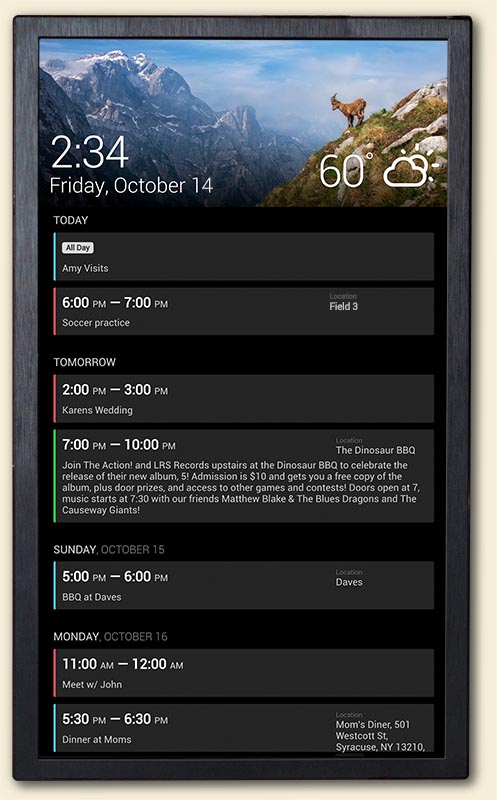
Has a calendar like this been made in Lovelace yet? https://www.dakboard.com/img/dakboard-agenda-tan.jpg
 glacial ledge
is there a lovelace "template card"? like a card you can write custom text and include information from sensors. i.e.:
"today is <weather.sensor> and the heat is set to: <climate.lr.state> and <sensor.presense> is not home yet"
 polar kelp
Yes. Markdown.
glacial ledge
thanks.
Is there a way to get a sensor's data from a different home-assistant installation on a different computer on the same network?
glacial ledge
true. got carried away...
 mortal cape
@glacial ledge I like remote assistant.
I use the same network, but they can be on different networks
glacial ledge
looks cool. which instance do I install it on? The little bit I looked it seemed like the "client" hass gets the config.
Is that correct?
mortal cape
You install it on the "master". On the client, you only create the long lived access token.
My config is pretty simple:
  instances:
  - host: 192.168.1.117
    port: 8123
    secure: false
    access_token: eyJ0eXAiOiJKV1QiLCJhbGdfgp-89eh3r4gFFiyGJENdiwnnQEGRUGEAHRGFWENRGH-DG80wN9hiSNAUIzc
entity_prefix: "slave01_"```what do you call "master"? I think we call it different things...
mortal cape
The master is where you expect to see all the sensors coming in
glacial ledge
I call the one "serving" the sensors master
mortal cape
the slave is the instance with the sensors to share to the other
glacial ledge
ok. great. maybe we should move to #330944238910963714 so we don't clog the #frontend-archived chan with OT stuff...
mortal cape
If you want to turn it on its head and have multiple masters all reporting in to one slave that's fine with me. ✊
it's probably better in #609399695466430465
glacial ledge
ok. but I think we're done 🙂
viral sorrel
is it possible to combine two custom lovelace plugins? I tried:
card:
  show_header_toggle: false
  title: Batteries
  type: 'custom:battery-entity'
filter:
  include:
    - entity_id: sensor.*battery_level
      options:
        secondary_info: last-changed
show_empty: false
type: 'custom:auto-entities'
but unsurprisingly it did not work
viral sorrel
also tried:
type: entities
title: Batteries
entities:
  - type: custom:auto-entities
    card:
      type: custom:battery-entity
    filter:
      include:
        - entity_id: sensor.*battery_level
          options:
            secondary_info: last-changed
 outer gulch
have some groups that has different sensors all added together.. how can i add them to lovelace as a card?
the groups contains several sensors
if i just add the group in the entities, then i just get the state of the group as a whole, not the individual sensors in the group
 errant plover
Is there a Lovelace picture viewer card that works? I tried using this but no go: https://github.com/robmarkcole/HASS-Photo-browser
 civic sedge
in your config direcory - you created an www folder?
civic sedge
good - while there had an restart?
 wispy kite
Yeah
civic sedge
when you create the www folder you need to restart one time that you get [url]/local
when you pass now [url]/local/howeveryounamedyour.js you should be able to see the content
wispy kite
yep, loads ok
civic sedge
nice - now hou you configured your lovelace so far?
I see that you dont have an ui.lovelace - thats fine actually
https://user-images.githubusercontent.com/1299821/55429846-b14e6c80-558c-11e9-81f3-2a7099d26e0c.gif

☝ thats what you have to do now
wispy kite
tried that, just re adding the code now to check
@civic sedge Genius! thanks, not sure which part i had missed but working spot on now
 atomic glacier
@viral sorrel Certain cards can be added inside other cards, But not like you are trying. Knowing what youe are trying to achieve, I may be able to help.
@outer gulch Would be easier to extract the info you would like to see within that card and display it instead of 'grouping' the sensors in that card, if I am understanding what you are looking for...
@errant plover I don't have a custom card for that, but I simply use photos loaded to HA in a folder and display them in rotation, works fine, but if you are needing tons of pics, not gonna be worth it.
 grim geyser
Is there any way to set the height to a fixed value, so that the left card is the same height as the reight ones combined? https://imgur.com/a/cHLwT1F
mild veldt
@grim geyser card-mod
grim geyser
i'm sorry, what exactly
grim geyser
thanks
viral sorrel
@atomic glacier I'm trying to have all entities matching *battery_level added to the custom lovelace battery card (https://github.com/cbulock/lovelace-battery-entity)
atomic glacier
@viral sorrel This is from Thomas Loven and it works great, I have it on a test view: https://paste.ubuntu.com/p/wh9HrRwmcW/
which looks like:
https://imgur.com/a/Awfqmho
Of course, you can style it however you wish, but need card-mod & auto-entities installed to work...
viral sorrel
I saw that but I don't think it includes all the features of the battery entity card. all my batteries are 100% so I can't test the icon changing with the level (is that automatic now?)
atomic glacier
@viral sorrel This was Thomas' creation and the icon changing color templates are buit-in. I believe the reason the icon changes is due to the device_class: battery part. I just changed all of my battery sensors to that type and voila'. That is why I included the pic so you could see all of that.
viral sorrel
oh sorry.. I missed the pic.. that's perfect.. seems to make the battery entity card redundant
glacial ledge
I don't know if it belongs here but I don't know where else.
Using the webUI on android adding to homescreen sets up hass as a webapp as expected and it works great.
However I am having an issue because I want to set the link to .../lovelace/4 instead of the default .../lovelace/ so I can have two seperate links for different panels. I tried going to the panel I wanted and then adding to homescreen but it still defaults to .../lovelace/.
How to do this?
atomic glacier
@glacial ledge The easiest way is lovelace-state-switch or compact-custom-header and create a different user for the tablet and just restrict access accordingly to what you need. Examples in my repo if needed
errant plover
@atomic glacier How do you display the photos? I have a constant number of 24 photos. Is that too many?
atomic glacier
@errant plover This is an example that I use in a popup: https://github.com/Dino-Tech/Home-Assistant-Main/blob/master/scripts.yaml#L2966-L3078
looks like: https://imgur.com/a/NuT9wEO and the automation rotates the pics at 3 mins...(I think, I'd have to chk, but...)
the top pic is still one and the bottom is camera image
 fleet kite
So....I'm having some difficulty finding the answer I'm looking for here. Is it still true that cover entities cannot have a tap-action in a picture-glance card? I'm wanting to have the live video feed from inside my garage be the "image" background of a card, but have toggles for the two overhead doors (already setup cover entities for both), and three light switches. They work fine on a glance card, but not a picture-glance. I thought I read something a while back about not being able to toggle covers in PG cards, but didn't know if that was still a limitation.
mild veldt
@fleet kite when in doubt, check the docs https://www.home-assistant.io/lovelace/picture-glance/#options-for-entities
Added in 0.100 https://www.home-assistant.io/lovelace/changelog/
fleet kite
Thanks for the reply Ian. I hadn't updated from .99 yet, and didn't realize that lovely little gem was in the change log. You're doing great work, btw.
mild veldt
@fleet kite jump on the beta for even more fun 🙂 https://rc.home-assistant.io/lovelace/changelog/
devout loom
I would like to create a 1-button control for the lighting in the whole house. I am imagining to have a bulb icon with numbers saying something like 10/16, to show that 10 out of 16 lights are on. If I press it, I would like all lights to turn off. If I hold it, I would like to somehow be shown pop-up with all the rooms of the house as icons again with a text showing how many of the lights in the room are on out of the total. Again, if I press that, I want to turn all lights in the given room off. And then, if possible, have one more pop up step when holding on the icon to show the actual light entities in the room and be able to control them individually. Is this doable?
mild veldt
@devout loom
you cannot currently have a pop-up within a pop-up; you'd have to trigger a script using browser_mod to dismiss the current pop-up and then bring up the next one you want; but I might have a change for that in 0.102. we'll see.
that being said, everything else sounds doable. I would do this:
vertical-stack-in-card
  - entity-button
  - markdown
entity-button being your button and markdown showing the current number of lights on out of the total
the vertical-stack-in-card makes it look like a single card
you can then configure your entity-button to do the different tap/hold actions you want (0.101 introduces double tap)
using browser_mod you can then define the popups you want to display or wait to see if this gets merged https://github.com/home-assistant/home-assistant-polymer/pull/4124
devout loom
Thank you @mild veldt. I hope your card within a card there makes the cut, that looks simple to use!
The pop up within a popup is more “nice to have” in what I want to do.
 pearl hound
Hi, someone know if its possible to include javascript in the content (this.content.innerHTML="...") of a custom card? Iam not a web dev..
mild veldt
@pearl hound would help to see what card you're talking about, but short answer is yes. You'd need to concat what the result is into the right spot of how it is already being constructed to be set there
fleet kite
Just a quick update related to my earlier question, Ian: I updated to .100.3, checked out my code for the card I had made the other day, and still not getting the action that I want. I would appear that toggle is still not a valid action for "cover" devices. Video displays fine, both garage door cover entities and the light switch display overlaid with the "Garage" title. But....covers are still on the left, and tapping them pulls up the more-info action, instead of toggle. Light switch acts as expected. Is there any plan to allow toggle as a valid tap action for cover entities in the picture-glance card in the future?
 elder pendant
You can toggle covers
atomic glacier
@mild veldt  💯 nice one 👆🏻 custom
more-info option will work for me 😎
fleet kite
I can toggle them in other card types....but not picture-glance, apparently.
mild veldt
picture-glance is no different
fleet kite
Here's a link to my code: https://paste.ubuntu.com/p/b5dtNDcj2T/
Perhaps there's something I don't realize I'm doing incorrectly.
mild veldt
only thing I can think is that you have not cleared your browser cache, but even then, the default picture-glance action before my change was to toggle. it works on the demo site... 🤷
elder pendant
confirm it works in my instance as well
pearl hound
@mild veldt iam trying to make an own card. Is there an example how to include javascript? I've got a working example outside HA in a simple html file which works so far
@mild veldt found the https://developers.home-assistant.io/docs/en/lovelace_custom_card.html advanced example. And changed from js to module
mild veldt
@pearl hound well if you're doing it, just build your string up
e.g.
inner = "<div>" + myJavascriptObject.objectOfSomeSort + "</div>";
I've also created a more complete example that allows for more rapid deployment here https://github.com/custom-cards/boilerplate-card
I should update that thing...
wheat current
 for the boilerplate 🎉
fleet kite
My apologies. It was indeed a browser cache issue. Opened in an incognito tab, and tap works correctly.
elder pendant
Are you using yaml mode?
pearl hound
Hm.. but i cant figure out why my card is not working. https://pastebin.com/WEsJCUGw this is the HA card. And this is working example in an test.html file outside HA (other .js files missing) but they seem to be loaded in HA https://pastebin.com/pr0UsgjT. the <script> (function ($) { ... } </script> doenst seem to be called or work in HA maybe cause its of the shadow/dom stuff? Maybe someone has a hint. Everything in the render function gets put into HA like in the test.html, but it doenst change the <div id="day-schedule"></div>
 faint bloom
I have a tuya bulb running esphome
is it possible to have the light card to manage white value instead of brightness?
 sinful socket
Being doing some research but still haven't found any answer for what I am looking for. Is there a radio button in HA/Lovelace?
or somethign that does something similar?
Looking for something that will give the user a choice between two options - in its most simplisit form.
devout loom
@mild veldt - in regards to your vertical stack in advice earlier. I notice that the background on a vertical stack is much darker (transparent grey box) than on regular cards. Do you know why tha tis?
mild veldt
@sinful socket use an input_select
@devout loom it uses this theme var https://github.com/custom-cards/vertical-stack-in-card/blob/014550ca884773ea8a7635582efd4ff68cad689a/vertical-stack-in-card.js#L15
devout loom
Hmm seems mine is twice as dark as all other cards. As if the two stacked in cards backgrounds are overlapping on the entire card
Anyone know if animations like these can be made in Lovelace to show state? https://i.redd.it/rj4165rqjln11.gif
 sinful socket
@mild veldt Thats what I just used. Thanks 🙂
 tulip mulch
has anyone used the custom:search-card?
polar kelp
Never heard of it. Cool idea!
tulip mulch
it works pretty well.. i couldnt get it work at first.. but it was my fault and not seeing where it saved the card and my ui-lovelace.yaml wasn't pointing to the right place
errant plover
Any java experts available to help me with this template-card issue? https://community.home-assistant.io/t/100-templatable-lovelace-configurations/105241/289
mild veldt
@errant plover nothing stands out as being incorrect. Are you sure it isn't an issue with your picture?
polar kelp
You can't chain comparisons in javascript.
if vars[0] is 25, then 10 < vars[0] is true and true < 20 is also true since true is about 1.
10 < x < 20 only works in python, and maybe some weird functional languages
And you don't need it anyway. If you get to that comparison, then 10 < vars[0] is always true.
mild veldt
^listen to this guy
polar kelp
Also, java is not javascript.
errant plover
I thought someone was going to pick me up on java vs javascript when I lazily wrote that. I guess I'll try using the jinja template card instead then.
Thanks.
polar kelp
Or just replace it with vars[0] < 20...
errant plover
So, like this? vars[0] <= 10 ? 'E-blu.png' : vars[0] <= 20 ? 'E-grn.png' : vars[0] <= 30 ? 'E-yel.png' : 'E-red.png'
polar kelp
yes
errant plover
Thank you.
devout loom
Anyone know if these animations that this guy creates in HA floor plan can be made in Lovelace? And are there any guides for stuff like that? https://i.redd.it/rj4165rqjln11.gif
 vapid field
Anybody have success installing this custom lovelace weather card? https://github.com/Tobi0892/weather-card
I'm getting custom element doesn't exist
split granite
What's the full error message?
Are your files in CONFIG_FOLDER/www/custom-lovelace/weather-card?
wheat current
Any why use a fork?
vapid field
yeah confirmed the files are in the correct location on HA
wheat current
"lovelace config" can be 2 things, yaml/UI, you added it to the correct place?
vapid field
yeah I'm using yaml config mode for lovelace so I added the module - url: /local/custom-lovelace/weather-card/weather-card.js
type: module
vapid field
This is the error in the logs https://hastebin.com/ifivekejul.bash
the /local refers to the www folder correct?
mild veldt
no need to restart
@vapid field also do yourself a favor and install https://hacs.xyz
vapid field
I do have hacs installed but this addon isn't on hacs
@wheat current for some reason that didn't work so I might just give up and use the simple weather card that's in hacs
wheat current
This is the same-ish, its not the fork you tried, but the repository the fork was based on
mild veldt
@vapid field also you can always add repos to hacs yourself
wheat current
ture, but adding "support" for a fork of a maintained repo is... 🤷
mild veldt
agreed
wheat current
by using it, you support that, the dev the forked it, should rather made a PR with the changes
mild veldt
that might have been why they forked it 🤷
wheat current
Was in august does not take you 24d to click the Create PR button
mild veldt
you under estimate some people
wheat current
maybe 😂
vapid field
@wheat current oh man that's exactly what I want I can't believe I didn't see that on HACS. thanks !!
You saved me a lot of time thanks alot dude!!
pearl hound
Hi, does anyone of you look into grapesjs? I think it would be an awesome idea to have an drag&drop editor for home assistant frontend
Feel free to write me if someone is interested in doing it together, although iam not good js dev - just decent html/css
 flat matrix
I accidentally duplicated my Life360 members because of prefix change. How do I remove the second copy from HA?
Also, one of the kids added a friend to the Family circle, how do I remove him from HA? (he's removed from the Circle)
So, basically, in my screenshot, green should stay, red should be removed
Ah, can't upload screenshot
https://i.imgur.com/V6QUT78.png here it is

Ah, I found it under known_devices.yaml. I was previously looking under /.storage/ device and entity registry instead.
 wild sundial
any lovelace-card-mod experts out there? I'm trying (and failing) to change the font size for entity labels within a horizontal stack
this is what is not working:
type: entities
style: |
  ha-card {
    --name-font-size: 0.5rem;
  }
entities:
  - type: 'custom:hui-horizontal-stack-card'
    cards:
      - type: light
        entity: light.front_yard_north
      - type: light
        entity: light.front_yard_south
      - type: light
        entity: light.back_yard_garage
 kind shellBOT
@wild sundial To format your text as code, enter three backticks on the first line, press Enter for a new line, paste your code, press Enter again for another new line, and lastly three more backticks. Here's an example:
```
code here
```
Watch the animated gif here: https://bit.ly/2GbfRJE
DO NOT repeat posts. Please edit previously posted message, here is how -> https://bit.ly/2qOOf1G
Command '~format' was invoked by: Tinkerer
mild veldt
@wild sundial that style is being applied to the stack, not the cards within. you'll need to put that in the config of each light card, I think
kind shellBOT
@wild sundial posted a message that is too long, it is moved here --> https://paste.ubuntu.com/p/2dZVcZCqWy/
wild sundial
@mild veldt ^^ tried to put style inside each card but no luck
mild veldt
yeah, if I remember correctly, it doesn't support individual row styling like that I lied, it should work
https://github.com/thomasloven/lovelace-card-mod/blob/master/src/example.yaml#L19 but it is inside the stack, which is probably what is breaking it
try it without the stack as a sanity check
wild sundial
this works to shrink the font on a basic light card:
type: light
style: |
  .name {
    font-size: 0.5rem;
  }
entity: light.front_yard_north
got it!!
type: entities
entities:
  - type: 'custom:hui-horizontal-stack-card'
    cards:
      - type: light
        style: |
          .name {
            font-size: 0.8rem;
          }
        entity: light.front_yard_north
thanks for pointing me in the right direction @mild veldt
kind shellBOT
@pseudo birch posted a message that is too long, it is moved here --> https://paste.ubuntu.com/p/rWmkdqSs2y/
@pseudo birch Rule #6: Spam will not be tolerated, including but not limited to: self-promotion, flooding, codewalls (longer than 15 lines) and unapproved bots.
Please take the time now to review all of the rules and references in #rules.
Command '~rule6' was invoked by: Tinkerer
 pseudo birch
I created my own custom element for a custom lovelace card. The element is called <my-cc>. The following html page can use my component successfully:
https://hastebin.com/aliwezewid.xml
I am now trying to figure out how I have to include this component (written in Svelte) inside a custom card. I am trying to follow along https://developers.home-assistant.io/docs/en/lovelace_custom_card.html but I am not getting anywhere. My component lives in a .js file called svelte-bundle.js.
Any tips on how to get my custom element loaded inside a custom lovelace card?
mild veldt
@pseudo birch just need to import it
But I always recommend using the boilerplate-card https://github.com/custom-cards/boilerplate-card
pseudo birch
I will have a look at the boilerplate card, thanks @mild veldt .
Regarding the import: do I have to use customElements.define or what do you mean by import?
kind shellBOT
@pseudo birch posted a message that is too long, it is moved here --> https://paste.ubuntu.com/p/BZYyTz29Jm/
@pseudo birch Rule #6: Spam will not be tolerated, including but not limited to: self-promotion, flooding, codewalls (longer than 15 lines) and unapproved bots.
Please take the time now to review all of the rules and references in #rules.
Command '.spam' was invoked by: Tediore
mild veldt
@pseudo birch assuming you put your file in the src folder and your element is properly exported, you just add to the top import "./svelte-bundle";
i really dislike codewalls being considered spam. our bot handles moving them, so why is it an issue? work smarter, not harder?
 muted inlet
I think it's because the bot doesn't work sometimes
 wind canyon
Trying out lovelace through the UI interface, and I cannot get state_filter to work with for instance picture-entity or picture-glance. Is this only supported through the yaml version of the config?
https://hastebin.com/hefukufesa.yaml
devout loom
@mild veldt appararently the vertical stack in cards are broken at the moment, that is why my transparency was messed up: https://github.com/custom-cards/vertical-stack-in-card/issues/60
mild veldt
@wind canyon yes, you have to use yaml code editor; not yaml mode, to be clear
@devout loom weird, i might take a look. Thats a pretty important card 😄
wind canyon
@mild veldt thanks, i did change over to yaml mode. i cannot get it to work with device_tracker or person entities. a light entity with on/off works though
mild veldt
What state are you trying to match that isn't working with trackers?
wind canyon
home/away, as in the hastebin i pasted, and any combination of "/' or no "
mild veldt
Away is the computed state, if I remember correctly. I'm pretty sure it is actually "not_home". Check the states tab in developer tools
wind canyon
ahh, that might be it. It seems to work with "home"
that was a bit confusing, away/not_home i mean
thank you!
mild veldt
👍
vapid field
On the newest version of HA the entity registry background color has changed
what color controls this?
Mine has went to a solid white with white text
I can't read it anymore
mild veldt
vapid field
ty
 mental delta
@mild veldt could you give me an example on how to use visible in views?
mild veldt
I didn't add that to the docs... 🙈
views:
  - title: Ian
    visible:
      - user: iantrichid
    cards:
      ...
  - title: Chelsea
    visible:
      - user: cswehlaid
    cards:
      ...
  - title: Admin
    visible: false
    cards:
      ...
that's not right though, my bad
it's a list, not map
fixed
mental delta
Thanks
mild veldt
okay, submitted a PR to add https://github.com/home-assistant/home-assistant.io/pull/11061
mental delta
The icons of my views disappeared after adding this 😧
https://www.dropbox.com/s/f4ggfsx61xke3bq/Screenshot 2019-10-31 11.31.22.png?dl=0

For both users
mild veldt
config?
 patent imp
Is it normal you cant see Lovelace in the addon store?
wheat current
Yes
patent imp
Where can i install it sorry im new to this 🙂
wheat current
Lovelace is not an add-on, it's the UI of Home Assistant
When you click overview, that is Lovelace
mental delta
@mild veldt sorry for the delay
I don't know if it's relevant, but I used to have Compact Custom Header
Removed it earlier today
mild veldt
Its not the userid its the user id found on the profile page. Should add a note on that as well
unborn cedar
anyone else having issues with CCH not hiding tabs?
mild veldt
@unborn cedar it previously was and is not now? What has changed for you?
unborn cedar
Nothing, i just wanted to use the function 🙂
But i figured something out, as CCH has a legacy version
and i want to hide tabs on a older device
mild veldt
@unborn cedar as discussed right above your message; 0.101 did add the ability to hide views out-right or by user, if that's what you're looking for. No need for CCH
mild veldt
I should stop saying "hide". While you can "hide" a view outright, if by user, you specify which users it is visible for
 clear dome
Does anyone know the theme parameter name to change the color of the thermostat card 'wheel'? (for example on auto mode it shows green by default in between my two temperature ranges)
pearl hound
Hi, i try to use the API with the javascript client https://github.com/home-assistant/home-assistant-js-websocket. If i yarn install and build, i get a "haws.js" file. Is this the only one which i need to include in my new file?
vapid field
@unborn cedar hi having the same problem, whatever I fill in, it won't hide the views
 vapid field
does that work for you?
unborn cedar
y
vapid field
should try it
unborn cedar
lovelace editor
vapid field
I have edited my lovelace file thats in .storage file
unborn cedar
 vapid field
mine looks different, did you chang it somhow, to get rid of the lines?
muted inlet
you're not supposed to edit the file directly @vapid field, use the raw config editor in the UI
muted inlet
and changes should update automatically without a restart
vapid field
thx
muted inlet
👌
vapid field
gonna try that out
unborn cedar
@mild veldt i found a bug
wheat current
kill it
unborn cedar
than my tablet dies 😦
vapid field
omg i tried everything to get the views invisible, all it needed was to update home assistant to version 0.101.0
didn't know it was something new.
thx for helping me dudes! 🙃
muted inlet
glad to be of disservice
unborn cedar
Yes
vapid field
glad i found out there was a discord page of home assistans, verry helpfull
mild veldt
@unborn cedar what is it?
unborn cedar
If you have a default page set and don't give a user visibility to it
It still loads up
repro:
Give user access to other tab then the "Default"
Login to user with no acces to default
Page still loads
mild veldt
Yeah, the visible setting is just for display of the tab. Anyone can still navigate to it if they know path and the default path is always going to be loaded
It is by no means a security setting
mild veldt
Sure, perhaps it should not be allowed on the default view
unborn cedar
I feel like it should go to the first page in line it has access to
mild veldt
clear dome
@mild veldt thank you mate
 cloud edge
Is there any way to "clean-up" then History page?
I know the include/exclude. I just want to remove the unused channels, divices not longer used, and name changes ect.
hpoe lovelace is the right place for this, not sure where else to ask?
muted inlet
I think the include/exclude answers your question unless I'm missing something
There's include/exclude for both history and recorder
vapid field
Anyone know the color for the logbook device names that are links? Trying to change mine as its a dark gray
atomic glacier
@vapid field most of them are here: https://github.com/Dino-Tech/Home-Assistant-Main/blob/master/packages/theme_control.yaml#L88-L115
you'll have to change the colors to what you need
clear dome
I clearly must be doing something dumb...I cannot get the sensor card to display the graph of the temperature. It has 'space' for the graph but its just blank where the line graph should be. I tried default theme just in case but its still blank, any ideas? ```entity: sensor.4in1_sensor_temperature
name: Outdoor Temperature
type: sensor
unit: °F
graph: line
detail: 2
theme: default
hours_to_show: 24
Detail was at 1 but I was trying various values to no avail
Ahhh ok well, pro-tip don't comment out "history:" in your config yaml if you want to track state changes over time 😂 I will wait but I'm pretty sure that is why. EDIT: yep
muted inlet
also don't comment out recorder: if you want state changes written to the db 😉
which will then break history as well
clear dome
Heh thank you
Thanks to your comment I finally configured the recorder
Last week I had 50gig database LOL
muted inlet
holy shit
clear dome
ahahah youre telling me
I saw that there is a computer hardware monitor lovelace card, I am about to do that to keep tabs on the Pi to help me out
muted inlet
there's also the filesize integration you can use
kind shellBOT
Command '.filesize' was invoked by: Tediore
clear dome
Oh ok thank you!
elder pendant
Is it possible to theme the yaml code divs?
Or is there a way to override css classes manually? This is the class that holds the background
.CodeMirror{
  background: white;
}
there is
https://gist.github.com/ludeeus/fb0a8410d6c04e7f2f58b23cbd4e1542
Just adjust that to your needs
elder pendant
Yup, I was just working on a js workaround, thanks for the kickstart 👍
wheat current
Or.... crazy idea, create a PR for the polymer repo adding support for theme in it?
elder pendant
That might be beyond my wheelhouse, but I will look into it
mild veldt
we're going to be doing a theming overhaul in the short-term, so probably not the best time to start adding new ones
unless it was just based on current vars
wheat current
It should/would be based on something pre exsisting (i hope)
elder pendant
That might get tricky correcting for syntax highlighting
polar kelp
Maybe I should take the opportunity to officialize the theme-maker then.
wheat current
Not too bad @elder pendant
elder pendant
That looks good to me. I'm not sure what other syntax highlighting there is, but that's for sure better than bleeding eyes
wheat current
There are some purpule as well, those takes a few sec to adjust to :/
mild veldt
@polar kelp that would be a very nice addition. Have you been tracking on this at all? https://github.com/home-assistant/home-assistant-polymer/issues/4147
polar kelp
No. But it seems I should
vapid field
Hi guys, is there a way to set an action toggle in push mode?
I mean inside a card ( without automation)
split granite
With a script or service call...
vapid field
So... I've to change all my programmation...
 hard thunder
Is anybody using a glace card type to control a scene?
entities:
  - entity: scene.good_night
    tap_action:
      action: call-service
      service: scene.turn_on
      service_data: scene.good_night
title: Scenes
show_state: false ```This does not appear to work
muted inlet
change service_data to entity_id
also... you have a leading space at the top, not sure if that's a typo or not
mild veldt
service_data is a map
muted inlet
ah sorry, include entity_id: scene.good_night under service_data:
damn lovelace, gets me every time lol
indented two spaces under service_data:
hard thunder
type: glance
entities:
  - entity: scene.good_night
    tap_action:
      action: call-service
      service: scene.turn_on
      service_data:
        entity_id: scene.good_night
title: Scenes
show_state: false ```like so?
muted inlet
yup
mild veldt
@hard thunder I'm pretty sure that action: toggle works for scenes though
hard thunder
I tried toggle and it did not work
mild veldt
anything with turn_on or turn_off should work
elder pendant
@wheat current which var did you use for your background?
wheat current
Same as the gutter
elder pendant
Alright, PR submitted 🤞
 placid hare
Been using card-mod to change the icon colors in glance cards based on the examples in the repo and it was working fine until I upgraded to 0.101.1 last night. Has anyone else seen this happen?
wheat current
@elder pendant did you get that js thingy to work?
elder pendant
No 😦 the style tag for the code editor was too hard to track down and modify efficiently. I might give it another go later on
 mint geode
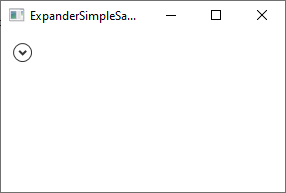
Is there a (custom) card where I can expand and hide the cards content?
mild veldt
@mint geode there's a row that does that but not a card. You could use a conditional-card tied to an input_boolean though
mint geode
Was thinking of the input_boolean/conditional combination as well, but it would be better to have an toggle option on the card itslef.
 mild veldt
don't think that would look really good within the mix of other cards
just an icon, hanging out on its own?
use an entity-button I guess if you want that
or button-card if you want more styling
mint geode
You could add a caption, wouldn't look that bad I'd guess 😄
mild veldt
still have the conditional, but button-card would allow you to flip the chevron icon between down/up
mint geode
So the conditional card would be inside the button card then?
mild veldt
no...i mean I guess it could be. that is supported now
mint geode
That would work I guess 🙂
mild veldt
i don't think the card will dynamically size, however
mint geode
I'll try if I have time
I use conditional cards in an entities card, it resizes correctly in that specific case
mild veldt
i was referring to the button-card
mint geode
oh ok, have to look that up, guess it's a custom card?
mild veldt
yes
i think it is overkill for what you're trying to do
type: vertical-stack
cards:
  - type: entities
    entities:
      - entity: input_boolean.tv
        name: Show TV
  - type: conditional
    conditions:
      - entity: input_boolean.tv
        state: 'on'
    card:
      type: media-control
      entity: media_player.family_room_2
is what I would do
mint geode
You're right, that's probably the way to go, thanks for all the advice 🙂
Any chance you can help me out with my above mentioned conditional in enities card constelation? I've got essentially an entities card, in an conditional card in an entities card. I was looking into removing the double card-borders with card mod but didn't have any success. What attributes to I have to change? margin? padding? Something else?
Looks like this: https://imgur.com/a/zhdOOtu
The second entity only shows when I'm not at home, therefore it's in an conditional card. I haven't figured out what I have to do to get rid of the double borders
mint geode
Sorry for asking... But what's a conditional row? Didn't find any custom cards or such a property on the entites card docs
mild veldt
no, I'm saying I should actually make that
mint geode
Would be great 🙂
mild veldt
it is now on the list
mint geode
Btw, box-shadow was working fine, only margin I had to set to -16px
Hope that's not too "dirty"
Thanks again for the help 🙂
mild veldt
whatever works 🤷
 tired thicket
i try to instal compact custom header , but it says add this to resources ```resources:
- url: /community_plugin/compact-custom-header/compact-custom-header.js
type: module``` but where is that recources folder? hope you can help me , thanks.
polar kelp
mild veldt
mint geode
@mild veldt you rock!
polar kelp
Hehe. I expected the entire diff to be like ```
hui-conditional-card.ts @74+1
- customElements.define("hui-conditional-entity-row", class HuiConditionalEntityRow extends HuiConditionalCard {});
Hello all! Just joined the HA community and this chat
I have a question: can I use material design icons inside picture element? I am trying to create a floorplan and place light toggles inside it
vapid field
Following the questions: can I switch the icon based on light on/off state?
icon: 'on': / 'off': doesn't seem to work (/w type: state-icon)
 worthy parrot
Hey all 🙂 At first sorry for my bad english. I hope it's ok writing here in this chan... I'm new in hassio and new in discord :p I'm reading the FAQ since three days and looking youtube videos. But i have a problem with the themes. Maybe someone can help me. I have default_config activated in my configuration.yaml so frontend is activated, right? So i just added the following line: themes: !include_dir_merge_named themes/ and created a folder with the file midnight.yaml. After rebooting hassio i cant access the theme. When i added frontend: i got a 404 error after rebooting 😦
wheat current
1: You still need frontend: since themes: are nested under it.
2: Don't reboot your host, run a config check and restart Home Assistant if it's OK.
3: This question, really belongs in #330944238910963714 :)
4: If you need help getting hassio back up, #330990055533576204 is the place for that
kind shellBOT
Always run the configuration check command when you make changes. Don't trust the UI check - it misses some problems.
Command '~check' was invoked by: Tinkerer
split granite
frontend:
  themes: !include_dir_merge_named themes/
``` That is how it should look in `configuration.yaml`Even if default_config is is set?
wheat current
worthy parrot
Sorry just asked in this chan because of the answere of tinkerer...
 slender temple
hey lovelace guru's 🙂 I've got a problem I can't seem to solve. I've got an MQTT sensor. It recieves on or off from a PIR. I want it to look like a motion sensor, but customize doesnt support mqtt sensors. (only works on binary sensors and remapping its type doesnt work) so i've been bouncing around, trying to use various solutions, currently able to change the icon by making a seperate template sensor which almost does the trick, but i cant change the color when its triggered. Any ideas on how to move forward?
fleet kite
Not sure if this is the right place to ask; but is it possible to change the way a group of sensors displays its state? I have a group that consists of all of the binary sensors for my doors. The device class for those sensors is "door" so their individual states show up correctly as open/close in lovelace. But the group's state shows as on/off in lovelace. Is there a way to get the group to show open/close instead?
split granite
@slender temple Wrap it in a template binary sensor 😉
The colour will change when the motion sensor is on
slender temple
hmm ok thanks - will try that 🙂
mild veldt
@vapid field yes. Use the prefixmdi:
E.g. icon: mdi:house
slender temple
@split granite thanks man - worked first time. wasted several hours, solution was soooo simple lol
vapid field
I saw that the latest lovelace version introduced '' New confirmation option for actions # 4006 @mild veldt ''
how do you enable on a card?
mild veldt
@vapid field should be in the docs under tap/hold/double action sections
 broken marsh
Hi. How can I have the entity button run two services on same tap_action?
muted inlet
have it call a script with the two services
polar kelp
Make a script to run them both an.. too late
muted inlet
lol sry
broken marsh
Ok. Thanks
 haughty bough
How do I start making an automation through the UI? The docs say configuration->automations, the release notes say pick a device and there should be a way to create one... I appear to have neither option, or at least I can't find either with Hass .101.2
split granite
Under Configuration do you see either Automations or Devices?
haughty bough
@split granite Devices yes
split granite
But not Automations?
haughty bough
Correct
split granite
Ok, check configuration.yaml for default_config: and
automation: !include automations.yaml
Oh, I don't have either... Guess no automation: no automations
kind shellBOT
Command '~default_config' was invoked by: Tinkerer
haughty bough
Thanks @split granite .... I had an automations file, but I removed it because Hass doesn't start (event loop is closed) with it enabled after upgrading from .100.3... so move it out of the way make a blank automations file and recreate them
vapid field
@mild veldt can't find it
vapid field
Thanks
atomic glacier
After updating to 0.101.1 I have checked the LL changelog and not finding what I am looking for. Best guess that it's related to this: https://github.com/home-assistant/home-assistant-polymer/blob/master/src/resources/ha-style.ts#L17-L19 but apparently my knowledge is prohibitting me, (and/or not enough ☕ yet ) in finding the changes I need...
font_size and border-radius are not applying anymore. When I open F12 to inspect it displays properly on desktop, but not on my Android. Any clues where to start? @mild veldt
image: https://imgur.com/a/3Ch1y4q
code: https://paste.ubuntu.com/p/VsgfvZmhDy/ (shortest ex I could find😐 )
lines 12-15 is what is not applying anymore...
mild veldt
for just glance card?
atomic glacier
AFAIK the only thing that I see not applying
mild veldt
I mean it sounds like something related to card-mod in that case, which I don't test against. I don't know of any changes in 0.101 that would have effected those things directly except for potentially when the glance card is updated (it is more strict in its updates now). If you put it in a regular theme it applies, I assume
atomic glacier
Yeah, all the theme variables apply and the anchors: as well, but the styling inside the glance-card appears to be a no-go, but only on mobile. I have some time today and I'll run every way I can think of for a solution and I'll tag you later this evening if I come up with a solution/problems. Thanks👍🏻
 tired quail
So I've been using TileBoard for the past couple years for wall-mounted tablets in the house. Just rooted and flashed a custom ROM to my tablets so I can get a newer Webview and I'm considering migrating over to using lovelace for them all now. Each tablet has its own interface. I see custom compact header lets you do some user-based customization on links, and thomasloven's browser-mod gives me access to some of the stuff i use in TileBoard. Curious if anyone else is doing this and has any tips for organizing the configuration
I also really like the grid of the Tileboard/metro interface, is there a good way to replicate grid layouts with lovelace cards?
atomic glacier
@tired quail Jump on in the water is fine 😜
You can do almost anything you can design with Lovelace
I switched awhile back and I have no regrets
tired quail
@atomic glacier did you use TileBoard in the past?
atomic glacier
saw it, but I used appdaemon and thought I'd never switch
tired quail
ah
yeah i started out with HADashboard, then jumped over to TileBoard since it was a lot more customizable
atomic glacier
Foundation for a great layout starts here: https://github.com/thomasloven/lovelace-layout-card
tired quail
my main complaint with tileboard right now is it wasn't really built where you can add custom tiles easily, they're all in one giant js/html file
and there's a ton of custom cards for lovelace now
split granite
Since Lovelace came into its own, I've ditched all other HA based UIs
The custom cards mean that it can do everything I need now, and way more than that
tired quail
only thing i don't think i can do with lovelace right now is the digital picture frame/screensaver mode
after ~5 minutes of idle time it switched to a "screensaver" that cycles through a batch of pictures and has a big clock & shows the current weather conditions
atomic glacier
@tired quail that can be done(example in my repo). I have a large clock screensaver and black screensaver for after a certain time at night. My wall mount is motion activated with 'on' 'off' functions that are automated. As I said 👆🏻 pretty much limited to your imagination.
tired quail
what's your repo?
atomic glacier
mint geode
What is the logic behind the default lovelace layout when just adding card after card, without any horizontal/vertical stacks? The order is different depending on the columns the device displays lovelace on obviously. When is it starting to put a card into a new column?
atomic glacier
@mint geode take a look here: https://github.com/thomasloven/lovelace-layout-card for a better explaination than I can give
mint geode
I'm aware of this plugin, but that layout would then be the same on every device, therefore I would have two or three columns on my phone as well, which would be not that good to navigate through 🙂
I'm a fan of the differing columns per device, but I don't get the logic behind the default ordering
Which I didn't see explained on your linked site?
atomic glacier
Thomas explains the logic on that page if you scroll down a bit ( I'll check again) i think
mint geode
Ok, will look again
atomic glacier
<min height>
Optional. Default: 5
Best explaination I could find...
The number of units needed before a column is considered not empty.
Every item has a unit height. When that unit height for the column gets to 5, it places the next item in the next column. A unit is about 50 pixels in height if I remember correctly, but some cards can override that. Some cards also don’t have dynamic heights. If they are collapsed when first added, they’ll be treated as the collapsed height.
Apparently it was removed from the link I gave you... @mint geode
mint geode
Thanks 👌 Was already suspecting the height of the card to play a role since I added a new row to an existing entities card and now my whole layout is acting crazy @atomic glacier
mild veldt
@mint geode the old card-modder, not card-mod, has the ability to override the reported card size which can be used to overcome some@of those isssues
polar kelp
That doesn't work reliably on first load. That's why it's not included in the new version.
The layouting is explained here: https://github.com/thomasloven/lovelace-card-modder#forcing-size
But since .88 or something it's different on first load, so you can get different layouts when you reload your page and when you move to another view and then back if you have lots of custom cards.
Basically, all custom cards have a height of 3 (iirc) until they are loaded in - which they become after the layout has been set on the first page.
Some plugins (like card-mod) force a refresh of the layout after they have been loaded, but that's also a bit iffy since there's no guarantee of the load order of resources.
 prime umbra
was wondering anyone using the markdown card, i use to use the thomas markdown that now seems to be integrade in core of ha
but i dont seem to be able to pass the sensor value on the HA core markdown right now is **[[ sensor.time.state ]]** o'clock
polar kelp
The core card uses jinja2 templates instead. Just like the backend. {{ states('sensor.time') }}.
prime umbra
ohhh k hehe thanks
kind shellBOT
@long cedar posted a message that is too long, it is moved here --> https://paste.ubuntu.com/p/Ss9JdPT9Bw/
 long cedar
I have a zigbee lock that is connected to a smart things hub and I want to control it from my lovelace UI. I can get it to appear properly, but it just displays as a big lock icon with the name underneath it and when I click on that a modal pops up with lock/unlock actions. How can I make it so that when I click the lock icon it toggles the locked/unlocked state of my zigbee lock?
Here is my config:
  - type: js
    url: /local/card-tools.js?track=true
  - type: js
    url: /local/layout-card.js?track=true
title: Home
views:
  - badges: []
    cards:
      - cards:
          - entity: lock.front_door
            type: entity-button
        type: 'custom:layout-card'
    panel: true
    path: new-home
    title: New Home
After an hour of searching I finally figured out how I did it the last time I set this up. I used the custom button-card. In case someone else finds this in the future here's the solution I used:
kind shellBOT
@long cedar posted a message that is too long, it is moved here --> https://paste.ubuntu.com/p/T3p9TcDR6H/
muted inlet
Thanks for sharing! Watch your line counts though.
kind shellBOT
@long cedar Rule #6: Spam will not be tolerated, including but not limited to: self-promotion, flooding, codewalls (longer than 15 lines) and unapproved bots.
Please take the time now to review all of the rules and references in #rules.
Command '.spam' was invoked by: Tediore
mild veldt
@long cedar you could have specified the tap_action to toggle as well. A custom card is not necessary
muted inlet
Yeah I'm not sure about the benefit of the custom card
Unless the entity doesn't support toggle I guess
mint geode
@mild veldt Thanks for the info, will try👍🏼
mild veldt
@muted inlet even then, pretty much everything in core supports actions
 serene ermine
HI n00b questian here, I like to change the icon on a button when state changes on a light, Is that possible to do with the lovelace entity-button or is only possible with the custom card "button-card" ?
broken marsh
I have an automation in automations.yaml that on event_type: xiaomi_aqara_click event_data: click_type single does something. What's the easiest way of adding that as a button in lovelace?
Can I perhaps call the ID of an automation?
mild veldt
@serene ermine that would require a template right now, so something like the config-template-card surrounding it
mild veldt
@broken marsh a butting to turn the automation on/off? Or do the "something"?
broken marsh
Do the something
mild veldt
You'll need to put that in script then
broken marsh
Found a way now. Called the automation.trigger service.
mild veldt
ah, right 👍
vapid field
@mild veldt Thanks! Can I use different icon for off/on states?
mild veldt
not without something like config template card. i have plans for something easier though
vapid field
Sorry, but what do you mean with config template card?
vapid field
Ty!
 vernal gazelle
is there a way to hide the things you dont plan on using in the Unused Entities section?
 dark dirge
Hide them through customization?
split granite
Pretty sure you can't hide anything there, deliberately
 verbal finch
Hi guys how to i add a user avatar on the badges on lovelace ?
vernal gazelle
Config - Devices works for what I want to do
dark dirge
This seems agree that entities can't be hidden in Lovelace: https://community.home-assistant.io/t/hidden-entities-still-showing-in-gui/106608/10
 old whale
Does Custom Button Card work with Home Assistant Cast?
 brittle eagle
hey guys, any idea where i can start troubleshooting a slow loading lovelace apart from the dev console and disabling card by card? My front screen loads pretty slow since the 0.100 upgrade
 low summit
Hi! Quick question; cant seem to get the name-config to work for my history graphs, not sure whats up. Any ideas? https://imgur.com/a/lQlizdP
 cyan ocean
I'm in the process of moving my install from RPi 3 to RPi 4. I created a full snapshot, copied it to the new device, and restored it. It looks like everything is there, with the exception of my LoveLace design. It's just the basic UI. any suggestions?
vapid field
hi, I am trying to style my HA installation via Lovelace with some mdi icons. Why can't I use this one ? https://material.io/resources/icons/?icon=ac_unit&style=outline
old whale
because its not an mdi icon?
vapid field
isn't https://material.io/ by google ?
polar kelp
It strives to, but not the icons specifically.
old whale
what you can do is download the png (https://fonts.gstatic.com/s/i/materialiconsoutlined/ac_unit/v1/black-18dp.zip) and use entity_picture instead
polar kelp
You could try mdi:snowflake
vapid field
yes, I am using that, but my VD design it with the mdi:ac_unit 😉
old whale
sorry, VD?
vapid field
Visual Designer
I am doing a demo app where I would show some HA features
for our public site
polar kelp
You could make and import your own iconset.
Here's an example https://github.com/thomasloven/hass-fontawesome
vapid field
aha, will take into account for v2 ;)...not a priority right now
old whale
I personally use mdi:air-conditioner
vapid field
yes, but that looks weird with the rest of the icons at the top bar
anyway just a detail, to stick to my VD guidelines...
Other thing that she asked me was: if I was able to rotate the whole floorplan depending on the device and screen size...
Doesn't seem easy that, thoughts ?
polar kelp
Not easily, no.
polar kelp
yeah
With a bit of luck, that would only require transposition of the x and y coordinates, though.
vapid field
and also.....how can I add the inteligence to determine the screen size and do the apopiate layout?
polar kelp
That's the trickier part
polar kelp
As far as I know, there's no way to do it currently. It's on my list, though...
vapid field
I can share with you the app when it is ready
so you can see what I have right now, and what the VD pretended on other layoutrs
maybe it can help on your idea
now it is basically done for mobile devices
old whale
Hey thomas, could you help me with this https://discordapp.com/channels/330944238910963714/460846676358332417/640636592591077406 ?
polar kelp
No idea, but I think it does.
mild veldt
@old whale have you followed the FAQ regarding custom cards in general?
cyan ocean
I'm in the process of moving my install from RPi 3 to RPi 4. I created a full snapshot, copied it to the new device, and restored it. It looks like everything is there, with the exception of my LoveLace design. It's just the basic UI. any suggestions?
atomic glacier
@cyan ocean did you check the info page under Dev Tools?
cyan ocean
@atomic glacier The old install says:
Lovelace
mode storage
resources 5
views 9
The new one says:
Lovelace
mode auto-gen
how do I switch modes?
atomic glacier
is your ui-lovelace.yaml there?
should be right above that if I remember correct
I just switched to RPi4 as well
Sorry, forgot to ask if you are using lovelace: mode yaml ?
dark dirge
Right, this is how you switch modes: https://www.home-assistant.io/lovelace/yaml-mode/
timid burrow
he shows storage
@cyan ocean do you have a .storage/lovelace ?
if you do I think you just need to configure gui and take control and it should use that old file
it should have come over with the snapshot
cyan ocean
stand by.... looking...
Yes - there is a .storage/lovelace file
I was using lovelace on the rpi3; though not with a homegrown .yaml - just using the GUI to build the interface.
timid burrow
so in the GUI.. top right 3 dots click on configure and then take control.. maybe copy it first incase it blanks it out
don't understand why it didn't restore that
atomic glacier
Thanks @timid burrow I really needa play around with the GUI sandbox plugin...at least to be more helpful with the new stuff😐
cyan ocean
So, selecting "Take control" did wipe out the file. So I copied the original one in, and it's not showing the design (even after clearing the cache). perhaps I'll reboot?
Also - I noticed that none of my users got copied over.
timid burrow
try stopping HA and copying it in and starting again
or in the old one, go into raw editor and copy/paste to a file and then copy/paste back in to raw mode
cyan ocean
If you don't mind me asking - what's the "FW" in your username represent?
timid burrow
initials
cyan ocean
I live in Fort Worth, so when I saw FW...
timid burrow
hahaha
cyan ocean
Well, that got lovelace synced up. But it appears that most of my entities didn't transfer from the rpi3.
timid burrow
so did the snapshot actually restore properly?
it can take a long time to restore BTW
cyan ocean
I thought so. but, apparently not. I did the restore at 8am today.
Maybe I'll start again and leave it overnight.
timid burrow
check that all the yaml files etc are in the snapshot.. you need to open through about 3 zip files within the snapshot but you can see exactly what has been saved in there
cyan ocean
it definitely looks like they're all in there
I'll try restoring the snapshot again and see what that gets me. I was a little disappointed, because it seemed like it should be pretty straightforward.
timid burrow
yeah it is straightforward but you need to be patient
cyan ocean
What I have noticed is alot of processes in HA lack sufficient status messages. So it's hard to know when something is complete.
timid burrow
I've used snapshots a lot
cyan ocean
Okay - thank you, sir. I've created a lot of them, before doing any updates, but I've never had to restore any (thankfully!)
I appreciate your assistance.
timid burrow
I agree... a message when it's complete would be nice. I don't think it's logged.... maybe if you set log to debug.... but I think it will restart HA when it's done as well
cyan ocean
For example - I just clicked "restore selected". It asked if I'm sure, and I clicked Yes. So the dialog box is still up which allows me to choose what elements to restore. From an end-user perspective, there's no indication if I should just wait, of if I should close this panel, etc.
Hmm. okay - it just showed "Snapshot restore" (that was FAST)
timid burrow
yep
cyan ocean
I'll do a full reboot now and see where that lands me
timid burrow
or just restart HA from the frontend
also make sure it has your addons and they are started as well
cyan ocean
Nope - that didn't do it. I'm creating a new snapshot from the pi3 and will try again.
mint geode
Anyone knows something similar but for the Logitech harmony? https://github.com/iantrich/roku-card/blob/master/README.md
mint geode
Just read through it again, should work with harmony as well I think
night talon
What are you trying to do? I use this card with Harmony. For remote use your harmony entity, for media put your roku media player entity.
cyan ocean
@timid burrow I created a new full snapshot on my (old) rPi3. Strangely, it was considerably smaller than the previous snapshot (154MB vs 254MB). Restored it to the new rPi4 and rebooted - everything seems to be there - users, lovelace, etc.
mint geode
@night talon yes I know it should work now that I read it again
mild veldt
@mint geode let me know how it goes for you. Just did a rewrite of a lot of it with some new features, so let me know if anything is bumpy
mint geode
I’ll configure the card now, but I can’t test it before the weekend but sure 😉
faint bloom
where would the equiv of ui-lovelace.yaml be?
I'm trying to add a HACS button card
muted inlet
click the overflow menu in the upper-right (three dots) > configure ui > raw config editor
faint bloom
holy smokes
thanks!
it says to drop it in and just refresh home-assistant
does that mean restart server or refresh browser?
I keep getting No card type configured.
I'm unsure why
muted inlet
so you added it through HACS and then added the lines to the lovelace file?
faint bloom
bottom the file okay?
muted inlet
under resources:
faint bloom
i dont have one
muted inlet
create it
faint bloom
bottom of the file okay?
faint bloom
okay then yeah
I pasted it in at the bottom of the raw editor
  - url: /community_plugin/button-card/button-card.js
type: module```should be good then, save and then refresh your browser
then you should be able to configure the card with the manual card editor. there won't be a button for it when you go to add a new card
muted inlet
putting - type: "custom:button-card" in the manual card editor says no card type configured?
faint bloom
- type: 'custom:button-card'```ah yeah get rid of the hyphen
faint bloom
specifically to trick me I think 🙂
muted inlet
prolly
wheat current
That's needed when you add it in yaml mode or raw editor
wheat current
My guess is that most of the devs uses that and not the pretty manual card option
 fringe wave
hey there. is there a way to have one language for the system and a nother for lovelace frontend
like I prefer to have my system in english. but i like having lovelace in my native language (like calendar and weather cards)
polar kelp
At the bottom left there's a circle with your initials. Click it.
fringe wave
@polar kelp that changes the entire system
I only want lovelace to be my native language
polar kelp
Ah. Then, no.
fringe wave
😆
polar kelp
I thought you meant system as in backend.
vernal gazelle
@polar kelp Quick Noob question - do you have to use panel mode for the - break to work correctly in the layout-card?
polar kelp
If you don't use panel mode, the layout-card will get as much space in the layout as any other card - 300-600 pixels - and will try to squeeze everything into that width. Break will work, but by default, you'll only have room for one column, so the next one will be placed under the first.
vernal gazelle
Thank you - makes sense.
 thorny verge
@polar kelp Is browser_mod limited to newer android versions? I have an older phone, LG G3 with android 6, and I am running premium version of fully, and I do not get a light, sensor, or binary_sensor
polar kelp
It requires a rather new (like 6 months) version of Fully Kiosk. They made a small undocumented change that broke everything...
polar kelp
Then it should work.
Make sure you've cleared your cache. There's a button for that in the web interface.
thorny verge
It showed up once, but never again. I've tried that, but I will try again.
polar kelp
Do you get a media_player?
thorny verge
no
polar kelp
Does it work with your computers browser?
thorny verge
browser_mod? Yes, and I have a tablet running Fully, and it works, although android 7.
I cleared cache, restarted HA, still nothing
atomic glacier
Trying to come up with a working example using lovelace-layout-card to share, but I am not quite hitting the mark and could use a pointer. Think I set this up right, but the cards are not staying within the boundaries. Maybe this isn't correct? https://imgur.com/a/RaF0Dtb test code: https://paste.ubuntu.com/p/wyWDJ4jb27/ @polar kelp
elder pendant
@wheat current https://i.imgur.com/UQhBNdy.gif 🎉

 grave moss
my eyes enjoy this
wheat current
Theme values?
elder pendant
It's using the already available CodeMirror themes, you just set the name of the theme you want in your HA theme with --code-editor-theme
I'm just trying to figure out the best method to load all the css files
wheat current
carefully
elder pendant
right now I'm just injecting all of them into the style tag that's used for CodeMirror, but it's pretty ugly
wheat current
maybe
frontend:
  extra_module_url:
    - /path/to/some/css/file.css
I'll give that a shot
but that's still only a temporary solution
I want to actually make these changes PR-able
muted inlet
trigger:
  platform: state
  entity_id: comment.ludeeus
  to: 'carefully'
action:
  service: counter.increment
  entity_id: counter.ludeeus
{{ states('counter.ludeeus') }}
12748494
😉
Don't worry, I think it's funny
prime umbra
very nice lol
elder pendant
extra_module_url only allows javascript. Linking the stylesheet through js also doesn't appear to work
something tells me if I tried to change this file https://paste.ubuntu.com/p/PjgxqRQ9ZD/ to this https://paste.ubuntu.com/p/c6vh7CmgpJ/ my PR would get rejected 🤔 it only adds about 3000 lines
devout loom
Is it possible to use a live website as background and put (transparent) button cards over that?
elder pendant
What do you mean? Like having amazon.com as your lovelace background?
wheat current
that sounds messy
polar kelp
@muted inlet To be fair, I think I've only seen three carefullies today...
@elder pendant Here's a part of card-mod. It waits for the hui-entities-card element to become defined, and then goes into it and replaces one of it's functions - renderEntity with my own version, which first runs the original and then modifies the results before returning. You should be able to do something similar. https://github.com/thomasloven/lovelace-card-mod/blob/master/src/hui-entities-card.js#L4-L29
If you load it as extra_module_url it will most likely be loaded in before ha-code-editor too, so you won't have to worry about race conditions or anything.
Adding the styles in the index template probably won't work, because the code editor uses shadow roots and live in it's own isolated bubble.
elder pendant
Well right now I'm trying to figure out how to load a directory of css files properly to fit home-assistant-polymer standards. I'm guessing it would have to be done within the code-editor component ts file, but I'm still puzzling it out.
I know Ian said it wouldn't be worth creating a 1 to 1 mapping of CodeMirror theme to HA theme, but I'm starting to think this is the only way to do it if we want to give users full control of the syntax colors. Selecting from the predefined CodeMirror themes is starting to seem lazy to me, so loading the css files might not be necessary if we implement the ability to essentially create your own code-editor theme
thanks for the tips though, I will store that in my toolbox for the future
wheat current
What about https://www.npmjs.com/package/code-mirror-themes?
elder pendant
CodeMirror already has built-in theming, it's a matter of how to tie it into HA themes
that package may have been made before themes were a thing. It's 3 years old
devout loom
@elder pendant I want to use Dakboard as a background, and just have like 5 custom button card on top. Cause I don't use HA for that much, so if I can avoid doing UI in code mostly, I would do so
So if I could just iFrame the whole thing and add a couple of buttons on top, that would be the best
wheat current
Do that then
devout loom
Is it doable? Can't find anywhere that says how
It seems most things I look for in HA just gives me a bunch of unanswered forum posts :/
wheat current
with picture elements you should be able to get that going
devout loom
Can picture elements use cards inside of it? It didn't look like it could
wheat current
I would not recomend it thoug 😛
devout loom
hmm
Okay, another question then. Is it pretty easy to handle devices inside home assistant from other UIs? Cause I guess I could just pay a UI/UX designer to do me a good UI then
wheat current
devout loom
That is awesome.. I know someone that is good at Adobe XD, so I guess that could be a good way
wheat current
Another option is compleatly seperate system https://github.com/home-assistant/home-assistant-js-websocket
devout loom
Cool, I'll send that over and see if I can get something to build something for me.
There aren't anyone that are known to do HA UIs for people as a paid service? Would be absolutely fantastic to never have to worry about lovelace again, and just pay someone to do something beautiful
devout loom
No but nothing is more expensive than working with Home Assistant yourself, if your time is worth even a little bit 😉
elder pendant
Good thing my time is worthless, otherwise I'd be in trouble I guess
devout loom
Well I just find it funny that I hear so often that HA is great cause it's free, and it's what I hate the most about it. It would pay itself off a million times if I just worked a bit overtime and had someone do this stuff for me.
split granite
Then... go pay a contractor for a commercial solution 🤦
devout loom
nothing good exists
split granite
Then you're not looking widely enough, or you're too cheap 😉
devout loom
I already paid for HomeSeer, Homey, Hubitat, Indigo etc. too. And it was shit.
split granite
That's not contractor level
devout loom
I know
split granite
See my previous statements 😉
Go look at the things you can do with Loxone, and more
devout loom
I absolutely hate stuff like Control 4
devout loom
Loxone don't exist here, they are nice though
muted inlet
sounds like you should make your own home automation platform
devout loom
What @muted inlet ? That is probably the only thing in the world it does not sound like.
wheat current
This is massively off topic for #frontend-archived
muted inlet
true, let's go to #the-water-cooler
split granite
Or one of the none HA Discords 😛
devout loom
Well anyway. My question was relevant enough. It could be lovelace, I don't really care about the name. But does someone know someone that does UIs as a paid service? Like I send over my entity_ids and a sketch of what I want, and get a file in return I move over.. happy days
split granite
TL/DR: No
grave moss
Just wait like 2 or 3 years than ill do it for you 👌 @devout loom
devout loom
Hehe
atomic glacier
Any suggestions on my earlier post? 👆🏻 @polar kelp
devout loom
I do see a lot of configurable frontends popping up here and there. So I guess something that is good will come up eventually.
muted inlet
#frontend-archived is pretty configurable
split granite
Try the forum
devout loom
@muted inlet codable*
muted inlet
i mean, the card editor is a UI
devout loom
Actually I honestly never got that working.
vernal gazelle
anyone using https://github.com/ljmerza/tracking-number-card ?
muted inlet
odd. haven't really had any trouble with it
polar kelp
@atomic glacier I have a hunch what the problem could be... it was in the beta too for a while, I think...
vernal gazelle
disregard its working.. for whatever reason when downloading the tracking card from HACS it didn't set the properties in lovelace.yaml (first time I've had that issues, I think)
atomic glacier
No biggie, just changed them to glance card for now. Lemme know if you come up with a fix, I'd like to keep it with all one card type... Thanks! https://imgur.com/a/4pSh4L7 @polar kelp
wheat current
Hacs has never added anything to your config @vernal gazelle
vernal gazelle
I thought when I installed it auto added the - url: /community_plugin/tracking-number-card/tracking-number-card.js
type: js
wheat current
Nope
vernal gazelle
its been a while since I messed with it..lol
maybe I always copied and pasted ..lol
wheat current
If you have it in there, you must have
vernal gazelle
Ive used it since it was made avail a few months back, but with all the work stuff i stopped messing around with HA.. so apparently.. I have a short memory 🙂
polar kelp
@atomic glacier I don't think I can fix it, actually. I'm guessing your cards there are, like 150-160 pixels wide? Most cards expect 300 px minimum.
atomic glacier
@polar kelp Yeah, didn't do the math and used %'s intentionally. I'll revisit this. I just get asked a lot and thought a simple example to demonstrate the abilities of layout-card would be a good starting point for newcommers 🙅🏻
polar kelp
... well... not expect, as much as have grown used to...
atomic glacier
Just gonna leave it at this for now: https://imgur.com/a/HsQLL29
code: https://paste.ubuntu.com/p/Vkz22WbTcv/ A bunch can be done with this layout style for anyone needing direction...
 light creek
Crossposting this to Hassio sub section as well!
Ok, so, I've broken my install via lovelace. I installed the Mini-Media-Player card and set artwork: cover
background: "website address.png" and now the system wont come back up. I can still access my install via samba, any ideas how I can remove those two extra lines I added from the card config via samba?
polar kelp
Did you add it via the GUi editor?
light creek
Yes I added it in the GUI, I managed to find the file via SAMBA, opened it, took the two lines out, saved, rebooted and I'm back in. Thanks!
vernal gazelle
Anyone tracking packages in HA (ups/fedex etc..) successfully?
split granite
That's surely a #330944238910963714 question?
vernal gazelle
probably.. I will move it 🙂
kind shellBOT
@hearty hound To format your text as code, enter three backticks on the first line, press Enter for a new line, paste your code, press Enter again for another new line, and lastly three more backticks. Here's an example:
```
code here
```
Watch the animated gif here: https://bit.ly/2GbfRJE
DO NOT repeat posts. Please edit previously posted message, here is how -> https://bit.ly/2qOOf1G
Command '~format' was invoked by: Tinkerer
split granite
Well, if you can edit it and format it correctly folks may be able to help you 😉
 hearty hound
haha I will do that
  - type: picture-entity
    entity: binary_sensor.door_window_sensor_158d000247838b
    tap_action: none
    state_image:
      "on": /local/images/carport-open.png
      "off": /local/images/carport-dicht.png
    style:
        top: 35%
        left: 65%
        width: 7%
        padding: 50px 50px 100px 50px
Can someone tell me why the state-images are not doing anything with the style?
split granite
(You missed, twice, the whole edit thing)
    style:
        top: 35%
``` ❌Too many spaces
    style:
      top: 35%
``` ✅Thanks Tinkerer
None of the styling is still working. The width is the image-width right? because I am trying to make the images smaller.
split granite
I've never tried, but I do know that getting the YAML indenting wrong breaks things 🤷
mild veldt
why?
split granite
Spamming the server with fill out this survey links @violet depot - not the smartest approach
 stoic solstice
Is there a way to set "friendly" names for the different alarm states for the alarm_panel? Currently they are "disarmed", "arm home" and "arm away" but i want to change those if possible.
Checked the docs but they don't mention such option
stoic solstice
Yes, well i want to change it in the default panel if possible
muted inlet
?
wheat current
alarm-panel-card @muted inlet
stoic solstice
In the panel, where you put the pincode and choose the state
muted inlet
oh
stoic solstice
Sorry for beeing vague... yes the alarm panel card
muted inlet
all good
stoic solstice
🙂
muted inlet
i don't think that's possible
stoic solstice
ok
wheat current
everything is possible, if I say it's not possible, @polar kelp comes along a few moments later and shows that I'm wrong 🤷
stoic solstice
But for showing the state in a state card of somesort i guess a template would be right
I actually need that too, so 🙂
polar kelp
Sure. It can be done, but it's not very easy.
stoic solstice
I prefer easy 🙂
wheat current
Clone the frontend repo, do changes host your own version of it, probably the easy way
muted inlet
ah yeah sorry, i meant "not possible" as in "there's no setting for it"
stoic solstice
Too much work for this minor thing imho. Not worth the time and effort in my case. No biggie at all
polar kelp
customElements.define("alarm-card2", class AlarmCard2 extends customElements.get('hui-alarm-panel-card') {
   _label(state){ return {
    disarm: "Larma av",
    arm_home: "Hemmaläge",
    arm_away: "Bortaläge",
    clear_code: "Rensa",
    }[state];
}});```Put that in www/alarm-card2.js, include in your resources and use with type: custom:alarm-card2.
Turned out to be easier than I thought...
polar kelp
You play me like a damn fiddle, Joakim.
muted inlet
lol
stoic solstice
Could i extend that with the different states of the alarm? "disarmed", "armed_away", "armed_home"?
polar kelp
It should be the same strings as here: https://www.home-assistant.io/lovelace/alarm-panel/#states
stoic solstice
I like that you even translated it for me 😉
polar kelp
plus disarmand clear_code.
stoic solstice
I'm gonna try that out! Thanks @polar kelp
wheat current
Super wierd seeing that name here 😅
stoic solstice
@polar kelp Not working 😦 Do i need to restart hass after adding it? I don't think so, right?
or wait... i might have made a booboo
It works! 😄
Thank you very much!
broken marsh
What must I do to the automation.trigger in button entity to prevent it from launching ALL automations?
I want it to trigger just one specific
type: entity-button tap_action: action: call-service service: automation.trigger hold_action: action: more-info show_icon: true show_name: true entity: automation.webcam_pa_nest_hub
polar kelp
service_data:
entity_id:
- automation.my_automation
- automation.another_one``` lime warren
Can I talk about some weirdness in a history-graph card that's had additional entities added to it over time?
I had a history-graph that's been logging two temperature sensors for almost 6 months now - The values are coming in from the sensors (a rest sensor, with the incoming units configured to C) and HASS.IO is set to Fahrenheit, so a conversion is happening internally, and all my values are showing up in the card in F, which is good. So I have a nice long database file with all these old values from the two original sensors in there that are graphing nicely. But THEN, I added the new sensors that I brought online this morning, and some goofball stuff starts happening. It's showing them in a separate graph, and with units of C on the graph, but values of F. States shows everything in F as the proper values though. Check it out..
All of the entities are showing up as F in entities cards (on the same page even)
Is this just some weirdness of the old and the new previously nonexistent data showing up in the history-graph?
polar kelp
Have you configured all sensors with unit_of_measurement?
kind shellBOT
@lime warren posted a message that is too long, it is moved here --> https://paste.ubuntu.com/p/NNHjvYjX6n/
lime warren
yes @polar kelp - That was my first thought
https://imgur.com/a/VCe7P89 for another view
When I pull up a state, it reads
unit_of_measurement: °F friendly_name: Inverter Temperature device_class: temperature
and like I said, my entity cards show up completely as expected
but why on earth is it breaking it up in to two graphs I wonder
My hunch is that this will all go away once all of the logs end up the same length
(and are trimmed to 10 days) but why isn't it happening on the "power" - Perhaps because no internal numerical conversion is going on with that number?
as it's not an imperial vs metric value
So one idea I have is that I have certain values on those original two sensors excluded from logging, but temperature isn't one of them. I've gone ahead and excluded them in recorder, logbook, and history for the new weird ones that are showing up in C, but again, none of these excluded readings are ones that I'm displaying. Why? I want to level the playing field for all of these things and see what happens.
Restarted - Still in goofball mode. This is a weird one.
elder pendant
Changing config entries will not change history. It's already been recorded
lime warren
I figured as much. And in my history graphs, when I change the log length to 1 hour, it's still breaking them out in to two graphs
but when I set it to FOUR hours, it puts them in one graph, but puts the units in C
OK so here's one...
but... OK now in the history graph, if I set a device_class: temperature on the entity (even though that's in the STATE) only THEN does it show units in F
It seems like doing this:
      - entity: sensor.module_1_renesola_module_temp
        name: Module 1
        device_class: temperature
        unit_of_measurement: °F
      - entity: sensor.module_2_renesola_module_temp
        name: Module 2
        device_class: temperature
        unit_of_measurement: °F
      - entity: sensor.module_3_renesola_module_temp
        name: Module 3
        device_class: temperature
unit_of_measurement: °F```does NOTHING, but doesn't throw an error. But it still shows in C
oh man - This is some squirreley stuff here - Listen to this...
Changing the length of the displayed time in the history-graph GUI card editor changes the units.
 violet depot
So if the history was previously C, and now its in F...if you try to display the mixed history it might be getting confuse
*confused
?
lime warren
I think I understand what's going on - There are gaps in the data
violet depot
It wont convert the older data into F.
lime warren
and IF the beginning of the history-graph data is in a gap, then it screws up the units
The actual numerical figures are all coming in as F in the states - Everything is, you know, 102 degrees,
Let me paste a few pictures.
This is completely bananas, and has everything to do with the amount of time shown
But I want to add that there are actual GAPS in the data, from when the sensors go offline at night. My other power readings don't have gaps, they just go to zero
Here's the chunk of the REST sensor that is pretty explanatory
        device_class: temperature
        unit_of_measurement: '°C'
        friendly_name: 'Inverter Temperature'
# Here we're doing something goofy - We're NOT commiting the temperature reading if the value drops
# to something bonkers like -100, which is what it does when the inverters disconnect at night.
# again, no need to grind the SD card, and -100 values make your charts scale to something ugly.
        value_template: >-
          {% set magic = states('sensor.renesola_module_1').split('\n')[1].split(' ')[7] %}
          {% if magic|float > -50 %}
          {{ magic }}
          {% else %}
           ''
{% endif %}```So I'm trimming garbage data but subbing in a null instead of a numerical value
but why a null value clobbers the graph is beyond me. And I think this has been going on forever, but I never bother to look at the graphs at night, when 24, 48 and 72 hours prior would start the graph in a null data area of the database
but I DID notice it today, because I just brought them online this morning, and 24 hours prior, the newly commissioned sensors in question had null data while the first two DID have data.
hence why their units went kerplooky and then two graphs happened.
devout loom
Jesus christ, all of a sudden all my manually installed cards started doing this:
/local/manual-install/markdown-mod/markdown-mod.js:7:1 Uncaught SyntaxError: Unexpected token '<'
Only thing I can find by searching is people being told they fetched the file wrongly (not the raw), but this is not the case here. It started happening after getting the browser mod add-on. I don't know if it's related, but that plugin messed up a lot of things.
Anyone know what that is all about?
lime warren
Snapshots, my friend. Lots of snapshots.
 mental kayak
Hi I'm new to Home Assistant and lovelace
curious to know though before I start diving in more if anyone knows if you can add a panel with a browser window in it in the UI?
I ask because spotify allows you to run their browser based version and instead of using the spotify card with limited features, I wonder if I could run the browser version of spotify in the UI
 tepid locust
if you can put it in an iframe you should be able to do that
mental kayak
Does anyone here have Spotify and can test in an iframe for me? I just tried installing hass.io on my mac but I'm getting a bunch of dependency errors
https://open.spotify.com/ is the address if so
atomic glacier
@polar kelp "Add back dummies for deprecated functions" Thank you my lovely deprecated popups are working again 🎉 ...I know...🙄 it's deprecated 😢
EDIT: Get first image on 2.1 and second image on v0.4.2 🤷🏻 https://imgur.com/a/dDgl7uS
lime warren
@mental kayak just load HASS.IO on a Raspberry Pi and lock it in a closet somewhere. It runs 100% perfectly out of the box. The money you'll save on the power bill from not running your mac 24/7 will quickly pay for the cost of the Raspberry Pi. Not even joking.
 vast oar
Was there a change to brightness_pct:? It stopped working in some of my scenes. Switch to using brightness: and it is fine. I can't see anything in the release notes...
errant plover
Yeah the breaking changes around scenes were missed from the release docs. There has been quite a bit of discussion in the community forum thread for the release. This is the PR https://github.com/home-assistant/home-assistant/pull/27182 Read the "additional comments"
 strong falcon
is it possible to use a template to define the name of an entity in an Entities card?
mild veldt
@strong falcon https://github.com/iantrich/config-template-card
wheat current
strong falcon
thanks, I will have a look
mental kayak
@lime warren I plan on doing that, but I wanted to test this Spotify iframe thing first before I got the pi
mental kayak
I tried using the demo environment of lovelace and add an iframe to a new view but I get "Looks like you've followed a broken link or entered a URL that doesn't exist on this site" when I paste in the iframe code for Spotify
mild veldt
@mental kayak the page is configured so that it disallows embedding
mental kayak
oh okay makes sense. Looks like Spotify also limits you when using iFrames so it only plays a short snippet of the song
lime warren
Well, I guess that leaves piracy.
muted inlet
banned
muted inlet
Yeah lol
lime warren
yes, they probably were.
lime warren
I wouldn't pay for a subscription I couldn't use. But I do pay for Youtube Red (is it still called that?)
muted inlet
YouTube Premium
mild veldt
anyways, @mental kayak I can understand wanting to have HA be your all in one dashboard but bringing in the full spotify UI into it is also a bit much. You could always put out feature requests for the spotify card if you're looking for a specific thing
muted inlet
Which makes it sound like an adult video service
 ashen kindle
@muted inlet I'd argue YouTube Red made it sound more like an adult video service.
lime warren
That's youtube pink
muted inlet
Lol
mild veldt
full derailment
muted inlet
My 🅱️
lime warren
At any rate, how exactly does embedding in an iFrame threaten Spotify's revenue stream?
ashen kindle
Or that other site with "Red" and "Tube" in the name.
Can't remember exactly which though...
muted inlet
TubeRed? Never heard of it
lime warren
You're thinking of Node Red, but you're using it wrong.
muted inlet
Ahhh that's it
wheat current
close enough
muted inlet
good enough for government work
wheat current
most things is
muted inlet
u rite
lime warren
Is there any way to crunch down an "entities" card so the entries aren't, for all practical purposes, double-spaced?
muted inlet
There might be a custom card
wheat current
card-mod + ccs magic can probably do that
muted inlet
But the spacing is there for the A E S T H E T I C
lime warren
It's nice for almost everything, but I'm a bit data-heavy in this application
muted inlet
Yeah I'd be interested in a more compact entities card
Maybe we could call it the "compact entities card"
wheat current
muted inlet
No
wheat current
Yes
muted inlet
Damn you win