#frontend-archived
1 messages · Page 127 of 1
 frosty pelican
 tulip mulch
android or apple?
frosty pelican
android, thers no permission for it
in 0.99 it seems on glance cards and toggles theres a vibrate
tulip mulch
you accepted it the first time you accessed the frontend after upgrade.. the only other way I know is try clearing your site setting..
 wheat current
Not limited to Lovelace, probably some new fancy PWA thing
We don't have an Android app @tulip mulch the "issue" is when browsing the webpage
tulip mulch
the browser is an android app
frosty pelican
this is different
tulip mulch
you can try going into app info.. for firefox.. and notifications...
tulip mulch
ok..
frosty pelican
when u update to 0.99 you will see what i am talking about...tap on any glance card or toggle any entity
tulip mulch
i did.. and i saw it
it is a site setting.. if you clear the site setting and then click on one of those toggles and select don't allow the site to vibrate the device
frosty pelican
there is no vibrate setting
at least for chrome
honestly id turn it off for every website if i could lol
tulip mulch
have you tried reseting them for that site.. and then closing the browser, and re-accessing, that's what i had done on firefox.. and then decided I didn't want the vibration, seems like chrome may not be able to disable the navigator.vibrate in the code...
 vapid field
Hi, I try to get my own icons working like @polar kelp did (https://github.com/thomasloven/hass-fontawesome).
To me my icon html file (https://gist.github.com/Bouni/012056e57c947514be2e2c77c7050e2b) looks very similar to the hass-fontawesome html files but the icon is not loaded (hass-fontawsome works).
Does somebody know what's the problem with my icon or how to debug?
vapid field
🤦 Finally I figured out that if i use the wrong icon name it will obviously not work 😆
 willow dove
hi, is there any way to move a ptz camera from the lovelace ui ?
tulip mulch
You have to set a button to send an http command
 polar kelp
tulip mulch
polar kelp
tulip mulch
Nice.. I'll have to save that one
polar kelp
The script is because my specific camera is stupid and keeps going until you tell it to stop. Normally, you can give it a direction and a distance.
willow dove
thanks!
polar kelp
Screenshot:
 languid pewter
hello asterisk integration there is some tutorial I would like to integrate it
to have my garage
 mild veldt
wat?
frosty pelican
yea looks like chrome does not allow to disable HTML5 vibrate 😦 wish this came with an option
personally I dont need a device to vibrate while being held in my hand
mild veldt
cc @winter hollow
 winter hollow
yeah a toggle in profile would make sense
how is the vibrate? my iphone doesnt support it so have not tried it 😄
frosty pelican
it vibrates on glance cards and entity toggles lol
just a bit of haptic feedback lol
its like a short pattern, almost like when you go to remove a iOS app
I think a good place for it would be on server restart or stop, something that you want to draw attention to...maybe even editing the lovelace UI? something that says "hey you are about to make a big change" instead of "hey the light is toggled" or "hey here is the more info panel" 😄
mild veldt
I think an overall toggle makes sense, but also think we'll want to allow for specific haptic patterns per action. e.g. arming my alarm would give me a success haptic. turning on a light would just give me a small haptic
Here's the ones I support for custom cards currently: https://github.com/custom-cards/custom-card-helpers/blob/master/src/haptic.ts
frosty pelican
it would be cool if users can have some control over that....maybe like a set of predefined patterns that they can access via a lovelace config I can see its uses in certain places for sure.
 hearty plover
Is there a way to use panel mode and also have badges?
mild veldt
@hearty plover no, badges are not rendered in panel mode. you could use a glance card to get something close
polar kelp
🎉 Major update of browser_mod: https://github.com/thomasloven/hass-browser_mod/releases/tag/10
@atomic glacier I think you'll like some things here.
lovelace-fullykiosk is now deprecated
wheat current
Probably some stuff I forgot
The most important part 😄
polar kelp
Next step is to look into if I can make it pass the devices webcam picture to hass...
Oh. And toasts are still on the todo list
Other things on the list are "Add icon support to card-mod", "add state to entity row removing state" and "invent layout-mod" ... so little time...
hearty plover
hahaha @ "probably some stuff I forgot"
mild veldt
@polar kelp layout-mod or just revamp core layouts? might be easier 🤷
hearty plover
Would layout-mod help me get my columns lined up the way I want them? If so, that'd be great 🙂
mild veldt
@hearty plover thomas does already have the layout-card which is much more flexible than what is in core
hearty plover
That's what I've been fighting with all day 🙂
When it's in panel mode, it looks great, except for the badges. When it's not in panel mode, all of the columns shrink to the middle.
wheat current
You need to use panel, if you want badges too you can use glance card
hearty plover
That what @mild veldt said but I was trying to get it done semi-natively.
mild veldt
hearty plover
I would argue there are differences between "best" and "not best" that are different than "works" and "doesn't work" 😉
mild veldt
I bet it does work, just looks awful 🙂
 full cosmos
Hello, I have trouble with setting up background image in a theme. Right now I am using the background image directly in ui-lovelace. But I would like to use different background image for some of the other themes I have created. How would I go about doing that?
Using this: background: center / cover no-repeat url("/local/images/background_19.png") fixed
Directly in the ui works perfectly, but it is the same image for all themes.
Using this: background-image: "center / cover no-repeat url('/local/images/background_19.png') fixed"
In one of the themes, does not do anything?
full cosmos
Figured it out, I needed to put this in the ui-lovelace.yaml
background: var(--background-image)
And then this in the specific theme:
background-image: 'center / cover no-repeat url("/local/images/background_19.png") fixed'
 atomic glacier
@polar kelp Thank you for tagging me, as my keyboard time has been shortened drastically with this new job. Really excited to jump into this over the weekend...Looks awesome...(as usual😉 ) Already thinking of some changes 🤔 Congrats!!!
 gentle tide
Anyone else play around with flex-horseshoe-card yet? I'm really digging the layout functionality that allows for X/Y positioning instead of the CSS grid method.
mild veldt
First time seeing it. Looks cool
hearty plover
I installed it but haven't had a use for it yet. It does look cool, but my setup is still in its infancy.
 stiff quail
is anyone using HUESENSOR? I have this in my config.yaml and it wont let me open the dashboard anymore:
binary_sensor:
- platform: huesensor
device_tracker: - platform: huesensor
sensor: - platform: huesensor
I ran a config check and just freezes
mild veldt
@gentle tide yeah the layout is pretty great. Could see that being great for a card that lays out other cards like layout-card
gentle tide
Right? The customization possibilities are endless. If button card had this, oh man...
 naive musk
hey guys, i've got this https://pastebin.com/XyW1Q2xJ in my configuration.yaml - i'd like to hide the toggle button on the card - but Home Assistant doesn't like the "show_header_toggle: false" line!
could you guys shed a little light? i'm clueless.
 kind shellBOT
@naive musk Please DO NOT cross post. Read the channel description, post it and wait for folks to respond.
Command '.crosspost' was invoked by: sjabby
mild veldt
@naive musk that’s not Lovelace related. Lovelace is configured in the UI or ui-Lovelace.yaml
Assume you’re working with an entities card, if so, check the docs. <
https://www.home-assistant.io/lovelace/entities/>
 rough grove
hey guys, what kind of card gives me: https://community-home-assistant-assets.s3.dualstack.us-west-2.amazonaws.com/original/3X/9/5/958bdcbdbe87e47f548a54c399bdab87242bbee1.png ?
naive musk
@mild veldt i must say, these docs aren't very intuitive.
I'm trying to get light-entity-card (via https://github.com/ljmerza/light-entity-card) to work - ive already got it all loaded up , ive put it as a card into lovelace
but its not displaying the color wheel at all.
ive been banging my head for 2 hours trying to get it to work
ive got https://pastebin.com/azq4U9Jq in my configuration.yaml, and ive got https://pastebin.com/L1wkvfKT in my lovelace configuration - the card shows up but nothing is displayed within it...
it does say in the light-entity-card docs that: "Show color-picker only if entity has support" - but i don't understand what makes an entity support it or not?
atomic glacier
@polar kelp hass-browser_mod update throws error for auto_close function and stopped working. Had to revert due to so many of them in my UI and forgot to copy error from logs. If you need me to reproduce and copy it I can in a few hours. Thanks
polar kelp
The popup command only works when lovelace is open.
Wait. I see the problem
New release in 30 seconds.
 velvet hornet
anyone know how i can reset lovelace UI back to auto after ive taken controll of it?
 split granite
Did you just delete .storage/lovelace or did you also restart Home Assistant?
 tranquil yarrow
Has anyone gotten the new unused tab to play nice when using a dark theme? This is what i'm getting https://imgur.com/a/GX6xhHg
naive musk
@mild veldt it's an mqtt light - i can add whatever features i want on the device's end
atomic glacier
@polar kelp That did the trick😁 Thanks
Quick question, (unrelated to the update), lovelace-fold-entity-row/fold-entity-row.js?v=0.7.1.7 4679 Uncaught TypeError: Cannot read property 'entity' of undefined
Everything seems to work fine, but I can't seem to find where it originates from when using my mobile UI. (which consists entirely of fold-entity-row's) 🤔
 raw finch
Hi All, I have Installed "Dual Gauge Card" via community and have added the Resources line to RAW. I have read the docs for custom cards etc but I just cant get it to work. I keep getting "No Card Type Configured"
wheat current
remove - and make the config be to the far left
When you use the UI to add a "manual" card (usually you do that for custom cards)
This is not ok (You get a No card type found error):
This is ok:
See the difference?
raw finch
I'll give a try. Thanks
Now I get the error "Custom element doesn't exist: dual-gauge-card." type: 'custom:dual-gauge-card' title: Living room min: -20 max: 40 outer: entity: climate.living_room attribute: current_temperature label: "Current" unit: "°C" inner: entity: climate.living_room label: "Target" attribute: temperature unit: "°C"
wheat current
Then your local file is missing and/or your have included it wrong
See the pinned messages in this channel
raw finch
Thats what i am thinking also. I have read the pinned message by thomasloven, but still cant get it right 😦 I have the "dual-gauge-card.js" file in " /www/community/dual-gauge-card" and in the RAW editor i have `Resources:
- type: js
url: /www/community/dual-gauge-card/dual-gauge-card.js?v=2`
wheat current
/www/ does not exsist should be /local/
But since you installed it with HACS, why not use the URL that HACS give you?
raw finch
HACS url gives same result. Also in the card editor i get the error "Cannot read property 'setConfig' of undefined"
Ok I got rid of the error "Cannot read property 'setConfig' of undefined" by resetting the config to the far left, but still have the "Custom element doesn't exist: dual-gauge-card." error with url set as given by HACS.
wheat current
clear your cahce, your try with "www" is probably still messing with you
raw finch
No change, still the same error "Custom element doesn't exist: dual-gauge-card."
raw finch
SOLVED ! RAW changed 'Resources' to 'resources' doh!
polar kelp
@atomic glacier I'd say the most likely problem is that head: is missing.
atomic glacier
@polar kelp Hmm...that's confusing. I thought it was my brain that has been missing lately 😜 Thanks! I'll make the adjustments today 😉
velvet hornet
my ui is blank, even though i have 2 devices integrated into it so far anyone know why its not auto adding them?
velvet hornet
if i turn lovelace ui off on mobile app there there but not on teh lovelace ui on desktop
polar kelp
If you click the three dots in the top right and choose "Configure UI" do you get a warning message?
Or actually, better way: Click the little hammer in the bottom left  . What does it say next to
 mode: under Lovelace?
 prime umbra
@polar kelp do you have any exemple of the screensaver you showed?
https://discordapp.com/channels/330944238910963714/460846676358332417/623979618592096297
thats a amazing....
prime umbra
awsome, thats a amazing 🙂
velvet hornet
@polar kelp i do get a warning message and i dont have the little hammer
polar kelp
Do you have a circle with an "i"?
And what's the warning?
Oh wait.. that warning.
What devices do you have?
velvet hornet
yeah circle with an i and the warning says if i take controll then it wont be auto done
polar kelp
Then I guess if you click that circle, it will say "mode: auto"?
velvet hornet
yes mode auto-gen
polar kelp
Does your stuff show up if you go to <your ha>/states/?
And do you get nothing or like just the sun and weather?
velvet hornet
it shows up if i change ui from lovelace and i get the sun and weather in tiny circles
 obsidian orbit
are there any way in the UI that I can use to see if the sunset hasn't occurred and then switch my lights on?
split granite
Show the state of sun.sun?
obsidian orbit
But how do I use that in the UI?
split granite
What are you actually trying to do?
It sounds like you're talking about writing an automation, which has nothing to do with the UI itself
 brave basin
quite awhile back I heard that thomas loven's toggle lock entity row was the best (or easiest) way to prevent accidental button presses. in my case its for the garage door opener. is that still the best option? https://github.com/thomasloven/lovelace-toggle-lock-entity-row
 honest brook
Hi all, since latest hassio version there is a vibration setting for entities. I have a remote based on the principle of floorplan but with transparent zones where I can tap on screen (linked to harmony) Quite handy if you have a bit of Photoshop skills. Can someone explain how to use the vibration for mobile? I would like to quickly vibrate when I click on a button of the remote. Can someone help?
Looks like this for now https://prnt.sc/p99pgp
vapid field
hey, is it possible to create a external link as a "view"? Basically I want to have a link to external URL in top row where the views are listed. There is a URL path: attribute, but that only links you within the HomeAssistant.
honest brook
Little up for my question above :-) did I completely misunderstood the release notes or is it really possible to add vibration to the UI?
Actually I understood that every toggle button gets this vibration by default and on a floorplan every item that I can click on also got the vibration added. So it just works...
vapid field
In the 90's when Internet started to gain its form, one of the first things I learned was creating a homepage with hyperlinks and frames. What has taken humanity so much backwards, that In 2019 this has been made impossible.
Somebody who calls this an user interface should be ashamed.
polar kelp
Well. Home Assistant is about Automating your home. Any time you need to touch the interface is a failure... But are you seriously saying it’s a bad interface because it doesn’t show totally unrelated things? (Which it does, btw. Check out ”panel” in the docs)
 buoyant portal
@vapid field feel free to submit a PR and “be the change you want to see”
 vernal cosmos
dang, talk about ragin'
 steel notch
Hello! I'm trying to add my Roborock S50 to HA. But I dont really understand how to add the "input_select".
When I add my config to the configuration.yaml nothing appears after a reboot.
 copper mural
Is there a card where you can put text and template-data?
steel notch
I'm not sure. Sorry I'm really new to HA
copper mural
@steel notch How did you entered it in configuration.yaml?
But appear is another thing. You have to add it to the UI too.
 gray flint
any way to add a time frame indication to the x-axis in mini-graph card (https://github.com/kalkih/mini-graph-card)?
kind shellBOT
@steel notch posted a message that is too long, it is moved here --> https://paste.ubuntu.com/p/rZs9qvDM3p/
copper mural
Enter it to the configuration means its availible.
@steel notch Here you have everything you need for input_select .. https://www.home-assistant.io/components/input_select/
You declare it in the conf, then use it in a automation of scene.
steel notch
Ahh, now I get it. Thank you! @copper mural
 narrow girder
Is there a certain card I should be using for a window sensor? I'm somewhat new and never sure what card to pick when adding a new unused entity.
split granite
Whatever works for you 🤷
I use glance cards, because I want a compact view, but it's entirely personal
narrow girder
Hm okay, I guess that confused me because it says "On". Does that mean each door sensor needs to be configured on the YAML for "Open" vs "Closed"?
narrow girder
I also added a panel for all media controls (5 of them), but only 1 shows up. Assuming they're overlapping, I added type: vertical-stack but still only see one even though 3 are active. Is there anything else I'm missing?
- cards: - type: media-control entity: media_player.x_room - type: media-control entity: media_player.roku_x1 - type: media-control entity: media_player.roku_x2 - type: media-control entity: media_player.roku_streaming_stick badges: [] type: vertical-stack path: media title: Media panel: true theme: default
split granite
That, doesn't look like a single vertical-stack - the formatting is well out if it is
narrow girder
If I were to take out the vertical-stack line, what else would I need for all cards to show up?
split granite
Just create a valid view definition...
- title: Map
  panel: true
  cards:
    - type: media-control
      entity: media_player.x_room
    - type: media-control
      entity: media_player.roku_x1
    - type: media-control
      entity: media_player.roku_x2
    - type: media-control
      entity: media_player.roku_streaming_stick
You've defined a panel, and a view that appears to be type: vertical-stack
mild veldt
Panel only shows the first card
So the first card should be the vertical stack and inside all the media controls
vapid field
Hey all, I'm creating an entity-filter card and right now it works brilliantly, but I'm adding a new door with a different kind of door sensor, so the state_filter: "on" isn't the same, the filter for this door is "open" "closed". How can I add it to the yaml?
  title: Open doors
entities:
  - entity: binary_sensor.boys_room
    name: boys room
  - entity: binary_sensor.basement_slider
    name: Basement Slider
state_filter:
  - 'on'
type: entity-filter```you can always use
https://github.com/thomasloven/lovelace-auto-entities
vapid field
@mild veldt Ah, ok. So it's not possible now. That's good to know as I fiddled with it a few different ways, that seemed like it should have worked, but didn't
mild veldt
That being said, I reread your question and you should be able to add "open" as a filter and it will work now
  - "on"
  - "open"
 dim cloud
Hi! How do you cope with entities that are unavailable most of the time (e.g. various media players / plex clients, etc)?
wheat current
Cope?
I generally don't use my UI, and certainly not for a control purpose, home assistant is an automation platform, automate what you need ;)
dim cloud
yeah, I am with you on that. Nevertheless I like to check on stuff like weather vs. heating or if it would be safe to shut down parts of the system (imagine other people consuming media while I tinker with HA) 😉
(and I don't like big red boxes in the GUI) ;-P
I'd imagine something like a conditional stackpanel where state != unavailable
mild veldt
@dim cloud if your device truly reports as unavailable, that is supported by the conditional card actually I think it should work regardless if I recall
 ornate mason
Hi, so I'm trying to try out the new lovelace casting service, but I'm getting an error that it can't find any of my views. I suspect it's because I've got my lovelace config split up like so: ```views:
- !include lovelace/views/home.yaml # 0
- !include lovelace/views/living_room.yaml # 1
...```
Basically, any view path I try, gives me an error.
wheat current
Did you authorize?
Are you using the case service call or the card?
ornate mason
Service call.
With { "entity_id": "media_player.kokken_chromecast", "view_path": "home" }
wheat current
What did I tell you? For that #330944238910963714 ;)
ornate mason
But it was a display issue?
wheat current
Nope
ornate mason
¯_(ツ)_/¯
 outer urchin
i do have some lights two times using hue. is there a way to remove them? don´t see them in the hue app http://tinyurl.com/y29m2v3x
 slow gust
hi, I added several devices in hassio mainly through tuya,hacs and sonoff (without tashmota). These devices by default are grouped by hassio (for example in SWITCHES tab or COVER. I haven't found a way to add them in rooms. Can someone give an example please?
split granite
Still not Hass.io
Home Assistant
Hass.io is the install method you used
Home Assistant is the software you're running
That said. Top right corner -> three dot menu
Click that, and then you can customize your UI
slow gust
Thanks, can you elaborate on how I can updating it when new entities or Lovelace components become available?
split granite
Once you take control, then the UI is entirely in your hands
You add new entities, change cards, add custom cards even, to suit you
slow gust
Sorry if I am taking your time, but for example let's say I just installed a new device. Will it be available somewhere in the overview so I can manage it or do I have to "import" it somehow?
split granite
Once you take control, Home Assistant won't add (or remove) anything automatically
You'd then need to edit a card (or view) and add the new entity (I think there's a list, but I haven't used it)
slow gust
(hope the last question for the subject but not sure :))
If I take control is there a way to return to automatic?
split granite
Not and have your changes kept
Honestly though, unless you're adding a dozen devices a day, it's unlikely to be a problem
Also, once you've taken control, you can explore the crazy world of custom cards...
slow gust
I am sure I am going to explore it sometime.
right now though I am still a little lost cause these are new to me and prefer to take one step at a time.
Feeling very good although since most of what i tried is going well.
Where is the correct section in order to ask regarding automations? 🙂 ( I haven't got any yet and think its time to start)
split granite
#330944238910963714 for automations using YAML, or #node-red-archived if you're planning on using it
Do read https://www.home-assistant.io/docs/automation/ and the sub-sections if you're using YAML
slow gust
what would you suggest for someone with almost zero knowledge about programming? I know very little vba.. YAML or node-red ?
 sudden lion
mild veldt
sudden lion
mild veldt
automations can also be done via the frontend
slow gust
all these YAML or NODE-RED or FRONTEND should I add them in HA?
sorry, I feel (again) i am not in the right section for these questions
split granite
YAML automations, which you can create through the front end, are built into Home Assistant and can be asked about in #330944238910963714
Node Red automations require an add-on, and can be asked about in #node-red-archived
slow gust
I see. Just checked this option which seems easy and familiar...but I guess it isn't so efficient?
slow gust
last question and i am gone 🙂
All these will be available and in my configurator.yaml?
 latent moss
There is a new feature in 0.99 called "device automations", in the same automation editor section from your link. It is brand new so not perfect yet, but that is probably the easiest solution for automating.
split granite
The automation editor isn't new - it's been around for ages
But, it doesn't support all the features of automations
As for the automations, they'll be in automations.yaml if you use the UI editor
Once more though: #330944238910963714
Questions about automations, etc, belong there, not here
slow gust
fine! it is understood thanks!
split granite
Yeah, that bit is, but the editor as a whole isn't
Then again, device automations are pretty new
mild veldt
yeah, @static knot is giving it some much needed love 🙂
mild veldt
Well I don't want to learn preact so don't want to touch it 🤣
 karmic edge
Hello all, new to hassio and getting acquainted. On the overview tab in Lovelace there is just a blue spinning circle. As I understand from the documentation there should be at least three dots in the top right corner to open up some options, but that is missing as well. Is this a common set up issue or am I doing something wrong?
This is true when I select the profile tab as well.
narrow girder
When I create a new panel, then move 3 cards to this new panel and only 1 shows up in full width, what else am I missing to configure it so all cards show up?
Ah nevermind, panel mode is probably it. Looks like I should have that off, misunderstood that
mild veldt
@narrow girder pane mode stretches a single card. You will want to use stacks or layout-card to utilize it with multiple cards
 dark wolf
Hey sorry for the noob question but can you point me to the docs for doing things like stripping leading zeros from gauges etc?
wheat current
Look up template sensor
 ornate grotto
Hi there, I'm looking for a way to display N lasts events for a list of entities in lovelace. Something between notifications and history graph.
The issue with notifications is that they have no timeout (afaik)
they are either very short or need explicit closing
ornate grotto
home feed seems to be what I need 🙂
hearty plover
@wheat current Is there anything I can do to help fix the "homeassistant_version" issue with upgrading button-entity-row?
wheat current
Huh?
wheat current
Oh.. yeah, upgrade HA
 dim jolt
hey folks,
is there a way to show a card only if a state is met? but not glance or entity card
monster card seems only to work on normal cards
i was hoping to add an extra picture-elements card if guest_mode is on
then report the state of the guest (home / not_home)
hearty plover
Eventually. For now, using "upgrade all" bypassed the issue, and allowed me to upgrade the plugin. #breakinstuff
 tropic cloud
hey guys, is it possible to change the default view for the user that logs in?
mild veldt
@dim jolt conditional
tropic cloud
or to hide different views from other users all together?
mild veldt
@tropic cloud compact-custom-header
tropic cloud
ahh awesome!
dim jolt
thanks @mild veldt conditional card, or use conditional rules in the lovelace view?
mild veldt
The card
 hallow granite
hi there! good evenign.. I have a question: someone here using browser _mod?
I try to get my cam as popup.. works so far BUT i want to use optinal parameter but it is not written WHERE to place thse.. My script looks like this:
popup_front_door:
  alias: Pop-Up Front Door Camera
  sequence:
    - service: browser_mod.command
      data:
        command: more-info
        large: true
        auto_close: true
        entity_id: camera.front_door
        deviceID:
          - add26ca0-6fd6fdac
          - 6e77de20-0fea8368
pop-up shows up on desired device BUT not ith optional parameters...
@polar kelp I have also problem with auto_close: true.. It just won't work OR i might have setup the cript wrongly.. this is my script:
popup_front_door:
  alias: Pop-Up Front Door Camera
  sequence:
    - service: browser_mod.command
      data:
        command: more-info
        large: true
        auto_close: true
        entity_id: camera.front_door
        deviceID:
          - add26ca0-6fd6fdac
          - 6e77de20-0fea8368
Where to put the auto_close etc?
Did not find any example with this options
narrow girder
For anyone familiar with https://community.home-assistant.io/t/floorplan-now-available-as-a-lovelace-card/115489, is it possible to overlay entity icons on something like this? Such as a media_player preview or door state icon
atomic glacier
@hallow granite skip down to line 1870 for some working examples:
https://github.com/Dino-Tech/Home-Assistant-Main/blob/master/scripts.yaml
There are also plenty of popups located at the beginning of my ui-lovelace.yaml
polar kelp
@hallow granite more-info doesn't support auto_close.
Pro tip, @atomic glacier. If you click the line numbers, you get a direct link to that line: https://github.com/Dino-Tech/Home-Assistant-Main/blob/master/scripts.yaml#L1870
And you can shift+click to get a range: https://github.com/Dino-Tech/Home-Assistant-Main/blob/master/scripts.yaml#L1870-L1974
kind shellBOT
@hallow granite posted a message that is too long, it is moved here --> https://paste.ubuntu.com/p/2mBGn838WN/
hallow granite
@atomic glacier Cool! Thanks will look into this 🙂
hallow granite
@polar kelp Cool! Will tr this.. a bit off topic question: Each time i reload the scripts my hass seems restarting? Is that normal (hassio Ubuuntu Intel NUC)
polar kelp
You mean with the "Reload scripts" button? No idea. #330944238910963714
hallow granite
ok.. thanks .. Ok then another plugin related question. Your docs don't say how to use this camera thing exactly.. Could you describe what exactly it does? ANd the docs are also out-dated as it is not data_template BUT data: ... do you want me to mak a pull request with changes?
@polar kelp for the moment the more info card in combination with browser_mod gives me with large: true a nice big window BUT with scroll bars... any idea how to fix that?
the goal is having a clean big "window" with cam live stream without any scroll bars at all
polar kelp
"All examples below are given in the syntax used for calling them from lovelace via e.g. an entity-button card with tap_action: set to call-service. If you call the service from a script or an automation, the syntax will be slightly different."
The camera adds a camera to home assistant which displays what the camera of your device sees (with a low update frequency).
You might be able to change the aspect ratio and stuff with card-mod.
hallow granite
i tired overflow: hidden with style (don't remeber which plugin) but it didn'T work
 jade herald
Hi, I'm running into an issue that I just can't figure out. I would like to change the color of an icon if the state contains the string "Today" or "Tomorrow". I use custom_ui and have tried many things with customize templating. I now have this, but it doesn't work, does anyone have an idea how I can get this to work?
This is my yaml in customize.yaml: https://pastebin.com/pkrBqRBx
split granite
jade herald
@split granite does that work? Maybe I can alter the component to have a data attribute with the state. I was hoping my attempt would work haha
kind shellBOT
Tinkerer is away for 25m 2s with a message :point_right: ¯\(ツ)/¯
polar kelp
That works, yes. If you have card-mod installed.
 errant plover
So how would one put a style in a theme instead of per card?
errant plover
Yeah I have a day and night theme defined but can I add this card-mod style setting to them? ```
style: |
ha-card {
border: solid 2px var(--primary-color);
}
Instead of every card.
Oh actually never mind. I have some nested cards that I don't want a border applied to.
hallow granite
stupid question.. I have a picture -glance card and thre entites. But i want that entities toggle and not show more info.. how would i do that?
kind shellBOT
@hallow granite posted a message that is too long, it is moved here --> https://paste.ubuntu.com/p/Bx6J3dDBrw/
hallow granite
that'S what i Have so far...
hallow granite
@polar kelp that's nly valid for the camera
not for the entites :/
i want to click on the entity (it's a scriptthat turns my cam)
but it opens the more info and there i can execute the sript.. that's not what i want
sorry i am new to lovelace and there are sooo many features that i am still lost 😛
polar kelp
Oh sorry. I thought that was for the entities.
Seems it's not supported for picture-glance entities.
polar kelp
You could use a picture-elements instead and add the icons manually.
hallow granite
wannna have my live cam and button on it
but picture element would not show live stream right ?
mild veldt
@polar kelp @hallow granite I'll create a PR for picture-glance entities to support actions; there's no reason they should not
hallow granite
cool thanks!
i solved it now totally complicated with pictire elements
now i need the icons another color but i cant 😛
 light geode
Hi all, I've posted this is more detail over on the forum - https://community.home-assistant.io/t/eufy-robovac-11c-lovelace-custom-card/139012?u=sym0n. Briefly, I'm very new to HA and Lovelace. I'm wanting to add more live data and controls for my RoboVac (through a custom component) to a custom Lovelace card. I can see everything I want on the entity, in the states tab of dev tools, but for the life of me I can't figure out how to get that to display on a card or if that's even possible. Sadly my searching skills have let me down. 😔
 mortal cape
@light geode I dont think you necessarily need a custom card. Are those vaccuum commands on your states page as entities?
I don't have a vacuum
 carmine shoal
@light geode: to get at attriobutes of the vacuum, create some template sensors, to get at
{{ state_attr( 'vacuum.eugene', 'battery_level') }}
or other attributes.
then a standard glance card can display the attribute sensors.
light geode
@mortal cape Sadly not, they're down as attributes under the main entity, which is the vaccum itself.
mild veldt
If doing anything with template sensors; I highly recommend this integration https://github.com/custom-components/templatesensor
light geode
@carmine shoal Thanks! I'll give it a whirl shortly.
@mild veldt I'll take a look at that now. Thanks
mild veldt
@light geode and if you haven't already; install HACS
makes setting up custom things much easier
 faint echo
Would anyone know if it's possible to have a popup card get called from inside a popup card?
mild veldt
@faint echo it is not
faint echo
explains why I can't get it to work - thanks!
mild veldt
could potentially call a script that dismissed the current popup and then created the new one...?
using browser_mod
@polar kelp that should work...right?
faint echo
hmmm, I'll look into that
 boreal charm
It would break your history then right? Aka close new popup would not show old popup? Might not be an issue.
mild veldt
@boreal charm correct
light geode
@mild veldt I'll add it to the list. Thanks. 👍🏻
mild veldt
@light geode to the top of it 😉
 devout hatch
just a question, I can call scene directly from lovelace?
I do not need script right?
            color_type: card
            color: rgb(223, 255, 97)
            icon: mdi:volume-minus
            state:
              - value: 'on'
                styles:
                  state:
                    - color: rgb(66, 134, 244)
              - value: 'off'
                styles:
                  state:
                    - color: rgb(66, 80, 244)
            tap_action:
              action: call-service
              service: scene.turn_on
entity_id: scene.romantic```like this?
 elder pendant
Did you try to click the button?
mild veldt
@polar kelp @hallow granite https://github.com/home-assistant/home-assistant-polymer/pull/3807
vapid field
Hii i saw somewhere in a youtube video a button with "Next Page" for my Google Nest Hub - Cast
Anyone knows how this is possible with lovelace?
hallow granite
@mild veldt U r the best! Thanks!
Stupid question: I need some sensors from my vacuum (xiaomi) vith valetudo.. How can I "extract" those attributes here:
last_run_stats: {
  "startTime": 1569451170000,
  "endTime": 1569454432000,
  "duration": 3249,
  "area": "35.1",
  "errorCode": 0,
  "errorDescription": "No error",
  "finishedFlag": true
}
those are attributes but I dunno hwo to generate a sensor .... template sensor of ourse 😛
also those ones:
valetudo_state: {
  "id": 8,
  "name": "Charging"
}
@mild veldt but this is like second level.. won't work for those attributes
{{ state_attr( 'vacuum.rockrobo', 'startTime') }}
this won't work as startTime is inside last_run_stats
never got an answer 😛
{{ state_attr[ 'vacuum.rockrobo', ('last_run_stats', 'area')] }} doesn't work either
mild veldt
wow...that card makes me want that vacuum 🙂
hallow granite
{{ state_attr( 'vacuum.rockrobo', ('last_run_stats''area') ) }}
doesn'T work either
split granite
Have you tested in the Templates menu
hallow granite
@mild veldt Yeah this robo rocks!
@split granite yes i am playing around but don't get it work
it's like second level attribute or however we wanna call it
mild veldt
better asked in #330944238910963714 🤷 my jinja is subpar
polar kelp
{{ state_attr('vacuum.rockrobo', 'last_run_stats').area }}
hallow granite
@polar kelp U GOT IT MATE!
polar kelp
Or maybe {{ state_attr('vacuum.rockrobo', 'last_run_stats')["area"] }}
elder pendant
Either should work
wheat current
or a 3 one in #330944238910963714
hallow granite
{{ state_attr('vacuum.rockrobo', 'last_run_stats')["duration"] }}
just a last question ..
thi value is seconds.. in minutes it would be how?
{{ state_attr('vacuum.rockrobo', 'last_run_stats')["duration"] /60 }} ? sorry i am noob in templating.. but i learn every day .)
wheat current
*60
hallow granite
ok.. solved it myself 🙂
it is /60
60 seconds = 1 minute 🙂
*60 would be killer .P
vapid field
I am a beginner at Home Assistant. I'm trying to install The Volvooncall integration but can't figure out how to do this. Can anyone explain how? I have the latest version of Hass.io.
polar kelp
hallow granite
is there is way to organize size and positions of widgets ?
i know htere are many plugins but it's such a big choice that i dunno which way to go.. wanna be able to place my widgets where I want
polar kelp
For full detailed control a picture-elements card is the best.
Make it full screen with panel: true and then put cards in it right where you want them: https://github.com/thomasloven/hass-config/wiki/Misc-tricks#cardelemententity-row-triality
If you want just a bit of control and don't mind a plugin, there's layout-card: https://github.com/thomasloven/lovelace-layout-card
hallow granite
@polar kelp thanks for all you support.. And i am sorry if I always ask those sil question but for the moment for a lovelace newcomer there's a mess in creating a dashboard as nothing is centralized at the moment. And unfortunately your great stuff is not in HACS? .. Why this?
polar kelp
I'm currently in the process of remaking much of my things using better techniques. The ones that have been remade are available in hacs. Search for "thomasloven" or " 🔹 "
wheat current
Not sure if name search will work in current, don't remember when I added it
hallow granite
@polar kelp I try something but I fail.. I wanna use your layout-card but I am sure theres something wrong in my config. Sillyquestion.. is there a way to generate configs? because i always fails with the intents i think
kind shellBOT
@hallow granite posted a message that is too long, it is moved here --> https://paste.ubuntu.com/p/SYyqVmSx2B/
polar kelp
You should know that if someone says there's a problem, but not what problem, I always assume it's HTTP error 418.
Also style:doesn't work on layout-card.
hallow granite
even if I remove style... it won't work correctly
I understand but If xsomeone is not that familiar with the right terms We are tended to say: It doesn'T work 😛
My biggest problem is that I already made a dashboard "plan" but I dunno how to realize this. Which widget how to configure ..it's not that clear to me
I wanted a banner on the top showing me some notifications..I found a plug-in bit impossible to configure for me
Just a small example .. and then the sizes of the widgets don't work for me it just adjusts the inside of a widget bit never the widget itself
Alarm control panel for example is so big but I want it smaller
 cobalt agate
Can anyone refer me how to make a transparent card ?
cobalt agate
its possible to control it? like 30% transparent.
polar kelp
background: rgba(255,255,255,0.3)
cobalt agate
nice
thank you
one more question.
its possible to make it globally?
or i need to put it in each card?
I want all the cards to be transparent
polar kelp
Then you can do it in your theme. Set ha-card-background: rgba(255,255,255,0.3)
and ha-card-box-shadow: none
cobalt agate
do i need to restart HA in every change in my Theme?
cobalt agate
@polar kelp oh, thank you .
im trying to add this to my theme, to be globally rounded cards
but its not working in this way.
border-radius: 20px
border: 'solid 1px rgba(100,100,100,0.3)'
box-shadow: '3px 3px rgba(0,0,0,0.4)'
Border is not supported through temes. The other ones need the ha-card- prefix.
 modern vector
Hi all! Do you know how to hide the "unused entities" link in the menù under Refresh for non-amin users? I refer to the link you can access clicking on the 3 vertical dots in the upper right of lovelace UI. Thanks
devout hatch
why I get an error entity not available: homeassistant.restart https://i.imgur.com/HcVMHOl.png
my lovelace button code is: ```title: Settings
id: settings
icon: mdi:settings
panel: true
cards:
- type: entity-button
name: Restart Homeassistant
tap_action:
action: call-service
service: homeassistant.restart
entity: homeassistant.restart
color: auto
icon: mdi:restart```
isn't it irrelevant what shall I put as my entitiy in this case?
polar kelp
Just put any entity (that exists). It doesn't matter which.
devout hatch
yes, but I would like to have "clean" code..not to put for example switch.main_light_livingroom, because that doesnt make any sense 🙂 @polar kelp
can I "create" a fake entity id?
for example: something.something?
polar kelp
I usually use sun.sun. Short and not used much otherwise.
 radiant drum
Is there any changes in fold entity row? All i get i this.
mild veldt
@radiant drum you can always check the repo
and I don't think items is a valid option
or id
hallow granite
hi people.. I would like making a horizontal stack of two widgets i created. But somehow it does not work. Intents are wrong i guess.. could someone please help me to get this done? I'll post both and they have to be put together
this is my actual horizontal stack card:
kind shellBOT
@hallow granite posted a message that is too long, it is moved here --> https://paste.ubuntu.com/p/BBjHmySwH6/
hallow granite
and i would like to add this one:
camera_image: camera.front_door
camera_view: live
entities:
  - lock.main_door
  - binary_sensor.door_entrance
style: |
  ha-card {
    border: 1.5px solid #c4ff4d;
    background: transparent;
    box-shadow: grey;
    border-radius: 50px 5px;

  }
title: null
type: picture-glance
Style can be ignored.. but i dunno how to put them together..
I tried this but it won't work:
ok came up with this.. but looks awful :/
My problem is that EACH time widget are put under each other.. ut i want the cam left and weather right
 twin patio
did you try a horizontal-stack ?
vapid field
Hello Everybody, can I ask here about hassio language?
mild veldt
Don't know what that means, but no, read the room description
split granite
If you mean translation @vapid field see https://developers.home-assistant.io/docs/en/internationalization_index.html
vapid field
I'd like to know where are located the text file...
carmine shoal
mortal cape
@split granite @mild veldt I think @vapid field came here because it is in reference to the badge https://ibb.co/4N5ytWm
and though not lovelace, I can understand coming here
Would that be something to customize? Or is it missing a translation in the backend?
"home" and "away"
mild veldt
That is Lovelace but how would we have known that, I guess?
There's a lot of missing translations
mortal cape
Well we've got an Italian if we can point him where to submit one. I just don't know how you focus in on a particular element. Is that backend or frontend
mild veldt
Frontend but we have a generic ticket to do translation housekeeping. We'd be flooded with tickets if we had one for each thing missing
mortal cape
makes sense
mild veldt
You can make note of it here https://github.com/home-assistant/home-assistant-polymer/issues/3429
vapid field
Sorry guys the wrong translations are four:
- home = in casa
- night = notte
- away = totale
- unknown = sconosciuto
mild veldt
That's not quiet how it works
They are not currently localized. Once they are you can translate them
Hopefully someone picks up the ticket for Hacktoberfest
It's easy work, just tedious
vapid field
Thank you, sorry for the question but what is the file path on hassio?
narrow girder
Is it possible to ingest an email message (say from imap_email_content) and insert its content into https://www.home-assistant.io/lovelace/markdown/?
hallow granite
@twin patio yes then video is redicilous small and dimension of both wiget don't fit to my needs
mild veldt
@narrow girder if you have it in a sensor already, absolutely
hallow granite
Hey people.. I see a lot of nice Dashboards and I am trying to do my best but I just won't get it running. Could someone help me out here? :
devout hatch
         - type: entity-button
            name: Check Config
            tap_action:
              action: call-service
              service: homeassistant.check_config
            entity: switch.living_room_main_light
            color: auto
icon: mdi:progress-check```How to get some response from homeassistant.check_config? for example to be able to span some text Success and Failed
hallow granite
OK fellas. I got horizontal stack to my needs BUT i now want to add more 1. ho can I add another widget underneath the horizontal stack?
kind shellBOT
@hallow granite posted a message that is too long, it is moved here --> https://paste.ubuntu.com/p/2s9G8Pkg5p/
twin patio
put the horizontal stack together with the other widget into a vertical stack
polar kelp
People transitioning from popup-card to browser_mod; How about if I make entity card rows consider tap_action. Would that work?
mild veldt
wat? how are you going to pull that off?
wheat current
magic
mild veldt
he explained it to me in a dm; confirmed magic 😜
hallow granite
@twin patio would you mind giving me an example?
mild veldt
type: vertical-stack
cards:
  - type: horizontal-stack
    cards:
      - ...
  - type: light
    ...
@hallow granite
 brave raven
guys where is the lovelace data stored?
split granite
.storage/lovelace if you're using the UI editor
If you decide to edit it by hand, you're on your own when you break it 😉
vapid field
Hello Everybody, I'd like to set up some slides for rgb modulation on Lovelace card. I using "slider-entity-row" that supports red, blue, green attributes.
My question is how to compile the card... can you help me to understand how to use the attributes?
I mean the attributes... light.namelight.attributes.red doesn't work
polar kelp
I don't understand what you're trying to do?
hallow granite
@mild veldt I tried all of this but it never worked..
how can i make widgets smaller?
i wanna use radial widget inside my vertical stack but they are so big that the rest becomes too small
vapid field
@polar kelp I would like to have n.4 slides. 1 for brightness, 1 for red, 1 for blue and 1 for green
polar kelp
Ok. Then you don't need to compile it. Just install it following the instructions on line 2 in the readme.
Or install it through HACS if you have that.
vapid field
I did it but I've only brightness slide...
polar kelp
What have you tried?
vapid field
I installed the module, the brightness slide works.
I would like to know how to move the r g b using 3 slides.
polar kelp
Add three more slider-entity-rows to the same card, set the options you want to make them look the way you want and control the attributes you want.
polar kelp
Line 71. What's that doing there?
hallow granite
mild veldt
"a wild layout-card, sits in wait to pounce on the unsuspecting stack-card" - Morgan Freeman voice
hallow granite
this looks awful.. wanna pull the cam and the weather widget a bit down .any idea here?
polar kelp
Tip for organizing stacks. Start with the stack cards, and put placeholder cards inside. Something really really simple, like ```yaml
type: entities
title: 1 #increase this for each card to know which is which
entities:
- light.my_lamp```
Horizontal stacks always divide the space equally between the cards.
vapid field
light.mylamp.red (red is the attribute) is it correct?
hallow granite
@polar kelp I also added gap card.. but this also made a strange thing
why is it not possible having a grid to position the widget where ever we want?
sorr as**** quetion but that would change the whole thing 🙂
polar kelp
Because all cards aren't the same size.
mild veldt
@hallow granite you can place all your cards on a picture-elements card with panel true if you want full control over placement
I don't recommend that...but you can...
polar kelp
@vapid field The attributes you can pick are listed in the attributes list in the readme.
I wonder where Toast is, btw. He was the king of picture-elements.
hallow granite
@mild veldt .. what i wanna do is having weather widget, my cam and some buttons and radials as a menu . then I saw banner for information about open windows or turned on lights... i know how to configre them all but not how to place them after.. then there's always my shitty intents which don't fit 😛
@mild veldt does this mean that i can put all kind of cards in pic element? also custom ones? and can i style each card differently then too?
@mild veldt what would yOU recommend then instead of pic elements?
mild veldt
@polar kelp he still pops in on the untappd sensor everyone once and a while; but I think he's off discord all together
polar kelp
I mean, look at this stuff: https://discordapp.com/channels/330944238910963714/460846676358332417/488320285368647682
polar kelp
polar kelp
Just getting to the untappd card now in the history of pictures in this channel. Should go out and clean the woodshop so I can crack one open soon...
Oooh! So that's where it's from from the start: https://discordapp.com/channels/330944238910963714/460846676358332417/469867466856726529
mild veldt
I used to have tons of picture-elements
hallow granite
@stiff estuary here? 🙂
I saw some awesome stuff and was wondering if you have a github acc?
building the dashboard is more or less the hardest part of all
LOL i already fail to put two cards in pic elements card 😛
What's weather forecast for y type to put in picture-elements card?
O gosh.. I will freak out 😛
then... image won't show live stream of my camm ...
type: picture-elements
image: /local/images/background.jpg
elements:
  - type: image
    camera_image: camera.front_door
    camera_view: live
    entities: []
    style:
      top: 40%
      left: 28%
      width: 48%
      border: 1px solid grey
      background: none
      border-radius: 40px 1px
      box-shadow: 1px 1px black
that's not the right person...
vapid field
Hey there, i am quite new to homeassistant and all the fancy stuff. I have a question about changing a custom icon based on the state of a binary sensor (window sensor). I read lot of threads in the forum and read about custom_ui and template sensors. But to be honest, i really do not know where to start. Creating template sensors for every sensor entity seems scarry to me...
mild veldt
@vapid field currently you have a few options:
- use template sensors, this makes it easier: https://github.com/custom-components/templatesensor
- use config-template-card
- use lovelace-templater-card
I plan to add a state-merge-config card to core at some point in the future, but I don't have it yet
vapid field
thank you. what option do you prefer?
do i understand it correctly that equal which option i choose i have to add new template sensors for each "real" sensor?
mild veldt
no, 2 and 3 are just lovelace configuration
it can just get messy using templates in your configuration https://github.com/custom-cards/config-template-card
vapid field
thanks again - i will try to understand all that information. Is there a tutorial or a further documentation on this?
mild veldt
No but examples are on the forums https://community.home-assistant.io/t/100-templatable-lovelace-configurations/105241
brave raven
@Tinkerer can you define editing it by hand? Cause I belive i did break it and I am on my own xD (well had to restore an old backup anf only have the .homeassistant folder
split granite
If you edit .storage/lovelace outside of the UI you better run it through a JSON validator and cross your fingers you know what you're doing 😉
brave raven
oh no then I edited it through the UI 😄 although I don't seem to find the newest version anywhere, oh well I wanted a new start anyway
split granite
It's all in .storage/
brave raven
yeah I checked it there, I seem to find an old version so the backup probably didn't do a good job
vapid field
can someone help me if they have time
I made a script androidtv_plex:
alias: 'Launch Plex on AndroidTV'
sequence:
service: androidtv.adb_command
data:
entity_id: media_player.shieldtv
command: "am start -a android.intent.action.VIEW -d -n com.plexapp.android/com.plexapp.plex.activities.SplashActivity"
I want to fire it from lovelace do I make a "entity" and just click it to execute?
vapid field
got it working
I just got to figure out how to beautify it now i wanna make some "buttons" for it
 tacit cave
custom button card
vapid field
I don't see that as an option. I see manual card
oh looks like i have to add that
@tacit cave where do I install the custom card?
mild veldt
vapid field
ty
 slow garden
Is there any way to get lovelace to use only the viewport/window height. Panel:true only does the width. So something like panel:both so the first card uses the width/height on the device. No scrolling
 swift bolt
Anybody else can´t see the unused entities after upgrading to 0.99?
 slow wave
Did you read the release notes @swift bolt ?
swift bolt
@slow wave Flew over them ... I guess to quickly not recognizing changes here 😉
@slow wave OK read it but still don´t get what´s to do here to see my unused entities
split granite
https://www.home-assistant.io/blog/#frontend
Unused entities has been moved into the configure UI section
swift bolt
@split granite Yeah read that but what is the configure UI section? You mean in my configuration.yaml
swift bolt
I would post a picture but ... I guess it is deactivated to do that in here
kind shellBOT
Please use imgur or other image sharing web sites, and share the link here.
Command '~images' was invoked by: Tinkerer
swift bolt
🤦
split granite
If it doesn't exist in YAML mode then open an issue please
kind shellBOT
Want to see what issues are open (or were open and are now closed)?
Check issues for the backend, issues for the UI, and issues for the documentation.
Command '~issues' was invoked by: Tinkerer
split granite
https://github.com/home-assistant/home-assistant-polymer/issues/3759 looks like it's a known issue/bug/whatever
swift bolt
OK I have a unused entities entry in the little menu (three dots) but all I see there is a search input and a huge white square element
wheat current
Try with the default theme
 frank sphinx
Storing all cards in one single configuration file feels kinda messy to me, also it will be really hard to keep track of if one is not using the ui. Is it possible to split up one card, per file, if so, I guess you can't use ui config? Also, possibility to duplicate a card if one is using ui would be pretty neat. Does anybody know if it's been talked about, I've tried searching but could not come up with any information.
I see you can split up files, my question was more like, if you do split up, could you still use ui.
mild veldt
No and copying cards is a FR
atomic glacier
@polar kelp Trying out Fully Kiosk on my mobile, finally, and was wondering if using the 'Fake device-id setting ' would mess with hass-browser_mods ability to communicate or interact with my device? Was only thinking about using it to avoid having to add another device ID to all of my popup scripts 🤔
polar kelp
If it has the same id as a different device, only the last connected one will work.
 bronze walrus
Hello everyone, I am from China, I am very glad to meet you.
vapid field
Anyone able to help me get custom card working
slow wave
@bronze walrus 👋
vapid field
I get this error for some reason Custom element doesn't exist: button-card.
{
"type": "custom:button-card",
"color": "rgb(28, 128, 199)"
}
mild veldt
@vapid field did you read through the link I gave you?
vapid field
yeah I found the issue now
the hacs install page said how to add it and that was wrong xD
it had me referencing the wrong dir
now to figure out the yaml for the button :p trying to make a remote
wheat current
it did not
vapid field
If I want to add custom icons to lovelace where do I put them and what path should I use to reference them
vapid field
\192.168.1.14\config\www\icons\volup.png
on my custom card for icon: is there a way to reference it without doing the full http address?
like this but it doesnt work: icon: 'icons/volup.png'
so this shows me the picture but doesnt seem to show up in the custom button
vapid field
Hmm just switched to mdi for now
slow wave

wheat current
vapid field
That doesn't seem to work
wheat current
it does, that is not what you tried
slow wave
I can confirm it does work 👆
vapid field
That link provides absolutely nothing useful to what I am asking. I have told you I already gotten it hosted over http
however when calling it in the icon: field for stuff it does not populate either using full url, declaring a url in the string or partial url ignoring the base url
wheat current
that's because you are mixing icon with entity_picture
https://github.com/custom-cards/button-card#configuration <-- worth a read
vapid field
ty
vapid field
That has resolved my issues thanks sorry for being uniformed
vapid field
Is it possible to make a card that allows me to control the color of all my lights all at once?
this panel but for a group of lights https://i.imgur.com/Nn8G52Q.png
kind shellBOT
Command '~light.group' was invoked by: Tinkerer
split granite
Any reason not to simply use that?
 manic skiff
Having a bit of trouble using iframe. Getting connection refused when trying to add grafana graphs. Grafana connection is secure using https
vapid field
Is your ha also https?
manic skiff
ha is http but ha cloud is https both are not working
Is that the problem ? Do I need to have HA running on https as well @vapid field
vapid field
usually intermixing secure / not secure causes issues
manic skiff
Okay will give that a go tomorrow. Is there any other way to get grafana graphs into Lovelace? Custom card maybe
 ocean linden
hi, is there a way to display the time left on a timer in a glance card? state only shows active/idle
mild veldt
@ocean linden it's a feature request but not developed yet
ocean linden
gotcha, thanks
vapid field
Hello there! Tried installing https://github.com/custom-cards/upcoming-media-card
I get this in logs:
ERROR (MainThread) [frontend.js.latest.201909191] https://xxxx/local/upcoming-media-card.js:1:1 Uncaught SyntaxError: Identifier 'UpcomingMediaCard' has already been declared
Ideas?
wheat current
clear cache
vapid field
@wheat current thanks, did not help though :/
wheat current
Then check your resources, you probably have it defined multiple times
manic skiff
HTTPS HA and HTTPS Grafana still can't use iframe 😦
vapid field
@wheat current I only have it mentioned once in lovelace.yaml, however I have to .js files
One in www/custom-lovelace/ and one in www/custom-lovelace/upcoming-media-card/
Could this be the issue?
 gloomy raven
Hello,
perhaps a dumb question:
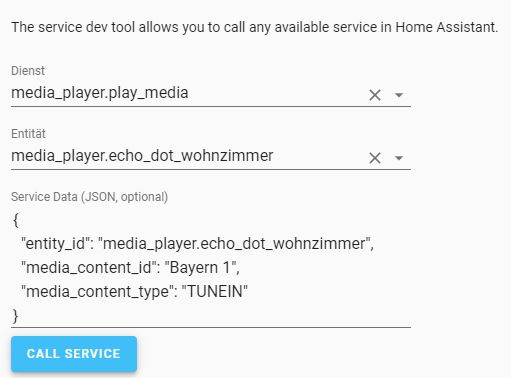
why is this working:
https://s17.directupload.net/images/190929/r7p4spel.jpg
but this not:
entity: media_player.echo_dot_wohnzimmer
image: /local/Bayern1.jpg
tap_action:
  action: call-service
  service: media_player.play_media
  service_data:
    entity_id: media_player.echo_dot_wohnzimmer
    service_data:
      media_content_id: Bayern1
      media_content_type: TUNEIN
the error code:
Fehler beim Aufrufen des Service media_player/play_media. extra keys not allowed @ data['service_data']
mild veldt
You have service data listed twice
 uncut oasis
noob seeking help
using the custom card "button-entity-row" https://github.com/custom-cards/button-entity-row
Any ideas how to get the buttons to left-align?
https://imgur.com/a/z6dmUQI
mild veldt
@uncut oasis edit the js at this line https://github.com/custom-cards/button-entity-row/blob/b667cea05e81cb124adbfe1bce265145108630cb/button-entity-row.js#L19 or use card-mod on that class name
uncut oasis
legend!!! There's no way I would have found that.
Testing now.
While you're here and before I sink more time into this setup, is there a better way to lay out these auto-brightness & auto-motion controls?
@mild veldt I edited that lined, tried changing value to flex-start and flex-end, didn't make any difference in the UI. Did a full home assistant restart. ¯_(ツ)_/¯
mild veldt
Using HACS?
uncut oasis
Yep
mild veldt
Delete the .gz file
uncut oasis
will try now. Line 28 is not important?
https://github.com/custom-cards/button-entity-row/blob/b667cea05e81cb124adbfe1bce265145108630cb/button-entity-row.js#L28
wheat current
Generally CSS is not important 😂
uncut oasis
Boom! Fixed. Thanks @mild veldt
wheat current
unless you add !important
 grave ingot
if everything is !important nothing is !important :p
wheat current
!important makes it not important in my mind... CSS is wierd...
 dark pagoda
Hi iam looking for themes. where can i find some?
wheat current
The forum
kind shellBOT
You can find the community forum here
Command '.forum' was invoked by: Ludeeus
gloomy raven
can i set the color of the icon in lovelace entity-button card like:
show_icon: true
icon_color: red ```can you make an entity's name a url so you click on it it takes you to a web page?
polar kelp
You can add a weblink row to a card https://www.home-assistant.io/lovelace/entities/#weblink
vapid field
Close to being perfect - better than nothing
mild veldt
URL will be an action type in 0.100 release
 sacred gulch
Does anyone have any recommendations of what application to use to draw a basic layout of my house? Like a top down view? Nothing super fancy, just looking for something easy
vapid field
What is the plan for something like that?
sacred gulch
@vapid field you responding to me? I want to put status symbols on top of the picture for lights, doors, ect. And if possible, taping on the symbol would either open up a card for control or take you to a window with said control on it
vapid field
Nice, I thought thats where you were going with that
I don't know how to do it but it would be cool to see the end result / hear how you implement it.
As for basic drawing I'd suggest photoshop / gimp and then use stock sources that maybe are colored to add them on?
 icy patrol
Anyone know if it would be possible to prompt for a passcode if I were to click on a tab in love lace
latent moss
@icy patrol not exactly what you want, but with compact custom header you can hide certain views by user account etc.
icy patrol
Just looking for the tablet to be on the way any one control lights. But don't want let's say other people to access the calender tab as in guest. Yet I still want my WiFi and kids to be able to access it
Looking for some sort of card that can prompt for a pin
Or maybe even a input bollean to toggle on then display calender card.
Just so it's not in plain view
latent moss
@icy patrol This looks like what you want i think.. haven't tried it myself yet. https://www.reddit.com/r/homeassistant/comments/c2tizq/lovelockcard_a_custom_lovelace_card_to_lock/
latent moss
well i was thinking that you could do a combination of both. an input_boolean that would ask for a password (using that custom lock card) and then when input_boolean state is on it'd show the conditional card for your calendar
vapid field
Does anyone know what the theme variable is for the light card where it has the dimmer slider is called? For some reason the one I am using is setting primary background-color as it and thats way dark
icy patrol
This is a good slider. https://github.com/thomasloven/lovelace-slider-entity-row
vapid field
It's like a dial knob
 river walrus
hi quick question.. how do I reset lovelace so that it goes back to default where the cards are automatically changed and updated
vapid field
Can anyone tell me what color var name under themes control the left side of this dial slider? https://i.imgur.com/uCpjaTl.jpg
mild veldt
@river walrus delete ./storage/lovelace and restart
river walrus
Thanks @mild veldt I noticed that folder now, but wanted to confirm here.
vapid field
Damn tried setting every option and it seems to be based on the same var as the top bar
Anyway to independentally call it out in the card and change it?
mild veldt
vapid field
Ty
Didn't know npm controlled that kind of stuff
Hmm that doesn't seem to affect it actually
round-slider-path-color: "#4EC6CC"
vapid field
Oh none of the others in themes.yaml had the -- that's why I removed it sorry
Same results doesn't change it
mild veldt
I don't that's going to work in themes.yaml. I'm far from a CSS expert, but I think you'll need to use card-mod to apply that
vapid field
Hmm card-mod you say
vapid field
Hmm a bit too much code for me to do on my cell I'll have to do it after work ty
 gusty gorge
hello. quick question: is there a hacky way to use the light card also for triggering a pump? the slider would be the minutes.
vapid field
I was able to reporpose a normal switch to do special actions so I don't see why not
Not sure how it updates states so you would have to find a way to do the math for the state percentage
split granite
Template light
kind shellBOT
Command '~light.template' was invoked by: Tinkerer
split granite
You'd use that and have that control an input_number (and probably an input_boolean) that you'd use in automations
 foggy tendon
Is somebody here who's using the custom auto-entities card?
mild veldt
@foggy tendon just ask the question
foggy tendon
Ok, how to have included a sensor who doesn't have attributes? I have this sensor sensor.samsung_s8_battery that has no attributes, but only his value... i tried to add to the card with - entity_id: sensor.samsung_s8_battery, but it doesn't show the value when using auto-entities card together with bar-card card
How to post the card config here? WHat to use?
kind shellBOT
To format your text as code, enter three backticks on the first line, press Enter for a new line, paste your code, press Enter again for another new line, and lastly three more backticks. Here's an example:
```
code here
```
Watch the animated gif here: https://bit.ly/2GbfRJE
DO NOT repeat posts. Please edit previously posted message, here is how -> https://bit.ly/2qOOf1G
Command '~format' was invoked by: iantrich
Please use https://www.hastebin.com/ or https://paste.ubuntu.com/ to share code or logs.
Command '~share' was invoked by: iantrich
 gray lance
need inspiration for lovelace, where can i get some?
split granite
The forum? The post history here?
 tough quiver
How do I go about making a view not show up at the top?
for context, I need a view that I can invoke with hass cast but don't really want it showing up on the normal webui
tough quiver
yeah probably.
Dang, doesn't work anyway
lovelace cameras don't load through home assistant cast.
"cameras" referring to picture-entity
Ah interseting, they work fine if i'm home-assistant-casting to my nexus player (or shield) but the cameras don't load on my home hub.
hmm
mild veldt
@tough quiver the ability to hide tabs should hopefully make the next release of core
vapid field
@mild veldt Hey Ian, we chatted saturday and you told me about config-template-card for changing state based icons. i tried to install the module but just get errors in my chrome console:
VM428:1 Uncaught (in promise) TypeError: Cannot read property 'state' of undefined
at eval (eval at _evaluateTemplate (config-template-card.js:2974), <anonymous>:1:27)
at HTMLElement._evaluateTemplate (config-template-card.js:2974)
at config-template-card.js:2948
at Array.forEach (<anonymous>)
at HTMLElement._evaluateConfig (config-template-card.js:2937)
at HTMLElement._evaluateArray (config-template-card.js:2961)
at config-template-card.js:2942
at Array.forEach (<anonymous>)
at HTMLElement._evaluateConfig (config-template-card.js:2937)
at HTMLElement.render (config-template-card.js:2927)
Do you have a hint for me what i am doing wrong?
mild veldt
you're trying to access the state of an entity that is not defined
vapid field
thx. tried another code and get another error 😦 . create-card-element.ts:76 config-template-card Error: Invalid configuration
at HTMLElement.setConfig (config-template-card.js:2902)
at De (create-card-element.ts:73)
at Ne (create-card-element.ts:98)
at HTMLElement.createCardElement (hui-view.ts:75)
at hui-view.ts:297
at Array.forEach (<anonymous>)
at HTMLElement._createCards (hui-view.ts:296)
at HTMLElement.updated (hui-view.ts:219)
at HTMLElement.performUpdate (updating-element.js:526)
at HTMLElement._enqueueUpdate (updating-element.js:460)
this is my config: type: 'custom:config-template-card'
config:
type: 'custom:hui-entities-card'
entities:
- entity: binary_sensor.leq0175072_state
- entity: binary_sensor.leq0175072_state
polar kelp
My crystal ball says indentation.
kind shellBOT
@cedar kestrel To format your text as code, enter three backticks on the first line, press Enter for a new line, paste your code, press Enter again for another new line, and lastly three more backticks. Here's an example:
```
code here
```
Watch the animated gif here: https://bit.ly/2GbfRJE
DO NOT repeat posts. Please edit previously posted message, here is how -> https://bit.ly/2qOOf1G
Command '~format' was invoked by: Tinkerer
polar kelp
I was wrong.
vapid field
could you explain this a little further?
I am just new to homeassistant ... Don´t know what i am doing wrong 😦
polar kelp
card, not config
vapid field
... sometimes it could be so easy... nextstep for me is now to change the icon based an state...
atomic glacier
👋🏻 @polar kelp
Still getting this error with code --> https://paste.ubuntu.com/p/sxz7T9d4fJ/ and now this has popped up webpack:////card-tools/lovelace-element.js?:22:6 Uncaught TypeError: el.setConfig is not a function not sure if they are related, but the first one I cannot seem to fix. Any other hints? 🤷🏻
I also figured out (after a few restarts and camera fails) that using FK on mobile and using the camera as a motion dectction with FK settings, does not allow HA to access the camera🙄 . Once I turned it off the camera worked perfectly. Awesome BTW 👍🏻
vapid field
i tried it again with this code- but the entity picture does not change
type: 'custom:config-template-card'
card:
  type: 'custom:hui-entities-card'
  entities:
    - entity: binary_sensor.leq0175072_state
      entity-picture: >-
        ${states['binary_sensor.leq0175072_state'].state === 'off' ?
        '/local/cust_pic/KNXUF_fts_window_1w_open.png' :
        '/local/cust_pic/KNXUF_fts_window_1w.png'}
    - entity: binary_sensor.leq0175072_state
@cedar kestrel To format your text as code, enter three backticks on the first line, press Enter for a new line, paste your code, press Enter again for another new line, and lastly three more backticks. Here's an example:
```
code here
```
Watch the animated gif here: https://bit.ly/2GbfRJE
DO NOT repeat posts. Please edit previously posted message, here is how -> https://bit.ly/2qOOf1G
Command '~format' was invoked by: Tinkerer
split granite
If you refuse to post your code correctly marked up it's really hard for people to help you
Please take a moment to help others help you
polar kelp
@atomic glacier Oh! That's a sneaky one. Had me baffled for a moment.
I believe you have a stray space after head:
Should have given a different error, but if you're 100% sure the problem is in that code it's the only thing I can imagine.
mild veldt
@vapid field entity-picture is not an option https://www.home-assistant.io/lovelace/entities/#configuration-variables
atomic glacier
Umm...you know how many times I looked and didn't see anything? 😜 I'll fix it, but I'm pretty sure that's it... Thank you kind sir and I'll let you know👍🏻 @polar kelp
vapid field
could i use icon instead? even with a custom icon?
mild veldt
I'll add it as an option in an upcoming release. It's like a one line change
vapid field
oh- that sounds great! thank you!
polar kelp
@atomic glacier Your editor may have an option to highlight trailing whitespace. It's generally considered bad form, and only has a use in markdown as far as I know.
Maybe LaTeX too... it's been a while...
I think \<space> is something, right? Unlike e.g. c where \<newline> is something but \<space><newline> breaks.
mild veldt
vapid field
👍
atomic glacier
@polar kelp It was only repeated 14 times LOL, Just replaced and error of my latest nightmares is gone 🎉 I will definitely check on the editor thing. Useless errors are unacceptable from my end 😎
polar kelp
:%s/\s\+$//
polar kelp
Is that perl?
atomic glacier
yes
atomic glacier
@polar kelp found it --> https://imgur.com/a/lTWCN0Q
That was sooooo easy it was embarrassing 😂
vapid field
Anyone know if there is a good "card" for calendar events?
polar kelp
Well. You have to know it's a problem to go looking for it.
split granite
There's a few posted on the forum @vapid field
vapid field
Ok cool I'll check it after work
split granite
HACS has two calendar cards in it's repos
vapid field
I need to start learning where to look instead of asking for it with a spoon sorry
split granite
At least you're considering that - it's more than many
Of course, knowing where to look is hard at first
split granite
Need to add:
Install HACS and check the default repos 😛
wheat current
step1 covers that
vapid field
I put hacs on yesterday. I got my card mod from it today that I'm going to play with to try and change colors
 atomic halo
greetings all.. apologies if this is covered somewhere,but I am trying to get a mini media player card to change internet radio presets on Roberts S2 speaker - (Silicon frontier), anyone had any experience with this?
vapid field
hmm having some problems getting card-mod to work
Anyone on familiar with it?
Expected a value of type undefined for style but received "ha-card {\n}\n.card-content {\n padding: 0\n}\n".
so i guess my issue is that im trying to do light as the card xD
vapid field
All that effort finally!
type: light
entity: light.master
style: |
  :host {
    --round-slider-handle-color: red;
  }
Finally figured how to properly use it xD
hmm that doesnt work with path though
vapid field
holy crap why is that calling primary-color as the correct color?
instead of round-slider-path-color it uses primary-color
narrow girder
Is there a way to hide the top header? I would like to to do this for my kiosk tablet
vapid field
cch
compact custom header
its an addon in the community hacs store
I run it for my kiosk tablet
I do not however enable kiosk mode for the webpage
atomic glacier
@narrow girder Needs to be updated, but some ideas for your tablet with code: https://github.com/Dino-Tech/Home-Assistant-Main may find a few useful things😜
vapid field
damn that looks cool
devout hatch
can someone tells me how to put an more info text on some auomations flags
I want to write which automation flags means.. for example: for automation flag Vacation - "Turns on random lights from 20pm - 1am while user(s) are on vacation"
I know that @polar kelp wrote popupcard..maybe I need to put some text into that card? what is the best option to do this?
I noticed that the pop-up card is deprecieted and its need to be used browser_mod. my question: if it this work on ios app?
polar kelp
foggy tendon
Is conditional card working only with type entities cards or not?
polar kelp
not
foggy tendon
Yes, i just realized this.... 🙂
vapid field
Any reason the built in slider card for lights uses primary-color instead of round-slider-path-color?
polar kelp
So that it follows the users theme.
vapid field
I overrode it using your card-mod just sucked trying to figure it out lol
My theme is dark including my top bar so it looked funny having a black path
I themed it to match the active paper icon color
atomic glacier
@vapid field I have quite a few dark themes in my repo and some are here as well: https://community.home-assistant.io/t/dinotechs-mobile-voice-with-video-notifications/84271
Just really depends on what you like.
vapid field
Ty I'll take a look my main issue ATM is some of my settings screen are white background with white text or my cancel and save buttons for UI configure are too dark (they are primary-color I think)
atomic glacier
@vapid field If you want a true dark/black theme with everything ledgible, I would take a look at my Dark-N-Clear or Dark-Nightz that fixes those issues. I had the same issue using an OLED display and that's why I decided to come up with my own a year or so ago...
vapid field
Nice I'll check it out after work kinda hard to see them all on cell
I still have to figure out a better way for the navigation I see you prefer side buttons
atomic glacier
@vapid field Actually, I am only using one LL view, so no navigating here. I have 50 popups(for my mobile), instead of views now and my /lovelace/0 path has 5 different user logins within it for each user, including a guest login for company. All have different permissions/access to my instance. I am in the midst of some changes and will update repo with the new stuff soon, but what is posted works as is and has for quite sometime now.
 halcyon mantle
Quick Question - I have devices which is powered off sometime in my config, for example some chromecasts. When the are powered off the show red error blocks on the config and these in my logs[pychromecast.socket_client] [192.168.127.34:8009] Failed to connect: [Errno 113] No route to host. aborting due to stop signal. Any idea if anyhting could be done, or is it one of those things?
polar kelp
🎉 https://github.com/thomasloven/lovelace-card-mod/releases/tag/6
tap_action support for entities card rows.
Very useful in combination with browser_mod for making popups.
 native cradle
hi guys, been a user for quite some time now, but only started just now with themes... only thing is i cannot get it to adapt all colour changes though yaml... any ideas for lovelace??
polar kelp
🎉 https://github.com/thomasloven/hass-browser_mod/releases/tag/12
The long awaited version 12! Now a fully mature replacement for popup card.
kind shellBOT
@prime umbra posted a message that is too long, it is moved here --> https://paste.ubuntu.com/p/5z6ypkPJ6S/
prime umbra
ups didnt realize text was to big sorry..
atomic glacier
@polar kelp Just finished reading over the changes and readme. Thank you!!!
Adding the services as the .extention was brilliant 👍🏻 (or whatever the proper term is LOL). Eventhough it makes for a bit of changes to my code, it is definitely needed and all for the good!
polar kelp
browser_mod.command still exists and does the same things.
But this makes for much cleaner code
atomic glacier
Yes, that is what makes it so desirable 😉 less = more 🥇
Making changes now 😎 Sill getting that error from yesterday that I thought you help me find tho 🤔 (putting on back burner for now...)
polar kelp
🎉 dummy-entity-row and gap-card, the two most useless lovelace plugins in existance are now in HACS
atomic glacier
Be nice!!!! I still have several of them in use 😂 too lazy to change
 idle nacelle
hey - i've embedded waze iframe in lovelace view (url: https://embed.waze.com/iframe?zoom=14&lat=??????&lon=??????) but i want the lat/lon to be taken from a state of an object - is that possible or only static URL is supported? the main idea is to have the map centered at a dynamic spot everytime it is being loaded
mild veldt
@polar kelp that should be in core 🙏
@idle nacelle you could use the config-template-card
idle nacelle
i'm not sure i understand - it says for card type to use a custom:??? - how do i use a type: iframe card and customize its url parameter?
mild veldt
custom:hui-iframe-card
 lunar trail
I have two separate entities I would like to have as one on an entity button. One is sensor entity for my garage that shows closed and open with a midi icon that changes state. The other is just a switch for the garage. It would be so awesome to have the same button display an open or closed icon in it. Is this possible?
 raven nacelle
Looks like you are looking for a template cover https://www.home-assistant.io/integrations/cover.template/
idle nacelle
@mild veldt thanks - i finally got it to display the card, but the thing is it is constantly refreshing itself even though the state never changes - i'm using the following code:
- type: 'custom:config-template-card'
variables:
- states['input_text.current_location_url'].state
card:
type: 'custom:hui-iframe-card'
url: "${vars[0]}"
aspect_ratio: 80%
 daring tendon
Cast card type is gone in 0.99.3? 🤔 I get the unknown card type error
 errant grail
Hi
Someone would have a documentation to configure Yeelight ?
I'll receive mine tomorrow
I've already build up my Hassio
polar kelp
@idle nacelle By default config-template-card updates on every state update for every entity in your HA configuration. You should probably add entities: to make it only listen to the entities that matter.
idle nacelle
@polar kelp got it working now thanks
atomic glacier
🤔 @polar kelp Is there any possibility of toggling off/on the cam when running FKB? Cool feature to show off 😎 and works well, but a bit heavy on the processor 🤷🏻
...other than camera: true and restarts?
Also, I have tested several times and the camera fails to work after the initial activation if the camera is enabled for motion detection as per the docs. It appears that only one way or the other works. e.g. camera for motion detection or camera for camera.my_camera component... I may be doing something wrong, (as usual), but it is consistent. @polar kelp https://imgur.com/a/IAVbCZY
polar kelp
Ah right. I was afraid that might happen.
I'll update the docs. With FKB there are other ways to get the camera picture anyway.
Can't be toggled, though.
atomic glacier
Hmm... 🤔 "With FKB there are other ways to get the camera picture anyway." 🤷🏻
elder pendant
Is it possible to get an actual camera stream rather than just stills?
polar kelp
Maybe. But it's beyond my skills.
elder pendant
Gotcha. It would probably overload the tablet anyway, just curious. Even the stills are super helpful. That's the only camera I have inside
 polar kernel
Hi, I am searching a way to modify text display from one entity to highlight the text in different color or background color when there is a special text. I am searching for some templatizing with style but not find information. Pearps not the correct word for research.
 open jackal
Where can I change the sidebar title from "Home Assistant" to be something more personalized?
wheat current
Just collaps the sidebar
polar kelp
At some point I came up with an awesome way to simplify my lovelace configuration, but it required me to redefine a node anchor - something pyyaml which hass uses doesn't allow.
I just managed to monkey patch pyyaml to adhere to the yaml standard, but now I can't remember my idea...
 main meteor
Adding the cch custom card and get it to work but still shows that the "Custom element doesnt exist". Im using the latest version and updated the version no for reload. Whats wrong?
main meteor
Is it possible to see in any log whats going wrong?
  - type: module
    url: /local/custom_ui/compact-custom-header.js?v5

cch:
  exceptions:
    - conditions:
        user: Iphone
      config:
        default_tab: 0
        show_tabs: 0

views:
@main meteor To format your text as code, enter three backticks on the first line, press Enter for a new line, paste your code, press Enter again for another new line, and lastly three more backticks. Here's an example:
```
code here
```
Watch the animated gif here: https://bit.ly/2GbfRJE
DO NOT repeat posts. Please edit previously posted message, here is how -> https://bit.ly/2qOOf1G
Command '~format' was invoked by: Tinkerer
idle nacelle
is it possible to change a view in lovelace when a script i executed finishes?
so after i press "execute" and it finish its sequence the view will change to some other one
prime umbra
you can achive that with
https://github.com/thomasloven/hass-browser_mod
with the service: browser_mod.navigate
idle nacelle
browser_mod.navigate is defined in lovelace - i need the view to change when a server script finishes
you can see the script with "Execute" button in lovelace, but it runs server side
core side
hearty plover
How much is the view changing?
idle nacelle
just from one view to another (views at the top of the UI)
polar kelp
There’s a note in the FAQ and examples in the cookbook how to get that working with browser_mod.
Kudos for recognizing that it’s a non-trivial problem, though. Not everyone does that.
hearty plover
I assume it's too complex to use conditional cards?
mild veldt
I used to have some complex conditional cards for different view layouts in the early days of LL
outer urchin
anyone knows how to get the temerature sensor (thermostats )for fritz working? https://www.home-assistant.io/integrations/fritzbox#sensor
polar kelp
 midnight frigate
Anyone know why my desktop chrome is showing time ref from UTC while phone's chrome is showing it off of proper time zone? https://i.imgur.com/MLtIZ6O.png
kind shellBOT
@slender temple posted a message that is too long, it is moved here --> https://paste.ubuntu.com/p/YhrJ7d9pYG/
wheat current
carefully
 slender temple
hmm not sure how to use that but i can go find out. the first way isnt possible as the sensor text changes allt he time
elder pendant
That would go under style:
slender temple
ok thanks, ill go play with it 🙂
they need to add justify: left to the config lol
elder pendant
everything under style is a css rule. Pretty much anything you can do with css you can add under that tag
slender temple
worked a treat! thanks
atomic glacier
@elder pendant Got a chance to check out the animated background plugin👍🏻. Is there a way to turn off the feature? I tried with. dummy.html and state, but crashed my browser🤪 not a bright idea, BTW. Also, is it possible to mod the .js to run as ha-card-back? Had a few design ideas🤔
mild veldt
who wants double tap actions? 🎉 https://github.com/home-assistant/home-assistant-polymer/pull/3879
elder pendant
@atomic glacier What do you mean turn it off? Like for a certain state, or just in general? There is no enabled: option like there is in cch, but I could add one. Right now you can add a single user to included_users: that doesn't actually exist. That will effectively disable it.
It might be possible to run it in a card, but I haven't experimented with that yet.
 glacial ledge
is there a way (monster-card maybe) to have a card with all switches that were on in the past timeframe (10 min)?
polar kelp
I can’t even think of any way to do it with with auto-entities...
Or even a good way of changing auto-entities to make it possible... that’s bad.
No wait... I’ve got an idea... but I need to sleep now.
Check back in a few days or so.
atomic glacier
@elder pendant After installing, I found that it runs continually as the background image under the views(my browser goes on strike too much already) and unless there is no background: applied it won't appear(at least for me, I could see the edges around the views where they were transparent)). I was using it as a screensaver on a blank view and it worked well combined with input_select.state to control the selections. Using the card back would allow the .html's to be used in popups and eliminate navigating from the current view. Just a thought🤔
elder pendant
I mean if you just want a screensaver that should be super easy to modify for. Putting it into a card is kinda complicated because I'm not actually using any HA assets to make this work. It's basically just forcing itself into the html of the page. Custom cards require stuff I've never done before, but I can give it a try. I'll be too busy to do it anytime in the next week or so, but I will put it at the top of my list to do in my downtime.
atomic glacier
@elder pendant I could definitely live with the screensaver option and just deal with the navigation part. I chopped my UI from 46 views down to one using popups, so I have room for more, I just got stuck on... reduction + OCD = overboard 🤓 Thanks for the response!
elder pendant
Well I can make the screensaver run on its own, no view required 🙂
It will just force itself into a different part of the html 🤣
atomic glacier
I'll sign up for beta😎
elder pendant
I just have to account for exiting the screensaver...
I might just make that a different plugin
vapid field
My lovelace dashboard was not showing anything. I see a spinning wheel. I removed all group config, but the problem persists. I see this in the logs:
Oct 03 23:38:50 rpi01 podman[30708]: 2019-10-03 23:38:50 ERROR (MainThread) [homeassistant.components.websocket_api.http.connection.281473439304080] Received invalid command: config/device_registry/list
Any idea where to start looking?
atomic glacier
@vapid field probably better response in #330944238910963714
vapid field
thanks. I will try
vapid field
what is the best component nowadays to have a SweetHome3D map with interactive controls and data?
ups wrong channel again, sorry
mild veldt
soumds like a LL question to me?
 green raft
Either picture-elements card or floorplan card @vapid field . Would lean towards picture-elements because it's much more themable.
 obtuse basin
Can I setup a light card for on/off status (not for controlling) from MQTT messages?
vapid field
on the alarm panel card is there anyway to change the button color?
Mine is coming out as black and my panel's are dark gray so its hard to read the numbers
mild veldt
@obtuse basin not really a LL question, but use a template light integration
@vapid field there's an example@of that on the card-mod page I believe
vapid field
Sure is ty
 quick gulch