#frontend-archived
1 messages · Page 122 of 1
 polar kelp
 tacit cave
@polar kelp are you planning on getting the card loader card into hacs?
tacit cave
no, its just a nice utility to update custom solutions from
polar kelp
It was a temporary workaround until card devs got around to fixing their stuff. Most problems I knew about were fixed within a week.
card-loader, I mean.
If you have the latest version of everything you really shouldn't need it. And if you do, that's a bug.
tacit cave
Ah
I still use it. I have no clue if it's still needed
haven't updated my UI in a few months
Still using card-modder too 🙃
gotta get rid of that at some point
polar kelp
If it works it works
 strong finch
my repro https://github.com/abeksis/My-HomeAssistant-Config Do not forget to give a star 😃
 civic sedge
some of you also got that a picture entety with an unavailable state image doesnt render anymore?
polar kelp
So... how about jinja2 templates in things like markdown-mod, card-mod etc. rather than my stupid made up ones?
civic sedge
would approve - but your made up ones actually arnt this bad
 half osprey
@polar kelp jinja2 rendering for markdown by sending it to the backend for rendering? That could work
 gloomy knoll
Anyone got advice on how to pull off a 2-column card? I'd like this to be 4-columns wide, with the floorplan taking up the left 2 columns: http://bru.ms/J93P6U
 mild veldt
@half osprey @polar kelp in my config-template-card you either up date on each Hass event (timer would be better) or you define the entities to watch; which I hope most people do
half osprey
I wouldn't mind seeing jinja2 support by rendering in the backend as part of main lovelace.
just not sure how updating would work, I guess we could expose an API for extracting relevant apis?
 cyan terrace
I have a weird issue - I'm using entity_picture: /local/images/window.jpg in the custom: button-card while using the custom: decluttering-card and the image is not showing up in the front-end - Any ideas how to troubleshoot? In developer tools --> inspector I just see [[entity_picture]]
tacit cave
@mild veldt is card loader needed anymore?
mild veldt
For what?
tacit cave
for loading order issues
mild veldt
I have no idea
tacit cave
I'm guessing yes then! Thanks
 weak apex
Can anyone help with getting this HACS aarlo-glance card to work? My config is setup with the sensors, binary and all, but cannot seem to add a card or anything. I added the reouse as it showed like ```resources:
- type: module
url: /local/aarlo-glance.js```
but still not getting anywhere
Where I want the card, I get: Custom element doesn't exist: aarlo-glance.
 split granite
I don't use HACS 😉
split granite
You can always manually configure these things
weak apex
I see them as a badge
but was trying to get a glance or something for snapshots or live view if motion detected
 errant plover
According to HACS your resource is not specified correctly. It should be: - url: /community_plugin/lovelace-hass-aarlo/hass-aarlo.js
 green raft
I just had similar issues. It's so weird that HACs uses the /community/ directory, but resolves it to /community_plugin/ for Lovelace.
 thorn mulch
hi, what is the simplest way to list all device_tracker in lovelace ui?
split granite
Probably https://github.com/custom-cards/monster-card since it takes wildcards
thorn mulch
👍
 undone egret
heck list them out LOL
had to zoom out a lot to get on one screen grap @thorn mulch
 tough quiver
 echo turret
hi, I have almost configured Hassio to control my country house. I run in a problem it's all the day i try to solve: I added 2 Blink cameras and I added 2 cards in Lovelace with the relevant automations (take a snapshot, record a video). I make everything works except I can't find a way to view the video recorded locally inside Lovelace. There is a way to di this? Thanks!
 full cosmos
Hello, anybody using Thomas Loven's slider-entity-row? For some reason, I don't get the slider anymore after using it for a couple months.
 distant gorge
Hey @here could anyone help my understand why my theme looks different in incognito vs normal using chrome. I have an automation for the theme to change between day/night. However it seems the change is only reflected on the incognito page version... thoughts?
Thanks in advance, maybe clearing some browser stuff? seems odd that it would behave this way. I just thought the automation was broken 😄
 potent compass
in a manual they say i need to add these lines to the configuration. wich config is it?
resources:
  - url: /local/custom_ui/dark-sky-weather-card.js?v=7.1
    type: module
 limpid sandal
I added a background picture to my "www"-folder and i also added "background: url("/local/darkwood.jpg")" to my lovelace yaml, but the pic only shows in my views/cards. I get no bg pic on "system pages" like Hass.io, Configuration, Developer Tools and the likes.
Could i instead add the bg pic to the theme, so that it will show up consistently on all pages within HA?
 ebon heron
Hello all, I just setup Home Assistant on a Ubuntu machine running docker and Hass.io. Ive been at it all weekend and I think I found my new obsession. One thing I am having trouble with is how to customize my theme? I see there are a lot of cool themes out there I just can't figure out how to add them to my home assistant. I checked the Home Assistant docs and it doesn't say much. Can anyone point me to documentation on how to add a custom theme?
limpid sandal
@ebon heron Check this for hints https://www.youtube.com/watch?v=3Xpd4zB2eRM
limpid sandal
So, no chance of adding bgimg to the system pages in HA UI?
full cosmos
I have found out that the slider entity row still works. It just does not work with lights connected through deconz. Anybody know why? And maybe a fix for this?
gloomy knoll
I got my cards to layout like I'd like, but I'd love for them to be twice as wide: http://bru.ms/FG6BtZ
Any tips that don't use panel: true (That breaks the whole layout and the mobile app)?
potent compass
anyone that can come to voice chat to help me setting up lovelace?
thorn mulch
@undone egret haha well that is exactly what i do not want
undone egret
@thorn mulch to each his own i guess i have that page and then a watchdog to see what should be connected and annouce on that state
thorn mulch
@undone egret yes, same but i show only "issues" i.e. lost connectivity to an ESP somewhere + notification. but i get your point
weak apex
have used the correct resource info, but still get:
{
  "entity": "camera.aarlo_back1",
  "image_click": "play",
  "name": "backyard",
  "show": [
    "motion",
    "sound",
    "snapshot",
    "battery_level",
    "signal_strength",
    "captured_today"
  ],
  "type": "custom:aarlo-glance"
}```My resources from the editor:
  - type: module
- url: /community_plugin/lovelace-hass-aarlo/hass-aarlo.js```and then for aarlo within my configuration.yaml:
  username: !secret arlo_username
  password: !secret arlo_password
  packet_dump: True
  db_motion_time: 30
  db_ding_time: 10
  recent_time: 10
  last_format: '%m-%d %H:%M'
  conf_dir: /config/.aarlo
  no_media_upload: True
  mode_api: auto
  refresh_devices_every: 0
  http_connections: 5
  http_max_size: 10

camera:
- platform: aarlo```and so on
 vapid field
Hey there. I am still new to homeassistant and after solving severals problems with custom cards i now have just left a problem with the auto-entities card. I get this error
Custom element doesn't exist: auto-entities.
my lovelance config is
anybody here, who could help me solving this problem?
 mossy otter
hi guys - I'm trying to figure out how to get my input_datetime in uk format, and also how to enable it to say "7 November 2019" on my frontend
vapid field
No one?
polar kelp
The readme of auto-entities links to installation instructions which contains a troubleshooting guide. Start with that.
@mossy otter we decided to follow internationally agreed standards for datetime_input instead.
mossy otter
@polar kelp that's fair enough. I may just create a set of three inputs that combine to create a time sensor...that seems like the easiest thing to do
polar kelp
If you want it anyway, this supports it: https://github.com/thomasloven/lovelace-time-input-row/blob/master/README.md (may be considered offensive to some)
mossy otter
great stuff, thanks!
vapid field
@polar kelp the log says: http://192.168.178.116:8123/local/auto-entities/auto-entities.js?v=1:7:1 Uncaught SyntaxError: Unexpected token
polar kelp
The am/pm selector doesn’t quite work in the upstream component, btw. You’ll have to change hours or minutes after changing it to make the changes go through.
@vapid field then your browser log will mention ”<”, which is a problem explained in the same article.
mossy otter
@polar kelp on that github it shows the default datetimeinput as a day rather than as an entry field...yet that's not how it looks on my frontend
polar kelp
That’s an old screenshot
Before I had that plugin implemented into core.
If you want that add type: custom:hui-text-entity-row to the row config.
 strong falcon
Can anyone see a reason why the top condition works, but the bottom one does not?
          - condition: template
            value_template: "{{ state_attr('media_player.emby_basement', 'media_content_type') in ['movie', 'tvshow'] }}"
          - condition: template
            value_template: "{{ is_state('media_player.fire_tv_4k', 'source') in ['com.amazon.avod', 'com.netflix.ninja'] }}"
#330944238910963714 @strong falcon
But it’s because you’re using the right function inthe first one, and the wrong one in the second.
strong falcon
oops sorry, forgot to change the group
polar kelp
state_attr vs. is_state
split granite
is_state returns true/false 😉
strong falcon
so it still should be state_attr for the second?
split granite
mossy otter
@polar kelp brilliant! that looks great and saves me a ton of work. Now I just need to look at using the timedate input thing for automations for reminders etc
vapid field
@polar kelp thank you. but now i get the next error: Can't find card-tools. See https://github.com/thomasloven/lovelace-card-tools it´s mentioned in the readme too and now I added this ressoruce:
- type: js
url: /customcards/github/thomasloven/card-tools.js?track=true
but the error still is there
polar kelp
Do you have custom_updater?
vapid field
no, should i?
polar kelp
If not: don’t follow the instructions that say ”For custom_updater”
vapid field
thank you - tha´s it
tough quiver
Getting towards actually being happy with my lovelace UI.
Replaced my 4 pages with one now.
(Still a couple things to add to it, but yeah)

(If anyone wants a look)
civic sedge
Girls and Guys - Share more!
Inspiration is always needed 😉
polar kelp
@half osprey I didn't really think about the update frequency... Before I had my own very simple templates which were fast enough to reevaluate on every hass update and then rerender if necessary. With an api call involved that's not really sustainable anymore... 🤔
But enforcing a list of entities to track isn't a bad idea. It work for backend 🤷
weak apex
Can anyone help with the aarlo-glance card issue posted above?
half osprey
@polar kelp we have advanced tracking built into the backend, which can detect which entities a template relies on. We can see if we can expose that info in the template result API
polar kelp
Didn’t we stop using that for template sensors?
 dusk hamlet
Hi guys/gals.
I have a stupid question. How can I remove a css propert from lovelace? My cards have a big shadow, and lovelace has overflow-x:hidden and it cuts through the shadow.
 errant plover
Use card mod: https://github.com/thomasloven/lovelace-card-mod ```
style: |
ha-card {
--ha-card-box-shadow: 'none';
}
@errant plover can this be applied to all cards alltogether? Or will I have to repeat this css rule on every card?
errant plover
Every card you want the shadow removed from.
errant plover
WHAT! O_o now you tell me.
Can I do that with this as well? ```
style: |
ha-card {
border: solid 2px var(--primary-color);
}
No
errant plover
Oh. That's ok then.
polar kelp
You can only set variables with -- in themes
errant plover
👍
 devout hatch
how can I make a check_config button?
which ervice do I call? homeassistant.check_config and how can I obtain an resposne message an to show on ui?
 sleek ginkgo
@devout hatch homeassistant.check_config is the correct service, but it will not return any response. It will log any errors in the Home Assistant log. If you're looking for a way to call a config check from Lovelace, though, I've created an AppDaemon app (which can be installed from HACS, so it's pretty easy to set up and requires minimal configuration). Link if you're interested: https://github.com/apop880/config-check
devout hatch
Thanks I will check
 steel nexus
Can anyone explain to me why my picture-entity cards with live camera feed keeps resizing on all my tablets running Fully Kiosk. Tried settings aspect_ratio to 16x9 and that keeps the card sizes, but the camera picture inside the card will resize/zoom in and not fill the whole camera feed. A reload always fixes the issue and the view is back to normal, but then it happens again after seconds/minutes. This happens with all cameras showing in Lovelace. The cameras run through Blue Iris. Thanks
 small pike
Is it possible to add different mode functions to the built in thermostat card? I have a honeywell thermostat (US) that i want to have the Fan modes show up as buttons at the bottom like the heat and cool modes do
polar kelp
Huh?
strong finch
@polar kelp I want to make an icon, which, once pressed, will open the cameras With popup
polar kelp
type: glance
entities:
- camera.my_camera```It's okay, I know it. But it should go out to the link on the internal network http: //192.168....
strong finch
@polar kelp ?
mild veldt
use https://github.com/thomasloven/hass-browser_mod to create a popup with an iframe to the site you want. Would recommend verifying that an iframe works for your camera first.
 hollow rain
anyone have any ideas how to get custom:button-card to have a toggle action for entities that do not have a toggle such as alarm_control_panel? the tap_action does not support templating the service call
mild veldt
what do you mean the tap action doesn't have templating?
you mean checking if it is armed or disarmed?
just put it in a script and run the script from the tap action
hollow rain
ahh, script, ok, I was hoping to call either "alarm_control_panel.disarm/alarm_control_panel.alarm_arm_away" based on the current state. but yeah creating that as a script seems like it would be easier. All of my stuff is in node-red so I'm not currently utilizing the scripts function
mild veldt
config-template-card is another option, but for this would suggest just a simple script
 slim pelican
anyone aware of any custom lovelace cards for the Dyson Pure, Hot, Cool fans? e.g. TP04 or others?
strong finch
What I would like to do is to make an state-icon and when taping it, it should open a popup-card (https://github.com/thomasloven/lovelace-popup-card 40), is it possible?
mild veldt
yes, but would suggest using browser_mod instead
green raft
Anyone using the Plex Recently Added/upcoming-media-card combo? Trying to work out if you can set up separate sensors/cards for TV and Movies separately.
 timid burrow
@devout hatch @sleek ginkgo custom component is awesome...
devout hatch
why my custom buton not changing color on state on
            entity: switch.office_led
            icon: mdi:white-balance-iridescent
            name: All LEDs
            aspect_ratio: 2/1
            tap_action:
              action: call-service
              service: script.turn_on_all_leds_lr
            state:
              - value: 'on'
                styles:
                  state:
                    - color: rgb(66, 134, 244)
              - value: 'off'
                styles:
                  state:
- color: rgb(66, 80, 244) ```when I addded tap_action section, no more changing color on tap
 gilded marlin
I posted this in the main channel, but anyone know why presets are missing from the thermostat card in 0.96.x? I only see 'eco' and none of the other modes
 atomic glacier
@strong finch Not sure if your question was answered, but what you are asking for can be found here: https://github.com/Dino-Tech/Home-Assistant-Main will be updating files this weekend for my new additions as well.
 fleet scaffold
I have a question 😃 I'm having problems with popup-card..I added it to the resources in the config raw editor
and in the view:
      person.michal:
        card:
          type: entities
          entities:
- input_number.ac_schedule_target_temp```and I don't see the card popup..I'm doing something wrong?
mild veldt
@fleet scaffold I suggest using this instead https://github.com/thomasloven/hass-browser_mod. I believe Thomas has previously said that he'll likely stop supporting popup-card in favor of browser_mod at some point. Plus it is much more powerful 😉
fleet scaffold
@mild veldt ok, I will try, just from the description I thought this one is more fitting 😃
fleet scaffold
ok..now I feel dumb..
remember I said I added it to the resources section in raw editor?
well..it works better if the path is right..
I forgot to add /local/
😦
 vernal gazelle
Question - when creating a card and using a sensor for example how does one get it to be removed from Unused Entities, somethings get removed but others stay. Any thoughts? For example My Miflora items are in card but are still showing unused. see here http://bit.ly/2GCp0JL
is there a way to manually remove or are they just stuck
polar kelp
They are supposed to be removed if you use them in a core card, but aren't always... it's a tricky algorithm.
vernal gazelle
its more of a visual appeal thing then a problem per-say
polar kelp
If you use things like auto-entities or monster card it won't work.
vernal gazelle
that is the reason 😃
polar kelp
Basically it goes through your ui_lovelace.yaml (if applicable) and looks for any entity: or entities:, and removes them.
With auto-entities there's no way for it to know what's in the interface and what's not. And even if it did, how would it react to dynamic changes?
TL;DR: Unused Entities is "broken" and should/will probably be replaced with something else at some point.
vernal gazelle
so forgive my ignorance - still gathering my understanding of everything.. .but basically anything that is not a core card, and is a custom card will essentially leave the entity in unused state basically?
polar kelp
If the custom card has a list of entities: or an entity: option, it will probably be removed.
vernal gazelle
  - type: custom:layout-card
    layout: horizontal
    column: 2
    cards:
      - type: custom:card-modder
        card:
          type: plant-status
          name: Orchid
          entity: plant.orchid
        style:
        "--google-red-500": 'green'
However, if your card is wrapped in something that isn't a core stack it won't be.
In that case, it's the layout-card
The algorithm can't step into it to keep looking for cards/entities.
I think. It's been a while since I dug through that part of the code.
half osprey
I'm making a change to the markdown card, if it has a header defined it will now do a +1 on the size.
gilded marlin
Now some more of the lovelace guru's seem around: Is there a reason the thermostat card no longer shows presets?
 atomic halo
evening all... I think a breaking change stopped my template working, could anyone please advise how to fix please:
- platform: template
sensors:
waterlevel:
friendly_name: "Water tank level"
value_template: >-
{% if is_state('binary_sensor.50percent', 'on') %}
60
{% elif is_state('binary_sensor.25percent', 'on') %}
40
{% elif is_state('binary_sensor.25percent', 'off') %}
20
{% else %}
0
{% endif %}
split granite
That looks like a #330944238910963714 question @atomic halo
 kind shellBOT
@atomic halo To format your text as code, enter three backticks on the first line, press Enter for a new line, paste your code, press Enter again for another new line, and lastly three more backticks. Here's an example:
```
code here
```
Watch the animated gif here: https://bit.ly/2GbfRJE
DO NOT repeat posts. Please edit previously posted message, here is how -> https://bit.ly/2qOOf1G
Command '~format' was invoked by: Tinkerer
atomic halo
righeo, thank you
vapid field
How do I set lovelace UI as the default. When load my "Overview" it's completely different
split granite
Go to the Information panel, and select Set Lovelace as default page...
vapid field
I don't see the information panel. only a "?" mark at the top right corner and the option to go to "raw editor"
split granite
Do you see Developer Tools?
vapid field
yes. Here is how I get to Lovelace UI. Developper Tool > Info > Go to the Love Lace UI
split granite
Now read the rest of that page, there's one that says "Set ... as default page"
vapid field
only thing I see is "remove state as default page"
vapid field
I hit it and when I go to Overview it still doesn't show my love lace UI 😦 only thing different is now it says "Set states as default page on this device" plus the link changes to the "Go to the States UI".
split granite
What's the URL - does it have /states or /lovelace?
vapid field
ok. I guess there's a process in the background that does the changes and probably reloads web server or something. I can see the love lace UI now. Just have to learn to be patient a bit 😉
Thankjs @split granite Appreciate your time
split granite
No worries
vapid field
Now I just have to figure out how to change colors etc.....Loving every moment of this but my wife things otherwise 😉
taking most of my time researching as I'm a newb
split granite
https://www.home-assistant.io/components/frontend/#themes Themes are your friend
vapid field
(Y)
split granite
There should be a number of them posted on the forum, it's where I stole mine from
vapid field
and so are you. Forums are amazing 😉 HA is my new friend.
I just got it tow work with the z-stick gen 5 and a FIbaro RGBW controller. Trying to figure out the rest via config examples.
fleet scaffold
is the default person graph (bar with home/not home) shown in more-info popup something default I can put on other cards or I need to make it manually through history_graph?
split granite
That happens with any entity that doesn't have a unit_of_measurement
fleet scaffold
I know I know, I'm just asking if I can display it somewhere else manually
split granite
In theory a history graph card might? I've never tried...
fleet scaffold
or I need to set up history_graph
fleet scaffold
yeah, trying it now
 cedar hedge
I've heard in the forum that there has been discussions about this but I thought I'd throw my voice into the mix. And remember I've got no idea what has or hasn't been discussed so I apologize if this is old news. I think the whole "notification" system has gone off the rails in the last couple of modifications to that functionality. The first mod a few releases back changed the way the notifications worked by removing the automatic pop-up and changing the appearance by superimposing it over the little bell icon. that sucked as a notification but at least it was a different color than everything else (accent-color). And because it was a different theme element it allowed us to theme the notifier to our desired color. Now with the latest change the notification icon is hidden at the bottom left corner of the screen and, what's worse, is that it uses the primary-color for it's theme style so there is literally no way to modify it so that it stands out and acts as a true "notification". If you can't notice it then it's not a very good notification. Then today I see that on my android phone with the side-menu closed the notification bell and "notifying" indicator is completely hidden from view. You have to open the side menu then it shows up, but again, it's still in the same non-descript color as the rest of the main page. In that case it really is completely and totally useless as a notification tool. I captured a small video of what I'm talking about if anyone needs me to post it somewhere.
This situation needs to be resolved. At a sheer absolute minimum it should be moved back to being separately themed so we can change the color so it contrasts with any theme we use. And on mobile at least moving it back to being superimposed over the hamburger menu would be the minimum acceptable. Even better would be to make it a real notification component like it was before lovelace and have the notifications pop-up on every page you navigate to until the notification is dismissed.
 solar pecan
Can I ask a butt-in (but slightly related q)? If in that example I wanted to plot the difference between the two temps is ther an easy way? (Yeah, I know I could create a new sensor, but was wondering if a "difference" syntax was possible in an entity definition.)
 shell geyser
hi, i'm working on a card to open/close garage doors, and i want to have a button that will pop open a stream of the camera if you click on it so you can see if the door is moving/open/closed. any ideas if that's possible?
split granite
@cedar hedge Best answer is to submit a PR for that. Alternatively raise a feature request on the forum
 split granite
Camera streams would do that - and you should be able to handle that with a tap action
Somebody did a custom card that opens another card on tap
shell geyser
i'm not sure what to call for the action of tap_action
split granite
You'd need that custom card - I don't remember what it is, just that it was discussed relatively recently (last month or so)
It might be findable by searching here, or in the forum
shell geyser
ok thanks i'll search
cedar hedge
I thought the common wisdom was that to get things resolved (or at least noticed) it was better to raise an issue here and discuss it. I submitted an issue a week ago and it hasn't been touched (https://github.com/home-assistant/home-assistant-polymer/issues/3414). If I knew how to fix the code to make it work the way I want I would gladly submit it but I have no idea how to do that kind of coding. And in my experience it doesn't seem like posting things as a feature request on the forum does much good but I guess I'll give it a try.
polar kelp
There's lots to do and little time. Unfortunately, the louder people usually get their wish sooner...
OTOH, the problems with more people affected tend to be resolved faster as well, for the same reason.
 dense thicket
Is there a way to make a card that contains all of a type of something? I.e. I'd like to be able to have a card on a tab that lists all my automations individually.
errant plover
Entities card.
timid burrow
I have a fuel price sensor that doesn't exist if the store is out of that fuel type and I then get an error in lovelace (the yellow entity does not exist) Is there a way to ignore a non-existant sensor?
errant plover
OR if you want to do it automatically, https://github.com/thomasloven/lovelace-auto-entities
timid burrow
auto-entities is where it's at
errant plover
David, can you use https://github.com/gadgetchnnel/lovelace-card-templater to prevent it from displaying if undefined?
timid burrow
I don't think so... The entity doesn't exist is the issue. The custom component doesn't create the sensor if the fuel type isn't available. If it came up with a state of undefined it's easy
 gray kernel
well since {{ states('sensor.does_not_exist') }} gives unknown you can try checking that
cedar hedge
@polar kelp I think that last comment above about having little time was directed to me so I'll answer accordingly (apologies if not)... I would think that the (self-inflicted) problems that have been introduced to the notification system would literally affect almost every HA user at least at some point in time. I'm not sure how many more people could need to be affected before it's a priority.
 ember crow
I guess it depends on how people use notifications, I don't I get it to send me a push notification. I rarely use the gui notifications
timid burrow
@gray kernel I think that will work.
 latent moss
@cedar hedge i don't think his comment was aimed at you. There's tons of issues like the one you posted, most of which have gone untouched for way longer than a week... Unfortunately there's simply not many contributors to the frontend. I do agree the change in notification badge color hinders visibility a bit, but it also still works so it's probably not a huge priority 🤷
latent moss
@cedar hedge submitted a PR to fix it here https://github.com/home-assistant/home-assistant-polymer/pull/3442
timid burrow
so @gray kernel @errant plover A template sensor worked for it. It was actually an issue with the NSW Fuel peope changing the name of the sensor anyway as it turns out but a template sensor will deal with outages as well in the future.
polar kelp
@cedar hedge it was meant as a general comment on how things work. I agree with you that gh issues and feature requests sometimes seem not to help.
solar pecan
I'm a long-ish time HASS user just transitioning to lovelace. Quick q - I want to graph the difference between two temperature sensors (using history_graph or Mini Graph Card). Is there a simple yaml expression for this that I can use on lovelace, or do I need to set up a new sensor?
 wheat current
you would need template for that.
There are a few template wrappers that maybe can do it, if not a template sensor
solar pecan
Thanks - I'll have a look for a template wrapper. Already bored with restarting HA 😃
wheat current
in that case, maybe https://github.com/custom-components/templatesensor (Super beta, not tested too much yet but should work)
solar pecan
And HACS available too - thank you
Oh dear - broke my Integrations - hitting "+" now gives me no choices 😦
wheat current
ctrl + shift + r (clear cache)
solar pecan
On Safari, cleared caches, no effect.
Log shows -
:0:0 Script error.
10:53 AM components/system_log/init.py (ERROR) - message first occured at 10:49 AM and shows up 8 times
solar pecan
Yeah, I have a journalctl window open permanently. Let me have a look ...
wheat current
you have HA 0.96.x ?
solar pecan
0.96.0
Nothing in the log except
ERROR (MainThread) [frontend.js.latest.201907171] :0:0 Script error.
wheat current
looks like a cache issue
solar pecan
appears twice when I hit "Configuration"
Let me try another browser
Good call - works fine on Firefox
And on safari after a restart. Odd that Develop/Empty caches didn't work
OK, that seems to work - the graph has started. Thanks!
Is there any way of editing the sensor? I want to go back and add an icon, change the unit ...
wheat current
No :(
To "edit" you need to remove (trashcan) then add it back agan (if you give it the same name the history is saved)
solar pecan
Oh bugger. Wish I'd copied the config script now 😃
wheat current
You can find it in .storage/core.config_entries (don't edit that file, only copy from it)
solar pecan
Excellent - thanks
devout hatch
I am using atomic calendar for google calnedar
how to switch to calendar mode na dto be listed as it is now
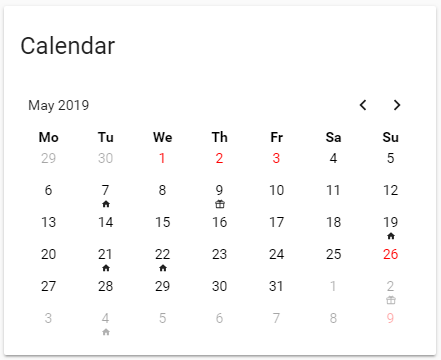
I added change mode but not works
 drowsy magnet
Hey all. Would anyone be able to help with a restful switch issue I'm having? I can see my switch in developer-tools/state, with the correct state. But the switch isn't showing up in my default view.
It doesn't show when I manually add it to a group though.
No errors in the HA log.
 final void
Did you check the unused entities page?
split granite
Groups aren't used for the UI any more
drowsy magnet
oh lol i missed that memo
split granite
See the Lovelace docs 😉
drowsy magnet
@final void you're quite right. It's there in unused entities.
devout hatch
I make it work google calndar - https://github.com/atomic7777/atomic_calendar ,but however, in calendar mode, I cant see any events
I added max_results: 15 to google_calendar.yaml file and nothing
drowsy magnet
how embarassing is that. I completley brain farted on the ui editor and i've used it before. Shame on me.
split granite
Welcome to the club 😉
We've all had those moments...
@devout hatch Is the card not showing what days have events?
devout hatch
it shows like in calendars
but not eny marked icons
I have blanco calendar
@split granite https://i.imgur.com/wYyJ04x.png

above is event mode and its ok - I have two events
but down in a calendar mode (same calendar service) is none
here is my xaml: https://paste.ubuntu.com/p/VSvb9VRJ2y/
fleet scaffold
in the default more-info for person..is there a way I can hide editable, id, source and user id? and maybe add some of my own? I know of popup-card, but that forces me to rebuild it from scratch, like add history_graph, state-info etc
mild veldt
more-info cards are not editable
fleet scaffold
and I can't hide/show properties of a person entity that are shown there, correct?
mild veldt
no
 ornate mason
You'll have to do it with a popup card, unfortunately. I did wonder earlier, if anyone have had any thoughts on how to improve the more-info card. It's a decidedly legacy part of the frontend, and quite naive in how it shows the data. But given the variety of entities, I'm not sure how to improve it.
devout hatch
How to combine mini-media player with media-extractor? I have several playlists and it works well when I calling media extractor from service page
wheat current
wheat current
Good job @polar kelp 👍
 grim compass
Hmm how do I do this without enabled the yaml mode ? Or how can I export my actual notyaml conf to yaml
wheat current
Was thinking of the wiki, and this https://discordapp.com/channels/330944238910963714/460846676358332417/585216406719561778 😛
Look 6 lines down (there is a gif) on the link @grim compass 😉
grim compass
yup sorry
but about my question to migrate the actual config to yaml mode, is it doable ?
I'd like ti j2 template all my confs
mild veldt
raw editor -> copy -> ui-lovelace.yaml -> paste
wheat current
- open the raw editor
- hold ctrl, hit "a"
- hold ctrl, hit "c"
- create the ui-lovelace.yaml file
- open that file
- hold ctrl, hit "v"
- enable yaml mode
- restart HA
wheat current
you do that between the steps
mild veldt
that explains a lot about you
grim compass
Oh thanks
but loks like i am still missing something :/
hmm can't copy pasta screenshot
wheat current
you need OCR for that
grim compass
mild veldt
you don't need yaml mode to use custom cards
you just need to follow the wiki and define your resources
read thomas' wiki completely and see if you're still stuck
wheat current
issue is indents in the "manual card" editor
ornate mason
Is there a way to split up ui-lovelace.yaml in multiple files? Mine's closing in on 3k lines.
wheat current
!include somefile.yaml 🤷
ornate mason
That simple? Nice.
Hm, just gotta figure out how that works with all my anchors and aliases...
 muted mulch
Hey, can someone please explain me how can I change the state color for an icon?
entity: binary_sensor.sensor1
hold_action:
  action: none
icon: 'mdi:flash'
icon_height: 70px
name: TestSensor
show_icon: true
show_name: true
tap_action:
  action: more-info
theme: Backend-selected
type: entity-button
I 'd like to make it RED when the switch is off and GREEN when the switch is on;
i have tried to use without success
color:
color_off:
Thanks!
mild veldt
@ornate mason anchors are only available in the file they are defined in
ornate mason
Yeah, I found out. This is going to be difficult, then. I've got some nested anchors going on. Might be able to replace it with decluttering_templates, but it'll be a mess.
atomic glacier
I use decluttering_templates in my scripted browser-mod popups and the anchors are located in my main ui-lovelace.yaml. The only way that I could find to use anchors and keep from repeating so much styling code. @mild veldt @ornate mason
Can anchors be located in scripts.yaml? Never tried🤔
@muted mulch https://community.home-assistant.io/t/entity-icon-color-custom-icon-color-based-on-state-customise-icon-color/102789 best shot is probably custom-button-card or something similar
ornate mason
lol, decluttering_templates does not like having its cards included. There seems to be some heavy caching going on.
ornate mason
So, it's because included files aren't live reloaded. They require HA restart to reload... That's a bit annoying...
latent moss
@ornate mason you can press Refresh from the 3 dots menu to reload included lovelace files
not sure about with decluttering_template tho as i haven't used that (yet)
ornate mason
@latent moss oh. I thought a full refresh (cmd+shift+r) would be enough.
Works. Thanks. The decluttering issue was the same thing.
muted mulch
@atomic glacier Thank you for the reply, but I need to do it in stock HA (stock Lovelace without Custom-UI).... can this be possible?
polar kelp
muted mulch
@polar kelp Thank you, so it's really necessary to add a plugin for a custom icon color?
timid burrow
@muted mulch there is a custom button card you can use as well.
atomic glacier
polar kelp
NB That’s custom-ui
mild veldt
@muted mulch why do you have to use core Lovelace only, exactly?
 tiny trellis
Does anyone know of a panel_custom that is set up to place sensors and switches on?
ornate mason
@atomic glacier If you're interested, here's how I ended up solving splitting my ui-lovelace config up: https://github.com/DarkFox/ha-config/commit/e3d7b2009a8328e48592b2121d4c7cff2cff35c7
tl;dr: Anchors that were just reused cards ended up in the cards folder to be directly included. Anchors that were used as templates became decluttering templates.
tiny trellis
@ornate mason I really like what you did there but I am trying to set either views or admin panels to keep the gf from doing stuff she shouldn't be
ornate mason
@tiny trellis Sorry, it wasn't related to your question. I was following up on a conversation with DinoTech from last night.
ornate mason
However, I think what you might be looking for is compact-custom-header: https://github.com/maykar/compact-custom-header
It allows you to restrict certain users/browsers to specific views, and hide the sidebar, etc.
atomic glacier
@tiny trellis best way I've found for restricting access: https://github.com/thomasloven/lovelace-state-switch IMO
@ornate mason I've been testing this out on my dev setup https://github.com/thomasloven/homeassistant-lovelace-gen seems like this is going to ne my route for my main
 faint echo
@atomic glacier Have you done anything with getting a persistent notification to show up in a popup ?
vernal gazelle
how I wish we could use the UI and the YAML config together.. some times I just want to drag cards around..lol
atomic glacier
I haven't really had a need, but I've seen something like that I believe 🤔 I'll look @faint echo
faint echo
I have an nws alert sensor for weather alerts, thought it would be nice to have it popup using browser_mod? instead of going to the notification section
I am thinking it will work too but wondered if you had tried it
atomic glacier
I believe all you need to do is extract the info from the sensor and then stuff it in a popup, (that is the easy part, LOL). I have that several times in my setup
muted mulch
@mild veldt sorry for the late reply, I'd like to use the lowest resurces as possible because I'm on a raspberry (battery powered) in 4G network
faint echo
I've gotten a lot of great ideas from you ui setup thanks for sharing your work. I'll play around with with it but I am sure I can come up with something. I know that the sensor info can get very lengthy sometimes
tiny trellis
@ornate mason worked great. Thanks
ornate mason
👍
atomic glacier
@faint echo NP! Keep an eye out for major changes to my UI. Hopefully, no later than Monday or Tuesday. Would like to finish up this weekend...we'll see, LOL
 thin sage
Hey guys ive just been lookin at lovelace-state-switch and have an idea. Is it possible to change which /view/ is shown to a user, based on entity states?
polar kelp
Not that I know of.
thin sage
For example when im away, i want my security camera tab to be the default. When the tv is playing something, i want the media tab to be the default
Damn.. That would be really cool 🤔
polar kelp
State-switch and layout-card lets you pretty much emulate the same thing, though.
Or you could use browser_mod to make all currently open browsers navigate to the right view
Actually, I guess you could make an automation to do it with browser_mod. Whenever a browser connects (known or unknown), if it's viewing /lovelace/0, make it navigate to /lovelace/whatever instead...
Then you can remove the first view from the header bar using custom-compact-header and use it only as a landing for automatic renavigation...
 sinful scarab
hi everyone...
I have a z-wave lock that change icon if it's locked (mdi:lock) or unlocked (mdi-lock-open). I wonder if it's possible to change color of the lock. when it's locked (mdi:locked) that the icon is green and when the unlocked icon (mdi-lock-open) I would like the color to be red. I'm not sure how to do that, anyone who have some example of how it could look like?
vernal gazelle
@sinful scarab I use custom card modder, for example
kind shellBOT
@vernal gazelle posted a message that is too long, it is moved here --> https://paste.ubuntu.com/p/YKKZZNnsw3/
devout hatch
I am using HACS mini-media-player card
and one question - why when I am playing media from internet radio, I do not have which is song and album cover?
Also I tried with media_extractor to connect with mini-media-player-card through my chromecast and nothing. but when I send JSON though service page, I am getting music (youtube playlist for example)
 remote mango
Do we have a map card or something similar to show line or points history on map from device_tracker/person moving?
mild veldt
@remote mango yes, check the docs
remote mango
@mild veldt how, where???
https://www.home-assistant.io/lovelace/map/
mild veldt
Ah, I misread
History of device points, no. Haven't seen that
You could get the places component and then a history graph would show history of places
 lilac robin
I get mapping values are not allowed here trying to implement the spotify-playlist sensor (https://github.com/dnguyen800/spotify-playlist-sensor).
I've created a new app at the spotify dev section and used it's id and secret in the configuration.yaml for the playlist sensor.
Any ideas?
errant plover
That error genrally means your indentation is wrong.
lilac robin
That was it. Thank you 😃
lilac robin
If a plugin tells me to add this and that to ui-lovelace.yaml, I'm guessing that plugin is quite old?
"When installed, this will be located in '.homeassistant/www/community/spotify-playlist-card', you still need to add it to your lovelace configuration ('ui-lovelace.yaml' or the raw UI config editor)."
Can I still add it to the raw UI config editor?
split granite
Yes
small pike
@lilac robin yes it can still be added in the Raw UI config that card works pretty well too and is updated every so often to fix minor bugs so it is still good to use
lilac robin
Sorry but where would I add it? Top? Bottom?
Unable to parse YAML: YAMLException: end of the stream or a document separator is expected at line 46, column 1:
    - url: /community_plugin/spotify ...
    ^```
I got that when I slapped it to the bottom of file.Oh I see, I gotta add resources:
small pike
Sorry yeah I was just going to mention that
I just realize there are actually two different spotify playlist cards now which one are you using? can you link me to it?
lilac robin
small pike
Ah yeah! If you saw in the card readme you will see the other card and the dev mentions that the other one is less "hacky" than his and works a little better
lilac robin
Yeah I saw, I figured I could try them both anyway 😃 I got everything to show but nothing happens clicking the thumbnails. I suppose I'll just give the other repo a shot
small pike
I haven't tried that one but I know the one I posted did take some tinkering with the setup to make sure I did it right. Do you have spotify premium? I only thing this works with that
 timid wigeon
any way to display daily on the weather card but when you click the day it's hourly?
lilac robin
@small pike Of course I have spotify premium. Every swede does, it's mandatory
small pike
Lol that's funny! but yeah the spotcast is kind of finicky in my experience
mild veldt
@timid wigeon yes, use browser_mod to make your own popup and you can either use another hourly sensor or, as I do, shown an iframe of Windy with forecast hourly showing
timid wigeon
ah cool thanks @mild veldt
mild veldt
https://gist.github.com/iantrich/f32441c48ed2b9591ab3eddd334d9b10
I actually have it in a swipe card so I can swipe over to the hourly and weekly forecast
I just have a button with the current weather showing, so everything is in the popup
lilac robin
@small pike with that other card I get; INVALID_CLIENT: Invalid redirect URI ¯_(ツ)_/¯
timid wigeon
@mild veldt That's awesome. I'm going to use this!
small pike
@lilac robin did you setup the spotify api right?
lilac robin
aye;
http://192.168.0.38:8123/api/spotify
http://192.168.0.38:8123/lovelace/media```@lilac robin are you using snapcast as well?
small pike
lol I take you are just trying to play spotify on one of your devices?
lilac robin
im just trying to set this up on my pc for now
small pike
snapcast is like a media server
lilac robin
oh i see, sonos DIY
small pike
try just doing a service call with the spotify component and not through the card
and basically
lilac robin
Sorry, I don't know what that means.
vapid field
Simple question, sorry if it's obvious, do I need to add a lovelace: key in my configuration.yaml to use a custom card? I so far have created a ui-lovelace.yaml and a configuration/www/simple-thermostat.js
vapid field
Yea I don't want that
split granite
Then use the raw editor
vapid field
Yea, so I've got that far... and it still doesn't see the card. Custom element doesn't exist: simple-thermostat.
does /local just end up referring to files in configuration/www ?
split granite
Yes
vapid field
Does it matter that this is type: module instead of type: js we think? https://github.com/nervetattoo/simple-thermostat
lovelace knows to look for ui-lovelace.yaml by default in /home/homeassistant/.homeassistant?
(virtualenv)
split granite
HA knows to look in your configuration folder
vapid field
oh so maybe I should flatten that configuration folder?
split granite
And you have to use the type that the card says to use 😉
Why?
You're looking for problems that don't exist
vapid field
I mean there's a bunch of magic going on with where it's sourcing that is incongruent with the normal way I split up configuration.
vapid field
ah okay that first link clarifies
small pike
@lilac robin Go to developer tools then services
vapid field
I do need to flatten I think and just make a www dir
split granite
Well, if you don't put that file in www/ then it won't find it
vapid field
yea but I was confused as to whether I had to make a configuration folder literally or if that implied /home/homeassistant/.homeassistant (or in other words the same folder as configuration.yaml)
split granite
No, there's no configuration/ folder
vapid field
well, local/simple-thermostat.js is accessible via https://myhomething.tld/local/simple-thermostat.js so that's good.
wheat current
Just go get hacs, it handles all that confusion for you 🙈🤣
vapid field
hacs?
lilac robin
@small pike There's no spotify service in the drop down menu
wheat current
https://github.com/custom-components/hacs @vapid field
vapid field
oh that's nice
undone egret
yea @wheat current is 💪 with 🎉 and a little 💃
undone egret
be nice he is one of the good guys
split granite
🤣
undone egret
was good huh
mild veldt
But I think we all know that @wheat current does indeed like some 💃 after some 🍺
wheat current
That was a secret @mild veldt 😮
mild veldt
🙈
small pike
@lilac robin right lol sorry its just the media_player.play_media service call look at the bottom of the spotify component page https://www.home-assistant.io/components/spotify/
lilac robin
Failed to call service media_player/play_media. required key not provided @ data['media_content_type']
split granite
lilac robin
Right. That works
Thanks
  "entity_id": "media_player.spotify",
  "media_content_type": "playlist",
  "media_content_id": "spotify:artist:6wWVKhxIU2cEi0K81v7HvP"
}```That started playing?
lilac robin
Yes
small pike
Then it's an issue with the card setup
lilac robin
Right. It looks like this:
type: 'custom:spotify-card'
client_id: myclientid
limit: 5
device: Advokaten
It shows up, I press the Authenticate button, and the URI error shows up.
lilac robin
Not using remote access
small pike
hm... I had this same issue and it took me forever to figure out but I can't remember what finally fixed it
lilac robin
My internal ip is 192.168.0.38, so that's what I added to the spotify dev page
small pike
I'll think of it in a minute just can't remember right now
not sure if this is what I did but open HA in an incognito window so you are logged out everything and no cookies to mess stuff up and then try to authenticate
lilac robin
Same thing :/
I tried to create a new app at the spotify dev page, same thing happens...
small pike
remove the new app but in the original one add another redirect uri to be http://hassio.local:8123/lovelace/[name of tab card is on]
lilac robin
http://hassio.local:8123/lovelace/home - same thing :/
Am I not supposed to use the Client Secret somewhere?
small pike
Other than just the config then no
Try the page number instead of name, they start with 0 then 1, 2, etc
tiny trellis
has anyone created a conditional card that contains a horizontal stack? I am struggling with it
small pike
@lilac robin Do you see a notification in the notification menu?
lilac robin
Nope. Nothing. I'm restarting now...
split granite
@tiny trellis Yup, see https://github.com/DubhAd/Home-AssistantConfig/blob/master/lovelace/view-people.yaml
small pike
@lilac robin Ah this is really annoying me! Sorry I haven't been more helpful I set this up about 2 months ago and had this same issue but can't remember how I fixed it
tiny trellis
@split granite thanks man. You always seem to bail me out
split granite
No worries
lilac robin
@small pike, I'm sure I've done something stupid really lol. I just don't know where as there wasn't that many steps for this card as with the previous one.
vapid field
Hello all, I'm new on this discord channel. I encounter an issue since my last upgrade of HA, from 0.94 to 0.96.5... The position of all my covers seems to be inverted, previously Open state was for 0% and Closed to 100%, since upgrade it is inverted and it annoys me a lot because I made a lot of config to display images depending on the open closed state. Am I the only one in this state ?
split granite
#330944238910963714 would be where to ask about that, since it's not about the display, but about the state
vapid field
sorry, thank you
small pike
@lilac robin do you have external access to HA?
tiny trellis
@split granite do you know why these buttons do not seem to execute the script https://paste.ubuntu.com/p/Wg4cYMsMpd/
split granite
Yes
            tap_action: call-service
            service: script.turn_on
Where it should be more like
tap_action:
  action: call-service
  service: script.turn_on
@small pike What do you mean by external access? From outside my network? It's so weird that the OG spotify card works but not this custom one. I don't get it.
tiny trellis
@split granite you are the man
split granite
All I did was RTFM 😛
small pike
Yes either your own setup via duckdns or nabucasa?
tiny trellis
Hey I have more problems finding stuff in the manual than you believe
lilac robin
@small pike nope only locally.
 steep lagoon
anyone here using badges with custom-ui? I have the other features working, but badges or extra_data_template don't show
small pike
Spotify, like facebook and others don't allow OATH to be done on a private network like your home network but if you expose it to the rest of the internet through Naducasa or duckdns it should work through those URI's
split granite
What custom-ui are you referring to @steep lagoon ? There's been various things tagged that, including ones for the pre-Lovelace UI
steep lagoon
@split granite https://github.com/andrey-git/home-assistant-custom-ui -- guess that naming is confusing 😃
lilac robin
But Spotify works with this @small pike.
type: media-control
entity: media_player.spotify
I just cannot get that custom card to show playlists.
mild veldt
TIL people still use custom-ui
split granite
Yeah...
mild veldt
Fortunately this is the lovelace chat, not custom-ui 😜
split granite
I'd hit up https://community.home-assistant.io/t/customui-discussion-thread/48694 @steep lagoon - where the GitHub repo directs you
steep lagoon
can lovelace natively do templating for icon and icon color changes?
mild veldt
just joking @steep lagoon , but probably not going to be able to help here
mild veldt
@steep lagoon card_mod is a popular method for lovelace customization
steep lagoon
@mild veldt : thanks. if custom-ui isn't that popular I should be working on what most people are using
mild veldt
I can't say that for sure, but we don't get questions about it in here that often
small pike
@lilac robin yeah that might work because you aren't logging into spotify but the card works by logging into spotify then displaying what is basically a slimmed down part of the app
the spotify configuration is just using the api but the card is using the api and an authenticated user to work
So the best option you probably have is to use the mini media play (https://github.com/kalkih/mini-media-player) and add buttons for the playlists
it's a but more work but it should do the trick
I have that running for myself and can actually provide more help on that
lilac robin
That makes sense. Thanks for the explanation @small pike. Would you mind sharing a picture of how your playlists look with that?
vernal gazelle
hey @mild veldt that weather card you did with the browser_mod, is the look and feel of that because of the browser_mod or was that a lovelace edit/config/code
small pike
@lilac robin they look like the buttons on this screenshot, you can customize it to how you like
mild veldt
@vernal gazelle that's the button-card
small pike
icons or text or both, along with the number of buttons per row
vernal gazelle
ah, have not used it yet.. its pretty slick.. will check it out.. mine is massive lol
mild veldt
vernal gazelle
Ty... ill check it out...
lilac robin
Thanks @small pike, looks like this'll do just fine. I love the way the multiroom speakers are shown
vapid field
Any other suggestions on getting custom cards to work... I have ui-lovelace.yaml with url: /community_plugin/simple-thermostat/simple-thermostat.js\ntype: module this time using HACS still no luck
small pike
Yeah they don't work with all multiroom speaker systems though like chromecast audio but work with sonos great apparently
@vapid field are those two lines at the top of lovelace.yaml file under resources:
small pike
Your welcome
vernal gazelle
is it possible to create a history graph of the Artist played on google minis? I like to see the crap that gets listened to around here..:)
lilac robin
How do I load additional themes from a single file? I've added
themes: !include themes.yaml``` to configuration.yaml, but it doesn't seem to work.you would have to create a template sensor for each mini
luckily there's a really easy template sensor component now https://github.com/custom-components/templatesensor
 icy flax
Help!
I accidentaly took control over the UI and now I can't seem to go back, what to do=
?
mild veldt
delete ./storage/lovelace if you want to go back to auto mode and restart
vernal gazelle
@mild veldt why not both 😦 lol
mild veldt
?
vernal gazelle
I use yaml.. but you know once in a while I just want to move some thing around via gui haha
mild veldt
requires a restart to switch between any lovelace mode
vernal gazelle
meh.. I like yaml anyway
 slender temple
hi @all. I've discovered this beautiful thing: https://github.com/kalkih/mini-graph-card - but - it says it needs mini-graph-lib.js - which I can't find. any ideas? I've googled it, but both plugins that mention it just say it's needed, not where to find it.
vernal gazelle
When attempting to change an MDI icon based on state of a binary_sensor is that in the cuztomize yaml or directly in lovelace?
split granite
@slender temple Maybe worth asking at https://community.home-assistant.io/t/lovelace-mini-graph-card/71385/649
slender temple
@split granite ok thanks will do
mild veldt
@slender temple the lib is part of the bundle
wheat current
https://github.com/kalkih/mini-graph-card/releases on the release pages @slender temple
(or just use hacs 🙄 ) 🤣
slender temple
i used hacs
mild veldt
then you're all good
slender temple
its not there. but ok, ill work it out, thanks 😃
wheat current
https://discordapp.com/channels/330944238910963714/460846676358332417/606957895552073728 it should not be there
vernal gazelle
this is my attempt at icon changes based off states
binary_sensor.fibaro_hallway_sensor_motion:
  template:
    icon: >
    if (state == 'off')
      return 'mdi:walk';
    else if (state === 'on')
      return 'mdi:run';
not working... i borked it
any thoughts
except the second should be run..lol
vapid field
same icons?
vernal gazelle
yea.. noticed that, but icon doesnt change at all either way.. stays a default circle
jsut changed it in cuztomize yaml to run as well
mild veldt
@vernal gazelle in what card?
vernal gazelle
 - type: vertical-stack
    cards:
      - type: entities
        #title: Motion Sensors
        show_header_toggle: false
        entities:
          - type: divider
          - type: 'custom:text-divider-row'
            text: Motion Sensors
          - type: divider
          - binary_sensor.foyer_motion_motion
          - binary_sensor.front_porch_motion_motion
          - binary_sensor.garage_motion_sensor_motion
          - binary_sensor.fibaro_hallway_sensor_motion
          - binary_sensor.office_motion_motion
i probably did it wrong..lol
mild veldt
I wouldn't recommend using customize for that. Try out this card I made https://github.com/custom-cards/config-template-card
vernal gazelle
is it in HACS 😛
slender temple
thanks @wheat current my card is working now
vernal gazelle
actually it is.. ha
mild veldt
yes, it is. all my cards are in the custom-cards repo
type: 'custom:config-template-card'
variables:
  - binary_sensor.fibaro_hallway_sensor_motion
entities:
  - binary_sensor.fibaro_hallway_sensor_motion
card:
  type: entities
  entities:
    - entity: "${vars[0]}"
      icon: "${states[vars[0]] === 'off' ? 'mdi:walk' : 'mdi:run' }"
cool will give it a shot
@mild veldt so is "${vars[0]}" related to the binary sensor is this example? Just trying to understand
mild veldt
yes, just noticed an error and correct it though
someone made an iteration on mine which might be easier to understand https://github.com/gadgetchnnel/lovelace-card-templater
vernal gazelle
thansk will do some reading
steep lagoon
@vernal gazelle : your previous customize code looks like custom-ui.
vernal gazelle
@mild veldt just got around to adding that to my UI but no card pops up...
that goes directly into the Lovelace UI I presume?
mild veldt
yes after you have installed it. errors in the console?
vernal gazelle
nothing
tyring to understand your github example ... wouldn't variables (Forgive me if im wrong) be
states['binary_sensor.fibaro_hallway_sensor_motion'].state
if we are looking for an icon change based on sensor state?
mild veldt
hold on, it's been like 6 months since I tried using this monster I made...
vernal gazelle
its cool, ive only been learning this for about a month... youve forgotten more than I'll ever know 😃
month and half maybe
mild veldt
type: 'custom:config-template-card'
entities:
  - binary_sensor.fibaro_hallway_sensor_motion
card:
  type: custom:hui-entities-card
  entities:
    - entity: binary_sensor.fibaro_hallway_sensor_motion
      icon: "${states['binary_sensor.fibaro_hallway_sensor_motion'].state === 'off' ? 'mdi:walk' : 'mdi:run' }"
try this
indentation was off, fixed now
that should work, just tested
vernal gazelle
it did... 😃
I was strating to hack it together.. still was a bit off.. but I was starting to understand... this is what I had
 - type: 'custom:config-template-card'
 #   variables:
#      - binary_sensor.fibaro_hallway_sensor_motion
    entities:
      - binary_sensor.fibaro_hallway_sensor_motion
    card:
      type: entities
      entities:
        - entity: binary_sensor.fibaro_hallway_sensor_motion
          icon: "${states['binary_sensor.fibaro_hallway_sensor_motion'] === 'off' ? 'mdi:walk' : 'mdi:run' }"
👍
strong finch
hi
How can I add two lines of include under popup_cards:
Here's how: I do what I do I get an error in ha (the design changes and there are icons) not lovelace
popup_cards:
!include lovelace/popup-cards/weather-temporary.yaml
!include lovelace/popup-cards/vacuum2.yaml
vapid field
Hi, is their away to change home assistant tabs trough Alexa?
split granite
@vapid field Still about zero chance of it working
Oh, and THIS IS NOT IRC - don't tag folks every time you reply
 prime umbra
im guessing by tabs you talking about views?, if so you can use browser_mod to change view by then using a automation
vapid field
Yesterday I had a hoorible experience with HA / Lovelace, after been configuring all my hubs I vare happy about the result, then I installed the MQTT Broker, after that the overviewscreen was messed up
then I was thinking, ah no problem use the snapshot do get it back the way it was, but no
I can't totally exclude the possibility that the problem is my Rasberry or my sd card
 wild condor
I'm using a sensor card to show air pressure. Can I provide hard limits, or soft suggestions, on the graphs lower and upper limits? This is todays graph, which is a soft curve fitted onto values the values 993 hPa and 994 hPA. It looks very dramatic, and I would like to look less like a dramatic rollercoaster, and more like the boring cloudy day it is. https://www.dropbox.com/s/zsz1uv8npfg3tq1/sensor-pressure.PNG?dl=0 https://www.dropbox.com/sh/4oht0rqly4b8p3d/AAC-7S36OIenbAbJ4kGgg7IJa?dl=0
 split granite
@vapid field "messed up"? If you just mean lots of new entities arrived, hit the menu in the top right and Customize your view
lilac robin
Anybody else experienced slider-entity-row failing in panel mode?
mild veldt
@vapid field I don't know much about Alexa but if you can get Alexa to send an event into HA you can use browser_mod to switch tabs
NVM, @prime umbra already said that 😜
lilac robin
@polar kelp I'm sure I've fucked up somehow.
  - entity: light.living_room0
    name: Taklampa
    toggle: true
    type: 'custom:slider-entity-row'
  - entity: light.living_room1
    name: Golvlampa
    toggle: true
    type: 'custom:slider-entity-row'
  - entity: light.living_room2
    name: Fönsterlampa
    toggle: true
    type: 'custom:slider-entity-row'
title: Vardagsrum
type: entities```
I have these for each of my rooms on the same tab. They display fine when they're next to each other. When I enable Panel Mode, only the first one appears, and the rest are hidden away somehow.I downloaded it through HACS by the way.
polar kelp
Are you sure that's the card you're seeing when in panel mode?
lilac robin
Yes
mild veldt
@lilac robin panel mode only shows the first card
You need to put it in a stack if you want to show more than one
vapid field
None of my history graphs will load - using a remote mariadb for recorder component. I see events being added to the database regularly - any ideas what to check? history graphs show "Loading State History"
atomic glacier
@wild condor possibly here? https://www.home-assistant.io/components/statistics/
@vapid field may get quicker response in #330944238910963714
@polar kelp any decision on removing 'scrolling' popups? or keeping? 🤔
lilac robin
So I got the vertical stack working, is there a way to get the cards to look like they do in panel mode? As in cover the entire screen left to right.
Here's my current config...
https://pastecode.xyz/view/25941fe4
atomic glacier
@lilac robin like magic🥇 https://github.com/thomasloven/lovelace-layout-card
lilac robin
max-width: 500px;
}```
I suppose I could change the css(?)Ah this basically alters the css? Thanks 😄
atomic glacier
Allows you to custom design rows, columns by px or %. I would be lost without it...
polar kelp
They’re staying, but hopefully I can fix them.
atomic glacier
@polar kelp Okay...reverted back to v5 and hate being behind, but can't redo 60 popups at the moment. I'll keep checking, thanks!
@lilac robin LOL...I was at 46 views and over 16K in lines and started removing the old views that bored me 😜
lilac robin
It should be easy enough to change the css manually though? I'm still not entirely sure where everything is located yet...
Dude 8k lines? lmao
How many devices do you have in the UI?
atomic glacier
I have 97 devices on line currently and they are all accessible thru my ui-lovelace
However, I have just finished converting everything tobrowser_mod popups instead of using views. Will be updating GH soon.
lilac robin
97? How large of a house do you live in? lol
split granite
The fancier you make it, the more lines it requires...
I've got about that many devices myself, it's not that many devices
And I've still got to replace all my light switches with smart ones 😃
atomic glacier
@lilac robin not big, but everything is on wifi, only 1800 sqft
...or Shellies in the wall, LOL @split granite
lilac robin
You showcase it somewhere?
atomic glacier
not my house...🤣 but besides my repo here is a few examples: https://community.home-assistant.io/t/dinotechs-mobile-voice-with-video-notifications/84271 trying to do a video at the house for a walk thru with my new setup, trying LOL...the new setup is the best I've done so far IMO
lilac robin
Jesus 😂
split granite
Part of my loves that you've done something so visually striking. The other part of me wants my sunglasses... 😛
atomic glacier
Cut it back quite a bit on the new stuff, black stainless and off white and DimGray accents....much more mellow, but catchy...IMO
The new pet popup for mobile. Pics at top rotate every 60 secs and the bottom is a live view camera, (to see how much trouble he's in when I get home 😜 ) https://imgur.com/a/CYov7sg
lilac robin
@atomic glacier You know how to make slider-entity-row 100% width with layout-card?
atomic glacier
@lilac robin on mobile?
on my pixel it's
              type: custom:layout-card
              layout: vertical
              column_num: 1
              max_width: [1440px]
and wifes iPhone it's
              type: custom:layout-card
              layout: vertical
              column_num: 1
              max_width: [750px]
with view set to panel: true
lilac robin
    cards:
      - entities:
          - entity: light.living_room
            name: Taklampa
            toggle: true
            type: 'custom:slider-entity-row'
        title: Vardagsrum
        type: entities```
I'm a bit confused on how I would add `type: custom:layout-card` with ^ though...using the editor...I'm a bit confused too 🙄 all my stuff is in mode: yaml unfortunately but here is a great start https://github.com/thomasloven/hass-config/wiki/Lovelace-Plugins @lilac robin
lilac robin
Ah gotcha. Thanks 😄
thin sage
@polar kelp you pointed me to browser_mod the other day to redirect clients to another view based on states. Do you know how i can redirect clients as they connect? Rather than redirecting only the ones already connected?
green raft
Anyone got some sexy examples/inspiration for Harmony remote in Lovelace?
polar kelp
@thin sage you’d need an automation that triggers when a device goes from unavailable to available, and then run the navigate command on it.
I haven’t tried it myself, but I immagine it could work.
polar kelp
Yes
icy flax
@mild veldt thanks!
 sage lance
What would be the easiest way to show a simple butt big digital clock?
icy flax
 prime umbra
You can use custom:bignumber-card or markdown-card to achive that
sage lance
Actually made it work with the picture-elements and state-label
mossy otter
on lovelace, is there a way when i click an entity (for example a sensor) to bring up a more info pane for something else (input_boolean)
tiny trellis
is there a way to customize the background image per user?
vernal gazelle
anyone i see an issue with this?
  - type: vertical-stack
    cards:
      - type: entities

        show_header_toggle: false
        entities:
          - type: divider
          - type: 'custom:text-divider-row'
            text: Schedules
          - type: divider
          - entity: automation.outside_lights_off
            icon: mdi:clock-outline
can you not put automations into a card?
grim compass
Is it possible to still edit the UI from the webUI once we set the yaml mode to on ?
vernal gazelle
you mean half UI and half yaml?
split granite
Yes
That's exactly what I do - https://github.com/DubhAd/Home-AssistantConfig/blob/master/ui-lovelace.yaml
vernal gazelle
me too 😃
@split granite do you have to use the monsters card for Automations for lovelace?
split granite
Have to?
No
You never have to use it
Whether you want to... that's a personal choice
vernal gazelle
okay was reading something... cant get it to show up.. will try something else in a bit
grim compass
like using dir_merge_list
split granite
Sure, but you'll need to name the files so that they come in the order you want
I'd suggest you start them all with a three digit number, like 001_overview.yaml and so on
grim compass
yup that's was i was thinking to do
split granite
Then you can leave nice big gaps in the early days, and fill them in
grim compass
2 digits should be enough
 neat hemlock
I do not have the UI controls to edit lovelace.... I have deleted the lovelace file in .storage and restarted.. there is nothing in the config yaml file pertaining to lovelace... any ideas?
grim compass
cry
split granite
Should be Configure UI in the three dot menu in the top right @neat hemlock
neat hemlock
its not showing... and I am just sobbing not crying
split granite
What is showing there?
neat hemlock
its just a solid blue line that says home.. no options on either side
neat hemlock
not showing in chrome but showing in edge... yuck
split granite
You've got a problem with your Chrome then, maybe an extension is blocking something
vernal gazelle
ah man.. you cant use a transparent paper background with Dual-Thermostat card... hrmm
i mean you can... but it looksodd
 lean bison
hello everyone, probably a noob question... but I have ideas just not sure how to make them happen. I have a light switch that I would like to link several configuration options for. I know how to setup what I want to do in Node Red but I am not quite sure how to handle it in lovelace. I want a regular entity for a light switch however when I click it i want it to go to a different screen that has all the switch options (a few different sets of time on and time off options, timer time, etc.) Is this possible?
errant plover
 warped yoke
Hi, I am using monster-card to try to only show Sonos speakers that aren't grouped, and having some issues. I posted an issue on the github repository with all the details here: https://github.com/custom-cards/monster-card/issues/8
I'd love if someone could help out!
vapid field
All of my history-graphs are stuck 'loading state history" when i click on a device there is no longer any graph. Logbook is working and i see updates being made to the remote mariadb server but nothing ever loads - possibly since last update - not quite sure when it stopped working. Any ideas ?
warped yoke
@mild veldt I'll give it a shot, thanks for the suggestion!
vernal gazelle
Out of curiosity anyone have good suggestion for media_payer cards? Do you just leave them as
      - entity: media_player.masons_bedroom
        type: media-control
      - entity: media_player.32_tcl_roku_tv
        type: media-control
or do you put them in any nice looiking cards?
warped yoke
I'm a really big fan of https://github.com/kalkih/mini-media-player
vernal gazelle
Ty will take a look
mild veldt
@vernal gazelle I hide everything away in popups. My main interface is very simplistic
vernal gazelle
is that with the browser_mod?
im still working on it making decisions. http://bit.ly/2Zw4bY7 http://bit.ly/2yCCm4n
colors... layout.. can all change.. its more for the fun of it right now..
to get a basic understanding of some of the possibilities
lean bison
@mild veldt that is what I am trying to do. Is there an easy way to edit or add pop up options for the basic switch entity? Right now when selected the default is just the switch state history. Can I add to that pop up?
mild veldt
@lean bison yes; https://github.com/thomasloven/lovelace-popup-card for that one, as you can't define the tap-action and popup-card just intercepts the more-info event
@vernal gazelle browser_mod is what I use if able to set tap_action
otherwise, popup-card
lean bison
Thanks! I'll check out
vapid field
@mild veldt naw, not on beta
vernal gazelle
@mild veldt gotta keep it simple for the wife.. 😃
though I have not decided if i like the cards transparent or not yet
vernal gazelle
can you incremtent the opacity via the paper-listbox-background-color: 'rgba(41, 41, 41, 0.3)' it doesnt seem to work but not sure if its me or not 😃
nm figured it out
 plain cradle
Hi all. I have the following in a custom card:
``resources:
-
type: js
url: /local/doublevalue-card.js -
type: "custom:doublevalue-card"
entity: sensor.f1_next_race
title_entity: sensor.f1_location
scale: 15px
``
I have a doublevalue-card.js file in my homeassistant/www/ directory
I get "No card type found"
first time installing a custom card so not quite sure what I'm doing wrong
Ah, I'm supposed to use the raw config editor not put it in a card, I think
although not sure about the type: "custom:doublevalue-card" bit then
mild veldt
 clear reef
Hello All, I am new to Hassio, i think i am learning fast. I have a problem..."Hi every one..I just ran across hassio, and i must have been under a rock.. I have a question about setting up a new card with my meter data from Duke engery. I have already set up life 360 and my honeywell t-stat ( I like the trend data on both ) I have edited the configuration.yaml file with this entry # Example configuration.yaml entry
sensor:
- platform: duke_energy
username: YOUR_DUKE_USERNAME
password: YOUR_DUKE_PASSWORD
How do set up the card on the overview page
I have set up the life 360, local weather, and thermostat already. when i set up the Duke card i get a red box"
mild veldt
What do you mean by "Duke card", @clear reef ? Is that a custom card?
polar kelp
Hey! Slider-entity-row now lets you make a slider for hue/saturation or the tilt position of covers 🎉
Or individual sliders for red/green/blue, but that's not really useful...
 glacial ledge
I guess my answer is: https://www.home-assistant.io/components/light.mqtt/#on_command_type
vernal gazelle
anyone know if it is possible to change the size of the dual thermostat card? https://github.com/enriqg9/dual-thermostat
grim compass
Can someone tell me what am I doing wrong here ? https://gist.github.com/jffz/6344cad6b2a1d5df581804f289c52925
I am looking to switch to yaml mode but none of my pages are displayed
nothing in logs either
grim compass
yep it's there
but it does only display the default lovelace like if nothing is configured

hmm the first card is working, looks like i have a black duck in here
kind shellBOT
@grim compass posted a message that is too long, it is moved here --> https://paste.ubuntu.com/p/FttkyHFm9z/
grim compass
The bad duck is here but I don't get what's up
alright it was a typo in the filename
thanks 
mild veldt
rookie mistake! i've never done that... 🤣
 icy delta
Hey guys. I am trying to get a lovelace commute card that shows the morning commute for both me and my SO. I tried to use Google Travel Time but i could not get the sensors to show in HA, and then I tried Waze and got the sensors to work. I am now trying to make a card that shows a map with the commute time. Does anyone have any recommendations? i tried googling with little help.
mild veldt
@icy delta here's a starting point https://github.com/ljmerza/travel-time-card
grim compass
magic fixed it
icy delta
thanks @mild veldt
gray kernel
@grim compass type: 'custom: dark-sky-weather-card' remove space between custom: and dark
atomic glacier
Anyone else notice a change using android mobile? https://imgur.com/a/ZVkcVWf Top bar changed CSS in theme?
grim compass
Thanks for tour help but i finally achieved to makr it works. The space has no impact here. The js was not load into the brosser for some reasons so I had to clean my cache and restart HA
polar kelp
@atomic glacier Could it be that it follows the backend theme setting?
The one you set with the frontend.set_theme service.
polar kelp
@atomic glacier Do you have the code for this popup available somewhere? https://community.home-assistant.io/t/browser-mod-turn-your-browser-into-a-controllable-device-and-a-media-player/123806/74
And could you try adding box-sizing: border-box to the popup style?
polar kelp
It actually seems like it could be a browser problem related to rounding errors...
lilac robin
Where's the css file(s) for default theme located? I'm looking to edit #columns and .column specifically.
Or is the css embedded in js files?
 slow wave
nice card @mild veldt
lilac robin
Thanks. Are the randomnumbers.chunk.js files just cached files? Searching for .column in the HA folder gave me quite a few hits...
polar kelp
No. They're compiled and minified javascript.
The frontend is actually a separate component of Home Assistant, distributed as a python package (https://pypi.org/project/home-assistant-frontend/) and downloaded automatically like all components.
The source code for the frontend is a bit over 600 mb, but you wouldn't want to have that sent to your browser every time (or to your mobile interface over an Edge connection...), so it's compiled and minimized.
What you could do is put javascript document.querySelector("body > home-assistant").shadowRoot.querySelector("home-assistant-main").shadowRoot.querySelector("app-drawer-layout > partial-panel-resolver > ha-panel-lovelace").shadowRoot.querySelector("hui-root").shadowRoot.querySelector("#view > hui-view").shadowRoot.querySelector("#columns ").querySelectorAll("div").forEach((e) => e.style[style_you_want_to_set] = value_you_want_it_to_have);
or something like that into a js file, save that js file in your www/ directory and add it to your resources.
lilac robin
You're a star Thomas. Tack som fan! 😃
atomic glacier
@polar kelp I'm without computer access for a few hours, but that code is in my script.yaml script.mobile_motion
polar kelp
Ok. Quick workaround: Replace yaml width: 100% height: 100%
with yaml width: calc(100% - 6px) height: calc(100% - 6px)
The behavior of the browser is actually wrong in the opposite way you think. The border should be outside of the area delimited by width and height. So if it was correct, you should see the same "problem" on all four edges...
Adding box-sizing: border-box also fixes it in my tests.
atomic glacier
awesome. I'll test and report when I get in. Thanks
polar kelp
You should really read up on node anchors, btw... https://github.com/thomasloven/hass-config/wiki/Misc-tricks#node-anchors
atomic glacier
@polar kelp didn't think they would work when in a script??
mild veldt
yaml is yaml
faint echo
Is it possible to combine multiple style anchors into a view? Meaning if one of my anchors has a number of style settings (i.e border color, font size etc) and the other anchors has a background setting can I combine them by calling the two anchors somehow? Purpose would be to vary a background on a card but use the same other settings for multiple cards.
polar kelp
Sure. See my link above. yaml style: <<: *border_stuff <<: *background_stuff
prime umbra
does anchors works in storage mode?
faint echo
@polar kelp That doesn't seem to work for me. The second anchor seems to overwrite the first and the styles aren't applied
faint echo
yes
prime umbra
😦
mild veldt
@faint echo they should not. Just what you want inside of style
faint echo
just tried that too and still didn't work. **edit - think I finally have it working now. Changed a few things and it seems like it's working now
 last compass
hi.. anyone using google_geocode plugin?
clear reef
@mild veldt the Duke card is listed under integrations. https://www.home-assistant.io/components/duke_energy/ I put the code into the yaml file
mild veldt
@clear reef that's not a card though, that's just the integration to get the data. You previously said "when i setup the Duke card i get a red box". I guess I don't really know what that means then. What card were you trying to use, what did the error say? Any errors in the console, etc?
half osprey
If you're using Home Assistant Cast, make sure to update to 97 b3 to not have to change your configuration to use Lovelace custom cards. Otherwise check the Cast FAQ for the right config.
polar kelp
Neat! I just managed to turn lovelace-gen into a custom component that overrides the normal ui_lovelace.yaml processing code.
Just install it, add lovelace_gen: to your config, and then you can use jinja templates, automatic cache invalidation and include files with arguments in your lovelace yaml. Just hit refresh in lovelace to rerender. Set and forget.
atomic glacier
YES!!!  That's so cool!!! Got my work cut out for me this evening 🤪
polar kelp
Well... There's some administration first... like documentation, and adding it to hacs and stuff...
Fun fact: It's also roughly half as many lines of code as the old version.
atomic glacier
Umm...just PM me the link LOL
mild veldt
well that's pretty slick... @polar kelp !
polar kelp
Eh. Sure. Just don't tell anyone. Ok?
https://github.com/thomasloven/hass-lovelace_gen
🎉
Expect bugs
@atomic glacier
polar kelp
I really need to get hacs running on my production setup so I can start using my cards...
polar kelp
Ah. Irony
 smoky peak
Any chance we'll ever get "left and right" arrows in the edit UI view like we have "up and down" arrows?
polar kelp
It's somewhere far far down my list.
smoky peak
understood.
polar kelp
The whole card-layouting engine needs to be redone for it to be possible. That's been discussed, but it's a big job.
smoky peak
Yeah, I can imagine. It's very complicated. I get mine looking just like I want to, then I add one card, and to put it where I want to put it, I always end up jacking up everything.
polar kelp
There's layout-card, but then the gui editor becomes pretty much useless...
smoky peak
Yeah, I tried messing with that, and determined the same thing. I'll just be patient and wait. Not like I don't have plenty of other tweaking I ought to be doing, lol.
grim compass
Is there a page which display all defaults cards ?
I switched to yaml mode and don't know what i am looking for
wheat current
grim compass
yes i am on but still don't know what i am looking for
I created a sensor to get external IP address but don't know which card to use to display it
mild veldt
you can always just throw things in an entities card if you don't know. there are no hard and fast rules in the land of lovelace when it comes to what fits in what card
outside of that, the cards are somewhat more specialized
polar kelp
@wheat current Where did the hacs repos go?
wheat current
?
polar kelp
Ah. There's a new branch
wheat current
Ohhh, yeah that changed a "long" time ago 😅 I think the docs are updated
polar kelp
There we go then. Lovelace_gen officially released! https://github.com/thomasloven/hass-lovelace_gen
polar kelp
...well... that was like 25 browser tabs closed... and two on my phone
That's almost the best part of finishing a project.
 elder pendant
Or giving up on a project
polar kelp
or that
 distant phoenix
Is there a way to use your own mdi icons? If I create a set of fan icons for high/med/low could I use it somehow like mdi:fan-high/med/low?
vernal gazelle
Is it possible to resize a card that does not have it as a normal function ? For example the dual thermostat card does not offer a size, but it is a little large for my liking, any way to shrink something like that?
atomic glacier
@vernal gazelle you can put it in a horizontal-stack with a custom:gap-card or 2
polar kelp
@distant phoenix Here's an example: https://github.com/thomasloven/hass-fontawesome
polar kelp
Oops... Turns out the first version of lovelace_gen breaks yaml parsing for everything that isn't lovelace
Fixed now
@atomic glacier In case you actually used lovelace_gen yesterday, you may want to upgrade ASAP.
vapid field
hello Every Body
I try to use the floorplan with this exemple : https://github.com/pkozul/lovelace-floorplan
but in my system when i call le card floorplan i have this information
Custom element doesn't exist: floorplan-card.
here my code
 frigid mortar
is there any way to use an svg / a png as an icon in lovelace cards instead of mdi:example ?
 unreal wind
does anyone know where the ui-lovelace.yaml
folder is in the configurator
frigid mortar
no, but you can also access it from the webinterface at the top right, something like "raw configuration"
civic sedge
seeing the 3 dots in the top right corner?
unreal wind
ah now i see the raw config editor
civic sedge
press on it - then there is something with... yea
unreal wind
so just add the custom card from here?
civic sedge
then add the resurces: and the custom card
you can .share it then I ll take a quick look over it
kind shellBOT
Please use https://www.hastebin.com/ or https://paste.ubuntu.com/ to share code or logs.
Command '.share' was invoked by: Underknowledge
unreal wind
https://github.com/atomic7777/atomic_calendar
okay im trying to follow this guide
is the raw editor basically just the ui-lovelace.yaml?
unreal wind
because ive already added the atomic-calendar.js to my /www folder
and then i just added
resources:
  - url: /local/atomic_calendar.js
    type: module
to the raw config
civic sedge
jup - just at the top or buttom
maybe also check out
https://github.com/custom-components/hacs
unreal wind
so under the card configuration pop up will it show as something else?
unreal wind
When you click the 3 dots and enter "configure UI" and click the +
hmm so what would i click? manual card?
unreal wind
oh, so i would add all that example stuff after the "resources" declaration
civic sedge
to use a custom card - it have to be loaded first
or rater the ability to get loaded bust be present first
entities:
  - calendar.kalendarz_dom
progressBar: true
title: null
type: 'custom:calendar-card'```
just change the name of your calender and it should run alreadynooope
unreal wind
oh literally just what you put?
civic sedge
get rid of line 5-11
unreal wind
so where does what you had go?
civic sedge
then go out of your raw editor and add an manual card
unreal wind
ooooooooh
hmm i tried to add it to the manual card, but it said no card type configured and now wont load
civic sedge
regualy it wont let you save faulty cards 🤔
card type is type: 'custom:calendar-card'
ah 🤦
thats my config
type is - type: "custom:atomic-calendar"
unreal wind
yeah i just copied one of the examples and changed the entity to mine
civic sedge
just like in the Configuration examples
unreal wind
          - type: "custom:atomic-calendar"
            title: "Calendar"
            entities:
            - entity: calendar.kalendarz_dom
              color: red
            - calendar.atomic7777
          blacklist: 'word1, word2'
so im just gonna copy this
civic sedge
try ```
type: "custom:atomic-calendar"
title: "Calendar"
entities:
- entity: calendar.kalendarz_dom```
unreal wind
does the "custom:atomic-calendar" get nested inside the single quotes from
type: ' '
civic sedge
shouldnt make problems but feel free to change
unreal wind
Custom element doesn't exist: atomic-calendar.
{
  "type": "custom:atomic-calendar",
  "title": "Calendar",
  "entities": [
    {
      "entity": "calendar.jamesjones03.jj@gmail.com"
    }
  ]
}
then the atomic calendar isnt loaded yet
unreal wind
so just restart HA
civic sedge
go back to the raw editor and check if the recurces is present - and check your www directory
unreal wind
yes its present at the top
resources:
  - type: module
    url: /local/atomic_calendar.js
next 3 lines?
unreal wind
thats all thats there and i cant remember where /www is lol
civic sedge
in your configuration directory
thomas got a nice writeup for installing custom cards
unreal wind
so the /www is under the configuration?
not under var/www/
civic sedge
configuration 😅
unreal wind
so like just config/
? cuz i dont have a /www
where would i find thomas' writeup
jk
unreal wind
okay i created the folder /config/www
added the atomic_calendar.js to it
and restarted HA
civic sedge
try - and it should work
unreal wind
okay i will. also i am trying to add the HACS thing. how to you just add a folder from my computer to HA that has things in it?
unreal wind
okay well i got the custom component does not exist again -_-
but the folder i need to add has a bunch of stuff, do i have to add them one by one, or can i just move the entire folder to HA
unreal wind
well it wont let me upload the entire folder. just one file at a time
civic sedge
ah you talking about the custom component
unreal wind
yes
civic sedge
just throw it over
unreal wind
like drag and drop?
civic sedge
what youre running?
yea