#frontend-archived
1 messages · Page 120 of 1
 polar kelp
`/dev-service requires json formated data. It's slightly different.
If you mean blackout doesn't work, that's because it wasn't released when I posted that gif.
 prime umbra
@polar kelp ya hehe just realized that now...
looking good this blackout thing
 tough quiver
Can i lockdown specific lovelace pages to specific people?
 elder pendant
No
 gray kernel
you can use the custom state-switch card to hide cards (which could include a layout-card, i.e. effectively the page but not the tab button itself) by user
 tacit cave
@polar kelp just found card mod... awesome. Thanks for the hard work.
polar kelp
@tough quiver look up compact-custom-header
tough quiver
@polar kelp thank you.
 wind tusk
Update hassio to the latest version just now and since then I can't update my lovelace config using @polar kelp lovelace-gen.py.
I executed the lovelace-gen from within the homeassistant container and I get this error:
could not determine a constructor for the tag '!include'
in "<unicode string>", line 38, column 5:
- !include cameras.yaml
Full error: https://pastebin.com/bH6bzpTh
I haven't updated my lovelace config for a long time so I dont think it's my config's fault, there is another errormessage in the logfile, has something been updated in the background so that lovelace-gen wont work?
polar kelp
I can take a look at that in six hours
wind tusk
thanks @vapid field but I think I might have found the solution, i removed my current lovelace-gen (6months old I think) and downloaded the latest one from your git (3months old) and now it seems to work
only took me about 2hours of troubleshooting to try that 😛 Not sure how many restores and VM snapshots I've gone through now 😄
 zenith sparrow
Hi All , I have been struggling with a config of a sensor template for multiple phones (IOS and Android). I use the life 360 app for presence detection and sensor info which works fine however when creating a sensor template for ios it affects Android battery status info which worked fine before adding the IOS template.
 fleet scaffold
How can I make sidebar auto collapse like in HA demo?
 fading sorrel
@fleet scaffold HA demo is tech preview
it is being worked on and not yet part of the current release
fleet scaffold
@fading sorrel Ah, ok, thanks for explanation 😃
fading sorrel
No problem m8!
 pastel valley
evening 😃
can someone help how i can trigger that automation on that screen button, now that only turn automation rule on and off
prime umbra
@polar kelp do you have any card that would allow to do this
https://imgur.com/a/gWbw9uT
polar kelp
card-mod
prime umbra
basikly change the pic when switch is on, that was done with switch template
will look into it thanks 😃
polar kelp
Let me whip up an example
prime umbra
but thats a picture
not a icon will it be able to do also?
that would be a amazing if could change the picture based on state
cause the way im doing is forcing me to create a mqtt switch and then create a switch template, wich will make you create 2 switch entities
polar kelp
Oh... picture. Then no.
prime umbra
ya 😦
polar kelp
Or actually... if you just want to change the color of the picture, then yes.
style:
.:
"#states > div:nth-child(4) > hui-toggle-entity-row":
$:
hui-generic-entity-row:
$:
state-badge:
.: |
state-badge {
filter: hue-rotate([[ if(input_boolean.notify == "on", "120", "0") ]]deg);
}``` proven tree
Hello Chat! I am trying to build a Lovelace Automation so that when I say to Google Home "Hey Google, Night Mode" all of my dimmable lights will dim to 50%......but I am not sure how to set that up. What type of automation Trigger would I set for that?
proven tree
ok, can you direct me to the proper chat channel? I thought since I was running Lovelace this was the proper place
proven tree
Thanks
pastel valley
@polar kelp Hi thanks for hint. How i can put that automation.trigger working on that my example picture? Thinking can i put that automation.trigger someway working on that configuration window directly
try to but service: automation.trigger etc but not get that worked :S
 split granite
You're trying to trigger an automation from the UI?
 fickle rampart
When defining custom themes, is there a name for the default theme? Or should I just add an empty 'theme' in frontend/themes?
split granite
Why not move that logic to a script, and call the script?
pastel valley
just thinking to get that easier if just this button trigger automation 😃
but maybe that not possible, then need to do script 😃
split granite
A script is just the action part of an automation
fickle rampart
Answered my own question, it's named default. Makes sense if you think about it, too much sense indeed
pastel valley
When i use trigger with script i dont get status to my "button icon". If i use example switch or light i see if light is on or off on that button color.
now i but that automation.trigger to script and use that button execute that script
but now not see if that lights is on or off because that script button not give me status feedback (with color)
 atomic glacier
@polar kelp I've been using 2 'not in use' or 'sleep screens' for my devices when no motion is detected. Basically 2 views. 1 panel view with a black background for after 21:30 until 05:30 (which I can now replace w/blackout via browser-mod😉 ) and the 2nd panel view is a clock screen https://imgur.com/a/mBnVDry that can be tapped to wake up (navigates back to main screen) from 05:31 to 21:29. Question finally could this be made to work with the blackout enhancement you just added🤔 ? possibly:
                entity: sensor.time_12_hour
                scale: 290px
just a thought...
prime umbra
I like the idea @atomic glacier 😀
polar kelp
I was debating whether to add a clock or not... I like the idea of an arbitrary entity, but I fear that’s a slippery slope of configuration options.
Perhaps I should just add an option to auto-close popups. Then you could style a popup with a markdown card to do whatever you want...
atomic glacier
@polar kelp That's what I ended up doing to all of mine. I was having the backgrounds overlay when a pop up was opened while one was already opened... Was a quick fix:
local_radar_popup:
  sequence:
    - event: browser_command
      event_data:
        command: close-popup
    - event: browser_command
      event_data:
        command: popup
        title: New Orleans Radar
The only thing I could think of...LOL
Now to change everything over to the browser-mod ...whew...didn't realize there were so many popups😂
You could just hook me up with a beta version with a clock that could be handled by browser-mod...I wouldn't tell anyone🤣
 broken compass
anyone using layout-card with camera entities?
gray kernel
yes, why?
broken compass
playing around with it for the first time, trying to load camera entities into the card panels but i can't get it to show the camera across the entire card like what "picture-entity" does
gray kernel
then put a picture-entity card in instead?
broken compass
let me try that again, im sure i did but you never know. back in a few mins
getting "invalid config entity required"
here is my config - title: Cameras icon: mdi:cctv panel: true cards: - type: custom:layout-card layout: horizontal max_columns: 3 cards: - type: picture-entity entities: - camera.cctvleftfront
gray kernel
that's not how you make a picture-entity card
broken compass
i am an idiot it seems
this seem to work, will try adding more panels - title: Cameras icon: mdi:cctv panel: true cards: - type: custom:layout-card layout: horizontal max_columns: 3 cards: - type: picture-entity entity: camera.cctvleftfront
thanks
gray kernel
cards, not panels
broken compass
poor choice of words
 wooden latch
Hi, is there a way to arrange entities in a card by value? I would like to arrange all my power consumption sensors from highest to lowest to easily see what is using the most power. Thx
prime umbra
@wheat current is the settings button open log suppose to be missing in HACS version: 0.10.0?
prime umbra
ya thanks for the quick answer :)
great job you doing
 wheat current
Thanks 👌
atomic glacier
@prime umbra told you I'd figure it out 😜 live MOBILE voice notifications with live video feed 😉 now while driving in my car I can hear the event notification ***and *** check the video feed if necessary!!! https://youtu.be/KlZltU5Dtvs
 prisma mango
Does Lovelace support showing attributes? I saw that it didn’t in late 2018
split granite
There are some custom cards that support showing attributes
I don't believe any of the stock ones do, but I may be wrong
 wet pond
btw anyone noticed how home assistant arranges evrything by name if you do stuff in user interface (example automation from automations in GUI)? is that normal or a bug, confusing for me
prime umbra
@atomic glacier hehe thats looking a amazing!!!
wheat current
That is expected @wet pond
wet pond
ah ... there is something i can do not to have that? an option or something to turn off?
wheat current
no
wet pond
damn 😃 thanks @wheat current
 winter wasp
anyone using the mini-media-player card? trying to figure out if my progress bars disappeared because of something I did or if it's a general issue
was working previously, progress bars seem to have disappeared after upgrading to 0.95.X
 cunning ferry
Width of cards, specifically anything with a graph in them, I do not see configuration settings for this. Impossible to change width or not looking at the right place?
polar kelp
Panel-mode
 hollow obsidian
anyone that had problem with hassio not booting upp after upgrading homeassistant 0.94.4 to 0.95.4 ?
split granite
Probably you'd want to ask that in #330990055533576204 😉
hollow obsidian
oh my bad sorry
cunning ferry
@polar kelp panel mode means all cards go big, right? What about just specific cards?
polar kelp
Yes. Then you can play around qith stacks to get the size you want (in factors of 1/2).
polar kelp
Or you could try layout-card
cunning ferry
lemme check
cunning ferry
no worries, I got the idea. Reading it now
split granite
There's a lot of ways you can configure the UI... the default options are designed to catch all the core functions
If you want to go crazy, there's no shortage of custom cards - or you can build your own 😄
cunning ferry
Yeah I just started yesterday, need to familiarize myself with all this first.
split granite
There's also other UI options than just Lovelace - it's merely the one built in
cunning ferry
Any examples would be appreciated
split granite
The forum has a load of them, more than I can remember
HA Dashboard and Tileboard are the two I remember
cunning ferry
I've found theming, but that's just CSS manipuliation mostly, right?
cunning ferry
Tileboard sounds interesting. Looking into that.
split granite
But, they have different layout options
cunning ferry
Hmkay.
split granite
Depends really on what you're trying to achieve. Don't get locked into must use the whole screen, think about usable on all my devices first
Well, second, after you think of automations 😛
cunning ferry
I understand, thanks for the tip. I actually have something in mind that is specific to the size of a 7" tablet, landscape.
I basically want to create a few views with a per tab statistics of power consumption, temperature, weather forecast.
split granite
For that, HA Dashboard may suit better, but I suspect you'll find that Lovelace works nicely too
cunning ferry
I'd be happy if lovelace would implement a width manipulation system, for example as bootstrap 4 does.
a grid
cunning ferry
hmm
would you say that other UI packages be better, like HA Dashboard, or would they run into the same problem ?
split granite
Better, no. Different, yes.
Scaling is always a problem
If you design something for a 7" display, it sucks on a 15" display
And probably on a 5" one
That's why Lovelace doesn't, by default, give you a fixed layout
cunning ferry
That's why I don't want all dashboard to be like that.
Also, the things I have in mind are mostly graphs, so I'm hopefull it will scale nicely
But I understand what you are saying. I'm a backend developer but I've done enough frontend stuff to know it ain't easy.
atomic glacier
I went the long route 😬 3 versions of the same viewmobile, desk and tablet 🙄
 vapid field
hello, is it possible to change the lovelace card mdi icon based on state? e.g a lights group
type: entity-button
tap_action:
action: toggle
hold_action:
action: more-info
show_icon: true
show_name: true
entity: group.all_lights
theme: default
icon: 'mdi:lightbulb-outline'
and have the icon switch with the state?
atomic glacier
vapid field
ty
 livid lintel
can I use YAML and UI Editor at the same time or is it one or the other?
the Raw editor is doing some strange stuff with how it orders things, so I'm inclined to use YAML, but I like some aspects of the UI editor.
wheat current
No, yes
livid lintel
thanks
wheat current
 forest mica

 pastel dragon
Trying to add a "custom component" to my lovelace UI, I have it downloaded but need to reference it in the UI_lovelace.yaml, where is this file?
tried adding it through the UI but still doesn't recognize it when I try using the card.
 mild veldt
pastel dragon
mild veldt
pastel dragon
something isn't going right.
I'm added the resources url to the top, like that doc says, but still getting a custom element doesn't exist error.
pastel dragon
Ok, new issue. I switched to YAML mode in my config. Went to disable yaml mode by removing it, now I can't get back into the Configure UI.
mild veldt
and you restarted?
vapid field
hello
I need some advice/help regarding homeassistant UI. Is this the right channel to ask?
 latent moss
yes
 spiral bluff
what card is the best to use for a washing machine that measure powersypply i am a totely noob on lovelace
 worthy kiln
Is there a good way to forbid some people of my familiy to use the adguard switches (RO)? I want to prevent my kids to do things like that. Other objects like the lights should stay fully usable (RW)
wheat current
There is a custom card that allow you to set a pin for entity control
worthy kiln
Thx, can you provide a link?
wheat current
 last compass
anyone have an example of lovelace code for iPhone tracker.. showing that the phone is home?
mild veldt
@last compass if that's all you want you can just put the device tracker as a badge for the view
 sacred quarry
Hi guys, do you know if @polar kelp is going to modify his cards to be compatible with hacs?
wheat current
They are compatible, just add them
sacred quarry
So I manually add them as I have been doing so far and HACS will pick them up and track them?
wheat current
No, add them in hacs under settings
sacred quarry
ah 😄
pretty cool 😃 I tought the plugin owner had to create some sort of repo, didn't actually think it did refer to the actual gihub repo 😄
wheat current
Most repositories will work without any changes from the dev
sacred quarry
That's very cool
I tought it was something up to the dev since some of his plugins are there and some are not 😃
wheat current
I think he is gradually cleaning up his stuff
sacred quarry
for the ones that don't work with the "add repository" way can I still add them manually as before?
polar kelp
He's planning to add them to the default repo as they are updated.
And yes. Adding stuff manually still works.
 blazing gorge
Hi guys. I'm new to HA and was trying to customize a lovelace page. The one I made was crap, so I deleted it.. only to discover immediately that I deleted the default one called Home
Does anyone know of an easy way to get the default page back?
polar kelp
Delete the file <config>/.storage/lovelace and refresh the page.
blazing gorge
Ugh, typical.. Thanks Thomas 😃
I got it set up discretely and out of place without a monitor, keyboard, etc. so it always feels like a hassle to have to hook up all that junk
(I know it's possible to do remotely)
polar kelp
Take the opportunity to install ssh too then.
blazing gorge
Yeah, might as well
sacred quarry
@polar kelp do you speak about yourself in 3rd person? 😄
polar kelp
Only when people tag me speaking of me, not to me.
sacred quarry
fair enough 😃 you were offline 😃 That's why it wasn't direct to you 😃
polar kelp
Don’t stop, btw. I appreciate that you recognize other people might be able to answer your question.
sacred quarry
Oh @wheat current and @split granite have been annoyed by my questions many times 😄
 kind shellBOT
Tinkerer is away for 21h 32m 17s with a message :point_right: On the road again. Goin' places that I've never been. Seein' things that I may never see again.
polar kelp
I get lots of pings and pms from people who have general questions that are only vaguely related to my plugins. They could all get help so much faster by asking more people.
sacred quarry
I can imagine 😃
wheat current
Questions are fine, but if you are tagging folks, the bar for other users to jump in are higher since they assume it's a continuation of a previous conversation
sacred quarry
I can get things done most of the time, sometimes I got stuck (even for stupid things I admit)
fair enough, I'll prevent that next time 😃
polar kelp
Exactly, Ludeeus.
wheat current
Just throwing the question out in the wild without any tags are the best way to get help 😃
polar kelp
I think the way you phrased your question was fine. It was open for anyone to answer.
wheat current
I agree 👍
polar kelp
But i get a notification in my watch every time I’m tagged. Whether online or not.
sacred quarry
sorry about that
polar kelp
My choice, and the way I like it.
wheat current
I have about 5-10 discord notifications every morning 😛
@polar kelp you like to missuse things, you may be able to untilize this https://github.com/custom-components/hacs/commit/04cfefef6fac46297604c599232f246af257565d 😛
polar kelp
Muahaha!
I could have used that to auto-install card-tools rather than doing all the work to get rid of it...
wheat current
Yup, card-tools is no more?
That was one of the things I had in mind for those sevices 😛
polar kelp
Is this in preparation of some form of store-card?
wheat current
Will add the posibility for one, but I will not make it
polar kelp
I’ve started webpacking my plugins together with select parts of card-tools. So the ones I add to the hacs repo don’t need it.
wheat current
Ahh 😄
polar kelp
Also makes things a lot easier for users, but adds a little bit more work for me.
wheat current
Easy for users == less issues for you to handle, win-win
did you remember to close down your old issues? 😛
polar kelp
Yep. Happened to be the same day I went on vacation. Perfect timing.
 weary axle
I have been drooling over influxdb and grafana. Is there a lot of people here using that embedded in lovelace? What are your experiences?
mild veldt
to my knowledge you'd have to do it inside an iFrame and it would be a static picture...so...less than ideal. But maybe there's something out there that I'm not aware of 🤷
 mint pilot
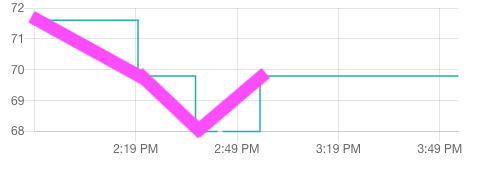
Is there a configuration option I'm missing which will have the history graph draw a straight line between measured values rather than taking infinite slope jumps?
For example, the purple line here https://ibin.co/4mX6QdCO0E0U.png
 polar kelp
No. The history graph shows the history of the entity, and if you looked at its state at 2:49 it would have been 68.
sacred quarry
@mint pilot you can use the mini-graph-card to acchieve something like that I think
mint pilot
@sacred quarry cool, thanks. The sensor card's graph is actually ok too for my purposes other than I'd like multiple graphs overlaid like the history component can do. I'll check that out.
wheat current
@atomic glacier https://discordapp.com/channels/330944238910963714/460846676358332417/593793006046412800 now you can 😉
sacred quarry
That card can do that too 😉
@wheat current was you who created the custom_updater component?
wheat current
correct?
sacred quarry
I don't know if you remember, long time ago we spoke about the fact (fixed by you after our chat as far as I can remember) it was taking foreever to start HA because it was checking for new updates on startup, cannot remember what was the cause, but I can see with HACS it does the same, when I was preparing the debug logs for the issue I opened (and you fixed right away, awesome), there was a long time I had simply to wait because it was updating each installed component/card.
So, long story short, do you think it would be possible either to don't do that on "boot" or to improve it a bit? 😃
wheat current
HACS does not do that after version 0.2
Everything are ready to be used (with the exception of adding/removing custom repos) 0.2s after startup
wheat current
At first boot it has to initialize everything, but every other starts are now as fast as it ever will get, with a 950% speed difference between 0.10 -> 0.11
sacred quarry
Ok 😃
wheat current
The reason it can not be faster (the only real limit are the custom_repos) are due to this https://github.com/custom-components/hacs/issues/181
sacred quarry
I see
I was thinking on the backup discussion we had on the ticket and maybe I didn't explain myself properly. What I am "buliding" is a very easy to plug system (let's call it that way) where everything is already pre-settled and post user creation there is nothing that needs to be done (beside now install the cards while before I was keeping them updated with a bash script). So having to have the hacs file with the versions in the repository is kind of a bummer (for my specific case of course) and having a file to be able to have as a "standard-list" of plugins, was going to be helpful. But I guess for now I will just take the current hacs file and have it standardize (kind of) setting 0 to all the versions 😃
wheat current
If you look at the link I shared with thomas 2,5h ago in here, and put on your dev hat I'm sure you can figure out something, just please keep it to your self, before you know it a list/script/automation is out there and everyone are going around filling up there systems with stuff they do not need/use.
sacred quarry
hehe not really a dev here 😄 but I will try to take a look (I presume your refer to the "Add services"). Beside that, what I am gonna keep updated is my central repo and only with cards/componets I do need, I'm not gonna download everything just for the sake of it 😄
prime umbra
@polar kelp thanks for the hass-browser_mod reload feature 😃
hass-browser_mod is becoming huge lol
did you reconsider @atomic glacier suggestion and add a option for put a entity in blackout ex: a timer hehe
polar kelp
Haven’t really had the time to look at it yet, but I think I’ll go with the auto-closing popup instead.
With card-mod and markdown-mod you can make a markdown card with anything you want in it that fills the screen in popup.
Or even a picture-elements
prime umbra
thats true
polar kelp
So an autoclose: true parameter, that also removes the title bar of the popup should do it.
prime umbra
nice
will the browser commander and popup card will become deprecated ?
it seems with hass-browser_mod would replace all those cards
polar kelp
Browser-commander yes. I’d say it is already.
prime umbra
ya i would say so
polar kelp
Popup-card... I’d like to think so. It can do the same things, with just a slightly different configuration.
prime umbra
looking good where hass-browser_mod is going....
polar kelp
Only thing it’s missing really is that you can’t open a custom popup from an entities card, because that doesn’t support tap_action.
prime umbra
ahhh
polar kelp
But I have a feeling that isn’t a very common use case.
atomic glacier
I'd have to argue that point...🤔 My 2 bits worth. Please give us an ENORMOUS heads up if you are feeling so inclined to deprecate my fav plugin. 😁 @polar kelp , but in the meantime I'll be proactive and start changing over now and see if I hit any speed bumps 👍🏻
@wheat current Awesome! Thanks! That will help out immensely in a n update disaster 👍🏻
kind shellBOT
Ludeeus is away for 24m 50s with a message :point_right: "away" adverb
"to or at a distance from a particular place, person, or thing."
 timid burrow
@wheat current is there a reason every card/component always shows NEW tag in HACS except the ones I have installed?
kind shellBOT
Ludeeus is away for 3h 18m 44s with a message :point_right: "away" adverb
"to or at a distance from a particular place, person, or thing."
 honest herald
hey guys I'm using transparency cards option in lovelace but it affects the thermostat card and makes it look like a pi chart. Anyway I can fix that? Has anyone else come across this?
atomic glacier
@honest herald the dependencies for the colors pull from the current theme installed. This can be fixed via lovelace-card-mod https://github.com/thomasloven/lovelace-card-mod
... or probably easier to just add a theme to the card directly
broken compass
is it possible to link to panels in lovelace?
honest herald
@atomic glacier the easier method is does with the same card-mod?
atomic glacier
@honest herald no, from the docs https://www.home-assistant.io/lovelace/entities/#theme should work, haven't tried it because I haven't had a need to, but worth a shot
 ember crow
@timid burrow it's some of thing for that release until you open them according to release notes for 10
atomic glacier
@broken compass depends on what you mean?
there is only one panel when set to panel: true
broken compass
For example I want to link to other tabs, say on tab 1 I have a category called rooms I would want the user to be taken to the rooms tab. Not sure if Lovelace was designed with that type of navigation capability in mind but that’s the outskirts of what I’m planning to do
atomic glacier
@broken compass that would be navigate and it's used in many different ways. I have countless uses of that all throughout my setup.
timid burrow
@ember crow that's what I thought it's supposed to do too but it stays flagged on my system even after I have viewed it
actually it is working I now see.... Not sure how useful it is if it shows 50 components and 50 cards I don't use all the time...
wheat current
Then hide them
timid burrow
I guess I understand it's working as intended but maybe the NEW flag should expire after a week?
wheat current
no
timid burrow
if you want to see what's new, it's not useful having every card there as new
wheat current
They are new (form HACS's perspective, it does not know what you have looked at before it started to track it.)
timid burrow
well I can tell from the description and only open it if it interests me.. but it's valuable to be able to see all new/recently added stuff cos it can get lost in the weeds... Could there be a button to remove the new flag now for everything in the repo as if you had opened them all?
wheat current
Could, yes. will be? adding buttons for one off operations will not happen.
Do it manually as I described here:
https://github.com/custom-components/hacs/issues/214#issuecomment-507529831
timid burrow
Ok but then it's disabled going forward as well isn't it? or will it reset when you restart?
wheat current
will be gone for the things that is there now, but not for new added.
timid burrow
ah ok..
wheat current
This is not related to #frontend-archived, so use #the-water-cooler / #general-archived %forum or Github if you need more. 😉
sacred quarry
Good morning, quick one for who knows, the card-modder is now card-mod or those are two different things?
sacred quarry
K, I need to change some views then 'cause the modder is not working for some reason
 civic sedge
@wheat current how the hell you link the messages?
civic sedge
So discord is just another browser 🤔
wheat current
There you go ;)
Now you are a "developer" 😂
civic sedge
😅
Maybe a good Idea to make an course or so on that
I remember a crypto currency named electron when i remember right 🤔 Should realy turn on the drive wit all my wallets sooner or later
sacred quarry
I am facing something quite odd with HACS, I have installed the light-entity-card, I can see it if I click "open plugin", I did add it in the resources list, but on the actual view I got the error that it doesn't exists and looking at the network tab (dev tools) it doesn't even try to load the card js file which leads me to believe that the resource is not even loaded, any idea/suggestion?
wheat current
"I am facing something quite odd with HACS", no
kind shellBOT
Help us help you. To quickly explain your environment please specify V/E/F
- Version - Which version of Home Assistant are you running?
Example: 0.84.3, 0.82.0, 0.85.beta.1 - Enviroment - How are you running Home Assistant?
Example: venv, venv-WSL, docker, hassio, native - Frontend: - Which kind of frontend configuration are you using?
Example: auto, manual, yaml, legacy (not lovelace)
Examples: 0.84.3/venv/yaml
Command '.vef' was invoked by: Ludeeus
sacred quarry
HACS v0.11.1 HA:0.95.4/env/yaml
And the only difference between when it was working (yesterday) and when it stopped to, is the switch to HACS 😃
wheat current
oh... you switched.. clear you cache
when you "open plugin" and see the file, HACS is not the issue.
wheat current
no
sacred quarry
Fine, it wouldn't, but I still have cleaned my cache 😃
wheat current
 say yaml?
sacred quarry
yes
sacred quarry
the YAML validator say it's valid
again, it was working before HACS, I am not saying it's HACS, I am saying that something it is odd, like the resource is not getting loaded
wheat current
and again HACS does not change how lovelace works.
if it does not load your resources there is an issue with your config.
Did you remember to save?
sacred quarry
...
timid burrow
Did you change the location it’s loading resources from? Cos HACS uses a different directory.. did you remove custom_updater if you previously used that?
sacred quarry
Can you please try not to treat me like an idiot? I might not be a developer but I still have about 15 years of experience as system administrator, so, please if I say it is not cache, it is odd because the "view" has not changed and that it looks like the resource is not getting loaded (while other are, and while I have simply copied the "url" line provided by the repository), believe me. Because sometimes I might place dumb questions because I might have not understood some docs, but I usually try to ask something here only when I tried many options and I coudln't figure out myself where the problem stands.
timid burrow
HACS works
sacred quarry
Yes @timid burrow I did, I have loaded many custom cards, the light-entity-card is the only one that is acting weird
wheat current
I'm not threating you as an iditot..
There has been multiple users in this channel not getting custom cards to load because they thought they saved but had issues with SMB/other remote protocols..
Questions are basic because 99% of the times there is a basic explanation.
sacred quarry
Fine, I got your point, still I am having some very odd issue that apparently I cannot figure out
I just noticed that is doing exactly the same thing on another view with the monster-card
timid burrow
If you’re using chrome, have you gone into dev-tools and right clicked on the refresh button and done an Empty Cache & Hard Reload?
Whenever I have any grief in Lovelace that usually sorts it out
sacred quarry
yep
worthy kiln
Is it possible to use the custom "light-entity-card" in a "group/room". The room has several light. Every light should be displayed when turned on like the custom card does today?
sacred quarry
I have found the problem... type: js was not required from the latest documentation while in my previous setup it was there (both for monster-card and light-entity-card), adding that fixed the issue... It doesn't make much sense to me this but ok..
timid burrow
It said not required? It normally says it can’t determine if it’s js or a module and to check the docs...
sacred quarry
It doesn't say not required, but it doesn't specify it in the "Add this to the resources" bit
Sorry, I meant the docs do not specify it, not HACS
atomic glacier
@polar kelp 👆🏻 "With card-mod and markdown-mod you can make a markdown card with anything you want in it that fills the screen in popup. " How can this be achieved? Currently, popups set to max height: 100% and max width: 100% do not fill the entire screen. Almost, but not entirely like blackout or a blank panel view as I have been using previously for an imitation off screen. Can a popup be configured to max out an entire screen now?
wheat current
@sacred quarry if you don't give it a type it does not load, and you get a warning in browser console https://github.com/home-assistant/home-assistant-polymer/blob/d7371ace6a7d9c511a8b4bf80f69c461f8b250c1/src/panels/lovelace/hui-root.ts#L581-L615
sacred quarry
Thanks @wheat current , I was actually surprised about not seeing a type yesterday, but I honestly tought it was some kind of new feature where it wasn't needed anymore, adding a type today was just to make sure it did look exactly has before , didn't even think that might have been the reason
wheat current
untill now I though it set js as default if not defined 🤷
sacred quarry
Apparently not 😄
 foggy tendon
which is the link of github to get the latest card-tools or card-modder?
polar kelp
@atomic glacier Also set margin: 0
atomic glacier
Genius ✨ thanks!!
 charred frigate
hi all , can I have some ideas on how you use iframe card(s) in your setup ?
mild veldt
@charred frigate wat? If you don't have a need for them, why look to add them?
charred frigate
looks nice maybe there is a use case I haven't thought of @mild veldt ! 😃
I mean I know I'd like (if it was possible) to have an iframe card displaying realtime weather conditions
but I haven't found a service to cover Greek territory
but I was wondering (based on that) what else I could show that would be equally as usefull
charred frigate
Hm, not bad!
 wintry solar
I'm trying to add 2 different functions to a picture-element card. I want my rooms to be dark or bright, depending on whether the light is on, but I also want the room to change to a different image when a sensor is turned on. Is this possible? The post below shows what I'm trying to combine.
kind shellBOT
@wintry solar posted a message that is too long, it is moved here --> https://paste.ubuntu.com/p/z5pvD9FTyJ/
gray kernel
Is this kind of layout possible in Lovelace? Even if it means many custom cards and advanced configuration? https://i.imgur.com/WX8jvss.jpg

I'm thinking some combinations of layout-card, card-mod(der) (to remove margins and padding from nesting cards), dummy-entity-row, and secondaryinfo-entity-row
polar kelp
It can probably be done with picture-elements and a few template sensors.
gray kernel
thanks for the guidance
polar kelp
Take a look at sharethelove.io
 half pawn
I want to add a switch input to my front-end but could not see it even after entering it in configuration.yaml. Then I found it under "unused entities" . How do I get this on the main page please?
Also noted that the icons on the left of the screen (if you click the hamburger) are not coloured by the setting in the theme.
paper-item-icon-color: "#0179d8" # Icon colour```how is your UI configured? is it yaml (where you edit ui-lovelace.yaml), storage (where you edit in triple dots in the top right), or auto?
half pawn
It is just the default setup at the moment, so I am clicking the triple dots to edit
gray kernel
once you're in editing mode click the + in the bottom right and choose "entities" then enter your switch entity_id in the form (as well as other details)
polar kelp
Once you've ever edited anything, it stops auto-adding entities.
Even just opening the editor once makes this happen.
elder pendant
Isn't there a warning?
gray kernel
I actually got the layout working https://i.imgur.com/MGkkWSv.png
just need to refine the template sensors and all that
(the right side is a copy of the left just to be certain it works)
will post config later
 polar kelp
Yes. There's a warning. But only once.
half pawn
Ah, that explains it. I have added it thanks. Is there a nce guide on all the possible lovelace settings, such as icon-color
wheat current
--sidebar-icon-color
half pawn
Perfect, found ""sidebar-icon-color" and am trying it now
and it worked!
I noticed when I added UPNP that nothing appeared on the interface. This I assume is related to your comment above that nothing auto-adds. How do I get the UPNP items to show at the top of the screen. I tried "entities", "sensor" and a few other items under "add" but cannot identify which one to use for these meaurements
broken compass
how do i show all automations in a lovelace card? i tried referencing group.all_automations under type entities but it only showed me one line
timid burrow
use Thomas Loven's auto-entities card... That's what I use along with folding entity row.
          - type: entities
            title: Automations & Scenes
            show_header_toggle: false
            entities:
              - type: custom:auto-entities
                card:
                  type: custom:fold-entity-row
                  head:
                    type: section
                    label: All Automations
                  open: false
                filter:
                  include:
                    - entity_id: "automation.*"
thanks
broken compass
is there a way to create a button which can tap_action navigate? currently i can only do this with picture type
timid burrow
have you looked at the custom-button-card?
 strong falcon
once I have switched over to yaml mode, what happens if i create a card in the UI?
wheat current
Nothing, you don't get that far
strong falcon
got it, so if I click the "+" button in the configure mode, the card options still pop up but nothing will load?
elder pendant
It won't let you go into configure mode
strong falcon
Hmm, I added
lovelace:
  mode:  yaml
to my config. Restarted HASS. The frontend picked up the ui-lovelace.yaml I had made but still let me go into config mode
latent moss
seems you have an extra space before the word yaml, no idea if that matters though.
strong falcon
i typed that in here, didn't paste it. The spacing is correct in the actual yaml file
mild veldt
try clearing your browser cache
strong falcon
thanks, will try that once I enable yaml again
polar kelp
It does that. Refreshing the page should fix it, and any changes will fail to save, I think.
Similarly, if you have a browser open in edit mode and change the config to yaml mode, you can actually get an editor for the cards in ui-lovelace.yaml, but changes won’t be saved.
 errant plover
Is there any way to add a border to a vertical-stack-in card? Cant seem to do it with card-mooder or card-mod
 wooden harness
Hi guys, I'm making a simple map as a custom card and having problems getting android chrome to refresh to the latest version of the card.
On desktop I can force refresh, but on android I can only see the new version if I use incognito mode.... (Clear site cache/data does not help).
Are there any tricks to fix this?
wheat current
Add ?V=123 at the end of your url under resources, change that number after each change.
wooden harness
Perfect! thanks
 severe stirrup
i have a horizaontal stack with 2 type of cards like this https://paste.ubuntu.com/p/cKP6ZQVtSG/
but the height is not the same. can anyone help me to made the card's height is the same?
https://imgur.com/a/D8Ni1C9
please help. thanks
i already try the option icon_height but it's not working.
 brazen crow
Hi! I'm trying to manipulate the Xiaomi Vacuum Card to work with my Neato vacuum, and I want to add the attribute for last run.
I'm able to add and show the attribute, but I can't figure out how to manipulate the value when it's added like this to show date in the format I want. I'm used to the Jinja-templating, but that won't work here.
<div>[[_config.labels.clean_start]]: [[stateObj.attributes.clean_start]]</div>
Any tips, other than starting with creating a Neato-Card from the bottom?
 latent bramble
hi all, how do i install a github custom plugin manually?
i want to install following card https://github.com/ljmerza/calendar-card
wheat current
latent bramble
thanks , so for project im try to use, resouces will be in /www/plugins/calendar-card/calendar-card.js if I extract to /www/plugins/?
wheat current
Looks correct
latent bramble
look like it cant find the js, so resources need to be in full path, as in /www/plugins/calendar-card/dist/calendar-card.js i guess?
it cant find the custom element 😦
wheat current
in resources you use /local instead of /www
if you just created the www dir you need to restart HA
latent bramble
thanks mate, have a lovely day 😃
worthy kiln
I still dont understand how the screen of lovelace gets filled by the different defined cards. If I dont use vertical or horizontal cards as a wrapper of the real cards, they are ordered randomly. But as soon I use vertical or horizontal wrapper, I cant use the UI to modify the components. So what is the logic of the placing/ordering of the cards?
 vernal gazelle
is there a way to convert MiB to GB and Celsius to Fahrenheit ?
 clever ore
@worthy kiln Cards are arranged by size to fill the view. A custom solution for different sorting options here: https://github.com/thomasloven/lovelace-layout-card
Unfortunately there is no solution for editing single cards via their UI when using stacks or panel view as far as I know
wheat current
There is kinda, a stack card is one card, you edit that card
polar kelp
But they have no gui editor. Yet...
vernal gazelle
any reason that when you use a sensor it still shows in unused entities?
wheat current
it's added as a wildcard to a card by using something like mostercard/auto-entities
 devout hatch
hello, I am using @polar kelp lovelace-card https://github.com/thomasloven/lovelace-layout-card
question: how to remove toggle from caption that toggles all entities
 devout hatch
I am trying to separate concerns in my ui-lovelace.yaml, such as I want to include one ciew from a different .yaml file.
my ui-lovelace.yaml: ```resources:
- url: /local/custom_ui/dark-sky-weather-card.js?v=7.1
type: module - url: /local/custom_ui/card-tools.js?v=1
type: js - url: /local/custom_ui/layout-card.js?v=1
type: js - url: /local/custom_ui/vertical-stack-in-card.js?v=0.1.3
type: js
title: Welcome to apartment 21!
views: - !include lovelace/view-lights.yaml```
and my view-lights.yaml:
I am getting blank screen with ha blue ribbon by default
strong falcon
Just to be clear...in order to use custom cards I have to enable yaml mode. Once I enable yaml mode, i lose the ability to configure in the UI.
Correct?
split granite
Nope
Other than secrets, YAML anchors, and splitting the config into multiple files there's nothing special about YAML mode
strong falcon
So I can use custom cards in the default (non-yaml) mode?
split granite
Yes
strong falcon
and ui-lovelace.yaml is only accessed if I enable yaml mode in configuration.yaml?
split granite
Yes
strong falcon
it appears that certain custom cards require an entry be made in ui-lovelace.yaml. If that is the case, then I would need to enable yaml mode and manage my entire UI that way correct?
strong falcon
by just adding it in the editor?
split granite
I don't recall, as I don't use it, but it should be covered in the docs/demo - see the channel topic for a link
strong falcon
ok, Iooked through the demo, clicked through some cards, i don't see resources defined in any of the cards
split granite
It's certainly possible, it's been covered repeatedly in channel
strong falcon
ok, thanks. I will do some digging
wheat current
raw editor
vernal gazelle
raw editor, however you can not leave comments in the config ui/raw editor.
split granite
@rose trench 👋 discussions about the UI happen over here
 rose trench
ahh right thanks
split granite
Go to the menu in the top right corner
rose trench
new to Discord as well
split granite
Select Refresh
split granite
HA
rose trench
dont see a refresh in either?
im so confused right now.... i don't have menu in top right?
split granite
Should be a three dot menu there
rose trench
On the dashboard there is
split granite
Hmmmmm, did you previously take control of the UI then?
rose trench
not sure?
it's under unused entities
i see it 😄
but how do i get that on to my dash?
split granite
Try Configure UI
I haven't used the automated UI option ever, so I'm limited in my knowledge of how it functions 😄
rose trench
i think im working my way round it, will update you in a minute or two.... appreciate the help buddy 😃
im trying to work out what type of card the other cameras are using so i can copy it :/
split granite
All the cards are shown at https://www.home-assistant.io/lovelace/
Probably https://www.home-assistant.io/lovelace/picture-entity/, but 🤷
rose trench
got it sorted....
2 final questions pal.... what is the option when I click on a camera in the dashboard to "pre-load stream"?
and the stream on the dash seems pretty slow, is there anyway to speed it up?
split granite
Pre-loading it means that the stream is always going on, so you don't get that delay
It will consume more resources on the system running HA though
rose trench
even in the preview?
split granite
It's always running
rose trench
okay brilliant
it's very jittery
i.e. someone is there then not.... no smoothness showing them walking away
like 1 frame per 5 seconds
anyway to address that?
split granite
In the preview, that's normal
rose trench
pretty poo
split granite
The preview only shows one frame every X seconds deliberately
But, you can use a custom card
rose trench
like?
split granite
And probably others, there's a sea of them these days
That card doesn't support stream though
rose trench
so i need a card that supports streaming
split granite
If you want it previewing as a stream
rose trench
yeah thats exactly what im after
split granite
I Googled lovelace streaming camera card and found https://github.com/custom-cards/camera-card - it does come with warnings, but 🤷
vernal gazelle
Question if one is trying to convert kbps to mb is this a possibility
- platform: template
  sensors:
    synology_down_speed_mbps:
        value_template: '{{ states.sensor.network_down.state | multiply(1024) }}'
        friendly_name: 'Synology Down Speed'
        unit_of_measurement: 'MB/s'
#330944238910963714 @vernal gazelle
rose trench
@split granite You about?
kind shellBOT
Tinkerer is away for 3h 10m 33s with a message :point_right: On the road again. Goin' places that I've never been. Seein' things that I may never see again.
rose trench
Can anyone help me with loading this card? https://github.com/nervetattoo/simple-thermostat
I'm running HomeAssistant on docker so not sure where the configuration/www folder is as it was pre-installed and I cannot find the folder
 past acorn
Hello all hoping you can help in the following. I have successfully setup custom weather component and it works everywhere except my wife's iPhone (both in home assistant app and chrome/safari browser with cache cleared.. It just says 'could not find custom component.
I have placed the js file locally in home assistant but still same behavior, any ideas?
vernal gazelle
man I have the hardest problem keeping things in Columns and rows..lol
prisma mango
@rose trench Does your card config utilise stream?
rose trench
Cyko, i'm a complete n00b, so if you can tell me how to check that i'd appreciate it?
i've only had it installed 4 hours
prisma mango
My previews now all show movement in preview
cards even
I would go through the basic material fisrt to get a good grounding
rose trench
ahhh, i've not been looking at that. Trying to get plex working first
prisma mango
entity: camera.cam201
type: picture-entity```I found very limited benefit in Plex when I did it, may have changed since
I am not hugely experienced, getting my cameras working as I wanted took a lot of time
rose trench
are you referring to the plex plugin or manually setting it up?
 shut imp
I want to integrate my iCloud calendar on my Hassio dashboard (via ui-lovelace.yaml) .. I mostly find Google Calendar cards. Anyone with a nice solution for iCloud? 🙂
last compass
hi all..
is there away to put sensor value on picture glance?
trying to put my broadlink sensor value
instead I got picture of eye..
rose trench
has anyone got the plex addon installed?
devout hatch
is this correct break in lovelace-card ```title: Demo
panel: true
cards:
- type: custom:layout-card
layout: vertical
max_columns: 4
max_width: [50%, 20%, 20%, 10%]
cards:- type: entities
title: Entities card sample
show_header_toggle: true
entities:- switch.rack_main_light
- input_number.bulb_dimmer
- break```
- type: entities
because, the view doesn't show when I put break
vernal gazelle
is there a card (I think ive seen it somewhere) where you can force Items to be in column 1, then once you say have 3, move to column two and etc...
 vapid field
still learning HA and lovelace and i'm kinda stuck here. I have a custom component that works (it's loaded in an entity card at lovelace). Is there a way i can invoke a component function from lovelace?
vapid field
Hello, someone have a card for Neato vacuum ?
 quasi mist
test
vapid field
i can't find the function in the service dropdown
i have a custom component with a custom function defined on that
 buoyant crater
someone has installed the Mini Media Player plugin?
through hacs?
vapid field
i added it manually
 vast ibex
has anyone used the declutter card with auto entities card?
 gray flint
what's the best way to show my Grafana objects in Lovelace?
vapid field
iframes?
 honest dew
Can someone please try and confirm what I think is a bug: in a picture entity I cannot get hold_action: action: none to work.
gray flint
@vapid field in grafana share there are 3 options: Link | Embed | Snapshot. When you iframe into Lovelace; for each of these do you (1) always need to sign into to grafana? (2) do they auto refresh with new data? trying to figure out which option is prefered
vapid field
Ehm, I don't know about the iframe card, mabye it has some auto refresh. For the auth, I'm not sure
 feral nymph
does anyone know if there is a way to use CSS "background-blend-mode" in Lovelace to blend pictures together (hopefully in the Picture Elements card)
feral nymph
Currently have
- type: image
            entity: switch.den_light
            tap_action:
              action: toggle
            image: /local/custom_ui/lovelace-floorplan/den.png
            state_filter:
              'on': opacity(100%)
              'off': opacity(1%)
            style:
              background-blend-mode: multiply
              top: 50%
              left: 50%
              width: 100%
and it is not blending the images as expected
Got it. Should be using mix-blend-mode
vernal gazelle
can you resize the picture card?
wooden latch
Hi, I'm playing around with the Lovelace "Banner Card". Under the variables there is as an example :"heading: "\U0001F6CB Living room"", but I've got no idea where to find alternative heading codes. I mean the \U0001F6CB part, which gives the heading like a sofa or tv picture.... Any ideas?
devout hatch
how to hide states on/off on entty buttons?
devout hatch
anybody has an example with picture entity with sliders botom and inoput_select?
 placid galleon
is there a place to look at a few themes for lovelace? (other than the one forum area)
gray flint
(1) how do I change the color of the active button in simple thermostat (https://github.com/nervetattoo/simple-thermostat). (2) how do I add fan modes (low, med, high, auto) ?
vernal gazelle
@placid galleon https://demo.home-assistant.io/#/lovelace/home
placid galleon
thanks @vernal gazelle
rose trench
has anyone got a dyson integrated? I'm struggling to do mine. I've added it to the config with my username, password, serial number and the devices IP... restarted and don't see anything in the registry... any help please?
mild veldt
@placid galleon https://www.juanmtech.com/themes-in-home-assistant
placid galleon
thanks @mild veldt , i have already configured themes, im just looking for more themes to look at for ideas 😉
brazen crow
@vapid field I'm currently working on an Neato lovelace card for my own environment. I will probably share it when it's done, but I'm not a dev so it's going a bit slow 😛
mild veldt
@placid galleon the link has a lot of themes if you scroll down past the tutorial
gray kernel
you can use template sensors, switches, etc. in lovelace like anything else
for templating card properties (such as type or title), you need to use something like custom:config-template-card or custom:card-templater (search these names)
 quick rampart
@gray kernel thank you
devout hatch
I am using custom button card - https://github.com/custom-cards/button-card and I can't hide state with show_state: false anybody has some experience with this button card?
errant plover
The documentation you linked to says it is false by default.
 fallow plinth
Hey there.. I got a question regarding the picture-glancecard.
I got an integrated OVNIF camera (no NVR) to Home assistant and it's seems to be generating a grey image on loading lovelace frontend.
However clicking on the grey image I get the stream all working fine. Any ideas how I can get a clear image?
type: picture-glance
entities:
  - sensor.outside_rflink_temp
camera_image: camera.entrance
camera_view: camera.entrance
title: Entrance
@fallow plinth did your sensor show the temperature or show icon?
fallow plinth
@last compass Yeah, it did.
the card does change from the default "no-image" image..
I think it's just not rendering the stream/image correctly and I can sometimes see some artefacts from the "real" image.
devout hatch
How can I saw a notification box in down left corner on my web ui lovelace dashboard when something I click? For example, if I click entity-button I want to be shown in down left corner "You have clicked a button 'Test' "
also I want to add pop ups messages
is that doable?
mild veldt
@devout hatch toast messages for clicks, no. you would have to run your own build of the frontend and then change the event handling. Here's where it was removed https://github.com/home-assistant/home-assistant-polymer/pull/2822
pop up messages of what?
mild veldt
@polar kelp idea for browser_mod, ability to show a toast?
@devout hatch persistent notification?
devout hatch
yes
mild veldt
could probably use https://github.com/thomasloven/hass-browser_mod and create an automation that when a persistent notification is created, you create a popup
polar kelp
Sure. I decided against it at some point because they are so short lived, but I recently found the connection warning one, which is pretty much persistent, so that could be something perhaps...
vapid field
hey there. anybody here who can help me with the size adjusting of a swipe-card?
vapid field
no one?
winter wasp
just noticed something odd: when i have a picture-glance card in a view and one of the entity glance icons is a camera, simply loading the view makes a request to the camera proxy api
which i wouldn't have noticed, but that specific call is failing auth occasionally in the iOS app and causing my IP to get banned
elder pendant
Do you get notified of the invalid auth in a persistent notification in HA?
I think my roommate's iphone might be doing the same thing
winter wasp
yep
had to run it through a proxy and sniff to see why it was failing
i can't see why it's trying to pull the camera feed when it's only a glance icon
that's besides the annoying auth failure
polar kelp
@vapid field A more detailed question is easier to answer.
atomic glacier
@polar kelp Going out on a limb here, but might the future auto-close popup command mimic the same characteristics as blackout? Move the mouse or tap screen to close? I'm currently using what I had in place before, but I've been asked to come up with an example using the new feature that doesn't exist yet 😁 kinda hard to do that 🤔 but just wanted to know if that is still a possible...
polar kelp
That's the idea.
atomic glacier
That will be a game changer for popups in general⚡👍🏻😎
Got some really cool ideas🤔😎
polar kelp
You can try it now: https://github.com/thomasloven/hass-browser_mod/releases/tag/5
The example code also assumes card-mod is installed.
atomic glacier
@polar kelp Phenomenal  Totally AWESOME ...and thanks for not including the header or the ugly 'X' 😜
vapid field
@polar kelp Ah ok. I try to use the swipe card. It works fine but the card is really big. I would like to discrease the size of the card. i tried several parameters but the card does not change its size.
My code is the following:
kind shellBOT
@cedar kestrel posted a message that is too long, it is moved here --> https://paste.ubuntu.com/p/NN2KMSQnRM/
polar kelp
So you want to change the size of the card cpntaining all the other ones?
prisma mango
Can you only use the variables and and options shown in the card instructions such as https://www.home-assistant.io/lovelace/history-graph/
I am using for temp log and was hoping to make some changes to the way it looked
prisma mango
Also: Can light card be used for a group of lights?
polar kelp
For a group (https://www.home-assistant.io/components/group/) of lights, no.
For a light group (https://www.home-assistant.io/components/light.group/), yes.
You can change the looks of cards using themes or card-mod https://github.com/thomasloven/lovelace-card-mod
Changing the colors of the graph is trickier, but can be done https://gist.github.com/thomasloven/5ee36708908569c8e168419557cefd08
(Also see backcountrymountains fork for changing bar colors)
 brittle eagle
Hey guys, would it be possible to have the iframe urls be requested from the ha machine instead of the users browser?
wheat current
no
wheat current
get yourself a proxy server
brittle eagle
Got one though id just like to restrict outside access where possible
But thanks for the quick feedback
Workaround right now is connecting to my vpn server when on the road
vapid field
@polar kelp yes, exactly. But whatever Parameter i try the swipe card does not change its size
vapid field
I'm building an extended entity-filter card where you can add min and Max values for an entity. Would this be useful for someone? Then I'll push it to github.
I'm using this card to show low battery devices
polar kelp
Nice! Be aware that auto-entities can do that too, though. https://github.com/thomasloven/lovelace-auto-entities
 proper mesa
are there dividers for lovelace header bar?
 dreamy flint
I've just installed hassio via the ubuntu virtual image, but I'm having some trouble with the path for my floor plan in Lovelace
I've found that the path for the folder is /mnt/data/supervisor/homeassistant/www/images/ but that doesn't work. Anyone know how to fix it? On my RPi the path was just /local/images/ but that doesn't work now
proper mesa
@mild veldt eh not really, I meant on the header bar. That with tabs. But thanks for answer (:
@dreamy flint in HA, the www folder is /local
so it would be /local/images/
mild veldt
I thought at first that was what you meant but don't understand what that means then
dreamy flint
@proper mesa I've tried that, but it doesn't work 😦
It works on my RPi, but not on the ubuntu install
dreamy flint
Yep, multiple times out of anger 😛
proper mesa
@dreamy flint if it's the first time you're adding something on the www folder, restart ha service. It must load the new settings.
@mild veldt Oh sorry i thought it was clear. I meant the top bar, the header. the single cards:... It would be nice having a divider there.
home | bedroom livingroom ... | settings
mild veldt
The local path is not different between install types
that will get you partially there
I don't know of anything else that messes with the header
proper mesa
@mild veldt yeah I'm using this (amazing) project already. but i could not find this divider i meant :/ i guess it reallt does not exist (yet)
dreamy flint
@mild veldt Copy/paste the exact same code again, and now it works.. I have no words for the 2 hours I've just spent trying to find the issue
mild veldt
when in doubt...drink
@proper mesa I don't like the idea, but you COULD put in false views that are just named '|'...
dreamy flint
Going for the 37 year old rum now 😄
vapid field
@proper mesa , maybe you could use something like the css selector :before { content: '|'; }
winter wasp
i don't know typescript yet. is it clear why the picture-* cards behave as described here? https://github.com/home-assistant/home-assistant/issues/23055#issuecomment-509641264
strong falcon
I'm using the UI Editor. Trying to add a custom card (mini media player) where do I need to add the resources since I am not using ui-lovelace.yaml?
 minor pelican
I finally got around to customizing the UI and would like to say Lovelace is awesome!!
latent moss
@strong falcon section 3 here explains with a handy animated gif https://github.com/thomasloven/hass-config/wiki/Lovelace-Plugins#3-import-the-plugin-in-your-lovelace-config
 steel nexus
Anyone using Samsung Galaxy tabs with Fully Kiosk and Lovelace? I have three wall mounted, but they are sooo slow. I wonder if its because im showing live camera feed from three cameras? Any settings to be aware of?
 viral sorrel
I have a xiaomi cube sensor (with 6 sides.. obviously) and I can detect which side the cube is on and I would like to display a counter of how long it is on each side along with a name corresponding to that side.. hoping to track cumulative total, cumulative today and current. can anyone suggest a good way to display this? a suitable card or cards? I'll figure out how to actually do the calculations elsewhere as this is a lovelace specific channel
 polar hornet
Quick question: was the interface named after the pornstar, the hospital, or the guy accused of murdering his wife?
(All things I had to pass over on my first non specific web search)
prisma mango
@polar kelp Thanks for your responses yesterday on groups and light groups, just saw them, I had gone to bed
latent moss
@polar hornet hah, none of the above. It's named after Ada Lovelace, widely considered one of the first computer programmers https://en.wikipedia.org/wiki/Ada_Lovelace
polar hornet
@latent moss as a CS grad, DOH!
civic sedge
@umbral stirrup https://i.imgur.com/IPksYIn.png
thats custom:calendar-card & custom:card-modder

 umbral stirrup
Actually looking for a way to see events via sensor or something, I’m using tile board as my front end
civic sedge
ah - some ppl tryed that already - I dont how to accive this
but the forums are helping there (just the firt one I saw)
https://community.home-assistant.io/t/more-than-1-google-calendar-event-in-appdaemon/96749/9
viral sorrel
the lovelace sensor card only does line graphs?
polar kelp
And badly (from a scientific perspective)
viral sorrel
I i have an error in my lovelace config.. where do I find the logs?
  - title: University
    id: university
    card:
      type: entities
      title: Study Subjects
      show_header_toggle: false
      entities:
        - sensor.current_subject
I added the following tab with a single card and the tab renders but nothing in it
wheat current
card should be cards the cards under cards should be list not dict.
viral sorrel
hmm. I originally had it as cards and SOMETHING told me that it should be card.. let me see (also I just copied an existing working entity card from the lovelace config).. weird
wheat current
https://www.home-assistant.io/lovelace/views/ The documentation is quite usefull 😉
viral sorrel
ahh.. is that what they're called.. I couldn't remember and just searched for tabs
 plucky harbor
@wheat current https://pastebin.com/HHZYANZn
wheat current
I don't speak JS, but hopefully someone else does 😃
 lyric iris
How can I reset the lovelace ui to be auto generated again? I saw previous advice recommending to delete .storage/lovelace however this doesnt exist for me
 paper oxide
I have a rest sensor that provides me an url to an album cover for the current song on my favorite radio station.
How can i show a lovelace card with that cover image that updates the cover image automatic based on an state update of that sensor. What type of card should i use?
The picture entity card has the layout i want but i'm not able te set the image url based on a rest sensor's state.
wheat current
Probably a markdown card with custom markdown mod to get the state/attribute.
viral sorrel
I appear to have card-tools correctly installed with HACS but then get the error Can't find card-tools. See https://github.com/thomasloven/lovelace-card-tools when using card-templater (also installed with HACS).. resources for both are added as documented
wheat current
are card-tools over card-templater in the config?
if you go to the URL of card-tools (the one you defined in config) do you see it?
viral sorrel
and there it is... learn something new every day
I wish there were more card-templater example config/screenshots.. don't quite seem to be getting it
don't get the entities: at 2 different levels and how they are different
except that obviously one level has templates while the other does not
wheat current
Look for a from topic for it, it is usually many examples there
plucky harbor
any way to reset / reload lovelace default config?
viral sorrel
@wheat current I'm even more confused now
 thin linden
Hi all, is there a card to show a notification in lovelace?
Something like an alert?
minor pelican
Hey everyone. Is there a way for popup card entities to popup when they are clicked on? For example, if a light entity is in the custom popup and I click ok it than the default light popup would show.
prisma mango
I am getting an error saying custom element doesnt exist for auto-entities, js in config/www/plugins and using raw editor I added ```resources:
- type: js
url: /config/www/plugins/card-modder.js?v=1 - type: js
url: /config/www/plugins/auto-entities.js?v=1```
Any ideas why it isnt finding it?
I have restarted
proper mesa
@prisma mango it is /local/plugins/
polar kelp
@viral sorrel Which card is card-templater? Sounds like it's not made to use card-tools optimally.
Never mind. I found it. Weird that the order matters...
Or do you have like lots and lots of plugins?
wheat current
card-tools is the only plugin I have seen with that issue, and only with no-cahce servers (custom_updater/hacs)
this is probably the one https://github.com/gadgetchnnel/lovelace-card-templater/blob/master/lovelace-card-templater.js
prisma mango
@proper mesa Thanks
polar kelp
Hm. It allows two seconds to load in card-tools before displaying the error... That ought be enough by far.
wheat current
should be, most plugins loads within 10ms from my testing
mild veldt
@minor pelican you can't create a popup from a popup...at least you couldn't previously, not sure if that is still true with browser_mod. @polar kelp I haven't played with it yet, do you happen to know for sure?
@thin linden auto-entities should work...🤔 haven't tried myself
 pallid lance
Hey, I've finally managed to have the browser_mod working, I can see the devices.
Now how do I use it? Trying in automation but then getting error when checking config telling me that its not accepted using 'service data ' am i'm not understanding the use of that card?
mild veldt
service_data
polar kelp
That's still true. Working on it.
pallid lance
So cant use in automation?
How shell I use it then? @polar kelp
polar kelp
Of course you can.
The examples in the readme are for service-call from lovelace. The service calls in automations/scripts have a different syntax: https://www.home-assistant.io/docs/scripts/service-calls/
pallid lance
Can you write an example please? Like a full automation and place also in the documentation?
Like if light turn on then popup message?
wheat current
pallid lance
https://pastebin.com/sBzGTjmt
Tks @wheat current I still can't understand how I should write it, can u please have a look?
By the way, love hacs
wheat current
data: not service_data:
pallid lance
Tks
atomic glacier
@pallid lance I have about every kind of example in my repo for popup usage if you need some ideas.
 leaden vapor
is there a way to lock down lovelace so the first screen you see is a pin pad for access to the rest of lovelace?
mild veldt
I'll say yes...with quite a bit of work
wheat current
log out of HA, then you need user/pass to get in
mild veldt
😃 I over thought it. ^ this
winter wasp
for button-card, is there a way to use the last_changed formatting in a label_template?
 crimson fable
I have a tablet which just displays the lovelace UI constantly. It seems to break if its open for a long time.
Sometimes this also causes a "login failed" notification
I'd assume that it has something todo with the tablet entering powersave and trying to refresh data with a stale token or something like that.
But even when that doesn't happen, the UI just feels very sluggish on wakeup. Often, I have to refresh the page to get it back into a working state
is there something I'm doing wrong?
winter wasp
can i call this somehow from inside the template? https://github.com/custom-cards/button-card/blob/9ef93a2a350176d9d1e86adee9d86908ff13a270/src/button-card.ts#L421
@crimson fable do you have a camera in your UI, even as just an icon?
winter wasp
crimson fable
oh nice
I will remove it and check if the problem is gone
thx
could this also cause the general slowdowns?
winter wasp
🤷
pallid lance
@atomic glacier thank you very much.
For me some times programing isn't as clear, I didn't realize that it should be used as button card in lovlace.
I believe more detailed samples in the documentation will help more ppl like me.
I truly appriciate this community, ppl like u, @polar kelp , @wheat current are making so much efforts to create and share new possibilities.
Ill reach to Thomas to add few instructions to his documents after ill write them
kind shellBOT
Ludeeus is away for 3h 32m 53s with a message :point_right: "away" adverb
"to or at a distance from a particular place, person, or thing."
minor pelican
Is it common that using many custom lovelace cards will slow down HA noticeably?
elder pendant
Depends on the cards
 clear dome
Is there a way I can use lovelace/home assistant to set an alarm on my phone that then triggers things? Not a house alarm, more like instead of using my mobile phone's alarm I would like to use one built into the home assistant so that depending on when I wake up different things are triggered.
elder pendant
https://www.home-assistant.io/components/input_datetime/ you can use this component to set a date/time to trigger an automation. Any further questions about this should be asked in #330944238910963714 since this doesn't really have anything to do with lovelace directly
Or do you mean set an alarm in the alarm app on your phone directly? You can still do that, but you need a specific app and it gets much more complicated
clear dome
@elder pendant I would potentially want to set an alarm in the alarm app on my phone directly, but I'm not sure if it's reliable or possible
latent moss
@clear dome do you use an iPhone ?
clear dome
I use a Samsung Note S8 @latent moss
latent moss
ok nevermind then. I have a way of doing it on the iPhone with apple's alarm clock app and the ios 13 beta. but don't use android not sure how to do it there.
clear dome
Ahhh gotcha thanks though
elder pendant
So you want an automation to trigger when you dismiss an alarm on your phone?
clever ore
@clear dome You could do this with tasker on android to trigger an automation when alarm goes off. I used to do this to turn on my coffee maker when the alarm sounds.
clear dome
@elder pendant either when the alarm is dismissed or when the alarm goes off
@clever ore that is along the lines of exactly what I want to do, turn on the coffee maker automatically when my alarm goes off, turn on some lights, etc. Interesting I will look at "tasker", thank you
winter wasp
can i ask a question for someone familiar with the custombutton-card?
i'm trying to create a custom label and use the show_last_changed formatting inside that label
is there a way I can reuse this HTML entity in the label_template somehow? https://github.com/custom-cards/button-card/blob/9ef93a2a350176d9d1e86adee9d86908ff13a270/src/button-card.ts#L427
hmm, looks like ha-relative-time is from LL core
mild veldt
Haven't tried that but something like this should get you close, I think...
label_template: >
  return '<ha-relative-time' +
         '  .hass="' + hass + '"' +
         '  .datetime="' + entity.last_changed + '"' +
         '></ha-relative-time>';
@late anvil you ever tried that? Not sure if the styleMap is required or not?
winter wasp
@mild veldt testing...
mild veldt
those vars won't expand correctly probably inside the html
mild veldt
yeah...not sure
winter wasp
does that render for you?
mild veldt
the element is "there" but those properties are not being properly passed
so no actual value is rendered
 dusty sigil
@winter wasp @mild veldt Currently facing a similar problem (I'm trying to show the relative time since last_changed as an state-label in picture elements) but I didn't find any elegant way to display this without using extra sensors with a respective template {{ relative_time(states.entity.last_changed) }}, maybe this would be a nice addition to access this e.g. via person.user.last_changed in the entity-field or somehow like the "secondary-info" field in the entites-card (at least for all core-cards)
winter wasp
@dusty sigil as in you created new template sensor entities?
dusty sigil
Yea, pretty much. Maybe this help you somehow? I probaly can't use that way since I want to use the relative-time pretty dynamically and its too much hassle to create a new sensor everytime I need this for a new entity
mild veldt
I couldn't probably make use of having this in some of my templates, so might take a look later
winter wasp
i try my hardest to not create sensors that report a state based on time. too much noise & i have to remember to exclude from the recorder
mild veldt
@late anvil I'm thinking we could throw this into the project https://www.npmjs.com/package/javascript-time-ago and then wrap that in a div instead of using the core one
and then provide that as a variable that people can use in their templates
time to brush off the javascript cobwebs 😉
proper mesa
@polar kelp hi, hope you don't mind if i tag you. i am switching to HACS but i do not see support for layout-card.
https://github.com/thomasloven/lovelace-layout-card
Also in your repo there is no trace about hacs (altho i read the issue #26 of this guy asking you gently to add the support for it).
In the meanwhile, silly question, can it be replaced... by... some other black magic? it would be quite sad to revert the changes that HACS made
polar kelp
You can add any custom card to HACS manually.
I'll add something similar to layout-card to the default repo eventually.
proper mesa
@polar kelp So the fact that in the store tab, layout-card is missing, doesn't mean it is not supported. On HACS, one could simply add the url link of a repo and add it.
Alright, great news! thank you
dusty sigil
@mild veldt I'm no dev, just stumbled over that an hour ago: Intl.RelativeTimeFormat could be of use, I think thats pretty new to js
mild veldt
@dusty sigil you have to specify the format though. e.g. day vs second vs minute, that you want the relative time to be in.
dusty sigil
Yea, that's the reason why I abandoned my own custom-element solution again 😅
mild veldt
I think it should be a quick change to the button-card. I'll try to find some time tonight or this weekend
 azure scarab
how does the kiosk mode work with a specific page? I can get it to work on the homepage but no other pages?
 simple knot
Guys, how do I add custom resources to lovelace?
Like for the weather
I did it like this, but it still tells me that the card does not exist
latent moss
@simple knot did you download and add the weather-card.js to that folder?
simple knot
Just figured it out. I made a stupid mistake. Sorry @latent moss
latent moss
all good 😃
 meager grotto
I'm thinkering with lovelace and I would like to change the color of "state-label" in a "picture-element", what is the attribute I need to use?
errant plover
Can anyone spot what is wrong with this config-template-card? https://paste.ubuntu.com/p/3JVGn6qghc/ removing the templates and putting either title or image works.
 keen salmon
@azure scarab this might be it for you https://github.com/maykar/compact-custom-header
here you can specify landing page, and hide other pages for users, kiosk mode and so on
polar kelp
@errant plover what does ”works” mean? Or more importantly, what would not working mean?
General tip for everyone: Most things can work in one way and not work in infinite ways. It helps being specific.
wheat current
That works 👍
errant plover
Well basically if I dont use the templates the card displays ( https://i.imgur.com/scG8HVF.png ) so the path and file-name I've used for the images in the template are correct. As soon as I try to template it though the card ends up blank. Blank as in nothing showing at all, just the edit bar at the bottom of a zero sized card.

I'm currently using two conditional cards that work as expected (i.e. display when they are supposed to) but having two cards with one of them hidden messes with the layout of the other cards in the view. It would be nice if I could just template the title and image of a single card.
spiral bluff
mmm if select the lovelace state, and in the right coner is 3 dots, and select confi ui.. i get: The edit UI is not available when in YAML mode.
pastel valley
Hi maybe stupid question but not get my system working thats way what i want
i have script what toggle 3different lights on and off
but when i do button on lovelace that script
that button not give me "state" that lights
wants get same status if i click some individual light button and button icon change color depends if is on or off
My script call my automation
- id: Keittiovalot zwave
alias: Keittiovalot zwave
trigger:- event_data:
entity_id: zwave.hank_electronics_ltd_hkzw_scn01_scene_controller_2
scene_data: 0
scene_id: 1
event_type: zwave.scene_activated
platform: event
action: - entity_id:
- switch.keittiovalot
- switch.lasivitriini
- switch.baaripoyta
service: switch.toggle
- event_data:
errant plover
@spiral bluff remove this from your config and restart to disable yaml mode: ```
lovelace:
mode: yaml
i found a video on youtube, he was talk about this :https://home-assistant-lovelace-gallery.netlify.com/ but the page cant be found. Are they a new page?
polar kelp
@errant plover You never end your ${ s
 midnight shadow
i want to use the entity-attributes-card to show the attributes in a compact list, but is it possible to get the actual state in the form of an attribute?
errant plover
@polar kelp Oh you have to be freaking kidding me. I was staring at that for hours and did not see it. Thanks. I'll give it a try.
midnight shadow
e.g. sensor.disk_free.* gives me all attributes except for the state, which is well what the addon does 😃 but is it possible to add the state somehow?
polar kelp
It's easy to go blind on things like that
errant plover
@spiral bluff It's hard to know what you are talking about as the link is broken. Was it the demo page? https://demo.home-assistant.io/#/lovelace/0
spiral bluff
@errant plover no.. lovelace galley, thar u can get all cards and get the codes, and see preview of them
@errant plover https://www.youtube.com/watch?v=ObfRzMIEJPg&t=679s 2.02min in
errant plover
See the left hand column here: https://www.home-assistant.io/lovelace/
Thanks @polar kelp that did the trick.
polar kelp
@spiral bluff That page's gone since a while. demo.home-assistant.io is all there is now.
spiral bluff
im trying to set a picture-glance card. and when chosen picture, (that is locacted in config/www/IMG_1377.PNG) but when i write it doset show up, what im missing?
 faint echo
Does the custom: card-modder not work with the custom:vertical-stack-in-card ? I have been trying to follow an example from @atomic glacier on his lovelace setup but no matter what I try following his example I can't get the background to be transparent. Here is a snippet of my setup -> https://paste.ubuntu.com/p/Gpdq4p2VKC/ The bignumber-card seems to get transparent but there appears to be a black background for the vertical-stack-in-card behind it. How would I get that to be transparent also?
atomic glacier
@faint echo what theme are you using?
The one I use already has paper-card-background-color: "rgba(0,0,0,0.0)" added
faint echo
it's the dkgreen theme, could that be interfering with it?
the theme your using has paper-card-background-color "rgba(0,0,0,0.0) in it?
atomic glacier
Yes
faint echo
I'll check what it has
Looks like it is this -> paper-card-background-color: "#23232E"
atomic glacier
It can be worked around at the card level though if you don't want all of your cards with clear backs
faint echo
how would I do it at the card-level? I thought by using the card-modder it would override that
I just tried the default theme and it does the same . Could I use a theme on a particular view? I know at one time that didn't work
atomic glacier
@faint echo pretty sure this will work, if not I can check in my config: https://paste.ubuntu.com/p/PwjqkzVtyf/
EDIT: forgot the ')' here background: rgba(0,0,0,0.1)
faint echo
@atomic glacier That did the trick. I figured I needed to mod the vertical-stack-in-card but just couldn't figure out the correct way. Thanks for you help!
strong falcon
is there a "proper" resolution for the images in a picture glance card:
strong falcon
can anyone see why this card config is invalid?
type: picture-glance
title: Living Room
entities:
  - switch.tv
  - switch.fire_tv_living_room
  - switch.sonos
  - switch.sonos_volume
state_image:
  PowerOff: /local/images/off.png
  Cable Box: /local/images/tv.png
  Fire TV: /local/images/firetv.png
  Sonos: /local/images/sonos.png
  Sonos Volume: /local/images/sonos.png
and it even stripping out the state_image section makes it invali
 hoary plinth
The spaces in Cable Box, Fire TV, and Sonos Voume. They need quotes i think.
strong falcon
they had quotes when i typed them in, they got removed when i saved the card, will try again
polar kelp
Shouldn’t be necessary
strong falcon
even this shows as invalid
type: picture-glance
title: Living Room
entities:
  - switch.tv
according to the documentation, only type and entities are required
strong falcon
figured it out, i needed to add the entity: to go with the state_image
type: picture-glance
title: Living Room
entities:
  - switch.tv
  - switch.fire_tv_living_room
  - switch.sonos
  - switch.sonos_volume
state_image:
  PowerOff: /local/images/off.png
  Cable Box: /local/images/tv.png
  Fire TV: /local/images/firetv.png
  Sonos: /local/images/sonos.png
  Sonos Volume: /local/images/sonos.png
entity: sensor.harmony_activty
Can some one translate this more simpel Your config is not valid: TypeError: Expected a value of type `[object] | undefined` for `resources` but received `{"-url":"/local/community/mini-media-player/mini-media-player.js?v=1.2.2","type":"js"}`.
mild veldt
@spiral bluff resources is a list, not a dict. should look like this
resources:
  - url: "/local/community/mini-media-player/mini-media-player.js?v=1.2.2"
    type: js
I don’t understand what I am doing wrong... i have HACS install, I have all the folder, then I copy the text from the guide, in to my raw config... but still not showing up
atomic glacier
@polar kelp Am I correct in concluding that the - this function of browser_mod will not work when called from a script? Works flawless when listing the deviceID, but no luck getting it to work otherwise.
polar kelp
Correct. Because there’s no way to make the script know which browser activated it.
atomic glacier
That's what I thought, Thanks for verifying!
polar kelp
...yet... 🤔 ⚙
atomic glacier
That would really be useful!
polar kelp
Ok. I have an idea, but I’m going away on vacation, so don’t expect anything soon.
atomic glacier
I'm having to duplicate some popups now, that could be replaced if it would work that way...I'll be watching👀
Have fun
👋🏻
mild veldt
@atomic glacier come do all my automations for me...I'll buy you beer 🍻
atomic glacier
@mild veldt You know I'll help whenever I can, just coffee and energy drinks for me now 😜
Working on voice activated screens by location now. e.g. when in the den that tablet responds, in the kitchen...etc. and screens responsive to the users voice, my wife talks and it opens her main screen or me and my screen opens. Thought that may be cool. Too many ideas, too little time🤷🏻
Will definitely need another video 😂
mild veldt
vapid field
hello, i am new to lovelace, but i spent so much time on it and i am getting crazy
is there anybody who can give me a hint?
i used this one,
kind shellBOT
@oblique folio posted a message that is too long, it is moved here --> https://paste.ubuntu.com/p/TrcFfZkyV6/
polar kelp
You’re welcome...
mild veldt
?
polar kelp
spiral bluff
im using gui editorn , how do inplant custome cards for lovelace.
polar kelp
vapid field
Hi all
I'm trying to find a way to use button_card's "tap_action" to "turn_off" and not "toggle".
I recon there is someway to do this easy with "call_service" but my programming skills is not good enough.
Am I on the right track or is there any other easy way to do this?
latent moss
@vapid field assuming you're talking about a light here?
tap_action:
  action: call-service
  service: light.turn_off
  service_data:
    entity_id: light.floor_lamp
It's the same for other things though. Just replace the service: part with something likeinput_boolean.turn_off , switch.turn_off, fan.turn_off etc and then the entity_id of what you want to turn off.
vapid field
@latent moss Thank's, that was easy 😃
I want to turn off a lot of things with one click but I don't want it to be possible to turn everything on the same way.
viral sorrel
turning things either on or off is much easier than toggling them.. where things can get out of sync
viral sorrel
anyone here use card-templater ?
I seem incapable of getting my head around how it works.. i have sensors namesd (for example subject_1701ict) with a boolean value and I would like to template it so that it appeared as (for example)Creative Coding - relative_time(states.sensor.subject_1701ict.last_changed) where subject_1701ict is Creative Coding
mild veldt
@winter wasp @dusty sigil @atomic glacier https://community.home-assistant.io/t/lovelace-button-card/65981/1838?u=iantrich
relative time
atomic glacier
@mild veldt Amazing Thanks 😉
devout hatch
Why I am getting an error with custom:button-card?
wheat current
you have an error
devout hatch
panel: true
cards:
  - type: "custom:button-card"
    entity: switch.bathroom_fan
    icon: mdi:air-conditioner
color: rgb(28, 128, 199)```in myu resources.yaml whichj I was included into my ui-lovelace.yaml I have:```
- url: /local/custom_ui/dark-sky-weather-card.js?v=7.1
type: modulehttps://github.com/thomasloven/lovelace-card-tools
- url: /local/custom_ui/card-tools.js?v=1
type: js - url: /local/custom_ui/layout-card.js?v=1
type: js - url: /local/custom_ui/vertical-stack-in-card.js?v=0.1.3
type: js - url: /local/button-card.js?v=0.0.4
type: module```
@wheat current I cant see any error
wheat current
no
devout hatch
maybe on include file?
wheat current
Can you see your error?
hint: no error posted
wheat current
No one will ever know, unless you actually share the error..
devout hatch
Custom element doesn't exist: button-card
like thisa https://i.imgur.com/zq3Nk3d.png

when I inspoect the element I see in console: Failed to load resource: the server responded with a status of 404 (Not Found)
devout hatch
I cant believe, I was convinced that I put correct path..
but still I have the same error 😄
oh I need to restart HA
devout hatch
too late 😃 I restarted HA and now on my view I have while parsing a block mapping in "/config/lovelace/view-demo.yaml", line 4, column 5 expected <block end>, but found '<block mapping start>' in "/config/lovelace/view-demo.yaml", line 5, column 7
wheat current
Fix that
devout hatch
Fixed 😄
But, now I have a one button across whole view although I have other entities in vertical stack for example
wheat current
Go-to the docs and read about panel mode 😉
kind shellBOT
@devout hatch posted a message that is too long, it is moved here --> https://paste.ubuntu.com/p/zctCgYgDbq/
devout hatch
thanks.. I now..panel mode, shows only first entity.. 😃
@wheat current can you point me to some documentation for picture-entities
I want to have a transparent strip below my image
wheat current
same place as everything else
wheat current
it's even in the channel description
split granite
Sssh, nobody reads those
devout hatch
icon: mdi:kodi
#panel: true
cards:
type: picture-glance
title: Living room
  - type: picture-glance
    title: Living room
    entities:
      - type: "custom:button-card"
        color_type: card
        lock: true
        color: black
        entity: switch.bathroom_fan
        show_state: false
image: /local/denon.jpg```just need confirmation - is this error prone?
because I am getting mapping values are not allowed here in "/config/lovelace/view-media.yaml", line 7, column 9
split granite
Wait, what, you're trying to put an entire card inside there?
devout hatch
I am trying to put some custom button card entities into strip over my image
glance-picture entity basically
split granite
The docs don't show anything that even hints such is possible
What are you actually trying to do?
devout hatch

I want picture glance, but on this strip below I want input_select, input_boolean
like to switch inputs of my denon avr
devout hatch
ok, but how to add entities
split granite
Other option is to replace those entities with script entities
devout hatch
Ok, but I want input_select, to be able to see my radio programs
and then I will write a script on change my input_select, to my avr denon switch a channel
also I am planning to do this also fior my TVs in my apartment
split granite
Then just put the input select there, and it'll pop up the selector I assume
devout hatch
yes, also I want entity button toggle for on/off


I only have a popup window?
there is no option to input_select be directly on picture-glance?
split granite
No
You either have individual entities such as scripts that set the input select to something, or a pop up
devout hatch
ok, and toggle on/off?
I would like to have an entity thgat when is avr is on toi be yellow bulb on
split granite
Sounds like a template binary sensor
devout hatch
and when is off to be turned off
winter wasp
@mild veldt so we'd need to declare that function inside of each template that needs it?
mild veldt
yeah...you could probably put it in a yaml anchor...? I htink
 lean wing
how to read gpio pin from raspberry pi in Lovelace
devout hatch
how to add a binary sensor which will be represented as a entity-button
I want to add a toggle button for my denon avr
I connected denonavr component to config.yaml, I can control him, I only need to set a state off/on from that device
in picture glance car
card
media_player.denon_avr_x2400h this is my denon avr
- type: picture-glance
title: Media Denon
entities:
- input_select.radio_stations
- switch.terace_wall_light
image: /local/denon.jpg``` and instead of ` switch.terace_wall_light` i want something `media_player.denon_avr_x2400h.state` strong finch
can anyone help me?
I want each sign to be next to each other and not underneath. Here is my code.
polar kelp
You could also be much more specific. I can see some horizontal-stack in there, so you obviously already know of the best way to get things ”next to each other” in lovelace.
spiral bluff
i may be stupid, but i cant get any thing to work using HACS, now i am trying to get :Slider Entity Row to work, i follow the guide as good as i understand, i dont have lovelace mode in my config. I have add the resources, url, and copy the link from the store in to the raw config.
wheat current
you need the type to
spiral bluff
@wheat current oh forgot the write, i have that to
wheat current
Then have a look here https://github.com/thomasloven/hass-config/wiki/Lovelace-Plugins
spiral bluff
@wheat current belive me i have been looking at the page but no luck, if i got a error i sholde know more what to look for the problem