#frontend-archived
1 messages · Page 113 of 1
 elder pendant
 polar kelp
It hardly works at all at this point
elder pendant
Lol I think with gestures it could be useful, but I definitely don't think I'd be able to hit that button accurately on mobile
polar kelp
flip-card
But state switch with animations is a neat idea...
Oh yes! That opens so many posibilities!
No sleep for me tonight
 lilac drum
All of my cards disappear on my "main" HA tab if I open or close the side panel or try to edit the interface, is this a known issue or is my HA eating itself?
 sharp talon
@polar kelp to be effective the card size needs to stay the same proportions between views so not pull the user out of the ‘illusion’
 amber jewel
@elder pendant did you ever figure out how to get those slider bars working better for lights 😄
elder pendant
Am I the one you meant to tag? I don't know what you're talking about
amber jewel
haha we talked about it like a month ago im pretty sure
elder pendant
amber jewel
maybe it was just arasboo
elder pendant
I come into this room pretty rarely. Javascript is scary. I only help with basic config questions
 quartz hazel
HA on windows 10. I can't make my camera to work.
I t's xiaomi camera, with Fang hack.
I found this tread;
https://community.home-assistant.io/t/hacking-the-xiaomifang-wifi-camera/18579
fang hack is working for me from beggining, also camera work in VLC:
rtsp://192.168.1.7/unicast (no need for user/pass)
I add this to configuration file:
I downloaded ffmpeg for windows and I add this to configuration....but no picture:
ffmpeg:
ffmpeg_bin: C:\Users\Lukcc\AppData\Roaming.homeassistant\bin\ffmpeg.exe
camera:
- platform: ffmpeg
name: Soba
input: rtsp://192.168.1.7/unicast
What i'm doing wrong? How can I know if ffmpeg is working?
 split granite
#330944238910963714 @quartz hazel - unless your problem is about sorting out a Lovelace card?
quartz hazel
ok, sorry
 torpid notch
in the icon field in lovelace, shout I enter mdi:icon-name or just icon-name?
 raven nacelle
mdi:icon_name
raven nacelle
where are all hass icons defined?
polar kelp
a minute
torpid notch
mdi:sprout results in an empty tab name 😦
torpid notch
@raven nacelle Ah, didn't know that. mdi:flower looks better anyway, thanks for the quick help
seems like mdi:sprout is the only icon not available in HA 😄
polar kelp
I thought there was a list of just a few hass: icons, but it seems the build script goes through the source and looks for hass:whatever, then loads that icon from the mdi set into a new one...
raven nacelle
so any mdi icon should be available as hass icon?
polar kelp
No. Only those that are used somewhere in the home-assistant-polymer source code. But every hass icon should be available as an mdi icon.
I don't quite see the point of the hass icons now, tbh
torpid notch
In the old state view I'v got a group with a weblink at the end. While converting to lovelace, it said that the weblink was not correct and it falls back to the yaml editor. I corrected the config (an icon was missing), but now the card only displays the weblink and I can't click on it. Any tips for that?
polar kelp
Did some greping: https://gist.github.com/thomasloven/01e03543364cf685eff969ad7980f5d7
Oops. sort goes before uniq ... fixed
polar kelp
Ugh. Annoying edge cases and stuff, but it might actually turn out well in the end.
Wow. That gif turned out horrible
This one's better
amber jewel
im confused how can i increase the width of a card
my lighting card isnt wide enough to fit the slider bar and the full names of the lights i am trying to make it wider or two columns wide
how it looks in states:
 mild veldt
Lots of big changes in button-card version 0.1.0 and 0.1.1 https://github.com/custom-cards/button-card/releases
 latent moss
kinda weird thing to ask i guess, but is there a list what exactly gets colored icons in an entity-row? i know of switch, binary_sensor, sun, lights... curious if I'm forgetting anything else? am trying to come up with an "icon coloring strategy for each entity component" per recent comment in ui-schema repo.
oh snap. button-card has been getting (even more) awesome lately 😃
mild veldt
latent moss
ah thanks @mild veldt , can't believe i forgot fan considering that's in my default_view lol
 vapid field
hey using the gauge card how do i make the text fit perfectly https://i.gyazo.com/79ba79fa4dabb59b5a228bfda56506fc.png

as you can see the font is a little too big
mild veldt
edit the js file or get a better cooling fan 🤣
vapid field
if only the sensor had an exception for using metric lol (i live in the states so i need it on imperial default)
latent moss
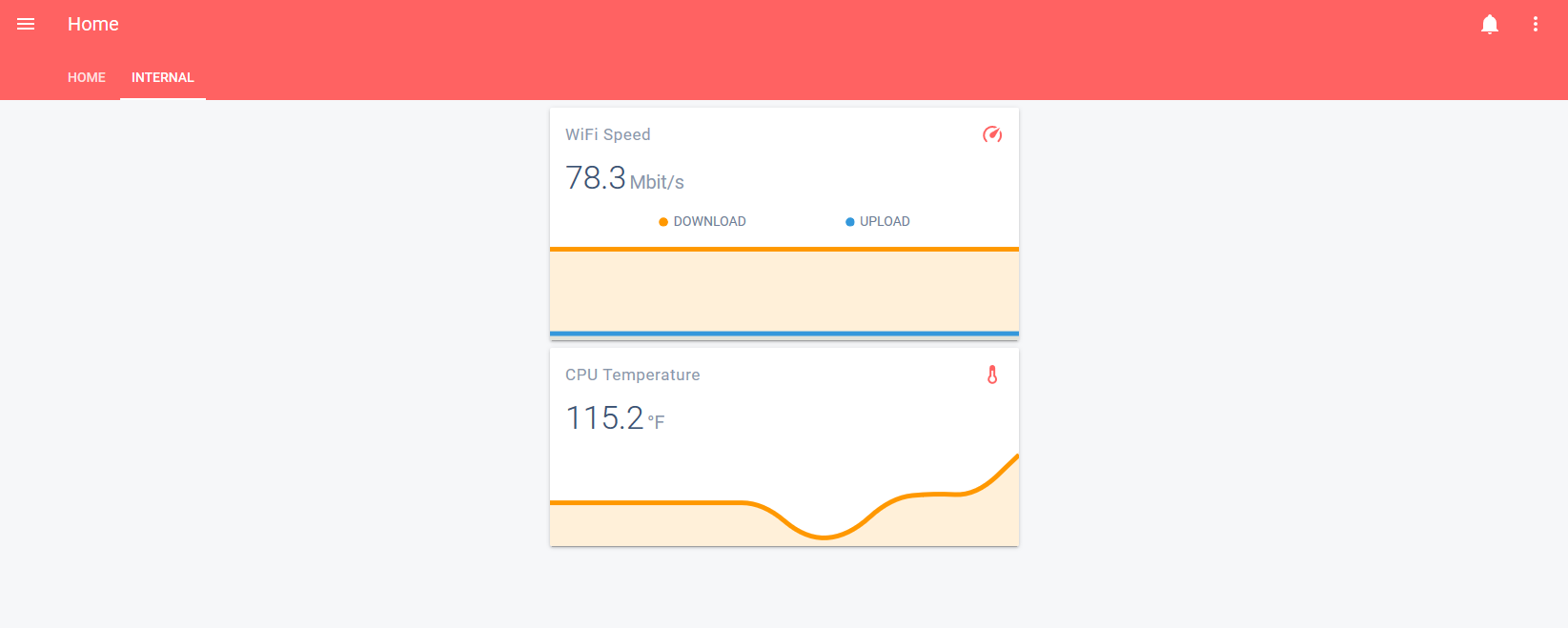
@vapid field i think mini-graph card would probably make that look a lot nicer. https://github.com/kalkih/mini-graph-card the cpu temp on my RPiB3+ is even longer character-wise than yours, 129.709° F lol
mild veldt
@latent moss
latent moss
@mild veldt Looks perfect! 👍
latent moss
just updated, works really well, nice one 😃
this radial-menu card would be awesome combined with floorplan, will probably be a while before i get to making a floorplan though. but it'd be super neat to click on a virtual render of your printer to see ink levels, or your tv to see input/channel select, a sonos or something that you could click to select albums in radial-menu etc. could think of a bunch of cool ideas
elder pendant
That is an excellent idea for the TV
I might have to install my second custom plugin now
mild veldt
@latent moss a floorplan was exactly what I had in mind for it 👍
latent moss
floorplan was always one of those "nice to have" things that i kept pushing off to the backburner, but now this radial-menu card got me super excited for the possibilities of it. feels like this could be integrated practically everywhere in floorplan. instead of just on/off for lights now you could have easy shortcuts to like 10 different light scenes and stuff for example. can't wait to see what people come up with
mild veldt
it really needs a long press
so then you could have it as a light or whatever, but then on long press bring up all these other options
polar kelp
I sneaked in a way to piggy-back off the built-in long press. Check how card-tools does it.
 simple jolt
@mild veldt custom updater shows version 0.0.2 as the current version of button card. I added the GitHub URL as described in the read me.
 wheat current
remove that, and open a PR to remove it from the readme @simple jolt nvm, it's correct
mild veldt
@polar kelp 👍
vapid field
@latent moss https://i.gyazo.com/0b2b5eddf1100561668233ec9aa9d571.png the mini graph card looks great. now i just gotta change the colors.
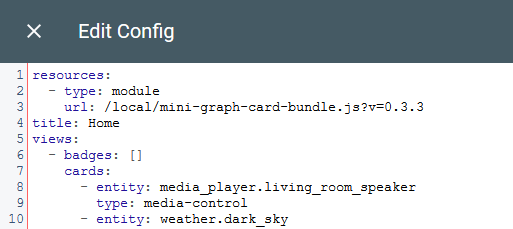
@scenic current it goes at the top of the raw config editor
 scenic current
Thanks.. .does raw config editor == ui editor from the gui? Can I do this from a manual card?
vapid field
to get into the raw ui config you have to go to Configure UI -> Raw Config Editor by clicking the three dots at the top right
scenic current
wow.. never knew that was there... checking it out now
vapid field
👍 check this screenshot https://i.gyazo.com/1246b897f010721557b0e09d8b0d05d6.png put your resources at the top like so
 scenic current
Got it.. Very nice.. Have been wanting to combine my cool/heat zwave thermostats for ages. Thanks for the help
While I'm here.. Any idea how to change Dark Sky icons? I much prefer the ones from the now defunct Wunderground
 sour thunder
Someone can tell me why i get this calendar-card.js?track=true:10:7 Uncaught ReferenceError: moment is not defined although i have included - url: https://unpkg.com/moment@2.22.2/moment.js type: js?
wheat current
order is important
sour thunder
Its in the calendar-card (https://github.com/rdehuyss/homeassistant-lovelace-google-calendar-card)
Its the first resource i include
I guess it works that way? Or does it include from the bottom? 😄
wheat current
also ?track=true will not do anything for that card
sour thunder
But it doesnt do anything bad, does it?
wheat current
nope, just looks wierd
sour thunder
Cache clearing didnt work
wheat current
get a better card 😛
sour thunder
@polar kelp sorry for pinging you, but is it possible to show your useful-markdown-card only if the sensor.updater exists? Would like to make a card which tells me when a update is available, but only show that card if an update is available 😄
/ is it possible to use the conditional card to check if an update is available? The docs say it can only check for state 😦
polar kelp
If you have a condition with an entity that doesn't exist, it doesn't show up, does it? What is the state of sensor.updater when it does exist?
sour thunder
Its the version number
Of the newest update
Thats available ^^
        conditions:
          - entity: sensor.updater
            state_not: "unavailable"
        card:
          type: custom:useful-markdown-card
          content: &markdown |
            # Update verfügbar ([[ sensor.updater.state ]])```
I made it like that, it doesnt show up. Have to test what happens when there is an updatethe state_not is just because it doesnt work without 😄
Works at least when i make a sensor.updater dummy myself
Thanks 😄
latent moss
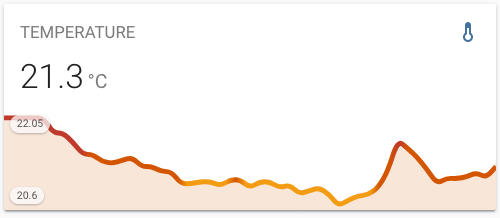
@vapid field looks good, a lot nicer than gauge card. be sure to also check out the "dynamic line color" section towards the bottom of mini-graph-card docs. that is one of the coolest features of the card imo, very nice for temperature related sensors like you're doing. https://user-images.githubusercontent.com/457678/52573150-cbd05900-2e19-11e9-9e01-740753169093.png
 amber belfry
the logic by which cards are places is somewhat lunatic I must say
polar kelp
It makes total sense if you’ve spent a few weeks studying the relevant source code.
mild veldt
Still waiting for you to overhaul it @polar kelp 😜
I'm not going to touch it
Maybe if I revisit muuri
polar kelp
If you don’t have the time, @amber belfry , you can read this instead https://github.com/thomasloven/lovelace-card-modder/blob/master/README.md#forcing-size
amber belfry
is a vertical stack counted as one unit or multiple units for the sake of the rule of five?
raven nacelle
@latent moss Any way to align the text in the center after show_icon: false?
latent moss
@raven nacelle it gets centered for me but i haven't tested all scenarios. you can try something like this.
          - type: custom:button-card
            entity: sensor.sonos_volume
            show_state: true
            show_icon: false
            style:
              - text-align: right
change text-align to center tho
raven nacelle
It is centered....but aligns to the top
amber belfry
I believe I could understand the logic that is implemented if I'll look at the source code sure, but I don't think it will ever make sense from the perspective of someone trying to make a frontend my users would want to use. I get the design principle behind this and with different screen sizes especially the mobile apps, the way its built makes it easy to run on say the iphone companion app where every card is below every other card.
But I have yet to create a view where every card is where I want it
raven nacelle
@latent moss with ```
- type: custom:button-card
entity: sensor.sonos_volume
show_state: true
show_icon: false
style:
- height: 40px
I see
mild veldt
@raven nacelle I think you'll want to set vertical-align
mild veldt
Well then...
amber jewel
@raven nacelle you were the one who was also having issues with those custom slider toggles right?
raven nacelle
              - type: custom:button-card
                entity: sensor.sonos_volume
                show_state: true
                show_icon: false
                style:
                  - height: 40px
- vertical-align: middle```@amber belfry a vertical-stack is the sum of the cards high. A horizontal stack is as high as the highest one.
amber jewel
i got it working for lovelace 😄
raven nacelle
@amber jewel I got them to work as well 😃 toggle: true
raven nacelle
Oh yeah....don't recall who was facing the error. Luckily my entity names are small so
what is the solution
raven nacelle
I see....so the slider appears in a different row
amber jewel
guess lovelace doesnt support two lines
latent moss
@raven nacelle i got it working i think... try this
            style:
              - height: 40px
              - text-align: center
              - line-height: 40px
there are no double height rows
mild veldt
@amber jewel not entirely true, we have secondary info
raven nacelle
that is default I believe
amber belfry
If someone can give me a pointer on what I have to get the circled card here https://imgur.com/a/qufw5Nz to where the arrow is pointing, I would be so grateful. I'm sorry if I came over as snarky but I'm getting a bit frustrated 😃
amber belfry
I've looked at it but it scared me 😃
raven nacelle
no other way to manually define the layout.
mild veldt
Stacks could be used
But layout-card is more flexible, I believe. Have yet to play with it
amber belfry
If I put the four cards in the upper right in a vertical-stack with the "Nächster Abfuhrtermin' Card in the lower center, it lays it out in two columns with the second one overflowing the screen
mild veldt
You need to use panel true and everything in a single stack which then has additional stacks
amber belfry
Actually that's the point where I snapped, threw something at the wall, angered the kitten, and came here to whine ^^
ok thanks everyone, it is what it is - lets try more stack options and the layout card
mild veldt
It is what is for now. It's always evolving. Get us more front end devs and it will get even better 😄
 devout loom
When using custom compact header ( https://github.com/maykar/compact-custom-header ) there's a gap between the header and content. It looks weird when using stuff in panel mode. Can that be removed?
mild veldt
@devout loom are you sure you're on the most recent version?
Should have been fixed in v1.0.1b6
devout loom
1.0.3b2 @mild veldt
mild veldt
Make sure your cache has been cleared if you recently updated
devout loom
Okay, something is wrong @mild veldt , in MS Edge, it says the compact custom header custom element doesn't exist
devout loom
I am using Chrome normally, I just wanted to check if it was different in Edge
devout loom
gap is still there in incognito window
is that what people are using these days, or as an alternative to chrome?
devout loom
@mild veldt https://i.imgur.com/EOjvlJo.png

Two different ways of setting up my view with it, both gives problems. The first one makes the gap, the second one does not, but instead the view starts behind the header
devout loom
hmm
Not sure
it's like, when it works "correctly" it just eats up part of what it is doing
mild veldt
Look at your config and to be sure. You have to define the cch card in EACH view
gotta run
vapid field
@polar kelp nice. which card is that ?
latent moss
Last example would be very cool for a hidden settings toggle thing
polar kelp
Dashboard POC
 tepid meadow
Im in dire need of help with the lovelace cards. I updated to 90 weeks ago and Im just so messed up about making it work. I have read all the material, copied a few other users trying to make it work. I have been unsuccessful with almost everything in lovelace. I need HELP
elder pendant
What errors are you having specifically?
raven nacelle
Not all streams are supported (I think it has to be rtsp). See logs for details
quartz hazel
behidn that is picture-entity card, where you can see pciture, but again, live view not working after i click and get new window
yap, it's rtsp
raven nacelle
anything in the logs
quartz hazel
camera:
  - platform: ffmpeg
    name: Soba
    input: -rtsp_transport tcp -i rtsp://192.168.1.7/unicast
sorry, I'm VERY new in this
where can I check logs?
raven nacelle
raven nacelle
the last icon on the left tab :
quartz hazel
nop,e nothing....
raven nacelle
scroll down on that page
raven nacelle
You need to use this config https://www.home-assistant.io/components/generic/#live-stream
generic camera
quartz hazel
ok i'll try this one
oh, yes..I tried this one
problem is, this camera don't have still image
i'll get error...
raven nacelle
which camera is that
raven nacelle
This thread has lot of details https://community.home-assistant.io/t/stream-component-confirmed-cameras-and-configurations/106729 on camera configs
quartz hazel
I posted thread about my camera ...I get config from there ...
mild veldt
@polar kelp mad man! 🤣 great stuff!
quartz hazel
yeah, tI 'm using this hack for 2 y now..now i'm trying to integrate in HA
camera:
  - platform: generic
    name: Streaming Enabled
    stream_source: rtsp://194.218.96.92:554
Not workign with this one either. Same error ...
No, now I have error ...
Invalid config for [camera.generic]: required key not provided @ data['still_image_url']. Got None.
but as I said..this cam has no still pic
 mighty kindle
Hey all- how would I change the icon of a Zwave outlet that controls a light to appear the same as the rest of my actual lights
 prime umbra
is there any LL card that will reproduce a switch template icon_template to change icon depending on the state of the switch?
latent moss
have always wanted to have my fan spin/animate when it's on, and finally made it happen... kind of 🤣 https://gfycat.com/InfatuatedMenacingBlackwidowspider
mild veldt
@mighty kindle https://www.home-assistant.io/components/light.switch/
@prime umbra config-template-card
@latent moss what are you doing...? 😂
latent moss
@mild veldt sad thing is that took me like 3 hours to do, one hour of which was spent editing the wrong darn file... an outdated one in /www/lovelace/ instead of /www/github/custom-cards/ .. no wonder the changes weren't showing up lol. total newb 😦
idea was to mimic a spinning fan blades though when it's on, the recent blink animation addition in custom:button-card reminded me i wanted that for a long time and tried to add spin animation too. but failed horribly lol
mighty kindle
@mild veldt That worked great thanks
i'm also having issues with the camera streaming - Setup exactly how i interpreted the doc- But both my test cameras just show idle and dont stream anything (log shows nothing)
stream:
camera:
-
platform: generic
name: "Vera's Room"
still_image_url: "null"
stream_source: "rtsp://usr:pwd@192.168.7.165/live" -
platform: generic
name: "frontdoor"
still_image_url: "null"
stream_source: "rtsp://[usr]:[pwd]@[192.168.7.147]/live"
tired with and without brackets around user and pwd and ip
mild veldt
@mighty kindle try #330944238910963714
damnit @latent moss, now I'm dinking around with spin animations when I don't even have any smart fans
I got a good looking spin, but making the text not spin would require some refactoring
okay...i officially hate my gif making software
that's "60 fps"
it's super smooth here
okay, got something workable...don't love my code...feels hacky
latent moss
nice
mild veldt
okay...so stop having good ideas now so I can watch a show for a bit 😃
latent moss
@mild veldt a friend of mine just came up with this... 1000x hackier but kind of amazing that you can even do this at all lol https://hastebin.com/ezotukohup.cs
said that he basically hid the icon, and play an animated gif as the button background lol. hacky shortcut and wouldnt work for any other icons/colors etc but pretty cool
 heavy cove
I have an entity-button connected to a Wemo Switch that is set to toggle, but when i press it, it doesn't do anything. However if I toggle it with the app, HA shows that it is in an on or off state. Am I doing something wrong?
it works fine if I use it in the states page and will toggle there with no problems
latent moss
can you post your code @heavy cove
hard to help diagnose issues without seeing what you have
heavy cove
- type: entity-button
entity: switch.bedroomfan
tap_action: toggle
- type: entity-button
entity: switch.heaterfan
tap_action: toggle
- type: entity-button
entity: switch.speakers
tap_action: toggle
The buttons show correctly, but when you tap them... nothing happens
latent moss
i dont really use entity-button, but think it needs to be tap_action: action: toggle
heavy cove
ok.. I'll try that.. see if it makes a difference
@latent moss how would you have done it differently? It's just a button to manually turn the Wemo's off and on
latent moss
well i use a custom card for all my buttons (custom:button-card) . it's a million times better than the default entity-button imo.
For just toggling a switch like you want to do though, the default entity-button is fine.
heavy cove
That seemed to work perfectly fine
latent moss
nice
mild veldt
When in doubt, read the docs
heavy cove
I read the docs.. but i miss interperated the docs.. sorry @mild veldt
mild veldt
all good
heavy cove
I'm trying to set up the button-card @latent moss mentioned... to do that you need to install custom updater.. I followed the two instruction.. put the python file in the config/custom_componants and then added custom_updater: to the configuration.yaml file but when I restart HA it says Invalid confiig in the little bell up the top... what have I done wrong?
from pyupdate.ha_custom.custom_cards import CustomCards as Cards ModuleNotFoundError: No module named 'pyupdate : is the error
 errant plover
You do not need to install custom updater. Tht's optional.
heavy cove
ok cool... but how come that doesn't work still?
errant plover
Don't know. I don't use it. You probably need this: https://github.com/ludeeus/pyupdate
heavy cove
Where do I put all that? There are no instructions
errant plover
mild veldt
heavy cove
@mild veldt Yeah.. I followed that.. I found that there was a missing step... you needed to take that pyupdate.. download the git repo zip. extract it and put that pyupdate folder into the custom_componants folder
reboot and it works
wheat current
#FakeNews
heavy cove
#madeitwork
 old karma
I only needed to restart Hassio and that was it with pyupdate.
heavy cove
pyupdate wasnt there in the first place for me though
mild veldt
@heavy cove that's common for custom components. Usually requires a second restart
heavy cove
ahh ok
 wild comet
is someone using an automation with the USGS earthquakefeed? i cant get it to wok :/
mild veldt
@wild comet #330944238910963714
vapid field
yo im having difficulties getting a h264 stream to play in lovelace. the thumbnail works (updates every 5 seconds) but when i try and show more info it loads forever
has anyone gotten this working?
raven nacelle
@vapid field is it a rtsp stream and are you using the stream component? Check logs for any errors
vapid field
no its a https .m3u8 stream. i dont own the camera either (its a news skycam). nothing in log sadly
raven nacelle
not all streams are supported by stream component (yet)
vapid field
and im using ffmpeg camera atm
raven nacelle
that may be why it is not workign
if you want to use the stream component
it should fall back to the regular camera though
vapid field
ok ill check it out. is there any way for me to test if my stream is compatible?
since there is no log output
I have migrated hassio and copied file lovelace file in .storage folder and ui-lovelace.yaml in config folder. Lovelace is the last state, ui-lovelace,yaml is in state when i migrated-too old. I use Raw config editor, now my hue light names has change and can not cghange them on floorplan. I have change the names in editor, but wont take effect, still showing triangle and old name.
because as i said, it somehow can grab updating thumbnails but it wont play the actual stream
raven nacelle
only rtstp streams are supported. The logs should indicate if the stream is not supported and if you are using the stream config
@vapid field Don't copy those files...they will be created again.
You can use the Entities in configuration section to edit which entities you want to retain
vapid field
can not copy the lovelace configuration?
raven nacelle
yes, you can copy the config files
the files in .storage are supposed to be left alone. Only mess with them if you know what you are doing
vapid field
so delete them, restart, then copy the inside in editor?
 heavy shoal
Hello, I have one question. the anchor in lovelace disappear after saved. Is that to avoid cross cards conflicts ?
mild veldt
wat?
 small pike
From your guys' experience what is the best calendar card to display google calendars?
raven nacelle
@small pike I am using https://community.home-assistant.io/t/lovelace-google-calendar/63662 and works quite well
https://github.com/ljmerza/calendar-card is a version of the same card, I believe, and is updated
heavy shoal
@mild veldt when you use yaml anchor in UI Lovelace, you save, you reopen this anchor was replaced by the content. Anyway I will persist my templates somewhere else and copy paste.
prime umbra
@mild veldt config-template-cardworked perfect, was hard to get it working but got it done
is it possible to add a title: option for the card? 😃`
raven nacelle
@prime umbra it already does
mild veldt
@heavy shoal anchors are not supported by the UI editor
raven nacelle
you just use the title for the underlying card. See example https://github.com/arsaboo/homeassistant-config/blob/master/ui-lovelace.yaml#L427
prime umbra
hmm did i miss that... let me look
small pike
@raven nacelle thanks I'll check it out
@raven nacelle Just added it but it just keeps trying to load and won't display the calendar info
any idea?
heavy shoal
@mild veldt ok 👌 at least I can use before it replaces
raven nacelle
@small pike Follow the instructions carefully and make sure the .js file has the right permission/owners
vapid field
@raven nacelle made some progress after updating HASS to 0.92. whats strange is the content is loading in my requests but its not showing in my browser
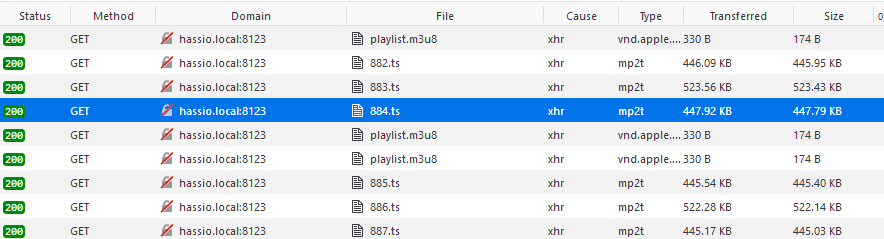
any idea as to why this is happening
raven nacelle
still ffmpg camera?
I am guessing it is making the request and then realizing that the stream is not compatible
vapid field
the url served by home assistant is http://hassio.local:8123/api/hls/deee824cb890f92da80cf1b431f05e9d53c6ccd18e5e48f132b2ab4993f92d7c/playlist.m3u8
which happens to work when i play it in vlc. just not in firefox.
 wary meadow
Anyone have a way to add text only to a picture-elements card? I used to have a way to do it but cannot recall.
wheat current
markdown-card
wary meadow
I want it inside a picture-elements card, not a stand alone card.
wheat current
yes?
or https://github.com/custom-cards/text-element but that has not been updated in 9month and is made by someone that should not be allowed near frontend.
 spiral arrow
it's SPINNING!
spiral arrow
it's not too bad when looking at the whole frontend, but I'll prob change it to something less flashy,
credit to the custom button card for that one - https://github.com/custom-cards/button-card @mild veldt

GitHub
Lovelace button-card for home assistant. Contribute to custom-cards/button-card development by creating an account on GitHub.
 green ice
@vapid field - try putting ?latest at the end of your url or javascript_version: latest under the frontend section in your config.
Also @raven nacelle - more than RTSP is supported, any H264 live streaming protocol is supported, HLS, SRTP, etc.
FFMPEG camera supports stream now too, as well as Amcrest, and in .92 a bunch more.
vapid field
@green ice so one of my cameras works but the other doesn't. both are currently using ffmpeg. is there any alternative to ffmpeg camera component for m3u8?
 limpid remnant
anchors. Now I understand the readme for the useful-markdown-card. That will make it much easier to define buttons and styles without replicating (yaml mode).
prime umbra
@spiral arrow exemple of the code of fan spinning?
spiral arrow
          - type: "custom:button-card"
            color_type: icon
            size: 22px
            entity: switch.nest_fan
            icon: mdi:fan
            tap_action:
              action: toggle
            show_state: false
            state:
              - value: 'on'
                color: rgb(29, 189, 229)
                spin: true
              - value: 'off'
                color: rgb(227, 228, 230)
custom button-card 0.2.0 required
spiral arrow
GitHub
Lovelace button-card for home assistant. Contribute to custom-cards/button-card development by creating an account on GitHub.
prime umbra
strange for some reason shows same
@spiral arrow i deleted and put the new card . on custom components still shows me 0.0.2 available...
spiral arrow
I just allow the custom updater to take care of mine, and restart hass container after each update
on occasion I need to clear my browser out.
limpid remnant
I just updated button-card to 0.2.0 copied the config above, and logged out and in again. Icon spins, but I needed to add a spin: false to the off condition
to make the spin stop when turned to off
mild veldt
@prime umbra the version number is just the string at the end of the string in your resources section
It doesn't infer it from the file itself
@limpid remnant you don't need to log out/in, just need to clear your browser cache
limpid remnant
Thanks,
 civic sedge
Someone know why Android devices vs windows tablets running chrome having such an enormous delay between state changes? >15s vs <2s
The Android tablet got even more ram
latent moss
the new spin: true on custom button-card is so cool.. thx @mild veldt 😃 https://gfycat.com/NearNiftyInchworm
 gilded veldt
  entity: switch.bedroom
  type: entity-button
extra_styles: |
  @keyframes blink {
    50% {
      background: red;
    }
  }
style:
  2s linear infinite: null
  animation:
    - sensor.button_animation.state
type: 'custom:card-modder' ```

😃can some one tell me why this card isnt working
its suppose to blink when the light goes on
  sensors:
    button_animation:
value_template: "{% if is_state('switch.bedroom', 'on') %}blink{% endif %}" ```#330990055533576204 is better place to ask
latent moss
np
@gilded veldt imo i think it would probably be easier to just use custom button-card instead of modding the extremely limited entity-button. custom button-card has blink built in (along with spin and many other features), see the last example on this page: https://github.com/custom-cards/button-card
gilded veldt
ok thanks
elder pendant
@mild veldt is there a plan to add state_image to the radial menu? Or is there a way to do that that I'm missing?
I can just set icon to none and put it on top of a state_image. That works for now 👍
mild veldt
@latent moss the idea of use a single plugin to customize rather than each card implementing it slightly different is IMO a much better approach
@elder pendant feel free to add a feature request to the repository
elder pendant
Oops, there already is a request. Sorry for bothering
latent moss
in theory yeah... i just don't like the fact that you need a plugin to mod very basic features into entity-button that (imo) should be there already. Not necessarily in this specific case matrix mentioned, but other extremely basic things like displaying the yellow "on" state for input_boolean etc. for me it feels like it's easier to just use another card that has those features instead of bolting things on 🤷
prime umbra
@polar kelp is it possible the toggle-lock-entity-row card have option for input pin to unlock?
 pallid needle
where do you get errors for when a card just shows up empty?
I tried to add two thermostat entities to an entity card
there are no errors I can see, but it is empty
 timid burrow
@latent moss IMO it's far better if the features are in core as for instance if a dev loses intereest in a custom card, unless you are lucky enough to have another dev take it up it's dead. So I'd really prefer to use NO custom cards at all..
pallid needle
how does lovelace decide to go to three columns
I just converted a fairly overloaded page to vertical-stack
but once I got down to three, it went to two column
and now I can't see everything on one screen
mild veldt
@timid burrow my sentiments tend to go back and forth on this. You'll never see everything in core. It's also just as likely to become a victim of devs losing interest. Cards in the custom-card org is huge as that allows a group to contribute more easily. My hope is that we can get core to treat custom cards as first-class citizens. The difference between the two is then almost gone. 🤞
pallid needle
@mild veldt I feel like the way to do that is to have a way to browse them from inside home assistant
a way to know they are vetted
and ideally a way to install them from home assistant
though the last one is more of a want than a need
pallid needle
yeah
I feel like the current set up is good
I mean there is enough to do in core right now
like I'd like a way to organize cards via drag and drop far before the ability to auto install
I think that is my biggest frustration with the ui atm
though, my frustration is not very high
I can't really complain about HA
elder pendant
Would that only tie to the custom-cards repos? Or have like a registry for custom cards
pallid needle
@elder pendant a registry
elder pendant
Like livesplit does with autosplitters and igt timers
pallid needle
I've never used those
elder pendant
I could take a crack at a plugin browser. That sounds like a fun project
pallid needle
Just make it better than npm 😛
more seriously though
I'd think you would want a way to track HA version compatibility
wrt plugin version
elder pendant
Meh, I'd probably just make it a separate service. It wouldn't be lovelace based
pallid needle
yeah
elder pendant
Oh you mean like make it a requirement for the cards to add what version it's for?
elder pendant
Oh yeah, there's a few properties I was thinking that would be useful
I would not want to get into supporting multiple versions within the service. Devs can just upload the latest version
pallid needle
hmm
I would think that would be critical
since if someone wants to downgrade, they would need to see the older versions
elder pendant
Lovelace cards don't really have compatibility issues like that though. At least very rarely
elder pendant
There was a major change a month or two back
But it was something with an html element or something that was deprecated
Or a change to which one to use in HA
latent moss
@timid burrow I mostly agree with you. I think it’s a bit unfortunate that many users (myself included) need to rely on third party custom cards for basic UI elements like buttons or graphs. Ideally the fundamental UI stuff like that should be handled well at the OS level, with custom cards being more for integrating third party services.
But it seems like in most cases this stuff isn’t wanted in core, a lot of configuration and/or styling options seem to get shot down in the name of simplicity. Which I think is a fine goal to have, but there can be more of a middle ground here. IMO keep the UI editor basic and simple to use, but still allow extra config options for those who toggle to manual/YAML mode.
timid burrow
@latent moss agree! I was dismayed to see that things as simple as changing the button when the state changes is a no-no for the core card and that is the reason I ended up using the custom-button card in the first place. Seems a lot of basic features are outside the 'vision' I use a bunch of custom cards for the same reasons you do but it does make me a bit nervous!
should also add, for anyone that hasn't tried it, you can just add the card in lovelace... any of the ones here https://github.com/custom-cards/ as long as you are using the custom_updater and all you need do is add them to the config like this as an example:
  - url: /customcards/github/custom-cards/text-divider-row.js
    type: js
Then if you check in the tracker card it will show that card with the available version and N/A as the installed version. Just tap Update All and it will download it for you so as long as lovelace references it that's all you need to do!
wheat current
Isn't that missing a ?track=true at the end to work? 🤔
 leaden mantle
I have been racking my brain trying to figure out how to make a call service lovelace entity button to toggle the media_player.volume_mute service. I have tried to use data_template and have an if statement for is_volume_muted but no matter what I do it displays this error,
Failed to call service media_player/volume_mute. required key not provided @ data['is_volume_muted']
Can anyone help me with this, I have searched github and google to find the best way to make it work correctly but have had no luck with peoples answers so far, any ideas?
 kind shellBOT
Please use https://www.hastebin.com/ or https://paste.ubuntu.com/ to share code or logs.
Command '~share' was invoked by: Tinkerer
split granite
Show us what you've done, and we can help more easily
leaden mantle
ok thanks
split granite
action:
  service: media_player.volume_mute
  data:
    entity_id: media_player.samsung_tv_remote
is_volume_muted: true``` that's from _an automation_ of mine that mutes the a TVCan you show me where in the docs you've seen the use of data_template for a card?
Also, what card is that?
leaden mantle
entity-button card and one sec i'll get the link
split granite
https://www.home-assistant.io/lovelace/entity-button/ makes no reference to data_template
leaden mantle
https://www.home-assistant.io/docs/scripts/service-calls/ under use templates to determine the attributes
split granite
Also, I'm pretty sure that there's zero support for templates in Lovelace 😉
Yes, or have Lovelace toggle an input boolean, and use that state change to call an automation
leaden mantle
I was thinking I could do an automation or script but was thinking that seemed excessive just to toggle a mute
or maybe a switch?
Actually would a switch be better?
split granite
Probably not
It's likely to be more complicated
You could do it with https://www.home-assistant.io/components/switch.template/ though
A script would require the least "moving parts"
leaden mantle
Alright, i'll do a script, thanks for that.
timid burrow
@wheat current it’s actually indifferent to track=true and works just fine without it as I posted.
wheat current
Cool :D
That's actually a bug then 🙈
timid burrow
Hahahaha... not from where I’m sitting
wheat current
Could be worse 😛
timid burrow
Well it’s great working without that. I was actually wondering if it was ever needed, Some cards tell you to add that but a bunch don’t and they all work. Is there a downside to the ‘bug’?
wheat current
yes, if you allready structure your cards like this:
/customcards/github/custom-cards/super_awesome_card.js
it will overwrite it when you check, if there is a card with the same name in that org
timid burrow
I only do that for the ones in that custom-cards repo
So are you saying all cards in the custom-cards repo should have track=true in there?
I would think you can’t have 2 custom cards with the same name anyway.... you can only reference one with the name
wheat current
could have, but since it's not doing anything, I don't see a reason to use it 😛
timid burrow
But when you tell lovelace the type: custom-card there can not be 2 custom-card s even if you define them in resources.... I don’t see a way to differentiate between 2 cards with the same name... in fact I think lovelace will throw an error if you try and load the same resource twice even though they would be ‘different’?
vapid field
is there any way to make a gauge that has a severity meter with custom colors
 cunning silo
is there a way to use the panel_custom to pop out a window when the add-on does not use ingress?
vapid field
This may sound basic but how do you show different sensors in the UI depending on the time and/or date?
split granite
That would be a conditional card
 fiery gyro
how do I add "devices" to my home screen?
I have an ESPHome device configured but I am not sure how to add it to my home page on hassio, also How do I set up devices for google assistant?
Do I need to make some changes to config file? if yes then what should I add in there?
split granite
FYI, Hass.io is the install method you used to install Home Assistant - the software we all run
If you've done nothing with Lovelace, it should only need you to refresh the page
fiery gyro
🤔
I see the device on my integrations page under configuration but not in "overview" tab
does it make sense?
split granite
Yes
You should find that if you go to Overview and do <CTRL><SHIFT><R> that causes that page to refresh
fiery gyro
alright
omg it worked!! but I see devices 2 times 😂 , thanks a lot, let me see if I can figure this one out
 quasi tinsel
how do i enable lovelace ?
split granite
It's enabled by default
But, if you had a really old install or forced it to use the old UI, go to and pick the option to use Lovelace
 old whale
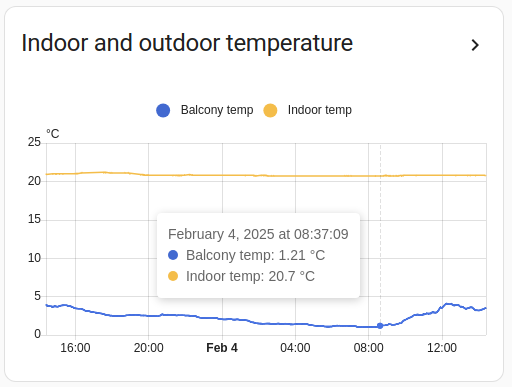
how do i make mine look like that?
currently have this ugly piece https://i.imgur.com/i3HEA0z.png
 split granite
That's down to how often it updates
Yours updates at long intervals, with big steps. The one in the example updates regularly with small steps
old whale
oh, i see.
Thanks 😃
another question, is there any way to remove the gap between the two entities ? redacted 😉
mild veldt
@old whale vertical-stack-in-card
old whale
@mild veldt thanks, ill check it out. Just to confirm, this one ? https://github.com/custom-cards/vertical-stack-in-card
mild veldt
👍
 tepid umbra
Hello everyone 👋
kind shellBOT
@tepid umbra posted a message that is too long, it is moved here --> https://paste.ubuntu.com/p/KwQrQnPDCJ/
limpid remnant
The "Reload Lovelace" button on the screen that shows when a parser error occurs has not worked for a number of versions now (currently 0.91.3). Am I the only one that creates parser errors? ( mode: yaml ). I have to refresh the page and log in again once I've fixed my grammer.
@tepid umbra you also have fewer closing } in lines 48-51 than you have their opening siblings in lines 1-7. I think you need another } after line 50. Then try adding commas after the closing } ] in 48-51. Its hard to see without a proper editor and indentation.
Try adding the } before the commas, though
latent moss
I have the same issue as you @limpid remnant with the reload lovelace button not working... I thought it was just me. I'll submit a bug report on that.
wheat current
the forum is a great start @vapid venture a lot of users have shared their "dashboards" there
 vapid venture
Thank you!
 main meteor
Using a custom ui and all of a sudden all my sensor texts got blacked out. The theme was untuched
mild veldt
A custom UI?
 next rivet
Hm, Having a slight UI oddity with Entity switches that are set to Input_booleans, you can tap the button and it'll schange than input_boolean's state, but the change is not reflected in the UI
(ie, icon is blue, you tap it.. it stays blue)
mild veldt
Input booleans don't change color
 opal light
Is anyone that is using the hold_action with the custom button card able to get it to work?
mild veldt
@opal light check the forum. You need something from core on your view that implements hold action
opal light
forum?
opal light
So it needs one of the default Lovelace buttons to actually work?
mild veldt
Not a button necessarily
opal light
cards*
just a card that has hold_action enabled that's part of the default set
looks like you guys are going to be working on your own implementation of hold_action? If so, I'll just live without until you get it going. I don't want to have random cards on pages
Thanks for that link though. Good info in there.
mild veldt
I make no guarantees on that
latent moss
It seems to still work for me even on pages that i dont have an entity-button on
unless - type: entities supports hold_action , thats the only "core" thing on this view, and hold_action in button-card still works for me. I guess maybe i am lucky
timid burrow
@next rivet the input_boolean colour thing is why I use the custom-button-card
latent moss
made a quick demo of some recent custom-button-card additions: hold_action , state, blink https://gfycat.com/orangeminiatureblacklemur fun to play with these 😃
timid burrow
totally agree.... now my alarm notification button flashes:)
next rivet
Hmm.k..
 errant birch
is there any way to change time window in the more info card ? like in google graph ?
I know ther's the history tab but it takes forever to load and I'm useaually just interested in one sensor at a time anyway
I feel like this is kinda missing from HA since it's either really simple graph or full on data management addons..
split granite
Switch to using MySQL/MariaDB/PostgreSQL for the database - that'll speed things up a fair bit
Also Hass.io is an install method
This is Home Assistant
😉
sour thunder
Is there a way to add a input_slider to a light card? Like the effects drop down, brightness slider etc, i would love to have the effect-speed slider in there, for my WS2812
mild veldt
@sour thunder https://github.com/ljmerza/light-entity-card
 jaunty venture
What is the correct way to re-order badges in lovelace? Last time I messed with the lovelace file in storage and got myself in trouble. Other card have a "toggle editor" mode, but cant seem to find this for badges?
mild veldt
click on the pencil on the tab/view you want to edit
jaunty venture
Ive tried that @mild veldt - click the pencil on the home screen, select the Badges tab. I can add and remove, but see no way to reorder?
tepid umbra
Are there companies or people offering a service to set up home assistant? I’m just not clever enough for this 😂
split granite
With patience you can do it
Assuming of course you're capable of learning and willing to learn 😉
civic sedge
lol - Everyone Is able to make it 😉 - Otherwise - for 50 bucks per hour I`m in 🤣 Otherise 2 - Everyone who knows the awnster to the question ll help you
tepid umbra
Well I’ve been at it every night after work and all weekend (inc this bank holiday weekend) and I achieved so little. I have HA installed but the first job was to configure the lightwave switches and sockets and it’s been a nightmare.
civic sedge
Most are starting with tasmota or something they have at home already - But I had a teamviewer fight with KNX - Didnt got far with this
mild veldt
@jaunty venture missed the re-order criteria. Use the "Raw Editor"
jaunty venture
thanks @mild veldt I could never find the Raw editor - didnt realize it only show up in the the ... after you are in edit mode.
sour thunder
@mild veldt so i should mod this, or what is the point?
mild veldt
@sour thunder you cannot add anything to the core light card. I was providing you another option that does have a effect drop down. Another option could be to setup an input_select with your effects and put it and the core light card in a vertical-in-stack-card
sour thunder
Huh, effects work. I need the effects speed slider 😄 but okay, guess that doesnt work
 odd umbra
I might have missed it, but I can't find the GIT-command for installing card tools. Here - https://github.com/thomasloven/hass-config/wiki/Lovelace-Plugins - I can only see card-modder.js??
mild veldt
card-modder looks to just be the example Thomas chose to use in the wiki. Instructions are somewhat dependent on the card though
errant birch
would there be a way to replace the standard graph presented in the "more info card" with a google graph by a hack of some sort ?
mild veldt
@errant birch you could use the popup-card to put any LL card you wish in it, but I'm not familiar with a google graph one. mini-graph-card is nice, though
errant birch
I'd love to be able to select a timeframe for the graph from within the more info dialog box
but to be fair, my coding skills are no up to the task.. not even close ..
 proper bane
Anyone know how to fix the idle camera card? Hassio, camera feed from Blue Iris.
LOVELACE:
type: picture-entity
title: Front Porch
entity: camera.frontporch
show_info: true
CONFIG:
camera:
- platform: mjpeg
mjpeg_url: http://10.0.0.39:81/mjpg/frontporch
name: frontporch
username: !secret bi_username
password: !secret bi_password
authentication: basic
manually opening the URL using the secret works fine
mild veldt
@errant birch so you could use the history-graph card inside a popup-card
errant birch
@mild veldt yes
 prisma totem
Anybody seeing a problem with images not being accessible from picture-elements card. Picture is in config/www/floorplan.jpg and specified with the image: /local/floorplan.jpg but it just shows a broken link.
mild veldt
Was it working previously for you or is this new? Did you just create www?
prisma totem
No I haven't used picture-elements before. Yes I just created www.
permissions through ssh are the same as other directories at that same level and the files within the www dir have rw-r--r-- permissions.
BTW, This is on HASSIO on a RP3B+
latent moss
If you just created www you need to restart Home Assistant @prisma totem
should work after a restart
prisma totem
good to know...thanks.
 hybrid laurel
I’ve got a media player with a source. Is there a way to use a entities card config with the name of the media player showing the active source? Basically how do I configure the name based on what the current source value of the media player is
mild veldt
You could use my config-template-card to grab the source from the attributes and set that to the name
polar kelp
Or you can use this to change the secondary info row to display the source https://github.com/custom-cards/secondaryinfo-entity-row
sharp talon
Is there anyway to change the height of a blank card with custom-button? I've tried adding style and height but this does not changing.
 obtuse fable
Good afternoon
First i have to apologize because i know that this is a noob question however it's driving me crazy
I'm trying to use this card
so i have added it to my resources as it was on the "exemple"
resources:
  - url: /local/circle-sensor-card.js?v=0
    type: module
ive added the file to my www directory
only the .js
but when i try to use it i get:
"type": "custom:circle-sensor-card",
I have the flag
frontend:
  javascript_version: latest
also test it with : auto
I have tried another browser
change V=0 to V=1
unfortunally nothing works
obtuse fable
well after a few more debug:
Cross-Origin Request Blocked: The Same Origin Policy disallows reading the remote resource at https://unpkg.com/@polymer/lit-element@^0.5.2/lit-element.js?module. (Reason: CORS request did not succeed)
seams that firefox block this
 bitter compass
are there other options for light cards for a linear slider instead of a circular one?
elder pendant
Not with default cards
But you can use this custom one https://github.com/thomasloven/lovelace-slider-entity-row
bitter compass
does this go in my lovelace.yaml file? the .js go in same directory?
oh wait, the markup goes in a card? guess i need to google where to put the .js file
 rotund thicket
@mild veldt I'm using https://github.com/custom-cards/camera-card and I want to integrate that card into a picture elements card. Since the camera entity I use has transparency, your module doesn't handle it very well
This is the expected result: https://imgur.com/w5QQ5RT
and this is the result with your module: https://imgur.com/U5Nmmfm
Ahh. the reason I don't want to use picture instead of your module is that because it won't update real time
bitter compass
anyone know of a good tut on how to install and configure custom cards? im lost after putting the .js in the www directory. not sure what markup i need to put where
rotund thicket
kind shellBOT
Follow this guide to add your first custom plugin to your lovelace configuration
Command '~lovelace-plugins' was invoked by: Villhellm
bitter compass
trying to add this to the raw editor but getting error
resources:
url: /local/slider-entity-row.js
type: js
rotund thicket
resources:
  - type: js
    url: /local/slider-entity-row.js
should it be url: /www/slider...
ah, thanks
can i put initial_state: false in the editor on a group of entities i want to be off upon restart?
polar kelp
I made a thing for people who own a Mi Flora and are comfortable with custom cards: https://github.com/thomasloven/lovelace-flower-card
🎉 I guess
 mortal cape
@polar kelp what award are you going to give to the first person to ask where the database file can be found? 🤣
latent moss
Don't own any plants but that's a very nice looking custom card 👍
sharp talon
Give us a clue what database file we need 🤷♂️
mild veldt
@polar kelp nice, I just got one of those and have another one on the way! 🥀
amber jewel
grrrr
why can i not get my summer automations and my winter automations for climate control to be by eachother
moving them up and down just makes everything get randomly reassigned
latent moss
I'm wondering whether it's safe to use camera_view: live on a Raspberry Pi? It seems to be working very nicely, and with seemingly little processor use. The WIP blog post for 0.92 says "Warn, can use a lot of data. We are exploring being able to add a mode to only show it on desktop." which sounds like it's talking about lots of network data/bandwidth. But is it doing the same for SD card writes or something that will murder my Pi faster?
I have it on a separate view at the moment and not my main one, not sure if that makes any difference, like is it always constantly streaming the live view or whatever even if you're not on that tab is my question i guess.
sharp talon
@mild veldt Padding doesn't seem to work for me with a blank-card but if I set to card or remove the colour type all together it does work but doesn't display as intended (no card) 😦
polar kelp
@sharp talon I won't say because of copyright liability and stuff, but what you're looking for is a MiFlora DataBase, a "MiFloraDB" if you will...
sharp talon
@polar kelp That’s all I needed to know.
amber belfry
sooo, I'm a bit salty. I got a cheap amazon fire hd 8 tablet, and wanted to go the route of fully kiosk or wallpanel but both don't work correctly because of the outdated webview component in fireos
does anyone know about some workaround for this
polar kelp
I think I heard something about being able to upgrade the OS if you root them... but I'm not sure.
prime umbra
@polar kelp is there any way toggle-lock-entity-row could have option for pin mode protection?
polar kelp
It's not really meant for security. Think of it like the piece of tape on your light switch that reminds you that oh yeah, there's a smart light bulb in that one...
That being said, it's due for an overhaul. Add an issue on github and I'll see if it makes sense when I get there.
amber belfry
OK that's helpful. Let's see if I can get this done.
 vestal crypt
Hello, I just installed HassIO on my Raspberry Pi and I get this error on my "Overview" tab:
{
    "type":  "custom:hui-empty-state-card"
}```Pfft tape on the light switch is so passé. The fuzzy part of adhesive Velcro dots is where it's at. Or if you're feeling sadistic - the hook side dots. 😃
polar kelp
@prime umbra You mention different users in the github issue. You're aware of this, right? https://github.com/thomasloven/lovelace-toggle-lock-entity-row#other-options
prime umbra
@polar kelp ya im aware of it, just still belive having pin entry would still be awsome option, sense alot times the desktop is open with HA in screen and kids tend to be curiouse... hehe
 atomic glacier
@polar kelp after updating card-modder to Latest commit 0a6b0a8 it negatively affected 16 of my views. Nothing in dev console, as this is not generating any errors I have found so far. 2 examples w/before & after here: https://imgur.com/a/LFfNJlw Kinda the same thing you had fixed way back with modder, but not exactly the same. Partial code here for just the beginning of the first view up to the first card: https://pastebin.com/N3gLzkP6 Thanks! FYI reverted back to version 8b0479a and it went back to original styling.
polar kelp
Right. I know what the problem is. I’ll add a fix lter, but you’ll need to add one line to your config.
In the end I think you’ll appreciate the new feature.
atomic glacier
@polar kelp you should know me by now...always loving new features😉 I'll stay reverted till you release, though, as that looked awful in my views😂 Thanks for the hard work as usual!!!
 scarlet kiln
I cant seem to figure out. How do I extract an attribute value of an entity to display on the lovelace glance card ?
how do i refer to an attribute ?
elder pendant
The easiest way is to make it into its own sensor first https://www.home-assistant.io/components/template/
scarlet kiln
thanks, i remember not too long ago there is a way to directly refer to attribute without creating a sensor... or did i remember wrongly ?
maybe i remember wrongly, or it was a customise attribute card
polar kelp
@atomic glacier I just uploaded a new version of card-modder.
The new feature I was talking about is that it will now automatically mod every card in a stack or layout-card separately. So you can do yaml type: custom:card-modder style: --ha-card-background-color: blue card: type: vertical-stack cards: - lots - of - cards
And every card in the stack will get a blue background.
However, as you found out that means you can't mod the stack itself. So I added another option: yaml type: custom:card-modder style: styles-for-stack recurse: false card: type: vertical-stack
If you're a bit clever you can combine it: yaml type: custom:card-modder style: [styles for every card] card: type: custom:card-modder style: [styles for the stack card] recurse: false card: type: vertical-stack cards: - a card - type: custom:card-modder style: [aditional styles for just this card. Will apply on top of [styles for every card] above] card: ... - yet another card
I do not recommend using the recursion thing for styles which contain templates ( [[ ... ]] ) for now.
The combination thing is purely theoretical, btw. I haven't actually tried it...
atomic glacier
@polar kelp SWEET! Will definitely check it out when I get back to the house. Excellent new feature BTW getting ideas already 👍
polar kelp
I imagine you could clean up your yaml quite a bit
atomic glacier
Yeah, between that and nodes I should be able to make some progress finally. Thanks again!
 half osprey
Anyone here that can share a screenshot for the release notes that is using the new camera stream feature in Lovelace
mild veldt
@scarlet kiln you could use the config-template-card
 leaden raft
@half osprey Still need a screen shot?
half osprey
yeah
Preferably a screen capture that shows the picture moving
and preferably posted in a tweet so I can embed the tweet 😎
leaden raft
@half osprey Good enough? https://twitter.com/kevank/status/1121181343247892480
half osprey
amazing! thanks !
too bad there is no temperature data overlay on the live feed 😛
added, publishing site
 odd light
so now I can have the video stream without clicking on it?
 languid bridge
is there anything I can add to my ui or page or whatever to get older browsers to work? eg: iPad
I'm going to try html5shiv
leaden raft
@half osprey Its on the nest camera at the top... not on the piggie cam 😃
half osprey
If you could, could you produce a second twee,t this time show the cameras in a grid ?
leaden raft
Sure. Not home at the moment but I will when I get home
Well if you are looking for them all moving.... Most of them are nest and don't stream....
leaden raft
@half osprey knowing that do you still want it?
odd light
who in here has blue iris cams streaming to their lovelace?
lemee know how you have it working.
scarlet kiln
@mild veldt thanks for the head up
green ice
@odd light meet @frosty pelican re Blue Iris 😉
 frosty pelican
@odd light
  still_image_url: "http://192.168.1.x/image/cameraname"
stream_source: "http://192.168.1.x/h264/cameraname/temp.m3u8"```I also whitelisted the HA IP in blue iris so i dont have to do auth locally
 indigo mauve
hello
I noticed something interesting - I have a tab configured with 6 cameras on it. when I click on one of images to initiate streaming, that camera live video overlay comes up but then the whole bacground page starts to jigger around as scroll bar shows up for a split a second and then disappear and it's just keep doing that
this is on win10, chrome73
interesting observation - I had that tab defined as view which consists of 2 groups (few cameras in each group) . I just removed groupping and included cameras straight to the view group itself and jiggling effect disappeared.
¯_(ツ)_/¯
 keen sundial
Hi, I am trying to install the Waze travel time into lovelace but am having a heck of a time with it. Someone able to walk a hassio noob through setting this up?
Here is the link to the component...https://www.home-assistant.io/components/waze_travel_time/
latent moss
what have you tried so far @keen sundial ?
keen sundial
I have read the install instructions...I see that the git has a .py file. The truth is I see the code, but I am not quite clear on where everything goes. I added the senso to my configuration.yaml...but I don't know where the rest of the code from the instructions goes.
latent moss
ok, well you seemingly did the first step correct (adding sensor code to configuration.yaml) . If you open the sidebar and go to Configuration -> General -> Check Config, and that reports that your configuration is valid, then you would click the "Restart" button on the bottom of that screen.
After your system restarts, then you should have a new sensor added to Home Assistant with the waze address(es) you listed. You would look for these in the States page (also in the sidebar - the  icon at the bottom). Once you have the entity_id of the new sensor then you add it to lovelace and it shows up in your UI.
keen sundial
This is what is in my configuration.yaml: sensor waze:
- platform: yr
- platform: waze_travel_time
origin: Tampa, FL
destination: Orlando, FL
region: 'US'
Ack..sorry..the "sensos waze" is the line above the -platform: yr
"sensor waze" geez, sorry on the typing
frosty pelican
@odd light go to blue iris global settings -> web server -> advanced -> Require from Non-LAN only, check secured session.....in the text box ^192.168.1.x replace with your HA IP then click ok twice
latent moss
that part looks fine @keen sundial but just make sure your configuration.yaml file only has one line that says sensor:
So basically should look like this:
sensor:
  - platform: waze_travel_time
    origin: Tampa, FL
    destination: Orlando, FL
    region: 'US'

  - platform: yr
OK...I understand that I can have different sensors as long as I identify them. Like "Style 2" in this link: https://www.home-assistant.io/docs/configuration/devices/
Is that ok to do?
latent moss
style 1 is how you'd want to do it in this case
sensor:
  - platform: waze_travel_time
    origin: Tampa, FL
    destination: Orlando, FL
    region: 'US'

  - platform: waze_travel_time
    origin: Miami, FL
    destination: Jacksonville, FL
    region: 'US'
like that... if you copy and paste exactly like that and then just edit the origin/destination you should be fine.
keen sundial
Out of curiosity...is there a standard or a reason to use style 1 over 2?
BTW...I am going to copy that now as we are speak. Thank you for the help.
latent moss
Style 1 is the standard that 99% of people and examples / documentation seem to use, so it's best to just stick with that especially if you are new.
keen sundial
Makes perfect sense. I was thinking it would be neater to identify each sensor individually...probably overthought it a bit.
This is gonna sound silly...but when you say "add it to lovelace" I am getting lost. From the Configure UI I click the big orange plus button, then pick sensor, then pick the entity we just added. But there are two WAZE sensors now...and neither seems to give travel times. I am going to mess with it for a bit.
latent moss
So what you did was try to add a sensor card which is different. What you want to do in this case is press the big orange plus button and then on that screen choose the "Entities" option
after you click on the "Entities" option click the dropdown as you did and search for the two waze sensors you added, then press Save.
keen sundial
See, I think that is where I need to get more information. Not sure why to pick 'Entities" when we added a sensor.
latent moss
different cards display things in different ways. sensor would probably still work in this case but i think "Entities" is the best/easiest to use for now
keen sundial
Nice...OK. Progress. I now have a card with two (2) cars with the Waze cars...but the time is "unknown." Which is OK, that means it's something with the config of the Waze component.
WAIT!!! One of them updated. Now it shows 291 minutes...but the other still says UNKNOWN.
latent moss
Nice, well now you know the basics of how to add new sensors and then put them into your UI. That was the hard part 😃
So basically the Waze Travel Time updates every 5 min, so it will take a bit to retrieve the new values.. and there's currently some issues with it that are being fixed too, so it might say Unknown for a little longer than 5 min, but rest assured it will fill in eventually
 blissful mason
hi there, I have a question about camera_view: live on 0.92, how I must setup it?
green ice
Add it to the configuration of the Lovelace card with a camera.
blissful mason
can you send me and example¿¿
split granite
blissful mason
understud! thks
old karma
Has anyone a good explanation how to take control on Lovelace?
https://community.home-assistant.io/t/using-the-new-camera-view-live-in-my-current-configuration/113049/5?u=vdrainer
old karma
Got it! Sorry, console junkie. ☺
elder pendant
Wow, the in-card streaming is incredibly impressive. This component has come such a long way in such a short time
@green ice congrats, dude. This is amazing.
green ice
Thanks @elder pendant
 brittle eagle
hello!
kind shellBOT
To format your text as code, enter three backticks on the first line, press Enter for a new line, paste your code, press Enter again for another new line, and lastly three more backticks. Here's an example:
```
code here
```
Watch the animated gif here: https://bit.ly/2GbfRJE
DO NOT repeat posts. Please edit previously posted message, here is how -> https://bit.ly/2qOOf1G
Command '~format' was invoked by: Ezra
brittle eagle
type: markdown
content: >
  ## UPS monitor
cat /file
or something?
cat something like this be done?
latent moss
Markdown card cant' contain sensors or anything
brittle eagle
Hmm to bad, since i have over 30 values on the UPS
not really keen on setting up all those new sensors
latent moss
try this customcard by thomasloven @brittle eagle i don't know if it will work for what you need but is more powerful than the default markdown card https://github.com/thomasloven/lovelace-useful-markdown-card
polar kelp
You can read the file into a file sensor and show it in useful-markdown-card
brittle eagle
yeah but it will only read the last line no?
polar kelp
yes
brittle eagle
yeah, to bad
i have multiple lines in that file, produced by a script on my freenas box and then ssh over to hass
i dont really need the sensors for automations just need it as an overview
im trying the iframe way right now
 sour crag
hello
0.02 has a new custom component setup if i understand correctly?
0.92
i tried installing ti, but seems like it breaks all custom components
for me
or at least i get "invaldig configuration"
Integration not found: miele
Integration dmx not found when trying to verify its light platform.
Integration melcloud not found when trying to verify its climate platform.
Integration not found: introduction
sour crag
sorry, thought i was in that channel
brittle eagle
iframe option works!
 viral sorrel
would this be where I look for help with something like custom_updater?
since trying to update (and as far as I can tell following the update instructions), NO custom elements exist..
 storm lion
I'm trying to stick the below in an iframe:
https://calendar.google.com/calendar/embed?showTitle=0&showNav=0&showDate=0&showPrint=0&showTabs=0&showCalendars=0&showTz=0&mode=WEEK&height=600&wkst=2&bgcolor=%23FFFFFF&src=xxx%40gmail.com&color=%232952A3&src=xxx%40group.calendar.google.com&color=%xxx&src=xxx%40group.calendar.google.com&color=%xxx&src=xxx%40gmail.com&color=%xxx&src=xxx%40group.calendar.google.com&color=%23182C57&ctz=Europe%2FLondon
It's a google generated ifram of a combined calendar but it keeps coming up blank - any ideas?
 dusty sigil
Do you use SSL with HA?
 timid wigeon
How do you change the header of lovelace from blue?
dusty sigil
@timid wigeon I think this is only possible wit ha custom theme, css-selector should be 'primary-color'
 shell torrent
hii guys. I'd like to have my cell phone dashboard look a little like an standard digital thermometer. I'd like a card that looks something like this. https://imgur.com/a/nISe901
No bells or whistles, just space efficient temperature and a location.
I haven't found anything yet. Any tips?
 leaden vapor
Greetings fellow bleep bloop people.
Is it possible to set a) a default lovelace starting tab, b) a lovelace starting tab that's based upon the user, c) hide particular tabs from particular users?
Ooh...I see "default_view"...but what about "default_view" per user?
 kindred pasture
just moved to lovelace from scratch without any conversion from old or anything. Gives me a bit more "hands on" 😉
but, now after setting up all my needed cards, I want to make a floorplan and according to guides out there, I need to create a ui-lovelace.yaml file..???
so question, where did HA store my current lovelace UI and configs ?
did or does....
 tribal warren
hi there, I just created a lovelace ui in the browser. Now I want to have the same ui in the ios app. How can I set the ui for all devices or even users?
elder pendant
The UI is shared between all devices and users
tribal warren
when I open the ios app it still shows the old view and the only way I see atm is to click on the 3 dots top right and select user defined ui
polar kelp
I gave the flower-card a bit of a facelift...
tribal warren
any idea how to set this up the right way for all users and devices?
elder pendant
I don't have an iphone, so I can't say how ios works for sure. On android and browsers the UI is shared
polar kelp
@cedar badger What version of Home Assistant are you on?
@tribal warren, I mean. Sorry for the ping, dodge.
tribal warren
0.91.1
I set up the ui in the web editor.
Ahh toggling the default ui in the dev-info/about page and adding the lovelace code in the raw editor in the browser did it.
elder pendant
Oh, I kinda forgot states ui was a thing 😅
polar kelp
Oh. I misunderstood you. I thought it opened the wrong interface only once on every new device, but it was every time on only one device, right?
tribal warren
lol but only if I go to the lovelace ui with that button in the about page
opening the app fresh it loads into the old ui
yes
I mean I set it up in the browser on my laptop and now I struggle with the ios app
elder pendant
You shouldn't need to copy the raw editor contents, just setting lovelace as the default on the device should be enough
tribal warren
I think I got it. I got confused with the text in the about page… "set states as default page on"/"remove states as default page on"
lovelace is the default when "go to lovelace" is actually not shown there right?
polar kelp
Correct
storm lion
anyway of embedding a full iframe?
<iframe src="https://xxx" style="border-width:0" width="800" height="600" frameborder="0" scrolling="no"></iframe>
just using the src as a url isnt working
wheat current
Save that snippet in a html file under www, and use the usl to that file in the card
 final fox
Hi
Cannot find lovelace migration in addons
Have added https://github.com/hassio-addons/repository, any tip?
final fox
Oh
mild veldt
what version are you on?
final fox
newest
mild veldt
then you're likely using lovelace already
final fox
oh
mild veldt
but in auto-generated mode
final fox
did not look any better 😛
mild veldt
which pretty much looks the same
final fox
where is the yaml file for it though?
mild veldt
do you want to edit it from the UI or from a yaml file>
?
If you want to use a yaml file, follow this https://www.home-assistant.io/lovelace/yaml-mode/
final fox
aaah
mild veldt
i prefer UI
final fox
yeah
I'll try that first
stopped using yaml when i got NodeRed for automations
so hopefully I can stop use yaml all over
mild veldt
doubtful in the near term, but some day perhaps
mild veldt
lots of people use http://www.sweethome3d.com
for the initially drawing
and then you use the picture-elements card to overlay elements on the card
final fox
thanks
limpid remnant
I'm using mode: yaml. Maybe I need to restore an image and play around with the managed UI mode. I'm happy with VIM via ssh editing and managing my files. But UI based validattion and real-time card updates would be nice. So, when I drop into RAW mode how robust are the searching, copying, indenting? If I need to be in RAW mode for
custom cards (a lot of them) how is the UI mode? I'm concerned about a one-way migration.
final fox
https://www.home-assistant.io/components/uvc/
Anyone know how to show the camera? I've added it as pr config but not an idea on how to add the camera to lovelace?
aah picture glance!
mild veldt
@limpid remnant you can always switch back to YAML mode
 pallid lance
Hey, i have some binary sensors, these are windows open closed RF sensors. I'm looking for a way to see the open closed history in a graf. From when till when its open, when till when closed.
Similar to the generic graf you can see when pressing on the sensor icon but something that can be more customized.
Any leads / ideas?
storm lion
Thanks @wheat current I'll give that go 👍
storm lion
worked a treat @wheat current - many thanks
anyone know how to set a minimum width for an iframe - only getting a letter box of my frame
mild veldt
@storm lion aspect_ratio
storm lion
@mild veldt - seems to only do length?
mild veldt
are you able to share the site you're trying to use?
storm lion
google calendar iframe through a html file saved in local
I guess I could force it full width with panel, not ideal but a start
maybe I should look at something like hadashboard
wheat current
force 100% in both directions in the hml file, then tweaak it in lovelace using aspect_ratio
storm lion
will give that a go - thanks buddy 😃
 random mantle
does someone maybe knows how to get this nice camera overview : https://twitter.com/i/status/1121413437148618752
latent moss
those look like standard picture-glance cards
  - type: picture-glance
    title: Kitchen
    entities:
      - light.kitchen_cabinets_sink
      - light.kitchen_cabinets_stove
      - binary_sensor.kitchen_motion
    camera_image: camera.kitchen
    camera_view: live
the camera_view: live part was just added in 0.92
random mantle
Thank You!
limpid remnant
@pallid lance I'm not sure if there is a direct way to use your sensors (unless they report numeric values for open and closed). if they don't a hack is to create a template sensor something like this:
  sensors:
    window_1_num_state:
      friendly_name: Window 1 Numeric State
      value_template: >
        {% if is_state("sensor.window_1","closed") %}
           0
        {% elif is_state("sensor.window_1","open") %}
           1
        {% else %}
          -1
{% endif %}```And graph that, perhaps using the https://github.com/custom-cards/canvas-gauge-card (the bar format)
pallid lance
@limpid remnant interesting, ill try it. Tks
limpid remnant
Actually, for this you probably want the mini-graph-card. See the example: https://pastebin.com/nNKxSziG
I wrapped it in the custom:card-modder to apply styles.
(and of course you need to check for the states as reported by your sensors, that may or may not be "open" and "closed"
limpid remnant
@pallid lance Also make sure that your derivative numeric sensors are included in your recorder: list so history is tracked.
 nocturne dust
So I've flashed a tuya smart switch with Tasmota, setup hassio (I'm a new user), configured mqtt (I think, the log seems to show hass and the switch both connected just fine), but I can't figure out how to get the switch to show up on the Overview where I can easily control it from there
I added a switch to the configuration.yaml file so my assumption was that, even if it isn't configured properly, a switch would show on the UI. But nothing
What am I missing?
pallid lance
I'm using the mini-graf-card for a temparture reporting graf, but I cant find the right settings for the open closed sensors @limpid remnant
@polar kelp I've plasted the js file in the plugins folder.
Set it in the lovelace same way I did with mini-graf-card.
Why it doesn't work?
I'm on 9.2 Hassio
Doesn't let me upload here screenshot
😩
keen sundial
I would like a lovelace button for the alarm that when I push it opens the keypad to arm/disarm, etc. Tried to make an "entity button" but that's not working so well.
 quick gulch
hey guys for some reason HA is not detecting my lovelace yaml - i'm getting /home/homeassistant/.homeassistant/ui-lovelace.yaml not found in the info page - I've checked and yaml mode is on and the permissions etc.. are fine on the OS
mild veldt
@keen sundial what’s not working exactly? That’s pretty vague
@quick gulch you 100% sure you don’t have a typo?
quick gulch
yes - i just did a clean install of hassbian and pulled from my git repo
vapid field
Hi! Anyone who have problems with the live camera cards? Mine worked for a little while (~1h) then the card went blank. If I remove the "camera_view: live" from the config, the camera shows.
quick gulch
anyone know how to fix that cant find ui-lovelace.yaml issue?
vapid field
Can i see a log somewhere if lovelace fails?
limpid remnant
@pallid lance Try this minimum config for the graph, then you can add to it. Use the template sensor that creates numeric values from your window sensor. type: custom:mini-graph-card entities: - entity: sensor.your_template_sensor_name show: graph: bar state: true extrema: true labels: false group: true hours_to_show: 24 points_per_hour: 1 lower_bound: -1
You may also need to increase the points_per_hour:
pallid lance
@limpid remnant Tks will try
 charred dragon
can anyone advise on how to enable themes? i have tried the old tutorials eg adding theme: !include themes.yaml in config no longer seems to work
sour thunder
How do i style the default round climate/thermostat card via theme? I want to change the color from orange to green, but it uses its own variable --mode-color
@charred dragon works for me?
themes: !include themes.yaml works, as part of the frontend config
sour thunder
Np 😄
Wait, do i have to restart after changing the theme?
Its in the default config, but i cant remember doing that when i made my theme originally
charred dragon
if you have edited a theme i think it should apply the changes after reapplying the theme
and yes got it sorted 😄
anyone recommend a good source of themes?
frontend.reload_themes is what your looking for
mortal cape
charred dragon
cheers! @polar kelp and @mortal cape
what does everyone use for displaying local camera streams within lovelace now?
i was previously using the picture card but is there a better way than having the 10 second delay between frames?
 hoary current
I'm so happy the ecovacs component is working again! But I need some help displaying the data in Lovelace
HA displays the entity, but how can I display the status of the entity?
I'm thinking of using a glance card, and displaying all the data in the image in the glance card
polar kelp
Either make template sensors for each attribute you wish to display, or use this: https://github.com/thomasloven/lovelace-more-info-card
vapid field
@nocturne dust If you configured it properly, you should see an entity matching your smart swtich on the entity page. If you do, set up a new lovelace card with "entities" or one of the entities card, and add that smart switch entity on the lovelace UI.
vapid field
Does Lovelace cache the custom cards somewhere?
tried changing my Gardena card, but it doesnt seem to reflect the changes to the .js file..
vapid field
doh, had to up the version number,d ont mind me;p
polar kelp
I can't see where you're trying to change the color...
vapid field
Ok, I based my card on this Xiaomi Vacuum, and his buttons are white. I didnt change anything related to that, so it got me confused.. https://github.com/benct/lovelace-xiaomi-vacuum-card
polar kelp
That screenshot seems to be taken with a dark theme where --primary-text-color is white.
vapid field
ok, how do I easily change the code so the buttons appear white? Im no coder, I do sys admin for a living 😛
charred dragon
just edit the theme your currently using to a white hex value for the icon active / unactive variables
in your hass config folder themes are normally placed inside themes.yaml
 dire dome
anyone using foscam cameras with streaming? I am seeming to get an issue with my videos stuck loading and not streaming
polar kelp
@vapid field Absolutely easiest way - add color: white somewhere here. It's not pretty or portable, but it should work.
vapid field
@polar kelp Somewhere where?:)
polar kelp
vapid field
Ok, thanks!
 normal folio
Hello, i use Hass.OS on Raspberry Pi 3B just make the group section ready like i did in an older Install but they dont show. Is there any change how to handle this in lovelace ? thx for your Help ...
polar kelp
With lovelace the frontend and backend are disconnected. Groups in the backend hardly affects the frontend att all. Instead you select which entities you wish to see where.
If you never made a change to the interface, however, groups should still show up to ease the transition for new users.
But after your first ever manual change, the auto generation is deactivated.
normal folio
okay, so i have to configure everything in a new way ?
Or is there a way to set back ?
 cold garnet
Can anyone help a noob figure out where to start? I have HA up and running, i looked at the "demo" example and would like a few of the options the demo cards has, but do not see how to add them, like the "entertainment" card that has Harmony information, or the "plexspy" which shows whats being watched on plex
 silent whale
Huh, I added some of the HA-awesome linked themes but the background of the UI stays white on all of them
Ah, selecting it on the View itself would be way too straight forward, have to call a service ... ¯_(ツ)_/¯
silent whale
the moving up/down in the tile grid drives me insane >.<
elder pendant
Use stacks
vapid field
Hey, I wanna show only the pollen sensors that does NOT have the status "Ingen spredning". How can I do that most elegantly in Lovelace? Conditional card requires all conditions to be met I think?
vapid field
yes, but would that show the ones with other statuses even if not all match? I can give it a shot. https://imgur.com/a/D9pZydJ
vapid field
Ok, I would add all the strings I wanna show then, isntead of NOT Ingen spredning?
I only want the Pollen sensors with that has statuses like Kraftig/Beskjeden spredning 😃
polar kelp
You can also use https://github.com/thomasloven/lovelace-auto-entities for more advanced controll.
 grim cairn
I remember seeing a WEBUI gallery of all the lovelace cards, anyone know the url?
I swear it was: https://home-assistant-lovelace-gallery.netlify.com/ but not found 404?
grim cairn
Hmmm...doesn't have the card I'm after really... basically my situation is as follows:
I have 3 controls for my AIRCON: AUTO, TIMER, COOL.
Currently these use a dropdown menu (input select), the problem is these actually represent 6 states of logic: i.e. AUTO when on is AUTO, or MANUAL when off. COOL is COOL when on, or VENT when off. So the dropdown bar doesn't make sense in this context.
But... I don't want 3 separate on/off switches, I would like a row of buttons, or something more elegant?
Any Card in Lovelace with a row of Buttons?
polar kelp
You can use a horizontal-stack with entity-button cards that set the value of an input_select via service calls.
With card-modder too you can make it work like the buttons to the right in those gifs: https://discordapp.com/channels/330944238910963714/460846676358332417/568532898798633015
Or... you know... something good looking... if you're not me...
polar kelp
Me? I'm definitely a fan of card-modder.
grim cairn
But thanks I think I horizontal-stack with entity-button cards
I assume you made it 😉
I would also like to make this look nicer 🙄

Also my fulltime job is programming HMIs for Industrial Equipment you should see how bad the UI is, (they all run Windows CE), I wish lovelace was available for garbage I work on....
polar kelp
Meh. At least it's not labview.
grim cairn
I hated labview never understood why my uni mates liked that software 🙄 Also NI stilll spams my email
Anyway to make these buttons smaller in height: https://user-images.githubusercontent.com/1299821/52751643-81ed9b80-2ff0-11e9-889b-65fcbbae8678.gif
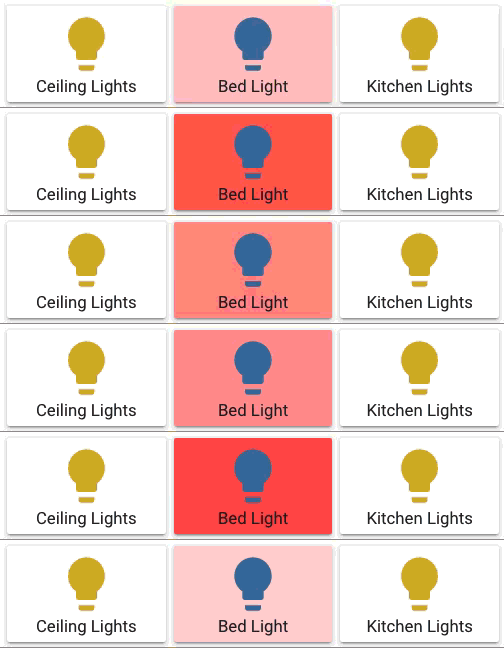 vapid field
I'm doing UI stuff in tcl/tk right now 😄
vapid field
Hey there. I am just new to hass (few hours) - i´ve a question about the lovelanceui.:
I want to change the icons oh the entities - how could i do that?
vapid field
@split granite : thank you. i opened the the customizing dialog. There the following is promted:
The following attributes of the entity are set programatically.
You can override them if you like.
I'm having trouble with live streaming camera feeds to lovelace cards. It worked for about 30 mins but since then it's been blank. If i remove the camera_view: live, I can see the camera but the update interval is what it is. Does anybody have any ideas?
But with which "attribute" i could change the icon
@vapid field You should use icon:
vapid field
You can get the icons from https://materialdesignicons.com/
split granite
(also linked from the docs 😉 )
split granite
vapid field
ah - thank you.
Perhaps last question: Where (which directory in hass.io) could i put my images in and how ist the path to be adresses in the entity_picture attribut?
split granite
In the www/ folder, inside your configuration folder
https://www.home-assistant.io/components/http/#hosting-files
https://www.home-assistant.io/docs/configuration/
In your case, /config is your configuration folder
 tiny plover
hello everyone