#frontend-archived
1 messages · Page 111 of 1
 main meteor
I then tried to add the compact card and the vertical card in next level (as posted here above), i then get "mapping values not allowed here..."
 clever ore
Sounds like you have some formatting issues somewhere, mind sending me a DM with your lovelace code including resources section?
main meteor
@clever ore Done! Thanks!
 modern plume
is it possible to customize the GUI via text editor rather than via the GUI?
ui-lovelace.yaml doesnt seem to work?
clever ore
@modern plume https://www.home-assistant.io/lovelace/yaml-mode/
modern plume
thanks
in your experience is it a good or a bad idea?
I'm not sure if it's worth the effort, but i find myself often editing every card anyway via gui code @clever ore
clever ore
It really depends on personal preference. Couldn't say one is better than the other. I don't use yaml mode currently, but it's just because I need to test things out for my card projects.
 latent moss
i was thinking of switching over to the UI editor but then i wouldn't be able to share my lovelace file on github eventually (as far as i know?). Wish there was a sort of hybrid mode where you could use the UI editor but it'd still dump everything into a ui-lovelace.yaml file rather than an invisible folder/file so you could share it etc.
clever ore
You can use the raw config editor and it shows you your whole lovelace config as yaml. It reorders things a bit, but you can share that code and it will still work for yaml mode and storage mode users.
latent moss
Hm I suppose that's true. It would require me to remember though and manually copy/paste the raw config just to share it, but i guess it's doable. probably will end up doing that soon.
clever ore
I know that @timid burrow uses storage mode, but copies his config to a yaml file to keep it organized then copy pastes between them. Seems to be the best of both worlds, but a bit more work.
modern plume
ok, after using it a bit i have no doubt that i want to use yaml
i feel like i have such better control
if you use yaml and are thinking of switching....don't 😄
I can't imagine doing vertical and horizontal stacks with the UI interface
the only thing that I need is a better text editor than the integrated on on my Synology 😄 Guess I'll just end up using Sublime
latent moss
Well the main thing that trips me up in YAML mode is the indentation. When you have a ton of lines it can be easy to lose track of how many spaces you need etc. In my limited testing on a friends instance, it seems like the UI editor takes care of that part. I don't like that the UI editor re-arranges the YAML code though.
modern plume
yeah, that's what drived me insane
regarding the indentation...i dunno, it feels like that depends a lot on your editor
as long as you can easily tab in-out and fold blocks of code, it's quite ok to move around
then again, my ui-lovelace is only 150 lines so far 😄
clever ore
Yeah, but you miss out on the good parts of the UI editor. I can click + to add a card, select entities, and pick from a list of entities. More and more of the UI is getting this treatment
And if I want, I can still edit the code to my liking
I do agree that building something like stacks is better done manually, but it is a work in progress
 timid burrow
one of the best things is in the GUI editor you get IMMEDIATE feedback of how a change will look. But yes, I then will make the change in my yaml file as well and for any big changes, I do it in the YAML and then just cut/paste the whole thing into the raw editor. That way you get the best functionality of both methods IMO.
The raw editor is good for adding custom cards too BTW... it's do whatever works best for you. I also like having comments in the yaml file...
clever ore
@modern plume Have you tried the Cloud9 IDE addon for editing? https://community.home-assistant.io/t/community-hass-io-add-on-ide-based-on-cloud9/
I'm a big fan
 mild veldt
@clever ore have you tried the new vs code add on though?
clever ore
Nah, not yet. Been meaning to. Looks very cool.
Cloud9 is nice when I'm at work. Can't remote to home and can't install anything. Ugh
At least they can't block me from my own domains
I'm sure I could get more creative with it, but I don't expect to be there much longer.
OH, wait a minute
I thought you were talking about the VS code plugin, not a hassio addon
DOPE!
mild veldt
👍
latent moss
anyone remember the name of that custom card that lets you eliminate borders/spacing between cards? edit: found it, vertical-stack-in-card https://github.com/custom-cards/vertical-stack-in-card
 broken jetty
Hi folks, My main goal is to setup tablets with the theme / style 3d floor plan outlined in this post that seems to require multiple 3rd party components. I want to understand whether to just download each component from github or is there a smarter way to always grab the most recent updates? Here's the link https://community.home-assistant.io/t/my-hass-io-and-lovelace-setup-updated/72902
I'm somehwhat new to Hass but believe my setup is Windows 10 running VirtualBox. VM is Ubuntu with Hass.io but I'm not entirely clearly whether I'm using docker or not???
modern plume
@clever ore intersting addon, though I need to see if it's supported when selfhosting HA on NAS.
by the way, is there as way to configure how long the "hold-action" lasts to trigger the action? I wish I could make the hold-action double as fast
 polar kelp
🎉
Lovelace-player has finally been modernized and should now work with 0.89 or later: https://github.com/thomasloven/lovelace-player
Also much better configuration method - no need to mess with a separate configuration file.
 bold lichen
@broken jetty I had a look at your link. That is all Lovelace. There are a few custom Lovelace cards used and a program to draw the 3D home image. He has used photoshop to create the separate images used to show lights on and off.
How did you install hass.io?
I run my home assistant in docker on a Ubuntu 18.04 host. hass.io is a bit different to home assistant
 torn idol
How do i access my Hassio /local folder?
When I use C9 I don't see it
when I used FTP i see /share only
 ember crow
@torn idol you have to create a folder called www manually. Create a www folder inside the same directory as configuration.yaml. restart HA. Then you access things in that directory via the /local url path.
 gaunt meadow
could someone point me in the right direction. I'm a hass noob, i got as far as making all the integrations work, i can control my stuff, but I can't for the life of me figure out how to have cool custom cards like the ones you're posting. For example i see people that have cards with mediaplayer entities that have both volume control sliders nad power off buttons in the same line. How does one accomplish that?
I'm pretty good with yaml, it's just that for example i see on the demo site (https://demo.home-assistant.io/#/lovelace/0) it has let's say the entities card with a input_select.hdmiswitcher. I have an AVR that works fine with hass, but there's no such thing as input_select.rxv679. I can't specify an attribute too. How is this done?
 atomic glacier
@polar kelp Trying to reduce my LL file size(almost to 15k do to so many popups now 👀 ) So here's the question sir... is it possible to use browser-commander to call popups that are globally defined? Currently I have popups in scripts to use with voice commands and then again globally for touchscreen/clickable popups....or would from an executable/performance standpoint, just be better/more feasible to just use BC for all popups and locate them within scripts like the old way?
polar kelp
With browser commander you can define your popups in the homeassistant config instead of the lovelace configuration. That means you can also generate them as they are needed, using the various scripting facilities or appdaemon or whatever.
You can also use node anchors to get your file size down: https://discordapp.com/channels/330944238910963714/460846676358332417/555872842948804637
And using lovelace-gen opens up even more posibilities to make the files smaller and - more importantly - more readable and easier to manage, e.g jinja macros: https://github.com/thomasloven/hass-config/blob/master/lovelace/floorplan.yaml#L5-L22
atomic glacier
Thanks!!! I have been wanting to use LL-gen, just looked a bit challenging at first..LOL. Will give another look. Thanks!
@polar kelp node anchors look amazing!!! are there any card restrictions? or can any card type be used? This will definitely help!!!🙌🏻
 grave cargo
Hi, I'm having an issue updating any config via the interface. Add-on, or configurator, when I attempt to update a config, mid-typing the text box refreshes, and goes back to the previous config.
I tried a different browser, and I get the same result.
polar kelp
@atomic glacier node anchors are a default feature of yaml, so they can be used anywhere
My example above causes a log warning, btw, but it still works
@grave cargo do you have the editor open in another tab/browser/computer?
 signal bay
Hey y'all, is there anyway to hide a lovelace view from the navigation bar
 wheat current
🙈 https://gist.github.com/ludeeus/bf91cea41f910f3f1f9a7bc98e951ab7 dinner time 👋
 safe sigil
Hi, the panel mode is great. But how can i scale the card that it shows the whole card?
In wide-screen tablet mode the bottom is cut off
safe sigil
@polar kelp yes
polar kelp
Change the aspect ratio of your picture so it matches your screen. E.g. by adding margins to the sides.
It will always stretch to fill the entire width.
safe sigil
Do i have access to the css files? Maybe i can use different styles for different screen ratio.
wheat current
then you are not using it
 arctic pumice
ok :d so i need to create one ? im trying to do that https://community.home-assistant.io/t/lovelace-attributes-card-entity-row/59122
wheat current
use the raw UI editor
 elder pendant
Here's a guide on installing lovelace plugins https://github.com/thomasloven/hass-config/wiki/Lovelace-Plugins
arctic pumice
Thanks !
wheat current
there are a custom layout card, and stack cards that can give you more controll
polar kelp
Mind if I add that to my github page, @wheat current ?
polar kelp
Thank you!
wheat current
You can thank @polar kelp for that one 😄
polar kelp
It's not always easy to use, but the results can be quite nice.
 mossy otter
Anyone else have visual problems with the otherwise amazing monster-card? Some icons don't display.
one light icon that didn't display before does manage to appear after i turn another light off: https://imgur.com/a/9TT26xV
safe sigil
hi, i've tried to setup a picture-elements-card like the doc says https://www.home-assistant.io/lovelace/picture-elements/#images-example
can i define the clickable area for each image element?
because the images are overlapping (halos of the lamps)
polar kelp
No. The entire (rectangular) area of the element is clickable, and the last one in the list takes precedence.
safe sigil
hm that is pity... so i can't make overlapping images?
polar kelp
Well.. yes, but you can't click the ones on the bottom...
safe sigil
ah that is an idea... i'll make every entity double... one with overlapping halos and one with the clickable fields... that is a hell of configuration... but it'll look nice
looks nice: https://imgur.com/9de7axL
polar kelp
Sweet!
 brave basin
Anyone have tips on making a "safer" button to avoid accidental clicks? Use case is a button that opens/closes the garage door. Thinking of something like the slider that unlocks iPhone
At very least I was going to put it in a popup-card, but then I'd still like to avoid accidental clicks
elder pendant
You could just put it on its own view
brave basin
@polar kelp of course you already thought of that, thanks!
mossy otter
@polar kelp your slider entity row lovelace thing is fab! Does it support tap/hold actions when you click the entity icon? All I can do is toggle it on/off or increase/descrease brightness. Can't change colours for example
polar kelp
No. That's kind of hard to get right in an entities card. The dev team is working on it, though.
mossy otter
Rightio
 amber nova
judging from the little reading ive done (just looking for some confirmation)...
If I used a conditional card, could I toggle between two different thermostat cards being shown?
so basically...if true, show downstairs thermostat, else, show upstairs
mild veldt
yes
torn idol
Can anyone help me set a xiaomi vacuum card to accept service calls from icons like this:
elements:
  - entity: vacuum.xiaomi_vacuum_cleaner
    icon: 'mdi:bell-ring'
    service: vacuum.locate
    style:
      color: '#3090C7'
      left: 80%
      top: 90%
    tap_action: call-service
    type: icon
when i click on the icon it does not send the call
torn idol
for anyone finding the same problem I have found the fix:
elements:
  - icon: 'mdi:bell-ring'
    style:
      color: '#3090C7'
      left: 80%
      top: 90%
    tap_action:
      action: call-service
      service: vacuum.locate
      service_data:
        entity_id: vacuum.xiaomi_vacuum_cleaner
    type: icon
 split granite
~format @torn idol
 kind shellBOT
@torn idol To format your text as code, enter three backticks on the first line, press Enter for a new line, paste your code, press Enter again for another new line, and lastly three more backticks. Here's an example:
```
code here
```
Watch the animated gif here: https://bit.ly/2GbfRJE
DO NOT repeat posts. Please edit previously posted message, here is how -> https://bit.ly/2qOOf1G
torn idol
Thanks @split granite
 astral vortex
How would I use an entity button to enable or disable an automation as the tap action?
polar kelp
call-service homeassistant.turn_on
astral vortex
I think I’m dense today. Is that under tap action > action?
torn idol
I think you need to do this:
tap_action:
      action: call-service
      service: homeassistant.turn_on
Let me try that, wouldn’t I want .toggle?
astral vortex
Interesting, the ui editor won’t allow it
I’ll try once I get access via ssh
Thanks
 vapid field
Hi guys, I would try to write a custom lovelace card in order to implement a bar chart using plotly.js for displaying min/max temperatures over the week or data like that.
Is there some tutorials/guides on how to write a custom lovelace card?
polar kelp
Try the "Developing custom cards" link
 strong furnace
Hi everyone, I'm currently trying to make my lovelace UI a bit nicer, are there any other recommendations for fancy graphs, other than kalkih/mini-graph-card?
vapid field
@polar kelp do you mean this? https://developers.home-assistant.io/docs/en/lovelace_custom_card.html
polar kelp
yes
You can also look at this https://github.com/ljmerza/lovelace-card-boilerplate
Or if you want a really really really simple example: https://github.com/thomasloven/lovelace-gap-card
mild veldt
@vapid field @polar kelp if you're looking to use something that has another dependency, I would recommend using rollup.js
strong furnace
which card can be used to show a card only during a specific time?
vapid field
I would like to have some charts like this https://plot.ly/javascript/bar-charts/ in my HA front end, such a pity that there's nothing "standard" do achieve it
split granite
Conditional card @strong furnace
mild veldt
@vapid field feel free to contribute something. We can always use more devs
vapid field
Yes sure! I really would like to! With my time and limits since it is not my expertise area, but maybe with some support I can success
mild veldt
@vapid field absolutely. I'm a C++ dev by day and HA is really the only front-end work I've ever done
vapid field
@mild veldt Same here, I use C/C++ for microcontrollers, but html / javascript is like russian for me ahaha
astral vortex
I have my entity button successfully enabling and disabling the automation, is there a way to get the button color to follow the enabled/disabled state or will I need to create a template sensor?
mild veldt
@vapid field we're moving to TypeScript which makes my life a lot easier. non-typed languages make me uneasy 😃
vapid field
@mild veldt indeed, not having a type turns me crazy, moreover because javascript has a c-like syntax, just for discussion, python messes my head less 😄
brave basin
Could not be happier to hear you're moving to TypeScript! Will make using VS Code that much more useful too.
Is there a lovelace card to display a live camera feed? Right now I'm using picture-entity to show cameras (non-live, which isn't great but best I could get to work) and when I click it I see the live feed. I want to override the popup with popup-card, but I realized that if I do this I don't know how to create a card that has the live feed in it. Goal is to have a garage door cam that I can click, which then shows a custom popup with the live feed, state of the garage door, button to open/close, etc. Fwiw I've seen surveillance-card but have not been able to get it to work.
mild veldt
surveillance-card is the only one I know of, but I just had an idea on how to possibly do this. Will need to do some testing
polar kelp
@subtle rune is working on one, I believe
 subtle rune
I have one working but it has a bug that spams the log, haven't gotten around to fixing it
It based on surveillance card
Can share what I have with @mild veldt later today if you want to have it as a base or something
mild veldt
I already finished my hack job 😃
subtle rune
Quick little bastard!
mild veldt
well when you see what I did, you'll understand why 😃
subtle rune
If it doesn't spam the log you still got 1 up on me 😄
mild veldt
@subtle rune @polar kelp @brave basin All I did was wrap the more-info-camera element so it should work with the new streams as well https://github.com/custom-cards/camera-card
polar kelp
Guessed that would be it.
The readme must have accounted for most of the development time
mild veldt
why waste time, make lot of code when few code do trick?
readme is copy/paste and then two find/replaces really. ~30 seconds 😃
the most time was getting my laptop out of my bag and starting it up 🤣
polar kelp
Again; gap-card ```js
class GapCard extends HTMLElement {
setConfig(config) {
this.height = ('height' in config) ? config.height : 50;
this.size = ('size' in config) ? config.size : Math.ceil(this.size/50);
this.style.setProperty('height', this.height + 'px');
}
getCardSize() {
return this.size;
}
}
customElements.define('gap-card', GapCard);```
Doesn't even trigger the bot
polar kelp
yeah...
mild veldt
@polar kelp so If I don't set size it is 0, why is it being divided by 50? Am I missing something obvious?
mild veldt
🤣
brave basin
@mild veldt it works!!! wow, you made my week 😃 this is one of the first things i tried to get working in HA and i've been stuck on it for a couple of months. really appreciate it!
mild veldt
🎉
brave basin
@fathom tree continuing the thread from reddit, camera-card (above) works great with iSpy. i can now see the time imprint running in real time and see that all cameras are connected. pretty freakin awesome!!
 fathom tree
👍 😎
brave basin
oops, i meant @atomic glacier above... too many helpful people here to keep them straight 🙃
atomic glacier
@brave basin 👋🏻 thanks! I'll check it out later. I have a few extra views and cameras to test it out on before switching everything over. Sounds promising.
 urban lotus
After upgrading to 0.90.2 I realize I can't edit groups anymore to change ui but I am confused by configuration and automation yaml files. I think configuration is still working but my system isn't reflecting changes I have made to automations.yaml. Should I be editing configuration.yaml and/or automations.yaml after upgrade to lovelace?
split granite
Yes, but they have nothing to do with the UI
mild veldt
@urban lotus in  you can choose to still use states UI which relies on groups if you wish
urban lotus
thanks, I know that but I am OK with using the lovelace editor. But I am not sure if I can still edit automations.yaml manually. I find it easier then using the ui. I think I still can but I am not sure changes I made recently are being reflected. I am investigating but thought I would ask if I am wasting time because you can't use direct edit of automations.yaml anymore.
@split granite OK I thought that should be the case but I am having issues with changes getting reflected after the upgrade to 0.90.2 so I was wondering if perhaps the UI automation editor was the default now. I think it isn't the cause however, I found a possible cause of my confusion. ID vs alias, I make them so similar that I was thinking changes were not being reflected.
mild veldt
@urban lotus automations.yaml will still be what you want to update if that is what you have been doing. UI is not default for automations editor.
urban lotus
OK thanks
polar kelp
yes
 sturdy vector
Hi tomas
of course you are using it, you re the creator 😃
first i would like to give you a big shout out, your work is amazing
i figured it out, had some dummy text in the yaml
i wanted to ask if you can make multiple popups within the same view
and i can confirm that it works
sturdy vector
i bet you do 😃
i tried a lot, anyway
cause at the beginning i couldn t figure it out how can i use the trigger for the popup to be a picture-entity card
cause i wanted to use a picture
but after trying for about 15 minutes i found the sweet spot :))
kind shellBOT
@sturdy vector Your message has been deleted as it contains a link or a domain name 'pasteboard_dot_co' that is on the blocked list because of: 'Virus detected!'.
Please re-post by removing/changing the domain name/link. Your original message has been DM'ed to you.
polar kelp
Ok. I just counted. It's five.
sturdy vector
good to know it works with even more :)))
can we use include for the lovelace-ui ?
polar kelp
yes
sturdy vector
cause mine got big enough and i would like to split it by views
i tried once and i failed :)))
i assumed that it doesn t work
ok ..thanks for the info ...i ll search on the community forum and try again
sturdy vector
thanks, I ve managed to split it :)
 digital breach
I'm making anetwork tab to monitor my servers (multiple Pis), any ideas/github repos for inspiration? I have no idea how to put my stuff... cpu load, is it online.. etc
 opal light
Is anyone using the Compact Custom Header card and could tell me what the show/hide tabs means?
subtle rune
@mild veldt Could you add to your camera card that you can get the actual more-info to show up on press?
In that case I will switch to yours instead of my own
torn idol
Any one know if I can set the map card to focus on a specific entity?
 grim compass
Is it intended that I can't use my home router sensors while i can see them in history ?
They re not displayed in lovelace as ssensors
grim compass
any idea ? :/
polar kelp
If you can see them in /dev-states  you should be able to get them into lovelace.
 odd light
Is there a way to do an entity filter card in lovelace with a title and a header toggle.
I've got one that shows lights that are on, i'd love to be able to just flip them all off
polar kelp
@odd light auto-entities
odd light
never heard of this auto-entities, will have to google that
polar kelp
I thought it worked that way with entity filter too...
Here's the updated list of my lovelace plugins. If I ever just blurt out what sounds like a card name, and you can't find it in the official docs, it's probably here: https://github.com/thomasloven/hass-config/wiki/My-Lovelace-Plugins
Unless it's compact-custom-header or vertical-stack-in-card which I mention often. They can be found elsewhere.
odd light
got it
mild veldt
sharethelove.io is probably the most complete resource of custom cards
grim compass
@polar kelp sorry for delay. I see it only in the history (as graph) but not in dev-states 🤔
vapid field
is tehre a way to show grafana outputs in lovelace ?
 brisk ridge
I want to use the entity button but i dont know how to configure. Where i need to wirte the configuration variables?
brisk ridge
ok i got it...i should click on the take control of UI button 😃
kind shellBOT
@vapid field posted a message that is too long, it is moved here --> https://paste.ubuntu.com/p/pMqS6gk74Y/
vapid field
I'm using a button-card to try and use a custom icon. I'm using "icon: attribute", and the entity i'm using has an entity_picture configured, but I can't get the custom picture to be shown. Any ideas to troubleshoot this? Config examples @ https://paste.ubuntu.com/p/pMqS6gk74Y/
elder pendant
Are you trying to set an icon to a picture?
vapid field
I'm trying to get a custom image to be shown in a button. Instead of using an mdi:* image, I want to show whatever the entity is using as an icon
elder pendant
I don't think that's allowed, even with the custom resource
Icons and images are different
vapid field
is there a way to use an icon that's not defined in the mdi: set? In the end I just want to have a button with a custom icon being shown
elder pendant
Not that I know of for icons specifically. I know some built-in lovelace cards use the entity_picture when there is no icon specified. But it doesn't look like this custom card does that
vapid field
ok. Thanks!
 civic sedge
I think there was a way to load cards based on users.
somebody knows the way there?
mild veldt
state-switch, custom-card-header, config-template-card. take your pick
 fiery sail
Can a service call be made to switch on or off a card's toggle switch?
elder pendant
What toggle switch are you talking about?
fiery sail
Header toggle
elder pendant
There is no service for that, no
fiery sail
Damn it
 polar jackal
Anyone test the srpenergy sensor component? It was updated in 0.91 and when I view the entity card it shows a bunch of objects https://imgur.com/a/M0AT6tu
The api call gets all the data in dev tools but it's not rendering properly in the card
 gloomy crag
is there a Kiosk mode built into Lovelace these days, I notice the kiosk hack seems to be broken since 90.0
having it so a guest account cannot see any of the admin menus would be cool
polar jackal
@gloomy crag I think that feature is coming. Recent releases are implementing those prerequisites
gloomy crag
seems like an expected behavior for a 'user' account,
vapid field
I have added second picture element card for floorplan, but it wont show if panel mode is enabled, why? I tried with vertical stack, but same problem, not showing second floor or picture if enable panel mode
polar jackal
@gloomy crag Absolutely, they are rolling it out gradually. Such as User/Administrator roles were just added
polar kelp
@gloomy crag General recommendation for now is to use custom-compact-header
gloomy crag
i can wait for it to be included
vapid field
Bad coding/fromat?! Will check again, @polar kelp thanks, so i must work
The lovelace editor has the other way stacked
vapid field
Hello, new to HA...went from Domoticz into HA yday. I was renaming my entities this morning to the correct names. Was just going to continue editing those but don't seem to be able to do this anymore since the update?
latent moss
@vapid field it's a bug in 0.91 https://github.com/home-assistant/home-assistant-polymer/issues/3051
vapid field
@latent moss Ok, thought I was loosing it.... guess we have to wait for a fix then?
Thanks for your reply!
latent moss
@vapid field yep, usually issues like this get fixed very quickly / within a few days in point updates. But the developers have been extra busy lately doing major backend and infrastructure changes, so just have to be patient. In the mean time you might be able to rename certain entities under the Configuration -> Entity Registry page.
 lofty hinge
Relatively new to HASS. About to start playing around with customizing the Lovelace interface, but actually really like having the managed view as well as a secondary view. Was wondering if there was a way to configure the UI so I could maintain the managed view in a separate tab while I played around in the main tab?
vapid field
I am going mad, I added second floor-picture element card, and only show the first card if I enable panel mode, can someone look at this config please: https://hastebin.com/ovanaxirog.bash @polar kelp
polar kelp
You said you tried a stack. I can’t see it
timid burrow
can I use an entity_picture nstead of an mdi icon on an entity-button card?
 azure scarab
What's the best way to set a background image and have it scale with whatever device is being used?
I'd love to get some gauges on a page with a non white background
polar kelp
@vapid field remove the dash on line 4
vapid field
https://hastebin.com/adetakexem.bash still no
 vapid field
Or this: https://imgur.com/a/oHYHQhU
polar kelp
There's so many weird things that it's imposible to know what is the cause, and you change unrelated things between your examples.
First views is a dictionary instead of a list: https://hastebin.com/ovanaxirog.bash,
Then, suddenly, cards seems to be inside of a list, but is also a list followed by a list: https://hastebin.com/adetakexem.bash (after updating)
In the screenshot of code (what am I supposed to do with that?), there's an empty cards list, followed by some kind of combination of a stack card and a view? https://imgur.com/a/oHYHQhU
vapid field
Trying everything, will send new example
 analog aurora
Hi all... the Lovelace config UI doesn't seem to like the order of line items I like and keeps changing it... I want the title first, then the type, then badges, entities etc... but whenever I reopen the config (possibly after a restart) it's gone and put the title last and mucked up my nice order of things... what am I missing here?
 sacred merlin
alphabetical order
vapid field
@polar kelp thank you for helping! It working now: https://imgur.com/a/gaXULl8
mossy otter
type: conditional
conditions:
  - entity: media_player.lgtv
    source: kodi
card:
  type: media-control
  entity: media_player.lgtv
trying to do something like this
so that if my media _player source is kodi then it hides the lgtv media player and only shows the kodi media player
is there a way to do this through template editing or will i need to use input booleans?
mossy otter
just realised i can do it with a template sensor
mossy otter
great stuff @mild veldt
 cinder rapids
That template card is so crazy, I have been meaning to start playing with it but is intimidating.
mild veldt
Look through that thread and you should be good as some people have some advanced examples
brave basin
Been struggling with YAML in my UI and just discovered that validation is a thing, and there is a VS Code plugin. Is there a schema for HA to assist? https://github.com/redhat-developer/yaml-language-server
mild veldt
if we exposed our config interfaces we could probably have a front-end yaml plug-in like the backend one released by @spice drum that does autocomplete
vapid field
really dumb question but I've setup a ui-lovelace.yaml file and rebooted but when I go to my instance with /lovelace it redirects me to /lovelace/default_view and shows everything like before
I've also set lovelace as the default page as well
 spice drum
@mild veldt that true. I'm currently working on a language server for HA Config as part of the vscode-extension efforts. I started with a JSON schema for Lovelace by copying/modifying some of the classes here https://github.com/keesschollaart81/vscode-home-assistant/tree/dev/src/lovelace-schema
only a schema is nice but the situation is much more complex because of includes
wheat current
You need to enable yaml mode to use that file @vapid field
spice drum
and also for the other HA config it needs to be more sophisticated.
So I'm currentyle working on a language server which can do all that but thats a significant effort 😃
mild veldt
@spice drum for sure. My initial thought was that the polymer project could package our types
and make that accessible via npm or something
spice drum
that would already be great!
But they need some modifications as well (search for '//updated' in the linked .ts file)
I'll do a PR to the Lovelace repo when I'm a little bit further in development
vapid field
@wheat current ah awesome thank you! 😃
mild veldt
@spice drum sounds excellent 👍
spice drum
feel free to reach out if you want to discuss or contribute. for now it's just me playing around in my evenings/weekends, learning a lot about Typescript, VS Code Extension etc. I'm not in a hurry 😉
mild veldt
We're in the same boat there 😃 I just dink around in my free time when I should be making my own HA instance actually usable
wheat current
@mild veldt need to finish grooming his beard so he can start up his stream 😄
mild veldt
@wheat current that takes at least 3 hours to properly prep
wheat current
I can wait 😛
mild veldt
I wonder how my manager would feel about me doing a live twitch stream while on the clock...?
wheat current
Ask? 😛
vapid field
cant figure this one out . Installed Hass.io with the script for debian docker but it seams it dosent come with mediaplayer card that I whant to add for kodi https://github.com/kalkih/mini-media-player
 dark dirge
@vapid field You can just install it via the instructions, right?
vapid field
usualy it is just an copy paste but docker script dident create a volume for www ... how do I put it then
dark dirge
www is just a directory in config
everything for hassio goes somewhere in config
in general, if you don't have a directory the instructions say you need, just create it
vapid field
this is part of my install comand curl -sL "https://raw.githubusercontent.com...........hassio_install" | bash -s -- --data-share /sharedfolders/AppConfig/hassio <------ dosent contain config/www
split granite
Just create the folder if you need it
Custom components, and custom #frontend-archived cards are things you have to install yourself
dark dirge
where did that install command come from? it doesn't seem to come from the github page of the card you're trying to install
vapid field
I kno now how to resolvmy problem hass on Openmediavault install comand ....
vapid field
since te newest version has added direct preview what benefits has Lovelace YAML mode?
vapid field
so since im on the newest version if I try to switch Lovelace YAML mode it gives me error when trying to set edit mode for Lovelace
resources:
- url: /local/mini-media-player-bundle.js?v=1.0.3
type: module
needs to be in ui_lovlace.yaml but without switching on Lovelace YAML mode were else can it be? ??
dark dirge
you can edit the Lovelace configuration manually without switching to YAML mode by clicking on "Edit raw" or something like that in the upper right
you can add resources that way
elder pendant
~lovelace-plugins
kind shellBOT
Follow this guide to add your first custom plugin to your lovelace configuration https://github.com/thomasloven/hass-config/wiki/Lovelace-Plugins
elder pendant
this shows you how to open the raw editor as well
broken jetty
I'm trying to install a cardmodder js from git and having trouble figuring out where my hass install is located (i'm running hass.io on virtualbox running on windows 10). I can ssh in but I don't know where to find it. Here's the directories I see.
ha@homeassistant:/$ ls
bin home lib64 opt sbin sys vmlinuz
boot initrd.img lost+found proc snap tmp vmlinuz.old
dev initrd.img.old media root srv usr
etc lib mnt run swap.img var
Figured it out from here. https://community.home-assistant.io/t/configuration-yaml-file-location-on-ubuntu-in-virtual-environment/46508/3 It's in /usr/share/hassio/homeassistant
And also had to change permissions to be able to install via git using sudo chown -R username.www-data /var/www
sudo chmod -R +rwx /var/www
mild veldt
@latent moss didn't you just ask about a divider?
did you delete you message?
or am i crazy?
otherwise I wasted 5 minutes 😃
latent moss
thanks, gonna use the hell out of this 😃
mild veldt
FYI, uses secondary-text-color for theming
latent moss
ok
latent moss
could u make the background thing of the text same color as the card ? cause of dark themes. https://i.imgur.com/jQtYB0m.png
 latent moss
idk, this is the slate theme
maybe theme is not set up right but it seems on some others its forced white too
latent moss
nice
latent moss
much nicer now 👌
polar kelp
Hey @half osprey How about that divider as default instead of mine? Not quite MD, but really good looking.
We’re phasing out paper-card-background-color for ha-card-background btw, @mild veldt
But that would look really weird if there was a background image.
modern plume
is it possible to "track" lovelace cards within automations? Like I would love to have button cards not tied to appliances, but to other UI elements (trigger: lovelace button1 is pressed -> event: show these other cards). Is it currently possible to achieve anyuthing like this?
 tacit cave
you can use conditional cards to make visible/not-visible based on entity states
polar kelp
State-switch can help a bit, with the hash option
Otherwise conditional and a inout boolean or something
 woven compass
@mild veldt was just wondering something about the podcast card, does the media_type have to be MP4 or could it be possible to extract the media type from the feed if it has it, otherwise it just falls back to MP4, just asking before opening a issue on the card repo
mild veldt
I’m pretty sure I hardcoded it to mp4
woven compass
Yeah, im just asking if it has to be
mild veldt
Probably not
woven compass
@mild veldt i edited the file on my local machine to pass the mime type and it worked, i just need to find a podcast that doesnt have a mime type to program the redudency
although i think its unlikely as most podcasts use a generator to get itunes support
mild veldt
👍 excellent. Welcome addition. Hoping to add Plex podcast support soon
And need some kind of indication of if it has been listened to already or not
vapid field
On floorplan with picture elements card in lovelace, can i call service hue activate scene instead calling or tap light entity?
 desert delta
Help, My main tab in lovelace just went empty, the others still work, and in the raw file there is still everything (and i didnt touch it).
mild veldt
@vapid field define the tap_action's action as call-service
check the docs
@desert delta try clearing your cahce
desert delta
2 cards stopped working because a loading component failed at a different loading stage. very strange that it pulls the whole tab down with it.
mild veldt
what cards?
 prime umbra
@mild veldt , @polar kelp was wondering if there is any way to hide buttons on left side of HA depending on permissions of users
kind of the way Compact Custom Header is able to do it
there is some things that would be nice to hide from wife or kids......
mild veldt
No user permissions on iframe panels, yet
prime umbra
ya thats what i tought, would be lovely to have it!!!
polar kelp
But the admin stuff are hidden for normal users in .91, I believe
mild veldt
I'm guessing add-on panels?
mild veldt
You could put them in an iframe card, set panel to true on a view and then use compact header to hide that view
prime umbra
hmm that seems to be a cool idea!!!
vapid field
@mild veldt thank you for hint!
desert delta
@mild veldt : was upcoming media cards, with a nonworking upcoming-kodi behind
mild veldt
ah, yeah, upcoming media card should probably show an error if the entity isn't available
or warning
maybe I'll submit a PR for that later today as I've been bit by that one as well
desert delta
it did that first, suddenly it all went away
other topic, I wonder: I know how to create a input list, and on choosing it sends an event with the selected data.
is that possible also with a slider? because in my new case, the list would be simply 0-14
mild veldt
oh, I already did submit a PR for that like 3 months ago 🤣 you should have seen a console error saying the entity didn't exist
@desert delta I'll have to get back to you on that, I think so...
 sinful flax
Does anyone use the picture elements card to display multiple cameras?
sinful flax
Is there anyway to make the image transparent?
I have a white background image and it shows white even in the even after a theme changes 😦
vapid field
see image element example 1:https://www.juanmtech.com/set-up-the-picture-elements-card-in-home-assistant/
i use brightness for overlay
prime umbra
@mild veldt is there any hack for make it possible iframe card to be able to use secrets on URL to dont expose it!!!
sinful flax
@vapid field I am only referring the image.
In example one, the image line is image: /local/Living_room_FP.png
Is it possible to make the image just transparent, i.e. nothing inside it.
mild veldt
@prime umbra in yaml mode, yes
prime umbra
thanks will look into it...
 winged parrot
I have a modified weather forecast, but cannot figure out if it is possible to easily make it a custom card. I've tried just plopping it into the www folder with type: js but this doesn't work
Anyone have any ideas?
Should say modified weather forecast card
winged parrot
I was hoping there would be an easier way rather than rewriting the existing card, right now I have a development polymer repo to use it
It is just a slightly modified version of the built in weather forecast card
The backend has an easy way to overwrite existing elements, I suppose the front end does not?
latent moss
I made a feature request for this in ui-schema repo a few weeks ago, but wondering if there is maybe a workaround method to accomplish this right now? I basically want to have weblinks with pictures inside of a glance card like this mockup i made https://i.imgur.com/H1N1iCt.jpg

 green laurel
Just to confirm, a lovelace entity list can't be used as automation trigger, right?
elder pendant
What do you mean? What would the trigger be?
green laurel
@elder pendant for instance use a entity list of family members to turn on the alarm when everybody is away home.
Afaik I still need to create a group for that
elder pendant
Yeah a group is the way to do that. Or a template sensor
I prefer template binary sensors for home presence detection. You can customize the logic a lot more than a group
green laurel
Thanks. Yeah, I'm expecting that the new person object will address this in the future somehow
latent moss
Here is an example of binary_sensor i have that could handle that scenario, it reports "on" when somebody is home and "off" when nobody is home.
- platform: template
   sensors:
     people_home:
       friendly_name: "People Home"
       value_template: >-
         {{ is_state('binary_sensor.sean_presence', 'on')
            or is_state('binary_sensor.gail_presence', 'on')
            or is_state('binary_sensor.brian_presence', 'on') }}
Thanks, Sean. What I'm looking for is a dynamic 'people_home' sensor, no requiring to edit it whenever I need to include someone.
latent moss
wouldn't you need to update the entity list or group too though to add people? kind of the same thing. and imo it's not something you do that often anyway.
but yes if the person component supported that, would be ideal
mild veldt
@winged parrot front ends are packaged very differently
Give this a try instead https://github.com/bramkragten/custom-ui/blob/master/weather-card/README.md

GitHub
Lovelace custom-ui. Contribute to bramkragten/custom-ui development by creating an account on GitHub.
You can update as you like
@latent moss can’t think of a work around for that. Would have to be in core or do something like @polar kelp has done for Popup-card
My super lame workaround for now would be to actually use the Popup card to bring up an entities card with a web link you desire
Far from ideal
latent moss
Bummer that's what i figured. @polar kelp did come up with a pretty good idea of using a sensor with tap_action navigate but that didn't work, because navigate doesn't seem to work with external links. I don't think Popup card would work for what i want either since i want the horizontal glance style with avatar images. so i think it's something that would need to be added to core.
mild veldt
popup-card would work, let me look at popup-card real quick
latent moss
well the problem is also that glance card doesn't support weblinks at all
so it'd have to be in an entities card i think, but then i wouldnt get the nice images and stuff
mild veldt
ahahahahahaha, it works
gg thomas
let me submit a PR to thomas with a solution that will work for you
latent moss
🎉
mild veldt
Use the file in this PR https://github.com/thomasloven/lovelace-popup-card/pull/21
and then do something like this
views:
  - title: popup test
    popup_cards:
      light.bed_light:
        url: 'https://www.home-assistant.io/'
    cards:
      - <your glance card here>
and do a popup card for each sensor
latent moss
Many thanks @mild veldt , stepped out to get some food but will check this out later 🎉
azure scarab
What is the best way for my config to scale with screen size?
right now if I pull up my page on my laptop it all fits, If I try on a table everything overlaps and gets mussed together
Also what is the best way to set a background image?
vapid field
Hi, any idea, how to hide "entity not found" on the top of the page, with lovelace? With states UI i could see which entity was missing, with lovelace when i click one of those "entity not fould", doesn't do anything.
I have a screenshot here: https://imgur.com/kp41eXv
split granite
Depends on the question really 😉
 blissful anchor
I try to ad ca custom card https://github.com/ciotlosm/custom-lovelace/tree/master/gauge-card
I put the file in www folder
but it is not loading..https://cl.ly/6cf736d07889
kind shellBOT
Please use https://www.hastebin.com/ or https://paste.ubuntu.com/ to share code.
blissful anchor
split granite
latent moss
if you just created www you need to restart ha i think
split granite
Please do not share code as images
split granite
That's just a Pain In the *** for folks
Use code sharing sites for sharing code @blissful anchor
As @latent moss said though, if you just created www/ you have to restart HA
vapid field
i have layoutcard, card-tools and tracker card, and the gauge card works without gauge card file
kind shellBOT
@vapid field posted a message that is too long, it is moved here --> https://paste.ubuntu.com/p/kB6JrbQm77/
vapid field
- cards:
- entity: sensor.processor_use
name: CPU Usuage
type: gauge
unit: '%'
split granite
That's because you're using https://www.home-assistant.io/lovelace/gauge/ @vapid field
I assume there's a reason that @blissful anchor is wanting the custom version
And yes, like that - but as per the docs you got it from, the type should be js
blissful anchor
i will try again it js
split granite
Did you restart Home Assistant after creating www/?
blissful anchor
yes, I have other things in there that work
but I cannot get custom cards to work
split granite
Is there a reason that you're not using the built in gauge card?
blissful anchor
with js is the same error
I want to implement a more complex custom card that also did not work so I took a simple example to learn the ways 😃
I put the file in www, put the the code in resources in lovelace raw editor, ad the card, no go
split granite
What if you put https://yourha.host/local/gauge-card.js in the browser?
blissful anchor
it is the same content as the file from www
split granite
Oooh really?
blissful anchor
I hope is normal
blissful anchor
<meta name="user-login" content="my surename">
split granite
You didn't download the file correctly 😉
You should have downloaded the raw file, not the HTML page
blissful anchor
oh... the raw thing?
blissful anchor
I red about it but I could not find how to
blissful anchor
this is what I have 😃
crap
ok
I have to click the file lol
clicking raw just opens a webpage with code from file
 old karma
blissful anchor
old karma
blissful anchor
which I think will copy in my local file in www
😃
still no go
same error the card does no exist
split granite
Did you bump the version in the resource?
https://github.com/ciotlosm/custom-lovelace/#simple-version <- worth reading 😉
blissful anchor
you mean v=1 ?
split granite
Yes
blissful anchor
to what value?
split granite
Ok 😉
blissful anchor
but did't link it to my "code" 😃
I thought is for developer
I am not a coder
I will put 2 to see what happens
split granite
No, the instructions on those pages are for you
Not for developers
Any time you change the files you bump the number
split granite
You may want to look at https://github.com/thomasloven/lovelace-card-tools
It avoids the need to change the version numbers, but does require you to pay attention to what you're doing
split granite
Sheesh, no
blissful anchor
well is there a solution for my problem, I don't mind reading pages but I don't want to swich my career to a coder now 😃
split granite
You don't need to be a coder
You just have to take the time to read
Skimming and jumping on parts is just going to cause pain
card-tools is a resource you add, and then you change from /local/ to /customcards/
blissful anchor
form that page I don't understand much or find a link on how would solve my problem
I see
makes sense now
so that is yhe only way to make a custom card work?
because here https://github.com/custom-cards/tracker-card/blob/master/README.md, the instructions don;t mention a customcard
I just thought that is a matter to put a file in www and some line in resources
thank you for the explanation
hmm....
strange that I ad another custom card (the complicated one) for surveilane camera, and all I did was put the raw code in the js card and it worked
but the gauge still no go
wheat current
There are multiple ways of "installing" (downloading) a custom card, your best bet is to folow the instruction in the README for that spesific card.
Mixing instructions will not work.
If you download manually you need to make sure that you use the RAW file, if not you need to clear your cahce, some cards that was created when Lovelace was new and shiney (9 months ago) does no longer work without an update from that dev (or someone else (Hey it's Open Source anyone can contribute 😄 ))
~lovelace-plugins
kind shellBOT
Follow this guide to add your first custom plugin to your lovelace configuration https://github.com/thomasloven/hass-config/wiki/Lovelace-Plugins
polar kelp
@split granite you’re thinking of auto_updater. Not card-tools
kind shellBOT
Tinkerer is away for 1h 44m 50s with a message :point_right: Searching for signs of intelligent life
 undone egret
☝ tough task ...will see you in a couple years
subtle rune
If there's any swedes here that's not over at the Swedish Discord, heres a custom card for the custom component Pollenkoll/pollennivå: https://github.com/isabellaalstrom/pollenkoll-card
 neat flume
does anyone know how to get the chromecast controls on lovelace? I have it on the standard configuration.
nevermind
figured it out
actually I don't. Getting errors
the media-control type doesn't won't show up
azure scarab
Is there a way to set an image as a background on a page?
I know you can do the picture element but then it seems like you can't use the cards like light and horizontal stack ontop?
mild veldt
@azure scarab yes you can. Just need to prefix with custom and use full name
E.g.
type: custom:hui-light-card
 limber mist
so I have a sensor, button, and title like this: https://i.imgur.com/H7bIXz5.png
any way to make that look nicer? Like put them in a glance card?
 mossy otter
@polar kelp are you about? I've been looking at your time-input-row card. I was wondering if you had an example of the automation for turning on/off the bedroom light in your example?
polar kelp
No. That’s just a fake frontend.
It’s pretty easy to do with some jinja templating, though.
But peraonally I use it with appdaemon.
mossy otter
Ah, I saw it and thought "that's a great idea!" I figured I'd do it with some jinja condition templates but it'll just be a bit of trial and error
mossy otter
@polar kelp not sure what I'm doing wrong with this popup card. Any chance you can have a look at my yaml and tell me what's wrong? https://hastebin.com/ocalefokic.bash
time-input-row works fine
but popup card doesn't appear when i click landing_light on that view
  - type: js
    url: /local/custom_ui/popup-card.js
  - type: js
    url: /local/custom_ui/time-input-row.js
got these at the top of my yaml file
polar kelp
Anything in the browser console?
mossy otter
sorry, i've no idea what that is
polar kelp
Chrome?
mossy otter
yeah
polar kelp
Press F12
Also, read this: https://github.com/thomasloven/hass-config/wiki/Lovelace-Plugins
There’s some troubleshooting tips in there
mossy otter
polar kelp
Try the debug mode in the installation instructions
mossy otter
An SSL certificate error occurred when fetching the script.
Failed to load resource: net::ERR_CERT_COMMON_NAME_INVALID
8?debug:1 Uncaught (in promise) DOMException
neat flume
Does the media-control card work? https://www.home-assistant.io/lovelace/media-control/
azure scarab
@polar kelp @mild veldt Thanks! I'll give that a try, it looks exactly like what I'm looking for.....if I use the custom card how can I use style to move the object around? seems that it doesn't like style
azure scarab
Also how do I add a group to a light card?
azure scarab
@mild veldt how did you come up with custom:hui-light-card? I'm wanting to put other types in as custom is that possible?
wheat current
any build in card https://www.home-assistant.io/lovelace can/must be prefixed with custom:hui- when used in other cards with the exception of stack cards
azure scarab
so I would just go custome:hui-entity-button ?
@wheat current thank you for the help.
wheat current
if you use it inside another card, then yes, if it's standalone then it's not needed
azure scarab
weird that's what I was trying to do but I get custom element doesn't exist
I was trying to put it in a picture element
wheat current
custom:hui-entity-button-card
azure scarab
ah ok Thanks! I was getting so lost
@wheat current one more question, is there a way to adjust the shape? The buttons are like rectangles and the lights are square?
wheat current
Have no idea I don't use it 😜
I picture-elements you should be able to apply styles, if not I think the custom cards-modder might work 🤷♀️
azure scarab
Ah is there something better I should be doing 😛
is there info on how to get the entire thing to scale on different screens?
right now everything just overlaps when I switch devices
wheat current
use em and % instead of px
azure scarab
hmm I am using %
wheat current
Try setting transform: none as a style option on the elements
civic sedge
Who else got the problem that their lovlace is to packed to render relyable on a tablet 🙈
Somebody got an tip for me?
wheat current
rm ui-lovelace.yaml 🤣
civic sedge
Wouldnt bee to harmful 😄 - all are !include
rm -r /config/lovelace would be a diffrent story
sinful flax
too packed?
 sour crag
Does anybody have any tips on a good up-to date guide on making floorplans in lovelace?
polar kelp
sour crag
not to sound to ungrateful, but i did specify "good" 😃
 mortal cape
@sour crag it comes down to "draw picture" then "map the things". If you're looking for a guide explaining how to create the floor plan itself I've only seen recommendations in regard to tools or apps to use. I've never seen a start to finish guide.
sour crag
ok, but lets say "Navigation path", how does that work?
in the docs it only gives an example
/lovelace 2
elder pendant
Navigation path is only if you want to go to a different page
elder pendant
Either a lovelace view, or any URL you want
If you don't specify a domain first, it assumes you want to refrence http://<your-ha-ip>
sour crag
but which view? And if i want it to point to an URL, how do i know what to set in the navigation path?
elder pendant
The navigation path is the URL
You can point to whatever view you want. Click on a view and look at the url
mortal cape
blahblah/lovelace/2 or blahblah/lovelace/lights, etc
sour crag
ok, thanks, that clear things up somewhat 😃
elder pendant
Generally for a home layout card, you're not going to be using navigation paths
sour crag
Although it does illustrate that the docs can be pretty skimpy when it comes to information
i was thinking of setting up a ystem where you can "zoom down" to a room
and get more details
lets say som key sensors and switches for the whole floor, and more details in a single room
mild veldt
@sour crag PRs to the docs are always welcome
mortal cape
yeah, you can propose edits to the docs and it is encouraged and appreciated
(assuming they are helpful changes 😛 )
elder pendant
Worst case scenario, you get some constructive feedback on a PR 🤷
polar kelp
I think I have a new record for shortest custom card code...
dummy-entity-row, four lines total.
civic sedge
600kb yaml - Not to much to downloade once - but drawing..
lol - I hate it when Discord dont scroll
@sinful flax
 carmine thistle
I have power switches that also measure the power consumed. Is there a combined widget that both enables switching on/of and as a extra text, display the power consumed ?
sour crag
is it possible to round of values in the UI? I get the temps with two decimals, but i only want to show one in the UI
prime umbra
with custom card yes
elder pendant
You can either use the custom template card or make a template sensor
sinful flax
@sour crag you can also create a new sensor off of the old senosr and use the round function.
prime umbra
 shadow sapphire
if i wanna make a card that looks like a picture with some buttons on, what is the right way to do so?
right now i cant even get the picture up
sour crag
i think the picture elements card is the way to go
but my skills in lovelace are limited
polar kelp
You don't have to be skilled to start, but you have to start to get skilled.
sinful flax
@sour crag you will grow and become skilled!
shadow sapphire
okay i figured it allmost but now to the advanced question i got 2 lines i want to remove the arrow shows at picture https://imgur.com/a/cgnCvI3
setup for the card: https://www.hastebin.com/xiyirojiso.sql
polar kelp
vertical-stack-in-card
shadow sapphire
@polar kelp is it this one you refer to? https://github.com/custom-cards/vertical-stack-in-card i can not get it to work maybe i dont understand how to proper install it
polar kelp
That's the one. https://github.com/thomasloven/hass-config/wiki/Lovelace-Plugins
shadow sapphire
that was just what i needed thx !
polar kelp
Spread the work.
 tranquil cove
Hello. I have an issue with the latest HA version (0.91.2) and Alarm Panel (https://www.home-assistant.io/lovelace/alarm-panel/). In UI mode I've added card Alarm Panel and in entity name I put alarm_control_panel.alarm but I'm getting error: "Entity not available: alarm_control_panel.alarm"
Am I doing something wrong?
elder pendant
Is that what your alarm panel is called in ?
tranquil cove
Hmm I think I don't have alarm panel in - shouldn't it be created out of the box?
split granite
No
tranquil cove
OK, thanks - I'll check how to configure it
split granite
Check to see what it is, if you have one
tranquil cove
Hmm, sorry for stupid question - but to use Alarm Panel I need to have real device and I can't use it to simulate keypad?
split granite
Not at all, but you need some suitable component
I don't have a real device, I use the generic alarm panel
tranquil cove
ok
split granite
 simple jolt
Wish there was a way to remove entities from the unused entities view. There are some components which set up entities which I don’t need and are cluttering that view that it makes it hard to sometimes find new entities when added.
tranquil cove
@split granite - thanks a lot. Works like a charm 😉
split granite
You can @simple jolt
Mentioned in https://www.home-assistant.io/lovelace/yaml-mode/ and probably other places - excluded_entities
simple jolt
@split granite does that work with storage mode? I set that up a while ago but it stopped hiding those entities.
split granite
Don't know, but in theory it'll work in the raw editor
simple jolt
@split granite I have it set up but it’s not hiding anything.
polar kelp
I was watching @fathom tree stream and remembererd about a card I made a while ago but never released...
So here's theme-maker: https://github.com/thomasloven/lovelace-theme-maker 🎉
fathom tree
👍 😎
 chilly zephyr
hi. Shouldn't an input boolean change colour depending on whether it's on/off?
elder pendant
What kind of card is it in?
chilly zephyr
glance
  templates:
    icon: >
      if (state === 'on') return 'mdi:run-fast';
      return 'mdi:eye-off';
    icon_color: >
      if (state === 'on') return 'rgb(251, 210, 41)';
return 'rgb(54, 95, 140)';```that doesn't work
dark dirge
use an 'else'?
this works fine for me:
  templates:
icon_color: if (state === 'on') return 'red'; else return 'green';```but 'rgb(x,y,z)' should work, too
and you need to use custom_ui
and icon_color was broken until the latest custom_ui release (0324)
chilly zephyr
ahh I'm not using custom_ui anymore
ok
I'll have to look back into that, thanks!
azure scarab
@wheat current didn't work 😦 http://tinypic.com/r/wcbn82/9 Anyone else have an idea how I can fix this?
kind shellBOT
Ludeeus is away for 6h 42m 51s with a message :point_right: 💤 🐑 💤
 regal turtle
Hi.. question if anyone is there.. is there a way to disable lovelace "configure UI" and "unused entities" button for just "users", or completely all together from the backend yaml code? I don't want users being able to modify the frontend.
regal turtle
I'll check it out!
wheat current
The "fix" would be to not use picture-elements @azure scarab
@azure scarab check out the same card as @regal turtle for your question in #330944238910963714
azure scarab
hmm ok thanks! What is another way to get the same look as picture-element without using it? lol
regal turtle
@dark dirge Thanks, looks like that will work nicely to prevent someone clicking it, however I guess it would still be accessible directly from the address... "lovelace/hass-unused-entities". using Yaml mode for lovelace disables the use of the "configure UI" button. ideally it would be handy to disable those pages with the user level, as currently the "user" level disables hass.io, config and dev tools etc. New to lovelace, but will have a look.
wheat current
You are not using it with that screenshot (not really) just apply a background to your view if you want and then add the cards normally, that way it will scale properly on all devices @azure scarab
azure scarab
@wheat current For some reason I think I tried that but then I couldn't use style to place the icons where I want?
wheat current
Correct, but your sceenshot does not have icons, only cards so that's a non-issue 😉
azure scarab
right I mean the cards
they snap to the 3 rows vs being able to place them anywhere on the screen
looks like complete shit that way
that's too bad 😦 The struggle getting this to do/look how I want is real
wheat current
Use the custom layout-card for more control
azure scarab
Thanks, I think I'm going to make another page and try to start over
I had it close to how I want but I can't perfect the look, ie no scroll bar, kisok mode.
wheat current
use a combination of https://github.com/thomasloven/lovelace-layout-card and https://github.com/maykar/compact-custom-header
azure scarab
wow those are cool! Thanks!
azure scarab
it actually works really well. I just need to figure out why it wipes all my buttons off the page
 lament burrow
Hey all, got a question that's on my mind..is there a way to pass the numeric state of an entity as a variable to CSS in the picture element card? If I want the page to dynamically change with an entity
polar kelp
Yes. With card-modder
I’m on mobile, so it’s easier for you to google it than for me to find the link.
lament burrow
Great thanks for the tip! I'll check it out
 small pike
I am trying to do a conditional card in the lovelace ui based on time and I keep getting this message:
Your config is not supported by the UI editor:
Expected a value of type undefined for condition but received {"after":"07:00:00","before":"09:00:00","weekday":["mon","tue","wed","thu","fri"],"condition":"time","type":"conditional"}.
Falling back to YAML editor.
anyone know why?
mild veldt
@small pike that's not how the conditional card works. It is an exact match for state/state_not
You could try using my config-template-card if you wish to use templates
otherwise you'll need to create a template sensor
small pike
ah, I see! Thank you,
small pike
how would I made a ui card that only shows at certain times of day? A template sensor?
mild veldt
template sensor or using my config-template-card
small pike
Perfect I'll try your config-template-card!
Thanks!
polar kelp
Or state-switch. I’d recommend the template sensor/conditional route.
 rough flint
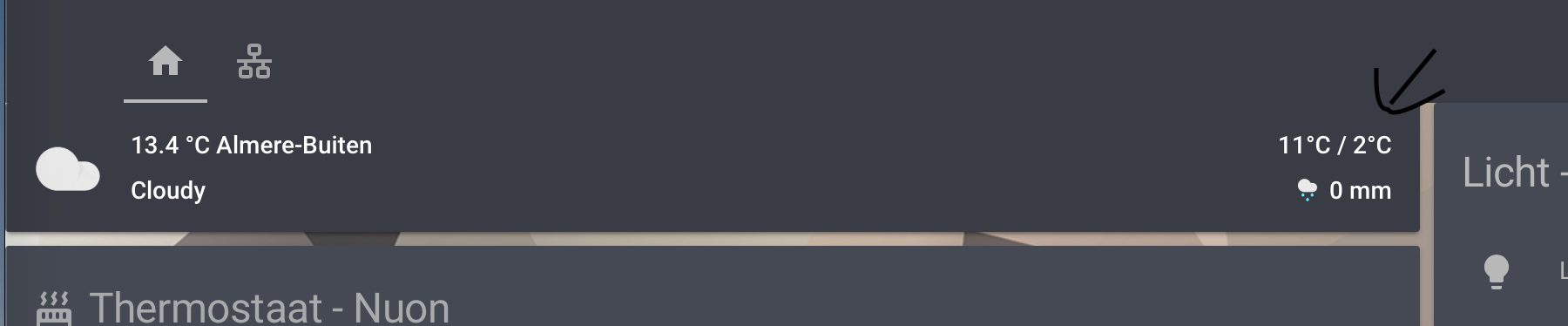
Hey everyone! Sorry for bothering you all here, I’ve been trying to figure out how lovelace’s design is built. I am trying to margin top the cards from the header. Currently my cards are touching the header, which is a little annoying. Does anyone know how I can add top margin to the cards so it has a little space between the header en cards
 lament burrow
so card modder looked promising, but either it doesn't support what i'm doing or i'm using it wrong. I want to style the position of a picture element using top and left with a state. an example of what I had in mind:
anyone know if that is possible in anyway, or is it a limitation of css in HA for right now?
polar kelp
You’re close. Dedent style so it’s level with the card-modder, and add some percent signs
lament burrow
Let me adjust and try
polar kelp
Because I assure you it's possible.
polar kelp
type: picture-elements
elements:
  - type: custom:card-modder
    style:
      top: "[[ input_number.y_pos.state ]]%"
      left: "[[ input_number.x_pos.state ]]%"
    card:
      type: custom:hui-state-badge-element
entity: ...```The quotes around the templates are mandatory
lament burrow
Ah! Gotcha!
That should be exactly what I'm looking for! You're awesome! I'm heading home so I'll try it shortly. Thanks for the suggestion and help!
polar kelp
So there were some more things to change than what I said first. I was on mobile and just glancing through your code
lament burrow
I should be able to tweak from there
mild veldt
@polar kelp using discord is often when I wish I had some kind of foldable phone that could expand to a full keyboard. trying to type yaml on mobile is tricky 😃
polar kelp
Yeah. A physical keyboard on the back or something would be great.
mild veldt
just keep on of these in your back pocket 🤣
 blazing nacelle
Good evening
one small question... I want to change my background with a jpg file in ha so ive put image.jpg into config/www
But for some reasons the background isnt changed
The theme is loaded correctly
  # Background image
background-image: 'center / cover no-repeat url("/local/day.jpg") fixed'```Did you create www/ just now?
If so you need to restart hass. And you also need to add a background definition to your lovelace configuration.
background: var(--background-image) at the top of ui-lovelace.yaml or the RAW editor should do it.
blazing nacelle
Hmmm ok
let me check that out
So only add background: var(--background-image) with the raw editor
no path to the specific image
hmmm
still not working
This is correct right? ```name: Thuis
icon: midi:home
resources:
- background: var(--background-image)```
sour crag
How can i make clicking on a room in a floorplan "zoom" into a room? I guess i can use navigate in the picture elements, but how do i make it react to a particular part of the floor-plan?
elder pendant
Cut your floorplan into rooms with a picture for each room, then add the pictures on top of the floorplan with a navigate tap-action
sour crag
hmm, i didn't quite understand that
i need to cut up the floorplan for the whole floor, if i understand you right?
and then add a navigate function to the different parts i have cut it up into?
elder pendant
Yes
sour crag
how do i keep the parts together in the interface?
blazing nacelle
Any other ideas @polar kelp ?
i am running hassio on docker.. maby that is the issue?
elder pendant
@sour crag what do you mean? You have to position them the same way you position any picture in picture elements
polar kelp
Who said anything about resources?
Just add exactly the line I wrote to the very top of your configuration.
sour crag
oh, so you mean having a big picture in the background, and then having room picture on top of that again?
blazing nacelle
hmmm ok
polar kelp
If you want the background image to be controlled by the theme, that is. If not, you should just add the line you wrote as background: in the lovelace conf instead of in the theme
blazing nacelle
Or put background: var(--background-image) in lovelave ui
yeah
Hmmm
FOr some reasons still not working
I have putted a # befor the background-image in in theme_clear.yaml
and added this to the lovelae ui: background: var(--background-image)
elder pendant
@sour crag yes. You can even do an empty picture to avoid having to be super precise with the visuals
polar kelp
Either you put background-image: "center ..." in the theme and background: var(--background-image) in the lovelace config or you only put background: "center ..." in the lovelace config.
was what I was trying to say
sour crag
I chose a pretty random size, and it doesn't look good in mobile (arelia)
elder pendant
But everyone's phone is different
sour crag
yeah, i was hoping the app would scale it properly
but t doesn't seem to
but it is just a big black box with the floorplan tiny in the middle
elder pendant
That doesn't seem right... it should scale the width or height to the maximum that the screen allows
sour crag
yeah, that was what i was hoping
guess i will have to experiment a bit with the size and se if it matters
polar kelp
Why didn't I think of this before?
Put the more info dialog of any entity as a card in lovelace.
Release when I've had some sleep.
lament burrow
that's a neat thought!
 royal pilot
Hi all. Is there a way to show a different ui-lovelace based on the user that’s logged in?
latent moss
maykar's compact-custom-header can do stuff like that @royal pilot https://github.com/maykar/compact-custom-header
royal pilot
Awesome! Thanks @latent moss !
latent moss
np
 wintry gull
Hello, Im trying to change the lightning bolts to a toggle switch but I havnt been able to do so. I read that if I put "assumed_state: false" this can be done but im not sure where to insert this. I have tried everywhere with no success. Right now my code on config is:
'''
switch:
Broadlink
- platform: broadlink
host: XXXXXXXx
mac: XXXXXXX
switches:
carrier_ac:
friendly_name: Carrier AC
command_on: 'JgDKAJCPFDQTERM0FDQTERMREzQUEBQQFDQTERMREzQUNBMREzQUNBMREzQUMRY1EzQTNBQ0ExETNBQQFBAUEBQQExETERMRExETERM0ExETERMRExETNBQ0EzQUEBQ0EzQUNBM0FKqSjhQ0ExETNBQ0ExETEBQ0ExETERM0FBAUEBQ0EzQTERM1EzQUEBQ0EzQUNBM0FDQTNBQQFDQTERMRExETEBQQFBATERMRExETNBQQFBATERMREzUTNBM0FBAUNBM0FDQTNRMADQUAAAAAAAAAAAAAAAAAAA=='
command_off: 'JgDKAJKOFDQTERM0FDQTERMREzQUEBQQFDQTERMREzQUNBMREzQUEBQ0EzQUNBM0FBAUNBM0FDQUEBQQExETERM0FBAUEBQ0EzQUNBMRExETERMQFBAUEBQQFBATNRM0FDQTNBQ0FKqRjxM0FBAUNBM0FBAUEBM0FBAUEBQ0ExETERM0FDQTERM0FBAUNBM0FDQTNBQQFDQTNBQ0FBATERMRExETNBQQExETNRM0FDQTERMRExAUEBQQFBAUEBMREzQUNBM1EzQUNBQADQUAAAAAAAAAAAAAAAAAAA=='
'''
azure scarab
@latent moss woah that's cool, I actually just setup the compact custom for the smaller header. Didn't even see that you can restrict based off user!
dark dirge
Browsers, too. There’s a lot packed into that thing
civic sedge
@wintry gull you can do this easy with a lovelace config - but I dont think that you can change the behaviur of the broadlink platform
  - entities:
      - entity: switch.carrier_ac
        tap_action:
          action: toggle
    title: toggle switch
type: glance ```Anyone have some advice on how I can get these in the same column? https://ibb.co/Bc1qX6V
civic sedge
np - just at the same things to do.
I feel ya - my 120th try to make a nice responsive tablet xD
civic sedge
Possible
blazing nacelle
I hehe
I am trying to install this one https://github.com/bramkragten/custom-ui/tree/master/weather-card
I followed the instructions but the custom card is not reconized by ha
 novel atlas
I have this thing called "http login" and "config entry discovery". anyone know how to hide these from my history graph ?
civic sedge
First - got an www dir in your config and restarted afterwards``
civic sedge
k - the hosted mode looks easy xD
do you realy use the lovelace mode?
blazing nacelle
  - url: https://cdn.jsdelivr.net/gh/bramkragten/custom-ui@master/weather-card/weather-card.min.js
    type: module
  - url: /local/custom-lovelace/weather-card/weather-card.js
type: module```do me an favur and check out - under system health - Lovelace / mode
azure scarab
@civic sedge nice this is what I have so far. https://ibb.co/3hdcb4n
blazing nacelle
set
azure scarab
Thanks for the help!
civic sedge
@novel atlas
more an home assistant question - check out https://www.home-assistant.io/components/history/#exclude
Done well 😄
blazing nacelle
Ow wait
Systeemstatus
error System Health component is not loaded. Add 'system_health:' to configuration.yaml```Let me do that first
mode    storage
resources    0
views 6```It just tells you wich mode youre lovelace is at the moment - I would guess you have the storage mode and trying to configure the file wich isnt used here
ha!
what I guessed 😄
blazing nacelle
ow
civic sedge
go to your frontend - press the 3 dots and configure UI
then RAW config editor - In there you can insert the module
blazing nacelle
ok
lets see
THis one right? ```resources:
- url: /local/custom-lovelace/weather-card/weather-card.js
type: module```
civic sedge
maybe... You got all files in the right place?
civic sedge
then hit save and add a new catd
blazing nacelle
No restart required?
civic sedge
nope
blazing nacelle
Ok
civic sedge
just hit comand+R for a full reload with the lovelace stuff
If you use Lovelace in storage mode, and want to use the editor, download the weather-card-editor.js to /config/www/custom-lovelace/weather-card/. (or the folder you used above)
civic sedge
kk - Most of the stuff is realy straight forward - just follow the readmes
blazing nacelle
But i have also placed this file in lovelave ui
  - url: https://cdn.jsdelivr.net/gh/bramkragten/custom-ui@master/weather-card/weather-card.min.js
    type: module
  - url: /local/custom-lovelace/weather-card/weather-card.js
type: module```The lovelace.yaml is completly ignored in the storage mode
blazing nacelle
ow oke
civic sedge
you have to go over the raw editor - or the configuration thingy
blazing nacelle
alright
And now add a manual card ?
with
  entity: weather.yourweatherentity
name: Optional name```jup - but spacing ll do you a little harm
blazing nacelle
ok
civic sedge
type: custom:weather-card
entity: weather.yourweatherentity
name: Optional name```
I got vscode open - so press + and past thiscool 😃
blazing nacelle
the - was the problem
atomic glacier
Good info for custom cards... **Installation instructions
This card requires card-tools to be installed.
For installation instructions see this guide. ** https://github.com/thomasloven/hass-config/wiki/Lovelace-Plugins
blazing nacelle
😛
civic sedge
yea - realy - I like the costom updater also very much
blazing nacelle
@atomic glacier Thx
@civic sedge Thanks for the help
Now i can proceed with all other custom cards
civic sedge
check out DinoTech's work 😉
atomic glacier
this one is a must for ALL custom cards, and make sure to keep it updated card-tools
civic sedge
Btw - ll you do an HA demo site?
atomic glacier
just here https://community.home-assistant.io/t/dinotechs-new-voice-activated-lovelace-screens/84271 and trying to get YouTube moving, posted some demos, not much yet https://www.youtube.com/channel/UCrSoN-g4sH1ADQq3A9f-Gzw?view_as=subscriber
civic sedge
new subscriber in 321
What you usin on this windows tablet?
got also one laying around - collecting dust
But its weak as F.
atomic glacier
just chrome browser...👀 just set up my LL to run more efficiently recently and just finishing up some new hands-free camera and browsing adds
will be trying to get demo vid by the weekend, not good at that stuff, but these new adds are sweet😎
civic sedge
maybe screen reccorder app and a voice over 🤷
atomic glacier
yeah, could do that, but I think it looks better being able to see the tablet on wall. Guess it doesn't really matter tho, IDK🤔 will be out of town till Thurs and will get back on it then.
civic sedge
 😄
😄
polar kelp
civic sedge
Somebody know empty entrys for a horizontal/vertical stack?
I use an empty picture-element atm to keep the size the same - but it isnt prittey
mhmmmm.. A horizontalstack card where you can set the size...
civic sedge
I knew you got somthing like this - Thanks a lot!
blazing nacelle
@polar kelp Hi Again 😛 Can you maby help me with me next issue
i have installed a few custom cards now and most of them are working (Y)
Sorry i mean @civic sedge 😛
blazing nacelle
This custom card
what i want is the topbar were the icons are and home icon is a lot smaller
So all of my groep tabs at the same level as the ''Home'' button in HA
if you know what i mean :S
group
civic sedge
so you installed the .js already?
blazing nacelle
yeah
I dont understand what they mean with
To use with panel view you need to place this card inside a "container card" with the panel card (vertical stack card, layout-card, etc.), otherwise this card isn't "displayed" and won't load. Placing this card at the end of the vertical stack can help with some spacing issues.
the cards arent the problem, only the mainbar
civic sedge
got an panel view ?
blazing nacelle
yeah
civic sedge
kk - you know how to use an vertical stack?
civic sedge
😄
blazing nacelle
This?
title: Home
resources:
  - url: /local/custom-lovelace/weather-card/weather-card.js
    type: module
  - url: /local/tiles-card-legacy.js?v=0.1
    type: js
  - url: /local/mini-graph-card-bundle.js?v=0.3.2
    type: js
  - url: >-
      /local/custom-lovelace/compact-custom-header/compact-custom-header.js?v=0.0.1
    type: module
views:
  - badges: []
    cards:
      - columns: 3
        entities:```