#frontend-archived
1 messages · Page 95 of 1
 viral sorrel
 subtle rune
@mild veldt I think I have a couple of links that's not in your list. Easiest way to make sure is to search the words in the repo, right?
 quick gulch
hey is it possible to use a sensor as the tooltip for an icon with the picture elements card?
 main meteor
Lovelace is not working in my iphone or the new Beta app but fully working in pc browser. Can it be the panel im using? Would it be possible to have different lovelace per device?
 cloud root
Good Morning folks
I have a query about history-graph. Is it possible to have a button to toggle the entity that is being displayed ?
 outer pendant
Anyone know why my "raw config editor" is empty?
 polar kelp
Heh. Never realized I only have two cards...
What? https://sharethelove.io/vertical-stack-cards/av-remote Why call that a vertical-stack card? There's only one card in the stack.
 wheat current
Lazy review, was probably me 😅
Will have a look at the entire site in a few mins 😉
 undone egret
wheat current
undone egret
wheat current
By looking at it, it should have been glance card @polar kelp ?
polar kelp
I guess
 mild veldt
@latent moss submit a pr if you have a moment. On mobile currently
@subtle rune probably most sure way
@quick gulch icons a tooltip? No, I don't think that is possible in general terms of browsers
@main meteor check that you have 'javascript: latest' in your 'frontend' section of your configuration.yaml
@polar kelp I typed your name out a lot last night 😉
undone egret
🤗
polar kelp
Should have copy pasted. I found two mistakes 😁
main meteor
@mild veldt i do, still not working
mild veldt
@polar kelp you get what you get and you don't throw a fit
 placid pivot
anyone using the custom_updater / tracker-card have any idea why its not showing me anything besides the custom_updater?
mild veldt
@placid pivot are you using storage mode?
placid pivot
yes
mild veldt
It doesn't work with storage mode
placid pivot
I'm using yaml files is that not storage mode?
placid pivot
it shows up so I think the tracker-card is working just the custom_updater isn't
mild veldt
Works only in YAML mode
If you still have your ui-lovelace Fe but are using storage mode, it is updating the ui-lovelace file and not your used configuration
That is is .storage
placid pivot
yeah I'm using yaml then
mild veldt
You have it explicitly set to YAML mode?
mild veldt
Then... 🤷
@wheat current may be able to help, but you'll need to tell him how great he is first. He's got a pretty big ego 😜
placid pivot
yeah I think the card is working right but the component isn't
wheat current
@placid pivot folow this, and I will have a look ;)
https://github.com/custom-components/custom_updater#issues
placid pivot
will do
outer pendant
Trying again: Anyone know what could cause the "raw" lovelace editor to be blank?
 fading nest
This might be a total newbee question 😃 in order to use the new Lovelace UI, you create a ui-lovelace.yaml file in the config folder and then in the about section of the Hame asstant interface you set the default page to lovelace.. right?
mild veldt
Otherwise you just hit try Lovelace in  and it will be autogenerated
fading nest
ok thought you had to have the converter installed for that
thx guys
hmm i get "Component not found: Lovelace" when i check my config, end the file is in the /config/ folder
mild veldt
@fading nest I would recommend not creating a file to start and do nothing to your configuration and just use the auto generated mode to get a feel for it
 naive tulip
I have added this config on lovelace as iFrame https://hastebin.com/ravosapiru.rb but I can see only one livestreaming the other one I can't see.
anyone know if it's a normal behaviour
 light smelt
Did something change regarding custom-components? in raw config editor my resources block are gone. if i add it it is removed. Worked in 0.85 before i edited the ui.
cant seem to find any references in changelog or issue tracker.
 split granite
See the pinned messages
light smelt
thx, have been wondering what that pin was used for 😃
naive tulip
@split granite thank you it worked without panel mode 😃
the only problem is the aspect ratio it not fit perfect the video stream
 midnight shadow
i can't remember where i've seen it, i'm looking for an light entity card that displays "On since " and/or "50% Brightness" below the light. those make stupid search terms, does anyone know what i mean? 😉
midnight shadow
i found light entity row, that's awesome but a bit overkill for the bathroom light
midnight shadow
found it 😃 the magic word was last-changed -> https://github.com/thomasloven/lovelace-fold-entity-row/ 👌
main meteor
My lovelace works in browser but i get errors like "Custom element doesn't exist"
in apad or iphone app
Im using the "javascript_version: latest" in frontend
quick gulch
@mild veldt not icons as tooltip, I want the tooltip of the icon to display sensor data e.g temperature
 foggy tendon
can someone tell me how to fix this error:
https://myduckdns.duckdns.org/local/custom_ui/weather-card.js?v=1.0.0:1:8 Uncaught SyntaxError: Unexpected token {
need more info
midnight shadow
use module instead of js or vice versa in resources
mild veldt
@quick gulch no, that would be templating which is not in core. You could accomplish it in a custom element however
foggy tendon
@midnight shadow I changed to module from js but the error is still there
midnight shadow
😦 worked for me for dark-sky-weather-card.js
placid pivot
@midnight shadow link to dark-sky-weather-card?
foggy tendon
I am using the same card, but the error calls weather-card.js
midnight shadow
https://github.com/iammexx/home-assistant-config/issues/4 the initial question is what helped me
the bramkragten one is the lit port, i'm not sure how similar this is
 dim harness
hey, what's the goto documentation/tutorial/video for the concurrent lovelace (looks like there has been quite a few changes since I made my config, so I think I should start over from the beginning)? is it possible to split the ui-lovelace.yaml nowadays?
e.g. I have a custom card for the vacuum, which itself is almost as big as the rest of the current config, so it'd be nice to put that elsewhere
mild veldt
@dim harness checked the pinned messages. modes are explained
dim harness
@mild veldt yeah, I looked into the topic (as well as into https://www.awesome-ha.com/#lovelace-ui -- some of that is from last summer/autumn, so probably not anymore up to date). I'm looking for some sort of "best practices" guide, e.g. there used to be id but there's path instead of it in the new examples
I'm going obviously for yaml mode
mild veldt
too new and changing to really have "best practices"
dim harness
so stuff like "always define path", "splitting up tabs to separate files" etc.? I hoped it is not so new anymore, that people have started to form good practices how to organize
 ornate mason
Is there a way of having a separate lovelace UI/Config? I'm trying to load it up on my wall mounted tablets (nexus 7 & fire tablet), and they're struggling with all the other views there.
 inner sphinx
are the cards on ...gallery/netlify.com up to day?
**up to date?
I'm finding it really easy to break the radial sliders
 pine island
Did I miss something with upgrading and lovelace? I upgraded to 0.85 and the Lovelace UI wont load now
split granite
From what version?
pine island
0.82
pine island
Gosh no.
split granite
Well, that'll do it
If you don't read the breaking changes section of every release, you're going to have pain
pine island
I typically have pain every release
Gonna try listen to the podcasts a bit more. I was aware of breaking changes to system info, and I think history-stats
split granite
There's breaking changes in pretty much every release 😉
Whether they'll impact you... the only way to find out is to read them
wheat current
😮
split granite
I know
pine island
I guess the longer I use HA, the more components im going to have, the more likely i'll have a breaking change
Must stop updating late at night too
Every time.... 😦
Ah. I see they fixed (or maybe not) the __ (double underscore) thing.
Thanks Lovelace for making me not have to restart to tidy my UI.
Getting there now. Thanks @split granite
 acoustic mural
is yaml still the preferred method of configuring lovelace and will that be the default when lovelace becomes the default UI?
split granite
Personal choice, and no, but you can set it
acoustic mural
what's the default going to be? I just rolled a new HA instance and figure I may as well learn the "right" way to do it, but the config docs (unless I'm just missing it) seem to be focused on yaml
split granite
The "default" will be JSON, in .storage/lovelace, as created through the built in editor
However, the real default is dynamically generated with no storage 😉
acoustic mural
so if I want to get going with that, where do I start. Is there a site somewhere that explains it? I'm sure if you can just point me in the right direction, I can figure it out. I'm on 85.0. Will it all be done through the Customization section of Configuration in the frontend?
acoustic mural
duh - I was on the old UI trying to figure out how to cusomize lovelace. Hadn't switched over yet. Thanks. I'm good to go.
split granite
🤣
polar kelp
split granite
😮 
polar kelp
And here's the video again, for inspiration (development version, some things are changed).
split granite
That... That... That's got some interesting potential
polar kelp
It really does, doesn't it?
split granite
Now, if only I could get my Google Home Hub displays showing Lovelace 😄
polar kelp
Bedtime
 winged zealot
Hi! I'm trying to setup a shopping list in lovelace. I have the "+ Add object" row but nothing happens when I add something. Anyone running Shopping list in lovelace?
 timid wigeon
I was curious about this too but implementing the Google Shopping list
pine island
Me again. Did something happen to the tap_action: toggle setup? I can't toggle any of my glance cards
split granite
Yes
polar kelp
Syntax changed in 0.84. Read the docs
split granite
Please read the change logs
winged zealot
@warm meteor I can't figure out how to get it running..
Conf.yaml:
shopping_list:
service: shopping_list.add_item
service: shopping_list.complete_item
Lovelace:
- title: Shopping list
icon: mdi:cash-usd
cards:- type: shopping-list
title: Shopping list
- type: shopping-list
 violet talon
@polar kelp that looks awesome. So many ideas!
mild veldt
@ornate mason checked sharethelove.io and find compact-custom-header
ornate mason
@mild veldt Yeah, I'm already using that. But it still loads the whole configuration.
mild veldt
I don't understand what you are saying your issue is. Performance?
ornate mason
Yes.
mild veldt
@winged zealot that configuration.yaml doesn't look right. Does Shopping List show up in the side panel?
Only the current view is rendered @ornate mason
ornate mason
Hmmm ok.
Weird, when I load it up in chrome there's no problem. But in Wallpanel it's so slow and laggy, it's unusable.
winged zealot
@mild veldt Yes mate.
mild veldt
@ornate mason could it just be the tablet in general?
@winged zealot does it work in the panel?
winged zealot
Yes it seems to work in the panel..
ornate mason
@mild veldt I meant, if I load it in Chrome on the tablet, it's fine, but in the wallpanel app it's unusable.
mild veldt
Well then the app is the problem...right?
ornate mason
Probably. I'm guessing it's using the built in WebView, which isn't as optimised as Chrome.
winged zealot
@mild veldt Suddenly it works, for some mysterious reason.
I would however like to hide it from the panel now.. =/
mild veldt
Not until States is dead and gone will that be removed
winged zealot
I see. This is good enough for me at the moment.
I've changed the configurations.yaml
shopping_list:
service:
- shopping_list.add_item
- shopping_list.complete_item
In case anyone else wonders.
Going to bed now. Thanks for the help!
timid wigeon
Great. Sorry @winged zealot didn't get to you
I have an issue with my picture-glance card where tapping and holding my hue lights doesn't bring up the color changing properties
 verbal osprey
Hey everybody, looking for a little help with a lovelace card
What I would like to do is hide motion when it is at "off"
- title: Master Bedroom TEST
show_header_toggle: false
type: entities
entities:- sensor.master_bedroom_motion
- sensor.master_bedroom_temperature
- light.master_bedroom_dimmer
I guess basically I'm looking for a way to include an entity-filter in an entities card, hopefully that makes sense
mild veldt
@timid wigeon did you setup your hold-action to do that? sharing your configuration would be helpful
~share
 kind shellBOT
:point_down:
Format Code
Please use https://www.hastebin.com/ or https://paste.ubuntu.com/ to share code.
mild veldt
@verbal osprey you want to hide that single motion sensor when no motion is detected?
timid wigeon
entities:
- entity: light.egg_lamp
icon: 'mdi:lamp'
name: Lamp
tap_action:
action: toggle
hold_action:
action: more-info @mild veldt
This is ui-lovelace.yaml
verbal osprey
@mild veldt Yep, and I just can't figure out how to include that in an entities card
kind shellBOT
:point_down:
Format Code
Please use https://www.hastebin.com/ or https://paste.ubuntu.com/ to share code.
mild veldt
@verbal osprey only way I can think of doing that off the top of my head is to create two conditional cards
that could be a potential feature for the conditional card; the card to display when it doesn't match
verbal osprey
@mild veldt Ah that's brilliant thinking out side of the box, I'll set that up real quick and give it a go. Thanks!
timid wigeon
Sorry @mild veldt https://www.hastebin.com/zayemapago.bash
mild veldt
is it more-info that is not working, or hold_action that is not working. i.e. if you set tap_action to more-info does it work?
timid wigeon
ah it's more-info that's not working
putting it in place of toggle it still toggles
I'm not sure if more-info is the correct attribute either
I'm looking to get the brightness slider, color wheel
timid wigeon
In fact with tap_action and hold_action deleted it still toggles. In the docs it says default action is more-info
mild veldt
did you refresh after editing?
mild veldt
no need to reboot
something is amiss here
i don't believe your edits are being reflected
what mode are you in?
timid wigeon
If I change the icon to mdi:led-strip it changes to led-strip image. I'm editing studio code from samba share using lovelace interface
verbal osprey
@mild veldt Here's what I ended up with, works great (ended up doing the disappearing trick on both motion and door)
https://www.hastebin.com/buhemifozi.css
Thought about getting the window status, but it's already getting massive. Thanks again for the idea!
timid wigeon
@mild veldt or what do you mean by mode. Lovelace VS default?
mild veldt
I meant yaml vs storage
mild veldt
Yours doesn’t make sense to me. It just can’t happen. The matching is explicit in the code
timid wigeon
I don't have the lights added in configuration.yaml just the hub. Does that matter maybe
timid wigeon
Yea but I just have it in the lovelace interface
 prisma kraken
Hi everyone, I'm trying to get the "Minimalistic media player card for Home Assistant Lovelace UI" working, but it is my first time with Lovelace, so I'm a little unsure how to add the custom js to HA ---
It seems that HA is ignoring my entries in ui-lovelace ... hmm? any hints :)
placid pivot
is it possible for a .js to reference its location so the path to images can be based off that and not hard coded?
I'm trying to use the weather-card.js from https://github.com/bramkragten/custom-ui/tree/master/weather-card and where it is looking for the images doesn't fit with my setup. I found where its hardcoded in the .js and could fix it but rather fix it to be universal if possible and submit a PR for it
 mint geode
Hi guys, I've got a problem with my lovelace config. To be specific with my conditional-card
mild veldt
@placid pivot just change your local js file
@prisma kraken how are you editing your configuration
mint geode
This is my code:
            conditions:
              - entity: sensor.netatmo_regensensor_rain_2
                state_not: 'unavailable'
            card:
              type: gauge
              name: Regenmenge
              unit_of_measurement: 'mm'
              entity: sensor.netatmo_regensensor_rain_2
              max: 40
0.85? I think there is an issue with gauge cards
split granite
That format looks wrong though
mint geode
I've doble checked
split granite
          - type: conditional
            conditions:
              - entity: sensor.netatmo_regensensor_rain_2
                state_not: 'unavailable'
            card:
              - type: gauge
                name: Regenmenge
                unit_of_measurement: 'mm'
                entity: sensor.netatmo_regensensor_rain_2
max: 40```(maybe 🤷 )
mint geode
Yes but if I do it your way lovelace complains
split granite
Then I'm wrong 😉
mint geode
According to the conditional page I should format it like i did
The weird thing is it takes up like apx. 10 pixels
If I remove the conditional I get the gauge card
In addition when I load the page it loads a white blank space for the card but then smoothly goes away until there's the above mentioned space of 10 pixels of nothing left.
 vapid field
Any idea what I'm doing wrong here...can't get the custom button to size properly?
https://imgur.com/a/1fBGoSw
      - type: horizontal-stack
        cards:
          - type: light
            entity: light.bedroom_light
          - type: custom:button-card
            entity: switch.bedside_lamp
            action: toggle
 proper notch
When using YAML mode for Lovelace since 0.84 my ui-lovelace.yaml seems to be ignored. I can add entities in the WebGUI without them showing up in yaml file and vice versa. What have I missed? I've enabled yaml mode in the configuration.yaml and restarted
split granite
@proper notch Did you read https://www.home-assistant.io/blog/2018/12/12/release-84/#for-existing-lovelace-testers?
proper notch
@split granite Yes, I've created a new ui-lovelace.yaml based on the raw config. But when I manually add entities they don't show up in the GUI. Using the WebGUI I can add them
proper notch
For me it's not really clear how to upgrade. I have an existing ui-lovelace.yaml which works great at version <0.84. When I upgrade it seems to revert to my old design pre lovelace. Enabling YAML mode and creating a new ui-lovelace.yaml doesn't seem to do anything. What am I missing?
split granite
You don't create a new ui-lovelace.yaml
You configure YAML mode (https://www.home-assistant.io/lovelace/yaml-mode/), and it just works
proper notch
So my existing ui-lovelace.yaml should just work?
wheat current
if you enable yaml mode, yes
proper notch
And if it's not working properly it's probably due to the YAML 1.1 parsing?
split granite
Depends... are you getting nothing, a partial config, or what?
proper notch
I'm getting kind of a partial config. Entities are missing and my custom cards are not working
Everything is in the ui-lovelace.yaml file though
split granite
You're 100% sure you've configured YAML mode in configuration.yaml?
proper notch
Yes, I have: # Enable Lovelace YAML Mode
lovelace:
mode: yaml
in my configuration.yaml and restarted
Does it need to be under the frontend: ?
proper notch
This is my ui-lovelace.yaml https://pastebin.com/raw/MwLSGnDR
 proper notch
WARNING (MainThread) [homeassistant.components.sensor.template] Could not render template yrwthr, the state is unknown.
INFO (SyncWorker_0) [homeassistant.components.sensor.command_line] Running command: cat /sys/class/thermal/thermal_zone0/temp
/usr/local/lib/python3.6/site-packages/afsapi/init.py:71: RuntimeWarning: coroutine 'noop2' was never awaited
They popped up after the upgrade
split granite
Now check to see if the missing entities are missing because they changed ID
proper notch
Same entity id
proper notch
"INFO (MainThread) [homeassistant.components.http.view] Serving /api/ to 172.30.32.2 (auth: True)
/usr/local/lib/python3.6/site-packages/afsapi/init.py:71: RuntimeWarning: coroutine 'noop2' was never awaited
self.__session._connector.close()"
Seems to be popping up in various situations
 raven nacelle
it's INFO...so nothing serious
proper notch
It seems like it's not able to load lovelace and falls back to the pre lovelace layout based on how it looks
raven nacelle
Lovelace is working fine here for me
proper notch
it's been working fine until I upgraded from 0.83. Really strange
raven nacelle
oh...did you check the breaking changes....lot can happen in two releasese 😉
main meteor
Tip on card simular to card-modder that works with CSS?
I get errors using card-modder and would like to replace it
 torn grove
 junior onyx
My light cards start out looking ok but after a few hours (always on iOS tablet running in safari, not the iOS app), they change to full circles and the dimming 'swipe around the circle' stops working.. anyone know if this is an issue I need to report?
 glacial oriole
HI, any one has an example of configuring lovelace thermostat (along with the climates such as mqtt hvac) to show cooling or heating instead of just the mode cool or heat?
placid pivot
so partial a z-wave question and partial a lovelace question. Just added my thermostat to HA (CT101) and it is showing up as 2 climate entities (heating / cooling) is there anyway I can combine those in the UI?
split granite
~crosspost @placid pivot
kind shellBOT
@placid pivot Please DO NOT cross post. Read the channel description, post it and wait for folks to respond.
split granite
I doubt that the template climate device will do what you need, but maybe it will 🤷
placid pivot
not seeing a template climate on the component list
placid pivot
yeah I don't think so
mild veldt
@polar kelp for your browser-commander idea, being able to say "hey google, damage report", triggers event, and browser-commander brings up the admin monitoring panel view on my display in the kitchen. i will now have my star ship!
polar kelp
I'm gonna need a video of that.
mild veldt
i'll have to build myself a captain's chair as well
oh man...and then have google respond back with the summary
...i'll probably never get around to doing this...my actual smart home stuff is a disaster, I just keep testing new broken things all the time
polar kelp
Same here. I keep wasting time on pointless plugins I don't even use.
placid pivot
I finally started removing some I wasn't using
like I don't need my sonarr/radarr in HA
split granite
@timid wigeon yaml - entity: script.menu_open icon: 'mdi:google-chrome' name: Screen Off tap_action: action: call-service service: script.turn_on looks very wrong
https://www.home-assistant.io/lovelace/picture-glance says that service is part of tap_action. You either need to call script.menu_open as the service, or also include the entity_id
split granite
You lost the action
mild veldt
@timid wigeon need service_data
polar kelp
Service_data isn't required.
mild veldt
For service-call it is. We don't pass the entity_id anymore
Oh wait. Missed that it was changed to the actual script
You're right
split granite
@naive meadow Did you read https://www.home-assistant.io/blog/2018/12/12/release-84/#for-existing-lovelace-testers?
 naive meadow
Moved from #330990055533576204
Hass isnt updating my lovelace, ive coppied over my existing conf to the instance and it hasnt updated, all the entities are seen in the unused section
oof
will do now
@split granite Ive pasted my conf in to the raw editor, Its added the pages, but not my tiles.
 fiery temple
can anyone help me combine these cards? i like to have the first part as verrtical stack and below the second c ards part as horizontal under it,
https://hastebin.com/jadebosivu.bash keep getting yaml errors cause im not so good at it
split granite
Ok, so that's the sections, the tabs
kind shellBOT
:point_down:
Format Code
Please use https://www.hastebin.com/ or https://paste.ubuntu.com/ to share code.
split granite
Yeah
naive meadow
although i always refer to it as pastebin because in a sence it is a bin to host your code
split granite
Pastebin is an actual thing 😉
split granite
Only two views, yes
naive meadow
yes
fiery temple
@split granite can i ask you to make a little example for my config, i can take over if i got a little sample trying so hard
naive meadow
@split granite Fixed it, seems like it doesnt like my volumio entity
split granite
Ah, cool/weird
naive meadow
no doubt i prob have it named something else somewhere
fiery temple
this gives me https://hastebin.com/gezopixize.bash
YAML Error: YAMLException: end of the stream or a document separator is expected at line 68, column 1: type: horizontal-stack ^
without horizontal stack on last line im getting:
YAML Error: TypeError: Cannot read property 'startsWith' of undefined
split granite
Well, that's not YAML, that's what happens when you randomly copy and paste stuff
@fiery temple If you're not using any custom cards, I'd strongly recommend you abandon YAML and go with the built in editor
fiery temple
i am using custom cards
vapid field
has someone a link/custom-card-name in mind, which spans more than 1 (card-)column? is this even possible, or intended?
fiery temple
like dark weather and custom mini meedia player
split granite
@vapid field Not possible as such
Then @fiery temple time to learn how to format YAML 😉
vapid field
@split granite mmmh, was already wondering why I haven't seen one yet, explains alot 😄
placid pivot
if I want to update my lovelace UI (in YAML mode) do I need to restart HA?
ornate mason
Hm. That's weird... I'm using the custom calendar card, and it's loading fine everywhere, except for on my fire tablet, when using fully kiosk browser... Works fine in Wallpanel and chrome. Straaaange.
I did find a neat little trick to speed up loading on slow tablets though. Make the first view empty (or just a "Loading..." markdown card), then use compact-custom-header to hide it by default.
mild veldt
@ornate mason fire tablets have an old version of webview, usually custom cards don't work with them. if you can root it, i would
ornate mason
Ah, makes sense.
Ah yeah, happens in wallpanel too.
Bugger, looks like it's unrootable. Too new firmware.
I guess I'll try running it as a Chrome web app, though I've had issues with that freezing after some time..
fading nest
hey guys anybody here good with the History Graph card ?, trying to to a little graph with my Netatmo outside temp
mild veldt
@fading nest check out the mini-graph-card
or are you just having issues with the history-card?
fading nest
I am just starting out to build my system and would like a graph of the temp the last 30 days
In the UI editor it just seems like i put in the yaml vode but it does not seem to work
and there is not a lot of documentation on the exact format of the yaml
tried this
type: history-graph
"title":"Regn Maengde i de sidste 30 dage",
"entity":"sensor.netatmo_willregn_rain",
"hours_to_show":720
"refresh_interval":60
:information_source:
Format Code:
To format your text as code, enter three backticks on the first line, press Enter for a new line, paste your code, press Enter again for another new line, and lastly three more backticks. Here's an example:
```
code here
```
Click on the link to learn how to format: https://raw.githubusercontent.com/skalavala/HassBot/master/format.gif
 fiery temple
@split granite took me 2 hours but i got it :D
https://hastebin.com/oqeresipap.bash
kind shellBOT
Tinkerer is away for 22m 3s with a message :point_right: Travelling in the Heart of Gold
mild veldt
shift + enter to do multiline entry
just edit your previous message rather than putting up more or use pastebin/hastebin to share
you have a lot of yaml mistakes. recommend you read up on yaml in general, but for now
type: history-graph
title: 'Regn Maengde i de sidste 30 dage'
enities:
  - sensor.netatmo_willregn_rain
hours_to_show: 720
refresh_interval: 60
finaly got it was using the wrong tics 😉
thx @mild veldt but the card "rendere" still reports yaml errors,
YAML Error: YAMLException: missed comma between flow collection entries at line 3, column 7: title : 'Regn Maengde i de sidste 30 dage' ^
but in the little yaml i have done your code looks alright to me, so i am puzzlede why it says there is a missed comma
polar kelp
The syntax highlighting above helps you. Something is obviously different about the first word on the second line in Ians code, right?
mild veldt
i'll fix it as well 😃
fading nest
thx guys i figure it out, think the problem was in reallity the order in witch the options was written 😃
mild veldt
No
fading nest
type: history-graph
title: Regn de sidste 3 dage
hours_to_show: 96
refresh_interval: 60
entities:
  - sensor.netatmo_willregn_rain
That does not matter
fading nest
this works
mild veldt
I had a space in between title and :
fading nest
ok
ohh and a small typo in entities 😃 that was the issue
I am just starting out so the first part i confused JSON with YAML, damn there is a lot to learn 😉
By the way is there a way to rearrange the views if you created them in the wrong order ?
polar kelp
It's never the order
prisma kraken
Hi everyone, I have been searching throug this channel and tried all of the examples, but I really having some challenges in added the custom js 'mini-media-play' to Lovelace as a 'new' ressource.
I use the RAW editor of the UI and tries to added to the top of the configuration, press SAVE and when I re-open the editor ... resource are ... gone 😦 any hints 😃 ?
 forest pebble
Its a bug in 0.85.0
prisma kraken
😂 oki -- well that explains 😃
...any workaround or would that be switching to ui-lovelace.yaml ?
forest pebble
You can try 0.85.1 but its still a bit buggy.
I updated to 85.1 then edited the raw file and still had the same issue.
What I did as a work around and it seems to work 'ok', is to edit the raw file, save, close, close the edit window, then close the browser.
When I reopen the browser after that the changes were saved.
Any new changes and the process has to be done again.
Funny enough I was adding the mini-media-player as well
prisma kraken
😃 👍🏼
polar kelp
If it doesn't work in 0.85.1 it might be a caching issue. Clear your cache and reload using ctrl+f5.
forest pebble
@polar kelp That didnt work for me. Had to do the process listed above for some reason.
 prime umbra
in 0.85.1 is already fixed
prisma kraken
0.85.1 would that be BETA channel ?
prisma kraken
yes
prime umbra
if not showing you can always force update with ssh via putty
hassio ha update --version=0.85.1
prime umbra
after update, then you might need to clean cache like @polar kelp suggested
prisma kraken
...think that I will try that ... tomorrow ... otherwise I kind of guessing that it would be late 😄
...again 😃
fiery temple
hi @polar kelp youre the invetor of lovelace right?
polar kelp
What the heck? Don't blame me!
fiery temple
could you tell me if !secrets work again on 0.85.1 i as broken for a while, im NOT using the yaml mode, just the new GUI edit on UI
polar kelp
No, I'm not. That's Balloob, like everything else.
fiery temple
owh sorry i tough you was the inventor
polar kelp
!secret only works in yaml mode
fiery temple
ah so you only made the converting yaml to lovelace thingy?
i understand now, thank you @polar kelp 😉
haha dont blame me he says 😂

 tepid locust
so you can add more stuff?
mild veldt
@pearl rivet what resolution is that monitor? Try panel: true on your view
 pearl rivet
2560x1080
Where am I sticking that?
Got it
but its pulling one thing to max width
the first card
is there any way to make it do both?
Got to use a horizontal element
@mild veldt kind of a hacky solution as it only displays the first tile but it works
mild veldt
It displays the first card
pearl rivet
no badges either
mild veldt
Make that first card a vertical stack and you can do what you want in terms of stacking other cards
ornate mason
So, I'm curious... The incompatibilities with the old Android Viewport versions. Is it mainly missing native Javascript functions?
 fathom tree
Any ideas why did my "resources:" section disappeared? If I edit the raw config, and put the resources back, and save, they don't stay. Poof! gone next time I open it. Did I miss a breaking change with 0.85?
 smoky mulch
@fathom tree are you on 0.85.1?
smoky mulch
it was fixed in that hotfix
fathom tree
ah!
excellent.
on my way to upgrade now
I'm not getting the option to update to 0.85.1 Must be Continental Preference for Europe again...
mild veldt
@fathom tree you can switch to yaml mode until you get the hot fix
fathom tree
Oh ya. Good call. Didn’t think of going back. 👍🏻
 unreal wind
helloi have some questions about lovelace
split granite
@unreal wind You have to actually ask the questions if you want answers
 outer spoke
Can you do "tile card"-view in lovelace similar to HADashboard?
Are those two even aimed to do the same thing or are they completely made for 2 different purposes?
split granite
Well, the purpose of both is to give you a UI for Home Assistant, the goals of them seem to be very different though
outer spoke
Different how?
split granite
Well, HA Dashboard is about giving you tiles in a fixed layout, where you have control over the sizing
Lovelace isn't
Lovelace dynamically flows the views, and you have very limited control over sizing
You can do something vaguely similar to HA Dashboard in Lovelace, but only vaguely
split granite
Yes
outer spoke
And I'm guessing Lovelace is the more "official" option? In a way that it is supported better by HA and better kept up to date.
split granite
Lovelace is the one built into Home Assistant. HA Dashboard is by another dev
As such Lovelace is the only one of those that's official 😉
Of course, "up to date" - the UI doesn't change that much
I've not been worried that my HA Dashboard install is "outdated"
prime umbra
@fathom tree when you not get update available you can force by using putty with ssh
hassio ha update --version=0.85.1
has long is already available in container
https://hub.docker.com/r/homeassistant/raspberrypi3-64-homeassistant/tags/
or
https://hub.docker.com/r/homeassistant/raspberrypi3-homeassistant/tags/
link depending in what RPI version you have 32 or 64 bit
fathom tree
Thanks!
 slow wave
hmm, when I look at https://www.home-assistant.io/lovelace/weather-forecast/ it shows per day forcast, however, in my config it shows per hour forcast, but I don't see any examples on how to specify that anywhere
 fair jungle
Is there a way to use a bit more structure in the raw config editor. I noticed that comments are not allowed. I like to stick to the raw editor because it looks it becomes the default one.
slow wave
nevermind, I overlooked the config happens in the darksky component, not the card itself
polar kelp
@fair jungle No. The raw editor is a workaround meant to be made redundant over time. It has the bare minimum of features.
polar kelp
Hard to think someone would choose to develop, update, support and document two ways of doing the same thing when they could do three, I know.
No offense meant, proton. Yours is definitely a valid question.
fair jungle
Not at all. I only was looking for clarification. I'll think i will switch to yaml until the gui is more mature
outer spoke
Can someone point me in direction of a tutorial that starts from scratch, makes a button in Lovelace UI that user can press to execute shell script found on same device and refresh UI in some way? Sounds like a very basic functionality, but I am having no luck finding such tutorial.
polar kelp
Lovelace is very new and very quickly evolving. Tutorials can be outdated in two weeks or less, so noone wants to make them at this point.
outer spoke
Actually now that I am looking more into it, it seems that I just can't wrap my head around how entities work. All tutorials start from point where they already have bunch of entities that they can select from. For me there are only a few, Sun being one of them.
I'll move to homeassistant channel and ask my question there.
split granite
In terms of a button in the UI, https://www.home-assistant.io/lovelace/entity-button/ is the only (stock) button card, though https://www.home-assistant.io/lovelace/picture-entity/ maybe
 warm mulch
Can the clock from HADashboard be ported to a card in Lovelace?
split granite
You could use https://www.home-assistant.io/components/sensor.time_date/ and a card of your choice
warm mulch
hmm. Not bad. I guess I'll do that.
For the future, I'm hoping someone will turn out a flip-clock, like the old HTC HD2 homescreen clock
If anybody can code js, I'd be forever in your debt if one were to take on the challenge
split granite
Raise a feature request on the forum, somebody may see it
split granite
~forum
kind shellBOT
You can find the community forum at https://community.home-assistant.io/
 pallid flame
@outer spoke Try this video for Lovelace introduction
https://www.juanmtech.com/how-to-set-up-lovelace-on-home-assistant/
mild veldt
@warm mulch clock flipping card. I like it. I think there is one around already though
The custom-compact-header has a clock in it for sure
warm mulch
@mild veldt I have the custom compact header atm. It serves it's purpose...
But I haven't seen this yet:
https://www.xda-developers.com/files/2010/09/Untitled.jpeg
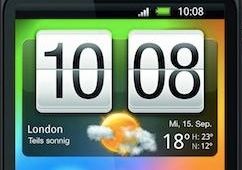
the old HTC had an animation when the minutes changed, to show the flip...then when the hour changed, the animation was a bit longer and played on both fields (HH and mm)
timid wigeon
Any way I can make a button on a picture glance card activate a different Harmony activity depending on which activity was currently active? I would prefer not to have a conditional card below
split granite
You could have it call a script, and have the script handle the logic
 dense thicket
I feel like adding volume buttons to a media-control card should be something that is done by default. Is it just my TVs that don't have the option?
I can change the volume of them with media_player.volume_up and media_player.volume_down but as that's a service I haven't quite figured out how to get that to be a button on my card yet
I have a sneaking sensation I need to learn templating and scripting to do this 😄
mild veldt
@dense thicket google mini-media-player
vapid field
i use that as well
 vale citrus
What is the correct way to toggle an entity in the new UI editor? My card works but I get this error when saving:
Your config is not supported by the UI editor:
Expected a value of type `{entity,name,icon} | entity-id` for `entities.2.tap_action` but received `{"action":"toggle"}`.
Falling back to YAML editor
 remote igloo
anyone using the https://github.com/custom-cards/upcoming-media-card
junior onyx
My light cards start out looking ok but after a few hours (always on iOS tablet running in safari, not the iOS app), they change to full circles and the dimming 'swipe around the circle' stops working.. anyone know if this is an issue I need to report?
kind shellBOT
:point_down:
Format Code
Please use https://www.hastebin.com/ or https://paste.ubuntu.com/ to share code.
remote igloo
@mild veldt I keep getting [frontend.js.latest.201812110] :0:0 Script error. and the card won't load
 vapid tapir
Anyone have a problem with using lovelace ui and duck dns?
Every since going to duckdns on hass.io, when I enable lovelace nothing loads. I just get the HA logo and a "retry" button
 old whale
The old home assistant UI was so difficult to setup and honestly didn't like the outcome.
I finally jumped on the Lovelace train and there is no going back!
It's so much easier. Seriously, whoever designed this... 👏👏
mild veldt
@polar kelp did 🤣
@old whale seriously though, this is balloob's baby (the founder of HA) but lots of devs have put in lots of hours to get it where it is now
mild veldt
New Roku remote card https://github.com/custom-cards/roku-card
Still a few rough edges to iron out
New Personal Capital card https://github.com/custom-cards/pc-card
 mortal cape
@mild veldt did the remote get added to the roku component or is that some custom component?
mortal cape
ah. Is there a roku setting that needs enabling?
mild veldt
no
their local api is dead simple. it's great
should totally be added as a remote in the backend, but didn't want to wait on that 😉
mortal cape
hmm...I can't get it to appear. Maybe I rushed it
smoky mulch
I cant see it either. Can access the ip:8060/query/apps though
and going to the query/icon/id works
mild veldt
I did slap it together pretty quickly tonight. No errors in console?
I’m heading to bed now. Will check back tomorrow
smoky mulch
@mild veldt got a Blocked loading mixed active content “http://ip:8060/query/apps error in console
np, have a good night
obviously cos im using https but trying to serve http
 tiny trail
Hi! Migrated my whole setup to Lovelace yesterday and reimplemented quite a bit of my thing in new better ways. Lovelace ain't that bad when you get over that initial bump 🙂
Got stuck on one thing and my Google fu is failing me. How do I create a card with entities from a group?
Have a few group's that auto populate based on scripts and I don't see a good way of recreating that in Lovelace?
split granite
https://github.com/ciotlosm/custom-lovelace has a group card that may be what you're after
tiny trail
@split granite thank you. I'll have a look
mild veldt
@smoky mulch @mortal cape ah. I just run locally and don’t need ssl. Should be an easy change.
vapid field
is anyone here using the air_quality component? id like to get some more infos displayed, does anyone know how?
placid pivot
before I go and start figuring out how to modify the thermostat cards I can find is there any that already support 2 climate entities (one for heat, one for cooling) in a nice UI?
placid pivot
More gooling and I was able to find one https://community.home-assistant.io/t/dual-thermostat-card/85798 so guess I'll just try using that for now
 tepid raft
can you give friendly names to badges in lovelace?
mild veldt
vapid field
can anyone help me defining more state attributes in lovelace? im trying to get more values displayed from opensensemap
tepid raft
@mild veldt right, but it can't be done via the new lovelace UI like normal entities can?
mild veldt
@tepid raft where are you seeing that you can update friendly names in Lovelace on “normal” entities (I don’t know what that means)
tepid raft
sorry, here's a link: https://www.home-assistant.io/lovelace/entities/#example
@mild veldt ^
in the list of entities, you can use the - entitiy: syntax to give UI specific configs to an item, which is great because if i have "Master Bedroom Lamp" I can have it only show up as "Lamp" in the master bedroom card, but "M. Bedroom Lamp" in an "All Lights" card for example
so you can edit its name to something different everywhere its visible
mild veldt
gotcha, doesn't exist
submit a FR to ui-schema
customize would still be best for a global friendly name change, however
tepid raft
right, and I have been using that - was just migrating over my UI to lovelace and was trying to get rid of all UI-specific values in my other files
 signal apex
good evening everybody 😃
 dire surge
Hi, I'm just getting started with custom cards. Can anyone tell me whether Lovelace uses a CSS library, and if so, which one? Thanks.
placid pivot
ohh @tepid raft I hadn't even thought of something like that. Right now my UI is very basic through and things (mostly) only exist on one "page" that corrolates to where they are in my house. I have another page with all my automations/scenes/sensors but its more to see them all as I'm still building the UI rather than to acutally use.
tepid raft
yeah, it's useful. and it works with entities right now, just not badges apparently
granted, my badges are global and i don't need to give them specific names right now, but was just trying to get my UI components out of everything except my lovelace config
mild veldt
@tepid raft I think it’s a valid feature request. Suggest you add it to the ui-schema repo for us
tepid raft
Will do! This one? https://github.com/home-assistant/ui-schema
mild veldt
Yeah
tepid raft
 signal bay
hey guys, when the backend changes a theme, it doesn't update unless I refresh or open and close the sidebar
signal apex
I'm pretty new to HA and i have successfully set up a small configuration for my light switches. Now i am trying to get into lovelace with which i'm failing big time...
No matter what documentation or video tutorial i follow, it does not show me the lovelace ui...it always shows me the default one.
I also have set up a new hassio installation on a second pi.
any suggestion what i'm doing wrong? I followed the tutorial of JuanMTech
vapid field
whats the url youre trying to access lovelace with
 odd lava
I have the same issue. I am using http://192.168.1.119:8123/lovelace/default_view
signal apex
i use hassio:8123/lovelace
i also set lovelace as my default going through the i icon on the right lower corner of the sidebar
and i of course restartet ha after creating the ui-lovelace.yaml
also tried with ip instead of the hostname
cleared out the groups.yaml to remove my old groups..... nothing helps
oh and btw, i'm using the latest hassio. just downloaded this afternoon
odd lava
@signal apex this sounds exactly like what I did. I had it working at one time . I built a new version too and still it only displays the default. If I bring it up in IE, it shows an error in the core-0083506b.js file and it just displays the blue banner. In Chrome, I start with address:8123/lovelace/ and it redirects to default-view which appears to be the normal page. Same happens on the iPad. There is no where to see any errors.
signal apex
japp...exactly the same here @odd lava
@odd lava : did you also watch and follow the video of Juan?
odd lava
Yes I watched Juan's and Dr Zzzs , went through all the tutorials. No matter what I do, it redirects to the default-view which is identical to the standard page (I compared the source files). I wish there was somewhere where you could see the errors.
If it didn't redirect, I could at least try to debug it in Chrome.
I had a simple configuration with only some automations and switches. I started with a brand new Hassio and let the Lovelace migration work and it redircets. I ttry updating anything in the ui-lovelace file and no change. Strip it down to a card, type entities with one switch, no luck.
 fallen seal
have you got
lovelace:
mode: yaml
in your configuration file ?
signal apex
no. I thought lovelace doesn't use yaml (??)
just thought the file has to be named like that
 broken mango
Hello everyone!
Is't possible to use jinja templates in secrets in yaml mode?
polar kelp
Only with lovelace-gen
No, wait... No. It's not. Lovelace-gen evaluates jinja before !secret.
Core hass doesn't support jinja in lovelace at all.
warm mulch
Gentlemen...
Can someone tell me what I have to have in my config-yaml to be able to use "sensor: local_time" in my ui-LL.yaml?
I'm stuck on stupid again
warm mulch
how would I declare one?
split granite
What are you trying to achieve?
warm mulch
ok...screw local_time
split granite
🤷
split granite
That is controlled by the display language in your browser
split granite
The browser controls the way the time is controlled
Unless you're using images... of course
polar kelp
You can for elements in a picture-elements card.
warm mulch
😄
polar kelp
And to some extent by using card-modder.
polar kelp
The style parameter injects css into the element.
Don't know if that will help you, though.
mild veldt
warm mulch
I can't post pics here, huh?
mild veldt
use imgur
split granite
~images
kind shellBOT
Please use imgur or other image sharing web sites, and share the link here.
broken mango
@polar kelp I have Google static map URL in my secrets with jinja template for coordinates. I was using it as URL for Camera components. How can I migrate it to lovelace?
I've followed this https://www.home-assistant.io/cookbook/google_maps_card/
warm mulch
mild veldt
warm mulch
I'm trying to remove the colon and change the color slightly
mild veldt
@warm mulch does it scale well with screen size?
polar kelp
@broken mango Use this: https://www.home-assistant.io/lovelace/map/
warm mulch
there's the template. I just put it in a picture-elements card, with time on top
broken mango
@polar kelp well it seems I'll have to use it. Unfortunately openmaps don't have good detalization for my region
mild veldt
@broken mango I misunderstood earlier, thought you wanted secrets in lovelace. Why not just display the camera that you already have setup in lovelace?
broken mango
@mild veldt just realized that. Thanks
broken mango
@mild veldt exactly
fallen seal
When I first used lovelace I had a default view. Is there anyway to get a yaml of that default view ?
polar kelp
🤦 Of course! Good catch @mild veldt
warm mulch
where would I look to find time_date.py?
polar kelp
@fallen seal go back to auto mode and check the Raw editor? Someone,please correct me if that doesn’t work.
split granite
~format @silver crescent
kind shellBOT
:information_source:
Format Code:
@silver crescent To format your text as code, enter three backticks on the first line, press Enter for a new line, paste your code, press Enter again for another new line, and lastly three more backticks. Here's an example:
```
code here
```
Click on the link to learn how to format: https://raw.githubusercontent.com/skalavala/HassBot/master/format.gif
 silver crescent
            cards:
            - id: Stue Picture Entity
              type: picture-entity
              entity: group.group_stue
              tap_action:
                action: toggle
                state_image:
                  "on": /local/stueon.jpg
                  "off": /local/stueoff.jpg
whats wrong? "Getting error no image source configured" Just updated and checked the docs but cant find the error
signal apex
@fallen seal : many thanks! with the mode tag it seems to work now.... strange that nobody ever mentions that in their videos 😃
fallen seal
from what I've read it wasn't necessary until very recently.
split granite
Videos become outdated very quickly with Home Assistant
mild veldt
@silver crescent you need a default image source
since your entity is not a camera
so add image: /local/stueon.jpg
wait a minute...
this is all wrong
why do you have a state_image in your tap_action?
that's the problem
silver crescent
@mild veldt that was the way it was setup before the upgrade. ```
cards:
- id: Stue Picture Entity
type: picture-entity
entity: group.group_stue
tap_action: toggle
state_image:
on: /local/stueon.jpg
off: /local/stueoff.jpg
            cards:
            - id: Stue Picture Entity
              type: picture-entity
              entity: group.group_stue
              tap_action:
                action: toggle
              state_image:
                "on": /local/stueon.jpg
                "off": /local/stueoff.jpg
indentation matters
split granite
Also, with 0.85 (or was it 0.84) the tap action format changed
fallen seal
@polar kelp the reason I wanted to be able to see the default view was to check if anything had been auto added that I didn't know about. For example, next door's weather station showed up yesterday :-)
I've found that I can drop back to /states and still see anything auto'd so that will do the job.
mild veldt
@fallen seal top right menu has “unused entities”
fallen seal
Just found that as well 😃
odd lava
@fallen seal I am glad this worked for @signal apex . I put in the lovelace: mode : yaml and it still seems to redirect on me. I also commented out the frontend: and config: options and restarted Home Assistant with no effect. Is there a forced redirect to lovelace\default-view in my code somewhere that I need to remove?
mild veldt
Idea is that from there you’ll eventually be able to just create a default card from some entity there as well
fallen seal
@odd lava what version are you running ?
mild veldt
@odd lava just go through
fallen seal
am I right in thinking that the www folder is relative where the configuration.yaml file is ?
odd lava
@mild veldt thank you. That is actually what I am doing and just stating the URL that shows up.
split granite
www/ is local/ in your config folder
silver crescent
@mild veldt That did the trick!! Thanks 😃
split granite
Or, to be more accurate, when you see www/ in your config folder, that's /local/ in the URL
fallen seal
that's what I thought.
I created a file 'test.txt' in the www folder but always get a 404 error.
does HA need restarting when things are added to www ?
signal apex
@odd lava : sometimes i do forget to restart HA after changing the configuration.yaml. have you restartet after adding the mode tag?
fallen seal
hmm, I thought I'd restarted it since creating the www folder. Perhaps I hadn't as it's now working.
odd lava
@signal apex - yes I have restarted HA and rebooted the system several times. I would hope that if there was an error with me ui yaml, an error would be available somewhere.
signal apex
@odd lava : are you using latest version of hassio?
odd lava
version 1.13 downloaded again 1/9/2019
 restive bolt
Is there a way to add css media queries to the horizontal-stack cards? As they flexboxes, I'd like to set them as columns instead of rows when viewed on a mobile.
odd lava
I have found the issue, I get net::ERR_CONNECTION_REFUSED. Now I just need to find out why.
polar kelp
@restive bolt That's what the normal interface is trying to do if you don't interfere by using stacks. You can tweak the behavior a bit by using layout-card.
warm mulch
in a state-label on a picture-elements card, how can I view all available styles? Is there an API somewhere that I can't find?
restive bolt
@polar kelp Thanks 👍 Seems like it might be the card I'm looking for 😀
polar kelp
@warm mulch It's css. You can experiment using the chrome object inspector
polar kelp
And you didn't happen to set? yaml style: font-size: 15vw; filter: opacity(90%)
warm mulch
I'm using those 2 😃
polar kelp
then look again
warm mulch
I'm wondering what else might be available
polar kelp
Google css. Anything you find there
warm mulch
and wondering why they don't show under styles in the inspector
polar kelp
They're right there in your screenshot
odd lava
@fallen seal I give up. Got rid of the errors and still no page. So I completely started over with a fresh hassio image, added the lovelace: mode: yaml, and created my ui-lovlace.yaml file with the example from the "Lovelace/ Yaml mode" page and still nothing. No errors reported anywhere, just get the default page
fallen seal
@odd lava how odd.
can't be of much more help unfortunatly, I've just started playing with lovelace myself
 odd lava
@fallen seal Thanks for the help though. We gave it a shot.

 zenith umbra
hi all
can anyone see anything obvious why lovelace doesnt like this conditional card?
troubleshooting for a while cant seem to figure it out
smoky mulch
there a reason why you haven't used - ?
zenith umbra
you mean before card?
smoky mulch
are u using yaml mode or the storage mode?
mild veldt
@odd lava you need a minimum configuration if you use yaml mode
I would suggested auto mode if just starting out.
@zenith umbra your conditions should be a list of entities. Look at the docs again
smoky mulch
@zenith umbra ```
type: conditional
conditions:
- entity: binary_sensor.slidingdoor_sensor
state: "on"
card:
type: glance
show_name: false
show_state: false
columns: 1
theme: Backend-selected
title: Backyard Door
entities:- binary_sensor.slidingdoor_sensor
thank you very much
old whale

why is the camera not expanding?
it was working fine until i put it into a group
type: entities
title: Outside
show_header_toggle: false
entities:
  - entity: light.driveway_coach_lights
    name: Coach Lights
  - entity: light.front_porch_light
    name: Porch Lights
  - type: picture-entity
    entity: camera.front_porch_camera
Picture-entity is a card. You should not put it inside a card.
old whale
what should i use then to group them all into a card?
polar kelp
The longer (true) answer then: Either the custom card ”Vertical-stack-in-card”, or set type: custom:hui-picture-entity-card instead.
I’m on mobile right now, so I don’t want to type out the full explanation...
old whale
got it.
man lovelace is so easy and nice looking
the other thing i have a question for is, https://i.imgur.com/YBGZ7cd.png why is it popping out?

im using custom components on those keep in mind*
prime umbra
sounds like next push we will have line numbers to Lovelace 'Raw Config Editor'
thats awsome
would be lovely to see having some language style on it!!!!!
 weak flume
Any reason why a custom card would work then all of a sudden not work
Custom element does not exist. It was working this morning. No restarts, just a page refresh 12 hours later.
 summer eagle
Using lovelace, once I added the cameras, they show up as badges within a card, how can I go to previous state of showing a large preview like before
mild veldt
@weak flume and everyone else, there appears to be issues with the lit packages on unpkg.
You should be able to open the js file and apply a similar fix to this for each custom card that uses lit https://github.com/kalkih/mini-media-player/pull/58/files
weak flume
Oh ok.
Ty very much. I was pulling my hair out
@mild veldt nice profile
Profile pic that is
 balmy oxide
@mild veldt thanks, i was wondering why the hell my custom cards all of a sudden wasnt working
i changed an int value to something else and everything broke hah
mild veldt
@weak flume wabbalubadubdub
weak flume
Meh I just disabled the card and went back to stock. The food didn't seem to work for me
balmy oxide
@mild veldt what is your change? just dont load LitElement externally and use one thast already available?
var LitElement = LitElement;
var html = LitElement.prototype.html;
would be enough to replace the import statement?
mild veldt
no, exactly as in the PR
var LitElement = LitElement || Object.getPrototypeOf(customElements.get("hui-error-entity-row"));
var html = LitElement.prototype.html;
i guess the fix doesnt work for custom-surveillance-card.js. didn't think hui-error-entity-row would apply to that card or not
it imports another one, repeat, from unpkg, but no localhost:5000 reference in my console about failures there
card just comes up blank
summer eagle
Does anyone know how to make a camera preview back to a regular sized preview and not a badge style?
And the "Idle" next to it is redundant for cameras too
 cloud escarp
did 0.85 break custom components?
mild veldt
@balmy oxide hui-error-entity-row is just a LitElement in the core project, has nothing to do with if it is used by the custom card or not
@cloud escarp I don't believe so. It appears to be an issue with unpkg. Scroll up through recent talk on the matter
 pearl yoke
anyone know where the lovelace JSON is stored?
mild veldt
.storage/lovelace
pearl yoke
thanks! 😃
 lean wraith
Hi @mild veldt . My custom button card stopped working after upgrading to 0.85.1. I attempted your fix to the js file but didnt seem to do anything. Do you expect this to eventually be resolved or should I start converting to another card (I'm using this card extensively)
mild veldt
🤷
lean wraith
@mild veldt Ha! ok. Thanks
mild veldt
Did you clear you cache?
It is starting to smell like it is something to do with the 0.85 upgrade, but I can't think of anything that could have caused this...
lean wraith
just cleared Cache. Now custom buttons dont show up at all. You may be onto something. I'll keep messing with it. Thank you!!
 thorny verge
I have not custom cards working now as well, all showing red "custom element doesn't exist...", was working for 3 days on 85, the past 2 days on 85.1.
mild veldt
Ah. That’s good to hear
thorny verge
Just rolled back to 84.6 cleared cache, and same errors...
mild veldt
Thanks for checking that out
balmy oxide
is it possible to build groups using templating?
i have some sonoff/tasmota switches that have a bunch of sensors attached to them, like sensor.sonoff_123_energy_current, sensor.sonoff_123_energy_voltage, etc..
i want to build a few groups dynamically based on the prefix sonoff_123_
for every single switch
ideally i want to build this group once, just defining the unique part of the name once, then use templating to build out the rest of the groups
im trying to find a good way to get all of the sensor power usage without manually adding them individually
polar kelp
Somewhat glad to see my decision not to rely on unpkg pay off... I guess...
 timid burrow
Yeah that unpkg is causing grief in a few places
 spare meadow
It looks as though some error checking in the custom ui config thing isn't sending anything but title and views to the websocket for saving... shoudl also send resources though
will find commit that broke it...
this is the short of it though:
 polar kelp
@spare meadow How about the commit that fixed it instead? https://github.com/home-assistant/home-assistant-polymer/commit/07a4505f1e4bd8e9b854007fce4b5b1f07ae750e#diff-f97c5d0acaad74ae1e5f895f215a7741
It should work in 0.85.1.
vapid field
hello, i just migrated to lovelace with lovelace migration addon, do i need still add this to configuration yaml:l ovelace:
mode: yaml? Because it switch back to old ui
polar kelp
I suppose the "migration addon" generated a ui_lovelace.yaml file? If so, yes.
polar kelp
Then yes
main meteor
@polar kelp Can lovelace-fold-entity-row show all lights with a certain state? Eg. All on?
I was thinking in having a top sensor saying how many lights are on "5 lights are ON in the house" and then the sub-folder shows the actual lights
polar kelp
I think I could add support for monster-card... been thinking of that before...
I'll take a look at it in a few hours or so
main meteor
That would be nice!
pearl rivet
Is there any way to get a card to go full width without being a panel?
I am having issues with display

Or should I just panel with a vert stack?
polar kelp
That would probably do it
pearl rivet
This is a bit of a charlie foxtrot in raw editing 😦
polar kelp
@main meteor Turns out that wasn't as easy as I thought. Monster-card has hard-coded away the option to use it on custom cards, and the developer hasn't been seen for months.
main meteor
A pitty! And the monster card is the only card that supports filtering on state?
pearl rivet
God this is a complete nightmare
polar kelp
Besides entity-filter https://www.home-assistant.io/lovelace/entity-filter/
main meteor
@polar kelp That would do it i guess. So templating a "count sensor" and add that as line on and the fold all entities using the entity filter card?
 polar kelp
You could try this: https://github.com/thomasloven/lovelace-layout-card
pearl rivet
Might have to tbh
placid pivot
hmm two of my custom cards are failing this morning but other ones are working fine. Nothing has changed on my end.
polar kelp
Trouble with unpkg. Check if there are updates for the cards.
placid pivot
well one of them has an update (that seems to remove unpkg) the other one doesn't and it does use unpkg
I'm guessing there isn't a way to fix that manually
mild veldt
@placid pivot just do the same change to your other card. What card is it BTW?
polar kelp
That works if it's just litelement. I don't know if other packages have the same problem.
polar kelp
Just realized this solution might break (for some cards) in the next hass version, when lit is updated...
placid pivot
circle-sensor-card still isn't working
signal apex
Does anybody know if it's possible to show icon with title below for the views?
So far i was only able to have the title as a tooltip...
polar kelp
It is not.
signal apex
😦
signal apex
thankx
 cinder cargo
New to Lovelace UI. Does the Dashboard still work the same or do I need to rebuild it?
polar kelp
Dashboard? The appdaemon one?
 royal crest
I bought a Envisalink which was installed in my Vista 21IP panel in the basement. I have it configured to HA but getting HUGE lag on the binary sensors (motion, door, etc). Has anyone experienced this?
envisalink:
  host: 172.16.0.5
  panel_type: HONEYWELL
  user_name: user
  password: user
  code: '1234'
  port: 4025
  evl_version: 4
  keepalive_interval: 60
  zonedump_interval: 30
Its an EVL-4, Firmware Version: 01.02.136A
also -- the allSecure app on my itunes reports zone status nearly instanteously (1-2 seconds). The HA is about 2 minutes sometimes
spare meadow
hm.... anyone know how to fix this without having to change the image specifically?
https://hub.docker.com/r/homeassistant/home-assistant/tags
:latest is not the latest...
0.85 is tagged as latest... not 0.85.1
that's what is causing the issue with the bad ui saving... for me.
meh... w/e i'll just change my image tag i'm using on my container. 😛
royal crest
uhh if your the docker guy for the project, just tag it
docker tag
cause someone forgot todo that
docker tag ${IMAGE}:${VERSION} ${IMAGE}:latest
 robust barn
Hi. can i stick a "lovalace card" on screen? i put the "clock card" and i want it to be the same place in the screen
 karmic vessel
what lovelace type would ya'll recommend for a server uptime sensor?
polar kelp
Entities. It has a new timestamp display
Or maybe that's not released yet...
No. It should be
karmic vessel
ah ok cool!
vapid field
i created themes.yaml with midnight theme, added themes: !include themes.yaml to frontend, and get now error : nvalid config for [frontend]: expected a dictionary for dictionary value @ data['frontend']['themes']['accent-color']. Got '#E45E65'
karmic vessel
i think my biggest problem with lovelace is sometimes i'm just not sure best way to display somethinghaha
 kind loom
Hello, my custom cards suddenly stopped working, it says the card-type does not exist. has anyone run into a similar problem?
polar kelp
Everyone has today. Unpkg - a repository of javascript packages - is down.
karmic vessel
biggest issue with depending on the internet hehe
polar kelp
Check if there's an update for the card, or wait for it to get back up.
kind loom
ah i see, thanks for the headsup:)
thorny verge
@kind loom Most cards have an update, but for the ones that don't yet, you can find the fix here,
https://community.home-assistant.io/t/lovelace-button-card/65981/267
raven nacelle
all of a sudden....the custom button card is not working for me. Anyone else?
polar kelp
sigh
Yes. Look three four messages up or so.
Nothing personal. You have no idea how many times I've explained this to people today.
wheat current
.broken
kind shellBOT
Yes custom button card is broken
wheat current
OFC you fixed yours 😄
 potent fjord
with latest hass update, is there a problem with custom components ?
ah yes
3 lines up 😄
raven nacelle
@polar kelp Yeah.,...I just saw your message
changed the link and it is working now
polar kelp
I predicted this might happen.
potent fjord
yeah, thnx 😃
raven nacelle
So, is there a solution to the problem @polar kelp or best practices, given that we will definitely have custom cards around ?
wheat current
From what I can tell, pinning lit-element to 0.5.2 in cards that uses it, and clearing the chache should resolve the issue.
placid pivot
yeah I just did that to one of the custom cards I was using (I should put in a PR for the actual card)
raven nacelle
looks like a ton of folks are using that card...we need some of those features in our button card 😉
placid pivot
you guys should add the dual thermostat card to the default for zwave thermostats that show up as a heat/cool climates
wheat current
Ask the dev to implement it in the core 😉
fiery temple
hi,, i had this card dark-sky-weather working but all sudden im geteting custom element doesnt excist,
yestereday i just had to wait and afteer a little 10-20 seconds the card loaded fine, but now it doenst show up just the error
placid pivot
update the card
fiery temple
@placid pivot mm howd you know? there is indeed an update of the card 3 hours ago, ill test the new card
placid pivot
if your using https://github.com/iammexx/home-assistant-config/tree/master/ui/darksky looks like it was update 3 hours ago to fix the issue
fiery temple
xD
placid pivot
cause all the custom cards have broken for the same issue
fiery temple
ah thnx didnt knew
id id read the changelog this time but couldnt find this info in it
fiery temple
@placid pivot thnx working again
 gloomy raven
hello after hass.io restart i get no lovelace anymore:
here the log:
20:13 components/system_log/__init__.py (ERROR)```i am on hass.io 0.82.1
i didn`t change anything on my config...
also my button cards stopped working:
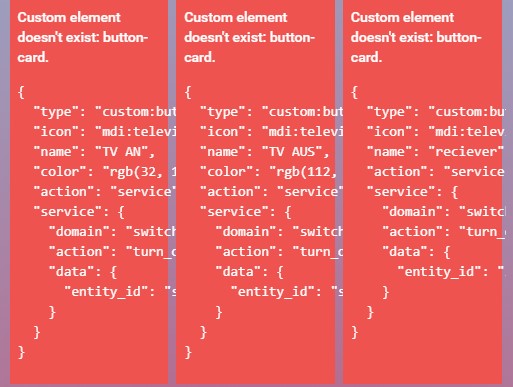 raven nacelle
There have been issues with custom cards due to the unpkg imports
scroll up, there has been enough discussion on it
gloomy raven
but i have not updated because of this ^^
raven nacelle
Not updating is not helping you 😃
Also, the import issue has nothing to do with updating HA
it is related to the external dependency in the card....again scroll up
cinder cargo
Sorry, missed the answer, had to go, same question: New to Lovelace UI. Does the Dashboard still work the same or do I need to rebuild it? Running HA 85.1, AppDaemon Dashboard. Thanks
wheat current
Appdeamon are separate from homeassistant
midnight shadow
weird, how can i find out what this is: (MainThread) [frontend.js.latest.201901091] http://192.168.1.109:8123/lovelace/0:0:0 Uncaught
something needing to be caught but didn't 🤔
in syslog every entry ends with #033[0m
polar kelp
Check the browser log too
midnight shadow
that's clean
vapid field
Is it possible to have glance card and in there with light card for light?
proper notch
Out of the blue my custom card for mini-media-player has stopped working. It's been working fine before but now I get the red card and "Custom element doesn't exist: mini-media-player". How should I troubleshoot this?
wheat current
Look at most of the posts in this channel from today
mild veldt
@wheat current can we just change the topic of this chat to be about the custom card disaster of 2019?
wheat current
#cardgate ?
vapid field
It would be super super cool to have some "package manager" for all these dependencies and a config option to set the custom cards to use a local server instead of needing an outgoing internet connection or depending on cdn's being alive
vapid field
afaik most js lib's would be installable by npm, right ? so we could go for some npm-package.json for installing the card dependencies.
 stuck plinth
Hey guys, Quick question.. i just started with lovelace, i used the addon lovelace migration to get a start. but when i now edit the ui-lovelace.yaml no changes are shown even after reboot and cache wipe? and when i edit it from the web. it does nog change that file?
polar kelp
I'd actually recommend not starting with a migration tool at this point, but to jump into the gui editor instead.
If you do wish to use yaml, you must activate yaml mode.
stuck plinth
oke, then i'll start using the gui 😃 just 1 other thing, how can i add Custom cards using the gui?
polar kelp
Through the raw editor. But only from version 0.85.1 or later.
stuck plinth
Oke, just updated to 0.85.1. thanks for the heads up 😃
fiery temple
@mild veldt do i see here that there is a local lit included in ha? so its better to use youre PR then mine? cause its always a local file you have?
https://github.com/kalkih/mini-media-player/pull/58/commits/4c232de681529b61f9c73653f808d8ed0a332915
vs
https://github.com/kalkih/mini-media-player/pull/60/commits/e1f1ba0532ed50bcef5e09d7ee132d6af3385995
if i understand correctly made some PR's on several custom cards to change the url like this links, should i instead make PR's with the code you wrote in this link
ill read it tomorrow, good night all
mild veldt
@fiery temple I would say local is better but I need to test that in dev as we just updated lit on the core project and want to make sure it plays nice
I’m also interested to hear about the other cards you updated as I submitted quite a few PRs last night as well
 past falcon
Hey, I just noticed that my weather card is showing me hourly. I'm guessing this happened when I switched away from yweather to darksky. Is there a way to switch this back?
I also got this error that I'm not sure what it means: /local/card-tools.js:43:21 TypeError: document.querySelector(...).shadowRoot.querySelector(...).shadowRoot.querySelector(...).shadowRoot.querySelector(...).shadowRoot.querySelector(...).shadowRoot.querySelector(...).firstChild is null
tepid locust
do you have a custom card for weather or are you using the default weather card
mild veldt
@past falcon card-tools is something thomasloven created. Do you have any of his cards in lovelace?
past falcon
yea I do
and sorry default weather card is what I'm using
I'll keep an eye on his custom cards then
mild veldt
you need to setup the darksky component to be in daily mode
past falcon
ok great!
pearl rivet
Anyone know how to stop lovelace displaying scatter data as a bar chart?
  - sensor.temp_sensor_1
type: history-graph ```I did expect this to be a graph?
mild veldt
@pearl rivet does the sensor have a unit_of_measurement attribute?
pearl rivet
Good question
It does not
I added it
but still have the same issue
Oh, maybe not
just cached
Might need to post an issue about that
as I seem to be getting lovelace caching a lot of stuff
and making up data based on the last point since cached
mild veldt
...yeah...it's caching by design. do you want to go and grab all state history for each sensor on each event on the bus...?
pearl rivet
Only the ones on the page I load
I've had it not do that
Having to use Shift-Refresh
 latent moss
I accidentally navigated to Lovelace yesterday for the first time (0.84.6) and it had all my UI etc. Now today I just upgraded to 0.85.1 and when I goto /lovelace/ it's a spinning circle forever... ? The sidebar is the only thing that loads on that page.
This is screenshot of what I see in Chrome inspector. Seems like the upgrade might have broke it https://i.imgur.com/r2ZX4U3.png
 mild veldt
@latent moss had you edited anything yet?
latent moss
Nope
mild veldt
Try clearing cache
latent moss
This is what I had seen, https://i.imgur.com/iTsL1LX.png was basically the same as my current UI (/states/) except with some yellow errors, i was taking care of them rather than configuring the ui. The only issue i noticed before is that my weblinks didn't transfer over properly, rather than being hyperlinks they were just long urls as text.

clearing cache didn't fix unfortunately
and I added this to config (and restarted), along with the example ui-lovelace.yaml (markdown card) on the docs page. but that doesnt seem to work either. Still a blank white page with spinning multi-color progress circle =/
lovelace:
  mode: yaml
Commented out that mode from config and restarted again, still the same thing, pic: https://i.imgur.com/TfCGV1Q.png Can see at the bottom of the window cache is disabled. It appears to be loading things(?) just not displaying them for some reason.
 mild veldt
mini-graph-card + pc-card === match made in heaven. more to come
@latent moss check if you have a .storage/lovelace
if so, delete it and restart
latent moss
@mild veldt i don't seem to have that file, https://i.imgur.com/dSLVY0d.png
 mild veldt
I just looked back at your images, I never did open that first one which looks like the auto generator just had trouble parsing you config for whatever reason.
what does your ui-lovelace.yaml look like?
I'm guessing you mean you used the example from here https://www.home-assistant.io/lovelace/yaml-mode/
I would try the yaml mode once more and make sure the cache cleared
🤞
latent moss
yeah i used the very first "super minimal example" on that page. i also tried safari in private browsing (which i never loaded HA on before) same issue. I'll try the yaml mode again one more time.
It was working perfectly yesterday aside from the weblinks issue, the only thing i did was remove unused things from views.yaml and check the unused entities page, i never actually made a "choice" on the screen where it asks you to select. Then i upgraded from 0.84.6 (hassio) to 0.85.1 and that's when it seems to have broke.