#frontend-archived
1 messages · Page 87 of 1
 undone egret
 mild veldt
@frank tapir I'm not aware of any live feeds
 warped bramble
Looking for a nice card for handling a group of lights
mild veldt
There is the Shinobi hassio add-on though
That does monitoring and recording

GitHub
A custom component for displaying camera feeds in the style of a surveillance system. - custom-cards/surveillance-card
This can get you close
 willow rose
any one know what's better to do,,, wait for 0.84 for lovelace UL to be in the HA or just put lovelace on now?
 raw brook
If you have never delt with before I would wait. It would be easier to start
 frank tapir
what's coming in .84?
Thanks for the link to the survellance card - will give it a look..
raw brook
Lovelace default with new editor stuff
frank tapir
cool, I have a sort of half built lovelace UI now, anything in particular I should do to prepare?
raw brook
The editor will do it all for you
frank tapir
Sounds promising 😃
mild veldt
🤞
undone egret
@raw brook can we put a wager of 🍻 's on that
raw brook
on what exactly
undone egret
raw brook
The editor will add ids where needed and get your lovelace ready. It will also auto generate cards like the current UI does
undone egret
so no bet then?
 late bloom
Does it make sense to have lovelace config and groups.yaml simaltaneously? Not clear on the direction the config is heading but I'm using groups.yaml to logically combine everything into rooms which get used by the API via appdaemon. I was then planning on having a separate config for lovelace displaying components in whatever grouping works best visually
mild veldt
@late bloom for Lovelace, groups.yaml doesn't make sense. Association to rooms is in the to roadmap, which I would show you if I could find it...
late bloom
interesting... do you happen to know if the room association will tied into the lovelace/ui config or more on backend logical grouping?
mild veldt
backend
I can't remember if it was in reference to Google Assistant room hints or actual HA architecture, though
which makes a big difference
I think it was for both, actually...
Now I'm going to be wondering until I find that thing...
late bloom
hmm indeed, because i really don't want to get tied up in something specific to a certain assistant such as google or tied too closely with the ui config. that's why groups.yaml is already perfect for me. Are there plans of phasing it out completely or is it just not a normal use case? I'm assuming they should be able to coexist without any issues as I've seen someone has made a groups lovelace card
mild veldt
my understand is that groups came to be to support the old UI and has always been seen as a hack
in time I imagine it will be deprecated or repurposed
late bloom
nice, thanks for this.
 kind sorrel
Anyone getting this error? I stripped everything one, and found that it only happens when I run lovelace.
2018-12-05 09:14:55 ERROR (MainThread) [frontend.js.latest.201811211] https://MYURL/frontend_latest/app-0fd67575.js:1097:1304 Uncaught NotSupportedError: Failed to execute 'define' on 'CustomElementRegistry': this name has already been used with this registry
That line shows
*/let modules={},lcModules={};function setModule(id,module){modules[id]=lcModules[id.toLowerCase()]=module}function findModule(id){return modules[id]||lcModules[id.toLowerCase()]}function styleOutsideTemplateCheck(inst){if(inst.querySelector("style")){console.warn("dom-module %s has style outside template",inst.id)}}class DomModule extends HTMLElement{static get observedAttributes(){return["id"]}static import(id,selector){if(id){let m=findModule(id);if(m&&selector){return m.querySelector(selector)}return m}return null}attributeChangedCallback(name,old,value){if(old!==value){this.register()}}get assetpath(){if(!this.__assetpath){const owner=window.HTMLImports&&HTMLImports.importForElement?HTMLImports.importForElement(this)||document:this.ownerDocument,url=Object(_utils_resolve_url_js__WEBPACK_IMPORTED_MODULE_1__.c)(this.getAttribute("assetpath")||"",owner.baseURI);this.__assetpath=Object(_utils_resolve_url_js__WEBPACK_IMPORTED_MODULE_1__.a)(url)}return this.__assetpath}register(id){id=id||this.id;if(id){if(_utils_settings_js__WEBPACK_IMPORTED_MODULE_2__.f&&findModule(id)!==void 0){setModule(id,null);throw new Error(`strictTemplatePolicy: dom-module ${id} re-registered`)}this.id=id;setModule(id,this);styleOutsideTemplateCheck(this)}}}DomModule.prototype.modules=modules;customElements.define("dom-module",DomModule)},function(module,__webpack_exports__,__webpack_require__){"use strict";__webpack_require__.d(__webpack_exports__,"a",function(){return afterNextRender});__webpack_require__(7);/**
 winter hollow
Do you have custom cards?
kind sorrel
Im not using any, I forget if I uploaded some, im sure it wouldnt affect it if im not referancing them
Only reference to this was on a custom card post
 kind shellBOT
@kind sorrel being uncaring, posted a message that is more than 15 lines. It is now available at: https://paste.ubuntu.com/p/Rwxwntzy7G/
 craggy cave
Hi guys and gals. First post here. I have been messing around with Hassio for a little bit now. Got switches, lights, and device trackers all working no problem. Broken up my config file etc and all working. Currently on 82.1 and can't for the life of me get themes to work. I tried both of the options with direct themes.yaml file and broken it up also but neither come up with the option under general settings to change themes. Very frustrating.... Any help much appreciated.
kind sorrel
@craggy cave You're in the lovelace support, you'll probably get better answers in homeassistant section.
Check if your config file checking as success
winter hollow
@kind sorrel how are you running home-assistant? And what version?
kind sorrel
Yes home-assistant, just upgraded to 0.83.3 to try and fix it
Maybe, I'm just getting lucky, but It used to crash in less that a minute if I was spamming lights.
I set show_header_toggle: true instead of false, and It hasn't happened in 5 minutes, very odd.
winter hollow
Shouldn't be, the error you are getting is about duplicate dependency
kind sorrel
Very odd. What would you suggest looking at? Shouldn't the error be somewhere in my lovelace.yaml if I was using a duplicate dependency?
Could the theme I'm using be causing an issue? Shouldn't be since it's just css
winter hollow
🤷
 blazing hamlet
thanks 😉
winter hollow
Lovelace:
resources:
  - url: https://fonts.googleapis.com/css?family=Unlock
    type: css
theme:
paper-font-common-base_-_font-family: Unlock
and that's all it takes to have an ugly UI!
blazing hamlet
another question it's possible to change image anchor position ? by default it's in the middle of the image
frank tapir
Can different user's have different Lovelace ui's?
 wheat bone
@frank tapir Well, until official support, you can do it with a custom card: https://github.com/thomasloven/lovelace-state-switch
Just have everything in custom:state-switch. You'll have the same views, but everything in each view can be different depending on who is logged in.
@dire dome https://github.com/custom-cards
And custom components here: https://github.com/custom-components
Also take a look here: https://github.com/thomasloven?tab=repositories
They are all natively supported by custom updater
 dire dome
@wheat bone i cant beleive i diddknt know about the state switch
wheat bone
I think it's pretty new; I didn't know about it until... yesterday? The day before? Something like that.
dire dome
pretty good solution until thye add multiple user frontends
wheat bone
Agreed! Thomas Loven has some great addons for lovelace
dire dome
wow, i just saw the fully kiosk one, thats pretty amazing
 thorny verge
Is there any way to stop the auto page reload in lovelace, every time the connection is lost?
Nothing has changed, and using the custom kiosk mode on a tablet that loses network for a split second, the page reloads and kiosk mode is lost.
 stable kindle
can I run 2 services via a single Entity Button? I want to trigger a snapshot for 2 cameras
 polar kelp
Not yet. But soon.
stable kindle
cool, thanks!
dire dome
@polar kelp great work with the slider custom card
just awesome
and im sure fully kiosk is going to be awesome tonight
pumped to be able to use the android as a camera
thorny verge
@polar kelp You were saying that there is a way to use !include to split up your lovelace_ui file natively?
I have tried it it seems to work, but any changes in the included file are not reflected unless I remove the include, and re-add it in . Is this normal, or am I doing something wrong?
polar kelp
That’s odd. I don’t use the feature myself, so I wouldn’t know...
thorny verge
Doesn't make it to useful, at least for now.
Unless there is a way to force them to refresh, but I can't find any documentation on the feature.
wheat bone
@thorny verge I saw something similar; my workaround was that I had to change something in the "base" ui-lovaelace.yaml, and save. Usually I would just add or delete a space or a comment somewhere. After saving that, it also reloads the !include yaml files.
winter hollow
Uuuhhh yeah, it does cache since last version
but only checks the if ui-lovelace.yaml is changed not the included yaml
dire dome
@thorny verge from what i have heard, seems like !include is still a work in progress in
winter hollow
It is not...
thorny verge
Ah, ok, makes sense. So for now, I'll just use !includes to take out stuff unlikely to change, as I had it completely broken up, and would never make changes in ui-lovelace.yaml so remembering to edit something in it will be a pain.
 remote igloo
is there a way on a glance card to show the values of an entity ? i want to put the temperature of a room on the card instead of having to click the entity
i gues i should say its a picture glance card
 kind loom
hello:) I get this errormessage after updating HA to 0.83.3, Lovelace UI is not loading. Unexpected exception
Traceback (most recent call last):
File "/usr/local/lib/python3.6/site-packages/homeassistant/components/websocket_api/decorators.py", line 16, in _handle_async_response
await func(hass, connection, msg)
File "/usr/local/lib/python3.6/site-packages/homeassistant/components/lovelace/init.py", line 476, in send_with_error_handling
result = await func(hass, connection, msg)
File "/usr/local/lib/python3.6/site-packages/homeassistant/components/lovelace/init.py", line 508, in websocket_lovelace_config
return await hass.async_add_executor_job(load_config, hass)
File "/usr/local/lib/python3.6/concurrent/futures/thread.py", line 56, in run
result = self.fn(*self.args, **self.kwargs)
File "/usr/local/lib/python3.6/site-packages/homeassistant/components/lovelace/init.py", line 160, in load_config
for card in view.get('cards', []):
TypeError: 'NoneType' object is not iterable
raw brook
CTRL+F5
kind loom
@raw brook was this meant for me? Lovelace is completly dead on 0.83.X, both with a new, clean config and my old one that works on 0.82
kind loom
i have a few views without cards, but should this be a problem? it worked fine on 0.82
raw brook
Take those and see
kind loom
ok, thanks. i will try when i get back home! 😄
 smoky peak
Hey, guys....I am having trouble wrapping my brain around something. My lovelace displays in three columns (automatically) and I personally like that layout. However, the vertical order of cards and which column they appear is seems to be random. Can someone help me understand the layout method I should use? I have read about "vertical-stack" and "horizontal-stack", but can't exactly understand how to use the two in conjunction with each other.
raw brook
If you make three Vertical stack of that layout. Then that emans those cards will stay in that order
To use both in conjuction you do
- Horizontal
  cards:
    - vertical
      cards:
    - vertical
      cards:
    - vertical
      cards:
so do three "- type: vertical-stack" statements?
raw brook
Yes
smoky peak
Start with horizontal first, to get three vertical columns?
raw brook
That above YAML makes sure they are in the same horizontal order
smoky peak
Ahh, awesome. Ok, let me try that out....probably about to break my shit, but made a backup. Thanks, @raw brook
smoky peak
Ok, trying to do what @raw brook said, and I've really screwed the pooch. Here's my config so far....can someone tell me what I have formatted incorrectly?
smoky peak
stand by....
Ok, hold on....let me just start from scratch, and see if I can get three more-or-less blank columns to display first...I think I am trying to change too much at one time. I'll keep you posted...
 gaunt flame
is there a way to add cards using the new editor ui?
raw brook
In 0.84 yes
gaunt flame
when does .84 get released?
raw brook
Next week
smoky peak
Ok, maybe this will be simply to pinpoint where I am getting this wrong. Here's my attempt at a framework: https://hastebin.com/mogipuzuqi.bash and here's how that displays:
Why am I not getting three columns?
smoky peak
I don't follow.
raw brook
views:
  - id: 0  # Automatically created id
    title: default_view
    icon: mdi:home
    type: horizontal-stack
    cards:
You are trying to use a card type and applying it to the view
All stacks are cards
smoky peak
Ok, so, what should I remove?
raw brook

Gist
[Lovelace] Create a header by using panel: true with nested stack cards - ui-lovelace.yaml
CHeck out this example
There is 1 vertical stack that you dont need. But the second card is a horizontal stack
Then within in that card you do the three verticals
smoky peak
I've never had a "panel:" statement in that place on line 5 of the example....what does that do?
smoky peak
So, fills up the view?
raw brook
yee
smoky peak
Ok, KPOW! Got it. Thanks a million.
remote igloo
is there was to hide entity card title and icon ?
mild veldt
@remote igloo entities card? There is no icon, and just don't specify a title and it is not displayed...
or do you mean entity-button card?
in which case...you would have nothing to render without an icon or name
smoky peak
@raw brook if you are still online, I finished arranging my lovelace into three vertical columns. however, any idea why I can no longer edit cards using the "Configure UI" feature?
smoky peak
Oh, a stack needs an ID??
smoky peak
🙃
mild veldt
ian high-fives himself
smoky peak
Let me try that....thanks.
mild veldt
don't splay your hand at me @wheat current !
 wheat current
It could be worse 😉
mild veldt
uhhh
 short willow
Quick q: Can I have a picture entity as a member of a glance card? Plan is to use small images in the picture entity
smoky peak
@mild veldt My stacks did NOT have IDs, but I have now added them. However, I still can't edit the cards in the UI. I don't SEE any cards which don't have IDs, but if I have overlooked one, is there a way to identify what may be preventing me from editing the UI in the GUI?
smoky peak
Ahh, never thought of that. :p
mild veldt
actuall...I think vscode now has mutliline regex search
smoky peak
is vscode like notepad++?
mild veldt
more like notepad+++++++++++++++++++
If I didn't suck at regex I could even tell you how to craft the search...but alas...I suck at regex
smoky peak
I don't even qualify as suck....
 near crypt
It is possible to rename a badge in Lovelace?
  - title: Home
    id: home
    badges:
- sensor.stats_mean ```womp womp
winter hollow
You can only edit the stack as a whole
smoky peak
Ahh, ok, @winter hollow as my grandmother would say, pissing in the wind.
mild veldt
@near crypt use friendly_name in your customize in configuration.yaml
smoky peak
So, step backwards in my opinion, for me....
mild veldt
winter hollow
@smoky peak what do you mean?
smoky peak
I mean, this morning, I could click on "Configure UI" and edit all my cards. But, now that I implemented stacks you can apparently no longer do that. So, I am going back to the way it was. 2 hours of my life I'll never get back, lol.
winter hollow
Hehe sorry about that
smoky peak
Well, I would imagine so....you guys are great. I'll probably just put that new lovelace file I created in the file, and hold on to it until then.
mild veldt
once the UI editor is polished up you won't be looking at that file anyways 😃
wheat current
You use stacks for pinning down the layout?
Wouldn't it be better if you could do that without stacks? 😉
smoky peak
It would be 1000% better....however, I don't know how....if there's a way, I'm all "eyes".
wheat current
Then the editor would not need to go "in the stack" 😄
wheat current
And I will love it!
smoky peak
if you build it, they will come.
winter hollow
The problem is that there is not really a way to pin it... or at least no one came with a good solution
winter hollow
I tried, now on my 4th laptop
smoky peak
Just use liquid paper on the screen to start over
wheat current
I like the way you can "set" most "dashboards" like in grafana for instance
kind loom
@raw brook removed the empty views and it worked! thanks for the help ❤
smoky peak
Ok, so here's another question which may be a "wait until its easier" answer...is there a way to change the "theme" in lovelace without having to do a bunch of customization like fonts? I read about themes a little, but looks like there aren't any "canned" ones I just just experiment with...are there?
wheat current
There are a lot on the forum
smoky peak
I think I have now defined some test themes...how do I select one? I thought I read they would be in a dropdown somewhere...
AHH, found it...nm
kind loom
Hello, this might be a noob question, but is there a way to have a lovelace card show the total valur of multiple states? i want to make a card to display power usage. thanks
value*
mild veldt
@kind loom checkout docs on template sensors
remote igloo
i am trying to get to vertical stacks that use the full width of the page do i need to do horizontal with two verticals ?
kind loom
@mild veldt hmm i checked them out now, but can´t seems to understand how to simply add up a few numbers..
mild veldt
remote igloo
yeah, i was looking at that but for some reason it didn't click. i pulled back my configuration and just tested till i got it - Thanks though
mild veldt
@kind loom that's a question for #330944238910963714 if you're having issues
remote igloo
is there support for multiple lovelace pages other than views ? I have an old Ipad that is playing hell with the layout and would like to present a different page for that device
 ionic hatch
Exhausted my google search and still can't find any clues. First time editing/customizing lovelace. I can see cards in the first view, but the second view shows up blank. What am I doing wrong?
If i put the cards from the second view into the first, those show up just fine.
 timid burrow
you need to post your yaml file...
mild veldt
@ionic hatch honestly, I would wait a week for the UI editor to drop
that being said, it's probably indentation or something in your config. check the browser console
ionic hatch
Thanks guys; I ended up copying the first card from the first view into the second, and that seems to have fixed something and I am seeing atleast something on the second view. Could have been some syntax error...
what do you mean by the browser console?
timid burrow
press F12 and it will show a browser console with errors etc
 opal sphinx
Hi, I have trouble loading Lovelace after HA update. (Unexpected error occurred). https://pastebin.com/Q0K95YE7 - Anyone knows whats what?
 vapid field
I've a entity list with about 15 covers, if I try to click more than 3 to drive the frontend freezes, anybode else can confirm this issue ?
winter hollow
@opal sphinx lovelace config and version?
 high canyon
is it a known issue that the light element shows a slider for switch type lights? (non dimmable)
opal sphinx
@winter hollow "Home Assistant 0.82.2 -> 0.83.3", https://hastebin.com/cerahacudo.bash
winter hollow
this is invalid config:
  - icon: mdi:silverware
    title: Kjøkken
    cards:
Should be:
  - icon: mdi:silverware
    title: Kjøkken
    cards: []
Aha.. Worked on 0.82.2 though. Ill try when I get home.
winter hollow
cards should be a list, so either make it an empty list or ommit it.
opal sphinx
Alrighty. 😃
mild veldt
@high canyon currently the light card is for dimmable lights only
high canyon
Ah ok, I guess it's not super clear in the docs no worries as long as it's known
mild veldt
Yeah the docs should make that clear. Want to clean them up in a PR?
 foggy tendon
How to have a new line in the text on 'useful-markdown-card' ?
I tried /n but with no success
polar kelp
No, but really. Some html tags work. Otherwise, google "markdown". I think it's *italic* **bold**. Same as in discord: italic bold.
thorny verge
Is there any way to stop the auto page reload in lovelace, every time the connection is lost?
Nothing has changed, and using the custom kiosk mode on a tablet that loses network for a split second, the page reloads and kiosk mode is lost.
polar kelp
I never noticed that. Are you sure it's not a setting in fully kiosk?
Sorry, you didn't say you were using Fully...
thorny verge
I am using Fully on my kitchen dashboard. But also using Chrome, and WallPanel in android, and all do it.
It's really noticable for me as I use the custom kiosk mode and the top bar comes back all the time.
I did some more testing on chrome, it only seems to reload if you interacted with the panel while there was no connection.
So, maybe it is just Fully where the biggest problem is. But, I have everything off in the Web Auto Reload section. Any idea what else it can be in Fully?
polar kelp
For me when fully reloads (after extended periods with the screen off e.g.) the kiosk script runs again automatically...
thorny verge
How do you do that?
Oh, sorry, you just reload fully after some time, and in an automation? That I do, but I still frequenly look at the tablet and it is out of kiosk mode.
polar kelp
It reloads when the screen turns on again. I don't know if it's a setting or something. I haven't touched it in ages.
thorny verge
That is a setting, but I don't want to do that, as my main screen takes a few seconds to load, and I want instant access.
polar kelp
If the kiosk script doesn't run, it sounds like you're not actually reloading the page but perhaps somehow navigating to a different page, which happens to be the same?... perhaps...
How do you do it? Is there kiosk in your view id, or do you add ?kiosk to the URL?
thorny verge
I use home-setter and the options for that have ?kiosk in the URL.
I just tested a little more in Chrome, as it is not just Fully, it is on Wifi. When the wifi connection is lost, the "Connection lost. Reconnecting" msg comes up on hass, and when signal back, page reloads, out of kiosk mode. The message doesn't come up on a PC with LAN, so no reload.
polar kelp
That could be your problem. I use an id with kiosk and navigate directly to /lovelace/kiosk_myview
It's probably that home setter is too slow on the reload, or isn't triggered. Custom cards are loaded pretty late in the process...
thorny verge
I can use the browser on chrome on android, and use the actual URL lovelace/home?kiosk and same issue.
Just tested with id: kiosk_home same issue. Anytime I get the "Connection lost. Reconnecting" msg, page reloads, not in kiosk mode.
It seems after the connection is reset, HA does a screen "Refresh" not reload, and that is when Kiosk mode is lost. Only a full page reload fixes Kiosk mode.
Is there a way to disable that page refresh in lovelace, or detect it on a device, and force a page reload?
polar kelp
I'll see what I can do...
There's a few things I'd like to change about the kiosk script anyway...
thorny verge
Cool, let me know if you need any testing.
 winter wasp
so I've tried using !include in my lovelace config, but I can't get changes to the included files to reflect in the frontend
 snow pelican
or have a button like "reload themes" to reload lovelace config
which in the end will allow more complex lovelace configs as well, since it than can completely reload the yaml file(s) and not do it on runtime
winter hollow
We have a reload button?
 static cloud
Really impressed with all the latest lovelace UI changes. Quick question, How can i add a name or title to the Shopping List?
 raven nacelle
raw brook
raven nacelle
raw brook
Damnit I was gonna say RTFM too
static cloud
thanks
 sour thunder
Hey, on my fire Tab running Fully Kiosk Browser, the media controls are invisible (there's empty space where they should be). It works in Chrome. So it's a problem with fully Browser, somebody know how I can fix this? It's the same on lovelace and the normal page. What's needed to show these controls what could be missing?
 timid trellis
Is there a way to use my own icons for an entity instead of a material icon?
raw brook
Technically. I think Thomas Loven has something with Font Awesome. You just have to include the css
timid trellis
Thanks. 😃
 atomic glacier
Need another set of eyes if someone has a moment. My eyes are apparently blurred (or closed, LOL). Can't get 'custom:card-modder' to work on this one: https://hastebin.com/hubuzilimi.bash THANKS!
polar kelp
Well... I don’t see anything at all...
Did you click save before copying the URL?
Also, first make sure the card works without card-modder, and let us know how it’s not working. Wrong color? Doesn’t show up at all? Upside down? Error messages?
atomic glacier
hmm... https://pastebin.com/DH6nSvxk @polar kelp card works fine w/o modder, nothing shows up when trying to mod card
polar kelp
Ok. There was mote info in the code
I don’t see anything that looks weird, allthough the first version probably wouldn’t do what I think you want.
It’s an odd error to get too... probably some syntax corner-case or something. Try removing stuff until it works, probably starting in the style section.
Wait
input_boolean.weather ?
What?
winter hollow
That’s not lovelace config
winter hollow
I should rewrite that weather card someday with litelement and claim it back 😜
raven nacelle
Please please...do that
raw brook
MAke it animated
raven nacelle
the weather card definitely needs some love
atomic glacier
Works fine in my LL views, but I'll do some digging and see what I come up with. Looks like most are using custom:dark-sky-weather-card, but I haven't had any isses until now
raven nacelle
you can tell from the forums that ppl are crazy about the animated cards
Is there any reason it is not officially supported? I guess the icons make it difficult
atomic glacier
Your card works fine and as expected even on mobile, I was just looking to upgrade looks and card backs @raven nacelle
wheat current
I'm guessing size are one of the reason static are prefered over animated
raven nacelle
yeah...you can look at the new code on my repo and the instructions on the forums
True, but let the users decide
atomic glacier
Thanks, I will do that @raven nacelle , everyone I show my LL to eats up the animated stuff, always what they pick out as favorite. Thanks again!
raven nacelle
indeed....it is one of the highlights
winter hollow
When I created that card, I made a ton of extra options, like a background color that matches the sun and weather conditions, more info screen, etc, but lost all the code... and now I just use your Lovelace card
 solemn wind
Hey everyone, any service-button experts around?
I'd like a service button to turn on, for example, 2 lights (out of many).
mild veldt
sounds like you need a light group or a script
solemn wind
I was trying to avoid making another group, but if that's the solution I can do that.
solemn wind
I was hoping there was some way to use JSON in the ui-lovelace file
I had read part of the reason for making lovelace was to get away from groups, since groups use more resources? I know they work just fine, but wondered if there was a "smarter" way to do it.
solemn wind
Related question... with the service button I tried having it do only one light, using the following, for example: https://hastebin.com/iwepinatej.css
And instead of just turning off light.hotelmode_light, it turns off ALL of the lights in my house
Like it ignores the "service_data" info.
Is that right?
mild veldt
No
But it is possible if you have entered the wrong entity it will turn off all I believe
solemn wind
The entity is correct, oh well.
I'll make a light group and see if it works.
I made the light group, but the service-button is still turning on every light in the house, ignoring the service_data
mild veldt
try the save service call from the dev tools
solemn wind
Ok
You mean the call service tool?
I did test that earlier, using homeassistant.turn_on, and the entity_id of the new light.group and it worked properly.
Turned on only the lights in that light group.
mild veldt
i'm kind of not really invested in figuring this out as I'm actually in the middle of rewriting service-button right this moment 😃
solemn wind
Ha! No kidding!
Thanks for the tip about light groups, had never played with that before.
mild veldt
Just wrapped it up, I believe 😃
Check out light switch as well, if you have any light switches. Super simple one the Frenck just put out that will put a switch in the light domain
Very useful
solemn wind
Thanks @mild veldt . I'm using the light switch feature already!
 sacred badger
Help ! after 0.83.3 update, Lovelace does not open. I get "RELOAD UI-LOVELACE.YAML"
raw brook
CTRL+F5
sacred badger
I don't understand! CTRL+F5 opens up a pop up that has python and node.js. What do I do. I am on a imac.
mild veldt
cmd + f5, then
raw brook
Clear your cache. Or find the error in your HA Error Log or in your browsers console
sacred badger
Cleared cache and still not loading. This is all that's on my log
sacred badger
Never mind y'all. I sort it out myself and got it working.😉
 white marten
would it be possible to hide the blue header of lovelace and rather use swipe left and right for tab views?
raw brook
Nope
white marten
darn :/
white marten
what about just hiding the title and keep the nav tabs? Feels just a waste of space with a huge header
mild veldt
No, but you could probably mess around with this https://gist.github.com/ciotlosm/1f09b330aa5bd5ea87b59f33609cc931 to get that
white marten
Has anyone had luck with combining custom:card-modder with custom:button-card? For me it seems like its something between them in the sense If I put them in they first fail with "Uncaught (in promise) TypeError: this.card.setConfig is not a function", but if you reload a couple of times it loads, reload a couple of more times setConfig error, reload working and so on
polar kelp
It probably has to do with which card is loaded first into lovelace... interesting problem...
They are loaded asyncronously, so it could be a bit random. It might mitigate the problem somewhat to put button-card as early and card-modder as late as possible in your resource section, but only maybe.
white marten
@polar kelp maybe its not waiting for the promise? Might check the code i
Is the idea of lovelace to build one UI for each device or does it goes by mobile first. As far as ive seen its not much intelligent breakspoints making the transistion between a laptop / tab and mobile not pretty. Cant find anything in the documentation directing towards how to really design
raw brook
The goal would be to make it mobile friendly. But also allow for lovelace to show differently per user. If set up
white marten
@raw brook That seem to be an issue when using vertical and horizontal stacks. If a 8 element stack look good on a tab it would from what I cen see not break over two lines on mobile
raw brook
Right. I said goal
Its not a reality as of yet. Eventually we will have a better organization system that will allow better rendering on all devices
white marten
So for now it might be best to use for example kiosk mode to url inject device so that devices can have different UI/breakpoints
raw brook
Sure. Or dont use horizontal Stacks.
Horizontal Stacks are the only thing that reals screws with the mobile friendliness
white marten
that does make sense
raw brook
After the 0.84 we will start working on more ways to fix these things
white marten
That sounds wonderful!
 fallen falcon
this question may be card specific, but figured I'd ask. I'm installing a custom swiper card and getting this error on my logs: https://xxxxxxxxx.duckdns.org:8123/local/custom-lovelace/swipe-card/js/swiper.min.js?v=1:6:467 Uncaught SyntaxError: Invalid regular expression: missing /
Is there something obvious I'm doing wrong?
 hallow spruce
just installed 0.84.0b1 and when my lovelace UI wouldn't load because:
ID `` has multiple occurances in cards
At some point in the past, random IDs got assigned to my cards... but then I entered a lot more manually (with no id:) so I then had to manually go in and enter id: tags to all of them.
 hallow spruce
that was my question: Since 0.83 didn't choke on the no-id's but 0.84.0b1 did, it seemed we were headed to requiring them
but apparently not?
raw brook
Its a roller coaster that is almost over 😃
hallow spruce
okey dokey - I'll just go for the ride.
 lapis oriole
Great beta (0.84.0b1)! Thanks!! Right now in Picture Elements Card is the toggling not working (for me). It only toggles to 'off'.
        # Washok
          - type: state-icon
            tap_action:
              action: toggle
            hold_action:
              action: more-info
            entity: light.aeotec_zw099_smart_dimmer_6_level_5
            style:
              top: 54%
              left: 25%
              --iron-icon-width: 18px
              --paper-item-icon-color: lightgray

        # Lamp Boekenkast Boven
          - type: state-icon
            tap_action: {action: toggle}
            hold_action: {action: more-info}
            entity: light.boekenkast_boven
            style:
              top: 59%
              left: 12%
              --iron-icon-width: 18px
              --paper-item-icon-color: lightgray
When you click it. In the bottom right a notification should show. What does that say? Does it ever say turning on? Only turning off? Can you make sure that the entity's state actually shows as off?
lapis oriole
Strange... Suddenly (probably after repeatedly refreshing) it works! Thanks for your magic reply ;-). Great work!!
mild veldt
TIL @raw brook can fix Hass instances just by willing them to work #wizard
hallow spruce
getting this error for a glance card that has a touch-action defined. This is only in Safari on the Mac - works fine in chrome and iOS app. This is on 0.84.0b1:
2018-12-07 14:55:56 ERROR (MainThread) [frontend.js.latest.201812070] https://my.server.com/frontend_latest/9246e4c506c7b3370b91.chunk.js:3388:310347 ReferenceError: Can't find variable: TouchEvent
@hallow spruce May be related to https://github.com/home-assistant/home-assistant-polymer/issues/2218
hallow spruce
yep - probably. Added my datapoint to the issue.
 summer sluice
anyone run into a issue with lovelace where in the Chrome browser none of the "toggle on click" actions works in a glance card. i can load another page with the slide switchs and it works fine. Also The glance cards work fine on my phone. I have cleared the cache, and still have the same issue.
mild veldt
Tap/hold actions are in flux at the moment. Should be fixed in next release
 kindred pawn
I'm interested in making my own lovelace card to handle my thermostat that has 2 climate entities (heating and cooling) - where can I find the code for the built-in thermostat card so I can start exploring?
 opal light
Does Lovelace not work when using duckdns? I can't get the page to load
mild veldt
@kindred pawn https://github.com/home-assistant/home-assistant-polymer
Use #devs_frontend-archived for any development questions
kindred pawn
thank you!
opal light
It just says the server is not responding. I have the ui-lovelace.yaml in the correct place with just the test config on it.
vapid field
i am trying out Lovelace, seem to get most of the things to work.. except something i believe is very trivial but i can not solve it. How can i customize the width of the page? For some reason horizontal stack is just utilizing"one" column in the center of the pages.
vapid field
okay, ill dig deeper.. been scouvering https://www.home-assistant.io/lovelace/**** . Panel it is thanks!
lol, that was trivial 😉
 distant hawk
I am getting an error after i updted my HA to the latest build with lovelace I get ID `` has multiple occurances in cards
raw brook
Change the IDs to be unique
dire dome
hey, anyone know how to get a calendar componenr that i can use with lovelace to show me certain sporting events
mild veldt
@dire dome there's a custom component out there assuming you have a calendar with the events on it
dire dome
@mild veldt that's perfect
Thanks
Is there a central database of all the custom cards? Or just search github
 mortal cape
@dire dome closest thing to that would be https://sharethelove.io/ but custom cards can be anywhere out there
dire dome
Ok, thanks
mild veldt
@dire dome this is a good resource as well: https://www.awesome-ha.com/#lovelace-ui
dire dome
Got it, that's what I had been using
Lastly, any one know of a way to control alexa volume from hass?
mild veldt
That would be a good question for #330944238910963714
 ember crow
For custom cards, can they be put in a folder under local/www and referenced in the lovelace-ui.yaml with url: /local/www/<foldername>/customcard.js or do they have to live in /local/www
ember crow
@grim willow thanks mate for quick response
mild veldt
oh, poor @grim willow , always being spammed for @raw brook 😃
raw brook
REKT
mild veldt
dude had it coming for trying to steal your name, obviously
 sour radish
Hi all. I need a glance card to extend the full width of the screen. Any ideas? I've tried style, with no luck
 copper mural
uhm, I've changed in lovelace-file and reload. But the change isnt shown up. I have to restart hassio to make the change visible?
 split granite
No reload is required
copper mural
But the change isn't shown up in the gui. I renamed a entity and now there is the yellow row say isnt not exist. I changed to the correct one in the lovelace-file but the change isn't shown up.
Still say that light.under_tv isn't exist.
But the lovelace is set to show light.ambilight
split granite
You've checked the entity is visible in  with the new name?
copper mural
yepp
If its not the yellow bar should say light.ambilight is not exist.
entity not availible: light.under_tv
After a restart of hass it show up the one I changed to in the config.
Dont know if its couse I use:
cards:
!include lovelace/homeview.yaml
In my ui-lovelace.yaml.
And the changes is done in lovelace/homeview.yaml. But it worked in 0.82 tho.
I can reproduce the issue in all included file in ui-lovelace.yaml.
split granite
That should work, I believe, but includes are new (again)
copper mural
The wierd is that it work on another instance of 0.83.3 😮
 fossil kindle
anyone using mini-media-player-bundle
winter hollow
@copper mural make a change to ui-lovelace.yaml then refresh
the cache only checks if ui-lovelace.yaml is changed
(is fixed in next version btw)
vapid field
Hello one and all
Is the show_header_toggle option not functioning on entities cards? I have it set to true but don't see a toggle?
blazing hamlet
Morning
I have a prob with lovelace and weather.darksky, I always get No state available for weather.darksky
{
"type": "weather-forecast",
"entity": "weather.darksky"
}
but it's working without lovelace, I mean with the default Hass interface
fossil kindle
I cant get mini-media-player-bundle to work
 subtle rune
I have a great deal of cards collected in my wiki on github: https://github.com/isabellaalstrom/HomeAssistantConfiguration/wiki/Gui---Lovelace
@dire dome
 wet dagger
HI all - quite new here
I was wondering if there's an option in lovelace to add a view that just shows all devices. I want to move to lovelace but worried that i might forget to add something and still need it. Not having a lot of time, it means that a view with everything possibly in the system would save the day
kind shellBOT
Monster card is a magical type of card. Because it's dynamic if you're smart about it, you can have one card that adapts and that you don't need to touch when adding new entities & sensors to your setup. Supports both inclusion and exclusion filters with wildcard for entity_id: https://github.com/ciotlosm/custom-lovelace/tree/master/monster-card
wet dagger
@split granite - thanks. Will try that right away
mortal cape
@wet dagger within the Lovelace UI there is also "unused entities" from the three dots in the upper right of the page
wet dagger
@mortal cape - How could i have missed that one?! 😮 Thanks!
short willow
Guys, I'm playing with picture-elements and in particular an image with a state-image array not showing. I've checked the states in HA and they appear to be correct, but my state-image doesn't appear to be matching. What's the paste URL please for longer than 15 lines?
raw brook
~share
kind shellBOT
:point_down:
Format Code
Please use https://www.hastebin.com/ or https://paste.ubuntu.com/ to share code.
short willow
ty
So... all elements in that picture-elements work apart from the image: https://paste.ubuntu.com/p/MZ38PptXCR/
I tried commenting out the image: line since the docs say that's also optional, but then I get nothing at all there
Have I done something really dumb and obvious>
?
Yes, I'm a dumb ass. I put state-image: instead of state_image: - Now working
 pine island
Evening. Is there a way to change the layout of the cards in a view? By default lovelace does it's best at keeping everything on screen, but i'd kinda like a bit more control
 wary dust
I believe there is. You can set the specific location of them
short willow
The lovelace tricks and tips page has some good info on laying out near the bottom. It suggests using panel: to set it full width, then use horizontal-stack and vertical-stack to organise
pine island
👍
wary dust
So I'd like to create a lovelace view that is just a digital picture frame with the time, date and outside temp
Is there a way to create an element that is basically a rotation of photos from a google photos album?
pine island
You guys 🤗
panel works great
oooo, until I looked at it on my phone
Which is about 90% of my usage. It looks pretty awful there
short willow
Lol. Lots of design tweaks, and refreshes on your phone... That's where I am now. Designing it on my VM, testing on my laptop, then retesting on my tablets
pine island
https://imgur.com/a/D0aVRzA
Bad UX
Shame. So long panels... it was a good 5 minutes while it lasted
short willow
Oh thats nasty lol
pine island
And it was so beautiful on my desktop
On my desktop, I could arrange everything (like in the pic) to show everything on screen at once, no scrolling. Lovelace by default is making me scroll, and leaving whitespace
short willow
https://imgur.com/a/NhdPMH9 That's my current test layout
pine island
And on your phone?
I must get my media devices going on lovelace. I never had much love for them in standard HA. Is there any integration with Firesticks?
pine island
Yeah. I expected much worse. Landscape though.
wary dust
I've considered making two separate views
One for portrait on my phone and one for landscape everywhere else
short willow
That could be a plan
wary dust
I wonder how hard it would be to create a button that sends you to the one you prefer
Make your default view a splash screen with 2 options
short willow
Use a picture-elements - icon has an option for navigation_path which will do just that
Btw don't look to me for advice lol, I first looked at lovelace yesterday
 tame dove
@wary dust , this link has a slide show card. Not sure if that is what you are looking for you rotation of google photos.
https://github.com/isabellaalstrom/HomeAssistantConfiguration/wiki/Gui---Lovelace
wary dust
I found that... local photos only unfortunately. I don't think this one is possible until someone smarter than me creates a google photos component
OK, let's go real simple
How do I set a background picture?
I have a pic I want to use at /local/assets/bg1.jpg
I have it showing up but it's upside down and not scaling
short willow
https://www.youtube.com/watch?v=ObfRzMIEJPg - he goes through all the components
wary dust
Thank you
haha this guy cracks me up. His discombobulated head makes me smile
Doesn't help me with options on the background. I'm struggling to find one that tells it to scale the image
 naive grail
I have a background image and have it set like this, hope it helps
background: center / cover no-repeat url("/local/background_dark2.jpg") fixed
short willow
Further along he explains the picture-elements component - you can set a bg image in that
wary dust
@short willow Other than the standard background line?
@naive grail Yeah that's exactly what I have
naive grail
I have been trying to figure out a way to make the background image work in the theme so it will change with the theme for light/day and dark/night
short willow
Well the pitcure-elements is like a group of components all in one
*picture
So you can have images inside it too
wary dust
But it's not the actual background of the whole view right
short willow
My weather thing is one, and the weather state picture is a separate image inside it
- type: picture-elements
image: /local/images/weather/bg-white.png
naive grail
are you putting the background in a view or the first line under the title for all views
short willow
That fills my component with whatever that image is
wary dust
In a view @naive grail
short willow
In my case it's just a white rectangle I used as a placeholder
@naive grail does that override the theme then, and do that for the entire screen?
naive grail
it just covers the background, I made the image 1920x1080
@wary dust does the pic show the correct way when you view it as a image? what are the dimentions?
naive grail
ok so showing correct now, are you looking to size to be smaller?
naive grail
ok the "fixed" makes the background stay stationary and if you have cards that extend down further then the page they will scroll, let me see if I can find the scale attribute, think it is height and width 100% give me a minute
@wary dust what if you remove cover and put in 100%
naive grail
@wary dust or you could try replacing cover with contain
wary dust
I had cover / contain... I will try the 100% as soon as I'm done supper. Thank you @naive grail
wary dust
@short willow You were right!
Picture element was the way to go
I didn't understand it before, sorry for dismissing you on that
short willow
Tbh once you get your head around it, it looks pretty powerful. My custom weather widget in that screenie is one
Yeah takes some getting used to lol
wary dust
Is there a local time/date element somewhere I don't know about?
@true crane What's up?
 true crane
I'm having an issue with the conditional card. I hide a card then the state changes back it does not unhide unless I refresh
wary dust
Hmmm I haven't made it that far yet
true crane
Really have two cards a heating and cooling card. I want to show heating card if thermostat is on heat and the cooling card if the thermostat is on cool. The hiding part works just not the unhide part LOL
wary dust
I'm curious
since the thermostat card can handle both, why hide one and then show the other?
true crane
The zwave thermostat gives two different entities one for heat one for cool it's a little clunky
true crane
I wish I could combine them into one card ..
It's z-wave specific
But with lovelace conditional it would be a little better so I would only show one at a time.
mortal cape
Sorry, catching up here...tap action: is something that doesn't work at the moment, yes?
for buttons...
raw brook
Tap actions/ hold actions are having issues on certain devices. Mainly Windows 10 touchscreen. The issue being the tap of the button is never detected
If you are on beta, you will need to turn tap_action: toggle to
tap_action:
  action: toggle
@true crane I have a remoteec zts110 thermostat and it shows both cool and heat in the thermostat card
true crane
@naive grail Really I have a go control thermostat and it gives me two entities one for the heat control and one for the cool control. Maybe I just have the card setup wrong do you get two entities for the thermostat?
naive grail
yes I have climate.remotec_zts110_cooling and climate.remotec_zts110_heat, I just used the cooling one and it shows 4 icons, cool, heat, power and 2 spinning arrows
I live in FL and use the heat maybe 2x a year in the am, just used it the other morning and worked fine
does your show 4 icons for the therm card?
I get a 3rd entity but just shows the stats of the therm
true crane
@naive grail I do get the heat and cool Icon power and auto icons. But the temp control is different for the heat and the cool entity
naive grail
I am adding the heat one now to see if there is a difference on mine just a minute
so how are you trying to make one card appear, say heat if heat is on. with automation?
naive grail
I have seen the conditional card
I would imagine it would work for what you are trying to do
true crane
@naive grail So I show the heat card if I have thermostat set to heat and I show the cool card if it's set to cool.
@naive grail But when you switch the thermostat it hides the heat but does not show the cool card unless you refresh.
naive grail
ok let me see if that works on mine
timid burrow
Is there any way to show a button instead of a slider switch for a switch? A push button?
I have a sonoff sv as a dry contact for a garage door opener and I’d just like a button instead of a toggle
true crane
@timid burrow did you try https://www.home-assistant.io/lovelace/entity-button/
I have not so just a suggestion
timid burrow
I’ll take a look. Thanks
naive grail
@true crane im not getting either to show, but I have never played with the conditional card before, so conditions are z-wave.cooling and z-wave.heating and each is set to state: "cool" or "heat" and then card entities are both the cooling and heating?
true crane
@naive grail Ok for me I have an entity call climate.thermostat_cooling_1 or climate.thermostat_heating_1 and they have a state of heat or cool based on the thermostat setting.
wary dust
@short willow Still around?
naive grail
@true crane I got you now, you basically make 2 conditional cards one for cool state and one for heat state. and yes I get the same result you were saying, when you change from cool to heat or vise versa the card dissapears and the other does not show up until you refresh your browser? correct
wary dust
I think you need @true crane
naive grail
I realized and edited thanks
true crane
@naive grail Yes that's what I get. So do yo think that's a bug if so where do I report it?
naive grail
I did notice one thing, the icons are inside the circle not under it and the type is smaller when in the conditional card
I would think this is a possible bug but do not know where to report it to, I have tried a few avenues for things I have seen issues with and either get what I wrot deleted or they say try another channel
Like I am having an issue right now where in the Darksky weather card it shows correct in the web browser but on my iphone app it reports today as saturday instead of sunday but shows the temps for sunday
true crane
@naive grail at least it can be reproduced so Its not just me I'll see if I can find the correct channel for a bug report.
I cannot help with the Iphone app we are an android family here not one Iphone in the house.
@naive grail if I find the right channel to report the bug I'll let you know.
naive grail
ty
mild veldt
@true crane @naive grail any errors in your browser consoles when the hidden card is not displayed?
The front-end repo is here: https://github.com/home-assistant/home-assistant-polymer/issues
true crane
No error in the chrome console
@mild veldt No error when the card is hidden but when I refresh the screen to get the card to show up. I do get a Uncaught (in promise) TypeError: Cannot read property 'states' of undefined
at HTMLElement.firstUpdated (
timid burrow
I'm trying to turn this into an entity-button:
          - type: entities
            title: Security
            show_header_toggle: false
            entities:
              - switch.sonoff51083
thied this:
          - type: entity-button
            tap_action: call-service
            service: switch.turn_on
            entity: switch.sonoff51083
You on beta?
raw brook
Tap action has changed @timid burrow
tap_action:
  action: call-service
  service: switch.turn_on
  service_data: {...}
on a seperate line and indented from service_data?
it does not like this
          - type: entity-button
            tap_action:
              entity: switch.sonoff51083
              action: call-service
              service: switch.turn_on
              service_data: entity_id: switch.sonoff51083
hmm....
          - type: entity-button
            entity: switch.sonoff51083
            tap_action:
              action: call-service
              service: switch.turn_on
              service_data:
                entity_id: switch.sonoff51083
that worked...
yours shits itself
raw brook
Sorry that's what I meant... Like the normal way to do it 😉
 fresh latch
Is there a way (natively without JS scripts) to use an entity filter card that is based on a different entities value? example - im trying to display the commute time to work based on if my device-tracker status is home or not
split granite
~monster-card
kind shellBOT
Monster card is a magical type of card. Because it's dynamic if you're smart about it, you can have one card that adapts and that you don't need to touch when adding new entities & sensors to your setup. Supports both inclusion and exclusion filters with wildcard for entity_id: https://github.com/ciotlosm/custom-lovelace/tree/master/monster-card
split granite
Not native, no, but custom cards can be added trivially
fresh latch
ok thanks
 half osprey
If you're running the latest beta 2 of Home Assistant and want to continue using the YAML file for your lovelace config, add this to configuration.yaml and restart Home Assistant:
lovelace:
  mode: yaml
You can now use anything in your YAML file that you want, !include, !secret, !env_var, !merge_dir_list etc
When in YAML mode, the UI editors will be disabled
 brave badge
Hi, in a card I have a history-graph composed of 10 binary sensors. I would like to change the order as I enter them, but these always appear in alphabetical order. Is it a known issue?
 rose owl
After updating to latest beta release, I'm receieving an error: ID `` has multiple occurances in cards
with an option to reload ui-lovelace.yaml, but it does nothing
any ideas?
 gray marsh
@rose owl this would mean you should probably check for reused IDs in your Lovelace.yaml
rose owl
@gray marsh I don't have any IDs, maybe that why?
gray marsh
That's possible although, I seem to remember some release was supposed to add them...
@rose owl I would go through and add them
rose owl
@gray marsh Yea, I will give it a go. Strange thing, It used to work just fine
gray marsh
@rose owl yeah, they are trying to get Lovelace to be editable from frontend. So some things are changing
rose owl
@gray marsh adding IDs seems to have done the trick 😉
gray marsh
@rose owl glad to hear!
 torn stratus
Hi! Anyone got custom lovelace cards to work with iOS devices?
mild veldt
@torn stratus yes
polar kelp
Yes. By reading the manual: https://www.home-assistant.io/lovelace#custom-cards-dont-load-on-my-ios-device
torn stratus
I've seen that but if I change this:"javascript_version: latest" my iOS 9 devices show a blank screen
polar kelp
What version of Home Assistant are you on?
near crypt
It is normal that I get "custom element doesn't exist" for 10-20 sec then custom element loads correctly?
thorny verge
I get it, sometimes it's 1 second, sometimes it's 20, not sure why.
Sometimes it never goes away and I have to refresh
near crypt
Thanks, it's weird.
torn stratus
@polar kelp 0.83.2
 cold sedge
Hi, I know that there is a built in lovelace config generator, how can I trigger it?
 grim cairn
Once I have enabled lovelace as default is there anyway to access old UI? I liked how old UI auto-discovered new entities and displayed them, usually I refer back to default UI when implementing lovelace UI.
timid burrow
homeassistant url/states
grim cairn
Thanks @timid burrow , I will go ahead and enable lovelace as default in that case then
mild veldt
@grim cairn there is also “unused entities” in the top right menu when in Lovelace
grim cairn
@mild veldt neat thanks
 glossy birch
although I wish if there is a way to capture just the unused entities by the entity_id, so that we can copy/paste in the lovelace config.... I guess that doesn't matter as it is not going to be in the yaml file anymore in the future
mild veldt
I think the plan is to keep the generated dashboard around and have the ability to install to your views from it at some point
naive grail
I asked about this before but lets see if anyone around today has any thoughts. I have 2 themes, light and dark. I was wondering if there is a way to add the background image to the theme so I can have a light background and a dark background. I change them with an automation and for right now I just have in the lovelace.yaml the background set right after the title line. I have tried multiple css options for the background image but none seem to work. I looked in the possible theme settings and do not see anything for background image just background color.
 prime umbra
anyone with problems on camera?
using 0.84.0b3 version and sense versions 0.83.3 my camera preview wont work
camera_image: camera.test_camera
entities:
  - entity: switch.mar
    icon: 'mdi:lightbulb'
  - switch.qt
id: 583965b4f34948bc885fbb395bc9
title: Test Camera
type: picture-glance
aspect_ratio: 16x9
if you click on blank image you can see the camera working, it seems thecamera_image: isnt working, shows blank image
any thoughts in what could be wrong, any changes that im missing out?
mild veldt
No changes for camera to picture-glance recently.
Anything in your logs or browser console?
prime umbra
@mild veldt only thing i can see related to the camera is this
https://pastebin.com/zuxzRAYs
mild veldt
that looks very relevant and related to the backend
prime umbra
no idea what happen all i know is that wont work the camera_image:
shows no image, but when i click on it i can see camera working in popup window
mild veldt
Looks like others have noticed as well and a change is being reverted: https://github.com/home-assistant/home-assistant/pull/18602
prime umbra
ya cool thanks
 honest herald
does the light card only allow lights that are dimmable?
polar kelp
yes
honest herald
oh ok
 mild matrix
Really loving the new UI editor in 0.84b. Has anyone figured out a way to reorder views? For example, if I'm creating a new view and I want it to appear in the 2nd position rather than the last.
raw brook
Not functional yet
 flat timber
I'm having an issue with the custom_updater file I get https://paste.ubuntu.com/p/qJM7vyJj4J/ that error when I put the file and configuraztion entry in
 gilded plume
Hi, i did read somewhere the measurements of the image that need to be behind the top image (column) to make it wide as the icons....but can't find it someone here knows it? https://imgur.com/a/YG8b7MO
mild veldt
wat?
gilded plume
Lol 😃
Well the top card (with only icons) https://imgur.com/a/YG8b7MO i did read somewhere the image size that was needed to only show the icons part instead of bar above
subtle rune
Image for your "header"? A picture glance/entity is always going to be like 74px in height I think I read in the code a while back.
gilded plume
that indeed, thanks!
Didn't want to have waste above the icons, tested several images but with no luck
subtle rune
Try picture elements
gilded plume
thanks will do, with 74px already looking better but will try out picture elements and map the icons
thorny verge
I create transparent .png files of different sizes, works great.
 dark crater
hey, is there a easy way to write a separated ui for a wall tablet? like running an other lovelace config on a special url..
mild veldt
you can make another view
dark crater
okey, will try. Idea is to get something like ha dashboard or tileboard. but more upstream
thanks @mild veldt
mild veldt
that's a question for outside #frontend-archived then
prime umbra
would rox eventualy create views and have option add existing card into current view where you could just select from existing cards list that you already made it to include into the new view you creating
raw brook
Duplicate Card Action is on the idea plate
prime umbra
also would be awsome to be able to have existing views and be able to hide them
so lets say i want to do a android view , tablet view
i could be able to set them as default main pages for the exiting devices and kind make them be the default overview page
so i could use some card like
https://github.com/ciotlosm/custom-lovelace/tree/master/home-setter
to make that possible
the cards when you build in lets say on desktop and when then you go see them on a android has example the texts etc.. they tend to move positions, so you kind of need to make cards with specific positions to see in other devices
raw brook
Or
We can make a way to layout your view in different ways for each clientWidth.
We have some ideas. Working on a lot of stuff. But we'll get there
prime umbra
ya its been amazing the job you guys doing 😃
the new raw config editor, is there anyway you can make changes and at same time you be able to undo them also?
many changes we do after set them in, most like you tend to break stuff and once they made we got no way to undo them, on the UI editor hehe
vapid field
man i cant access my frontend
Unable to connect to Home Assistant.
it loads the icon along that
sometimes it gets stuck on "loading data"
 cyan terrace
Open question to all - Does it really make sense, that the thermostat lovelace card showing the room temperature as main value instead of the target temperature?
 short zephyr
hey guys, how can i make an entity-button change color based on input_boolean state?
vapid field
@cyan terrace When you look at a thermostat are you checking to see the current temperature of the room, or the eventual temp?
Personally, I'm looking to see the current temp.
cyan terrace
@vapid field To be honest If I look on my thermostat I want to know what is the current targent temp - I want to know the setting of my climate device - But Ok, maybe I should change my mindset there
polar kelp
Hey! I did a new thing!
Most people won't care, but I think a few might really like this one.
cyan terrace
does anybody know a lovelace card which is similar to the new light card, which can used as a input-slider entity?
polar kelp
Similar as in round?
cyan terrace
Yes, I would love to have a input_slider as that round slider
raw brook
Wow/ @polar kelp Thats pretty cool
raven nacelle
Our entity-button card needs some love - blank card, styles, state based icons, etc.
cyan terrace
It is possible just to print a just state in a card? Just that it looks like the markdown card?
I need it for kind of a extra data template
in customUI it looks like:
input_boolean.bathroom_climate_program:
  icon: mdi:calendar-clock
  friendly_name: Heizprogramm
  extra_data_template: return (entities['sensor.calendar_bathroom_climate_upcoming'].state);
I'm looking forward ti build similar in lovelace
 frank pasture
I experienced the oldest open issue for home-assistant today: https://github.com/home-assistant/home-assistant/issues/2495 😂
Spend quite some time tinkering before realizing it's not my fault, going to upgrade to Lovelace now as it probably won't happen there.
 prisma mango
My Lifx Scenes have stopped working or displaying recently, does anyone know if they have changed in configuration?
raw brook
Checkout #330944238910963714
mild veldt
@polar kelp that is bad ass! Great stuff as always
frank pasture
So with LL, groups are only for backend?
I mean, if I define a group of device trackers
If I want them together in an entities card, I need to copy/add the list of entities from the config to LL?
Or is there a way to display all entities in a group as a card?
raw brook
You add the entities to a card
frank pasture
But you can't simply use all group entities at once? E.g. a group with device trackers of your kids.
If you want them together in a card you would need to add them one by one to an entities or glance card
If you then want to have a 'group' for them (e.g. for use in an automation to check if they're all home), you would need to add them one by one again?
raw brook
You can add the group entity and they will be one entity shown. But unless you use the monster card then yes you have to put them into a card
frank pasture
Right, I totally forgot about custom cards. The monster card isn't what I actually need though, but apparently there is also a group-card. (which expands the entities in a list to show them in a glance or entities card)
frank pasture
Hm, it's not that great.
I have a group of device_trackers (network devices and game consoles). Some of these known devices have set hide_if_away: true.
This works great in the old UI, I have a group of devices and whether or not they are connected.
Some will always show, others are hidden if not home.
frank pasture
This is not at all possible to achieve with Lovelace:
a) you can't add the normal group as an entity list to have the same behaviour
b) the 'custom:group-card' adds all devices in the group, the ones that were hidden on the old dashboard as well
c) when using the entity filter card it filters all entities. So I can't combine a list of devices to always show and devices to only show when 'home'
raw brook
Then use states. Idk you seem dead set on what WAS possible and not seeing what is now possible.
frank pasture
I tried option c hoping it would work. The docs says there a card: variable to pass down extra options rendering the result.
So maybe other entities as well but no luck: https://paste.ubuntu.com/p/pwbxNnP6cp/
No, not at all, LL is great and it's awesome to see the progress. I'm just trying to implement the basic UI I had in Lovelace, which doesn't seem possible yet.
willow rose
any one know when 0.84 will come out before xmass??
raw brook
Should be out today. As in Wednesday, latest by the end of the week
willow rose
nice I can't wait to start using lovelace 😄 with it.
polar kelp
The lovelace-as-default has been postponed to make sure everything works just right before release.
copper mural
the badge view, is that support name? So I can rename the sensor in the badges: ?
So I can write
badges:
- entity: sensor.bla
name: blaaaaha
 spice grove
Anyone with JavaScript skill could help with this issue in vertical-stack-in-card? https://github.com/custom-cards/vertical-stack-in-card/issues/33
polar kelp
@copper mural Doesn't seem like that would work... https://github.com/home-assistant/home-assistant-polymer/blob/c0c7c0f41a/src/panels/lovelace/hui-view.js#L96-L122
copper mural
@polar kelp Do I look like a c0der? 😉
polar kelp
@spice grove You'd have to kill me before I'd admit to any javascript skills, but I made a comment trying to explain what's happening.
 naive tulip
There is a documentqtion link
For configure all the badges
After the uodate to the beta version I cant see my camera
 torpid jasper
Using lovelace UI, is it possible to have an entities-card show every member of a group. So the card is defined with e.g. entities: - group.all_automations
And it does show all automations as switches?
split granite
 valid thorn
Is anyone using the new storage mode that could say how it is?
valid thorn
Can't tell if sarcasm it serious. 😲
Also, thank you to all who have put so much work into getting Lovelace ready for prime time. You're all Rock stars!
 restive flicker
Hey, just started experimenting with lovelace.... reading the documentation now, looks awesome
mild veldt
@valid thorn bram/balloob wrote it, so of course it is great 😃
@restive flicker 🍻 for reading the docs!
valid thorn
👍
split granite
@vapid field I just used an entity card for automations, to list them much like in the old group based UI
vapid field
@split granite thx
 errant glacier
for the new lovelace update, how does that affect using customr resources? do i need to use yaml mode if i want to use custom things?
winter hollow
No, you add them in raw config mode
restive flicker
hey, trying out lovelace and reading the docs.... i'ts not clear to me (it's me, i'm sure) how to define multiple views. are all views defined by one "views:" and then you just need a second - title ?
split granite
Yes, the top level is basically all the views, which then contain cards
restive flicker
@split granite thanks, got it....
one of the coolest things is theres no restart... just refresh... loving that
dire dome
i may be going crazy, but i swear i remember someone on lovelace figuring out how to hide the view bar, anyone know what i am talking about?
 granite prawn
err
i just upgraded to .84
and i went through the notes
and i cant find the Configure UI
raw brook
Whats your URL
dire dome
top right corner?
raw brook
Are you on Lovelace?
raw brook
have you used lovelace before?
granite prawn
yes, i have
a reboot of the service fixed it
weird that it didnt pop up the first time
 devout plover
With the latest update, my views that contain multiple entities have a toggle button at the top. Even though there is no action for it to represent. Any way to remove said toggle?
raw brook
Check the docs for show_header_toggle
devout plover
Thanks
And for the record, false must be spelled correctly to work as intended..... LOL
restive flicker
in the "entity button" I am trying to call a scene, is that a script?
granite prawn
after .84, where does the lovelace config get saved?
split granite
Almost certainly in .storage/, but I'm upgrading my test instance to find out
granite prawn
does that mean that all ui changes will be done only through the front end and not through YAML. The changelog doesnt make that very clear
split granite
Option one is to use the new storage mode and import your existing file. You can do this by opening the Lovelace UI and click on Configure UI, this will prompt you to change to storage mode. This will unlock a new option in the menu called “raw config editor”.
So, if you migrate to the storage, you edit through the front end only
granite prawn
yes, just that it doesnt explicitly state that no further changes can be done through YAML. or maybe im just stupid 😦
split granite
That paragraph doesn't outright say it, but if you read the following paragraph If you want to continue managing a YAML file
granite prawn
yeah, i guess thats fair enough
raw brook
You can manage it as YAML using the Raw Config.
You just cant manage it in the files any longer if you arent in YAML mode
split granite
Maybe I'm doing something wrong, but I can't use the editor to fill a Glance card
Entities works, but nothing I pick for a Glance card adds an entity
Works if I enter the entity ID manually though...
raw brook
Well there is beta 2 for ya
split granite
Sure, I found it, might as well report it 😉
The sensor card, it's supposed to be pretty raw for adding?
Ah, never mind, looks like a few of the cards are raw still
raw brook
Yea. We haven't made all the editors as of yet
split granite
Shocking 😛
No worries, I'll ignore all the raw ones and just double check those with editors
polar kelp
@dire dome google ”lovelace kiosk”. First hit.
dire dome
lol, i found it that way
seems not to be working thouhg, not sure if .84 broke it somehow
polar kelp
Possibly. A few things changes with the layout.
dire dome
@polar kelp wanted to say, amazing work with the fully kiosk component, cant thank you enough for that
polar kelp
Thank you! Glad you enjoy it.
dire dome
having my wall mounts turn in to cameras is incredible
polar kelp
That’s not a feature of the plugin, though...
dire dome
well, also the motion sensors
either way, your the one that told me about it
and the sliders, cant thank you enough for the WAF points
raw brook
He gets a big shout out in the Next Home Assistant Podcast Next Year. Believe me 😉
dire dome
any idea what im doing wrong here?
          - type: entity-button
            name: Turn Off Lights
            tap_action:
                action: navigate
                navigation_path: /lovelace/2/
sorry about the formatting
split granite
~format 😉
kind shellBOT
:information_source:
Format Code:
To format your text as code, enter three backticks on the first line, press Enter for a new line, paste your code, press Enter again for another new line, and lastly three more backticks. Here's an example:
```
code here
```
Click on the link to learn how to format: https://raw.githubusercontent.com/skalavala/HassBot/master/format.gif
 dire dome
- type: entity-button
name: Turn Off Lights
tap_action:
action: navigate
navigation_path: /lovelace/2/
hmm, good to know, lol
i get invalid entry
im looking for a button card to navigate to a lovelace page
raven nacelle
@dire dome entity is required for button
dire dome
anyway to use it to navigate?
polar kelp
Should have thought of that... there will be much confusion.
raven nacelle
I guess, just add a random entity and see if that works
polar kelp
Just add any entity and it should work
mild veldt
@dire dome hopefully we can get button to be less confusing in the future 😃 https://github.com/home-assistant/home-assistant-polymer/pull/2203
dire dome
yup that worked
raven nacelle
@mild veldt on button, will be great if it can support adding blank buttons (for organization) and can suport image based on staes
dire dome
yea like the custom button card
raw brook
Feature REquest start after the new year! So we'll get there eventually haha
mortal cape
@split granite I thought it my be my invalid lovelace and all the ids...
 primal tiger
Hi guys, is there a way to ask for a sort of "confirmation" on a switch turning off? i mean, if i press it it says like "do you really want to turn off this switch?" something like that
mortal cape
I was going to try a valid lovelace, test, then report in, lol
split granite
@primal tiger There's no existing, or custom, card that does that
raven nacelle
@primal tiger Please don't cross post. Your question was already answered
there is nothing that exists at the moment
primal tiger
@raven nacelle i'm so sorry, they told me to ask here as well. Thanks anyways
primal tiger
They linked that to me as well. Thanks!
mild veldt
The infamous"they"
glossy birch
😂
mortal cape
I thought I had seen another custom card at some point where you had to long press
Maybe I'm confusing that with the toggle lock
glossy birch
It was a great suggestion by @tawny rapids - it would be fantastic to have a confirmation card that you can set entity_ids of lights, switches and cover components
In the last few days, I have seen a couple of folks asking for something like that... if it is easier in lovelace, it would be good!
mild veldt
Well you could set a tap_action of none and hold_action of toggle to accomplish that
primal tiger
Or maybe is there any way to make it like a confirmation? Even a long press would be ok
primal tiger
Will use the link you provided instead. Thanks for the help
restive flicker
i have a motion sensor in a room and i'd like to see some sort of status, any suggestion on which card i should use?
raw brook
Glance
restive flicker
@raw brook - so it's going in a wine cellar, i'd love to have one that told me how long it's been since someone opened the door... that might be asking a lot...
i'm guessing because it's binary it won't be that useful for the "sensor" card
split granite
Build a template sensor that displays the time since the last state change?
restive flicker
@split granite - that sounds like the right path.... it seems fairly custom
split granite
You'll probably need to have the template update based off of something else, like sun.sun or a time sensor
glossy birch
@restive flicker "they" want you back over in #330944238910963714 channel, and "they" want to help you 😛
restive flicker
i'm cruising now....
i'll be directing all questions directly to you now @glossy birch
glossy birch
I can help you with the template code, but it will be a bit custom
restive flicker
it's probably not worth the bother... i'll just hook up a siren when someone opens the wine cellar door
 marsh forum
Just read the 0.84 announce and I have no idea if I should switch to storage mode or continue with yaml (besides the fact that the hassio package is not yet available). Some more guidance or a screenshot on https://www.home-assistant.io/lovelace/how-it-works/ or https://www.home-assistant.io/lovelace/ would be welcome
raw brook
Do you care if you cant edit in the files but can still edit YAML through the front end? Do you care not to use includes? Would you rather use the editor?
If answer is yes then switch
marsh forum
mh, my concern is more related to versioning and having the workflow switched. With having no idea how it looks like and feels I'm not sure yet
restive flicker
looking at the documentation for the entity filter card at https://www.home-assistant.io/lovelace/entity-filter/
the first block of example code,
should this first entity be there? " - entity: light.bed_light
name: Bed"
or is that just an option
winter hollow
@marsh forum you can always go back to yaml after trying by setting mode: yaml
marsh forum
Yes, will do this to check and I assume we just will end up with one json file within .storage folder which can be deleted when switched back
winter hollow
Yes
 still quail
Lovelace worked fine prior to 0.84. Just upgraded from 0.83.3 to 0.84.1, and lovelace won't load. No config, it says. (Obviously I haven't moved it. Should I?)
raw brook
CTRL+F5
still quail
That helped in the sense that I got at least a front page, But not lovelace; that still refuses to load. I only get the old one now.
still quail
Just what I needed; thanks. Here I was pretty sure I looked through the release notes, but missed this.
 grave sphinx
Mmmh, how do I switch back from the editor to my file?
thorny verge
I have this in my configuration file, and still don't have my old lovelace, just the new one based on my views. I'm obviously missing something.
mode: yaml
@thorny verge I added what you did to the config, and also changed "name" to "title", and moved it to the top of the ui yaml. Old lovelace back. Not confident the title etc. was what made the difference, but it's how it looks like in the doc "for old testers".
thorny verge
I always had title:
grave sphinx
@thorny verge works for me
thorny verge
Well, I just started with a blank card and it works, obviously I have one of the breaking changes in my config, but I read through them 10 times.
Guess, I'll just add ti all back in a bit by bit, only 15000 lines to go...
raw brook
Using YAML mode you are going back to YAML1.1
MEaning quotes for on and off need added back
thorny verge
I have quotes on every instance of 'on' and 'off', always have, habit.
thorny verge
I figured out what it was. A couple of my custom cards needed updated, so I went to a blank lovelace yaml and added the card updater, and now good.
 civic glade
how do u edit the cards to add the entities to it with the new ui ?
or is that feature not avail yet
mild veldt
...yes..?
I don't really know what your question is
oh wait...i can't read
classic me
top right menu, configure ui
then select edit for the card in question
not all have graphical editors built out
some are still yaml
civic glade
yes when i add the light card or button card it shows up but how do i add the entity to it as it just says specify an entity from within the light domain
and i cant edit it or select any entity
mild veldt
Toggle editor, but it should list all your entities for that domain
civic glade
so i go configure ui, then + at the bottom right corner of the page , then select light card =shows up on the ui but no way to add the light that i want to it
when i click edit next to up and down arrows toggle editor is grayed out
civic glade
ok when using raw mode what format do i need to follow as it just - type: light is there an example
raw brook
Use the docs
mild veldt
Light should be there
mild veldt
@civic glade what was the issue?
 versed hound
Hi i been scanning the chat. I just updated hass.io to new version and once it was back on, lovelace UI doesn't work.
mild veldt
@versed hound did you read the release notes?
grave sphinx
@mild veldt i bet you know the answer 😉
raw brook
I bet if you scanned the chat you could find it
civic glade
@mild veldt like zac said not all cards can be edited from the ui ,so i went to raw and added the entity to the card
 blissful anchor
seing the chat... I think I will get the update and switch in the spring :))
kind shellBOT
@brave badge being pitiless, posted a message that is more than 15 lines. It is now available at: https://paste.ubuntu.com/p/H2rgsnwzCc/
brave badge
sorry
 cunning tree
Hey guy, Since updating to the new version I have my lovelace working and copied my lovelace UI, But I am now wondering if there is a way to start from scratch? Like when it first asked me to select manual or not. When I go to ass an item, Should it look like this?
mild veldt
@cunning tree fix the mistake in edit mode
@grave sphinx nope. Nothing to go off to answer a question like that
polar kelp
Version 0.2 of card-tools released. Includes the "templating engine" from useful-markdown-card. https://github.com/thomasloven/lovelace-card-tools
Holy crap! I just realized an awesome use for that! I can make card-modder take templates for settings, so you can specify the background image of a card by the state of a sensor and have it change dynamically.
cunning tree
@mild veldt I don't know what the mistake could be in it as I imported straight from my old Lovelace this is what the RAW config editor https://pastebin.com/qVdphAVB
mild veldt
madman @polar kelp
 livid fox
Is there a way, in Lovelace, to specify the minimum / max values + size of temperature steps in a thermostat card?
(Btw, am I the only one that thinks of Loveless from Wild wild west when talking about Lovelace?)
mild veldt
@cunning tree check your console and logs
@livid fox lovelace was the first computer programmer
@livid fox that option does not exist
read the docs for answers on card configs
there are custom options however: https://github.com/nervetattoo/simple-thermostat
livid fox
Where do you load this, under the new 0.84 lovelace way of work?
resources:
- url: /local/simple-thermostat/simple-thermostat.js?v=1
type: module
cunning tree
@mild veldt OK thanks, I will have a look into it. From what I can see the editor works with some cards and not with others.
mild veldt
we haven't created UI editors for all card types yet
but I did make one for Light, but maybe it didn't make it into the release
can't remember when it got merged
oh...none of the ones I made got into the release 😢
well that explains it
only glance and entities have one for now
once those are released, probably in the next beta, UI setup will be much easier
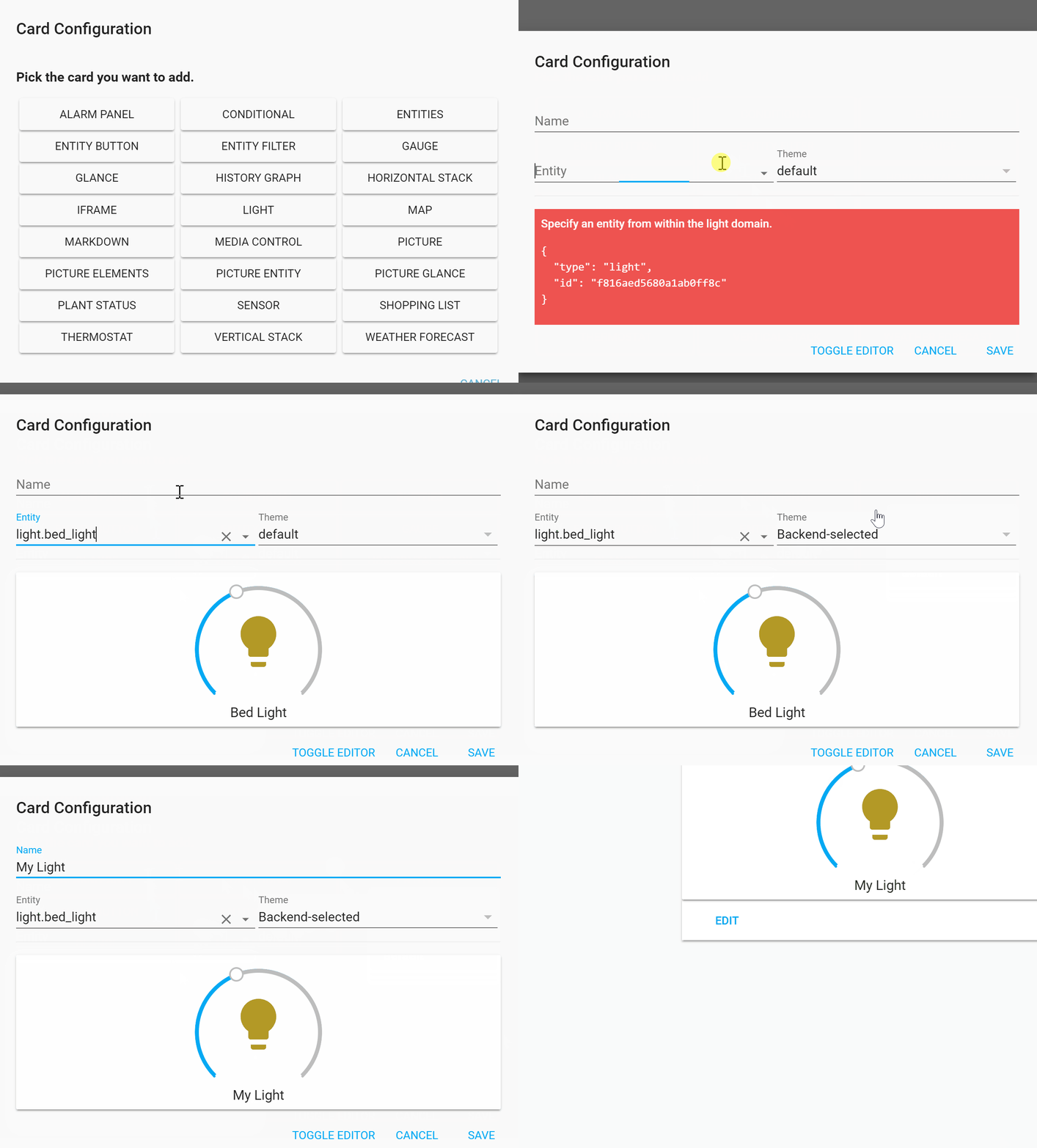 cunning tree
@mild veldt Is there a way I can go back to the start? Would I just delete everything in the RAW config? and then just remake them with the editor? Thanks
mild veldt
you could do it that way or go into .storage and remove the lovelace file and restart
cunning tree
@mild veldt I have just tried deleting from the RAW but it won't save it. I will try the Lovelace file
@mild veldt Just checked that little clip you sent. I had the same option to select an entity but when I click it didn't fill the box. I guess this may just be an issue in the release and better in the next.
cunning tree
@mild veldt Ok, Might just stay with YAML for now. The interface editor is great but defiantly only a small bit is implemented. Thanks for your help.
mild veldt
you should always be able to toggle the yaml editor for an individual card
would prefer everyone try the newer way so we can find bugs and squash them, honestly
brave badge
Hi, now I'm on 0.84.1. I removed the discontinued sensor.since_last_boot and trying the new relative format for timestamp entities.
          - type: entities
            entities:
              - entity: sensor.last_boot
                name: Last Boot
                format: relative
but I get 2018-12-11T16:47:51+01:00
Am I doing something wrong?
polar kelp
Hahaha! It actually worked!
timid burrow
@brave badge I don't think that relative format is merged yet
polar kelp
- type: custom:card-modder
  style:
    background-image: "url(http://www.place[[ input_select.background.state ]].com/500/250)"
  card:
    type: entities
    entities:
      - input_select.background
        ...```