#frontend-archived
1 messages · Page 82 of 1
 timid burrow
 mental bear
is there a difference between columns and vertical stacks?
i guess i want how it looks without panel: true but to have the two vertical stacks have 50% page width each
 winter wasp
will splitting the lovelace config into multiple files ever be officially supported?
 mild veldt
@winter wasp not likely. we're moving towards editing the UI in the UI itself
 fleet badger
just upgraded to 0.81.0 any doc why or how lovelace is genrating id tag for everything card and views
mild veldt
It’s to support editing of the UI from the UI @fleet badger
 light smelt
After 0.80 i got red boxes on views containing vertical stack on ios app (both beta and appstore). Commenting out the vertical stack makes the red box go away. Everything worked on my mac in chrome and all views contains sensors.
 raw brook
Hotfix is coming soon
light smelt
Great work by the way. Lovelace is such an improvement over the old ui.
 rocky merlin
After 0.81 two of my custom cards broke. I have been trying to finding out why but what I can see so far is that the cards is built on "LitElement" and the one that works "HTMLElement". The hass object is empty at set hass(hass) Any ideas?
never mind... reading here there is a bug that might explain my error too... I will upgrade to 0.81.1 and cross my fingers 😃
 lament burrow
@gritty swift this is the error i get with the thermostat card. anyone else having it? https://i.imgur.com/8XVBrT8.png
 wheat current
That is not an error
Set your theme to the default one and it will show up correct
lament burrow
Duh. Thanks!
 regal flint
does the picture-entity card's 'tap_action' support the same options as picture-elements? The documentation seems to indicate it only supports more-info and toggle, is there a reason for this?
 inland ember
Running 0.81.0 I'm noticing that glance Lovelace cards aren't honoring the column_width property that was added in .74, but I can't find in the release notes if it was removed (although it's not in the current docs).
 split granite
It's in the HA release notes
Mentioned in both the Breaking Changes section, and the paras at the top
Looks like the change for the docs got missed, let me dig into that
Ok, weird, I can see that it was merged
inland ember
In the .81 release notes on github? I'm not finding it
 brave badge
change column_width: with columns: and insert the number of columns that you want
inland ember
got it on the web site 👍
split granite
Just submitted https://github.com/home-assistant/home-assistant.io/pull/7158 since @polar kelp's original PR while merged was missing 🤔
inland ember
Bummed that change removes some functionality
 urban jasper
Getting an error message since upgrading to .81
It now states 'Unsupported YAML, you can not use !secret in ui-lovelace.yaml'
But it was working fine yesterday
I am using a !secret in my lovelace yaml file
split granite
@inland ember It's effectively back, but now you say 6 rather than doing maths
urban jasper
because it's a URL that contains an API key
inland ember
Right but if I want to set a width so the title shows and don't care if there are 1 or 5 columns based on screen width, it doesn't function
wheat current
@urban jasper That is no longer supported
split granite
@urban jasper Yeah, for some time now it's been warned that that's not supported, and it looks like they've officially dropped all support
inland ember
On a wider view I'm good with a 3x2 display, but on my phone 2x3 works better - either displays the same column width
split granite
Because the plan is that it's managed through the UI, and that doesn't work with includes etc
 polar kelp
I’m sure I did that...
inland ember
For a hard setting of the number of columns this is way better, but it does remove the responsiveness of the glance
split granite
I blame the GitHub chaos earlier this week
polar kelp
Those things happen
wheat current
Only when Microsoft owns it 😛
 short vale
What the heck....
I upgraded to .81 and am kinda pissed
Unsupported YAML, you can not use !secret in ui-lovelace.yaml
this has been working for literally 2.5 months
with secrets in the front end
😦
short vale
- type: entities
title: Climate Control
entities:
- type: thermostat
entity: climate.nest
can I d o that
regal flint
is there any way to use the entities-filter card to hide an entity based on the state of some other entity?
short vale
@raw brook I want to show multiple climate lovelace items in a single card
raw brook
You would need a custom card for that
I believe there is one out there called column or something by Thomas Loven
winter wasp
could wrap it all in a conditional
short vale
like?
 kind shellBOT
@short vale being unconcerned, posted a message that is more than 15 lines. It is now available at: https://paste.ubuntu.com/p/7hhFtqzwmd/
raw brook
Entity !== Card
short vale
same container
wish wild cards worked in entities
- type: entities
        title: Lighting
        entities:
          - group.all_lights
- light.*```~monster-card
kind shellBOT
Monster card is a magical type of card. Because it's dynamic if you're smart about it, you can have one card that adapts and that you don't need to touch when adding new entities & sensors to your setup. Supports both inclusion and exclusion filters with wildcard for entity_id: https://github.com/ciotlosm/custom-lovelace/tree/master/monster-card
short vale
Error: Specify an entity from within the climate domain.
setConfig — d076e229b8879acac643.chunk.js:1684
      - type: custom:monster-card
        card:
          type: thermostat
          title: Climate Control
        filter:
          include:
- domain: climate```I don't see why that shouldn't work
I have two climate devices
mild veldt
seems like overkill for two devices
short vale
well I'm waiting on 3 more to arrive in the mail
and I don't feel like adding them all the time 😉
so what's weird is I have like 7 fans, none of them show up in that fan list
will dig in
mild veldt
@short vale @urban jasper https://www.home-assistant.io/lovelace/tips/#lovelace-config-generator-jinja2-script
Would recommend anyone looking to keep their configs separate start using the jinja2 script
 past falcon
Is there a reason !secret got removed from Lovelace in 0.81? Do I need to work out a way for it to work without secret or will this be changed back in the future?
urban jasper
It won't be changed back in future
@mild veldt has just posted a different methodology
past falcon
Lol whoops didn't know that's what y'all were talking about. I'll look into ot
urban jasper
@mild veldt I appreciate the suggestion, I will have to look into it!
short vale
I logged an issue with it
It should be added back, I want to share my config with others but I'll take it off of github before I leak user info
mild veldt
@short vale you could arguably share your separated files that use !secret before they are ran through the jinja2 script
 lofty summit
hey guys anyone else getting undefined state errors when using conditional cards in 0.81.0?
mild veldt
Is there a stack inside the conditional?
lofty summit
no, the other way around it's a condition inside a stack
mild veldt
There's a bug in stacks right now. Hotfix in 0.81.1 will address it
lofty summit
perfect thanks
 valid thorn
Can't wait for my wife to ask me when we got an upstairs 😉
Great work though guys, I really do love the new thermostat card. I'm a little miffed about the template sensor update change, but I'm sure there was a good reason behind it. Thanks everyone that worked so hard on this!
 gusty coral
What version did the thermostat card get introduced? I'm on 0.80.0b1
gusty coral
Okay. I'm making a proposal to include a line in each "card page" on the lovelace section of the site so that users know if they need to update to get the card
valid thorn
Also, whoever is going to fix the thermostat card might want to add an off button. I just noticed I can set a every mode except for off.
gusty coral
@mild veldt but why though
mild veldt
there are some hotfixes enroute
gusty coral
That's fine, by the time I figure out how to update HASS through docker, it'll get released :p
valid thorn
@gusty coral there are some bugs that got missed, some with lovelace can be breaking if you've got certain layouts
gusty coral
I'm just starting with lovelace so I'm in no rush.
mild veldt
@valid thorn change is already in made for fix: https://github.com/home-assistant/home-assistant-polymer/pull/1867
valid thorn
It's a great thing, really elevating home assistant with each release
mild veldt
not sure about 'off'
valid thorn
@mild veldt would you call that a feature request? Or a bug fix to add the off? Seems like a big enough oversight to be a bug for me. Imagine a thermostat in your home without an off mode.
mild veldt
In a world, where thermostats have no off modes; one man strives to...
valid thorn
pay his utility bills
gusty coral
Lol, I agree on having an off mode though.
mild veldt
but I think it is part of the fix
valid thorn
ok, i'll check out the github issues
raw brook
Off is already an option?
valid thorn
I don't see it on any of my thermostat cards
they are off, but once you turn them on there is no off button
mild veldt
I see an off with the demo climate
raw brook
If you have a GitHub issue make sure to include a picture of  for the climate entity. So I can see the operation modes
valid thorn
sometimes the mdi selection of icons calls for some creative thinking
my brain just didn't get it
raw brook
There is a PR or issue one for changing the off icon
valid thorn
it makes enough sense, but yeah, just OFF might be more clear. Thanks for entertaining my foolishness.
@raw brook Also, great work on the card, it's great.
raw brook
Thanks!
winter wasp
any ETA on 0.81.1?
raw brook
Should already be out
 raven nacelle
@raw brook Not out yet...
raw brook
oh
split granite
Was about to say
raven nacelle
but it should be out today
split granite
🤣
 winter knoll
Hi, about the new Thermostat lovelace card, how can I change the name? https://www.home-assistant.io/lovelace/thermostat/ It shows "Upstairs" and documentation doesn't tell me how to change it
raw brook
Hotfix coming soon
winter knoll
ok thanks
 tame dove
Undefined is not an object (evaluating hass.states) error on a couple cards after 0.81.0 update. Known issue?
Never mind. Saw up above their are problems with stacks. Think both my cards are stack cards. As you were 😂
 sleek warren
hi users, anybody know a trick for swapping screens when an entity is armed for example? to display a lovelace url alarm panel for example 😃
sleek warren
thats correct 😃
can show it at all times, but switch when armed
basically load another url based on entity state
 ruby tartan
i mean i can think about a dirty solution for how you can make it work
sleek warren
for example load ip/lovelace/alarm_panel when entity = armed via an automation maybe?
ruby tartan
have a view with only the panel
overlay it via iframe over every other view if it is armed
sleek warren
hmmm not used iframe i will investigate 😃
ruby tartan
sleek warren
thank you @ruby tartan
urban jasper
Could you not also do this with conditional cards?
So you have all you cards be conditional on the 'alarm' entity being disarmed?
Of course it would show the alarm panel along with all the other cards when disarmed
ruby tartan
i didnt even know we had that. Thats a handy thing
urban jasper
@sleek warren
sleek warren
hi @urban jasper
urban jasper
I just posted another method for doing what you asked for with the alarms ^
sleek warren
That is very kind of you Darragh i will have a read now and at a glance that is PERFECT 😃
 quick gulch
hey so i'm trying to get this new thermostat card working, where is the docs on how to do it?
sleek warren
i will try both solutions i have been advised on and see which suits the WAF factor best 😃
quick gulch
nm
ruby tartan
well the conditional card is way cleaner 😛
quick gulch
scrolled up 😃
sleek warren
- type: thermostat and entity: climate:?
^^ 😃
i wonder if the card could be expanded to full screen when other entities are hidden?
now that would be cool 😉
wheat current
When 0.81.1 is out you can use a combination of vertical and horisontal stack to do that
ruby tartan
full screen floorplan 😍
wheat current
That wuold be possible
I picture elements card will probably be best for that.
eksample: https://sharethelove.io/picture-elements-cards/3d-floorplan
quick gulch
hmm are there any other custom cards that do climate?
the thermostat doesnt seem to do what i want
quick gulch
well i'm controlling an air conditioner with it, doesnt quite work the same way as a thermostat
raw brook
ah gotcha
quick gulch
i want to be able to toggle the setttings more effectivley
raw brook
No climate card is going to work. Atleast none I have seen
I would look into setting up buttons with call-service's
quick gulch
right so is that using the scripts functionality?
 vapid field
any idea why my climate.thermostat thermostat panel says "upstairs" in the middle of the panel?
mild veldt
Search the chat
vapid field
thanks 😛
vapid field
Anyone know of mini-media-player custom card works on .81 ? I am getting this error -
2018-10-27 20:54:48 ERROR (MainThread) [frontend.js.latest.201810260",
...
http://jarvis:8123/local/mini-media-player.js?v=0.8.8:7:1 Uncaught SyntaxError: Unexpected token <
Works for me
That error usually means you need to redownload the raw version of the file
vapid field
ahhhh
raw brook
and up the version number
vapid field
cool
must have been something with the file, works now that i redownloaded. thanks @raw brook
mild veldt
@vapid field You likely downloaded the HTML copy of the code instead of the raw code
timid burrow
that is so easy to do and a real PITA with github..... got me a few times way back too
mild veldt
Someday @wheat current will get off his lazy bum and finish his custom card install feature for custom_updater 🤣
kind shellBOT
Ludeeus is away for 7h 13m 7s with a message :point_right: (╯°. °)╯︵ ┻━┻)
 ripe mulch
Is there any information floating around about embedding Lovelace pages in other environments? (Eg on a digital signage system)
vapid field
Hi folks,
is it possible to decrease the size of the gauge card? I want to put 2 gauges in a horizontal stack, but radius is too large, the circles overlap: https://i.imgur.com/1fRhMLI.png
ruby tartan
you can adjust the css in the js file
 vapid lance
o/
I'd like to help debugging this issue: https://community.home-assistant.io/t/custom-cards-not-working-in-lovelace-after-upgrade-to-0-81-0/75534 . Anybody here to help me do it ?
wheat current
stack cards are broken, should be fixed in 0.81.1
vapid lance
ok so the issue is known ? don't hesitate if I can help with anything
wheat current
It is
gusty coral
Does anyone have more than one thermostat in HA? I registered both mine in lovelace labeled as "upstairs" and "downstairs" and both appear with "upstairs".
 undone egret
will be fixed in next release
gusty coral
Okay. For now, could I use customize to change it?
wheat current
No, it's hardcoded in the card
undone egret
a release is planned for today i believe.....but no it is hard coded in the code
damn ^^^^
gusty coral
Okay, no biggie. Thanks for letting me know! 😃
I'm finally getting around to making my lovelace cards
I knew 0.81.1 would be soon (never checked when). Just updated to 0.80 from 0.80.0b and lovelace cards were missing. Oh well, at least I know how to update from docker now.
wheat current
It was released 5h ago, should "hit" docker soon-ish
fleet badger
Hi guys how is long-presss implemented now or do i still need the custom card for it can it be used for entity button
wheat current
No, the buiilt-in one should be the "same" (at least do the same)
raw brook
A fix for the Gauge card is coming eventually. I have opened a PR to make it size with it's container
Idk what release it will be a part of though
Most likely not a hot fix. So .82
@vapid field
fleet badger
what card type is the long press under now?
fleet badger
🤔
polar kelp
Everywhere you could use tap_action, you can now also use hold_action.
fleet badger
thank you Sir
polar kelp
So that’s picture-entity, picture-elements, glance and button iirc
 silver crescent
Hi... If I reset my Hue Bridge completely... will all my entities be a mess afterwards?
split granite
Try #330944238910963714 @silver crescent 😉
silver crescent
@split granite Oki 😃
fleet badger
I just love homeassiatant and this community! when i first found out about the button card i told a friend would it be nice if it had the long press card capabilities for a quick cellphone UI and about a week later its there. sorry just had to testify.
silver crescent
@polar kelp what are the parameters for the hold_action?
polar kelp
Same as tap_action
Service and navigation values are shared for now
Glad to be of service @fleet badger
silver crescent
the tap_action is toggle and i want the hold_action to activate the entity (open the color picker for Hue).
polar kelp
That’s more-info then
silver crescent
Hmm.. its working on pc but not on my wall tablet @polar kelp
 halcyon mantle
@polar kelp I have updated HA, and now long-press.js is giving me these errors. Any idea what might be causing it?```
https://192.168.XXX.XX:8123/local/long-press.js?v=6:101:16 Uncaught NotSupportedError: Failed to execute 'define' on 'CustomElementRegistry': this name has already been used with this registry
I dont see anything in the change log which should be a breaking change for this
polar kelp
Long press is built in now. You shouldn’t use that file anymore.
halcyon mantle
Woohoo!!! Is there updated docs for the syntax?
polar kelp
Yes. For each card that has it. And also just a few messages back.
halcyon mantle
Cool stuff - Thx! Massive rewrite I guess - My ui-lovelace.yaml is 2605 lines...
 cosmic gazelle
hey guys, I'm using secondary_info: last-changed under entities and it's working great. But is there a Time Changed info? What time the state was changed?
 vital forge
Anybody knows when that hotfix for the stacks will come.....?
wheat current
When you update to 0.81.1
raven nacelle
it is already released (unless you are on Hassio)
raven nacelle
yes, it should be available sometime today
vital forge
thanks
 tacit cave
Are there any unreported breaking changes in lovelace? My config is no longer working in 0.81. Didn't see any breaking changes
tacit cave
Ah ok, I'm guessing due to unresolved states for some sensors?
At least that what this looks like.
winter wasp
hmm, i still have some hass.states errors in 0.81.1
tacit cave
@raven nacelle there a way to update to 0.81.1 for hassio?
 prime umbra


 foggy tendon
Which are the .js files we can delete as they are built-in in the last release?
Or, better, is there somewhere a list of custom cards now built-in ?
polar kelp
Long-press, gauge, button, alarm-panel, color-glance. I may have missed some, but there’s a change-log linked from the lovelace page in the docs.
There’s also thermostat, but that’s not quite the same as Marius version.
 frosty pelican
is there a way to remove the centering in glance cards in 0.81.x? just updated and noticed this
halcyon mantle
@polar kelp Just wanted to say thanks again - Updated my lovelace config and all working like a charm...
frosty pelican
that does not work wtih entity filter i think
i just tried it
cards are still centered
raw brook
Share your yaml
frosty pelican
raw brook
🤦
winter wasp
looks like some monster-card setups inside stacks still break with the undefined hass.states error
on 0.81.1
mild veldt
@winter wasp conditional cards in your monster?
winter wasp
the vertical-stack itself is inside a conditional
undone egret
lovelace is giving no love..go figure
winter wasp
got it, thanks
silver crescent
After i updated hassio i've got a lot of these in my lovelace.yaml.. What is that? - id: f54e95585be74defbeefa00ed7f7f633 # Automatically created id
raven nacelle
yes, those are automatically added to support additional features that are coming soon 😃
silver crescent
I will try to ignore them 😉
halcyon mantle
@raven nacelle May they be changed? or should they be left alone? ```
- id: 06088d794132418291c0626acf46fbb7 # Automatically created id
They can be changed as long as they are unique
undone egret
and baloob dont get mad
halcyon mantle
hahaha! Cool...
raw brook
The reason they were added with letters was because they knew people would change them
halcyon mantle
After the update to 0.80.1 I got these errors in my UI - Cannot read property 'states' of undefined. The entity, media_player.living_room_speaker, does exist and currently have a state of 'idle'. The config looks like this: type: vertical-stack cards: - type: conditional conditions: - entity: media_player.living_room_speaker state_not: 'off' card: type: media-control entity: media_player.living_room_speaker
wheat current
halcyon mantle
Ta! Guess 0.80.2 it will be...
winter wasp
@raw brook is the thermostat card your baby?
raw brook
Yes
winter wasp
@raw brook are there config options already planned?
winter wasp
i’d like the ability to ignore certain operation modes
raw brook
Only 4 at most are listed. Auto, Heat, Cool and Off.
But you can always create a feature request. But I dont think that will be something added especially before 1.0
silver crescent
anyone else experience Column_width calc(100% / 3) dosent work anymore?
silver crescent
can you guide me in the right direction? Also for future problems 😃 The way columns are handled in the glance card has changed (#1832) (breaking change)
cant figure out how to correct it....
split granite
Beat me to it 😉
All you have to do is read the link you've been given - TWICE - @silver crescent
silver crescent
Sorry... Had column instead of columns 😦 Thanks
vapid field
Does this look ok? its not showing my automations...
        type: 'custom:monster-card'
        card:
          type: entities
          title: Automations
        filter:
          include:
          - domain: automations
I used this for scripts and it worked fine -
        type: 'custom:monster-card'
        card:
          type: entities
          title: Scripts
        filter:
          include:
          - domain: script
- type: custom:monster-card
  card:
    type: entities
    title: Automations
  filter:
    include:
      - entity_id: automation.*
ahh I see you are using automations not automation
@vapid field
vapid field
hrmmm
yah, that should have fixed it
ok there it is, thanks
it didnt like my custom ID
i had to delete it and let it re-create one
timid burrow
so I updated to 0.81.1 but it shows as 0.81.0dev0? anyway, lovelace... My custom cards are still red-screening - only the custom:tracker-card and custom:dark-sky-weather-card though... is this known bug(s)? It's not a monster card
raw brook
Are they in a stack
raven nacelle
@timid burrow Please don't cross-post
timid burrow
@raven nacelle not really a cross-post - information with a specific question. @raw brook yes in a vertical stack. I just thought that was supposed to be fixed in 0.81.1
raw brook
It is but clearly you are on 0.81.0dev0
I would make sure you are on 0.81 by having it be displayed before posting about a bug
timid burrow
hassio system tab says I'm running 0.81.1
 sterile hinge
hi all - ive just picked up lovelace today and am loving it. little issue with the pic-elements card, the svg i'm using is width: 100%, which means the height goes off the bottom of the browser window => vertical scroll bar.
do you know if there's a way to scale the svg/card so that it scales with the screen size? ie. never has scroll bars?
- type: picture-elements
  image: /local/floorplan/apartment.svg
@timid burrow same question dif channell's equal cross post
timid burrow
if you say so but it was information to go with a lovelace question because someone was sure to say I need 0.81.1
undone egret
yep say so
 white marten
Is it in the pipeline to use lovelace as the main UI, or will Lovelace live its own life outside the default UI? I think its important to be careful not having too many UI, so can almost compare to HomeSeers bad UI (my view, others love it), and OpenHAB 9485571112435532 versions of frontend UIs
raven nacelle
Yes, LL will be a default UI eventually. We are still waiting for a few issues to be resolved before we move over
 inner wagon
Guys I upgraded to 81 now i am having a heck of a time getting this commented section of my code to work. What am I doing wrong? I tried a series of indents but cant get it. https://hastebin.com/watonizola.shell
polar kelp
What are you expecting to happen, and what actually happens?
inner wagon
Im getting this error :while parsing a block collection in "/config/ui-lovelace.yaml", line 118, column 7 expected <block end>, but found '?' in "/config/ui-lovelace.yaml", line 136, column 7:
polar kelp
@sterile hinge sorry, can’t be done. You’ll have to edit your images height
inner wagon
Ok so i figured it out.... I guess its required now to have the ID field. I missed the memo.
 fair girder
hey, just wondering what the current temperature is for a breaking change introduced in v0.81 . I pretty rely pretty heavily on !include in my ui-lovelace.yaml file, but since I upgraded I started getting Unsupported YAML, you can not use !include in ui-lovelace.yaml error on the FE.
i have some large card configs that i prefer to keep in their own files. will i not be able to set it up this way anymore?
past falcon
@fair girder I was told that this won't be put back in and to use this:
https://www.home-assistant.io/lovelace/tips/#lovelace-config-generator-jinja2-script
Would recommend anyone looking to keep their configs separate start using the jinja2 script
 dim jolt
read a bit on here about the new thermostat card - but its not working correctly for me (using climate.nest). looks like this:
is that down to the theme i'm using? surely that would also effect others as well, or am i missing something?
 eager pollen
Do you see any javascript errors?
dim jolt
nothing in the ha log - just checking chrome
 acoustic mural
With the addition of users, will we (at some point) see views that are assigned to specific users? Like I could hide some views from my in laws so they can control lights but not my thermostat?
dim jolt
nothing in chrome I can understand 😦
gives me an error in one of my other horizontal-stacks but seemingly not for the thermostat card
dim jolt
and thanks for the response @eager pollen and @raw brook
eager pollen
I'm having MIME errors in my Lovelace myself
 chilly storm
Anyone else see the minor bug in the new production version of the Alarm card? "Arm custom bypass" doesn't print on the button (But "armed" does if you specify that state). Still functions OK but that button is blank.
ripe mulch
Does anybody know if it's possible to use a lovelace card as a widget somewhere else (ie in an iFrame, or on digital signage)
raw brook
Damnit. I'll submit a fix @chilly storm... I fixed the arm night but didn't check bypass... Stupid I am
foggy tendon
@raw brook Will your thermostat card work with Tado Thermostat?
 vivid relic
While modifying ui-lovelace.yaml using Samba/FTP and refreshing, HA changes the (write) right on the file which makes it impossible to save the file. I noticed this happening especially when the Automatically created id is inserted. Is it a normal behavior for the file to be write locked ?
polar kelp
I think that should be fixed in 0.81.1...
vivid relic
Okey, I make sure now I include an ID so that HA doesn't change the permissions
 odd light
anyone know anything about the new alarm panel card in the .81 update? I don't see anything in the docs
valid thorn
Is hold_action available on all card types or only the picture-elements? I don't see it listed on the entity-button card.
Answered my own question, hold action is available, just not in the docs yet for other card types.
polar kelp
Hm... I thought it was, but you're right...
Everywhere there's a tap_action, there's also a hold_action.
odd light
nice
valid thorn
@polar kelp Made sense to me, so I just tried it. 😃
Entity button cards feel better on mobile for interacting so I'm repalacing all my old glance cards for lights and whatnot
polar kelp
If it feels that intuitive I guess I did something right. Thanks!
 mental delta
Is there a way to show only the current state of an entity in a card?
I wanna display the current state of an input_select but not its name or icon
wheat current
I don't think so, without using some custom element that does that
polar kelp
State-label in picture-elements
mental delta
🎉 It works! Thanks @polar kelp
 amber nova
Are there any hopes that lovelace will support swipe left or right to transition from one view to another?
Instead of having to click on the tab?
Would be a great feature for mobile
 winter leaf
Im trying here aswell as the forum.
Do anyone here see the problem with my config;
https://community.home-assistant.io/t/lovelace-swiper-card/72447/99?u=kernehed
valid thorn
@mental delta you could also make it a template sensor and display that in a sensor card
kind shellBOT
@foggy tendon being cruel, posted a message that is more than 15 lines. It is now available at: https://paste.ubuntu.com/p/8Br5HfnDYM/
foggy tendon
@raw brook https://paste.ubuntu.com/p/8Br5HfnDYM/
raw brook
The custom is not the same as the integrated. Looks that the docs
And the problem is a known issue
The background of the thermostat can not be themed
foggy tendon
@raw brook i did not themed the background, so i must put only the type in the card and the entity_id?
raw brook
You did. I can see it haha
The theme you have applied changes the background of the cards
foggy tendon
@raw brook ?? Where is the theme?
raw brook
So normal Lovelace has white background yours is a dark background. So you have a theme applied
foggy tendon
@raw brook Ahhhh.... it's the global theme i set when the sun goes down.... So it's better to wait some improvements of the card....
raw brook
The issue is the plugin that its using doesnt allow it so we are waiting on an update. I am also looking into other alternatives
foggy tendon
@raw brook Ok i can wait... will be in the future also have the operational modes activated?
raw brook
YOu'll have to explain what you mean
foggy tendon
If you see the code of my card you understand what i mean (about hvac states)...
raw brook
Probably not something for near future. But you can submit a feature request https://github.com/home-assistant/home-assistant-polymer
foggy tendon
👌
mental delta
@valid thorn testing it right now
Looks good, but it shows the name of the entity and the icon
And, like the weather card, this one doesn't work in a stack
😦
Thanks anyway
 thorny verge
Is there any way yet to change/force the width of the columns or a vertical stack?
I was doing it with https://github.com/kuuji/button-card, defining the width and it was working perfectly, until the last HA update.
@mental delta I have the custom weather card working in a stack.
mental delta
I don't have any custom cards yet
But the original Weather Forecast Card is currently not working in a stack
thorny verge
Oh, sorry, assumed the custom animated weather card. May be same issue, as you just had to change the one line in .js file to fix.
wheat current
There are issues with stack, should be fixed in the upcomming 0.81.2
mental delta
Thanks @wheat current
 whole eagle
Is there a way to fix stacks right now or are we waiting for a fix in 81.2?
wheat current
~8ball @whole eagle Is there a way to fix stacks right now or are we waiting for a fix in 81.2?
kind shellBOT
:8ball:
8Ball Prediction:
@whole eagle Answer Unclear Ask Later
 proud flax
is there a way to make lovelace default view and change back to old view by option ? Problem is the browser does not seem to want to remember that I want lovelace view
thorny verge
yourip:port/states
wheat current
Set the default under https://my-ha-domain.duckdns.org:8123/dev-info
proud flax
I've clicked that about 100 times I think
 untold cairn
just updated hassio to 81.1
horizontal-stack and vertical-stack still don't work 😦
whole eagle
I am using 81.1 and my stacks work, it seams they didn't play well with custom cards
i removed the custom cards in favor of the newly added lovelace cards and everything is working.
untold cairn
i use native cards only. here is example of broken setup:
      - type: vertical-stack
        cards:
        - type: horizontal-stack
          cards:
          - type: sensor
            name: Outdoor
            accuracy: 50
            entity: sensor.outdoor_temp
          - type: sensor
            name: Weather
            accuracy: 50
            entity: sensor.current_weather_temperature
ok, I feel stupid now, I may have been clicking the link above :S @wheat current
whole eagle
Some of what I removed were sensor cards, perhaps that is the problem?
untold cairn
btw, is there a way to disable id autogeneration inside lovelace config?
- id: 52240c94940d4457b1c696ce5522c5ed # Automatically created id
@whole eagle you are right. sensor card doesn't work inside of stack. i'm going to replace it to something simpler
 rigid ferry
I'm trying to get https://www.home-assistant.io/lovelace/alarm-panel/ working. I've added code in my ui-lovelace.yaml. But get a "entity not available: alarm_control_panel.HA_alarm" in the UI. I assumed maybe i need to add some code in configuration.yaml , but can't get it to work.
whole eagle
@rigid ferry do you have an alarm panel entity created?
rigid ferry
I've added the following to configuration.yaml:
alarm_control_panel:
platform: manual
name: "HA_alarm"
code: !secret alarm_code
delay_time: 60
pending_time: 45
trigger_time: 45
disarm_after_trigger: false
whole eagle
try restarting hassio
rigid ferry
im running hassbian ... already did a sudo reboot of my Rpi3b
whole eagle
run a config check?
rigid ferry
in the normal/old interface i see an entity (in the top of the ui), which i can click and which gives me a number pad...
i always do a config check before restarting HA ... no errors
Tx btw for your replies
I'm on 0.81.1 btw
whole eagle
what does your lovaelace card code look like?
rigid ferry
- type: alarm-panel
entity: alarm_control_panel.HA_alarm
mild veldt
@untold cairn you sure you’re on 0.81.1 and cleared your cache? It you add a unique I’d to your cards and views it will not be generated
whole eagle
'''- type: entities
title: Entities card sample
show_header_toggle: true
entities:
- entity: alarm_control_panel.HA_alarm
name: Alarm Panel'''
does that work?
@rigid ferry
rigid ferry
No, same error ... only difference is title shown in card above error
whole eagle
ok, try renaming your control panel
rigid ferry
so change "entity: alarm_control_panel.HA_alarm" to for instance "entity: alarm_control_panel.testalarm"?
whole eagle
yes and change your alarm entity name to testalarm instead of "HA_alarm"
rigid ferry
in configuration.yaml?
whole eagle
yes
whole eagle
ok, HA_alarm may be reserved internally or you had something off with the names between the entity and card. Experiment with the entity name until you get one you like to work.
tacit cave
anyone working on the issue with Cannot read property'states' of undefined?
I have a surefire way to reproduce the issue
HA 0.81.1 btw
raw brook
Hassio/docker?
tacit cave
yah hassio
raw brook
I dont believe 0.81.1 was tagged correctly for Hassio. 0.81.2 should be coming today or tomorrow which I believe has that fix
tacit cave
you got a PR for that?
 ornate pollen
@raw brook just wanted to ask that
will this include the fix for the conditional cards also ?
tacit cave
pretty sure it's the same issue
I just wanna see the PR before I make that conclusion
ornate pollen
will browse though the PR's then ... 😉
tacit cave
I'm gonna myself, was hoping someone had it handy
ornate pollen
i found this: https://github.com/home-assistant/home-assistant-polymer/pull/1906 still not merged yet 😦
raw brook
@mild veldt had a hand in this. Not sure if he knows more
mild veldt
I haven't had time to look back at the review comments and won't till later tonight. So not sure if it will make the cut.
ornate pollen
can we help somehow ?
tacit cave
Yeah, it also does not fix the issue I am refering to
That appears to be limited to conditional cards.
raw brook
Does your yaml have stacks where you are having the issues?
tacit cave
Yes, it's caused specifically by having a sensor-card inside a horizontal-stack inside a vertical-stack.
any other combination works
any other card as well (replacing sensor-card) works as well. Tried glance, entities. So i guess it wouldn't be ANY other card.
raw brook
So that is in 0.81.1
tacit cave
Yes
ornate pollen
can i somehow apply the fix in the above PR to my homeassistant installtion ? just can't find the frontend folder with the files in the repo
(im using a python venv install)
tacit cave
sweet, was just looking for that
raw brook
@ornate pollen the PR hasnt been merged so there is no guarantee it works or its the best way
ornate pollen
i know, i just want to play around with the code locally, if it fixes for me is fine now until its merged and released
if not then i still can roll back 😉
raw brook
To do that you have to clone the repo and change the files locally and point the frontend at the local frontend.
ornate pollen
the first part is no prob, the last part is where im lost, i still dont understand how pip install installs everything in here
and the scary part is i dont see the frontend folder in site-packages either, i had that idea to clone the repo and just remove & sym link there
if its too much hassle, ill wait for the release then, i can live without my conditional cards for a few days longer
ornate pollen
okay, thnx , ill look into it
vapid lance
o/
@raw brook : are you refering to the issue where any custom card does not work any more when used within vertical|horizontal stack ? ("hass is undefined")
ornate pollen
yepp, he was
@mild veldt thnx, it wasnt that hard, pulled the repo, ran the script/bootstrap file, then i had some hard time finding out which exact version of node was need because my system node was too now 😉 dont using nvm, but googled out where its config is, installed exact node version, its up and running, now built it, copied the folder over to my home assistant install and it works 😉
i will keep this for playing around ...
 junior oriole
hey guys, is it possible to remove the Title from the Weather card on Lovelace? I've looked through the documentation and code, however I didn't see any option how to do it
tacit cave
does not look like it
junior oriole
yep - I've looked into the weather card code, and it doesn't have the option...
looks easy to implement, and not proper to a feature request - when I have some free time I'll try it 😄
 loud vault
will 0.81.2 contain the fix for conditional-card and stack lovelace errors?
raw brook
Stack yes. Conditional no
loud vault
both stacks?
raw brook
yes
mild veldt
Should have been in 0.81.1. Just saw about the Docker image. Womp womp
loud vault
still broken for me in 0.81.1
mild veldt
On hassio right?
loud vault
ya
mild veldt
Yeah. The Docker image (hassio) didn’t get applied properly
loud vault
will that get fixed up or just applied correctly with next release (0.81.2)
timid burrow
hahaha that was an either/or question, not a yes/no one lol
raw brook
Yes covers it pretty well
loud vault
this is serious discord, no jokes in here
timid burrow
lol
valid thorn
Hold action seems to have stopped working on mobile devices, anybody else experienced this?
mild veldt
You have a specific card it’s not working with? 0.81.1? Hassio?
vapid lance
yop, according to the blog announcement: "Template sensors will no longer auto update if we can’t find relevant entities in the template. You’ll want to review your template sensors and consider adding relevant entity_id entries or use the new homeassistant.update_entity service."
I have a sensor that looks like that:
- platform: template
sensors:
teleinfo_hchc:
value_template: '{{ states.sensor.edf.attributes["HCHC"] }}'
unit_of_measurement: 'Wh'
icon_template: mdi:flash
So I need to add some automation to call update_entity now ?
mild veldt
@vapid lance #330944238910963714
past falcon
@valid thorn I've had the same problem on picture elements in Hassio 0.81.1
Also as a side note, what do I need to do to recolor the inside of the new thermostat card? It looks pretty bad with my dark background
raw brook
Not currently
valid thorn
@mild veldt entity-buttons for me tap action works fine and hold action only seems to have issues on mobile. Weird thing is I swear it was working before and then stopped.
The purple circle comes up indicating the hold, but nothing happens after that
Oh and the circle sticks there until something else is touched.
raw brook
CC @polar kelp
 waxen needle
I'm trying to create a card for my hue lights in lovelace. Is there a way to add rgb controls to the card so I can select colors?
mild veldt
@waxen needle https://github.com/custom-cards/light-entity-row
 median bay
Hi crew - trying to debug hwat should be a simple Harmony remote entity-button...
It clicks and my error log just gives me an error of "Uncaught" - that make sense to anyone?
ripe mulch
Is there a way to expose just a lovelace card so it can be iframed somewhere else?
 meager grotto
After upgrading to 0.81.1 I'm getting error on horizontal-stack, cannot read property 'states' of undefined. https://pastebin.com/1CK4tcxc
Hopefully you can help me I have no clue
wheat current
Patience young grasshopper 😃
If you scroll up here you will se many users with the ssame issue, should be corrected in the upcomming 0.81.2 version
meager grotto
ah thanks, downgrading to 0.81.0 would be a solutioin=,
polar kelp
Don't think so...
wheat current
0.81.2 is released, so if you have a pip install you can upgrade now, if you have docker/hassio you need to wait for builds to finish.
timid burrow
Woot!!
quick gulch
so i have my broadlink ir working on my tv properly now with home assistant - can anyone point me to the best way to make a lovelace config that lets me control my tv?
 high canyon
whats teh correct way of doing "include_dir_list" in lovelace? this used to work
high canyon
also has anyone used the new thermostat card with tado? doesn't seem to have any control beyond setpoint
timid burrow
OK!! 0.81.2 updated and my red cards are gone. Thanks guys.
 olive lynx
@quick gulch create a bunch of buttons which call scripts. And have a script for each IR send via the broadlink. I just setup a script for each of my IR/RF broadlink commands and call the scripts using various interface controls
Does lovelace still adhear to each vertical-stack being in it's own column?? - ever since a recent update (not sure which one) my 3 vertical-stack config will compress to 2
 serene sequoia
Hey guys, wondering if someone could help, trying to use the new thermostat card but it's not displaying correctly, just looks like an upside down white egg haha. Can see that the bar is moving up around the edge, and the icons are there (some maybe obscured behind the...egg). It appears to work fine in chrome, but not on firefox 63.0 and I've enabled the settings in about:config. Also doesn't display properly in iOS app, is it a known problem?
high canyon
@mild veldt So we can't break up our config any more?
mild veldt
@high canyon not officially. You can use @polar kelp script that allows for it
wheat current
@serene sequoia There are a known isssue with some themes, select the default one and it should display correctly
polar kelp
Or, possibly, soon-ish you might not need to: https://discordapp.com/channels/330944238910963714/351047592588869643/506759324882698240
serene sequoia
@wheat current thank you 😃
high canyon
@polar kelp moving to in app editing?
 frank garnet
Was there a card that makes it possible to make a template in markdown card?
mild veldt
useful-markdown
olive lynx
@mild veldt the latest
frank garnet
@mild veldt Yes, that's it. Thanks
polar kelp
a not-quite-template
brave badge
Is there a way to order the items in a history-graph? It seems to me that it orders the list alphabetically by the name of the item
and not in the order that i put in the code
valid thorn
just a heads up, 0.81.2 is not fixing the hold action issue.
polar kelp
Is the problem only present on mobile? I can't reproduce it on my computer.
valid thorn
yeah, chrome on two different android devices. I swear it was working when i first tried it.
polar kelp
It's always been a bit iffy on touch screens, but I thought I had ironed everything out by now. Can't test on a touch device at the moment unfortunately.
brave badge
On the ios app the hold action works perfectly, and works also in chrome for ios
valid thorn
@polar kelp just tried clearing cache in the browser and that doesn't seem to solve it. Weird thing is the purple circle comes up so it's registering the hold. But it's just not executing the action, which is the more-info popup
polar kelp
That's funny. Normally the problem I had was that the circle didn't pop up, but the action worked.
Mind showing your configuration?
mild veldt
@serene sequoia can you share what you mean by "compress"? Screenshot and config?
olive lynx
@mild veldt here my lovelace yaml, just ref Page 1 it has 3 vertical-stack - they all used to be in their own columns, but now stack 2 will be under stack 1 and stack 3 in it's own column
polar kelp
Oh, I know what it is.
The glance cards reports the wrong height. I thought someone fixed that already...
 molten rivet
hi there. Any idea to make this idea work with the lovelace UI? https://www.youtube.com/watch?v=8PHBqQnFyTw
molten rivet
I have no idea how this guy change the image for specific area?
does he need to implement the custom CSS?
polar kelp
Here's a description: https://sharethelove.io/picture-elements-cards/3d-floorplan
wheat current
I think you can only apply CCS filters
molten rivet
it won't work for me. I want to find the suitable tag via CSS class to apply specific JS
wheat current
Tried the example in the docs?
molten rivet
yes it will work but I wonder how the guy in the video can add the light icon to each element
I dont think that he added these icon to the original image
cause I can see the icon flashed when he click to it
so I thought that his solution is more complex
polar kelp
I think he just put another image or a state-icon or something on top of the image.
molten rivet
hmm may be, thanks all for your supports
molten rivet
sorry 1 more question, @polar kelp
will this approach works for the mobile view?
I tried but it works on my desktop only
kind shellBOT
@patent jay being insensitive, posted a message that is more than 15 lines. It is now available at: https://paste.ubuntu.com/p/7hYH5qBbMP/
 patent jay
sorry i always forget 🤔
after the .81 update i have this problem:
https://cdn.discordapp.com/attachments/476055894447357952/506502489529516043/unknown.png
how can i fix this ?
 raw brook
@patent jay HAssio?
patent jay
yes why is lovelace different on it ?
thorny verge
Can I set a different theme on a view? Docs say I can, but can't get it to work.
I use a dark theme, which don't work with the new thermostat card, unless someone has a fix for that (I tried card-modder, didn't seem to work).
raw brook
The theme for the view should be applied to just the view. Not sure why it doesnt work but thermostat has no fix currently (and really isn't one until the plugin is updated)
We are working on the fix and getting it implemented though
thorny verge
Does the theming per view work?
raw brook
In theory. Im not at my home computer to test for my self
thorny verge
Doesn't seem to, changes card color, but not text or icon colors...
Was able to get thermostat card viewable in a dark theme by using card-modder and setting "--paper-card-background-color": "white" and
"color": "blue"
raw brook
Oh Yea I guess you could use card modder that way. I meant there is not way for it to work in dark mode currently
wheat current
Not sure I trust that card, must be made by a dev without darkmode 🤔
raw brook
I made it in my dev environment. But I think I may just have figured out a way to fix it!!
I just need to get home for testing
silver crescent
Is it possible to combine the picture Glance with the Picture Entity so clicking the picure (picture Glance) toggles all entites?
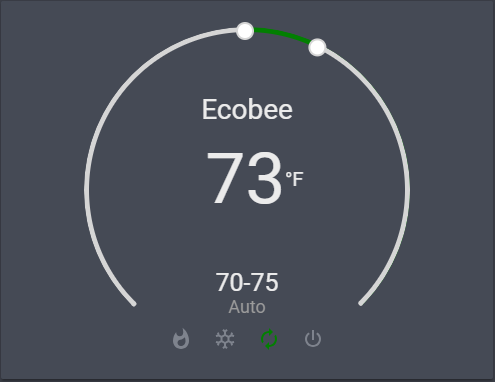 vapid field
I'm suddenly getting a "cannot read property states of undefined"
Error only shows in lovelace, emptying cache and rebooting hass.io didnt work :?
:/
polar kelp
Home assistant version?
vapid field
0.81.0
vapid lance
@raw brook : how to force-upgrade ? I'm on " 0.81.0.dev0 " because I did: hassio homeassistant update --options "version=0.81.1" ... Dunno how it's possible :/
and hassio does not propose any update
raw brook
hassio ha update -o version=latest
tacit cave
did 0.81.2 get released yet?
raw brook
Yes
vapid field
why doesn't it autoupdate to 0.81.2?
vapid lance
indeed, thx @raw brook
"Unsupported YAML, you can not use !secret in ui-lovelace.yaml" ... seriously ? 😦
raw brook
It's coming back
vapid field
updating to 0.81.2 worked, thanks @raw brook 😄
vapid lance
@raw brook , were there a deep rewrite of horizontal stack ? The rendering of my custom thermostats is very weird, the size of thermostat changes to 15x15px when I click on it oO
raw brook
Hmm it's just the thermostat... Can you send me a gif? If not that's okay. I know the issue
polar kelp
There was a deep rewrite of, like, half of the lovelace cards.
vapid lance
woh
sending you the screenshot
(sorry to bother, btw if I can help on ANYTHING, just say it. I love lovelace too much to ... not help)
@raw brook : https://gyazo.com/64f250305fa45692a439a62dfefcaad3
the gif
raw brook
Oh
That's not the integrated thermostat. I don't know what that is
The issue anyway
@polar kelp you know what that could be? @mild veldt
vapid lance
that's custom-thermostat card, was working perfectly before 0.81
raw brook
Yeah I know the card. I don't know what that could be off the top of my head
polar kelp
No idea. It's really weird. Only happens in horizontal-stack?
vapid lance
(very usefull on wallmounted tablet)
raw brook
Can you send us the yaml for that view is a paste bin or hastebin?
polar kelp
Does it matter where on the thermostat you click?
vapid lance
If that can help: does not happen on Iphone (?!), still the same with panel:false
let me try
nope, anywhere I click within the thermostat, same issue
highlight_tape:false, still the same
removed style:height:200px from the horizontal card, now thermostats take the whole width of the screen. Clicking on it does not change the size
raw brook
It's re rendering when you click on it. So it's something with the initial client width or getCardSize() but I think getCardSize only runs once
Is it only if it's in a stack?
vapid lance
let me try without stack
polar kelp
That just makes it weirder. Horizontal stack should ignore style:
vapid lance
size is stable without stack (i created a new view just for this)
but thermostats are on a vertical layout, on top of each other
believe me, without style: , thermostats are taking the whole screen size
maybe the custom card overrides something ?
raw brook
Are you using anything other than that custom card that is custom?
I have gotten to look at the yaml yet
vapid lance
Are you using anything other than that custom card that is custom?: yep, a lot of cards, but not on this view
ok, I got some kind of clue: when only putting them in a horizontal stack (panel:false), size is stable
but very small : the size is the one you see on the gif, when I click on the thermostat
so, when I click, the thermostats gets the size it should have on horizontal-stack, from 200px
polar kelp
Try it without the no_card
raven nacelle
we need no_card for our thermostat card
polar kelp
No we don't. At least not with that implementation.
raw brook
Agreed
Also once theme is added to all cards then you can just set the background to transparent
raven nacelle
I see that point....may be a slightly modified version
vapid lance
your thermostat card is much better to be honest, smooth integration with the overall design. But IMHO the choice of the roundy slider is tricky to be used on phone or on wall tablet. 2 buttons style like the custom thermostat is perfect
and WAF 😃
raw brook
I'm thinking of a different version but not copying the nest look. Gonna try a button approach with a more modern approach
polar kelp
Did you try it without no_card, @vapid lance ?
dim jolt
can anyone tell me where src/panels/lovelace/cards/hui-thermostat-card.ts is once installed (i have to connect via docker exec and not sure where the file would be
vapid lance
without no_card: https://gyazo.com/1aad766f2f9ed51ca4a75560aa9704d8
polar kelp
dang
raw brook
@dim jolt you literally answered your own question
You can't get to it unless you point your frontend at a Dev environment
dim jolt
unless i'm completely losing my marbles thats the location before building
polar kelp
@dim jolt It's minified and packed up in a python package called hass_frontend.
dim jolt
usr\src\app.......
ahhhh balls - was hoping to make the change here https://github.com/home-assistant/home-assistant-polymer/pull/1931/commits/4ce6fe1b151fa635cca5d88037ffd4bfb5a560c9
so i can use the thermostat
polar kelp
Won't be easy to find whatever it is you want to change, but I've seen it done.
raw brook
You could use the card modder
polar kelp
No, you can't go that deep with card-modder.
dim jolt
just need to change the background of the thermostat card so its not white inside the 'dial'
polar kelp
But you can make a custom wrapper card that does it
If it's only the card background, card-modder works
raw brook
Rip
dim jolt
errrm - ok, think i'll wait until the next release 😉 appreciate the help though 😃
vapid lance
@raw brook : maybe without finding what is the issue, you have a smart approach to get the same layout ?
polar kelp
Just a stupid idea that could work - because who knows with this problem - but maybe if you wrap each one of them in a vertical-stack?
polar kelp
shouldn't
 mossy otter
were there some breaking changes to lovelace recently?
not touched my yaml but now getting "cannot read property 'states' of undefined"
and a red screen
raw brook
Upgrade to 0.81.2
mossy otter
hmm, i just upgraded hassio, but it seems i'm on "0.81.0.dev0"
how do i update in the frontend to 81.2?
 mortal cape
use the cli instead and hassio ha update -o version=latest
mossy otter
thanks both
vapid lance
@polar kelp : by wrapping them into a vertical-stack,a nd removing the style: each thermostat takes the WHOLE screen 😦
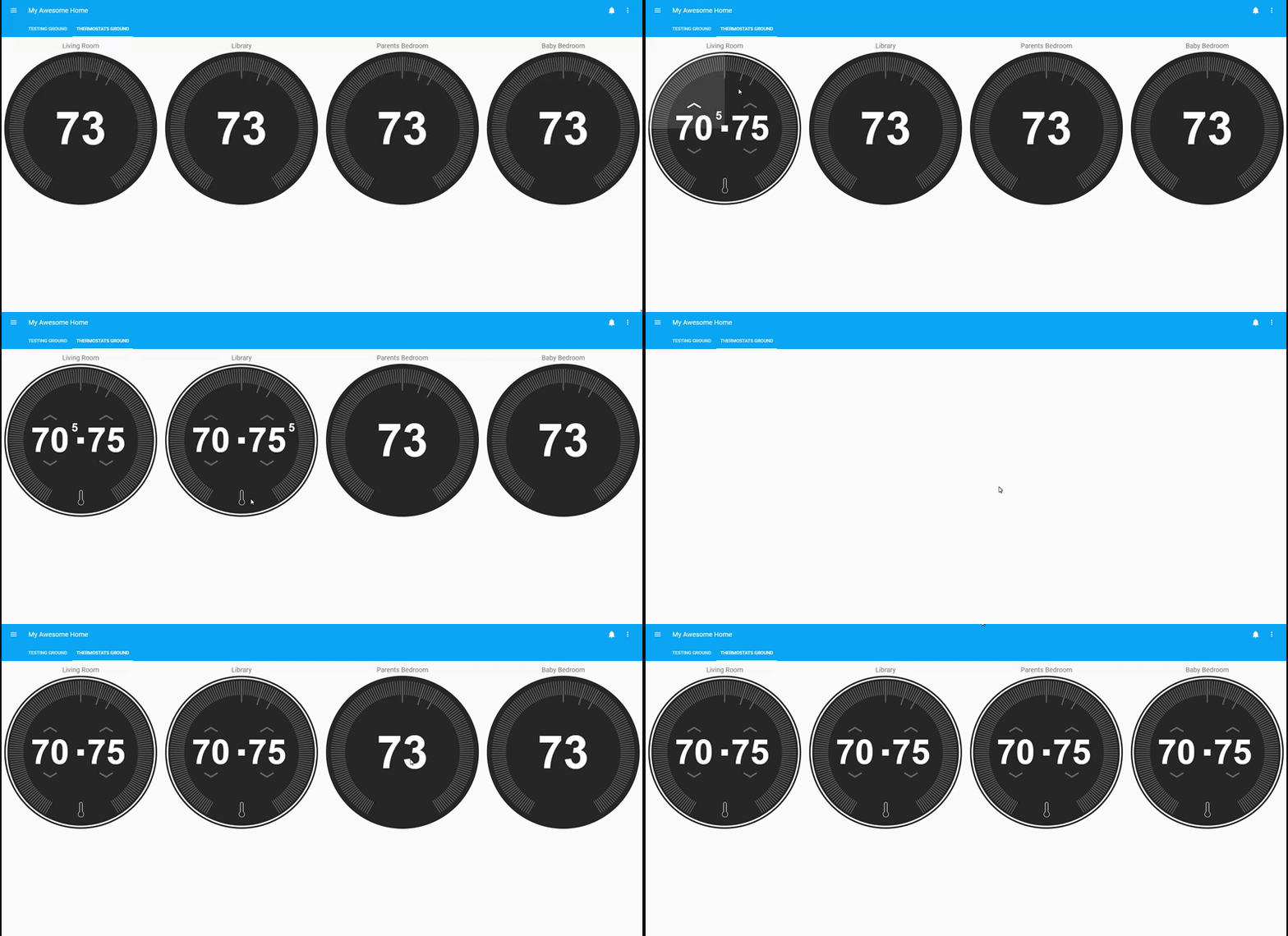 vapid lance
how ???
btw, a little bug with midnight theme probably: https://gyazo.com/62a7a52cc0576216a9b8011021c05b83
vapid lance
you're too quick 😃
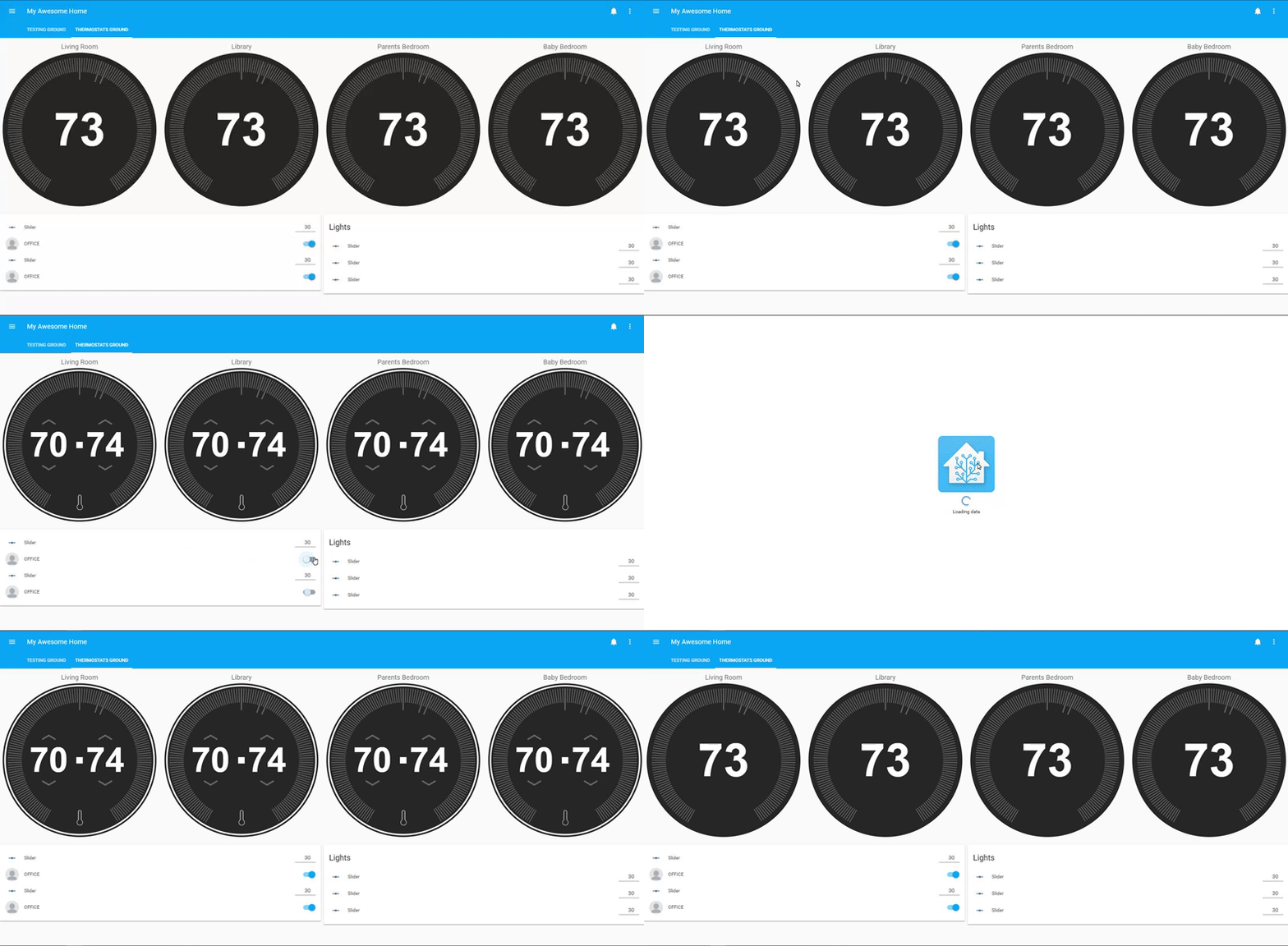 mossy otter
core-ssh:~# hassio ha update -o version=latest
ok
did this, it said ok and the version is still the same?
raw brook
https://pastebin.com/K1jpJGxx this is the yaml @vapid lance
You have to wait soggeypete. The restart probably didnt happen. So you may want to try it again.
It does that to mee sometimes and If I wait like 10 min it finally restarts and upgrades
mossy otter
ah probably being a little too impatient, it looks like i can't access it so it must be restarting
thanks @raw brook
vapid lance
- url: /local/custom-lovelace/thermostat-card/thermostat-card.js?v=1
type: module
➜ thermostat-card git:(master) ✗ md5sum thermostat-card.*
01d16ac434b1ec67d6c1cecaef33d5d5 thermostat-card.js
c0d5998b8015a085e92d7f95e18bb93d thermostat-card.lib.js
➜ thermostat-card git:(master) ✗
raw brook
?
vapid lance
do you have the same lib ?
mossy otter
@raw brook updating finished. Lovelace working again. Thanks a million!
raw brook
I mean I downloaded it fresh from github to my dev environment
But yea thats the directory I went with
And the files I downloaded
raw brook
You may want to redownload?
vapid lance
so how is it possible the behaviour is different on my browser ?
probably, can you provide me url? just in case ?
vapid lance
firefox quantum 62.0.3 (64 bits)
raw brook
Try a different browser. Im on chrome.
raw brook
🎉 🎉 🎉
raw brook
Haha I was just interested in why it was happening
vapid lance
^^
timid burrow
So when I upgraded to 0.81.0 (I think) my Lovelace was populated with ID's all over the place... all good... when/if I deleted one it just came right back. However I just added an entity to a card which would have normally (in 0.81.0) caused an ID to be created but it wasn't.... I'm now on 0.81.2 - did they change the auto-id creation behaviour in 0.81.2?
vapid lance
any idea why the style is interpreted ?
timid burrow
lol.....
I don't know why
not like it was a problem and I presume they will be back?
raw brook
It was a problem with people who didnt like their files touched
It will be back but as an option
vapid lance
so, @raw brook & @polar kelp thanks a lot for your help, time to sleep now. ❤
timid burrow
ah ok. thanks @raw brook I just manually added an ID.
raw brook
Everything is better in dark theme https://i.gyazo.com/5f130faa34642b7120d51f9b5ff5f44b.png
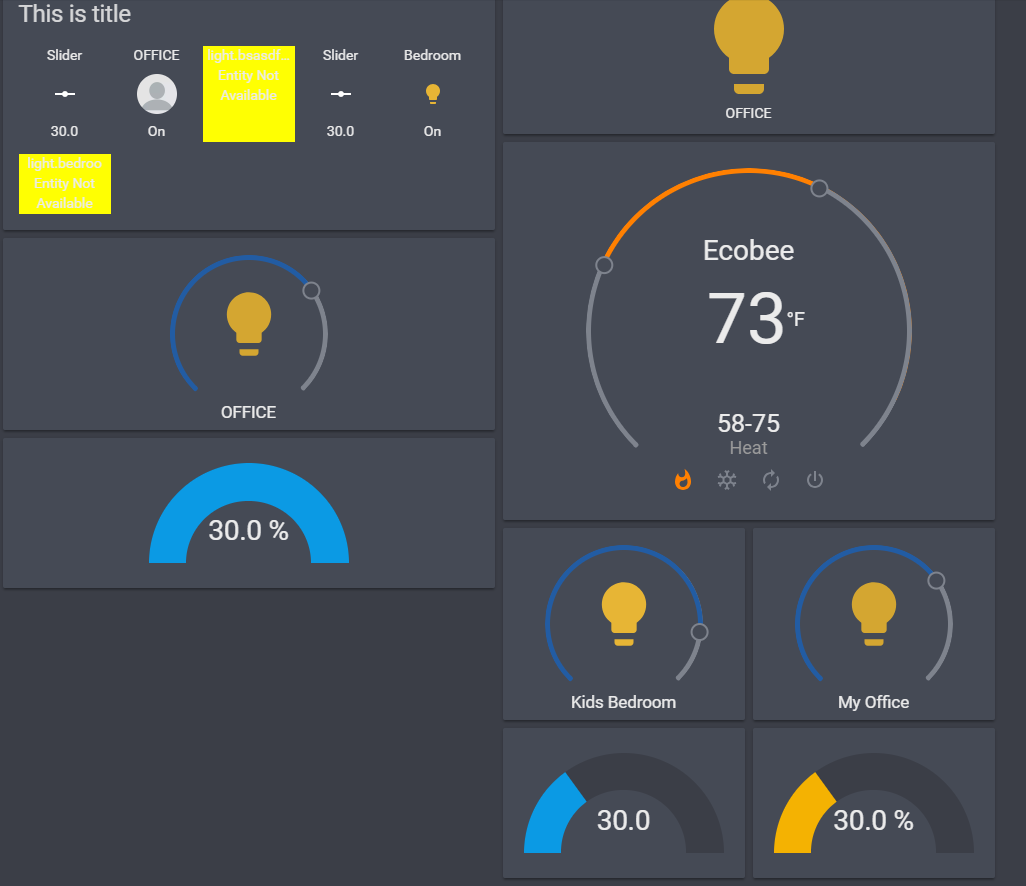 mild veldt
@raw brook has got the eye candy!
raw brook
I should have undone the broken entities.. But its my dev env 🤷
mild veldt
My dev env is a disaster. Just a bunch of random combos from bug reports and will only get worse
raw brook
Mine is just testing the things I make but I have been deleting some
mortal cape
@raw brook I've not seen these light cards. What are those?
raw brook
uhh shhh 😜
mortal cape

loud vault
could someone pls tell me how to force hassio to update? for some reason mine is not seeing 0.81.2 update, stuck on 0.81.0.dev0
 cinder rapids
Is the plan to include some default themes?
timid burrow
hassio ha update -o version=0.81.2
 timid girder
Hi guys! Quick question: are you aware that the new 0.81.x thermostat card is not showing for some people?
cf. https://community.home-assistant.io/t/0-81-new-thermostat-card-not-working-with-danfoss-thermostat/75365
raw brook
Will address in the forums. Thanks for bringing this up
 coarse monolith
Hey all - I'm receiving an error when using conditional card with a picture-glance. If I include entities I get
https://home.myhass.com/frontend_latest/8a696fdac4ce3eb749b3.chunk.js:1559:737 Uncaught TypeError: Cannot use 'in' operator to search for 'light.entry_light_level' in undefined
~share
kind shellBOT
:point_down:
Format Code
Please use https://www.hastebin.com/ or https://paste.ubuntu.com/ to share code.
raw brook
Share your Lovelace Yaml
coarse monolith
      - type: conditional
        conditions:
          - entity: binary_sensor.front_porch_multisensor_motion
            state: "on"
        card:
          &front_door_cam
          type: picture-glance
          title: Front Door
          camera_image: camera.front_door
          entities:
            - lock.front_door_lock_locked
            - light.entry_light_level
            - switch.porch_lights_switch
It's worked reliably for the past.... while...
raw brook
If you take the light.entry_light_level entity out do you get the same error but with a different entity?
coarse monolith
it errors on the first entity listed under the entities block
raw brook
Does this happen without the conditional card wrapper?
coarse monolith
no, I'm referencing front_door_cam in another view without problem
using
- *front_door_cam
that loads fine
the conditional version fails
raw brook
If you take out the &front_door_cam
Does that work?
I have never seen that syntax before
coarse monolith
no, it does not
That creates a "template" so I can refer to the same card later in the .yaml file
raw brook
Makes sense. Pointer/Reference Syntax just never seen it in Yaml before
Can you post the issue on the Front end repo? https://github.com/home-assistant/home-assistant-polymer/issues
 ancient crest
Since recently (I guess since my update to 0.81.1), I get the error 'Cannot read property of 'states' of undefined'. That is coming from a vertical-stack card containing multiple condition cards.
Before the updates, it was working just fine.
All the entities referenced seem to be existing. Was there any changes I missed or is any place to get a more detailed error message?
raven nacelle
One of the entities (may be outside the vertical stack card) is probably undefined.
ancient crest
There is only one other card containing two light entities. Both of them are working just fine.
vital forge
I also still have issues with conditional cards with 0.81.2.... Known issue? I thought it was all solved with this version?
polar kelp
@spiral dragon I think it's called a Node Anchor: http://thomasloven.com/blog/2018/08/YAML-For-Nonprogrammers/
vital forge
lofty summit
My vertical stack issues actually got fixed in 0.81.2 when using conditions inside a stack, still getting the same issue when using a stack inside a condition though.
vital forge
conditions with mediaplayer and some others are still known to be broken apparently. Fix in 0.81.3
polar kelp
@ancient crest are you using hass.io?
I just realized my first example of a dictionary is a terrible one...
And it even says in the text why it's terrible. 🤦
silver crescent
Is it possible to combine the picture Glance with the Picture Entity so clicking the picure (picture Glance) toggles all entites?
polar kelp
Afraid not, but you can pretty much copy the picture-entity and add the functionality yourself using a picture-elements.
vapid field
Hello everyone, can someone guide me on how to use the long_press functionality that was included in the last release... Struggle to find any documentation on it 😦
polar kelp
For some reason that update didn't make it into the docs.
Anywhere you have a tap-action, you can also use hold_action with the same options. That's it.
vapid field
yeah, thaat makes sense 😉 Thanks again
polar kelp
What you can't do is have them perform the same action with different effects. E.g. you can't have tap_action: call-service and hold_action: call-service and have them call different services.
But they can call the same service
vapid field
got it. Will try right away
might be easier if I also remember to update to 81 😉
works like a charm.
 modest cliff
Hey everyone, is there anyone who knows if you can hide views from lovelace? i want to navigate from one view to another so i have no use for the second view
polar kelp
Google lovelace-kiosk
That hides the entire top bar
Another solution is to set title: " "
modest cliff
thanks alot! i did the " " trick!
 dense glacier
can we do nested cards in lovelace
split granite
Only with certain cards - those designed to "hold" other cards
dense glacier
say i have i want a card for bedroom but inside that i want a header for bathroom under which all my bathroom entities would go
split granite
Vertical and horizontal stack
 dim jolt
any idea on eta for 81.3? the wife is giving me funny looks with the odd looking thermostat lol
mild veldt
using experimental ui for day-to-day comes with its risks 😜
dim jolt
lol experimental - ye olde get out clause - thanks guys. will just hide it for now 😃
polar kelp
I updated card-modder to allow a bit of control over where cards show up: https://github.com/thomasloven/lovelace-card-modder
 fallow oak
Can I reverse the severity of the gauge card? How do people handle this when the value is more severe as it goes down?
raw brook
The severities can be set at any level:
severity:
  green: 33
  yellow: 66
  red: 100
or
severity:
  green: 100
  yellow: 66
  red: 33
Ahhh.... Mine was just blue, but I got it sorted now! Thanks!
 fleet portal
Hi there
Looking for a way to get state dependent color change for components such as groups / automations / remotes / locks / scripts etc. (Similar to how switches and lights get a different color when switched on vs. off)
how can I make it happen in Lovelace ? (for glance cards / filter cards...)
dim jolt
button-card by kuuji perhaps ? https://github.com/kuuji/button-card @fleet portal
fleet portal
uhhh looks promising 😃 thanks @dim jolt
dim jolt
only thing it hasnt got yet is attributes
mild veldt
kuuji is the master of configurability 🤣
thorny verge
Is there any way to disable the pop up when you click a button/card in lovelace? Preferably on a perview basis.
thorny verge
Not disable the tap-action.. Disable the little notification on the bottom left, the one that pops up and says "Turned on Light"
polar kelp
Aha. Don’t think so.
thorny verge
I like it on the hallway tablet, but I am building a remote, and it is not nice there.
polar kelp
Put in a feature request: https://github.com/home-assistant/home-assistant-polymer/
Please. Now that you’d mentioned it, it will annoy me all the time.
thorny verge
Ok. Seems like a common sense thing to me, it is very annoying for a TV remote...
Not sure how to do a feature request in github, or should I do it in the forum?
raw brook
Yes. Add it to the forum
mild veldt
...great. now I'll be focused on that toast notification all the time now...
thorny verge
Ugh...
mild veldt
100% confirmed @thorny verge is the worst for pointing this out 🤣
thorny verge
💩
Please vote on the feature request!!
https://community.home-assistant.io/t/disable-toast-notification-on-ui-switch-actions/76352
 fleet condor
hi, I add a thermostat card to try but it doesn't appear in the UI. If I make a typo in the climate (for instance climates) I see the error message where the card was supposed to be, but if it's correct no card appears. Any ideas? I'm trying to use this with broadlink climate. don't know if it works, but I believe I should at least see the card right?
raw brook
Should be fixed in the next release
thorny verge
Is there a way to call a service and navigate on one button/icon click?
So, on an icon in picture-elements, I need to call-service AND navigate...
It's for a TV remote, for example I want to call a service to start Kodi, then navigate to the Kodi remote.
tacit cave
have you tried configuring both?
thorny verge
No, not sure how, any idea? You have to define a tap_action, so one or the other there.
raw brook
I don't believe to actions is a possibility
thorny verge
I can do a workaround maybe, is there a way to have an automation trigger on page navigation (clicking or naviagting to new page)?
past falcon
Could you just do it the opposite and set up an automation to fire on a click, and part of that automation is to navigate to a new page? Though I'm not sure if you can navigate or not in an automation...
raw brook
I think your best bet is to have a navigation to the Kodi Remote and a Power button on the remote that turns on Kodi
thorny verge
That's what I have, thanks. Hoping to save button clicks... major WAF. It is automation software afterall.
@past falcon I am pretty sure you cannot navigate progamatically anymore
But... if I can trigger an automation on a 'click', that would work, just not sure any way to do that.
past falcon
Yea I wasn't so sure, but thought you'd have more lu k coming from that direction
timid burrow
also regarding the gauge card... can I change the size of the text? I can't post an image here... where can I post an image? or if someone knows how to change the text?
raw brook
~images
kind shellBOT
Please use imgur or other image sharing web sites, and share the link here.
raw brook
Currently not possible to change the text size
timid burrow
ok thanks zac. it's bloody huge and overwrites the gauge
timid burrow
hahaha yeah I might do that
actually it's the gauge value doing it....
https://imgur.com/a/P7kByzn
raw brook
You can do unit_of_measurement: ""
No other solution unless you use card modder. I think you should be able to change the font size
undone egret
get faster internet
tacit cave
@timid burrow I kind of like the way it looks with it overwriting it
timid burrow
@grim willow I was thinking about card-modder actually... Might look at that
tacit cave
FYI my internet is shittier than yours
raw brook
Everyone doesnt have 400/25 🤔
timid burrow
yeah..... I'm on a nominal 50/20 plan so I'm doing pretty well - VDSL 800m from the node
I think it's a bit ugly myself
I might remove the unit of measurement
timid burrow
nice but I prefer the gauge.... 12ms ping here
tacit cave
😥
mild veldt
@thorny verge that sounds like the kind of crazy customization kuuji would add to his button card 😉 Cool idea
timid burrow
@raw brook removing the unit of measurement didn't work so I'm making a sensor
 tepid moth
Hi all, I've a couple of conditional cards which I uses to open a "light drawer". Basically a group of lights that I want to reveal/hide on the front page of my hass-install. Anyway, when I try to open the drawer, I need to refresh the page for the condition to kick in and show the group. Is this a know issue with lovelace? I'll try to post some code:
To toggle group: - type: entity-button
entity: input_boolean.show_g3
name: Lampor uppe
tap_action: toggle
Conditional card:
- type: conditional
conditions:
- entity: input_boolean.show_g3
state: "on"
card:
type: entities
entities:
- light.koksbord
 wheat bone
@tepid moth I haven't really used the conditional card, but I'm doing something similar with the Monster card. https://github.com/ciotlosm/custom-lovelace/tree/master/monster-card
That seems to work fine; update when needed, etc.
quick gulch
anyone here using the thermostat card? seems to break when you change the theme/colors
tepid moth
@wheat bone Thanks, gonna check that one out.
 subtle rune
@mild veldt I'm really intrigued by this shopping list card I see in pr. Do you have any pictures?
I was going to try and make a card for a todo-list but maybe this is going to be usable?
quick gulch
+1 on the shopping card, would be great if someone could integrate Bring! - i think its the best shopping list app i've seen, it has the apple watch app which is great for walking around the supermarket
polar kelp
@subtle rune https://github.com/custom-cards/list-card
No, wait. That wasn't it
He showed me some screenshots on github some time...
I suppose this is the PR you found? It has some screenshots https://github.com/home-assistant/home-assistant-polymer/pull/1821
subtle rune
Oh darn, I didnt look that far down
or maybe I looked earlier than 5 days ago actually
Looks like exactly what I want however ❤
Can I try the not-ready card as a custom card or is that not going to work?
mild veldt
Won’t work 😦
I’ll be adding a pr for it again soon once it looks silky smooth @subtle rune
raw brook
@quick gulch fix will be in .82 release
mild veldt
@quick gulch Bring! Doesn’t have a public api
 karmic vessel
anybody got good examples i can look at for lovelace configs? really wanna start diving into it
mild veldt
Check the pinned messages
karmic vessel
i guess i shouldn't have said configs but like looking for inspiration on what people have done, the config side i can figure out, most pins i don't see examples
or just haven't run across them yet hehe
 wary meadow
Anyone have a trick for making a blank entity-button card? Trying to keep a grid going of equally spaced controls. I know the custom card has this option but trying to stay away from the custom cards.
@karmic vessel Search for home assistant configs on github. Many put screen shots up. Mine For example https://github.com/SilvrrGIT/HomeAssistant & this is probably the most elaborate I have seen https://community.home-assistant.io/t/my-latest-lovelace-screens-updated/70601
mild veldt
@karmic vessel this is pinned https://www.awesome-ha.com/#lovelace-ui and has lots of links
 signal bay
Hey guys, is there anyway to set lovelace as default on all devices?
raw brook
Not all at once. Going to  and then clicking https://gyazo.com/6e7ee0b5e7bac12b20e05a5ef9c0ae98