#frontend-archived
1 messages · Page 77 of 1
 buoyant skiff
 tired quail
yeah FireOS will keep using its embedded version instead of the new version even if you install it from the play store 😦
buoyant skiff
a tablet is only as good as its last update
 simple jolt
Well that’s disappointing. Really wanted to set up the button cards but doesn’t appear that it’s going to work.
buoyant skiff
you can always root your tablet and install another rom on it
tired quail
unless its the 2017 8" fire tablet, no root for it yet 😦
buoyant skiff
those tablets are mostly in the US never seen one over here in sweden
simple jolt
Yea they are the 2017 models. 😡
 mild veldt
fire tablets are garbo. they are still based on lollipop
buoyant skiff
cheep stuff are often shit
and user expectancy is often high that it should perform since its an android
mild veldt
i have fires for my kids and even that is a frustrating experience. i would gladly take my $30 back
tired quail
i got an old 7" to play around with a few years ago and decided i wanted 8" models for the wall. set the 7" up for the toddler to play with, but we can't lock it into an app so it kind of sucks for a toddler
tired quail
she always manages to swipe up and hit the home button and close whatever she was playing, so we end up letting her play with our ipad in lockdown mode
but for $30 for an 8" tablet i'll use them for my wall-mounted dashboards. They work well enough for that, now that I disabled a bunch of the pre-installed bloat.
 fiery temple
when i use panel: true all other cards are dissapearing how to correctly fix this? i just want the panel and below that the cards..
https://pastebin.com/BeCTg1W4
 chilly zephyr
Hey all, this isn't quite a developers question so I'm sticking it here.
I've recently learned python, pushing that daily at work, but I want to be able to do some cool stuff with Hass/Lovelace. So I'm after a learning path
I don't know Javascript, should this be my first port of call?
or should I learn it in a library context with React? Or go straight to Polymer?
I'm thinking I should be looking at fully learning Javascript without any of the other stuff so I have a better grip on it, then learn polymer... Is this a good route to go?
 wheat current
I have close to 0 web dev experience, but if I where to learn it now I would probably start with getting the base knowledge of JS then branch out with React and/or other frameworks
 raven nacelle
@chilly zephyr There are lot of feature requests on the ui-schema repo https://github.com/home-assistant/ui-schema/issues. That will be a great place to start, if you are looking for front end related issues.
mild veldt
@chilly zephyr Do you want to build cool display or add new functionality to Hass? As I'm sure you know, Python is the backend and JS is the front-end. I would recommend doing a Python custom component to start to get a taste. And then building a custom card to display your new custom component's data (assuming it is something like a sensor)
But if you just want to make cool stuff on the front-end using existing, then just start learning JS as @wheat current suggested.
chilly zephyr
Well I’m learning in general. I now use python at work and want to start making ui’s. But also gaining knowledge that could help me make cool stuff in hass and contribute is also a goal. So I’d learn something I can apply to both.
That kicked off my interest. I’d like to make an alarm clock you could click on, select the days and give them different times
He says that there’s some restrictions. Mainly and gravely that a ui has to be open to fire the automation. That’s no good for me.
I don't know if Polymer would have the same restrictions etc
 severe idol
@covert jacinth cheers buddy
 native kiln
@buoyant skiff no to which question? to all of them?
fiery temple
@empty heath can you correct me on this?
https://pastebin.com/GXkKz5xN
its only showing the first header bar im confused why its not adding the rest...
nvm ill just edit youre cofnig
 halcyon mantle
@polar kelp I'm really enjoying your long-press.js for lovelace, but now I'm getting greedy after using it for a while... I find that it is very sensitive, scrolling up & down on the screen when one by accident start on the picture element it envokes the long-press opening up more-info. Though not a train smash, but not ideal. What is the possibility of using 3d-touch vs long-press or perhaps making long-press less sensitive? I played with the value of this.timer = setTimeout((e) => this.onHold(), 300); which yielded various results, but none better. If the value is too high, the save image dialogue pops up. Again, thanks for your trouble, just wanted to give some feedback...
fiery temple
website seems down again
native kiln
I am getting an error from webpack:///.src/panels/lovelace/common/create-card-element.js on line 51 with the basic example for a custom card, where do I find create-card-elements and any ideas on solving the error?
 proud brook
Anybody doing any work with blinds or the Cover stuff? I've got motorized blinds with two rails (normal bottom rail that goes up + top rail that goes down) and the normal cover component just isn't cutting it. I'm considering Lovelace to get some kind of UI element with 2 separate sliders. If they can be positioned on a picture of a window so it's obvious which slider controls which rail, even better.
I'm assuming I'm going to need to do the customization (some ui experience, mostly backend Node dev lately), but I wanted to make sure I'm not tilting at a windmill here.
Blinds that do the normal stuff, plus this:
https://images-na.ssl-images-amazon.com/images/I/818-m4DnQLL._SL1500_.jpg
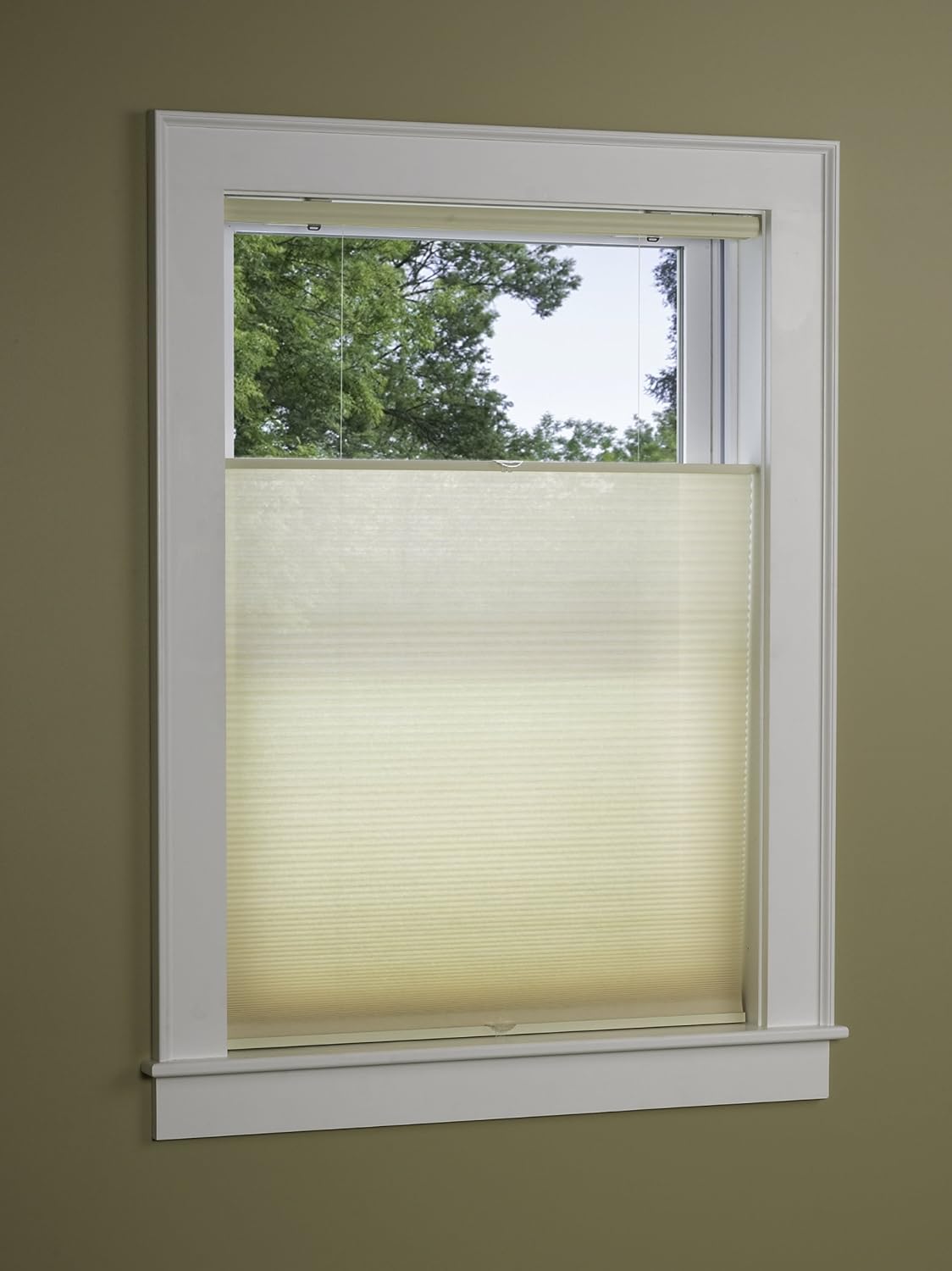
Anyway, if anyone is interested in collaborating on some top-down/bottom-up blind automation then hit me up!
 lucid matrix
Is Lovelace going to be mandatory? Im affraid to to install and run the lovelace migration tool. What steps must be taken.. finally getting only 3 main errors in log rest are from mjpeg Cameras ( failed to parce boundaries)
native kiln
Has anyone else had an issue with the icon, secondary-info, or tap-action? I can get name to work
but not icon, secondary-info, or tap-action
@undone egret @wet oar
 wet oar
Sorry, I don’t know anything about Lovelace
native kiln
Ah bummer, do you know about the plans for lovelace?
by any chance does @calm sluice know much about lovelace?
 undone egret
@native kiln please dont ping people randomly.... I also dont use lovelace
native kiln
@undone egret Sorry for pinging you directly, you have been helpful in the past so thought I would ask
undone egret
np just dont ping randomly.... ask a question and anybody that can help will
native kiln
Okay good to know thanks!
buoyant skiff
geeez
 polar kelp
@halcyon mantle Thanks for the feedback. I’ll look at the scrolling thing. If you’d like, you could open a github issue so I don’t forget. I don’t think 3d touch is possible. It’s just a website, after all, which is also why the save image dialog pops up. As you realized I chose 300 ms to avoid that.
buoyant skiff
@polar kelpis it possible to set the paper box is be option in the markdown card ?
polar kelp
Yeah. I’ll try to get that done today.
buoyant skiff
tnx easier to have it scaleable :D'
polar kelp
Might try to make two components from it, acually. useful-markdown-card and useful-markdown-entity.
Wait. I thought you were talking about the margins. What do you mean, exactly?
wheat current
I think he want a templatable textbox without any styling (other than padding) 😜
buoyant skiff
yeah changed all the margins to 8px in the js script
but i think it would make more sense to have em setable 😃
 subtle rune
Do you guys think there is any reason for that for example entity picture doesn't have "state_filter" as "image element" in picture elements has? Or is it just a matter of no one making it so yet?
halcyon mantle
@polar kelp https://github.com/thomasloven/lovelace-long-press/issues/2 <--Done! Thank you...
polar kelp
@subtle rune No card has state_filter.
subtle rune
@polar kelp I know, but image element has, and I want it for cards too 😉
I'm asking if there is any kind of restriction in the function for that or if it's just a matter of implementing it.
For example I think it would be nice to be able to add a state filter to make "off" black and white, would be better than having to make a copy of your image, make that black and white and use state_image
polar kelp
It might be a design consideration, not wanting people to be able to mess with the css of cards...
subtle rune
Yeah, that might be it of course.
polar kelp
But as a workaround, you could use image-element as a card...```yaml
cards:
- type: custom:hui-image-element
image: http://placekitten.com/200/200
entity: light.my_lamp
tap_action: toggle
state_filter: {"off": "saturate(0)"}```
But you lose the pretty shadows and stuff.
@buoyant skiff Now there's a padding option.
subtle rune
@polar kelp Thanks!
polar kelp
No thank you. I never thought of this before, but it's a problem I had too.
buoyant skiff
@polar kelp tnx
buoyant skiff
hehe @polar kelp dont think that is worked that well
            style:
              top: 248px
              left: 50%
              margin: auto
              color: rgb(255, 255, 255)
              font-family: Trebuchet MS, Quattrocento Sans
              font-size: normal
              pointer-events: none
              font-weight: bold
              font-variant: small-caps
              font-variant-caps: all-small-caps
              background-color: rgb(54, 65, 78, 0.7)
              text-indent: 0.5em
              z-index: 1
              padding: 8px
          - type: custom:useful-markdown-card
            padding: 8px
            content: >
              Upcomming events
            style:
like that ?
polar kelp
Yeah
buoyant skiff
still messed up
polar kelp
Weird... that should have given the same results as if you changed line 11 in the source to say padding: 8px...
Perhaps I need to look a bit further into picture-elements...
buoyant skiff
ok 😃 i like how its bigger on some of the other so having it scale able it nice
polar kelp
What changes did you do to the js when you got it to work the way you wanted?
wheat current
The question is why did he not make a PR with the changes, since he know what he wants 🤔
buoyant skiff
it was those 2 padding values
changed all 3 values to 8px
@wheat current then it would be a predefined value not a setable value
kinda obvious
not a js person
wheat current
Then you need to learn some Js and make it settable before pr 😜
buoyant skiff
fuck that
polar kelp
I'm not a js person either. I have no idea what I'm doing here
You can try playing around with things like padding: 0 8px 8px too, I guess...
wheat current
I'm not a * person, and have 0 clue what you are talking about. 😜
buoyant skiff
or atleast it did in the old version
it does in this version too
if i change
      if(this.title){
        this.padding = '0 8px 8px';
      } else {
        this.padding = '8px';
so im guessing using the padding as keyword for setting it might not be a good idea or something cause it overrides with the browsers default values or something
again a frontend dev will probily have a better idea
polar kelp
If you inspect the element, you should find <ha-markdown id="md" style="padding: ... . Does the padding reflect what you pass to the entity?
buoyant skiff
need to reset it again
<ha-markdown id="md" class="style-scope useful-markdown-card" style="padding: 16px;"><p class="style-scope useful-markdown-card"></p> </ha-markdown>
the default
and lets try with the entity entry of padding
polar kelp
@buoyant skiff You might want to censor your IP...
buoyant skiff
ty
<ha-markdown id="md" class="style-scope useful-markdown-card" style="padding: 8px;"><p class="style-scope useful-markdown-card">Upcomming events</p>
</ha-markdown>
hmmm
might have just been a cache issue before
yepp cause the rest is padding on 16px
which is great
so consider the non issue resolved 😛
buoyant skiff
the extra padding on the weather info really makes all the differance
 foggy tendon
which are the states available for the domain media_player to use into an entity-filter card or monster-card?
wheat current
The same as you can see under 
foggy tendon
@wheat current Can you tell me why this card shows an error "incorrect filter config"?
- type: entity-filter
entities:
- entity: media_player.camera_da_letto
- entity: media_player.salotto
- entity: media_player.tv_salotto
- entity: media_player.kodi_bedroom
- entity: media_player.kodi_living
- entity: media_player.salotto_audio
- entity: media_player.googlehome0461
- entity: media_player.googlehome5670
state-filter: 'on'
 weak gust
state_filter
wheat current
What @weak gust said 😉
foggy tendon
Arghhhh...... 😀
foggy tendon
I want to use the media-control card but visible only for media_players in "on" or "playing" state. I tried with entity-filter card but unsuccesfully... there is a better way to have that?
mild veldt
@foggy tendon you did something wrong then. that's the way to do it
foggy tendon
@mild veldt i tried this:
- type: entity-filter
title: Media Players
show_header_toggle: false
entities:
- media_player.house
state_filter:
- "playing"
- "idle"
- "on"
show_empty: false
card:
type: media-control
entity: media_player.house
but in this way i am forced to use one media-control card for every media player
mild veldt
please use hastebin
wheat current
same s**t different branding
foggy tendon
@mild veldt Is there a way to use one media-control card for all media players with that filter state?
mild veldt
what?
wheat current
What did you expect from it?
One card to rule them all, One card to find them,
One card to bring them all and in the darkness bind them?
mild veldt
like a single media-control card that controls everything?
no
why would you want it like that? am I missing something?
foggy tendon
i want to see the media control visibility for cards that are playing or on and not for all media players (also for those that are off)
weak gust
so just media controls for players that aren't off
foggy tendon
yes
mild veldt
so the problem is that you want to do this in one entity filter instead of numerous?
foggy tendon
exactly
mild veldt
that's not a problem
foggy tendon
maybe conditional cards?
mild veldt
you said it works for one, right?
foggy tendon
for one yes
mild veldt
then copy-pasta
if you want pretty configs, you're in the wrong business
i don't even want to know what @buoyant skiff 's config looks like ☠
foggy tendon
so i must have as many cards as many media players i have?
buoyant skiff
trying to clean it up so it becomes n00b friendly
mild veldt
@foggy tendon you could probably use the monster-card
foggy tendon
i already tried to use it but always forced to use one card for every entity
buoyant skiff
lol
mild veldt
idontbelieveyou.png
buoyant skiff
@foggy tendon come back when you got 2 cards that takes 2000+ lines
mild veldt
@foggy tendon try it for your media_player domain
weak gust
the joys of yaml
foggy tendon
@mild veldt in place of entities?
mild veldt
I don't have access to my config from work, but I'm pretty sure I have a monster card with this exact same thing for the media_player domain
you should be able to adapt the light example
foggy tendon
ok, i'll try...
foggy tendon
@mild veldt I tried with monster-card, but in this way i don't get the media-control type view
 opal beacon
someone knows as I can "refresh" the visualisation of a local jpg image, when it changes, on lovelace?
 signal pine
Clear your browser cache I think
severe idol
hey I have a door sensor that just outputs on or off, and in Lovelace I want to change it to closed and open
and also change the icon accordingly. So far I have this:
- entity: binary_sensor.ecolink_garage
name: Garage Door
icon: mdi:door
in a regular entity card. what do I add to make it say Open or Closed (when on and off respectively) and change icon accordingly too?
nvm, changed the device class to door and this took care of it!
mild veldt
@foggy tendon I looked at my config when I got home. I have a monster-card for my 'playing' media_player domain, but it is an entities card. You're right, media-control does not look to be supported.
 tired charm
Anyone know good wifi 8-16CH Relays what will work with or already have integration with the LoveLace UI?
 plain torrent
@severe idol I used this - but you have an answer already.
              entity: light.recliner_light
              tap_action: toggle
              image: /local/images/lamp1.png
              state_image:
                'on': /local/images/lamp1.png
                'off': /local/images/lamp2.png
              state_filter:
                'on': brightness(650%) saturate(2.5) drop-shadow(0px 0px 10px red)
                'off': brightness(150%) saturate(0.8) drop-shadow(0px 0px 30px green)
              style:
                top: 15%
                left: 34%
                width: 5%
padding: 30px 30px 50px 30px```state_image..
severe idol
the brightness, saturate and drop shadow, that is CSS correct/
can I see how yours looks? I have no idea how to code CSS. is it easy?
plain torrent
you mean the image?
severe idol
yeah I wonder how it looks with all the CSS you put in. for inspiration if nothing else.
Additionally do you know how to add a divider line? I keep getting errors when I add - type: divider.
- type: entities
entities:
- light.kitchen_1
- light.kitchen_2
- light.kitchen_3
- light.kitchen_4
<<divider goes here>>
- light.kitchen_5 etc....
buoyant skiff
.format @severe idol
 kind shellBOT
:information_source:
Format Code:
@severe idol To format your text as code, enter three backticks on the first line, press Enter for a new line, paste your code, press Enter again for another new line, and lastly three more backticks. Here's an example:
```
code here
```
Click on the link to learn how to format: https://raw.githubusercontent.com/skalavala/HassBot/master/format.gif

 gritty swift
2 cards that take 400 lines?
What is this black magic.... I feel like I’m too simple now
 prisma mango
Can you force icons to start on a new row? I was thinking it would be possible with horizontal and vertical stacks but checking other options
buoyant skiff
2 cards 1550+ lines
 fallow oak
Is there a card (except the monster-card) that can contain a domain?
buoyant skiff
No
buoyant skiff
Np
plain torrent
@severe idol - this is what I use to divide the card.
        entity_id: light.bed_light
    - type: divider
    - type: divider
style:```how does the google voice cloud works today?
the guide says:
Install our skill for Google Assistant. As of this writing, the link is not live yet: you can find it by opening the Google Home app -> Home Control, tap on the blue + at the bottom right and find Hass.io in the list.
But there is no such thing as a blue +, i know it reffers to the round blue button with + in it but it isnt there
is it only activated in some countrys?
weak gust
do you own a Google home?
weak gust
I think you need a GH
fiery temple
Guess what? Yep, our Google Assistant Smart Home skill is live! It’s a mouthful but it means that you can now control your Home Assistant devices via any Google Assistant enabled device by simply saying things like “Ok Google, turn on the lights”.
that what the first text on the page is
any google assistant
well the s8 is any google assistant right? i may read this incorrectly cause of my poor englisch grammar
https://www.home-assistant.io/blog/2018/04/24/launch-google-assistant-support/
is also says the google assistant app do
i have that app installed in my s8
@split granite is it possible to get the home assistant working with only a Galaxy s8 with voice assistant? so without an google home device?
 split granite
What has that to do with Lovelace?
If you're trying to set up cloud: or google_assistant: please use #330944238910963714 having read the fine manual first
 sudden lion
@buoyant skiff Was it you that had a lovelace card that showed a vacuum cleaner map?
polar kelp
It's on sharethelove
fiery temple
in lovelace is there possiblity to swipe the page to right to get to second view?
or swipe to left to show second view
 dense roost
@fiery temple there's not
 foggy pewter
Has anyone got a keypad working in Lovelace?
This isn’t for an alarm control panel but I’m thinking of making a ‘remote control’ for my tv
If the tv source is set to cable box I would like to set display a numeric keypad to be displayed to allow the user to select the channel to be displayed (the numbers would be transmitted to the cable box via a Broadlink rm mini )
If the tv source is changed from cable box I would like the number pad hidden
 tiny trellis
@foggy pewter I have not got a keypad working. But i use a picture elements card and icons to control the tv. Just like you would a floorplan in your house just a remote
anyone know of a good darksky weather card. The stock one does not show a forecast for days just by hours
mild veldt
@foggy pewter I have a Roku remote using picture-elements like @tiny trellis , check out the custom button-cardhttps://github.com/kuuji/button-card
foggy pewter
@tiny trellis @mild veldt thanks guys 😃
mild veldt
@foggy pewter @buoyant skiff has one on sharethelove as well
subtle rune
Finally someone went ahead and did a mini media player card 🎉
https://github.com/kalkih/mini-media-player/blob/master/README.md
fiery temple
Can anyone tell me how to show the switch itself on the glance card?
https://imgur.com/a/05JHAbD
https://github.com/IIIdefconIII/homeassistant/blob/master/ui-lovelace.yaml#L207
mild veldt
@fiery temple read the docs on glance card again. Sounds like you want to change your tap_action
fiery temple
@mild veldt no i just want the actual toggle instead of the mdi icon
mild veldt
That’s not a glance card, then
fiery temple
monster card? or is there any buildin card that can reach this
i will try just entities
that seems to work
 mossy otter
Is there a simple way to check what's wrong with your lovelace yaml?
I did "check config" and no errors
but am getting:
404: Not Found
 hoary river
@mossy otter Check the logs in dev-info for clues on which line causes the problem.
You find dev-info in the bottom right of the sidebar btw!
 dim jolt
anyone tried an entity-filter card with button-cards in it?
ie buttons that sometimes show based on a state
mild veldt
I created a custom_component tonight that expands upon the built-in in HASS shopping_list to include multiple lists and categories. https://github.com/custom-components/lists
Want to create a Lovelace card for it this weekend, but if anyone is feeling ambitious and wants to beat me to it, please do
There is an api call to get the current list /api/lists that will just give you the full list
And then services to add/delete lists/categories and add/complete/clear items
buoyant skiff
ty ian
probly should rename it in the read me
sensor. track
sensor.list ?
also sensor missing from repo name
ludeeus is gonna have OCD problems
unless its a platform 😛
polar kelp
@subtle rune Nice media player. I held off because you found that PR which I thought was merged a while ago...
 paper oxide
Hi there, isn't it possible to use the "!include {path-to-file}" in the ui-lovelace.yaml? When i add it for the resources element the frontend states ui-lovelace.yaml not found
I can't find it in the docs neither in the forums
split granite
No, includes aren't supported
The pinned messages have some other ways of solving that
buoyant skiff
thats what you want but remember this method might break in future updates
at the moment its working
paper oxide
@split granite "The pinned messages have some other ways of solving that" What pinned messages are you referring to?
@buoyant skiff thanks
split granite
You know how to find the pinned messages in a Discord channel @paper oxide ?
paper oxide
Nope, but ill manage to find out in the web interface.
split granite
I don't use the web interface, so I'm not sure where it is there
paper oxide
found it
polar kelp
Top right. Looks like a pin. Yours probably has a red circle too
paper oxide
@polar kelp yup, it's my first use of discord ever so i need some time to find my way around
thanks for the support. @split granite i'll take a look
split granite
The key message you're after FYI has the word merge in it, but the others may be of interest to you for other reasons
paper oxide
absolutely, thanks!
tiny trellis
are there any good themes for lovelace
 raw brook
polar kelp
raw brook
polar kelp
It's the same themes for lovelace as for the rest of home assistant.
tiny trellis
thanks. Anyone have a tile card that is functioning pretty good. I have found quite a few but was curious before I started putting time into one
fiery temple
good evening all,
id like to know how i can get
https://imgur.com/a/k9FpaTj
that showing on the frontend instead of clicking on the hyperion lightbulb first
https://github.com/IIIdefconIII/homeassistant
 daring schooner
Hi guys
I'm trying out this low battery card
https://community.home-assistant.io/t/low-battery-alert-in-lovelace-ui/64238
I'm a bit stuck on the filters though
my battery items are float, so 41.0 and I can't go and add thousands of filters so cover every number
Anyone have any other ideas on this?
polar kelp
monster-card
 boreal charm
Hey everyone. I'm having a bit of trouble with the monster card. It seems to only work with certain domains for me?
It's very very odd...
Eg. I can get it show a list of all my sensors...
but when I change or add the domain 'media_player' it brings up nothing even though I have like 10 media_player.* devices
split granite
~share a config please
kind shellBOT
:point_down:
Format Code:
Please use https://www.hastebin.com/ or https://paste.ubuntu.com/ to share code.
boreal charm
I've also tried it without the - domain: sensor that runs as well but does not bring back anything. when I add - domain: sensor i get all my sensors and no media players
polar kelp
That works perfectly for me...
Do you get any errors when refreshing he page, in hass or in your browser log?
boreal charm
I was afraid of that, lol. Let me check.
I am not getting any errors on the page (the lovelace red box) nor am I getting any related errors in my homeassstant log. At least not related to this. I'm having some other issuse with failing device trackers but that's a known error I'm not currently debugging.
polar kelp
Are you using chrome?
boreal charm
Yep. Just checked the chrome debugger console and the only error i get is this
GET https://mydomain.com/background.png 404 (Not Found)
polar kelp
Then I'm affraid I can't help you - which is not to say noone can.
boreal charm
Thanks Thomas. I appreciate the feedback. I was mostly hoping I was missing something obvious. It seems my problem is likely specific to my setup. So I'll have to do some deeper debugging. Thanks again!
polar kelp
Might be worth trying a full restart...
boreal charm
Hahaha I did an unrelated reboot and it fixed the issue! 😃 Came here to comment and saw your reply! Thanks again for the help! 😃
polar kelp
"Have you tried turing it off and on again?"
tiny trellis
i am looking for a way to create a drop down for a light bulbs effect list any help would be appreciated
mild veldt
@tiny trellis A custom drop-down card would be cool. You'll likely want to use this: https://github.com/PolymerElements/paper-menu-button
Actually, this might be the best option: https://github.com/home-assistant/home-assistant-polymer/blob/master/src/components/ha-combo-box.js
Here it is being used for the service picker: https://github.com/home-assistant/home-assistant-polymer/blob/master/src/components/ha-service-picker.js
polar kelp
Why not just an input_select?
tiny trellis
i am good with an input_select but I have never set on up either. to the WIKI. can i remain the items in the drop down? like rename them?
foggy tendon
WHo can help me to trace this error in calendar-card?
2018-09-15 00:06:34 ERROR (MainThread) [frontend.js.latest.201809030] https://xxxxxxxxxx.duckdns.org/local/calendar-card.js:10:7 Uncaught ReferenceError: moment is not defined
 cloud escarp
Is there a way to hide/ show a view in lovelace depending on which user is viewing?
 glossy birch
@cloud escarp that "user" specific functionality is something that will be available in the future
glossy birch
lots of new exciting stuff has been added in the past few releases. some of them will definitely morph into something big - like the new auth system.
mild veldt
@polar kelp wouldn't using a polymer element make it look more "Lovelace"?
polar kelp
Why reinvent the wheel?
mild veldt
Because HASS is built with Polymer components is my thought so doing a card with them would likely fit the look better
polar kelp
Sure, but you'd also have to create a custom card to handle all the functionality. With an input_select all that is done, and you can just have it trigger an automation or whatever. Your solution - while pretty - is all frontend and pretty much useless in itself, really. Or am I missing something here?
mild veldt
No. You're right. I was the one missing something. I was totally thinking that was their goal and thinking you were talking about a different kind of web element that was not polymer branded.
I reread everything and feel like a big dummy 😄
polar kelp
Yeah. I went afk for a while and realized that was what must have happened. I'm talking about the built-in home assistant component input_select. Doesn't get much more lovelace-y than a something with a predefined, official lovelace representation...
 empty heath
@fiery temple The reason the header (using vert and horz stacks) didn’t work is because you have multiple cards listed for the view itself. Instead you need to only have ONE card for view, and the rest of them inside the vertical stack.
 vague heath
Hi Guys, i'm i'm looking to add a card that shows, a trend graph similar to what you see when you click on a sensor in the started interface. i've had a Google and looked around and it seems to point me towards "history-graph" but when i add a sensor it shows, as non-state data. history.
mild veldt
@vague heath can you share your config and a screenshot?
vague heath
- type: history-graph
title: 'My Graph'
entities:
# - speedtest.download
# - efergy.current_values
- sensor.random
- device_tracker.b4f1dab85319
random sensor is just a random value that jumps around. if i add the device track item it shows the single bar graph no problems
mild veldt
Imgur
vague heath
https://imgur.com/Pj6Zl5n showing that there is data for that sensor. it's like i need to setup the graph so it is not just on / off
mild veldt
I was able to recreate your issue with my brewdog sensor. Not sure why
The function _computeIsEmpty in state-history-charts.js is the culprit. Don't have time to look further it, but that is what decides if there is state history to render or not.
 grim cairn
Hi I'm new to Home Assistant but I plan to use Lovelace - should I first setup my interface using standard UI or go straight to using lovelace, I'm not familiar yet with group views etc.
 vapid field
@grim cairn I suggest checking out lovelace first. It's easier
grim cairn
Ok, will do
split granite
I'd agree with that 💯
You're going to have to go to Lovelace at some point anyway, and learning the old hack route just to do it the easy way is going to cause you lost time and pain 😉
grim cairn
cool I haven't done any setup apart from all all my devices and lovelace looks nicer anyway
vapid field
does anyone know if it would be possible to put cards in a picture elements card at given positions?
like with the elements but instead its a card
kind shellBOT
A place for LoveLace Config https://sharethelove.io/
buoyant skiff
check out those examples
basically what your out after is
left: 50px
top: 50px
transform: none
by using px or em or any other measurement you can define it better and make it stick
remember that right and bottom are also valid options
and transform none makes it really stick to edges
vapid field
Thanks for the response but it's not what I meant
buoyant skiff
so you didnt ask how to position stuff
vapid field
I know how to position but I was wondering if you could use cards as in lovelace cards instead of elements
polar kelp
You need to know the internal name of rhe card, it’s something like hui-glance-card, and then you add it like a custom element
So - type: custom:hui-entities-card for example
You can find the names in the source here: https://github.com/home-assistant/home-assistant-polymer/tree/master/src/panels/lovelace/cards
I’m not sure of this working is a feature, or a lucky coincidence, so it might stop working in future updates...
vapid field
Thanks
is it working for you?
Im getting errors
do I also have to have those cards in my local folder and reference them in the lovelace file?
polar kelp
No, the cards are already loaded in, but getting the configuration right might be tricky
Tou need to live and breathe yaml
The opposite is also possible, btw - using an element as a card.
 viral sorrel
I seem to have a 100% crash rate with my lovelace home page (the others seem fine).. anyone else have a similar problem? I have the necessary options enabled in firefox
viral sorrel
I think it must be either vertical-stack or conditionals..
polar kelp
I’m away from my computer ATM, so I can’t check things, but I’m sure I got it to work before. Toast also uses this method, I think.
vapid field
okay, will try some more
viral sorrel
confirmed.. conditionals crash Firefox
buoyant skiff
not really
polar kelp
I thought that’s what you did to put markdown in your cards.
buoyant skiff
@polar kelp not towards comment towards the confirmed crash
polar kelp
Ah. Right
viral sorrel
remove conditionals.. no crash.. add even one conditional.. crash.. the conditional is within a vertical-stack.. so that may have something to do with it
I'll move it outside to see
polar kelp
IS it what you’re doing though, Toast? I’ve just guessed.
foggy tendon
Is anyone using the custom component sensor.launchlibrary?
viral sorrel
nope.. conditional still crashed outside the vertical stack.. no let's see if JUST the conditional crahsers Firefox
buoyant skiff
@foggy tendon thats not lovelace
#330944238910963714 or if your having issues git
@viral sorrel mine doesnt crash
viral sorrel
yes.. it does. I'll try to se if the barest of basic conditional also does it
buoyant skiff
not on windows and not on linux
viral sorrel
62.0 (64-bit) on macOS
buoyant skiff
urgh to tired to deal and help out
rather do something else
sorry @viral sorrel
its just one of those days 😄
foggy tendon
@buoyant skiff Sorry, but being a custom component i thought it was lovelace related
viral sorrel
what's a super basic conditional I could do?
viral sorrel
interestingly both chrome and safari have no problem with it
ok.. it's misrendering so I must have stuffed something up.. but no crash
vapid field
@polar kelp Got it working.. kinda. cards looking funky but styling can fix that I think
polar kelp
It’s not meant to be used this way, so you should expect to jump through a few hoops.
viral sorrel
ok.. so it's not conditional... maybe it's the map then :/
found it
    cards:
      - type: conditional
        conditions:
          - entity: device_tracker.google_maps_112857019502026064475
            state: "home"
        card:
          type: map
          title: Jola
          entities:
            - device_tracker.google_maps_112857019502026064475
this crashes firefox
a conditional with a map
or maybe it's just the map
shit yes..
    cards:
      - type: map
        title: Jola
        entities:
          - device_tracker.google_maps_112857019502026064475
this also crashes it.. I swear I remember seeing maps in Firefox
vapid field
anyone using the custom lovelace card thermostat?
vapid field
nevermind
 mortal cape
I just noticed that my media player devices which are audio chromecasts don't appear in lovelace. The other chromecasts and GH devices are fine. If I check the old groups UI the audio chromecasts are present.
 dusty granite
ha@ha:/home/homeassistant/.homeassistant$ lovelace-gen.py
lovelace-gen.py: command not found
fiery temple
didnt got an answer few days ago so ill ask again 😃
id like to know how i can get
https://imgur.com/a/k9FpaTj
that showing on the frontend instead of clicking on the hyperion lightbulb first
https://github.com/IIIdefconIII/homeassistant
split granite
@dusty granite Try ./lovelace-gen.py
dusty granite
i did chmod then i get another error.
now i got it to run but only got this @split granite
This file is automatically generated by lovelace-gen.py
https://github.com/thomasloven/homeassistant-lovelace-gen
Any changes made to it will be overwritten the next time the script is run.
null
...
dusty granite
ha@ha:/home/homeassistant/.homeassistant$ ./lovelace-gen.py
Could not write to output file.
Run ./lovelace-gen.py -h for help.
ha@ha:/home/homeassistant/.homeassistant$
split granite
You need to run it as homeassistant
dusty granite
homeassistant@ha:~/.homeassistant$ ./lovelace-gen.py
Could not write to output file.
Run ./lovelace-gen.py -h for help.
homeassistant@ha:~/.homeassistant$
split granite
ls -ald .
dusty granite
drwxr-xr-x 7 homeassistant homeassistant 4096 Sep 15 17:53
dusty granite
-rw-rw-r-- 1 homeassistant homeassistant 207 Sep 15 17:54 ui-lovelace.yaml
now it ran
but just get null
deleted ui-lovelace and reran the script
my main.yaml is totally empty.
in /lovelace/ folder.
split granite
To be clear, you've already got all your files in /home/homeassistant/.homeassistant/lovelace/
dusty granite
should i copy everything?
split granite
An empty file won't work
Please read the instructions
The whole point of lovelacegen is to allow you to break your config into multiple files, and merge those files
 pallid needle
Good afternoon, is there a way to use an mdi icon for a state image?
split granite
What are you trying to do @dusty granite ?
@pallid needle It depends on the card type - please see the docs 😉
dusty granite
Convert my standard config to lovelace.
pallid needle
I'm trying like this
        entity: sensor.side_motion_detected
        camera_image: camera.side
        state_image:
          "True": "mdi:run"
"False": "mdi:minus-circlei"```I didn't see anything in the picture entity docs about mdi icons
I also tried without " around the icon
split granite
@dusty granite Then you're playing with the wrong script
@pallid needle Then you can't
dusty granite
Oh, hah.
pallid needle
😦
split granite
dusty granite
Hmm, Alright.
pallid needle
@split granite thanks, it's easy enough to download the image icon and use it directly
dusty granite
@split granite That worked good, thanks for helping out!
split granite
No worries - always worth taking the time to read the details on what tools you're using 😉
pallid needle
Are states case sensitive?
dusty granite
Well it sounded like what i wanted to do
split granite
Yes (though that's not Lovelace specific) @pallid needle
split granite
on, and 'on' and 'On' are all different
pallid needle
        entity: sensor.side_motion_detected
        camera_image: camera.side
        state_image:
          "True": /local/run.png
"False": /local/run-fast.png```ah
split granite
sensor.side_motion_detected won't be reporting 'True' or 'False' I suspect
pallid needle
sensor.side_motion_detected False Build Date:
I tried "False" "false" and False
I wonder if it's permissions
what file perms does the www folder need?
split granite
Did you just create www/ for the first time?
pallid needle
I did restart HA after adding it
split granite
Ok, that's the common problem
pallid needle
the files are rw rw r
split granite
Should be fine - if you try https://yourhost/local/run.png what happens?
pallid needle
the icon loads
split granite
Check the HA log file for errors then
pallid needle
checking now
any idea what I'd be looking for, I looked for run and I only see the sensors getting registered
split granite
Run a tail on it, reload that page and then toggle the state in another window, in
pallid needle
is there a way to post a snippet in discord that doesn't take up a bunch of space?
ok one moment
2018-09-15 14:18:45 INFO (MainThread) [homeassistant.core] Bus:Handling <Event state_changed[L]: entity_id=sensor.side_motion_detected, old_state=<state sensor.side_motion_detected=False; Build Date=build:2016-08-15, Version=2.520.0000.0.R, Serial Number=AMC0043J0T20WD9KKR, Record Mode=Automatic, friendly_name=Side_Motion Detected, icon=mdi:mdi:run @ 2018-09-15T14:13:38.840073-04:00>, new_state=<state sensor.side_motion_detected=True @ 2018-09-15T14:18:45.988597-04:00>>
2018-09-15 14:18:47 INFO (MainThread) [homeassistant.core] Bus:Handling <Event state_changed[L]: entity_id=sensor.side_motion_detected, old_state=<state sensor.side_motion_detected=True @ 2018-09-15T14:18:45.988597-04:00>, new_state=<state sensor.side_motion_detected=False; Build Date=build:2016-08-15, Version=2.520.0000.0.R, Serial Number=AMC0043J0T20WD9KKR, Record Mode=Automatic, friendly_name=Side_Motion Detected, icon=mdi:mdi:run @ 2018-09-15T14:18:47.076921-04:00>>```I notice it shows mdi:mdi:run
so that's the normal ui
but other than that I don't see errors
the only errors I see are related to synolgy
which is this
split granite
Can you try the following in  please
{{ is_state('sensor.side_motion_detected', 'False') }}
When there's no motion
pallid needle
Traceback (most recent call last):
  File "/usr/src/app/homeassistant/helpers/entity.py", line 210, in async_update_ha_state
    state = self.state
  File "/usr/src/app/homeassistant/components/sensor/synologydsm.py", line 240, in state
    return round(attr * 1.8 + 32.0, 1)
TypeError: unsupported operand type(s) for *: 'NoneType' and 'float'```yes I will try that
that returns true
split granite
Ok, so 'True' and 'False' should work
pallid needle
that is what I have 😦
        entity: sensor.side_motion_detected
        camera_image: camera.side
        state_image:
          'True': /local/run-fast.png
'False': /local/run.png```the path doesn't need quotes right?
let me make sure spacing is right
split granite
The docs don't have quotes, but yes your indenting is shocking 😉
pallid needle
that is from pasting
the indenting is right in the file
the docs have no quotes
and adding quotes doesn't change anything in lovelace
does order matter for attributes
split granite
Shouldn't
pallid needle
maybe it needs to come after entity rather than camera_image
split granite
I'd follow the format in the docs
pallid needle
hmm, I noticed when I manually set the motion detected to true
the name of the card changes too
it goes from Side_Motion Detected to side motion detected
 prime umbra
just wondering state image shouldn't that be true and not True
pallid needle
@prime umbra We tested that in the template
it's case sensitive
and it reports the state with a capital
I also tried with and without capitals with and without quotes
raw brook
Anyone see why this is not showing in two columns?
https://gyazo.com/10abb8b112bf2d0fcbbab2dbd158a035
https://pastebin.com/48WSDKNu
I have refreshed (clear cached) and tried an incognito tab. For a second, it will be two columns and then flash to one column
raven nacelle
You have probably added the thermostats in horizontal stack card
raw brook
@raven nacelle The thermostats are in a horizontal stack card. Can you not have them in a Horizontal Card within a vertical? It works if I rearrange them a different way
raw brook
Taking the Thermostat card and parent horizontal card out and it still has the same issue with the glance and two entity cards
raw brook
Really weird as I am able to get this set up to work:
https://pastebin.com/ENVZygdV
https://gyazo.com/f9dfd074d3ce779c1c4ced851aedc192
This layout doesnt work: https://pastebin.com/48WSDKNu
https://gyazo.com/10abb8b112bf2d0fcbbab2dbd158a035
 timid burrow
I have a group of switches in Lovelace - I want a toggle to switch the group of them on or off..... used to be a header toggle on true/false but if seems to be ignoring that now?
 echo stratus
Hi, I have created an input_boolean entity. I would like to display the state of the entity, not the switch toggle. I have read that 'states.<entity>' will return a string with the entity state. But how do I display this in a Lovelace card ?
split granite
What type of card?
echo stratus
any card really , but preferably the entities card
split granite
Well, a glance card does exactly what you're after without any fiddling
For an entities card, you'd probably end up needing a template sensor and then display that sensor
echo stratus
thanks for your help! Enough pointers to do some more investigation!
prime umbra
@raw brook i think this is what you looking for
https://github.com/thomasloven/lovelace-column-card
 ornate pollen
hi, just a quick question, i woke up this morning with a great idea, just wanna know can the lovelace markdown card render its content from a template ? I mean can i make it omseting like "Good morining, currently it is {{ sensor.whatever_weather_temp }} °C outside ?
 cedar girder
can lovelace be used with old school HA themes?
im asking because since i updated Lovelace all my old theming (mostly colouring entity name when the value is too high) has disappeared and now im not sure if i will be able to install Midnight theme with lovelace
ornate pollen
im using midnight with lovelace which i used also for the legacy ui and it works well
 odd light
looking for ideas on how to layout my lovelace as I continue to add scripts, multi sensors, etc. do you guys prefer to group everything by room in a card? or similar things like all lights in a card, all temp sensors in a card, etc? any good websites for ideas and maybe screen shots?
 kind granite
trying to install my first lovelace card
i dont have a www folder can i just create it?
 tough knoll
Is it possible to show a card only if a input_boolean is on?
I found it: https://www.home-assistant.io/lovelace/conditional/
ornate pollen
@kind granite yepp you need to create that folder if its not already there
kind granite
it was
anyone been able to install the upcoming media card for love lave?
id post in lovelace support, but i dont see it on the left hand side
i am getting custom element doesnt exist
i have this at the very top resources:
- url: /www/custom-lovelace/sonarr-upcoming-media-card/upcoming-media-card.js?v=0.1.2
type: js
and have the js file in both locations described here Install this card by copying to your www/custom-lovelace/ folder.
Be sure to include it in its own folder like so: www/custom-lovelace/sonarr-upcoming-card/sonarr-upcoming-card.js
is this right? resources:
- url: /custom-lovelace/upcoming-media-card/upcoming-media-card.js
type: js
raw brook
@kind granite
  - url: /local/mini-media-player.js?v=1
    type: js
I have my js file in the WWW folder
ornate pollen
yepp, anything in the /www folder is visible to the frontend/lovelace as /local,
so for example you put xy.js into /config/www then you can access it also from your browser url-of-your-home-assistant-installation/local/xy.js
anybody has some examples how to include a standard paper-toggle-button into a custom lovelace card ? I started my card based on the official docs and code i found other ppl made, im extending HTMLElement, have my templates, styles set up, just can't bind the value for the button and have it toggle
kind granite
so - url: /local/custome-lovelace/upcoming-media-card.js
is /www/custome-lovelace/upcoming-media-card.js?
ornate pollen
yepp
ornate pollen
actually its a good idea
otherwise the frontend isnt detecting changes to your code 😃
kind granite
sigh, it didn't work
ornate pollen
so its easier to update the card later, just replace the file and increment the ?v at the end, im right now trying to write a custom lovelace card, im already at ?v=48 😄
polar kelp
Let me just interlude here that saying /www/ is NOT the same thing as <config dir>/www/. Paths beginning with a slash are Absolute paths, at the root of the file system. Might cause confusion...
In this case it should be <config dir>/www/.
split granite
And ideally mark directories as www/ for example, rather than www because it's clear that www/ is a directory, where www might be mistaken for a file
polar kelp
Good point - edited
split granite
A thing I've learned the hard way 🤷
polar kelp
On a slightly related but still OT note, do you know about the / vs // vs /// thing?
/tmp/ and /tmp// is the same thing, right? So / and // should be too. But it isn't. /// and any higher number of slashes is the same as /, though, but // has a special meaning in POSIX (only implemented in Windows - of all places - iirc).
Just an interesting pitfall.
weak gust
you can end up with a few weird bugs using string concatenation to merge paths, yeah
split granite
That I didn't know about - that's interesting, and now I'm off down the standards rabbit hole. It's not unlike the Wikipedia rabbit hole, where whole days can vanish in a stream of vaguely connected articles 😄
 gloomy raven
hello, can i resize the cards in lovelace ui?
because my floorplan in picture-elements is always the same size, if i upload a 200x100px image or a 1920x1050 ^^
for example:
cards:
- type: picture-elements
image: /local/floorplan.png
elements:
- type: state-icon
tap_action: toggle
entity: light.wohnen_decke
style:
top: 70%
left: 65%
undone egret
.format @gloomy raven
kind shellBOT
:information_source:
Format Code:
@gloomy raven To format your text as code, enter three backticks on the first line, press Enter for a new line, paste your code, press Enter again for another new line, and lastly three more backticks. Here's an example:
```
code here
```
Click on the link to learn how to format: https://raw.githubusercontent.com/skalavala/HassBot/master/format.gif
gloomy raven
@undone egret sry, where to enter these? sry , i am new
polar kelp
In the box where you type your message.
To answer your question, the only way you can change the size is with panel: true, which will make one card fill the entire browser window.
gloomy raven
.format
kind shellBOT
:information_source:
Format Code:
To format your text as code, enter three backticks on the first line, press Enter for a new line, paste your code, press Enter again for another new line, and lastly three more backticks. Here's an example:
```
code here
```
Click on the link to learn how to format: https://raw.githubusercontent.com/skalavala/HassBot/master/format.gif
polar kelp
@split granite: A good way to explore it is to just enter cd /; pwd; cd //; pwd; cd ///; pwd in bash. I think // is used for networking in cygwin or something on windows...
kind granite
how can i get a harmony activity in lovelace?
remote:
- platform: harmony
name: Music On
Host: 192.168.148
activity: Listen to Music is what i'd like on my lovelace page
timid burrow
Is it possible to turn a group of automations on/off in Lovelace? It used to be you could do it...
fiery temple
@prime horizon im not sure why im getting not state available card errors when the devices are turned off.. anyone?
https://github.com/IIIdefconIII/homeassistant
that my github, you can see in the readme what i mean
3th picture @polar kelp
kind granite
anyone?
fiery temple
thats +8 hours ahead
we are now on monday 2:16
most people are European3 i believe
i got this for harmony: https://github.com/IIIdefconIII/homeassistant/blob/master/packages/harmonyhub.yaml
kind granite
how does your harmony know the name of the hub?
where on your lovelace do you reference harmonyhub.yaml?
tiny trellis
@kind granite harmony hub is not controlled like that
kind granite
how is it controlled?
tiny trellis
have you set the IP in your config and restarted Home assistant. When you do it will leave you with a harmony.conf in your config folder
tiny trellis
you will create a script
i use scripts and in lovelace i use a picture entities card for it
here is a video on scripting the remote that i watch it may help you https://www.youtube.com/watch?v=1cwrUKGaXxs
kind granite
how do you put it in lovelace?
tiny trellis
i build a picture element card for it, I am working on making a button card for it but that is proving a little more time consuming
https://www.youtube.com/watch?v=ObfRzMIEJPg&t=1s around 14 minutes
kind granite
sigh, i tried to add something (scripts.yaml) and now home assistant web ui isnt loading
though i can still get to the folder/files via smb share
split granite
~troubleshooting @kind granite
kind shellBOT
@kind granite If you're having problems with your updates to your configuration, check the troubleshooting steps in https://home-assistant.io/docs/configuration/troubleshooting/
split granite
Though, that's a topic for #330944238910963714
split granite
Get it added to one of the existing sources of such things, like the GitHub repo or the Awesome list 😉
Better to have a limited number of places to look for these things, than just keep pinning a million of them
buoyant skiff
yeah gonna do that but atm it serves my purposes under pin
polar kelp
That's an awful lot of backend stuff done in that remote frontend...
But to each his own
vapid field
Does anyone know if it is possible for the top card to conform to the horizontal stack below?
polar kelp
It probably will if you give it enough space. The cards aren't made to be squeezed smaller than 300 px or so.
Or you could try putting the top card in a horizontal stack of its own. That might work, but I don't think it will...
polar kelp
I don't think those toggles to the right would agree...
vapid field
how would I give it more space?
 high steppe
Anybody know if it's possible to vertical-stack nested with 2 horisontal-stack or if it's possible to do another way? https://pastebin.com/y48DdKTp
get this error ui-lovelace.yaml contains duplicate key "cards". Check lines 390 and 438.
this is what I get https://imgur.com/a/LkZ6Obl should have been two rows
polar kelp
You're missing the specification of the horizontal-stack of the second row
There should be a - type: horizontal-stack before the dedented cards: line
Line 54 in the pastebin
 honest herald
any using the circle sensor card know how to make it smaller?
high steppe
@polar kelp tried that didn't work also tried vertical instead of horizontal. The error is gone but still only one row !?
mild veldt
@high steppe panel: true for the view
@honest herald are you using it on a picture elements card?
high steppe
@mild veldt yes
high steppe
@polar kelp Got it https://imgur.com/a/zINlVuH You were right. But had the classic yaml indent problem as well 😄 Thanks
mild veldt
@honest herald You can scale it inside a picture elements card. Check out my fitbit card: https://sharethelove.io/picture-elements-cards/fitbit-card
honest herald
ok cool was trying to make it like he sensor buttons in the original frontend
foggy tendon
Is the style option applicable to all cards or only to some of them? And whre i can find docs about various options of style?
mild veldt
@foggy tendon a card may have its own style which would be in it's respective docs but all cards/elements can have styke applied if in a picture-elements card
Style is just CSS properties
 calm rock
Hi , found that the custom weather card is not working on my config , ive been out for a while, was there any braking changes for this card during the last month ?
buoyant skiff
if its a custom card its better to report it to the author
calm rock
woks fine in chrome, not in Safari ..
halcyon mantle
Is it possible to get a title on vertical stack?
halcyon mantle
Currently:```
- title: Media Players
id: mediaplayers
icon: mdi:disc-player
cards:- type: vertical-stack
cards:- type: "custom:mini-media-player"```
- type: vertical-stack
I'd like to group them by type: Airplay, Squeezebox, Cast, TV
Would be nice to have a title E.g. Title Cast Players, with them in the vertical stack, then another with the TVs in with title TV etc...
halcyon mantle
Found a work around using the .js grouping style, but would have preferred the individual card look & feel.
dusty granite
@halcyon mantle This ''' - type: vertical-stack
cards:
- type: custom:mini-media-player
entity: media_player.spotify
show_info: true
- type: custom:mini-media-player
entity: media_player.lg_webos_smart_tv
show_info: true
- type: custom:mini-media-player
entity: media_player.vardagsrummet
show_info: true'''
I dont know how to add the code.
That looks kinda neat and tidy.
split granite
@dusty granite You want the back ticks next to 1⃣ on many keyboards
halcyon mantle
@dusty granite Thx! ^^ What he said 😉
dusty granite
I'm trying to vertical stack 3 groups of lights etc but it doesnt wanna work.
split granite
If you can't find ` on the keyboard, use a code share site
dusty granite
Shouldnt this work?
https://pastebin.com/g6Xw1XtP
split granite
You've got various indenting issues there
Also looks like you included the same card twice, but the second time with an extra cards: header
dusty granite
Yeah im just trying to stack them, changing entities later.
polar kelp
On swedish keyboards backtick is shift + key left of backspace followed by space.
split granite
@dusty granite Please read https://www.home-assistant.io/lovelace/vertical-stack/
Compare the example with yours - you should see that you've added a cards: where there shouldn't be one (and your indenting is semi-random)
dusty granite
I'll take another look, and yeah i saw the indenting was crazy. Thanks
halcyon mantle
@dusty granite - Did a quick once over - Might not be perfect https://pastebin.com/bWpMKQnX
Look at the raw paste - Seems the HTML render screws with some of the indentations
kind shellBOT
:point_down:
Format Code:
Please use https://www.hastebin.com/ or https://paste.ubuntu.com/ to share code.
split granite
Those two are well behaved
halcyon mantle
hastebin - Is my preference, if it wants to save
split granite
Yeah, hence why there's now the ubuntu one included in the bot messages
dusty granite
Kinda did not work, but thanks for trying,
split granite
I've got some live examples on my own GitHub - https://github.com/DubhAd/Home-AssistantConfig/blob/master/ui-lovelace.yaml
halcyon mantle
@dusty granite I see I missed the top indentation```
- title: Test
id: Rum
cards:```
mild veldt
@halcyon mantle Get yaml linting in vscode to avoid that
dusty granite
Yeey.
halcyon mantle
@mild veldt Thx! I mostly do, this was during a quick once over on notepad for Meklubba
dusty granite
@split granite Thanks for the example got it working now.
Can u hide name in glance card?
dusty granite
Thanks i used name: on those entities i wanted to hide name off.
Now it's starting to look good!
Now i'm gonna figure out how to change my device tracker from icon to a picture of me.
dusty granite
Thanks! Got it working.
 long basalt
evening all. has anyone got custom cards working in lovelace with fully kiosk on an old fire7 tablet?
it's fine on the silk browser but i can't find a way to turn on custom elements in fully kiosk
polar kelp
What's your javascript_version setting?
mild veldt
3
long basalt
how do i find out the jscript version on a fire tab?
 past falcon
Hey, I was trying to install the custom mini media-player (https://github.com/kalkih/mini-media-player) and I keep getting this error. Not sure what to do:
/local/custom_ui/mini-media-player.js:5:19 TypeError: this.createShadowRoot is not a function
mild veldt
@long basalt fire tablets are garbage and is not surprising at all that they have outdated web view
buoyant skiff
Firetabs cant handle lovelace due to the outdated webview
and updating it outside of playstore doesnt work
as Ian said its garbage
mild veldt
@past falcon do you have javascript_version: latest in your configuration.yaml under frontend?
buoyant skiff
wonder if you can install lineageos on a firetab
mild veldt
i used to have one and that was the first thing i did (not lineageos, but a different rom) I don't think the newest ones can be flashed yet, but I don't keep up on them now a days
welp, i think this answers that 😃 https://forum.xda-developers.com/amazon-fire/orig-development/rom-lineage-12-1-t3639447
buoyant skiff
lineage is at 15.1
mild veldt
womp womp
i hate how out of touch i am with custom roms since getting this crappy iphone for work
mild veldt
but even 12.1, and it looks like 14.1 is supported as well for some, would be a huge upgrade for a fire tablet
buoyant skiff
better off picking up a raspberry pi touch screen 😛
mild veldt
how much would that run, you think?
the reason people keep getting the fires is they sell them for like $30 USD when on sale
buoyant skiff
the rpi touch screen is fairly cheap too atleast here in sweden
or just pick up any old touch screen and get a vesa holder and put that up on a wall
anything is better then the firetablets
cause those arent up to standard at all
might be a slim hope
are those the newer models @mild veldt ?
mild veldt
no idea and I've lost interest 😃
polar kelp
I got the cheapest possible 7" tablett from Teknikmagasinet. Even cheaper than the pi screen and works well enough. About $60 or 70 I think.
grim cairn
what does the '-' do in front of some elements in the yaml config do?
grim cairn
@polar kelp I'm confused by the dashes, are they even necessary or just for formatting - could one not just use indenting exclusively - here is my attempt at using them: https://paste.debian.net/1043057/
polar kelp
If you have a list you need dashes for each item.
If you don't have the dashes, it's a dictionary, which must have unique keys.
So in your example title: Second view would override title: Example and type: markdown would override type: entities. Or maybe not, there's no way of knowing.
grim cairn
@polar kelp thank you that has made it clear to me now
long basalt
@mild veldt I agree. I've updated fireos to 5.6.2 which is the latest for this device and it still only have v59 webview. I would get another tablet but I managed to pick this up at £30 ish so can't complain too much. Got any other recommendations? Contemplating a pi zero or something and a screen
 hardy zealot
@polar kelp I thought YAML stood for "Yet another markup language"
polar kelp
So did I. Turns out it doesn't.
 drowsy summit
It doesn't?
halcyon mantle
I thought so too, but apparently not... Originally YAML was said to mean Yet Another Markup Language, referencing its purpose as a markup language with the yet another construct, but it was then repurposed as YAML Ain't Markup Language, a recursive acronym, to distinguish its purpose as data-oriented, rather than document markup.
hardy zealot
Cool. Fun to know! Wikipedia is wrong. Whodda guess!
I learned from your article that a list can be thing: a, b, c. Did not know that either!
polar kelp
That might depend on the parser. But as a superset of JSON it should work.
hardy zealot
The online converters don't seem to recognize the foo: 1, 2, 3 format
They do recognize foo: [1, 2, 3] format
I tried two online converters.
polar kelp
Perhaps I should remove that from the article... it's a bit iffy in homeassistant as well...
hardy zealot
Still good to know that foo: [1, 2, 3] works. I didn't know that.
polar kelp
I couldn't get the <<: &anchor thing to work in any online converters either, but it does work in homeassistant
 obtuse fable
hello everyone
qucik question
I'm trying to use lovelace on my firefox v62 (64bit)
everytime i try to load the ui it "breaks" my firefox and force me to close the window
 patent lagoon
Hi! How can I adjust the size of the image of a picture-elements card? My floorplan is stretched across the screen and is zoomed all the way in...
obtuse fable
PS: I've add the flag's
dom.webcomponents.customelements.enabled and dom.webcomponents.shadowdom.enabled
simple jolt
With everyone here saying the fire tablets are shit is there any other tablet that you’ve used which you would recommend? I ask this because I have a fire tablet and it won’t render module type custom components.
buoyant skiff
well any updated hardware with a decent webview will do
with decent i mean something that has a recent android version if you want android and has a long support time (something that will get future updates of android)
or if your one of the lucky ones that has a firetablet that can be modded then install linageos on it and then you will have an updated tablet that can handle lovelace
raw brook
I have loaded a resource for custom CSS and I can see the link in the web page
<link type="text/css" rel="stylesheet" href="/local/custom_ui/custom-theme.css"> I can load the source in the DevTools Window and show my CSS File Data. But the changes are not affecting anything. I have restarted HA, and I have Disable Cache with DevTools open so I don't think its caching...
ha-card {
  margin: 10px !important;
}
shadowdom prevents that
i think so atleast
plus use www folder
for exposing stuff to lovelace
raw brook
Its in the www folder just a folder within that
But gotcha. There is not a way to edit the style for the cards then?
dim jolt
hey folks - anyone having issues with conditional cards? i can get it to work when i use state_not: blah
but when state: blah i get an error: No card type configured
split granite
~share the config
kind shellBOT
:point_down:
Format Code:
Please use https://www.hastebin.com/ or https://paste.ubuntu.com/ to share code.
dim jolt
looks only a single card can be displayed based on conditions. using switches to test the idea of being able to show the correct button based on if the alarm is armed or disarmed
split granite
That's what I'd take from the docs
dim jolt
if alarm state is disarmed show 'arm away' & 'arm home'
split granite
Now, I wonder if you could use a horizontal stack card there, and put two cards inside?
(or vertical)
dim jolt
i am - just didnt include in the hastebin
split granite
Details matter 😉
dim jolt
that shouldnt make a difference should it?
split granite
It might - and if you give us a work of fiction we don't know
dim jolt
also cant get a custom:button-card to show the state
i'm assuming when you say you get that from the docs you meant:
(object)(Required)Card to display if all conditions match.```that it uses 'card' and not 'cards'
split granite
hotizontal?
dim jolt
typo in manually typing
split granite
I was wondering https://www.hastebin.com/neborenuti.bash would work
dim jolt
ah you horizontal stack to get the single card with 2 cards inside, smart! will give that a try
hmmmm - they dont seem to obey the above conditional statement. will keep exploring though, food for thought. thanks
vapid field
Is there a way to make an iframe card wider/taller so it doesn't show scroll bars?
mild veldt
@vapid field you can adjust the aspect ratio, but to define the width/height more, you'll need to put it in view with panel:true set and then put it within horizontal/vertical stacks to space it how you want
vapid field
Hmm, I've just tried that but it's still showing a vertical scroll bar
What exactly does panel:true do?
split granite
dusty granite
Possible to make glance card show more of the entity text instead of entityte....
tough knoll
Hi guys, can I set the property "opacity" of a picture-element with the value of a sensor? Like, if the value of a sensor is 30, the opacity of picture-element is 30%
ornate pollen
i use a samsung galaxy tab 2 10.1 as my wall mounted dashbaord, its a realy old tablet ( 5-6 years ) but it works, im running custom rom (with relatively new android version, not the newset) on it that keeps wifi and screen on and just displays a webview with chrome assistant, its always plugged in so i dont care about the battery which nearly died already long time ago 😃
patent lagoon
How can I control the scaling of the picture-elements' image? Lovelace is scaling it above 100% to fit the window width...
Second question: Can I have an entity within a picture-elements card that is just a label. So no entity, just a defined text? Maybe with state-label?
correction: Can I have an element*
Okay, to answer my second question: https://github.com/custom-cards/text-element
mild veldt
@dusty granite no
@ornate pollen time to find a used one
@patent lagoon you’ll need to edit the image image editor
@patent lagoon there’s also the useful markup card
 inner topaz
probably just tired... but where is the climate card ? 😃
past falcon
hey, I'm having a strange problem with the custom animated weather. I keep getting this error TypeError: hass.config.core is undefined but it only happens in firefox. I've tried refreshing my cache, but nothing. Error still pops up. But it works fine in chrome...
plain torrent
@split granite on the navigation id, so can you have multiple id within a single page?
kind shellBOT
Tinkerer is away for 3h 34m 49s with a message :point_right: Heading through a rift with Pug and Thomas
mild veldt
@plain torrent A navigation id is at the view level: https://www.home-assistant.io/lovelace/views/#ids
plain torrent
@mild veldt - is there a process to request a feature or development of a feature.
mild veldt
yes, through the home assistant polymer. but can you explain what you're trying to do with a navigation id for a card?
plain torrent
you know how in html there are tags like a list of chapters and when you click on a chapter it takes you to the section on the page where the chapter starts... I have a lovelace starting page that if I click on an item it would take you to the page where it expands the properties of the item. For example , I have and Icon for my washer and dryer.. and I am using the navigate function that when I click on the washer ot the dryer, I navigate to lovelace/3 . but lovelace/3 has a section for the washer, and a section for the dryer and a section for the heater (and maybe a section for the water heater)
so what I would like is to click on the washer icon, and navigate to the section of lovelace/3 where the washer card within the lovelace/3
buoyant skiff
so on click just get that info and not the page ?
viral sorrel
does anyone use the map card?
I can't get it not to crash Firefox.. even with the suggested lovelace settings
  - title: Maps
    cards:
      - type: map
        title: Michal
        entities:
          - device_tracker.google_maps_102544766966588487163
is enough to crash it
buoyant skiff
so report it on the tracker
thats obviously a bug
annd yes the map is bad in ff
i can confirm that
viral sorrel
I was suspicious that it was only affecting me
mild veldt
@plain torrent so Anchor Links?
polar kelp
@plain torrent Sounds fun. I'm on it.
split granite
@plain torrent on the navigation id no idea why you randomly chose me to tag with that question 🤷
polar kelp
@plain torrent On second thought... it's probably not possible. The cards are loaded and placed in the view after the page has loaded and all navigation is complete. So the browser wouldn't know where the anchor is supposed to be.
buoyant skiff
dunno either perhaps @empty heath knows
@polar kelp achors might work if one uses elements and fixed positions shouldnt it ?
polar kelp
No. They're still added long after the page has rendered.
... is my guess...
I really don't know what I'm talking about here... but anchors seem to me like a remnant from the time when the web was all about static text and the occational image.
In lovelace, the page loads completely (and thats when anchors are resolved - I think), then the built-in cards are rendered, then custom js is loaded in and THEN custom cards are rendered. As evidenced by the red boxes (which are disappearing in .79 btw) this difference in time can be several hundred ms.
Some more custom javascript could possibly perhaps maybe scroll the view after the cards are loaded, though...
But I don't know how anchors work in modern browsers. So chances are like 90% I'm waaaay off here
patent lagoon
@mild veldt: I can't find any info on the "markup card"...
polar kelp
It's markdown card - probably just a typo
mild veldt
^ thanks @polar kelp
plain torrent
@split granite -- Because you were talking about the ID's
@mild veldt -- that is exactly what I am talking about... I just could not remember the actual name - Thank you.
@polar kelp -- thanks for trying..
And too all, thank you for taking the time. Very much appreciated.
I have another question... it is possible to hide views, but be able to link to them .. ( I was thinking that this might be a work around)
split granite
If you hide it, it's hidden 🤷
polar kelp
No. But you can hide the entire navigation bar for certain views.
plain torrent
that is interesting... So you can have lets say navigation arrows on the view that can be used to select the page to be displayed next based on the arrows.
polar kelp
Using e.g. image with navigation_path, yes.
Google "Lovelace kiosk". It should be the first hit - a github gist.
plain torrent
Thank you... -
split granite
Thanks to the storm coming through, I've realised that the Lovelace weather card blindly uses the units (metric/imperial) specified in the HA config, regardless of the actual units for that source
The joys of living in a country where some things are imperial, some things metric, and some who knows 🤷
split granite
Lots, given the broken trees 😛
tough knoll
Can someone help me with this question?
Hi guys, can I set the property "opacity" of a picture-element with the value of a sensor? Like, if the value of a sensor is 30, the opacity of picture-element is 30%
Thanks
mild veldt
@tough knoll cool idea, but not currently possible, to my knowledge
wheat current
Statefilter maybe?
tough knoll
@mild veldt maybe it can works but I should set a state for every value. So if my device's status is in range 1-100 I should set 100 different status (if the value is a integer)
mild veldt
i mean, you could probably get by with 10
tough knoll
@mild veldt I didnt get it
mild veldt
put the sensor value in a template sensor that rounds to the nearest 10th
then you'll only need to create 10 state filters
assuming that works for opacity
i'm not sure about that
tough knoll
it's true, it should works. do you think is it possible to implement in some way the possibility to set the value of a css property directy from a sensor status?
wheat current
Can be set with a custom card
mild veldt
I don't see why not, but you'll still need a way to pass that value. Could probably create a custom picture-elements wrapper that applies it
tough knoll
so I should take pictures-elements code and customize it to implement this new picture-element, right?
mild veldt
no, I think that would be overkill. all you're trying to do is apply some css. i was thinking you would be able to just take in cards and apply the css (similar to picture-elements, I guess so would be good to reference their code but not duplicate)
OR, if it makes sense, add it to picture-elements source and submit a PR: https://github.com/home-assistant/home-assistant-polymer/blob/master/src/panels/lovelace/cards/hui-picture-elements-card.js
I'm not convinced it should be
I think this line is what you'll really want to look at if you make a wrapper: https://github.com/home-assistant/home-assistant-polymer/blob/master/src/panels/lovelace/cards/hui-picture-elements-card.js
tough knoll
thanks for your help @mild veldt , which line do you mean?
tough knoll
so I need to look createHuiElement function, right^?
i just saw that I can define a custom picture-element too
https://github.com/home-assistant/home-assistant-polymer/blob/master/src/panels/lovelace/common/create-hui-element.js#L49
polar kelp
You could take a look at this if you wish. It loads a card and then changes its css, the process is almost exactly the same for elements: https://github.com/thomasloven/lovelace-card-modder
Ping @tough knoll because I'm an hour late, and you're probably off coding away...
raw brook
Does this have the ability to change any of the CSS of the Card? ie. ha-card element
polar kelp
yes
raw brook
oooo Thank you.
polar kelp
Horrible example.
mild veldt
@polar kelp I knew there was something in the back of my head telling me something like that already existed 😃
buoyant skiff
my eyes burns
raw brook
Cool. I am looking to change the Margin, Shadow, etc of the Card. This is perfect
polar kelp
@tough knoll Reading again, I think your idea of creating a custom element is better. Starting from here, for example: https://github.com/home-assistant/home-assistant-polymer/blob/master/src/panels/lovelace/elements/hui-image-element.js
raw brook
I was going to look into creating a wrapper type thing like this but this takes all the work out of it haha
polar kelp
I chose the color scheme carefully to illustrate how well the card-modder can shoot you in the foot
 dreamy tendon
not sure which is worse, the swedish language or the colors 😃
tough knoll
@polar kelp thanks for your help Thomas, I like your cards modder! Do you think I can set the value of css element by a sensor state? Or I need to create a custom element as you said in your message?
polar kelp
It can't be done with the card modder.
tough knoll
ok, then I try to make my custom picture element 😃
polar kelp
But you should be able to make a thin wrapper around hui-image-element, kind of like what I did here: https://github.com/thomasloven/lovelace-color-glance-card
tough knoll
if I got your code the background is static, right? I mean, I cannot change it. I ask just to know if I got know this module works 😃
polar kelp
Yeah. You'll have to listen to changes to hass and recalculate your css when it changes.
raw brook
I am not home to try the Card Modder yet, but @polar kelp do you know if it works with Custom cards? Basically would be a custom Card within a custom card
polar kelp
It does. If they are made correctly.
raw brook
Sweet. You are awesome
tough knoll
My element is a image-element with a variable CSS property, so I decided to start from a image-element.
https://github.com/home-assistant/home-assistant-polymer/blob/master/src/panels/lovelace/elements/hui-image-element.js
https://github.com/home-assistant/home-assistant-polymer/blob/master/src/panels/lovelace/components/hui-image.js
I should work to this function, right?
https://github.com/home-assistant/home-assistant-polymer/blob/master/src/panels/lovelace/components/hui-image.js#L162
polar kelp
That could work.
Another way would be to just make a new element that creates an image-element which it controls. Then you can go in from the outside to change the css.
tough knoll
I think that's harder with my knowledge 😄
My only question is now, should I clone all the import file, or I can import the stardard ones if I don't need to mod them
polar kelp
Oh, right... I forgot about all that stuff... Then my method is probably simpler.
tough knoll
In this case I should make:
-
new class that extends this element and override some methods
https://github.com/home-assistant/home-assistant-polymer/blob/master/src/panels/lovelace/components/hui-image.js -
new image-element like this with another name that import my class instead of stardard one
https://github.com/home-assistant/home-assistant-polymer/blob/master/src/panels/lovelace/elements/hui-image-element.js
polar kelp
Do you want to have this thing, or do you want the learning experience?
tough knoll
Both, but more the first one 😃
polar kelp
Then here you are: https://gist.github.com/thomasloven/a488eab3f1da851ce99e3bbc02aab41e
wait
Ok, now
mild veldt
just couldn't resist, could you, @polar kelp ? lol
tough knoll
you helped me a lot with this script, I didn't know how to start
polar kelp
The configuration is just like a normal image, you just change type: image to type: custom:dim-image-element and add dim_entity: sensor.whatever or dim_entity: light.whatever if you want to follow a lamp dim level
mild veldt
i have a feeling that people that utilize floor plans in picture element cards are going to love this
tough knoll
@polar kelp amazing! I searched on your website a way to thank you! I didn't find it 😃
polar kelp
No worries. It was fun.
tough knoll
Thank you again!
tough knoll
you forgot some zero before 😄
fiery temple
Good evening, im not sure if this is a lovelace related thing, but is there any way to get rid of red media cards, when my device lets says receiver is off, the card turns red with the error, no state available for media_player.vsx922. Is did found something about changing the state "" to "off" with some customization, but im not sure how the exact custumazation have to be
If i need to upload a picture for visual support then ill do that
polar kelp
Perhaps you could use a conditional or monster-card to make the card only display if the receiver is on?
fiery temple
im more searching of a way that it would be static always on there
before i shall begin my journey to this i like to know if thats even possible
i already tried changing the power settings on the device to try keep the lan card on (from ernergy safe mode to standby etc.) but this wont help, i could connect my chromecast to permenent adapter instead of usb power on the receiver, but i wanne try without having to must have the chromecast on the whole time to safe energy.
mild veldt
so you want to display a media control card for a device that doesn't exist in HA?
fiery temple
no it does excist
mild veldt
Not when it is off
fiery temple
but when the power is off the card turn red cause of the state thats giving no output
Then yes i want to show that card still
cause now when the device is off i get ugly cards
mild veldt
There's nothing to display. The device doesn't exist
The media control card needs an entity. No way around that
fiery temple
cant we do a ifd state is "" (empty) make entity 😛 or some hack that thes cards will either gone from dashboard when its off, or templated with default media_player template instead of this ugly noob looking error code?
or an if entity is "" then show card or anyhting
mild veldt
@polar kelp gave you a solution for hiding them
fiery temple
ow yeah, will try that instead thanks for reminding me
polar kelp
It is weird though. If it's temporarily unavailable, the state should say so. Perhaps you should file an issue about whateve component you are using.
mild veldt
Not if it was never discovered
polar kelp
I'm assuming we're talking about actual media players here, that have been available until the power to them was cut. In that case, they should be in known_devices even if hass has restarted since
fiery temple
      - type: entity-filter
        entities:
          - media_player.ziggo_mediabox_01
        state_filter:
          - 'playing'
        card:
          type: media-control
          entity: media_player.ziggo_mediabox_01
thats the card im using for this
@polar kelp correct
the device is in the known_device
aah wait
re-reading the code now, as i set it up whil it was one, could the state_filter kill this?
raw brook
@polar kelp Using your Card Modder, Do you know how you would go about styling the CSS of the Ha-card element within the Hui-{card-type}-card . The Card modder seems to only place the style straight on the Hui-{card-type}-card element, meaning nothing outside of that will be affect, I believe. Just wondering if you had accomplished this
Edit: I am looking at the code and found that its receiving null for shadow root in both the IF statement and the Elif Statement. Thought the Target.FirstChild is the direct parent of the ShadowRoot. But Taget.firstchild.shadowRoot returns null
odd light
is there an easy way to change the card size in lovelace yet?
kind shellBOT
@raw brook being heartless, posted a message that is more than 15 lines. It is now available at: https://paste.ubuntu.com/p/wYxrpG546p/
raw brook
Twas barely 15 lines. But oops
Any Javascript Gurus awake that explain why this doesnt work
https://paste.ubuntu.com/p/wYxrpG546p/
https://gyazo.com/5df41cd4de6ceb90e1b647f36f8268bd
polar kelp
It doesn't work because console.log in chrome is horribly broken.
If an object doesn't exist at the time console.log is called, it will be filled in later when it does.
Then again... that doesn't seem to be the problem here...
It works for me, btw, @raw brook . I can remove the box shadow of a weather-forecast.
raw brook
That is very interesting... Are you on chrome?
From what I am seeing with just looking at where the style is applied it is failing each of the IF conditions.
https://pastebin.com/U40feDFH Here is the Yaml
I found the reason why it doesnt work, @polar kelp . Okay, I found what is causing it not how to fix it.
When panel is set to true. The shadowRoot code does not work
polar kelp
Hm... That's interesting. I'll see if I can get some time to look into that tonight.
raw brook
Cool. Thanks man. I am also poking around a bit. Ill let you know what I find. Have to research shadowDom a bit more but I may be able to find the solution.
mild veldt
@polar kelp do you know if it is possible to have a card avoid being refreshed in LL? I've made my own todo list component based on the shopping list in HA, but with supports for additional lists and categories, but while working on developing a card for it I'm running into issues where the card is refreshed and gets reset to the default view. https://github.com/custom-components/lists
polar kelp
If it's for experimenting with formating and stuff, you can pause javascript execution in chrome devtools under the Sources tab.
mild veldt
I do that now, yes, but I need something actually baked in. e.g. I bring up my grocery list on my phone and start checking things off. I don't want it to refresh and go back to the Inbox (default) list
I was thinking I could hold the view state somehow, but not sure how I could support multiple users if I did something like that. Maybe I'm looking at this the wrong way
also, my card looks like crap, but that's a whole other story 😃