#frontend-archived
1 messages · Page 69 of 1
 viral sorrel
I thought it was intended obfuscation 😛
maybe with some sort of reason behind it that I was too stupid to figure out
so it's intended to go under card always?
 buoyant skiff
wonder if you been paying attention
im fairly certain that its not suppoed to
cause it looks like shit
viral sorrel
ok.. I think we're talking about two different things 😛
buoyant skiff
are we ?
cause your talking about this
same thing
just that i have zindex on those two cards and then they stand out more
again its a bug
.
viral sorrel
no no.. I'm not.. sec
buoyant skiff
ffs
viral sorrel
I'm talking about configuration not rendering
buoyant skiff
well you got the previlge of posting pictures
so i suggest you use it instead of trying to explain it
☕ brb
viral sorrel
    cards:
      - type: entities
        title: Zigbee
        entities:
          - input_boolean.zigbee_permit_join

      - type: custom:monster-card
        card:
          title: Z-Wave
        filter:
          include:
            - domain: zwave
I'm literally talking about the configuration.. and where title goes
viral sorrel
why can't I do this then?
viral sorrel
I don't understand why some cards have card: and others do not :/ I think that's leading to my confusion
 split granite
As soon as you're talking about custom cards, all bets are off
buoyant skiff
i suggest you read the documentation for the monster card again
that one has pretty good documentation
not written by @wheat current ™ 😛
 kind shellBOT
Ludeeus is away for 7h 44m 59s with a message :point_right: 💤
Object reference not set to an instance of an object.
viral sorrel
yes but it makes me understand the built in cards less 😛
I prefer the way the moster card works in terms of config clarity
buoyant skiff
seems the monster card is the one messing you up
so it doesnt bring you clarity
it brings you chaos
viral sorrel
well the monster card is the one that works fine
buoyant skiff
show me a pic of the card and not the code please
viral sorrel
    cards:
      - type: entities
        card:
          title: Zigbee
        entities:
          - input_boolean.zigbee_permit_join
cause this is getting way to muddy for my taste
viral sorrel
I keep trying to do things like that
split granite
Picture 😉
buoyant skiff
just getting a blank ?
viral sorrel
sec
buoyant skiff
and the boolean does it work in the old ui and in dev-info ?
cause i wont spend time on this problem if it doesnt freaking work there 😛
viral sorrel
Title simply doesn't come up if you put it under card
only if you do it the way I pasted before.. at the top level
buoyant skiff
see ! less confusion with images
the monstercard is self is kinda powerful havent used it as much myself does the boolean work if you put it under another card ?
a regular card ?
viral sorrel
      - type: entities
        title: This shows a title
        entities:
          - input_boolean.zigbee_permit_join

      - type: entities
        card:
          title: This does not show a title
        entities:
          - input_boolean.zigbee_permit_join
yes
buoyant skiff
think it might be the monstercard that is the culprit in this case
viral sorrel
these are normal cards
it seems like card: is not a thing with built in cards
except sometimes when it is.. ie conditional
 median jolt
Is there any reason glance cards have a fixed number of 5 entities horizontally?
viral sorrel
nice.. lovelace renders timers that aren't counting down as idle whereas the old ui just has them blank..
but for some reason lovelace render cards only one on top of another and not side by size
 north spear
@viral sorrel use horizontal-stack for that
Card is not a propery of normal cards
It is sometimes used with special cards that do preprocessing before sending data to an actual card
Special cards usually don’t have a dom of their own
But reuse the dom of actual cards
viral sorrel
I tried that but it didn't work so I though I misunderstoodf what it was supposed to do
north spear
What are you trying to achieve?
viral sorrel
starting out with monster-card probably created a lot of false expectations of how things work in cards
Old UI
north spear
That is just entities cards
north spear
Always read docs to understand correct parameters
viral sorrel
my brain tries to impose order so when similar things behave differently I get what feels like config dyslexia.. I can read the docs and stare at the config for ages without seeing a really obvious problem.. sometimes it becomes apparent to me AFTER I ask..
kind shellBOT
@viral sorrel posted a message that is more than 15 lines. It is now available at: https://hastebin.com/jayuluvexi
viral sorrel
should that render side by side?
viral sorrel
thanks.. that worked in one way but not in another
it halved their widths when it rendered them horizontally
median jolt
you could try making your view a panel
add panel: true under views
not the exact desired effect you looking for though
viral sorrel
no it's not.. but closer.. thanks..
is horizontal stack supposed to resize the cards like that?
north spear
Read it’s description
Btw, you are trying to achieve something that was not there in old ui
In old ui you got them side by side by order of cards and width of screen
north spear
You can achieve that here as well
Just add enough cards
And put them in right order
+experiment
viral sorrel
so you can't have just 2 cards and have them side by size filling available space (though not RIGHT to the edge like with panel)
north spear
If you build this for desktop only just use panel:true and stacks
median jolt
@north spear maybe you can enlighten me as to why glance only lists 5 entities side by side even if the card is wide enough for more
north spear
@median jolt read docs. You can decide how many side by side
There an option to have as many as you like
split granite
To be fair, the description in the docs isn't clear
https://www.home-assistant.io/lovelace/glance/#column_width doesn't yell "number of entities across"
north spear
Hmm. Maybe edit on github with a more suitable description
split granite
I'll submit one now
north spear
Or extra text
split granite
Yeah, I'll add a "this controls how many entities show across"
north spear
The calc example is best as you have visual on number of entities
median jolt
I tried adding more and it worked. however on a mobile device if i have added more entities then they squash up and it looks cluttered. I only want more entities side by side if the card width allows for it
viral sorrel
what weirds me out about the horizontal stack panel is that it has the same old gap between cards but none at the outer edges.. maybe I'm just OCD :/
median jolt
@viral sorrel thats probably because of the panel view
north spear
@median jolt i think you can fix with more intelligent calc
split granite
https://github.com/home-assistant/home-assistant.io/pull/5996 submitted @north spear - please feel free to tear apart my wording 😃
north spear
I am out shopping
split granite
You have a life? A developer with a life? Don't believe it 😛
north spear
@viral sorrel you have enough cards there
@median jolt you can try using something smarter to determine width
viral sorrel
ok.. I think I'm getting the hang of how this works.. and THANK GOD for how easy it is to tweak and reload lovelace config
north spear
indeed
median jolt
@north spear I dont want to change the width of the entities. just want to fit more in IF the card has enough width for it.
A standard glance card is fine to have 5 entities but if you put that glance in a type:panel then the card is a lot wider on a tablet or PC in which case it would be great if the entities on line 2 would bump up to line 1 and have say 8 or more entities
north spear
I understood very well what you are trying to achieve
I'll have a look if there is any way to get smarter about calc (it's just standard css)
median jolt
from what i can tell the glance card has a predefined set of 5 columns instead of dynamically placing entities horizontally
north spear
wrong
glance card as a default value for the width allocated to an item
it places items dynamically and fluid
the width is a variable that you can redefine using column_width
the reason the width is fixed to 20% of the total width is taht you can various titles of various lengths
it's not the icon that give the width of the element
some people want to have more space for longer names to avoid cutting the text
median jolt
then if that is the case then why does it still only show 5 entities if say the entities width is 100px and the card with is 800px (hypothetically)
north spear
the width is fixed in % not in pixels
you can set column width to 80px and see your layout become fluid as you wish
@median jolt the problem with fixed pixel width is that people than complain if entities not taking the full width if they have less entities
buoyant skiff
buoyant skiff
i can if i want to
viral sorrel
for a brief second I though it was a controller for a roomba where you move it around and hit sweep like in some sort of old school arcade game 😉
median jolt
how do i paste a picture?
buoyant skiff
you cant
median jolt
😦
median jolt
http://www.internot.co.za/images/capture.jpg
this is an example of what I mean. the panel is wide, i have set entity width to 100px and it still shows only 5 enetities wide
mmm so calc(100% / 7) isnt even setting it to 7 entities
split granite
Share the code behind that please 😉
split granite
But those circles are still all different diameters and thicknesses 😛
median jolt
split granite
I only see column_width: 15%
buoyant skiff
all icons are 512px so its easy to swap for something else
split granite
Did you reload the config after that?
buoyant skiff
that fits better
split granite
I've got various at 25%, 33% and others and it works fine
You are reloading in the UI after you change the value?
median jolt
F5 does the trick for everything else
split granite
Three dots menu -> Refresh FYI 😉
median jolt
doesnt make a difference. same result
north spear
@median jolt use column_width: 120px and see what you get
median jolt
@north spear no change
median jolt
0.75.3
 wheat current
Like Internet Explorer 😛
median jolt
Firefox (and yes its up to date too)
split granite
Try Chrome
north spear
hmm
split granite
🤣
north spear
did you enable the custom elements in firefox?
split granite
Note for the Lovelace docs maybe?
median jolt
http://www.internot.co.za/images/yes.jpg
the desired effect 😃
buoyant skiff
@split granite yes on that
split granite
It's in the FAQ - but maybe needs clearer https://www.home-assistant.io/lovelace/#faq
median jolt
everything else works perfectly in firefox. just not this one thing. and its been driving me crazy
north spear
try the faq, maybe you get more benefit in the long run
buoyant skiff
wait until your ui goes crazy in ff when add panel: true
marius did you report the bug btw ?
north spear
@buoyant skiff no, I think I remember seeing an issue around this but I could not find it
median jolt
enabled those two options in ff and its now working too
thanks guys
next question: can the entities be aligned center?
buoyant skiff
the text or where its placed
in both cases yes
in style
            style:
              left: 50%
or
   style:
     text-align: center
the entities in the card. instead of them being aligned left
split granite
~8ball is it a typo?
kind shellBOT
:8ball:
8Ball Prediction:
It Is Certain
split granite
Why do you ask? What makes you think it's a typo, and what is a typo?
buoyant skiff
you can also indent it with style
split granite
I mean, vague questions aren't terribly helpful @viral sorrel
 undone egret
make perfect sense with 🍷
buoyant skiff
to all vauge questions or statement
median jolt
@buoyant skiff put that where? glance card doesnt have style
buoyant skiff
yeah im missing 🍺
viral sorrel
- type: map
  aspect_ratio: 100%
  entities:
    - entity: device_tracker.demo_paulus
    - zone.home
Still waiting for a statement of what you think is the typo 😉
buoyant skiff
naa he only post code snipplets
viral sorrel
ok.. then it's clearly not or you'd see it
buoyant skiff
@median jolt really havent messed around with glance that much have had no use for it
split granite
@viral sorrel If you think there's a problem say what you think it is
Being deliberately difficult isn't helpful
viral sorrel
really though.. whenever I formulate a sentence when I ask it's EVEN WORSE than this
median jolt
lol I did and it didnt work
buoyant skiff
k
median jolt
but stuff it. enough lovelace for today. time to go climb a mountain
viral sorrel
anyway.. I can't tell if it's wrong or right because it doesn't work with or without entity: for me
split granite
Pretty sure it's wrong, looking at the edit history of the page
That feature was changed a while back, and while the docs were updated the example wasn't, so I've submitted a PR to fix it
viral sorrel
does it work on your system? with just zone.home even?
split granite
Yes
viral sorrel
I don't even get an error
using chrome
maybe I need to quit and restart.. WAY too many tabs open
holy crap.. that fixed it!
 prime umbra
@buoyant skiff where to get button icon pics?
buoyant skiff
by looking on the page
there is a link there
so please read before pinging next time
next time im making font-size 2000 px and blinking so you dont miss it
😉
prime umbra
lol
 mild veldt
@buoyant skiff you sound like you're on edge. You need a 🍺
mild veldt
Haven't looked it over. Out of town at the in-laws
buoyant skiff
think if you redid your with em
instead of %
you will get a more accurate button precision
mild veldt
Nice
prime umbra
@buoyant skiff the shell script part, how to go about it
you need to put all in a file, how that works?
prime umbra
ok ty
buoyant skiff
np
viral sorrel
what does "Make sure you change v=1 to a higher number every time you update your card with new code!" mean? does it mean if you make any changes to the lovelace-ui.yaml using the specified card?
 vapid field
eh silly question: those round button on top from the legacy ui, do they still exist in lovelace? 😃
for things not put in a group
vapid field
thanks
buoyant skiff
@viral sorrel what possible use could you have for a version tag ? 😛 think of that for awhile see if you can figure it out
split granite
Also helps people help you if you provide details - since you're talking about the documentation on the custom cards page - which isn't part of Home Assistant itself 😉
viral sorrel
is it wrong to assume any sort of prior knowledge? given that this is #frontend-archived ?
split granite
It's wrong to assume people can read your mind
viral sorrel
but you did :/
split granite
Nah, you'll note I didn't answer the question, just pointed out you needed to help people help you
 polar kelp
There are lots of custom cards floating around already, most of which have some version of that text in their readme, but the answer might depend on which one you're talking about.
split granite
Pretty sure he's talking about https://github.com/ciotlosm/custom-lovelace and the note there
polar kelp
Me too, but still
viral sorrel
well the example given is monster-card but it's not on the monster-card page, rather the custom-lovelace page which includes many other cards
polar kelp
In this case it means that when the .js file is changed, you should increse the number
buoyant skiff
or use the tracker card
polar kelp
I.e. when you change the code to a new version, you update the version tag
viral sorrel
so only if I change the code in the js file.. not if the code in the js file changes because of an update?
polar kelp
No, whenever the js file is changed.
It's so that your browser will know that it has changed, and request the new version from the server rather than use a cached one.
viral sorrel
so you manually have to change the version number after every update?
polar kelp
Short answer: yes
viral sorrel
I assume there's a reason that the files can't contain their own version?
mild veldt
re: caching
viral sorrel
worst case if you don't update the version you keep re-downloading the same "update" ?
viral sorrel
I mean if you don't do the manual version update..
with the tracker-card
it seems like the version only matters if you use the tracker-card
viral sorrel
oh I see.. so you mean that even if you update it it won't be loaded unless the url changes?
mild veldt
Yes
viral sorrel
you said that if you use the tracker carrd this is a moot discussion.. what did you mean by that? I understood that even if you do you still have to manually change the url
polar kelp
If you use the tracker card, the updater will change the version number - that's part of the long answer, as stated earlier.
viral sorrel
only the short answer was stated previously :/ now the tracker card makes much more sense to me
polar kelp
Toast told you that the tracker card changes the version number.
viral sorrel
if you mean "that does that for you" I read that completely differently
polar kelp
The other part of the long answer is that lovelace-gen with the !resource statement adds a version number on it's own whenever it is run, so if you're using that you won't have to worry about it
Unless you want to use the updater AND lovelace-gen... as I said... long answer...
prime umbra
i have tryed the lovelace-gen with !resource statement and that didnt do nothing
updates on tracker card dont works using lovelace-gen
wheat current
@viral sorrel if you do not change the versionnumer (or any aspect of the filename) the old version will be served to the frontend due to caching
 void marten
Can anyone offer some suggestions on an issue with the conditional card?, I'm getting "Unknown card type encountered: conditional."
https://paste.ubuntu.com/p/Hht8qYy6kM/
As far as I'm aware the formatting is correct, bar some strange issue only a placeholder card appearing for the alarm - the rest works...
wheat current
old version of that single .js file that is
"Unknown card type encountered: conditional." are you on 0.75+?
void marten
err lemme check, think so
viral sorrel
I got that part. I just didn't (until it was explained) get the part that the custom_updater could do that for you
wheat current
Update will fix that then 😛
void marten
ta, for some reason I thought it was the latest
wheat current
@viral sorrel The custom_updater exist so you can be lazy 😉
viral sorrel
if i wasn't lazy I wouldn't have any time left for sleep.. I already get by on 6 hours :/
well.. confirmed.,. it works great.. just have to be careful with updating while I have the lovelace-ui.yaml open
those repository url's are a great way to find out about cards/components
I'll wait for April 1st next year to unveil my diagonal-stack
viral sorrel
plenty of time to learn how to do it properly 😛
viral sorrel
ascending.. descending.. guess those would be the only options
buoyant skiff
now i can exahale
wheat current
Congrats 🎉
wheat current
Not bad. 👍
buoyant skiff
was lazy on the last nas and did raid0 😛
its only gonna be shit on it anways
but the rest has raid1 or higher
viral sorrel
at least you got a happy ending...
buoyant skiff
so now i can focus on feeking lovelace again
void marten
Thanks @wheat current - that sorted it, there wasn't a version requirement on the 'conditional card' page so didn't think to check...since moving over to hassbian instead of hassio, I forget I need to manually update 😃
viral sorrel
I've been meaning on using the conditional card for a map when someone is not home..
wonder if I'll be able to do local fuel price notifications once the api becomes available later this year
wheat current
@void marten that is not entierly true ;)
You can use this https://github.com/custom-components/sensor.versions to get info about updates.
And if you are feeling lucky you can use this in an automation to auto upgrade https://github.com/custom-components/hassbian_config
buuuuut this is out of the scope of #frontend-archived 😛
vapid field
is there a way to show all entities in lovelace? entity-filter needs to have an appropriate entry to filter but I can't find the "any" or * filter
viral sorrel
monster card
void marten
Thanks bud, will take a look and refer to #330944238910963714 when it goes pear 😃
viral sorrel
argh.. it's midnight.. goodnight everyone.. thanks for your help.. sorry if I seem obtuse sometimes
buoyant skiff
night 😄
polar kelp
raid0 - also known as "What's the point?"
buoyant skiff
why is everyone complaing of how i set up my stuff ? 😛
if i want to have storage for stuff i careless about and just want the best speed i can get then raid0 is perfect for that
😉
undone egret
cause your on a tech forum/chat
polar kelp
The speed advantage of raid0 is... debatable... in real use conditions. But you do you
buoyant skiff
indeed i will
split granite
Striped RAID0 across multiple controllers makes sense where you need more throughput - I've done that a few times in a work setup where the data is trivial to replace
 rotund island
is there a way to define custom state-icons in picture-elements cards?
wheat current
it's in the docs 😉
buoyant skiff
adonno there are even examples on sharethelove.io
changes based on state
so that you can have dynamic icons based on the state of the sensor
but just like ludeeus said its all in the homeassistant docs
split granite
Works pretty well - I've experimented with using it to replace Floorplan (not there yet IMO)
buoyant skiff
checked the nice floorplan thats on sharethelove.io ?
split granite
Not yet, but getting Floorplan to work "pretty" is relatively easy, getting it to work on Lovelace is painful
split granite
Ah, that approach. Yeah, I'm going for finer grain details like doors open/closed, sensors active, etc
Basically, I want to replace my current HA Floorplan with minimal visual change. Which obviously means I'm asking for the moon on a stick 😛
 odd light
if you want a glance button that goes to a webpage when you tap it, can you use the call service to do that? or is there another way to have icons you can tap on to go to websites?
rotund island
@buoyant skiff thx exactly what i needed
odd light
I'm reading the documentation thats why I referenced glance buttons and what not.
rotund island
btw i've seen the floorplan but like tinkerer i need a finer view
odd light
otherwise I would have said hey, do everything for me and give me a config
rotund island
@split granite @buoyant skiff https://ibb.co/dSs7vp
buoyant skiff
neat
still there are awesome ideas in the one shared on sharethelove
like filter state
polar kelp
I don’t think that’s doable with glance, @odd light
Perhaps if the item is a weblink, but I don’t think so...
odd light
possibly not 😃
 upper cedar
is there a way to integrate shopping list into lovelace
mild veldt
@upper cedar iframe
@rotund island very cool design. Wonder if you shouldn't consolidate your lights into light groups. Looks very busy
rotund island
@mild veldt actually not really as I paid a lot of money to have them separated as such 😄
mild veldt
I understand that functionally they are but having 4 lights in a small bathroom floorplan amkes it feel tight. Just my opinion
prime umbra
@rotund island what program you used to do the designs
rotund island
I see what you mean but with that view i can actullay see what light is on where i will also hav to add my door sensors
rotund island
@prime umbra there are tutorial for sweethome3D by @fathom tree
i used home.by.me as it gave me realistic images. I also concieved the plans for the house when it had to be build on that program
prime umbra
very nice
rotund island
@rotund island iantrich mobile will have a pane for itself with consolidated views
vapid field
how to avoid showing the friendly name? i just want to have the value of the sensor in the card. anyone having a clue? 🤔
split granite
What card type?
vapid field
entitites
rotund island
every floor has a tablet and will show this view
split granite
https://www.home-assistant.io/lovelace/entities/ @vapid field
vapid field
it is left column: firendly name and right column: value of the sensor. since I'm reading out a string of a calendar it doesn't make sense to show the friendly name
mild veldt
@vapid field then put a blank friendly name
vapid field
@split granite I'm on that page, give me a hint 😄 . Override the friendly name with a blank?
upper cedar
@mild veldt url: /local/shopping-list ?
split granite
Probably @vapid field - but if it doesn't say "and you can disable the friendly name by doing X" then the odds are you can't 😉
wheat current
No, markdown is a preformated static text.
odd light
i read every type of card there is, and I don't see a way to change the background image of the card itself for instance, an entity card.
wheat current
AFAIK only picure cards, support BG
rotund island
@buoyant skiff found how to change the image for an entity for my picture elements card : by customizing the entities
good thing with that is they wil keep switching colors and i can still use state-icon
odd light
interesting
upper cedar
i'm guessing there's not really a way to integrate HA shopping list with Google Assistant? I'd love to be able to tell google to add an item to my shopping list and it adds it to HA's
wheat current
If there is #330944238910963714 would be the best place for that query
upper cedar
ah right, sorry
 low parcel
anybody out there who has build a harmony remote?
mild veldt
@low parcel are you looking for styling help? I've made one for Roku and @buoyant skiff has a more generic one for Kodi on sharethrlove
low parcel
no, was looking to use it, I'm way too stupid to build that myself
buoyant skiff
the one on sharethelove is easily modified
just change the entites to the harmony commands
low parcel
that I could manage
will have a look
maybe a very stupid question to you all, but where do I place those images? in /config/www ???
split granite
Yes
split granite
If /config/www/ didn't exist before, you need to restart the first time
low parcel
ha ok
polar kelp
There's still no way of getting a camera image into elements, right?
I have a PTZ camera that could do with some directonal arrows...
kind shellBOT
A place for LoveLace Config https://sharethelove.io/
polar kelp
But will that get updated without reloading the page?
low parcel
it already goes wrong on loading images, made a www/images/icons directory
images don't load
buoyant skiff
yes it does
low parcel
yeah doesn't work, doesn't work with www also by the way and yes I rebooted
buoyant skiff
@polar kelp np
polar kelp
Ok. Let's eliminate sources of error.
Place an image in /config/www/myimage.png and point your browser to http://your_lovelace_ip:8123/local/myimage.png
Does that work?
low parcel
Now I know what's wrong, file empty_long_placeholder.png is missing from images pack
I give up, I don't have enough knowledge to make this work, harmony are no entitiies, these are commands in json format
buoyant skiff
stefan
make an transparent image
its not that hard
the reason why its left out is so you get the card in the shape that you want
and as for the json stuff well thats not hard either
template
its all in the docs
giving up isnt gonna get you anywhere
low parcel
time my friend,,I'll be here all evening to figure this out and i'll have to bother you with every stupid mistake I make
another day ok?
buoyant skiff
your call for me its ok
prime umbra
@buoyant skiff went to look for those files in how to use those script shell commands in hassio, wasnt able to find mutch about it
if you could direct me to a link where talks about it, would rox
buoyant skiff
so you need a file called shell_commands.yaml
place that stuff in there
then you add this to config
shell_command: !include includes/shell_commands.yaml
thats how you add shell_commands in hass
its in the docs
just tired and i dont wanna find it
but thats how you do it
kind shellBOT
@prime umbra posted a message that is more than 15 lines. It is now available at: https://hastebin.com/efaguwawov
polar kelp
Hm... five minutes. No change to the picture-elements background using /api/camera_proxy....
buoyant skiff
mine works just fine @polar kelp using it for unsplash
prime umbra
just not sure what to do with
little shell script that handles the calls
buoyant skiff
sudo nano /usr/bin/kodi_remote
paste content
save
chmod +x /usr/bin/kodi_remote
profit
linux 101
edit the line that say ip:port
to kodis ip
and webserver port
prime umbra
so got to create folder directories
sudo nano /usr/bin/?
and past e all in kodi_remote file?
will that file be a .sh?
buoyant skiff
basically you can place that file anywhere
im just lazy and dont wanna write paths
so i place my shell scripts in bin
since its an enviorment path anyways
you can place it under the home assistant folder
but then you have to append the path
prime umbra
but the kodi_remote file is a .sh or .yaml?
buoyant skiff
sh
low parcel
let me do this in theory and do the execution another day, we have a dvr and a tv, so we need two cards or a selector
channel up/down, volume up/down/ tv or dvr off or on, those are essentials
a numeric keypad for channel selection, or just the five most used with their logo?
but that script stuff I don't get that, what do I need exactly and where do I put it?
prime umbra
@buoyant skiff i have created a kodi_remote.sh file with this content
https://hastebin.com/nosezewonu.makefile
but i actually have tryed that before and didn't work
aim i missing something in start of that file?
mild veldt
@low parcel scripts/automations are not in the scope of this channel
low parcel
@mild veldt sorry, I was just talking to myself, understand how it works now
polar kelp
@prime umbra since you didn't name the script as instructed, did you also change the correct lines in shell_commands.yaml?
prime umbra
i actualy just have put in configuration.yaml
https://hastebin.com/ekotuzenep.bash
the kodi_remote.sh i have droped in config folder
polar kelp
Still, you didn't change it from calling kodi_remote to kodi_remote.sh...
prime umbra
hmm name is kodi_remote
polar kelp
If you named the script kodi_remote.sh - as you say you did - then the name is kodi_remote.sh and you should call kodi_remote.sh, not kodi_remote
prime umbra
i have saved with notepad++ has bash.,sh type of file
so name is kodi_remote
has you see in pic
polar kelp
In windows, the filename (and more specifically the extension - what comes afte the . ) is what defines the filetype. Despite this, for some reason, windows often hides part of the all-important filename.
If windows somehow "knows" that your file is a shell script, that's because it has a .sh extension.
It even says "Type of file: Shell Script (.sh)"
prime umbra
ya
polar kelp
Also, that's not /usr/bin so if that's where you have your script you proably need to have your shell_commands call /config/kodi_remote.sh instead (assuming you're using hass.io) since the home assistant config directory is probably not on the default PATH - ie the list of places where shell_script looks for things to run.
prime umbra
im using hassio i have the script file in config folder
i already tryed
kodi_bedroom_home: "kodi_remote.sh --home"
and
kodi_bedroom_home: "/config/kodi_remote.sh --home"
must be something im missing not sure
wheat current
Try kodi_bedroom_home: "bash /config/kodi_remote.sh --home"
prime umbra
k
wheat current
Also even though your plan is to connect this to Lovelace, it's a bit out of the scope of this channel, #330944238910963714 fits better 😉
prime umbra
k
rotund island
i guess it is quite sure that lovelace will replace the old ui one day but is there any idea when this will happen ?
split granite
Soon™
I think the answer will depend on when they feel it's sufficiently stable and feature equivalent
Given previous experience, I'd expect that the first step will be making it easy to set Lovelace to the global default, then 2 or more releases later they'll officially deprecate the old UI, and eventually cull it
mild veldt
I think a UI editor is the goal for the switch over
rotund island
Yeah but i think that will take some serious time
mild veldt
I have no doubt that it will. But I don't think there is any reason to rush people towards adopting Lovelace until then
rotund island
Fair point however new adopters should have lovelace as default if that’s not the case ?
mild veldt
@rotund island are you going to share that floorplan when on mobile or do you have a different idea for that?
 dense roost
Isn't there a custom card called vertical stack in card? I can't seem to find it
wheat current
vapid field
is it posseble tot include a light slider in a Entities Card?
mild veldt
@vapid field not currently
vapid field
@mild veldt thanks, and can i get it when i click it? I have found this: https://home-assistant-lovelace-gallery.netlify.com/#demo-more-info-light but i dont know how to get it in the frontend.
wheat current
When you click an entity in lovelace the default action is to give you the more-info dialogue that will include the same info as the "old" UI (including slider if the entity has that)
vapid field
Oke, Thanks
dense roost
If I wanted to mess around with the style applied to horizontal-stack cards, let's say I want to make my own horizontal-stack card and change it into a custom card, where would I find that? My google-fu is failing me.
I can't find a repository that has a horizontal-stack card in it
 timid burrow
So I'm getting an error in my log file every time I click on overview or load the side panel. Turns out that if there is a hidden entity in lovelace it generates the error and I have updater.updater in there which only shows if there is an update. I commented it out and no more errors! I assume this is a bug?
upper cedar
in the lovelace ui, the mdi:lightbulb icon turns yellow when the light is on, but i have a group of lights designated as group.lamps using the same icon, and the icon won't change color based on state. does anyone know how to accomplish this?
mild veldt
welp, I downloaded sweethome3d...this is going to be trouble and my new obsession.
dense roost
Do we yet have the ability to add text to picture elements that doesn't call a service or something like it? I can't find anything
mild veldt
Markdown card
dense roost
@mild veldt but you can't add that on top of a picture elements card can you?
mild veldt
style:
  "--paper-card-background-color": none
  "--paper-material-elevation-1_-_box-shadow": none
  "--shadow-elevation-2dp_-_box-shadow": none
to remove the card's background
 twilit zodiac
I've just created my first custom card based on the HA Plant Card. This is my first js project so comments very welcome. You can find it here: https://github.com/RodBr/Plant-Card
buoyant skiff
Morning
dense roost
@buoyant skiff stahp it's night time
buoyant skiff
not in Sweden 😄
rotund island
@mild veldt still thinking about how it would show up on mobile I’ve seen different screenshots that i really really like but still have to find a use for me right now
buoyant skiff
since i started to use px and em instead of % everything sticks where its supposed to in my ui
no matter what resolution
viral sorrel
lovelace has no way yet to programatically substitute friendly names on a per card basis yet does it?
buoyant skiff
?
polar kelp
Yes. Entity objects.
card stuff...
entities:
 - entity: switch.my_switch
    name: A switch
example.. you have entities binar_sensor.family_room_door, binary_sensor.office_door.. You have 3 cards.. Doors, Family Room and Office.. In the room cards you just want the entity to be named Door.. in the Doors card you want them to just be named Family Room and Office.. But to do this in conjunction with something like a monster card with entity filters so you have a Doors card with binary_sensor.*_door and you automatically strip the Door at the end of the friendly name.. and vice versa for the rooms.. so a mechanism as simple as strip Door from the end of all friendly names, or strip room name from the beginning of all friendly names.. or something more complicated like a regexp
wheat current
Use the name option, or make a variant ot the entity card https://developers.home-assistant.io/docs/en/lovelace_custom_card.html
polar kelp
I think it's possible with lovelace-gen... kind of https://github.com/thomasloven/homeassistant-lovelace-gen#experimental-feature
I'm not quite sure of the limits of the templates, though
viral sorrel
don't see how it would be in the case of a monster-card with a wildcard.. only if you specify the entities.. and wouldn't it need to know the friendly names in order to change them?
polar kelp
Not with monster card. You'd have to replace that and use templates to populate a card instead. So you'd lose any dynamic properties. But the template can access the friendly_name.
viral sorrel
card:
  template:
But then again... I invented the hammer. To me every problem looks like a nail.
viral sorrel
that would be nice.. run the template over the card after it's done all it's work
or before it renders it.. either way would work.. before is probably better
since this is only really for globally modifying friendly names in a card
low parcel
can anyone point me in the direction how to get a service call for harmony on a button in lovelace, I know how to handle the button, but I'm lost on the javascript, json stuff
service: remote.send_command
data:
entity_id: remote.tv_room
command:
- home
- 1
- 2
device: 4576546
delay_secs: 0.6
split granite
~format @low parcel
kind shellBOT
:information_source:
Format Code:
@low parcel To format your text as code, enter three backticks on the first line, press Enter for a new line, paste your code, press Enter again for another new line, and lastly three more backticks. Here's an example:
```
code here
```
Click on the link to learn how to format: https://raw.githubusercontent.com/skalavala/HassBot/master/format.gif
 placid geyser
Yay, my first shameless ripoff/modification custom card. https://imgur.com/a/iYzON7C https://gist.github.com/cgtobi/f4c1787e7f04a619deab8ffc1df2796e
Only really useful for people in the Rhein-Main area though. 😉
low parcel
@wheat current thx
kinda works, how do I get rid of the "turn this on link" and make it a clickable button?
wheat current
Use image and not service-button
viral sorrel
is something wrong with the way I've done this?
      - type: custom:monster-card
        card:
          type: entities
        filter:
          include:
            - domain: media_player
              options:
                secondary_info: last-changed
Maybe. Does it do what you want?
low parcel
let's say I have a squar 326*326 How do i position 3 equal rows some space last row
forget previous message, I meant 4 colums, all equal, but right one with a bit of space between third, 4 rows
viral sorrel
no.. it doesn't show media players
buoyant skiff
mihalski if you have to ask then yes
viral sorrel
I assume it wouldn't care that they were just added with an integration so long as they're visible as an entity
come up fine in unused entities
time for a browser restart I think.. got to stop opening so many tabs
bingo.. perfect
split granite
So, given that this is the second time in a few days that's solved your "problems" maybe you should try that before asking vague questions next time 😉
viral sorrel
that looks much better than it did yesterday
prime umbra
@buoyant skiff wow looking better and better
by the way about the shell script was talking with a friend that told me that shell scripts doesnt work on hassio docker, not sure if thats true
if so then i guess the shell script would need to be converted to python, not sure how hard that would be
other then that your card ROX !!!!
great job
 gilded plume
Goodmorning all here
buoyant skiff
@prime umbra thinking of making a component instead
prime umbra
hehe thats great news!!!!
gilded plume
Just have a question, is it possible with the picture-entity-card to change picture on the GPS state...so i now use it to show if person is home / away so color/grey but i also have configured zones so is it possible to change the picture according the zone?
viral sorrel
if I mistype exclude: as excluse: in the monster-card filter should it throw an error or just ignore it? because I didn't get an error
polar kelp
gilded plume
Ah there it is, thanks @polar kelp overlooked it i guess because it switched to https://home-assistant-lovelace-gallery.netlify.com/# for nice demo's
buoyant skiff
😛
  - type: iframe
    url: https://threatmap.checkpoint.com/ThreatPortal/livemap.html
    aspect_ratio: 120%
@buoyant skiff don't judge us by California they're the worst state we have here. 😋
buoyant skiff
hehe
 oblique rain
Is there a way to break up the lovelace config (views) into smaller files - I'm trying to use "!include_dir_merge_named" - doesn't seem to be working
 subtle rune
polar kelp
subtle rune
polar kelp
Just !include filename should work though, I've heard.
wheat current
it does work (for now) may change later
dense roost
@buoyant skiff so css import I was told is just for loading fonts because Hass uses shadow dom, my dreams 😭
polar kelp
It feels wrong to say it, but javascript is probably the solution.
wheat current
What's wrong about that? 😅
mild veldt
@buoyant skiff I think @dense roost was hoping to have common CSS styling instead of specifying some things for each element, if I remember correctly
buoyant skiff
pretty okey with this design now
mild veldt
preacher, great show
polar kelp
Is that a marquee? Like in the 90s?
buoyant skiff
yes it is
polar kelp
sweet
buoyant skiff
since the filenames are long its kinda impossible to have it that small
wheat current
Like in the 90s 😂
polar kelp
<blink>
buoyant skiff
if it does the job then who cares
wheat current
you care, it does a bad job 😛
buoyant skiff
but hey show me a better way 😉
wheat current
it also looks like it's a couple of px to high, and are "playing: " nessesarry?
polar kelp
You could make it one of those fancy ones that show static text for a while, scrolls it once and then waits again.
buoyant skiff
yeah but that requiers js doesnt it ?
low parcel
who challenged me for that harmony card yesterday?
buoyant skiff
@wheat current yeah thats the problem with your cards their are kinda wacky and wonkey to setup
low parcel
wheat current
@buoyant skiff I have not encountred any issues with them 😛
buoyant skiff
....
dense roost
@buoyant skiff I want to be able to style everything with CSS, positioning, animation, style. There's not enough variables, some variables don't allow gradients I've discovered, etc. Taking things out of the grid you're pretty confined to. There's custom panels but that's way over my head right now. Bah humbug.
dense roost
Though I did alter @polar kelp column card to create a horizontal scroll card I've been wanting. 😁 http://imgur.com/a/rX4nhZl
Now to get rid of all the js I don't need in it :)
polar kelp
Pretty
mild veldt
@dense roost put that horizontal scroll card up asap! lol. looks great
low parcel
stupid question maybe, shouldn't lovelace be responsive? because it isn't on my phone
polar kelp
Yes, it should
low parcel
chrome
which editor are you guys using, I use textpad, but whenever I copy and paste it messes up the spaces./tabs and I get errors in lovelace every f****** g time, tired of it
mild veldt
are you on hassio?
low parcel
yeah
split granite
~atom
kind shellBOT
Atom is a text editor that supports live YAML checking.
- Get Atom here: https://atom.io/
Useful Atom plugins:
- YAML language support in Atom: https://atom.io/packages/language-yaml
- Linter plugin for YAML: https://atom.io/packages/linter-js-yaml
- Indent Guide Improved: https://atom.io/packages/indent-guide-improved
- Atom Sublime Select: https://github.com/bigfive/atom-sublime-select
- Atom Mini-Map: https://github.com/atom-minimap/minimap
- Remote FTP/SFTP/SFTP: https://github.com/icetee/remote-ftp
Note: It is safe to ignore the error shown for !secret when using the YAML linter plugin.
split granite
I personally prefer Visual Studio Code if I'm using a GUI editor, but YMMV
mild veldt
@low parcel I use VS Code if editing locally. But since you have hassio I would recommend the community add-on for Cloud9 IDE
low parcel
thx for the tips
 lucid pumice


 low parcel
how do you make these panels a bit fancier, not directly to the edge and not that big
 prime umbra
@split granite sense you mention atom above, maybe you know what I'm looking for
in ATOM do you know what plug in would be for
imagen you have many lines you need them all to move 2 spaces to the side, instead going line by line 2 space to the side, i wanted to select all lines and then move all in one shoot
i know notepad++ can do that, not sure in how to do that in atom
dense roost
@mild veldt will do later tonight
split granite
I don't actually use atom I'm afraid, though I'd guess the links above might help @prime umbra
I actually use vi for all my HA related editing 😄
prime umbra
ahh k 😃
 raven nacelle
So, in Lovelace, is it possible to have simple animations (e.g., door open)?
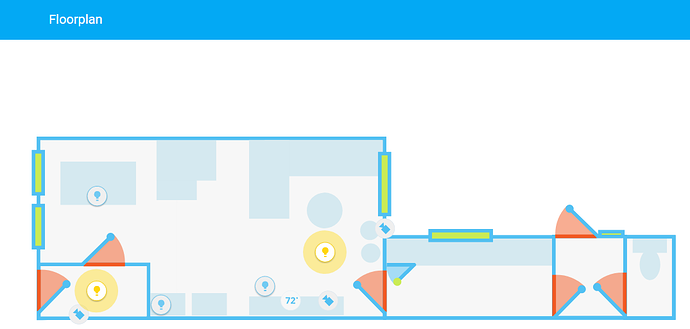
and was wondering that some CSS could be used to show door opening, etc.
buoyant skiff
nope the shadow dom kills all animation attempts with css
atleast for my attempts so far
would love to have it animation being included but i doubt that its gonna happen
raven nacelle
Yeah....simple rotate or such things would be nice
raven nacelle
rotate works, but may be not with an action/state
buoyant skiff
.sharethelove
kind shellBOT
A place for LoveLace Config https://sharethelove.io/
buoyant skiff
worth a try 😄
raven nacelle
indeed worth a try
buoyant skiff
or just state on and use blur with insane amounts
so the image fades away 😛
or opacity(0)
raven nacelle
I will play with it tonight....
opacity should work (so that we can have the red color as well)
low parcel
I've been looking at it the whole afternoon and I can't see why the first tab isn't responsive and all other tabs do
buoyant skiff
looking at it is not gonna fix it 😉
upper cedar
is it possible to use tautulli attributes as entities
split granite
Not as entities, no. You could create a template sensor to turn that attribute into a state (of that template sensor), or look at some of the custom cards
kind shellBOT
A place for LoveLace Config https://sharethelove.io/
buoyant skiff
there is a card and everything there for tautulli
 granite prawn
hey guys
anyone know how to display the notifications in lovelace?
for eg when an IP is banned, or when the IR remote learns a new RAW code
 empty heath
You may be able to use the monster-card, but I'm not sure it'll display correctly.
split granite
I'm pretty sure others have abused the monster card for that
empty heath
Apparently 😛
Maybe @buoyant skiff will have some insight on this.
I've been away from Lovelace for about 2-3 weeks now, so I have no idea what new enhancements have been added.
wheat current
Moster-card is still the "best"/easiest way of displaying persistent notifications
granite prawn
yup, exactly like that
buoyant skiff
havent bothered with em 😛
granite prawn
😦
buoyant skiff
and no that link was the first ive seen
wheat current
@granite prawn
- type: custom:monster-card
  card:
    type: entities
  filter:
    include:
      - entity_id: "persistent_notification.*"
there is it
granite prawn
thats awesome @wheat current , im gonna give that a whirl 😃
thanks @buoyant skiff
is it possible to make the moster card conditional?
granite prawn
yes, i think so
nope, im getting a big fat red block with this
although i know the notification exists
as i can view the same in states
wheat current
https://github.com/ciotlosm/custom-lovelace/tree/master/monster-card <--- Have a lok at the docs 😉
 tender wasp
@granite prawn Notifications are in the works https://www.youtube.com/watch?v=ug0I8e4qvRw
wheat current
Got an ETA on that? 😃
tender wasp
Not really. PR is open, but I did that as an initial POC, so still needs review from crusader and balloob to see if my approach is correct
tender wasp
No it will be available on all platforms
granite prawn
@wheat current how come we cant customise the icon and friendly name for persistant notifications?
wheat current
If you can't I'm guessing it's because they are designed to be temporary
granite prawn
hmm, even so, they look bad on the front end
btw, i decided against the monster card method and am going with the conditional method instead
#      conditions:
#        - entity: persistent_notification.httplogin
#          state: "notifying"
#      card:
#        type: entities
#        entities:
#          - persistent_notification.httplogin
# - persistent_notification.ipban```hehe okey 😄
mild veldt
@broken mango are you referring to this? https://github.com/rdehuyss/homeassistant-lovelace-google-calendar-card
 broken mango
@mild veldt yes
buoyant skiff
got it loaded just havent added it
mild veldt
I have not, but start with what problems you are facing
buoyant skiff
wonder if its sloppy to add iframe examples for sharethelove
mild veldt
answer: yes
buoyant skiff
finally got one thing i want as an iframe
live attack maps 😛
can stare at those for hours
mild veldt
would be cooler if you got all the data and drew it yourself...slacker
broken mango
@mild veldt Google-card uses rest api and there is localhost hard-coded in url
With new auth system it doesn't work and I'm getting banned with ip_ban
mild veldt
@broken mango you should be able to change that url and do some testing
broken mango
I've already changed. And got 403 with new auth system
I guess that rest api is not supported with new auth system
I can't get logic of card. Why do we need to fetch calendar object via rest api if we already got it via Hass object in card config
mild veldt
Hmm, maybe not. I was running into some IFTTT issues yesterday
@broken mango I was just thinking the same thing
Probably needs a good overhaul and PR
broken mango
Unfortunately I'm not so strong in web dev
buoyant skiff
@broken mango worth contacting the dev on github and asking
broken mango
I've opened issue on github will see
mild veldt
pinging @midnight monolith
empty heath
The header name is different for new auth system.
broken mango
Hello @empty heath. Do you mean that http request to api should have valid bearer token?
empty heath
@broken mango If you're using the new auth system, yes, it needs to have a valid bearer token.
Authorization: Bearer XXXXXXXX
is it possible to use entity filter on a media-control card?
i want to have an entity filter and only show them when playing
- type: entity-filter
        entities:
          - media_player.kitchen_speaker
          - media_player.living_room_speaker
          - media_player.record_room_speaker
          - media_player.master_bedroom_speaker
          - media_player.workshop_speaker
          - media_player.pinky
          - media_player.master_bath_speaker
          - media_player.the_brain
        state_filter:
          - 'playing'
        card:
          type: media-control
how do you get rid op the text below state-badges, I'm only interessed in the badge and how do I format date?
empty heath
@upper cedar I would think that should work.
@upper cedar Actually, that might not work at all, because the media-control card is limited to one entity.
From the docs: "This type of card can also be used together with rest of cards that allow multiple entities..." https://www.home-assistant.io/lovelace/entity-filter/
empty heath
There is still hope! 😃
@upper cedar Mind you, this workaround will require one card per media player, but it should work the way you want it to: https://www.home-assistant.io/lovelace/conditional/
@upper cedar https://hastebin.com/ovapuganov.bash
empty heath
The benefits of using the advanced features of Atom 😉
 sudden lion
What features is that?
empty heath
@sudden lion Find & replace with regular expressions.
sudden lion
ah cool
empty heath
sudden lion
Havent played with regex, just used find & replace 😄
empty heath
I'm definitely a regex guy, have been for many many years.
upper cedar
don't suppose there's any way to get rid of blank space where the conditional cards are when they're not in use?
empty heath
Let me check the docs.
Doesn't seem so. I was hoping to find a show_empty option like the Entities Filter card has.
Something else that you might try, just for S&Gs, is an Entities Filter card, with type: media-control and entity: media_player.xxx
upper cedar
i thought we tried that
mild veldt
@low parcel friendly_name: ' ' in side your customize: section
empty heath
Yup.
Like so:
      - type: entity-filter
        entities:
          - media_player.kitchen_speaker
        state_filter:
          - 'playing'
        show_empty: false
        card:
          type: media-control
          entity: media_player.kitchen_speaker
Does it work?
empty heath
Holy, for real?
upper cedar
- type: entity-filter
        entities:
        - entity: media_player.pinky
        state_filter:
          - "playing"
        card:
          type: media-control
          entity: media_player.pinky
        show_empty: false
added the last bit to remove that blank white card
oh you had it in the middle, didnt see that
but yeah it works, it looks great
empty heath
I originally didn't have it, but edited my message to add it.
I was afraid it was going to error if the target card didn't support entities:
@upper cedar That seems to be a fitting tip/trick to add to the tips & tricks page.
 coarse monolith
@empty heath I used your method to create a header - curious if there is a way to modify the style of an input_text to have the input field span the available width.
void marten
qq chaps, is it possible to add a custom icon (via icon_template) to a non-standard sensor (added by z-wave) which doesn't appear in the configuation.yaml? - Would I have to define a new sensor with an icon template, setting the value as that of the old z-wave sensor?
kind shellBOT
By default, all of your devices will be visible and have a default icon determined by their domain. See https://home-assistant.io/docs/configuration/customizing-devices/ for how to change that.
void marten
doi 🤦
Forgot about that! Thanks @coarse monolith
upper cedar
@empty heath i don't want to mess it up lol
empty heath
@coarse monolith @void marten I do not recommend the use of customize for this, because Lovelace is going to eventually completely replace customize.
@upper cedar No better time to learn than now! 😉 Any submitted change will be reviewed by our team of PR reviewers, and they will request any necessary changes.
polar kelp
Speaking of the tips & tricks page; it mentions that lovelace-gen gives you the ability to split the config. That's become only part of the functionality, and I think the !resource command and the templates may be worth mentioning too.
I'd submit a PR myself, but I'm kind of past the Ballmer Peak on fifth aniversary wine at this point... so if anyone feels inclined...
upper cedar
i'll add it, @empty heath
now just to figure out how to show plex artwork in those media players
 simple jolt
Anyone experiencing very sluggish performance running Lovelace on a fire 8 HD? It’s barely usable.
upper cedar
has anyone been able to display background art or album art from plex in the media-control card?
mild veldt
@upper cedar probably a question better suited for #330944238910963714
 random juniper
im trying to add a light control to bottom of a video feed in hassio with lovelace , does anyone have example code? please and thank you.
 glossy birch
@random juniper use picture-glance and set entities of lights there https://github.com/skalavala/smarthome/blob/master/ui-lovelace.yaml#L1270-L1277
twilit zodiac
@glossy birch , now THAT is an impressive implementation. A lot of stuff in there.
glossy birch
@twilit zodiac thank you!
 steady narwhal
now we need a screenshot
buoyant skiff
morning
polar kelp
morning
subtle rune
Morning!
If Lovelace is going to replace customize, will state icon be a thing? I have different colors on some of my icons for different states,. Like door open = red.
Like we have state image now for some things
 rich vessel
I'm not sure Lovelace is replacing customize.
buoyant skiff
yeah was wonder about that too
rich vessel
It "replaces" groups & views
buoyant skiff
check dale3h comment above
subtle rune
I was reacting to what dale3h said
polar kelp
buoyant skiff
but again its easy to write my currect cards but still customize is nice for doing it fast and easy
subtle rune
And also if you have the same entity in several places, you don't have to specify for all of them.
buoyant skiff
sigh i want a gauge or a circle card that takes 2 entites
polar kelp
Wasn't there a double gauge in the forums?
buoyant skiff
ahh should have been a bit clearer
max value should be deterimed by entity two
so first is how much and second is max
thats something that we are missing at the moment
we only have the one with fixed max value
wheat current
Apperantly it's easy to write custom cards, so do that for double guage then :P
viral sorrel
if I change entity names via the UI should I get a red error card that no state is available for the old entity?
wheat current
yes
viral sorrel
is a restart the best way to fix that?
wheat current
Will not help. you need to update the ui-lovalace.yaml file to reflect the new ID
viral sorrel
yes I realised that shortly after I asked.. got confused by the fact that some cards were affected and others were not until I remembered I was using monster-card for the working ones
wheat current
Monster-card do advanced filering, so depending on how major your change is, that should in most cases still work
low parcel
I've put gauge-card.js in my www directory, that should be enough isn't it? Yet it says gauge card doesn't exist? Reboot needed?
never mind have to use resources also, found it
strange
resources:
- url: /local/js/gauge-card.js?v=2
type: js
doesn't work
wheat current
And the path for it is /www/js/gauge-card.js ?
low parcel
yeah path is correct
had this with images too, had to reboot first
so I guess I'm rebooting now just to be sure I'm not stupid 😃
wheat current
If you created the www dir now, it needs a restart (only first time)
viral sorrel
in monster card how would you exclude on state?
low parcel
i created the js directory just now that wel be it
polar kelp
mihalski: Same way as include on state
low parcel
I like my directories clean
wheat current
@viral sorrel conditional card is better for that
polar kelp
true
viral sorrel
but the card includes a domain.. I don't think I can do that with the conditional
on the flip side monster card does not have state_not
wheat current
https://github.com/ciotlosm/custom-lovelace/tree/master/monster-card there is a state filter
viral sorrel
but I just want to exclude on state "unavailable"
it looks like that works with when which is above include and exclude
wheat current
Then there is this https://developers.home-assistant.io/docs/en/lovelace_custom_card.html to make your own
low parcel
still not working afther that restart, but we have an error now
wheat current
Did you get the RAW file?
wheat current
set it to ?v=99 and refresh the browser and see if that helps
low parcel
well I'll be damned, thjat works
 midnight monolith
@broken mango @mild veldt see https://community.home-assistant.io/t/lovelace-google-calendar/63662/6
if somebody can help me with getting all the events from the hass config, I'm happy to change the card. However, this requires a change in the backend
That's the reason I chose the rest api
granite prawn
The Lovelace UI does not stay the default when a web app is made in chrome in android.
Even if the option to set it to default is applied
Anyone know how to fix this?
void marten
@empty heath np, will avoid customize for now - is there a feasible alternative at the moment or is it just better to wait for lovelace to take over that functionality? - It's not really urgent, just more of a passing curiosity to make my GUI a bit prettier instead of seeing that damn eye icon everywhere 😄
split granite
viral sorrel
how might one use monster card to show all lights that are on? I've been trying and failing
conditional card doesn't seem suited either
wheat current
Both have state filter, so both are suited for it, have another look at the documentation 😉
 plain torrent
Good Day everyone...
Looking for some guidance. I am trying to get a custom card to work but I keep getting an error
Custom element doesn't exist
  - url: /local/plan-coordinates.js?v=10
    type: js
  - url: /local/state-attribute-element.js?v=0
    type: js
  - url: /local/plant-card.js
    type: js
I am running HA on a RPI3
midnight monolith
@broken mango I asked in the beta channel how we can retrieve the new oauth bearer token. Once I know, I'll try to update the web component
wheat current
@plain torrent What exactly does the error say?
plain torrent
Custom Element does not exist
plain torrent
sorry - Custom element doesn't exist: plant-card
plain torrent
homeassistant@hassbian:~/.homeassistant/www $ pwd
/home/homeassistant/.homeassistant/www


homeassistant@hassbian:~/.homeassistant/www $ ls -la *.js
-rw-r--r-- 1 homeassistant homeassistant 1797 Aug  3 02:55 plan-coordinates.js
-rw-r--r-- 1 homeassistant homeassistant 3908 Aug 14 11:17 plant-card.js
-rw-r--r-- 1 homeassistant homeassistant 1115 Aug  4 01:23 state-attribute-element.js
Run $ head plant-card.js
plain torrent
Sure
class PlantCard extends HTMLElement {
  constructor() {
    super();
    this.attachShadow({ mode: 'open' });

    this.sensors = {
      moisture: 'hass:water',
      temperature: 'hass:thermometer',
      intensity: 'hass:white-balance-sunny',
      conductivity: 'hass:emoticon-poop',
Ok. Then you did download the RAW file. Good.
Do you get anything in the browser log?
Or homeassistant log, even?
plain torrent
nothing on the homeassistant.log
Im not seeing anything - at least nothing is jumping out at me..
Also, the other ones do not work as well..
polar kelp
That would have been good to know from the start.
Did you just now create the /www directory? If you did, you need to restart home-assistant.
plain torrent
sorry about that.. the www directory has been there for a while... I had been using the floorplan
I think I figured it out... I forgot the "s" on the first line
resource:
sorry to waste your time..
wheat current
hm... how did the rest work?
polar kelp
They didn't.
wheat current
oh, yeah... need more coffee
buoyant skiff
^^
mild veldt
@buoyant skiff I added the ability to use a 2nd attribute as a max value for the circle-sensor-card
buoyant skiff
nice
mild veldt
I didn't have a use case for it at the time, but should have added a min attribute config as well
buoyant skiff
on github ?
buoyant skiff
nope dont think so
rotund island
I was wondering about something not sure if it’s lovelace or ha related. If you use a tablet somewhere hanged on a wall to interact with home-assistant would you rather have a welcome page with minimal info (maybe also pin protected via an entity filter) and a link to the main-menu or the main-menu ?
polar kelp
If it's in your home, you'll get tired of any extra steps pretty quickly...
mild veldt
I would want a quick glance summary page to welcome me, but no pin protection. Most of the time I would be looking for things like forecast, next events, open doors, etc. More like a bulletin board
rotund island
Both of you have a point i don’t want extra steps, but as the tablets are always on i could make use of them for additional info . I will sonn get with some results hope you’ll like them
mild veldt
I mean, if we don't, you'll be ostracized and banished to #the-water-cooler, obviously 😃
gilded plume
When building on lovelace is it possible to "restrict" the order of the cards? Is this still be done or can this still be done just like group order (in customize -> https://www.home-assistant.io/components/group/) not using groups at the moment for my lovelace views
 night patrol
Does anyone have screenshots of their Lovelace UI? I need some ideas of what is possible
mild veldt
.sharethelove