#frontend-archived
1 messages · Page 67 of 1
 buoyant skiff
buoyant skiff
buoyant skiff
ok 😃 no rush
 proper carbon
Hi all. I just started with Lovelace yesterday. It is awesome. I always felt separating the UI from the rest was needed - and it seems job very well done. Home assistant continues to get better and better.
I haven't seen any information or examples on reuse in Lovelace. For example: can the same card be reused in multiple views? Or what about icons associated with entity types. For example, currently the humidity from my Aeon sensor is appearing with an eye icon, when the nice water-percent would be more appropriate. It is clear I can set that icon for an entity in a particular card in my lovelace config, but I will have to set it everywhere I want to show that data, and also for any other humidity sensors I might have. I'm fine doing that, but I just want to make sure there is not a better approach out there.
buoyant skiff
.awesome
 kind shellBOT
Awesome Home Assistant - A curated list of amazingly awesome Home Assistant resources. https://www.awesome-ha.com/
proper carbon
was that for me @buoyant skiff ?
buoyant skiff
nope just needed that link
 wheat current
@proper carbon you can set custom icons in customize.yaml
those will be used everywhere
proper carbon
@wheat current That crossed my mind, though my thinking was maybe customize was the old way, and there might be some new Lovelace way. I'll put the defaults in customize then. Thanks for confirming.
buoyant skiff
 polar kelp
@proper carbon: https://github.com/thomasloven/homeassistant-lovelace-gen This helps with reuse, but !include file also works for now, I think.
buoyant skiff
might break soon
polar kelp
The built-in !include, yes, probably. Not lovelace-gen.
Just to be clear.
proper carbon
thanks @polar kelp ; that is a good answer. Do you know if they replace !include file with an alternative? Is one big file seen as being better?
polar kelp
The plan is to introduce a graphical interface for configuring lovelace. lovelace-ui - or a simmilar file - will still be there, but generated automatically, which makes it hard to keep the include functionality working well. Therefore it's to be removed.
I believe you will still be able to edit lovelace-ui yourself, though. So this script should keep working
proper carbon
Got you. It is a few years ago now, but I remember a frustrating experience using Openhab after it went down this route. No doubt the have improved it a lot since then, but sometimes a config file is easier to understand than a UI - just my $0.02
 north spear
It will not be mutually exclusive
 split granite
What, we're not moving to encrypted binary blobs for storing the config? But that's worked soo well for other platforms 😛
wheat current
To get started just add this in your platform pool
rOGJ29OdeWOeVziqEaQwrtVOD+Y8jge8OpfHWj53JAQ=
Your BC wallet?
wheat current
256bit AES of:
sensor:
  - platform: test
``` 😛No, I don't. Can you ssh into hass.io?
It uses a package - pyyaml - which isn't default, but is installed with homeassistant. So if you can run python commands in the same environment as hass it should be possible, I guess.
Don't really know how hass.io works at all, really. Decided against it because there was no mysensors module back in the day...
wheat current
if you convert it to and component that exposes a service for generating the file, folks could set up a folder watcher triggering the generator, that would also work (be easy) for hassio folks 😃
 fair hamlet
 subtle rune
@fair hamlet I know that, but ppl find ways 😉
polar kelp
Feel free to experiment and let me know if you find a way.
subtle rune
I will try!
wheat current
 polar kelp
Also, only a sith deals in absolutes...
wheat current
touché 😂
fair hamlet
subtle rune
I have installed Hass.io manually in Docker, I wonder if that means I could reach the files if I ssh into my nuc instead 🤔
polar kelp
Probably. If so, you just need to pip install pyyaml and you're good to go
fair hamlet
wheat current
Put the py file in your config dir, make a shell_command to execute it
subtle rune
Should that be it? I will try at once
subtle rune
Can report back that @wheat current suggestion worked perfectly! Now I can finally split my file a bit...
Maybe we should write how to use in hass.io in the readme for the gen, @polar kelp ?
I can fork and make a pr if you want to
polar kelp
sure
I just got an idea. The !resouce command in the generator copies the specified file into www/lovelace and replaces it with a link. If it also renamed the file randomly you wouldn't need to clear the cache when updating a script.
subtle rune
The generator doesn't work with the card tracker and updater, @wheat current is going to look at that
Maybe cooperate on the matter 😃
fair hamlet
@subtle rune not sure what the tool is you are talking about, but would it be better to make a hass.io add-on? Never messed with it.
polar kelp
The tracker and updater requires the ?v=x.x trick, I suppose... I guess I could take a look at that as well at some point.
polar kelp
Cool! My first PR!
subtle rune
😄
 pliant pulsar
Hello guys, can i fragment ui-lovelace.yaml
 mild veldt
scroll up about 20 lines. lots of discussion about it
 dense roost
@pliant pulsar yes but that's being taken out soon so I wouldn't
 halcyon mantle
can one use an svg in a picture-element card - type: picture-elements image: /images/floorplan/floorplan2.svg
mild veldt
@dense roost use of the generator from @polar kelp should continue to work if !include is removed
@halcyon mantle try it out
halcyon mantle
i did, the result was not what I excpected....
First time creating an svg - so not sure if it is something I did wrong...
halcyon mantle
@mild veldt - Good idea!
Do you guys have a shortcut determining the percentages where to place image on that card, or is it a guessing game?
mild veldt
@halcyon mantle I recommend using transform: none in your style if you want the placement to be consistent on different screen sizes and unfortunately that does make it so plan-coordinates values are different than what are needed. Perhaps we can fix that as a configuration to plan-coordinates
halcyon mantle
@mild veldt Not 100% sure what I should do, but I will read up - Tonight is my first time fiddling with the picture-elements card
mild veldt
Checkout https://sharethelove.io/cards for some examples
 alpine mason
Hi there! I tried different method to add custom css into homeassistant (include css resource and html resource with inline style). I turned out that none of them work on safari. It seems to block dynamically loaded css. As anyone used custom css?
mild veldt
I haven't used css as a resource but use it within style quite often, but don't use Safari
Is it just Safari having issues?
Have you tried other browsers?
alpine mason
Firefox on mobile isn't working either
alpine mason
Actually, it's not working with chrome 😦 Only in Firefox web.
I tried the 2 calls, with css and html. Files are loaded in the app, but the css styles are just ignored.
mild veldt
try adding !important ?
alpine mason
Css rules are really ignored. They don't show up in styles inspector. I tried !important
Yet, I can see my css file in element inspector and the file is loaded
alpine mason
Just not there...
I feel the problem come from loading css file after the page is loaded
But I may be wrong ?
mild veldt
i don't know how proven the loaded of css /html resources is. I would suggest adding to style on elements to verify a small portion and if that works file a bug report
oh this is on a glance card...i don't think css is applied at all to that card. I'm surprised you say that ff is working
I was under the impression on picture-elements supported css styling
*only
alpine mason
Actually, I made a theme and tried to change global css, including header, navigation etc.
So I tried to get my theme file loaded in any way when app is starting
I think I'll open a ticket. Thanks for your help
mild veldt
Themes not through lovelace directly, perhaps the issue
I don't think there has been an intention of allowing open CSS styling on a global scale beyond color themes
alpine mason
I'm trying to add files in frontend right now, thanks for this idea
 unreal musk
hi all, is it possible to embed a <script> tag using lovelace? Would like to integrate the darksky.net widgets because they are so pretty 😃 https://darksky.net/widgets/smalldetailed
north spear
@unreal musk juse use resources like nay other custom cards,
it will automatically load and execute the javascript
no need for <script> tag
unreal musk
so I should use this: https://developers.home-assistant.io/docs/en/lovelace_custom_card.html
alpine mason
@mild veldt Well, I can't make the frontend method work either :/ Think my theme's gonna stay in the fridge for a moment... Thanks anyway
unreal musk
ok thanks for the info, I looked a bit closer into the script and there's an url in there, so could probably just use picture glance/element !
buoyant skiff
@north spear did u try the ui-lovelace.yaml I provided earlier today?
north spear
@buoyant skiff no, I hurt my brains with webpack and trying to get thermostat modularized
can you ping it again ?
I wil try it now
I need a break
north spear
will do
buoyant skiff
Awesome thanks
 raven nacelle
@north spear In the Darksky widget, where are you setting the location?
Or does it use the location configured in the config?
north spear
no idea, I haven't actually checked Darksky yet
@buoyant skiff harder to reproduce your UI as I don't have all the sensors
what was the problem again ?
subtle rune
@polar kelp The gen doesn't work at all with versioning of the resources?
polar kelp
Give me an hour or two and I’ll ser what I can do.
subtle rune
@wheat current talked about maybe making a pr for it, so you don't work on the same thing!
 proud flax
Anyone know how to get the AppleTv remote switch into lovelace ?
mild veldt
@proud flax those are just service calls, right?
proud flax
sorry, I'm pretty new to HomeAssistant, it just popped up, and yesterday I started with lovelace (awsome stuff)
proud flax
@mild veldt it's listed as remote.appletv
 coarse monolith
I have a conditional card that seems to leave a blank spot in the UI - anyone else seeing that?
mild veldt
@proud flax there is no remote domain support yet that I know of. I don't have one. Try adding it to an entities card. You'll be able to bring up whatever more-info is available for it. Not sure what that looks like, to be honest
I have setup my own Roku remote in lovelace using picture-elements
but that's a bit different as there is no actual Roku remote component
I should make a Roku remote component (random thought)
proud flax
@mild veldt it's just a on/off switch I tried adding it as a
- type: entities
title: AppleTV
entity: remote.appletv
but it just gives an error (Entities needs to be an array)
mild veldt
just need to reformat
check the example again: https://www.home-assistant.io/lovelace/entities/#example
wheat current
     - type: entities
        title: AppleTV
        entities:
          - remote.appletv
or cheat and use what @wheat current posted, lol
mild veldt
so what does a remote look like in HA?
proud flax
for someone who knows nothing about coding it's a bit confusing. I just copied what I used for my media_player:
@mild veldt thanks for help !! 😃
mild veldt
hold on, i want a screenshot, lol
i'm generally curious as to what interaction you get with a remote
proud flax
how do I post a image here ?
mild veldt
imgur
wheat current
It's not even a switch.. the switch you see there are for all entities in that card 😛
mild veldt
what do you get when you click it?
proud flax
oh snap, your right
I guess it will stil do the job though. If not I need to click on it to get to the switch
mild veldt
lame, was hoping there was some kind of remote interface that I was unaware of
well, @proud flax with picture-elements you could build your own apple remote card to interact with
proud flax
I have no plans to interact with it, I just need the switch so my automations work
mild veldt
boo, you're no fun
proud flax
my goal with Home Assistant is to use the UI as little as possible, and have it do all the work for me automatic
mild veldt
@wheat current @north spear any idea how I could replace a more-info card for a media-player with a picture-elements card?
@proud flax that's cool, but why are you playing with lovelace then?
proud flax
lovelace was a godsent in terms of cleaning up the userinterface and just adding the important stuff
wheat current
Never used a more-info card, what does it do?
mild veldt
the more-info overlay, I should say
wheat current
Well in that case, what is the more-info overlay?
mild veldt
what you get when you normally click on an entity, like what @proud flax posted: https://imgur.com/a/s88xb6j
I'm obviously not using the correct terminology 😃
proud flax
anyone tried the bignumer-card ?
I tried adding it, but I just get an error saying the custom element does not exist
proud flax
yes
polar kelp
What does your browser log say?
proud flax
uhm, browser log ?
polar kelp
What browser are you using?
proud flax
found this in homeassitant log:
2018-08-07 19:08:27 ERROR (MainThread) [frontend.js.latest.201807200] http://192.168.10.201:8123/local/bignumber-card.js?v=1:7:1 Uncaught SyntaxError: Unexpected token <
 calm rock
Hi All,! , is it possible to use any png file , as an icon, on a picture elements card card?
instead , of only mdi: icons
proud flax
@polar kelp chrome, I get an error in home assistant log (se above)
proud flax
@mild veldt I just redownloaded it becuase I don't that mistake before
let me try again
mild veldt
@calm rock well I don't know about "any". I guess a corrupt one would likely not work 😉
proud flax
@mild veldt nope, just downloaded raw file again, same error
calm rock
@mild veldt , but how to select the file ?, which element should i use in that case?
mild veldt
i assume you were talking about icon-element as that is what you first referrenced
try just giving a path like you normally would for an image icon: local/test.png
I think it will work
mild veldt
are you sure or just assuming that?
calm rock
will , test your suggestion
mild veldt
i mean, if anything just use image-element and all guessing is gone 😃
proud flax
do I have to reboot HA after adding a js file ?
mild veldt
no
proud flax
oh, maybe now bumping the version number will be a good idea then 😄
that solved it, thanks for pointing me in the right direction
should be in the faq, when you downloaded the html version and re-downloaded the raw version, remember to bump the version number.
mild veldt
@proud flax go ahead and do a PR
polar kelp
@subtle rune: Me and @wheat current are almost there. The generator is updated, only the tracker/updater left.
wheat current
Running last tests on that now 😃
polar kelp
Also, lovelace-gen now makes sure that any file included using !resource is automatically uncached between runs.
subtle rune
Great! I will go to bed soon but can test tomorrow
mild veldt
well it looks like i'm setting up lovelace-gen tonight 😃
proud flax
@mild veldt I think I've done it correctly, that would be my first contribution on github 😄
mild veldt
I just did my first about a week ago
Found some features I wanted in custom cards
Fun stuff
wheat current
@mild veldt was just joking earlier with the 'more-info' dialogue, but got sidetracked with component update 😅
mild veldt
well to make it up to me, tell me how to change it
proud flax
After spending a couple of weeks setting up HomeAssistant, I must say Lovelace is awesome !
wheat current
@proud flax If you use the custom_updater and tracker-card it will download the RAW and change the "version" tag for you automagically 😉
proud flax
@wheat current thanks, I will check it out
mild veldt
@wheat current I want to be able to click on my roku icon and have a remote overlay popup. Currently I'm redirecting to a different view of a remote
would prefer I didn't have to navigate away
wheat current
using icon-element?
mild veldt
yeah
wheat current
Share that type part of your config
polar kelp
I may be a bit biased, but this automatic cache invalidation is AWESOME!
wheat current
You may be, but I totaly agree! 😄
You should scan for all files in the config and do the same 😃
example image: /local/transparent/small.png?v=28
polar kelp
Put the image somewhere in lovelace/ and do image: !resouce path/small.png
Simple as that
mild veldt
         - type: state-icon
            entity: media_player.office_tv
            tap_action: navigate
            navigation_path: /lovelace/office_tv
@mild veldt you tell it to go somewhere else..
remove the last two lines and you wil get the more-info dialogue 😉
mild veldt
but I want a custom more-info
proud flax
I found this awesome example site, but could someone explain where I put this code ?
https://home-assistant-lovelace-gallery.netlify.com/#demo-more-info-light
mild veldt
navigating to /lovelace/office_tv is my way around that currently
I want to be able to view what I have on /lovelace/office_tv view within more-info
more or less
wheat current
So you want a custom popup to host a custom layout?
mild veldt
yes
wheat current
Way beyond my skillset :P
Poke Maruis next time he is around 😃
polar kelp
@proud flax That page is just a demo of how the more-info dialogs look. You can't adjust that yourself. I think...
mild veldt
okay, thanks. I was able to do it with custom UI, but was hacky, for sure
proud flax
@polar kelp oh, I was trying to add time status on my PIR, to see when they where last triggered.
the 24h time bar is not very practical
proud flax
@wheat current thanks, looks like a solution... testing..
wheat current
give you this:
buoyant skiff
Burp
calm rock
image question: how to change the color of an SVG image ( to represent an icon)? , is it possible with state filter? , or the only way is to have to images , with state image?
halcyon mantle
@calm rock - I'm struggling to get my head around that too
I built a crude floorplan, now if I click on the living room for example I would like it to light up when the light is on... not sure which options to use or to cut up the floor plan and use state images...
bit lost currently
calm rock
i think , that the only elegant way , is just to set a template icon over the entity itself,
and then use the state-icon
halcyon mantle
My first try was just plastering icons over the image, it works, but now I want to get "fancy"
calm rock
all other options seams to be way too MUCH work , and may not even work
coarse monolith
anyone have an elegant way to manage global cards?
calm rock
theme ?
calm rock
that is easy
halcyon mantle
I have built the image, but can't get my head around the shading
calm rock
you should have different images
if you wont to change the image light base on states, you have to have multiple images , to select
wheat current
@coarse monolith depends on what you mean with "global cards"
calm rock
all based , from the same
calm rock
yes
halcyon mantle
How do I stitch them together in a card? SVG or picture-element card?
calm rock
i have jpg , for the background , and select the file based on state, but on most parts i do have state icons
coarse monolith
@wheat current I'm using @empty heath example
- &front_door_camera
            type: picture-glance
            title: Front Door
            camera_image: camera.front_door
            entities:
              - lock.front_door_lock_locked
              - light.entry_light_level
              - switch.porch_lights_switch
Wondering if there is a great way to manage these global cards in one spot for easy reference through the ui-lovelace.yaml file. I saw the lovelace-gen... Maybe that's my answer?
wheat current
it probably is ;)
Was about to sugest it 😛
halcyon mantle
So I set the bakground, to the dark image, then use the cut up bright images as state on. Is my understanding correct?
How would one line them up nicely?
calm rock
that is the key , always work with the same image, and modify that
but only change , light and shades
never the , floorplan itself
halcyon mantle
I rendered the two versions from the same base, so they are 100% the same except for the ligthing. but if I cut out each room, how do I overlay it over the background?
e.g two rooms in diffrent areas are switched on, only they should light up
calm rock
if you have two states, you just change the whole thing
wheat current
if its icons, why not use the filter?
state_filter:
  "on": saturate(1)
  "off": saturate(0)
if you have multiple states , you have to make the images to appear ,
over the same background
so are elements ...
halcyon mantle
only two states, off & on - for now I'm only going to use it for lighting..
calm rock
ludeeus may , explain it better ...
halcyon mantle
I feel very stupid, but I'm still not sure how I overlay an image of a room with light on, over the "dark" background image
wheat current
grayscale may be better https://developer.mozilla.org/en-US/docs/Web/CSS/filter-function/grayscale <--- but this is only for the icon, it acutally sounds like you want to light up a room
halcyon mantle
I'll quickly upload an example of my floorplan with lights off... give me a sec
@wheat current That is correct
This is the dark version - So when I tap on a room, I would like it to light up and the rest stay dark
I have created the same image, with "lights on" - Exact same image, just with the lighting changed
calm rock
@wheat current , it seams ( just my experience , of many hours experimenting so far) that the state filters , cant change the style of a custom made svg icon , so not easy way to change an image based on state, unless the icon is from mdi: .
this , for example aint work , https://hastebin.com/uyepidutoz.bash , the icon dont change
halcyon mantle
Any idea how to tie the two images together to get it working as expected?
calm rock
if you only have two states , for one picture , this is the way : https://hastebin.com/alopapiyav.bash
halcyon mantle
@calm rock Awesome, but how do I handle that per room?
calm rock
but as said , for more than two sates over the same picture , not sure , only did that with icons , and still there no easy way to do it right , other than to have two images , per "icon"
so short answer to your goal , i dont know
halcyon mantle
@calm rock Thx! I'll keep reading and post when I figure it out...
 prime umbra
@halcyon mantle what program you using to do the floorplan pictures design?
halcyon mantle
@prime umbra http://www.sweethome3d.com/ - Very easy, as I can't draw to save my life
raven nacelle
In this image https://community-home-assistant-assets.s3.amazonaws.com/optimized/2X/d/d5905b76a556259e7cc44f83fb441b0154c27581_1_690x329.png is it possible to have simple animations (may be using CSS) to indicate door open/close?
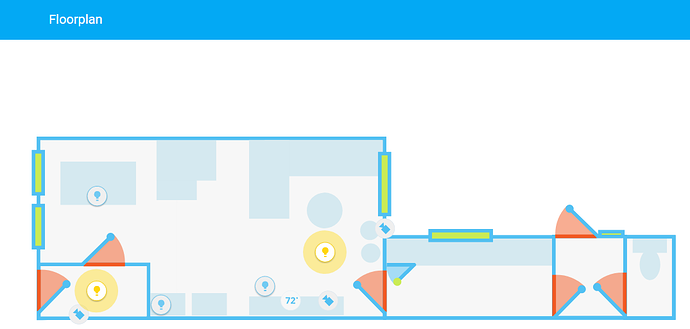 mild veldt
@raven nacelle I got my architect neighbor doing my floor plans in that style for me 😃
raven nacelle
We all need neighbors like yours 😉
mild veldt
@halcyon mantle you'll need to break up your floor plan into images for each room; on/off for each. then, position them on a picture-element card as image elements with their respective on/off images in the state-image configuration
halcyon mantle
@mild veldt Thankz - I'll try that, I'm a bit worried about allignment, not sure the top/left % is granular enough
mild veldt
Can use px
halcyon mantle
I missed that somewhere - That could definitely work...
mild veldt
Don’t think it’s explicitly stated but it’s just css positioning
halcyon mantle
Cool! My CSS skill sucks, but I'll figure fiddle till it works - Google will have ample examples
 midnight monolith
Small question: I want to create a lovelace card and import moment js. However, I'm not succeeding to do so. I tried import:
import 'https://unpkg.com/moment@2.22.2/min/moment.min.js?module'; => Uncaught TypeError: Cannot set property 'moment' of undefined
import 'https://unpkg.com/moment@2.22.2/min/moment.min.js'; => Uncaught TypeError: Cannot set property 'moment' of undefined
import moment from './lib/moment.min.js' => The requested module './lib/moment.min.js' does not provide an export named 'default'
Is there any tooling I need to set up? Thanks in advance!
midnight monolith
I also tried installing it with npm and imported then using import moment from './node_modules/moment/src/moment.js'
This however gives also troubles because momentjs internally does not have any js extensions on any of it's imports. This results in 404's then...
subtle rune
Now the cool 3d floorplan card from reddit is available on sharethelove! https://sharethelove.io/cards/3d-floorplan
midnight monolith
Cool, I didn't know about sharethelove.io!
subtle rune
Lots of good stuff there! Feel free to share your own things there as well if you are making cool stuff.
calm rock
@subtle rune , hi , what type of camera view have you selected to get that perspective on the 3D floor plan ?, then have you saved it as png , svg?
subtle rune
@calm rock I havent made this card myself, only contributed from files I got from the creator at reddit. I can give you the link to that post
buoyant skiff
Nice pr @subtle rune
midnight monolith
@subtle rune would love to share my card (upcoming events in Google Calendar, but I'm stuck with moment js :-s)
calm rock
Thanks
subtle rune
@buoyant skiff Thanks, I only helped with the sharing though 😃
 simple jolt
@subtle rune would have been nice if he shared the actual png files so we could see how he did his masking.
subtle rune
@simple jolt I got them but forgot to put them in as files. Will do that immediately! Good catch
Have done a pr with links now.
 winged night
Hi. Is there currently a solution for adding sliders for light entities in Lovelace similar to what was possible with Custom UI? https://imgur.com/a/7s2fNwk
I have got an input_number slider to show up in my Lovelace UI so I assume that at present using this with an appropriate automation is the only way to get a brightness slider? Thanks
subtle rune
@winged night I have worked on it a bit but haven't gotten the whole way yet
@north spear Do you want to take a look at my brightness slider?
midnight monolith
Issue is solved, I now build my stuff via webpack
north spear
@subtle rune sure!
 winter knoll
Hi, I was looking at Lovelace page here https://www.home-assistant.io/lovelace/ and noticed that there is "Birthdays" sensor. How can I create that? I can't find appropriate component for it.
polar kelp
I suppose that's a template sensor (https://www.home-assistant.io/components/sensor.template/) added to a glance card.
mild veldt
@midnight monolith would love to see your calendar card
subtle rune
Ask @storm lion about the birthday sensors, I believe its his video there? 😃
 storm lion
@subtle rune - good memory
subtle rune
So is it template sensors? 😃
storm lion
it is me.. who liberally borrowed the code off someone far cleverer - @glossy birch :
https://github.com/skalavala/smarthome/blob/master/packages/birthday.yaml
subtle rune
Will also steal that!
midnight monolith
@mild veldt : can I post an image here somewhere?
winter knoll
good stuff, thanks 😄
storm lion
imgur (or similar) @midnight monolith
midnight monolith
mild veldt
looks like you need to buy some birthday presents 😃
midnight monolith
it's the first trial... we can only fetch 5 events through home-assistant. I hope to make a pull request to have 30 events
indeed 😃
mild veldt
I would love to just pull events for the current and next month and be able then build an actual calendar card
midnight monolith
I'll see what I can do 😃
mild veldt
maybe we need to look into expanding the google calendar component
storm lion
hmmm well what are you trying to achieve?
mild veldt
there's a lot more we could potentially do with calendars in general in HA 😃
replicate all GC functionality within HA, lmao
mild veldt
I am one of those yankies 😃
polar kelp
"sopor" for the surprisingly large number of Swedes...
storm lion
calm rock
what do you tink is the best way to mimic HA dashboard in lovelace, like this for example , https://imgur.com/a/ukAe9LZ ? :
mild veldt
@storm lion I could have used that last night. Had to rush to get it to the curb this morning
@calm rock I think @polar kelp has a column-card
calm rock
ok, will look at that , tks
mild veldt
not exactly what I was thinking of, https://github.com/thomasloven/lovelace-column-card
must be remembering incorrectly
@calm rock I think to replicate such a look, it would be best to build a custom card rather than trying to stitch something together using existing
polar kelp
That's the opposite of what column card is for!
mild veldt
yeah, I know, haha!
I stared at the repo for a bit and shook my head at myself, haha
@calm rock A general grid/remote custom card would be a great addition
polar kelp
Best bet, I think is either a collection of vertical-stack and horizontal-stack inside a vertical-stack-in-card. Or better yet, picture-elements.
Speaking of custom cards. I just made one of mine obsolete.
The audio-card is now replaced with lovelace-player: https://github.com/thomasloven/lovelace-player
"Lets any browser currently viewing your lovelace interface act as an audio receiver with a media_player interface"
And by not making it a card, it can work across views.
calm rock
i see , thanks for the comments
mild veldt
I'm thinking a button custom card that does the label/icon would be enough along with a vertical-stack-in-card
subtle rune
@calm rock I have done that, one sec for link
Or kind of. Look at the small "buttons" in the lights view fe: https://github.com/isabellaalstrom/HomeAssistantConfiguration#examples-from-my-lovelace-gui
storm lion
yeah - I've done that one too many times @mild veldt - hence the bin's being added
polar kelp
I have a week number sensor and am planning to add a reminder on sundays of odd weeks and monday mornings of even weeks to put the trash out.
mild veldt
@calm rock looks @subtle rune use of small "buttons". That paired with vertical-stack-in-card should allow you to get that remote pretty easily. Awesome!
subtle rune
The button-template.png is just a grey square in the same color as the regular cards
Unfortunately the whole button is not clickable, just the icon, so that would be something to improve
calm rock
@subtle rune ,thank you , will study your config .
halcyon mantle
@subtle rune -Thank you for the 3d floorplan link! I was able to build it - WAF just went up...
subtle rune
I don't particularly like that word "waf", but I get what you mean.
And I will not get into my feminist tech rantings here 🙊
halcyon mantle
non techie wife , thats all 😉
calm rock
@subtle rune , the same way change the opacity by using the filter , is it possible to change the css color?
subtle rune
@calm rock I don't know! I didn't even know you could change opacity in that way before 😃
north spear
took me a whole minute to understand what waf means, even searched google and wiki 😃
mild veldt
@north spear lol. I did the same thing
north spear
I can only say that I find UK and US abuse acronyms 😃
mild veldt
@subtle rune I had to create so many todos for my ha instance after looking through your project. Great stuff!
subtle rune
@mild veldt Haha, glad to inspire 😃
calm rock
@subtle rune by using , this : opacity(1) hue-rotate(240deg) brightness(1) saturate(100%) , it is possible to change to "almost" any color, but i found that the color wheel is kind of strange , for example to go from green to red , it should be 240deg , but the resulting color is kind of orange .
will try , the opposite , starting from red , and rotating to green
mild veldt
@calm rock what are you using that for?
calm rock
subtle rune
@north spear @mild veldt I find PAF better. (Partner instead of wife, since WAF comes from women not being interested in anything else but looks)
north spear
I think both are wrong, if you can get kids or elders to properly use it without breaking it it's more accurate 😃
subtle rune
Maybe Faf, for family 😉
mild veldt
@calm rock nice! I totally forgot about state-filter 🤦
@subtle rune but then we have to consider house guests as well
we're all wrong! lol
subtle rune
😄
mild veldt
just AF
because even for me as the house "techie" making things easier to interact with increases my "AF"
new tagline: #frontend-archived paving the way towards AF
@calm rock really need a state-filter for icon elements
simple jolt
For entity-filter card can I have a state-filter as anything not home? I know templates are not supported by lovelace.
subtle rune
I find that if you respect those you live with and make things right from the beginning the af get higher quite quick!
@simple jolt you mean you just want to show entities that's not home? That works fine
mild veldt
@subtle rune I've been doing this for over a year and haven't given my UI to anyone to use but myself yet, lol. I'm not ready for the user feedback
subtle rune
Ot if you want to show everything not home the custom monster card might be a better bet. If you don't want to specify all entities
calm rock
going from red , to green , works , much better , so now i will save my icons with a red foreground , and no background , and then change the color as needed with the on , off filter .
simple jolt
achingbirds#5561 sorry this relates to the conditional card.
subtle rune
@mild veldt I asked my husband what he wanted to have on the default page and then made it happen. 😃
@simple jolt that should work. I have my media players hiding if we are not home
simple jolt
But will it show if I’m in an already defined zone? For instance I want it to show a card when I’m not home but that would still include while I’m at work which is defined in my zones.yaml.
simple jolt
@mild veldt work and home are two different states.
subtle rune
You can have state_not
I have "state_not: home"
Then it hides for all other states than home
simple jolt
@subtle rune let me try that.
subtle rune
I just realized it might be cool to be able to toggle parts of a view with a boolean 🤔
There are some things I find belong in a certain view but don't always want to see
mild veldt
I thought of that yesterday as well. I have been hoping to be able to define my own more-info cards, but don't see that happening right now. so was thinking that I could just quickly show/hide cards instead
subtle rune
Smart thinking!
 stable kindle
anyone using the animated weather card? the graphics don't load in firefox for me, only in chrome.
subtle rune
Your own more info cards would be awesome
mild veldt
yeah, I would absolutely love a custom more info card that is just lovelace cards
biggest one i've thought of is brining up a remote when clicking on a tv icon
maybe i should add the request on the ui-schema repo
subtle rune
Couldn't hurt 😄
north spear
should be doable to redefine some cards with lovelace for moreinfo
I don't see why not
maybe tonight I'll have a look (the thermostat card is currently eating a lot of energy with the refactoring)
 pine comet
8
mild veldt
@north spear I love your brain!
stable kindle
any ideas how I can tap in lovelace to call a service? want to restart a addon..
stable kindle
that's what I thought, but it looks like I need to give an entity, no?
polar kelp
Yes. Just add a dummy template switch or something
polar kelp
Or I guess you could pick any entity at all, really, and change the icon
And be careful about the service_data
stable kindle
what do you mean about the service_data?
polar kelp
If you don’t specify the service_data it will send entity_id: the id of the entity you picked. An addon restart service probably doesn’t appreciate that.
stable kindle
Lol thanks
north spear
@mild veldt maybe try to attach to this:
    this.addEventListener('hass-more-info', (ev) => {
      if (ev.detail.entityId) {
        this.$.notifications.showNotification(`Showing more info for ${ev.detail.entityId}`);
      }
    });
if you attach to that event you will be able to intercept hass-more-info with the entity id
and do your own
mild veldt
would this not contend with my own attempt? meaning, there's no guarantee as to which is displayed or would both be displayed?
something to play around with, I guess
stable kindle
is this config ok?
- type: glance
   title: Reload Git
   entities:
     - entity: switch.switch_5
        icon:
        tap_action: call-service
        service: hassio.addon_restart
        service_data: {"addon": "core_git_pull"}
specifically the json on yaml part - it doesn't seem to be working
polar kelp
I think you should skip the quotes around addon...
stable kindle
doesn't work, according to the log it send the entity_id with the service call, which breaks it all LOL
coarse monolith
I've always put the values for data/service_data on subsequent rows
- type: glance
   title: Reload Git
   entities:
     - entity: switch.switch_5
        icon:
        tap_action: call-service
        service: hassio.addon_restart
        service_data:
          addon: "core_git_pull"
Looking at the code it seems that there's no way to avoid sending entity_id from glance.
Picture_elements, perhaps: https://www.home-assistant.io/lovelace/picture-elements/#service-call-button
polar kelp
Hm... I think I'm about to make lovelace-gen actually useful...
The first few lines of my lovelace/main.yaml:
{% set resources = [ 'custom-lovelace/monster-card/monster-card.js', 'kiosk.js', 'lovelace-player/lovelace-player.js', 'lovelace-player-config.js'] %}
resources:
  {% for res in resources %}
  - url: !resource {{res}}
    type: js
  {% endfor %}
need to support modules and css as well 😃
polar kelp
You're free to make any jinja2 template or macro you want.
I think this would work...
{% set resource = [ ['path_1.js', 'js'], ['path2.js', 'module], ['path3.css', 'css']] %}
{% for res in resource %}
  - {url: !resource {{res[0]}}, type: {{res[1]}} }
{% endfor %}
Any idea how to change the icon color on a picture-element card? I'm using```
- type: icon```
I have tried without success:```
transform:
--paper-item-icon-color: pink
"--paper-item-icon-color": pink
 steady narwhal
halcyon mantle
steady narwhal
halcyon mantle
Thx!
This is what I have now, but it doesn't seem to do anything - type: icon icon: mdi:human-female title: Ina tap_action: navigate navigation_path: /lovelace/ina style: top: 15% left: 85% transform: "--paper-item-icon-color": pink
mild veldt
is it the empty transform?
halcyon mantle
@buoyant skiff: Still getting my head around this - I figured it was a type of heading
Where can I get info on the transform part? Not much info on that on the picture-elements docs
buoyant skiff
mild veldt
It's a css style
wheat current
Transform is a css property, thing you are trying to do you probably found under filter
mild veldt
Not lovelace specific
buoyant skiff
its all css
mild veldt
you're css!
buoyant skiff
so bookmark that site
and search for the stuff thats used for styling
@mild veldt dont be jelly
mild veldt
i'll fight you
buoyant skiff
there there 😛
wheat current
ClearlySuperSkilled?
halcyon mantle
hahaha - Thx guys - I will check it out...
mild veldt
CantStyleSites
buoyant skiff
thats a good title for you @mild veldt 😛
im clearly what ludeeus suggested and your the other 😛
wheat current
here @mild veldt 🥛 🍪
mild veldt
brutal in here today
wheat current
nono, we all friends here 😄
halcyon mantle
ClearyStillStruggling
proper carbon
speaking of changing icon colors, outside of the picture element card is it possible to do it? I've read the custom UI does not work in lovelace.
buoyant skiff
icon template ?
halcyon mantle
seemed I had to use --iron-icon-fill-color: pink instead of "--paper-item-icon-color": pink
Thx for pointing me in the right direction
buoyant skiff
np
got most of my icons as animated icons
makes for a more dynamic interface
only use mdi icons if i need to
proper carbon
So you have your icons locally - pre-colored as it were? I was leaning towards this.
buoyant skiff
.sharethelove
kind shellBOT
A place for LoveLace Config https://sharethelove.io/
buoyant skiff
check the greeter card
proper carbon
Just looking up animated icons there, the first result was these nice looking ones https://icons8.com/c/animated-icons but they seem to be focused around animated the tranistion which I imagine is not what you had in mind
buoyant skiff
@mild veldt @wheat current https://loading.io/icon/custom/168138
mild veldt
...but why is it called bottle when it is a glass?
mild veldt
yeah, those are cool
halcyon mantle
Is my understanding correct that this will be hidden if not in one of the listed states: - type: entity-filter entities: - media_player.sitkamerappletv state_filter: - 'playing' - 'idle' - 'pause' card: type: media-control entity: media_player.sitkamerappletv
mild veldt
@buoyant skiff can just put those in as image elements?
buoyant skiff
think so
mild veldt
noice
buoyant skiff
indeed
mild veldt
welp, time to redo all my icons
buoyant skiff
haha yeah
@wheat current does the shadowroot support on hover ?
when used in css ?
loads of awesome icons there
shit im gonna have so much to do
wheat current
@buoyant skiff have no idea how shadowroot works 🤷
mild veldt
initial release to my family is slotted for 2020, I think
buoyant skiff
yeah @mild veldt 😛 i feel the same
mild veldt
time to call in sick to work more often
buoyant skiff
no idea why the charge for icons
when i can just right click and save 😛
free shit 😛
wheat current
@halcyon mantle Seems correct
buoyant skiff
seems kinda redundant
halcyon mantle
@wheat current Thx!
Doesn't seem to hide it though, but I'll fiddle with the states and see what happens
Is it possible to have like a glance card with navigational buttons on it?
wheat current
in the default I'm not sure, but with picture-elements you can do pretty much whatever you like
halcyon mantle
That is the work around I'm currently doing, just wondered if there was an easier method
wheat current
I think that is the easy way 😛
halcyon mantle
Thx!
buoyant skiff
@wheat current hows the update coming along for unsplash ? 😛
wheat current
Has been available for about 40 min 😉
buoyant skiff
ahh 😛
mild veldt
thanks for reminding me, need to setup that unsplash component
 mortal cape
which component is this?
wheat current
https://github.com/custom-components/camera.unsplash
Give you a random image from their API.
Can be linited to a single or multiple collection(s), or the entire DB 😛
mortal cape
ah, cool
wheat current
super neat as a background to a picture-elements card
mortal cape
I was looking at the 'local_file' camera component last night and wondering if there was a need for it with lovelace
or maybe it can be used in conjunction still...I had never noticed the component before
wheat current
I can't think of a reason other than it serves the "feed" on the API so there will be no issues with cache if you change out the image
buoyant skiff
gives amore dynamic feeling to the ui when the card changes images
alpine mason
Hi there! Do you know any way of replacing specific elements (paper-tabs for example) by a custom one? Without rewriting any other element using it?
 rotund island
hi
i was wondering is there a way to force a card on a culomn ? lets say i have 3 columns and i want a specific card to be on the 3rd column is that possible ?
buoyant skiff
vertical stack
rotund island
@buoyant skiff thx will try that
buoyant skiff
np 😃
prime umbra
was wondering how you guys organize cards in lovelace to have a specific order in the way they displayed
it seems every time you add things it will mess the order you put things
will lovelace in future plan to have a better implementation in how to keeps things organize like some type of tables orders
polar kelp
You can do a bit of manual override with vertical-stack and horizontal-stack. Default behavior is to form a number of columns depending on your screen width and populate them with cards to be kind of equal in length.
You can kind of predict the order of the cards if you know the rules. Cards are added in the same order as in the configuration file and are placed in the shortest column. If a column is more than five units tall, a new column may be added, provided there is 300 pixels of free horizontal space left on the screen.
A “unit” in this case is roughly as tall as one item in a entity card.
Just off the top of my head. I haven’t been in that part of the source code for a while...
I also think four or five columns is max.
 buoyant portal
Is there a way to make the cards semi-transparent?
 winter wasp
anyone have a clean way to split up ui-lovelace.yaml?
oh, just saw the note on https://www.home-assistant.io/lovelace/tips/
 half cradle
Hi all trying to make a card for a scene with a picture and it doesnt seem to work
- title: TV Controls
cards:
- type: picture
image: /local/10.jpg
service: scene.10hd
service_data:
entity_id: scene.10hd
polar kelp
“Doesn’t seem to work” isn’t much to go on...
However, in this case it might be enough, because the service you wish to call is called scene.turn_on.
subtle rune
I'm trying to have a monster-card with entities as card type, and I want to use secondary info with last-changed, doesn't seem to work. Anyone else tried? This is how I have it in config: https://hastebin.com/onahegilur.bash
polar kelp
You're missing options:
subtle rune
Aaaah, thanks
polar kelp
filter:
          include:
            - entity_id: "sensor.back_door_camera_movement"
              options:
                 secondary_info: last-changed
morning
polar kelp
hello
subtle rune
Doesnt seem to work with wildcards though. But thats alright
buoyant skiff
@subtle rune seen the icon site i posted yesterday ?
incase you wanna swap your icons for animated ones 😃
subtle rune
@buoyant skiff Nope. Nice!
polar kelp
@subtle rune It works for me
- entity_id: "light.*"
  state: "on"
  options:
    secondary_info: last-changed
the icons ? just put em in your www folder 😃
save em as svg
since thats has the animation done
subtle rune
@polar kelp Well, there we go. Don't know what I did different 😄
@buoyant skiff And how do I reference them?
buoyant skiff
check the greeter card that one uses animated icons
subtle rune
Ah, entity picture template (if I want different for states)? I was thinking directly in Lovelace, but maybe that doesnt work
proper carbon
I read icon_template only works for mdi icons
buoyant skiff
errr
well if your using real icons
use gimp or photoshop to change to wanted colors
and if you wanna change em on state you can use
state_filter:
"off": opacity(50%)
"on": opacity(1%)
there are other filter available
again google is your friend
not sure what your going for
but all the info is available just a google away
check the welcome rules 😉
dale3h posted some good stuff there
how to manipulate colors and images using css
not sure how much more i can provide here
proper carbon
sorry if the question is a stupid one.., but just to confirm then you are talking only within the scope of the Picture Elements card in Lovelace.
buoyant skiff
im talking about style: in general
if your really unsure on how lovelace works
i suggest you take the time and read the lovelace documentation again
cause style: isnt reserved to just elements
proper carbon
I don't think your assumption about me are valid, but let's just leave it there.
buoyant skiff
im not assuming anything, just think the answer are availble if you reread the documentation
but you did ask for help and i gave you an answer so if your offended by the answer then i cant really do much about that 🤷
proper carbon
I'm not offended, I just don't agree with the conclusions you are jumping to.
buoyant skiff
¯_(ツ)_/¯
polar kelp
Toast: You said "Icon templating", and I think that's where the misunderstanding happened. Looking at the greeter card ( @proper carbon : https://sharethelove.io/cards/greeter-card) it seems you're talking about entity_picture_template.
And to be fair, customization and customization templates in particular are notoriously badly documented.
buoyant skiff
but still its fairly simple to figure out
 viral sorrel
re the templating.. does this essentially let us create "functions" with variables that you pass and the generator expands them?
polar kelp
In lovelace-gen, yes, pretty much
It's to be used with care, though. You need to really understand how yaml works to avoid syntax errors.
viral sorrel
I wish you could create a hassconfig-gen because that is the sort of thing I always wanted for the main config also
I have so many sensors that are 95% hundreds of lines of copied/pasted content
I'm only starting with lovelace but I can see this will be a godsend.. thank you so much for saving me hours of time!
buoyant skiff
i just ended up trashing 95% of my old ui
cause it look just bad in compared to the new stuff
polar kelp
Me too. I'm rewriting my configuration entirely to work better with lovelace
viral sorrel
oh hell.. I'm not even going to consider my old ui.. starting from scratch
but I have so many tasmota based sensors that I would kill for a generator like you've created to help with that
polar kelp
You could do it "by hand" in /dev-template/, and copy the results to your config.
viral sorrel
you need to keep your original code or you'll cry when you want to make changes 😛
polar kelp
Of course.
buoyant skiff
borderline #330944238910963714 chat on that topic 😛
viral sorrel
speaking of lovelace
the weather card.. what does the output of the weather sensor have to be like to render a forecast?
my weather card has basically nothing
polar kelp
It should be a weather component, not a weather sensor.
alpine mason
Hi there... I spent a few days try to make a nice theme for hass and I still struggle with simple (?) issues. I learned a lot about Polymer on the way.
I there any way to style header background (to white) without modifying --primary-color (which makes many components like buttons invisible)?
I'd like to change some specific properties in the header too, like uppercase, navigation background, title color etc. Can I do that in the header or only custom components?
viral sorrel
isn't anything that starts with weather. a component?
polar kelp
yes... I think
viral sorrel
alpine mason
Here is what I'd like to achieve : https://www.dropbox.com/s/6xci049loc8abnu/Mobile - Music.png?dl=0
 viral sorrel
just wondering what this looks like for a component where the weather card is full featured
it's a little underwhelming
polar kelp
My weather components also have the attribute forecast:... which makes sense...
viral sorrel
ahh.. I've never seen that
BOM has all that stuff.. wonder why the component doesn't get it :/
May need to make my own component so I can play with the weather card
buoyant skiff
might be a format issue @viral sorrel
check dev info and see if it differs from any working service
from the json format
viral sorrel
looked at the source.. don't see it getting a forecast anywhere.. I don't think there is a forecast per weather station so that may be why.
buoyant skiff
well there you have it then
viral sorrel
might see if can expand it with an option for forecast
buoyant skiff
dunno how that service works but if its not in the data stream then it wont show
wheat current
@alpine mason like this?
alpine mason
Like this! 😃
viral sorrel
nice.. used the yahoo weather component.. curious what the delta is between the data.. guess you can't see the objects in the dev-state view
wheat current
step1: save this https://hastebin.com/ijoxokodig.js as /config/www/white.js
step2: add this to ui-lovelace.yaml
resources:
  - url: /local/white.js?v=1
    type: js
Add /white to the end of the URL
viral sorrel
forecast: [object Object],[object Object],[object Object],[object Object],[object Object],[object Object],[object Object],[object Object],[object Object],[object Object]
Will only affect the top bar
viral sorrel
how can I see what's actually in there?
alpine mason
@wheat current Thanks! I guess I can use this to style other properties in the header! What is the setTimeout for?
polar kelp
@viral sorrel : {{ states.weather.yweather }} in /dev-template/
wheat current
Have no clue :P
I just modified the kiosk JS that @marius made 😃
polar kelp
SetTimeout is to make sure the page has finished loading everything before the script is run, I believe
viral sorrel
@polar kelp thanks.. why not show it in the dev-state view? just saving space?
polar kelp
Probably
alpine mason
@wheat current Ok 😃 Seems perfect! I'll tried for two days to make something like this. I'll experiment with that. Do you have a link to @north spear work just in case?
wheat current
Nope, I tried finding it, but can't remember where he put it :/
polar kelp
google for "lovelace kiosk" and you'll find it. It's a gist.
north spear
you called?
polar kelp
Oh, shit! Run!
alpine mason
We sent the @north spear signal on the moon 😃 Thanks!
wheat current
There it is 😄
north spear
😃
viral sorrel
is this like the Batman signal?
polar kelp
Removes the header. Useful for locking e.g. a tablet to one view.
alpine mason
Ok, cool! Thanks for your help
viral sorrel
is scraping a legit way of getting data in a component?
wheat current
yes*
but not a topic for this chanel 😉
viral sorrel
discord needs an addon that makes you check what channel you are on before it allows you to type each time :/
wheat current
That is implemented in the human body, it's called eyes 😉
viral sorrel
the problem is remembering to look 😛 we're automating here.. that should be automated 😛
Are there any sort of limits to the javascript you can use in the lovelace ui?
polar kelp
Don't think so... it's kind of hard to limit javascript.
subtle rune
Found a simple but yet great use of the conditional card together with the generator:
input_boolean showing on my "settings view" for Hass developer mode. When on, all views have a conditional card with service call to shell_command.lovelace_gen, thats !included
buoyant skiff
my new untappd card base card
buoyant skiff
alpine mason
Ok, new question 😃 What's the better way to create my own Glance component? Can I extend the default one? Is there any example somewhere?
buoyant skiff
picture-elements
any card is gonna have the same answer 😄
aint that right @mild veldt and @wheat current ?
polar kelp
If you really want to make a new card, I think the answer is "not quite, but..."
You can't copy the cards right off, because you can't access PolymerElement in that way... (I think... or maybe you can through a module... I'll have to look into this).
Anyway, the documentation is a good place to start: https://www.home-assistant.io/lovelace/#custom-cards
buoyant skiff
enjoy
mild veldt
@polar kelp started breaking my lovelace config out last night to use your utility. already so much easier to work with. thank you!
buoyant skiff
its gonna go on share the love once im done anyways 😄
subtle rune
@mild veldt @polar kelp I made separate files for all my views yesterday. SOO much easier to find stuff.
mild veldt
going to share mine as well. as they are the same sensor, should we have a category on share the love?
polar kelp
Good. I was planning to look through your lovelace-ui for inspiration some day when I have the time... but 800 lines... 😰
buoyant skiff
finally my latest track is on spotify
mild veldt
800, psh. those are rookie numbers
buoyant skiff
hehe
subtle rune
@polar kelp mine?
polar kelp
Nice!
Though I'm pretty sure this won't work: https://github.com/isabellaalstrom/HomeAssistantConfiguration/blob/master/lovelace/main.yaml#L29
The generator runs outside of homeassistant. So it has no idea about the state maching.
subtle rune
Yeah, it didn't. Just forgot to take it out
polar kelp
Would be nice though. But I can say right away that the chances of it happening are pretty much zero.
subtle rune
Yup. I find that if you use entities in custom cards or as for example icon in picture templates it still shows up as unused 😦
Makes it pretty useless for me, unfortunately
 tired charm
hi guys, having a great deal of trouble getting this lovelace ui up and running, maybe some hints to a newb what i am doing wrong. Everytime i restart home assistant i lose the ui-lovelace.yaml file, any ideas why? the backups are there but the main file gone. I am using HASS.IO if it accounts for anything?
the file seems to be wiped (deleted) gone!
this is it now
hit restart
wheat current
We do not need a picture walktough 😉
tired charm
lol sorry guys
it stayed this time
so maybe not the restart let me play see what cuases it
wheat current
Does it only apply to ui-lovelace?
Seems more like hassio is reverting an older state of /config
subtle rune
@polar kelp I want to use the "unused entities" feature in Lovelace, but it sees all entities in picture templates and custom cards as unused
polar kelp
Ah. I thought the problem was template-related.
subtle rune
I made a half assed attempt to remove some entities from it 😛
polar kelp
Yeah. It's unfortunate you don't even seem to be able to use globbing there...
subtle rune
Would be super useful to find "floaters" (entities you once made and then forgot about and that should be removed)
I guess it should be possible to make a custom card for it, but since it's there it would be nice if it worked as I want it to 😉
buoyant skiff
wheat current
Contain those two in a picture-elements card with a unsplash BG 😜
buoyant skiff
no
wheat current
Yes
buoyant skiff
how about no?
polar kelp
How about at least a vertical-stack-in-card?
wheat current
@buoyant skiff how about yes... https://image.ibb.co/mLFzJ9/image.png
 buoyant skiff
@wheat current how about this ?
the clock icon is animated and the weather icon
but the alignment is off
need to realign em
wheat current
That works to, if my name where Peter 😛
 sudden lion
LOL
sudden lion
Good Afternoon @wheat current
buoyant skiff
shame that i cant replace the mdi icon on the toolbar
wheat current
like this?
wheat current
yes
wheat current
"shame that i cant replace the mdi icon on the toolbar" 🤔
wheat current
so your statement should be:
"shame that i cant replace the mdi icon with an svg file on the toolbar"
😉
sudden lion
@wheat current He's swedish, go easy on him..
subtle rune
🇸🇪
wheat current
Don't use my time on stuff that no one reads anyway 😉
subtle rune
🇳🇴 🔥 🇩🇰
buoyant skiff
time to swap old boring battery icons with animated ones
wheat current
You can actually get an a row of svg's at the top 😛
wheat current
Hide the default one, and make your own
buoyant skiff
ehh ? so dont use mdi: use something else ?
wheat current
no
hide this, with kiosk.js:
Then create something like this with svg files
I think this is what makes that bar:
https://github.com/isabellaalstrom/HomeAssistantConfiguration/blob/master/lovelace/3_lights_view.yaml#L10-L47
@subtle rune can probably confirm 😉
subtle rune
huh?
wheat current
the entities do not match up, so no sure where they are defined, but you get the idea 😛
subtle rune
Oh, I'm slow. Yes, the config you pasted makes the grey buttons.
They don't match bc of config changes so the images are wrong already 😂
I moved the last three down
wheat current
Aha 😄 Then I was looking at the "correct" place then 😃
buoyant skiff
battery pack if anyone wants it with animated icons 😄
mild veldt
please stop giving me ideas that make me refactor my full ui, people...
buoyant skiff
muahaha
fair hamlet
Still playing..... Curious type question.
I am seeing this https://pasteboard.co/Hynlo8G.jpg
from this code https://hastebin.com/agofuqisun.js
Making baby steps. I have images being placed based on a state. Next step is to make it clickable.
To do that I need to execute a java script function. So I did a hello world that runs an alert("test")
To test my function, I threw it in the top of the code. So the card is stopped before it is totally rendered.
According to the message, the "custom element doesn't exist". I am guessing, it more like doesn't exist YET.
That explains the red flash before the card is displayed.

 grand veldt
@polar kelp I'm trying your lovelace-gen.py generator, but I get the following error "Error running command: python /config/lovelace-gen.py, return code: 2" any idea? Using Hass.IO
buoyant skiff
    {%- if states('sensor.battery_dishwasher')|int < 100 -%}
       /local/icons/animated/battery_100.svg
    {%- elif states('sensor.battery_dishwasher')|int < 75 -%}
       /local/icons/animated/battery_75.svg
    {%- elif states('sensor.battery_dishwasher')|int < 50 -%}
       /local/icons/animated/battery_50.svg
    {%- elif states('sensor.battery_dishwasher')|int < 25 -%}
       /local/icons/animated/battery_25.svg
     {%- elif states('sensor.battery_dishwasher')|int < 5 -%}
       /local/icons/animated/battery_5.svg
    {%- else -%}
       /local/icons/animated/battery_dead.svg
    {%- endif -%}
😄
animated 😄
wheat current
dynamic*
wheat current
the implementation is dynamic, not animation 😛
subtle rune
@grand veldt I usually get the 2 when a file is missing
(ie most often put in the wrong place)
Do you have the latest version of the gen too?
grand veldt
@subtle rune Thanks. Accidentally called main.yaml mail.yaml 😃 Works now!
 cinder rapids
Have you guys heard how long before Lovelace becomes the default view?
cinder rapids
I check this room once in a while and you guys are doing some amazing things with Lovelace.
kind shellBOT
A place for LoveLace Config https://sharethelove.io/
buoyant skiff
so when you get started you got examples to use
cinder rapids
I have been wanting to set up a Floorplan but haven’t had the time. Maybe this winter....
buoyant skiff
check out the 3d one on share the love
that one is epic
so far the only floorplan that im temped to do
 distant oracle
omg just saw that, epic.
cinder rapids
Holy balls, that’s a new one I haven’t seen. Very tempting but way beyond my current set of skills, there’s a lot more I gotta learn before getting to that point.
Is the plan integrate some of the cards into HA instead of keeping them as custom elements?
wheat current
some custom cards, may find their way into the core (at least a version of them) but som may not 🤷
split granite
Translated - the devs will be conservative about what makes it into the stock UI
The great thing is that unlike the old UI where adding the custom UI could break things horribly, there's (as far as I know) been zero signs of that with Lovelace
 odd light
when is lovelace going into prod?
wheat current
not soon enough IMO 😛
 desert tiger
When I use the default light icons in Lovelace, the color togles besed on the on/off status of the bulb. When I change the icon to a lamp (icon: mdi:lamp) the color doesn't toggle. Is there a way to make the color toggle?
odd light
haha I'm scared to try it, I started with hass.io not even a week ago but it was buggy, 32 bit seems to be working fine now
split granite
You can use it, and the stock UI, alongside each other
You can't break HA with Lovelace - same can't be said with Custom UI
 median jolt
Hey all. So today I started off with lovelace and so far think it has great potential. I have run in to 2 issues which im hoping im missing the solution to or there is some workaround.
Issue 1 is i get an error in my log file if i have input_number in an entities card
Issue 2 is just something that bugs me and that is a card only shows 5 entities side by side. I setup a glance card as a panel and 5 entities on a wide screen makes them spaced out rather far apart
the error in the logfile is: TypeError: this.shadowRoot.querySelector(...) is null
If anyone has 2 cents to throw at me that would be great
buoyant skiff
early wip of my untappd card 😛
@wheat current possible to change the icon in the wishlist card ?
wheat current
Yes? Its js all of it can change
mild veldt
@buoyant skiff let me guess, so the beer is animated?
wheat current
even on nokia 3210i?
mild veldt
even on my watch?
buoyant skiff
1px 1px
fair hamlet
https://hastebin.com/otamisuzef.js
Trying to create a card with clickable images. There is a loop (lines 24-31) that build the images with a "onclick()"
The function called toggleClick (lines 15-18) is tested at startup (line 18) and works.
But when I click on the image, I get an error "toggleClick" not found.
This has to be a html newbie issue, but googling I did not find it. Or I did not phrase the question right.
I think it is a scope issue, does anyone see it off the top of their head?
polar kelp
@median jolt you can change how many entities are on a line in glance with column_width.
median jolt
@polar kelp yes I saw that however I want the number of entities to change according to the width of the screen. If im using my phone then 5 wide is fine but if im using a table or PC with a wider screen Im wanting more than 5
also with the weblinks in lovelace is there a way to make them open in a new tab?
rotund island
i have an issue with my cards @buoyant skiff i tried the vertical stack as suggested by you but that didn't help https://hastebin.com/ecuwevuhon i want to decide what card is in what column is there a way to force it ?
buoyant skiff
well if you indented it should end up in the colum its indented too
so its all about indentation
buoyant skiff
- name: Home
  title: Home
  cards:
    - type: horizontal-stack #this is colum one
      cards:
      - type: some_card_1
      - type: some_card_2
      - type: some_card_3
    - type: vertical-stack #this is colum two
      cards:
      - type: some_card_1
      - type: some_card_2
      - type: some_card_3
thats how you "force a card to a colum"
now im getting back to my untappd card
rotund island
not working for me
buoyant skiff
post your config then
lets take a look at it
not promising to respond fast
since im creating right now
wheat current
You have no horizontal-stack cards
rotund island
yeah that dind't solve it for me I tried it but i still only had 2 columns
wheat current
how many do you want and how did the config look when you tried?
rotund island
i want 3
mild veldt
I've been debating on using grey backgrounds or text shadowing on my cards
rotund island
@wheat current https://hastebin.com/amaculikuw Here is one example
but always getting only 2 colums
mild veldt
@buoyant skiff can you share your config for setting up those grey backgrounds with those nice single side borders? I'm going to give them at try
buoyant skiff
sure just gotta complete it first
wheat current
@rotund island that is expected with that config
wheat current
Okei 😘
rotund island
@wheat current Sorry to dissapoint but i'm using your config and I now have a single vertical stack
wheat current
are you sure you are not mixing vertical and horisontal?
buoyant skiff
it actually line breaks 😛
so im ok
tested it
@mild veldt https://hastebin.com/aximowetap.bash
wheat current
wrong site @buoyant skiff
rotund island
@wheat current still not showing up correctly
nevrermind i give up
wheat current
That will not help you at all 😉
rotund island
I know but i just can't seem to understand why it won't show up in 3 different columns. I am wondering if my picture-elements card is at fault here
buoyant skiff
@mild veldt you were right on the no background color
looks freaking epic with just the solid line under instead
wheat current
@rotund island this https://hastebin.com/mucusaqifo.bash give me:
mild veldt
@buoyant skiff can you get some shadows on the text?
rotund island
@wheat current managed to get 3 columns finally but not in the correct order if i change the order it screws up
https://hastebin.com/kanerokeni.bash gives me 3 columns
https://hastebin.com/egivohixoj.bash gives me also 3 columns but one card is in the wrong one
how can i share pictures ?
rotund island
hmm ?
polar kelp
Then again.. that is the problem
rotund island
-_-
wheat current
The last type is not under a vertical stack
polar kelp
The only thing in your horizontal stack is the first vertical stack