#frontend-archived
1 messages · Page 58 of 1
 signal pine
that was me when first setting up home assistant. . work hours spent on config and layout and shit
trying not to let lovelace do the same thing to me
 buoyant skiff
          top: 50%
          left: 50%
          color: #f9fbff
          font-weight: bold
          font-size: 150%
          text-shadow: 3px 3px black
how i did it 😛
next step is to figure out how to make the card use unsplash api for random images
so that it has a dynamic background
but first work
 subtle rune
@buoyant skiff Where is it 12 degrees? 😱
buoyant skiff
Borås think it was lagging behind its like 19c outside
need to check so im using the right sensor
 wheat current
@buoyant skiff it caches the img, so you will need a script the fetches the new img, give it an unique name, and updates ui-lovelace
buoyant skiff
yeah i know :/
wheat current
@calm rock If you get an error for that line, you need to upgrade the component
buoyant skiff
not sure that its entirely possible at the moment to do dynamic backgrounds
unless i do i ugly back hack
wheat current
Will have to do some sort of hack
buoyant skiff
that rotates by greping the url and adding it
but first i need to look at the unsplash api
Create with the largest collection of high-quality photos that are free to use. Trusted by Trello, Invision, and thousands of other API applications to power their image needs. It's like the Flickr API, but better.
wheat current
actually, you can add ?v=9 at the end of the file name, so the only think you need to change there is the "version" tag
wheat current
And the API itself looks super simple 😃
wheat current
But there is no standard aspect ratio, that can srew you possitioning
wheat current
Ah, good 😃
buoyant skiff
and motiv
even make a list of predefined images
all you have to do is include the author and that it came from unsplash
that is the only thing that you must do when using thier api
wheat current
Do you need to do that for private use?
buoyant skiff
if im gonna publish a card then i need to do it
wheat current
oh.. yeah 😛
buoyant skiff
or use it for an example
 drowsy summit
does anyone have posted some amazing examples of lovelace interfaces with code for the cards?
buoyant skiff
yeah its the docs
in the header
all the example one needs to get started
and then there is the demo site that Ballob is working on https://home-assistant-lovelace-gallery.netlify.com
drowsy summit
not at all what I meant
drowsy summit
I saw that but a lot of the cool examples don't have the code.. probably still in the works
buoyant skiff
cause everyone got their on sensors and switches
what works for me might not work for you
its not generic
drowsy summit
I was thinking more along the lines of the Plex and Transmission cards I saw earlier in the chan
I get that
buoyant skiff
the transmission card is still very much wip
gonna do a package once im good with the layout
drowsy summit
cool
drowsy summit
oh I understand.. i saw your comment about that lol
buoyant skiff
yeah some people lack the power of thinking
or searching
i promised teachingbirds and smurfdoll that i put up a repo very soon
so keep an eye out for generic sensors
that can easily be modified
now i really have got get back to work
subtle rune
@buoyant skiff to be honest it's hard to know which timezone everyone is from here..
The joys and hardships with internet 😄
drowsy summit
oh wow!! there have been BIG changes to the demo site since I looked at it just a few hours ago
drowsy summit
Baloob is hard at work on it
wheat current
I see in some other discord servers they have a flag in front of the username indicating where they are from, could be useful here to. 😜
 timid burrow
Turning off discord when you don’t want to be disturbed works like mad too
timid burrow
Sometimes the time zones aren’t aligned and I wast to thank or respond to someone that isn’t active
wheat current
That should also work, but with around 1000 "active" users at any given time that is not going to happen 😛
buoyant skiff
think me and arsaboo see it the same way on this topic
 empty heath
@buoyant skiff To be fair, we are all on different time zones and cannot be certain what time it is for a specific user.
buoyant skiff
then use common sense 😃
thats what im saying 😃
i seldom ping you if you arent online or talking
but this is all offtopic
empty heath
Hmm, I sometimes ping people when it pertains to them, no matter the time of day.
 tepid locust
what does that display on?
buoyant skiff
@tepid locust ?
dale3h what im saying is i dont appricate random pings
lets just leave it at that
and focus on lovelace 😄
tepid locust
just wondering if you have like a wall tablet or something that displays the card or if it is just on the HA web page
empty heath
Honestly, if you don’t want your phone going off at 4am, then silence it. :/ I hate to be harsh about that, but there’s nothing we can do to prevent it from happening again.
The context was there, so it wasn’t exactly random. It may have been 9pm for them (as it was me, I believe). I get pinged all the time at all hours of the day, but I have DND in from 12am to 5am. Hell, it could have been 8am for them. Maybe they just got to work and we’re trying to catch up on the messages they missed overnight here in #frontend-archived.
And to expand on that, I greatly appreciate when people tag me in a message that deserves my attention. It ensures that I see it, whether it be at that moment in time, or 17 days later. 😜
@wheat current is such a lurker!!!!! 😂
wheat current
Indeed 😄
buoyant skiff
well i do have the phone on dnd
just that i forgot my laptop 😃
and i know that we cant prevent it
 onyx patrol
my laptop is never on dnd, but also never near my bed
empty heath
I put my laptop on DND while I am writing chapters for the HA book. 😮
onyx patrol
this system doesn't even have dnd
buoyant skiff
ahh well havent thought that far to be honest @tepid locust
 mossy gale
@empty heath a book? Real paper version or electronic? I'd buy it either way
wheat current
whats early? like yesterday? 😛
mossy gale
@buoyant skiff still got 6 hrs to go here, eyes deep in a massive Excel macro
mossy gale
system I work on is locked down, so only code you can run is VBA within Excel to automate etc, not ideal but better than by hand
 dense roost
Any idea when individual view header color will be available? Is it planned to allow you to change the width and height of icons in picture elements? Or even add images in place of icons to picture elements?
buoyant skiff
 frank garnet
nice
buoyant skiff
for the two sensors temp outside and time of day
i used yahoo weather for example
might needs some additonal tweaks
dense roost
I don't see where it's getting the "good morning Peter"text from
wheat current
panel: true only allow you to have one card?
 north spear
Yep, looking really good
buoyant skiff
just need to do dynamic backgrounds
north spear
Use a template sensor
 storm lion
morning beer, the best way to start the day... 😛
wheat current
I approve 🍺
north spear
Depends on how late you drank previous night 😃
dense roost
Oh I must have accidentally clicked the first link both times haha
dense roost
Can you decide a picture elements image based on state and attribute data currently? Or based on multiple entity states?
dense roost
And is there a way to hide state history in more info dialogs? I've never cared for it when I've disabled history recording in the past all it did was stop recording but the state history element on the more info dialogs was still there as an eye sore wasting space.
buoyant skiff
now im really good 😛
 long cosmos
Sorry to have disturbed you Toast. I'm new to discord and didn't realize it's notification would disturb you. I appreciate your help and was interested in learning, I thought it would just visually alert you to the message. I won't tag you again if you aren't active.
buoyant skiff
just please dont randomly ping me at 4am and we are all good
current version of the card
the location calander sensor

Home Assistant Community
Hi People started to work on my own ideas for a custom weather widget and i really liked the weather alerts from accuweather so i made a small shell script that can be used to show alerts and i thought i share it with you guys. #!/bin/bash SET_AGENT="Mozilla/5.0 (Windows NT...
 placid geyser
4am, which timezone? 😉
buoyant skiff
and the accuweather sensor
gmt+2
sweden
thats the complete package for doing that card
placid geyser
very nice. It looks very pretty.
buoyant skiff
hoping it helps someone else to do something prettier
the image i used is 1920 x 1080
should work fairly good to use bright images also since there is shadowing on the text
 rocky merlin
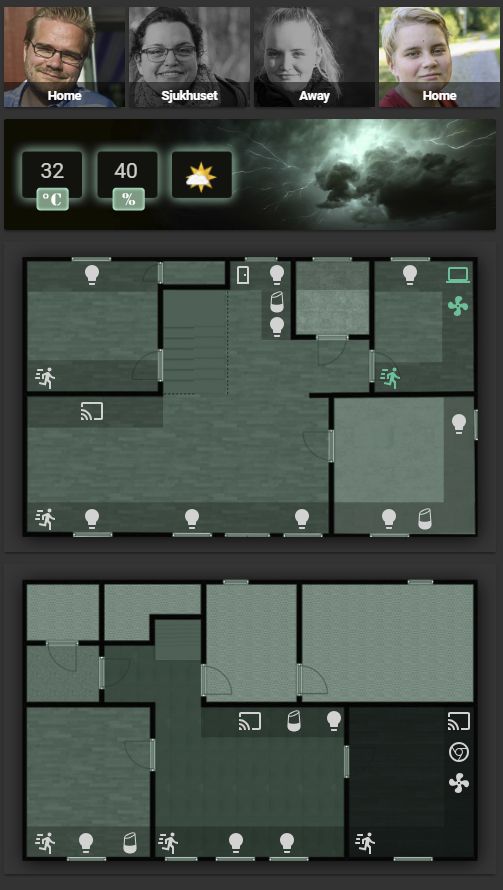
Let me share my v.1.0 of my lovelace work. Love lovelace, keep up the good work guys. https://i.imgur.com/4NrLZTN.png
 raven nacelle
Did you add the room borders to the image itself?
rocky merlin
Yea it is photoshop 😃 to make it look cooler
raven nacelle
Ok...
dense roost
@placid geyser we can take turns I'll grab every other day at 4am 😜
 half osprey
@rocky merlin looks great!
 calm rock
Hi, cant make the card tracker to work again , after an update it stopped working , How to DELETE the card tracker sensor , so i can reload it fresh ? ( already tried , deleting the js file, loading again , disabling the "resources" ... ), tks
wheat current
@calm rock just download the latest component from here: https://github.com/custom-components/custom_cards
calm rock
@wheat current tks, updated, but cant find the file to update the sensor .

GitHub
sensor.custom_cards - A sensor platfor that give you information of new versions of your cards.
wheat current
Thats the one 😉
calm rock
ok,
wheat current
But should not be needed, the component will download that if you do not have it
wheat current
yes
calm rock
ok, tks
buoyant skiff
hmm
can -webkit-font-smoothing: antialiased and -moz-osx-font-smoothing: grayscale be used as style ?
wheat current
Should be possible
buoyant skiff
          text-rendering: optimizeLegibility;
          -moz-osx-font-smoothing: grayscale;
          font-smoothing: antialiased;
          -webkit-font-smoothing: antialiased;
that worked
 mild veldt
@buoyant skiff thanks for the help yesterday and opening my eyes to the possibilities in picture elements. I started on my own system monitor card using your transmission card as an inspiration. Starting to come together nicely
buoyant skiff
seen my greeter card ?
mild veldt
oh yeah, that is one pretty card
buoyant skiff
          top: 40%
          left: 50%
          color: #f9fbff
          font-size: 250%
          text-shadow: 3px 3px black
          font: Verdana
          font-style: oblique
          font-weight: bold
          text-rendering: optimizeLegibility;
          -moz-osx-font-smoothing: grayscale;
          font-smoothing: antialiased;
          -webkit-font-smoothing: antialiased;
😄
can do so much more now
not limited at all anymore
mild veldt
✋ 😑 👌
half osprey
@buoyant skiff you on 0.74 yet ?
buoyant skiff
nope
half osprey
missing out
buoyant skiff
on what ?
half osprey
custom elements on picture-elements
buoyant skiff
neat 😄
buoyant skiff
dynamic background thats something im gonna try and work into my greeter card
half osprey
Hour*
buoyant skiff
Balloob check out this api
Create with the largest collection of high-quality photos that are free to use. Trusted by Trello, Invision, and thousands of other API applications to power their image needs. It's like the Flickr API, but better.
thats something im gonna use to make dynamic backgrounds
the only rule in the api that you have to have the authors name when using it
buoyant skiff
they do 😃
half osprey
That would be pretty neat to just add to Lovelace
half osprey
You can do your stupid markdown in picture elements now btw
half osprey
fwiw, any card can be added to picture elements now
wheat current
Thank you! 😄
buoyant skiff
nice
half osprey
both a blessing and a curse?
          - type: custom:hui-markdown-card
            content: >
              # lol markdown

              This is silly
            style:
              top: 45%
              left: 45%
dale3h and ludeeus will use it i can do so much more with css
didnt know that it was possible to do much more but decided to try this morning
and really got the result i wanted
half osprey
CSS is really powerful
buoyant skiff
got it from your offhand comment yesterday about style
should be more clear in the docs 😉
buoyant skiff
haha it is
buoyant skiff
gonna rework most of my cards now that i know that css is possible
having fixed positions and other fonts is nice
can give the card a unique flavor
rocky merlin
Is this all in 0.74?
buoyant skiff
can i use google fonts if i add it to the ui-lovelace.yaml document ?
no Helto some of it is in the current version
rocky merlin
Ohh ok
half osprey
You can load custom CSS via HTML imports. You can open an issue to allow loading CSS files for fonts
buoyant skiff
sweet
that is deffo someting im gonna do
- url: /local/some.css
type: css
and then do @import blah
half osprey
yeah or just point directly at a google fonts CSS stylesheet
although that loads fonts, doesn't use them I guess
buoyant skiff
as long as it works im good
that will make the cards even more unique
cause there are so many great google fonts available
it didnt work when i loaded me directly as -url and stylesheet
tried that
but loading em in a css that should work
raven nacelle
@half osprey You mentioned earlier that any card can be used on picture-elements...is it documented?
half osprey
Not yet
raven nacelle
Oh ok
half osprey
But see my code snippet a few lines above
raven nacelle
type: custom:hui-markdown-card?
half osprey
yes
raven nacelle
I see....so any card can be added there 
half osprey
As elements have the same API as cards, you can just point at the custom element names of our cards
raven nacelle
man that custom elements is powerful stuff
raven nacelle
@buoyant skiff That is the hard part 😉
buoyant skiff
naa
i find it easy just look at what i did with picture elements 😛
where everyone saw floor planning i saw dynamic cards with colorful backgrounds
by far the best feature introduced into ha
raven nacelle
My objective is to only have the two floor plans cards and use it with Google Smart Dispaly or Echo Show Mode
buoyant skiff
my plans are limitless 😄
if i can get more cards like my greeter card then im happy
calm rock
@wheat current , after restart , the card appears , but empty , should i need to delete the sensor js file ?
wheat current
@calm rock probably not, can be cache, or that you have defined it wrong?
calm rock
@wheat current , it was this : custom_components:
auto_update: False
it seams that is not accepting auto_update :false anymore
or not needed
after commenting that out , is working now
 undone egret
Please dont hurt me.... but i got a good question.. i have spent hours and hours making sure the house is automated and no need for gui....
so i guess my question is spend hours for a gui to look pretty?
wheat current
@calm rock Correct, that option was removed some versions ago
signal pine
@undone egret i mean, if you have no need for it, why bother?
i find the gui to be handy for edge cases that automation doesn't handle. sometimes i want the lights brighter or dimmer than the automation would give me, or i want to turn off certain automations (most often: sometimes i don't want my chromecast to control my lights)
undone egret
just a question..... no problems i can completly understand the excitement and hard work
signal pine
i think that's the beauty of the product though, you've made it work for you and you don't need a certain aspect
that's 100% fine
undone egret
LOL i have been with the project for years
undone egret
notice the green name?
signal pine
sure, but noticing and paying attention aren't the same thing =P
undone egret
np .... ballob is prolly wanting to shoot me right now
undone egret
i go there quite often
buoyant skiff
lol
Vasiley each to his/her own 😃
i like it automated but i also like it looking good
so im see the benefits of both sides
undone egret
ah.... i wasnt downplaying nothing ... think its great work.... guess its more of (us nerds like headless machines ....)
buoyant skiff
i get it most of my automation work like a charm
i just like my ui looking as good as possible
since im gonna be glancing at it once in a while
undone egret
yea no doubt
signal pine
i also like the gui for guests
buoyant skiff
sugardoll did u see the final version of the greeter card ?
signal pine
i think you showed it just as i was getting to bed last night
it looked really nice!
buoyant skiff
signal pine
oooh
buoyant skiff
the sensors
Home Assistant Community
Hi People started to work on my own ideas for a custom weather widget and i really liked the weather alerts from accuweather so i made a small shell script that can be used to show alerts and i thought i share it with you guys. #!/bin/bash SET_AGENT="Mozilla/5.0 (Windows NT...
the full package to do your very own
i used yahoo weather for temperature
 frosty pelican
is the Lovelace changelog current on the main site? Not sure if anything changed from the betas to official
buoyant skiff
np @signal pine
dense roost
Onboarding doc link from change log is broken. Why u do dis to meh
rocky merlin
Hey, where is the best place to suggest improvements for lovelace? I want to be able to hide name on picture entity and get state centered. I would guess more people could want that too?
rocky merlin
Tried to find... I may be bad at looking 😦
buoyant skiff
Current limitations

This is the very very early version aimed at gathering feedback. Discussion and suggestions are welcome in the ui-schema repository and in the chat in #lovelace.

Home Assistant
The Lovelace UI is a powerful and configurable interface for Home Assistant.
 rocky merlin
Thanks alot!!!!!
buoyant skiff
again almost any answer is in there
mild veldt
what's the meaning of life? i looked in the docs, but didn't see an answer ;p
rocky merlin
I am sure there are other meanings but if thats the meaning of life... I am in trouble... Cause it was quite easy to find haha... My wife always complain I suck att finding things...
north spear
42
 polar kelp
Well.... that's the answer to the Big Question About Life, the Universe and Everything... which might be "What's the meaning of life", but probably isn't - and unfortunately, we'll probably never know...
 kind shellBOT
@dense roost posted a message that is more than 15 lines. It is now available at: https://hastebin.com/uricuneqex
dense roost
how do you import custom css into lovelace? I can't seem to get it from my above posted code.
buoyant skiff
hehe
  - url: /local/yourawesome.css
    type: css
add that the start of your ui-lovelace.yaml
wheat current
Cant see that in the docs
dense roost
hmm didn't work.
beginning of lovelace:
  - url: /local/tb.css
    type: css```

contents of tb.css:
```    #tabsContainer {
        display: none;
}```not all might work
dense roost
my heart hurts now
buoyant skiff
so what are you trying to do ?
wheat current
@buoyant skiff Don't have to read, I have (ctrl+f) in my browser 😉
wheat current
That to 😛
dense roost
@buoyant skiff hide the view icon bar 😬 but i'm trying to style anything on the page, and nothing is changing, even adding ?v=11 and incrementing hmmm
dense roost
even bg color text color, positioning things, nothing's changing. strange
 tender wasp
No, only js, module, and html
I think he meant you could request it be added
GitHub
home-assistant-polymer - :lollipop: Polymer frontend for Home Assistant
dense roost
wouldn't i still be able to add css through an html import?
dense roost
oh yeah i checked the console and it was freaking out with Unknown resource type specified: ${resource.type} and maybe 50 lines of referenced files.
removed the css import and it went away
buoyant skiff
added an issue @tender wasp, tnx for pointing it out
dense roost
when I turn it into an html import the console spits out [Deprecation] Styling master document from stylesheets defined in HTML Imports is deprecated. Please refer to https://goo.gl/EGXzpw for possible migration paths.
tender wasp
Yep. That should say css instead of ${resource.type}
buoyant skiff

GitHub
only js, module, and html are allowed at the moment, would love to have the option to add additonal css files to be imported so we can use google-fonts etc for lovelace
sure we could go the long route and do theme
dense roost
just give control of everything 😇
tender wasp
There are custom cards and custom elements now.. how much more control could you want 😉
dense roost
i'm greedy man i need it all 😅
though I very much love the images in picture-elements, gonna have fun with that.
tender wasp
Yeah it'll be cool to see what people come up with. @buoyant skiff is already doing some cool stuff
buoyant skiff
working on it
tender wasp
So what was your goal with the css import? Just to hide the navbar?
dense roost
and he's only working at 50% capacity, imagine if he had the full capacity to change anything. eh 😋
 quick beacon
Elements have shadow root so what's the use for css imports??
buoyant skiff
for me its google fonts
dont wanna do a whole theme just to get em
and if i could have a simple css that i can import the font for lovelace it would be awesome
tender wasp
I think @dense roost wanted to hide the top bar and that's not the first time I've heard that. Maybe it's time to revisit kiosk mode?
dense roost
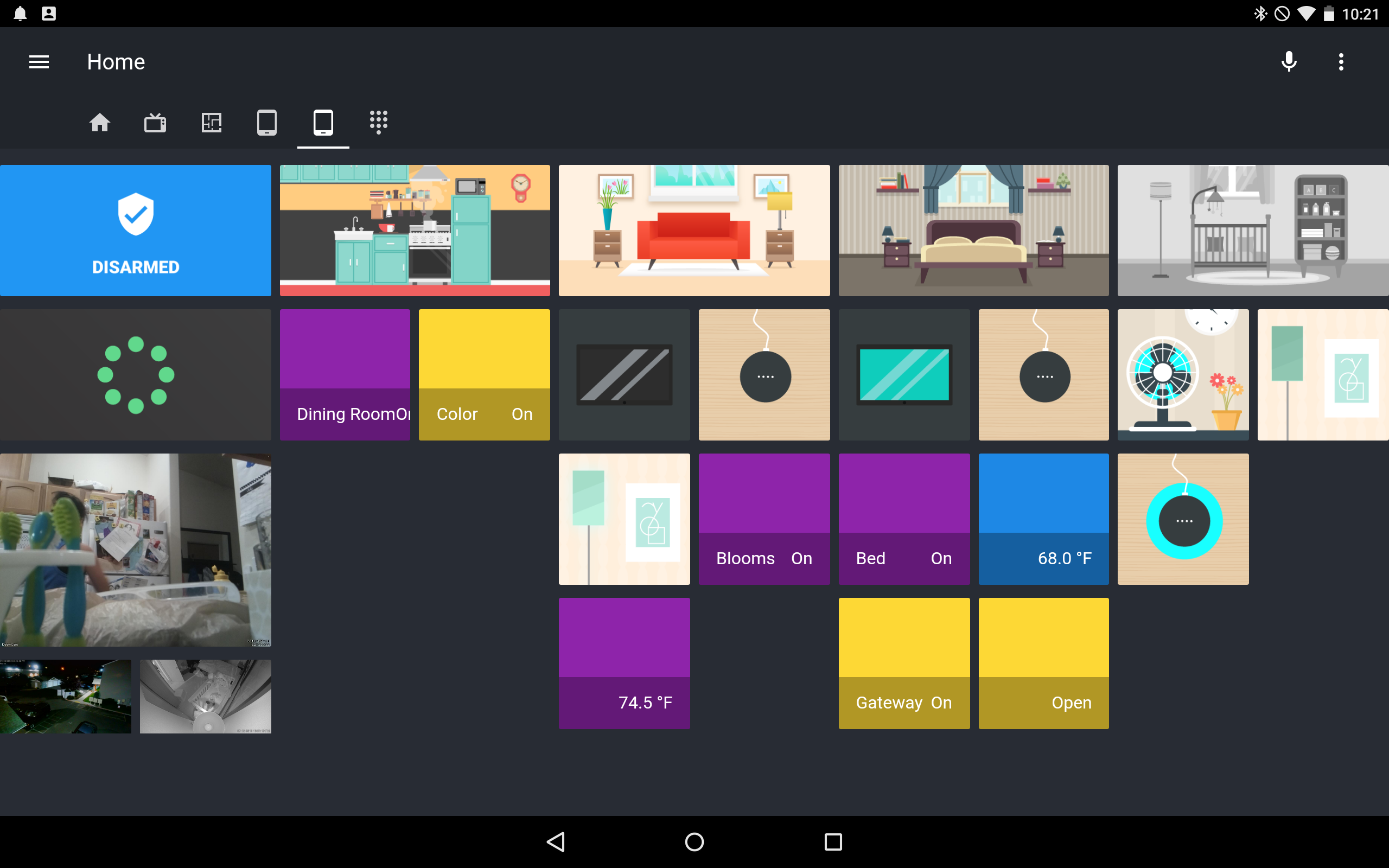
@tender wasp yeah. it takes up too much room on the wall tablet view i'm creating, and I don't need access to other views from it. https://i.imgur.com/yYWezKQ.png

 buoyant skiff
do you make those 8bit images yourself ?
dense roost
I'd actually love to get rid of the entire header for this one view, and hide this view icon from other views. i'm assuming the user system being implemented will allow us to create entirely different layouts for different users, so I could have views of each room, then my wife could have just and only a single view without seeing my views, and my kid could have his own view without access to any other views. that way I could have the wall tablet ui with it's own username and interface, so it doesn't have access to other views.
I made the google home mini one and the august lock one, the others are from freepik.com, i edited them to make them fit and look pretty. though I do some illustration work in a similar style. I've been meaning to vectorize my apartment so it looks in picture how it does in real life. http://dribbble.com/nickchamberlin

Dribbble
husband, father, epic geek, twenty-eight, caretaker of people. Illustrator of strange and... just strange.
tender wasp
wow nice work man. You're really talented
buoyant skiff
helping my friend in the city where i love we have the largest pinball/arcade hall in Sweden
so i play alot of old school games
not sure what my theme is gonna be in the end for the ui
dense roost
oooo do you know pewdiepie hahajkjk
have you made a retroPi yet? so many games. check out shaq fu for the super nintendo hahaha it's ridiculous
dense roost
what do you run it on? phone?
dense roost
ahh gotcha, ill have to check it out i'm always looking into new things.
buoyant skiff
still not sure what my overall theme will be for lovelace
but im gonna go for a theme in the end just not sure what it will be
dense roost
yeah i'm just throwing different things together seeing what i like. there's so many more ways to use home assistant now. With picture-elements having image support now i've got a few more ideas. really opening it up for us to do what we want with it.
touch-long-press while using a phone or right-click on a pc would help even more 😁 click to lock the front door or long press for more info, click to turn a light on, long press to access colors in more info, etc.
 river edge
In lovelace this header don't hide on scrolling. Any ideas?
 simple jolt
Trying to create a picture-elements card but for some reason either the png or jpg won’t show up on the homepage. Do the my need to be a particular size?
polar kelp
Refreshed cache?
simple jolt
Yea still doesn’t shoe up. Shows a broken image icon.
The picture I’m using is from unsplash if that makes any diff.
Uploading to an image service worked. Not sure why local it wasn’t showing up.
empty heath
@simple jolt Did you make sure to put it in your /config/www directory (for example /config/www/name_of_the_image.png, and try to access it via http://your.hass.ip:8123/local/name_of_the_image.png?
 foggy tendon
I want to use the custom card plan-coordinates together with a picture card with panel true, is it possible or not?
empty heath
It should be possible with a picture elements card.
foggy tendon
@empty heath only with picture-elements? And with panel true?
empty heath
panel: true is only on views, I believe, and to my knowledge does not affect the type of cards able to be used.
half osprey
no, panel: true is to render the first card in a view as the view
simple jolt
@empty heath yea I can access using the URL.
foggy tendon
@half osprey so i cannot use panel true to create a picture-elements card?
foggy tendon
but in this way i can have only one card?
half osprey
try it…
empty heath
Most of what I learn is by trial and error. Trying something and playing around with it is often the best learning tool.
But this behavior likely comes from my background of wearing the white hat.
frosty pelican
does anyone here have their thermostat or a vacuum in an entities card? Seeing some odd stuff in the UI after 0.74....thermostat is missing the temperature (just shows state and unit) and vacuums are missing the toggle (just see Off or On)...already cleared cache and tried incognito
 cunning violet
@rocky merlin hey mate, could you share your config for who's home and away for Lovelace please.. Looks sweet.
raven nacelle
@frosty pelican This is how it appears for me
I wish it showed the temperature instead of the mode
frosty pelican
@raven nacelle same here, it used to show the temp right?
tender wasp
it used to show both
frosty pelican
yea current and set point I believe
rocky merlin
Sure @cunning violet , i filed a issue to allow to toggle name/state that will make my own hack obsolete... I will pm you my git
raven nacelle
I actually removed the thermostat from the UI today, thinking that the auto is not quite useful
did not realize that it was a bug 😃
tender wasp
The entity row elements were reworked for lovelace recently
frosty pelican
haha ok let me file a bug for this, thank you for confirming 😃
ok both bugs filed with screenshots of before and after, including YAML used...hope that is enough 😃
hmm it looks like automation is also impacted by the missing toggle issue
anyone else seeing that?
identical to the issue I just filed: https://github.com/home-assistant/ui-schema/issues/117
raven nacelle
@frosty pelican Similar issue https://github.com/home-assistant/home-assistant-polymer/issues/1488
frosty pelican
ah so where is the correct place @raven nacelle UI schema or polymer?
raven nacelle
Yeah....toggles are missing for Automations
Since it is affecting only Lovelace, may be ui-schema is fine
frosty pelican
ok I referenced my issue in the one you linked to so easier to keep track of
 vapid field
anyone with issues with tracker-card?
for some reason cant get it to work
long cosmos
https://github.com/ciotlosm/custom-lovelace/tree/thermostat/thermostat-card trying this but i keep getting the error "custom element doesn't exist". I have the two js files in /config/www, resource set with " - url: /local/thermostat-card.js?v=1" and type as module. any ideas? other custom cards work fine.

 tacit cave
are you adding it as a resource in your lovelace-ui.yaml?
north spear
You need to set module but that card is not yet usable
I will get to it next week to get it in a minimum usable state
Atm is usable for contributions
I am away for a big festival, that is why progress is slow
vapid field
hi, i am trying use last-state of my switch, but is not works
- type: entities
title: Light
show_header_toggle: false
entities:
- switch.candeiro_sofa
secondary_info: last-changed
anyone can tell where is the issue?
Hi, currently I am working on custom card from this tutorial https://community.home-assistant.io/t/custom-animated-weather-card-for-lovelace/58338, After implementing this functionality, should I be able to see this in main page?
I am not quite sure about this line:
customize:
input_boolean.weather:
config:
weather: weather.yweather
sun: sun.sun
From where "config:" section came from? There is nothing about this at this site https://developers.home-assistant.io/docs/en/frontend_creating_custom_ui.html

State card
long cosmos
Okay, thanks for the information
half osprey
the customize thing is how the old custom UI card used to hack config
that is not a part of lovelace
vapid field
@raven nacelle can u put here a screen shot of your lovelace?
kind shellBOT
For best of the best home automations, visit my repo at https://github.com/arsaboo/homeassistant-config
raven nacelle
not quite up-to-date, but it should give you an idea
north spear
Maybe we should build a config checket to spot out of date config
foggy tendon
I am using the custom plan-coordinates, but i see it's not so precise with coordinates (at least on my floorplan).. Is it a real issue or only mine?
raven nacelle
@north spear The config is updated, the screenshot is not
I update the config regularly. Last updated minutes ago 😃
north spear
😄
@foggy tendon it does not take into accout element size
I think coordinates show center and config uses top left
raven nacelle
@north spear You are on iOS right? DO you see some discrepancy between the arrangement of items on picture-elements card on the desktop vs. app?
rocky merlin
For me they are the same but I don’t run latest yet
foggy tendon
@north spear Ok, only for precision... it's not a big problem... 😀
raven nacelle
I see some elements are not perfectly aligned on the iOS app. I will file a bug with images
north spear
I don’t use picture elements that often
 jaunty narwhal
is there anyway to make this config global? secondary_info: last-changed
for all entities
polar kelp
@raven nacelle Nice idea with the xkcd world clock
vapid field
@jaunty narwhal i tried
- type: entities
title: Light
show_header_toggle: false
entities:
- switch.candeiro_sofa
secondary_info: last-changed
but doesnt work
jaunty narwhal
seems is entity specific
frosty pelican
for anyone who wants to see some Lovelace screenshots I have updated my config and screenshots on Github: https://github.com/dshokouhi/Home-AssistantConfig#lovelace-screenshots
 little tartan
@frosty pelican what manual do I have to read to show the badges
frosty pelican
@little tartan I dont have the actual badges being used, what you see is the glance card in my screenshots
for badges they just added support in 0.74: https://www.home-assistant.io/lovelace/views/#badges
little tartan
sorry I just a Long time the badges to work Love them and love lovelace Just want the best of both words
frosty pelican
you can also use badges in picture elements card: https://www.home-assistant.io/lovelace/picture-elements/#state-badge
 cinder rapids
@frosty pelican thanks for always keeping your repo so well maintained.
vapid field
@north spear are you the developer of the custom cards, especially the attribute card? I've added show_all as parameter to simply view all attributes without having to name them all. Also "key_header" and "value_header" to change the headlines for the respective columns to anything needed... Should I throw a PR at you or too minor or not interesting ?
anyone tell me what is wrong?
kind shellBOT
@vapid field posted a message that is more than 15 lines. It is now available at: https://hastebin.com/xiniradoyi
tender wasp
@vapid field what version are you on?
simple jolt
Has the changelog for Lovelace not changed since b0. Don’t see any updates on the website.
 fathom tree
Any way to fire other commands with tap_action?
quick beacon
it's a pain to update the docs, and it's more pain to keep the changelog updated
tap_actions are in docs for supported cards
fathom tree
thanks
vapid field
@tender wasp oo.73.2
tender wasp
I think you need to upgrade
vapid field
ok going to do
timid burrow
is there any way to get my automations to show the toggle on/off instead of having to click on it?
it's showing:
instead of the old toggles for on/off?
frosty pelican
@timid burrow its a bug thats been fixed so next release should have it
vacuums have teh same issue
timid burrow
ah ok thanks for that - I thought it might have been a config for the card I needed to change
 lucid trail
any way to resize picture-elements cards to be larger?
@frosty pelican yes it did - upgrading to 0.74.0 is where it changed
buoyant skiff
morning
frosty pelican
evening
mild veldt
@quick beacon I'd be willing to offer help in updating any docs for Lovelace
@buoyant skiff I have beer to drink this weekend. Where's that untappd custom component 😜
🍻
buoyant skiff
Soon™
dense roost
@vapid field it's your indenting on styles on the last part of your code. I submitted a change to the docs example but it hasn't been accepted yet, the example is messed up
Oh NVM I have no clue what I'm doing and need to submit a pull request
 half oak
Currently Lovelace schema is docs-only - nothing is enforced on the backend. Is this intentional?
empty heath
@half oak Yes -- Lovelace is 100% frontend only.
half oak
Then we should definite a json schema for it along with validation and autoconvertion to markdown :) I'll look into it.
empty heath
@half oak I've thought about writing a JSON-based schema for my python-lovelace module, but I wasn't exactly sure how to go about doing so. https://github.com/dale3h/python-lovelace/blob/refactor/lovelace_migrate.py
buoyant skiff
reworking my transmission card with a new layout
empty heath
❤
empty heath
Lmao, so you had a look on the PC? 😛
buoyant skiff
on pc, laptop and mobile
want it to be good overall
various resolutions if im gonna be posting snipplets i need em to work no matter what res the users had
not really doing this for myself 😃
if it was just me one res fuck the rest 😄
empty heath
I like your attitude! ❤
buoyant skiff
tnx dale3h 😃
empty heath
Where the f*** is @wheat current?
empty heath
Stats along bottom (in the red)
buoyant skiff
:/
empty heath
Fiiiine, switch sides first! lol
buoyant skiff
didnt like that when i did it the last time 😛
empty heath
Then don't do it!
You're the one that has an eye for design, not me! 😛
My brain can create beautiful code, not pretty beautiful colorful pictures.
buoyant skiff
empty heath
My eyes can see that a little better!
And I like the horizontal layout of the bottom right icons 😃
buoyant skiff
so far it works perfect in mobile and laptop
😄
😄
looks way much better then the first transmission card i did
empty heath
My brain hurts. Lolololol
signal pine
how does it display one torrent vs. multiple torrents?
buoyant skiff
ohh i did a small bash script that uses tranmission-remote-cli
to get peer info
and then i just did a simple grep on active and paused etc
for the active vs paused or stalled states
that basically
all it needs access to is transmission-remote-cli
on your hass.io or hassbian
So there you all go my transmission card done 😛
then you need to add sensors too
buoyant skiff
the sensors
i dont do it much either anymore got free streaming services from work
so i got hbo and netflix and the rest for free
perks of working at an isp i guess
empty heath
I just said I don't Torrent, I didn't say I don't do anything else 😉
I run a 12TB Plex server, haha.
buoyant skiff
i thought i was bad 😛
tepid locust
lol I have "Linux ISO Services" that manage my media
buoyant skiff
got an 4x4 tb nas
running on raid 6
8tb partition
if two discs fails i still got all my data
use that for my music
dont wanna loose any of my productions
tepid locust
I have radi 6 as well, need to implement a batter backup other than crashplan though
buoyant skiff

For the latest Vivid Mind release we have a reboot coming from Sweden's very own Toast.
This remix release includes a take from the powerhouse that is Noise Zoo. Their version showcases their wonderful hybrid electro progressive sound and is everything you would want in a f...
empty heath
I need to get a good HDD controller so that I can expand, and get a secondary parity drive.
buoyant skiff
hehe my music is my everything
tepid locust
I have tons of movies and tv shows, I stream my music though
tepid locust
nice!
empty heath
Damn, I need a Toast station to listen to while I'm coding.
tepid locust
im up to 15.9 TB used out of 28 TB on my array
empty heath
I used to Napster-it-up, but now I stream my music as well.
tepid locust
I remember napster lol, I still owe my first born to that if you believe the EULA
empty heath
@buoyant skiff Do you consider this Ambient or House?
buoyant skiff
the worst part about streaming services like spotify and other is that they pay shit
house
empty heath
👍
tepid locust
true, they are soo convinient though 😦
empty heath
@buoyant skiff Can't get rich by paying everyone top dollar for the license 😛
buoyant skiff
indeed but as an artist we get very little outta streaming services
make my money of beatport
empty heath
And as an open-source developer, where do you suppose I make my money? 😛
tepid locust
GoFundME? 😛
empty heath
Hah, if only it were that easy.
buoyant skiff
yeah but you can always apply those skills to real paying projects
tepid locust
how do you make money developing for open source?
buoyant skiff
donations
empty heath
Home Assistant is a real paying project for me.
buoyant skiff
ohh
empty heath
Just not monetarily.
buoyant skiff
common for opensource to have a donation page
empty heath
It pays me in happiness and satisfaction.
tepid locust
im so glad I found HA, I gave up on automation before when I used Vera that was a POS
empty heath
I have been a business owner for over 7 years now, so I do this in my freetime.
tepid locust
nice! what kind of buisness?
tepid locust
you own a shop or make tanks or something?
tepid locust
nice! I'm originally from Texas myself. Whats the name of your shop and do you sell online?
tepid locust
Houston Area right between galveston and houston
empty heath
I don't fault you for moving away then 😂
empty heath
I travel down to the Bolivar Pen every year for a Jeep event 😃
tepid locust
you make your own juice?
empty heath
We make everything fresh to order, yes.
Over a million ways to make each flavor 😉
It is time for me to finally, as we say in Texas, hit the hay! G'night fellas!
tepid locust
👋
empty heath
~away dreaming of beautiful Python scripts
kind shellBOT
dale3h is away! dreaming of beautiful Python scripts :wave:
north spear
@vapid field yes I am. Happy to receive a PR. I also will add some filter functionality soon. Also have a look at beer-card as that is also using attributes for things maybe it helps for your use cases
buoyant skiff
was the festival good yesterday @north spear ?
buoyant skiff
hehe
wheat current
@empty heath was sleeping 😉
kind shellBOT
dale3h is away for 26m 42s with a message :point_right: dreaming of beautiful Python scripts
wheat current
Good morning @buoyant skiff
buoyant skiff
rewamped my transmission layout
soo much better now with css defing every bit of the way
nothing comes outta place on any resolution
north spear
😄
buoyant skiff
tried it on my mobile, laptop and stationary pc
subtle rune
I'm on a beach by the Black sea and all I can think about is Lovelace 🤔🙈
tepid locust
I have no idea what to do with lovelace lol, I basically just remade my original UI
north spear
@subtle rune by the Black sea? Are you in Romania or Bulgaria ?
subtle rune
@north spear Bulgaria!
north spear
nice
subtle rune
Yes, very nice!
vapid field
Hi guys, I just updated to 0.74. I have an entities card displaying two groups of device trackers. It used to show the state of the group. (The group was wifi and gps tracker of a phone combined) but now it shows a toggle switch? Really weird. Anyone else seeing this?
north spear
I switched from groups to template sensor for such things
I was really annoyed with some logic when reloading groups that would cause my tracker to blip
I think template sensor is much much better now and it works properly
vapid field
Okay thanks, will look into that
Still going to issue it I think, it’s not supposed to do that
north spear
binary_sensor:
  - platform: template
    sensors:
      people_home:
        device_class: presence
        value_template: >-
          {{ is_state('binary_sensor.marius_home', 'on')
             or is_state('binary_sensor.oana_home', 'on') }}
      marius_home:
        friendly_name: Marius
        device_class: presence
        value_template: >-
          {{ is_state('device_tracker.ios', 'home')
             or is_state('device_tracker.wifi', 'home')
             or is_state('device_tracker.gps', 'home') }}
@subtle rune its nice to be on vacay aint it ? 😛
i usually bring my laptop 😄
that way i can enjoy and do stuff
hate being creative and not having an outlet
just gets me frustrated
north spear
@wheat current the custom_components didn't automatically download the sensor for me (just moved my configs on production)
I had custom_card auto-download (so the sensor folder existed) but the custom_components didn't
I did it manually and now all works good
@hardy zealot I checked your refactor of alarm card, looks great
@wheat current I think we should do also a community forum post, for people that are interested
@vapid field seems indeed some things changed
I see my automations no longer have a toggle, but show state
vapid field
@north spear oh yeah wow noticing that now too. Problaby switched some things around
vapid field
Weird thing is the more info window showing the correct stuff
north spear
I know it was optimised for a lot more things
vapid field
For both the groups and automations
north spear
yes, more info dialog is part of old code ,but the entities card it not
vapid field
Can’t imagine this was intended
north spear
will you be raising an issue for it in polymer repo ?
I wish I could have a look, but kind of busy these days with the festival, so will get to it only on Monday
vapid field
I raised an issue on my phone but wasn’t really able to do it right
Will do when I get home but that’ll be at the end of the day
north spear
I think I should update monster-card to take advantage of secondary_info in entities 😃
wheat current
@north spear hmm.. Ill try to simulate that here.
A post sounds like a logical step, but there are a few things I want to get in before that 😃
I got the same result regarding the sensor https://github.com/custom-components/custom_components/issues/1
 tough knoll
hi guys, is it possible to create tiles with lovelace?
north spear
you can kind of achieve something in that regard using horizontal-stack with panel: true
wheat current
@dense roost shared this yesterday https://i.imgur.com/yYWezKQ.png
tough knoll
@north spear are you speaking with me? 😃
dense roost
He is.
north spear
yep
dense roost
Use panel true for the view, then a horizontal stack, and vertical stacks within that.
tough knoll
@north spear at the moment I have this group. I would like to port this on lovelace. But, how can I make tile button?
north spear
@tough knoll using stacks. It's a different approach and will take some getting used to, but look at examples and docs and experiment
it's probably not at straightforward but doable
maybe tiles will be available in the future
tough knoll
@north spear my problem is to make the single button, then I found how to stack them :)
Thanks for your help
north spear
a single button can be made with entity-picture and correct toggle states
then just use a single horizontal-stack with 3 vertical-stacks inside
and put buttons from top to bottom
or... you can just do picture-elements with crazy stuff
buoyant skiff
Picture elements
Can even make it prettier
Maybe something I can do for shits and giggles
tough knoll
@buoyant skiff but I cannot make it working on click
simple jolt
Where is everyone getting these pretty icons, art etc for all their picture elements?
buoyant skiff
Read the docs
Make em yourself?
It's not rocket science
😁
Or use Google
Image search
tough knoll
https://www.home-assistant.io/lovelace/picture-entity/
I found this documentation, is it the right one?
dense roost
@simple jolt probably dribbble.com, freepik.com, behance.net
tough knoll
Thanks for your help @buoyant skiff
tough knoll
the last question, it's not possible at the moment to use slider, right? (https://github.com/andrey-git/home-assistant-custom-ui/blob/master/docs/features.md#features-available-for-light-and-cover-domains-only)

GitHub
home-assistant-custom-ui - Custom UI elements for https://home-assistant.io
raven nacelle
No, custom UI does not work with Lovelace yet
Hopefully it will be updated soon to work with Lovelace
subtle rune
Would it be "easy" to make a slider in a custom card?
raven nacelle
@subtle rune that would be great
subtle rune
I mean I can make the slider, but to get it working with the lights
raven nacelle
Although it will be usable only in picture elements
raven nacelle
We need the slider even for the entity card
subtle rune
Yes, was thinking about recreating entity card with sliders
mossy gale
ive been scrolling back and searching for someones comment about a really good royalty free site for pictures that has an API we can use. I can't find it for the life of me, does this ring any bells with anyone?
buoyant skiff
Unsplash
wheat current
rocky merlin
That’s a pretty cool site
north spear
@subtle rune I almsot created a slider card but didn’t know what people preferes
It is very easy to integrate in entities card because it supports custom row elements
And now picture-entities also support this
If you have an example I can schedule something next week. Should be a fairly standard card to build
subtle rune
@north spear don't have anything yet! But I have created slides before I meant
For work 😛
 light mountain
Just started migrating all of my views over to Lovelace--it's absolutely amazing.
One thing I can't figure out is how to show lovelace in kiosk mode. Looking through the code, it looks like the /kiosk route isn't relevant in lovelace anymore. Is there a flag or something needed in the config to remove the nav?
 split granite
Pretty sure it's not yet supported
light mountain
Damn, that's what I expected to hear. Was just hoping someone knew something I didn't. 😃 . Thanks @split granite
split granite
I think it's been discussed, a search here should find more
 sinful haven
https://home-assistant-lovelace-gallery.netlify.com/# - this gallery should be linked in the docs... I don't know how I've found it, but its super helpful
north spear
It was in the release notes
And I think balloob mentioned kiosk tests with lovelace but I am not sure
I will try kiosk mode on chrome next week
wheat current
If we could load custom global CSS, we could remove the top all toghter :P
          app-header {
            display: none
          }
(Yes, there is a kiosk mode)
 cloud escarp
man it would be sweet is you could setup picture glance to have the individual controls down at the bottom and then an additional control for clicking the image. I am thinking individual lights at the bottom and the group as the picture or on off as the picture and adjusting color / brightness/ individual controls at the bottom
wheat current
@mild veldt delete that! this is no place for spam!
split granite
I have deleted it for @stuck scroll
undone egret
dang i missed the action
sinful haven
me too 😄
 forest star
@split granite what does the migration script does ?
split granite
It takes your current groups configuration and spits out a Lovelace config file
forest star
Nice
cinder rapids
Hi guys, what program are you guys using to create your floor plans to use them in Lovelace?
split granite
I just used the same floorplan image I had for HA Floorplan, so in my case Inkscape
It'll work with a standard JPEG, PNG, etc too though
sinful haven
is there any good source to find example with floorplan?
seems like it's not mentioned in docs
oh, it's picture-elements...
 uneven vector
@cinder rapids I used MagicPlan to generate it, since I didn't have measurements already
cinder rapids
Luckily I have the blueprints for the house in paper, that should help some.
I’ll look into Inkscape and magicplan, thx guys.
split granite
I used the floorplan from the house listing, and then "traced" it in Inkscape
raven nacelle
I was able to get it from my builder's website....luckily they are still using my floor plan
split granite
Nice!
sinful haven
any easy way to calculate the %-values for top/left?
sinful haven
yeah, the problem with this card is
that the box shows top-right of whole panel
and if floorplan is much lower
you can't read values 😦
light mountain
I was able to create a custom-ui card with a slider for my dimmable lights. Does anyone have pointers on how I would do the same in lovelace?
split granite
@sinful haven Did you make the card a panel, so that it takes up the whole screen?
raven nacelle
@sinful haven I open the image in an image editor and look at the pixel values to calculate the %
sinful haven
yeah, i think its the only way
uneven vector
has anyone put together a camera card yet? not seeing one, but from the old UI it doesn't look too tough
cinder rapids
My floorplan is different from the builders page 😔 @raven nacelle
raven nacelle
Typically builders reuse their plans...may be with name changes and minor updates.
so look at other plans within the same sq. footage and you should be able to find something close
split granite
@uneven vector https://www.home-assistant.io/lovelace/picture-entity/
split granite
No worries
north spear
@sinful haven tou can change the card
And use position fixed instead of position absolute
dense roost
@wheat current I don't know if you saw the conversation that led to this https://github.com/home-assistant/ui-schema/issues/115

GitHub
@swetoast commented on Jul 20, 2018, 5:39 PM UTC: only js, module, and html are allowed at the moment, would love to have the option to add additonal css files to be imported so we can use google-f...
empty heath
@north spear Hah, I drive 40km each way (80km round trip) to work every day. 😛
north spear
Errr
I might have had too much to drink, but don’t remember a potential context for that reply
empty heath
Haha, you were talking about the festival being 40km out of town, so a long bus ride.
split granite
Depends on what your bus route looks like. Here it takes about 1 hour to go 7 miles as the crow flies, or 1 hour to go 35 miles...
That first bus route though goes "all around the houses"
empty heath
@split granite Ewwwwwwwwwww, fair point.
undone egret
new place to live 🤣
mild veldt
@wheat current what did I post that was spammy?
mild veldt
Oh ma. Sorry all. My toddler had my phone this morning
split granite
There's kids modes on these things, to lock them in specific apps 😛
Also avoids dialling the emergency services...
mild veldt
I was in the shower and didn’t even know she had it, haha. She’s sneaky
forest star
@empty heath 80 KM every day where do you work man ?
empty heath
Live in North FW (Saginaw area) and work in South FW (Forest Hill area)
25mi each way.
split granite
80 KM a day isn't a big deal, I'm at 70 miles a day
empty heath
But that's taking Loop 820 the whole way. If I take 35W-S, it'll shave off 6mi, but often adds 10+ minutes.
split granite
I mean, sure, I'd rather less, but anything up to an hour commute is acceptable in my view
empty heath
@split granite That's fair, as long as it's highway 😛 lol
split granite
Or country roads 😉
I'd take country roads over highway, for the same duration (but not distance)
empty heath
True.
mossy gale
Hi, I can't get my head round what I am doing wrong with this https://hastebin.com/hoyowukedo.bash
forest star
yeah
mossy gale
Trying to do a simple picture state change, using example on Lovelace docs
just changing the device and image details
split granite
When I used it, I found it needs a state list for all states, but I've not properly tested
mossy gale
Gives me Incorrect elements type: image
split granite
What version of HA are you on?
mossy gale
0.73.2
split granite
mossy gale
i wanted to get it working b4 i upgraded, had the bit between my teeth! I will update now
split granite
Lovelace is changing very fast, it's currently critical to read the changelog I'm afraid
mossy gale
duly noted
split granite
It's caught me out a few times too, and I'm supposed to know better 😛
mossy gale
😃
i spent ages trying to put a text label next to a value on a image, failed to get it to display anything other than the value from the sensor, but that looked snazzy with a shadow and stuff 😉
updating now
forest star
@empty heath how is the migration script working ?
split granite
PFM 😛
empty heath
The latter. Hahaha
forest star
nice
empty heath
Just did @undone egret's in the script. I forgot how much shit he had in Home Assistant, lol.
forest star
Or please forgive me !!!
because its not working at all ?
😛
hey whats up with Homeseer are they using HASS for its software
undone egret
@empty heath HEH .... i aint got that much
empty heath
Holy shit. Is that real?
forest star
Yeah man !!!!
we need to get into that

HomeSeer Store
HomeTroller Zee S2 Is An Advanced Home Controller. It Combines The Speed & Reliability Of Locally Managed Automation With The Power Of Cloud-Managed Services. The Unit Is Powered By HS3-Pi Home...
they even are using rapsberry pi for their " main controller "
Its not on the website yet
but they have a "beta" mobile app
that looks like HASS a lot !!!!!!!
split granite
Homeseer.... yeah, just say no 😉
forest star
That looks like lovelace
split granite
And a bit like the stock UI
There's a limited number of ways to do these kinds of things within standard mobile UI guidelines
 clear vale
anyone has a ui-lovelace package?
wheat current
lovelace does not have package support
clear vale
you have a repo?
wheat current
not updated
clear vale
ok
wheat current
@clear vale random repo from github show you where https://github.com/PhyberApex/homeassistant-config/blob/master/ui-lovelace.yaml
buoyant skiff
finally at home again
vapid field
Hi,
I have following error in this javascript:
https://github.com/arsaboo/homeassistant-config/blob/master/www/custom_ui/weather-card.js
I got this error "TypeError: entity is undefined"
It's from this tutorial
https://community.home-assistant.io/t/custom-animated-weather-card-for-lovelace/58338
any idea what i am doing wrong?
This is probably because "this.config.entity_weather" doesn't exist

GitHub
homeassistant-config - 🏡 My Home Assistant Configs. Be sure to :star2: my repo to follow the updates!

Home Assistant Community
UPDATE (7/3): Thanks to @ciotlosm for all his inputs to get the card fixed. We now have a significantly better version of the custom animated card that provides the same output, but is less “hacky”. To configure the card: Place the weather-card.js and weather-card.css f...
split granite
@vapid field Please wrap your URLs in < ... > like <https://community.home-assistant.io/t/custom-animated-weather-card-for-lovelace/58338> - that stops the URLs expanding like that
vapid field
ok
wheat current
someone should block that here to
split granite
Well, we decided to allow image uploading by default, which means URLs expand by default
If it gets out of hand we'll revert it like the other channels
wheat current
You sure?
It should be to seperate settings
split granite
That's how it works apparently 🤷
buoyant skiff
seen my new cards @split granite ?
split granite
I've been home and awake for about 6 hours now, so no 😉
buoyant skiff
undone egret
peter went to heaven with jesus
buoyant skiff
sorry im an athiest
split granite
Pretty sweet card
Now though I want to be able to set individual cards to 100% width, but not make them panels...
Always something to complain about 😛
buoyant skiff
frosty pelican
nice!
wheat current
vertical stack as panel, with multiple cards?
buoyant skiff
so im seriously reworking my cards using every css trick in the bag
split granite
Oh
Ah, but I want a single map card 100% width, with 3 other map cards of normal width below
buoyant skiff
i want a pretty ui 😄
split granite
I want a pony and a plastic rocket 😛
wheat current
Vertical stack with horizontal stack then. 😜
buoyant skiff
good for you 😛
clear vale
I have this file " alarm_control_panel-card.js " in my www folder and in the ui-lovelace.yaml folder I have this what am I missing?
kind shellBOT
@clear vale posted a message that is more than 15 lines. It is now available at: https://hastebin.com/pupeteyene
buoyant skiff
use hastebin please
just pasting stuff in the chat isnt good
add the url to the first line
wheat current
What is not working?